
Best AI for coding: 7 tools, one identical brief, measured
The best AI for coding, measured rather than listed. I gave seven tools one identical brief and used every app. All seven passed. Here is what separated them.
Contents
The best AI for coding, measured rather than listed
Every ranking of AI coding tools I found while researching this compares feature tables. So I did something else: I wrote one brief with six numbered requirements and gave it, unchanged and without follow-ups, to seven tools. Then I used each resulting app to check whether it actually worked.
That brief has since gone to ten tools in total. The three added after this page was written — GitHub Copilot, v0 and Base44 — are ranked in the best vibe coding tool and the best AI app builder, because they compete on a different question. The seven below are the ones that compete as coding tools, and they are what this ranking covers.
All seven met all six requirements on the first attempt. Capability separated nothing.
What separated them was time, cost, how much code they wrote, and whether anything checked the result. The cost range for an identical outcome was roughly tenfold.
| Tool | Best for | Time | Cost | Own tests | Rating |
|---|---|---|---|---|---|
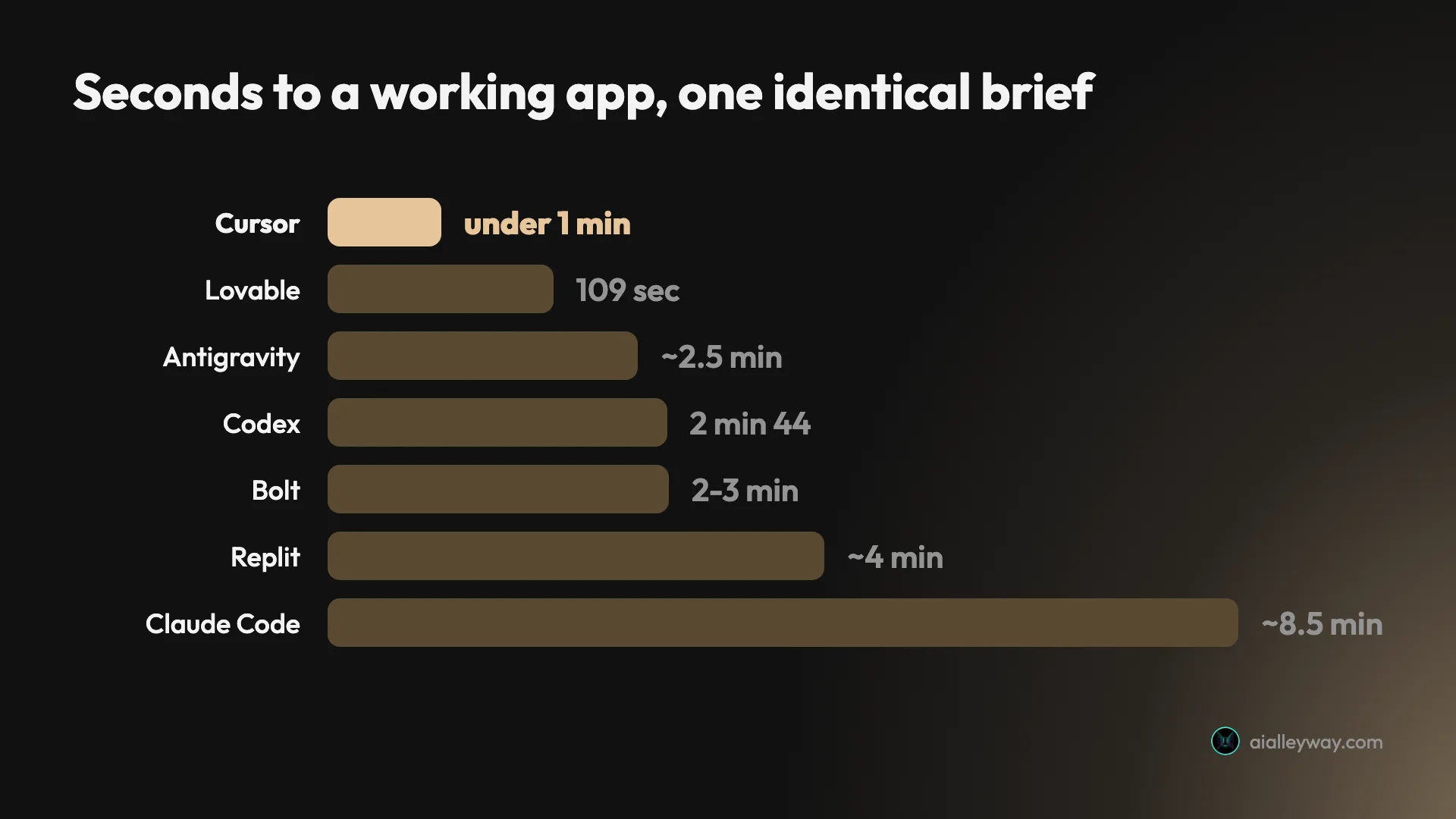
| Claude Code | Code you will maintain | ~8.5 min | ~$2.56 | Yes, 28 | 4.7 |
| Lovable | Fastest route to a hosted app | 109 sec | ~$0.30 | No | 4.6 |
| Bolt | Cheapest per build | 2–3 min | ~$0.25 | No | 4.4 |
| Codex | Restraint, bundled with ChatGPT | 2 min 44 | $0 | No | 4.4 |
| Google Antigravity | Staying free indefinitely | ~2.5 min + gate | $0 | Yes, 6 | 4.3 |
| Cursor | Driving an editor yourself | Under 1 min | $0 free tier | No | 4.2 |
| Replit | A real backend and terminal | ~4 min | 31% of a day’s credits | No | 4.2 |
| GitHub Copilot | Staying in your existing editor | Not tested | Not tested | Not tested | Not rated |
How I tested them
One message. Six numbered requirements. No follow-up prompts.
Build a single-page subscription tracker with: a form to add a tool with a name, cost and billing cycle; annual plans displayed as a monthly-equivalent figure rather than the annual one; a running monthly total pinned to the top; a cancelled state that removes an item from the total but keeps it visible in its own section; persistence across reloads; and a dark theme.
Two of those are traps. Requirement two asks the tool to display something other than the number you typed, which means storing the raw figure and deriving the display value. Requirement four asks for an item to be simultaneously excluded and visible. Each needs two ideas held at once, and each is the kind of thing that gets quietly half-implemented and looks fine until it doesn’t.
Then the part most rankings skip. I served every app and used it: entered a $2,400 annual plan to see whether $200.00 appeared, cancelled items to watch the total move, hard-reloaded to test persistence, and read the stored data to see whether the underlying model was sound or merely looked right.
| What I checked | How |
|---|---|
| Trap 1: derived figure | Entered $2,400/yr, looked for $200.00/mo |
| Trap 2: excluded but visible | Cancelled an item, watched the total and the list |
| Persistence | Hard reload, not a soft refresh |
| The data model | Read localStorage to see raw vs derived storage |
| Honesty | Compared the tool’s own summary against git and disk |
That protocol caught things no transcript would have. It caught one tool editing a project rules file without asking. It caught another reporting six changed files where git showed seven. And it nearly caught me out too: I spent several rounds documenting a rendering “bug” that turned out to be an artifact of reading the DOM in a backgrounded browser tab, where the animation frame never fires.
1. Claude Code — the best code, at the highest price

It refused to build. Given the brief, Claude Code wrote zero files and ran a clarifying interview instead — three questions, then a two-part design document. Eight exchanges passed before a single line of code existed, and its run log recorded no permission denials. Nothing blocked it. It chose to ask.
What eventually arrived was the best output of the seven. It stored money as integer cents, explaining unprompted that summing 9.99 and 19.99 as floats produces 29.979999999999997, and it rounds the annual division once at format time so twelve $120-a-year plans total exactly $120.00 a month rather than $119.88. No other tool went near this.
It also shipped a 28-assertion test suite covering corrupt JSON, non-array payloads, storage that throws on read, negative costs and float precision. I ran it myself: 28 passed, 0 failed. And it was honest about its limits, closing with “Built, but not yet verified — I couldn’t execute anything,” because its own sandbox blocked Node.
| Claude Code on the brief | |
|---|---|
| Exchanges before any code | 8 |
| Build turn | 394 seconds |
| Lines written | 1,052 |
| Test assertions, run | 28 passed, 0 failed |
| Money stored as | Integer cents |
| Cost | ~$2.56 |
The costs are real. Roughly eight and a half minutes, about $2.56, and no free tier at all.
What it costs. Claude Pro at $20 a month or $200 a year, Max 5x at $100, Max 20x at $200. On a subscription the marginal cost of one more build is zero, which is the fair way to read that $2.56 — it came from metered API billing, which is not how anyone runs this daily.
Full detail in is Claude Code worth it, the pricing breakdown, and how to use it.
2. Lovable — fastest route to something you can show someone

109 seconds from one prompt to a working, hosted, presentable app. Only Cursor beat it, and Cursor is a different kind of tool.
It handled both traps correctly and, importantly, handled them the sound way underneath: it stored the raw annual figure with the billing cycle and derived the monthly number at render, rather than freezing the derived value where it would drift later.
Its pricing is the most legible of the hosted builders because it publishes what individual actions cost — a simple update at 0.50 credits, removing a component at 0.90, implementing authentication at 1.20, a landing page with images at 1.70. My whole build cost 1.20, about thirty cents. You can estimate a project before starting it, which is more than most tools here allow.
The limits are shape rather than quality. React web apps with a managed backend, output on a preview subdomain, and no route to a Python worker or a database you administer. Credits expire, and a build action costs the same whether the answer was right or wrong, so iteration is where the money goes.
What it costs. Free with five build credits a day. Pro is $25 a month for 100 credits, or $21 billed annually. Business is $50.
See the Lovable review, pricing, and alternatives.
3. Bolt — the cheapest build I measured

Same shape as Lovable — describe an app in a chat box, get a hosted result — and the cheapest per build of anything here at roughly 25 cents, about 100,000 tokens.
It met all six requirements in two to three minutes and handled both traps. What I like about its billing is that it counts tokens rather than inventing a credit with an expiry schedule, so the arithmetic is yours to do rather than a rate card to look up and a clock to watch.
The trade is the same structural ceiling every hosted builder has. If you left one of these because you hit a wall, Bolt is the same wall at a lower price.
What it costs. A free tier with a daily token allowance, and paid plans from $20 a month.
More in the Bolt review.
4. Codex — the most restrained agent

Codex met all six requirements in 2 minutes 44 seconds, unattended, in 585 lines across one file — the tightest result of the seven, and less than a quarter of what Antigravity wrote for the same brief.
Restraint is its defining quality. It added cancel, restore and delete, and then stopped. It also ran a syntax check on its own output and volunteered that the folder was not a git repository so it had no git status to report — an admission of what it could not verify, unprompted.
On a separate harder task it found and changed all 33 references of a renamed field across seven files in a single run. It also, on that task, edited my project rules file without asking, deleting the very line that made its change wrong, because that file sat inside the workspace and everything inside the workspace is ungated by default. The boundary it was told about held; the one it had to infer did not.
What it costs. Bundled with ChatGPT rather than sold separately, so the free tier is real — my whole test ran on it.
See the Codex review, pricing, and the head-to-heads with Claude Code and Cursor.
5. Google Antigravity — free indefinitely, and it tests itself

The only tool here whose free tier is a product rather than a countdown. Antigravity’s pricing page contains exactly one number and it is $0, and that tier includes Gemini models alongside Claude Sonnet and Opus.
It met all six requirements in about two and a half minutes, then did something only Claude Code also managed: it wrote a test file, ran it under Node, and recorded six assertions that I independently confirmed against the shipped app.
Two costs. It will not run unattended — it returns an implementation plan and waits, which took one approval click and one permission grant. And it sprawls badly: 2,894 lines for six requirements, adding a six-currency switcher, a category breakdown, a command palette, grid and table views and JSON import/export nobody asked for.
Google also publishes no number for what the free allowance is, describing it only as “basic weekly rate limits” while pricing its music credits to the exact credit on the same comparison page.
What it costs. Nothing, indefinitely. Paid access is a Google One AI plan: $4.99 for AI Plus, $19.99 for AI Pro, $99.99 for Ultra 5x, $199.99 for Ultra 20x.
See the Antigravity review and how it compares to Claude Code and Cursor.
6. Cursor — the fastest thing I have measured

Under a minute, 581 lines across three files, six of six — on the free Hobby tier, for nothing. Nothing else I have given this brief has beaten a minute.
That free tier is the most under-reported fact in this category. It completed a real self-contained task without a card. What it excludes is frontier models, MCPs and cloud agents, which is the actual boundary rather than the one most comparisons draw.
Cursor’s problem arrives later. Above the free tier it charges a subscription plus metered usage at the model’s API rate, billed in arrears. I paid $510.70 across eleven months on a plan advertised at $20 — $340 of subscription and $170.70 of usage, with one month reaching $159.22. Nothing malfunctioned. A meter does what a meter does, and the bill lands a month after the behaviour that caused it. There is a spend limit on every paid tier and it is off until you switch it on.
What it costs. Hobby free. Pro $20 a month or $16 annually, Pro+ $60 or $48, Ultra $200 or $160. Team seats $40 and $120 per user. Yearly is exactly 20% off.
See the Cursor review, pricing, alternatives and Claude Code vs Cursor.
7. Replit — the one with a real computer behind it

Replit is the answer whenever the requirement includes a word Lovable and Bolt cannot handle. It is a full cloud IDE: file tree, terminal, deployment logs, built-in Postgres, and many languages rather than one framework.
It met all six requirements in about four minutes, the slowest of the hosted tools. The cost is the awkward part. That one build consumed 31% of a day’s free Agent credits — roughly three builds before the day’s allowance is spent, though the grant refreshes daily — and I cannot tell you what it cost in dollars, because the free plan exposes only a percentage of an unstated total. Replit charges per checkpoint, priced by effort assessed after the work rather than the old flat $0.25.
What it costs. Starter free with daily Agent credits. Core $20 a month or $18 annually. Pro $100 or $90. Enterprise by quote.
See the Replit review, pricing, alternatives and Lovable vs Replit.
8. GitHub Copilot — the one I have not tested

I have not run Copilot through this brief, so everything here is documented shape rather than measured result, and I am not going to rank it against tools I did measure.
It belongs on the page because it answers a question none of the others do: how to get AI assistance without changing editor. Copilot is an extension that runs inside VS Code, JetBrains and Visual Studio, which means no migration, no new application to learn, and no arguing with your team about tooling. For a lot of working developers that is the whole decision.
The consistent theme in independent coverage is that it is the most practical rather than the most capable — a strong inline pair-programmer rather than the most aggressive agent. If your requirement is “help me while I type in the editor I already use,” it is the obvious starting point and the cheapest thing on this page to try, because it changes nothing else about how you work.
What seven identical builds actually revealed
Three findings came out of running the same brief seven times that no feature comparison would surface.
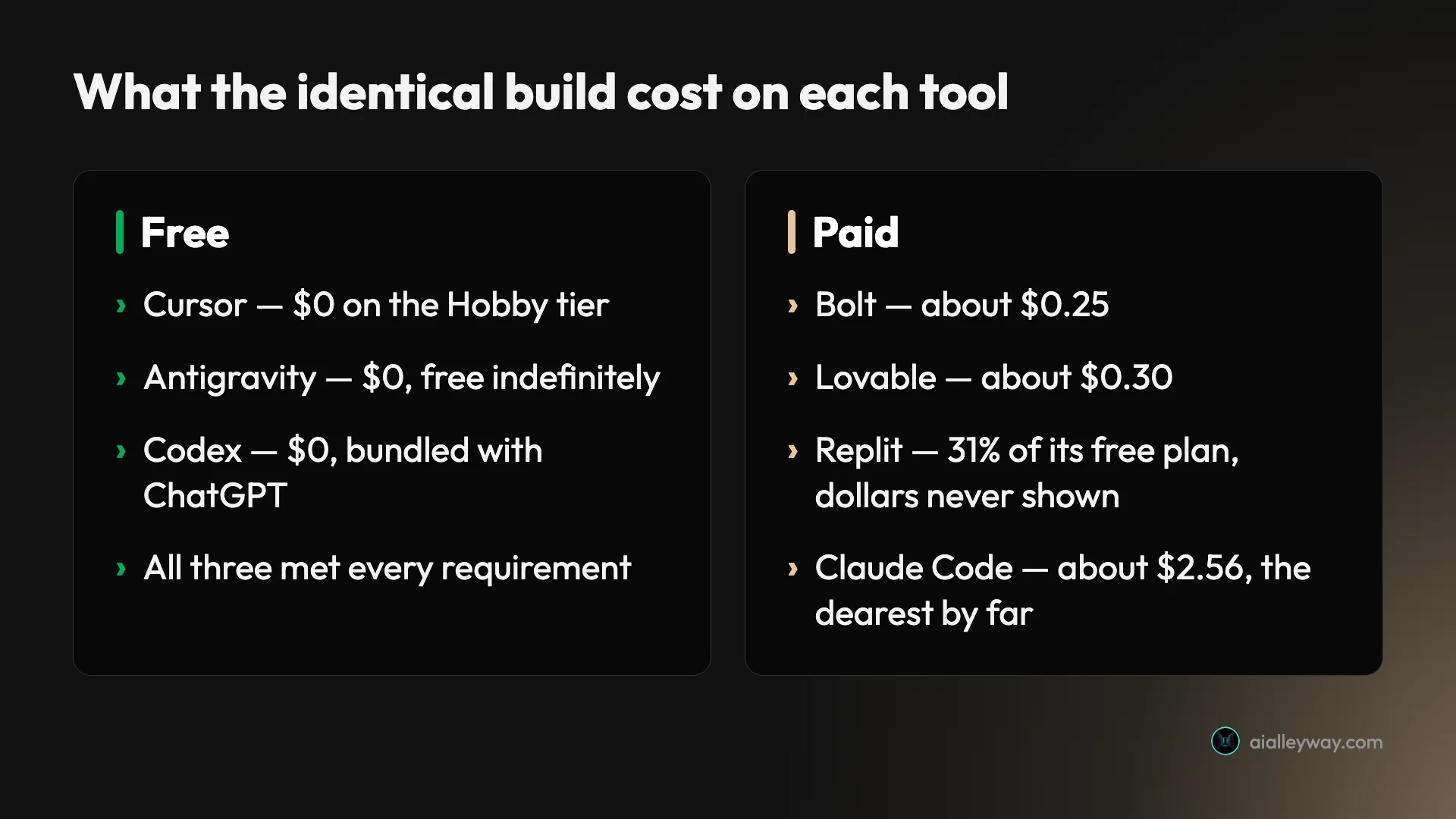
The cost range was roughly tenfold for the same result
| Tool | Cost of the identical build |
|---|---|
| Cursor, Antigravity, Codex | $0 |
| Bolt | ~$0.25 |
| Lovable | ~$0.30 |
| Replit | 31% of a day’s credits, dollars not shown |
| Claude Code | ~$2.56 |
Every one of those produced a working app meeting all six requirements. On a single build the spread is trivial. Across a project of iterations it is the entire budget, and it is invisible at the point where you choose a tool.
Only two of seven checked their own work
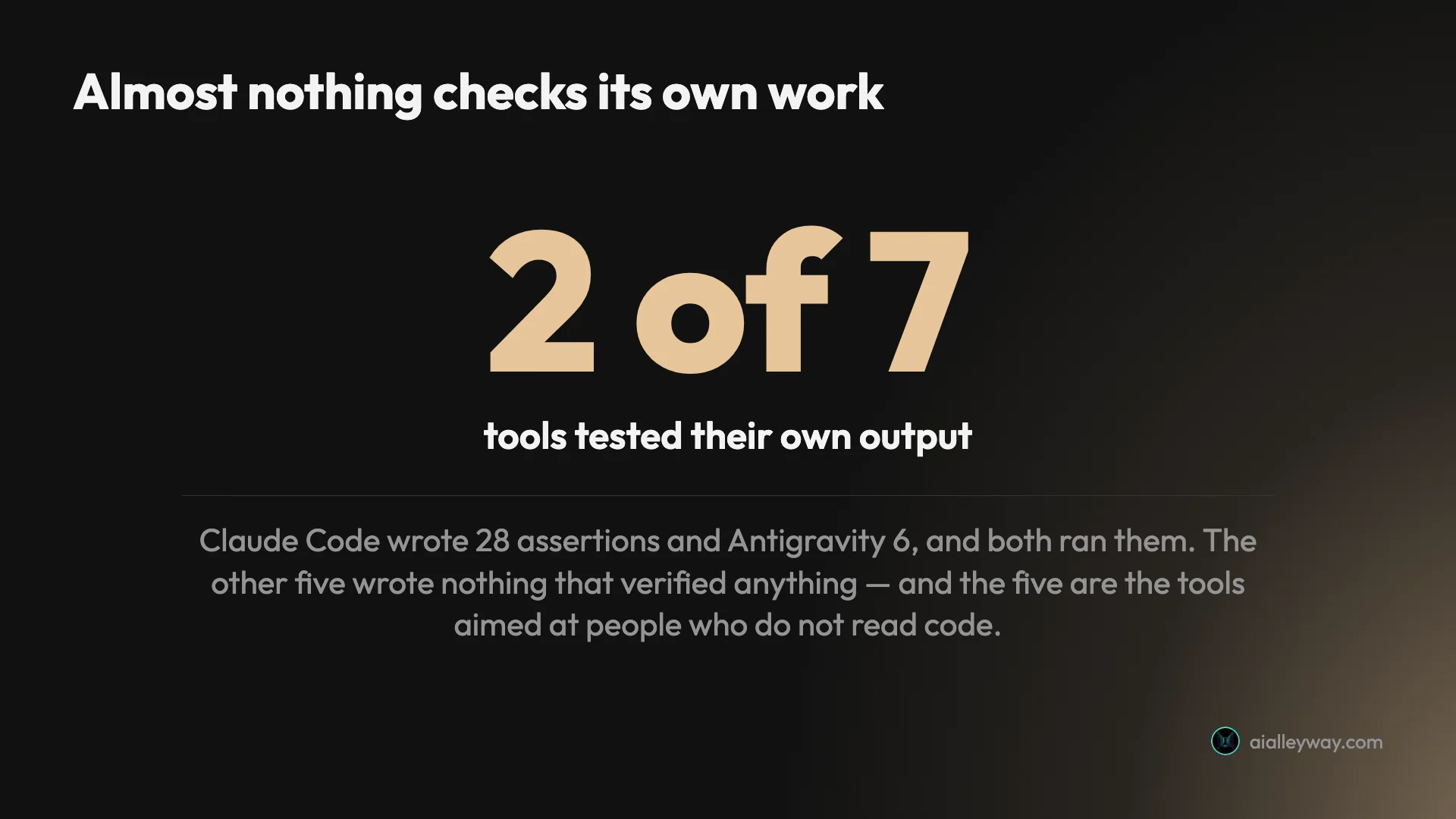
Claude Code wrote 28 assertions. Antigravity wrote 6. Both ran them. The other five wrote nothing that verified anything, and Replit produced test hooks that never executed.
The distribution is the interesting part. The tools that test themselves are the developer-facing agents. The ones that do not are the hosted builders sold to people who do not read code. The users least equipped to catch a bug by reading a diff are being served by exactly the tools least likely to catch it for them.
All seven invented the same feature
My brief said a cancelled item must leave the running total and stay visible. It said nothing about bringing it back. Every single tool added a Restore button. Seven for seven here — and ten for ten across every tool I have since given the same brief, without a single exception.
Read generously, all seven inferred correctly that cancelling implies undo, which is good product instinct. Read less generously, all seven added scope to a specification written to be precise — which is the same instinct that hands you an app with six features you did not ask for and one you did.
The four kinds of AI coding tool
Half the confusion in this category comes from ranking products that do not compete. Before any comparison is useful, work out which of these four things you are shopping for.
| Kind | What it is | On this page | Pick it when |
|---|---|---|---|
| Hosted builder | Describe an app, get a hosted result. No terminal | Lovable, Bolt | You want something presentable fast |
| Cloud IDE with an agent | A real environment the agent works inside | Replit | You need a database, terminal or Python |
| AI-native editor | An editor you drive, agents on call | Cursor | You want to type and stay in control |
| Terminal agent | You delegate a task, it works in your repo | Claude Code, Codex, Antigravity | The work is in an existing codebase |
| Editor extension | AI inside the editor you already use | GitHub Copilot, untested | You will not change tools |
The single most useful question is whether you want to write code with help or describe an outcome and review the result. Everything else follows from that. A hosted builder will never give you a terminal, and a terminal agent will never hand a non-technical founder a link to show an investor.
The reason this matters for a ranking: the seven tools I tested span four of those categories, which is why “all seven passed” is less surprising than it sounds. A brief that a hosted builder can complete is, by construction, a brief a terminal agent finds easy. What the test measures well is efficiency and discipline. What it cannot measure is the ceiling of any of them.
What about the models underneath?
A lot of people searching for the best AI for coding are really asking which model to use, which is a different question from which tool. It is worth separating them, because the two get conflated constantly.
The model is a component, not the product. Cursor lets you pick between Claude, GPT, Gemini and its own Composer models. Antigravity’s free tier includes Gemini models alongside Claude Sonnet and Opus. Codex runs OpenAI’s models, Claude Code runs Anthropic’s. So “which model is best” and “which tool is best” have different answers, and in several cases the same model is available through more than one of these products.
What I can say from testing rather than benchmarks: the differences I measured did not track the model. Claude Code and Codex both produced excellent, restrained output on different models. Antigravity, running Gemini, wrote nearly three times as much code as Codex for the same requirements. The variation came from how each product is built — what it does before it writes, whether it plans, whether it tests — far more than from the model answering.
| Tool | Model it runs | Can you change it? |
|---|---|---|
| Cursor | Its own Composer, or Claude / GPT / Gemini | Yes |
| Antigravity | Gemini first, plus Claude Sonnet and Opus | Yes, even on free |
| Claude Code | Anthropic models | No |
| Codex | OpenAI models | No |
| Lovable, Bolt, Replit | Chosen for you | No |
Where the model does show up is cost. Because several of these tools bill at the model’s API rate, your choice of model is a choice of price. The spread between a fast, cheap model and a frontier one is roughly double on output tokens in Cursor’s published rates, and that compounds across a month of heavy use far more visibly than any quality difference does on a task like mine.
The practical advice: pick the tool for its shape, then use the cheapest model that handles your work, and only reach for a frontier model when a task genuinely stalls. That ordering will save you more money than picking the “best” model ever will.
The free tiers, ranked honestly
“Free” means two different things here, and the difference decides more than subscription prices do.
| Tool | Free tier | Completed my brief? | What ran down |
|---|---|---|---|
| Google Antigravity | Free indefinitely | Yes | Nothing visible. Limits undefined |
| Cursor | Hobby, no card | Yes | Nothing. Excludes frontier models |
| Codex | Bundled with ChatGPT | Yes | Within the ChatGPT plan |
| Lovable | 5 build credits a day | Yes | 1.20 of that day’s 5 |
| Bolt | Daily token allowance | Yes | ~100,000 tokens |
| Replit | Daily Agent credits | Yes | 31% of a day’s credits in one build |
| Claude Code | None | n/a | n/a |
Every free tier here completed a real six-requirement app, which is worth stating plainly because none of the marketing implies it.
What separates them is what happened next. Antigravity, Cursor and Codex absorbed the build without visibly consuming anything, which makes them the three I would point anyone at who wants to find out whether this way of working suits them before spending a penny. Lovable’s daily reset means a bad afternoon costs an afternoon. Replit’s single build taking nearly a third of the plan means roughly three attempts before the decision is made for you.
Two opposite transparency failures are worth naming. Replit shows you a percentage running down without telling you of what. Antigravity does not tell you there is a limit at all, describing it only as “basic weekly rate limits” on the same page where Google prices its music credits to the exact credit. One will not tell you the denominator; the other will not tell you there is one.
What a year of this actually costs
Per-build numbers are easy to compare and misleading on their own, because almost nobody buys a single build. Here is the same set read as an annual commitment, which is the decision people are really making.
| Tool | Cheapest realistic year | What that buys |
|---|---|---|
| Antigravity | $0 | Free indefinitely, undefined limits |
| Codex | $0 | Bundled with a ChatGPT plan you may already have |
| Cursor | $0, or $192 | Free Hobby tier, or Pro at $16/mo annually plus usage |
| Claude Code | $200 | Claude Pro billed yearly. No free tier |
| Replit | $0, or $216 | Starter free, or Core at $18/mo annually |
| Lovable | $0, or $252 | Free 5 credits a day, or Pro at $21/mo annually |
| Bolt | From $240 | Free tier, then from $20/mo |
Two things that table makes obvious and a per-build comparison hides.
The annual spread between paid options is small. Every paid entry tier lands between roughly $192 and $252 a year. Nobody is meaningfully cheaper than anyone else at the subscription level, which means subscription price should be close to the last thing you decide on.
The variance sits entirely outside the subscription. Cursor’s $192 is the only figure on that list with an open-ended meter attached, and my own eleven months turned a $20 plan into $510.70. Replit’s checkpoints are effort-priced after the fact. Lovable’s credits expire. Antigravity’s limits are undisclosed. The subscription is the predictable part of every one of these; what sits on top is not.
So the honest framing for a year of this: if you are one developer doing ordinary work, two of these cost nothing and will do the job, and the paid options are all roughly $200 a year with different amounts of uncertainty bolted on. Pick the uncertainty you can live with.
Which one should you pick?
The useful question is not which is best. On this evidence they are all capable. It is which constraint you are actually under.
| Your situation | Pick |
|---|---|
| The code has to be maintained for years | Claude Code |
| You need something presentable this week | Lovable |
| Cost per build is the binding constraint | Bolt |
| You already pay for ChatGPT | Codex |
| You cannot spend anything at all | Antigravity, or Cursor’s free tier |
| You want to stay in the editor and type | Cursor |
| You need a database, a terminal or Python | Replit |
| You will not change editor | GitHub Copilot, untested |
Two patterns worth naming, because they cut across the table.
If you are evaluating rather than committed, start free. Antigravity and Cursor both completed a real task on their free tiers without visibly consuming anything. That is a better way to find out whether this style of work suits you than reading any ranking, including this one.
If you are choosing for a team, weigh predictability over peak capability. The tools differed far more in how legibly they bill than in what they can build. Lovable publishes a rate card. Replit shows a percentage of an unstated total. Cursor tells you precisely, a month late. Those differences compound across ten developers in a way a capability difference of nearly zero does not.
Five mistakes people make choosing one of these
Watching seven tools do the same job surfaced a set of errors that are easy to make and expensive to unwind.
Choosing on capability. All seven passed. If a comparison is telling you one of these tools can build an app another cannot, on work of this size, it is describing a difference that did not show up under controlled conditions. Choose on cost shape, output discipline and whether you want to type or delegate.
Reading the sticker price as the bill. Cursor’s $20 is a floor, not a price — mine came to $510.70 across eleven months because metered usage bills in arrears. Replit’s $20 Core is the cheapest subscription on this page and its consumption was among the heaviest. The subscription tells you almost nothing about what you will pay.
Assuming the free tier is a trial. Two of these are genuinely free products. Antigravity is free indefinitely and Cursor’s Hobby tier completed a real app. Anyone paying to evaluate this category is paying for something two vendors will give them for nothing.
Trusting the tool’s own summary. One tool reported six changed files where git showed seven. Another said it had built and verified something when its sandbox had blocked the verification step entirely — to its credit, it said so. If you are not checking the output against disk, you are grading the transcript rather than the work.
| The mistake | What it actually costs you |
|---|---|
| Choosing on capability | Nothing gained — all seven passed |
| Reading the sticker price as the bill | $510.70 on a plan advertised at $20 |
| Assuming the free tier is a trial | Paying to evaluate what two vendors give away |
| Trusting the tool’s own summary | Grading a transcript instead of the work |
| Upgrading to escape overages | A bigger bill and the same mechanism |
Buying a bigger plan to escape overages. I upgraded from Cursor Pro to Pro+ specifically to stop overage charges. It did not work, because a larger allowance moves where the line sits without changing what happens when you cross it. The fix was a spend limit I never set, which exists on every paid tier and is off by default.
What this test does not tell you
The honest limits, because a ranking that does not state them is not worth much.
It is one greenfield single-page app per tool. That is the shape that flatters fast agents and hosted builders. It says nothing about how any of these behaves on prompt fifteen, or against a repository with ten years of history and a build system nobody understands. On that ground the weight of independent reporting favours Cursor and Claude Code, and I have not measured it.
It is one run each. A second attempt would produce different numbers, and a harder brief would separate them differently. What generalises is the shape of the differences — cost legibility, restraint, whether anything self-verifies — rather than the exact seconds.
Some tools are not here. GitHub Copilot is on this page but untested. Others that appear in similar rankings I have not put through the brief and will not rank on their marketing.
| Limit of this test | What it means for you |
|---|---|
| One greenfield app per tool | Says nothing about a large existing repo |
| One run each | The shape of the differences generalises, not the seconds |
| Free/default settings | A paid tier may behave differently |
| Measured early Aug 2026 | Models and prices move underneath these products |
| GitHub Copilot untested | Present for completeness, deliberately unranked |
Two of these are changing hands or shape. Cursor’s parent company, Anysphere, is being acquired by SpaceX in a $60 billion all-stock deal expected to close in the third quarter of 2026, and Cursor’s pricing has already been rewritten once. Google, meanwhile, retired Gemini CLI in June 2026 and folded those users into Antigravity CLI at roughly 2% of the previous free allowance. Neither is a reason to avoid either tool, and both are reasons to be wary of committing twelve months to a price list.
And the models move. Every result here was measured in the first half of August 2026 on the tools’ then-current defaults. A tool’s model changes underneath it more often than its pricing page does, which is a good reason to distrust any ranking, this one included, that does not tell you when it was run.
The final word
Seven tools, one brief, and all seven passed — and the three tools I added to the test afterwards passed too, which makes it ten for ten. That is the result that should change how you read every other ranking of these products: the capability gap that most comparisons are implicitly arguing about did not show up at all on a task designed to be fumbled.
What did show up was a tenfold cost spread, a five-to-one difference in how much code got written for the same outcome, and the fact that only two of the seven bothered to check their own work before handing it over.
If you want one recommendation, it is Claude Code at 4.7, because the two things it did that nothing else did — integer cents for money and a test suite that actually runs — are the two things you will care about in six months, when the speed difference has long stopped mattering and something has quietly stopped adding up.
If you want one recommendation that costs nothing, it is Antigravity, because it is free indefinitely and it is the only free option that tests its own output.
Where to go deeper
This page ranks the field. These go one level down on the questions it raises:
The tools tested here. Full reviews of Claude Code, Cursor, Codex and Antigravity, each with the complete build trace.
GitHub Copilot, which joined this test after this page was first published and turned in the leanest complete result of any tool: what a credit actually buys, Copilot vs Codex, Claude Code vs Copilot and the alternatives.
Head to head. Claude Code vs Codex vs Cursor puts the three most-compared tools in one place.
Pricing, in detail. Claude Code, Cursor, Codex and Antigravity — the last of which publishes exactly one number.
Switching. Claude Code alternatives and Cursor alternatives if you already pay for one and are reconsidering.
Getting more out of what you have. Claude Code tips, from eight months of running this site’s editorial pipeline on it, and the skills layer on top of it: the eight packs I kept out of 162 installed, and how to read a Claude skills marketplace before you add one.
If you would rather not write code at all, prompt-to-app builders are a different product with a different ranking. The best AI app builder ranks the five I measured on cost per build; the best vibe coding tool covers both groups in one place.
And if you have not tried any of them, the most useful thing on this page is not the ranking. It is that two of these tools will build a real app for you today without a credit card, and an afternoon with them will tell you more than any list of features can.
Frequently asked questions
What is the best AI for coding?
There is no single answer, and I say that having measured seven of them on the same task rather than as a hedge. All seven met every requirement of an identical brief on the first attempt, so capability did not separate them at all.
What separated them was cost, speed and whether anything checked the work. Claude Code produced the best code and cost the most, about $2.56 against Bolt's 25 cents for the same result. Cursor was fastest at under a minute. Antigravity was the only one that was free indefinitely and also tested its own output. Pick on which of those you need, because on raw capability the choice barely matters.
What is the best free AI for coding?
Google Antigravity, and it is not close. Its free tier is free indefinitely rather than a trial, it includes Claude and Gemini models, and it built my entire six-requirement app without a card. It was also one of only two tools of seven that wrote and ran its own tests.
Cursor's free Hobby tier is the runner-up and is better than most write-ups suggest: it completed the same brief for nothing, faster than anything else I have measured. What it excludes is frontier models, MCPs and cloud agents. Lovable, Bolt and Replit all have free tiers that work but drain quickly in one sitting — my single Replit build consumed 31% of a day's Agent credits, though Replit's grant refreshes daily. Claude Code has no free tier at all.
Which AI writes the best code?
Claude Code, measurably, on the one task where I inspected the output closely. It stored money as integer cents rather than floats, volunteering that adding 9.99 and 19.99 as floats gives 29.979999999999997, and it shipped a 28-assertion test suite covering corrupt storage, non-array payloads and float precision. I ran that suite: 28 passed, 0 failed.
It also did it in 1,052 lines where Google Antigravity took 2,894 for the same six requirements. The cost is speed and money — roughly eight and a half minutes and about $2.56, and it would not build at all until it had interviewed me three times.
Do AI coding tools check their own work?
Almost none of them. Of the seven I tested on an identical brief, exactly two wrote and executed real tests: Claude Code with 28 assertions and Google Antigravity with 6. The other five wrote nothing that verified anything, and Replit produced test hooks that never ran.
That pattern is worth knowing because it inverts the marketing. The tools that check their own work are the developer-facing agents, not the hosted app builders sold to people who do not read code. The users least able to catch a bug by reading the diff are being served by the tools least likely to catch it for them.
Is Cursor or Claude Code better?
They answer different questions. Cursor is an editor you drive with agents on call; Claude Code is a terminal agent you delegate to. On my brief Cursor was dramatically faster — under a minute against roughly eight and a half — and produced 581 lines against 1,052.
Claude Code produced better code and was the only one to handle money as integer cents. It also cost about $2.56 against Cursor's zero on the free tier. The longer-run cost picture reverses, though: I paid $510.70 across eleven months of Cursor on a plan advertised at $20, because it bills metered usage in arrears. Neither is universally better; the split is whether you want to type or delegate.
How did you test these tools?
One message with six numbered requirements, no follow-up prompts, and then I served each resulting app and used it. Two requirements existed to be failed quietly: annual plans had to display a monthly-equivalent figure rather than the number entered, and cancelled items had to leave the running total while staying visible.
I checked totals against a calculator and read the stored data rather than trusting any tool's summary of itself. That protocol caught things a transcript would not, including one tool editing a project rules file without asking. Where a tool on this page was not put through that brief, it is labelled untested wherever it appears.
Keep reading
Claude Code vs Codex vs Cursor: one brief, three results
Claude Code vs Codex vs Cursor, measured. I gave all three the same brief and used every app they built. All three passed — here is what separated them.
Claude Code vs Cursor: I paid for both for a year
Claude Code vs Cursor, decided on invoices rather than vibes. They have converged on capability. Three axes still separate them, and only one decided it for me.
Claude skills marketplace: what it is and which to add
A Claude skills marketplace is just a git repo with a manifest. Anthropic's official one lists 291 plugins; 23 say Anthropic wrote them. How to read one.
Claude Code vs Copilot: $10 now buys you both
Claude Code vs Copilot, both measured on one identical brief. Copilot Pro at $10 now bundles Claude Code access, which changes the question entirely.