
Cursor alternatives: I left after $510.70, here's where I went
Cursor alternatives from someone who actually cancelled. Real invoices, what each option does about the metered bill, and which ones I've tested.

Contents
The short answer
Most Cursor alternatives lists are written by people who never paid for it. I am not neutral either: I paid for Cursor for eleven months, cancelled it, and moved to the tool at the top of this list — which also happens to be the one tool on this page we earn referral credits from. That is the opposite of the disclosure on my Claude Code alternatives post, and you should read this one knowing it.
| If you want | Go to |
|---|---|
| A bill with a ceiling | Claude Code — but read the next line first |
| To try an agent for nothing | Codex |
| The closest thing to Cursor | Windsurf, now Devin Desktop |
| To keep your VS Code | Cline |
| Raw editor speed | Zed |
| What work already pays for | GitHub Copilot |
One caveat before you act on that table, because it complicates my own top pick: switching did not save me money. The arithmetic is two sections down. If your bill is already steady, the honest advice is to set Cursor’s spend limit and stay.
Why I left Cursor, in numbers
The invoices are the reason this post exists, so here they are before anything else.
Across March 2025 to January 2026 I paid $510.70 on a plan advertised at $20 a month: $340 of subscription and $170.70 of metered usage, billed after the fact. A third of my total spend was not predictable from the plan price I thought I had bought.
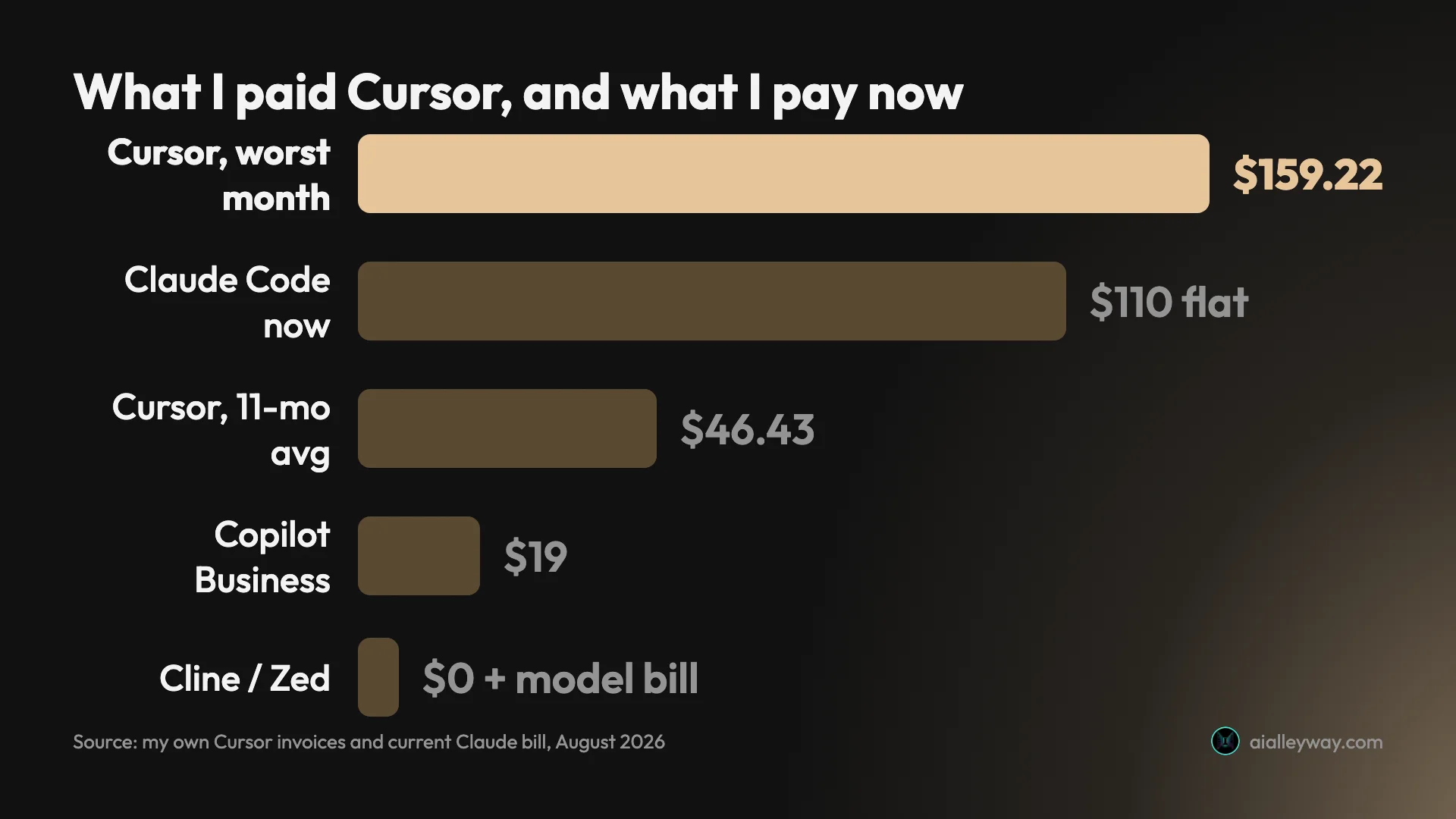
The shape matters more than the total. Five months sat at a flat $20. Then August spiked to $57.16, September fell back to $22.29, and October hit $159.22 — of which $80 was subscription, because I had upgraded to the $60 Pro Plus tier that month specifically to stop the overage. It did not. The larger allowance was gone in about a week and metered charges resumed on top of the higher subscription.
Three things are worth being precise about, because the internet gets them wrong:
- Cursor takes no markup. Individual plans pay the model’s API rate. The bill grew because my usage grew.
- A spend limit exists on Pro, Pro Plus and Ultra, in the Spending tab, and it was not set on my account for any of those eleven months. Eleven months of uncapped billing was a choice I made by not making it.
- Cursor is a good product. I would still recommend it to most people who want AI inside an editor, and the full review says so — I rated it 4.2 out of 5 while cancelling it, which is not a contradiction so much as the whole point.
And now the part that complicates my own recommendation, which I would rather put here than bury.
Switching did not save me money. Averaged across eleven months, Cursor cost me $46.43 a month. Claude Code Max 5x bills me $110 once tax lands. On the numbers, leaving cost me about $64 a month more than staying would have.
What I bought was not a discount. It was the difference between a bill I can put in a budget and a bill I find out about in arrears — and having had one $159.22 month, I decided predictability was worth paying for. That is a legitimate reason to switch and a terrible reason to tell you that you should.
So this is not a list of tools that are better than Cursor. It is a list of what each one does about the specific problem that made me leave: a floor with no ceiling.
How I picked these, and what I have not tested
My evidence is lopsided and it would be dishonest to write seven sections in the same confident voice.
Tested, with real money behind it. Cursor, for eleven months, with the invoices above. Claude Code, which is my daily driver on a paid Max plan. And Codex, which I ran two documented agent tasks through on a free ChatGPT account in July, verifying the output against disk rather than trusting what it claimed.
Documented, not tested. Windsurf, Cline, Zed and GitHub Copilot. For those four I have gone through the docs, the pricing pages and the repositories, and that is all. No controlled task, no invoice, no hours in the tool. What follows describes what they are designed to do, and you should weight it accordingly against the three above.
The useful thing about this particular list is that the two tools I would actually recommend first are both in the tested half.
What Cursor still does better than anything here
I spent $510.70 with this product and I am recommending you consider leaving it, so it is worth being precise about what you would be giving up. These are the things I actually missed.
You watch the work happen. Every change arrives as a diff you accept or reject inline. That sounds like a small ergonomic detail and it is not: errors surface at the first diff rather than the third commit, which means you catch a wrong turn while it is cheap. Agents hand you a finished result and a larger blast radius.
Your editor comes with you. Cursor is a VS Code fork, so extensions, keybindings and settings import in minutes. That migration was the single smoothest thing about the product, and every terminal agent on this list asks you to give it up entirely.
Model choice inside one subscription. Cursor lets you switch between labs per task. Claude Code runs Anthropic’s models and Codex runs OpenAI’s. If you want to route a refactor to one model and a code review to another without changing tools, Cursor is still the only mainstream option here that does it.
It stopped being just autocomplete. Its 2.0 release on 29 October 2025 rebuilt the default surface around agents, with plan mode, sandboxed terminals and tiled panes for running several at once. I went through that history in detail when I put Claude Code and Cursor head to head. Comparisons written before that date — and a surprising number written after — describe a product that no longer exists.
| What I missed after leaving | Available elsewhere on this page? |
|---|---|
| Inline diffs you accept as they land | Windsurf; also Cline and Copilot inside VS Code |
| Extensions and keybindings importing | Windsurf, or stay via Cline |
| Switching labs inside one subscription | No |
| Agent, editor and autocomplete in one | Windsurf, partly |
So the fair summary is that Cursor lost me on billing shape and nothing else. If you can set a spend limit and live inside it, most of this page is irrelevant to you.
The alternatives at a glance
| Tool | Cost | Shape | Ceiling? | Tested? |
|---|---|---|---|---|
| Claude Code | $20 / $100 / $200 | Terminal agent | Yes | Yes |
| Codex | Free, then $8–$200 | Terminal, app, IDE ext | Yes, on Free and Go | Yes |
| Windsurf / Devin Desktop | Free tier, from ~$20 | VS Code fork | Varies by plan | No |
| Cline | Free; you pay the model, or buy credits from Cline | VS Code, JetBrains, CLI | Only if you buy Cline’s own | No |
| Zed | Free editor; AI billed | Native Rust editor | Depends on key | No |
| GitHub Copilot | Free, $10–$100 | IDE assistant + agent | Yes | No |
1. Claude Code — best if the bill is the problem

This is where I went, and the reason was arithmetic rather than affection.
Claude Code costs $20 with Claude Pro, $100 for Max 5x or $200 for Max 20x, and it stops rather than bills. Usage credits exist and are off unless you switch them on. My Max 5x plan bills a steady $110 once my local tax lands — a number I can put in a budget, which is precisely what $159.22 in October was not.
What you give up is the editor. Claude Code is a terminal agent: you describe work and review a result rather than watching diffs land inline. Your Cursor extensions and keybindings do not come with you, because there is nothing for them to come to. If watching the work is what you valued about Cursor, this is a downgrade dressed as a saving.
| Claude Code vs Cursor | Cursor | Claude Code |
|---|---|---|
| Surface | Editor you watch | Terminal you delegate to |
| Past the allowance | Metered, in arrears | Stops; credits are opt-in |
| My real bill | $46.43/mo average, $159.22 peak | $110 flat with tax |
| Your extensions | Come with you | Nothing to bring them to |
Two things carried the switch for me. CLAUDE.md accumulates a project’s conventions and compounds over months, which is the single most valuable file in my repo and most of what makes the tool worth driving properly. And the default posture asks before editing, which is tedious on day one and reassuring on day ninety.
The honest caveat is that a ceiling is not the same as cheap. Anthropic’s own documentation puts enterprise usage at $150 to $250 per developer per month — above the top consumer plan. What you are buying is predictability, not a discount. I broke the whole ladder down in what Claude Code costs.
Skip it if the editor is the thing you actually want, or if you need to see each change as it happens.
2. Codex — best way to try an agent for nothing

The cheapest honest experiment on this page, because it costs nothing to run.
Codex is bundled into whatever ChatGPT plan you already have, including the free one. I tested that rather than repeating it: on 31 July I ran two agent tasks on a free ChatGPT account with no card attached, and the substantive one renamed 33 of 33 references across seven files and three languages — the same run I put against Claude Code. I checked the result with git, node --check and py_compile instead of trusting the summary — which was wise, because its own diff badge undercounted what it had changed.
Against Cursor, the trade is the same shape as Claude Code’s: you swap an editor for an agent. The difference is the money. Codex’s free and Go tiers genuinely stop when you hit the limit, so those two are the only options here that cannot surprise you at all.
| What I measured on the free tier | Result |
|---|---|
| References renamed | 33 of 33 |
| Files touched | 7, across 3 languages |
| Verified with | git, node —check, py_compile |
| Card required | None |
One caution from that testing worth carrying over: point it at the right folder and say so explicitly. Aimed at an empty directory, mine searched the wider filesystem and proposed edits to an unrelated repository. It asked before writing, so nothing landed, and one sentence of prompt boundary fixed it completely.
Be aware that Plus and Pro have been able to buy credits at four cents each since October 2025, so the ceiling I am praising applies to Free and Go rather than to the whole product. I compared the two directly in Cursor vs Codex, which is the closest thing to a like-for-like on this page.
Skip it if you left OpenAI’s ecosystem deliberately, or you need an agent that stays rigorously in scope without being told.
3. Windsurf, now Devin Desktop — the closest like-for-like

If you want to change your bill without changing your habits, this is the one every other roundup puts first, and for a defensible reason. It is also the one whose name has moved twice.
Windsurf is a VS Code fork like Cursor, built around an agent that keeps context across a workspace, with a free tier and paid plans starting around $20. Structurally it is the smallest possible move: same editor lineage, same inline-diff workflow, same muscle memory.
Check the URL before you check the pricing, though. When I followed the links on 3 August 2026, codeium.com redirects to windsurf.com, and windsurf.com in turn 308-redirects to devin.ai/desktop — the product now lives under Cognition’s Devin brand. Most published roundups still describe it as standalone Windsurf, which is a reasonable signal about how recently they were checked.
That similarity to Cursor is also the reason I have not ranked it first. If the problem you are solving is an unbounded metered bill, swapping one agentic VS Code fork for another is a lateral move unless the pricing genuinely differs for your usage — and pricing in this category has been rewritten repeatedly during the period I have been paying attention. Check the current plan page against your own last three invoices before you treat it as a saving.
Skip it if the migration is the point. If you want the same thing more cheaply, verify the arithmetic on your own numbers first.
4. Cline — best if you want your VS Code back

The lowest-friction option here, because it does not ask you to move at all.
Cline’s pitch against Cursor is that it asks you to install an extension rather than an editor. It is Apache-2.0, provider-agnostic — you supply the keys, including for models running on your own machine — and its primary home is VS Code, with a JetBrains plugin and a CLI alongside it. It sat at roughly 65,500 GitHub stars on 3 August 2026, with commits landing that day.
Against Cursor the distinction is real. Cursor replaces your editor with one built around an agent; Cline adds an agent to the editor you already configured. If your setup is heavily customised, or your employer has views about which applications you install, that difference decides it.
| Cline, in short | Detail |
|---|---|
| Licence | Apache-2.0 |
| Surfaces | VS Code, JetBrains, CLI |
| Models | Any provider, including local |
| Who bills you | Your provider, or Cline directly |
Now the part most roundups skip. Free software is not free to run. Cline ships no model of its own, so the default route is your key and your provider’s per-token bill, with no ceiling. That is structurally the same unbounded shape that cost me $510.70, with a different company sending the invoice. Worth knowing that bring-your-own-key is the default rather than the only option: Cline also sells inference credits directly on a usage basis, and markets a ClinePass product alongside it. It is a genuinely good deal if your usage is spiky, and a worse one if it is heavy and daily.
Skip it if predictable cost is the reason you are reading this.
5. Zed — best if the IDE itself is the problem

A different complaint, answered properly.
Zed is a native editor written in Rust, built for speed first with AI layered on rather than bolted through. If part of what irritated you about Cursor was that a VS Code fork carries VS Code’s weight, Zed is the only tool here that addresses that directly. It had roughly 87,900 GitHub stars and commits landing on 3 August 2026, so it is neither a toy nor a side project.
The editor itself is free and open source. Its AI features are the part that costs — billed separately or run against your own key, which puts it either in Cline’s per-token category if you bring a key, or, on Zed Pro at $10 a month with $5 of tokens included and metered usage above that, in Cursor’s own subscription-plus-meter shape.
I would be careful about treating it as a cost fix. It is a performance and ergonomics fix that happens to let you control your model spend. Those are different problems, and only you know which one you have.
Skip it if you want a drop-in replacement. Moving from a VS Code fork to a native editor is a real migration.
6. GitHub Copilot — best if your company already pays

Rarely the enthusiast’s pick and frequently the correct one.
What Copilot wins on is not the agent, it is the paperwork. In most organisations it is already on the approved-vendor list and already coming out of a budget line someone else owns, which turns adoption from a purchasing decision into a checkbox. Against a Cursor bill you have to justify, that matters more than a feature comparison suggests. The ladder runs Free at $0, Pro at $10, Pro+ at $39 and Max at $100, with Business at $19 and Enterprise at $39 per seat, so it offers one of the cheapest paid entries here — undercut only by Codex’s $8 Go tier — and a genuine ceiling.
Against Cursor, the honest read is heritage. Copilot began as a completion tool and grew agentic features; Cursor was rebuilt around agents in its 2.0 release. If most of your day is writing code with assistance, that history does not matter. If you are handing over multi-file tasks, it does.
Skip it if agentic multi-file work is the specific thing you are buying.
Also named, and why they are not ranked
Trae, Void, Continue, Kilo Code and Antigravity all appear in other roundups, and several appear in Google’s own AI Overview. Antigravity is the one I have since tested properly, in the Google Antigravity review.
I have left them unranked for one reason: I have neither tested them nor checked their documentation to the standard I applied above, and adding five more names I cannot speak to would make this list longer without making it more useful. Continue is the most established of them, at about 35,300 GitHub stars with commits on 2 August 2026, and it belongs in the same provider-agnostic category as Cline.
That is a limit of this page, not a verdict on those tools.
What actually moves when you migrate
The install is the easy part and nobody writes about the hard part, which is your accumulated project instructions.
Cursor accumulates rules — conventions, gotchas, the “never do this in this repo” knowledge that stops a tool making the same mistake twice. That file is the most valuable thing in your setup after the code itself, and it does not travel uniformly.
| Tool | Reads |
|---|---|
| Cursor | AGENTS.md and .cursor/rules |
| Codex | AGENTS.md |
| Claude Code | CLAUDE.md |
| Cline | .clinerules/, and AGENTS.md |
The useful thing in that table is how much of it is the same file. Three of the four read AGENTS.md: Cursor, Codex and Cline. If you already keep your rules there, any of those moves carries them across untouched, which makes Codex the cheapest migration on this page as well as one of the cheapest tools. Claude Code is the holdout. It reads CLAUDE.md, Anthropic’s docs say so plainly, and that move means porting the file by hand.
Two things do not move at all, and both surprise people:
- Your subscription. A Cursor plan pays for Cursor. Nothing else on this page accepts it, and tools that run the same underlying models want their own subscription or your own API key.
- Your usage history. You lose the record of what you spent and why, which is precisely the data you need to judge whether the switch worked. Screenshot your last three invoices before you cancel. I did, and this post exists because of it.
What actually changes about the bill
Here is the arithmetic that decides this, and it is the reason I would not switch on price alone.
The two vendors who publish real usage figures both put serious use far above their headline tiers: Anthropic at $150–250 per developer per month, OpenAI at $100–200 for Codex. Those are the companies’ own documentation, and they nearly overlap. That convergence tells you the cost of running an agent is mostly the cost of the tokens, and no interface saves you from it.
Which means the free tools on this page do not remove that cost. They move it — from a subscription to a per-token bill with no ceiling, which is exactly the shape that cost me $170.70 in metered charges.
| Your situation | Switching saves you |
|---|---|
| A few tasks a week | Real money. Codex’s free tier may cost you nothing at all |
| Steady daily use, one project | Marginal. You trade a metered bill for a capped one, which is the point |
| Heavy, multiple agents | Probably nothing. You want a ceiling, and free tools have none |
| You just want Cursor to stop surprising you | Nothing — set the spend limit instead |
That last row is the one I wish someone had put in front of me in March 2025. If your only complaint is unpredictability, Cursor’s spend limit solves it in about thirty seconds, and you keep the editor you already like.
Is there a genuinely free Cursor alternative?
Yes, with an asterisk that is doing most of the work.
Codex’s free tier is free in the ordinary sense. No card, real multi-file capability, and a hard stop when you hit the limit. I have run actual work on it.
Cline, Zed and Continue are free software, which is not the same thing. Each is free to install and each needs a model to do anything, and that model bills you through whichever provider you chose. Calling them free is accurate about the licence and misleading about the cost, and it is the most common distortion in the published roundups.
The only fully free path is an open-source tool pointed at a locally-run model, and that costs you capability on exactly the long multi-file work that makes an agent worth having.
How to pick, in one decision tree
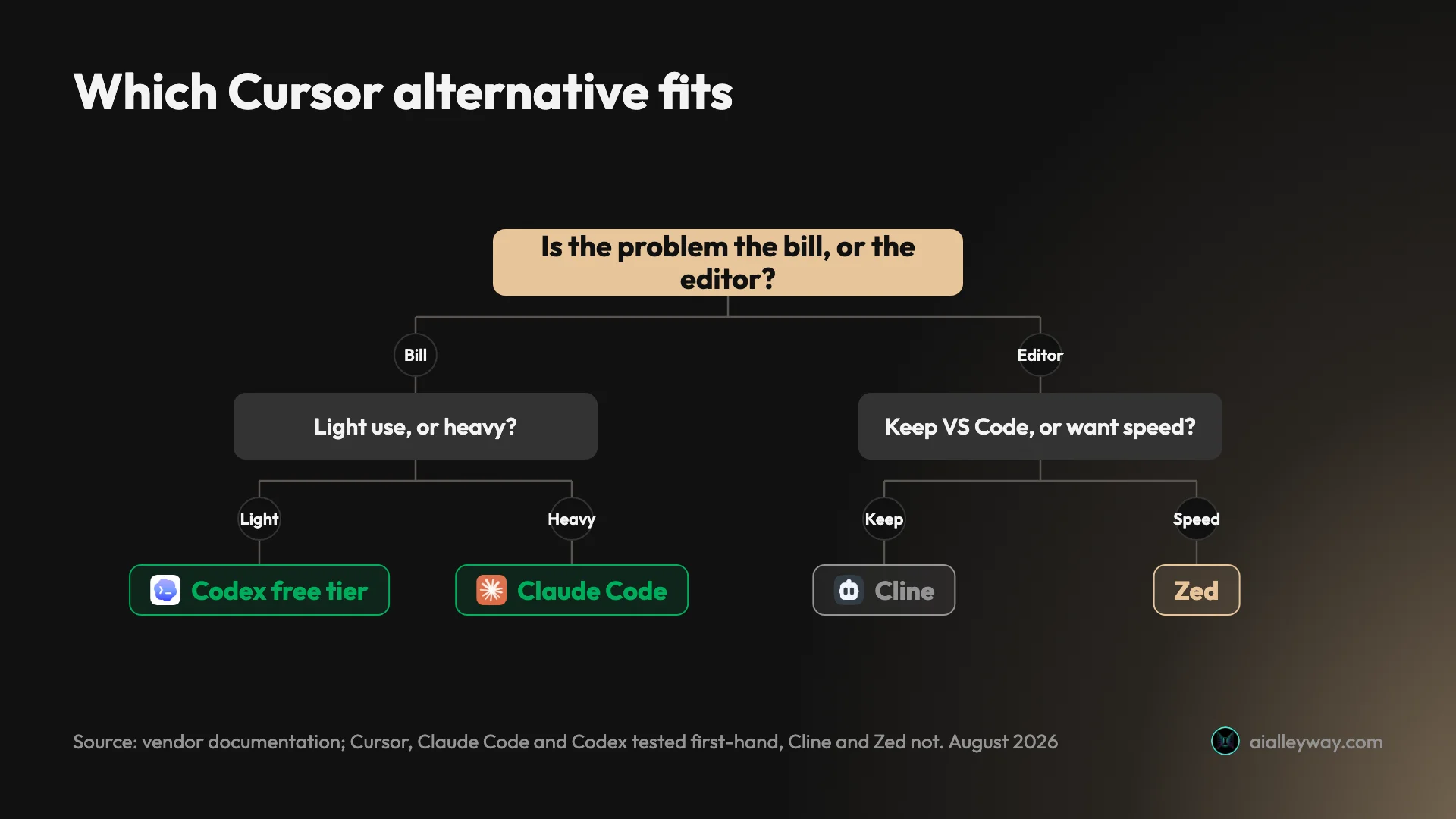
Four questions, in order, and the first two are the ones that would have saved me money.
What did you actually spend per month for the last six months? Not the plan price — the invoice. Most people searching this cannot answer it, which is exactly how a $20 plan becomes $510.70. If your real average is below the plan price of whatever you are moving to, switching is a cost increase wearing a fix’s clothing.
Can you set a limit on what you have, and is it on by default? Almost always yes and no respectively. That combination is how every unbounded bill in this category happens, mine included.
Is the problem the bill, or the editor? If it is the editor — too slow, too heavy, or you never wanted to leave VS Code — then Zed and Cline are your branch and cost is a side effect. If it is the bill, keep reading.
If it is the bill, are you heavy or light? Light: Codex’s free tier, and you may never pay. Heavy: you want a ceiling, which means Claude Code or Copilot, not a free tool with an uncapped meter. The counterintuitive part is that “free” is the wrong answer for the people with the biggest bills.
And before any of them: check whether you simply need to set Cursor’s spend limit. It is off by default, it is available on every paid individual tier, and it would have saved me a meaningful share of $170.70.
Final word
The strongest argument for leaving Cursor is not that something else is better. It is that Cursor’s cost is a floor with no ceiling, and if that shape does not suit you, no amount of liking the editor fixes it.
For me the answer was Claude Code, and I will say plainly that it is also the one link on this page that pays us anything, in referral credits rather than cash — my Max plan bills a flat $110 with tax, which was the whole point. If you want to test the water first, Codex’s free tier is the only option here I have watched complete real multi-file work without a card.
And if you take one thing from a page written by someone who paid the bill: the free tools are free to install, not free to run. Two of the six above move your costs to a model provider with no ceiling by default, which is the same shape you are trying to escape.
I looked at all of this in early August 2026. In a category where two of these tools shipped commits the day I checked, that date is doing real work. The rest of my coding-tool coverage is here, including the case for whether Claude Code is worth it if you want the other side of my recommendation.
For the measured ranking behind these picks, every tool here took the same six-requirement brief.
Frequently asked questions
What is the best free Cursor alternative?
Codex, and I say that having run real multi-file work on it without paying. Two agent tasks on a free ChatGPT account in July 2026 renamed 33 of 33 references across seven files and three languages, and everything still parsed when I checked it against disk rather than trusting the transcript.
If you want to stay in an editor rather than move to an agent, Cline is the better free answer. It is an open-source extension you point at your own model keys, which makes the software free and the running costs yours. That distinction matters more than most roundups admit.
Why did you stop using Cursor?
Cost shape, not capability. Across eleven months I paid $510.70 on a plan advertised at $20: $340 of subscription and $170.70 of metered usage billed after the fact. October alone came to $159.22, and I had upgraded to the $60 tier that month specifically to stop the overage, which it did not.
Nothing malfunctioned and Cursor takes no markup — individual plans pay the model's API rate. The problem is that the meter is unbounded by default, and a spend limit exists on Pro, Pro Plus and Ultra that I simply never switched on. Eleven months of uncapped billing was a choice I made by not making it.
Is Claude Code better than Cursor?
For the specific thing that made me leave, yes: the bill has a ceiling. Claude Code costs $20, $100 or $200 a month and stops when you hit a limit rather than billing past it, with usage credits off unless you turn them on. That predictability is what I was buying.
It is not better at everything. Cursor is an editor and Claude Code is a terminal agent, so you lose inline diffs, your extensions and the ability to watch each change land. If seeing the work happen is what you value, Cursor is still the better instrument and the honest fix is a spend limit rather than a migration.
Is there a Cursor alternative that keeps my VS Code setup?
Cline is the direct answer. It is an open-source agent that runs as a VS Code extension, so there is no editor migration, no second window and no new keybindings to learn, and it is provider-agnostic rather than tied to one lab.
GitHub Copilot is the other route, and often the pragmatic one because it is already approved and paid for at a great many companies. Both leave your setup intact. The trade against Cursor is that you are adding an agent to an editor rather than using an editor built around one, which is a difference in how each product is designed to gather context, not one I have measured.
Are Cursor alternatives actually cheaper?
It depends entirely on whether you are heavy or light, and the honest answer for heavy users is often no. Free and open-source tools do not remove the cost of running a model, they move it from a subscription to a per-token bill from whichever provider you point them at — which is the same unbounded shape that made Cursor expensive for me.
The vendors who publish real figures put serious use well above their headline tiers: Anthropic at $150 to $250 per developer per month, OpenAI at $100 to $200 for Codex. If your usage looks like that, what you want is a plan with a ceiling, not a tool with no floor.
Keep reading
Cursor vs Codex: I paid for one and quit the other
Cursor vs Codex from someone who cancelled Cursor after $510.70 and walked away from Codex too. What each actually costs, and which one I'd go back to.

Cursor AI pricing: what the plans cost and what I paid
Cursor AI pricing runs free to $200 a month, plus metered usage. I paid $510.70 across eleven months on a plan advertised at $20. Every tier, verified live.

Cursor review: I paid for 11 months, then cancelled
Cursor review from someone who actually paid: $510.70 across 11 months, a third of it metered usage. What it does well, and what I got wrong about the bill.
Claude Code vs Codex vs Cursor: one brief, three results
Claude Code vs Codex vs Cursor, measured. I gave all three the same brief and used every app they built. All three passed — here is what separated them.