
Claude Code vs Cursor: I paid for both for a year
Claude Code vs Cursor, decided on invoices rather than vibes. They have converged on capability. Three axes still separate them, and only one decided it for me.
Contents
The short answer
Cursor is the better tool for most people. I use Claude Code, and I switched to it from Cursor.
Claude Code vs Cursor is usually framed as terminal against editor, and that framing misses the thing that actually decided it. Both of those statements above are true, and the gap between them is the whole point of this comparison. I paid for Cursor for eleven months and Claude Code for eight, overlapping in December 2025 when I ran both at once, and every number below comes from those two invoice histories rather than from a spec sheet.
| Category | Pick this |
|---|---|
| Best for most developers | Cursor — model choice, a real free tier, and a more mature editor |
| Best for predictable cost at volume | Claude Code — a ceiling instead of a meter |
| Best overall value | Cursor Plus at $8 if its own Grok and Composer models suit you; Claude Code at $20 if you want Claude |
We also ran all three of Claude Code, Codex and Cursor against each other, and the wider field is ranked in the best AI for coding.
Where I stand, so you can weigh the rest: we earn referral credits on Claude signups and none on Cursor. That makes the scorecard below awkward for me, which is the best reason to trust it.
Claude Code vs Cursor: how they compare, axis by axis
I scored seven axes a buyer actually weighs. Cursor took three, Claude Code one, and three came out level. That is the headline: these two have converged, and the remaining differences are narrower than the internet thinks.
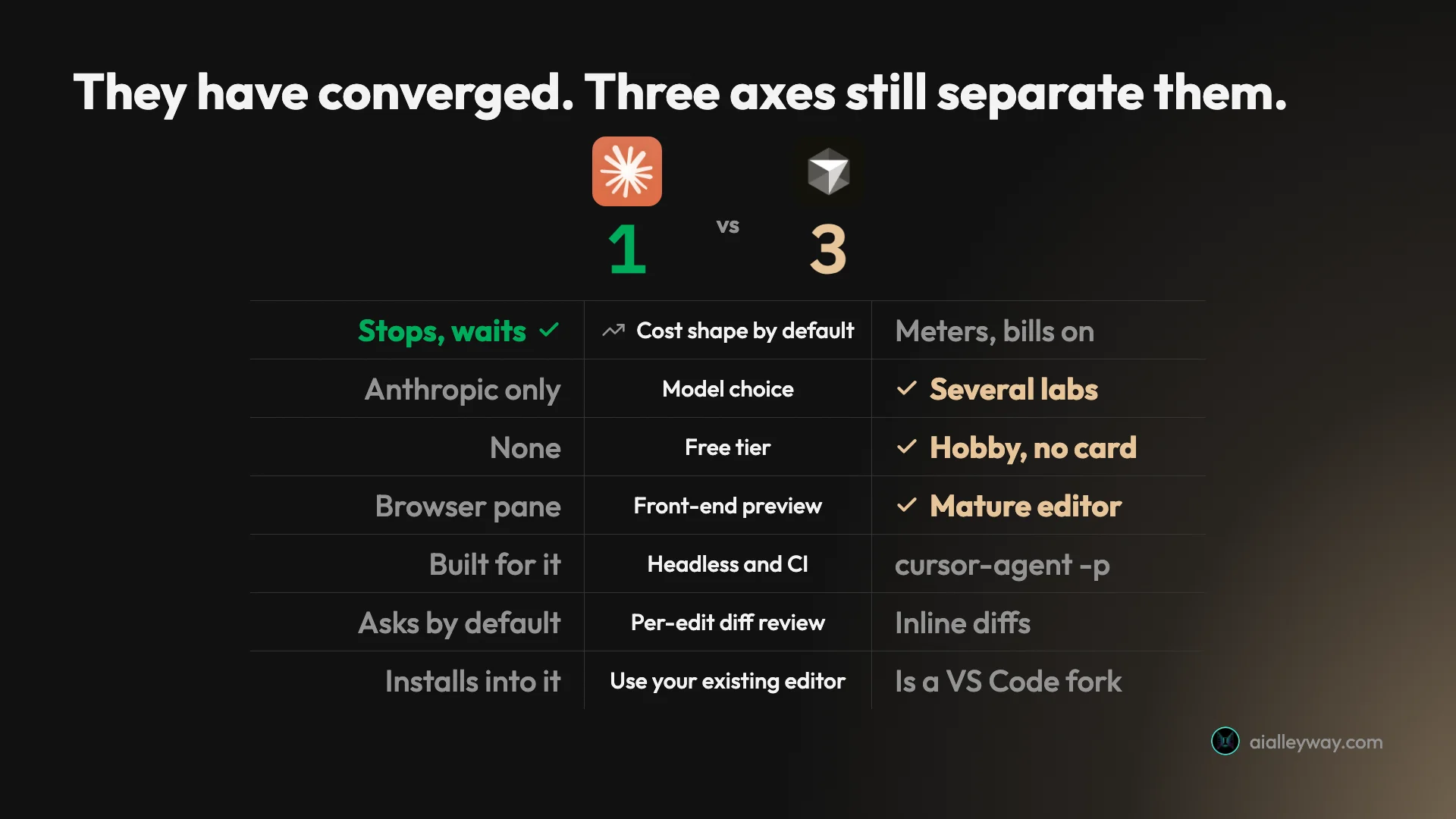
| Axis | Claude Code | Cursor | Winner |
|---|---|---|---|
| Cost shape by default | Stops at the limit and waits | Meters Claude and other third-party models per token, from prepaid credit (in arrears on legacy plans) | Claude Code |
| Model choice | Anthropic models only | Several labs, switchable per task | Cursor |
| Free tier | None; Pro is the entry point | Free plan, limited usage | Cursor |
| Front-end preview | Browser pane, dev server, element select | Mature editor and preview | Cursor, narrowly |
| Headless and CI use | Built for it | cursor-agent -p, GitHub Actions | Tie |
| Per-edit diff review | Asks before edits, diff pane | Inline diffs, accept or reject | Tie |
| Use your existing editor | Installs into VS Code, JetBrains, even Cursor | Is a VS Code fork | Tie |
Entry price used to be level at $20, and it no longer is. Cursor’s cheapest paid plan is now Plus at $8, but it runs only Cursor’s own models; getting Claude inside Cursor takes Premium at $30 plus per-token charges, against Claude Pro’s $20 with Claude included. The top tier is still $200 either way, and both tools offer a spend cap you have to go and set. Code review is close enough to a wash that I cover it below rather than scoring it.
Two things that table hides. The first is that the axes are not equally weighted, and which ones matter is entirely a function of how you work: a front-end developer and someone running agents in CI would score this identically and reach opposite conclusions. The second is that the entry price conceals the largest practical difference between them, which is what happens to the bill after that.
That is why I am not publishing an overall winner. Three-to-one makes Cursor the answer on features, and for most readers it is, but I would be the wrong person to tell you that three narrow wins beat one large one when my own decision went the other way.
Claude Code: strengths and gaps
It delegates further than anything else I have used. One instruction, and it searches the repository, edits across files, runs the build and reports back. In a session I captured while writing my Claude Code review it also verified its own work beyond what I asked, checking that a generated page actually resolved.
The project memory is the feature that compounds. A CLAUDE.md file at the repo root is read at the start of every session, so conventions and past bugs stop being things you re-explain. After a few months it reads like onboarding documentation for a new hire.
It is scriptable in a way editor-bound tools are not. Hooks fire on events, skills package repeatable procedures, subagents run in parallel and it runs headless in CI. If your ambition is to automate around the tool rather than type into it, this is the one.
The bill has a ceiling. Max 5x is $100, $110 with my tax. When I hit a limit it stops and waits rather than billing me more. That is the axis that moved me.
The ceiling is enforced by two meters running at once, which is worth seeing before you buy:
| Claude Code limits | Session limit | Weekly limit |
|---|---|---|
| Window | Rolling, roughly 5 hours | Fixed weekly reset |
| My dashboard, same moment | 7% used | 56% used |
| Split by model | No | Yes, a separate Fable bar |
| What it predicts | Whether you can keep going now | Whether you can keep going Friday |
Reading the session meter as your budget is the mistake that produces the angry threads. It says abundance while the weekly meter, the one that actually governs your week, says something else entirely.
The gaps are real. The visual story has improved and is still second best. The desktop app runs a dev server in a Browser pane, previews your app, lets you select an element with a shortcut and auto-verifies after every edit, but it is younger and less fluent than an editor built around that loop.
The two-limit system is the other one. A rolling session window plus a weekly cap is genuinely confusing: my dashboard read 7% of the session and 56% of the week at the same moment, and only one of those numbers predicted whether I would still be working on Friday. And it is a single-lab tool. You get Anthropic models, and that is the whole menu, which is fine until the day another lab ships something you want.
Cursor: strengths and gaps
You keep your editor. It is a VS Code fork, so extensions, keybindings and settings come across intact, and eleven months of paying for it never once made me think about my setup. Adopting it is a download rather than a migration, and that is the single strongest practical argument in its favour.
It has caught up on agents, and it did so early. Cursor 2.0 shipped the agent-first home and multi-agent tiled panes in October 2025. It also runs headless: cursor-agent -p is documented for non-interactive scripting, with JSON output and a CURSOR_API_KEY for CI, plus a GitHub Actions integration. Anyone still describing Cursor as the autocomplete editor is describing a product that stopped existing a year ago.
Model choice is a genuine lever. My Cursor invoices name the models I called, and the per-call cost ranged from $0.027 on Sonnet 4 to $0.085 on Opus 4.5 high-thinking. Matching model to task is real money, and a single-lab tool cannot offer it.
The free tier reaches the actual product. The free plan gives you the agent with limited usage, rather than a crippled demo.
The gap is the meter. On the legacy Pro plan I paid for, usage past the included allowance was billed in arrears at the model’s API rate. That is honest pricing, clearly documented, charged at list with no markup, and it is also unbounded. A third of everything I paid Cursor arrived after the work was done. On The X Subscription, sold to new customers since 12 October 2026, the meter has moved rather than gone: Claude and the other third-party models are in no plan’s allowance and bill per token from prepaid credit, from the first request.
And the cap is opt-in. Cursor offered a spend limit on Pro, Pro+ and Ultra, in the Spending tab, and I never opened it. The X Subscription’s equivalent is a monthly additional usage limit on your credit. That is my failure rather than the product’s, and it is the single most useful thing to do in your first week, but a default that bills rather than stops is still a default worth knowing about.
What that looked like across my eleven months:
| Cursor, eleven months | Amount | Share |
|---|---|---|
| Subscription, agreed in advance | $340.00 | 67% |
| Metered, billed in arrears | $170.70 | 33% |
| Total | $510.70 |
Two thirds of that bill was the thing I chose. A third was the thing I did not, and would have capped in about ninety seconds had I known the field existed.
Is Cursor cheaper than Claude Code?
This is the axis that decided it, so it gets the real numbers rather than a plan table.
When I paid for both, the entry tiers matched: Cursor Pro at $20 against Claude Pro at $20. That is no longer the comparison. In October 2026 Cursor moved new customers onto The X Subscription, one plan for Grok, Cursor and X, and its docs now list Free, Plus at $8, Premium at $30, Super at $100 and Ultra at $200. Plus runs only Cursor’s own Grok and Composer models. Claude, GPT and Gemini start at Premium and are not included in any plan: they bill at API list price from prepaid credit, from the first request.
So the honest entry comparison depends on what you want to run. Cursor’s own models: $8, well under Claude Pro. Claude inside Cursor: $30 plus Anthropic’s per-token price, against $20 with Claude Code where the model is included. Claude runs Pro $20, Max 5x $100 and Max 20x $200, with the Max figures published in the help centre rather than the pricing page. Both exclude tax, and both offer a spend cap if you go looking for it: Cursor through a monthly additional usage limit on your credit, Claude through usage credits you can leave switched off.
The plans I actually paid Cursor for, Pro at $20 and Pro Plus at $60, are now legacy plans kept for existing customers. On them, the structural difference was what happens when you exhaust the plan: Cursor kept going and billed you in arrears, while Claude stops and makes you wait. Neither is dishonest, and they produce very different invoices.
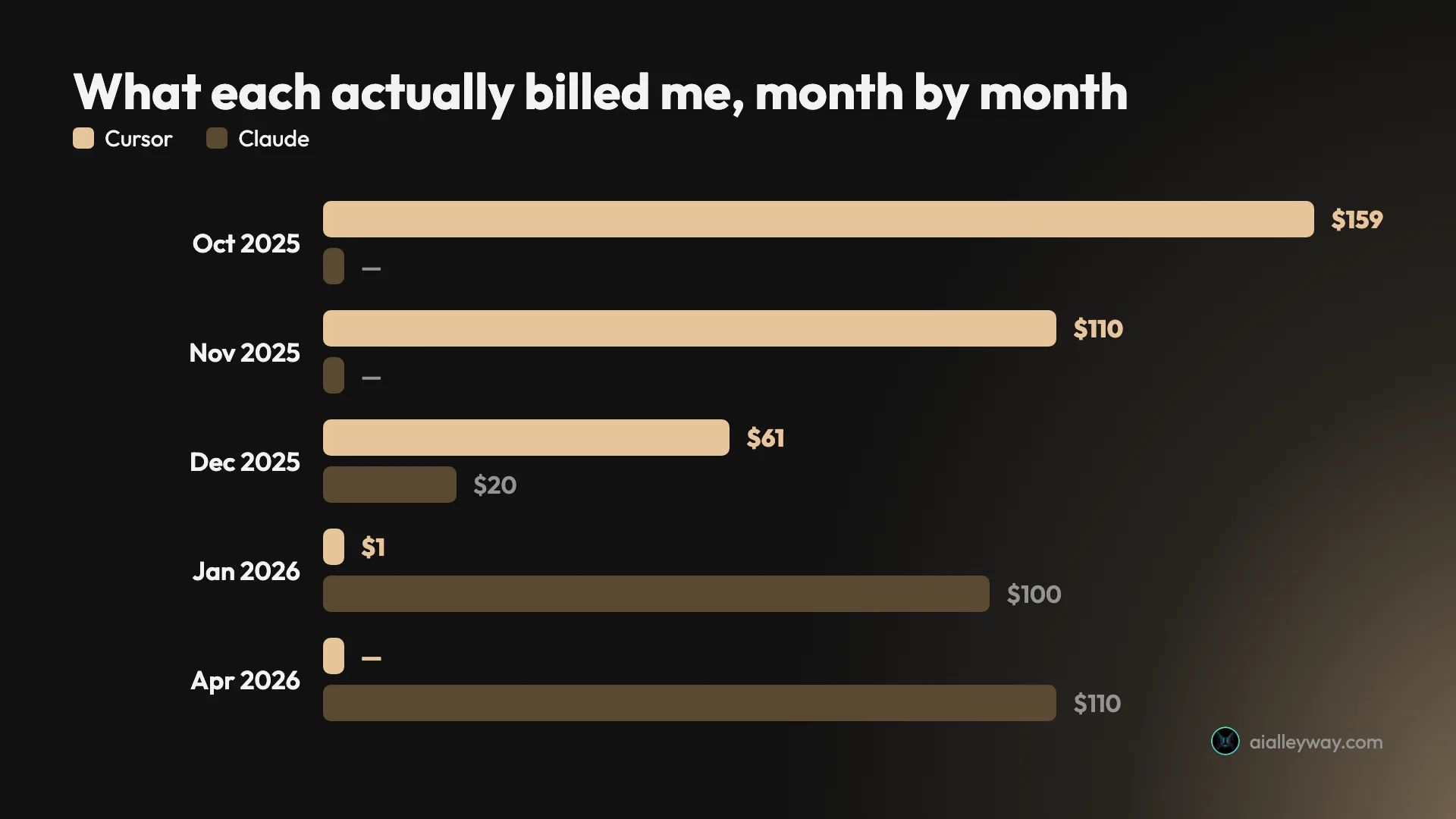
Mine, side by side, and worth saying plainly: this is one developer’s usage on one kind of project, not a benchmark. Cursor cost me $510.70 across eleven months, of which $170.70, a third, was metered usage rather than subscription, and the full invoice breakdown is in its own review. My Cursor bill reached $159.22 in October 2025 across four separate charges, and $110.00 in November. Neither month involved unusual work.
Claude Code has cost $20 in December 2025, $100 a month from January, and $110 from April once tax collection started. The number moved once, by 10%, without a plan change. That is a smaller and more predictable surprise than a meter, and it is still a surprise.
December 2025 is the honest month, because I paid both: $61.27 to Cursor and $20 to Claude. Running the pair cost about $40 at the entry tiers then, which is a perfectly reasonable setup until one of the bills starts moving.
The lever Cursor gives you and Claude does not
Because Cursor bills third-party models at their API rate, the model you pick is a cost decision as well as a quality one, and on The X Subscription more so, since none of those calls come out of the plan. My invoices itemise every usage line by model and call count, so the per-call figure falls straight out:
| Model called through Cursor | Calls | Charged | Per call |
|---|---|---|---|
| Sonnet 4 | 88 | $2.34 | $0.027 |
| Sonnet 4 thinking | 371 | $17.16 | $0.046 |
| Sonnet 4.5 thinking | 510 | $40.69 | $0.080 |
| Opus 4.5 high-thinking | 15 | $1.27 | $0.085 |
Three times the cost per call between the cheapest and the dearest, for work that frequently did not need the difference. A disciplined Cursor user routes routine edits to a cheap model and saves the expensive one for genuinely hard problems, and that discipline is worth real money.
Claude Code has no equivalent lever, because you are not paying per call. You are paying for a block of usage and choosing a model changes how fast you burn it rather than what you owe. That is simpler and it is also less controllable: the only thing you can do about your Claude bill is pick a tier and then stop when it tells you to.
Is Cursor cheaper than Claude Code at your volume?
| Your usage | Cursor, on my legacy Pro plan | Cursor now, if you want Claude | Claude Code |
|---|---|---|---|
| A few evenings a week | $20 flat, allowance never exhausted | $30 Premium plus a few dollars of Claude at API rates | $20 with Pro, plenty of runway |
| Most working days, one project | $20 plus metered, realistically $40–80 | $30 plus per-token Claude, capped only by your monthly limit | $100 Max 5x, capped |
| All day, agents running constantly | Uncapped unless you set a limit | Same shape, larger credit bill | $200 Max 20x, still capped |
The middle row is where I sat, and it is where the decision actually gets made. At light usage Cursor was straightforwardly cheaper on the old plan, and on its own Grok and Composer models it still is at $8. At heavy usage Claude’s ceiling is worth more than Cursor’s flexibility. In between, it depends on whether an unpredictable $40 to $80 bothers you more than a predictable $100 does, and that is a question about temperament rather than arithmetic. I have not run the new plans myself, so the middle column is worked from Cursor’s published pricing rather than an invoice.
The summary a buyer needs: Cursor is cheaper if your usage stays inside the allowance, and more expensive if it does not. There is a volume at which Cursor costs more than its plan card says, and I found it.
One honest caveat on the other side, because it is the same failure mode wearing a different hat. Claude’s ceiling only holds if you leave usage credits off. Turn on auto-reload and it buys more capacity when you run low, and a $100 plan becomes a variable bill exactly like Cursor’s. Mine sits at $0.00 with auto-reload off, which is the only reason I can call it capped at all. Both tools will bill you past the sticker if you let them. The difference is which behaviour is the default.
Which writes better code, Claude Code or Cursor?
Nobody wants to hear this, but on output quality I cannot separate them, and I am suspicious of anyone who claims they can.
The obvious reason is that they were often running the same models. My Cursor invoices are itemised calls to claude-4.5-sonnet-thinking and claude-4.5-opus-high-thinking. When I moved to Claude Code I was running Opus 5 through a different harness. Comparing them is largely comparing wrappers around overlapping model families, which is why “which writes better code” is the wrong question and the one most comparisons lead with.
What differs is the shape of the mistakes, which I come to below. Neither tool eliminates a confident wrong answer on an ambiguous task, and in eleven months on Cursor I never had one expensive enough to still remember, which is the same thing I said about Claude Code.
The public aggregates do not settle it either, and they are worth quoting in full precisely because they cut against my own choice:
| Aggregate | Claude / Claude Code | Cursor |
|---|---|---|
| Trustpilot | 1.5 / 5 from 1,720 | 1.6 / 5 from 278 |
| G2, the coding products | 4.7 / 5 from 108 | 4.7 / 5 from 307 |
On Trustpilot they are the same to within a tenth, and both are terrible, because Trustpilot collects people angry about a bill. On G2, where reviewers are verified business users and the coding products are listed separately, they tie at 4.7 and Cursor carries three times the review volume. If you were hoping an aggregate would decide this for you, none of them does.
Context is where they actually diverge
If there is a quality difference worth naming, it is not the model, it is what the model gets shown.
Cursor makes context explicit. You type @ and point it at files, folders, docs or past chats. On a large repository that precision is worth more than it sounds, because you can hand the agent exactly the three files that matter instead of hoping it finds them among four hundred. The cost is typing, and a discipline you have to maintain.
Claude Code decides for itself. It searches, reads what it judges relevant, and gets on with it. In the session I captured for its review it found the right file from a one-sentence instruction that named no file at all. When that works it is a genuinely different experience. When it goes wrong it goes wrong invisibly, because you never saw the moment it picked the wrong thing to read.
There is a second-order effect worth knowing. Because Claude Code assembles its own context, a CLAUDE.md file steering it is doing more work than a Cursor rules file, which is why the project-memory habit matters more on Claude Code than it does on Cursor. On Cursor you fix a bad result by scoping the prompt better. On Claude Code you fix it by improving the instructions the agent reads before it starts.
Neither approach is safer. They relocate the same risk: Cursor puts scoping errors in your hands, Claude Code puts them in the agent’s. Pick the one whose failure mode you would rather debug.
Both will review your pull requests, and both charge extra for it
Code review is close enough to a wash that I left it out of the scorecard, but it is where the two products have converged most visibly, and where both have quietly put the good version behind a higher tier.
| Code review | Claude Code | Cursor |
|---|---|---|
| On the entry paid plan | /code-review, runs in your usage | Not on Plus; Bugbot from Premium at $30 |
| The hosted version | Billed via credits, roughly $15–25 a review | Legacy Teams bill Bugbot from on-demand spend |
| Parallel reviewer agents | Research preview, Team and Enterprise | Bugbot |
Cursor ships Bugbot. On The X Subscription it is included from Premium up and missing from Plus. On the legacy plans, since a billing change in June 2026 it draws from included usage on individual plans and from on-demand spend on Teams.
Claude Code ships a local /code-review command that runs the audit as a background subagent, and that one works on any plan including my Max 5x. The version Anthropic markets, dispatching several reviewer agents at a pull request in parallel, is a research preview limited to Team and Enterprise, and it is billed through usage credits at roughly $15 to $25 a review rather than included in any plan.
For an individual it is close to a wash: both reviewers draw from usage you have already paid for. For a team both charge on top, Cursor through on-demand spend and Anthropic through credits, so neither is the cheap option and I would not pick a tool on this axis.
Worth knowing before you weigh it heavily: an AI reviewing AI-generated code is a narrower safety net than it sounds, since both passes share a model family and therefore share blind spots. I use it as a first filter and not as the reason I trust a diff.
So: quality is a draw on the evidence available to me, and anyone telling you one of these writes materially better code is describing a preference.
How do Claude Code and Cursor differ day to day?
The workflow difference is the one you will feel on day one, and it is bigger than any feature.
Cursor keeps you in the loop. Changes appear as inline diffs, you accept or reject them, and the editor is right there when you want to take over. The tiled agent panes let you run several agents and watch them in parallel, though the Claude desktop app has since grown its own draggable pane layout with parallel sessions, so this is a narrower edge than it was. If your instinct is to supervise, this is a better fit and no amount of autonomy elsewhere compensates.
Claude Code can take you out of the loop, but that is a setting rather than the default. Out of the box it asks before editing a file and shows the diff, and the desktop app has a dedicated diff pane. The difference is how far each one nudges you: Cursor’s interface is built around watching, Claude Code’s around delegating, and both let you work the other way if you insist.
The front-end case is where Cursor still leads, though by less than it did six months ago. Visual work is a loop of change, look, adjust, and Cursor has been built around that loop for years. Claude Code now has a Browser pane that runs your dev server, previews the app and lets you point at an element, which closes the category gap without closing the maturity one. If most of your day is CSS and component work, Cursor is still the better instrument.
Which is easier to get started with?
| The measure | Claude Code | Cursor |
|---|---|---|
| First run | Install the CLI, authenticate, start a session | Download the app, import VS Code settings |
| What you bring | A terminal habit | Your existing editor setup, intact |
| First real friction | Permissions prompts and learning what to delegate | Watching the meter, if you delegate hard |
| Payoff curve | Slow, then steep once CLAUDE.md is real | Immediate, because nothing changed |
Cursor’s onboarding advantage is genuine and under-rated. You import your settings and you are working, with no new habits to build and nothing to defend to colleagues who like their setup. Claude Code asks you to learn a permissions model, a memory-file convention and a mental model of what is worth handing over, and it repays that investment only after a few weeks.
That asymmetry is why “just try both” is better advice here than in most comparisons. A two-week Cursor trial tells you what Cursor is. A two-week Claude Code trial tells you what Claude Code is like before the payoff arrives, which undersells it.
Where I expected a gap and did not find one
I went into this assuming automation was Claude Code’s moat. It is not. Cursor ships cursor-agent -p for non-interactive runs, with json and stream-json output, CURSOR_API_KEY auth for pipelines and a documented GitHub Actions workflow. Anthropic’s headless story is more mature and better documented, but “Cursor cannot do this” is simply false, and I would have published that error if I had not gone looking.
The same correction applies in the other direction. I assumed Claude Code could not show you a running app, and the desktop build now previews one in a Browser pane and auto-verifies its own changes. Both assumptions were a year out of date, which is roughly the half-life of any claim in this category.
Who should pick Claude Code?
- Anyone who needs the bill to have a ceiling. This is the case I lived. If a variable invoice is a problem, a capped plan that makes you wait is the answer, and it is the only axis where Claude Code wins decisively.
- People automating around the tool. Hooks, skills, subagents and headless CI runs make it programmable in a way an editor-bound tool is not.
- Developers working mostly in existing codebases on multi-file changes. The further a task reaches across files, the further the delegation model pulls ahead.
- Terminal natives. If you already live in a shell and a browser, adding a GUI you do not want is a cost rather than a feature.
The common thread is delegation. Every one of those cases is someone who wants to describe an outcome and review a result, rather than participate in the writing. If reading a finished diff sounds like a relief, this is your side of the comparison.
The reverse test is just as useful. If the idea of an agent editing nine files while you are not watching makes you uncomfortable, that discomfort is information, and Claude Code will spend months arguing with it.
Who should pick Cursor?
- Most working developers, honestly. It takes three of the four axes that are not level, and asks nothing of your setup. That is the default recommendation and I would not argue with anyone who takes it.
- Anyone doing front-end or visual work. The preview loop is not something Claude Code competes for.
- People who want to watch each change land. Inline diffs and accept-or-reject beat reviewing a finished result if supervising is how you build trust.
- Anyone who wants model choice. Several labs in one editor, switchable per task, with real cost consequences: on The X Subscription every third-party call bills from prepaid credit.
- Moderate users. If your usage sits inside the allowance, the meter never bites. My $20 plan did almost everything; Premium at $30 is its current equivalent.
The common thread here is participation. These are people who want the AI in the room rather than sent away with a brief, and who would rather catch a wrong turn at the first diff than at the third commit.
It is also, bluntly, the larger group. Most developers are not trying to automate themselves out of the editing loop, they are trying to move through it faster, and Cursor is built for exactly that. My own first five months were spent happily in this category, and nothing about the tool pushed me out of it. My usage did.
Final word
If you are choosing between these on the features, choose Cursor. It won three axes of seven to Claude Code’s one, with three level, it does not ask you to abandon your editor, and for five straight months it did everything I needed at a flat $20. It no longer costs the same to start if Claude is what you want: that is $30 plus per-token charges in Cursor against $20 in Claude Code.
I switched because one axis outweighed the other three for me. My Cursor bill reached $159 in a month and a third of everything I paid was metered rather than subscription, while Claude Max stops at $110 and waits. That is a statement about my volume, not about which tool is better, and if your usage is moderate you will never meet the problem that moved me.
| If this is you | Buy | Why |
|---|---|---|
| Front-end, visual, design-heavy work | Cursor | A more mature preview loop, though no longer the only one |
| Moderate usage, existing VS Code setup | Cursor | Three axes, no migration, from $8 on its own models |
| Heavy delegation, bill must be predictable | Claude Code | A ceiling instead of a meter |
| Agents in CI or on a schedule | Either | Both run headless; pick on price |
| Genuinely unsure | Cursor’s free tier | It has one; Claude Code does not |
One thing neither tool solves, so you do not go looking for it. Both still need you to review the output, and both will hand you a confident wrong answer on an ambiguous task. Neither has removed the judgement step, and the marketing on both sides is careful never to promise it has. Whichever you buy, the bottleneck moves from typing to reviewing, and if you cannot review the code you cannot safely use either.
The genuinely useful test is cheaper than either subscription. Run Cursor’s free plan for a fortnight on real work and watch how fast you meet the limits, because Cursor has a free tier and Claude Code does not, which makes it the cheaper experiment by default. If you never get close, buy Cursor and enjoy it. If you hit them in the first week, you have just learned that the cost axis is your axis too, and the rest of this comparison is noise.
If you want a single sentence to take away: the feature lists have converged further than either camp admits, the billing models have not, and the billing model is the thing you will still be living with in a year.
A closing caution about how long any of this stays true. Anthropic began collecting tax mid-subscription and moved my bill 10% without a plan change, Cursor rebuilt its interface around agents, and while writing this I found three of my own axis verdicts had gone stale inside six months. Every number here is dated to July 2026 and checked against primary sources, and some of them will be wrong by the time this ranks.
What will not change as fast is the shape of the two products. One bills you for what you use and lets you keep going. The other charges a fixed amount and makes you stop. That difference has survived every repricing on both sides, and it is still the thing to decide on.
Frequently asked questions
Is Claude Code or Cursor better?
On features, Cursor. I scored the two across seven axes a buyer actually weighs and Cursor took three: model choice across several labs, a genuine free tier, and a more mature front-end preview. Claude Code took one, what happens to your bill by default. Three axes came out level, including two I expected to be gaps: both run headless in CI, and both show you a diff before editing.
I switched to Claude Code anyway, which is the honest complication. One axis outweighed three for me: on the legacy plan I had, Cursor billed metered usage on top of the subscription and my bill reached $159 in a month, while Claude Max caps at $110 and makes me wait rather than charge me. If your usage is moderate, Cursor's three wins are real and the cost axis never bites you. If you delegate heavily, that one axis is the whole decision.
Is Cursor cheaper than Claude Code?
It depends which models you want. Since October 2026 Cursor is sold inside The X Subscription: Plus at $8 a month runs only Cursor's own Grok and Composer models, which undercuts Claude Pro's $20. If you want Claude inside Cursor, you need Premium at $30, and every Claude request then bills at Anthropic's API list price from prepaid credit, because no Cursor plan includes third-party models. Claude Code includes Claude in the $20 Pro plan.
Above that they diverge in shape rather than size. Cursor's weekly pool covers only its own models, and third-party usage is metered from the first request, capped by whatever monthly limit you set. Claude Max is $100 or $200 flat and stops you when you hit a limit instead of charging more.
My own invoices show what that means: Cursor cost me $510.70 across eleven months with a $159.22 peak on its legacy Pro and Pro Plus plans, while Claude Max 5x bills a steady $110 including tax. Cursor is cheaper if you stay inside the allowance and more expensive if you do not.
Can you use Claude Code and Cursor together?
Yes, and plenty of people do. They are not mutually exclusive purchases: Cursor is an editor you install and Claude Code is a terminal agent, so running both means paying two subscriptions rather than resolving a conflict. For one month, December 2025, I paid for both at once.
The common pattern is to delegate large multi-file work to Claude Code in the terminal and keep Cursor open for front-end work, visual debugging and anything where you want to watch each change land. At $20 plus $30, or $20 plus $8 if Cursor's own models are enough for the editing side, that is a defensible setup. It stops being defensible when both bills grow, which is what pushed me to pick one, and if you are going to pick one the question is whether your work is mostly delegation or mostly editing.
Which is better for front-end work?
Cursor, but by less than it used to be. Front-end work is a loop of change, look, adjust, and Cursor has been built around that loop for years: editor, preview and inline diffs in one window.
Claude Code closed the category gap in mid-2026. Its desktop app starts a dev server, previews your running app in a Browser pane, lets you select an element with a keyboard shortcut and auto-verifies its own changes after every edit.
That is a real preview loop, just a younger and less fluent one than Cursor's. If most of your day is CSS, component work or design iteration, Cursor is still the better instrument, but 'Claude Code cannot show you your app' stopped being true.
Does Cursor still just do tab completion?
No, and this is where most comparisons are out of date. Cursor reshaped around agents with its 2.0 release in October 2025: open it now and the default surface is an agent prompt with a model selector, plan mode, a sandboxed shell command and tiled panes for running several agents side by side. (Skills arrived later, in 2.4 in January 2026.) Tab completion is still there, but it is no longer the centre of the product.
That matters for this comparison because the old framing, Cursor as the autocomplete editor and Claude Code as the agent, no longer separates them. Both delegate multi-file work now. The real differences are where the work happens, terminal versus editor, and how you get billed for it.
Keep reading
Claude Code vs Codex vs Cursor: one brief, three results
Claude Code vs Codex vs Cursor, measured. I gave all three the same brief and used every app they built. All three passed — here is what separated them.
Claude Code pricing: what it costs and what it really costs
Claude Code pricing is $20, $100 or $200 a month. Anthropic's own docs put enterprise usage at $150–250 per developer per month. Here's why the gap matters.

Claude skills marketplace: what it is and which to add
A Claude skills marketplace is just a git repo with a manifest. Anthropic's official one lists 291 plugins; 23 say Anthropic wrote them. How to read one.
Claude Code vs Copilot: $10 now buys you both
Claude Code vs Copilot, both measured on one identical brief. Copilot Pro at $10 now bundles Claude Code access, which changes the question entirely.