
Is Claude Code worth it? What $110 a month actually buys
Is Claude Code worth it? I run the Max 5x plan: the sticker says $100, I pay $110. What the money actually buys, and where the usage limits bite hardest.
Contents
Is Claude Code worth it?

Yes, if you work inside an existing codebase and can judge what an agent hands back. Claude Code is the only AI coding tool I have stopped evaluating and simply started depending on, and I pay for the Max 5x plan out of my own pocket to keep using it. It loses points for billing friction rather than capability, which is what the 4.7 reflects. Skip it if you want a graphical editor, or if you are still learning to code, because its autonomy is exactly the wrong shape for someone who needs to watch every change land.
If you decide it is worth it, Claude Code tips covers how to get more out of it — and the best AI for coding shows where it placed against seven other tools on one identical build.
Where I stand, so you can weigh the rest: we earn referral credits on Claude signups, and I moved here from Cursor after paying for it for eleven months. Every figure below is from my own account.
What does Claude Code actually do?
It is not autocomplete. That distinction is the whole product, and it is the thing most comparisons get wrong by lining up feature tables as though Claude Code and an AI editor were the same kind of object.
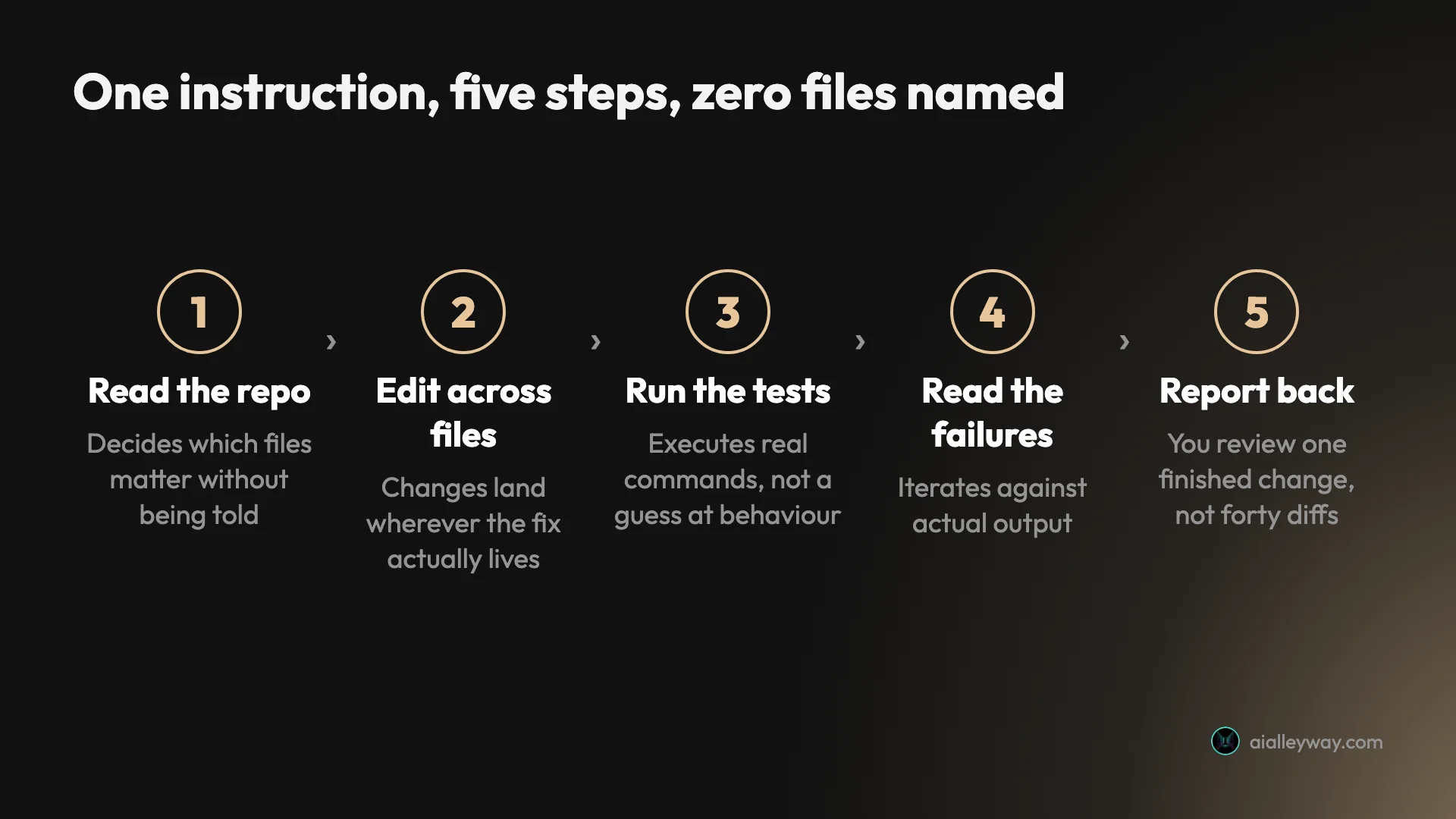
Claude Code runs in your terminal. You give it a task in plain English, and it reads your repository, decides which files matter, edits them, runs your tests, reads the failures, fixes them, and reports back. A typical instruction from my own week looks like “the OG card renderer is picking the wrong logo slug for hyphenated tool names, find it and fix it”. It then goes and does that, across however many files the fix touches, without me naming a single one.
The unit of work is a task, not a line. An editor with AI in it makes you faster at typing code you already planned. An agent makes you responsible for reviewing code you did not type. Those are different jobs, and which one you want is the real decision underneath the “is it worth it” question.
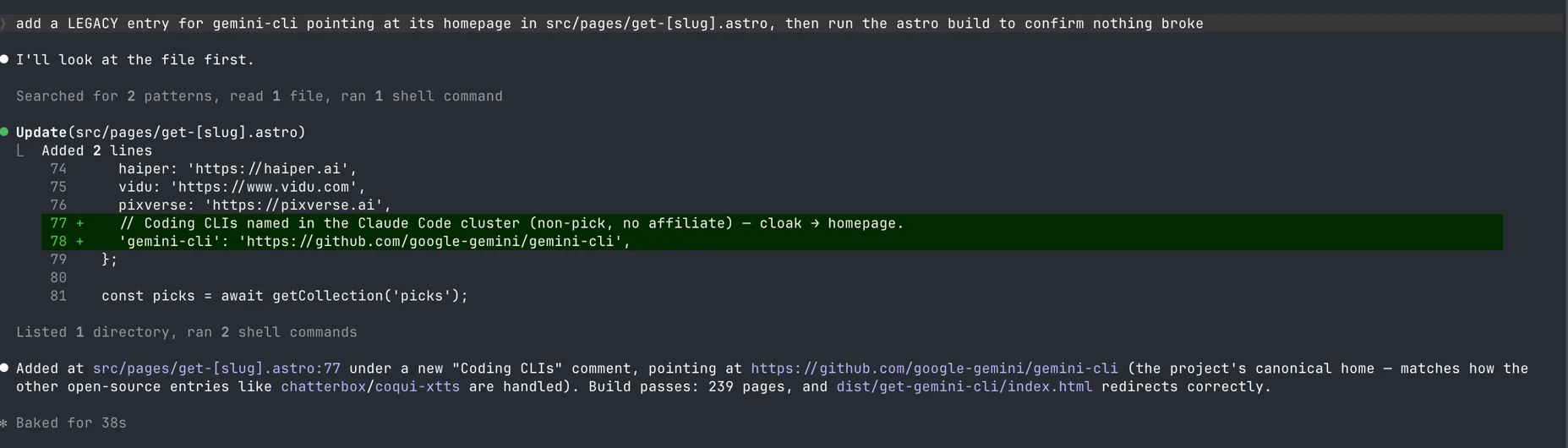
That is a real session from this site’s repository, captured on Claude Code v2.1.220 running Opus 5. One sentence in, and it searched for the right patterns, read the file, added two lines, ran the build, and confirmed 239 pages compiled.
The part worth noticing is the last clause. I asked it to confirm the build did not break. It also checked that the generated redirect page actually resolved, which I had not asked for. Thirty-eight seconds, and the verification was more thorough than my instruction.
Three things make the delegation actually hold up in a real project rather than a demo. The first is a project memory file, CLAUDE.md, that sits in your repository and gets read at the start of every session. Mine carries the deployment quirks, the naming conventions, and a list of prior bugs that bit us. It removes the tax of re-explaining your project every morning, which is the single biggest reason AI coding help usually stays shallow.
The second is scope. It holds a large enough context window to keep a genuinely big slice of a codebase in view at once rather than working file by file. The exact number depends on the model you are running, and the top models now reach far beyond the 200,000 tokens the plan comparison table advertises. The third is that it can run commands. It executes your test suite, reads real output, and iterates against reality instead of guessing what your code probably does.
How it differs from just using Claude
This is the question I get most, and it has a clean answer: access. Claude in a chat window can only see what you paste into it. Claude Code sees your filesystem, your git history, and the output of any command it runs.
That changes the work in a way a bigger context window never could. In chat you become a courier, ferrying files in and answers out, and every round trip loses a little fidelity. In Claude Code you describe an outcome and it goes and gets what it needs. The difference is not intelligence. It is permission and reach.
It also means the failure modes differ. Chat gives you code that does not fit your project. Claude Code gives you code that fits your project and may still be wrong, which is harder to spot and more important to review.
| The measure | Claude (chat) | Claude Code |
|---|---|---|
| Sees your code | Only what you paste | The whole repository |
| Runs commands | No | Yes, including your test suite |
| Edits files | You copy the output back | Writes to disk directly |
| Remembers the project | Per conversation | Persistently, via CLAUDE.md |
| Typical failure | Code that ignores your setup | Code that fits your setup and is still wrong |
The last row is the one to sit with. A more capable tool does not remove the review burden, it relocates it.
Where it runs
It started as a terminal tool and that is still where it lives, but it is no longer only that. There is an IDE integration, a desktop app, a web surface and JetBrains support, plus an integration with the separate Claude in Chrome extension, all sharing the same subscription and the same limits. The plan comparison page lists Claude Code alongside Cowork, Design, and Science as products bundled into the same tiers rather than sold separately.
Practically, the terminal remains the honest surface. The other entry points are conveniences on top of the same agent, and if you dislike working in a terminal, adding a GUI wrapper will not change the fundamental posture of delegating a task and reviewing a result.
There is also a permissions model worth knowing about before your first session. By default it asks before running shell commands or modifying files, while reads inside your working directory go through without prompting, and you can widen or narrow that as trust builds. Most of the horror stories about agents running wild come from people who turned the guardrails off early.
How much does Claude Code cost?
There is no separate Claude Code price. It ships with a Claude subscription, so the question is really which Claude plan you need, and the answer is driven by usage limits rather than features.
| Plan | Price (USD, monthly) | Claude Code | Usage credits | Who it fits |
|---|---|---|---|---|
| Free | $0 | Not included | No | Chat only, not a Claude Code option |
| Pro | $20, or $17 on annual | Included | Yes | Light, occasional sessions |
| Max 5x | $100 | Included | Yes | Daily driver for most professionals |
| Max 20x | $200 | Included | Yes | All-day agentic work, multiple parallel sessions |
The pricing page itself only shows Max as “From $100” with a choice of 5x or 20x. The actual figures live in the help centre, which states Max 5x at $100 and Max 20x at $200. Findable, but not on the page you would look at first.
The listed price is not the billed price. Every figure on the pricing page excludes tax, stated in fine print under the plan cards, so my $100 Max 5x plan bills at $110 a month once my 10% rate is applied.
My own invoice history shows this arriving mid-stream rather than at signup. January, February, and March 2026 all billed a flat $100. From April onward every invoice reads $110. Nothing about my plan changed. Tax collection did, and my monthly cost rose 10% without a pricing announcement, because the list price never moved.
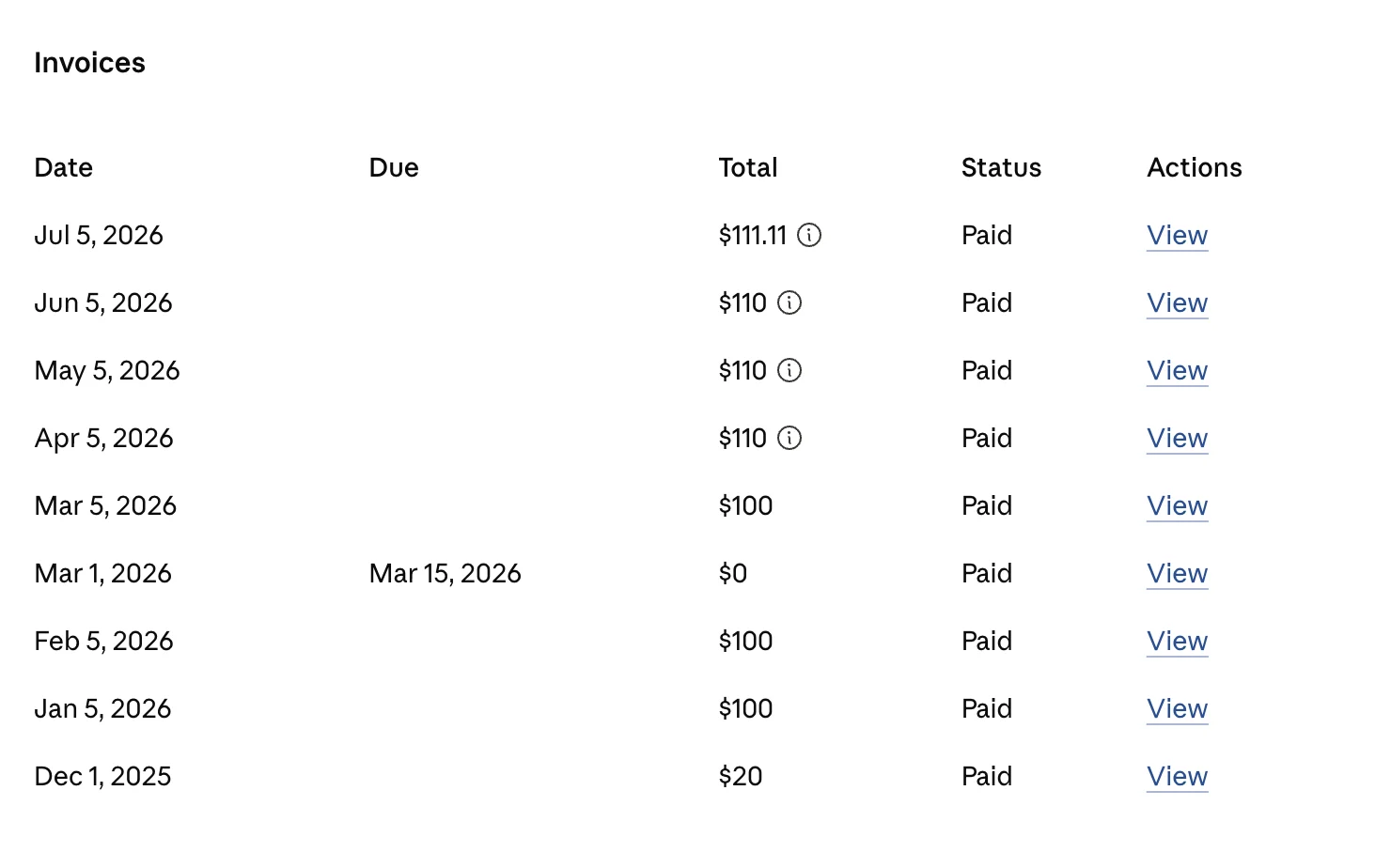
Your rate decides your number, and in some places it is zero, but the headline price is a floor rather than a total, and the floor can stay still while your bill does not.
The same table shows the upgrade path in one column. December 2025 is a $20 Pro invoice. January 2026 onward is $100. That jump is the moment Pro stopped being enough.
The more important cost mechanic is the limit system, because it decides whether you need the entry Max tier or the top one. Two limits run at the same time. A rolling session window resets roughly every five hours. A separate weekly cap resets on a fixed day and time. They move independently, which is why the pricing page cannot really answer “will this be enough for me”.
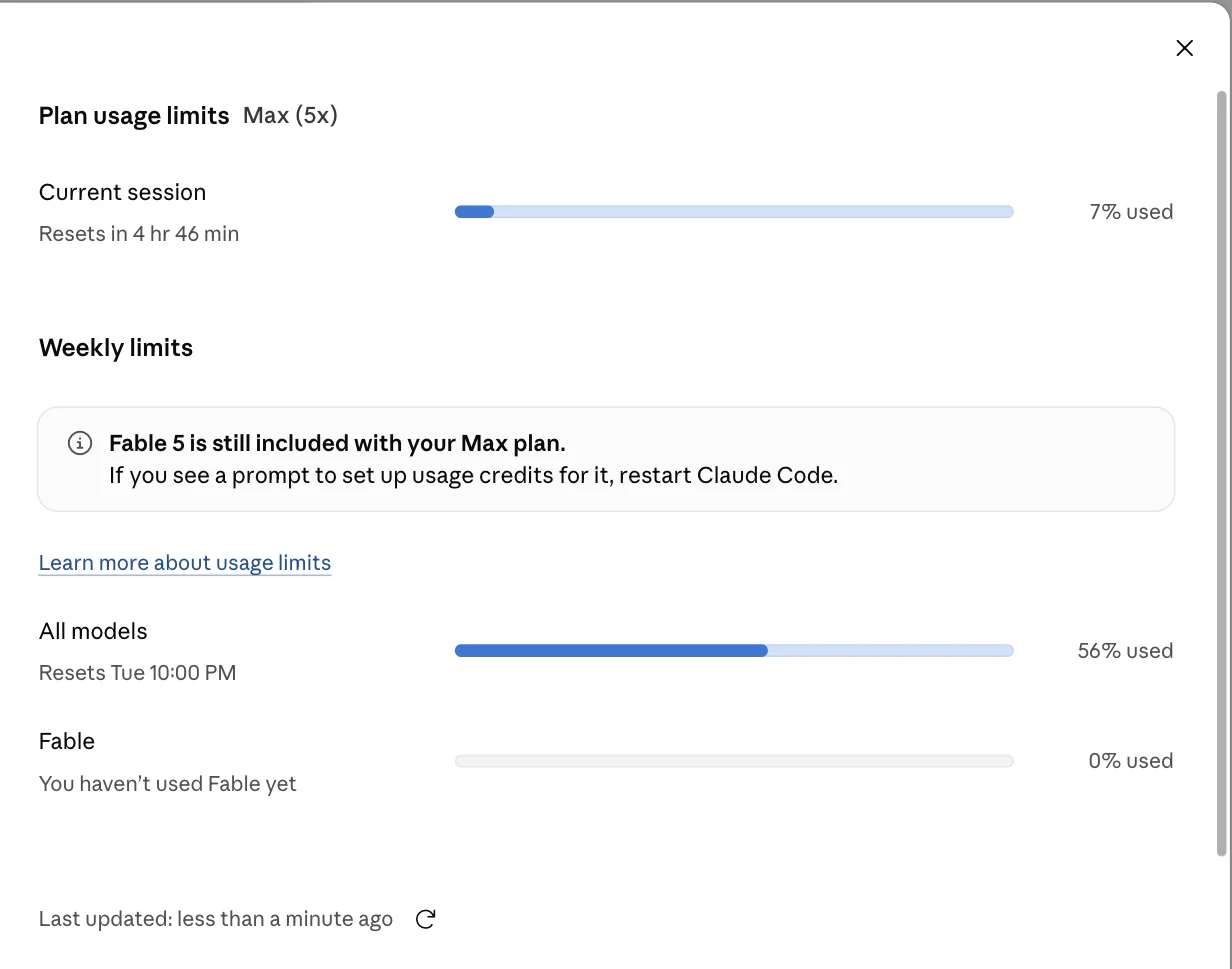
That screenshot is my actual account while writing this review, and it shows the trap in one frame. My current session was at 7% with nearly five hours left on the clock, which looks like abundance. My weekly allowance was at 56% and did not reset until Tuesday night. The session meter tells you nothing about whether you will still be working on Friday.
The weekly cap is also split: my dashboard shows one bar for all models and a second for Fable, which I had not touched. When you exhaust a limit you have two choices: wait for the reset, or switch on usage credits and pay past it. My credit balance sits at $0.00 with auto-reload off, which is the setting I would recommend to anyone who wants a predictable bill, because auto-reload is how a $100 plan quietly becomes a $300 month.
What “5x” and “20x” actually mean
They are mostly usage multipliers against Pro, but not only that. The plan comparison sells them on usage: Max buys “5x or 20x more usage than Pro”, higher output limits, earlier feature access, and Max-only priority at busy times. Two capability gaps sit underneath that and the pricing page does not surface them. Per Anthropic’s model configuration docs, Pro defaults to Sonnet 5 while Max defaults to Opus 5, and Opus with the 1M-token context window is included on Max but requires usage credits on Pro. Fable follows the same shape: included on Max at half your weekly limit, reached through credits on Pro.
That is the single most useful thing to understand before choosing. You are not buying a smarter tool at the top tier. You are buying more hours before you hit a wall. If you code two evenings a week, Pro is genuinely enough and the upgrade is wasted money. If Claude Code is how you work all day, Max 20x is cheaper than the hours you lose waiting for a reset.
Pro did not fail me on capability. It failed me on runway, repeatedly, in the middle of work, which is why that December-to-January jump in my invoices happened at all.
My weekly meter sitting at 56% mid-week suggests 5x is roughly the right tier for one person working most days, with headroom rather than luxury. If I were pairing with someone on the same account, or running parallel sessions, I would be looking at 20x within a month.
| How you work | Tier | Why |
|---|---|---|
| A few evenings a week | Pro | Defaults to Sonnet 5; Opus 1M costs credits; fine for short sessions |
| Most working days, one project | Max 5x | Removes the interruption without paying for headroom you won’t use |
| All day, or several sessions at once | Max 20x | Cheaper than the hours lost waiting for a weekly reset |
If you are unsure, start at Pro and let the limits tell you. Upgrading takes a minute and you will know within two weeks whether you are hitting the ceiling or imagining it.
Annual billing and the discount worth knowing
Paying yearly is meaningfully cheaper, on one tier only. Pro lists at $20 billed monthly against $200 up front, which Anthropic displays as $17 a month and a saving of about 17%. Max has no annual option: it is billed monthly.
The catch is the commitment. Annual means paying a year ahead for a tool in a category that is changing every few months, and there is a real chance the competitive picture looks different by month eight. I pay monthly for exactly that reason and treat the extra as insurance rather than waste.
One small offset when you are costing the plan out: the settings screen carries guest passes that give a friend a free week, and three were sitting unused in my account.
Who is Claude Code for?
- Working developers inside an existing codebase. The value is proportional to how much context the tool has to absorb, and a mature repository is where it pulls furthest ahead of an editor assistant.
- People who would rather review a finished change than approve forty small ones. If reading a complete diff sounds better than accepting inline suggestions all day, this is the right shape.
- Anyone automating around the tool, not just typing into it. The hooks, subagents, and skills layer turns it into something you can script, which is where the power users live.
- Teams with conventions worth writing down. A good
CLAUDE.mdis the difference between a clever assistant and one that matches your house style without being asked. - Not for people who want a visual editor or are learning to code. There is no design surface and no inline diff you approve line by line. If you cannot yet tell good output from plausible output, the autonomy is a liability rather than a feature.
One more filter, and it is the one people skip: check whether you are allowed to use it. Model training is opt-out on the consumer tiers, but pointing any agent at a client codebase is a contractual question before it is a technical one. Settle that first.
The good
The autonomy is real, and it holds across many files
The claim every agentic tool makes is multi-file editing. The difference here is that it finishes. In the session captured earlier, adding a redirect entry to this site, it searched for the right patterns itself, made the edit, ran the build, and then confirmed the generated page actually resolved. The work ended in a state I could ship rather than a suggestion I still had to finish.
CLAUDE.md removes the daily re-explaining tax
Anthropic’s memory docs describe layered CLAUDE.md scopes, from managed policy down to a local file, concatenated at the start of every session. In practice it is the feature that makes the tool feel like it works here, on this project, rather than in general. Mine encodes deployment quirks and a list of prior bugs, and sessions stop repeating mistakes that were solved months ago.
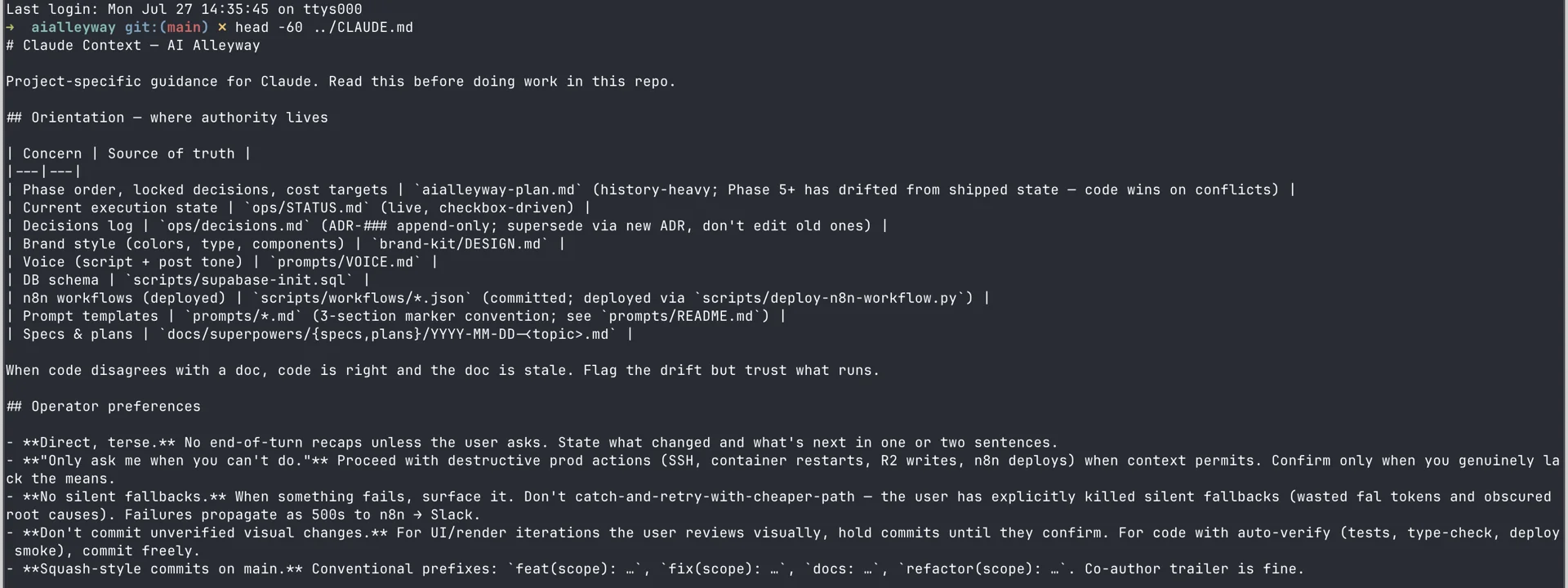
That is the top of my actual file. The first block tells it which document wins for each kind of question. The second tells it how I want to be spoken to and what it may do without asking. Every session starts already knowing both, and I never type any of it again.
The payoff compounds. Every time I correct the same misunderstanding twice, that correction goes into the file and I never explain it again. After a few months the file is a genuine onboarding document, useful to a human joining the project as well as to the agent.
## Gotchas (high-pain prior bugs)
- **`backdrop_url: null` ≠ `undefined`.** When validating optional scene fields,  use `!= null` (matches both). `!== undefined` rejects valid payloads.- **Composition props must be `type`, not `interface`.** Interfaces don't satisfy  `Record<string, unknown>`. This bites on every new Composition.- **The webhook path is `sf-4-render-video`**, not `sf-4-video-render` (that 404s).
That block is lifted straight from my own project file, and it is the reason a session in month six does not rediscover a bug from month two.
It runs your tests and reads the failures
It executes commands and iterates against real output. This is the difference between code that looks right and code that passes, and it is why I trust it on refactors. The loop of edit, run, read the error, fix, run again is the part that used to be my job and is now something I supervise.
The practical effect is that I stopped reading proposed diffs line by line and started reading test results. A change that touches nine files and turns the suite green is a different kind of evidence from nine plausible-looking edits, and it is the reason delegation stops feeling reckless.
The extensibility layer has no real equivalent
Hooks, subagents, skills, and worktrees turn the tool into a platform you can program. A local /code-review command runs the audit as a background subagent on any plan. The hosted version that dispatches several agents at a pull request in parallel is a research preview limited to Team and Enterprise, so it is not something my Max 5x plan buys. Editor-bound rivals do not expose this surface at all.
Hooks are the part I underestimated. They fire on events such as a session ending or a tool call running, so you can enforce project rules mechanically instead of hoping the agent remembers them. The same openness is why it works as an MCP client: when I tested Zapier’s MCP server, Claude Code was the thing driving it. Skills go further and package a whole procedure the agent can invoke by name, which is how a repeated multi-step job stops being something you re-describe every time.
You mostly pay for usage, and partly for a better default
The published plan comparison prints the same models and the same context allowance on Pro, Max 5x and Max 20x. That table is not the whole story, and I had it wrong here for a week. Anthropic’s own model configuration docs show Pro defaulting to Sonnet 5 against Max’s Opus 5, and Opus with the 1M-token window included on Max but requiring usage credits on Pro. So most of what you buy with Max is hours, and some of it is a better default model. The pricing table also lags the product, still printing 200k for every tier while the top models reach well beyond it.
Model training is opt-out on every consumer tier
The same plan comparison lists model training as opt-out across Free, Pro, Max 5x, and Max 20x. For anyone working on client code or anything under an agreement, that is a load-bearing detail, and it is stated on the pricing page rather than buried in a policy document.
The bad
The two-limit system is genuinely confusing
The single most common complaint I see, and the one my own dashboard demonstrates, is that the session meter and the weekly meter tell different stories. A user in the Reddit thread “Anyone using Claude Code Pro ($20/mo)? Worth it?” in r/vibecoding describes not lasting long on the $20 plan once real work started. Nothing is hidden, but nothing is obvious either, and the pricing page does not model it for you.
Claude Code’s two limits on a Max 5x plan, read from my own dashboard:
| The measure | Session limit | Weekly limit |
|---|---|---|
| Window | Rolling, roughly 5 hours | Fixed weekly reset |
| My reading while writing this | 7% used, resets in 4h 46m | 56% used, resets Tue 10:00 PM |
| Split by model | No | Yes, a separate Fable bar alongside all-models |
| What it tells you | Whether you can keep going now | Whether you can keep going Friday |
The two numbers routinely disagree, and only one of them predicts your week. Reading the session meter as your budget is the mistake that produces the angry threads.
The price you see is not the price you pay
I pay $110 a month for a Claude Max 5x plan advertised at $100, because tax is excluded from every figure on the pricing page. That is legal and standard, and it still means the number that sells the plan understates my actual cost by a tenth before I have bought a single usage credit.
Worse, it moved without warning. My invoices ran at a flat $100 through March 2026 and switched to $110 in April, with no change to my plan and no announcement, because the list price genuinely had not changed. A cost you cannot predict from the pricing page is the kind that quietly breaks a budget.

There is no visual surface at all
It is a terminal tool at heart. A desktop app and an IDE integration exist, but none of them gives you a design canvas or a rendered preview of what you just built. For front-end work you are switching to a browser constantly to see the result. If your day is mostly layout and visual polish, a terminal agent is simply the wrong instrument, and no amount of capability fixes that.
Confident wrong answers cost more than they save
On an ambiguous task it makes a decision that is reasonable in isolation and wrong for your system, then builds on it. A road-test writeup published by Loomery puts this plainly, noting it often hallucinates where there is ambiguity or unknowns while performing well on well-guarded tasks. Unwinding three commits of confident wrong direction is worse than never having delegated.
The defence is specification, not supervision. Vague instructions produce confident guesses, and the guesses are where the cost lives. I have learned to spend an extra thirty seconds saying which approach I want rather than letting it choose, and the failure rate drops sharply. That is a real tax on the tool’s promise, because “just describe what you want” is most of the pitch.
Usage credits and auto-reload are a budget trap by default
The billing screen offers usage credits at a discount and an auto-reload toggle that buys more when you run low. Leave auto-reload on and your predictable subscription becomes a variable bill with no natural ceiling other than the spend limit you remembered to set. I keep mine off and treat hitting a limit as a signal to stop.
The public rating is worse than mine
I held Cursor to this standard in my Cursor review, so it applies here. As of July 2026, Claude sits at 1.5 out of 5 on Trustpilot across 1,720 ratings, with the summary reporting that most reviewers were let down overall and that many were dissatisfied with their subscriptions. That is marginally worse than Cursor’s 1.6, on six times the review volume.
Two caveats matter and neither cancels it. The rating covers Claude the consumer product rather than Claude Code specifically, and the complaints cluster on subscriptions and usage limits, which is the exact territory this review spends most of its length on. Other aggregates point the other way: G2 rates Claude 4.6, and the iOS app holds 4.7 across roughly 213,000 ratings.
| Aggregate | Claude / Claude Code | Cursor |
|---|---|---|
| Trustpilot | 1.5 / 5 from 1,720 | 1.6 / 5 from 278 |
| G2, the coding products | 4.7 / 5 from 108 | 4.7 / 5 from 307 |
| G2, parent product | 4.6 / 5 from 403 | — |
| iOS App Store | 4.7 / 5 from ~213,000 | — |
The honest reading is that no aggregate separates these two tools in my favour. Trustpilot rates them the same to within a tenth. On G2, where the coding products are listed separately, Claude Code and Cursor both score 4.7 and Cursor carries three times the review volume. If you were hoping a rating would settle the choice, none of them does, and I would rather say that than quote only the ones that suit my argument.
The learning curve is real and front-loaded
Getting value out of it means learning a CLAUDE.md convention, a permissions model, and a mental model of what to delegate. A widely-read Hacker News thread on two weeks with the tool captures the gap between the glowing reviews and the first-week experience. It rewards investment, which is another way of saying it punishes casual use.
What are the best Claude Code alternatives?
If the terminal-agent model is not how you want to work, two tools are worth a look before you commit.
Cursor is the answer if you decided you want to see every change. I paid for it for eleven months before switching, so that recommendation is not theoretical, and I scored the two head to head in Claude Code vs Cursor. It is an editor you drive rather than an agent you delegate to, with inline diffs, tab completion, and a choice of models, at a fifth of the Max 5x price. Pick it if supervising the work matters more to you than offloading it.
Codex is the closer substitute, since it is also an agent rather than an editor. It offers a local CLI and an IDE extension alongside a cloud sandbox, and it is included on every ChatGPT tier, Free upward, with a Go tier at $8 and Plus at $20 below the heavier plans. Pick it if you would rather dispatch work to a sandbox than run an agent against your local filesystem.
Gemini CLI is the one to look at before you commit money to the idea. It is open source under Apache-2.0 and runs the same terminal-agent pattern, so it is a low-stakes way to find out whether delegating to a terminal suits you at all. Check its current free allowance before relying on it, because Google has moved that line more than once.
| Alternative | Shape | Entry price |
|---|---|---|
| Cursor | VS Code based, and agent-first since 2026 | $20/mo plus metered usage |
| Codex | Agent with cloud sandbox, CLI and IDE extension | Limited on Free and Go ($8); full on Plus ($20) |
| Gemini CLI | Open-source terminal agent | Apache-2.0; free consumer tier withdrawn June 2026 |
All three are reasonable if Claude Code’s shape is wrong for you. None of them changes my recommendation for the reader who wants the deepest agent on an existing codebase.
Final word
Claude Code is worth the money if your work is multi-file, your codebase already exists, and you can read a diff critically. That is a narrower audience than the marketing implies, and a much better fit than the hype suggests once you are inside it. I have run it daily for months on a production project, and I have not seriously considered cancelling.
Budget $100 plus tax, leave auto-reload off, write a real CLAUDE.md in your first week, and treat the weekly meter as the number that matters. Do that and it is the strongest agentic coding tool I have used. Ignore the limits and you will spend a month confused about your own bill.
Frequently asked questions
Is Claude Code worth it?
If you work in an existing codebase and can review what an agent writes, yes. I run it daily on the Max 5x plan and it is the only AI coding tool I stopped evaluating and started depending on.
The thing that justifies the money is not code completion, it is delegation: I describe a change that touches six files, and it reads the repository, makes the edits, runs the tests, and reports back. That is a different category of help from an editor that finishes your line.
It is not worth it for everyone. If you want a graphical editor with visual diffs, Cursor is the better buy at a fifth of the price. If you are learning to code, the autonomy works against you, because accepting changes you cannot yet evaluate teaches you very little.
And the value drops sharply if you cannot review output critically, since a confident wrong answer on an ambiguous task costs more to unwind than it saved. I score it 4.7 out of 5.
How much does Claude Code cost per month?
Claude Code is not billed separately. It is included with a Claude subscription, so you pay for the plan and Claude Code comes with it. Pro is the entry point, Max 5x is the tier most heavy users land on, and Max 20x is the ceiling. There is no free tier for Claude Code itself, though the Claude chat product does have one.
The number on the pricing page is not the number on your card. Every figure on that page excludes tax, and it says so in small print, so my $100 Max 5x plan bills at $110 a month once my 10% rate is applied.
If you exhaust your plan limits you can also buy usage credits on top, which is a separate charge with its own spend cap. Budget the plan price plus your local tax rate, and treat usage credits as an optional overflow rather than part of the base cost.
What are Claude Code's usage limits?
There are two limits running at once, and misreading them is the single most common complaint about the product. The first is a rolling session window of roughly five hours. The second is a weekly cap that resets on a fixed day and time. You can be at 7% of your session and still be at 56% of your week, which is exactly what my dashboard showed while I was writing this review.
The weekly cap is also split, with a separate bar for Fable alongside the all-models one. When you hit a limit, you either wait for the reset or turn on usage credits and pay to keep going. None of this is hidden, but none of it is obvious from the pricing page either, and it is the reason people who budget for a flat monthly fee end up surprised.
Is Claude Code better than Cursor?
They are solving different problems, so the honest answer depends on how you want to work. Claude Code is a terminal agent you delegate to. Cursor is an editor you drive, with AI woven into it. If your task is 'refactor this across the codebase and run the tests', Claude Code is stronger. If your task is 'help me write this function while I watch every change', Cursor is stronger, and it costs $20 a month against Max 5x's $100.
The deciding factor is usually whether you want to supervise every diff. Cursor shows you each change inline and asks; Claude Code goes away and comes back with a finished result. I lean Claude Code because most of my work is multi-file, but I scored the two across seven axes in Claude Code vs Cursor and they have converged more than either camp admits.
Do I need to know how to code to use Claude Code?
You need enough to review what it produces. Claude Code will happily write code you do not understand, and on a simple, well-specified task that is often fine. The risk appears on ambiguous tasks, where it makes a confident choice that is reasonable in isolation and wrong for your system, and you need the judgement to catch it.
It is also a terminal tool, so you need to be comfortable with a command line, a git workflow, and reading a diff. That rules out most non-technical builders, who are better served by an app builder with a visual surface. The people who get the most out of it are experienced developers using it to move faster on work they could have done themselves, because they can tell in ten seconds whether the output is right.
Keep reading
Claude Code pricing: what it costs and what it really costs
Claude Code pricing is $20, $100 or $200 a month. Anthropic's own docs put enterprise usage at $150–250 per developer per month. Here's why the gap matters.
Claude Code vs Codex vs Cursor: one brief, three results
Claude Code vs Codex vs Cursor, measured. I gave all three the same brief and used every app they built. All three passed — here is what separated them.
Claude Code vs Cursor: I paid for both for a year
Claude Code vs Cursor, decided on invoices rather than vibes. They have converged on capability. Three axes still separate them, and only one decided it for me.

Claude skills marketplace: what it is and which to add
A Claude skills marketplace is just a git repo with a manifest. Anthropic's official one lists 291 plugins; 23 say Anthropic wrote them. How to read one.