
Cursor review: I paid for 11 months, then cancelled
Cursor review from someone who actually paid: $510.70 across 11 months, a third of it metered usage. What it does well, and what I got wrong about the bill.
Contents
Is Cursor worth it?

Yes, with one condition: set a spend limit on day one. On the plan I had, a flat $20 bought a genuinely good editor, and the metered usage on top was fair but unbounded. I paid Cursor $510.70 across eleven months before cancelling, a third of it metered charges I could have capped and never did, and the editor was never the reason I left.
The plans have changed since. In October 2026 Cursor started selling itself inside The X Subscription, alongside Grok and X. Premium at $30 is now the nearest thing to my old $20 Pro, and Claude or GPT usage inside Cursor is paid separately from prepaid credit. My invoices describe the old plans; the advice about capping spend applies to both.
For how Cursor compares with everything else I have measured, see the same brief run through seven tools.
Where I stand, so you can weigh the rest: I moved from Cursor to Claude Code in January 2026, and we earn referral credits on Claude signups. Every figure below is from my own invoices.
What does Cursor actually do in 2026?
Open Cursor today and you do not land in a code editor. You land in an agent.
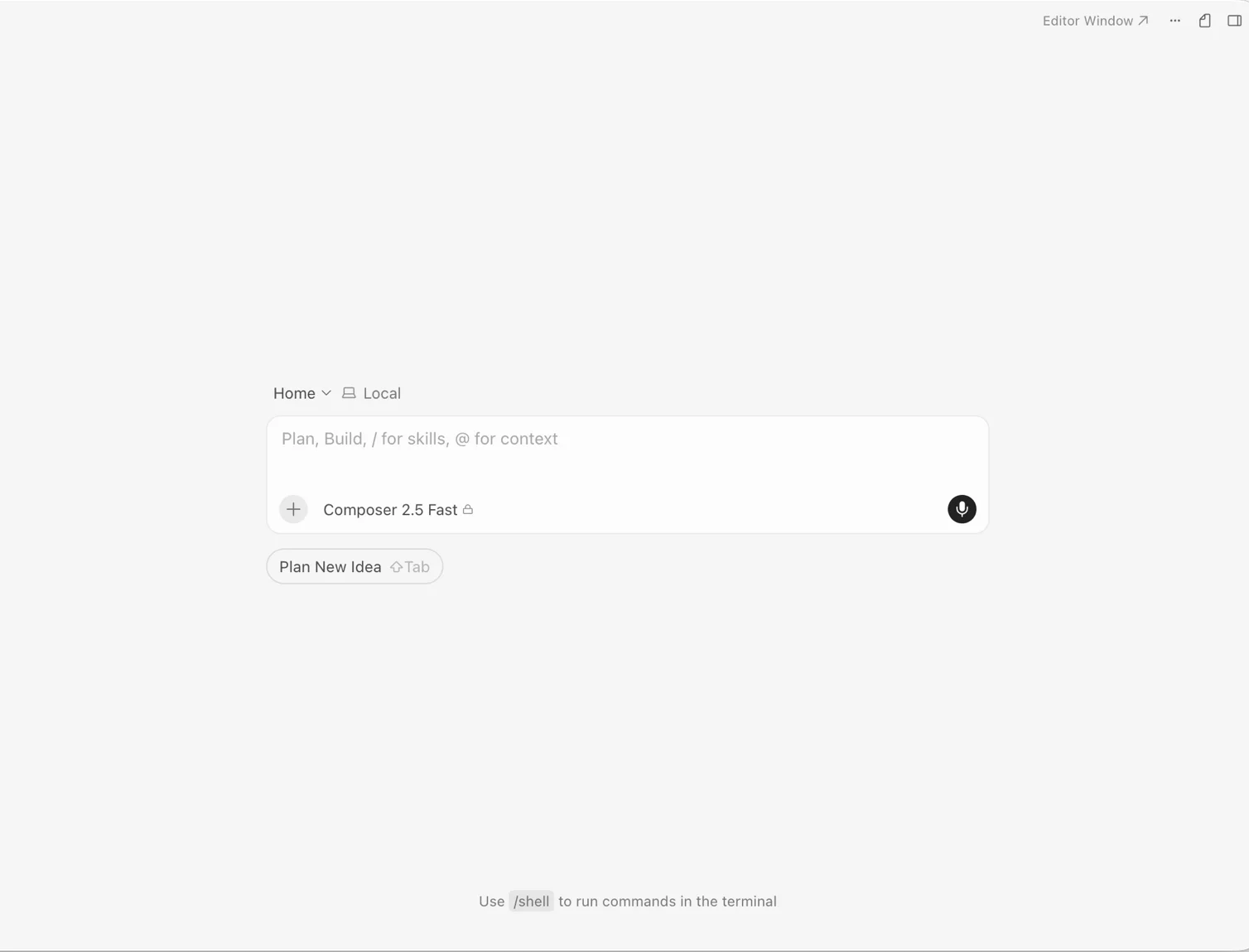
That screenshot is the default view on a current install. A prompt box, a model selector, a “Plan New Idea” button, and a hint that /shell runs terminal commands. No file tree in the centre, no open buffer, no cursor blinking in code.
The 2026 reviews have caught up with this and lead on agents. What has not caught up is Cursor’s reputation, which is still “VS Code with good autocomplete”, and several of the older published reviews describe exactly that product. The centre of gravity has moved from typing alongside an assistant to briefing one, which puts Cursor closer to a terminal agent than most people expect.
The VS Code lineage is still underneath. It remains a fork, so your extensions, keybindings and settings carry over, and that is still the strongest practical argument for choosing it over a tool that asks you to abandon your setup. You can drop back into a normal editor window whenever you want.
What sits on top is now a full agent stack: skills you define, hooks, a plan mode, and Composer as the in-house model alongside frontier models from other labs. The pitch is that you brief work, review a result, and stay in one window while doing it.
The slash commands tell you what it wants you to do
A product’s hint text is an honest signal of where its makers think the value is, and Cursor cycles through several on that empty home screen. /shell runs terminal commands without leaving the window. /plan switches on Plan Mode, described in the app as a way to improve agent execution. /create-skill builds a reusable skill, with the app framing skills as the way you customise Cursor around your own workflows.
None of those are editor features. They are agent-management features, and they are what the product leads with before you have typed anything. Two years ago the equivalent hints would have been about autocomplete.
| What the app surfaces | What it does |
|---|---|
/shell | Runs terminal commands without leaving the window |
/plan | Plan Mode, framed as improving agent execution |
/create-skill | Builds a reusable skill for your own workflows |
@ | Pulls specific files or symbols into context |
| Shift-Tab twice | Debug Mode, for reproducing and solving hard bugs |
| ⌘N | Starts a new agent |
Every row is an instruction for managing an agent. Not one autocomplete or formatting command among the things Cursor advertises on an empty screen. The tiling matters too: the interface assumes you will run several agents at once and want to watch them in parallel.
How it gets context
The prompt box advertises two symbols, and they carry most of the workflow. @ pulls in context, letting you point the agent at specific files, folders, docs or past chats rather than hoping it finds them. / reaches your skills.
This is the meaningful difference from a terminal agent that simply reads whatever it decides it needs. Cursor makes context an explicit act. You choose what goes in. Whether that is a strength depends on your temperament: it is more control and more typing, and it means a badly-scoped prompt is your fault rather than the model’s.
A model selector sat under the prompt, showing Composer 2.5 Fast on my account with a lock icon beside it. On the free Hobby tier the better models were visible but gated.
What the paid tiers actually add
The pricing page now splits capability by tier more sharply than the old plans did. Plus at $8 gives you the agent with Cursor’s own models only: Grok and Composer, at fixed settings, with no cloud agents, no Bugbot code review and no third-party models. Premium at $30 is where the product I used comes back: cloud agents and automations, code hosting, Bugbot, and Claude, GPT and Gemini at their API list price.
That last phrase is the pattern in miniature. The frontier models you probably want are available from Premium up, and none of the subscription price covers them. Every request to them is paid from prepaid credit, from the first one.
Teams seats cost $30, $100 or $200 per user, matching the individual Premium, Super and Ultra tiers, and add a marketplace for internal rules and skills, usage analytics, a team-wide privacy mode and SSO. Cursor also states that with privacy mode enabled, code data is not used for training by them or their model providers, which is the answer most people working on client code will want before installing anything.
How much does Cursor really cost?
The plans are simple. The bill is not. Across eleven months I paid $510.70: $340 in subscription and $170.70 in on-demand charges billed after the fact, on a plan advertised at $20 a month. Here is what Cursor sells today, then how my bill happened on the plans it replaced.
| Plan (The X Subscription) | Price | What you get |
|---|---|---|
| Free | $0 | Agent and Chat with limited usage |
| Plus | $8 / month | Agent with Cursor’s own models (Grok, Composer) only; Grok apps; X Premium perks |
| Premium | $30 / month | 4x Plus usage, cloud agents, Bugbot, code hosting, third-party models at API list price |
| Super | $100 / month | 15x Plus usage, priority model access at peak times |
| Ultra | $200 / month | 50x Plus usage, earliest access to new models |
| Teams | $30, $100 or $200 / seat / month | Premium, Super or Ultra seats, admin, analytics, SSO |
| Enterprise | On request | Pooled usage, SCIM, audit logs, access controls |
Two things the table does not show decide what you actually pay. The first is that the included usage is one weekly pool for Cursor’s own models, shared with the Grok apps, and Cursor’s docs are explicit that Claude, GPT and Gemini are not part of it: from Premium up you pay their API list price from prepaid credit, and past the weekly pool Cursor’s own models bill from that credit too. The second is that prices exclude tax.
Cursor calls the plans I paid for legacy. Hobby (free), Pro at $20, Pro Plus at $60, Ultra at $200 and Teams at $40 or $120 per user keep running for existing customers, with two monthly usage pools and on-demand usage billed in arrears. New customers cannot buy them. Cursor maps Pro to Premium, Pro Plus to Super and Ultra to Ultra, and says each new plan includes at least twice the Cursor-model usage of the one it replaces, while dropping the included allowance for third-party models. The full Cursor pricing guide works through every tier, the legacy plans and who comes out ahead.
Here is my real invoice history on those legacy plans, from the month I subscribed to the month I stopped.
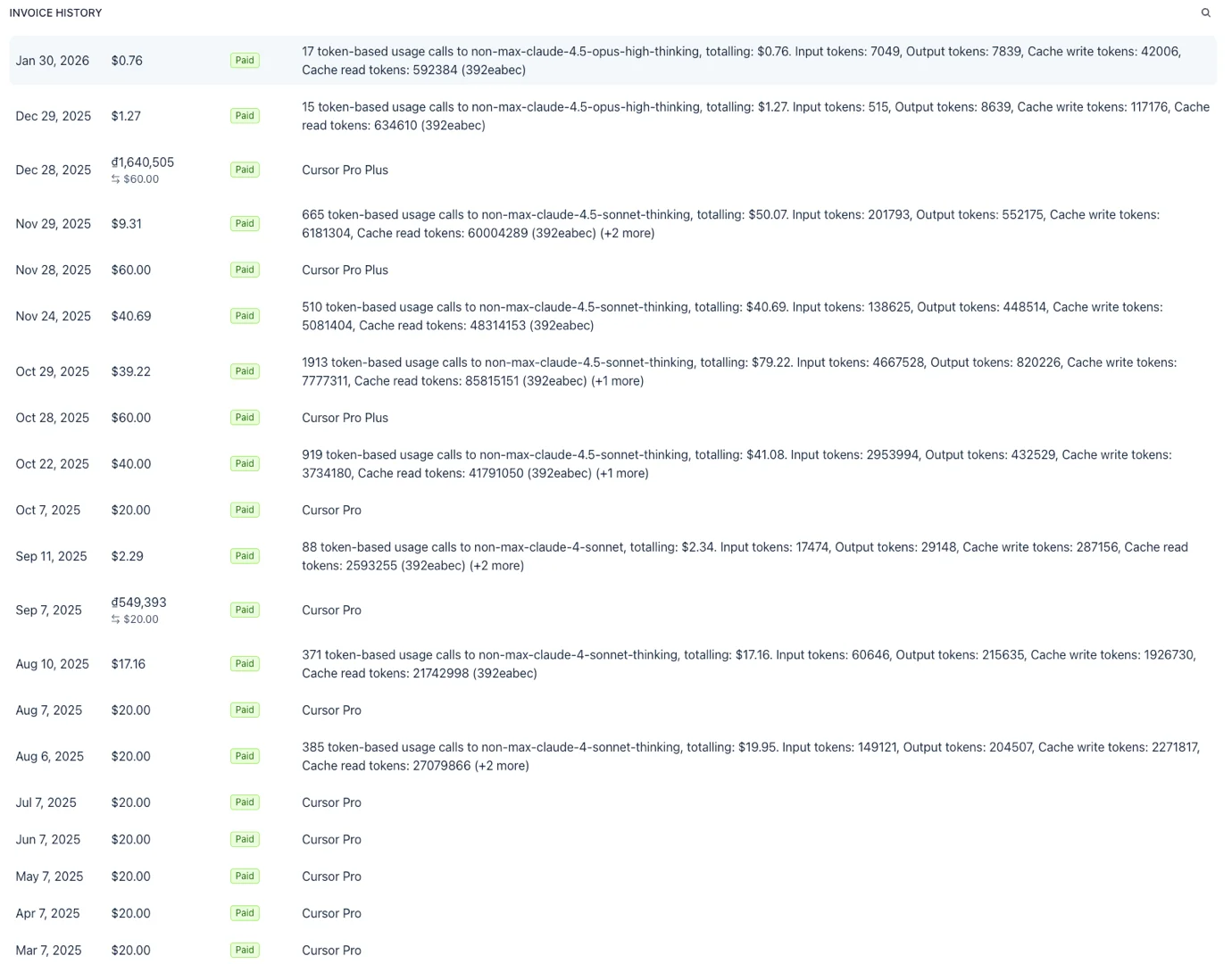
I subscribed to Cursor Pro at $20 in March 2025. For five months the bill was exactly $20 and I had no complaints. In August, on-demand charges started appearing alongside the subscription. In late October I upgraded to Cursor Pro Plus at $60, hoping a bigger allowance would end the overage. It did not.
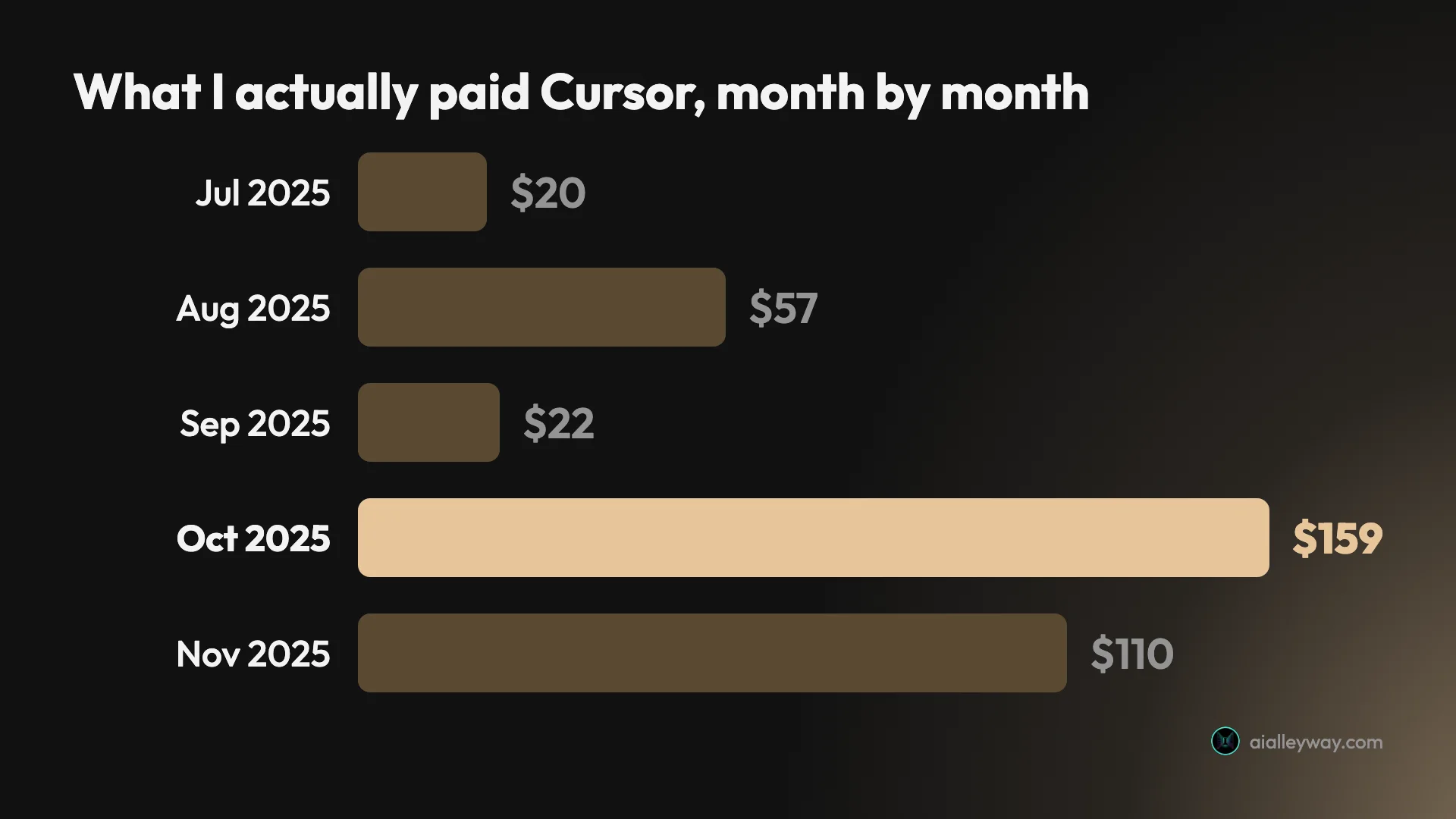
October 2025 cost me $159.22 across four separate charges: $20 for Pro, $60 for the Pro Plus upgrade, and $79.22 of on-demand usage. November came to $110.00, of which $50 was usage. Neither month involved unusual work.
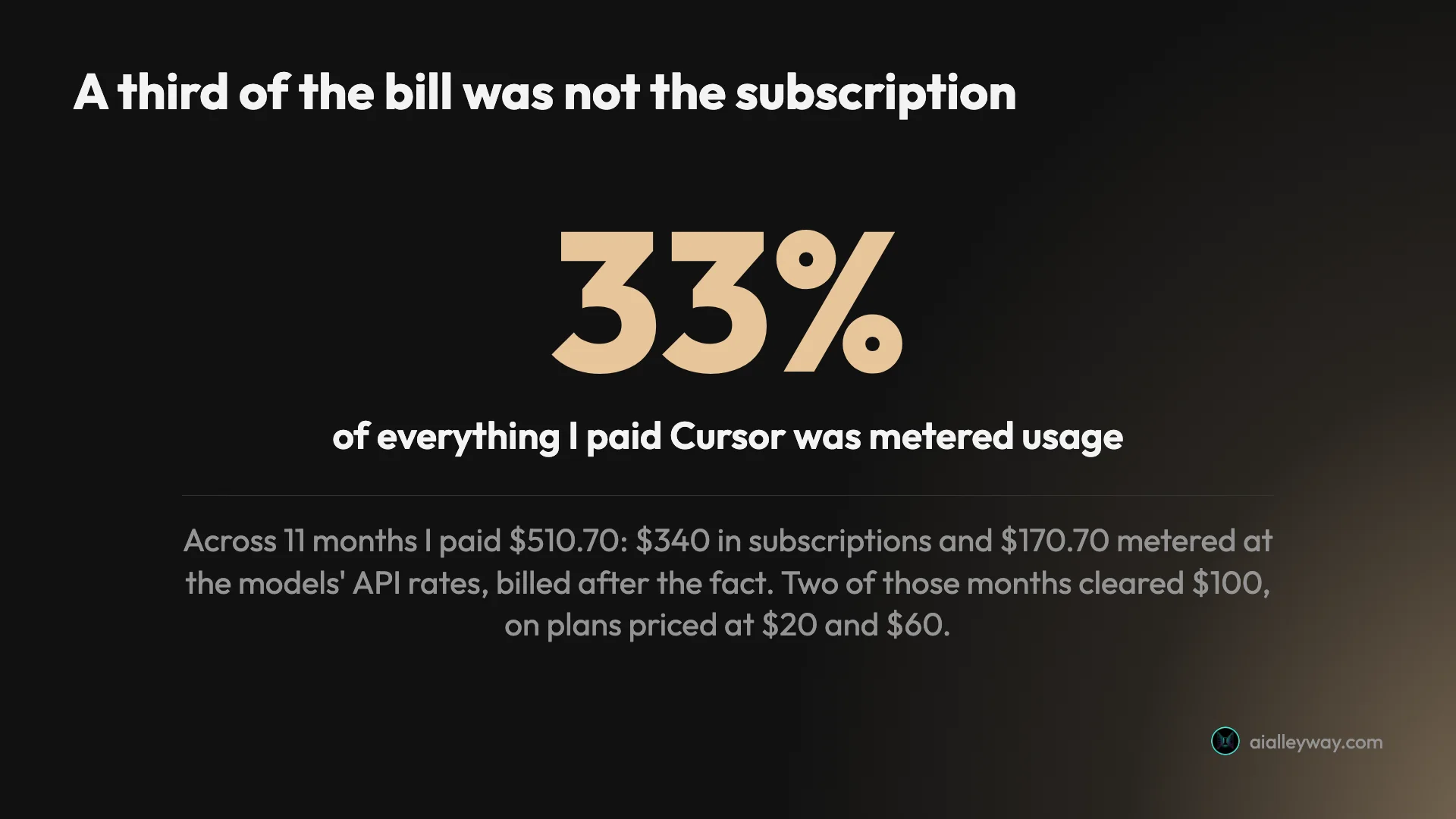
Across the full eleven months I paid Cursor $510.70. Of that, $340 was subscription and $170.70 was on-demand billing charged after the work was done. A third of my total spend was not predictable from the plan price I thought I had bought.
What you can do about it
The control I needed existed on the plan I was already paying for, and I never used it. Cursor’s spend-limit docs are unambiguous: on Pro, Pro Plus and Ultra you set a monthly cap on on-demand usage from the Spending tab in your dashboard. Not an enterprise feature, not a support ticket. A field I could have filled in during my first week.
That reframes my own story, so I will say it plainly rather than bury it: a meaningful share of my $170.70 is my fault. I assumed the subscription was the cost, did not read the billing docs, and noticed the charges only when the card statement arrived. If you take one thing from this review, make it that field.
The X Subscription changes the mechanics in a way that would have helped me. Extra usage is no longer billed in arrears: you buy prepaid credit, optionally with Auto Top-up, and a monthly additional usage limit caps what you can spend past the plan regardless of how much credit you hold. A prepaid balance cannot surprise you the way my October invoice did, though Auto Top-up with no cap set gets you most of the way back to it.
The other lever is model choice. The expensive lines on my invoices were the reasoning-heavy models, and the cheaper ones barely registered. Matching model to task is the single biggest thing under your control, and the interface makes it a one-click change.
Who is Cursor for?
- Developers who want AI in an editor they already know. The VS Code foundation means no migration cost, and that is a real advantage over tools that ask you to change how you work.
- People who code moderately and predictably. My five flat $20 months are the proof this works on the old Pro plan. If your usage sits inside the allowance, the $30 Premium tier is the current equivalent.
- Teams that want code review built in. Every team seat, from $30, includes Bugbot, admin controls and SSO, which is a coherent package rather than a price bump.
- People working under a confidentiality obligation. Cursor states that with privacy mode on, code data is not used for training by them or their model providers, and the team tier can enforce it across everyone rather than trusting each person to tick a box.
- Anyone who wants model choice in one place. Frontier models from several labs in one editor is genuinely convenient, although on The X Subscription they sit behind Premium and bill from credit rather than coming out of the plan.
- Not for heavy agent users, or anyone who needs a predictable bill. This is the group I fell into. If you delegate large tasks all day, the meter runs. On the legacy plans I found out how fast only in arrears; on The X Subscription you watch prepaid credit drain instead.
The dividing line is not seniority or language or project size. It is whether your usage is bursty. A steady drip of small edits sat comfortably inside my $20 allowance. A habit of handing over large, multi-file jobs several times a day does not, and no plan on the page reliably contains it.
If the honest description of your situation is that there is no codebase yet, then the category is wrong rather than the plan. An app builder will get you a working prototype faster than any editor will, and Lovable is the one I have put through a measured build.
If you are unsure which side you fall on, the free tier answers it faster than any review can, including the rest of our picks. Use it for a fortnight on real work and watch how quickly you meet the limits. That tells you more about your future bill than the plan cards do.
The good
It was worth $20 for five months straight
The most honest evidence I can give is my own invoice column. March through July 2025 read $20.00, $20.00, $20.00, $20.00, $20.00, with no usage charges attached. During those months Cursor did everything I asked at list price, and I would have told you it was excellent value. That period is why the rating here is not lower.
Five consecutive clean months is not a trial. It is long enough to build habits, ship real work and form a settled opinion, and my settled opinion at the time was that $20 was cheap.
The VS Code foundation removes the switching cost
It is a fork, so extensions, themes, keybindings and settings come across intact. Compared with adopting a terminal agent, where you rebuild your habits from scratch, this is the least disruptive way to get serious AI help into an existing workflow. That advantage is structural and no amount of billing frustration takes it away.
Adopting it is a download rather than a migration, with no need to defend a tooling change to colleagues who like their setup. When I left, this was the thing I actually missed.
Model choice in one editor is genuinely useful
My invoices name the models I was calling: Claude Sonnet and Claude Opus variants, alongside Cursor’s own Composer. Being able to pick a model per task, without holding separate subscriptions, is convenience you notice daily. On The X Subscription that choice starts at Premium, and every third-party call bills at list price from credit, so the cost lesson below matters more now, not less.
The menu may also shrink: after SpaceX completed its acquisition of Cursor in August 2026, OpenAI announced that it intends to stop supplying its models to Cursor, with a proposed shutoff date of 12 November 2026. GPT models are still listed in Cursor’s docs as I write, but do not build a workflow around them.
It also has a cost benefit if you use it deliberately. Each usage line on my Cursor invoices names its model and its call count, so the per-call cost falls straight out of the arithmetic:
| Model on my invoices | Calls | Charged | Per call |
|---|---|---|---|
| Sonnet 4 | 88 | $2.34 | $0.027 |
| Sonnet 4 thinking | 371 | $17.16 | $0.046 |
| Sonnet 4.5 thinking | 510 | $40.69 | $0.080 |
| Opus 4.5 high-thinking | 15 | $1.27 | $0.085 |
Three times the cost per call between the cheapest and the dearest, for work that often did not need the difference. Matching model to task is the biggest lever you control, and a tool tied to a single lab cannot offer it at all.
The free tier lets you reach the real product
The free plan costs nothing and gives you the agent with limited usage rather than a crippled demo. My cancelled account still sits on Hobby, the legacy free tier, which included limited agent requests plus Composer access. Plenty of tools in this category gate the actual experience behind a card; this one does not.
The agent stack is deeper than its reputation
Skills, hooks, plan mode, cloud agents and a /shell command add up to something you can shape around your own workflow. If your mental model of Cursor is “VS Code with autocomplete”, it has moved a long way past that.
The tiled agent panes are the detail that gave me most pause about leaving. Being able to run several agents and watch them side by side in a graphical window is something a terminal genuinely does worse, and if parallel delegation is how you work, that interface is a real argument for staying.
Team features are a real package, not a price bump
From $30 per seat, Teams adds Bugbot for agentic code review, a team marketplace for rules and skills, usage analytics and SSO. For a team already standardised on VS Code, that is a coherent step up rather than the usual enterprise tax.
The bad
A third of what I paid Cursor was not the subscription
Of the $510.70 I paid Cursor across eleven months, $170.70 was on-demand billing. That is 33% of my total spend arriving after the fact, on a product whose headline price is $20. Nothing about it was hidden: on the legacy plans, on-demand usage continued after the included amount and was billed in arrears, and the docs set out the rates. The X Subscription replaces that with prepaid top-ups.
The complaint is about emphasis rather than concealment. The card says $20 in large type and the metering is a sentence in an FAQ, so the number that anchors your expectation is the one least likely to match your invoice.
My Cursor invoice history, March 2025 to January 2026, split between what I agreed to in advance and what arrived afterwards:
| Month | Subscription | On-demand | Total |
|---|---|---|---|
| Mar–Jul 2025 | $20.00 each | none | $20.00 each |
| Aug 2025 | $20.00 | $37.16 | $57.16 |
| Sep 2025 | $20.00 | $2.29 | $22.29 |
| Oct 2025 | $80.00 | $79.22 | $159.22 |
| Nov 2025 | $60.00 | $50.00 | $110.00 |
| Dec 2025 | $60.00 | $1.27 | $61.27 |
| Jan 2026 | none | $0.76 | $0.76 |
| Eleven months | $340.00 | $170.70 | $510.70 |
Read the on-demand column on its own and the pattern is obvious: it is near zero when the work is light and it is the largest line on the invoice when the work is interesting.
The $60 plan ran out in about a week
I upgraded to Pro Plus specifically to stop the overage. The larger allowance was gone in roughly a week of normal work, and the on-demand charges resumed on top of the higher subscription. Paying three times more did not buy predictability, which is the thing I was actually trying to purchase.
That is the moment the product lost me, and it is worth being precise about why. I did not object to paying more for more. I objected to paying three times more and still not knowing what the month would cost. An upgrade that raises the floor without lowering the variance solves the wrong problem.
Two of my last four months cost more than $100
October 2025: $159.22. November 2025: $110.00. Those are not stories about a runaway script or a mistake, they are ordinary months. When a $20 tool bills $159, the number on the plan card has stopped being useful for budgeting.
October is the clearest example of how the charges arrive. Four separate hits: $20 for the old plan, $40 of usage, $60 for the upgrade, then another $39.22 of usage six days later. No single charge looks alarming. The sum is eight times the advertised price.
Metered API rates lose to a flat cap once you are heavy
I assumed for months that Cursor was taking a cut on the Anthropic models my invoices show me calling. It is not. The billing docs are clear that third-party models on individual plans are charged at the model’s API price, and the $0.25 per million token Cursor Token Rate applies only to Teams and Enterprise. I was paying list. On The X Subscription that is now the only way to use them: no plan includes any Claude or GPT usage, so every call is metered from the first one.
That correction sharpens the real point rather than removing it. Metered API pricing is honest and it is also unbounded, so at high volume you are competing against capped subscriptions from the labs themselves. Being precise about the arithmetic, because it is easy to flatter my own decision here: my two heaviest Cursor months carried $79.22 and $50.00 of metered usage on top of the subscription, for totals of $159.22 and $110.00. Claude Max 5x bills me $110 a month once tax is added. The gap is not that one is cheap and the other expensive. It is that one has a ceiling and the other does not.
You carry the context burden
The prompt box makes context an explicit act. @ points the agent at files, folders or symbols, which is more control than an agent that decides for itself, and also more work. Every session you are choosing what goes in.
That has a real failure mode: a badly-scoped prompt produces a confidently wrong answer, and the fault is yours rather than the model’s. A terminal agent that reads the repository on its own removes that step and the mistake with it. Which trade you prefer is temperament, but it is the one place where Cursor asks more of you than its rivals do, and it is not a billing complaint.
The public rating is genuinely bad
As of July 2026, Cursor holds 1.6 out of 5 on Trustpilot across 278 ratings, with the summary citing an unstable interface and frequent changes. Aggregate ratings skew negative for developer tools and this should not be read as the whole picture, but a score that low on that many reviews is not noise either, and billing complaints are a recurring theme in it.
Two things stop that number meaning what it looks like it means. Claude sits at 1.5 across 1,720 ratings on the same platform, so the tool I switched to scores no better. And on G2, where reviewers are verified business users, Cursor holds 4.7 out of 5 from 307 reviews, tying Claude Code’s 4.7 with roughly three times the review volume.
| Aggregate | Cursor | Claude / Claude Code |
|---|---|---|
| Trustpilot | 1.6 / 5 from 278 | 1.5 / 5 from 1,720 |
| G2, the coding products | 4.7 / 5 from 307 | 4.7 / 5 from 108 |
| G2, parent product | — | 4.6 / 5 from 403 |
The two platforms flatly disagree, and that is the honest summary. Trustpilot skews toward people moved to write by a bill they did not expect, and rates both tools about the same. G2 skews toward people evaluating a tool at work, and rates both coding products identically at 4.7, with Cursor carrying three times the volume. Neither is a reason to buy or skip either one.
It is worth holding that number against the rest of the evidence rather than in place of it. During my own first five months I would have rated Cursor around four out of five without hesitation, and nothing I saw in that period resembles a 1.6. A product can be genuinely good and still collect a wall of angry reviews when the thing people are angry about is the invoice, and that is roughly what the split looks like here.
What I got wrong, and what I am not claiming
Three criticisms I had drafted did not survive checking Cursor’s own documentation, and cutting them is more useful to you than keeping them. I believed the Pro Plus and Ultra prices were unpublished; they are, at $60 and $200. I believed Cursor took a margin on third-party models; on individual plans it charges the model’s API rate. I believed the plan I bought had been renamed away; “Cursor Pro Plus” at $60 is still exactly that.
The one that stings is the spend limit, because it was available on my plan the whole time and I never opened the Spending tab. A meaningful share of my $170.70 is a documented control I did not use.
The score gap with my whether Claude Code is worth it also invites an inference I want to head off: it is not a judgement that Cursor writes worse code. In eleven months it never produced a wrong-answer failure costly enough that I still remember it. I cannot give you a rigorous capability verdict either, because I did not run the two tools side by side on identical tasks. What I have is eleven months of invoices, and the 4.2 reflects cost behaviour, which is the axis I can actually evidence.
What are the best Cursor alternatives?
If the metered billing is what puts you off, three options are worth a look.
Claude Code is where I went, and I put the two side by side in Claude Code vs Cursor. It is a terminal agent rather than an editor, which is a real workflow change, and its own pricing has a two-layer limit system worth understanding first. What it gave me was a ceiling. Its own pricing has its surprises, which I cover there.
Codex is the closest like-for-like if you want an agent without leaving OpenAI’s ecosystem. It is included on every ChatGPT tier from Free upward, with a Go tier at $8 and Plus at $20 below the heavier plans, and it ships a local CLI and IDE extension alongside a cloud sandbox.
Antigravity is the low-commitment way to test whether agent-style work suits you, because it costs nothing. Google retired Gemini CLI in June 2026 and moved those users here. I ran a full build on its free tier for the Google Antigravity review.
None of these makes Cursor a bad tool, and two of the three ask you to give up the editor entirely, which is a real cost rather than a footnote. They matter only if unpredictable billing is your specific objection, and if it is not, staying put is the sensible answer.
Final word
The short version of this Cursor review: a good editor attached to a pricing model that punishes the people who use it most. For five months it was the best $20 I spent on software, and I would still recommend it at that level without hesitation. The trouble starts precisely when the tool succeeds, because the more work you delegate, the further your bill drifts from the number that sold you the plan.
If you are a moderate user, buy it and enjoy it. If you are heading toward daily agent work, do the arithmetic first, because I did not, and eleven months later I had paid $510.70 for a $20 subscription and moved on.
The version of this review I expected to write was harsher, and checking Cursor’s documentation made it milder twice over. The first seven months are a good tool at a fair price. The last four are a cautionary tale about a meter I could have capped with one field and did not. Both halves are true, and which one you get depends on how much you delegate and whether you read the billing docs before the card statement.
| If you | Then |
|---|---|
| Code moderately, inside the included allowance | Premium at $30 is the current equivalent of my $20 Pro. Set a limit anyway |
| Only need Cursor’s own models | Plus at $8 runs Grok and Composer, with no Claude or GPT |
| Delegate heavily most days | Price Super at $100 or Ultra at $200, plus API credit for Claude or GPT |
| Cannot tolerate a variable bill | Set the monthly additional usage limit on day one, or buy a flat-rate tool |
| Want to keep the editor you already know | The VS Code base is the strongest single reason to stay |
So set a spend limit on day one, pick cheaper models for routine work, and check the invoice rather than the plan card at the end of month two. Do that and Cursor is a Power Tool many people will be happy with for years. Skip it and you will learn what I did, more expensively.
Frequently asked questions
Is Cursor worth it?
It depends entirely on how hard you push it, which is not the answer the pricing page implies. I paid for Cursor for eleven months and it was good value for five of them, when my bill was a flat $20 and the included allowance covered everything I did. The editor is capable, the model range is wide, and building on VS Code means your extensions and shortcuts come with you.
It stopped being worth it for me when I started running agents seriously. Usage past your included allowance is billed after the fact, and my October 2025 bill came to $159.22 with roughly half of that unplanned.
Across the full eleven months I paid $510.70, of which $170.70 was on-demand billing rather than subscription. If you code moderately, it was a solid $20 tool. New customers now start on The X Subscription, where Premium at $30 is the nearest equivalent and Claude or GPT usage is paid separately, so if you delegate heavily, price the credit rather than the plan. I score it 4.2 out of 5.
How much does Cursor actually cost?
Since October 2026 Cursor is sold as part of The X Subscription, one subscription for Grok, Cursor and X. Free costs nothing. Plus is $8 a month and runs only Cursor's own models, Grok and Composer. Premium is $30 with four times Plus's usage, Super is $100 with 15 times, and Ultra is $200 with 50 times. Team seats cost $30, $100 or $200 per user. Annual billing runs from $80 a year for Plus to $2,000 for Ultra.
The included usage is one weekly pool for Cursor's own models, shared with the Grok apps. Claude, GPT and Gemini are not in any allowance: from Premium up you pay their API list price from the first request, out of prepaid credit, and Plus and Free cannot use them at all.
My own bill was on the older plans, which Cursor now calls legacy and keeps running for existing customers: Pro at $20, Pro Plus at $60, Ultra at $200 and Teams at $40 or $120 per user, with on-demand usage billed in arrears. On those, metering added $170.70 across eleven months on top of $340 in subscriptions. Prices exclude tax. On either generation, set the spending cap before you start, which is the single most useful thing to know before subscribing.
Why did you switch from Cursor to Claude Code?
Cost predictability, not capability. When I upgraded to the $60 plan the included allowance ran out in about a week, and metered charges pushed my monthly total past $100 more than once. I had assumed Cursor was taking a margin on the Anthropic models my invoices show me calling, and while writing this review I checked and found that is wrong: individual plans are charged at the model's API price, with no Cursor markup.
So the honest reason is arithmetic rather than grievance. Metered API pricing is fair and it is also unbounded, and at my volume a capped subscription won. My two heaviest Cursor months totalled $159.22 and $110.00, of which $79.22 and $50.00 were metered; Claude Max 5x bills me $110 including tax, with a hard cap.
I should add that Cursor offers a spend limit on paid individual plans and I never set one, which would have changed the picture. I cancelled and was downgraded to the free tier, where the account still sits.
Is Cursor still just a VS Code fork?
Less than it used to be, and this is where most reviews are out of date. Cursor started as a VS Code fork with AI woven into the editor, and most published reviews still describe it that way, leading on tab completion and inline edits.
Open it today and the default screen is an agent prompt reading 'Plan, Build, / for skills, @ for context', with a Composer model selector and a Plan New Idea button. There are skills, hooks, a /shell command and a plan mode.
The VS Code lineage is still there and your extensions still work, but the product's centre of gravity has moved from typing alongside an assistant to briefing an agent, which puts it much closer to terminal agents than the older reviews suggest.
Is Cursor better than Claude Code?
For most people who want AI inside an editor, yes. Cursor keeps you in a VS Code window with your extensions and keybindings intact and shows you changes inline. On price it is no longer a straight comparison: Cursor's $8 Plus plan runs only its own Grok and Composer models, and using Claude inside Cursor now means Premium at $30 plus Anthropic's API list price from prepaid credit, against Claude Max's flat $100. If you want to watch the work happen rather than review it afterwards, Cursor is the better fit.
I moved to Claude Code anyway, for one reason: my Cursor bill was metered and unbounded, and at my volume a capped plan won. That is a statement about my usage, not about which tool writes better code. I scored the two head to head in Claude Code vs Cursor, where three axes tie and Cursor takes three of the rest.
What is Cursor's free plan good for?
Evaluating the tool, and not much beyond that. The free plan costs nothing and gives you Agent and Chat with limited usage (my account sits on Hobby, the legacy free tier, which included limited agent requests plus access to Composer), which is enough to judge whether the workflow suits you before paying anything.
The limits bite quickly on real work, and the better models carry a lock icon until you upgrade, so you can see what you are missing without being able to use it. Treat it as a genuine trial rather than a permanent home.
That said, it is a more honest free tier than most, because you reach the actual product rather than a crippled demo, and my own cancelled account has sat on it since January without being nagged into resubscribing. If you are trying to work out whether you would blow past the included allowance on a paid plan, a fortnight of real work on Hobby will answer that faster than any pricing page can.
Keep reading
Cursor pricing: the X Subscription plans and my $510.70 bill
Cursor pricing now runs Free, Plus $8, Premium $30, Super $100 and Ultra $200 inside The X Subscription. Every plan read live, plus what I paid on the old Pro.
Cursor vs Codex: I paid for one and quit the other
Cursor vs Codex from someone who cancelled Cursor after $510.70 and walked away from Codex too. What each actually costs, and which one I'd go back to.

Cursor alternatives: I left after $510.70, here's where I went
Cursor alternatives from someone who actually cancelled. Real invoices, what each option does about the metered bill, and which ones I've tested.
GitHub Copilot alternatives: what you are actually leaving for
GitHub Copilot alternatives ranked by a build test, not a feature table. Four took the identical brief Copilot took. Here is what each produced and cost.