
Google Antigravity review: it wrote its own tests
Antigravity built my six-requirement app on the free tier and met all six. Then it wrote and ran its own unit tests, which no other builder I have tested does.
Contents
Is Google Antigravity worth it?

Yes, with a caveat about what it is. I gave Antigravity the same six-requirement brief I have given Replit, Lovable and Bolt, on the free tier, and it satisfied all six on the first attempt in about two and a half minutes.
Then it did something none of the others did. It wrote a unit-test file, ran it under Node, and reported six specific assertions about its own output — including that a $180-a-year plan computed to $15.00 a month, and that cancelling an item removed it from the running total while keeping it in the cancelled array. I checked every one of those claims against the running app. They were all true.
That is this Google Antigravity review in one paragraph: of the four builders I have run this brief through, the least polished is the only one that checks its own homework.
Alley Rating: 4.3 / 5 — Power Tool.
For how Antigravity placed against the rest, see seven tools measured on the identical brief.
What does Google Antigravity actually do?
Antigravity is Google’s agentic development platform, and in its 2.0 release the thing you open first is not an editor. It is a command centre: a conversation list, a Scheduled Tasks panel, a project tree, a model selector and a Main Agent picker. The IDE sits behind a button labelled Open IDE.
That ordering is the product’s whole argument. Antigravity wants you managing agents rather than typing, and it ships four surfaces to do it: the 2.0 manager, a CLI, the IDE itself, and an SDK for building your own agents on the same harness.
It is also the survivor of a consolidation. Google retired Gemini CLI on 18 June 2026 and moved personal users onto Antigravity CLI, which makes this the product line Google kept rather than the one it folded. Google announced the transition at I/O, and I went through what it left behind in the Claude Code alternatives guide.
The model list is the surprise. On the free tier Antigravity offers Gemini 3.5 Flash, Gemini 3.1 Pro and Gemini 3 Flash — and also gpt-oss-120b and Claude Sonnet and Opus 4.6. A Google IDE shipping Anthropic’s models at no charge is not what I expected to find on the pricing page. In the app itself the selector offered Gemini 3.6 Flash on a High reasoning setting, which is newer than anything Google’s own pricing page names.
How do you start a project in Antigravity?
Worth knowing before you compare it against a browser builder: Antigravity needs somewhere to work, and that is a step the hosted tools do not have.
Replit, Lovable and Bolt all start from an empty prompt box. Antigravity starts from a project. Under Projects you choose New Project or Quick Start, and it opens a standard macOS folder picker. I pointed it at an empty directory, and only then did the prompt box switch from “Select a folder” to showing the project name with a Local context badge beside the model selector.
That badge is doing more work than it looks. It is telling you the agent is operating on your filesystem, with your files, under your permissions — which is the whole reason it can run node -c against its own output and the whole reason its sandbox has to be restrictive about what else it may do.
The model selector sits in the same row: Gemini 3.6 Flash at a High reasoning setting by default, with a Main Agent picker to its right. Neither is buried in preferences, which I appreciated. You can see what is about to run before you run it.
The cost of this shape is that “try it in thirty seconds” is not on offer. You install an application, sign in, choose a folder, and then you prompt. Against that, the folder you chose is a real repository you own at the end, rather than a project living inside somebody’s platform.
What I asked it to build
I gave Antigravity the same brief every tool in this cluster gets, so the results are comparable: a single-page subscription tracker called Stack Cost, in one message, with no follow-up prompts.
Six numbered requirements. Add a tool with name, cost and billing cycle. Annual plans must display a monthly-equivalent cost rather than the annual figure. A running monthly total pinned at the top. A cancelled state that removes an item from the total but keeps it visible in its own section. Persistence across reloads via localStorage. A dark theme.
Requirements two and four are the traps. Each asks the tool to hold two ideas at once — a stored value and a derived one, a list that is filtered for arithmetic but not for display — and both are the kind of instruction that gets flattened into something simpler.
Does Antigravity build unattended?
Antigravity does not build straight from the prompt, and that difference arrives about twenty seconds in.
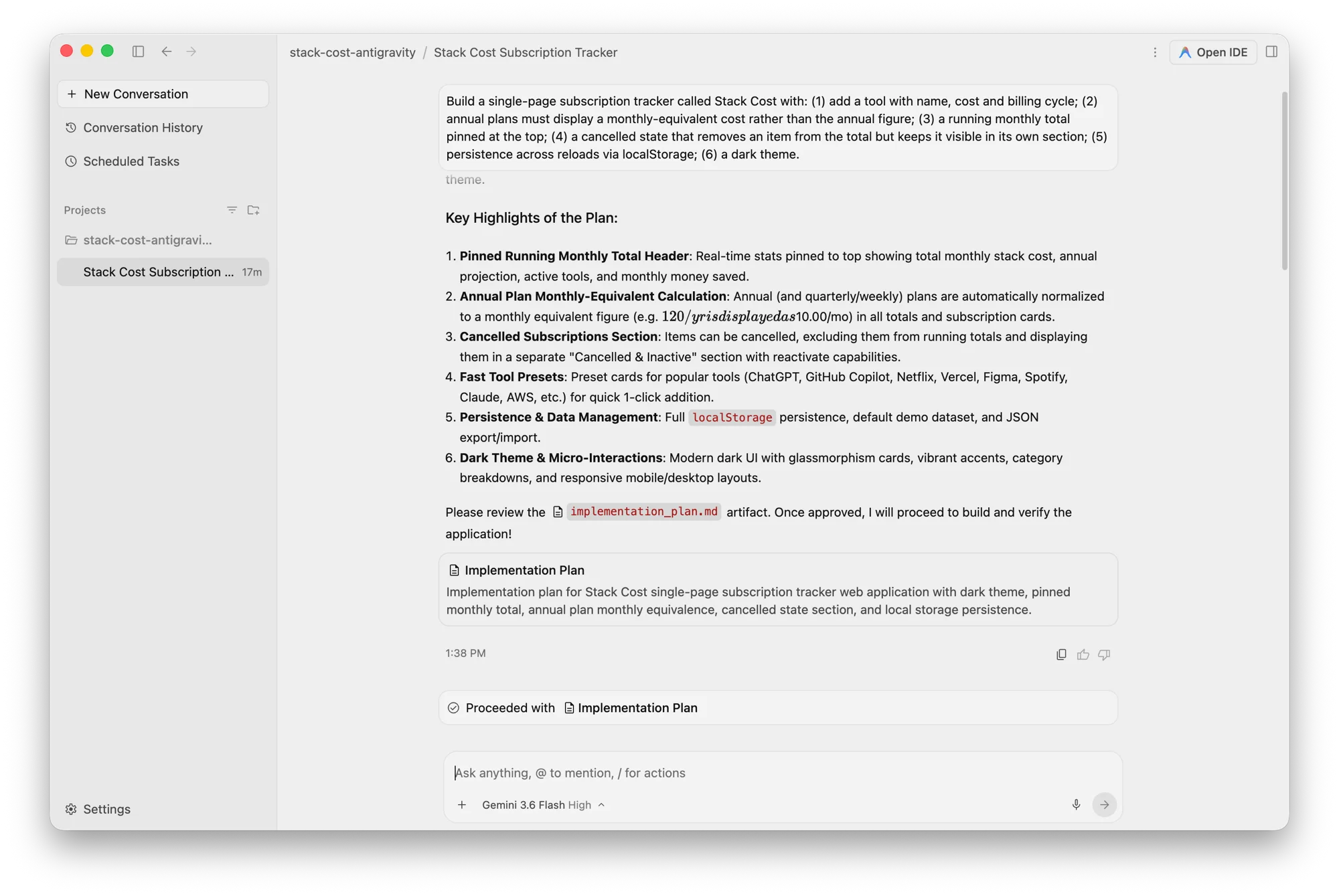
Antigravity thought for 13 seconds, produced an implementation_plan.md artifact covering all six requirements, and stopped. “Please review the implementation_plan.md artifact. Once approved, I will proceed to build and verify the application.”
Replit, Lovable and Bolt all just build. Antigravity gates on approval, which means the one-prompt-one-app experience is not available here by design. Across the whole run it needed one approval click and one permission grant. Those are not follow-up instructions, so the comparison holds, but it is not unattended either.
Look closely at point 2 in that screenshot and you can see a bug I hit twice. The sentence should read “$120/yr is displayed as $10.00/mo”. It renders as mangled italic maths, because the chat pane treats $…$ as a LaTeX delimiter. Any sentence comparing two prices breaks, which is unfortunate in a tool whose main output is often a sentence comparing two prices.
What it wrote
Approved, Antigravity worked for a minute.
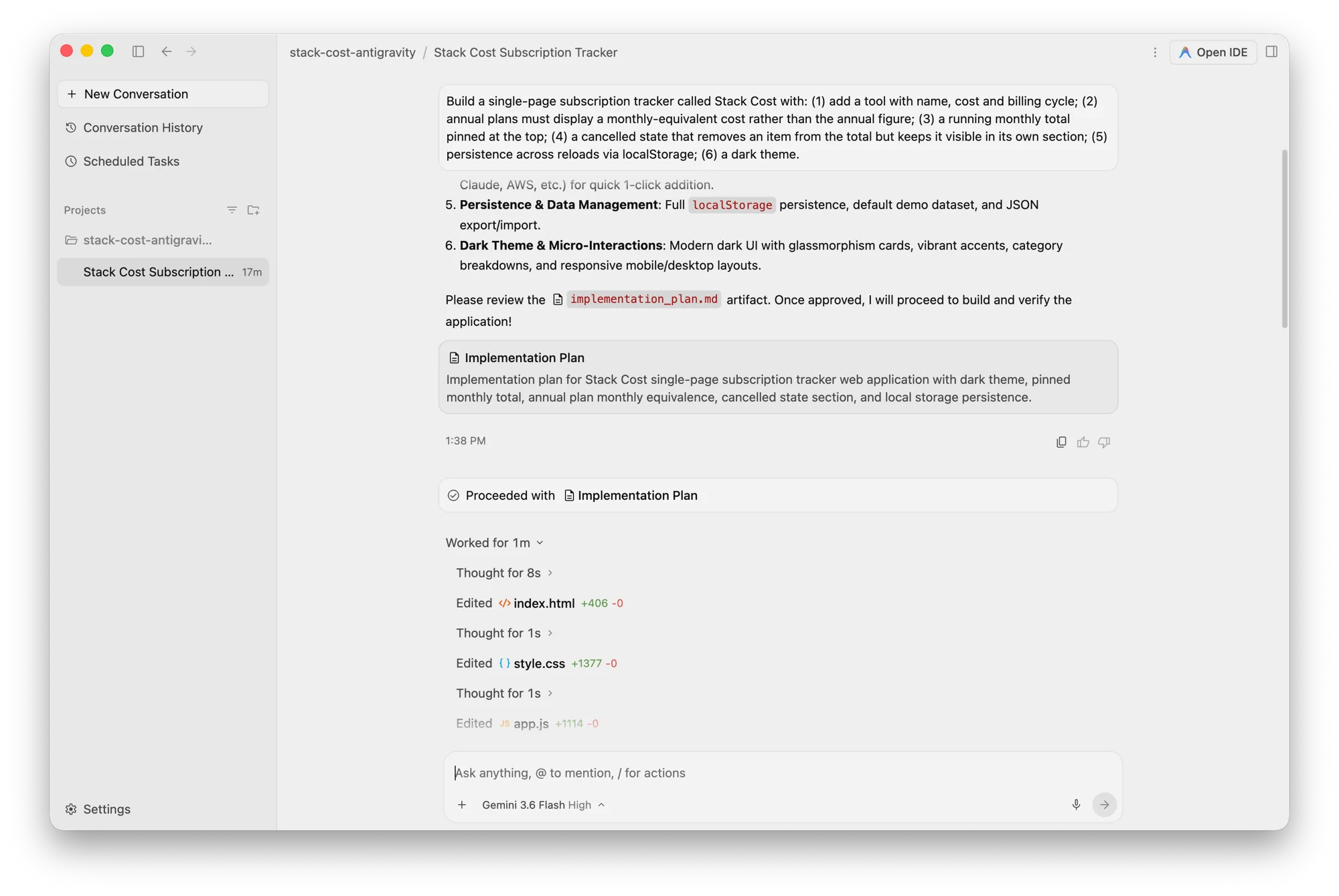
Eight seconds of thinking, then index.html at +406, a second’s thought, style.css at +1,377, another second, app.js at +1,114. On disk that lands at 2,894 lines across the three files, with the model pausing between each rather than emitting them in one pass.
The result is a real application, not a sketch.
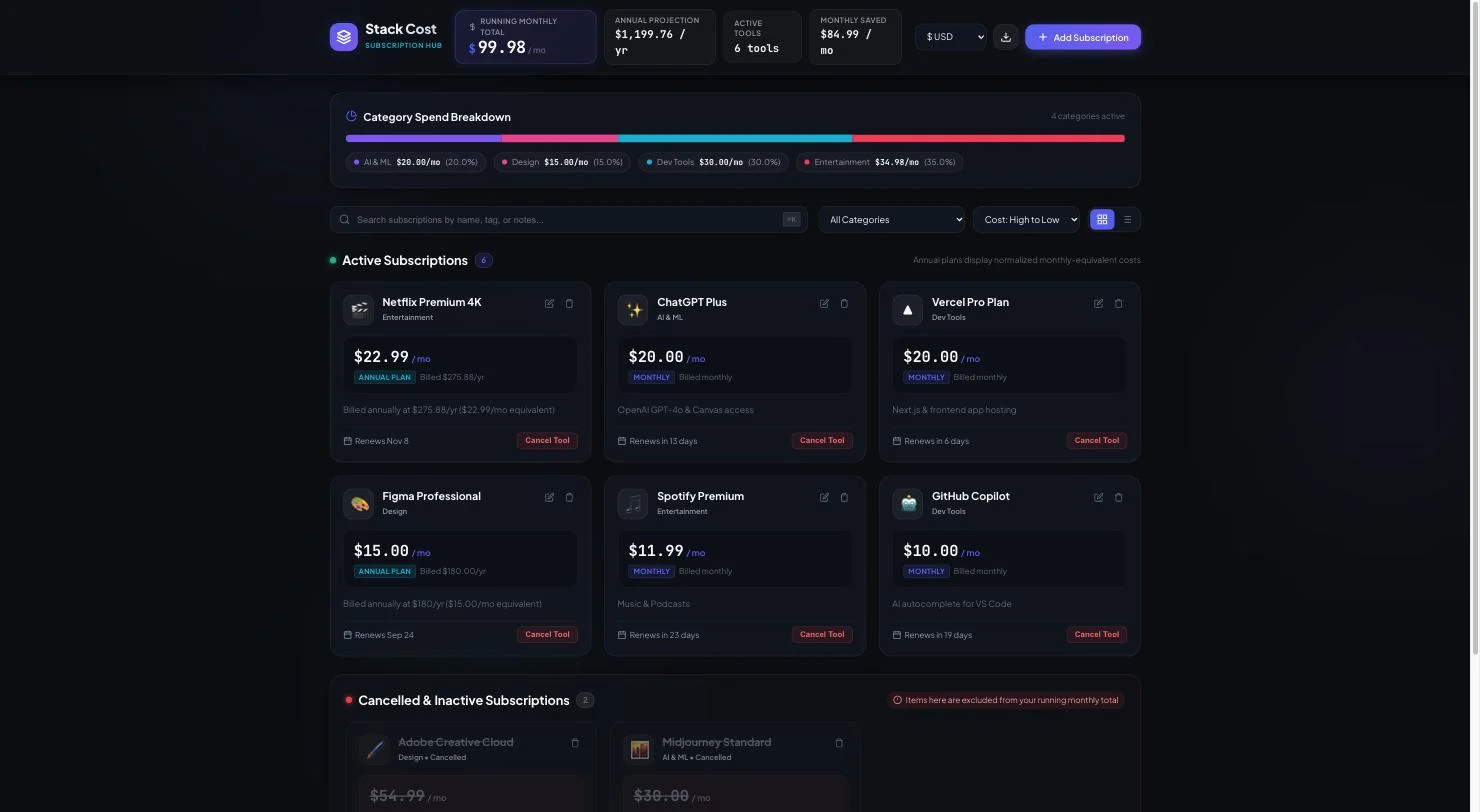
It also invented a good deal nobody asked for: a six-currency switcher, a category spend breakdown, a ⌘K search, grid and table views, JSON export and import, quick-add presets for popular tools, and a “monthly saved” metric.
That pattern is now four for four. Every tool I have run this brief through has added features I did not request, and the additions cluster around the same instincts: give the numbers somewhere to be filtered, give the user a way to undo, make the empty state less empty. Replit, Lovable and Bolt all independently invented a Restore button for cancelled items. Antigravity did too, and then added five more things on top.
It is worth deciding in advance whether you want that. On a throwaway prototype it is free polish. On something you intend to maintain, it is 2,894 lines where perhaps 900 would have done, and every one of them is yours to read.
Did it actually meet the brief?
Antigravity met all six requirements. I checked each one by using the app rather than reading its summary, which is the only way this test means anything.
| # | Requirement | Result |
|---|---|---|
| 1 | Name, cost and billing cycle | Pass, plus category, renewal date, icon, status and notes |
| 2 | Annual shows a monthly equivalent | Pass, and well |
| 3 | Running monthly total pinned at top | Pass. $99.98, moving correctly on every change |
| 4 | Cancelled leaves the total, stays visible | Pass. Own section, with a Reactivate button |
| 5 | Persistence via localStorage | Pass. Key stack_cost_subscriptions_v1, survived a hard reload |
| 6 | Dark theme | Pass. Body background rgb(7, 9, 14) |
Requirement two is the one worth seeing. I added Cursor Ultra at $2,400 a year.
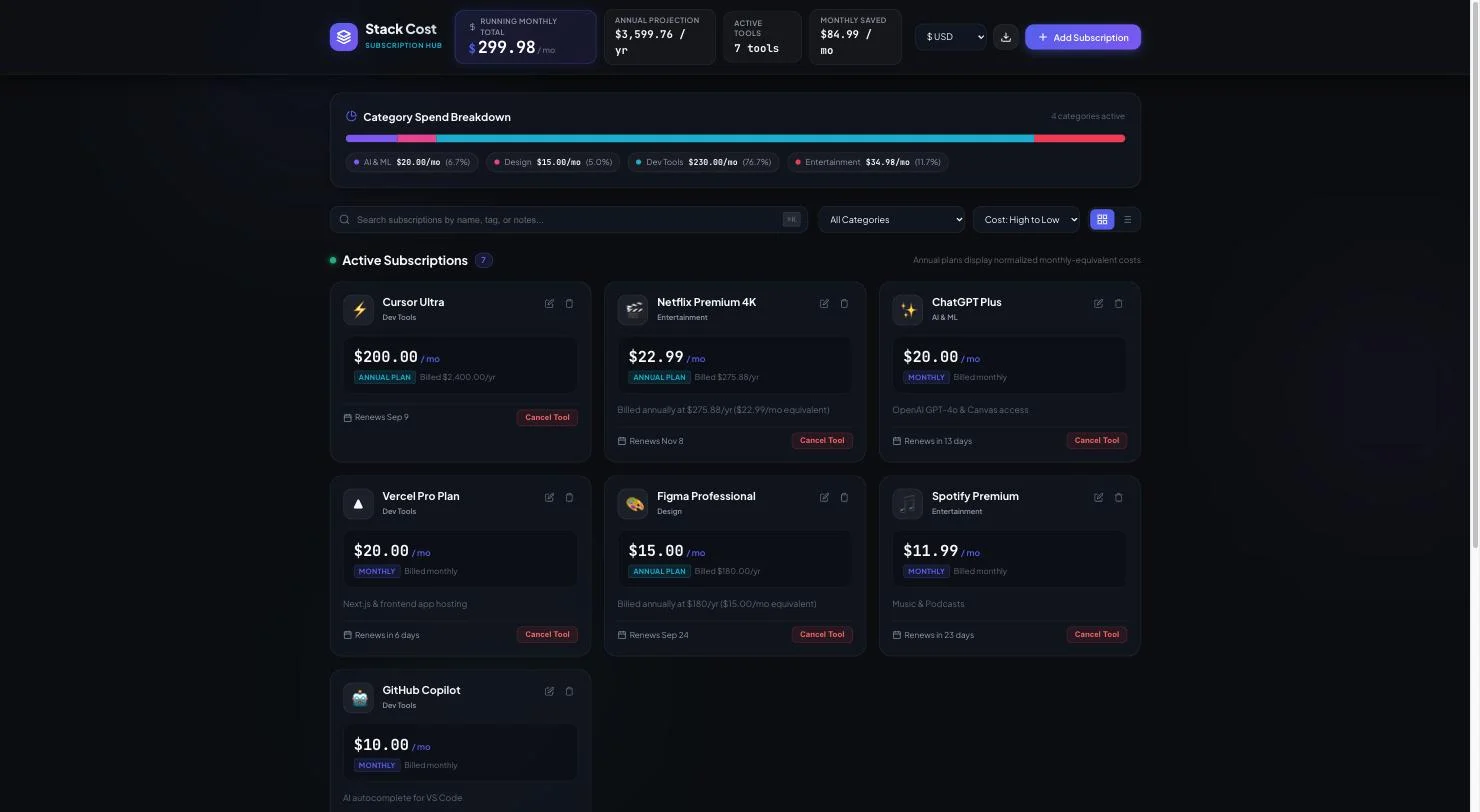
It rendered $200.00/mo as the primary figure, kept “Billed $2,400.00/yr” as sub-text beneath it, and moved the pinned total from $99.98 to $299.98. That is the same choice Lovable made on the identical brief: derive the number the reader needs, keep the number they were quoted.
Requirement four held up too. Cancelling Cursor Ultra dropped active tools from seven to six, pulled the annual projection from $3,599.76 back to $1,199.76, and moved the entry into a Cancelled & Inactive section, struck through, annotated “Saving $200.00/mo from budget”, with a Reactivate button.
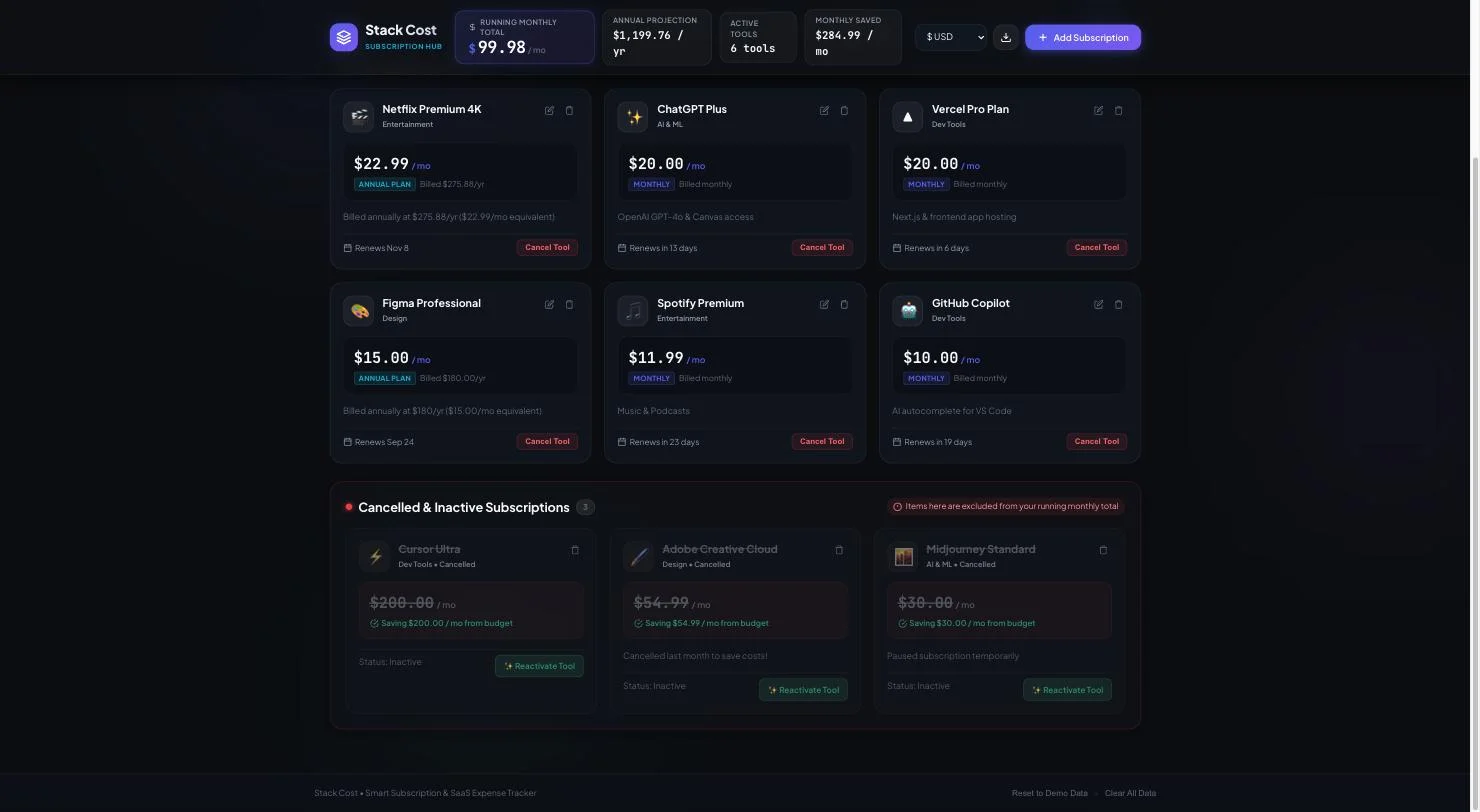
Six for six, on the first attempt, for nothing.
Does Antigravity test its own code?
Antigravity wrote and ran its own unit tests. It created test_store.js in its scratch directory, executed it under Node, and reported six assertions in walkthrough.md — annual, quarterly and weekly monthly-equivalence, running-total summation, cancelled-item exclusion, localStorage round-tripping and a syntax check — every one of which I independently confirmed against the running app. Replit, Lovable and Bolt wrote no tests at all. Replit emitted data-testid hooks, which are handles for a test to grab rather than assertions that run.
Getting there was not clean, and the failure is as informative as the success.
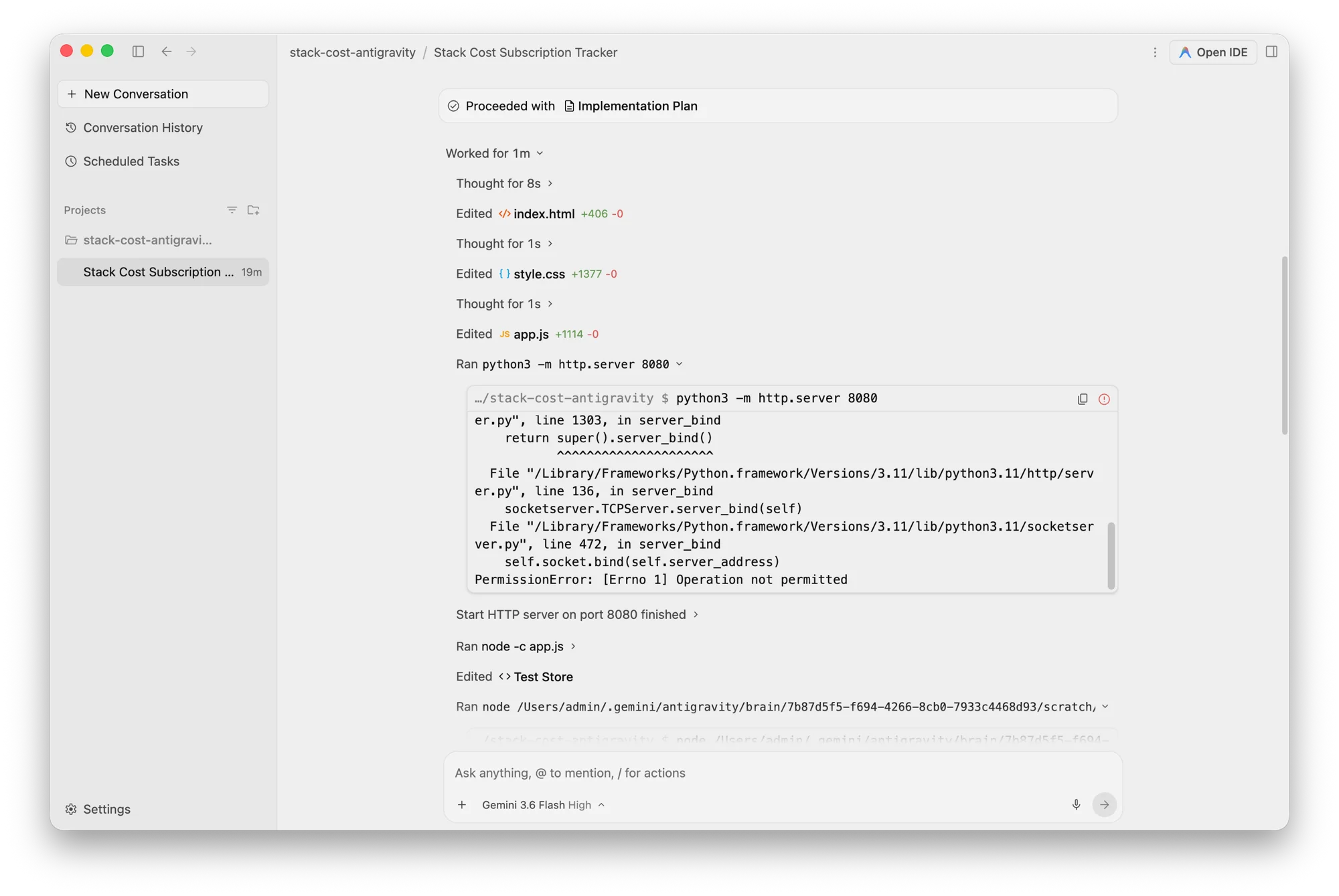
It ran python3 -m http.server 8080 to serve the app and look at it. The command failed: PermissionError: [Errno 1] Operation not permitted. Its own sandbox would not let it bind a port. I ran the identical command from my shell on a different port and got HTTP 200 immediately, so this is Antigravity’s restriction on its agent process, not the machine.
So its browser-level verification never happened. What it did instead is the part no other tool in this cluster attempts. It ran node -c app.js for a syntax check, wrote a file called test_store.js, and executed it under Node.
Its walkthrough.md records the results:
| Assertion it made | Verified against the running app |
|---|---|
$180/yr computes to $15.00/mo | True |
$30/quarter → $10.00/mo; $10/week → $43.33/mo | True |
| Active subscriptions sum to the running total | True |
| Cancelling subtracts from the total, retains the item | True |
| localStorage serialises and deserialises across reloads | True |
node -c app.js — zero syntax errors | True |
Every claim it made about itself was accurate. Lovable, Bolt and Replit all told me what they had built; Antigravity told me what it had tested, and the tests were real files I could open and run myself.
The limit is worth stating plainly: all six assertions are against the store logic, not the rendered interface. The one step that would have caught a purely visual problem is precisely the step its sandbox blocked.
How does Antigravity compare to Codex, Replit, Lovable and Bolt?
Antigravity was the fourth tool to get this brief and Codex became the fifth. Five tools, one prompt, same six requirements. No other page I found while researching this runs all five on one brief, which is the whole point of doing it this way.
| Tool | Requirements met | Time to finish | Ran unattended | Wrote its own tests | Cost of the build |
|---|---|---|---|---|---|
| Antigravity | 6 of 6 | ~2.5 min plus an approval gate | No | Yes | $0 |
| OpenAI Codex | 6 of 6 | 2 min 44 sec | Yes | No | $0 |
| Replit | 6 of 6 | ~4 min | Yes | No, test hooks only | 1 checkpoint, not derivable |
| Lovable | 6 of 6 | 109 sec | Yes | No | 1.20 credits, $0.30 |
| Bolt | 6 of 6 | 2–3 min | Yes | No | 100,000 tokens, $0.25 |
What each hands you at the end differs as much as the numbers: Antigravity and Codex leave a local folder, Replit a dev URL, Lovable a preview subdomain with a database behind it, Bolt an unpublished project.
Capability did not separate them. All five met every requirement on the first attempt, and all five invented features nobody asked for — every one of them shipped a Restore button that appears nowhere in the brief. What separates them is shape.
Lovable is the fastest and the most legible about money. Bolt is the cheapest per build and counts tokens exactly. Replit is the only one where the same build could not be priced at all, because its free tier reports a percentage bar rather than a number.
Antigravity is the outlier on both ends. It is the only one that tested itself and the only one that will not run without you there to approve it. It is also the only one that hands you a folder rather than a URL, which is less a weakness than a different job.
Codex is the one that lands closest, and it is the reason Antigravity sits a notch below it here. Both are free, both are agents rather than hosted builders, and both met all six requirements. Codex did it in 585 lines across one file where Antigravity wrote 2,894 across three — a like-for-like count of project code, since Antigravity keeps its test file outside the project folder. Codex also ran start to finish without asking permission once.
Antigravity’s answer is the thing none of the other four managed: it wrote and ran its own unit tests, and its approval gate is precisely the check that would have caught Codex quietly editing a project rules file mid-refactor. Codex wins on restraint, Antigravity on conscientiousness, and what settles it is that five times the code is five times the code to read six months from now.
The honest caveat on all of this: it is one greenfield single-page app per tool, on one prompt. None of it tells you how any of them behaves on prompt fifteen, or against a repository that already exists.
What does Google Antigravity cost?
Antigravity costs nothing, and that answer is more interesting than it sounds.
| Plan | Price | Antigravity agent requests |
|---|---|---|
| Antigravity Individuals | $0 | ”Basic weekly rate limits” |
| Google AI Plus | $4.99/mo | Limited |
| Google AI Pro | $19.99/mo | Expanded |
| Google AI Ultra 5x | $99.99/mo | Higher |
| Google AI Ultra 20x | $199.99/mo | Highest |
Two things follow from that table. First, there is no Antigravity subscription — paid access is a Google One AI plan, so you are buying Gemini limits and storage and Antigravity comes along with them.
Second, and more awkward: Antigravity’s own pricing page carries exactly one price, and it is zero. Pro and Ultra appear there with no prices at all, only “More generous rate limits” and “Flexible AI credit pool”, both asterisked. Google’s own comparison table then quantifies Flow Music Credits precisely — 3,000, 10,000, 30,000 and 30,000 a month across the four tiers — while describing Antigravity agent requests as Limited, Expanded, Higher and Highest. Four adjectives, no figures.
Nobody, Google included, publishes what an agent request is or how many the free tier allows.
One piece of context I can only half-source: several outlets reported that Ultra was cut from $250 to $100 at I/O in May 2026. The current $99.99 is verified from Google’s own page. The cut itself I have only from secondary reporting, so treat it as background rather than fact.
Where does Antigravity save its plans and test files?
Antigravity does not put its working files in your project, which caught me out and which I have not seen covered anywhere.
When Antigravity told me to “review the implementation_plan.md artifact”, I went looking for that file in my project folder. It is not there. Neither is walkthrough.md, the document containing its test results. The project directory holds exactly three files: the HTML, the CSS and the JavaScript.
The artifacts live somewhere else entirely:
implementation_plan.md # the plan it asked me to approveimplementation_plan.md.metadata.jsonwalkthrough.md # the test results it reportedwalkthrough.md.metadata.jsonscratch/ test_store.js # the unit tests it wrote and ran test_store.js.metadata.json.system_generated/.user_uploaded/Antigravity keeps its own working memory outside your repository entirely, keyed by conversation.
I think that is the right default and I would still rather it said so. Two consequences follow.
Your repository stays clean. No agent scaffolding, no plan files, no test harness the agent wrote for its own purposes committed by accident. Compare that with agents that scatter working files through the project and leave you to gitignore them afterwards.
Your agent’s reasoning is not in version control. The plan that justified the build, and the tests that verified it, live in a per-conversation directory keyed by a UUID on one machine. They are not shared with a colleague who clones the repo, and they are not in your history. If the plan matters to you, copy it out.
It also means the “automated test results” claim is checkable, which is more than most agents offer. I opened test_store.js, read what it asserted, and confirmed each assertion against the running app. That whole audit trail exists on disk. You just have to know it is not where the product implies it is.
Who is Google Antigravity for?
Antigravity suits a narrow set of people well and the rest badly.
Take it if you want a capable agent that costs nothing. The free tier is not a trial. It built and tested a complete application without a card, and it includes Claude Opus 4.6 alongside Gemini, which is a genuinely unusual thing to get for free.
Take it if you care about verification. If you have ever watched an agent declare victory on code that does not run, the fact that this one writes and executes tests is worth more than a nicer preview pane.
Take it if you are already in Google’s stack. Paid limits arrive through a plan you may already hold, and there is a Google Cloud route for organisations.
Skip it if you want a hosted app at the end. Antigravity writes to a folder on your machine. There is no deployment, no database, no URL. That bundle is exactly what Replit, Lovable and Bolt sell, and it is the single biggest reason to choose one of them instead.
Skip it if you need to know your limits in advance. “Basic weekly rate limits” is not a number, and free products with unpublished ceilings have a way of finding them at the worst moment.
The good
Antigravity checks its own work. The unit-test file is the headline. No other tool I have run this brief through has written tests unprompted, and every assertion it made held up when I verified it independently.
It is free in a way that is not a trial. $0, no card, real models including Claude Opus 4.6, unlimited tab completions and command requests.
The plan-first flow is genuinely useful when the job is large. Being shown a six-point implementation plan before any code exists is the right shape for work you actually care about, even though it costs you the unattended one-shot.
The output is well-engineered. 2,894 lines, a clean separation between an HTML shell, a stylesheet and a store-plus-render app file, and derived values computed at render rather than stored — the same correct choice Replit made and the best single indicator that a generated app was designed rather than assembled.
It exposes its reasoning. Every “Thought for 8s” expands into the actual deliberation. When it decided how to structure the cancelled section, I could read why.
The bad
| The fault | How much it matters |
|---|---|
| Will not run unattended | High, if you wanted a one-shot builder |
| Sandbox blocked its own browser check | Medium, its logic tests still ran |
| Chat mangles any two-price sentence | Low, cosmetic but constant |
| No published figure for your limits | Medium, and unusual for Google |
| Product line moved twice in a year | Medium, if you are building on it |
Antigravity will not run unattended. The approval gate means you cannot fire a prompt and walk away, which is precisely what the hosted builders are for. If your use case is “make me a thing while I do something else”, this is the wrong tool.
Its sandbox blocked its own verification. Antigravity could not start a local server to view the app it had just written. That is a self-inflicted limitation on the exact step that would catch visual problems, and it means the testing it does do is narrower than it sounds.
The chat mangles prices. Two dollar signs in one sentence and the pane renders LaTeX. I hit it twice in a single conversation, in a tool that constantly writes sentences about money.
Nothing about your limits is published. Four adjectives across four tiers, and no definition of the unit being limited. Google prices its music credits to the exact credit on the same page.
Google has moved this product line twice in a year. Gemini CLI was retired into Antigravity CLI in June. Antigravity is the survivor, but that is a short track record for something you are about to build a workflow on.
One more worth knowing about rather than weighing: a one-click remote code execution issue affecting Cursor, VS Code and Antigravity was reported in early August 2026. I have only secondary reporting on it, and I have not verified the detail or whether it is patched, so it is not part of the rating.
What are the best Google Antigravity alternatives?
If Antigravity’s shape is wrong for you, four tools solve adjacent problems.
OpenAI Codex is the closest substitute and the one I rate slightly higher. It is free on the same terms, met the same six requirements in 585 lines against Antigravity’s 2,894, and runs unattended. The trade is the gate: nothing pauses to ask before it edits a file inside your workspace.
Lovable is the opposite trade: $25 a month, no approval gate, and a hosted app with a database at the end. It built the same brief in 109 seconds against Antigravity’s two and a half minutes, and it costs a knowable thirty cents a build. Choose it when you want the result rather than the repository.
Cursor is the editor to Antigravity’s agent manager. If you want to be the one typing, with agents on call, Cursor is still the better daily driver — but watch the bill. I paid $510.70 across eleven months on a plan advertised at $20. Head to head on the identical brief, that is Antigravity vs Cursor.
Claude Code is the closest philosophical match: a terminal agent that works on a real repository and is unusually careful about verification. It is not free, arriving with a Claude plan from $20 a month, and it is the one I reach for on an existing codebase. Antigravity vs Claude Code puts the two of them on the same six requirements.
For the wider field, the Replit alternatives roundup sorts eight of these tools by which job you are actually doing. And if the free tier is the whole appeal, Antigravity pricing covers the one number Google publishes and the three it does not.
The final word
Antigravity is the least finished of the four I have tested and, on the evidence of one careful test, the most conscientious. It planned before it built, wrote 2,894 lines that worked, and then wrote tests to prove they worked — all for nothing, on a free tier that includes a competitor’s frontier model.
The rough edges are real and they are all in the seams rather than the substance: a sandbox that blocks its own verification, a chat pane that cannot render two prices in a sentence, and a pricing page whose only price is zero. None of them touched the code it produced.
If you want a hosted app at the end of a prompt, buy Lovable. If you want an agent that will tell you what it tested and let you check, this one costs nothing and is worth the afternoon.
Frequently asked questions
Is Google Antigravity free?
Yes, genuinely. The Individuals tier costs $0 and is not a trial. It includes Gemini 3.5 Flash, Gemini 3.1 Pro, Gemini 3 Flash, Claude Sonnet and Opus 4.6, and gpt-oss-120b, with unlimited tab completions and command requests. I built and tested a complete application on it without paying anything.
The limit is described only as "basic weekly rate limits". Antigravity's pricing page carries exactly one price, and that price is zero. Paid access comes through a Google AI plan rather than an Antigravity plan.
How much does Google Antigravity cost?
Nothing on its own. Paid tiers are Google One AI plans: Google AI Plus at $4.99 a month, Google AI Pro at $19.99, Google AI Ultra 5x at $99.99 and Google AI Ultra 20x at $199.99.
What those buy in Antigravity terms is deliberately vague. Google's own comparison table describes Antigravity agent requests as Limited, Expanded, Higher and Highest across the four tiers, with no figures attached — while pricing Google Flow Music Credits on the same table at exactly 3,000, 10,000, 30,000 and 30,000 a month.
Is Google Antigravity better than Cursor?
They are aimed at different moments. Cursor is an editor you drive, with agents available when you want them. Antigravity is an agent manager with an editor behind a button, and Google positions the 2.0 release around running several agents in parallel, which I did not test.
On my one measured build Antigravity was free and thorough, writing and running its own tests. Cursor's pricing is the sharper contrast: I paid $510.70 across eleven months on a plan advertised at $20 a month. If unpredictable bills are your objection, a free tier with vague limits is a different problem, not the same one solved.
What models does Google Antigravity use?
More than you would expect from a Google product. The free tier lists Gemini 3.5 Flash, Gemini 3.1 Pro and Gemini 3 Flash alongside gpt-oss-120b and, notably, Claude Sonnet and Opus 4.6.
In the application itself the model selector offered Gemini 3.6 Flash at a High reasoning setting, which is newer than anything named on the pricing page. Google's own homepage and pricing page disagree on the current Flash version, so treat any published model list as approximate.
Does Antigravity replace Gemini CLI?
Yes. Google retired Gemini CLI on 18 June 2026 and moved personal users to Antigravity CLI. Antigravity was the consolidation target rather than the casualty, which is worth knowing if you are choosing something to build a workflow on.
That history is also a reason to read Antigravity's roadmap rather than its marketing. Google has moved this product line twice in under a year, and the CLI you install today is the successor to something that was itself only a year old.
What are the downsides of Google Antigravity?
Three real ones. It will not build unattended: it returns an implementation plan and waits for your approval, so the one-prompt-one-app experience that Lovable and Bolt offer is not available by design.
Its sandbox blocked it from starting a local server to check its own work in a browser, so its verification was limited to logic tests. And the chat pane parses dollar signs as maths delimiters, so any sentence comparing two prices renders as mangled italics. None of these break the output; all three are visible signs of a product still being finished.
Is Google Antigravity safe to use?
Antigravity runs on your machine with your permissions, which is the trade you accept with any local agent. The context badge in the prompt bar reads Local, and that is literal: the agent reads and writes your files directly, which is exactly why it can run a syntax check against its own output.
It is not unrestricted, though. Its sandbox refused to let it bind a network port, so it could not start a local server even when it wanted to, and it asked permission before reading a URL. It also writes its own working files to a directory outside your project rather than into your repository. Treat it as you would any tool with filesystem access: give it a folder you are willing to let it change.
Is Google Antigravity better than VS Code?
They are different categories rather than competitors. VS Code is an editor you drive, and Antigravity is an agent manager that happens to contain an IDE — the editor sits behind a button labelled Open IDE, and the first screen you see is a conversation list with a model picker.
If you want to write code with assistance, an editor is the right shape and Antigravity is the wrong one. If you want to hand work to an agent and review what it produced, Antigravity is built for that and a plain editor is not. I have not run a head-to-head, so treat this as a description of intent rather than a measured comparison.
Is Google Antigravity worth using?
If you want a capable agent that costs nothing and is unusually rigorous about checking its own work, yes. It met all six of my requirements on the first attempt and was the only tool I have tested that wrote and executed a unit-test file without being asked.
It is the wrong choice if you want a hosted app at the end. Antigravity writes to a local folder and gives you no deployment, no database and no URL, which is exactly what Replit, Lovable and Bolt bundle. Free plus rigorous, in exchange for doing your own infrastructure.
Keep reading
Replit review: I gave it the same brief I gave Lovable
Replit review from a measured build. The same six-requirement prompt I gave Lovable, scored the same way, plus the checkpoint maths that decides your bill.
Lovable review: six requirements, six passes, 109 seconds
Lovable review from a real build. One prompt, six requirements, a working app in 109 seconds — and an honest look at what it got right and where it stops.
Bolt.new review: the best build, the worst reviews
Bolt.new review from a measured build: the same six-requirement prompt I gave Lovable and Replit, 100,000 tokens, and the 1.4-star gap nobody explains.
Google Gemini review: the best free tier, sold as storage
A Google Gemini review from the free tier: four models including 3.1 Pro handed over for nothing, then paid tiers that are really 400GB, 5TB and 20TB of Drive.