
Antigravity vs Cursor: I gave both the same brief and paid nothing
Antigravity vs Cursor on one identical build. Cursor was the fastest of seven tools, and its free tier did the whole job. Both cost me nothing.
Contents
Antigravity vs Cursor: which should you use?
Almost every comparison of these two opens the same way: Antigravity is the free one, Cursor is the $20 one. I gave both the identical brief last week and neither of them cost me anything, because Cursor’s free tier built the whole thing in under a minute.
That is not a technicality. It changes which question you should be asking.
| Verdict | |
|---|---|
| Best free option | Tie, genuinely — both built the same app for $0, and Cursor did it faster |
| Best at checking its own work | Antigravity — it wrote and ran its own unit tests. Cursor wrote none |
| Best overall | Antigravity, 4.3 to Cursor’s 4.2, and the tenth of a point is entirely that test suite |
How they compare on one identical build
Both tools got the same message, once, with no follow-ups: build a single-page subscription tracker with six numbered requirements, including two deliberate traps. Annual plans had to display a monthly-equivalent figure rather than the number you typed, and cancelled items had to leave the running total while staying visible. Each needs two ideas held at once.
I verified every result by serving the app and using it, not by reading the tool’s summary.
| Axis | Google Antigravity | Cursor | Winner |
|---|---|---|---|
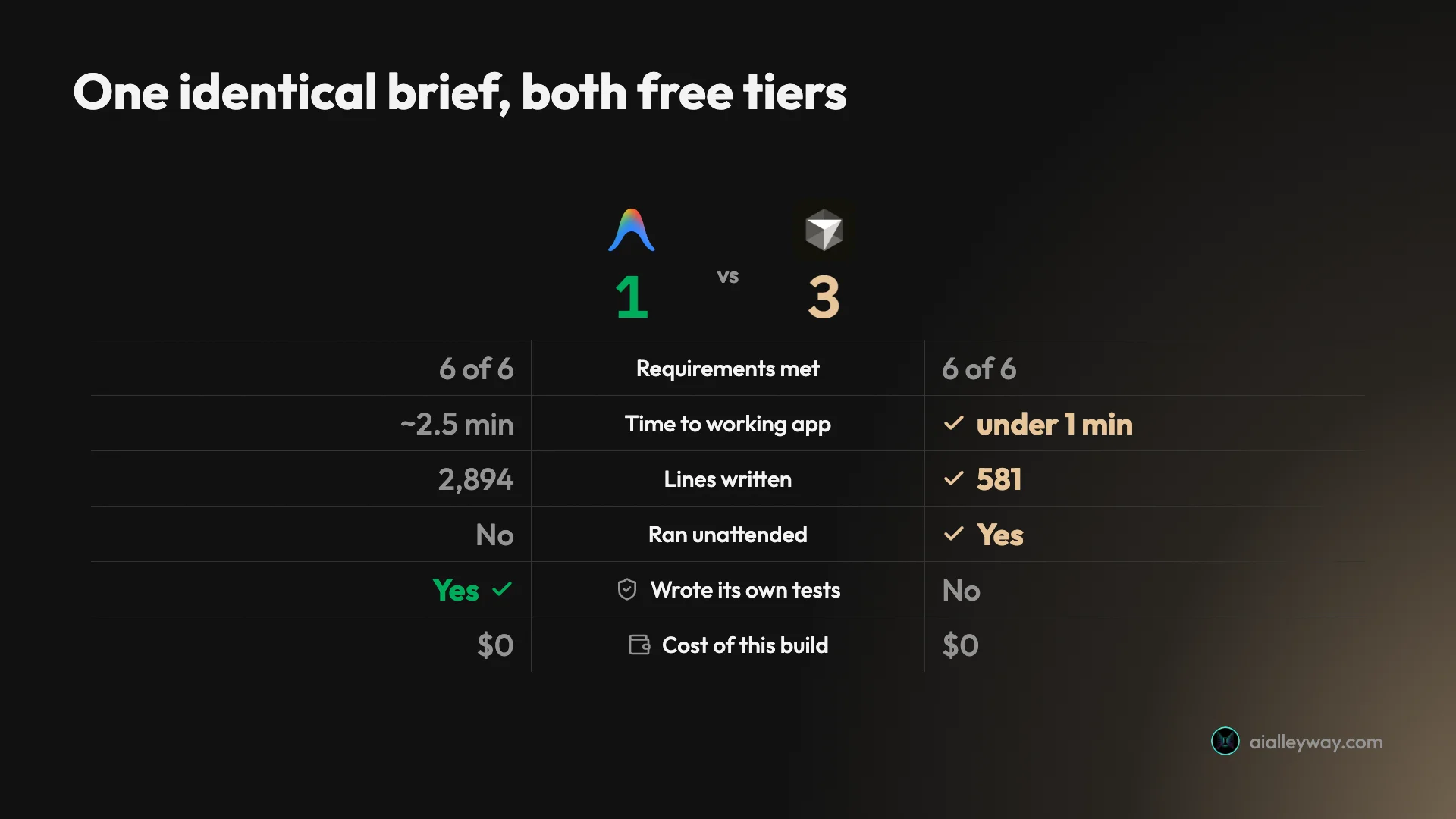
| Requirements met | 6 of 6 | 6 of 6 | Tie |
| Time to a working app | ~2.5 min plus a gate | Under 1 minute | Cursor |
| Lines written | 2,894 across three files | 581 across three | Cursor |
| Ran unattended | No — 1 approval, 1 permission | Yes | Cursor |
| Wrote its own tests | Yes, 6 assertions | No | Antigravity |
| Cost of this build | $0 | $0 (free Hobby tier) | Tie |
| Entry price after the free tier | Free indefinitely | $20/mo, plus metered usage | Antigravity |
| Alley Rating | 4.3 | 4.2 | Antigravity |

Google Antigravity: strengths and gaps
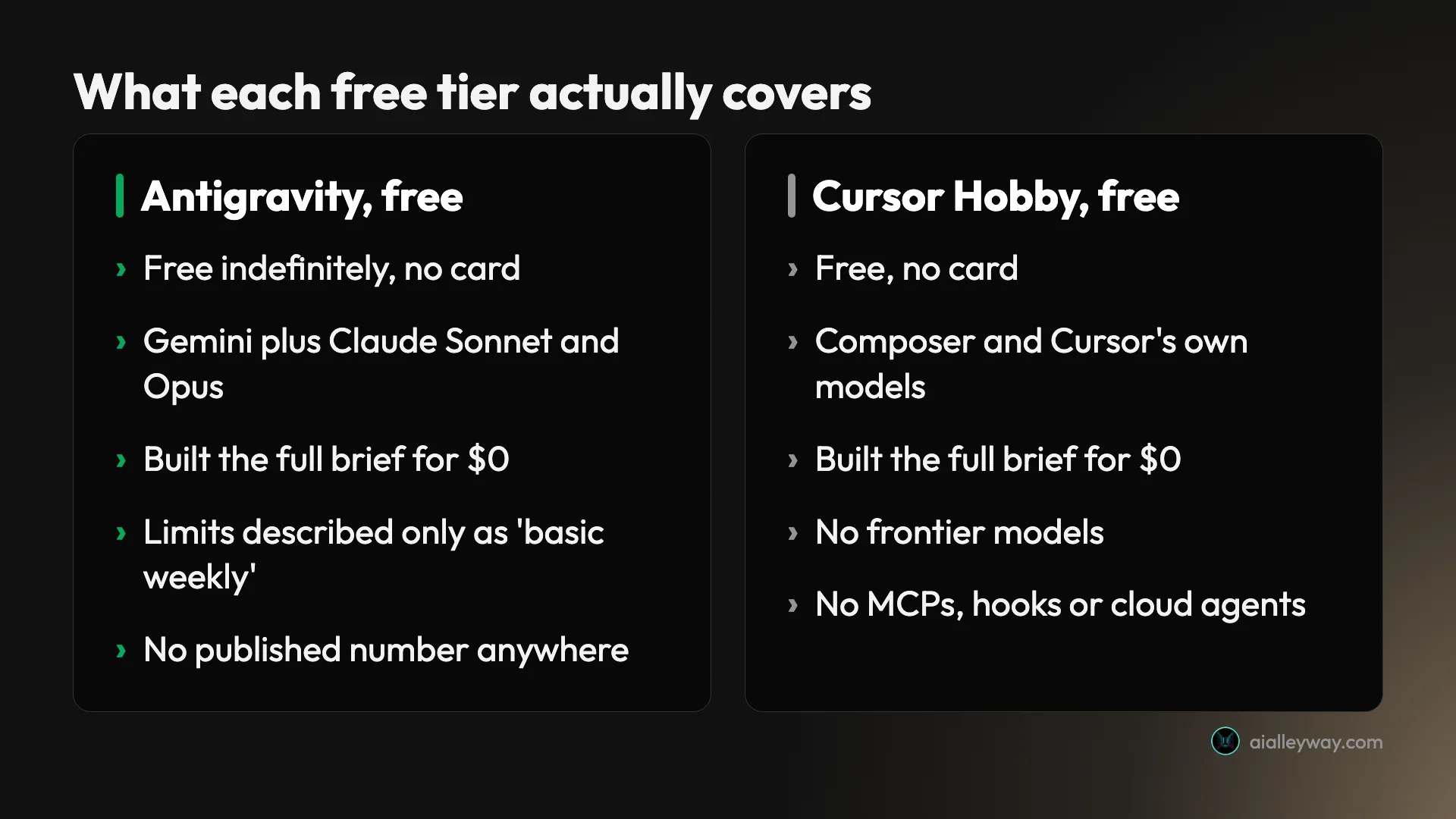
It tested its own work, which almost nothing does. Twenty seconds in it produced an implementation plan, waited for approval, then built. Afterwards it wrote a test file, ran it under Node, and recorded six assertions covering annual-to-monthly conversion, quarterly and weekly normalisation, the running total, cancellation, and a localStorage round trip. I checked each against the shipped app and they held. Of seven tools I have given this brief, two tested themselves and this was one.
The free tier is real and indefinite. Antigravity’s pricing page contains exactly one number and it is $0. That tier lists Gemini 3.5 Flash, Gemini 3.1 Pro, Gemini 3 Flash, gpt-oss-120b and, unusually for a Google product, Claude Sonnet and Opus.
It will not run unattended. The approval gate is by design, and it means one-prompt-one-app is unavailable no matter how well you write the prompt. My run needed one approval click and one permission grant.
It sprawls. 2,894 lines for six requirements, against Cursor’s 581 for the same result. Unasked, it added a six-currency switcher, a category spend breakdown, a command-palette search, grid and table views, and JSON import and export. On a prototype that is free polish; on something you maintain it is five times the code to read.
What it built beyond the brief, unasked:
| I asked for | It also shipped |
|---|---|
| Name, cost, billing cycle | Category, renewal date, icon picker, notes |
| Monthly equivalent for annual | Six-currency switcher |
| A running total | Category spend breakdown, “monthly saved” metric |
| A cancelled section | Reactivate button |
| localStorage | JSON import and export |
| Dark theme | Grid and table views, command-palette search |
Nobody publishes what the free allowance is. Google’s own plan comparison prices Flow Music Credits to the exact credit and describes Antigravity agent requests only as “limited”, “expanded” or “higher”. You cannot budget against an adjective.
The reliability complaints are consistent and I did not reproduce them. Google’s own developer forum carries the criticism that Antigravity stops mid-plan or partway through an implementation, which one poster describes as making it hard to trust for serious work. My single greenfield session hit nothing of the kind, so I am reporting it rather than confirming it. It is the most repeated complaint about the tool.

Cursor: strengths and gaps
It was the fastest of everything I have tested. Under a minute, start to finished app, with no approval gate and no follow-up prompts. Seven tools have taken this brief and nothing else has beaten a minute.
It was also among the tightest. 581 lines across three files, within four lines of the most restrained result I have recorded. It stored the raw cost and billing cycle and derived the monthly figure at render time, which is the correct model and not the obvious one — freezing the derived value is how you get a total that stops reconciling.
The free tier does more than people think. All of the above ran on Hobby, with no card. That is the fact this comparison usually gets wrong.
It wrote no tests. Nothing verified the result except me. Given that the app was correct, that is a smaller practical problem than it sounds, but it is the one axis where Antigravity is plainly ahead.
The paid model is where it hurts. Above the free tier, Cursor charges a subscription plus metered usage billed in arrears at the model’s API rate. I paid for it for eleven months and it came to $510.70 on a plan advertised at $20 — $340 of subscription and $170.70 of usage, with one month reaching $159.22. Nothing malfunctioned. A meter does what a meter does, and the bill arrives a month after the behaviour that caused it.
How they differ on price
Here is the thing worth taking away, because it is the opposite of the usual framing.
For a discrete, well-specified task, they cost the same: nothing. Both free tiers completed the identical brief. If your use of an AI coding tool looks like “build me this specific thing”, you can run either indefinitely without paying, and the comparison is about behaviour rather than money.
For sustained daily work they diverge sharply, and not on subscription price. Antigravity stays free but stops telling you where the ceiling is. Cursor charges $20 a month and then charges again for what you use, in arrears, uncapped unless you set a spend limit.
| Antigravity | Cursor | |
|---|---|---|
| Free tier | Free indefinitely | Free Hobby tier, no card |
| What the free tier excludes | Undefined “basic weekly rate limits” | Frontier models, MCPs, cloud agents |
| Entry paid price | $4.99 via Google AI Plus | $20 Pro |
| Metered usage on top | None | Yes, at API rate, in arrears |
| Published usage allowance | No — adjectives only | Yes, $20 to $400 by tier |
| What I actually paid | $0 | $510.70 over eleven months |
Both have a transparency problem and they are mirror images. Antigravity will not tell you how much you get. Cursor tells you exactly what everything costs and then bills you a month late, which is technically complete and practically invisible.
If you want a hard ceiling with no thinking, Antigravity gives you one by being free. If you want a hard ceiling with Cursor, it exists — the spend limit on Pro, Pro+ and Ultra — and it is off until you turn it on.
How they differ on speed and workflow
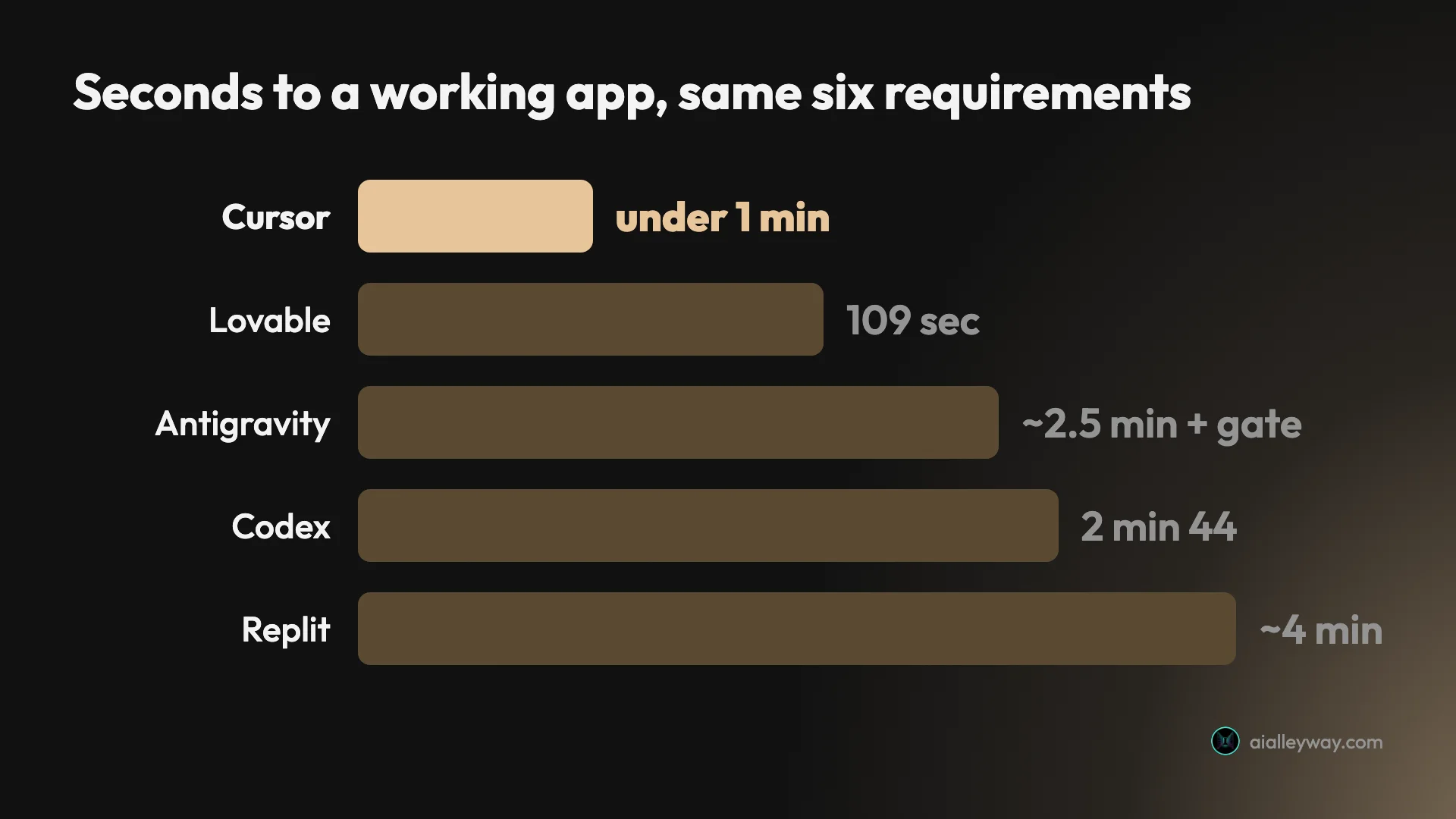
Cursor finished in under a minute. Antigravity took about two and a half, and roughly a minute of that was me reading a plan and clicking approve.
The difference is shape, not just duration. Cursor reads the brief and starts building. Antigravity reads the brief, writes down what it intends to do, and waits. On a fully specified task like mine, that gate is pure friction and it is exactly why Cursor wins the clock. On an underspecified task it is a checkpoint that catches a wrong plan before it becomes wrong code.
The workflows underneath differ just as much. Cursor is an editor you drive with agents on call; Antigravity is an agent manager you delegate to, with parallel workspaces and a browser the agents can drive themselves. That distinction survives my test intact — it is the one thing the existing coverage gets consistently right.
One caveat that applies to everything above: this was a greenfield single-page app from one prompt. It is the shape that flatters fast agents and says nothing about a repository that already exists. On that ground the weight of independent reporting favours Cursor for reliability, and I have not tested it myself.
The features that actually differ
Speed and line counts are what I could measure. They are not what separates these two in daily use, so here is the architectural difference, which my test barely touches.
Antigravity is an agent manager. Its 2.0 release is built around a command centre for parallel local agents, with project grouping and scheduled messaging, plus a CLI, an IDE and an SDK for building agents on its harness. The pitch is that you run several agents at once on different parts of a problem and supervise rather than type.
Cursor is an editor with agents in it. It is a VS Code fork, which means your extensions, keybindings and settings come with you, and the AI lives inside an environment you already know. The agent is something you invoke; the editor is where you live.
Two consequences follow, and they decide more cases than any benchmark:
| Antigravity | Cursor | |
|---|---|---|
| You are | The manager | The driver |
| Parallelism | Multiple agents at once | Primarily one task at a time |
| Browser | Agents drive a browser themselves to check UI | Embedded browser panel you inspect |
| Models | Gemini first, plus Claude Sonnet and Opus | Broad: Claude, GPT, Gemini, its own Composer |
| Migration cost | A new application to learn | Your VS Code setup carries over |
The browser row is the one people underrate. Antigravity’s agents can navigate and visually validate a UI change themselves, which is a genuinely different verification story from a panel you look at. It is also the capability its own sandbox blocked during my test, when its attempt to serve the app locally failed on a permission error — so I have seen the design and not the payoff.
Why most comparisons of these two are out of date
This is worth checking before you trust anything you read on this matchup, including this page.
Antigravity launched in November 2025 and shipped 2.0 around May 2026, a release that reorganised the product around the parallel agent manager described above. A large share of the comparison write-ups you will find on this matchup carry a November 2025 date — within days of the original launch, describing a version that has since been substantially rebuilt. Two of the most widely cited were published on 23 and 25 November 2025, four days and six days after Antigravity first shipped.
That is not a criticism of those write-ups; they were accurate when written. It is a warning about compounding. A post from launch week describes 1.0, later posts cite it, and an AI summary synthesises both into a description of a product that no longer quite exists. If a comparison does not say which version it tested, assume 1.0. The tell is easy to check: a write-up describing Antigravity as a single-agent IDE, with no mention of the parallel agent manager, predates 2.0 regardless of what its date says.
Everything on this page was measured on Antigravity 2.0 with Gemini 3.6 Flash (High), on 10 August 2026, and on Cursor’s 2.x agent window with Composer 2.5 Fast. Both on their free tiers. If you are reading this a year from now, apply the same suspicion to it.
The stability question nobody puts in the comparison table
Both of these tools have an ownership story that matters more than a feature row, and in opposite directions.
Cursor’s parent company, Anysphere, is being acquired by SpaceX in a $60 billion all-stock deal announced in June 2026 and expected to close in the third quarter — which is now. It is the largest startup acquisition on record. Cursor’s pricing has already been rewritten once, when it moved from counted requests to dollar-denominated usage in 2025, and that change was contentious enough to still be generating explainers a year later.
Antigravity is a Google product that has already consumed another one. Google retired Gemini CLI on 18 June 2026 and moved personal users to Antigravity CLI, cutting the free allowance from roughly a thousand requests a day to roughly twenty and changing it from open TypeScript to a closed binary. That is what consolidation looked like the last time it happened here.
Neither of those is a reason to avoid either tool. Both are a reason to be sceptical of a twelve-month commitment: one is changing owner, the other has demonstrated it will re-tier a free product when the strategy shifts. The free tiers, conveniently, commit you to nothing.
Who should pick Google Antigravity
Anyone who wants an agent that checks itself. The test suite is the real differentiator and it is not a small one. If you are going to trust generated code, a tool that verifies before handing over is worth a slower clock.
Anyone whose budget is a hard zero. Free indefinitely, with Claude and Gemini models included, is a genuinely unusual offer and the single best way to find out whether agentic development suits you.
People who want to watch the plan before the code. The approval gate is a feature if you have ever let an agent run and regretted it.
Not for you if you need unattended runs, or you are maintaining what gets built, or you need to know your limits in advance.
Who should pick Cursor
Anyone who wants to stay in an editor they drive. This is the fundamental difference and it decides most cases before any benchmark does.
Anyone doing discrete, specifiable jobs. Fastest of seven, tightest but one, and free for exactly that pattern of work.
Anyone on a large existing codebase. My test does not show this, but the independent reports consistently do, and it matches the shape of the two tools.
Not for you if you cannot tolerate a variable bill. Set the spend limit on day one, or repeat my $510.70 with your own money.
The final word
The page-one framing of this matchup is that you are choosing between free and $20. You are not. Both tools built the same app for nothing, and Cursor did it faster, so on the work most people will actually try first there is no price difference at all.
What you are really choosing between is two ways of being wrong. Antigravity writes too much code and checks it. Cursor writes tight code and checks nothing. Antigravity will not tell you what your free allowance is; Cursor will tell you exactly what you spent, a month after you spent it.
Antigravity takes it 4.3 to 4.2, and the margin is that test suite — being the only one of the pair that verified its own work is worth a tenth of a point and arguably more. But it is close enough that the tie-break is temperamental rather than technical. If you want to manage an agent, take Antigravity. If you want to drive an editor, take Cursor.
And whichever you lean toward: both free tiers are real, neither asks for a card, and the brief that produced every number on this page took under three minutes on each. Run your own.
For where these two land against the rest of the field, see how all seven placed on the identical build.
One level down on either tool: the full Google Antigravity review and Antigravity pricing, or the Cursor review and what a year of Cursor actually billed. If the agent side is what interests you, Antigravity vs Claude Code is the same test against the tool that beat both.
Frequently asked questions
Is Antigravity better than Cursor?
They won different things, and the split is unusually clean. Cursor was faster and tighter: it met all six requirements of my brief in under a minute, in 581 lines across three files, which made it the fastest of the seven tools I have run that brief through. Antigravity took about two and a half minutes plus an approval gate and wrote 2,894 lines for the same result.
Antigravity won the thing that is harder to buy. It wrote and ran its own unit tests, which only one other tool of seven did. So if you are choosing on raw speed and restraint, Cursor. If you want an agent that checks its own work before handing it over, Antigravity. Our ratings put them a tenth apart, 4.3 to 4.2, which is about right.
Is Cursor free?
Yes, and this is the most commonly missed fact in this comparison. Cursor's Hobby tier costs nothing, asks for no card, and it built my entire six-requirement app in under a minute without me paying anything.
What Hobby does not include is access to frontier models, extended agent limits, MCPs or cloud agents. So the free tier will complete a real, self-contained task and will not sustain all-day iterative work against Claude or GPT. That is the actual line between free and paid here, and it is not the line most comparisons draw.
How much does Antigravity cost compared to Cursor?
Antigravity's own pricing page contains exactly one number and it is zero. Paid access is not an Antigravity subscription but a Google One AI plan: $4.99 for AI Plus, $19.99 for AI Pro, $99.99 for Ultra 5x and $199.99 for Ultra 20x.
Cursor runs from a free Hobby tier through Pro at $20 a month, Pro+ at $60 and Ultra at $200, with team seats at $40 and $120 per user and 20% off for yearly billing. The difference that matters is not the sticker price. Cursor adds metered usage on top of the subscription, billed in arrears at the model's API rate. I paid $510.70 across eleven months on a plan advertised at $20. Antigravity has no meter at all, but it also will not tell you what its free allowance is.
Does Antigravity stop halfway through tasks?
It stops on purpose at the start, and there are reports of it stopping unhelpfully later. In my test it produced an implementation plan and then waited for approval before writing anything, which cost one click and one permission grant. That is by design rather than a fault.
Separately, Google's own developer forum carries complaints about Antigravity stopping mid-plan or partway through an implementation, which people describe as making it hard to trust for serious work. I did not hit that in a single-session greenfield build, so I cannot confirm it from my own testing. It is the most consistent criticism of the tool and worth knowing before you commit a real project to it.
Which is better for a large existing codebase?
Cursor, on the available evidence, though my own test does not prove it. I measured both on a greenfield single-page app built from one prompt, which is the shape that flatters agents and tells you nothing about a repository with ten years of history in it.
What points to Cursor is the weight of independent reports: it is repeatedly described as the more reliable choice on large production codebases, while Antigravity is described as strong for prototyping and erratic on complex existing code. That matches the shape of the two tools rather than contradicting it. If your work is a big legacy repo, treat my speed numbers as irrelevant and weigh reliability instead.
Can you use Antigravity and Cursor together?
Yes, and it costs nothing to try because both have free tiers. They are separate applications with separate configuration, so nothing conflicts beyond your attention.
The division people describe is using Antigravity for exploration and scaffolding, where its free tier means thinking is free, and Cursor for the editing work you want to watch. My results support that: Antigravity was the one that sprawled when left alone, and Cursor was the one that produced the tightest code fastest. The cost of running both is zero until you exceed Cursor's free tier, at which point the decision makes itself.
Keep reading
Antigravity pricing: one number on the page, and four adjectives
Antigravity pricing starts at $0, the only number on its page. The real ladder runs $4.99 to $199.99, and Google will not say what any of it buys.
Antigravity vs Claude Code: I gave both one brief, neither built it
Antigravity vs Claude Code, measured on one identical brief. Both refused to build unattended — the opposite of what page one says. Costs, code and verdict.
Google Antigravity review: it wrote its own tests
Antigravity built my six-requirement app on the free tier and met all six. Then it wrote and ran its own unit tests, which no other builder I have tested does.
Bolt.new alternatives: 8 tools, 7 took the same brief
The best Bolt.new alternatives, ranked by a measured build rather than a feature table. Seven tools took one identical brief. Here is what each build cost.