
Cursor AI pricing: what the plans cost and what I paid
Cursor AI pricing runs free to $200 a month, plus metered usage. I paid $510.70 across eleven months on a plan advertised at $20. Every tier, verified live.
Contents
How much does Cursor cost?
Cursor’s sticker price is $20 a month. Across eleven months I paid $510.70.
Nothing went wrong and nobody overcharged me. The gap between those two numbers is the whole subject of this page, because Cursor’s bill has two halves and only one of them appears on the pricing page.

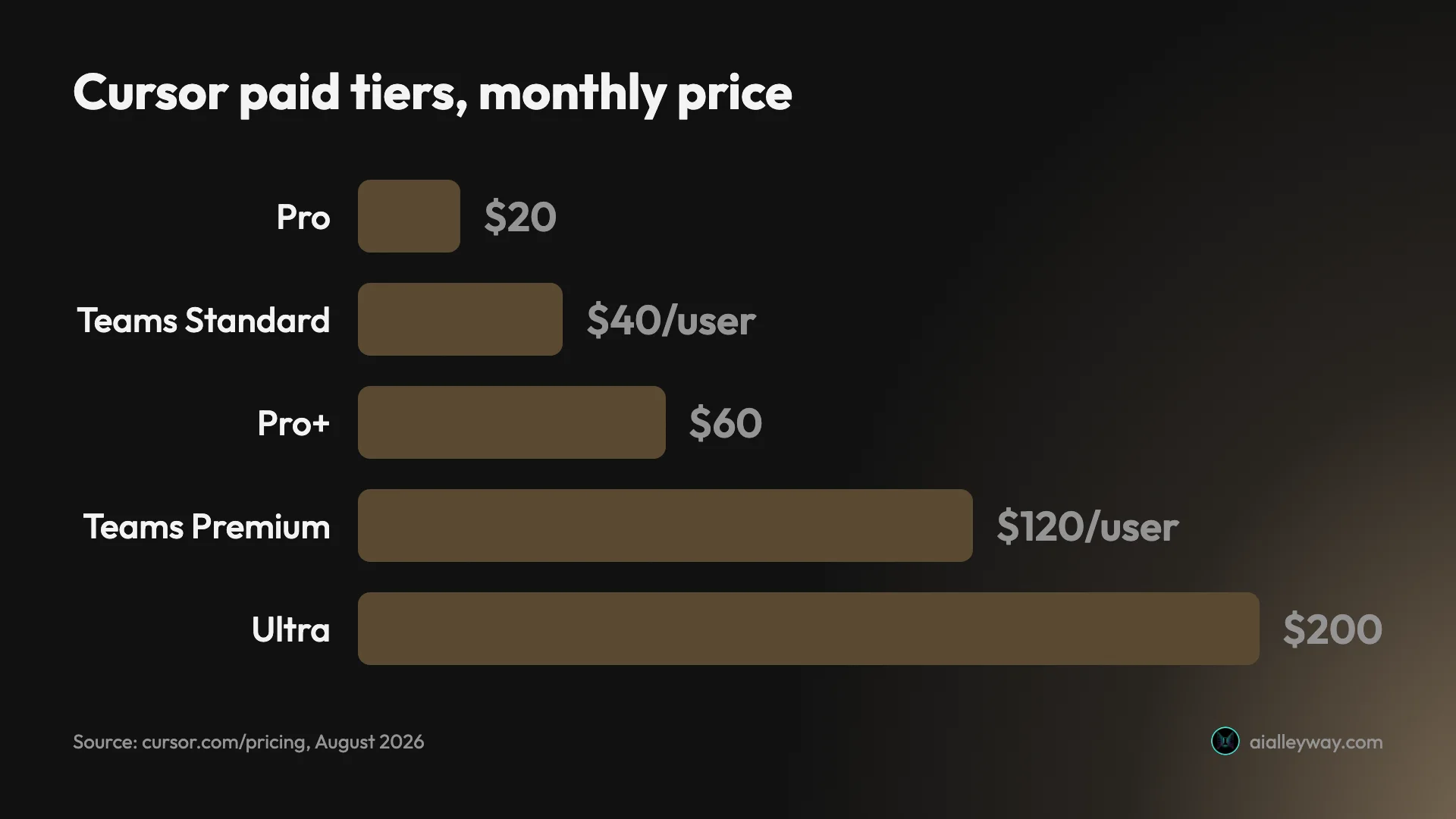
Here is the full ladder, read off Cursor’s own pricing page in a US browser on 11 August 2026, with the billing toggle switched both ways and every nested sub-tab opened.
| Plan | Monthly | Yearly (per month) | Agent limits |
|---|---|---|---|
| Hobby | Free | Free | Limited requests, no card |
| Pro | $20 | $16 | The baseline |
| Pro+ | $60 | $48 | 3× Pro |
| Ultra | $200 | $160 | 20× Pro |
| Teams — Standard | $40 per user | $32 per user | Pro-equivalent, pooled |
| Teams — Premium | $120 per user | $96 per user | 5× Standard |
| Enterprise | Custom | Custom | Quote-only |
Yearly billing takes exactly 20% off every paid tier. Not “about 20%”, and not more on the expensive plans — the same fifth, all the way up.
Why published Cursor prices disagree with each other
If you have already searched this, you will have noticed the summaries do not match. One says six tiers from free to $200. Another says the seats are $40 and $120. A third lists Pro, Pro+ and Ultra and never mentions seats at all.
They are all quoting the same page. The reason they conflict is that Cursor’s pricing page is nested: four cards across the top, and two of those cards hide sub-tiers behind tabs you have to click. The Individual card shows $20 until you click Pro+ or Ultra, at which point the same card shows $60 or $200. The Teams card shows $40 until you click Premium and it becomes $120.
A tool that fetches the page gets whichever tab happened to be selected. That is how a page ends up confidently reporting that Cursor Teams costs $40 per user, full stop, when there is a $120 seat one click away.
It is worth knowing this beyond the trivia, because it tells you something about how to check any price on this page: the number you see first is the cheapest member of a set, not the price of the thing.
What the bill is actually made of
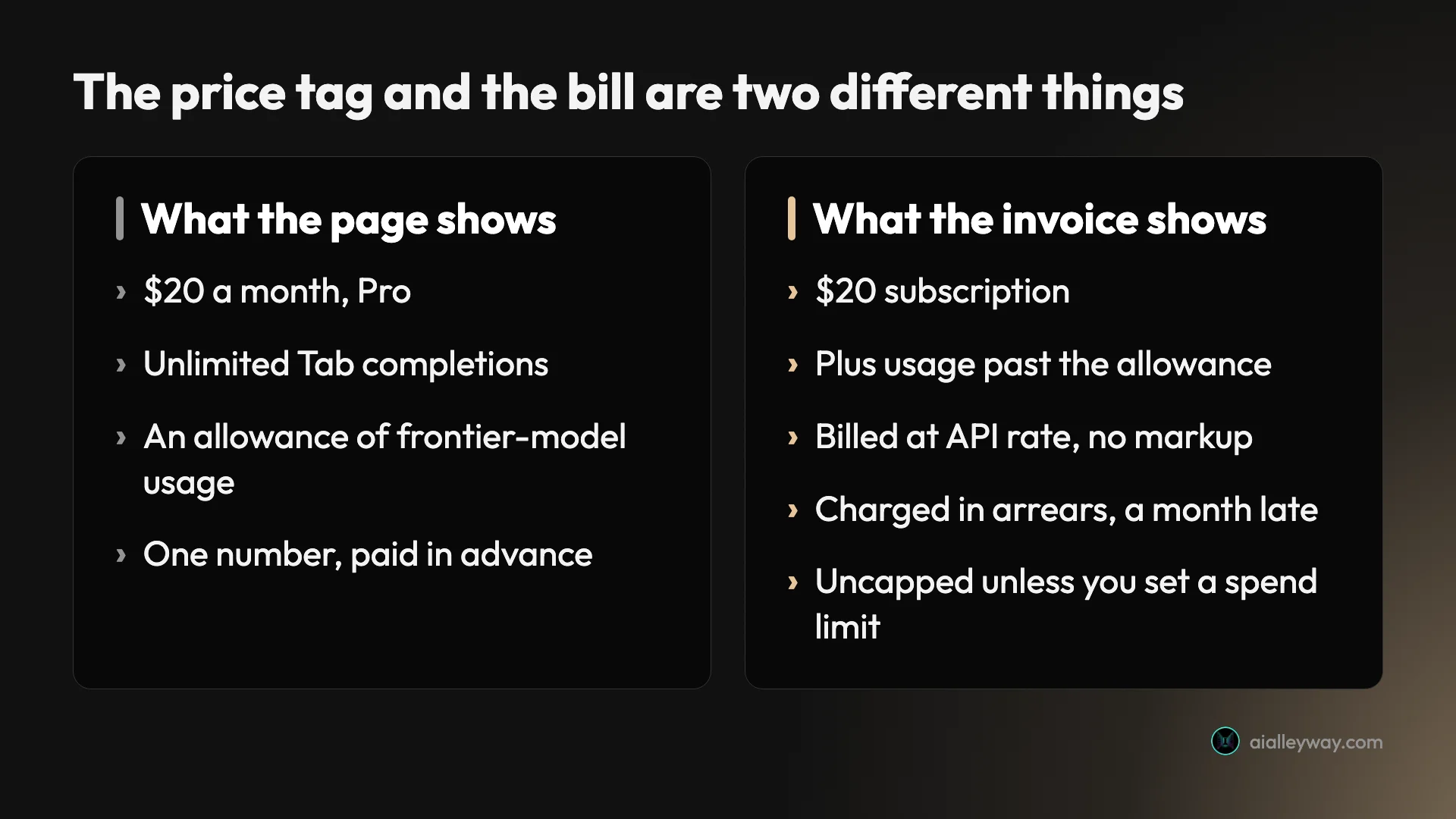
Every paid plan is two charges wearing one price tag.
The subscription is the number in the table above. It buys you the editor, unlimited Tab completions, and an allowance of frontier-model usage denominated in dollars.
The usage is what happens after the allowance runs out. On an individual plan Cursor bills the model’s API rate with no markup of its own, and it bills in arrears, after the month in which you spent it. On Teams and Enterprise there is a markup, and I had this wrong until I read the docs: third-party models carry an additional Cursor Token Rate of $0.25 per million tokens, and choosing regional data residency adds a further 10% uplift on model pricing.
That second word is where the money hides. Usage-based billing is not unusual and Cursor is unusually clean about it: no marked-up tokens, no invented credit currency with a fictional exchange rate, a published rate card. What makes it bite is the delay. You do not feel a meter running. You feel an invoice, four weeks after the work that caused it, by which point you cannot connect the number to the afternoon that produced it.
There is a lever for this and it is the most important sentence on this page: Cursor offers a spend limit on Pro, Pro+ and Ultra. It caps what usage-based billing can add. It is off unless you turn it on.
What I actually paid, from the invoices
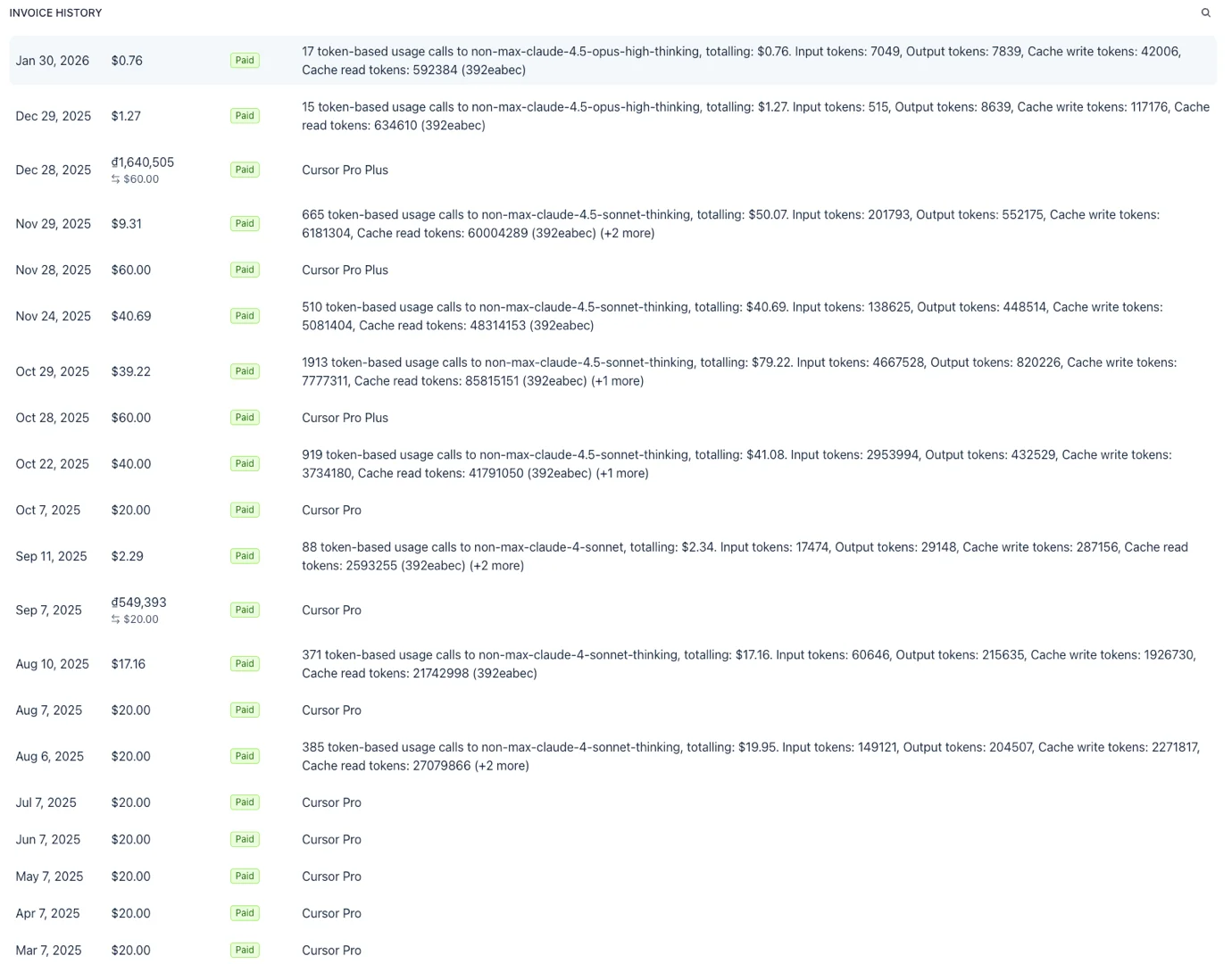
I paid for Cursor for eleven months and then cancelled. Here is the whole of it, from the Stripe invoice history rather than from memory.
| Amount | |
|---|---|
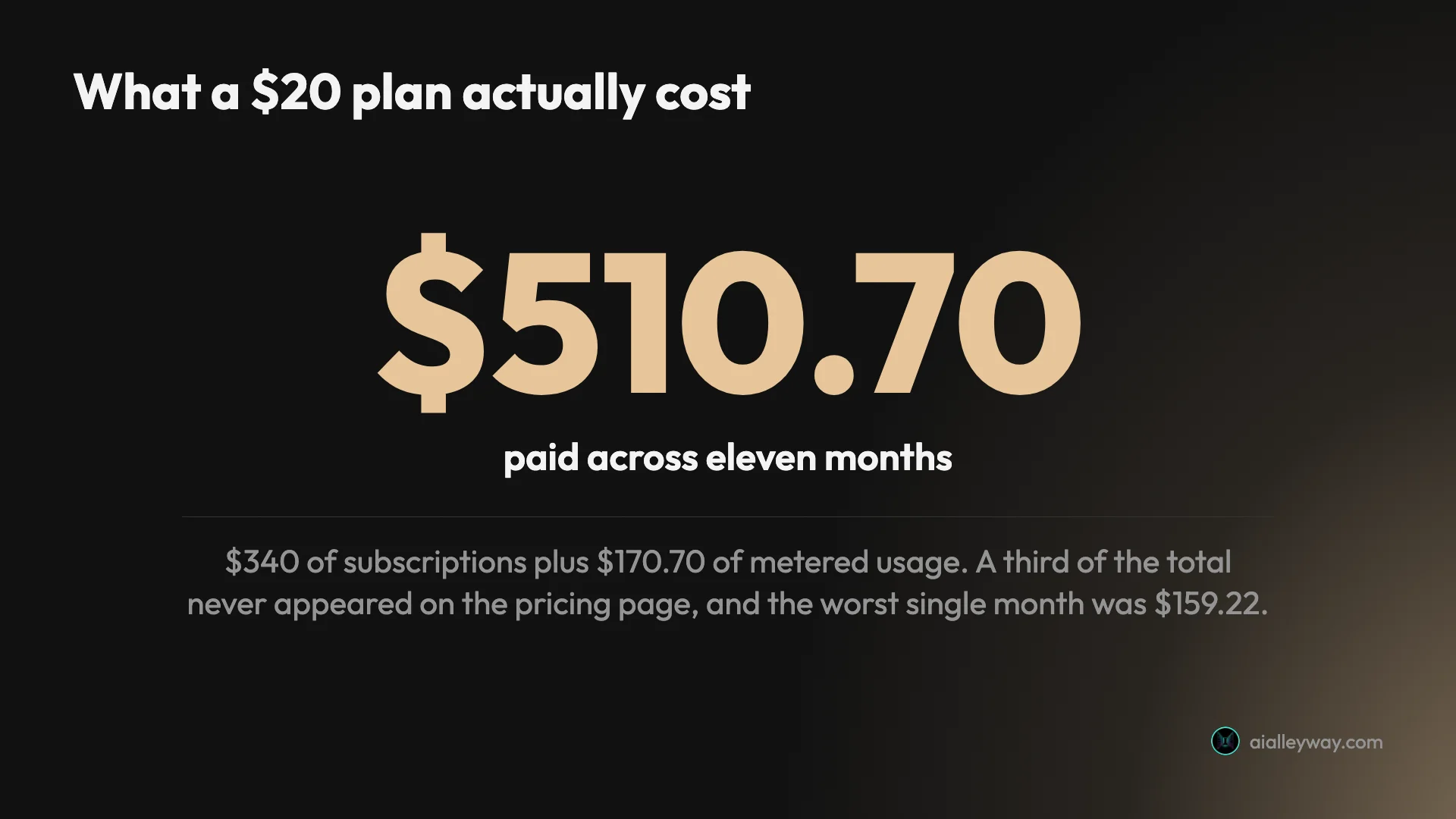
| Subscriptions across eleven months | $340.00 |
| Metered usage on top | $170.70 |
| Total | $510.70 |
| Worst single month | $159.22 |
| Usage as a share of the total | 33% |
I joined at $20 a month. In October I upgraded to Pro+ at $60, specifically to stop the overages — which is worth sitting with, because it did not work. Buying a bigger allowance moved where the line was without changing what happened when I crossed it.
A third of what I paid Cursor never appeared on any pricing page I read before signing up.
The month that made the point was October 2025: $159.22, on a plan advertised at $20, with roughly half of it unplanned. Nothing was broken. I had simply had a heavy month and the bill arrived a month later.
Is this Cursor’s fault?
Mostly not, and it matters to be precise about it, because “Cursor is expensive” is the wrong lesson.
Cursor charges the model’s API rate with no markup on individual plans. It publishes the rates. It offers a spend limit on every individual paid tier. Three of those are more than several competitors manage, and the fourth — the spend limit — would have capped my entire problem at whatever number I chose.
I never set it. That is not a defect in the product; it is a default I did not change and a bill I did not read closely enough for several months.
What is fair to put on Cursor is the shape: a headline price that is a floor rather than a price, and arrears billing that puts the feedback a month behind the behaviour. If the meter showed a running monthly total the way the plan page shows $20, most of this page would not need writing.
So the honest framing is not that Cursor overcharges. It is that Cursor’s advertised price is not a prediction of your bill, and the tool gives you exactly one mechanism to make it one.
How Cursor’s usage actually works
The word “credits” does a lot of hiding, so here is the machinery underneath it, from Cursor’s own models-and-pricing documentation.
Your allowance is two separate pools that both reset monthly, not one balance:
- Cursor’s own models (Grok 4.5 and Composer 2.5) draw on their own pool.
- Everything else (Claude, GPT, Gemini) draws on a third-party pool charged at the model’s API price.
That split matters because the two run down independently. Exhausting one does not touch the other, and “I’m out of credits” usually means you are out of one specific pool.
| Cursor’s own models | Third-party models | |
|---|---|---|
| Covers | Grok 4.5, Composer 2.5 | Claude, GPT, Gemini |
| Charged at | Its own pool | The model’s API price |
| Resets | Monthly | Monthly |
| Markup on individual plans | None | None |
| Markup on Teams / Enterprise | None | +$0.25 per million tokens |
What each tier includes is the number nobody quotes. Paid individual plans bundle between $20 and $400 a month of third-party model usage, scaling up the ladder. Read that against the subscription prices and the top of the range gets interesting: Ultra costs $200 a month and includes $400 of third-party usage. Whether that is a saving depends entirely on whether you would otherwise have spent it.
What is free. Tab completions are unlimited and consume no usage at all, on every paid tier. If most of your day is autocomplete rather than agent runs, your bill will look nothing like mine.
Auto mode versus picking a model. Auto Cost is priced per million tokens regardless of which model it routes to — you are buying a rate, not a model. Auto Balance and Auto Intelligence charge the actual API rate of whatever they choose. Selecting a frontier model by hand charges that model’s standard rate. This is the single biggest lever on the bill, and it is one dropdown.
Extended context is a multiplier, not a feature. GPT-5.4 and GPT-5.5 charge 2× input pricing for long-context requests up to a million tokens. On legacy request-based plans, Max Mode adds 20% to the model’s API rate in exchange for a larger context window. Neither is a trap — both are documented — but “just turn on the big context window” is a pricing decision.
What the models themselves cost
Since the third-party pool is billed at API rates, the model you pick is the price you pay. A sample from Cursor’s published rate card:
| Model | Input / M tokens | Cache read / M | Output / M |
|---|---|---|---|
| Claude Sonnet 5 | $2.00 | — | $10.00 |
| GPT-5.4 | $2.50 | $0.25 | $15.00 |
| Gemini 3.6 Flash | $1.50 | $0.15 | $7.50 |
Two notes before you plan around these. The Claude Sonnet 5 rate is promotional through 31 August 2026, so it is a discount with an expiry rather than a price. And cache reads are an order of magnitude cheaper than fresh input, which is why a long conversation in one thread costs less than the same work restarted repeatedly — the cache is doing the work.
The spread between Gemini 3.6 Flash and GPT-5.4 is roughly 1.7× on input and 2× on output. Across a heavy month that is not a rounding difference, and it is entirely under your control.
Five ways to spend less on Cursor
None of these are clever. They are the things I did not do.
| Tactic | Where it lives | What it changes |
|---|---|---|
| Set a spend limit | Account billing settings | Caps metered usage outright. Off by default |
| Stay in Auto for routine work | Model dropdown | Flat per-million rate instead of frontier prices |
| Match model to task | Model dropdown | Up to ~2x on output between Gemini Flash and GPT-5.4 |
| Treat long context as a purchase | Per request | Avoids 2x input pricing you did not need |
| Check consumption mid-cycle | Usage dashboard | Turns a month-late surprise into a live number |
Set the spend limit. It exists on Pro, Pro+ and Ultra, it caps what usage-based billing can add, and it is off until you turn it on. If you do nothing else on this list, do this one. My entire $170.70 of overage would have been whatever number I typed into that box.
Stay in Auto for routine work. Auto Cost buys a flat per-million-token rate regardless of which model answers. For refactors, boilerplate and the fiftieth small edit of the day, the frontier model is not earning its premium.
Match the model to the task, not to your mood. Reaching for the most expensive model by default is how the bill grows without the work improving. The rate card above is the whole argument.
Treat extended context as a purchase. 2× input pricing for long context is a fair trade when you genuinely need a million tokens of it, and pure waste when the answer was three files away.
Check consumption mid-cycle. Arrears billing means the invoice is the last place you learn what you spent. The dashboard knows in real time; the bill knows a month late. Look at the one that is current.
One line item that is easy to miss: Bugbot. On individual plans the pricing page lists it as “Bugbot on usage-based billing” rather than as an included feature, which means Cursor’s automated code review draws on the meter like anything else. On Teams it appears as “agentic code reviews with Bugbot”, bundled into the seat. So the same capability is metered on a personal plan and included on a team one, and if you turn it loose on a large pull request from a Pro account, that review has a price.
What Cursor costs a team
Team pricing is where the nested tiers matter most, because the gap between the two seats is 3×.
Standard at $40 per user is Pro-equivalent access plus the administrative layer: centralised billing, a team marketplace for rules and plugins, usage analytics, team-wide privacy mode, and SAML/OIDC SSO.
Premium at $120 per user adds 5× the Standard Agent limits, agentic code reviews with Bugbot, and cloud agents with shared team context.
For ten developers that is $4,800 a year against $14,400 at list, or $3,840 against $11,520 billed yearly — before any usage. Usage pools across the team on Enterprise, which changes the arithmetic again and is one of the reasons Enterprise is quote-only. Team billing also carries the markup individual plans do not: $0.25 per million tokens on third-party models, on top of the model’s own rate, and 10% more again if you need regional data residency.
The trap at team scale is the same one I hit personally, multiplied. A per-seat subscription is predictable and a metered overage is not, and ten people crossing their allowance in the same busy month produces a bill nobody forecast. If you are buying seats, the spend controls are not an optimisation to get to later. They are the thing that makes the budget a budget.
How Cursor pricing compares
Against the tools I have tested on identical work, Cursor sits in the middle on price and at the top on variance.
| Tool | Entry price | Free tier | Billing shape |
|---|---|---|---|
| Cursor | $20/mo | Yes, evaluation-grade | Subscription plus metered usage |
| Claude Code | $20/mo | No | Subscription, or metered API |
| Google Antigravity | Free | Yes, does real work | Free, or a Google One plan |
| Codex | Bundled with ChatGPT | Yes | Included in the subscription |
| Lovable | $25/mo | 5 credits a day | Credits, which expire |
Two things stand out. Cursor is the only one of these where the entry price and the likely bill are different numbers by design. And Antigravity is the only one whose free tier will carry real work indefinitely — I built a complete app on it without paying anything, which makes it the cheapest way to find out whether you like working this way at all.
That is not an argument that Cursor is bad value. Eleven months of it were genuinely useful and I would have kept paying if the bill had been predictable. It is an argument that the comparison people make — “$20 versus $20” — is not the comparison that shows up on the card.
One thing to check before you commit to a year
Cursor’s parent company, Anysphere, is being acquired by SpaceX in a $60 billion all-stock deal announced on 16 June 2026 and expected to close in the third quarter of 2026 — which is to say, around now. It is the largest startup acquisition on record, and it followed Cursor reaching roughly $2 billion in annual recurring revenue.
I am not going to speculate about what a new owner does to a price list. What I will say is narrower and checkable: this pricing structure has already been rewritten once, when Cursor moved from a request-counting model to dollar-denominated credits in mid-2025, and that change was contentious enough to still be the subject of explainer posts a year later.
So the yearly discount is a real 20%, and it is also a twelve-month commitment to a plan structure that has changed before, under an owner that is new. If your usage is heavy and stable, take the discount. If you are still working out whether Cursor fits, paying monthly for a few months costs you a fifth more and buys you the ability to leave. I would take that trade today.
Which Cursor plan should you pick?
Hobby, free — if you are evaluating. It asks for no card and it will tell you within a week whether the editor suits you. It will not sustain daily work, and it is not meant to.
Pro, $20 — the default, and the right starting point for one developer. Do not treat it as your monthly cost; treat it as your floor, and set a spend limit the day you subscribe.
Pro+, $60 — worth it only if you have watched yourself exceed Pro’s allowance repeatedly. Buying a bigger allowance to escape overages is the mistake I made; it raises the ceiling without changing the mechanism. Upgrade because 3× the limits matches your measured usage, not as a way to stop being surprised.
Ultra, $200 — for all-day agent use where 20× Pro’s limits is a genuine requirement. At this price the question is no longer whether Cursor is worth it but whether a flat $200 beats metered usage at your volume, and that is answerable only from your own invoices.
Teams, $40 or $120 per user — Standard for the admin and privacy layer, Premium if your team lives in the agent. Decide on the 5× limits, not the feature list.
Students — there is no standing student plan, whatever you may have read. Cursor’s students page offers the same free tier as everyone else, plus event promotions with no published terms. Budget as though the discount does not exist, because today it does not.
What the free Hobby tier actually gets you
“Is Cursor free” is one of the most common things people search alongside the price, and the answer deserves more than yes.
There is a free tier, it is called Hobby, and it does not ask for a card. What Cursor’s pricing page lists against it is short:
| Hobby includes | Hobby does not include |
|---|---|
| No credit card required | Extended Agent limits |
| Limited Agent requests | Generous limits for Grok and Composer |
| Access to Composer | Access to frontier models |
| MCPs, skills and hooks | |
| Cloud agents |
The word doing the work there is limited. Cursor does not publish what the Hobby Agent allowance actually is, in requests or in dollars, which puts it in the same position as several rivals: a free tier you can only size by hitting the end of it.
What I can tell you is one measured data point. The Stack Cost build above — six requirements, 581 lines, done in under a minute — ran entirely on Hobby and cost nothing. So the free tier is not decorative. It will complete a real, self-contained task.
What it will not do is the thing that generated my $510.70: all-day iterative work against frontier models, which is precisely what the paid tiers open up and precisely what the Hobby feature list excludes. Note that “access to frontier models” is a paid line item. On Hobby you are working with Composer and Cursor’s own models, not Claude or GPT.
There is no separate free trial of the paid tiers, either. The free tier is the trial, and the upgrade is a purchase rather than a countdown.
Does Cursor have a student discount?
This one is worth its own answer, because the web is fairly confident about a thing that does not appear to be true.
Several guides list a Cursor student discount as an established offer, sometimes with terms attached. Cursor’s own students page does not describe one. It says anyone can get started with Cursor for free, and directs students to watch for promotions at on-campus and online events, with a campus newsletter for early notice.
That is not a discount programme. It is a free tier everyone already has, plus the chance of a time-limited promotion with no published terms, no stated eligibility, and no verification flow.
If you are a student budgeting for this, budget for Pro at $20 or the free Hobby tier, and treat any promotion you catch as a bonus rather than a plan.
What actually happened to Cursor’s pricing in 2025
A good share of the people searching for Cursor’s price are really asking what happened to it, and the answer explains the shape of the bill you will get today.
Cursor originally sold requests: a monthly quota of a countable thing, where 500 fast premium requests meant 500 of them and you could feel the number going down. In mid-2025 it moved to dollar-denominated usage — your plan includes an amount of model spend rather than a count of actions.
| Before mid-2025 | After | |
|---|---|---|
| You bought | A count of requests | An amount of model spend |
| A unit was | 1 request, always | $1 of usage, size varies |
| Predictable? | Yes, countable | Only if you watch it |
| Overspend showed up | When the quota ran out | On next month’s invoice |
The change was contentious enough that explainer posts about it are still being written a year later, and the reason is not really the money. A request is a unit you can hold in your head. A dollar of frontier-model usage is a unit whose size depends on which model answered, how long the context was, and whether the cache was warm. The same action can cost different amounts on different days, and no amount of documentation makes that as legible as “you have 500 of these.”
It is worth saying that the new model is more honest than the old one. Charging for what you actually consume, at published rates, with no markup on individual plans, is a better-behaved arrangement than a quota whose real cost is hidden inside an average. But it moved the mental effort onto the customer, and a pricing model you have to think about is one people will describe as having got worse even when it got fairer.
That history is why the advice on this page keeps coming back to the same two habits: set the cap, and look at consumption before the invoice does.
What a real build cost me on Cursor
Abstract rates are hard to weigh, so here is one concrete data point from the same brief I have given seven AI coding tools.
I asked Cursor to build a single-page subscription tracker with six specific requirements — add a tool with a name, cost and billing cycle; show annual plans as a monthly equivalent; a running total pinned to the top; a cancelled state that leaves the total but stays visible; localStorage persistence; a dark theme.
It met all six in under a minute, writing 581 lines across three files, on the free Hobby tier, for nothing. It was the fastest of the seven tools I have run that brief through, and the tightest apart from Codex’s 585 lines.
That is the case for Cursor’s pricing that the invoice story obscures. A single well-specified task, done in one pass, costs approximately nothing — the free tier absorbed it entirely. My $510.70 did not come from tasks like that. It came from eleven months of open-ended, iterative, all-day work, which is a different activity that happens to use the same editor.
Which tells you how to read your own likely bill. If your use looks like discrete, specifiable jobs, Cursor is cheap and the free tier may genuinely cover you. If it looks like living in the thing, assume the meter, and set the cap.
The final word
Cursor’s pricing is honest and its presentation is not.
Every number is published, the model rates carry no markup, the spend limit exists, and the yearly discount is a clean 20% with no tier games. That is a better-behaved price list than most of this category manages.
But the number that gets quoted is $20, and the number that arrives depends on a meter you cannot feel, reported a month late, with the one control that would fix it switched off by default. My eleven months came to $510.70 — two and a half times the subscription total I thought I was signing up for — and every dollar of that gap was my own usage, billed fairly, that I simply could not see accumulating.
If you take one thing from this page, take the boring one. Subscribe at $20, and set the spend limit before you write any code. It is two minutes, it is on every individual paid tier, and it is the difference between a price and a bill.
If the bill is the reason you are reconsidering, here is what each rival cost for the same build. The full Cursor review is where these invoices came from, Cursor alternatives covers what to move to, and Claude Code vs Cursor and Cursor vs Codex are the two switches people actually make.
Frequently asked questions
How much does Cursor AI cost per month?
There are four individual prices and two team prices. Hobby is free. Pro is $20 a month, Pro+ is $60, and Ultra is $200. Teams is $40 per user a month on the Standard seat and $120 per user on the Premium seat, and Enterprise is quote-only.
Yearly billing takes exactly 20% off every paid tier, which makes Pro $16 a month, Pro+ $48, Ultra $160, and the two team seats $32 and $96. Those are the figures on Cursor's own pricing page, read in a US browser with the billing toggle switched both ways. What none of them include is metered usage, which is billed separately and is the reason my own bills did not match the sticker price.
Is Cursor free?
Yes, there is a genuinely free Hobby tier and it does not ask for a card. It gives you limited Agent requests, access to Composer, and enough of the editor to decide whether the paid version is worth it.
What it will not do is sustain daily work. The Agent request allowance is described as limited rather than quantified, and heavy use is exactly what the paid tiers exist to sell. Treat Hobby as an evaluation tier rather than a free plan you can settle on, which is a different proposition from a tool like Google Antigravity where the free tier does real work indefinitely.
Why is my Cursor bill higher than $20?
Because the subscription and the usage are two different charges. Your plan includes an allowance of frontier-model usage; past that, Cursor bills the model's API rate in arrears, so the overage lands after the month it belongs to rather than at the moment you spend it.
This is what happened to me. Across eleven months I paid $510.70 on a plan I joined at $20: $340 of subscriptions and $170.70 of metered usage. One month came to $159.22. Nothing malfunctioned, and on an individual plan Cursor adds no markup to the model rate. A meter simply does what a meter does when you lean on it, and the delay between using it and seeing it is what makes it surprising.
How do I stop Cursor overage charges?
Set a spend limit. Cursor offers one on Pro, Pro+ and Ultra, and it caps what usage-based billing can add to your subscription. I never set mine, which is the single most expensive thing I did in eleven months as a customer.
Beyond that, three habits move the number. Stay in Auto mode for routine work rather than manually selecting a frontier model, because Auto is optimised to be cost-efficient. Reserve extended-context modes for tasks that genuinely need them. And check consumption mid-cycle instead of at the invoice, since billing in arrears means the bill is the last place you find out.
Is Cursor's yearly plan worth it?
The discount is exactly 20% on every paid tier, with no tier getting a better deal than another. Pro drops from $20 to $16 a month, Pro+ from $60 to $48, Ultra from $200 to $160, and the Teams seats from $40 and $120 to $32 and $96.
Whether to take it depends on something other than the maths. Cursor's parent company is mid-acquisition by SpaceX, with the deal expected to close in the third quarter of 2026, and pricing here has already been restructured once. A 20% saving is real money, but so is committing twelve months to a plan structure under new ownership. If you are a heavy user with stable usage, take it. If you are still deciding, the monthly premium is cheap optionality.
Does Cursor have a student discount?
Not a standing one, despite several guides describing it as though there is. Cursor's own students page makes no offer of a discounted or free paid plan. What it says is that anyone can start with Cursor for free, and that students should watch for promotions at on-campus and online events.
So the honest answer is that the student route today is the same free Hobby tier everyone else gets, plus the possibility of an event promotion that is not guaranteed and has no published terms. If you have seen a page promising verified students free Pro, check the source before you plan around it. There is a campus newsletter for early notice of those promotions, which is the closest thing to a mechanism.
Keep reading
Cursor vs Codex: I paid for one and quit the other
Cursor vs Codex from someone who cancelled Cursor after $510.70 and walked away from Codex too. What each actually costs, and which one I'd go back to.
Cursor review: I paid for 11 months, then cancelled
Cursor review from someone who actually paid: $510.70 across 11 months, a third of it metered usage. What it does well, and what I got wrong about the bill.
Cursor alternatives: I left after $510.70, here's where I went
Cursor alternatives from someone who actually cancelled. Real invoices, what each option does about the metered bill, and which ones I've tested.
GitHub Copilot alternatives: what you are actually leaving for
GitHub Copilot alternatives ranked by a build test, not a feature table. Four took the identical brief Copilot took. Here is what each produced and cost.