
Cursor vs Codex: I paid for one and quit the other
Cursor vs Codex from someone who cancelled Cursor after $510.70 and walked away from Codex too. What each actually costs, and which one I'd go back to.
Contents
The short answer
Most Cursor vs Codex comparisons get written by someone who picked one and stayed. I paid for Cursor for eleven months, then cancelled it. I tried Codex for a month, then stopped opening it. Neither is my daily driver today, which is an odd position to write a comparison from and probably a useful one.
| Situation | Pick this |
|---|---|
| You want to watch the code land | Cursor. The editor is the product |
| You want to hand off a task and walk away | Codex. No editor, by design |
| You already pay for ChatGPT | Codex. It’s included, so trying costs nothing |
One thing worth saying up front: this site earns nothing from either of these tools. No affiliate programme, no referral credit, no relationship. The two sibling comparisons on this site both carry a disclosed conflict; this one doesn’t, and that makes it the easiest post in the cluster to write honestly.
And the usual caveat, because the evidence is lopsided: Cursor’s side is eleven months of paid use with real invoices. Codex’s side is a month on a $20 trial plus two documented runs on a free plan in July. I did not run the same task on both under matched conditions. Where I have numbers I’ll give them; where I don’t, I’ll say so.
Cursor vs Codex: how they actually differ
Most of the differences follow from one architectural choice, and it isn’t about model quality.
| Axis | Cursor | Codex |
|---|---|---|
| What it is | A fork of VS Code | An agent with no editor |
| Where you work | In the editor, watching | In an app, CLI or browser, reviewing |
| Free tier | Hobby, no card required | Limited access on free ChatGPT |
| Entry paid | $20/mo (Pro) | Bundled into ChatGPT Plus |
| Cost shape | Subscription plus metered usage | Allowance inside your ChatGPT plan |
| Model choice | Several labs, switchable | OpenAI models only |
| Your extensions | Come with you | Not applicable |
| Network by default | Blocked in its sandboxed shell, asks | Blocked, asks before egress |
| Spend cap | Available on Pro, Pro+ and Ultra, off by default | Governed by your ChatGPT tier |
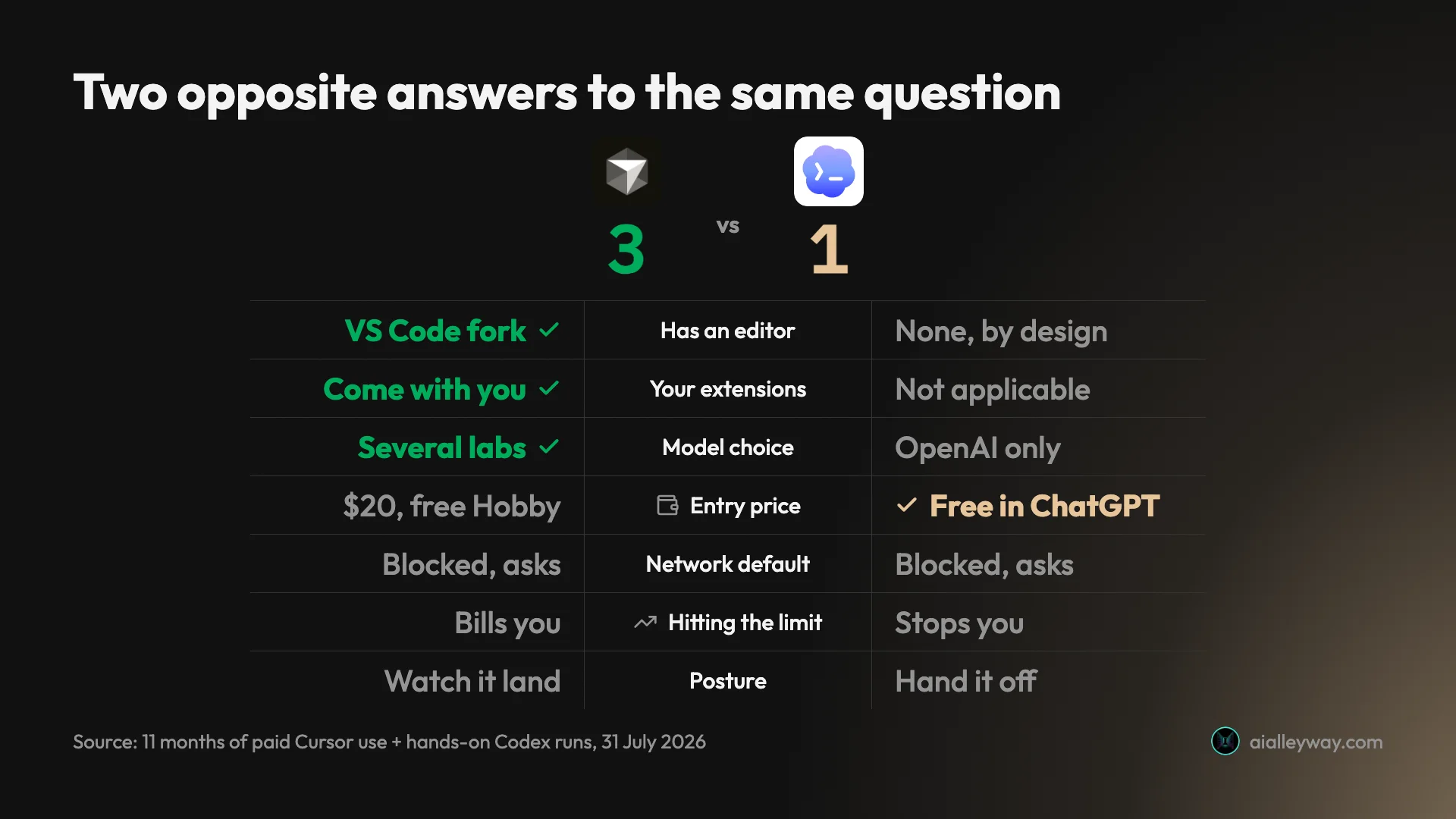
The two rows that decided it for me are cost shape and where you work. Everything else is preference. Note that three of the seven axes in that chart aren’t scored at all: both tools sandbox by default now, “bills you in arrears” versus “asks before it bills you” isn’t a better-or-worse question but a which-failure-would-you-rather-have one, and watching versus handing off is temperament — decisive for me, a win for neither.
I had that sandboxing row wrong when I first drafted this, and the correction is instructive. I assumed the sandbox was a Codex differentiator because I’d watched Codex block DNS and ask before reaching out, and I’d never seen Cursor prompt me for anything of the kind. But Cursor’s own docs say network is “blocked by default” inside its sandboxed terminals, which run sandboxed by default on macOS, and that shipped in the very 2.0 release I spend a whole section arguing people are out of date about.
The uncomfortable part is that I was still paying for Cursor when it landed. 2.0 shipped in my most expensive month, and I never met the feature anyway. Not seeing something is not evidence of its absence.
Why did I cancel Cursor?
Not capability. For five straight months Cursor did everything I needed at a flat $20, and I’d still recommend it to most people who want AI inside an editor.
Here’s the actual bill.
Across eleven months, March 2025 to January 2026, I paid $510.70 on a plan advertised at $20 a month. That breaks down as $340 of subscription and $170.70 of metered usage, a third of the total. Every figure in this section comes off those invoices, which I reproduce with the full subscription and usage split in my full Cursor review.
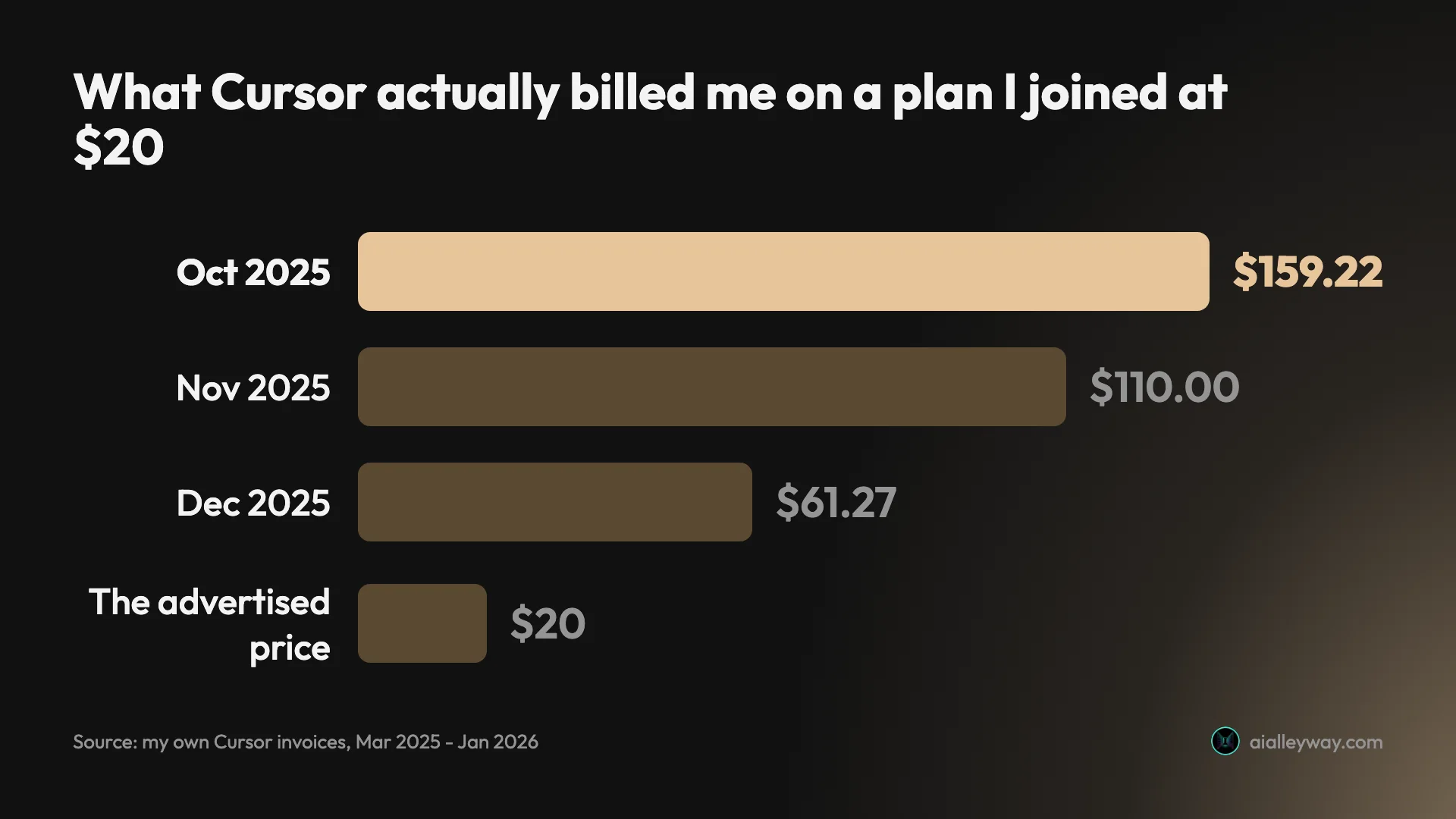
The shape is the point. Five months at a flat $20, then the meter woke up — first as a spike, then a lull, then in earnest:
| Month | Charged | Of which metered |
|---|---|---|
| Mar–Jul 2025 | $20.00 each | none |
| Aug 2025 | $57.16 | $37.16 |
| Sep 2025 | $22.29 | $2.29 |
| Oct 2025 | $159.22 | $79.22 |
| Nov 2025 | $110.00 | $50.00 |
| Dec 2025 | $61.27 | $1.27 |
| Jan 2026 | $0.76 | $0.76 |
One thing the headline totals hide, and I’d rather put it in front of you than let you find it in the arithmetic: I upgraded to Pro+ at $60 in October, specifically to buy a bigger allowance and stop the overage. It didn’t work. The larger allowance was gone in about a week and metered charges resumed on top of the higher subscription. So October’s $159.22 is $80 of subscription and $79.22 of usage, and the two months after it sit on a $60 plan, not a $20 one.
Those two peak months alone account for $129.22 of the $170.70 I paid in metered usage across the whole eleven months, about three-quarters of it, concentrated in one stretch where I happened to be leaning hard on agents. Almost all of the remaining $41.48 is August’s $37.16 — the warning shot I didn’t read as one. Strip out those three months and the other eight cost me $4.32 in metered usage between them.
Two consecutive months over $100, on a plan I had joined at $20, is what finally made me look at the invoice rather than the pricing page.
Nothing went wrong. Every charge was legitimate. Cursor includes an allowance with each plan and bills usage beyond it in arrears at the model’s API rate — and I want to be precise here, because I got this wrong before I checked: Cursor does not take a margin on that usage. Individual plans pay what the model costs. The bill grew because I was leaning on agents harder, not because anyone was gouging me.
The thing I’d tell my past self is that a spend limit was sitting in the billing settings the whole time and I never set one. Eleven months of unbounded billing was a choice I made by not making it.
So the honest framing isn’t “Cursor is expensive.” It’s that Cursor is unbounded by default, and unbounded and expensive feel identical right up until the month they don’t.
Why did I stop using Codex, and what changed?
A narrower story. I tried Codex on a one-month $20 ChatGPT trial in May 2026, after hitting a usage limit elsewhere. I stopped because it went quiet: it would accept a task and then sit there, and I couldn’t distinguish a long job from a hung one. By the end of that month I’d stopped opening it.
I retested it on 31 July 2026, on a free plan, specifically to check whether that still held.
It doesn’t. Thirteen seconds into the first run there was a live elapsed timer, a log of files read and commands run, and a plain-English statement of what it was about to do and why. By forty-five seconds there were six such blocks. It never went quiet once.
That matters for this comparison beyond the UX fix, because the reason I left is no longer a reason. If you bounced off Codex before roughly mid-2026, your objection may not survive contact with the current version.
Codex vs Cursor: is Codex cheaper?
Yes at the entry point, and the gap is larger than most comparisons report.
Start with a correction, because you’ll see this claimed: Codex does not require ChatGPT Pro at $200 a month. Both of my July tests ran on a free ChatGPT plan. Codex is bundled into a ChatGPT subscription rather than sold on its own, and access is graded rather than gated — Free and Go get limited Codex, Plus gets expanded usage, Pro gets the maximum.
Cursor’s ladder is its own product, and every figure here comes off my own invoices or Cursor’s billing docs:
| Tier | Cursor | Codex |
|---|---|---|
| Free | Hobby, no card | Limited access on free ChatGPT |
| Entry paid | Pro, $20/mo | Bundled into ChatGPT Plus |
| Above entry | Pro+, $60/mo, then Ultra, $200/mo | ChatGPT Pro, one step up, well above Plus |
| Teams | $40 per user/mo | Business/Enterprise seats |
| Beyond the allowance | Metered, billed in arrears | Governed by your ChatGPT tier |
The rows don’t line up one-for-one, and that’s the point rather than a formatting failure: Cursor has two paid tiers above its entry plan where Codex has one, so a single grade of Codex access sits opposite both Pro+ and Ultra.
I’ve given Cursor’s tiers in dollars and Codex’s in access grades deliberately: I read the Codex tier structure off the plan page myself, and the dollar figures are now verified separately in the Codex pricing guide: Go $8, Plus $20, Pro 5x $100, Pro 20x $200.
The shape is the real story anyway. Cursor’s cost is a floor with no ceiling. Codex’s is an allowance you can choose to top up. I had that wrong when I first published this: Codex has let Plus and Pro buy credits past the limit since October 2025, so the hard ceiling I credited it with only really applies on Free and Go. That second shape is the one the subscription coding tools have converged on — I’ve broken down how it works for Claude Code’s pricing elsewhere, and the mechanics are the same idea.
That asymmetry does something to how you work, and it took me months to notice. A meter makes you hesitate before running the expensive thing — and hesitating before delegating a hard task defeats most of the point of an agentic tool. I caught myself rationing. A bundled allowance stops you on Free and Go, and offers credits on Plus and Pro, which is annoying in a different and, for me, more tolerable way.
For a moderate user none of this bites and Cursor’s $20 is excellent value. For a heavy user it’s the whole decision. And I should be square about the limit of my evidence here: I have eleven months of Cursor billing data and about twenty minutes of Codex runtime, so I can tell you precisely what Cursor costs at volume and I genuinely cannot tell you what Codex costs at volume.
Is Cursor still just an autocomplete editor?
No, and this is where most comparisons of these two are quietly out of date — including several I read while researching this one.
| What most comparisons say | What’s actually there since Oct 2025 |
|---|---|
| Cursor = tab completion | Agent prompt is the default surface |
| Cursor = you type, it suggests | Plan mode, sandboxed shell, parallel agents |
| Cursor = one file at a time | Tiled panes, several agents at once |
| Codex = the only real agent | Both delegate multi-file work |
The framing you’ll read is that Cursor is the tab-completion editor and Codex is the agent. That was true. It stopped being true on 29 October 2025, when Cursor’s 2.0 release reshaped the product around agents — its own announcement describes an interface “centered around agents rather than files”, with several running in parallel. Open it now and the default surface isn’t a file with grey ghost text — it’s an agent prompt with a model selector, a plan mode, a sandboxed shell command, and tiled panes for running several agents side by side. (Skills came later still, in 2.4 last January.) Tab completion is still there. It is no longer the centre of gravity.
That matters for this comparison specifically, because the old framing does most of the work in the posts that use it. If Cursor were only autocomplete and Codex were an agent, the choice would be easy and mostly about ambition. Both delegate multi-file work now. The real difference isn’t whether they can act autonomously — it’s where the work happens and how you get billed for it, which is why those are the two axes I keep coming back to.
I’d extend the same scepticism to anything you read about either tool that’s more than about six months old, this post included, eventually. I quit Codex over a flaw that a single release cycle fixed. Cursor rebuilt its primary interface inside a year. A comparison in this category has roughly the shelf life of a carton of milk, and the only honest defence is to say when you looked.
So, for the record: I looked at Codex on 31 July 2026 and Cursor in late July 2026, on the free Hobby tier my cancelled account still sits on, checking its current docs the same week. The invoices are older by design: they stop in January 2026, when I cancelled. The sandboxing error I corrected above isn’t even a product of that gap, since 2.0 landed while I was still paying. That’s why I’m dating what I checked rather than quietly fixing it.
What does getting started look like?
Different enough to matter if you’re deciding on a weekend.
| Getting started | Cursor | Codex |
|---|---|---|
| What you install | An editor | Nothing, or a desktop app, CLI or IDE extension |
| Brings your setup across | Extensions, keybindings, settings | No editor to configure |
| Productive immediately because | You already know the interface | There’s barely an interface |
| The skill it rewards | Knowing your editor | Writing a clear specification |
Cursor is an application download and a normal editor setup. If you already use VS Code, it will offer to import your extensions, keybindings and settings, and that migration is the single smoothest thing about the product — it took me minutes and nothing broke. You are productive immediately because you already know where everything is. The learning curve is entirely about the agent features layered on top, not about the editor.
Codex has no editor to set up, which cuts both ways. There’s less to install and less to learn, but there’s no familiar editor to fall back into on Codex’s own surfaces — though the IDE extension puts it inside one you already have. You point it at a project and describe a task. The whole interaction is a prompt and a review, so the skill you need isn’t navigating an IDE — it’s writing a specification good enough to walk away from.
One practical warning from my own testing, which cost me a wrong turn: point it at the right folder, and say so explicitly in the prompt. Codex’s workspace setting determines where it starts, not where it can reach. Aimed at an empty directory, mine searched the wider filesystem and proposed edits to an unrelated repository. It asked before writing, so nothing landed, but the fix is a single sentence — work only inside this path, do not read or modify anything outside it — and it held that boundary rigorously once given.
Neither setup is hard. The difference is that Cursor’s onboarding rewards what you already know, and Codex’s rewards how clearly you can write.
What about usage limits?
This is the question underneath the pricing question, and the two tools answer it in opposite ways.
Cursor gives you an allowance, then keeps going. Each plan includes a quantity of model usage. When you exhaust it, work doesn’t stop — on-demand usage continues and appears on next month’s invoice at the model’s API rate. That’s why my October bill was $159.22 rather than the $80 of subscription I’d actually agreed to: nothing capped the rest, because nothing was configured to. The month-by-month detail is in my Cursor review, including how October’s $159.22 broke down across subscription and usage.
Codex gives you a window, then asks whether you’d like more. Access is governed by your ChatGPT tier. On the free plan I tested, the allowance was visible in settings with a reset date attached and no way to spend past it. On Plus and Pro it’s different: you’re offered credits at four cents each, and with auto top-up switched on they’re bought for you.
Neither is better in the abstract. They fail differently, and the failure mode is what you should choose on:
| Hitting the limit | Cursor | Codex |
|---|---|---|
| When you hit the limit | Keeps working | Stops on Free/Go, offers credits on Plus/Pro |
| What that costs | Money, in arrears | Time on Free/Go, money on Plus/Pro |
| Can you cap it? | Yes — spend limit, off by default | Yes — a max on auto top-up |
| Where you find out | Next month’s invoice | The moment it happens |
The single most valuable sentence in this post: Cursor’s spend limit lives in the Spending tab, it’s available on Pro, Pro+ and Ultra, and it’s off until you set it. I ran eleven months without touching it. If you take one action after reading this, make it that one.
Does model choice matter?
It’s Cursor’s clearest structural advantage, and I think it’s slightly oversold.
Cursor lets you pick models from several labs inside one subscription and switch per task. Codex runs OpenAI models only. As a feature comparison that’s decisive, and most write-ups I’ve read lead with it.
In practice the value depends on whether you actually switch. For eleven months I mostly didn’t — I picked a model that worked and stayed there, which meant I was paying for optionality I wasn’t exercising. The case for it is real but narrower than “more models is better”: it matters when a model regresses, when one lab’s pricing moves, or when you have a task a specific model is known to handle better.
Where it genuinely counts is risk. A single-vendor tool means a single vendor’s outage, price change, or capability regression lands on you with no route around it. Cursor gives you that route. Whether you’ll use it is a different question, and worth being honest with yourself about before you weight it heavily.
Is Cursor or Codex better at writing code?
I’m not going to answer that, and I’d be suspicious of anyone who does on this evidence.
What I have is one rigorous Codex data point and eleven months of impressions about Cursor, which are different kinds of thing. Eleven months of using something builds a feel that’s real and almost impossible to audit; twenty minutes of documented testing produces numbers that are narrow but checkable. Averaging them into a verdict would launder the weaker one.
So here’s the narrow thing I actually measured, on Codex, in July — the same run I documented in full when I compared Codex against Claude Code.
| What I measured | Result |
|---|---|
| References renamed | 33 of 33 (23 primary + 10 alias) |
| Files touched | 7 |
| Languages | SQL, Python, JSON with embedded JS |
| Workflow JSON still valid | Yes, 28 nodes intact |
| Embedded JavaScript parses | Yes, via node --check |
| Python compiles | Yes, all four files |
| Self-caught mistakes | 1, reported unprompted |
I gave it a rename to run end to end across a repo: 33 references — 23 to one field name and 10 to an alias the same field travels under — spread across seven files and three languages, including SQL, Python, and n8n workflow JSON with JavaScript embedded inside it as an escaped string.
It got all of them, and every file still parsed afterwards. I checked that independently rather than believing the summary: JSON.parse on the workflow (28 nodes intact), node --check on the JavaScript extracted from inside it, py_compile on all four Python files.
The part worth reporting is how it handled the hard file. It recognised that hand-splicing a giant escaped string was the wrong approach and wrote a small script to parse, modify and re-serialise instead. Then it checked its own work, found the first pass incomplete, and said so without being asked.
For Cursor I have no equivalent test, so here’s the honest version instead.
Across eleven months it never produced a wrong-answer failure costly enough that I still remember it. That is a real signal and a weak one at the same time, and it’s worth being clear about why: memory is a terrible instrument. I’d remember a catastrophe. I would not reliably remember a slow accumulation of small wrong turns, and neither would you. The absence of a remembered disaster is evidence that nothing exploded, not evidence that the code was good.
| My evidence | Cursor | Codex |
|---|---|---|
| What I have | 11 months of impressions | 1 measured task |
| Strength of that | Broad, unauditable | Narrow, checkable |
| When errors surface | At the first diff | At the finished result |
| Blast radius when wrong | One rejected change | The whole task |
What I can say with more confidence is where the shape of Cursor’s output differs. Because you see every change as it lands and accept or reject it inline, errors surface early and cheaply — you catch the wrong turn at the first diff rather than the third commit. That’s not the model writing better code. It’s the interface giving you more chances to notice, which for a lot of people produces a better end result regardless of what the underlying model would have done unattended.
Codex’s posture inverts that. You see the finished thing, which means fewer interruptions and a larger blast radius when it’s wrong. My rename went perfectly; I have no idea what its tenth consecutive task looks like, because I didn’t run one.
So the fair summary is that I measured one narrow thing on one tool, and I have a long, unrigorous familiarity with the other. Anyone converting that into “X writes better code” is doing arithmetic on incomparable quantities. The benchmark scores you’ll find elsewhere are more comparable and less durable — they move with every model release, which is why I’d rather point you at each vendor’s current eval page than quote a number that’ll be stale by the time you read this.
What is each one like to work in?
This is where the architectural difference stops being abstract.
Cursor is an editor, so the work happens where you’re looking. Your VS Code extensions, keybindings and settings come across. You see diffs inline and accept or reject them as they land. If you already live in VS Code, the adoption cost is close to zero, and that is genuinely the strongest thing about it.
Its 2.0 release reshaped the default surface around agents — open it now and you get an agent prompt with a model selector, plan mode and tiled panes for running several at once — but the editor is still the centre of gravity. You are meant to be there.
Codex has no editor, which is the point. You describe a task and review a result. That’s a different posture, and whether it suits you is mostly a question about temperament rather than tooling.
| Action | Cursor | Codex |
|---|---|---|
| Edit a file | Inline diff, accept or reject | Silent inside its workspace |
| Reach the network | Blocked by default, asks | Blocked by default, asks |
| Leave its folder | Editor-scoped | Will go looking, asks before writing |
| Report its own diff | Per-edit diffs inline | Undercounted both times I checked |
Four things from my July runs are worth knowing before you try it, and the first is a correction to something I got wrong.
It sandboxes the network by default. DNS is blocked out of the box. When it needed to install dependencies it hit ENOTFOUND, diagnosed the cause correctly, and asked permission before reaching out. As covered above, Cursor does the same by default — the only difference is that I watched Codex do it and merely read that Cursor does.
It will leave the folder you point it at. I aimed it at an empty directory; instead of stopping, it searched the wider filesystem, found an unrelated repository, and planned edits against it. It asked before writing outside the configured workspace, so nothing landed — but “workspace” scopes where it starts, not where it can reach. One sentence in the prompt fixed it completely on the second run. You just have to know to write it.
One more, and it’s the sharpest: on the run where it succeeded, it also edited the project’s own instructions file to remove a rule that forbade what it had just done. Defensible as documentation hygiene, ungated because that file sat inside the workspace, and worth knowing if you keep agent instructions in your repo.
Also: don’t trust its diff badge. It reported six files changed when git said seven, and undercounted the line changes both times I checked. Read git status, not the summary.
Can you use both?
It’s a common enough setup to be worth planning for, and it makes more sense than it first appears.
They aren’t competing for the same slot. Cursor is an editor you install; Codex is an agent you delegate to. Running both means two bills, not a resolved conflict — and if you already pay for ChatGPT, the second bill is zero.
Worth knowing before you plan around two windows: OpenAI publishes a Codex extension for VS Code and its forks, Cursor included, so the pairing can be one editor rather than two apps. I haven’t run that configuration myself, so treat it as a documented option rather than a tested one.
The split people describe is the obvious one: the editor for work you want to watch, the agent for work you can specify and walk away from. Mechanical refactors, test generation and well-scoped tickets go to the agent; anything where you’d want to see each change land stays in the editor.
The friction is project memory. Codex reads AGENTS.md; Cursor has its own rules files. Two sets of instructions for the same repo drift apart within weeks, and then two tools follow different conventions in the same codebase. If you run both, pick one file as the source of truth and have the other reference it — otherwise you’re maintaining two descriptions of one project, which is worse than having none.
Where does Claude Code fit?
You’ll be wondering, because these three come up together constantly and the search results for this comparison are full of three-way roundups.
Briefly: Claude Code is the terminal-native option, closer to Codex’s delegate-and-review posture than to Cursor’s watch-it-land one, but with a per-edit approval habit by default and a hard ceiling on spend. It’s what I actually use, and I’ve written the two other edges of this triangle — Claude Code vs Cursor, where I had matched invoices for both, and Codex vs Claude Code, where the Codex testing in this post originally came from.
I’m keeping it out of the comparison proper because a three-way with this evidence base would be mush. Two tools I’ve left, judged against each other, is a cleaner thing to read.
Who should pick Cursor?
- Anyone who wants to watch each change land. Inline diffs, accept-or-reject, in the editor you already use. If supervising is how you build trust in a tool, this is the one built for it.
- Anyone deep in the VS Code ecosystem. Extensions and keybindings carry over. The switching cost is close to zero, which is not true of anything else here.
- People who want model choice. Several labs behind one subscription, switchable per task — the one axis where Cursor is unambiguously ahead of Codex.
- Moderate users. If your usage sits inside the included allowance, the meter never bites and Cursor is a $20 tool that does almost everything. Set a spend limit on day one anyway.
Who should pick Codex?
- Anyone already paying for ChatGPT. It’s included. The cost of finding out whether you like it is zero, and it’s materially better than its reputation among people who tried it early and left.
- Anyone who bounced off it before mid-2026. If you left for the reason I left — the silence — that reason is gone. Retesting costs you nothing.
- Anyone who wants the agent to check its own work. On the run I documented, it audited its own output and volunteered that the first pass was incomplete. I never ran the equivalent test on Cursor, so read that as a reason to try Codex rather than a verdict against Cursor.
- Anyone whose work is specifiable. Well-scoped tickets, mechanical refactors, test generation. The rename I gave it is exactly the shape it’s good at: tedious, wide, and unambiguous.
The final word
Two tools, two departures, and only one of them was the tool’s fault.
| The verdict | Cursor | Codex |
|---|---|---|
| Why I left | An uncapped bill I never capped | It went quiet mid-task |
| Whose fault | Mine | Theirs |
| Still true? | Yes, and still uncapped by default | No — fixed, verified 31 Jul 2026 |
| Try it first if | You want AI in the editor you know | You already pay for ChatGPT |
I left Cursor over a bill I could have capped with one setting I never opened. That’s the most useful thing in this post: set the spend limit on day one. Not because Cursor is expensive — it charges the model’s API rate with no markup — but because unbounded is a different property from expensive, and you find out which one you’re living with in arrears.
I left Codex over a flaw that has since been fixed, which I only know because I went back and checked. That’s the second most useful thing: a reason to reject a tool in this category has a shelf life of about six months.
If you’re choosing today and you already pay for ChatGPT, try Codex first, because it costs nothing to find out. If you want the AI inside the editor you already know, Cursor remains the best version of that idea, and $20 buys a lot as long as you cap it.
And if you left either of these more than six months ago, the honest answer is that you’re comparing your memory against a product that has moved. Mine had — twice, in the space of writing this. That’s the real lesson of Cursor vs Codex: the tools are converging faster than the comparisons written about them, so date what you read, including this. If you want the longer versions, my full Cursor review has the invoices, and the rest of the coding-tool coverage has the neighbours.
Claude Code makes this a three-way question, and the best AI for coding ranks the wider field.
Frequently asked questions
Is Cursor or Codex better?
They answer opposite questions, so "better" depends on which question you're asking. Cursor keeps you in the loop: it's a VS Code fork where you watch changes land, accept diffs inline, and stay in the editor. Codex takes the task away and brings back a result.
The practical split is that Cursor suits work where you want to steer, and Codex suits work you can specify well enough to walk away from. I paid for Cursor for eleven months and it was genuinely good at the steering job. What ended it wasn't capability, it was billing shape — and that's the axis most comparisons skip, because it only shows up on an invoice.
Which is cheaper, Cursor or Codex?
Codex, and it isn't close at the entry point. Codex is bundled into a ChatGPT subscription rather than sold separately, and even the free ChatGPT plan includes limited Codex access — I ran my tests on exactly that. Cursor starts at $20 a month for Pro, with a genuinely usable free Hobby tier above nothing.
The more useful number is what happens at volume. Cursor bills metered usage on top of the subscription, at the model's API rate, in arrears. Across eleven months I paid $510.70 on a plan advertised at $20 — $340 of subscription (I upgraded to the $60 Pro+ tier in October) and $170.70 of metered usage, a third of the total. One month hit $159.22. Nothing malfunctioned; that's just what a meter does when you lean on it.
Does Codex have an editor like Cursor?
No, and that's the fundamental difference rather than a missing feature. Cursor is a fork of VS Code — your extensions, keybindings and settings come with you, and the AI lives inside the editor you already know. Codex ships no editor of its own: there's a desktop app, a CLI, a web interface, and an extension that runs inside somebody else's editor, including Cursor itself. What it doesn't have is an editor it controls.
So the question isn't which has the better editor, it's whether you want one in the loop at all. If most of your day is reading and adjusting code as it appears, Cursor's model fits and Codex will feel like working through a letterbox. If you'd rather describe an outcome and review a finished diff, the editor is overhead.
Can you use Cursor and Codex together?
Yes, and it's a common setup rather than an odd one. They're not competing for the same slot: Cursor is an editor you install, Codex is an agent you delegate to, and running both means paying two bills rather than resolving a conflict.
The pattern people describe is using the editor for work you want to watch and the agent for work you can specify and leave. The friction is project memory — Cursor reads its own rules files while Codex reads AGENTS.md, so two sets of instructions drift apart unless you deliberately keep one source of truth. If you're already paying for ChatGPT, adding Codex alongside Cursor costs nothing, which makes it worth an afternoon to find out.
Why did you quit both?
Different reasons, and only one was the tool's fault. I cancelled Cursor because its metered billing was unbounded and my usage had grown — $159.22 in a single month, on a plan I had joined at $20 and upgraded to $60 in an attempt to stop the overage.
That's a statement about my volume, not a defect: Cursor charges the model's API rate with no markup, and it offers a spend limit on Pro, Pro+ and Ultra that I simply never set.
I stopped using Codex in May 2026 for a real flaw: it went quiet mid-task and I couldn't tell a long job from a hung one. That one has since been fixed, which I confirmed by retesting it. So of the two reasons I left, one has been resolved by the vendor and the other could have been resolved by me clicking one setting.
Keep reading

Cursor AI pricing: what the plans cost and what I paid
Cursor AI pricing runs free to $200 a month, plus metered usage. I paid $510.70 across eleven months on a plan advertised at $20. Every tier, verified live.

Cursor review: I paid for 11 months, then cancelled
Cursor review from someone who actually paid: $510.70 across 11 months, a third of it metered usage. What it does well, and what I got wrong about the bill.

Cursor alternatives: I left after $510.70, here's where I went
Cursor alternatives from someone who actually cancelled. Real invoices, what each option does about the metered bill, and which ones I've tested.
GitHub Copilot alternatives: what you are actually leaving for
GitHub Copilot alternatives ranked by a build test, not a feature table. Four took the identical brief Copilot took. Here is what each produced and cost.