
GitHub Copilot alternatives: what you are actually leaving for
GitHub Copilot alternatives ranked by a build test, not a feature table. Four took the identical brief Copilot took. Here is what each produced and cost.
Contents
The best GitHub Copilot alternatives
Most lists of Copilot alternatives compare feature tables. I gave four of the tools on this page the identical brief that Copilot itself took — one message, six numbered requirements, no follow-ups — and then used every resulting app to check it actually worked.
Here is the finding that should frame everything below: Copilot passed. Six of six, in about a minute, on its free tier, in 468 lines — the leanest complete result of any tool I have measured. This is not a page about escaping a bad product.
It is a page about what you would be leaving for.
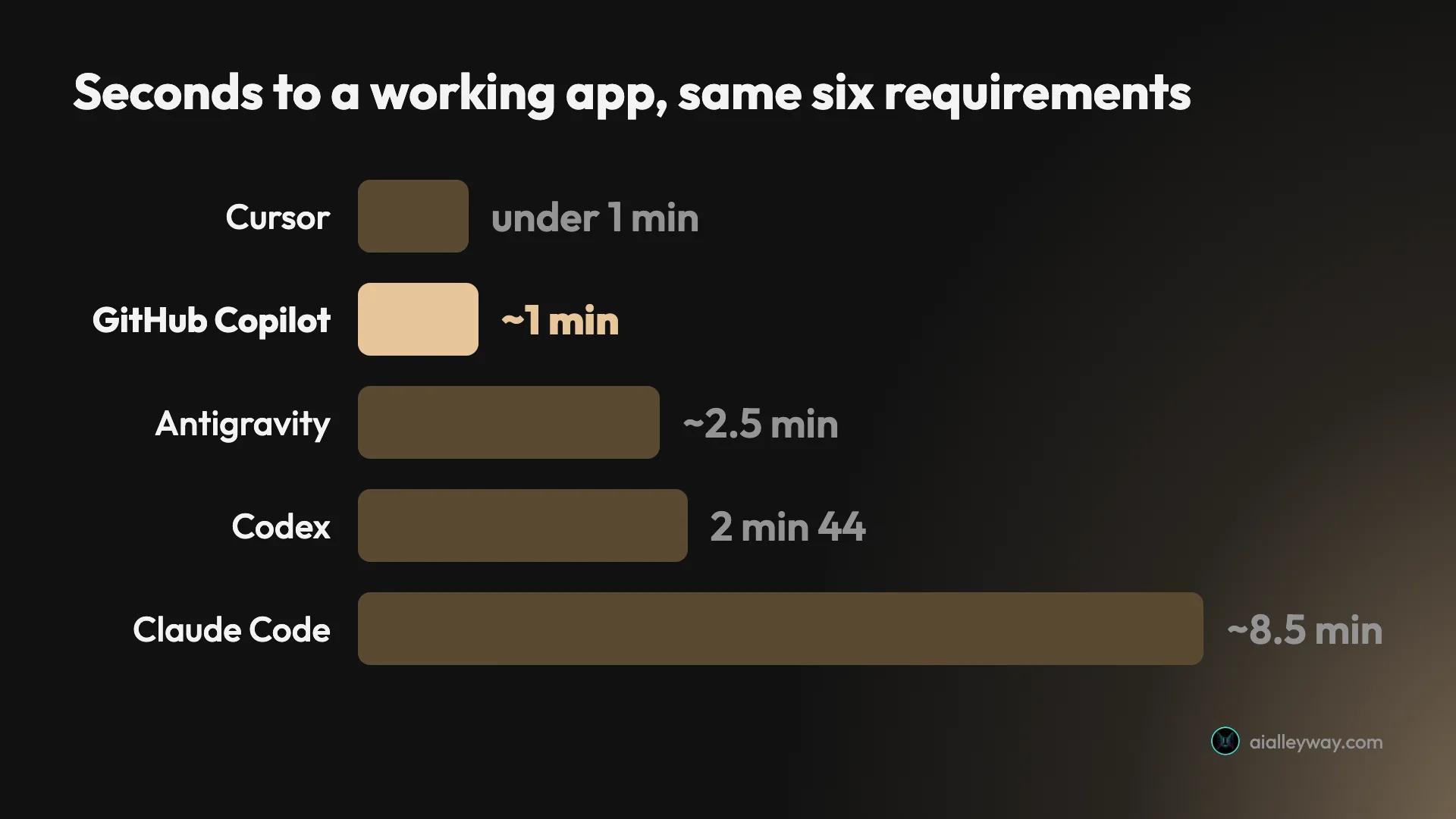
| Tool | Best for | Time on the brief | What it cost | Tested? |
|---|---|---|---|---|
| GitHub Copilot, for reference | Staying in your editor | ~1 min | $0 free tier | Yes |
| Cursor | The closest swap | Under 1 min | $0 free tier | Yes |
| Claude Code | Code you will maintain | ~8.5 min | ~$2.56 | Yes |
| OpenAI Codex | Restraint, and a ChatGPT bundle | 2 min 44 | $0 | Yes |
| Google Antigravity | Staying free indefinitely | ~2.5 min + gate | $0 | Yes |
| Windsurf | An agentic IDE | Not tested | Not tested | No |
| Aider | Terminal, open source, git-native | Not tested | Not tested | No |
| Continue | Not changing editor at all | Not tested | Not tested | No |
Why people are actually looking
Worth naming, because it shapes which alternative is right.
In mid-2026 GitHub moved Copilot onto credit-based billing, and the reaction has been loud. Developer threads since carry titles like “Copilot is dead and useless now — what alternatives”, and one widely shared post described spending $10 on Pro, then $29 more upgrading to Pro+, and burning through 7,000 credits in three days. Interest in the phrase “GitHub Copilot credits” is up roughly seventeenfold year on year.
I have not reproduced that experience and will not pretend to have. My Copilot test ran on the free tier, so I have no first-hand measurement of how fast a paid allowance drains. What I can verify from the plans page is the structure, and it is more defensible than the headline suggests:
| Copilot tier | Price | Monthly credits included |
|---|---|---|
| Free | $0 | None — 2,000 completions, no card |
| Pro | $10 | $15 |
| Pro+ | $39 | $70 |
| Max | $100 | $200 |
Every paid tier returns more credit value than it costs. The complaint underneath is not really that the number went up. It is that a credit is not a unit you can feel — a request costs what it costs depending on which model answered and how long the context was, and you learn the rate by exhausting it.
That matters for choosing an alternative, because most of the tools below have exactly the same problem in a different wrapper. If unpredictability is what is driving you out, check that what you are moving to is actually more legible.
How I tested
One message. Six numbered requirements. No follow-ups.
Build a single-page subscription tracker with: a form taking a name, cost and billing cycle; annual plans displayed as a monthly-equivalent figure rather than the annual one; a running monthly total pinned to the top; a cancelled state that removes an item from the total but keeps it visible in its own section; persistence across reloads; and a dark theme.
Requirements two and four are traps. Each needs two ideas held at once — show a derived number instead of the one entered, and exclude an item while keeping it on screen. Both are easy to half-implement in a way that looks fine on the day.
Then the part most roundups skip: I served every app, entered a $2,400 annual plan to see whether $200.00 appeared, cancelled items to watch the total move, hard-reloaded to test persistence, and read the stored data to see whether the underlying model was sound or merely looked right.
1. Cursor — the closest swap

If you want the thing Copilot does, from a different company, this is it. Cursor is a fork of VS Code, so your extensions, keybindings and settings come with you and the migration cost is close to zero.
It was also the fastest tool I have measured on this brief: under a minute, 581 lines across three files, six of six, on the free Hobby tier for nothing. It handled both traps and stored the raw cost with the billing cycle, deriving the monthly figure at render — the correct model rather than the shortcut.
| Cursor on the brief | |
|---|---|
| Result | 6 of 6, first attempt |
| Time | Under 1 minute — fastest measured |
| Lines | 581 across three files |
| Ran on | Free Hobby tier, no card |
| Wrote tests | No |
What it costs. Hobby is free. Pro is $20 a month or $16 billed annually, Pro+ $60 or $48, Ultra $200 or $160. Yearly is exactly 20% off every tier.
The catch is the same shape as Copilot’s, and worse. Above the free tier Cursor charges a subscription plus metered usage at the model’s API rate, billed in arrears. I paid $510.70 across eleven months on a plan advertised at $20, with one month reaching $159.22. If you are leaving Copilot because credits are unpredictable, understand that you are moving to a meter that reports a month late. There is a spend limit on every paid tier and it is off until you turn it on.
See the Cursor review and the pricing breakdown.
2. Claude Code — the best code, at the highest price

The furthest from Copilot in shape and the closest to it in one specific way: since mid-2026, Copilot Pro at $10 lists access to third-party agents and names Claude Code as one of them. So this is the one alternative you may already be paying for.
On the brief it behaved unlike anything else. It refused to build, running a three-question interview and then a design document — eight exchanges before a single line of code existed, with no permission denials in the log. Nothing was blocking it; it chose to ask.
What arrived was the best output of the eight tools I have tested. It stored money as integer cents, explaining unprompted that summing 9.99 and 19.99 as floats gives 29.979999999999997, and it shipped a 28-assertion test suite covering corrupt storage, non-array payloads, storage that throws on read, negative inputs and float precision. I ran it: 28 passed, 0 failed.
| Claude Code on the brief | |
|---|---|
| Result | 6 of 6 |
| Exchanges before code | 8 |
| Time | ~8.5 min — slowest measured |
| Lines | 1,052 including its test file |
| Test assertions | 28, all passing |
| Cost | ~$2.56 at metered rates |
What it costs. No free tier at all. Claude Pro $20 a month or $200 a year, Max 5x $100, Max 20x $200. On a subscription the marginal cost of one more build is zero, which is the fair way to read that $2.56 — it came from metered API billing.
More in is Claude Code worth it and the head-to-head with Copilot.
3. OpenAI Codex — the most restrained

Codex met all six requirements in 2 minutes 44 seconds, unattended, in 585 lines across one file. Restraint is its defining quality: it added cancel, restore and delete, then stopped, where Antigravity added a currency switcher, category breakdown, command palette, grid and table views and JSON import/export nobody asked for.
It also ran a syntax check on its own output and volunteered that the folder was not a git repository so it had no git status to report — an admission of what it could not verify, unprompted.
On a separate harder task it found and changed all 33 references of a renamed field across seven files in one run. It also, on that task, edited my project rules file without asking, deleting the line that made its change wrong, because that file sat inside the workspace and everything inside the workspace is ungated by default.
| Codex on the brief | |
|---|---|
| Result | 6 of 6 |
| Time | 2 min 44 sec |
| Lines | 585 in one file — tightest of the eight |
| Ran unattended | Yes |
| Cost | $0 on the free tier |
What it costs. Bundled with ChatGPT rather than sold separately, so the free ChatGPT tier includes usable access — my whole test ran on it. Like Claude Code, it is also reachable through Copilot Pro’s third-party agent access.
See the Codex review and pricing.
4. Google Antigravity — free, and it checks itself

The only tool here whose free tier is a product rather than a countdown. Antigravity’s pricing page contains exactly one number and it is $0, and that tier includes Gemini models alongside Claude Sonnet and Opus.
It met all six requirements in about two and a half minutes, then did something only Claude Code also managed: it wrote a test file, ran it under Node, and recorded six assertions that I independently confirmed against the shipped app.
| Antigravity on the brief | |
|---|---|
| Result | 6 of 6 |
| Time | ~2.5 min plus an approval gate |
| Lines | 2,894 — most verbose of the eight |
| Test assertions | 6, verified |
| Ran unattended | No — 1 approval, 1 permission grant |
| Cost | $0, indefinitely |
Two real costs. It will not run unattended — it returns a plan and waits. And it sprawls: nearly three times Cursor’s line count for the same requirements. Google also publishes no number for what the free allowance is, describing it only as “basic weekly rate limits”.
See the Antigravity review and pricing.
5. Windsurf — the agentic IDE

I have not tested Windsurf, so this is its documented shape rather than a measured result.
It is an AI-native IDE rather than an extension, built around blending predictive completion with agentic work across files — the same category as Cursor and a direct competitor to it. It is the tool most often named alongside Cursor when people describe leaving Copilot for a full editor rather than a plugin.
The reason it is on this page rather than ranked among the four above is simple: I have not put it through the brief, and I am not going to place an untested tool against measured ones. If you are evaluating full-editor replacements, it belongs on your shortlist next to Cursor, and you should weigh them yourself.
6. Aider — terminal, open source, git-native

Also untested here. Aider is an open-source command-line coding tool, and the two things consistently named as its strengths are automatic git integration and a repository map for context management.
It answers a question none of the four measured tools do: what if the tool is open source and you bring your own model? That matters for two audiences — people who want no vendor between them and the model, and people who left Copilot specifically because a closed subscription’s costs became unpredictable. Bringing your own key moves the bill to your model provider, which is not automatically cheaper but is at least itemised.
The trade is that you are assembling a workflow rather than buying one, and you supply the model, so the cost lands on your API account rather than a subscription.
7. Continue — for not changing editor at all

Untested by me, and included because it is the only tool here that preserves Copilot’s actual advantage.
Continue is an open-source extension for VS Code and JetBrains that lets you plug in whichever model you want — hosted or local. If the thing you value about Copilot is that it lives inside the editor you already use and changes nothing else, this is the closest replacement on the page, and everything else here asks you to migrate.
That framing matters more than it looks. Most Copilot alternatives are not alternatives to Copilot at all; they are different products that also write code. Continue is one of the few that competes on Copilot’s own ground.
What the measured results actually showed
Five tools, one brief, and the headline is that capability separated none of them.
| Tool | Requirements | Time | Lines | Own tests | Cost |
|---|---|---|---|---|---|
| Cursor | 6 of 6 | Under 1 min | 581 | No | $0 free tier |
| GitHub Copilot | 6 of 6 | ~1 min | 468 | No | $0 free tier |
| Antigravity | 6 of 6 | ~2.5 min + gate | 2,894 | Yes, 6 | $0 |
| Codex | 6 of 6 | 2 min 44 | 585 | No | $0 |
| Claude Code | 6 of 6 | ~8.5 min | 1,052 | Yes, 28 | ~$2.56 |
Three things fall out that a feature comparison would never surface.
Copilot wrote the least code of all of them. 468 lines, under Codex’s 585 and Cursor’s 581, for the same six requirements. For a tool whose reputation is autocomplete rather than architecture, producing the leanest complete result is not what I expected going in, and it is the single strongest argument for staying.
Only two of the five verified their own work, and neither was Copilot. Claude Code with 28 assertions, Antigravity with 6. If you want the tool that writes your code to also check it, that narrows the field to two immediately.
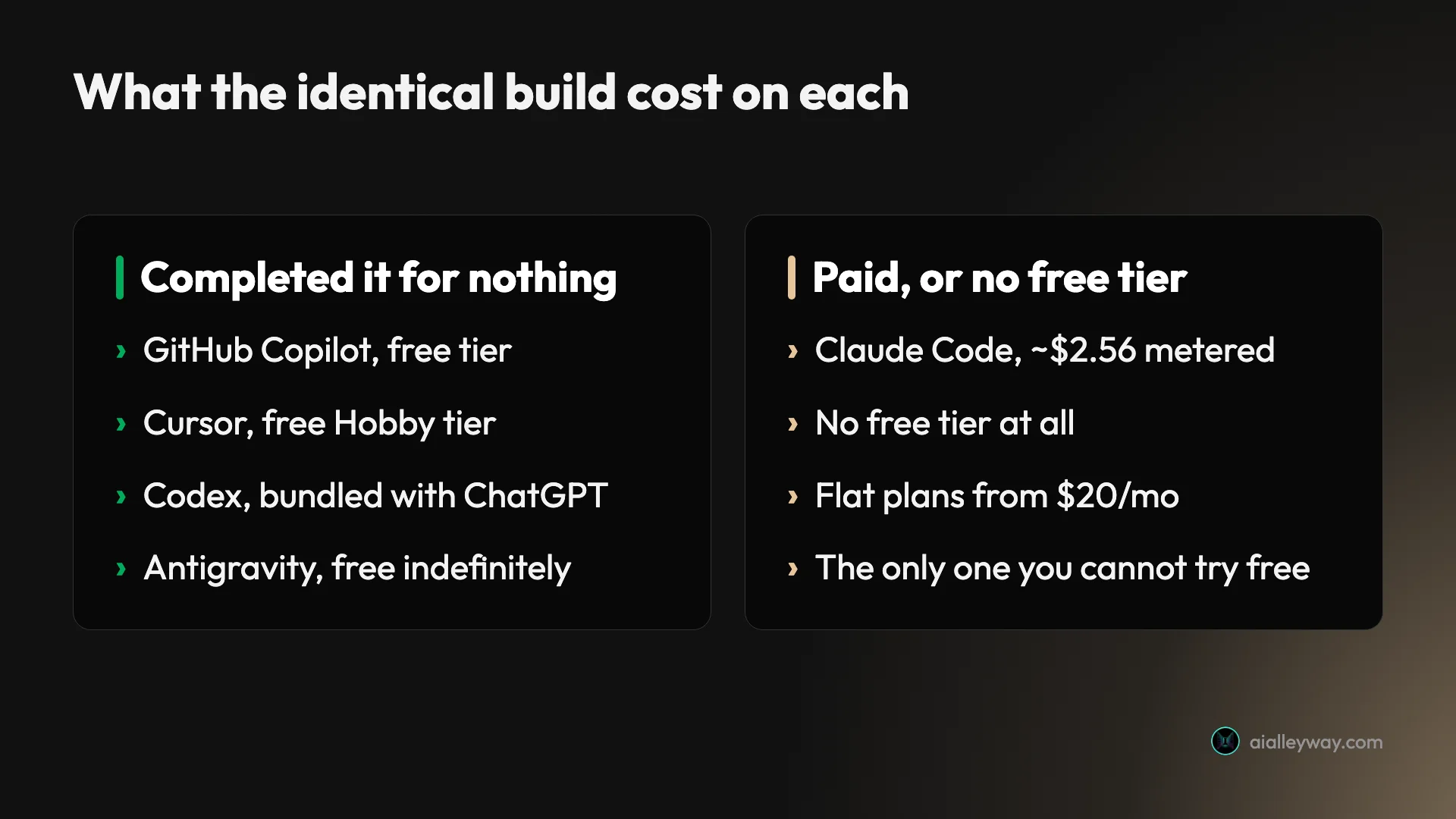
Four of the five did it for nothing. Copilot, Cursor, Codex and Antigravity all completed a real app on a free tier. Only Claude Code has no free tier at all. Whatever else is true about this category, the cost of finding out is close to zero.
The free tiers, compared honestly
Since “is there a free alternative” is the most common follow-up, here is the actual state of it.
| Tool | Free tier | Completed the brief? | What it excludes |
|---|---|---|---|
| GitHub Copilot | 2,000 completions a month | Yes | Cloud agent, 3rd-party agents, model selection |
| Antigravity | Free indefinitely | Yes | Nothing stated — limits undefined |
| Cursor | Hobby, no card | Yes | Frontier models, MCPs, cloud agents |
| Codex | Bundled with ChatGPT | Yes | Cloud tasks and GitHub code review on lower tiers |
| Claude Code | None | n/a | n/a |
| Aider, Continue | Open source | Untested | You supply the model and pay for it |
The row worth sitting with is the first one. Copilot has a real free tier, and a lot of “free Copilot alternative” advice is written as though it does not. If your reason for leaving is cost, start by checking whether the free plan you already have covers what you do.
Where the free tiers genuinely differ is what runs down. Antigravity’s does not visibly consume anything but will not tell you the ceiling. Cursor’s excludes frontier models. Copilot’s is a countable 2,000 completions, which is the most legible of the three even if it is the most limited.
What switching actually costs
The part most roundups leave out, and the reason many people should not switch.
To Cursor or Windsurf: a new editor. Cursor is a VS Code fork so the migration is unusually gentle — extensions and settings carry over — but it is still a different application, and on a team it is a different application for everyone.
To Claude Code, Codex or Aider: a new workflow. These are terminal agents. You are not replacing autocomplete; you are changing how work reaches you. That is a bigger adjustment than any feature table implies, and it is the reason people who try it either love it within a week or abandon it.
To Continue: almost nothing. Same editor, same setup, different engine. It is the only genuinely low-friction move on this page.
And you may not need to switch at all. Copilot Pro at $10 now includes access to third-party agents, Claude Code and Codex among them. If your complaint is “I want to try an agent”, that experiment may already be inside the subscription you are paying for.
| If your reason for leaving is | Consider |
|---|---|
| Credits are unpredictable | Antigravity (free) or a flat Claude plan — not Cursor, which meters too |
| You want an agent that tests itself | Claude Code or Antigravity |
| You want to stop paying entirely | Antigravity, or Cursor’s free tier |
| You want a full editor, not a plugin | Cursor, or Windsurf (untested) |
| You will not change editor | Continue (untested) — or stay |
| You want to try an agent | Check your Copilot plan first |
What Copilot still does better
A page of alternatives has an obvious bias, so here is what the incumbent won on my own test.
It wrote the least code of anything I have measured. 468 lines for six requirements, under Cursor’s 581, Codex’s 585 and less than a fifth of Antigravity’s 2,894. Less code is less to read the first time something breaks, and this was not a result I predicted for a tool known as an autocompleter.
It required nothing of me. One message, one artifact, no approval gate, no interview, no terminal. Claude Code needed eight exchanges before writing a line; Antigravity stopped for approval. Copilot just built it.
It lives where you already work. This is the advantage no benchmark measures and the one that decides most real cases. An extension inside VS Code, JetBrains or Visual Studio changes nothing else about your setup — no new application, no migration, no team-wide decision. Every tool on this page except Continue asks you to give that up.
Its free tier is countable. 2,000 completions a month is a number. Antigravity’s “basic weekly rate limits” is an adjective, and Cursor’s Hobby tier excludes frontier models without saying how much of anything you get. Copilot’s free plan is the most limited of the three and the easiest to plan around.
| Where Copilot won on my own test | Against |
|---|---|
| Leanest output, 468 lines | Cursor 581, Codex 585, Antigravity 2,894 |
| No gate, no interview, one message | Claude Code needed 8 exchanges |
| Countable free tier, 2,000 completions | ”Basic weekly rate limits” |
| Lives in the editor you already use | Everything here except Continue |
And it now bundles its competitors. Pro at $10 lists access to third-party agents including Claude Code and Codex. That is a strange thing for a product to do and a genuinely good reason to keep the subscription while you experiment.
What it does not do is verify its own work, and it does not give you a bill you can forecast under heavy use. Those are the two real reasons to leave, and neither is “it is not good enough”.
The open-source and self-hosted route
A large share of the people searching for Copilot alternatives specifically want an open-source one, and that is a different question from “which is best” — so it deserves its own answer rather than a mention.
I have not tested any of the open-source options, so what follows is the shape of the category rather than a ranking.
The category splits three ways. Editor extensions like Continue run inside VS Code or JetBrains and let you point them at whichever model you want, hosted or local. Terminal tools like Aider and OpenCode live in the shell, with git integration and repository mapping. Self-hosted servers like Tabby exist for organisations that need the model inside their own network, which is the only real answer for air-gapped or strict-privacy environments.
| If you need | Look at | Because |
|---|---|---|
| To stay in VS Code | Continue | Extension, not a new editor |
| Terminal and git-native | Aider | Repo map, automatic commits |
| Fully self-hosted | Tabby | Runs inside your own network |
| Model-agnostic agentic work | Kilo Code or OpenCode | Bring your own key, no markup |
The honest caveat on all of them is the same, and it is the one the open-source enthusiasm tends to skip: bring-your-own-key does not mean free. It means the bill arrives from your model provider instead of your tool vendor. That is genuinely better for transparency — an API invoice is itemised in a way a credit balance is not — but if you are leaving Copilot because $10 a month felt like too much, an API account is not obviously the answer.
What it does buy you is that nobody can re-tier you. Every closed tool on this page has changed its pricing model in the last eighteen months, and two of them did it this year.
If you specifically want a VS Code alternative
This is the most common version of the question, and it has a narrower answer than the general one.
Inside VS Code you have three realistic options, and they are not equivalent.
Stay in VS Code and swap the engine. An open-source extension like Continue replaces Copilot’s completion and chat while leaving everything else identical. Lowest friction on this page by a wide margin, and the only route that does not ask you to change tools.
Move to a VS Code fork. Cursor is the obvious one and the fastest tool I measured. Your extensions, keybindings and settings carry over, so it feels like an upgrade rather than a migration — but it is still a separate application, and on a team it is a separate application for everybody.
Keep VS Code and add a terminal agent alongside. Claude Code, Codex and Aider all run in the shell next to whatever editor you use. This is the option people underrate: you are not replacing Copilot, you are adding a second tool for a different kind of work, and your editor setup never changes.
| Route | Migration cost | What you gain | What you lose |
|---|---|---|---|
| Swap the extension | Lowest | Model choice, own keys | Copilot’s polish |
| Move to a fork | Low, settings carry over | A full AI-native editor | A separate app per person |
| Add a terminal agent | None to the editor | Delegation, deep multi-file work | A second thing to learn |
The third row is where I would start, and it is barely covered in the rankings for this question. Four of the five tools I measured cost nothing to try, so adding one alongside Copilot costs an afternoon rather than a subscription.
What none of these actually fix
Worth being clear about the limits of the whole category, because switching tools solves less than the marketing implies.
None of them make the bill predictable except by being free. Copilot meters credits, Cursor meters usage in arrears, Antigravity will not state its allowance, and bring-your-own-key moves the meter to your API account. The only genuinely forecastable options on this page are a flat Claude subscription and Antigravity’s zero.
Almost none of them verify their own work. Two of five did. If you are moving because you want more confidence in generated code, only Claude Code and Antigravity actually address that, and everything else is a lateral move.
All of them invent scope. Eight tools have taken this brief and eight added a Restore button nobody asked for. Whatever you switch to will also give you features you did not request, which matters more on code you maintain than on a prototype.
And none of them were tested where you work. My brief is a greenfield single-page app. It says nothing about a repository with ten years of history, a build system nobody understands, or the specific frameworks your team uses. Treat every number on this page as a comparison between tools under identical conditions, not a prediction about your codebase.
Cost over a year, not per build
Per-build figures are easy to compare and misleading alone, since nobody buys one build. Here is the same set read as an annual commitment.
| Tool | Cheapest realistic year | What that buys |
|---|---|---|
| Antigravity | $0 | Free indefinitely, allowance undisclosed |
| Codex | $0 | Bundled with a ChatGPT plan you may hold already |
| Cursor | $0, or $192 | Free Hobby, or Pro at $16/mo annually plus usage |
| GitHub Copilot | $0, or $120 | Free 2,000 completions, or Pro at $10/mo |
| Claude Code | $200 | Claude Pro billed yearly. No free tier |
| Aider, Continue | Your API bill | Open source, you supply the model |
Two things that surfaces which a per-build number hides.
Copilot Pro is the cheapest paid option on the page, at $120 a year against Cursor’s $192 and Claude Code’s $200 — and it is the only one of those three that includes access to another vendor’s agent. If cost alone is driving the search, the arithmetic does not obviously favour leaving.
The variance sits outside the subscription in almost every case. Cursor’s $192 has an open meter attached, which turned a $20 plan into $510.70 across eleven months for me. Copilot’s $120 has credits attached. Only a flat Claude subscription and Antigravity’s zero have no second number.
So the annual view mostly argues for one of two extremes: pay nothing and accept an undisclosed ceiling, or pay a flat fee and know exactly what the year costs. The middle — a modest subscription with a meter behind it — is where the complaints come from, and it describes both Copilot and Cursor.
A note on what “tested” means here
Since half this page is measured and half is not, it is worth being exact about the line.
Tested means I sent the tool the identical brief, took whatever it produced, served it, used it in a browser, entered real values, watched the total change, hard-reloaded it, and read the stored data. Not read a transcript. Not taken the tool’s summary at face value — which matters, because in a related test one tool reported six changed files where git showed seven.
Untested means I have read the documentation and the independent coverage and have not run it. Windsurf, Aider and Continue are on this page in that state, labelled at every mention, with no times, no line counts and no verdicts attached.
I have kept them because a roundup that only contains what I have measured would omit the three questions the measured tools cannot answer: what if I want a different IDE philosophy, what if I want open source, and what if I refuse to change editor at all. Excluding them would make the page tidier and less useful.
What I will not do is rank them against measured results, because the comparison would be fictional. If any of the three later goes through the brief, it moves up the page with numbers attached.
If you are choosing for a team
Everything above is written for one developer deciding what to install. Buying for a team changes which factors matter, and mostly not in the direction the feature tables suggest.
Predictability beats peak capability. All five measured tools passed the same brief, so the capability spread across a team of ten is close to zero. The spread in what they cost is not. A tool that occasionally produces slightly better code but bills on a meter nobody can forecast is a worse purchase than a flat-rate tool that is marginally behind, because one of those numbers goes in a budget and the other goes in a surprise.
Migration cost multiplies. A new editor is one afternoon for an individual and a fortnight of uneven adoption across a team, with half of them quietly still using the old one. That is the strongest argument for the extension route — Copilot itself, or an open-source extension — over any editor fork, however good the fork is.
Governance is where the closed tools earn their price. Centralised billing, seat management, policy controls and audit logs are table stakes for an organisation and genuinely awkward to assemble from bring-your-own-key tools. The open-source options trade that away, and the trade is much heavier at ten seats than at one.
| Team factor | What to weigh |
|---|---|
| Budget certainty | Flat per-seat beats a meter, even at a higher headline price |
| Rollout | Extensions deploy; editors have to be adopted |
| Key management | BYOK means someone owns the keys and the spend |
| Audit and policy | Closed vendors ship it; open source you assemble |
| Model choice | Only useful if someone sets the default |
The specific trap is bring-your-own-key at scale. It looks cheaper because the tool is free, and it moves an unpredictable bill from a vendor you can negotiate with to an API account that ten people can spend against independently. That is not automatically worse, but it needs someone to own budgets and defaults before it goes wide, not after the first invoice.
For most teams already on GitHub, the honest recommendation is to run the free tiers of one or two alternatives alongside Copilot for a fortnight and let people report back — four of the five tools here cost nothing to trial, so the evaluation is time rather than money.
Which one should you pick?
Cursor if you want the smallest possible change that still counts as switching. Fastest tool I have measured, free tier that does real work, and your VS Code setup comes with you. Just set the spend limit on day one.
Claude Code if the code has to last. It was the slowest and dearest of everything I tested and produced the only output I would trust to still reconcile in a year.
Codex if you already pay for ChatGPT. Tightest output of the eight, free in the sense that matters, and no new bill.
Antigravity if the budget is zero and you want verification. Free indefinitely, wrote its own tests, and the only cost is that it will not run unattended.
Windsurf, Aider or Continue if your requirement is one the measured four cannot meet — a different IDE philosophy, an open-source terminal tool, or staying exactly where you are. I have not tested them and have not ranked them.
Or nothing. Copilot passed the same test, faster than three of the four alternatives, with the least code, for free. The strongest case for staying is not that Copilot is best at everything — it is that four of the five tools here cost nothing to try, so you can add one alongside it and decide from evidence rather than from a roundup.
The final word
I came to this expecting to find that Copilot had fallen behind. It has not. On a controlled task it matched four alternatives on capability, beat three of them on speed, and produced the leanest result of any tool I have measured — on a free tier, with no card.
| The measured summary | |
|---|---|
| Tools that passed 6 of 6 | All five, Copilot included |
| Leanest output | Copilot, 468 lines |
| Fastest | Cursor, under a minute |
| Only ones that tested themselves | Claude Code, Antigravity |
| Completed it free | Four of five |
What has changed is not the product’s quality but its legibility. A credit that costs an unknown amount, spent at an unknown rate, is a worse thing to budget against than a flat fee, and that is what the exodus is about. The uncomfortable finding is that most alternatives have the same problem: Cursor meters in arrears, Antigravity will not state its limits, and bring-your-own-key tools move the bill rather than shrinking it.
So the honest ranking is not a ranking. If you want predictable spend, Antigravity’s zero is the only genuinely predictable number on this page. If you want the best code, Claude Code, and pay the flat subscription rather than metered rates. If you want the smallest disruption, Cursor. And if what you actually wanted was to try an agent without committing, look at your existing Copilot plan before buying anything — since mid-2026 it has included access to two of the tools on this page.
One last thing, because it is now eight for eight. My brief asked for cancelled items to leave the total and stay visible. It said nothing about bringing them back. Every single tool — Copilot included — added a Restore button. Nobody asks for it. Everybody builds it.
For the ranked view across the whole category, see every tool measured on one identical build.
Frequently asked questions
What is the best GitHub Copilot alternative?
It depends which part of Copilot you are replacing, because it does two jobs. If you want inline completion while you type, Cursor is the closest swap — it is a VS Code fork, so your extensions and keybindings come with you, and its free tier completed my whole test brief.
If what you actually want is to delegate work rather than accelerate typing, the answer is a terminal agent instead. Claude Code produced the best code of anything I have measured, and Google Antigravity is free indefinitely and was one of only two tools that wrote and ran its own tests. Those are different products from Copilot, not better versions of it.
Is there a free alternative to GitHub Copilot?
Several, and two of them are genuinely free rather than trial-free. Google Antigravity costs nothing indefinitely and includes Claude and Gemini models. Cursor's Hobby tier asks for no card and completed a full six-requirement app in under a minute in my test.
Codex is free in a third sense: it is bundled into a ChatGPT subscription rather than sold separately, so the free ChatGPT tier includes usable access. Worth saying plainly, though, that Copilot itself has a real free plan — 2,000 completions a month with no card — so leaving for a free tier only makes sense if Copilot's specific free limits are what is pinching.
Why are people leaving GitHub Copilot?
Mostly the mid-2026 move to credit-based billing. Developer threads since then are full of the same complaint — one widely shared post described spending $10 on Pro, then $29 more upgrading to Pro+, and burning 7,000 credits in three days.
I have not reproduced that, and I want to be honest about why: my own Copilot test ran on the free tier, so I have no first-hand measurement of how quickly a paid allowance drains. What I can verify is that every paid tier lists more credit value than it costs. The complaint underneath is not really the price, it is that a credit is not a unit you can feel until it is gone.
Which alternative is best if I do not want to change editor?
None of them, and that is the honest answer rather than a dodge. Copilot's defining advantage is that it is an extension inside the editor you already use, so nothing else about your setup changes.
The closest thing to a no-migration swap is an open-source extension like Continue, which also runs inside VS Code and JetBrains but lets you bring your own model keys. I have not tested it. Everything else on this page asks you to adopt a new editor, a new terminal workflow, or both — which is a real cost that feature tables never price in.
How did you test these?
One message with six numbered requirements, no follow-up prompts, and then I served each resulting app and used it rather than reading the tool's summary. Two requirements existed to be failed quietly: annual plans had to show a monthly-equivalent figure rather than the number entered, and cancelled items had to leave the running total while staying visible.
Four tools on this page took that brief, alongside Copilot itself: Cursor, Claude Code, Codex and Google Antigravity. All of them passed six of six, as did Copilot. Windsurf, Aider and Continue are here because they answer questions the tested four cannot, and they are labelled untested wherever they appear.
Should I switch at all?
Often not, and this page would be dishonest if it did not say so. Copilot met all six requirements of my brief in about a minute on its free tier, producing the leanest complete result of any tool I have measured — 468 lines, fewer than Codex or Cursor.
The reasons to leave are specific: the credit model has become unpredictable for heavy users, you want an agent that verifies its own work, or you want to stop paying entirely. If none of those describe you, the tool you have is a good one and switching costs more in relearning than it returns.
Keep reading
GitHub Copilot pricing in 2026: what one AI credit actually buys
GitHub Copilot pricing runs $0 to $100 a month, but since June 2026 you buy credits, not seats. Here is what a credit buys and how fast it goes.
Cursor vs Codex: I paid for one and quit the other
Cursor vs Codex from someone who cancelled Cursor after $510.70 and walked away from Codex too. What each actually costs, and which one I'd go back to.

Cursor AI pricing: what the plans cost and what I paid
Cursor AI pricing runs free to $200 a month, plus metered usage. I paid $510.70 across eleven months on a plan advertised at $20. Every tier, verified live.

Cursor review: I paid for 11 months, then cancelled
Cursor review from someone who actually paid: $510.70 across 11 months, a third of it metered usage. What it does well, and what I got wrong about the bill.