
Bolt.new review: the best build, the worst reviews
Bolt.new review from a measured build: the same six-requirement prompt I gave Lovable and Replit, 100,000 tokens, and the 1.4-star gap nobody explains.
Contents
Is Bolt.new worth it?

Yes, on the evidence of what it built. That is a narrower endorsement than it sounds, and the rest of this Bolt.new review explains why.
I gave Bolt the identical prompt I had given Lovable and Replit: one paragraph, six numbered requirements, two of them written specifically to be fumbled. It satisfied all six on the first attempt with no follow-up prompts, and produced the most finished application of the three.
It cost 100,000 tokens, a tenth of the free monthly allowance, and Bolt told me that number precisely. Converting that against Lovable’s credit price is the whole subject of Bolt vs Lovable, where the two bills land five cents apart.
Then there is the other number. As of 6 August 2026 Bolt holds 1.4 out of 5 on Trustpilot across 196 reviews, and that page ranks second among the organic results for this product’s own review query, directly above blogs rating it 4.7 and 4.8. Not one of the six competing reviews I read mentions it.
What does Bolt.new actually do?
You describe an application in a chat box and Bolt writes and runs it in your browser. The unusual part is where it runs: Bolt executes the whole Node toolchain inside the browser tab rather than on a server, so the preview you are looking at is a real dev server that exists only in your session.
That has practical consequences worth knowing before you start. There is no public development URL to send anyone: short of publishing, the app exists in your tab and nowhere else. I did not publish, so what that flow costs and produces is outside this test. It also means the preview starts instantly and keeps working with no server to wake up, because there is no server.
The trade runs both ways. A browser-hosted toolchain is why Bolt feels immediate, and it is also why anything genuinely server-side has to become a Bolt product rather than a file you wrote. The fast part needs no infrastructure; the moment you do, the nearest option is theirs.
| What you get | What you don’t |
|---|---|
| A chat, a live preview and a real file tree | A server-side dev URL to share |
| Exact token figures on the free plan | Those figures shown where you spend them |
| A published site on your own domain, on paid plans | Tokens that bank indefinitely |
| Code you can open, edit and push to GitHub | Any way to price a request in advance |
Three things tell you what the product is for.
It reads before it writes. My build opened six existing project files before generating anything, then reported the stack back to me: Vite, React, TypeScript, Tailwind v4.
It picked my brief over its own product. Bolt sells a hosted database. My requirement five asked for localStorage. It wrote: “The user explicitly requested localStorage persistence (requirement #5), so I’ll use localStorage rather than Bolt Database.” Then, after the build, it offered the upgrade in plain terms rather than quietly taking it. I have not seen a rival do that.
It ships a full editor. A file tree, a terminal, a package manager and a GitHub button sit behind the same screen as the chat, which puts Bolt closer to Replit than to Lovable in shape.
What did I ask Bolt to build?
The same thing I asked the other two, word for word, so the results can be compared rather than merely described:
Build a single-page app called Stack Cost that tracks AI tool subscriptions.Requirements: (1) add a subscription with name, cost in USD, and billing cycleof monthly or annual; (2) annual subscriptions must display a monthly-equivalentcost, not the annual figure; (3) a running total of monthly spend pinned at thetop; (4) each subscription can be marked cancelled, which removes it from thetotal but keeps it visible in a separate Cancelled section; (5) all datapersists in localStorage across reloads; (6) dark theme throughout.Requirements 2 and 4 are the traps. The second asks for a number that has to be derived rather than displayed. The fourth asks for a state that leaves the total without leaving the page.
I left the settings as a new user finds them, on the Standard model with Plan mode off, and scored the result by using the app rather than by reading Bolt’s summary of its own work.
| # | Requirement | Result |
|---|---|---|
| 1 | Add with name, cost, billing cycle | Pass |
| 2 | Annual shows monthly-equivalent | Pass. Shows $2,400/yr and a $200/mo badge |
| 3 | Running total pinned at top | Pass. $310, falling to $110 |
| 4 | Cancel leaves total, stays visible | Pass. Moves to CANCELLED, restore visible |
| 5 | Persists in localStorage | Pass. Survived a reload, cancelled state intact |
| 6 | Dark theme throughout | Pass |
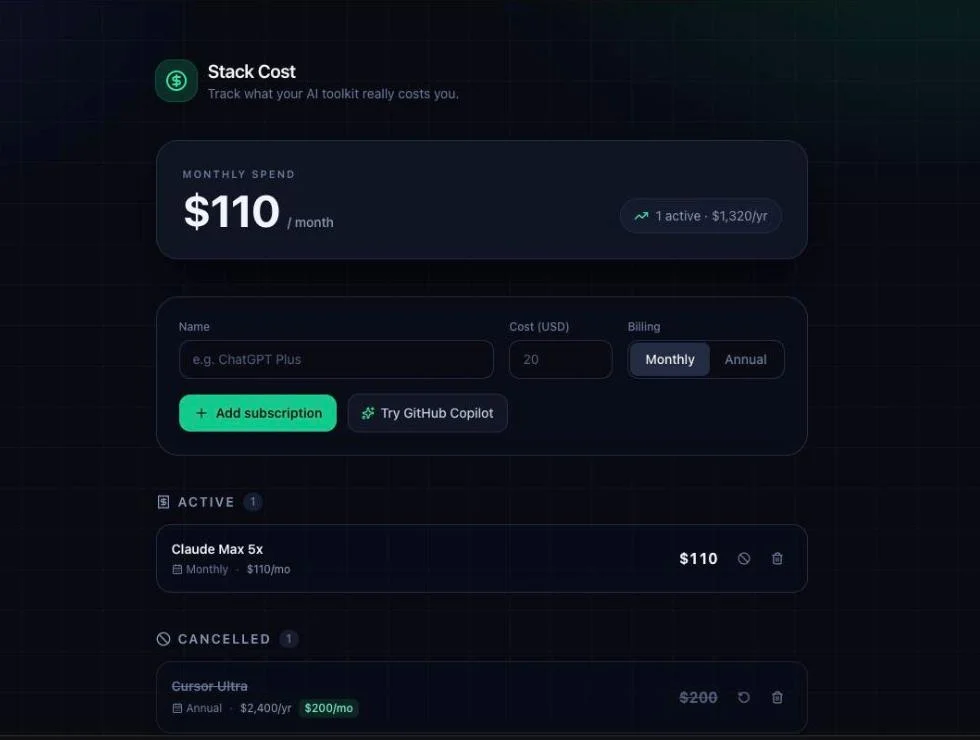
Six for six, on one prompt, no follow-ups — and now three tools out of three on this brief, which says more about the brief than about the tools.
How good was the app it built?
The best of the three, and the margin is in things I never asked for.
It versioned the storage key. I opened the source in Bolt’s own code view. The persistence layer is a separate 76-line module rather than being inlined into the component, and it opens like this:
export type BillingCycle = 'monthly' | 'annual';
export interface Subscription {  id: string;  name: string;  cost: number;  cycle: BillingCycle;  cancelled: boolean;  createdAt: number;}
export const STORAGE_KEY = 'stackcost.subscriptions.v1';
Two things in a dozen lines. The record stores cost as the raw number with cycle beside it, so the monthly equivalent is derived at render rather than frozen into storage. All three tools made that call and it is the single best indicator that a generated app was modelled rather than assembled.
The second is the .v1. Neither rival versioned its key. It costs nothing today and it is the difference between a clean migration and a corrupted load on the day the shape changes. Nothing in my brief hinted at it.
It kept both numbers. The cancelled row reads Annual · $2,400/yr with a highlighted $200/mo badge beside it. My brief asked only for the monthly equivalent. Lovable also kept the annual figure; Replit dropped it. Bolt went further and highlighted the derived one, which is the number the brief actually cared about.
It added a projection. Next to the total sits 1 active · $1,320/yr, and with both subscriptions running it read $3,720/yr. That is $110 plus $200, times twelve, and it is correct. Nobody asked for an annual view.
It formatted money properly. formatUSD uses Intl.NumberFormat with conditional fraction digits, so $110 renders as $110 and not $110.00. That is a small thing that separates generated code from thought-through code.
It invented a Restore button. All three tools did, unprompted, on the same brief. When three independent systems all add the same missing feature, the specification was incomplete and they all noticed.
One extra is more double-edged. Bolt added a one-click “Try” button that rotates through suggested tools (the screenshot above caught it on GitHub Copilot), and behind it is a hard-coded list of ten real AI tools with real prices: Claude Pro at $20 a month, Midjourney at $30, Perplexity Pro at $200 a year, GitHub Copilot at $100 a year. It is a genuinely thoughtful touch for a subscription tracker. It is also an app shipping factual claims about other companies’ pricing that nobody asked it to make, and that nothing will update when those prices change.
What did this build cost me on Bolt.new?
The full tier ladder, the per-token rates and the annual-billing maths are in our Bolt.new pricing guide. This section covers what my own build actually drew down.
Bolt.new pricing is easy to read once you know the unit. The balance and the daily cap below are figures I watched move in my own account on 6 August 2026. The tier comparison is Bolt’s own marketing copy, taken from the same account page and checked against Bolt’s pricing page, which states the rollover in its own words: tokens from a paid subscription “roll over for one additional month, making them valid for up to two months in total”. Read those rows as claims rather than as things I exercised.
| Plan | Price | Tokens |
|---|---|---|
| Free | $0 | 1M a month, 300k daily limit, unused expire |
| Pro | $25/mo | From 10M a month, no daily limit, unused roll over |
| Teams | $30/mo per member | From 10M a month, centralised billing and RBAC |
Yearly billing saves up to 28%. Pro also removes the Bolt branding, adds custom domains, private sharing and unlimited databases.
The important line in that table is not a price. It is that free tokens expire while paid tokens roll over, and even then only into the following month rather than banking indefinitely. On the free plan I was told the exact date mine would lapse. Buying a big balance to cover a busy month behaves differently depending on which side of the paywall you are on.
What is a token, and how fast do they go?
A token is Bolt’s unit of consumption, and one build of mine cost 100,000 of them. This is the part the competing reviews either skip or explain in isolation, and it is the part that decides your bill.
Bolt meters in tokens, which is a different unit from either rival: Lovable bills in credits, Replit bills in checkpoints. All three are consumption meters with different granularity, and none of them lets you price a request before you send it.
The units are not interchangeable and the differences matter more than the names suggest.
A Lovable credit is priced per build action and costs 25 cents, and the price varies with the action: Lovable’s own published examples run from 0.50 for a simple update to 1.70 for a landing page, and my build cost 1.20. The unit maps to things you asked for, and the published examples give you a rough sense of the band, though not a quote for the request in front of you.
A Replit checkpoint is a completed unit of work, so one checkpoint can be a one-line change or an entire application, priced by effort after the fact.
A Bolt token is the finest-grained of the three and the least intuitive, because it tracks how much the model produced rather than what you asked for. A long conversation about a small change can cost more than a short instruction that builds a lot.
That last property is why token billing feels punitive when things go wrong. Under a credit or checkpoint model a failed attempt is priced in the same terms as a successful one. Under a token model it costs you however much text the model produced while failing. I did not run a failing loop, so treat that as a property of the billing unit rather than something I measured.
My build cost 100,000 tokens. I know that precisely because the free plan shows it, from two directions.
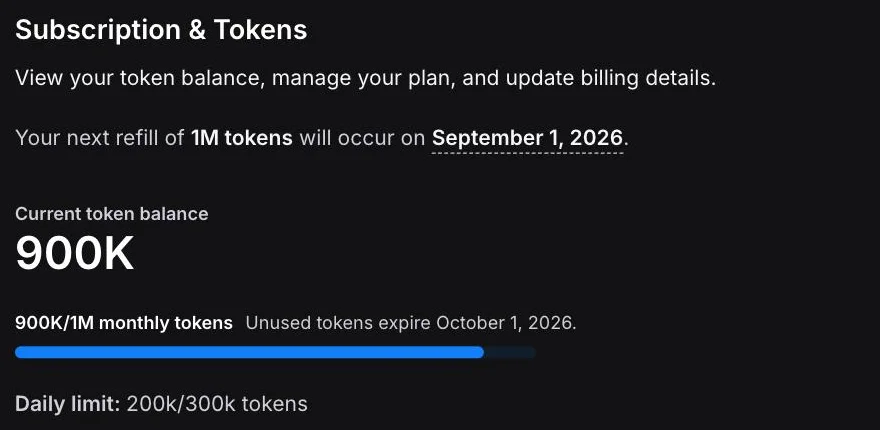
The monthly line went from 1M to 900K. The daily line reads 200k of 300k, and this build was the only thing I ran. Both arrive at the same 100,000.
What that buys you, at this size of app:
| On this plan | Builds like mine |
|---|---|
| Free, per day | 3, on the 300k daily cap |
| Free, per month | 10, on the 1M allowance |
| Pro at $25, per month | About 100, on 10M tokens |
Read that last row sceptically. It assumes every build is one prompt that works first time, which is exactly what my test was and exactly what real use is not. Iteration is where tokens go, and iteration is what the harsher write-ups keep coming back to.
How should you write the prompt when the meter is running?
Three tools, three billing units, one prompt, and all three got six out of six on the first attempt. The most useful conclusion from that is not about any of the tools. It is that the prompt did most of the work, and prompt discipline is the only lever you control on a metered plan.
| The rule | Why it earns its keep |
|---|---|
| Number the requirements | Each one becomes checkable afterwards |
| Name the derived values | Separates a requirement from a hope |
| Describe behaviour, not implementation | Lets the tool model the problem properly |
| Name the storage explicitly | Stops it reaching for its own product |
Four things about that paragraph were deliberate, and all four transfer.
Number the requirements. Not for the model’s benefit so much as your own. A numbered list is checkable afterwards, one line at a time. “Build me a subscription tracker” produces something you can only judge by feel, and feel is how people end up spending a day’s allowance discovering what they actually wanted.
Name the derived values. Requirement two did not say “handle annual plans”, it said annual plans must show a monthly-equivalent figure rather than the annual one. That distinction is the whole difference between a requirement and a hope, and it is the one all three tools had to reason about rather than pattern-match.
Describe behaviour, not implementation. Requirement four said cancelling removes an item from the total but keeps it visible. It said nothing about arrays, filters or components. All three tools independently chose to store the raw figure and derive the monthly one at render, which is the right call and not one I made for them.
Name the storage explicitly. Requirement five said localStorage. This is the one place I did specify implementation, and it earned its keep: Bolt has a database product it could reasonably have reached for, and the explicit instruction is why it did not.
The result across three products was one build each, with no follow-ups on any of them. A vaguer version of the same request would have cost several times as much in iteration on all three. Which makes specification the habit that pays best on any metered plan, and an odd thing to need from a category sold to people who would rather not think like engineers.
Is the free plan enough to decide?
Yes, and Bolt deserves credit for how clearly it answers the money question.
I built and stress-tested a working application without entering a card, and the account page told me exactly what it cost, when my allowance refills, and when the unused part expires. Having just come from Replit, where the free tier shows a percentage bar and locks the usage page behind a subscription, the contrast is stark.
The free plan is also generous enough to be a real trial rather than a demo. Ten builds the size of mine in a month, three in a day, on a product whose paid entry point is $25. That is enough to answer whether the tool understands your kind of brief, which is the only question a single session can settle.
There is one odd choice sitting on top of all that transparency. In Settings, under General, there is a toggle labelled “Display token usage in chat”, described as “Always shows monthly token balance above the chatbox when you’re in a project”. It is off by default.
So the number is accurate, complete and free to see, but not shown in the one place you are actually spending it. You have to go looking, in an account page, on a different screen, after the fact. I would turn it on before the first build.
Who is Bolt.new for?
| You are | Verdict |
|---|---|
| Building a first-draft app fast | Buy it. Best first draft I have measured |
| A developer who will read the code | Buy it. Real repo, real structure |
| Non-technical and want a working page | Try Lovable first. Faster and simpler |
| On a strict budget | Careful. Tokens are unpriceable in advance |
| Buying on reputation | Read the next section first |
The dividing line is how much you intend to iterate. One well-specified prompt is cheap here and the output is excellent. A long conversation with a stuck agent is where this product’s reputation was made, and I cannot tell you from one afternoon which of those you will end up doing.
There is a cheap way to find out which kind of user you are, and it does not cost anything. Spend one day’s free allowance on a real task rather than a toy one, and pay attention not to whether the app appears but to how many times you had to go back. If the answer is none, this tool is priced for you. If the answer is four, multiply that by every feature you intend to build and decide whether the number still looks like $25.
Why do the reviews say 4.7 and the users say 1.4?
The two numbers are 1.4 and 4.7, they describe the same product in the same week, and they sit one result apart in the same search. Why they diverge that far, I do not know, and I want to be careful about pretending otherwise. But somebody should at least put them next to each other, because right now nobody does.
| Source | Verdict |
|---|---|
| Review blogs | 4.7 and 4.8 out of 5 |
| Trustpilot, 196 reviews, 6 Aug 2026 | 1.4 out of 5 |
| Top Reddit thread in r/nocode | ”Felt like a god. Then reality slapped me” |
| This review, one measured build | 4.4 |
I read six of the most prominent Bolt reviews. Not one mentions the Trustpilot score. Two of them describe a real build; none reports what their build cost. Trustpilot itself is the second thing you find when you look Bolt up, above most of them.
I should be precise about what I did and did not read. Trustpilot blocks automated access, so I have the score and the review count, not the reviews themselves. What I have read is the thread that outranks every blog and the competing reviews that do engage with the complaints, and those point the same way: the recurring theme is tokens vanishing into debugging loops, and billing and refunds after that. It is not the generated code. The Reddit thread that outranks every blog captures the shape of it in its title alone: a spectacular first impression, then the grind.
There are a few honest explanations for a gap this size and they are not mutually exclusive. Review sites tend to test the way I did, with one clean build, because that is what fits in an afternoon. Trustpilot is where people go when they are angry, and angry people are disproportionately people with a billing dispute, so the sample is skewed by construction. And a consumption meter creates a specific kind of grievance that a flat subscription does not: when a capped plan disappoints you, you wait; when a metered one disappoints you, you have already paid for the disappointment.
None of that makes 1.4 across 196 reviews a rounding error. What it means is that the number is measuring something my test structurally cannot: not whether Bolt can build an app, which it plainly can, but what happens between you and the company when it does not. I have no data on that at all. Nor, as far as I can tell, does any published review report a build’s cost, which is a narrower claim than saying nobody engages with the complaints: two of them do.
My build was cheap because it was right the first time. That is the entire reason I have nothing bad to say about the meter, and it is also why my experience is not evidence against theirs.
The good
It met a picky brief exactly. Six numbered requirements, six passes, first attempt, no follow-ups. Two of them were written to be fumbled and neither was.
The output is the most finished of the three. A versioned storage key, a correct yearly projection, proper currency formatting and both the annual and derived monthly figures on screen. Every one of those is something I did not ask for and would have wanted.
It chose my instruction over its own product, and said so. Bolt sells a hosted database and my brief asked for browser storage. It used browser storage, explained why in the build log, and only then offered the upgrade. Every tool in this category has a paid tier it would rather you reached; this is the only one I have watched decline to route me there when the brief said otherwise.
The free plan tells you what things cost. Exact token balance, daily cap, refill date, expiry date, all visible without a card. After Replit’s percentage bar and subscription-gated usage page, this is the standard the category should be held to.
The code is inheritable. A separate persistence module, typed records, Intl.NumberFormat for money. A developer can pick this up without wincing.
The bad
The meter is invisible where you spend it. The token balance is accurate and free to see, and the toggle that puts it above the chat box is off by default. The one screen where you are actively burning tokens is the one screen that does not show them.
Free tokens expire, paid tokens roll over. My unused balance had a lapse date on it. That is a defensible commercial choice and it is also the opposite of how a free tier earns trust, because the allowance you did not spend is worth nothing next month.
You cannot price a request before you send it. Tokens track how much the model produced, not what you asked for, and no estimate is offered beforehand. This is true of all three tools in this category, and it is the structural reason the complaints exist.
It shipped facts about other companies. The suggestion button is backed by a hard-coded list of ten tools and their prices. It is a thoughtful feature and an unrequested set of claims that nothing will keep current.
The customer sentiment is the worst I have measured. 1.4 out of 5 across 196 Trustpilot reviews on 6 August 2026, against 4.7 and 4.8 from the review blogs. I could not reproduce whatever produces that, and I am not able to tell you it is wrong.
How does Bolt compare to Lovable and Replit?
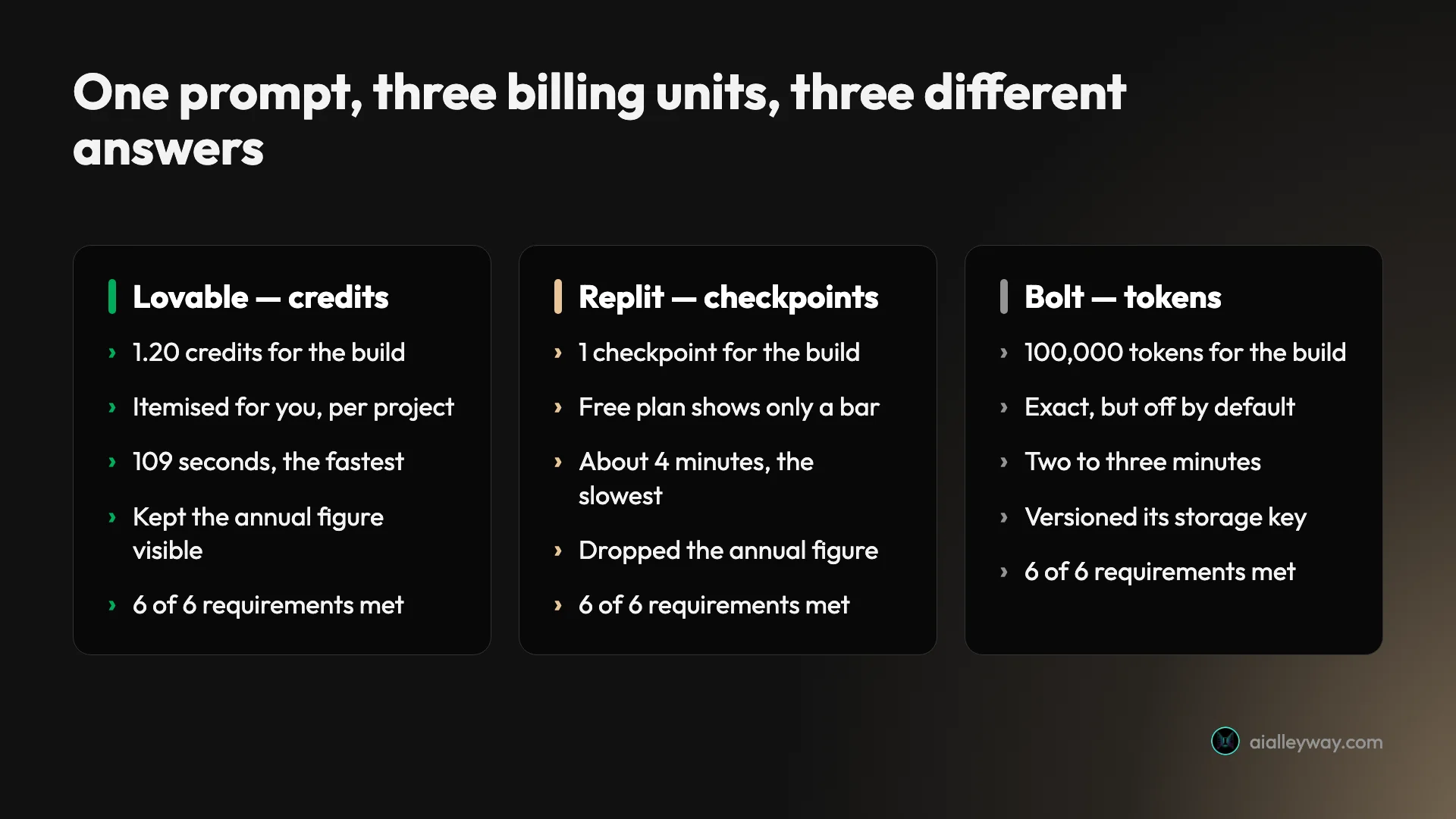
Bolt vs Lovable vs Replit: three tools, one prompt, six requirements each.
| The measure | Lovable | Replit | Bolt |
|---|---|---|---|
| Requirements met | 6 of 6 | 6 of 6 | 6 of 6 |
| Time | 109 seconds | About 4 minutes | 2 to 3 minutes |
| Billing unit | Credits | Checkpoints | Tokens |
| What the build cost | 1.20 credits | 1 checkpoint | 100,000 tokens |
| Free plan shows the number | Yes | No, a bar | Yes |
| Kept the annual figure visible | Yes | No | Yes, and highlighted |
| Versioned the storage key | No | No | Yes |
| Invented a Restore button | Yes | Yes | Yes |
| Trustpilot | Mixed | 3.0 | 1.4 |
Running the same brief three times was worth it for one sentence. Given an identical six-requirement prompt, Lovable charged 1.20 credits, Replit charged one checkpoint, and Bolt charged 100,000 tokens — three different units, three different granularities, and three different answers to the question of whether you can find out what you just spent. Lovable itemises credits per project. Replit shows free users a percentage bar and gates the real figure behind a subscription. Bolt gives you the exact number and leaves it switched off by default. All three met every requirement, so the meter, not the output, is what actually separates them.
The correctness column is a tie and the interesting columns are the others. Bolt produced the most complete first draft and is the most honest of the three about what a free build costs. It also has, by a distance, the angriest customers.
What are the best Bolt.new alternatives?
Three, and the choice turns on how much you want to iterate and how much you want to read.
Lovable is the fastest of the three and the simplest, deliberately hiding the code. It finished the identical brief in 109 seconds and its credit accounting is easier to hold in your head than tokens. It is the better choice for a non-technical founder. My Lovable review has the measured numbers.
Replit gives you a full IDE, a shell and a hosted database, and it is the one to pick if your prototype needs a real backend soon. It was the slowest on this brief and the least forthcoming about cost. The Replit review covers the checkpoint billing model.
Claude Code is the answer when the honest description of your situation is that the repository already exists. It is a terminal agent billed as a capped subscription rather than a meter, which is a different shape of bill entirely, and it is what I use daily. I wrote up whether it is worth it separately, and the wider coding-tool comparison covers what capped and metered plans each do to a monthly total.
Those are the three I would put in front of most people leaving Bolt. Bolt.new alternatives runs the full field of eight on this same brief, including the ones that hand back a project rather than a hosted app, and the open-source version Bolt publishes itself.
What did I not test?
The rating is only as good as its evidence, so here is the boundary:
- Paid tiers. Everything above is the free plan.
- Iteration at length. One prompt, no follow-ups, which means I never entered the debugging loop those write-ups describe.
- Publishing and custom domains. I stopped at the in-browser preview.
- The Bolt Database, auth and anything server-side. My brief specifically avoided them.
- Billing and support. I never paid, so I never had a charge to dispute. That matters, because billing disputes are the theme running through the write-ups that engage with the complaints.
- Reproducibility. One run per tool. I have not tested whether the same prompt twice produces the same result, which is the obvious caveat on every superlative in this review.
Two claims above are read rather than observed. The rollover and expiry rules come from Bolt’s own plan page, not from watching my balance across a month. And I did not verify the prices Bolt hard-coded into its suggestion list.
The final word
Bolt built the best app of the three tools I have given this brief to. Six requirements, six passes, one prompt, and a result that versioned its own storage key, projected an annual total, formatted its currency properly and told me plainly when it had chosen my instruction over its own product. On the evidence in front of me, that is excellent work.
I am rating the product I measured, and I want to be honest that the product I measured is the one on its best day: a single, carefully written prompt is the scenario this tool is strongest at and the scenario its critics are not complaining about.
| The verdict | In one table |
|---|---|
| Requirements met | 6 of 6, first attempt |
| Time | Between two and three minutes |
| Cost | 100,000 tokens, a tenth of the free month |
| Real deduction | A meter you cannot read where you spend |
| Evidence | One app, one prompt, free plan |
4.4 out of 5. The build earns more than that, and it is worth being explicit about why the number still lands below the 4.6 I gave Lovable on the identical brief. Lovable was faster, it itemises what each build cost you per project, and it carries none of the three deductions below. Bolt wins the artefact and loses the surroundings.
Those deductions are a token balance hidden behind a default-off toggle, free tokens that expire while paid ones roll over, and a customer sentiment score I could neither reproduce nor dismiss. On the last of those I am treating unresolved risk as a discount rather than a disqualification: I cannot show that the one-star reviewers are right, and I equally cannot show they are wrong, so it costs confidence rather than the recommendation.
If you are choosing today, the free plan will answer the only question one build can answer, and it will tell you exactly what that answer cost. Whether the twentieth prompt goes as well as the first is the question I could not reach, and it is the one 196 people on Trustpilot are answering differently to me.
For how Bolt placed against seven other tools given the identical brief, see the best vibe coding tool — and the best AI app builder for the app-builder field on its own, where Bolt turned in the cheapest build I have measured.
Frequently asked questions
Is Bolt.new free?
There is a real free plan and I built and tested a working app on it without entering a card. It grants one million tokens a month with a three hundred thousand token daily limit, and my whole build cost one hundred thousand of them.
Two limits to know. Unused tokens expire rather than banking indefinitely, and the free plan stamps a Made in Bolt badge on what you build. The paid plans remove the daily cap and let unused tokens roll over to the next month.
How many tokens does a Bolt.new app cost?
Mine cost 100,000 tokens for a complete single-page app with forms, computed totals, a cancelled state and localStorage persistence, built from one prompt with no follow-ups.
That is a tenth of the free monthly allowance and a third of the daily cap, so three builds of that size would exhaust a day.
On the $25 Pro plan, which starts at 10 million tokens, it works out at about 100 builds a month, but that number is close to meaningless in practice because almost nobody builds an app in one prompt. Iteration is where tokens go, and it is the single most common complaint about this product.
Why does Bolt.new have such bad reviews?
Bolt held 1.4 out of 5 on Trustpilot across 196 reviews when I checked on 6 August 2026, which is the lowest score of any tool in this category I have tested, and that Trustpilot page sits directly above the review blogs rating it 4.7 and 4.8 in the same search results.
One caveat on what follows: Trustpilot blocks automated access, so the score and the count come from Google's summary of that page rather than from reading it, and I have not read the reviews themselves. What I have read is the top Reddit thread and the competing reviews that engage with the complaints, and both point the same way.
The recurring theme is tokens disappearing into debugging loops, then billing and refunds, and almost never the generated code. My test could not reach that: one carefully specified prompt that works first time is the scenario this product handles best, and it is not the scenario the angry reviews describe.
Is Bolt.new better than Lovable?
On the identical brief all three tools I have tested met six requirements out of six, so the difference is not correctness. Bolt produced the most complete app: it was the only one to version its storage key, the only one to add a yearly projection, and it showed both the annual price and the derived monthly figure where Replit showed only the monthly.
Lovable was faster at 109 seconds against two to three minutes, and its credit accounting is easier to reason about than tokens. If you want the shortest path to a working page, Lovable. If you want the most finished first draft, Bolt.
Who should not use Bolt.new?
Anyone who needs a predictable monthly bill. Tokens track the model's output rather than your request, the amount a given prompt will cost is not knowable in advance, and the free plan's tokens expire rather than accumulating.
It is also the wrong tool if you are buying on reputation. The gap between what the review sites say about this product and what its own customers say is the widest I have seen in this category, and while my measured build was excellent, I cannot tell you that the people leaving one-star reviews are wrong.
Keep reading
Bolt vs Lovable: same brief, and what each build cost
Bolt vs Lovable, tested on one identical six-requirement brief. Both met all six. Lovable finished in 109 seconds; the two builds cost 30 cents and 25 cents.
Bolt.new pricing: the token ladder you only see signed in
Bolt.new pricing has 14 token tiers that never render logged out, a 28% yearly discount that is really 10%, and a measured 100,000-token build.
Bolt.new alternatives: 8 tools, 7 took the same brief
The best Bolt.new alternatives, ranked by a measured build rather than a feature table. Seven tools took one identical brief. Here is what each build cost.
Lovable alternatives: 7 tools, and I gave 5 the same brief
The best Lovable alternatives, ranked by a build test rather than a feature list. Five of the seven took an identical brief. Here is what each cost.