
Best AI app builder: 5 tools, one brief, every app used
The best AI app builder, measured. I gave five builders one brief and used every app. All five passed — what separated them was the cost of the second build.
Contents
The best AI app builders at a glance
Best overall: Lovable. One paragraph in, a working app 109 seconds later, all six requirements right first time — and a free tier you can actually iterate on.
Best if you need code you own: v0. The only one that handed back a real multi-file Next.js project, and the only one that opened a browser and tested its own work.
Best free tier for iterating: Base44. Twenty-five builds a month at no cost, against three on the tightest tier here.
I gave five app builders the same brief. One paragraph, six numbered requirements, handed over verbatim with no follow-up prompts, then I used every app that came back rather than reading each tool’s summary of itself.
All five passed. Six of six requirements, first attempt, no corrections, on free tiers, without a card. So the question “which one can build my app” has no useful answer — they all can. The question that actually separates them is what the second build costs, and there the gap is eight-fold.
How I chose: one brief, five builders, every app driven
The brief asked for a subscription tracker: add a tool with a name, cost and billing cycle; show a monthly equivalent for annual plans; keep a running monthly total; let a subscription be cancelled without deleting it; persist across a reload; dark theme throughout.
Two of those six were written specifically to be fumbled. An annual price of $2,400 had to be derived to $200.00 a month rather than displayed as typed. And a cancelled subscription had to leave the running total while staying visible on the page. Both are the kind of requirement a tool can appear to satisfy while getting wrong.
So I checked every app by using it — adding two subscriptions, watching the total reach $310.00, cancelling one, watching it fall to $110.00, then hard-reloading to see whether any of it survived. I also read each app’s storage in the browser console, because that is where these tools usually cheat: storing the derived $200 and forgetting it came from $2,400 loses information you need later. All five stored the raw annual figure with the billing cycle and computed the monthly equivalent at render. Every one of them got the model right.
All five got the hard part right
The storage check deserves more than a passing mention, because it is the one place where a tool can hand you something that looks perfect and is quietly broken.
When you type $2,400 and pick “annual”, the app has to show you $200.00 a month. There are two ways to make that happen. The right way is to store 2,400 alongside the billing cycle and divide at the moment of display. The wrong way is to store 200 and forget where it came from — the screen looks identical, and you have destroyed the information. You can no longer show the real renewal amount, you cannot switch a plan back to annual, and you cannot tell $200 a month from $2,400 a year on the next screen you build.
I read every app’s storage in the browser console. All five stored the raw annual figure with the cycle:
| Tool | Storage key | Stored |
|---|---|---|
| Lovable | stack-cost:subscriptions | raw 2400 + cycle |
| Replit | stack-cost-subscriptions | raw 2400 + cycle |
| Bolt.new | stackcost.subscriptions.v1 | raw 2400 + cycle |
| Base44 | stack_cost_subs_v1 | raw 2400 + cycle |
| v0 | stack-cost.subscriptions.v1 | raw 2400 + cycle, plus UUIDs and timestamps |
Five for five, and three of them versioned the key unprompted. This is the single most encouraging result in the test: the category has got good enough that the models make the correct architectural call on a data question the brief never spelled out.
And all five got the same thing wrong
Every one of them invented a Restore button. The brief asked that a subscription can be marked cancelled. It says nothing about undo, nothing about reinstating, nothing about restore. Five independent products, from five different companies, on five different model stacks, all built the same unrequested feature — and not one of them mentioned that it had made the decision.
That is worth understanding before you write a spec for any of these. They do not stop at the edge of your requirements; they fill in what they infer you meant, confidently and silently. On a prototype that is often a bonus. On something a client or a compliance reviewer signed off, it means the document and the software have diverged and nobody raised a hand.
The second shared gap is verification. Only v0 checked its own work, and it did so by driving a browser rather than writing tests. The other four handed back an app whose entire quality guarantee is that it looked right when they finished generating it. That is not a reason to avoid them — my testing found all four correct — but “it rendered” and “it is right” are different claims, and four of these five only make the first one.
One note on the competition, because it explains why this post exists. Filter page one of this search down to written articles and three survive — and all three are published by companies whose own product appears in their own ranking, usually at number one. That is not a scandal, it is just how this category markets itself. We sell no app builder, which is why the ranking below can put a tool we earn nothing from in second place.
The finding that actually matters
Every one of these tools will build your first app for nothing. What differs, enormously, is how many times you can go again before you are asked for a card.
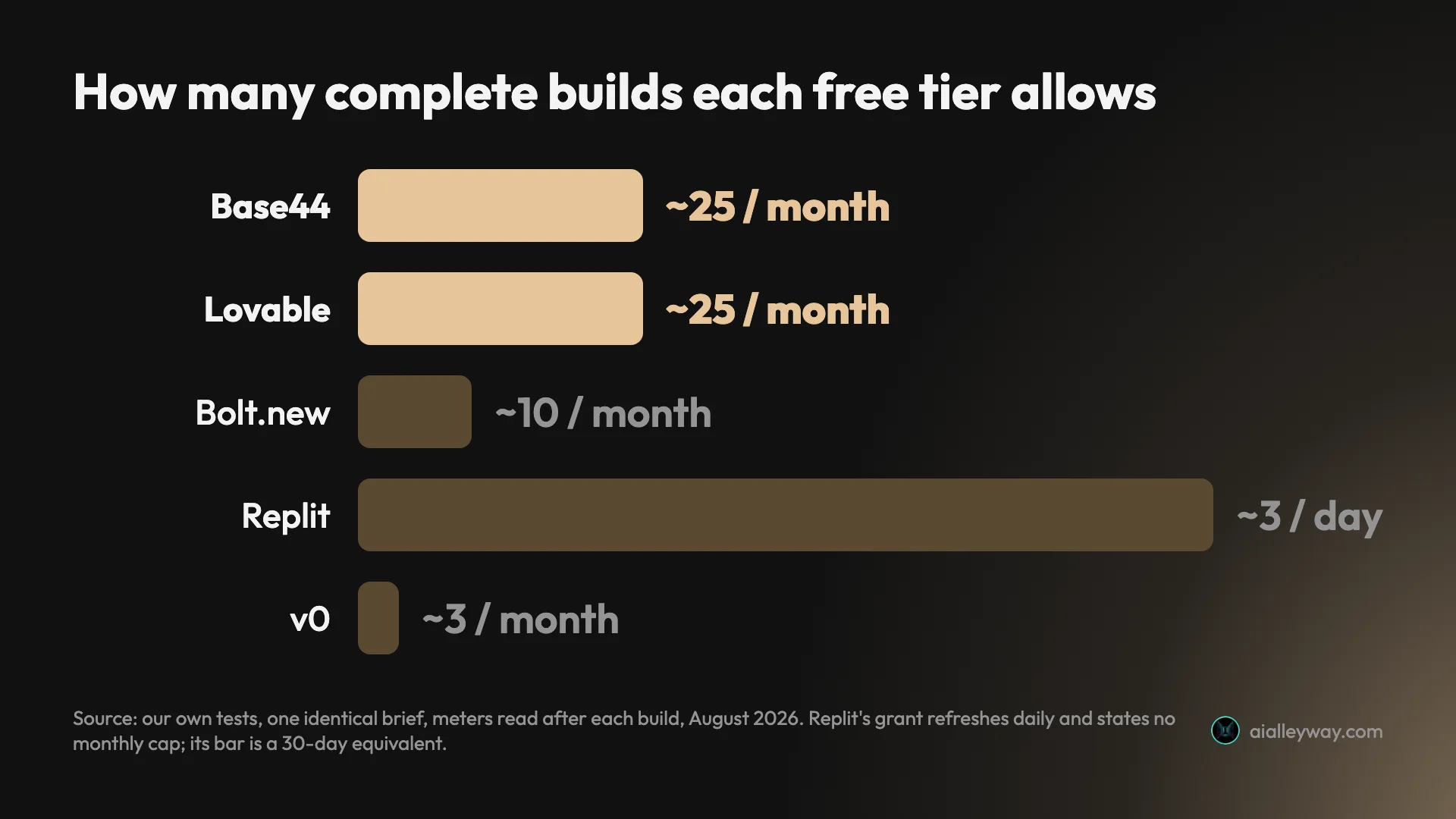
Measured against the identical brief, one build consumed: 1.20 credits on Lovable, one message credit of 25 on Base44, 100,000 tokens on Bolt, one checkpoint worth 31% of a day’s free Agent credits on Replit, and $1.40 of a $5 monthly credit on v0. Convert those into complete builds a month and the free tiers are not comparable products:
| Tool | What one build consumed | Free builds per month |
|---|---|---|
| Base44 | 1 message credit | ~25 |
| Lovable | 1.20 build credits | ~25 |
| Bolt.new | 100,000 tokens | ~10 |
| Replit | 1 checkpoint (31% of a day) | ~3 a day, refreshing |
| v0 | $1.40 | ~3 |
Replit is the odd one out, and in its favour. Its free grant refreshes daily rather than monthly. Replit’s own pricing page calls it “daily agent credits” and states no monthly ceiling, so three builds a day is roughly ninety a month if you keep coming back, far more runway than anything else here. It is the tightest tier in a single sitting and the loosest over a month. What Replit will not tell you is the size of the grant in absolute terms.
Among the monthly pools, that is roughly eight times more runway on the most generous free tier than the tightest. Nobody publishes this, because it requires building the same thing five times and reading five different meters afterwards.
The five compared
| Lovable | v0 | Bolt.new | Replit | Base44 | |
|---|---|---|---|---|---|
| Result | 6/6 | 6/6 | 6/6 | 6/6 | 6/6 |
| Time | 109 s | 3 m 36 s | 2–3 min | ~4 min | ~2.5 min |
| Reports its own time | No | Yes | No | Yes | No |
| Cost of this build | ~30¢ | $1.40 | ~25¢ | 31% of a day’s credits | 1 of 25 credits |
| Free builds/month | ~25 | ~3 | ~10 | ~3 a day, refreshing | ~25 |
| What you get | Hosted app | Next.js project | Code + preview | Hosted app + DB | Hosted app |
| Live URL immediately | Yes | Yes | Yes | Yes | No — must publish |
| Source visible free | Via GitHub sync | Yes | Yes | Yes | No — $50 tier |
| Alley Rating | 4.6 | Not rated | 4.4 | 4.2 | Not rated |
Two tools are deliberately unrated. One controlled build is not a review, and I will not put a number on v0 or Base44 until they have had the same scrutiny as the other three. They still get a verdict, because a verdict is a judgement about fit and a rating is a claim about quality.
1. Lovable — best overall

Lovable is the shortest distance between a paragraph of English and a working app, and nothing else here is close on speed.
It finished in 109 seconds on the free tier with no card, and met all six requirements on the first attempt with no follow-ups. Both traps were handled properly: the $2,400 annual plan rendered as a derived $200.00/mo with the annual figure preserved as context beneath it, and the cancelled subscription dropped out of the total while staying visible in its own section.
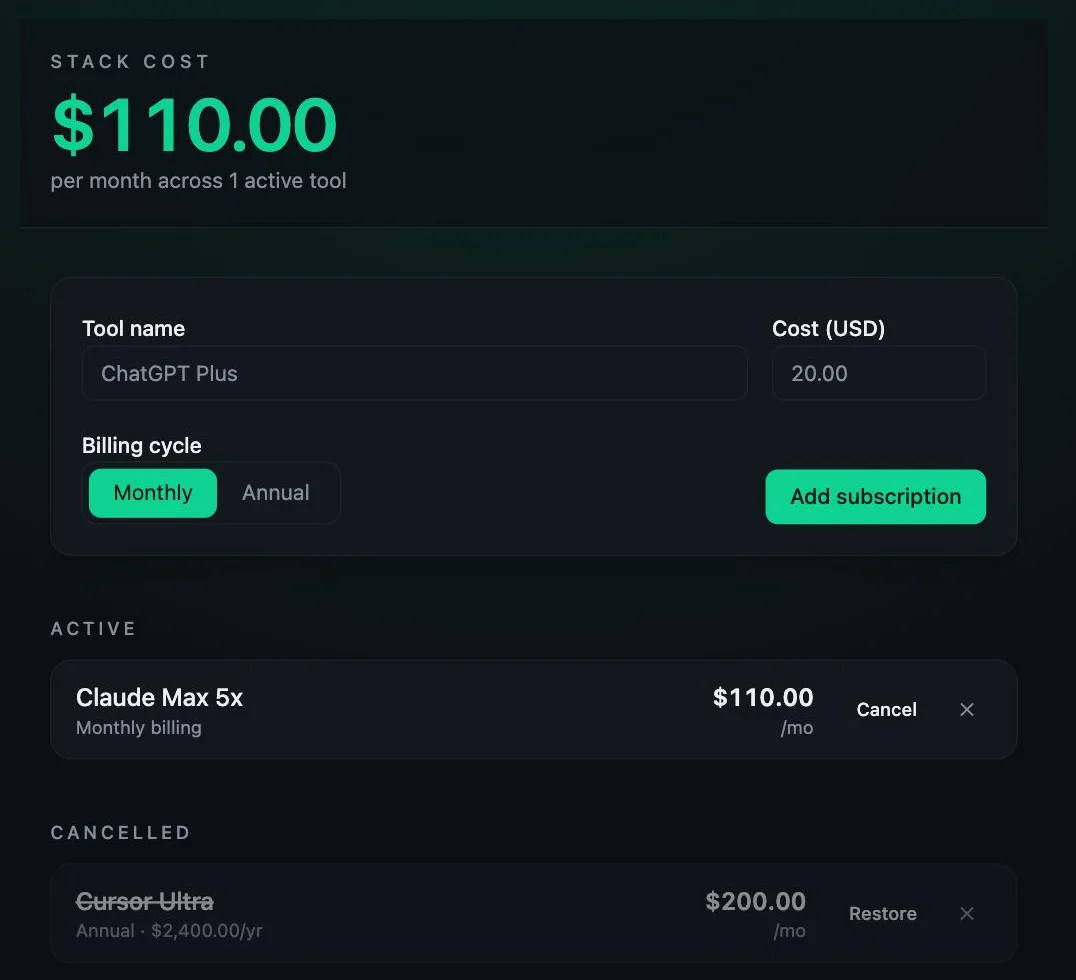
The storage model was right too. Lovable kept the raw annual figure with the billing cycle under a namespaced key and derived the monthly number at render, which is the choice that does not lose information. Four of the five made that call; Lovable made it fastest.
Pricing: free with 5 build credits a day and up to 30 a month, Pro $25 a month for 100 credits, Business $50. A credit works out at $0.25 on Pro, and my build consumed 1.20 of them — about 30 cents. That free allowance is around 25 complete builds a month, which is genuinely enough to develop something rather than just admire it.
One quirk of the credit model to plan around: Lovable meters planning as well as building, at a flat credit per Plan mode message. Replit does the same. So on both tools there is no free place to think — a conversation about what to build draws down the same pool as building it. Budget for the discussion, not just the output.
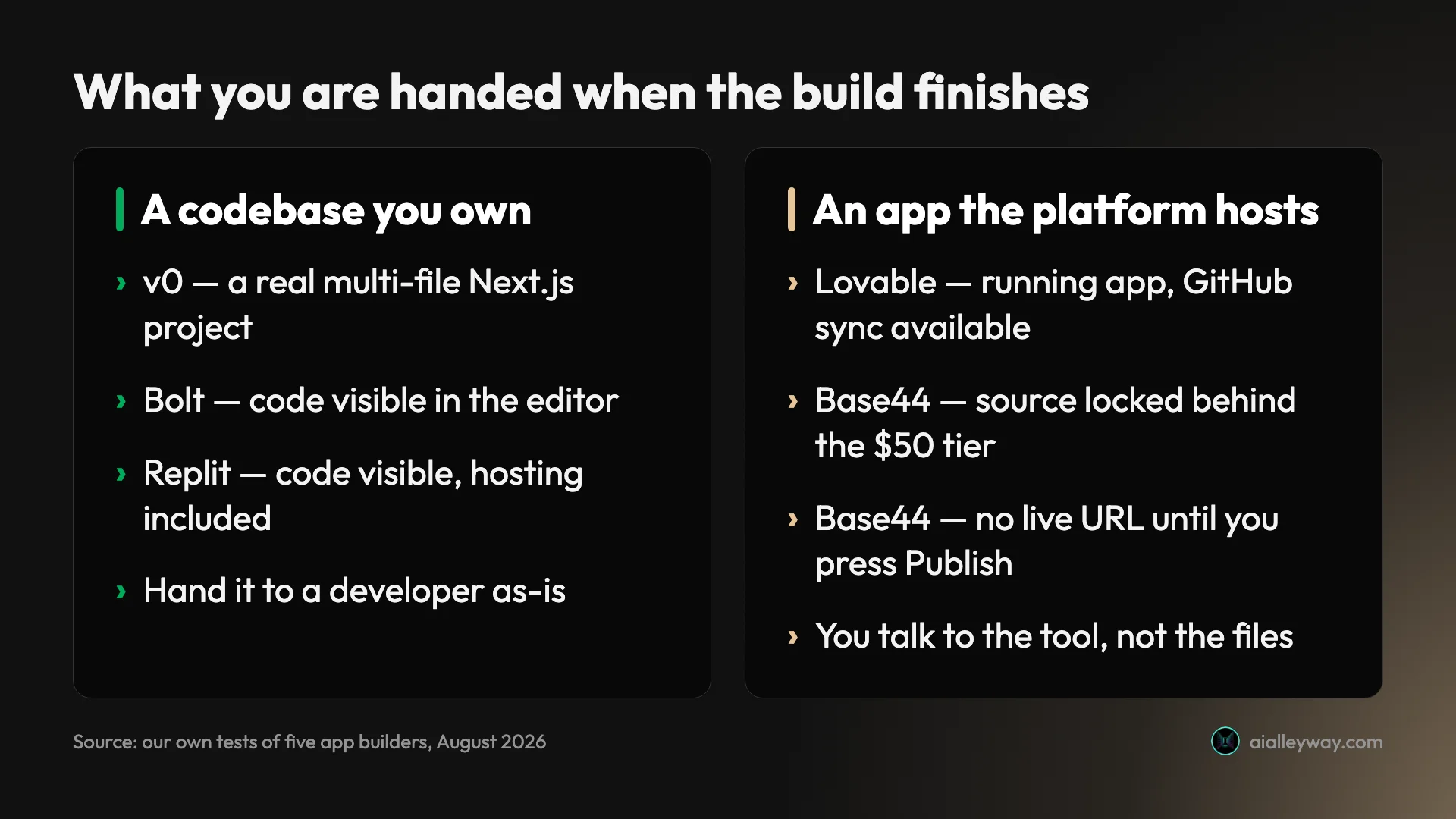
The catch: you get an app rather than a codebase. There is a GitHub sync path, but the default posture is that Lovable hosts the thing and you talk to it. If your requirement is “hand me a repository”, start with v0 instead.
Who it is for: anyone who wants the shortest path from idea to working URL, and non-technical founders in particular. If you cannot read the source, this is the tool least likely to require that you do.
Our full Lovable review has the complete build trace and the credit arithmetic.
2. v0 by Vercel — best if you need code you own

v0 is the only tool here that behaved like an engineer rather than a generator, and the only one that handed back something you could hand to a developer.
It took 3 minutes 36 seconds — its own figure, displayed when it finished, which only two of these five bother to report. What it produced was not a file but a project: app, components, hooks, lib and public directories on a proper Next.js scaffold, split into named components with a reusable persistence hook and pure helper functions.
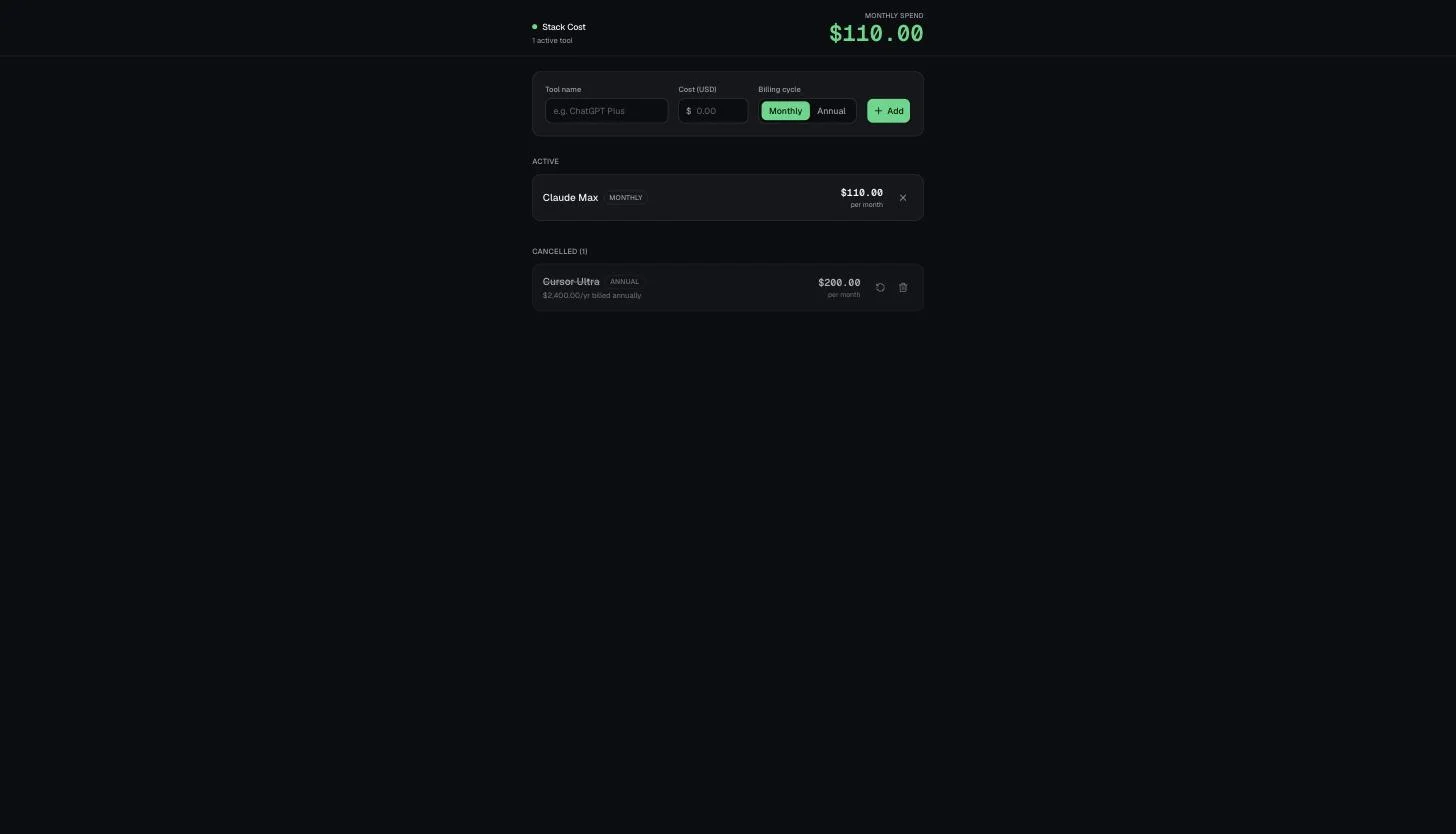
It also read the brief more carefully than anything else here. The requirement said annual plans must display a monthly equivalent rather than the annual figure. Every other tool showed both as equals. v0 led with $200.00 per month and demoted $2,400.00/yr billed annually to a small grey subtitle — the only one that treated the annual number as subordinate, which is what the sentence actually asked for.
Then it did something no other builder did: it opened a browser and tested its own work. Its log shows it starting a dev server, loading a browser-automation skill, adding a subscription, cancelling it, reloading the page and confirming the total — with its own screenshot of the result. It ran a version of my verification protocol before handing back. It also stated plainly why it did not ask me any questions first: “The requirements are clear and localStorage persistence is explicitly requested, so I’ll build directly.”
Pricing: the free tier carries a $5 monthly credit, and this build consumed $1.40 of it — read from the balance before and after. That is the most expensive result in the test and leaves roughly three builds a month before you are paying.
The catch: that cost. At $1.40 a build, v0 is about 5.6 times Bolt’s 25 cents for an app of this size. You are buying a real codebase and genuine self-verification, and on a throwaway prototype you will not collect on either.
Who it is for: anyone whose app has to survive contact with a developer. Also the right pick if you are already on Vercel and Next.js, since that is exactly what it emits.
3. Bolt.new — cheapest per build, and it says so

Bolt is the only tool in this test whose exact cost I can state to the token, and it turned out to be the cheapest of the five.
It finished in two to three minutes — Bolt shows no timer, so I will not pretend to a precise figure — and met all six requirements on the first attempt on the free plan. Its handling of the annual trap was the fullest of any tool: the row rendered both “Annual · $2,400/yr” and a highlighted “$200/mo” badge, losing nothing for the reader.
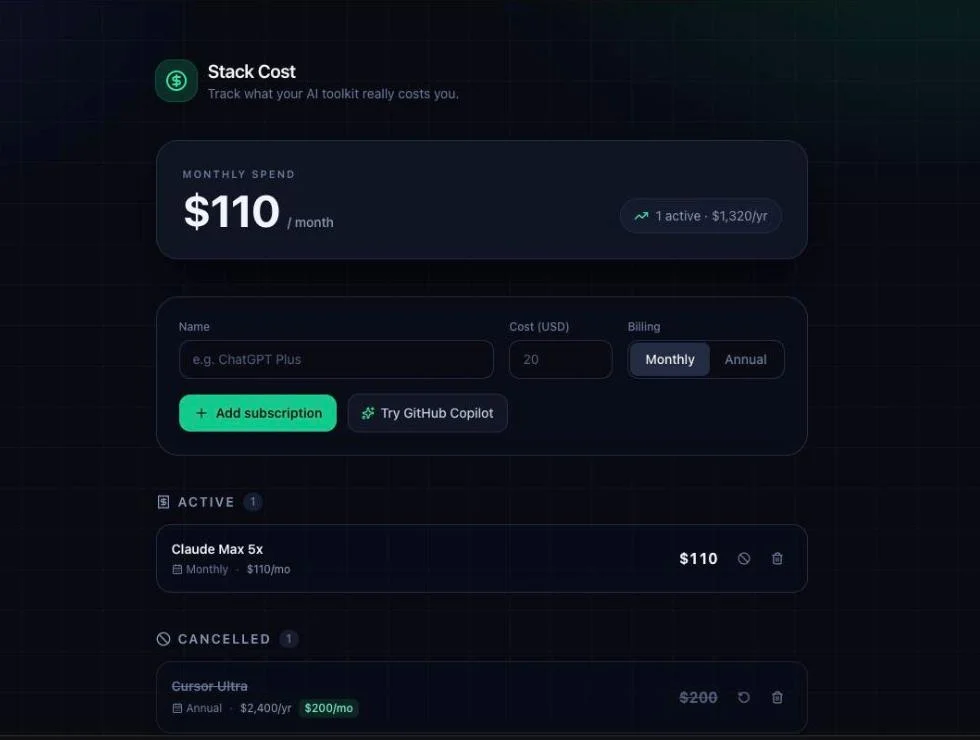
The cost is the part nobody else reports. The build consumed 100,000 tokens, corroborated two ways on Bolt’s own usage page: the monthly balance moved from 1M to 900K, and the daily line read 200k of 300k with this build as the only activity. That is roughly 25 cents, and it means the free plan’s monthly pool is about ten complete builds.
One detail I keep coming back to. Bolt had its own database product available and chose not to use it, saying so explicitly: it noted that a Bolt Database was on offer but that since I had specifically asked for localStorage persistence, it used localStorage. Given how much of this category is built around locking you into a platform, a tool that follows the brief over its own upsell is worth noticing.
Pricing: free with 1M monthly tokens and a 300,000 daily cap, paid tiers above.
The catch: Bolt’s public reviews are notably poor for a product that performed this well under controlled conditions — worth understanding before you commit money, and our review digs into where the gap comes from.
Who it is for: people who want browser-builder speed but also want to know what each iteration actually cost them.
Our full Bolt.new review covers the token accounting.
4. Replit — best when you need hosting and a database included

Replit hands you a running, hosted application with a database attached rather than a project you then have to deploy — and it is also the clearest warning in this category about what “free” means.
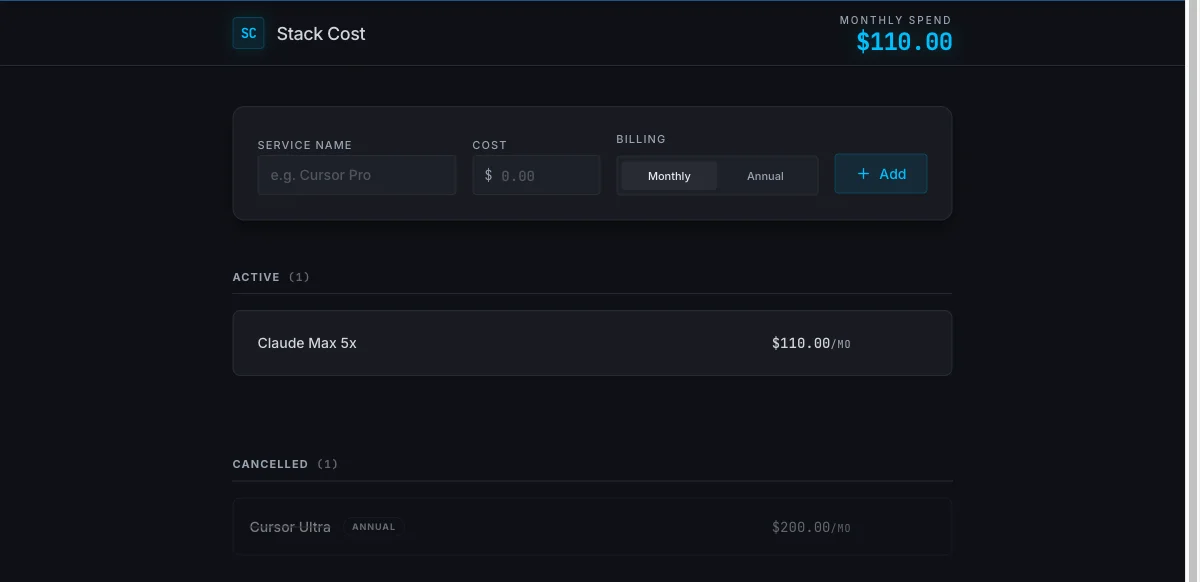
Given the identical brief on defaults, it met all six requirements on the first attempt in about four minutes by its own counter. The app was correct when I drove it: the total reached $310.00, fell to $110.00 on cancel, the annual plan showed a derived $200.00/mo, and the state survived a reload.
Then the meter. That single build was one checkpoint, and one checkpoint took the free plan’s Agent credits from 0% to 31% used — three more and the day’s allowance is gone, though it refreshes tomorrow. Worse, the free tier will not show you a number at all: the percentage bar is the entire financial interface, and the usage page is gated behind “You must have an active subscription to view your own usage.”
Replit was also the only tool of the five that dropped the annual figure entirely. Its row showed the derived $200.00/mo and nothing else — technically correct, since the brief asked for the monthly equivalent rather than the annual number, but it means the app can no longer tell you what you will actually be charged at renewal. Lovable kept the annual as context beneath, Bolt showed both, v0 demoted it to a subtitle, and Base44 printed them side by side. Only Replit made the information invisible in the interface while still holding it in storage.
The billing unit is the checkpoint, and charges apply even when no code changes, including Plan mode answers. Lovable meters planning too, so neither product gives you a free place to think — but Replit is the only one that also hides the arithmetic.
Pricing: Starter free with daily Agent credits, Core $20 a month ($18 billed annually), Pro $100 ($90), Enterprise custom.
Who it is for: people who want hosting, a database and a live URL in one place, and who will be paying for it. Treat its free tier as a demonstration rather than a plan.
Our full Replit review has the checkpoint mechanics in detail.
5. Base44 — most generous free tier, most locked-down code

Base44 gives you more free builds than anything else here and less access to what it built than anything else here. Those two facts define it.
It finished in about two and a half minutes — no timer, so treat that as approximate — and met all six requirements on the first attempt. The app was correct when I drove it: $310.00 down to $110.00 on cancel, the annual plan rendered as $2,400.00/yr · $200.00/mo equivalent, and the cancelled row survived a full reload struck through in its own section. It also showed a live hint while I typed: “Equals $200.00/mo when annualized.”
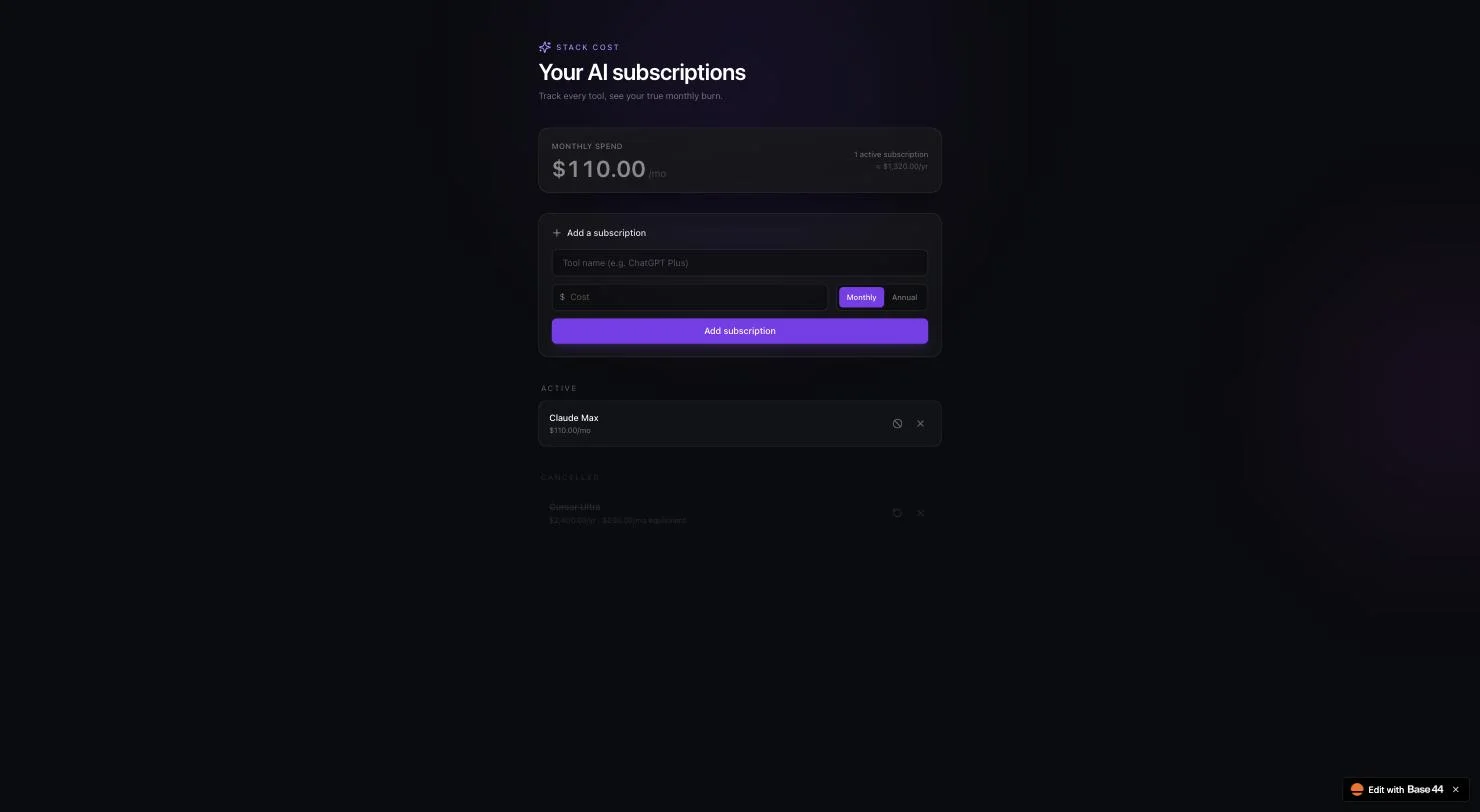
The cost is the headline. One complete six-requirement app consumed one message credit, out of 25 a month on the free plan, with no daily cap throttling how fast you spend them. That is the most iteration-friendly free tier in this test by a wide margin.
Two things to know before you commit. First, your app is not reachable until you press Publish — before I published, the URL served “Stack Cost isn’t available yet”, where the other four served a working link the moment they finished. Second, and more consequential: you cannot see your own source code on the free plan. “In-app code edits” is the first feature listed on Starter at $20 and appears nowhere on Free. Two things you might expect to come with it do not: “AI model select” and “Github integration” both start at Builder, $50. Read off base44.com/pricing, 9 September 2026.
Pricing: free (25 message credits a month, up to 5 apps), Starter $20 ($16 on yearly), Builder $50 ($40), Pro $100 ($80), Elite $200 ($160) — a flat 20% off on yearly billing, read 9 September 2026. Base44 is part of Wix, and carries ISO 27001, SOC 2 Type II and GDPR badges — which matters if your blocker is a procurement form rather than a feature.
Who it is for: internal and business tools where somebody will ask who owns the vendor, and anyone who wants to iterate a lot without paying. Not for you if reading the code matters, unless you are paying at least $20 for it.
How to pick
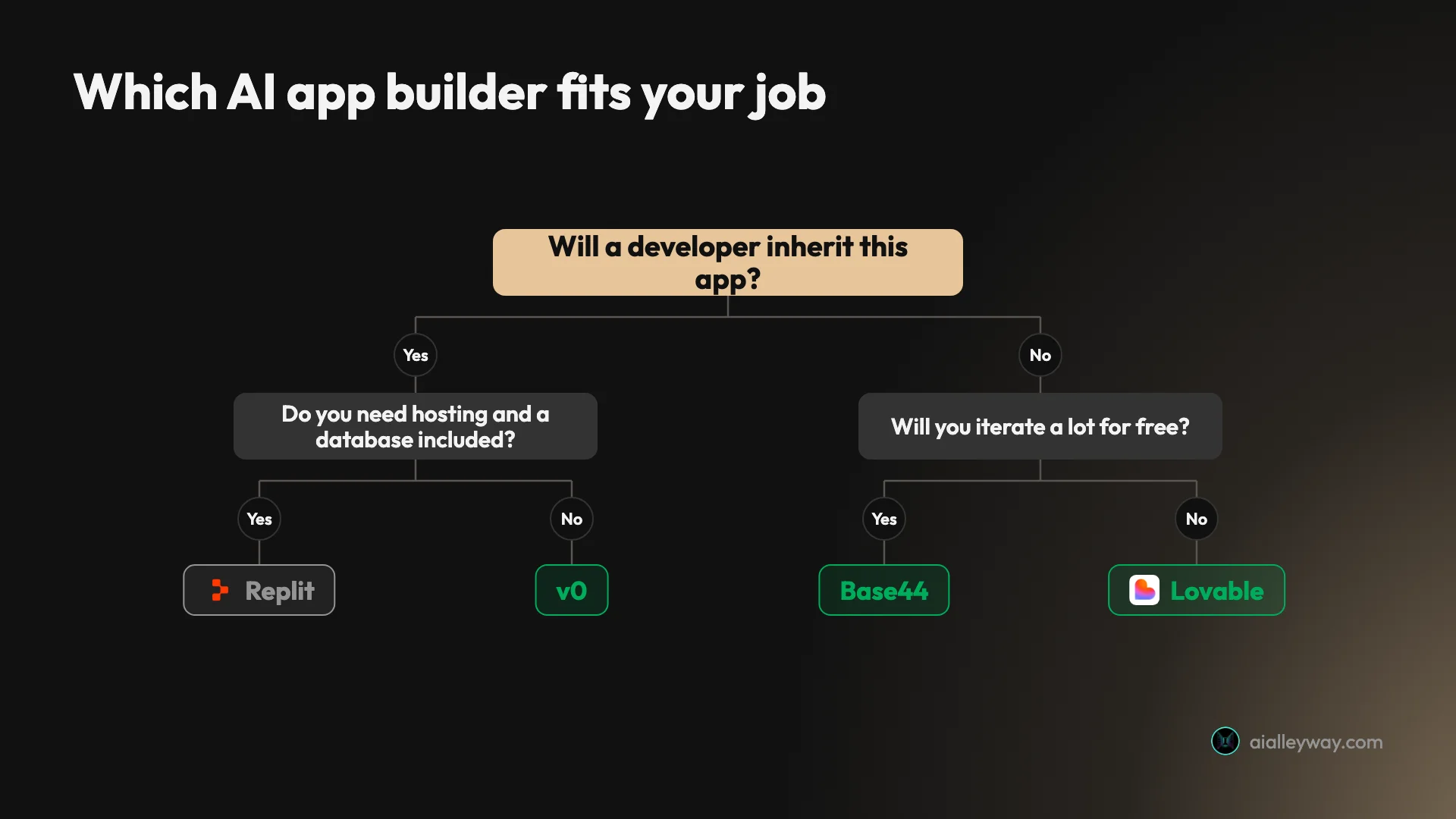
- You want a working app as fast as possible → Lovable. 109 seconds, and the free tier lasts.
- A developer will inherit this → v0. It is the only one that emits a real Next.js project, and the only one that tested itself.
- You want to know what every iteration costs → Bolt. 100,000 tokens, stated plainly, about 25 cents.
- You need hosting and a database in the box → Replit, on a paid plan.
- You will iterate a lot and spend nothing → Base44 or Lovable, at roughly 25 free builds a month each.
- Procurement will ask who owns the vendor → Base44, which is part of Wix and carries the compliance badges to match.
- You write code all day anyway → none of these. See our best AI for coding roundup, which ranks agents that work in your repository instead.
The decision that eliminates most of the list is the first one: do you want an app, or a codebase? Answer that and three of these five stop being candidates.
There is also a case for using two of them, and the cost data is what makes it work. Explore on a cheap, generous tier — Base44 or Lovable at roughly 25 free builds a month, or Bolt at 25 cents a go — until the shape of the thing stops changing. Then rebuild the version you intend to keep on v0, once, for $1.40, and walk away with a Next.js project instead of a hosted app. That sequence costs a couple of dollars in total and it inverts the usual failure mode, which is discovering on build fifteen that everything you have is locked inside a platform you now have to pay to leave.
Final word
All five built the app. That is the finding, and it should change how you shop: on a small, well-specified build, five products from five companies all got it right on the first attempt, for nothing.
So compare the things that actually differ. One build cost 25 cents on one tool and $1.40 on another. One free tier allows about 25 builds a month and another allows three. One hands you a Next.js repository, one will not show you your own source without $50 a month, and one will not serve your app at all until you press a button. None of that is visible from a pricing page, and none of it shows up until the second or third time you try to change something.
One last thing worth carrying into whatever you pick. All five invented a Restore button. The brief asked for cancellation and never mentioned undo, and every single tool built it anyway without flagging that it had made the decision. Expect to receive an app that is slightly not the one you specified — which is fine on a prototype, and worth an extra read when it is not.
For most people asking this question, start with Lovable.
Where to go deeper
The builders tested here. Full reviews of Lovable, Bolt and Replit, each with the build trace and the measured cost.
What they charge once the free tier runs out. Lovable pricing and Replit pricing — a Lovable credit is 25 cents, a Replit credit is a dollar, and neither number is on the page you would think to check.
Head to head. Lovable vs Replit is the matchup most people are actually deciding.
If you already pay for one. Lovable alternatives and Replit alternatives.
If a repository would suit you better than a hosted app, the best AI for coding ranks the seven tools that work on real code, and the best vibe coding tool covers both groups against the same brief.
Frequently asked questions
What is the best AI app builder?
Lovable, for most people. It turned one paragraph into a working app in 109 seconds, met all six requirements on the first attempt, and did it on a free tier that allows roughly 25 builds a month.
But capability did not separate these tools at all — all five I tested passed every requirement first time. The real question is what the second build costs you, and there the spread is enormous. If you need code you own rather than an app you rent, v0 is the better answer, because it hands back an actual Next.js project rather than a hosted app.
What is the best free AI app builder?
Base44 and Lovable, and the reason is iteration rather than the build itself. All five tools completed my brief without a card, so 'free' is not the differentiator — how many times you can go again is, and whether you can choose when.
Replit actually hands you more builds over a month, but rations them roughly three a day. Base44 and Lovable give you a monthly pool you can spend in one afternoon if a project demands it, which is why they still take this.
On free tiers, Base44 and Lovable each allow roughly 25 builds a month. Bolt allows about 10 before its monthly token pool runs out. v0 allows about three a month, because one build cost $1.40 of a $5 monthly credit. Replit also allows about three, but a day rather than a month: one build consumed 31% of its Agent credits, and Replit's pricing page calls that grant daily with no monthly ceiling. So Replit is the tightest tier in one sitting and the most generous across a month, while v0 is simply the tightest.
Among the monthly pools that is an eight-fold difference in how long you can keep working.
Do AI app builders give you the source code?
It varies more than the marketing suggests, and it is the single most important question if the app matters.
v0 produced a real multi-file Next.js project — app, components, hooks and lib directories with a proper scaffold. Bolt and Replit both expose the code directly in the editor. Lovable gives you a running app and a GitHub sync path. Base44 is the outlier: on the free plan you cannot view your own source at all, because in-app code edits are the first feature on its $20 Starter plan and appear nowhere on Free.
Can you build a real app with these, or just a prototype?
For prototypes and internal tools, the evidence says yes. Every app worked when I used it rather than reading the tool's summary: the totals were right, the derived monthly figures were right, the cancelled state behaved, and the data survived a hard reload.
What none of them did was tell me they had guessed. All five invented a Restore button the brief never mentions. That is harmless on a prototype and a real problem on something a client signed off, because the spec and the software have quietly diverged and nobody flagged it.
How much do AI app builders cost per build?
The same six-requirement app cost between about 25 cents and $1.40 depending on which tool built it, which is a wider spread than the subscription prices suggest.
Bolt's build consumed 100,000 tokens, roughly 25 cents. Lovable's used 1.20 credits, about 30 cents. Base44's used one message credit of 25 free monthly. Replit's used one checkpoint, which took its daily Agent credits from 0% to 31%. v0's cost $1.40, read from the credit balance before and after. Sticker prices cluster around $20 to $25 a month; the cost of the work does not.
Keep reading
Bolt.new alternatives: 8 tools, 7 took the same brief
The best Bolt.new alternatives, ranked by a measured build rather than a feature table. Seven tools took one identical brief. Here is what each build cost.
Best vibe coding tool: 8 tools, one brief, every app used
The best vibe coding tool, measured rather than listed. I gave eight tools one identical six-requirement brief and used every app they built. All eight passed.
Replit alternatives: 8 picks, and what a real build cost
Eight Replit alternatives ranked by job. I ran one identical prompt on three: Bolt built it for $0.25, Lovable $0.30, Replit would not say what it cost.
Lovable vs Replit: same prompt, same six requirements, two bills
Lovable vs Replit on one identical brief. Both hit 6 of 6 — Lovable in 109 seconds, Replit in four minutes and 31% of a day's credits. The cost model decides.