
Replit pricing: what $20 of credits actually buys
Replit cut Core to $20 in February and most guides still say $25. A credit is exactly one dollar, and here is what a real measured build cost.
Contents
What does Replit cost?

Most people pay $20 a month. That is Replit Core, and it includes $20 of monthly credits, five collaborators and two agents working in parallel. Pay annually and it is $18 a month.
If you are reading a guide that says $25, it is out of date. Replit cut Core from $25 to $20 on 24 February 2026, and a lot of published pricing has not caught up.
| Plan | Monthly | Annually | What you get |
|---|---|---|---|
| Starter | Free | Free | Free daily Agent credits, built-in database, publish 1 project |
| Core | $20 | $18/mo | $20 of monthly credits, 5 collaborators, 2 parallel agents |
| Pro | $100 | $90/mo | $100 monthly credits, 15 collaborators, 50 viewers, 10 parallel agents |
| Enterprise | Custom | Custom | SSO/SAML, VPC peering, single-tenant, region selection |
I read those figures off the pricing page in a rendered browser on 7 August 2026, with the billing toggle switched both ways. That detail matters more than it should: a plain fetch of the same URL hands back the pre-February prices, because the plan cards are generated in JavaScript. That is the mechanism by which a stale number outlives the price change.
How does Replit pricing work?
Here is the thing that makes Replit easier to reason about than most of its rivals: a credit is a dollar.
Core costs $20 and gives you $20 of monthly credits. Pro costs $100 and gives you $100. There is no conversion to do, no per-credit rate to look up, and no unit that means something different on a different plan. Compared with Lovable’s 25-cent credit, which you have to divide before it means anything, this is refreshingly literal.
The consequence is worth sitting with. On the monthly rate, your subscription buys exactly its own value in usage, so the workspace, the collaborators and the parallel agents cost nothing. You are prepaying for compute and being handed the IDE for free.
Credits cover more than the Agent. They are drawn down by published apps, storage and databases too, which is why a quiet month of hosting is not actually a free month.
What does Replit charge you for?
The billing unit is the checkpoint. Replit’s billing documentation defines it as the moment the Agent completes work on your request and implements the requested functionality in your code.
The price of one is not fixed. Since June 2025, Replit uses what it calls effort-based pricing, which scales with the complexity of your request. A simple change typically costs less than the old flat $0.25; a large build costs more and arrives as a single bundled charge rather than a run of small ones.
There is a line in that documentation worth reading twice: all Agent interactions are billable. A reply that returns nothing but text still costs you something. It costs less than a build, but the meter does not stop for conversation.
| How a checkpoint is priced | Before June 2025 | Now |
|---|---|---|
| Unit | A checkpoint | A checkpoint |
| Price | Flat $0.25 | Variable, by effort |
| A trivial edit | $0.25 | Typically under $0.25 |
| A large build | Several $0.25 charges | One bundled charge, often more |
| Knowable in advance | Yes | No |
That last row is the honest summary. Effort-based pricing is fairer per unit of work and strictly less predictable, and no amount of documentation changes that trade.
The Pro credit ladder
Replit’s Pro plan is where volume pricing appears, and the shape of it is not what the marketing implies.
| Credits | Monthly | Annually | Cost per credit (monthly) |
|---|---|---|---|
| 100 | $100 | $90 | $1.00 |
| 250 | $225 | $215 | $0.90 |
| 500 | $440 | $425 | $0.88 |
| 1,000 | $850 | $825 | $0.85 |
| 2,500 | $2,050 | $2,000 | $0.82 |
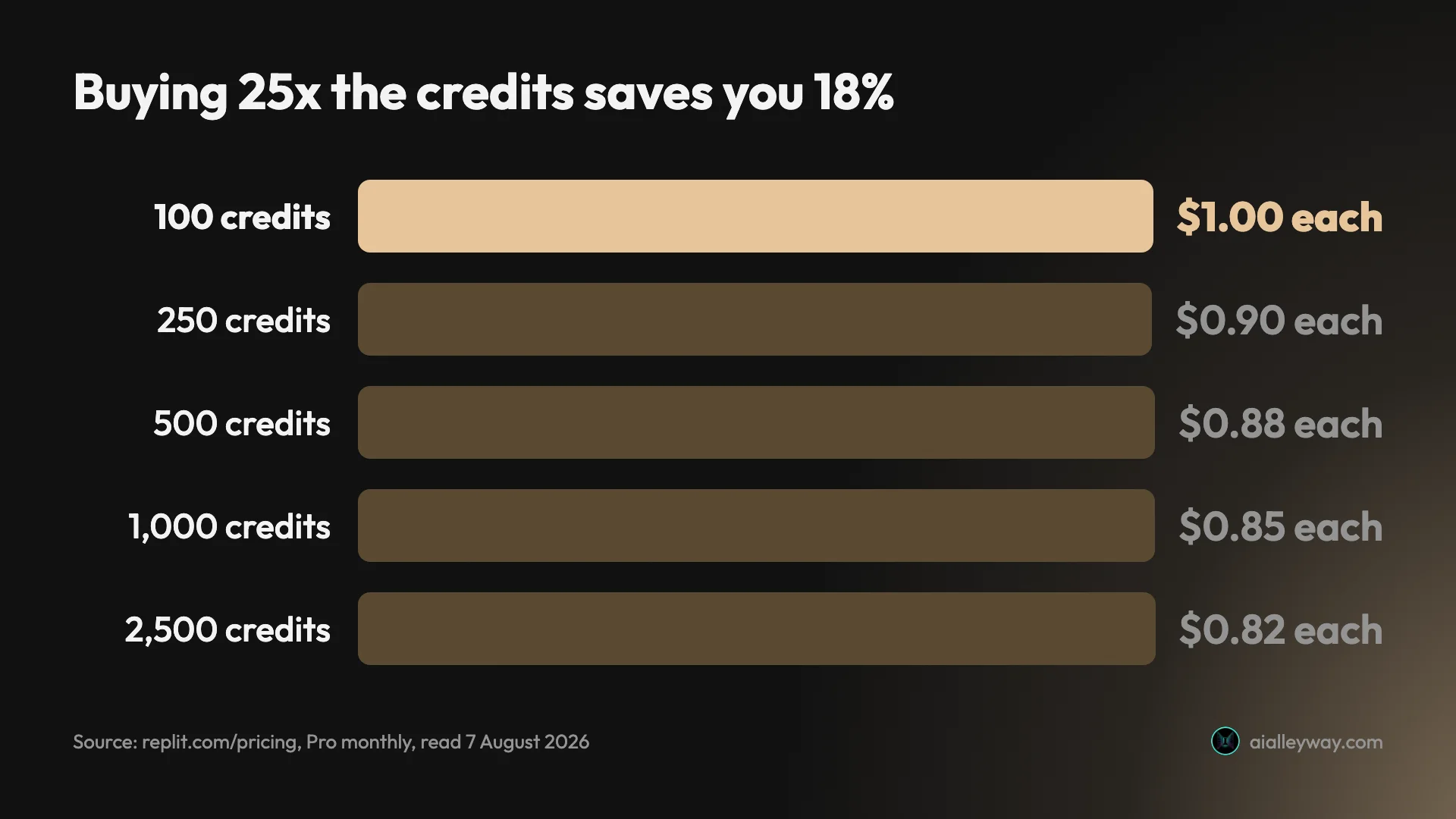
At the entry rung there is no discount at all. You pay $100 for $100 of credits, exactly as you do on Core. The saving only starts at 250 credits, and even at the top of the published ladder, buying twenty-five times the entry bundle saves 18%.
Annual billing takes 10% off both subscription prices, $20 to $18 and $100 to $90. On the credit ladder it does much less work than that: the rungs above 100 save between 2% and 5% against their monthly equivalents, so the further you climb, the less the commitment buys you.
Against the entry rate of a dollar a credit, annual’s 10% beats the 100-credit rung, ties the 250 rung and loses to everything above it. The cheapest credit on the published ladder is 2,500 billed annually at $2,000, which works out at 80 cents.
What changed in February 2026
Three things moved at once in Replit’s pricing, and together they explain most of the disagreement you will find about it.
Core got cheaper. It fell from $25 to $20 a month on 24 February 2026. Existing subscribers moved to the new price at their first renewal after 25 February, so a person who checked their own invoice in early March would have seen the old number and reasonably reported it.
Pro replaced Teams. Replit launched Pro at $100 a month with up to fifteen builders, credit rollover, and 28 days to recover a deleted database instead of seven. The Teams plan is being sunset, with subscribers automatically upgraded to Pro at no additional cost from 3 March 2026. Yearly Teams subscribers were given $100 of credits a month free for the remainder of their term.
Agent modes arrived. Economy, Power and Lite are available on the paid plans. Turbo Mode is restricted to Pro and Enterprise, and it is the one to watch: twice as fast as Power using the same models, with requests costing up to six times more.
What does a real Replit build actually cost?
The published guides all explain Replit’s credit system. None of them reports what a finished application costs, so here is mine.
I gave Replit a single prompt with six numbered requirements and no follow-ups. It produced a working single-page app with forms, a computed running total, a cancelled state and browser persistence, in about four minutes. The full write-up is in the Replit review.
It cost one checkpoint. The whole application, four minutes of agent work, one billable event. That is effort-based pricing working as advertised: the bundling is real, and it is on your side for a build of that shape.
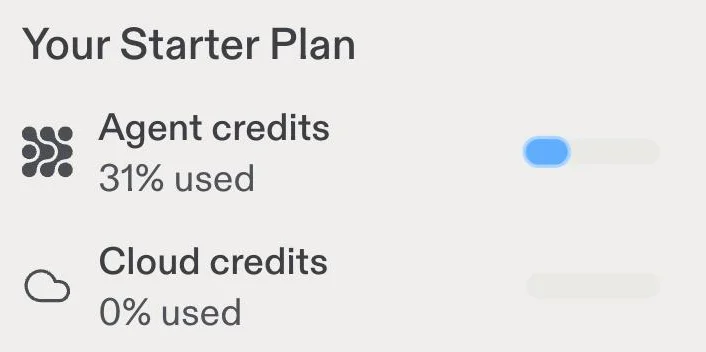
What I cannot tell you is what that checkpoint cost in dollars, and neither can Replit, from where I was sitting. The free plan reports a percentage bar and nothing else. My build moved Agent credits from 0% to 31% used, and the usage page that would convert that into money is gated behind a paid subscription.
So the cheapest plan is also the one that tells you least about what you are spending. On Core or Pro the usage page shows where credits go by date, resource, project, workspace, group or member, updating in near real time. On Starter you get a bar.
What publishing and databases cost on top
Credits are not only an Agent budget, and this is the part that surprises people after launch.
Published apps draw on the same balance. Replit bills outbound data transfer per byte with ingress free, plus compute units for autoscale deployments, plus a per-request charge. Core includes 100 GiB of outbound transfer a month. Static deployments are billed on transfer alone, which makes them the cheap way to ship something that does not need a server.
For autoscale compute, one RAM second costs two units and one CPU second costs eighteen. The ratio is the useful part: CPU time is nine times more expensive than memory time, so an app that idles cheaply can still bill hard under load.
Databases follow their own rule, and it is a friendly one. Development databases are always free with 20 GiB of storage per Replit App. Only production databases bill, on compute time plus stored data, capped at 10 GiB. Compute time counts the hours a database receives requests plus a five-minute tail after the last one.
What are the downsides of Replit’s pricing?
Six things about Replit’s pricing cost people money. Three are controls you can set; three are simply how the product works.
| The trap | The default | What to do |
|---|---|---|
| No cap on spending past your credits | Off | Set a usage limit in Settings → Account → Billing |
| Auto-reload buys more credits silently | Off | Leave it off until a limit is set |
| Turbo Mode costs up to 6x for the same models | Off | Use Power unless the wait genuinely costs you more |
| A request cannot be priced before you send it | Always | Budget retrospectively; effort-based work is not quotable |
| Core credits expire each cycle | No rollover | Take Pro if your work is bursty |
| Talking to the Agent is billable | Always | Write the spec before you open the chat |
A spending limit is something you set up, not something that arrives configured. Replit’s documentation describes usage limits that cap spending beyond your monthly credits, and says that when you reach your limit, usage-based services are blocked until the next billing cycle or until you increase the limit. It is something you set up rather than something that arrives configured, under Settings, then Account, then Billing.
Auto-reload is a convenience that removes the last brake. It automatically buys a new credit pack when your balance runs low so you are not interrupted mid-project. It is also opt-in, and turning it on while having no usage limit set is the combination that produces a bill nobody planned.
You cannot price a request before you send it. Effort-based pricing is explicitly complexity-scaled, so the same sentence costs different amounts depending on what it turns out to involve. Budgeting is therefore retrospective, which is a real cost for anyone billing a client.
Turbo Mode charges up to six times more for the same models. Replit is clear that it buys speed, not quality: twice as fast as Power, same underlying models. It is Pro and Enterprise only, and it is the fastest way to convert a plan’s credits into nothing in particular.
Rollover is a Pro feature, and Replit disagrees with itself on how long. Core credits expire at the end of the cycle. The billing documentation says Pro credits roll over for two months; the Pro launch announcement says one. If your work arrives in bursts rather than steadily, Core’s $20 quietly evaporates in the quiet months.
Talking to the Agent costs money. Because all Agent interactions are billable, a long clarifying conversation is not free thinking time. My six-requirement brief cost one checkpoint precisely because it did not need six rounds of clarification, each of which would have billed.
Is there a student discount?
Yes, and it is a good one: 50% off Core with a .edu email, which brings it to $10 a month. Replit’s students page states the discount plainly and verifies eligibility by .edu email. Verified educators get Replit free, with credits for their students.
The reason this question keeps getting answered wrongly is that the pricing page carries no academic tier at all, so anyone checking the obvious place concludes there is nothing. That $10 also quietly confirms the new Core price, being exactly half of $20.
Education offers move more often than plan prices do, so confirm the figure at checkout rather than trusting any guide, this one included.
What do Replit’s Agent modes cost?
Replit runs the Agent in named modes, and the mode you pick moves the bill more than the prompt does.
Economy, Power and Lite are available on the paid plans, Core and Pro, and they trade speed and depth against consumption in the order you would expect. The free Starter plan does not get the choice.
Turbo Mode is the one to understand before you switch it on. Replit restricts it to Pro and Enterprise, and describes it as twice as fast as Power using the same models, with requests costing up to six times more.
Read that trade honestly. You are not buying better output, because the models underneath are identical. You are buying latency, at up to six times the price, and the saving is measured in your waiting rather than in anything that ships. On a $100 plan carrying $100 of credits, a habit of leaving Turbo on is the fastest way to reach the end of a month early.
There is a narrow case where it pays. If you are demonstrating live, or a client is watching a build happen, halving the wait may genuinely be worth six times the compute. For everything else, Power is the same answer more slowly.
Which plan should you pick?
Matching a Replit plan to your situation is mostly a question of how steady your work is and whether you need the recovery window.
| If you are | Pick | Why |
|---|---|---|
| Trying it out, or building one small thing | Starter, free | A real free tier; a whole app fitted inside one day’s Agent credits |
| Building steadily, alone or in a small team | Core annual, $18 | 10% off, and $20 of credits is a lot of Agent for one person |
| Shipping commercial work, or need 28-day database rollbacks | Pro, $100 | Rollover, ten parallel agents, and the recovery window that matters after an incident |
| Working in bursts with quiet months | Core monthly, $20 | Do not prepay annually for credits that expire unused |
| Spending over ~$2,000 a month | Talk to them | The published ladder stops at 2,500 credits |
Skip Replit entirely if you need to know what something costs before you approve it. Effort-based pricing and a free tier that hides dollar figures are a poor fit for fixed-bid client work, however good the builds are.
Is there a cheaper alternative to Replit?
If the credit maths does not suit you, two of Replit’s closest rivals price the same job differently.
Lovable is $25 a month, more expensive at the door, but it publishes both a credit count and a credit price so you can convert any action into dollars from the free plan. My equivalent build there cost 1.20 credits, or thirty cents.
Bolt is also $25 and meters in tokens rather than credits, with 10 million a month on Pro and unused tokens rolling over. The same build cost 100,000 tokens, which works out at twenty-five cents.
Claude Code is a different instrument altogether: a capped subscription where running out means waiting rather than paying more. If unpredictable bills are the thing you are trying to avoid, that shape is the actual answer.
The final word
Replit is the clearest-priced of the app builders in one specific way and the murkiest in another. A credit being exactly a dollar removes an entire layer of arithmetic that its rivals impose. Effort-based pricing then puts a different layer back, because you cannot know what a request costs until it is done.
At $20 a month it is now the cheapest entry point of the three, and the free tier is real enough to build a working application on without entering a card. Before you upgrade, though, go and set a usage limit. It is the one setting that turns a metered product into a predictable one, and Replit will not do it for you.
For how Replit did against the rest of the field on one identical build, see the best AI app builder; the full Replit review has the build trace those numbers came from, and Lovable vs Replit is the price comparison most people are actually making.
Frequently asked questions
How much does Replit actually cost?
Most people pay $20 a month. That is Replit Core, which includes $20 of monthly credits, five collaborators and two agents running in parallel. Billed annually it drops to $18 a month.
Above that, Replit Pro is $100 a month or $90 annually, and it is aimed at commercial work: fifteen collaborators, ten parallel agents and database rollbacks going back 28 days instead of seven. Enterprise is quote-only. There is also a genuinely free Starter plan with a daily allowance of Agent credits.
Did Replit change its prices in 2026?
Yes, and it is the reason published figures disagree. Replit cut Core from $25 to $20 a month on 24 February 2026, with existing subscribers moving to the new price at their first renewal after 25 February.
The same announcement launched the Pro plan at $100 and began sunsetting the Teams plan, whose subscribers were automatically upgraded to Pro at no extra cost from 3 March 2026. Yearly Teams subscribers were given $100 of credits a month free for the remainder of their term.
What is one Replit credit worth in dollars?
Exactly one dollar at the entry rung, which makes Replit unusual. Core costs $20 and includes $20 of monthly credits, so the subscription is best understood as prepaying for usage with the workspace thrown in free.
The rate only improves if you buy in bulk on Pro. The ladder runs 100 credits for $100, 250 for $225, 500 for $440, 1,000 for $850 and 2,500 for $2,050. That is a dollar a credit at the bottom and 82 cents at the top, so buying twenty-five times the entry bundle saves 18%.
What happens when you run out of Replit credits?
Usage keeps going and you keep paying, unless you have told it not to. Replit's billing documentation describes usage limits that cap spending beyond your monthly credits, and states that when you reach your limit, usage-based services are blocked until the next billing cycle or until you increase the limit.
The important detail is that this is something you set up rather than something that arrives configured. You set a limit under Settings then Account then Billing, and auto-reload, which automatically buys a new credit pack when your balance runs low, is likewise switched on by you. Check both before a heavy month.
What is effort-based pricing on Replit?
It means the price of a request scales with how much work the request takes, so you cannot know the cost before you send it. Replit's documentation describes it as effort-based pricing that scales with the complexity of your request, and bundles each request into one checkpoint to reduce billing noise.
Before June 2025 a checkpoint was a flat $0.25. Now a simple change typically costs less than that and a large build costs more, arriving as a single bundled charge. Every Agent interaction is billable, including replies that only return text.
Do Replit credits roll over?
Only on Pro, and Replit's own sources disagree on the length. The billing documentation lists rollover for two months as a Pro feature, while the February 2026 Pro launch announcement says unused credits roll over for one month. Either way, Core credits are use-them-or-lose-them each cycle.
That matters if your work is bursty. A month where you build nothing is a month where the $20 simply expires, so Core suits steady use rather than an occasional heavy sprint.
Is Replit AI free or paid?
Both, and the free tier is a real one. The Starter plan gives you a daily allowance of Agent credits, a built-in database and one published project, with no card required. I built and ran a complete six-requirement application inside a single day's allowance.
What the free plan will not do is tell you what you spent. It reports a percentage bar and nothing else, and the usage page that converts credits into dollars sits behind a paid subscription. So Replit AI is free to use and only legible once you pay.
Is Replit worth it?
At $20 a month it is the cheapest entry point of the major app builders, and the free tier is generous enough to answer the question yourself before paying. A credit being exactly a dollar also removes arithmetic that Lovable and Bolt both impose on you.
The case against is predictability. Effort-based pricing means you cannot know what a request costs until it has run, a spending cap is something you have to set up yourself, and the free plan hides dollar figures entirely. If you bill clients fixed-price, that combination is a poor fit however good the builds are.
Is Replit cheaper than Lovable or Bolt?
At the entry tier, yes. Replit Core is $20 a month against $25 for both Lovable Pro and Bolt Pro, having been the same $25 as recently as February 2026.
What you cannot do on Replit is check the arithmetic from the free plan. Lovable publishes a credit count and a credit price, and Bolt publishes an exact token balance, so both let you convert a build into dollars. Replit's free tier shows a percentage bar and puts the usage page behind a subscription, so the cheapest plan is also the one that tells you least.
Keep reading
Replit review: I gave it the same brief I gave Lovable
Replit review from a measured build. The same six-requirement prompt I gave Lovable, scored the same way, plus the checkpoint maths that decides your bill.
Replit alternatives: 8 picks, and what a real build cost
Eight Replit alternatives ranked by job. I ran one identical prompt on three: Bolt built it for $0.25, Lovable $0.30, Replit would not say what it cost.
Best AI app builder: 5 tools, one brief, every app used
The best AI app builder, measured. I gave five builders one brief and used every app. All five passed — what separated them was the cost of the second build.
Bolt.new alternatives: 8 tools, 7 took the same brief
The best Bolt.new alternatives, ranked by a measured build rather than a feature table. Seven tools took one identical brief. Here is what each build cost.