
Replit review: I gave it the same brief I gave Lovable
Replit review from a measured build. The same six-requirement prompt I gave Lovable, scored the same way, plus the checkpoint maths that decides your bill.
Contents
Is Replit worth it?

Yes, if you expect to open the code. The build was as good as the best result I have measured, and the product wrapped around it is markedly less forthcoming about what that build cost.
I gave Replit the identical prompt I had given Lovable the day before: one paragraph, six numbered requirements, two of them written specifically to be fumbled. It satisfied all six on the first attempt with no follow-up prompts, and I verified that by using the finished application rather than by reading the agent’s summary of its own work.
It took about four minutes, against Lovable’s 109 seconds. It cost one checkpoint, and that checkpoint consumed 31% of a day’s free Agent credits. I know the percentage because a bar in the sidebar moved. I do not know the number, because Replit will not show it to me.
What does Replit actually do?
Replit is a browser IDE with an agent bolted to the front of it, and the order of those two things matters. You describe an application, an agent builds it, and what you are left with is not a preview pane but a workspace: a file tree, a shell, a package manager, a database, and a deploy button.
That is the structural difference from the rest of this category. Lovable deliberately hides the code. Replit assumes you will eventually want it, and the whole product is arranged around that assumption.
| What you get | What you don’t |
|---|---|
| An agent, plus a real IDE and shell | A simple, single-purpose interface |
| A built-in database and deployments | A free tier that shows your spend |
| Checkpoints you can roll back to | A fixed price per checkpoint |
| Code you can open and edit | Any way to avoid the meter while iterating |
Three details tell you what the product is really for.
It dispatches subagents. My build announced that no backend was needed and then launched a design subagent to construct the interface. That is a visible piece of internal architecture, and it is a large part of why the build took four minutes rather than two.
It writes tests into the markup. Every interactive control in the generated app carried a data-testid attribute. Nothing in my prompt asked for that. It is the single clearest signal that the output is aimed at somebody who will later automate against it.
It queues its own follow-up work. When the build finished, a task board had already been populated with three suggestions the agent had planned by itself: let users edit subscriptions after adding, show a monthly spend breakdown chart, and build a mobile companion app. Each of those is one click, and each is another checkpoint.
That last detail is worth pausing on. The suggestions are good ones, the friction to accept them is a single click, and the cost of accepting is not shown next to the button. Lovable does the same thing with its own four follow-ups. Whatever the intent, the effect in both products is the same, and so is the defensive habit: ignore the suggestions unless you actually wanted that feature.
What did I ask Replit to build?
The same thing I asked Lovable, word for word, so the two results can be compared rather than merely described:
Build a single-page app called Stack Cost that tracks AI tool subscriptions.Requirements: (1) add a subscription with name, cost in USD, and billing cycleof monthly or annual; (2) annual subscriptions must display a monthly-equivalentcost, not the annual figure; (3) a running total of monthly spend pinned at thetop; (4) each subscription can be marked cancelled, which removes it from thetotal but keeps it visible in a separate Cancelled section; (5) all datapersists in localStorage across reloads; (6) dark theme throughout.Requirements 2 and 4 are the interesting ones. The second asks for a number that has to be derived rather than displayed, which is where these tools usually store the figure they were given and show it back to you. The fourth asks for a state that leaves the total without leaving the page, which is where they usually delete the row.
I left every setting as a new user finds it: the Economy model, Plan mode off. Then I scored the result by using the app.
| # | Requirement | Result |
|---|---|---|
| 1 | Add with name, cost, billing cycle | Pass |
| 2 | Annual shows monthly-equivalent | Pass. Renders an ANNUAL badge and $200.00/MO |
| 3 | Running total pinned at top | Pass. $310.00, falling to $110.00 |
| 4 | Cancel leaves total, stays visible | Pass. Moves to CANCELLED (1) |
| 5 | Persists in localStorage | Pass. Survived a reload, cancelled state intact |
| 6 | Dark theme throughout | Pass. Background rgb(14, 16, 21) |
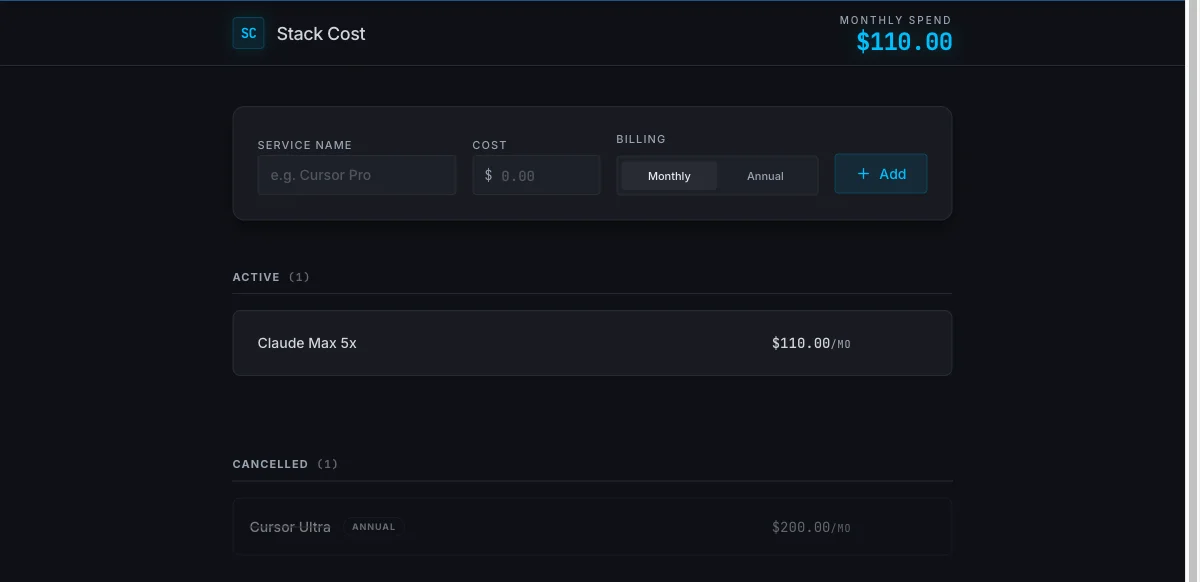
Six for six, on one prompt, with no follow-ups. That is the same score Lovable got, and it is worth saying plainly because the community sentiment around this product would not lead you to expect it.
How good was the app it built?
Better than the checklist suggests, and the reasons are in the parts I did not ask about.
It modelled the data correctly. I checked the browser console rather than trusting the interface. This is the record the app actually wrote, after I cancelled the annual subscription:
{ "id": "8843ac67-27f1-4646-abe1-dc112cc40729", "name": "Cursor Ultra", "cost": 2400, "billingCycle": "annual", "cancelled": true}The stored figure is 2,400, not 200. The monthly equivalent is computed at render time from the cost and the cycle together. That is the correct model and not the obvious one: storing the derived $200 would have satisfied my requirement just as visibly, and would have quietly destroyed information the moment anyone edited the plan or switched it to monthly. Both tools I have tested made this choice, and it is the single best indicator that a generated app was designed rather than assembled.
It invented the missing verb. My brief said cancelling removes an item from the total but keeps it visible. It never said how to undo that. Replit added a Restore button. Lovable added the same button, unprompted, on the same brief. Two different products independently identified the same gap in my specification, which says more about the specification than about either tool.
The code is real code. I opened a shell in the workspace and read it. The application is a 352-line component using react-hook-form for validation, and the monthly derivation appears three times, consistently. There is a separate Express service scaffolded alongside it that my app never needed. This is not a mockup with the logic painted on.
The interface has manners. Cancelled rows dim to half opacity. The Cancelled section renders only when something is in it. Counts update in the headings, ACTIVE (1) and CANCELLED (1). None of that was requested.
One deliberate choice went the other way. On the cancelled row, Replit shows only an ANNUAL badge and the derived $200.00/MO. The original $2,400 a year appears nowhere in the interface, though it is safe in storage. Lovable kept that figure visible as sub-text, and I preferred it there. Replit also hides the Restore and Delete buttons until you hover the row, which is tidier and less discoverable at once. The same rule does include focus-within, so a keyboard user still reaches them, which is more than a lot of hover-reveal patterns manage.
How much does Replit cost?
Every figure here is from Replit’s pricing page, checked on 6 August 2026.
| Plan | Price | What you get |
|---|---|---|
| Starter | Free | Free daily Agent credits, built-in database, publish 1 project |
| Core | $20/mo, or $18/mo annually | $20 of monthly credits, 5 collaborators, 2 parallel agents |
| Pro | $100/mo, or $90/mo annually | $100 monthly credits, 15 collaborators, 10 parallel agents |
| Enterprise | Custom | SSO/SAML, single-tenant, VPC peering |
That Core row is worth a second look, because it is the single most misreported number about this product. Replit cut Core from $25 to $20 on 24 February 2026, and most published guides have not caught up — you will still find $25 quoted as the monthly rate, and $17 or $18 quoted for the annual one, usually with no billing term attached. I read the current figures off the pricing page on 7 August 2026 with the billing toggle switched both ways: $20 a month monthly, $18 a month billed annually. If you are comparing against a rival’s monthly price, use $20.
The full ladder, including what Pro’s volume tiers actually save, is in the Replit pricing guide.
The credits are a spending allowance rather than a token count, and Replit denominates them in dollars rather than in a unit you have to convert — unlike Lovable’s 25-cent credit. On Core you get $20 of monthly credits, which on the $20 monthly rate is exactly what you paid, so that plan is best understood as prepaying for usage and getting the workspace thrown in. Pay annually and the same $20 of credits costs $18. That is the opposite shape to a capped tool like Claude Code’s monthly plans, where the price is a ceiling and running out means waiting rather than paying more.
What is a checkpoint, and why does it decide your bill?
The billing unit is the checkpoint, which Replit’s billing documentation defines as the moment the Replit Agent completes your request and implements the functionality in your code. My entire build, four minutes and a complete application, was one checkpoint. This is the part nobody else writing about Replit explains, and it is the part that decides what you pay.
The price of a checkpoint used to be fixed. Replit’s own announcement is explicit: “Previously, the Agent charged $0.25 per checkpoint.” In June 2025 that changed to effort-based pricing, where “Simple changes still result in a single checkpoint—typically costing less than $0.25” and larger tasks “will be bundled into one checkpoint, which may cost more than $0.25 but reflects the total effort involved.”
| How a checkpoint is priced | Before June 2025 | Now |
|---|---|---|
| Price of a checkpoint | Flat $0.25 | Variable, by effort |
| A simple change | $0.25 | Typically under $0.25 |
| A large build | Several $0.25 charges | One bundled checkpoint, possibly more |
| Knowable in advance | Yes | No |
Two consequences follow, and both cut against the buyer.
A big request is not automatically more expensive than several small ones, but you cannot tell in advance. Bundling is genuinely better than being charged $0.25 four times for one job. It also means the number is unknowable until after the work is done, which is the complaint that dominates the negative reviews.
You are charged for thinking, not only for building. Replit’s billing documentation states that charges apply even without code changes, and names Plan Mode answers as an example. If your instinct on a metered plan is to talk the problem through before committing, Replit bills you for the conversation. Lovable is no better here, and I had assumed otherwise until I checked: its Plan mode deducts a flat one credit per message. Neither product gives you a free place to think.
What does the free tier actually give you?
Enough to answer the only question that matters, and not enough to know what it cost.
I built and stress-tested a working application without entering a card. The Starter plan advertises free daily Agent credits, a built-in database, and publishing for one project. My build worked and ran on its development URL.
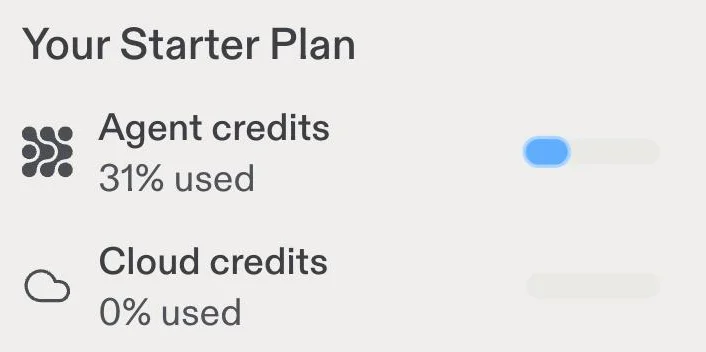
Then the problem. That bar is the entire financial interface of the free plan. One build took it from 0% to 31% used. There is no absolute figure, no tooltip, and no breakdown. When I opened the usage page to find one, Replit told me:
Permission required. You must have an active subscription to view your own usage.
I want to be fair about what that is and is not. It is not a hidden charge, because nothing on the free plan charges you. But this is a product whose central variable is consumption, sold partly to people who are nervous about consumption, and the free tier’s answer to what did that cost me is a blue rectangle. Lovable’s free plan, on the identical build, told me the exact figure and itemised it by project.
Working from the percentage, three builds of my size would roughly exhaust a day’s allowance, since the Starter grant refreshes daily. What happens at the ceiling I did not test. That is a genuinely useful thing to know before you plan an evening’s work around it, and I had to derive it from a progress bar, which is the point.
It also sets a ceiling on what the free tier can tell you. One build answers can this thing follow instructions, and mine answered yes. It cannot answer what will this cost me in a month, because the only unit of measurement available to a free user is a fraction of an allowance whose size is not disclosed. To learn the second answer you have to pay, which is a defensible commercial decision and an uncomfortable one for the buyer trying to make exactly that call.
Who is Replit for?
Replit suits people whose problem does not end when the app appears. If you expect to read the code, extend it, connect a database or hand it to a developer, the browser IDE stops being overhead and starts being the reason you chose it.
| You are | Verdict |
|---|---|
| A developer who wants a fast scaffold | Buy it. The code is worth opening |
| Prototyping and you may hand it off | Buy it. Real repo, real test hooks, real code |
| Non-technical and want a working page | Try Lovable first. Faster, and simpler |
| On a strict budget, watching every dollar | Not yet. The free tier hides the number |
| Working in an existing codebase | Wrong category. Use a terminal agent |
The dividing line is not skill. It is whether the code is an asset to you or an implementation detail, and only you know which.
The good
It met a picky brief exactly. Six numbered requirements, six passes, first attempt, no follow-up prompts. Two of them were written to be fumbled and neither was.
The generated code is properly engineered. react-hook-form for validation, the derived value computed at render rather than stored, and a test id on every interactive control. I read the source in the workspace shell; this is code a developer can inherit.
The workspace is the product. A shell, a file tree, a database and deployments sit behind the same screen as the agent. When I needed to understand what had actually been built, I ran commands against it rather than guessing from a preview.
Checkpoints are a rollback story as well as a billing one. The same unit that prices your work also marks a state you can return to, which is a genuinely good design for a tool that writes code you did not read.
It over-delivered in the same place a rival did. The unrequested Restore button was the exact feature I would have asked for next.
The bad
The free tier will not tell you what you spent. A percentage bar, no absolute number, and a usage page locked behind a subscription. For a metered product this is the wrong default, and it is the thing I would fix first.
You pay for planning. Charges apply even without code changes, including Plan Mode answers that never touch your code. The mitigating note is that Lovable does the same thing, at one credit per Plan mode message, so this is a category habit rather than a Replit quirk.
It is slower. About four minutes against Lovable’s 109 seconds for the identical prompt. That gap is defensible given what it produces, and you will still feel it on the fifth iteration.
The reputation problem is real and specific. Replit holds 3.0 out of 5 on Trustpilot across 1,515 reviews, and the top organic result for this product’s own review query is a Reddit thread titled Replit is a f*cking scam with more than 280 comments. The complaints are strikingly consistent, and they are almost never about code quality. They are about credits disappearing into debugging loops and about billing disputes.
My test could not reach the failure mode people describe. One careful prompt is the scenario this product handles well. The scenario that generates the anger is the twentieth prompt on a stuck bug, and a single build does not go there.
What do other Replit reviews say?
The gap between the editorial reviews and the users is wider here than for anything else I have covered in this category.
| Source | Verdict |
|---|---|
| Review blogs | Broadly positive |
| Trustpilot, 1,515 reviews | 3.0 out of 5 |
| Google’s own AI summary | 4.3 to 4.6, but cons lead with credit burn |
| Top Reddit thread in r/replit | Does not recommend, in strong terms |
| This review, one measured build | 4.2 |
Of the competing reviews I read closely, only one reported a timed build of its own, at eight minutes for a working app. None of them reported what their build cost. That is a strange omission for a metered product, and it is why the arithmetic in this Replit review is the part I would keep.
The consistent user complaint deserves to be stated in its own terms rather than softened: people are not saying the output is bad. They are saying they could not predict what they would be charged, and that when the agent got stuck the meter kept running. My build was cheap in checkpoint terms because it was right the first time. Nobody who gets it right the first time complains about the meter.
How does Replit compare to Lovable?
They tied on the thing I could measure most precisely and diverged on everything else.
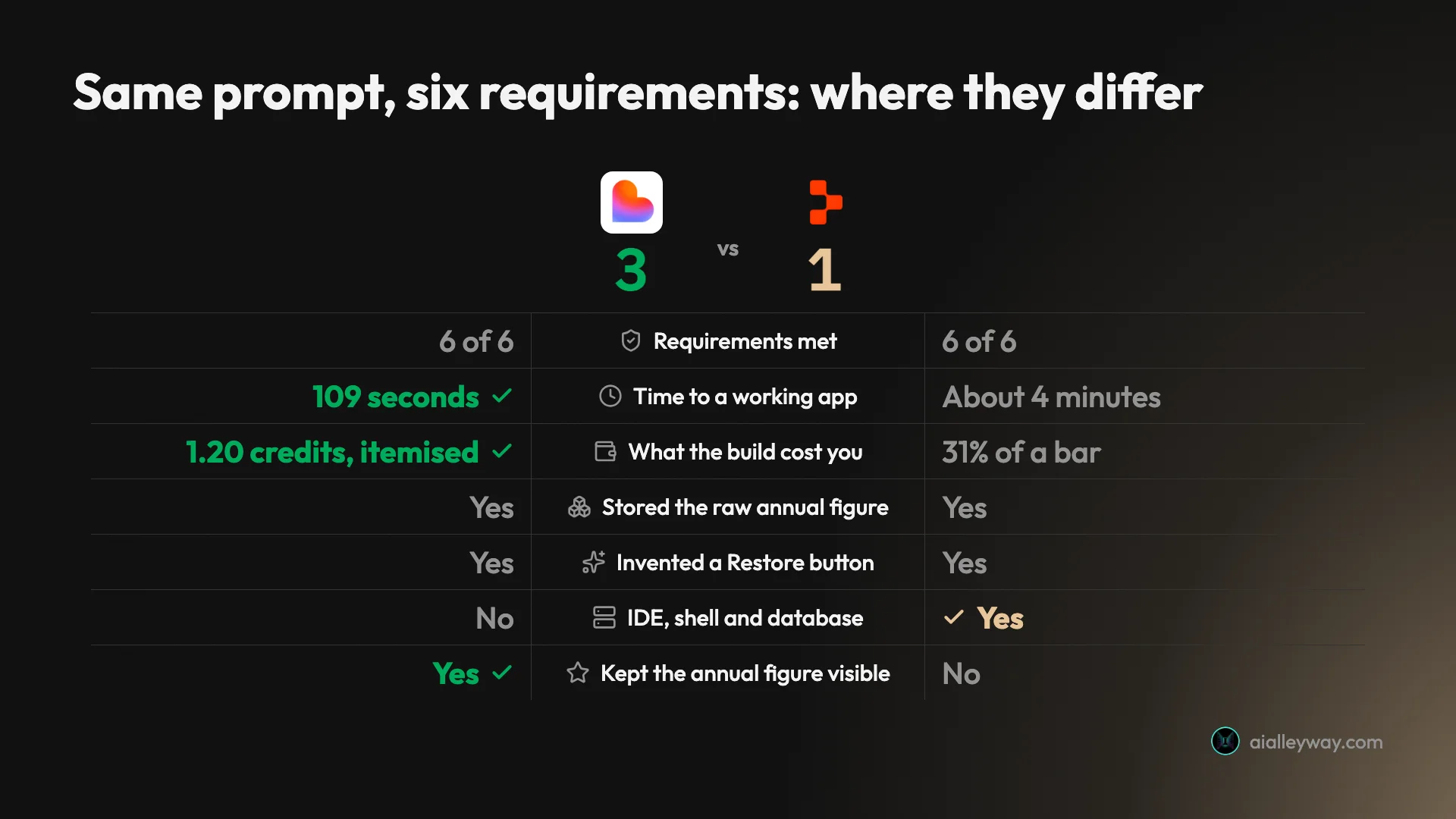
The three ties are the interesting part. Two products from different companies, given the same paragraph, both satisfied every requirement on the first attempt, both chose to store the annual figure rather than the derived monthly one, and both added the same button I had forgotten to ask for. When two independent systems make the same three judgement calls, the brief was doing more work than either tool was.
| The axis | Lovable | Replit |
|---|---|---|
| Requirements met | 6 of 6 | 6 of 6 |
| Time | 109 seconds | About 4 minutes |
| Cost of the build | 1.20 credits, shown to me | 1 checkpoint, 31% of a bar |
| Stored the raw annual figure | Yes | Yes |
| Invented a Restore button | Yes | Yes |
| Kept the annual figure visible | Yes | No |
| Gives you an IDE and a shell | No | Yes |
If your problem is speed to a working page, Lovable. If your problem is that somebody will eventually open this code, Replit. That is the whole comparison, and both answers are defensible.
What are the best Replit alternatives?
Three, and the right one depends on how much of the code you intend to touch.
Lovable is the direct competitor and the one I have tested against the same brief. It is faster, simpler, tells you what each build costs, and deliberately does not give you an editor. It is the better choice for a non-technical founder and the worse one the moment you need a shell. My full Lovable review has the measured numbers.
Bolt occupies the same prompt-to-app slot and runs its toolchain inside the browser rather than on a server. I have since put it through this same brief: the Bolt review has the numbers, and it also hit six of six while telling me exactly what the build cost in tokens, which is the thing Replit’s free plan would not do.
Claude Code is the answer when the honest description of your situation is that the repository already exists. It is a terminal agent rather than a builder, billed as a capped subscription rather than per checkpoint, and it is what I use daily. I wrote up whether it is worth it separately, and the wider coding-tool comparison covers what capped and metered plans each do to a monthly bill.
What did I not test?
The rating is only as good as its evidence, so here is the boundary:
- Paid tiers. Everything above is the free Starter plan.
- Iteration at length. One prompt, no follow-ups, which means I never entered the debugging loop that drives the complaints.
- The database. No Postgres, no auth, no server-side anything.
- Deployment and custom domains. I stopped at the development URL.
- Existing codebases. Not what the product is for, but worth stating.
Two claims above are read rather than observed, and they should not hide among the measured ones. I left Plan mode off, so the charge for planning comes from Replit’s billing documentation, not from my bill. And I never rolled a project back, so the checkpoint-as-rollback behaviour is a documented feature I did not exercise. Everything else in this review is something I watched happen.
The final word
Replit did what it claims to do and did it precisely. Six requirements, six passes, one prompt, and code underneath that a developer could inherit without wincing. On the evidence of the build alone it is the equal of anything in this category.
The deduction is not for the build. It is for a metered product that will not show a free user a number, that charges for planning as well as for work, and whose own usage page is locked behind the subscription you are trying to decide whether to buy. Those are choices rather than limitations, and they can be changed.
My complaint is not the same as the community’s, and I should not pretend otherwise. The anger in those Trustpilot and Reddit threads is about credits vanishing into a debugging loop, which is a scenario one clean build never reached. Mine is narrower: before any of that can happen to you, the plan most people evaluate from will not tell you what anything costs.
| The verdict | In one table |
|---|---|
| Requirements met | 6 of 6, first attempt |
| Time | About 4 minutes |
| Cost | 1 checkpoint, 31% of a day’s free allowance |
| Real deduction | The free tier hides the number |
| Evidence | One app, one prompt, free tier |
4.2 out of 5. A point off for cost opacity on the plan most people evaluate from, for billing planning as though it were building, and for being roughly twice as slow as the tool it competes with most directly. None of that is about the software it wrote, which was excellent.
I would pay the $20 on this showing, and I would want a paid month and fifty prompts before telling anyone to run a business on it.
For how Replit placed against the rest of the field on the identical brief, see the best AI app builder, where its checkpoint pricing is set against four rivals, and the best vibe coding tool.
Frequently asked questions
Is Replit free?
There is a real free tier. I built and tested a working application on it without entering a card, and the Starter plan advertises free daily Agent credits, a built-in database, and the ability to publish one project.
What it will not do is tell you what you spent. My single build moved the Agent credits bar from 0% to 31% used, and that percentage is the only figure the free plan exposes. The usage page itself is gated behind a paid plan, with the message that you must have an active subscription to view your own usage.
How much does one Replit build cost?
Mine cost one checkpoint. A checkpoint is the billing unit, and Replit's documentation defines it as the point where the Agent completes your request and implements the functionality in your code.
The price is no longer fixed. Replit moved to effort-based pricing in June 2025, replacing a flat $0.25 per checkpoint. Simple changes now typically cost less than $0.25, while larger tasks bundle into a single checkpoint that may cost more but reflects the total effort. On the free plan you see none of this in dollars, only the percentage bar.
Is Replit better than Lovable?
On the identical brief they tied on correctness. Both met all six requirements on the first attempt, both invented the same missing feature, and both stored the raw annual figure rather than the derived monthly one, which is the right way to model it.
They differ on everything around the build. Lovable finished in 109 seconds against roughly four minutes, and told me exactly what the build cost. Replit gave me a full IDE, a shell, a database and test attributes on every interactive element. If you want the fastest path to a working prototype, Lovable. If you expect to open the code, Replit.
Does Replit charge you when the agent fails?
Replit's billing documentation states that charges apply even without code changes, and gives Plan Mode answers as an example. So the meter is not strictly tied to shipped work.
Be careful before treating that as a point against Replit specifically. Lovable meters planning too, at a flat one credit per Plan mode message. Neither product lets you think for free, which matters because the failure mode people complain about most in this category is a debugging loop where the agent keeps trying and the meter keeps running.
Who should not use Replit?
Anyone who needs to know what they are spending as they spend it. The product is metered, and on the free plan the only signal is a percentage bar with no absolute number behind it.
It is also the wrong tool if a browser IDE is not what you wanted. Replit gives you a file tree, a terminal and a package manager alongside the agent. That is an advantage when the generated code needs opening and a distraction when you only ever wanted a working page.
Keep reading
Replit pricing: what $20 of credits actually buys
Replit cut Core to $20 in February and most guides still say $25. A credit is exactly one dollar, and here is what a real measured build cost.
Replit alternatives: 8 picks, and what a real build cost
Eight Replit alternatives ranked by job. I ran one identical prompt on three: Bolt built it for $0.25, Lovable $0.30, Replit would not say what it cost.
Best AI app builder: 5 tools, one brief, every app used
The best AI app builder, measured. I gave five builders one brief and used every app. All five passed — what separated them was the cost of the second build.
Bolt.new alternatives: 8 tools, 7 took the same brief
The best Bolt.new alternatives, ranked by a measured build rather than a feature table. Seven tools took one identical brief. Here is what each build cost.