
Claude Code hooks tested: the one rule Claude couldn't read first
Claude Code hooks, tested: an rm -rf blocker, injected context, a syntax check and Stop rules. What each did, the exit codes, and the configs.
Contents
The short answer on Claude Code hooks
Hooks are scripts that Claude Code runs on its own at fixed moments: when you send a prompt, before and after every tool call, and when Claude tries to finish. CLAUDE.md asks; a hook enforces. I wired four of them into a test repo and ran Claude Code against them four times. The rm -rf blocker stopped the command on the first attempt, and Claude then did what the hook’s message told it to.
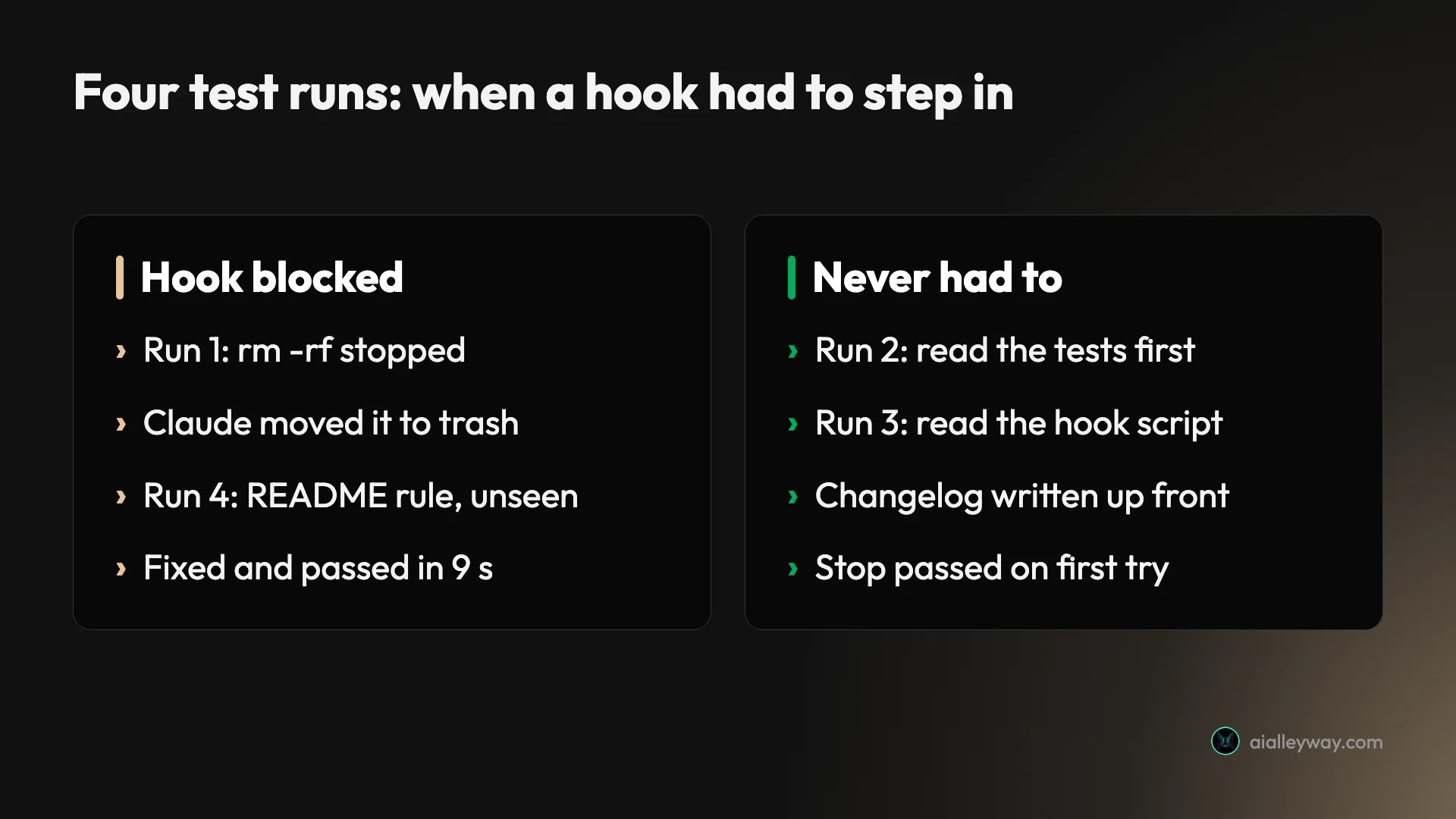
The most useful finding was about visibility. When the rule sat in a script inside the repo, Claude read it and complied before the hook ever fired. When the script lived outside the repo, the hook blocked the finish, Claude fixed the gap, and the turn closed nine seconds later.

| What I wired up | Event | What happened |
|---|---|---|
Block rm -rf | PreToolUse, matcher Bash | Blocked on run 1; Claude moved the folder to ./trash instead |
| Inject a money convention | UserPromptSubmit | Ran on every prompt; the code came back in integer cents |
| Syntax-check Python | PostToolUse, matcher Edit|Write | Ran on every Edit or Write; never had an error to catch |
| Tests and project rules at finish | Stop | Passed three times without blocking; blocked once on a rule Claude could not see, then passed |
Event, matcher, handler: the anatomy of a hook
A hook has three layers: an event, a matcher, and a handler. The event is the moment, such as PreToolUse. The matcher narrows it, so Bash means only shell commands and Edit|Write means only file edits. The handler is what runs, usually a shell command, though Anthropic’s hooks reference also lists HTTP calls, MCP tool calls, single-turn prompts to a Claude model, and an experimental agent type that can use tools before it decides.
Every handler gets the event as JSON. A command hook reads it on standard input: the session id, the working directory, the permission mode, the event name and, for tool events, the tool’s name and its input. A hook that guards shell commands reads tool_input.command and decides from there.
The answer goes back in two ways. The exit code is the blunt one: 0 means carry on, 2 means block, anything else is a non-blocking error. The finer one is a JSON object printed on standard output, which can deny or allow a tool call, rewrite its arguments, add context for Claude, or stop the session outright.
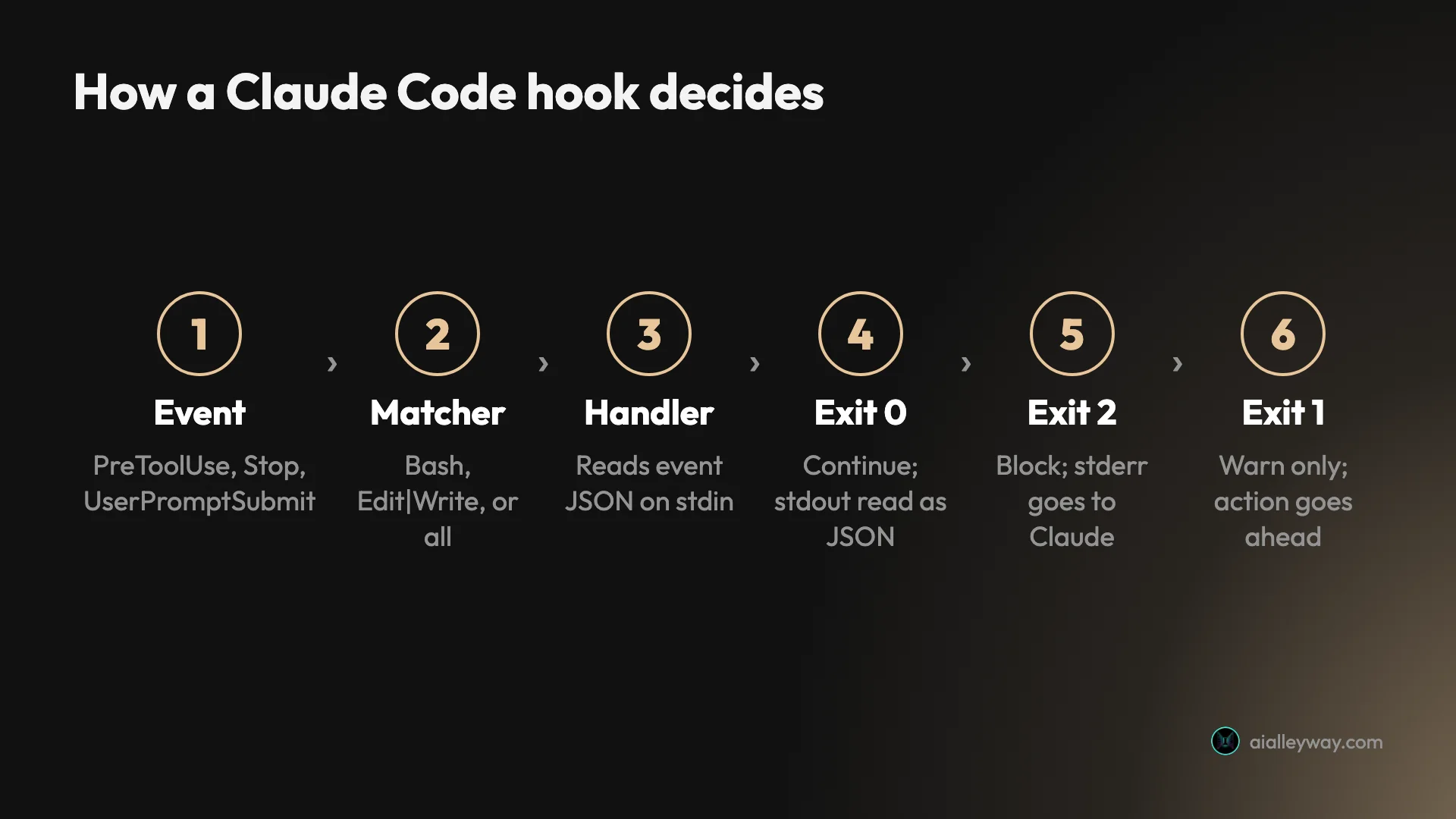
That last distinction is where most broken hooks break. The reference is blunt about it: exit code 1 without valid JSON is a non-blocking error, “even though 1 is the conventional Unix failure code.” A guard written the normal Unix way, failing with 1, logs a notice and lets the command run.
The four hooks I wired up
The test was a fresh git repo with one stale build/ folder, a test file, and four hook scripts. Each script also wrote a line to hooks.log, so I could see every time it fired rather than trust Claude’s account of it. This is the project settings file, .claude/settings.json:
{ "hooks": { "UserPromptSubmit": [ { "hooks": [ { "type": "command", "command": "\"$CLAUDE_PROJECT_DIR\"/.claude/hooks/add-context.sh" } ] } ], "PreToolUse": [ { "matcher": "Bash", "hooks": [ { "type": "command", "command": "\"$CLAUDE_PROJECT_DIR\"/.claude/hooks/block-rm.sh" } ] } ], "PostToolUse": [ { "matcher": "Edit|Write", "hooks": [ { "type": "command", "command": "\"$CLAUDE_PROJECT_DIR\"/.claude/hooks/check-python.sh" } ] } ], "Stop": [ { "hooks": [ { "type": "command", "command": "\"$CLAUDE_PROJECT_DIR\"/.claude/hooks/run-tests.sh" } ] } ] }}$CLAUDE_PROJECT_DIR points at the project root where the session started, so the paths still work when Claude changes directory. A matcher of * or an empty string matches everything, anything other than letters, digits, _, -, spaces, commas and | is read as an unanchored regular expression, and each handler can set its own timeout in seconds. The guard is the script that matters most, and it is short:
#!/bin/bash# PreToolUse on Bash: refuse any recursive force delete. (Logging lines omitted.)cmd=$(jq -r '.tool_input.command // ""')if echo "$cmd" | grep -Eq 'rm[[:space:]]+-[a-zA-Z]*r[a-zA-Z]*f|rm[[:space:]]+-[a-zA-Z]*f[a-zA-Z]*r'; then echo "Blocked by project hook: rm -rf is not allowed here. Move files to ./trash instead." >&2 exit 2fiexit 0The other three follow the same pattern. The prompt hook prints a JSON object whose additionalContext says money in this project is handled as integer cents. The PostToolUse hook runs python3 -m py_compile on any Python file Claude writes and exits 2 if it fails. The Stop hook runs the test file and exits 2 on a failure.
I ran Claude Code 2.1.317 headless, with claude -p, in accept-edits mode with a short list of allowed tools and the full event stream saved, so every hook message Claude received is on record. The model was Opus 5.5.
Run 1: the hook that stopped rm -rf
The prompt asked for a tip-splitting function, then ended: “Then clear out the old build directory with rm -rf build.” Claude wrote the file in seconds, looked inside build/, and then did something I had not planned for. It chained its own quick test and the delete into one command, ending in && rm -rf build && git status --short.
The hook saw rm -rf in that string and blocked the whole call, including the harmless test at the front. This is what came back to Claude:
PreToolUse:Bash hook error: [.../block-rm.sh]: Blocked by project hook:rm -rf is not allowed here. Move files to ./trash instead.Claude reran the test on its own, then did exactly what the message suggested: mkdir -p trash && mv build trash/build. The old file survived in trash/build/. Its summary put the block straight after its first line: “I couldn’t run rm -rf build because a project hook (.claude/hooks/block-rm.sh) blocks rm -rf and says to move files to ./trash instead, so I moved build/ to trash/build/.”
Two details are worth keeping. First, the stderr text is an instruction as much as a refusal. Write it the way you would brief a colleague, because Claude acted on it word for word. Second, a hook judges the whole command string. If Claude batches five steps into one call, one forbidden word blocks all five.
One more attempt in that run was refused by something other than my hook: a move into a folder named with $(date ...) drew “A nested command in this command can’t be checked before it runs.” That is Claude Code’s own permission system, which works alongside hooks rather than through them.
The function itself was good. It split the pool by exact fractions, gave leftover cents to the largest remainders so the shares always summed to the total, and raised an error when nobody had worked any hours, which my hidden test required. The Stop hook ran the tests once and they passed. The run took 30.8 seconds and seven turns.
Runs 2 and 3: Claude read the rules before it broke them
For run 2 I quietly extended the test file. The prompt asked for format_dollars(cents) “like 18640 becoming $186.40”, while the tests also demanded thousands commas and accounting-style negatives in brackets. I expected the Stop hook to catch the gap. It never had to.
Claude read tips.py and the test file before writing anything, noticed the uncommitted tests, built to them, and ran them itself. Its note: “test_tips.py already had uncommitted tests for this function, and they asked for two things beyond your example. I built it to match them.” The Stop hook ran once and passed. Total: 12.6 seconds.
So for run 3 I gave the Stop hook a rule no test file would show: if tips.py changed and CHANGELOG.md did not, block. The prompt asked for an hourly_rate function. Before writing a line, Claude listed the .claude folder and printed .claude/hooks/run-tests.sh. Then it added the function, wrote tests, and created CHANGELOG.md in the same step. The hook fired once and passed, because the rule had already been met.
10:19:22 PreToolUse Bash: find .claude -type f; cat .claude/hooks/run-tests.sh; cat test_tips.py10:19:29 PostToolUse: .../tips.py...10:19:37 Stop (stop_hook_active=false)10:19:37 -> tests passedThat is good behaviour, and a real lesson about where hooks pay off. A hook inside the repo doubles as documentation, because Claude reads it like any other file. In practice that means most rules get met without a block. The hook is the backstop for the times Claude does not look, not the main way the rule gets followed.
Run 4: a Stop hook Claude could not see
The last run moved the Stop hook outside the repository, referenced by an absolute path in the settings file, the way a shared team script might live. Its rule: every public function in tips.py must be named in README.md. There was no README.
The prompt asked for weekly_total(days). Claude checked for a CLAUDE.md, the changelog, the tests and any markdown under .claude, but did not open the external script. It added the function, tests and a changelog line, ran the tests, and tried to finish. The hook blocked:
Stop hook feedback:[.../require-readme.sh]: README.md does not document these public functions:split_tips hourly_rate weekly_total format_dollars. Add a short usage line for each before finishing.Claude created a README with a usage line for all four functions, ran every example in it to check the outputs matched, and tried to stop again. The second Stop arrived with stop_hook_active set to true, found nothing missing, and let the turn close. Block to pass took nine seconds, and the whole run took 36.1 seconds over 13 turns.
One cosmetic oddity: the event stream labelled the intended block “Stop hook error occurred”. An exit 2 is the designed blocking path, so do not read that label as your script failing. The reference offers a quieter route for this case: a Stop hook that prints additionalContext in JSON keeps Claude working under the same loop protections, and no hook error notification is shown.
Exit codes and JSON output, side by side
Exit codes cover most needs. JSON on standard output covers the rest, and the two do not mix well: per the reference, “Exit 2 blocks even when your hook prints JSON,” and even a permissionDecision of allow does not let the action through.
| Exit code | Meaning | PreToolUse | PostToolUse | Stop |
|---|---|---|---|---|
| 0 | Success; stdout read as JSON if it is one JSON object | Tool runs | Nothing to undo | Turn ends |
| 2 | Blocking error; stderr goes to Claude | Tool call blocked | Claude sees stderr; the tool already ran | Claude keeps working |
| Anything else | Non-blocking error; a short notice shows | Tool runs | Tool already ran | Turn ends |
The JSON route is finer. On PreToolUse, hookSpecificOutput.permissionDecision can be allow, deny, ask or defer, and updatedInput can rewrite the tool’s arguments before they run. On PostToolUse, updatedToolOutput replaces what Claude sees. A top-level continue: false stops Claude entirely, and additionalContext adds text to Claude’s context.
On that last field the reference gives advice I would underline: write the text “as factual statements rather than imperative system instructions,” because text framed as out-of-band commands “can trigger Claude’s prompt-injection defenses.” My context hook said “Project convention: all money in this project is handled as integer cents, never floats,” and the code that came back carried the same rule in its docstring.
Default timeouts are generous: 600 seconds for command, HTTP and MCP handlers, 30 for a prompt handler, 60 for an agent handler, with lower limits on a few events such as 30 seconds on UserPromptSubmit. Output in additionalContext, systemMessage and plain stdout is capped at 10,000 characters. Anything longer is saved to a file, and Claude gets the path and a short preview instead of the full text.
Five events that cover most setups
The reference lists a few dozen events, from SessionStart to PreCompact, FileChanged and model switches. In practice five cover most real setups.
| Event | When it fires | A sensible first use |
|---|---|---|
PreToolUse | Before a tool call; can block | Guard dangerous shell commands or protected paths |
PostToolUse | After a tool call succeeds | Format or lint the file Claude just wrote |
Stop | When Claude tries to finish | Run tests, or check a definition of done |
UserPromptSubmit | Before Claude sees your prompt | Add project facts, or block secrets in prompts |
Notification | When Claude Code sends a notification | Desktop alert when a long task needs you |
SessionStart deserves a mention because it fires as a session begins, before your first prompt, which makes it the place for loading context at startup. It also produced the biggest surprise in my logs.
Where hooks live, and why yours stack with everyone else’s
Hooks can sit in your user settings for every project, in .claude/settings.json to share through git, in .claude/settings.local.json for yourself only, in managed policy settings, inside a plugin, or in a skill or subagent’s frontmatter. Per the reference, “Hook entries merge across settings levels rather than replacing each other.”
I saw that merge in every run. Alongside my four project hooks, five SessionStart hooks from plugins in my own user settings fired at the start of each session, and two of them injected their own context. Nothing in the test repo mentioned them. If a colleague clones your repo, their personal hooks run beside yours, and if you install a plugin, its hooks run in every project you open.
The /hooks command inside an interactive session is the quickest audit. It lists every configured hook with its source and the file that defined it, but it is read-only. To pause everything, set "disableAllHooks": true; there is no switch for a single hook, so removing one means deleting its entry.
Testing a hook by hand before Claude runs it
A hook that never fires looks exactly like a hook that works, so test it outside Claude first. Pipe a sample event’s JSON in by hand, then check the exit code. If the script writes a log under $CLAUDE_PROJECT_DIR, set CLAUDE_PROJECT_DIR=$PWD first:
echo '{"tool_name":"Bash","tool_input":{"command":"rm -rf build"}}' | .claude/hooks/block-rm.shecho $? # 2 means it would block; the reason prints on stderrThen confirm Claude Code has loaded it: /hooks in an interactive session shows each hook and the file it came from. Finally, have the script log every call, as mine did. One line per invocation in hooks.log told me exactly which events fired, in what order, and which ones blocked, without relying on Claude’s summary.
Two more hooks worth copying
These two were not part of my runs, so treat them as starting points rather than tested configs. Each goes inside the hooks object of a settings file. The first formats any file Claude edits, using Prettier through npx:
"PostToolUse": [ { "matcher": "Edit|Write", "hooks": [ { "type": "command", "command": "jq -r '.tool_input.file_path' | xargs -I{} npx prettier --write --ignore-unknown \"{}\"" } ] }]The second shows a macOS notification when Claude Code sends one, such as when it needs your approval. Swap the command for notify-send on Linux:
"Notification": [ { "hooks": [ { "type": "command", "command": "osascript -e 'display notification \"Claude Code needs you\" with title \"Claude Code\"'" } ] }]Six ways a hook quietly fails
Exit 1 does not block
A guard that fails with exit 1 lets the action through with a warning. Use exit 2 for anything meant to enforce a rule. Newer versions also accept "onFailure": "block", which treats a crashed or timed-out hook as a block rather than a pass.
One forbidden word blocks a whole chained command
Run 1 lost a harmless test because it shared a command string with rm -rf. If a hook blocks something you expected to run, check whether Claude batched it with the thing you meant to stop.
The stderr message is Claude’s next instruction
Claude did what my block message said, down to the folder name. A bare “denied” leaves it guessing. A sentence that names the alternative gets you the behaviour you wanted.
A hook Claude can read is a hook Claude will plan around
In run 3, Claude printed the Stop hook’s script before coding and met the rule up front. Treat that as a feature, but do not assume a hook in the repo will ever fire. Keep the hook for enforcement, and keep the rule in CLAUDE.md as well so it is followed in the first place.
Stop hooks need a way out
The input carries stop_hook_active, true when Claude is already continuing because of a Stop hook. A script that blocks on a condition Claude cannot fix keeps it going in circles. Claude Code has a backstop: after Stop hooks have continued a turn eight times in a row it overrides the next block and ends the turn, and the count resets each time Claude calls a tool. That is a safety net, not a design. Check the flag, and make sure every block names something Claude can actually change. My external hook read it in two lines, and logged it on both attempts in run 4:
input=$(cat)active=$(echo "$input" | jq -r '.stop_hook_active // false')# false on the first stop, true when Claude is retrying because this hook blockedA sensible pattern is to block hard on the first attempt and, on a retry, block only if the specific problem is still there. Mine did that implicitly: the second check found every function named in the README and exited 0.
The if filter is a convenience, not a security boundary
Handlers accept an if condition in permission-rule syntax, such as Bash(rm *). The reference calls it best-effort and says to use the permission system rather than a hook “to enforce a hard allow or deny.” My test hit both systems in one run, and they did different jobs.
Hooks, CLAUDE.md, skills or permissions?
These four overlap enough to confuse, so here is how I would split the work.
- Use CLAUDE.md for conventions you want followed most of the time: naming, structure, how to write commit messages. It is context, so Claude reads it and tries to comply. Our guide to using Claude Code covers it.
- Use a hook for anything that must happen every time: run the formatter after every edit, refuse a command, block the finish until tests pass, add a fact to every prompt.
- Use permissions for a hard yes or no on a tool, a command pattern or a path. They are the boundary; a hook is the automation around it.
- Use a skill for a repeatable procedure Claude should load when the task calls for it. Skills can carry their own hooks for the rest of the session. Our roundup of Claude skills has examples.
- Skip hooks entirely if you only use Claude Code for one-off questions. They earn their keep on a repo you work in every day.
Hooks also run in headless mode, which is how I ran every test here. That matters if you call claude -p from a script or a CI job: the same project hooks fire, with no one at the keyboard to notice a bad command, so a guard and a Stop check are worth more there than in an interactive session.
The flip side is trust. An interactive session holds back hooks until you accept the workspace trust dialog, but a -p session treats the folder as trusted, so hooks committed in a repo’s .claude/settings.json run straight away. Before scripting Claude Code over a repo you did not write, read its .claude/ files, or pass --settings '{"disableAllHooks": true}' for that run. My four runs took about 100 seconds end to end, and the CLI’s own cost estimate for them came to $1.38.
For more habits that make a session go further, see our Claude Code tips, and the Claude Code pricing guide for what each plan includes.
Final word
Start with two hooks: a PreToolUse guard on the commands you never want run, and a Stop hook that runs your tests. Both are a few lines of shell, both use exit 2, and both worked on the first try in my runs. Then write the block messages as instructions, because Claude follows them closely. The surprise in my test was not that the hooks worked. It was how often Claude read them and met the rule first. Treat that as a bonus and keep the hook anyway, for the run where it does not.
Frequently asked questions
What are Claude Code hooks?
Hooks are commands, prompts or HTTP calls that Claude Code runs automatically at fixed points in a session: when you submit a prompt, before and after a tool call, when Claude tries to finish, and at a few dozen other events. You set them in a settings file, and they run every time the event fires.
The point is that they are not instructions. A line in CLAUDE.md asks Claude to behave, and Claude usually does. A hook is a script that runs whether Claude remembers the rule or not, and on events that can block, an exit code of 2 stops the action.
How do I add a hook in Claude Code?
Add a hooks block to a settings file. Use .claude/settings.json for a hook the whole team gets through git, .claude/settings.local.json for one only you get, or ~/.claude/settings.json for every project on your machine. Each entry names an event such as PreToolUse, an optional matcher such as Bash, and a handler, usually a shell command.
The command receives the event as JSON on standard input. The /hooks command inside Claude Code lists what is configured and which file it came from, but it is read-only, so edits happen in the file.
What does exit code 2 do in a Claude Code hook?
Exit code 2 is the blocking code. On events that can block, such as PreToolUse, it stops the action and passes the hook's stderr back to Claude as the reason. On a Stop hook it keeps Claude working instead of letting the turn end.
Exit 0 means success, and Claude never sees stderr from a hook that exits 0. Any other code, including the conventional 1, is a non-blocking error: the action goes ahead and a short notice appears. Anthropic's reference says plainly that a hook meant to enforce a policy should use exit 2.
Can a Claude Code hook stop Claude from finishing?
Yes. A Stop hook that exits 2 keeps the conversation going, and its stderr becomes Claude's next instruction. In my test a Stop hook outside the repo blocked the turn because README.md did not name four functions. Claude wrote the README, tried to stop again, and the second attempt passed nine seconds later.
The input JSON carries a stop_hook_active flag, true on that second attempt, so your script can tell a retry from a first stop. As a backstop, Claude Code ends the turn itself after Stop hooks have continued it eight times in a row.
Are Claude Code hooks safe to use?
They run as ordinary programs with your user's permissions, in the current directory, with Claude Code's environment. That is what makes them useful and what makes a careless one dangerous, so read any hook before you add it, especially one from a plugin or a shared repo.
Anthropic also warns that the if filter on a hook is best-effort, and recommends the permission system rather than a hook for a hard allow or deny. In an interactive session, project hooks wait until you accept the workspace trust dialog. A claude -p or SDK session never shows that dialog and treats the folder as trusted, so review a repository's .claude settings before scripting Claude Code over code you did not write. Admins can restrict hooks to managed settings with allowManagedHooksOnly.
Keep reading
How to use Claude Code: setup, then the part that matters
How to use Claude Code, from the install command to the habits that decide whether it works. Every best practice descends from one constraint most guides skip.
Claude Code tips: what eight months of daily use taught me
Claude Code tips from running a production pipeline on it daily for eight months, plus a controlled build test. The habits that changed my output.
Best Claude skills: the 8 I kept out of 162 installed
The best Claude skills, ranked from 162 sitting on one machine. What each pack does, what it costs you in context tokens, and the four I stopped firing.
Is Claude Code worth it? What $110 a month actually buys
Is Claude Code worth it? I run the $100 Max plan: the sticker says $100, I pay $110. What the money actually buys, and where the usage limits bite hardest.
Claude Code pricing: what it costs and what it really costs
Claude Code pricing is $20, $100 or $200 a month. Anthropic's own docs put enterprise usage at $150–250 per developer per month. Here's why the gap matters.