
Nano Banana Review and Pricing: Fast, Free, Nearly Exact
Nano Banana pricing, tested: 12 prompts on Gemini's free tier, no limit hit. 15 of 15 text strings right, most images in 30 seconds, and one tulip too many.
Contents
Is Nano Banana worth it?
Yes, and on the free Gemini plan it gives you far more for nothing than ChatGPT’s free plan: across 12 prompts it spelled all 15 text strings I asked for, added no slogans of its own, drew believable hands and products, and finished most images in half a minute without hitting a limit. It rates 4.4, a Power Tool, because it reads a crowded brief a little loosely, drawing four tulips where I asked for three, and because free images carry a visible watermark. On Nano Banana pricing, the Gemini app is free and the API costs $0.0336 to $0.24 per image; move to ChatGPT only if exact adherence to a long brief matters more.
What does Nano Banana do?
Nano Banana is Google’s nickname for the image models inside Gemini. You ask for a picture in a Gemini chat, in plain language, and it draws one. There is no separate app, no sign-up beyond a Google account, and no Nano Banana subscription, whatever some search results suggest.
The name now covers a family rather than one model. Google’s API pricing page lists four: Nano Banana 2 (Gemini 3.1 Flash Image), which is the default in the Gemini app, a cheaper Nano Banana 2 Lite, the slower and higher-resolution Nano Banana Pro, and the original Nano Banana from 2025, now marked deprecated.
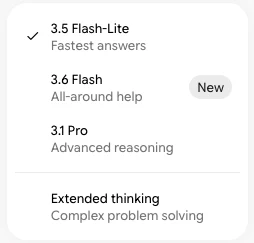
In the app you never choose between them directly. You choose a chat mode. On my free account the picker offered 3.5 Flash-Lite, 3.6 Flash, 3.1 Pro and Extended thinking, and Google’s help page says every plan, including no plan at all, gets image generation with Nano Banana 2.
Editing works the same way as generating: you reply in the chat with what to change, and Gemini reworks the last image. That conversational editing is what Google launched Nano Banana on, and in my test it was the strongest single thing the model did.
Where you can use it
There are three official routes in, and they are priced differently.
The Gemini app at gemini.google.com and on phones is the one most people mean. It is free, it needs only a Google account, and it is where every image in this review was made.
Google AI Studio and the Gemini API are the developer route. You create an API key, call a model by its ID, and pay per image from the first one. This is how the resellers in the next section get access too.
Google Search is the third. Our Gemini review found the paid plan cards listing more access to Nano Banana in Search as a benefit, with Nano Banana Pro added from the AI Pro tier. That route is for quick edits inside Search rather than a working tool, so I did not test it here.
How I tested it
I used exactly the prompt set from our ChatGPT image generator review, word for word, so the two sets of results can be compared picture by picture. It covers compositional accuracy, text inside the image, photorealism, style range, editing and speed.
Everything ran on a free Gemini account with no Google AI plan, in the default Flash-Lite mode, one new chat per prompt. I then ran the first prompt again in 3.1 Pro mode to see what the slower mode changes. Every image below is the first result. Nothing was rerolled or retouched.
| # | Test | Mode | Result | Ready by |
|---|---|---|---|---|
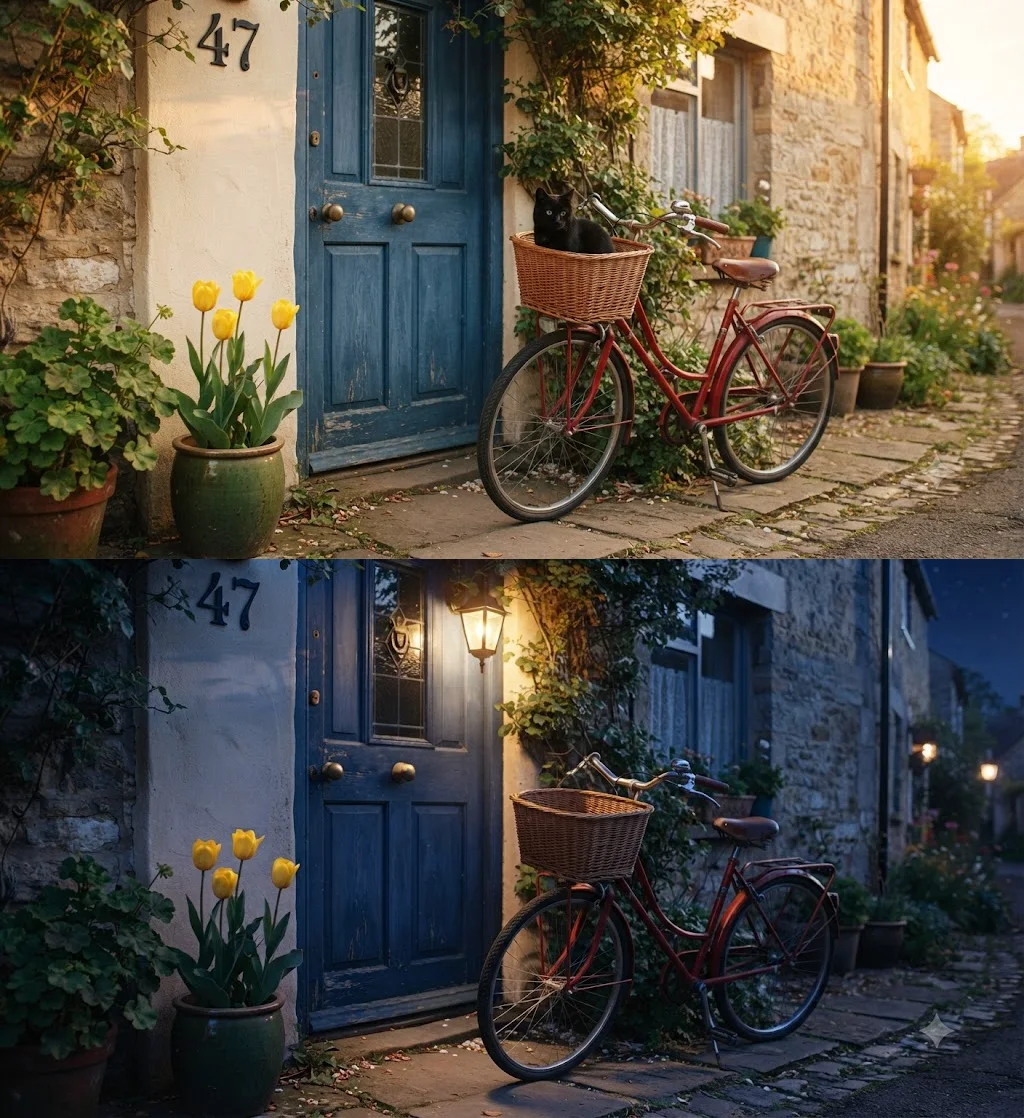
| 1 | Seven-part scene (bike, door, cat, tulips, pot, “47”, light) | Flash-Lite | 5 of 7: four tulips instead of three; “47” beside the door | ~17 s |
| 2 | Edit: night, lamp on, remove the cat | Flash-Lite | Real night, lamp lit, cat removed, scene intact | ~20 s |
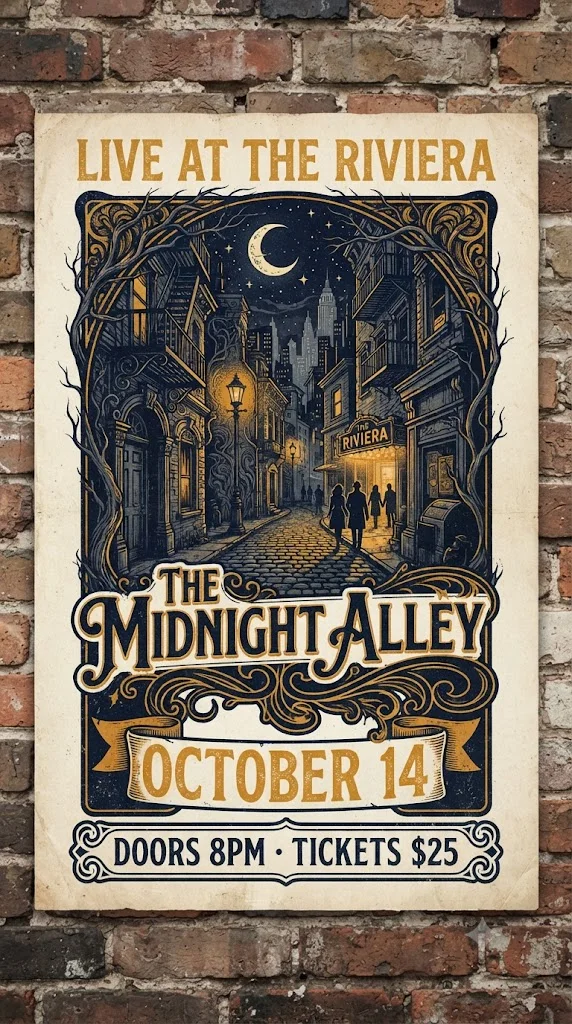
| 3 | Gig poster, four text lines | Flash-Lite | 4 of 4 strings exact | ~39 s |
| 4 | Café menu, title plus six items with prices | Flash-Lite | 7 of 7 exact; nothing added | ~31 s |
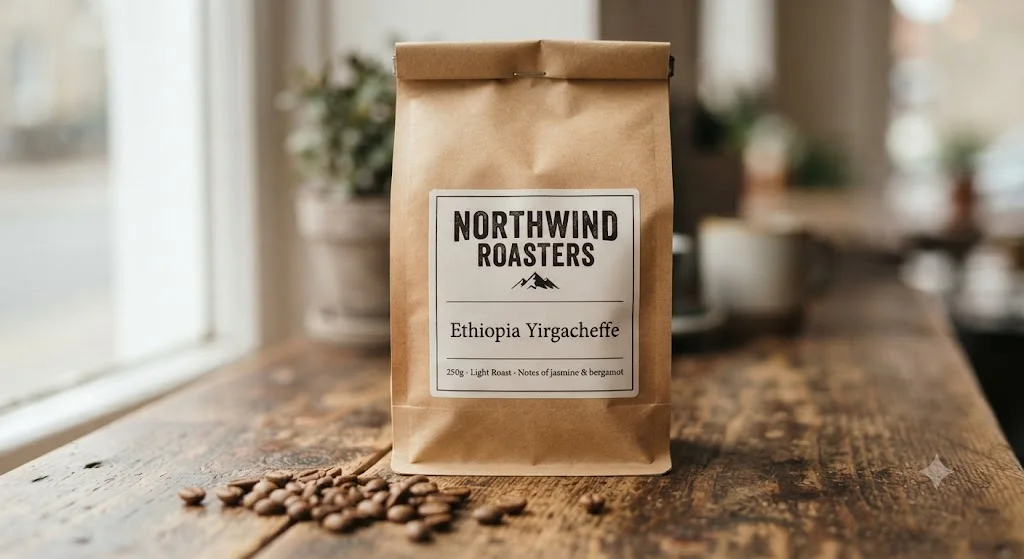
| 5 | Coffee-bag label, three text lines | Flash-Lite | 3 of 3 exact; nothing added | ~31 s |
| 6–8 | Portrait, product shot, hands | Flash-Lite | No anatomy or physics errors | ~31 s |
| 9–11 | Ukiyo-e, watercolour, isometric low-poly | Flash-Lite | Styles convincing; isometric drew one table of two | ~31 s |
| 12 | Seven-part bike and door scene, rerun | 3.1 Pro | 6 of 7: tulip count fixed; “47” still beside the door | ~84 s |
The times are when I checked, so each is an upper bound. The first two were checked early and were ready within 17 and 20 seconds. The rest were checked at about 30 seconds and were already done, apart from the poster, which I first checked at 39, and the Pro-mode rerun, at about 84.
How to prompt it, from what I saw
Four habits would have improved my results, and all of them come from where the test went wrong.
Switch to Pro mode for counts. The fast mode drew four tulips when I asked for three. The 3.1 Pro mode reasoned about the number and got it right. If a brief has specific quantities, spend the extra minute.
Say where text may and may not go. Nano Banana wrote nothing I did not ask for on the menu and the coffee bag, but it added a signature to the woodblock print and a name to the café. Ending a prompt with “no other text, no signature” is cheap insurance.
Name the shape you need. None of my prompts gave an aspect ratio, and Gemini chose for itself: a wide landscape frame for eleven of the twelve images and a tall portrait for the poster. That was a sensible guess every time, but a wide frame is the wrong shape for an Instagram post or a phone wallpaper. If the image has a destination, say “square” or “vertical 9:16” up front rather than cropping afterwards and losing part of the scene.
Edit one thing at a time, then stack. The night edit changed three things at once and still kept the scene intact, without the unrequested change ChatGPT’s version made to the house-number plate. Even so, when an edit misses, a single-change request is easier to correct than a three-part one.
Nano Banana pricing: how much does it cost?
There are two price lists, and which one matters depends on whether you are a person making pictures or a developer building them into something.
For people, it is free. The Gemini app includes Nano Banana on every plan. Google’s usage-limits page no longer gives an image count. Since May 2026 Gemini uses compute-based limits that refresh every five hours until you reach a weekly ceiling, and making images uses more of that allowance than chatting does.
| Gemini plan | What it changes for images |
|---|---|
| No plan (free) | Standard limits; image generation with Nano Banana 2 included |
| Google AI Plus | Limits twice the standard level |
| Google AI Pro | Limits four times the standard level |
| Google AI Ultra | Limits five or twenty times AI Pro’s |
I could not see US prices for Plus or Pro from my account, which Google localises to Vietnam, so I have not printed them. Google’s own blog puts AI Ultra at $100 a month, with a $200 top tier. In practice the free tier was enough for this entire review: twelve image requests in one session and not a single refusal, where ChatGPT Free stopped me after three.
For developers, it is priced per image. Google’s API pricing page, updated on 22 September 2026, lists these standard-tier rates. None of the four models has a free API tier.
| API model | Model ID | Price per image |
|---|---|---|
| Nano Banana 2 Lite | gemini-3.1-flash-lite-image | $0.0336 at 1K |
| Nano Banana 2 | gemini-3.1-flash-image | $0.045 (0.5K), $0.067 (1K), $0.101 (2K), $0.151 (4K) |
| Nano Banana Pro | gemini-3-pro-image | $0.134 (1K or 2K), $0.24 (4K) |
| Nano Banana (original, deprecated; shuts down 2 October 2026) | gemini-2.5-flash-image | $0.039 |
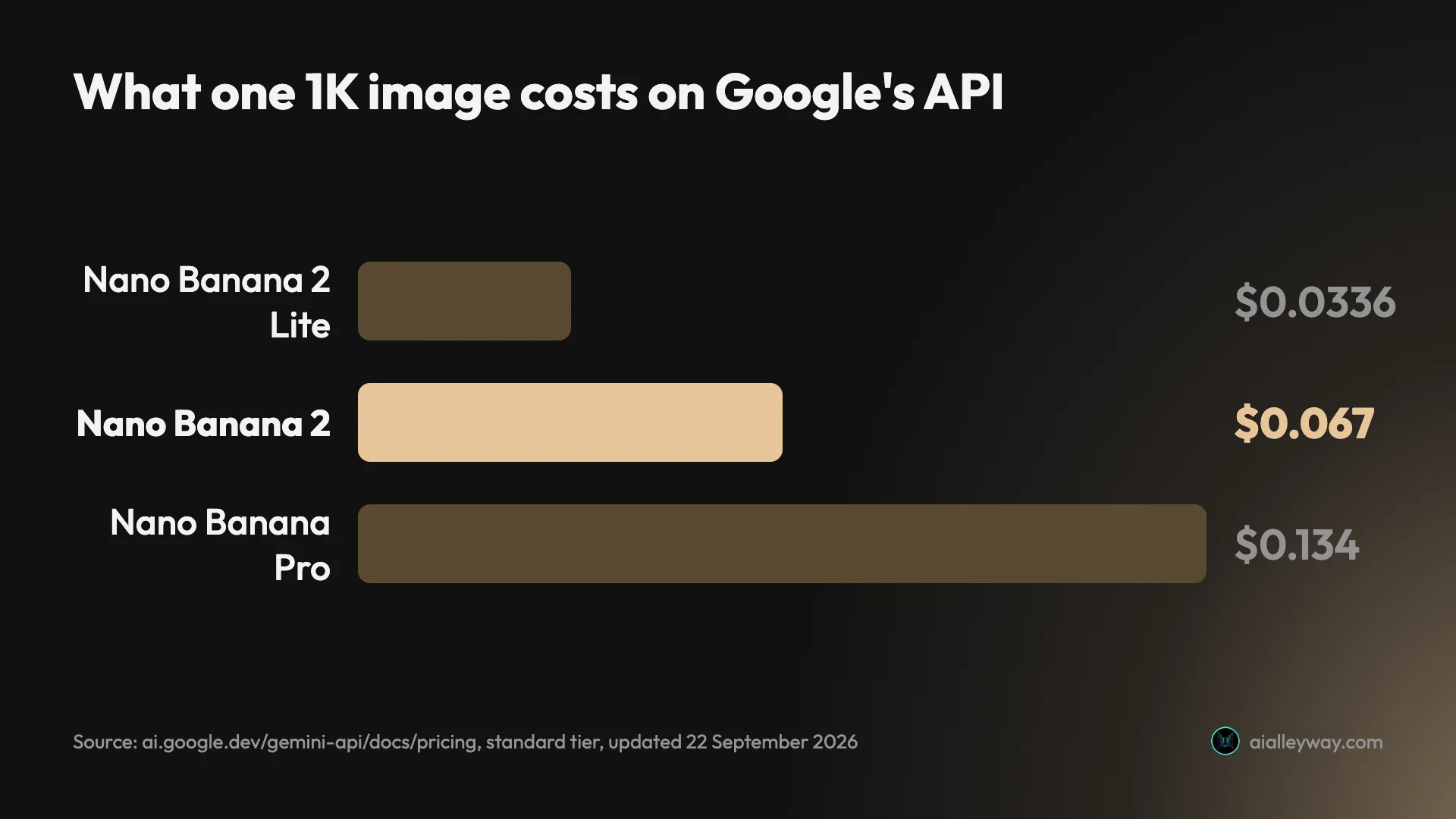
Batch processing roughly halves those rates, bringing Nano Banana 2 to $0.034 for a 1K image and Pro to $0.067. For a product that generates thousands of images, the difference between Lite and Pro is a factor of four per 1K picture, so it is worth testing whether the cheaper model is good enough for your job before defaulting to Pro.
What 1,000 images cost
Per-image prices are easier to judge at scale. At the standard rates above, 1,000 images cost:
| Model and size | 1,000 images, standard | 1,000 images, batch |
|---|---|---|
| Nano Banana 2 Lite, 1K | $33.60 | $16.80 |
| Nano Banana 2, 1K | $67 | $34 |
| Nano Banana 2, 4K | $151 | $76 |
| Nano Banana Pro, 1K or 2K | $134 | $67 |
| Nano Banana Pro, 4K | $240 | $120 |
Two things stand out. Batch Nano Banana 2 at 1K costs about the same as standard Lite, so if you can wait for a batch job you get the better model for the budget model’s standard price, and batch Lite halves again, to $16.80. And Pro at 4K costs seven times Lite at 1K, which is worth it only when the extra resolution or precision reaches the finished product.
Is a paid Google AI plan worth it for images?
For images alone, probably not. The free tier handled a twelve-prompt test without a refusal, and the paid plans are sold as storage plans with more Gemini attached: Plus comes with 400 GB, Pro with 5 TB and Ultra with 20 TB, according to the plan cards on my account.
What a plan changes for images is headroom and, in some regions, the watermark. Plus doubles the standard compute allowance and Pro quadruples it, which matters if you generate dozens of images a day or combine image work with long research sessions that draw on the same pool. Ultra is the only tier that gets the visible-watermark toggle in India, South Korea and Vietnam.
If you already need the storage, the image headroom is a bonus. If you are paying only to make pictures, the free tier is the better deal until you actually hit its ceiling.
The Nano Banana sites that are not Google
Search for Nano Banana pricing and much of the first page is not Google at all. Sites called nanobanana.io, nano-banana-pro.io and nanobanana.im sell “Nano Banana” plans with credits, free trials and monthly prices of their own.
They are independent resellers. When I ran that search on 23 September 2026, Google’s own AI Overview linked nanobanana.io as the “Plans & Pricing of Nano Banana”, as if it were the official page. It is not. Google sells Nano Banana in exactly two places, the Gemini app and its API, and anything else adds its own markup and its own terms between you and the model.
Who is Nano Banana for?
- Anyone who wants to make a lot of images for free. ChatGPT Free stopped me after three requests; Gemini ran all twelve in one sitting.
- People who edit photos by describing the change. Its one-line night edit was more convincing than ChatGPT’s, and editing is what Google built the model around.
- Anyone who makes social graphics with text on them. It spelled every string correctly and, unlike ChatGPT, left the rest of the design alone.
- Developers who need images at volume. Three current API models from $0.0336 to $0.24 per image, with batch discounts, give you a real price-quality ladder.
- Not for briefs where every count and position matters. On a crowded scene it drew an extra tulip and moved the house number. If a client specified three tulips above a door, check the result or use ChatGPT, and our ChatGPT vs Gemini comparison covers the two assistants more broadly.
What does Nano Banana get right?
It is fast enough to think with
Speed changes how you use an image generator. At half a minute a picture you try an idea, look, and adjust, the way you would sketch. At a minute a picture you plan.
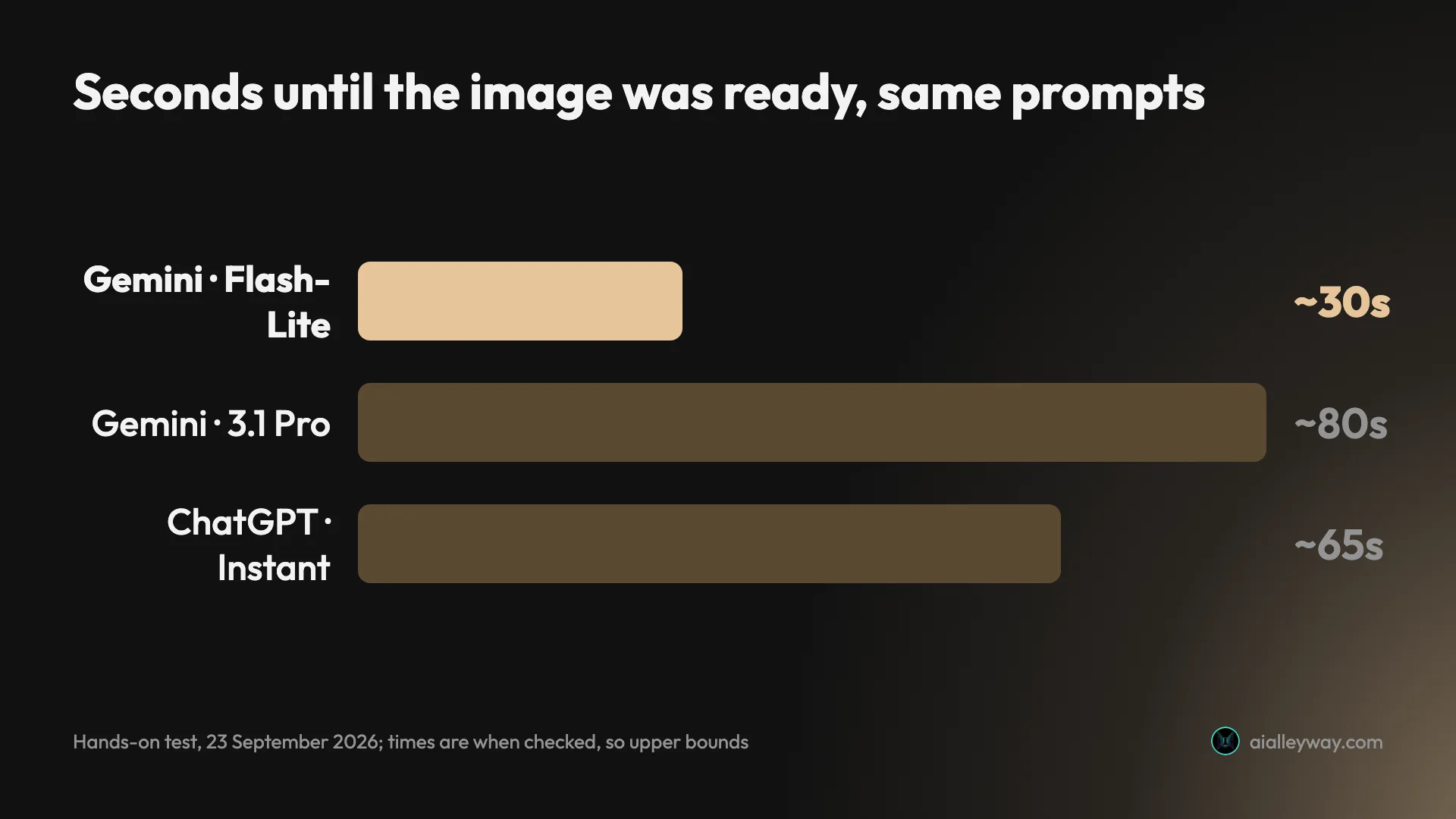
The two images I timed most tightly were ready within 17 and 20 seconds, and every image in the default mode was finished by the time I checked, about 30 seconds for most of them. On the identical prompts, ChatGPT’s Instant mode took around a minute each.
It spells what you ask for, and adds no slogans
Nano Banana matched ChatGPT’s best result on text: all 15 requested strings were correct across a gig poster, a six-item café menu with prices, a coffee-bag label and a house number. What it did not do is the thing that cost ChatGPT points. It added no slogans.
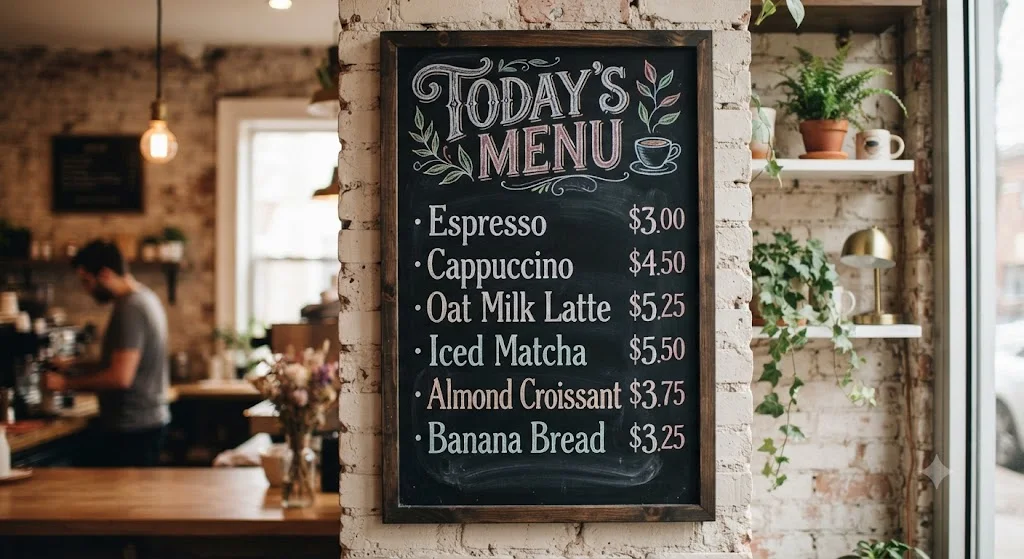
The menu has the seven lines I asked for and nothing more. The coffee bag has exactly its three lines. The only extra text on the three text designs was a small “The Riviera” marquee drawn into the street scene on the poster, which is the venue the poster advertises.
Its edits are the best part
I asked it to turn the bicycle scene into night, switch on a lamp above the door and remove the cat. It produced an actual night, with a dark blue sky and street lamps glowing further down the lane, lit a wall lantern by the door, and took the cat out of the basket.
Everything else stayed put: the bike, the pots, the ivy, the door, even the fourth tulip it should not have drawn in the first place. ChatGPT’s version of the same edit read as dusk, and it changed a detail I had not asked about. Nano Banana changed only what I asked for.
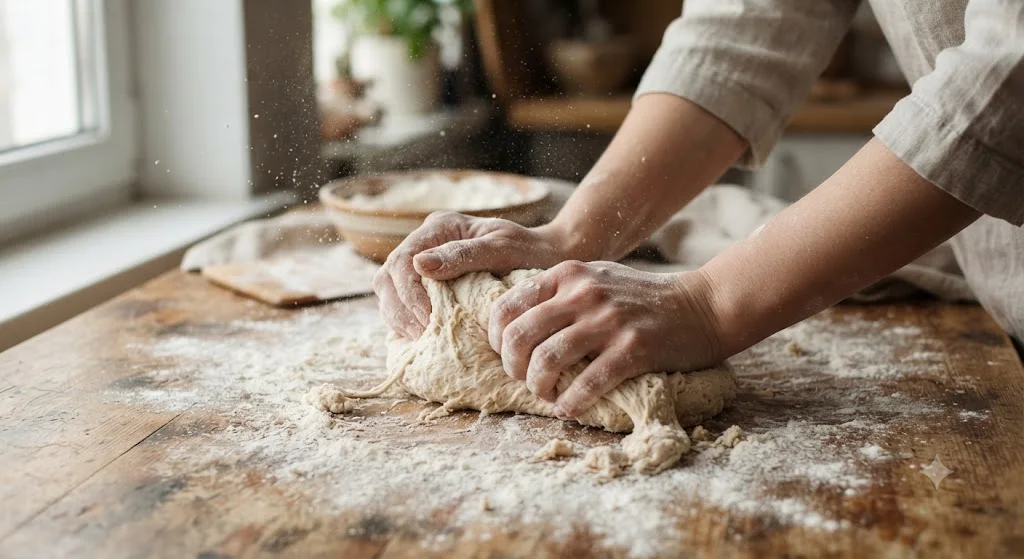
Photorealism with no giveaways
Hands, the usual tell, were correct: two hands pressing into dough, the right number of fingers, flour in the creases and a haze of flour in the window light.
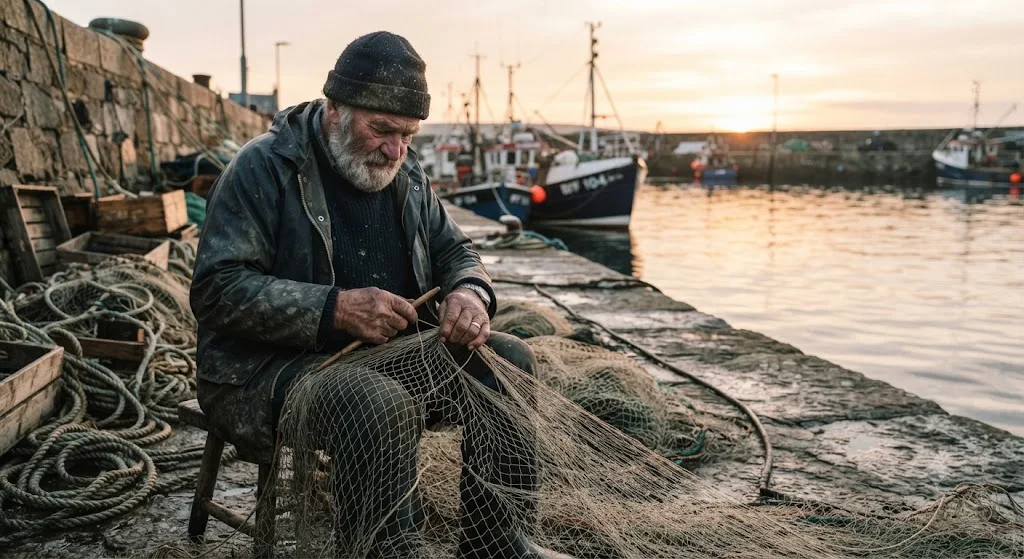
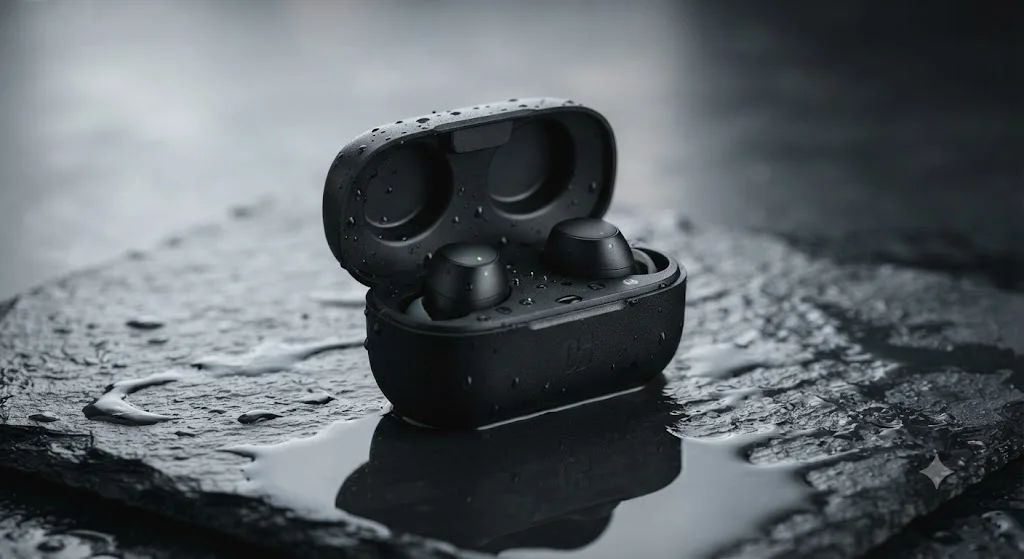
The fisherman sits on the stone quay at sunrise with a net across his knees and boats behind him, and the product shot put the earbud case on wet slate with its lid open, as asked, and a clean reflection underneath. Our best AI image generator for realistic photos roundup puts these beside ChatGPT’s versions.
Styles that look like the medium, not a filter
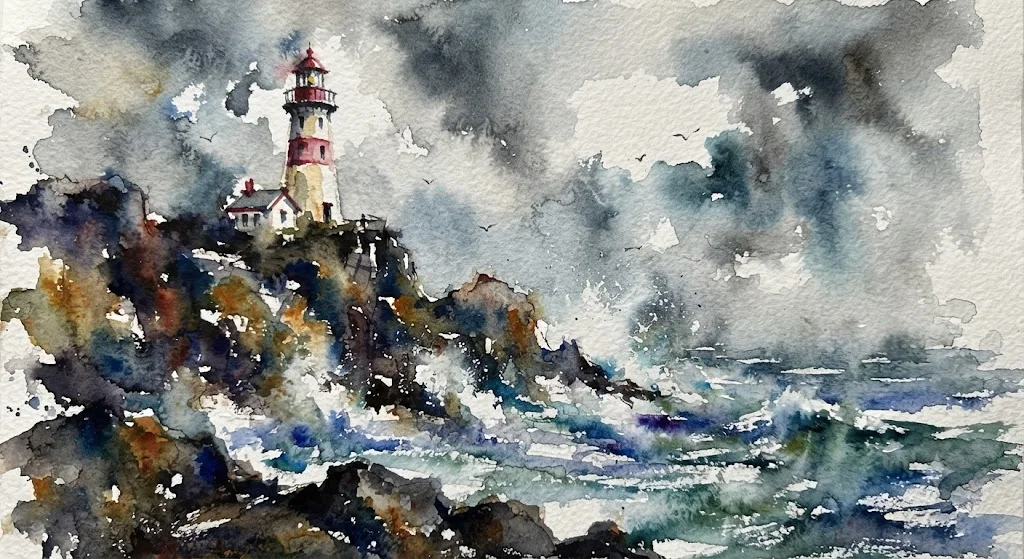
The watercolour lighthouse is the best image in either of my tests: pigment blooming into wet paper, hard edges only where the cliff needs them, and white paper doing the work of spray.
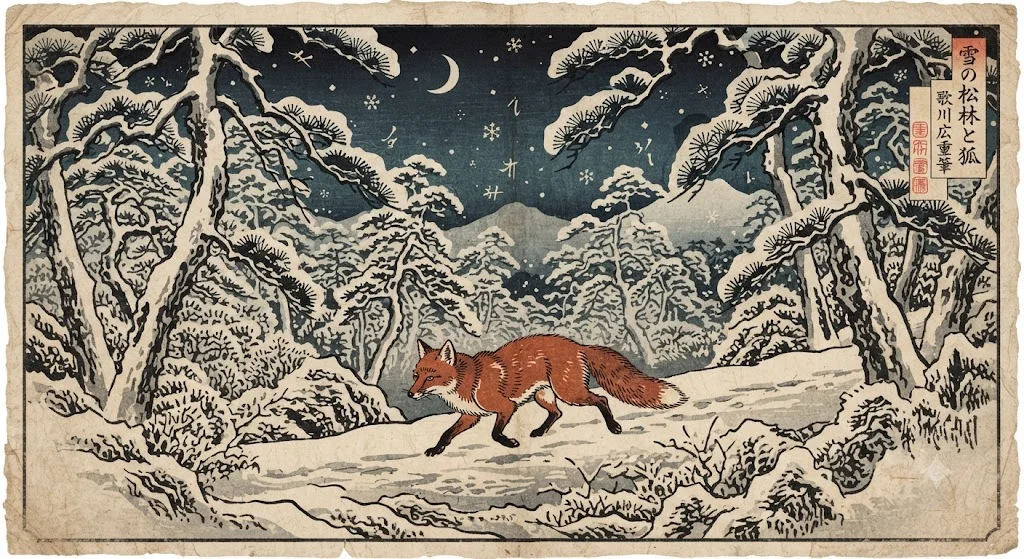
The ukiyo-e fox is just as convincing, down to the carved-line texture and a title cartouche in Japanese. That cartouche turned out to be a problem, which is covered below.
The free tier is actually usable
This is the point that decides it for most people. I ran twelve image requests, including an edit and a slow Pro-mode generation, on a free account in about 20 minutes. Gemini never refused one or warned me about a limit.
On ChatGPT’s free plan the same test stopped after three requests, and the lockout lasted 24 hours. If you make images every day but do not want another subscription, that difference matters more than any single picture.
It labels its own images, and Google claims no ownership
Every Nano Banana image carries Google’s SynthID watermark in the pixels, designed to survive cropping and compression, whether or not the visible sparkle is switched off. The full-size PNG I downloaded also carried C2PA content credentials naming Google, marking the file as AI-generated and referencing SynthID, so the label travels in the file’s metadata as well as its pixels. For anyone publishing AI images honestly, that is a record of where a picture came from that you do not have to maintain yourself.
The rights side is simple. Google’s Terms of Service say it won’t claim ownership of content you generate with its AI services, and the Gemini API terms add that Google may generate the same or similar content for other people. That caveat matters for logos and brand marks, where you want something nobody else can have. For marketing images, product shots and social graphics, it is rarely a practical problem.
Where does Nano Banana fall short?
It reads a crowded brief loosely
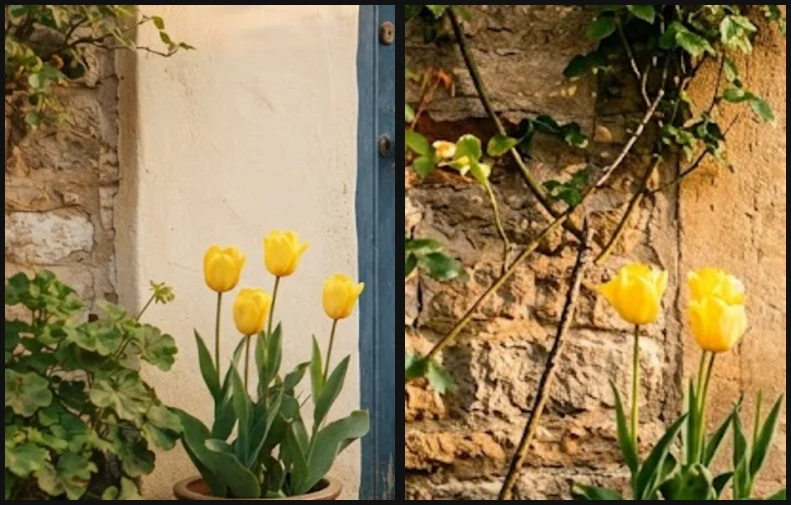
My compositional prompt asks for seven specific things. Nano Banana got five. It drew four yellow tulips where I asked for three, and it put the house number on the wall beside the door rather than above it.
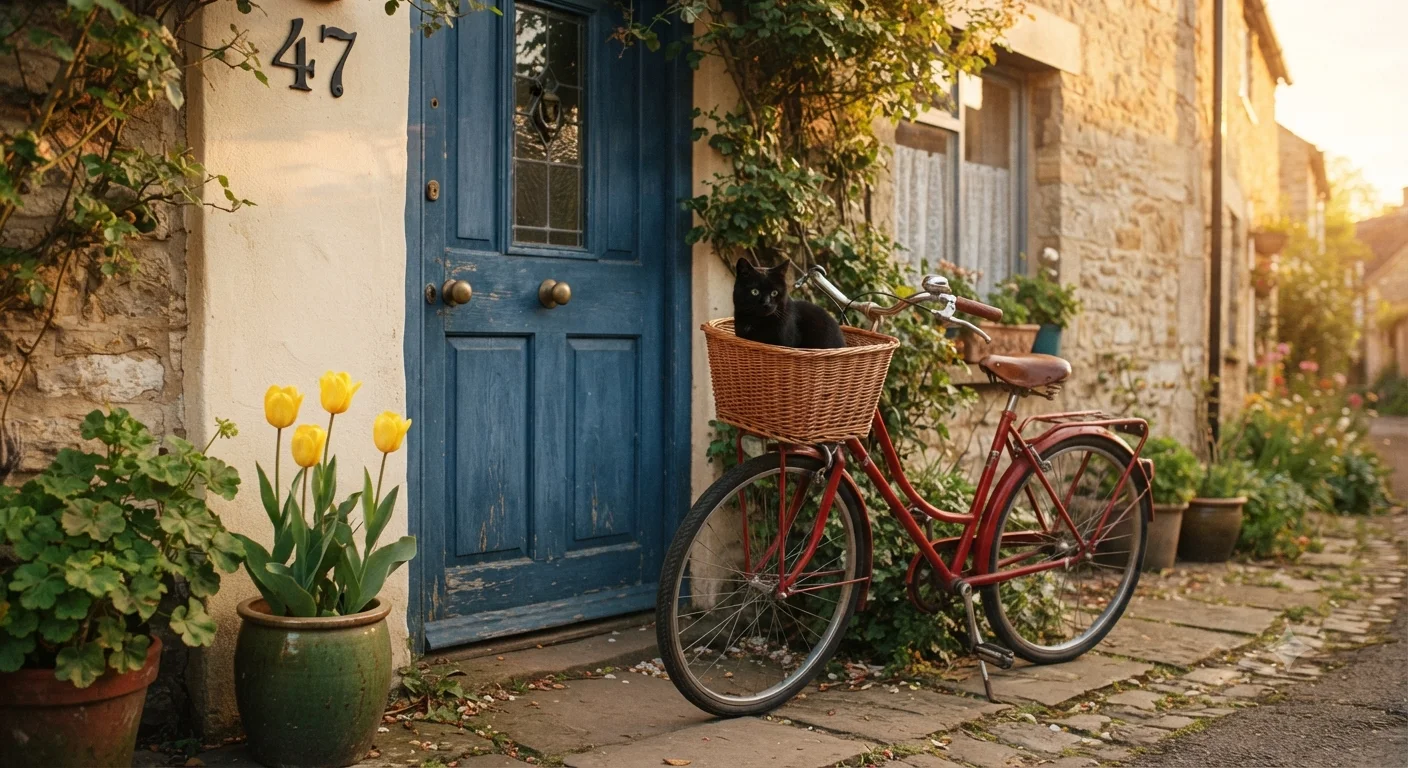
The rest of the scene is right, and it is a lovely picture: a stone cottage lane in low sun, the cat sitting up in the basket, the door exactly the blue I asked for. That is what makes the misses easy to overlook. You have to go back to the brief and count.
The isometric café showed the same habit. I asked for two outdoor tables and got one. None of these would matter on a mood board. On a brief with specific numbers, they are the difference between a usable image and a revision round.
The fix costs an extra minute
Switching the chat mode to 3.1 Pro fixed the count. Gemini visibly worked through the prompt, with a status line reading “Refining Floral Count”, and returned exactly three tulips. The house number, though, stayed beside the door, and the image took about 80 seconds instead of under 20.
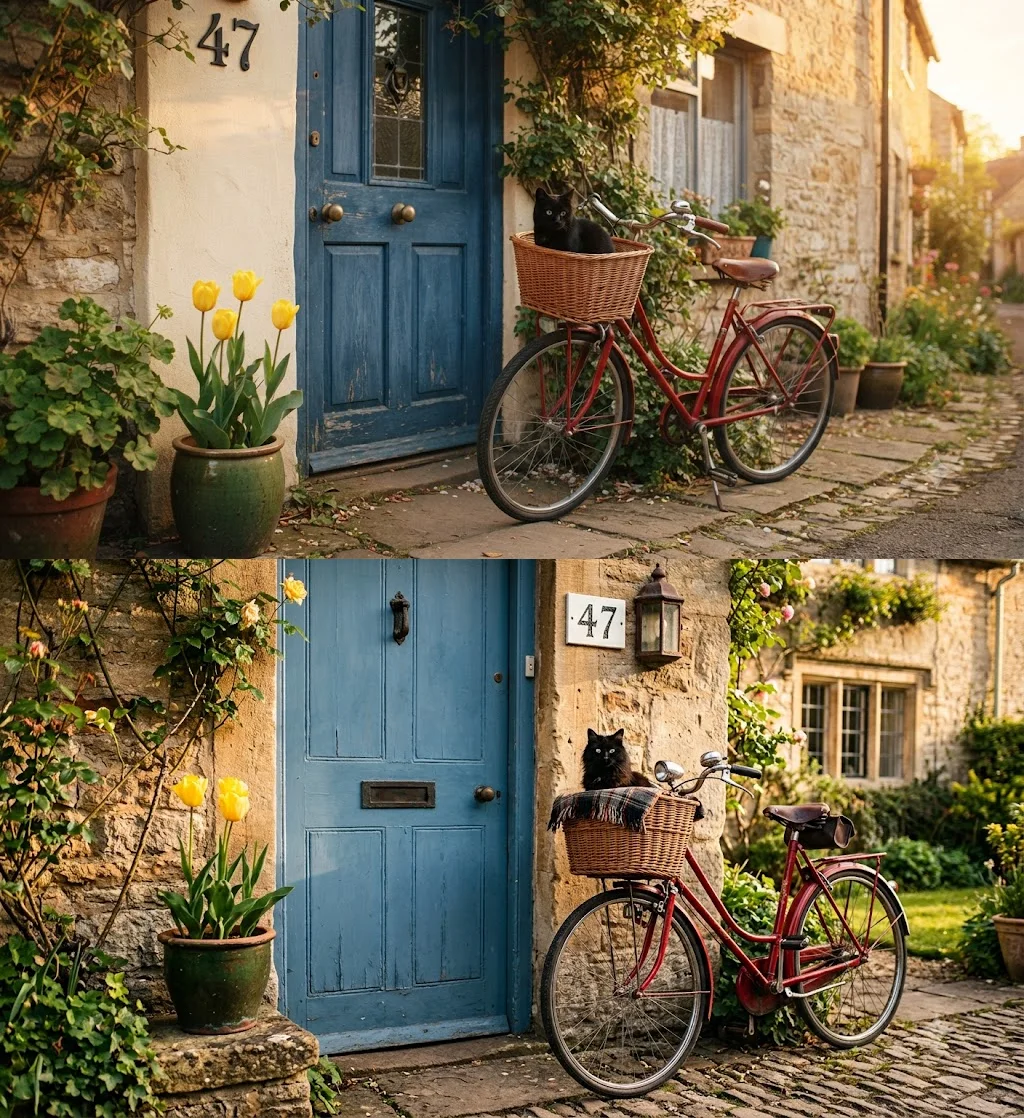
So the precision is available, but you pay for it in time, and Gemini does not say which image model the Pro mode used. Google’s help page promises free accounts Nano Banana 2 for image generation, and lists redoing an image with Nano Banana Pro as a paid-plan feature.
It signed the woodblock print with a real artist’s name
The ukiyo-e fox came with a title cartouche and a second line of text in the style of an artist’s signature. The title reads “fox in a snowy pine forest”. The signature reads 歌川広重筆, “from the brush of Utagawa Hiroshige”, the real 19th-century printmaker.
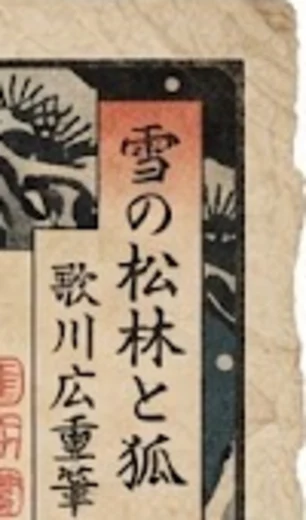
I asked for a style, not an attribution. Most people will never read the Japanese, which is exactly why it matters: an image that claims to be by a named artist can mislead, and it is the kind of detail a platform or a client could object to. If you use Nano Banana for anything in a historical style, check the text it adds, especially text you cannot read.
Every free image is watermarked
Each image from my free account carried a small four-point sparkle in the bottom-right corner. It is subtle, but it is there on every picture, and on a product shot or a client graphic you would have to crop or retouch it.
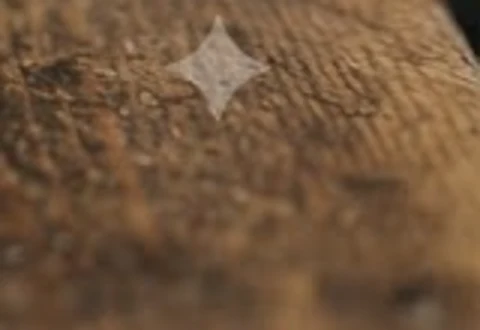
Since August Google has let most users switch the visible mark off in settings. Google’s own help page says accounts in India, South Korea and Vietnam need AI Ultra for the toggle, and reports of the rollout say EU accounts do not get one. The invisible SynthID watermark stays either way.
”Low-poly” gets smoothed over, and empty space gets text
Like ChatGPT, Nano Banana treated “isometric 3D low-poly” as “isometric 3D”. The café is charming and clean, but only the plant pot has flat faceted surfaces. The building, awning and furniture are smooth.
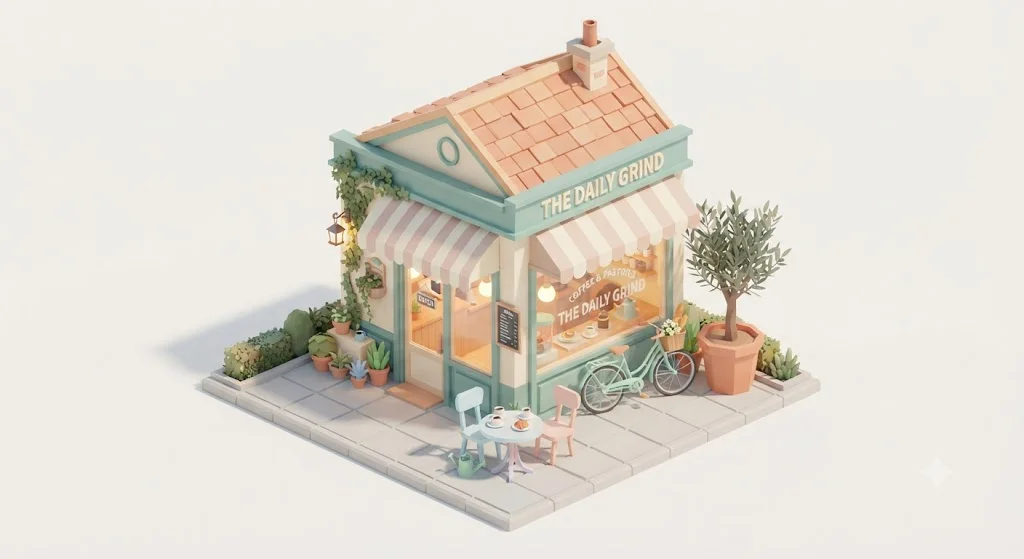
It also named the shop “The Daily Grind”, and wrote “Coffee & Pastries” on the window, without being asked. That is harmless here, but it is the same instinct as the Hiroshige signature: when a scene has room for text, the model sometimes fills it.
You don’t get an image count
The generous free tier comes with a cost in planning. Google replaced fixed daily image counts with compute-based limits that refresh every five hours up to a weekly ceiling, and image generation draws more from that pool than text. Gemini shows usage under Settings and warns you near the limit, but as a share of compute, not a number of images.
I never hit the limit in twelve requests, so I cannot tell you where it is. That is fine for casual use and awkward for a deadline, because you cannot plan a deliverable by image count. If you depend on it for client work, do the image work before a long chat session rather than after it, since both draw on the same allowance.
The full-size download is small
Gemini’s full-size download button saved my first test image as a 1408×768 PNG, about 1.1 megapixels. The version shown in the chat is smaller again, 1024×559. For comparison, ChatGPT’s images in the same test were about 1.5 megapixels, for example 1536×1024.
That is plenty for a blog post or a social feed, and short of print. On the API, Nano Banana 2 and Pro both go up to 4K, so the ceiling exists. It is just not what the free app hands you. Check the download before promising a client a print-size file.
If Nano Banana isn’t the right image generator for you
If loose counting, the watermark or the invented signature rules Nano Banana out, these are the places to look.
- ChatGPT Images. The more literal of the two: it placed all seven elements of the same compositional prompt, at the cost of a minute per image, a three-request free tier and a habit of adding slogans. Our ChatGPT image generator review ran the identical test, and our Nano Banana vs ChatGPT comparison sets the two side by side. If it is Gemini as a whole you want to leave, see our Gemini alternatives.
- Midjourney. If style and mood matter more to you than following a brief to the letter, Midjourney is built around aesthetic control. It has no connection to Google’s ecosystem. Our Nano Banana vs Midjourney comparison sets the two side by side, our Midjourney review has its pricing, or see Midjourney.
- Adobe Firefly. If the worry is commercial safety or working inside Photoshop and Illustrator, Adobe says Firefly is trained on licensed and public-domain content. See Adobe Firefly.
Final word
Of the two I tested, Nano Banana is the one I would give to someone who wants to make a lot of pictures without paying for them. On the same prompts that took ChatGPT a minute each, it took about half a minute, spelled every word right, left the rest of the design alone, and never once told me to come back tomorrow.
It rates 4.4 rather than higher because it reads a busy brief a little loosely, it signed a woodblock print with a real artist’s name, and free images carry a watermark. Check the counts, read any text it adds, and it is the free option I would pick over ChatGPT’s. Our image picks keep ChatGPT first for exact adherence; between the two, Nano Banana is the better choice when you need something good, quickly.
Frequently asked questions
Is Nano Banana free?
Yes, inside the Gemini app. Google's usage-limits page lists image generation with Nano Banana 2 as available without any Google AI plan, and on the free account I tested, twelve image requests in one session, including an edit and a slow Pro-mode run, went through without a single refusal.
The limit is not a fixed image count. Since May 2026 Gemini uses compute-based limits that refresh every five hours until you reach a weekly ceiling, and image generation draws more from that allowance than text does. Paid Google AI plans raise the ceiling: Plus to twice the standard limit, Pro to four times, and Ultra to five or twenty times Pro. What is not free is the API. Google's pricing page lists no free tier for any Nano Banana model.
How much does Nano Banana cost on the API?
It depends on which of the four models you call and at what resolution. Google's pricing page, updated 22 September 2026, lists Nano Banana 2 Lite at $0.0336 for a 1K image, Nano Banana 2 from $0.045 at 0.5K through $0.067 at 1K and $0.101 at 2K to $0.151 at 4K, and Nano Banana Pro at $0.134 for 1K or 2K and $0.24 for 4K. The original Nano Banana, Gemini 2.5 Flash Image, is still listed at $0.039 but marked deprecated, and it shuts down on 2 October 2026.
Batch processing roughly halves those prices, for example Nano Banana 2 at $0.034 for a 1K image. There is no free API tier for any of the four. For occasional use the free Gemini app is the cheaper route by a long way; the API only makes sense when you are generating inside your own product.
Is nanobanana.io the official Nano Banana site?
No. Nano Banana is Google's name for the image models in Gemini, and Google sells no separate Nano Banana subscription. Sites such as nanobanana.io, nano-banana-pro.io and nanobanana.im are independent businesses that resell access, often through Google's API, under plan names and prices of their own.
They rank highly for Nano Banana pricing searches, and on 23 September 2026 Google's own AI Overview for that search linked nanobanana.io as the "Plans & Pricing of Nano Banana", as if it were Google's own page, which it is not. If you want Google's model at Google's price, use the Gemini app at gemini.google.com, or Google's API through AI Studio. Anything else is a third party with its own terms, its own refund policy and its own markup.
What is the difference between Nano Banana, Nano Banana 2 and Nano Banana Pro?
They are three generations of Google's image model sold under one nickname, plus a budget variant. The original Nano Banana is Gemini 2.5 Flash Image, now deprecated. Nano Banana 2 is Gemini 3.1 Flash Image, the default in the Gemini app for every plan. Nano Banana 2 Lite is Gemini 3.1 Flash Lite Image, the cheapest API option. Nano Banana Pro is Gemini 3 Pro Image, the most expensive, particularly at 4K.
In the Gemini app you do not pick an image model directly. You pick a chat mode, and on my free account switching the mode from Flash-Lite to 3.1 Pro made Gemini reason visibly before drawing, took about 80 seconds instead of under 20, and fixed a counting mistake the fast mode had made. Google's app does not label which image model produced the result.
Can you remove the Nano Banana watermark?
The visible one, sometimes. Every image from my free account carried a small four-point sparkle in the bottom-right corner. Since 14 August 2026 Google has let most users switch that visible mark off in Gemini's settings, but Google's help page says accounts in India, South Korea and Vietnam need an AI Ultra plan to get the toggle, and reports of the rollout say EU accounts do not get it at all because of the EU AI Act's labelling rules.
The invisible watermark stays either way. Google embeds SynthID in the pixels of every Nano Banana image, and it is designed to survive cropping and compression. Removing the sparkle makes an image look unlabelled to a person. It does not make it unlabelled to software that checks for SynthID.
Is Nano Banana better than ChatGPT for images?
On the same prompt set it was faster and cleaner, and slightly less literal. Nano Banana finished most default-mode images in about 30 seconds against roughly a minute for ChatGPT, matched it at 15 of 15 on text without adding slogans, and let a free account run the whole test. ChatGPT placed all seven elements of the compositional prompt, where Nano Banana drew an extra tulip and moved the house number.
For speed, editing and free use, Nano Banana leads; for exact adherence to a long brief, ChatGPT does. Our Nano Banana vs ChatGPT comparison sets the two tests side by side, picture by picture, with pricing for both.
How much does a Nano Banana 2 subscription cost?
Nothing, because there is no Nano Banana 2 subscription. Google includes Nano Banana 2 in the Gemini app on every plan, including a free account with no plan at all, so the model itself costs nothing to use there.
What you can pay for is a Google AI plan, which raises Gemini's compute limits rather than giving you the model itself: Plus doubles the standard limit, Pro quadruples it, and Ultra starts at $100 a month. Sites selling a Nano Banana 2 subscription are third-party resellers, not Google.
How much does a Nano Banana token cost?
On Google's standard API tier, Nano Banana image output costs $60 per million tokens for Nano Banana 2, $30 for Nano Banana 2 Lite and $120 for Nano Banana Pro. A 1K image counts as 1,120 output tokens, which is where the per-image prices come from: about $0.067 for Nano Banana 2, $0.0336 for Lite and $0.134 for Pro.
Input is far cheaper: $0.50 per million tokens for Nano Banana 2, $0.25 for Lite and $2.00 for Pro, covering your prompt and any image you upload to edit. In the Gemini app there are no tokens to buy; plans use compute-based limits instead.
Keep reading
Nano Banana vs ChatGPT: 12 Prompts, Two Different Winners
Nano Banana vs ChatGPT, tested with the same 12 prompts: ChatGPT follows a brief exactly, Nano Banana is twice as fast and free. Which one to use, and when.
Nano Banana vs Midjourney: Free Precision or Paid Style?
Nano Banana vs Midjourney: Google's model is free, fast and spelled every word right in our test; Midjourney sells style from $10 a month. Which to use.
Best AI Image Generator: 8 Picks, Two Tested Head to Head
The best AI image generator is ChatGPT for exact briefs and Nano Banana for free, fast images, both tested. Plus Midjourney, Ideogram, FLUX and three more.
ChatGPT Image Generator Review: Perfect Text, Pushy Slogans
I tested the ChatGPT image generator (Images 2.5) with 12 prompts on Free and Plus. It spelled all 15 text strings right, and added slogans I never asked for.
Gemini alternatives: the two reasons people actually leave
The best Gemini alternatives, sorted by why you are leaving. Privacy points one way, escaping Google's ecosystem points another, and they are different tools.