
Nano Banana Pro Free: Where It Actually Works, Tested
Nano Banana Pro free, tested on a free Google account: it worked in Google Flow at no credit cost, but not in the Gemini app or AI Studio.
Contents
Can you use Nano Banana Pro for free?
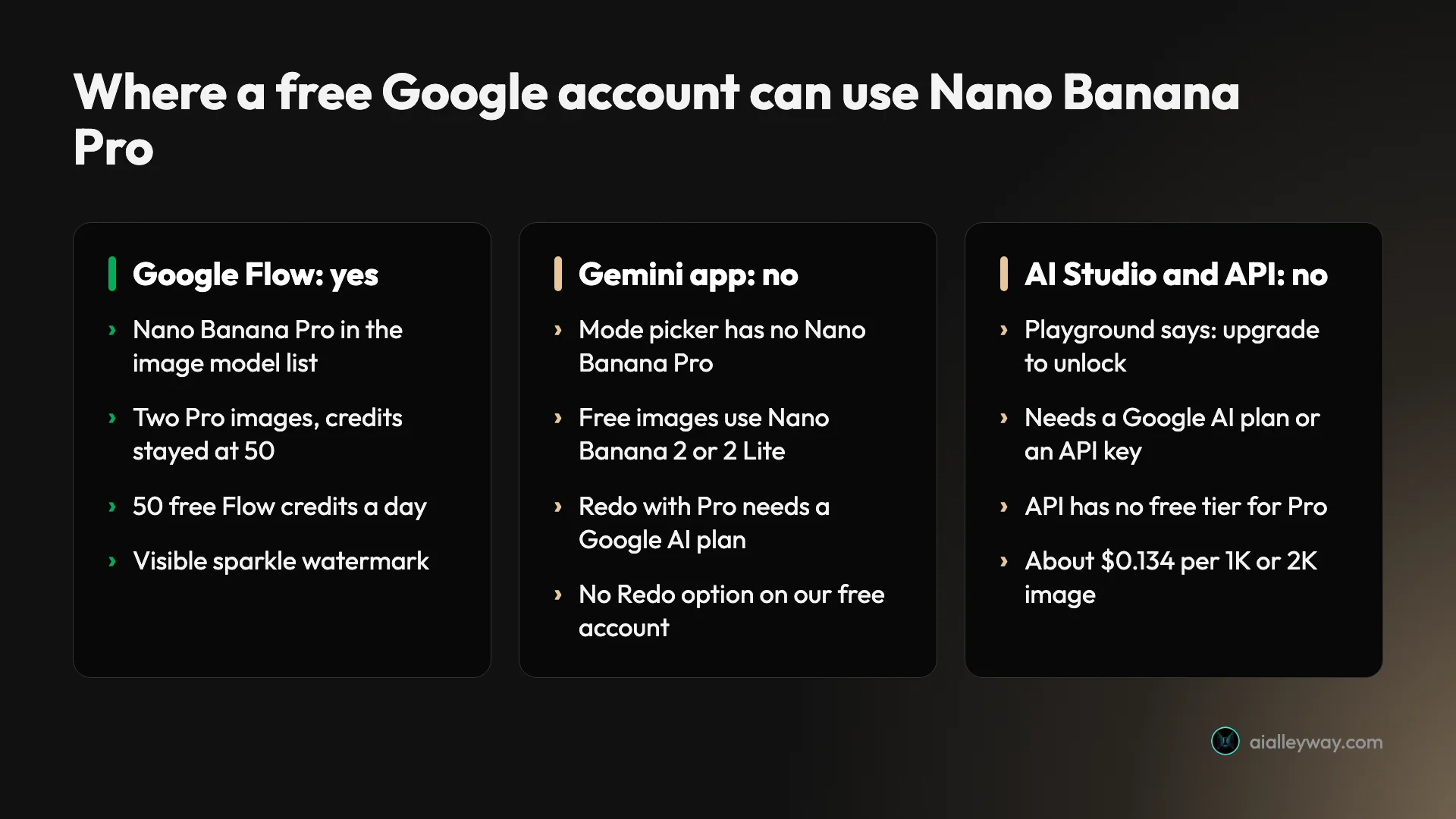
Yes: Nano Banana Pro free access works in Google Flow, and not in the Gemini app. On 1 October 2026 I tested all three of Google’s own routes on a free Google account with no Google AI plan. Google Flow listed Nano Banana Pro in its image model menu, made two images with it, and my 50 daily Flow credits were still at 50 afterwards. The Gemini app kept me on Nano Banana 2, with no option to redo an image with Pro. Google AI Studio told me to upgrade or add an API key before it would run Nano Banana Pro at all.
Nano Banana Pro is the top tier of Google’s image models, the one Google describes as having the highest level of world knowledge and more precise creative control. Below is exactly what each route showed me, the two Pro images I made, how they compare with free Gemini, and the catches: Google’s own Flow pages disagree about who gets free access, and the images carry a watermark.
Three official routes, one that worked
My test account is a free personal Google account. Gemini shows it an Upgrade button, it has no Google AI subscription, and its location is Vietnam. I tried the three places Google itself offers Nano Banana Pro: the Gemini app, Google Flow and Google AI Studio. I did not try any third-party site that promises free Nano Banana Pro; more on those below.
| Route | Nano Banana Pro on a free account? | What I saw |
|---|---|---|
| Google Flow | Yes | In the model list; two images, credits stayed at 50 |
| Gemini app | No | No Pro model in the picker; no Redo with Pro on my images |
| Google AI Studio | No | ”Upgrade to unlock Nano Banana Pro” |
| Gemini API | No | No free tier for Pro; about $0.134 per 1K or 2K image |
Why the Gemini app won’t give it to you free
The Gemini app is where most people meet Nano Banana, and it is the route that disappoints. Google’s help page on images in Gemini maps each chat mode to a model: Flash-Lite mode uses Nano Banana 2 Lite, and Flash or Pro mode uses Nano Banana 2. Nano Banana Pro is not a mode. The same page says it is available with a Google AI plan, as a way to regenerate an image: set the model to Pro, make the image, then click More and Redo with Pro.
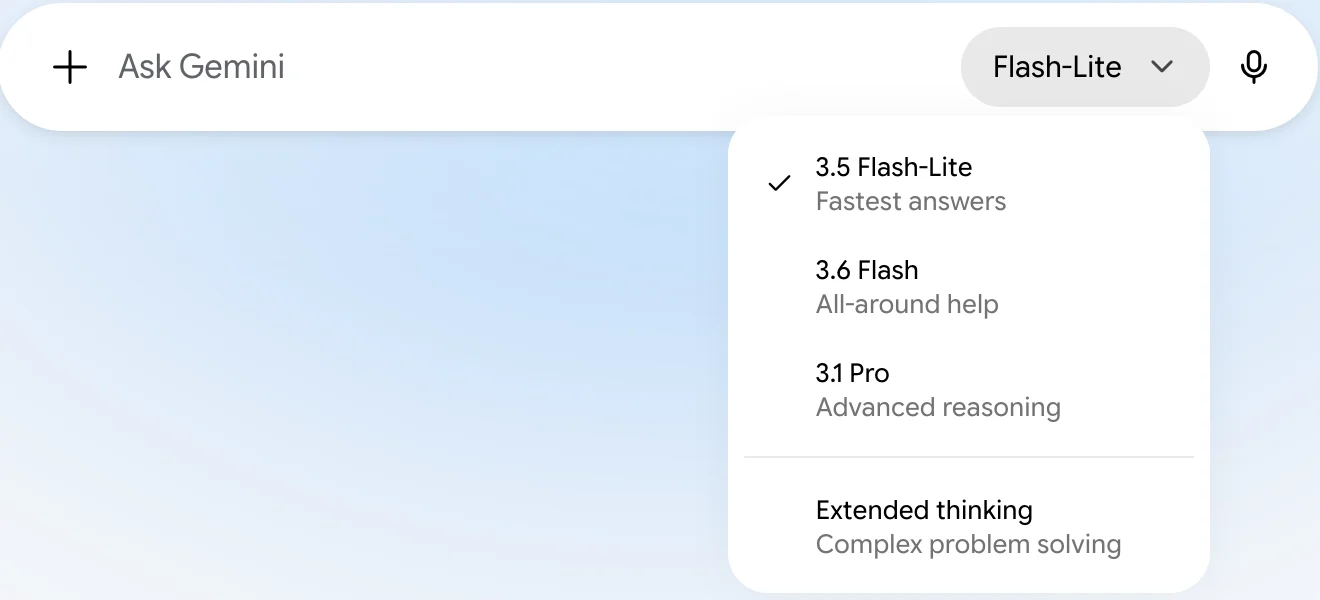
That matches what I found. My free account’s mode picker lists 3.5 Flash-Lite, 3.6 Flash, 3.1 Pro and Extended thinking. The “3.1 Pro” in that list is a chat mode, not the image model, which is the source of a lot of confusion. I switched to it and asked for a lighthouse on a rocky cliff at sunset. Gemini made a good photorealistic image, by Google’s mapping with Nano Banana 2, and offered Copy prompt, Edit, Share image, Copy image and Download full size on it, but no More menu and no Redo with Pro.
Google’s page adds one more catch for paying users: if you have used your daily Nano Banana 2 allowance, you cannot redo any more images with Pro. Our how to use Nano Banana guide covers the modes and the paid route step by step.
Using Nano Banana Pro free in Google Flow
Google Flow is Google’s AI filmmaking tool for video and images, a separate product from Google AI Studio; our Google Flow tutorial walks through the whole app. It is where my free account got Nano Banana Pro. Google’s getting-started page says you need to be 18 or over with a verified age, be in a supported region, and use a Chromium browser such as Chrome or Edge; a VPN will not get you in from elsewhere. Here is how to use Nano Banana Pro for free in Flow, with the steps as they appeared for me:
- Go to Google Flow and sign in with your Google account.
- On a first visit, read the welcome screen. It has two optional boxes, for marketing emails and user research, which you can leave unticked. Then scroll through the privacy notice and continue.
- Click New project. A chat panel opens on the right.
- Open the settings in that panel. Under Image generation default, change the model from Nano Banana 2 Lite to Nano Banana Pro, and pick the shape and how many images you want each time.
- Save, then type what you want in the chat box and send it.
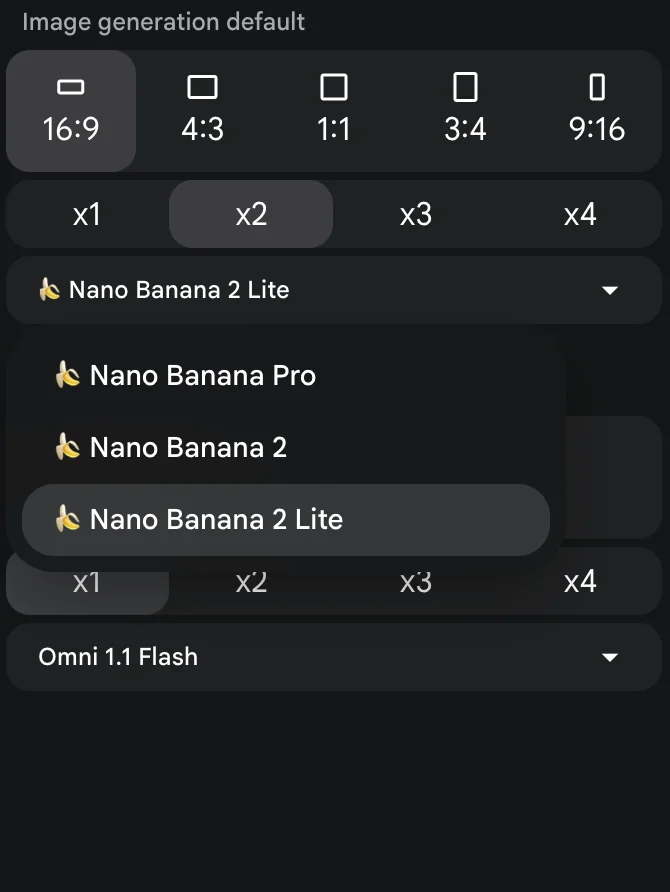
Nano Banana 2 Lite was the default on my account, which matches Google’s Flow models page, where Lite is described as the default available at no charge and Nano Banana Pro as the default for Google AI Ultra subscribers. Nothing stopped my free account from choosing Pro.
For prompts that suit Pro once you are set up, see our Nano Banana Pro prompts guide, which ran 16 of them in Flow.
Two details surprised me. Flow’s agent rewrote my prompts slightly before generating, for example turning “photorealistic” into “photorealistic style”, and on the poster it added a description of Lisbon landmarks. And although the setting “Confirm before generating” was on its default of Always, the agent generated straight away without asking.
To check which model actually made an image, open it in Flow and click the small information icon beside its title. The panel lists the prompt Flow used, the date, the model and the shape; mine read Nano Banana Pro and 16:9 for both images. The chip in the edit box under an open image shows the model too. It is worth checking once, because Flow’s default is Nano Banana 2 Lite and nothing on the image itself tells you which model drew it.
Two free Pro images, against Gemini
I ran the same lighthouse prompt in Flow with Nano Banana Pro that I had run in the free Gemini app. The image was ready in about 36 seconds, and Flow’s info panel confirmed it: created 1 October 2026, Nano Banana Pro, 16:9.
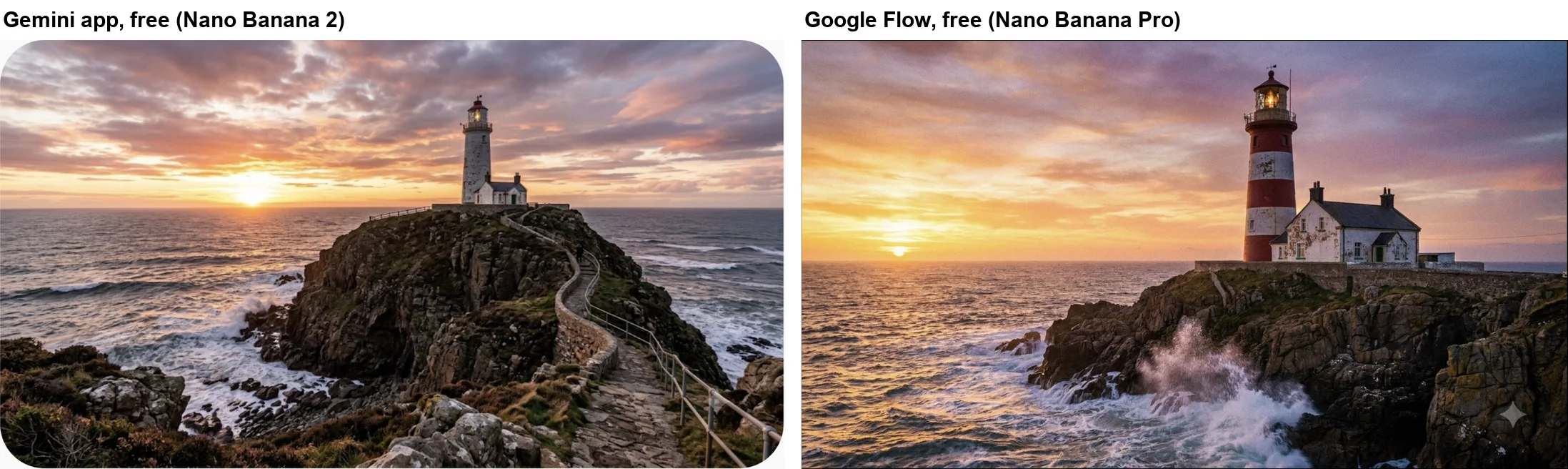
Both are convincing photographs, and on a simple prompt like this one you would struggle to call either one better. Nano Banana Pro chose a more dramatic moment, with spray from a breaking wave, and more texture in the peeling paint of the cottage. Nano Banana 2 gave a wider view with a winding path. If photorealism is all you need, the free Gemini app is already very good.
Text is where Google says Pro pulls ahead, so the second test was a poster with two lines of exact wording.
Create an image of a retro travel poster with the headline “VISIT LISBON” at the top and the line “Trams, tiles and sunsets” at the bottom, flat illustration style.
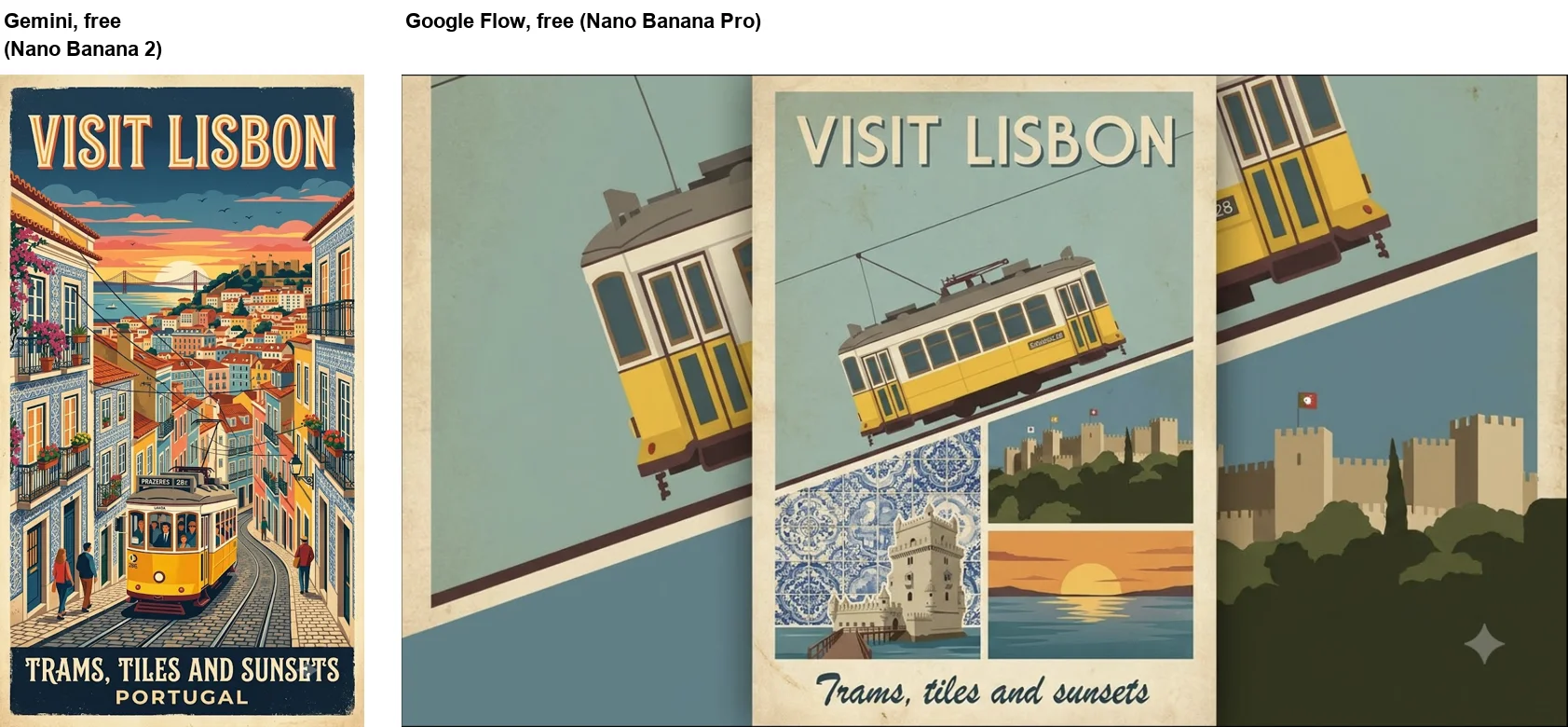
Nano Banana Pro got the words exactly right, including the lower-case “Trams, tiles and sunsets”. Nano Banana 2 in the Gemini app spelled both lines correctly but set the second one in capitals and added a line of its own, “PORTUGAL”. The tram’s destination sign shows another difference: Gemini printed a real Lisbon route, “PRAZERES 28E”, while Pro left it as unreadable pseudo-text.
But the better poster is the Gemini one. Flow’s settings were on 16:9, so Nano Banana Pro drew a tall poster in the middle of a wide frame and filled the sides with cropped copies of its own panels. Gemini, with no shape in the prompt, simply made a tall poster. For posters on Flow, set the shape to 3:4 or 9:16 first.
Did it cost credits?
Not in my test. Before the first image, Flow’s account menu showed 50 Google Flow credits, refreshing daily. After two Nano Banana Pro images it still showed 50, including after a page reload. Google’s credit history page for my account listed 50 Flow credits, 0 AI credits, and a single older entry, “AI credits -20” from November 2025. Neither Pro image appeared in it.
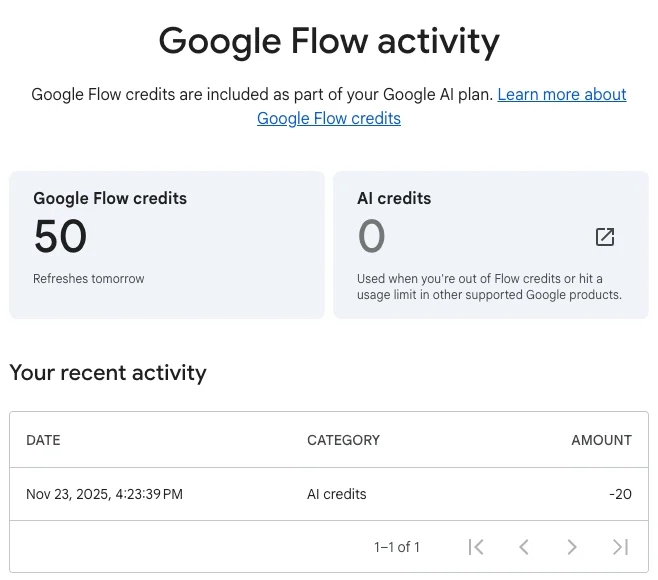
Google’s Flow credits page says everyone gets 50 credits a day, with or without a subscription, and that the daily reset starts from your first generation and unused credits do not roll over. It lists costs for video and upscaling but does not give a credit price for images, which fits what I saw: my two Pro images did not touch the balance. I only made two, so I cannot tell you whether there is a daily cap on free Pro images.
There is a real caveat here. Google’s own Flow getting-started page says access requires a Google AI Plus, Pro or Ultra plan, or a qualifying Workspace plan, which contradicts the credits page and my free account. My account already had a Flow project from November 2025, so I cannot rule out that older accounts are treated differently. If Flow asks you to upgrade, that is why.
AI Studio and the API want a plan or a key
Google AI Studio is the developer playground for Gemini models, and Google’s API pricing page says using AI Studio is free of charge. That does not extend to Nano Banana Pro.
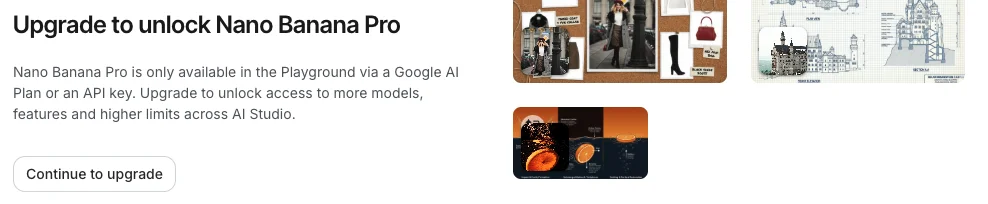
In the model list, Nano Banana Pro, Nano Banana 2 and the original Nano Banana each carry a “Paid” badge; only Nano Banana 2 Lite does not. When I selected Nano Banana Pro, the Playground showed “Upgrade to unlock Nano Banana Pro” and explained that it is only available there with a Google AI plan or an API key. The API itself has no free tier for any of the image models, according to the same pricing page. Nano Banana Pro costs about $0.134 for a 1K or 2K image and $0.24 for 4K.
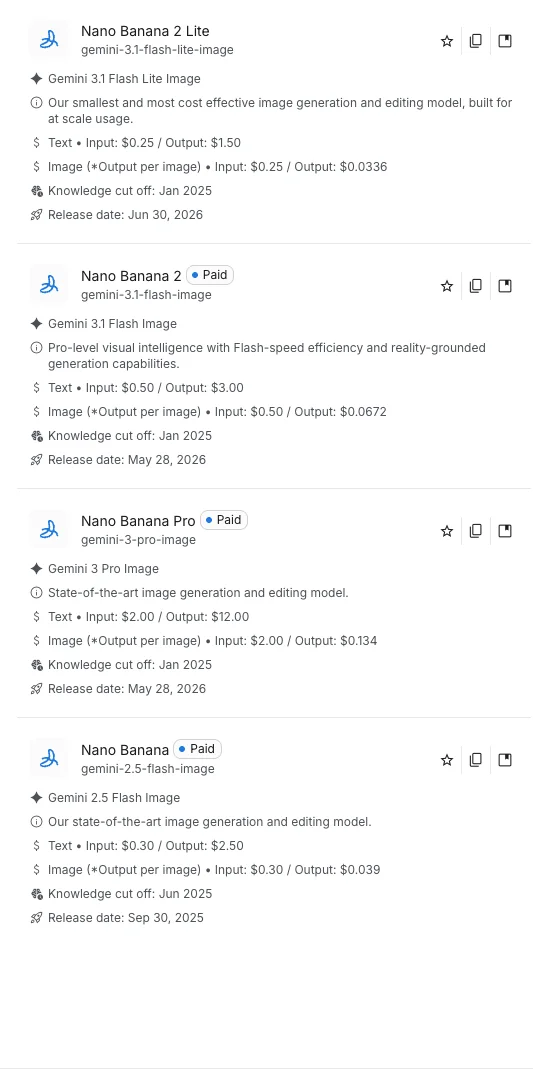
If you are a developer, that is the honest answer: there is no free Nano Banana Pro through the API, and for building an app the realistic options are paying per image or using the cheaper models.
How Pro compares with Nano Banana 2 and Lite on paper
Google positions the three current models as a ladder. Its help page describes Nano Banana Pro as having the highest level of world knowledge, advanced text and language capabilities, higher consistency and more precise creative control. Flow’s models page calls Nano Banana 2 the standard model for fast, high-quality generation and editing, and Nano Banana 2 Lite the highly efficient one.
The API prices show the same order. These are Google’s per-image output prices for a standard image, from the API pricing page:
| Model | API name | Price per standard image | Free in Gemini app? |
|---|---|---|---|
| Nano Banana Pro | gemini-3-pro-image | About $0.134 (1K or 2K) | No, Redo with Pro needs a plan |
| Nano Banana 2 | gemini-3.1-flash-image | $0.067 (1K) | Yes, in Flash or Pro mode |
| Nano Banana 2 Lite | gemini-3.1-flash-lite-image | $0.0336 (1K) | Yes, in Flash-Lite mode |
So Nano Banana Pro costs about twice as much as Nano Banana 2 per image through the API, and four times as much as Lite. My two prompts are far too few to say the extra quality is worth that in general. On a plain photo the two looked equally good; on exact text, Pro was more faithful. If your work is text-heavy, such as posters, labels or infographics, that is where to try it first.
I have since run both models through the same eight prompts: the results are in Nano Banana Pro vs Nano Banana 2. For what each route costs, see our Nano Banana Pro pricing guide.
What paying adds
If you decide the free route is not enough, Google’s pages list what a Google AI plan adds for images. In the Gemini app, a plan adds Redo with Pro and 2K downloads instead of 1K, according to the help page. In Flow, every plan keeps the 50 free daily credits and adds a monthly allowance on top: 200 credits with Google AI Plus, 1,000 with Pro, and 10,000 or 25,000 with the two Ultra tiers, per Google’s Flow credits page. Ultra subscribers also get Nano Banana Pro as Flow’s default image model.
None of that is needed to try Nano Banana Pro, as my free account showed. It matters if you want Pro inside the Gemini app, where you already work, or if Flow’s free access changes.
Watermarks on free Pro images
Both Flow images carry Google’s small sparkle in the bottom-right corner. Flow has a “Visible watermarking” switch in the account menu, but on my account it was greyed out with the note that visible watermarking is required in my region. That matches the Gemini app, where Google’s watermark settings page says India, South Korea and Vietnam only get the switch with Google AI Ultra. Google says images made or edited in the Gemini app also carry an invisible SynthID watermark; I did not check whether the Flow images do. Our Gemini watermark remover guide tests what the official setting removes and what it leaves behind.
Free Nano Banana Pro websites
Most of the search results for this topic are not Google at all. They are third-party sites with names built around Nano Banana Pro that offer free images, usually with a sign-up, a small number of credits and an upgrade button. I did not test any of them. You cannot see which model they really call, what they keep from your prompts and uploads, or whether “Pro” means Google’s Nano Banana Pro. Since Google Flow ran the real model for free on my account, there is little reason to hand your photos to a site you cannot vet.
Common mistakes when chasing free Nano Banana Pro
| Mistake | What actually happens |
|---|---|
| Picking “3.1 Pro” in the Gemini app | It is a chat mode; images still come from Nano Banana 2 |
| Looking for Redo with Pro on a free account | Google’s help page puts it behind a Google AI plan; my free account had no option |
| Leaving Flow on its default model | Flow starts on Nano Banana 2 Lite; switch to Pro in the settings |
| Making a poster on Flow’s 16:9 default | Pro squeezed a tall poster into a wide frame |
| Trusting free “Pro” sites | Unknown models and unknown handling of your images |
The best free route for you
- You want free Nano Banana Pro images: use Google Flow. Switch the image model to Nano Banana Pro, set the shape before you prompt, and check that your credit balance behaves the way mine did.
- You want everyday images and photo edits: the free Gemini app is quicker to reach, and its Nano Banana 2 was close behind on photorealism; our Nano Banana review has the full test.
- You make posters, labels or other text-heavy images: try Pro in Flow first; our Nano Banana prompts guide has text prompts to start from.
- You are building an app: budget about $0.134 per Pro image through the API.
- Skip the third-party “free Pro” sites entirely if your images are private.
Final word
Nano Banana Pro is free on a free Google account, but only in one of Google’s three places. In Google Flow on 1 October 2026, my account picked Nano Banana Pro from the model list and made two images with it, and the 50 daily credits did not move. The Gemini app kept me on Nano Banana 2, and AI Studio asked for an upgrade or an API key.
Pro’s edge showed up in text, not in a simple photo: it printed both poster lines exactly as typed. Use Flow while it lasts, set the shape first, and keep an eye on the credit balance, because Google’s own help pages do not agree on who should get this for free.
Frequently asked questions
Is there a way to get Nano Banana Pro for free?
Yes, Nano Banana Pro is available for free in Google Flow. On a free Google account with no Google AI plan, Flow listed Nano Banana Pro in its image model menu, and two Pro images I made on 1 October 2026 left my 50 daily Flow credits untouched.
The Gemini app does not offer it for free: Google's help page says the Redo with Pro option needs a Google AI plan, and my free account showed no such option. Google AI Studio asked me to upgrade or add an API key before it would run Nano Banana Pro.
Is Nano Banana Pro free or paid?
It depends where you use it. In the Gemini app it is a paid feature, available through Redo with Pro with a Google AI plan, according to Google's help page. In Google AI Studio and the Gemini API it is paid too, at about $0.134 per 1K or 2K image on Google's API pricing page.
In Google Flow, my free account could pick Nano Banana Pro and generate with it without spending credits. Google's Flow help pages are not consistent about free access, so check your own account before you rely on it.
How do I use Nano Banana Pro for free?
Go to Google Flow at flow.google.com, sign in with your Google account and start a new project. Open the agent settings, find Image generation default and change the model from Nano Banana 2 Lite to Nano Banana Pro, then describe the image in the chat panel.
The first visit shows a short welcome and a privacy notice to read through. Google's help page says Flow is for people aged 18 and over in supported regions.
Is Nano Banana Pro better than Nano Banana 2?
Google describes Nano Banana Pro as having the highest level of world knowledge, advanced text and language capabilities, and more precise creative control. In my small test, its travel poster kept both quoted lines in exactly the case I typed, while Nano Banana 2 in the Gemini app put the second line in capitals and added a word I had not asked for.
Nano Banana 2 made the better poster layout, though, because Flow's default wide frame squeezed Nano Banana Pro's poster into the middle of a 16:9 image. Set the shape before you generate.
Does free Nano Banana Pro have a watermark?
Yes. Both Nano Banana Pro images I made in Flow carry the small sparkle in the bottom-right corner, and Flow's watermark switch was locked with the note that visible watermarking is required in my region, Vietnam. Google says images made or edited in the Gemini app also carry an invisible SynthID watermark; I did not check the Flow images for it.
Our Gemini watermark remover guide covers what the official setting does and does not remove.
Are free Nano Banana Pro websites safe?
I did not test them. The search results for this keyword are full of third-party sites that promise free Nano Banana Pro images, usually with sign-ups, credits or upgrades. They are not Google products, and you cannot see which model they really run or what happens to the images and prompts you send.
Google Flow is Google's own route, and on my free account it ran Nano Banana Pro at no cost.
Keep reading
How to Use Nano Banana: Gemini's Image Model, Step by Step
How to use Nano Banana in Gemini: pick the right mode, prompt, edit in plain words and download, with which mode runs which model and what free users get.
Nano Banana Review and Pricing: Fast, Free, Nearly Exact
Nano Banana pricing, tested: 12 prompts on Gemini's free tier, no limit hit. 15 of 15 text strings right, most images in 30 seconds, and one tulip too many.
Nano Banana Prompts: 15 I Tested, With the Results
Nano Banana prompts for headshots, product shots, thumbnails, stickers, logos and edits, each tested in Gemini with the result, and what it ignored.
Gemini Watermark Remover: What Works, Tested Free
Gemini watermark remover options on a free account: the Media Watermark setting (missing for me), cropping, asking Gemini, and what SynthID still shows.