
Nano Banana Pro Pricing: $0 to $0.24 per Image
Nano Banana Pro pricing in full: $0.134 per 1K or 2K image and $0.24 per 4K on the API, half that in batch, plans from $4.99, and one route that cost me $0.
Contents
Nano Banana Pro pricing: the short answer
Nano Banana Pro pricing depends on which Google product you use it through. On the Gemini API, Nano Banana Pro costs $0.134 for a 1K or 2K image and $0.24 for a 4K image, or half that in batch. In the Gemini app it comes with a Google AI plan, from $4.99 a month in the US. In Google Flow, my free account made ten Pro images over two days for nothing.
| Route | What you pay | What you get |
|---|---|---|
| Gemini API, standard | $0.134 per 1K or 2K image, $0.24 per 4K | Pay per image, no free tier |
| Gemini API, batch or flex | $0.067 per 1K or 2K image, $0.12 per 4K | Same images, delivered later |
| Gemini app | Google AI Plus $4.99, Pro $19.99, Ultra from $99.99 a month | Redo with Pro, no fixed image count |
| Google Flow | $0 in my test | 50 credits a day, “limited access” to Pro |
Those are Google’s own prices, read on 2 October 2026. Google does not sell a product called Nano Banana Pro on its own, so any site offering a “Nano Banana Pro plan” is someone else’s business.
Why there is no single Nano Banana Pro price
Nano Banana Pro is a model, not a product. Its technical name is Gemini 3 Pro Image. Google exposes it in several places, and three of them charge in different ways: the API, the Gemini app and Google Flow. That is why a search for the price returns numbers as far apart as $0.134 and $19.99.
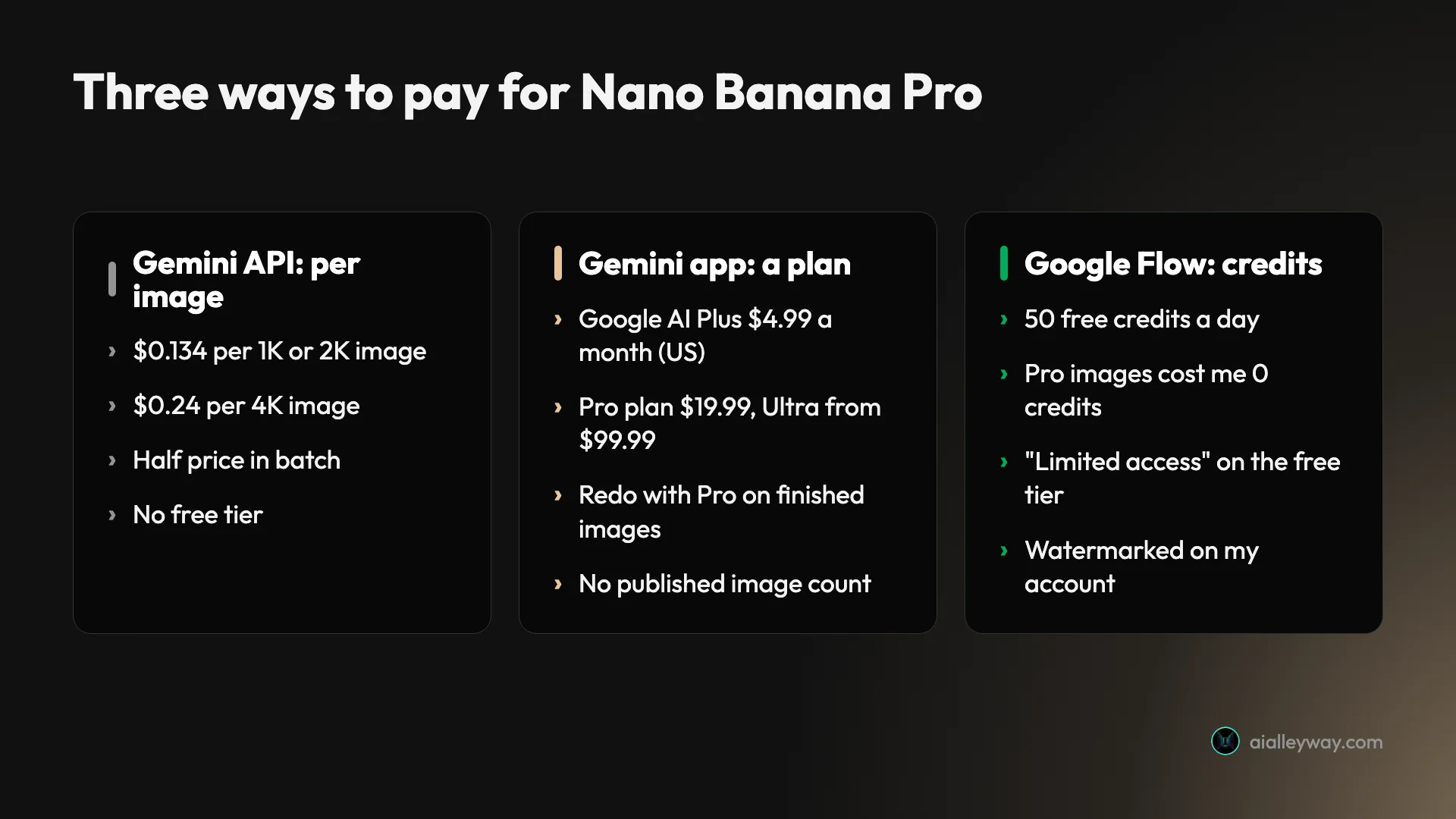
The API charges per image, through tokens. You send a request, Google counts the tokens in the picture it returns, and you are billed for those. This is the route for developers and for anyone generating in bulk.
The Gemini app charges nothing per image. Instead, Nano Banana Pro is one of the features you get with a Google AI subscription, alongside storage and higher chat limits. You cannot buy it there separately.
Google Flow, Google’s video and image studio, runs on credits. Every account gets 50 a day, and subscribers get more each month. Google AI Studio, the browser playground for developers, sits between the app and the API: it follows your plan or your API key.
So the useful question is which route fits how many images you make. The rest of this guide takes each route in turn, then works out where one becomes cheaper than another.
The Nano Banana Pro API rate card, image by image
Nano Banana Pro API pricing is the only price Google states per image, and it is short enough to memorise. The Gemini API pricing page, last updated on 1 October 2026, lists four rates for Nano Banana Pro.
| Rate | 1K or 2K image | 4K image | When to use it |
|---|---|---|---|
| Standard | $0.134 | $0.24 | Normal requests, answered straight away |
| Batch | $0.067 | $0.12 | Bulk jobs you can wait for |
| Flex | $0.067 | $0.12 | Lower-priority requests at the batch price |
| Priority | About $0.24 | About $0.43 | Lower latency and higher reliability, at 80% more |
The priority figures are my arithmetic. Google lists that rate only as $216 per million image output tokens, against $120 at the standard rate, and does not print a per-image number for it.
Two things about this table are easy to miss. A 1K image and a 2K image cost the same, so on Pro there is no saving in asking for the smaller size. And there is no free tier: the page marks the free tier as “Not available” for this model, where some of Google’s text models have one.
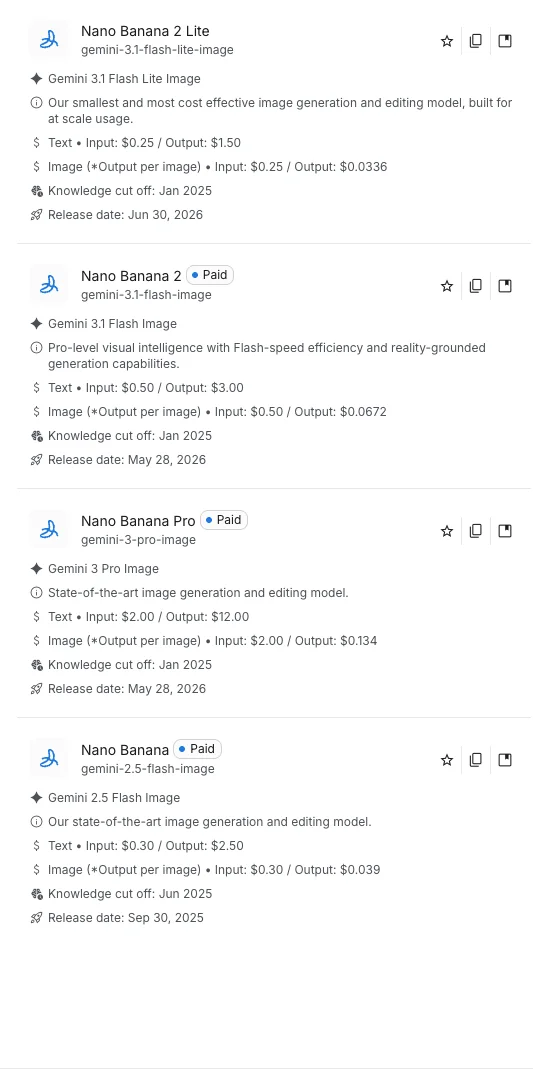
Google AI Studio shows the same number in its model list. On my free account, Nano Banana Pro carried a Paid badge and a price of $0.134 per output image.
Where $0.134 comes from: the token maths
Google does not really charge per image. It charges per token and gives the per-image figure as an equivalent, and knowing the difference explains every other number on the page.
The pricing page sets image output at $120 per million tokens. A footnote says an output image from 1024 by 1024 pixels up to 2048 by 2048 uses 1,120 tokens, and an image up to 4096 by 4096 uses 2,000. Multiply those out and you get $0.1344 and $0.24.
| Item | Tokens | Rate per million tokens | Cost |
|---|---|---|---|
| Output image, 1K or 2K | 1,120 | $120 | $0.134 |
| Output image, 4K | 2,000 | $120 | $0.24 |
| Input image (a reference or a photo to edit) | 560 | $2 | $0.0011 |
| Your text prompt | Varies | $2 | A fraction of a cent |
| Text and thinking output | Varies | $12 | Varies |
The last three rows are why a real bill runs slightly above the headline. Each image you upload as a reference or for editing adds about a tenth of a cent. Your prompt is billed as input text. And any text the model writes back, including its thinking, is billed at $12 per million tokens. I have not run the API, so I cannot say how many thinking tokens a typical request adds. The image itself is the main charge, and the extras are not zero.
Buying through Vertex AI: same token rate
Businesses that buy through Google Cloud pay the same token rate. Google Cloud’s pricing page for Vertex AI, a product Google now presents under the name Agent Platform, lists Gemini 3 Pro Image at $2 per million input tokens, $12 per million text output tokens and $120 per million image output tokens on its global standard rate. Its footnote gives the same per-image equivalents: $0.134 for a 1K or 2K image and $0.24 for 4K.
The priority rate there is also $216 per million image output tokens. So the choice between the Gemini API and Google Cloud is about billing, contracts and tooling, and the image price is the same on both. I have not used either, so I cannot speak to quotas or to how invoices look in practice.
Google AI plans that include Nano Banana Pro
In the Gemini app, Nano Banana Pro is a perk of a subscription, and the cheapest plan that includes it is Google AI Plus. The US version of Google’s subscriptions page, read on 2 October 2026, lists four tiers.
| Plan | Price per month (US) | Gemini usage | Nano Banana Pro in the Gemini app | Flow credits |
|---|---|---|---|---|
| Free | $0 | Standard | ✗ | 50 a day |
| Google AI Plus | $4.99 | 2x standard | ✓ Redo with Pro | 50 a day + 200 a month |
| Google AI Pro | $19.99 | 4x standard | ✓ Redo with Pro | 50 a day + 1,000 a month |
| Google AI Ultra | $99.99 or $199.99 | 5x or 20x the Pro plan | ✓ Redo with Pro | 50 a day + 10,000 or 25,000 a month |
The Pro column comes from Google’s Gemini limits page, whose feature table ticks “Redo images with Nano Banana Pro” for Plus, Pro and Ultra and marks it unavailable for accounts without a plan. The Flow credits come from Google’s Flow credits page. Prices differ by country, and Google localises the page, so check your own.
What the plans do not give you is a number of images. Gemini’s limits are based on compute and refresh every five hours until you hit a weekly cap. Google’s limits page says the allowance depends on the models and features you use, and its image help page separately mentions a daily quota of Nano Banana 2 images. Plus doubles the standard allowance and the Pro plan quadruples it. Google does not publish either number, or how many Pro images they allow.
So what does Nano Banana Pro cost per month? Through the app, it is the price of the plan: $4.99, $19.99 or from $99.99 in the US, whether you make one Pro image or as many as the allowance permits. Through the API it is whatever you generate, with no minimum, so a quiet month costs nothing.
There is also a catch in how Pro works in the app. You do not choose it up front. By Google’s help page, you make an image first with Gemini set to Pro mode, then use Redo with Pro on it. Our how to use Nano Banana guide walks through the steps.
Google Flow: the route that cost me nothing
Google Flow is where the price of Nano Banana Pro dropped to zero on my account. I have no Google AI plan. On 1 October I made two Pro images there, and on 2 October another eight for our Nano Banana Pro vs Nano Banana 2 test. The credit balance read 50 before and 50 after on both days.
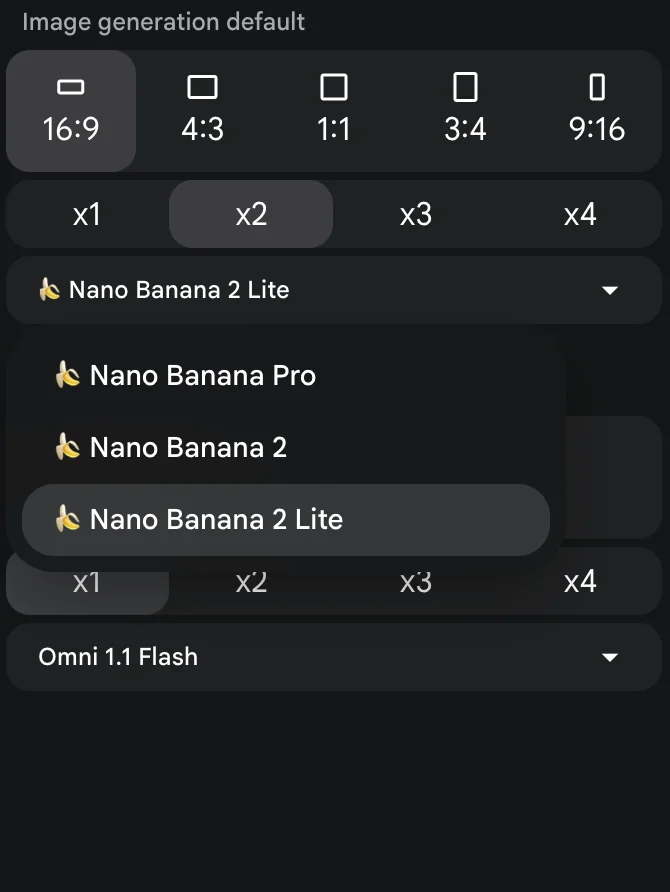
Google’s own pages half-explain this. The subscriptions page says the free tier’s Flow access includes “limited access to Nano Banana Pro”. The Flow credits page says every account gets 50 credits a day, and its table of credit costs lists only video models. No image model appears in it, which fits what I saw: images did not draw credits at all.
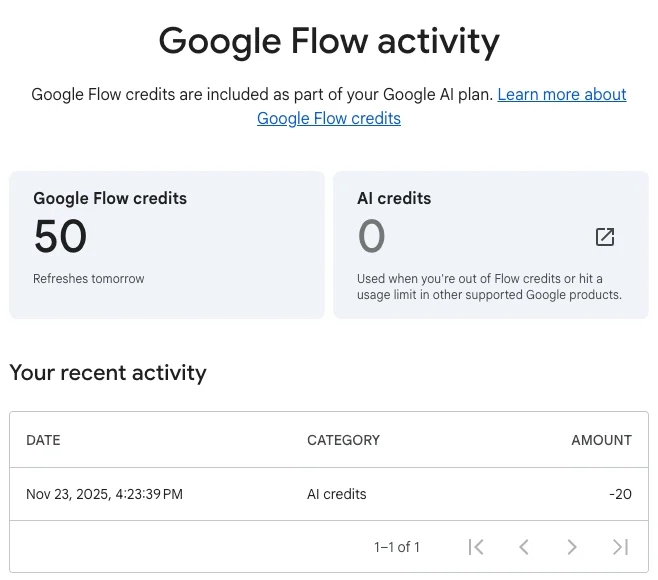
I would not budget around it. “Limited” is not defined, I did not find the limit in ten images, and Google’s Flow getting-started page says access needs a Google AI plan or a qualifying Workspace plan, which contradicts both the credits page and my result. My account also had a Flow project from November 2025, so I cannot rule out that older accounts are treated differently. Flow also has conditions: Google says it is for people aged 18 and over in supported regions, and my images carried a visible watermark. Our Nano Banana Pro free guide has the full walkthrough.
Google AI Studio follows your plan or your key
AI Studio is not a fifth price list. It is a front end, and what Nano Banana Pro costs there depends on what you bring. On my free account, selecting Pro produced an upgrade notice instead of an image.
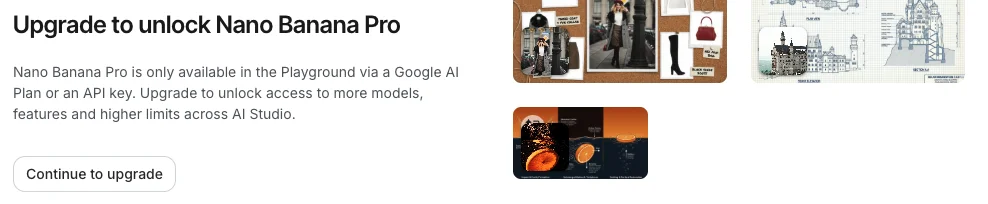
The notice names the two ways in. With a Google AI plan, Google’s plans page lists image generation and editing with Nano Banana Pro in AI Studio as Limited on Plus, Expanded on the Pro plan and Higher or Highest on Ultra, again without numbers. With an API key, you pay the per-image rates above.
What Nano Banana Pro costs for five real workloads
Per-image prices only mean something at a volume, so here are five realistic workloads priced at Google’s API rates. These cover image output only and leave out the small input and text charges.
| Workload | Images | Standard | Batch |
|---|---|---|---|
| A few hero images a month, 2K | 20 | $2.68 | $1.34 |
| Weekly social posts, 1K | 100 | $13.40 | $6.70 |
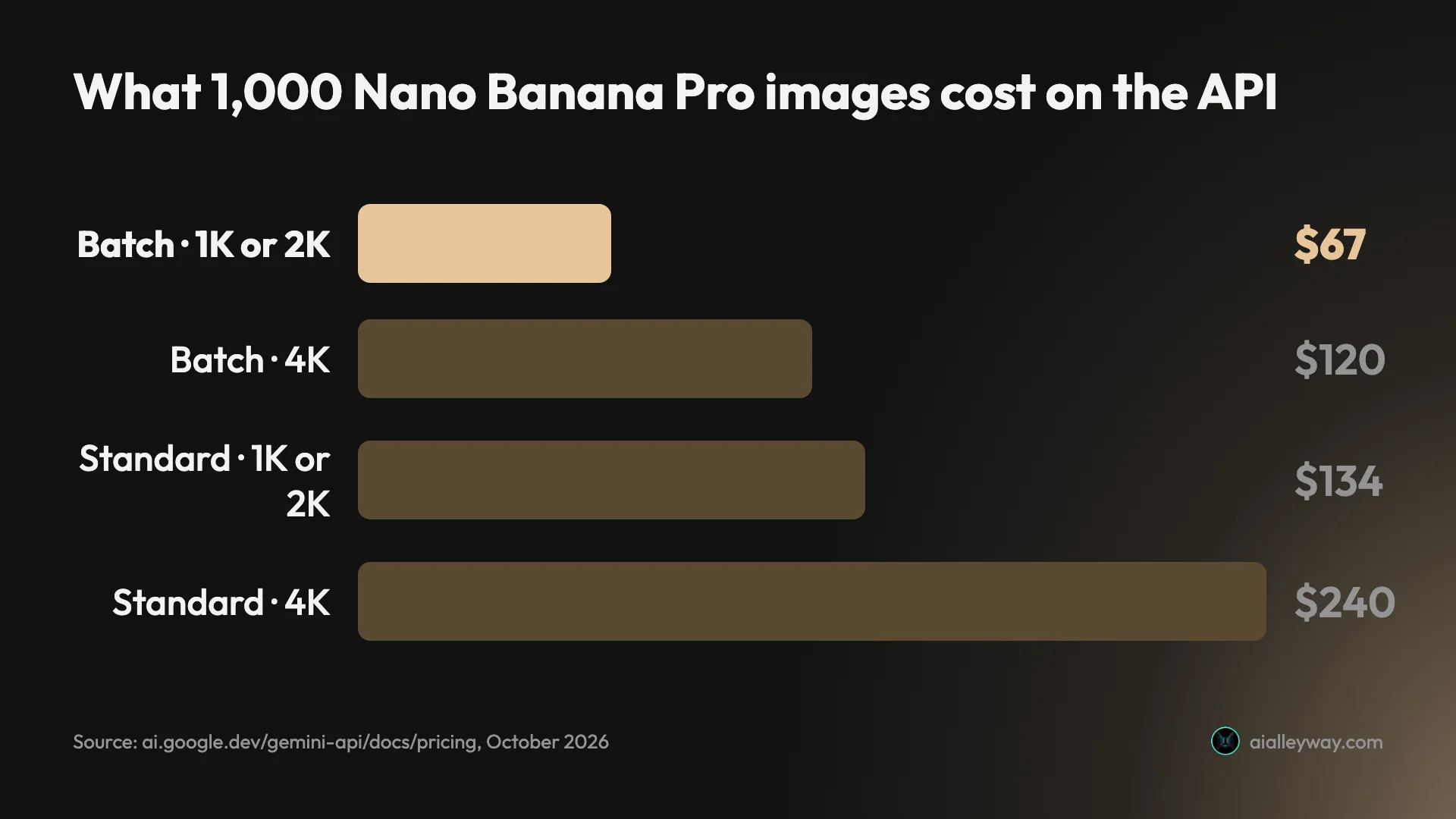
| A product catalogue, 2K | 1,000 | $134 | $67 |
| Print-ready artwork, 4K | 1,000 | $240 | $120 |
| An app generating daily, 1K | 10,000 | $1,340 | $670 |
Retries change the sum. The API charges for every image it returns, including the ones you throw away. In my eight-prompt test, Pro’s first attempt matched the brief closely on most prompts, but it scored 4 of 7 on a detailed street scene. If one image in five needs a second attempt, your real cost per usable 2K image is about $0.16 instead of $0.134.
Search grounding can add more than editing does. Say an app makes 10,000 grounded image requests in a month and each triggers one search. The first 5,000 searches are free, and the other 5,000 cost $70 at $14 per 1,000, on top of the images.
Editing adds a little. Sending one photo to edit, with a 2K result, costs about $0.135: the $0.134 output plus $0.0011 for the input image. Sending five reference images adds about half a cent.
Plan or API: where the break-even sits
A subscription and the API are priced in different units, but you can still line them up. Divide a plan’s monthly price by $0.134 and you get the number of standard-rate API images the same money buys.
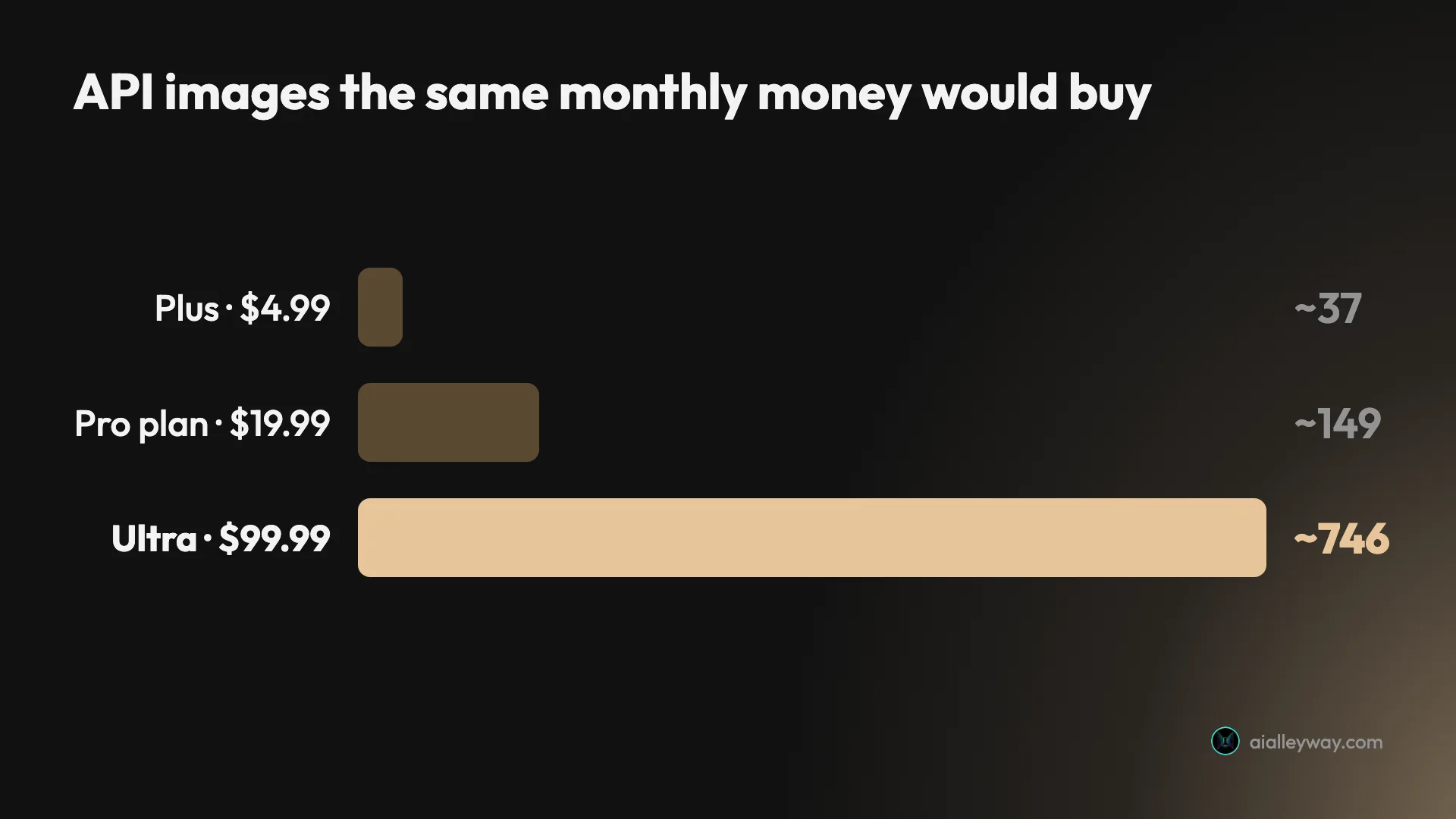
| Plan | Monthly price (US) | Same money on the API, 1K or 2K |
|---|---|---|
| Google AI Plus | $4.99 | About 37 images |
| Google AI Pro | $19.99 | About 149 images |
| Google AI Ultra | $99.99 | About 746 images |
This does not say Plus gives you 37 Pro images. The plan covers chat and video too, and its image allowance is unpublished. What it says is that below about 37 Pro images a month, the API is cheaper than any plan for images alone. Above that, at the standard rate, Plus is cheaper if its allowance stretches that far, and the $19.99 plan only makes sense on image price once Plus runs out.
The plans also bundle things the API never will: storage, higher Gemini limits, Flow credits and Gemini inside Google’s other apps. If you want those anyway, Nano Banana Pro is effectively a free extra. If images are all you want, the API or Flow is the straighter deal.
Nano Banana Pro price traps to watch
Six things can make Nano Banana Pro cost more than the headline numbers suggest, and the first is not Google’s doing.
| Trap | What it costs you |
|---|---|
| Reseller plans | A separate subscription, on someone else’s terms |
| App quota | No Pro redos once the standard image quota is used |
| Search grounding | $14 per 1,000 searches after the free 5,000 |
| Priority rate | 80% more per image |
| Local pricing | A different plan price from the US one |
| Free Flow access | Could shrink or end without notice |
Reseller sites are not Google
Most of the search results for this topic are independent websites with names built around “nano banana” and their own plans. The result snippets I pulled on 2 October showed monthly plans from $4.99 to $59.90. They are separate businesses that resell access, and their credits, limits and refund terms are their own. I did not test any of them. Google’s prices are the ones on its own pages, linked above.
The app plan can run out before Pro does
Google’s image help page says that if you reach your daily quota of Nano Banana 2 images, you cannot redo any more with Nano Banana Pro. Pro in the app depends on the standard model’s allowance, so a heavy day of ordinary images can lock you out of Pro.
Search grounding is billed separately
On the API, letting the model check facts with Google Search is free for the first 5,000 search requests a month, shared across Google’s Gemini 3 models. After that the pricing page lists $14 per 1,000 requests, and it notes that one image request can trigger more than one search.
Priority costs 80% more
The priority rate is $216 per million image output tokens against $120. If a setting or a provider routes you to priority, a 4K image costs about $0.43 by my arithmetic, 80% above the standard $0.24. The rate is on Google’s pricing page, and Google’s documentation describes priority as the tier for lower latency and higher reliability, so it is a choice you make for a live product, and a waste for anything that can wait.
Plan prices change by country
The plan prices in this guide are the US ones. Google localises its subscriptions page, and my own account, which is set to Vietnam, is shown local prices instead. The API is simpler: its rates are listed in US dollars for everyone. If you are comparing a plan with the API, use the plan price your own account shows.
Free access in Flow is not guaranteed
Flow’s free Pro access is described as “limited” on the subscriptions page. Google’s Flow credits page says every account gets 50 credits a day, while its Flow getting-started page says access needs a Google AI plan or a qualifying Workspace plan. Google can change any of the three. Treat free Pro as a bonus.
Picking the cheapest route for your volume
Match the route to how many images you make and what else you need.
| Images a month | Cheapest route with a published price | Rough monthly cost |
|---|---|---|
| A handful (I tested up to 8 in a day) | Google Flow, if your account gets Pro there | $0 |
| Under about 37, or about 74 in batch | Gemini API | Under $5 |
| More than that, in the app | Google AI Plus, if its allowance holds (Google publishes no count) | $4.99 |
| 1,000 at 2K | Gemini API, batch | $67 |
| 1,000 at 4K | Gemini API, batch | $120 |
- You make a handful of images a month. Try Google Flow first. If your account gets Pro there for nothing, as mine did, you are done.
- You already want Google storage or higher Gemini limits. Google AI Plus at $4.99 adds Redo with Pro in the app. That is the cheapest plan that includes it.
- You are a developer or you generate in bulk. Use the API, and use batch whenever you can wait. A thousand 2K images cost $67 that way.
- You need 4K. The API is the route with a stated 4K price, at $0.24, or $0.12 in batch.
- Skip paying for Pro if your images are everyday pictures with no exact text in them. Nano Banana 2 is free in the Gemini app and matched Pro on four of the eight prompts I ran.
Cheaper options inside the same family
If the numbers above add up to more than you want to spend, the cheaper models are Google’s own. On the same pricing page, Nano Banana 2 costs $0.067 for a 1K image, $0.101 for 2K and $0.151 for 4K. Nano Banana 2 Lite costs $0.0336 for a 1K image and does not go larger.
| Model | 1K image | 2K image | 4K image |
|---|---|---|---|
| Nano Banana Pro | $0.134 | $0.134 | $0.24 |
| Nano Banana 2 | $0.067 | $0.101 | $0.151 |
| Nano Banana 2 Lite | $0.0336 | Not offered | Not offered |
At 1K, Nano Banana 2 is half the price of Pro and Lite is a quarter. At 2K, Nano Banana 2 is only about 25% cheaper, which makes Pro easier to justify when you need that size anyway. Our Nano Banana review covers how the free models behave.
The final word on Nano Banana Pro pricing
Nano Banana Pro has one clear price and several unclear ones. The clear one is the API: $0.134 for a 1K or 2K image, $0.24 for 4K, half that in batch. The unclear ones are the subscriptions, which include Pro without saying how much of it, and Google Flow, which gave it to my free account for nothing without saying for how long.
Start with the free route, pay per image if you build things, and buy a plan only if you want the rest of what it bundles.
Frequently asked questions
How much does Nano Banana Pro cost per image?
On Google's Gemini API, Nano Banana Pro costs the equivalent of $0.134 for a 1K or 2K image and $0.24 for a 4K image at the standard rate. The batch and flex rates are half that: $0.067 and $0.12. Google bills by token, at $120 per million image output tokens, and the per-image figures follow from the token count of each size.
There is no free API tier for Nano Banana Pro. In Google Flow, on the other hand, my free Google account made ten Nano Banana Pro images over two days without spending any of its 50 daily credits.
How much does the Nano Banana Pro app cost?
There is no separate Nano Banana Pro app or subscription from Google. Nano Banana Pro is a model inside Google's products, including the Gemini app, Google Flow, Google AI Studio and the Gemini API.
In the Gemini app it comes with a Google AI plan. Google's US subscriptions page lists Google AI Plus at $4.99 a month, Google AI Pro at $19.99 and Google AI Ultra at $99.99 or $199.99. Websites that sell their own Nano Banana Pro plans are independent businesses with their own prices.
Is Nano Banana Pro still free?
In Google Flow it was for me, as of 2 October 2026. My free Google account could select Nano Banana Pro there, and ten images across two days left the 50 daily credits untouched. Google's subscriptions page describes the free tier's Flow access as including limited access to Nano Banana Pro, without saying what the limit is.
It is not free in the Gemini app, where redoing an image with Pro needs a Google AI plan, and it has no free tier on the API.
Is Nano Banana Pro included in Gemini Pro (Google AI Pro)?
Yes. Google's Gemini limits page lists Redo images with Nano Banana Pro as available on Google AI Plus, Google AI Pro and Google AI Ultra, and not on accounts without a plan. The standard model, Nano Banana 2, is listed for every account including free ones.
The plan does not come with a fixed number of Pro images. Gemini's limits are based on compute: Plus gets twice the standard allowance, the Pro plan four times, and Ultra five or twenty times the Pro plan's.
How much does Nano Banana Pro cost per month?
It depends on the route. Through the Gemini app you pay for a Google AI plan: $4.99 a month for Plus, $19.99 for the Pro plan, or $99.99 and $199.99 for Ultra, at US prices. The plan includes Redo with Pro but no stated number of images.
Through the API there is no monthly fee. You pay $0.134 per 1K or 2K image and $0.24 per 4K image, so 100 images a month cost $13.40 and a month with no images costs nothing.
Is Nano Banana Pro worth the price?
For images where exact wording matters, yes. In my eight-prompt test against Nano Banana 2, Pro printed a three-line poster word for word with nothing added, while Nano Banana 2 made three additions of its own. Pro costs twice as much per 1K image on the API, $0.134 against $0.067.
For everyday images it is harder to justify paying, because Nano Banana 2 matched Pro on four of the eight prompts and is free in the Gemini app. If your account can reach Pro in Google Flow at no cost, the question mostly answers itself.
Is Nano Banana Pro cheaper with batch processing?
Yes, by half. Google's pricing page lists the batch rate at $0.067 per 1K or 2K image and $0.12 per 4K image, against $0.134 and $0.24 at the standard rate. The flex rate is the same as batch.
The trade is time. Batch jobs are processed in the background rather than answered straight away, so they suit catalogues and bulk variations, not a person waiting for a picture.
How much does Nano Banana Pro cost on Vertex AI?
The same per token as on the Gemini API. Google Cloud's pricing page for Vertex AI, which Google now presents as Agent Platform, lists Gemini 3 Pro Image at $120 per million image output tokens on the global standard rate, which works out to the same $0.134 for a 1K or 2K image and $0.24 for a 4K image.
The priority rate on both pages is $216 per million image output tokens, which by my arithmetic is about $0.24 for a 1K or 2K image and $0.43 for a 4K image.
Keep reading
Nano Banana Pro Free: Where It Actually Works, Tested
Nano Banana Pro free, tested on a free Google account: it worked in Google Flow at no credit cost, but not in the Gemini app or AI Studio.
Nano Banana Pro vs Nano Banana 2: 8 Prompts, Tested
Nano Banana Pro vs Nano Banana 2 on the same 8 prompts: Pro added nothing to a poster, Nano Banana 2 costs half per 1K image. Which to use, and when.
Nano Banana Review and Pricing: Fast, Free, Nearly Exact
Nano Banana pricing, tested: 12 prompts on Gemini's free tier, no limit hit. 15 of 15 text strings right, most images in 30 seconds, and one tulip too many.
How to Use Nano Banana: Gemini's Image Model, Step by Step
How to use Nano Banana in Gemini: pick the right mode, prompt, edit in plain words and download, with which mode runs which model and what free users get.