
Nano Banana Pro vs Nano Banana 2: 8 Prompts, Tested
Nano Banana Pro vs Nano Banana 2 on the same 8 prompts: Pro added nothing to a poster, Nano Banana 2 costs half per 1K image. Which to use, and when.
Contents
Pro for precision, Nano Banana 2 for value: the verdict
Nano Banana Pro vs Nano Banana 2 comes down to this: Nano Banana Pro is the more exact model and Nano Banana 2 is the better deal. On 2 October 2026 I ran the same eight prompts through both in Google Flow, on a free Google account. Pro printed a concert poster word for word and drew a clean close-up of hands. Nano Banana 2 made three additions to the poster that nobody asked for and put an extra foot in the hands photo, yet it beat Pro on a seven-part scene and matched it on a menu, a diagram and a map. On Google’s API it costs half as much per 1K image.
| Pick | Why | |
|---|---|---|
| Best for exact text and layouts | Nano Banana Pro | Poster lines word for word, nothing added |
| Best for everyday images | Nano Banana 2 | Matched Pro on 4 of 8 prompts, free in the Gemini app |
| Best overall value | Nano Banana 2 | $0.067 per 1K image on the API against $0.134 |
If you searched Nano Banana 2 vs Nano Banana Pro expecting the cheaper model to be the quick one, one finding went against the usual advice: in Flow, Nano Banana 2 was clearly slower than Pro on three of my eight prompts and not clearly faster on any. The details, and the limits of that result, are in the speed section.
Gemini 3 Pro Image and Gemini 3.1 Flash Image at a glance
Both models are Google’s, both live under the Nano Banana name inside Gemini, and the naming hides how different their roles are. Nano Banana Pro is Gemini 3 Pro Image. Nano Banana 2 is Gemini 3.1 Flash Image. The table mixes what I measured with what Google publishes, and says which is which.
| Axis | Nano Banana Pro | Nano Banana 2 |
|---|---|---|
| Model behind the name | Gemini 3 Pro Image | Gemini 3.1 Flash Image |
| Google’s description | ”The premium choice for the most complex visual tasks" | "generalist workhorse model for all tasks” |
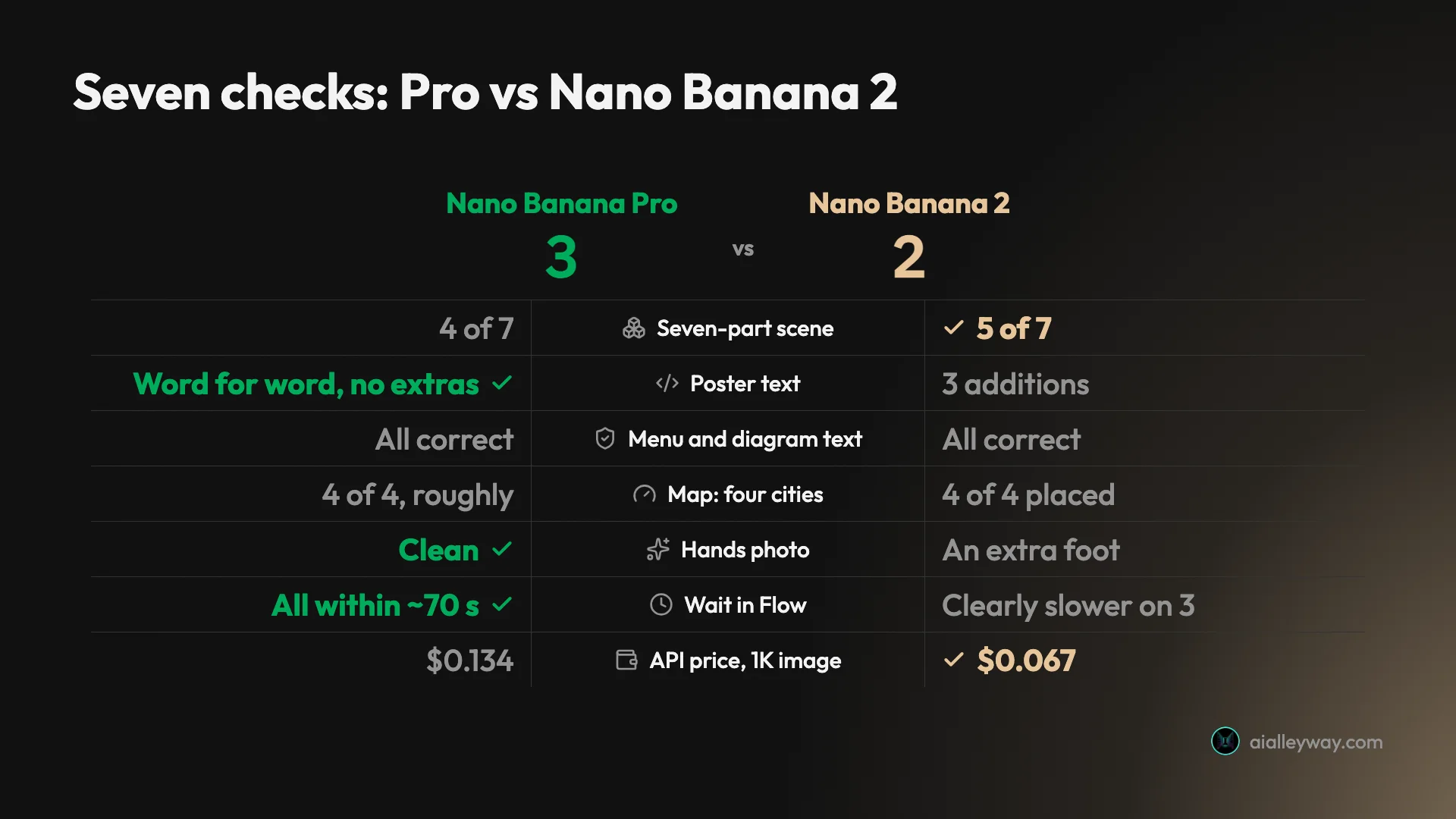
| Seven-part scene (my test) | 4 of 7 | 5 of 7 |
| Poster text (my test) | 3 lines word for word (all caps), nothing added | 3 lines correct, 3 additions |
| Menu, diagram, map text (my test) | All correct | All correct, plus extras |
| Hands photo (my test) | Clean | An extra foot in frame |
| Wait per image in Flow (my test) | Within about 70 seconds | Within about 90 seconds, one near 2 minutes |
| Free in the Gemini app | ✗ Needs a Google AI plan | ✓ Flash and Pro mode |
| Free in Google Flow (my test) | ✓ 0 credits | ✓ 0 credits |
| API price, 1K image | $0.134 | $0.067 |
| API price, 4K image | $0.24 | $0.151 |
| Reference images (API) | Up to 6 objects + 5 characters + 3 style references | Up to 10 objects + 4 characters |
The scorecard counts axes, including wait time and price, so its 3 to 2 tally is not the same as the prompt-by-prompt count below.
The eight-prompt Flow test, and its limits
I used one Flow project, set the image shape to 4:3 and the count to one image, and chose the model in Flow’s settings: Nano Banana Pro for the first run, Nano Banana 2 for the second. Each prompt was typed word for word, once per model, with no retries. That makes sixteen images in total.
Three limits matter. Flow’s chat agent rewords prompts before it generates, so neither model saw my exact words, though both went through the same agent. One image per prompt is a small sample, and a second attempt could go differently. And I did not test editing, reference images, 4K output or the API itself. Our Nano Banana Pro free guide explains how a free account gets to both models in Flow.
| Prompt | Nano Banana Pro | Nano Banana 2 | Better |
|---|---|---|---|
| Seven-part street scene | 4 of 7 | 5 of 7 | Nano Banana 2 |
| Concert poster, three lines | Word for word, nothing added | Correct, three additions | Pro |
| Chalkboard menu, four prices | All correct | All correct, plus doodles | Draw |
| Water cycle, four labels | All correct | All correct, plus a title | Draw |
| Map of Italy, four cities | All roughly placed, plain outline | All placed, twelve extra labels | Draw |
| Portrait of an elderly woman | Close-up, visibly elderly | Wider shot, looks younger | Pro |
| Hands tying a boot | Clean | An extra foot | Pro |
| Earbud case product shot | Clean | Clean, darker | Draw |
What the Pro model gets right, and where it falls short
Pro earned its name on the two prompts where a small mistake ruins the picture.
- It printed my words and nothing else. The poster carried my three lines, in capitals, and no others. That is the behaviour you need for an ad, a flyer or a label.
- It kept scenes plausible. Its hands photo showed two hands and one boot. Its portrait matched the brief for an elderly woman more closely than Nano Banana 2’s.
- It was not slow. Every image arrived within about 70 seconds in Flow.
- It cost me nothing in Flow. Eight Pro images left my 50 daily credits untouched.
- Gap: it is harder to reach. In the Gemini app it is a paid extra, and in Google AI Studio my free account was told to upgrade or add an API key.
- Gap: it lost the counting test. On the seven-part scene it got four elements right, one fewer than Nano Banana 2.
- Gap: it costs double on the API at 1K, and it has no 512px size for cheap drafts.
Nano Banana 2 on the same eight prompts: wins and misses
Nano Banana 2 is the model a free Gemini account gets as soon as it switches from Flash-Lite to Flash or Pro mode, and it held up better than its cheaper-tier reputation suggests.
- It is free where it matters. Google’s help page says the Gemini app’s Flash and Pro modes both use Nano Banana 2, and my free account had both modes.
- It matched Pro on structured text. Four menu prices, four diagram labels and four map cities were all correct.
- It won the seven-part scene, 5 of 7 against 4 of 7, by getting the green pot right.
- It is half the price on the API for a 1K image, and it adds a 512px size at $0.045.
- It has developer controls Pro lacks. Google’s documentation lists a thinking level setting and Google Image Search grounding for it.
- Gap: it decorates. It added text to the poster, a title to the diagram, doodles to the menu and twelve extra labels to the map.
- Gap: it slipped on a photo. The hands image had one foot too many.
- Gap: it was not faster in Flow, which is what Google positions it for.
Does the cheaper model really cost half as much?
At 1K, yes, exactly half. At larger sizes the gap narrows, and for a person using Google’s own apps the price difference can vanish. There are three separate price stories here, and mixing them is how the confusion starts.
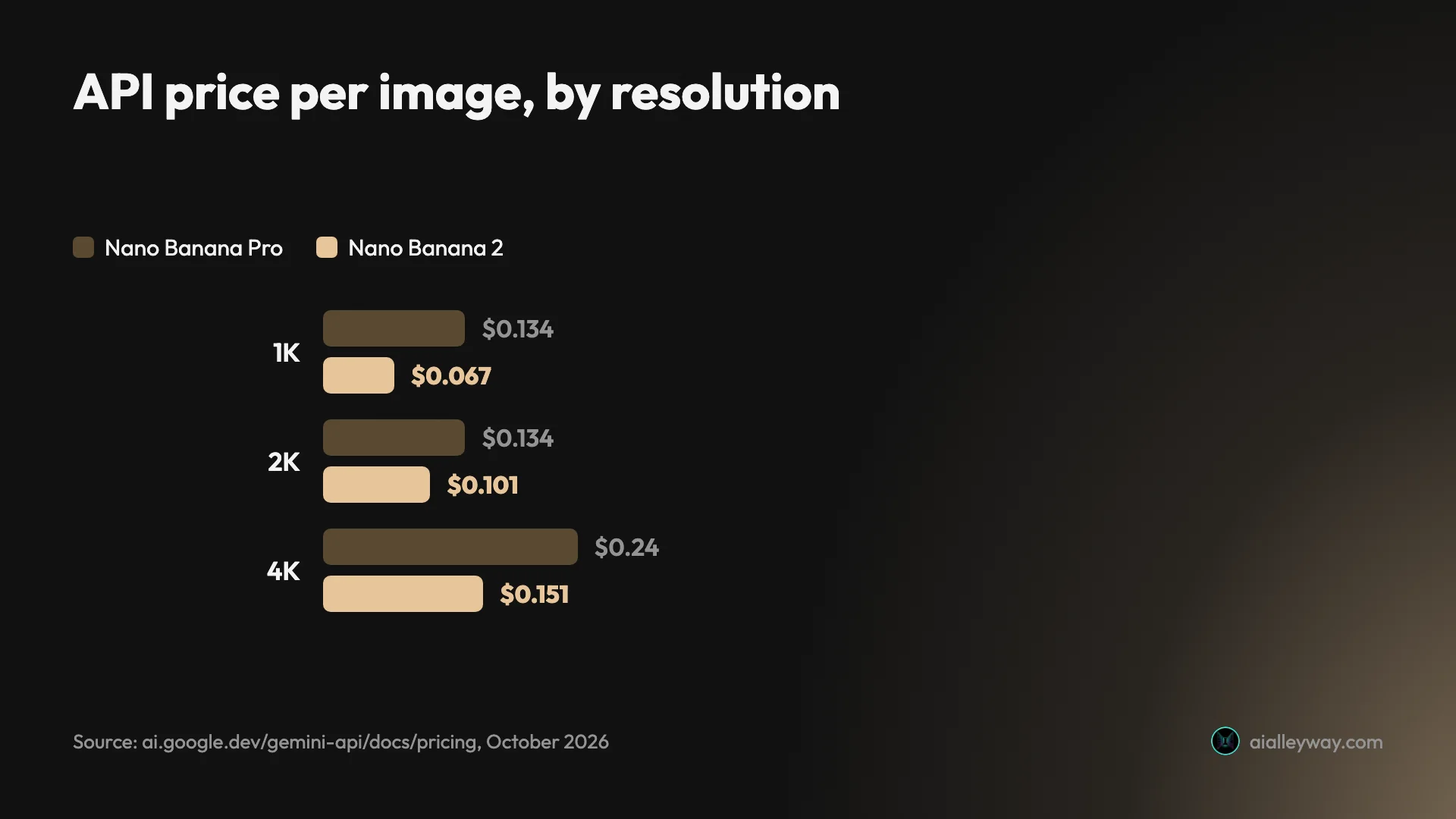
The API. Google’s Gemini API pricing page bills by token and gives a per-image equivalent for each size. Nano Banana Pro is $0.134 for a 1K or 2K image and $0.24 for a 4K image. Nano Banana 2 is $0.045 at 512px, $0.067 at 1K, $0.101 at 2K and $0.151 at 4K. So the saving is 50% at 1K, about 25% at 2K and about 37% at 4K. The page lists no free tier for either model.
The 2K row is the interesting one. Pro charges the same for 1K and 2K, so if you need 2K anyway, Pro costs only about a third more than Nano Banana 2 rather than double. Batch jobs halve everything: $0.067 for a 1K or 2K Pro image, $0.034 for a 1K Nano Banana 2 image.
To put numbers on it, a thousand 1K images cost about $134 on Pro and $67 on Nano Banana 2. At 2K the same thousand cost $134 and $101. A team generating product variations all day will feel the first gap. Someone making twenty hero images a month will not notice either.
The Gemini app. Here the difference is a subscription, not a per-image price. Nano Banana 2 is what the app uses in Flash and Pro mode, which my free account had. Nano Banana Pro only appears as Redo with Pro, which Google’s help page says needs a Google AI plan. Our Nano Banana Pro pricing guide covers the plans.
Google Flow. This is where the price gap was zero for me. My account has no Google AI plan. Flow gives 50 credits a day, and after eight Pro images and eight Nano Banana 2 images the balance still read 50. I would not treat that as a promise: Google’s Flow help pages disagree with each other about who gets free access, and the allowance could change.
Price winner: Nano Banana 2 on the API. In Flow it was a draw at zero.
Image quality: eight prompts, three wins for Pro
Pro made fewer mistakes that matter, and Nano Banana 2 made more additions. Across eight prompts I count three where Pro was better, one where Nano Banana 2 was better, and four draws. Here is each group.
Following a seven-part brief
The first prompt asked for a red bicycle leaning against a blue door, a black cat in the basket, three yellow tulips in a green pot on the left, a house number 47 above the door, and late sun from the right. I score it out of seven. In both images the bicycle leans on the wall beside the door, which I did not score.
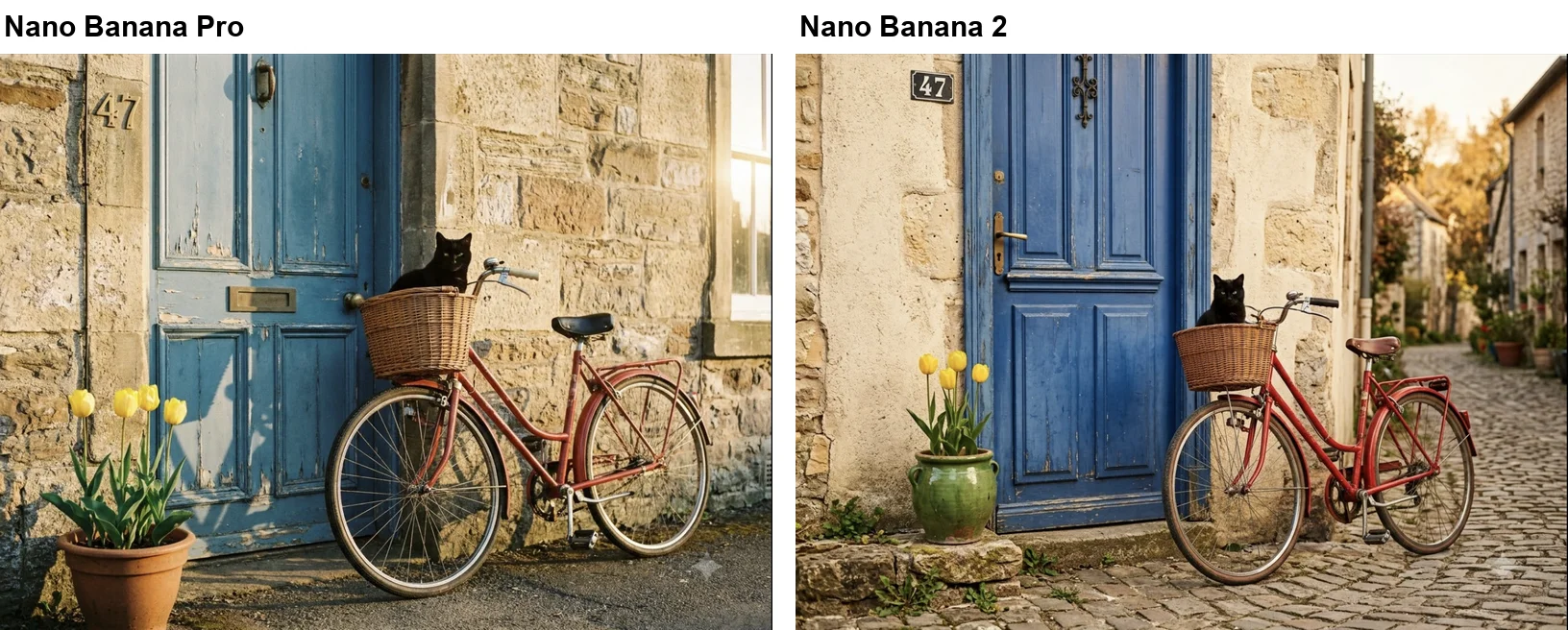
Neither image had three tulips: both show four. Both also put the 47 on the wall to the left of the door instead of above it. Pro added a third miss with a terracotta pot where I asked for green. That is 4 of 7 for Pro and 5 of 7 for Nano Banana 2. When I ran this same prompt for our Nano Banana vs ChatGPT comparison, ChatGPT scored 7 of 7. The misplaced 47 has now shown up in every Nano Banana run I have made of this prompt, across three models. The tulip count came out right once.
Nano Banana 2 vs Pro on poster text
This is where the two models split most clearly. I asked for a headline, one line and one line of small print, all in quotation marks.
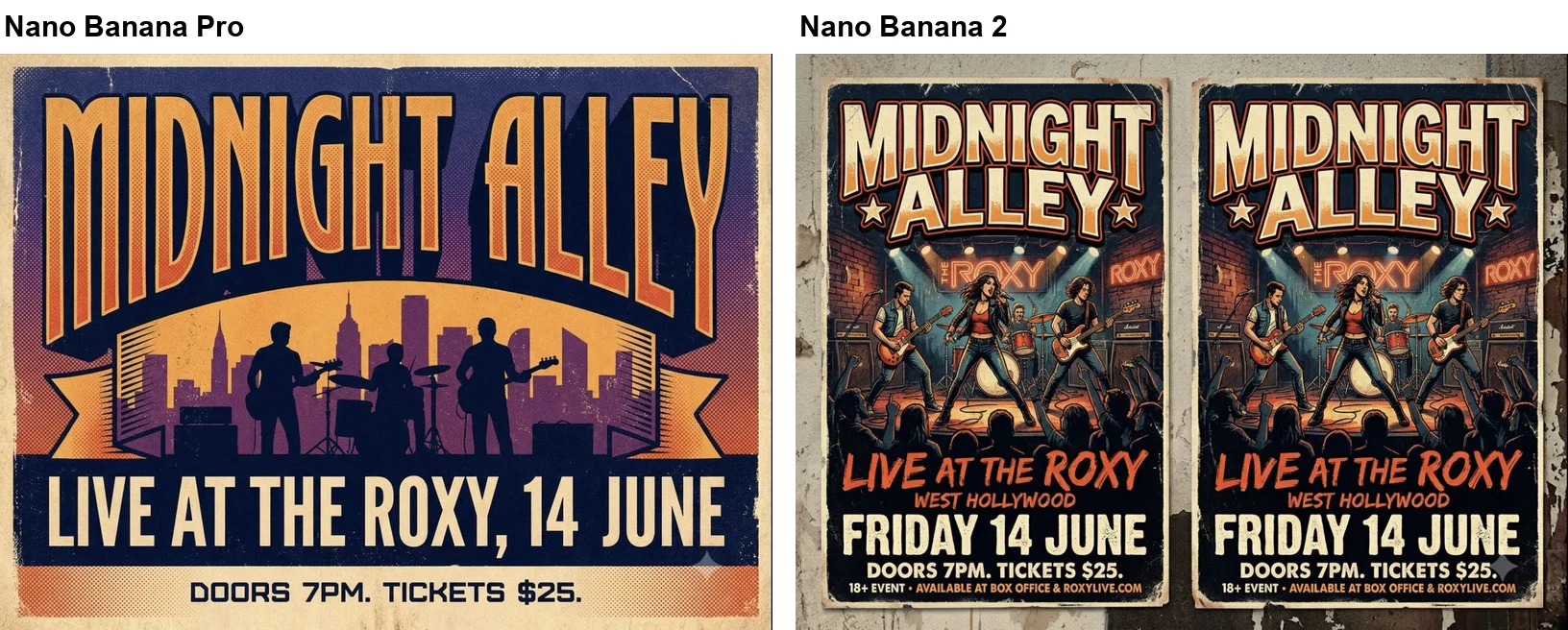
Pro’s poster reads MIDNIGHT ALLEY, LIVE AT THE ROXY, 14 JUNE, and DOORS 7PM. TICKETS $25. It put everything in capitals, and added nothing. Nano Banana 2 spelled all my words correctly too, then kept going. It added WEST HOLLYWOOD under the venue, put FRIDAY in front of the date, and finished with a line reading 18+ EVENT, AVAILABLE AT BOX OFFICE and a web address I never gave it. It also drew two copies of the poster side by side.
The additions are the real problem. A poster with a weekday and a web address nobody supplied cannot be used, however good it looks, and 14 June is only a Friday in some years. Google’s own description of Pro mentions “precision creative control”, and this was the prompt where I could see it. Our Nano Banana Pro prompts guide tests 16 more text-heavy prompts on Pro alone.
Menus, diagrams and maps
On structured information, I could not separate them on accuracy.
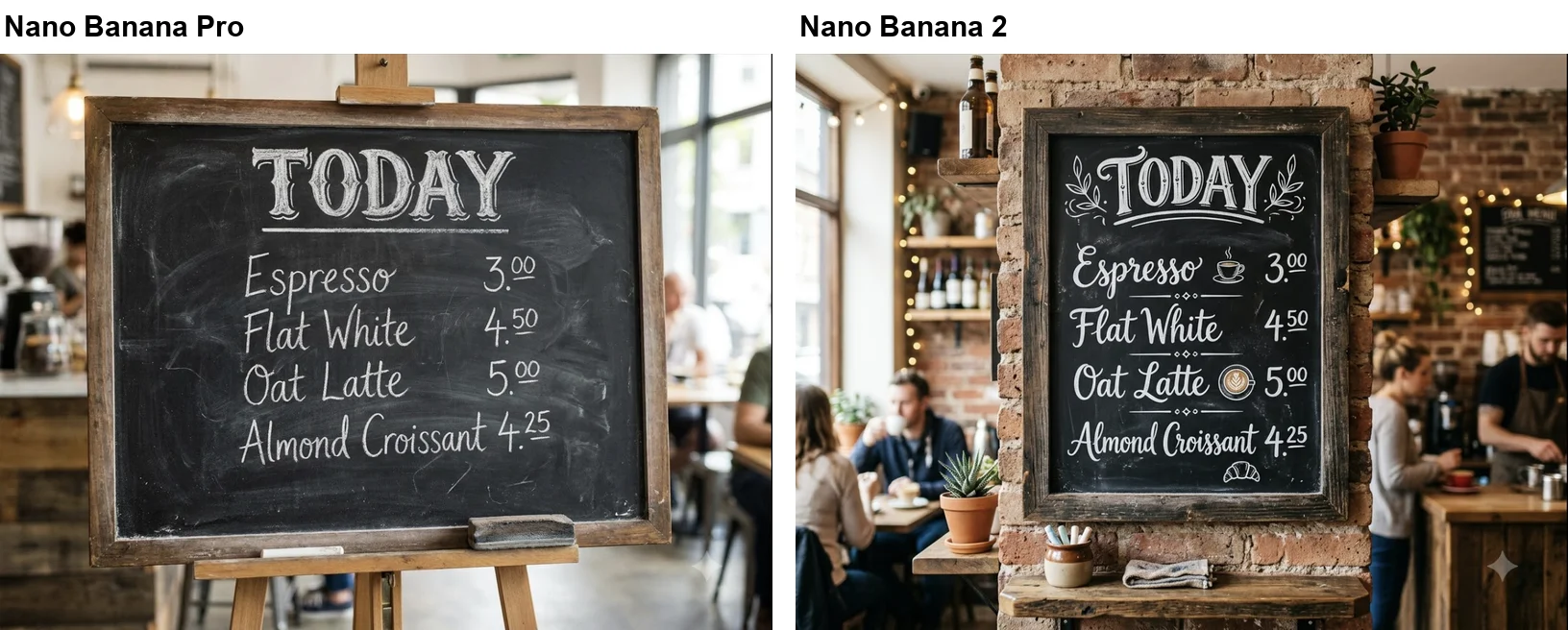
Both chalkboards have the right title, the right four items and the right four prices. Nano Banana 2 added small chalk drawings of a cup, a latte and a croissant, which suit a menu.
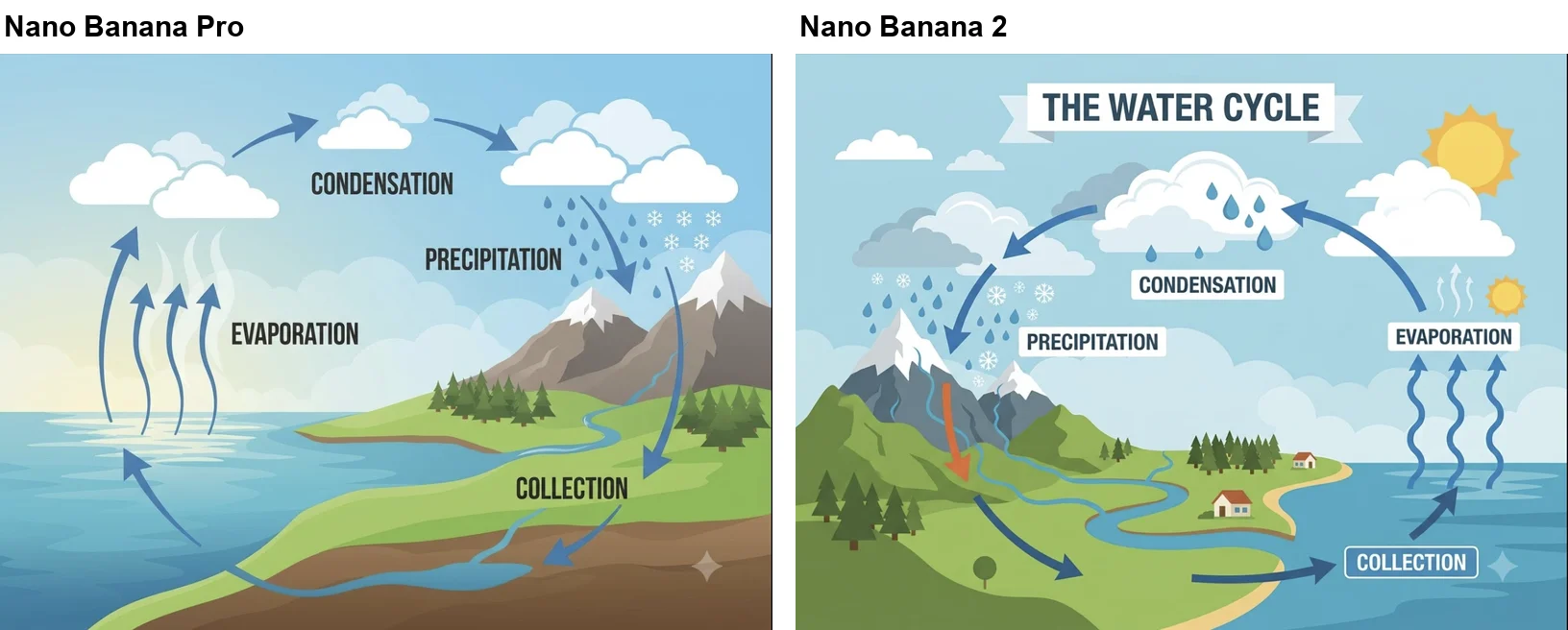
Both diagrams spell the four labels correctly and loop the arrows from sea to cloud to rain and back. Nano Banana 2 added a title banner, a second small sun and one stray orange arrow on the mountain. Pro’s version has only what I asked for.
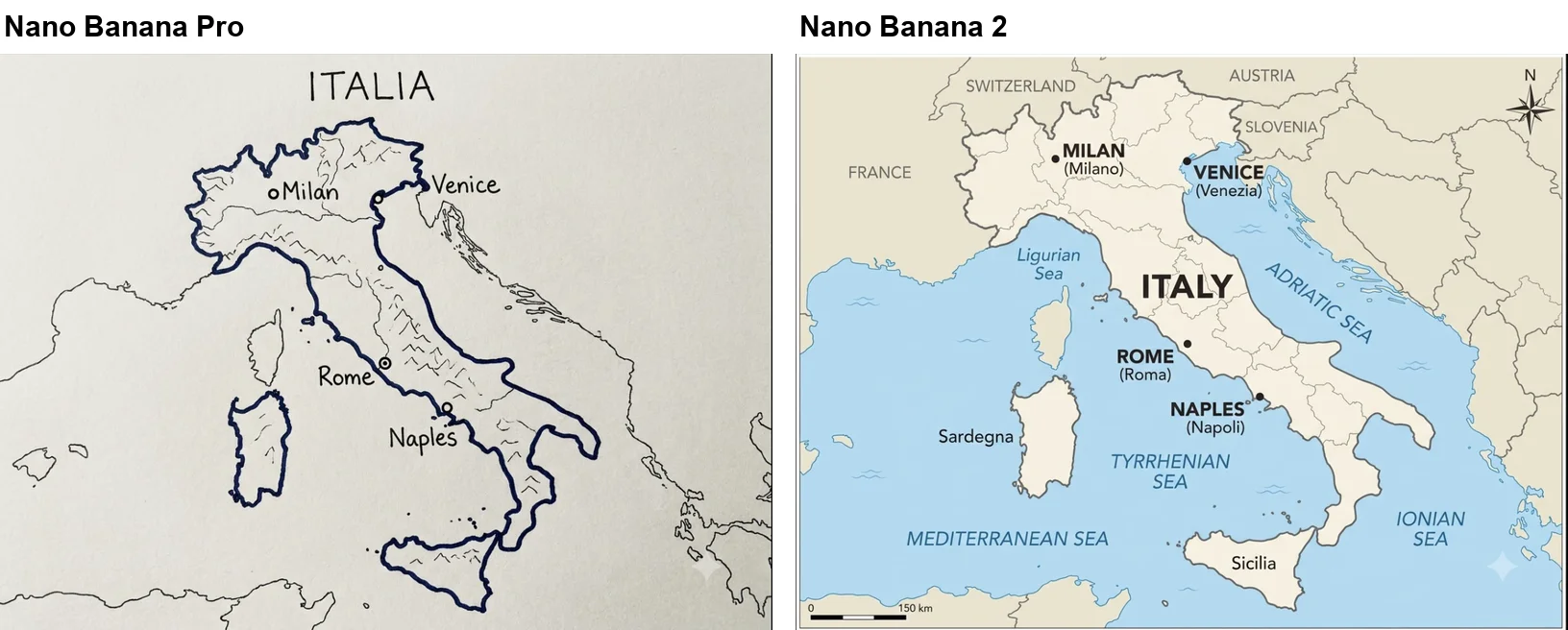
The map surprised me. Both placed Milan, Venice, Rome and Naples roughly where they belong. Pro took “simple” literally and drew a pen outline, with a title I had not asked for and two small unlabelled markers. Nano Banana 2 produced something closer to an atlas page, with twelve extra labels for countries, islands and seas, plus a compass and a scale bar. The extra labels I could check were right, and it is the map I would put in a slide. It is also not a simple map.
The pattern across all three is the same as the poster. Nano Banana 2 fills in what it thinks the picture needs. On a map or a menu that helps. On a poster it invents facts.
Portraits, hands and products
For plain photography the gap was smaller, and partly a matter of taste.
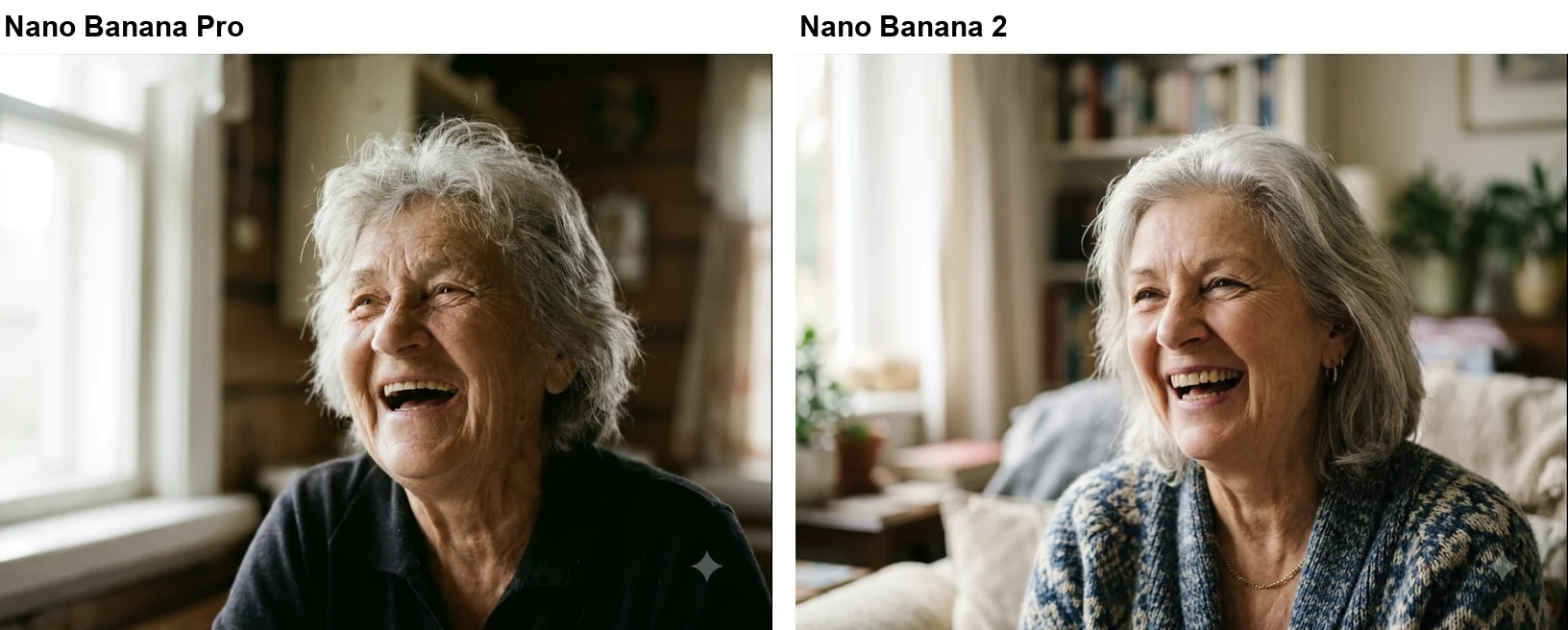
I asked for a close-up of an elderly woman. Pro gave me a tight frame and a face with deep lines and untidy hair. Nano Banana 2’s woman looks to me like she is in her sixties, with smoother skin, in a wider shot of a living room. Both are convincing photographs. Pro’s is closer to the brief.
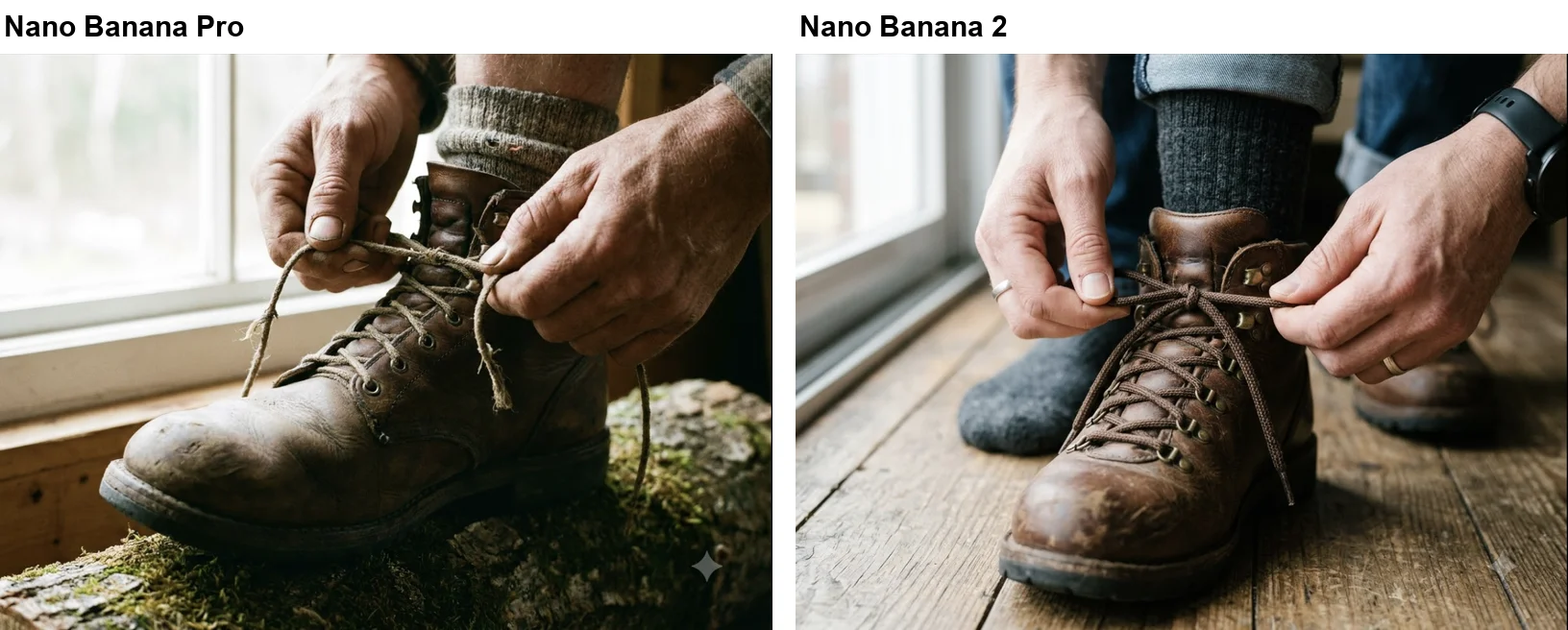
Hands are the classic test, and both models drew them well: five fingers, sensible grips, real-looking laces. The slip is elsewhere in Nano Banana 2’s frame. The laced boot sits between a grey-socked foot on one side and a second boot, which appears to be worn, on the other. That is one foot too many for one person. You may not notice it at first, and then it is all you see.
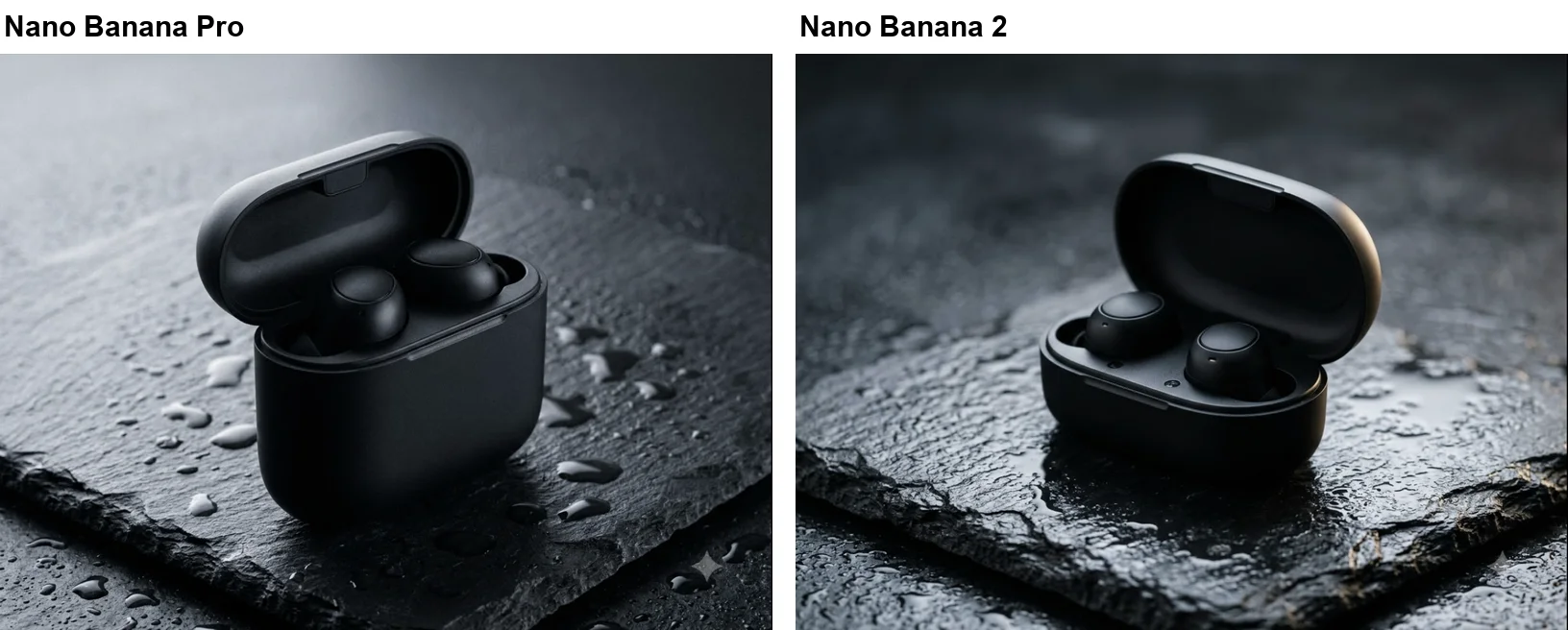
The product shot was a draw. Both cases are matte black with the lid open on wet slate, and both obeyed “no text, no logo”. Pro’s is brighter with visible droplets, and Nano Banana 2’s is darker. I would use either.
Quality winner: Nano Banana Pro, narrowly, on the prompts where precision counts.
Speed in Flow, and where each model is available
In Flow, Pro was clearly the quicker model on three of eight prompts, which is the opposite of the standard line that Nano Banana 2 is the fast one. Pro’s eight images each arrived within about 70 seconds. Nano Banana 2 took up to about 90 seconds for seven of its images, and its first one sat at 99% and needed around two minutes.
| Prompt | Nano Banana Pro | Nano Banana 2 |
|---|---|---|
| Street scene | Under 40 s | 110 to 135 s |
| Concert poster | About 38 s | 60 to 70 s |
| Chalkboard menu | About 54 s | 40 to 50 s |
| Water cycle | 40 to 58 s | 55 to 65 s |
| Map of Italy | Under 61 s | 30 to 50 s |
| Portrait | Under 48 s | 70 to 90 s |
| Hands and boot | 48 to 68 s | 50 to 70 s |
| Earbud case | 30 to 48 s | 50 to 70 s |
Prompt by prompt, Nano Banana 2 was clearly slower on three: the scene, the poster and the portrait. It looked a little slower on the product shot and a little faster on the menu, but both gaps are within my polling error, and the other three were too close to call. I would not build a theory on this. I checked the screen about every ten seconds, the times include Flow’s chat agent, the Nano Banana 2 run came second in the session, and server load changes by the minute. What I can say is that in Flow, on that morning, choosing Nano Banana 2 did not buy me speed.
On the API the picture may differ. Google’s image generation documentation says Nano Banana 2 “balances speed” with quality, and it gives developers a thinking level setting for it, with minimal as the default and high as the option. Pro has no such setting on that page. I did not test the API, so I cannot tell you how many seconds that saves.
Where you can use each one matters more than a few seconds for most people:
| Where | Nano Banana Pro | Nano Banana 2 |
|---|---|---|
| Gemini app, free account | ✗ | ✓ Flash or Pro mode |
| Gemini app, Google AI plan | ✓ Redo with Pro | ✓ |
| Google Flow, free account (my test) | ✓ | ✓ |
| Google AI Studio, free account | ✗ Marked Paid | ✗ Marked Paid |
| Gemini API | ✓ Paid | ✓ Paid |
The workflow differs too. In the Gemini app you never pick Pro up front. Per Google’s help page, you make an image first and then ask for a Pro redo, which suits Pro’s role as a finishing pass. In Flow you pick the model once in the settings and every image uses it. In Flow, images from both models carried the small sparkle watermark in the corner on my account.
For developers, Google’s documentation lists a few more differences. Both models take up to 14 reference images, split differently: Nano Banana 2 allows up to 10 object images and 4 character images, and Pro allows up to 6 objects, 5 characters and 3 style references. Both go to 4K, and only Nano Banana 2 offers 512px. Grounding with Google Image Search is listed for Nano Banana 2 only.
Speed winner in Flow, on that morning: Nano Banana Pro. Access winner: Nano Banana 2, because it is in the free Gemini app.
When the Pro model is worth choosing
Pick Pro when one wrong word or one stray detail makes the image unusable.
| If you mostly make | Pick |
|---|---|
| Posters, ads, labels with exact wording | Nano Banana Pro |
| A few finished images a month | Nano Banana Pro |
| Everyday images in the Gemini app | Nano Banana 2 |
| Menus, diagrams, maps for slides | Nano Banana 2 |
| Thousands of 1K images on the API | Nano Banana 2 |
- Anyone putting words in an image. If the poster, ad or packaging has to say what you wrote and nothing more, Pro is the safer model. Nano Banana 2 added lines of its own to mine.
- People making a few important images. At twenty images a month, the API price gap at 1K is $1.34. Take the model that makes fewer slips.
- Anyone who needs 2K output on the API. Pro charges $0.134 for 2K against Nano Banana 2’s $0.101, a much smaller premium than at 1K.
- Flow users on a free account. If Pro costs you nothing there, as it did me, there is little reason not to make it your default for finished work.
When Nano Banana 2 is all you need
Pick Nano Banana 2 when you want good images at no cost or low cost and you are willing to check its work.
- Free Gemini app users. It is the model you already have in Flash and Pro mode, and it handled menus, diagrams and maps as accurately as Pro.
- Developers generating at volume. A thousand 1K images cost about $67 instead of $134, and batch pricing halves that again.
- People who want the model to fill in the picture. Its atlas-style map and decorated menu were more finished than what I asked for. For slides and social posts that is a feature.
- Anyone drafting before finishing. The 512px size at $0.045 exists only on Nano Banana 2, and it suits rough drafts you plan to redo.
Check its text before you publish, whoever you are. Our Nano Banana review has more on how the free model behaves day to day.
The final word
For most people, Nano Banana 2 is the right default. It is free in the Gemini app, it matched Pro on four of my eight prompts and beat it on one, and it costs half as much per 1K image if you ever move to the API. Its habit of adding things is the price: read every word it prints and look at the edges of its photos.
Use Nano Banana Pro for the images that have to be right the first time, especially anything with a headline on it. If your free account can reach Pro in Google Flow, as mine could, the choice is easier still: draft with whichever is quicker that day, and finish with Pro.
Frequently asked questions
Is Nano Banana Pro better than Nano Banana 2?
On precision, yes, by a small margin in my test. I ran the same eight prompts through both in Google Flow on 2 October 2026. Nano Banana Pro printed a three-line concert poster word for word, in capitals, with nothing added, and drew a clean hands photo. Nano Banana 2 spelled the same three lines correctly but made three additions of its own, and its hands photo had an extra foot in the frame.
Nano Banana 2 was not worse everywhere. It scored 5 of 7 on a seven-part scene where Pro scored 4 of 7, and both got every menu price, diagram label and map city right. On Google's API it costs half as much for a 1K image.
What is the difference between Nano Banana and Nano Banana Pro?
They are different generations and different tiers. Nano Banana, with no number, is Gemini 2.5 Flash Image, the original model. Google's developer documentation now calls it the legacy model of the series and recommends moving to Nano Banana 2 Lite. Nano Banana Pro is Gemini 3 Pro Image, the premium model, which Google describes as the choice for the most complex visual tasks.
Nano Banana 2 (Gemini 3.1 Flash Image) sits between them as the general-purpose model, and by Google's help page it is the one the Gemini app uses in Flash and Pro mode. Google's pricing page lists the original Nano Banana as deprecated.
Is Nano Banana 2 faster than Nano Banana Pro?
Not in my test. In Google Flow, Nano Banana Pro delivered each of its eight images within about 70 seconds. Nano Banana 2 was clearly slower on three of the same eight prompts, including one that sat at 99% and took about two minutes, and it was not clearly faster on any.
Those are coarse timings from one session, taken by checking the screen every ten seconds or so, and they include Flow's chat agent. They say nothing certain about the raw models on Google's API, where Google positions Nano Banana 2 as the one that balances speed with quality. Treat the common claim that Nano Banana 2 is always faster as something to check on your own setup.
Is Nano Banana 2 cheaper than Nano Banana Pro?
On Google's API, yes. Google's pricing page lists Nano Banana 2 at $0.067 per 1K image, $0.101 per 2K and $0.151 per 4K. Nano Banana Pro is $0.134 per 1K or 2K image and $0.24 per 4K. So Nano Banana 2 is 50% cheaper at 1K, about 25% cheaper at 2K and about 37% cheaper at 4K. Neither has a free API tier.
For a person rather than a developer, the gap can be zero. In Google Flow my free account made eight images with each model and the 50 daily credits did not move.
What is the best version of Nano Banana?
For most people it is Nano Banana 2. By Google's help page it is the model the Gemini app uses in Flash and Pro mode, which my free account had, it matched Nano Banana Pro on menu text, diagram labels and a labelled map in my test, and it costs half as much per 1K image on the API.
Nano Banana Pro is the better pick when the text in the image has to be exactly what you typed and nothing else, such as a poster or an ad, or when one stray detail would spoil the shot. Nano Banana 2 Lite is the lightest of the three and the default in Flow and in the Gemini app's Flash-Lite mode.
Is Nano Banana 2 still the best?
As a default, yes. Nano Banana 2 is free in the Gemini app, it matched Nano Banana Pro on four of my eight test prompts and beat it on one, and it costs half as much per 1K image on Google's API.
It is not the best at exact text. In a Nano Banana 2 vs Pro test on a concert poster, Pro printed my three lines word for word and Nano Banana 2 made three additions of its own, so anything with a headline is better finished on Pro.
Can I use Nano Banana Pro and Nano Banana 2 for free?
Nano Banana 2 is free in the Gemini app: Google's help page says Flash and Pro mode both use it. Nano Banana Pro is not free there, because redoing an image with Pro needs a Google AI plan.
In Google Flow, my free account could pick either model in the settings, and sixteen images across the two left my 50 daily credits at 50. Google's own Flow pages are not consistent about free access, so check your account before you plan around it. Our Nano Banana Pro free guide walks through the steps.
Keep reading
Nano Banana Pro Free: Where It Actually Works, Tested
Nano Banana Pro free, tested on a free Google account: it worked in Google Flow at no credit cost, but not in the Gemini app or AI Studio.
How to Use Nano Banana: Gemini's Image Model, Step by Step
How to use Nano Banana in Gemini: pick the right mode, prompt, edit in plain words and download, with which mode runs which model and what free users get.
Nano Banana Review and Pricing: Fast, Free, Nearly Exact
Nano Banana pricing, tested: 12 prompts on Gemini's free tier, no limit hit. 15 of 15 text strings right, most images in 30 seconds, and one tulip too many.
Nano Banana vs ChatGPT: 12 Prompts, Two Different Winners
Nano Banana vs ChatGPT, tested with the same 12 prompts: ChatGPT follows a brief exactly, Nano Banana is twice as fast and free. Which one to use, and when.