
Nano Banana 2.1 Tested: 8 Prompts vs Nano Banana 2
Nano Banana 2.1, tested free in Google Flow on the same 8 prompts as Nano Banana 2: cleaner poster text, no extra foot, and half the API price.
Contents
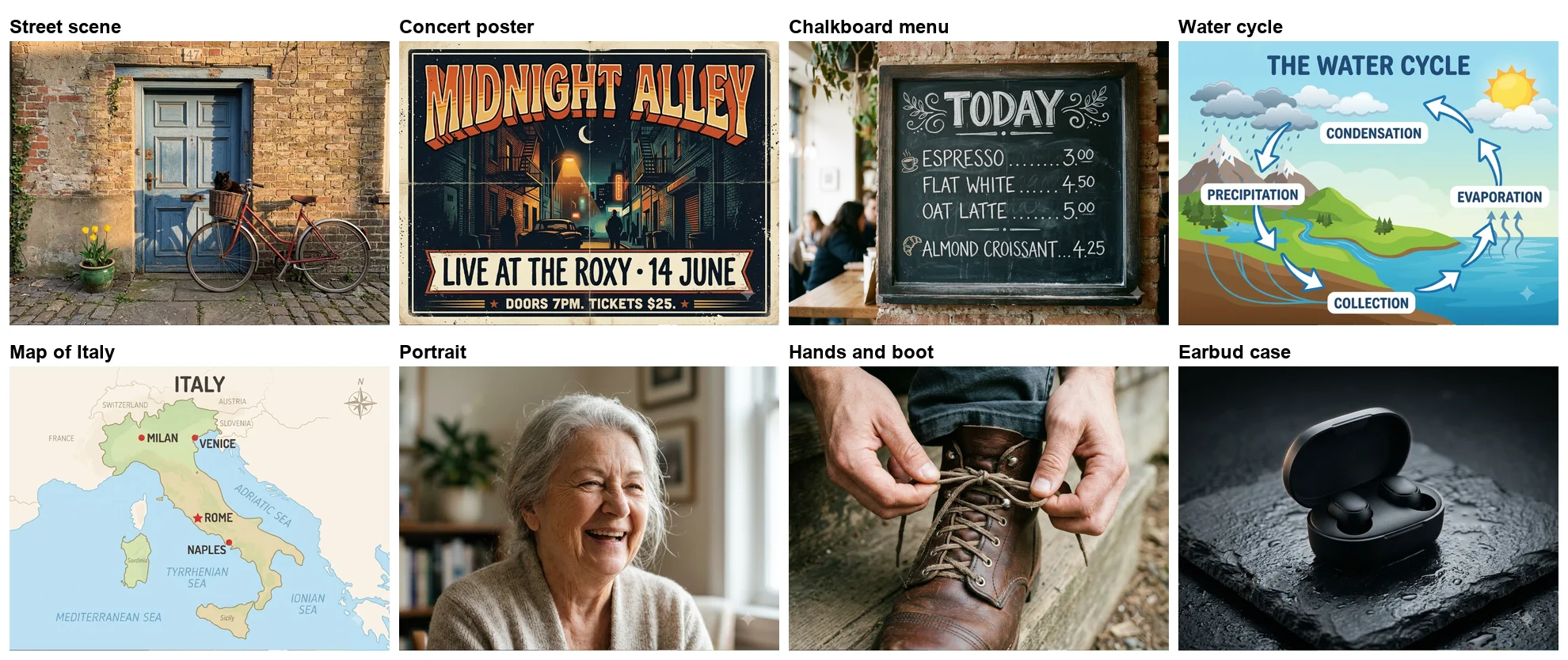
Nano Banana 2.1 is a real step up from Nano Banana 2, and in Google Flow it is free. I gave it the same eight prompts I had given Nano Banana 2 on 2 October, on the same free account, and it fixed three of the old model’s clearest mistakes: it set a concert poster word for word instead of inventing three lines, drew two hands tying one boot instead of adding a stray foot, and drew one sun in a diagram instead of two. It still adds titles and labels nobody asked for, and it still cannot count tulips.
Google announced Nano Banana 2.1 on 6 October 2026 as an update to Nano Banana 2, its API pricing page added it the same day, and it costs half as much there. Here is what changed in practice.
| Prompt | Nano Banana 2 (2 Oct) | Nano Banana 2.1 (7 Oct) | Better |
|---|---|---|---|
| Seven-part street scene | 5 of 7 | 6 of 7 | 2.1 |
| Concert poster, three lines | Correct, three additions | Word for word, nothing added | 2.1 |
| Chalkboard menu, four prices | All correct, plus doodles | All correct, plus doodles | Draw |
| Water cycle, four labels | Correct, title, two suns | Correct, title, one sun | 2.1 |
| Map of Italy, four cities | All placed, twelve extra labels | All placed, eleven extra labels | Draw |
| Portrait of an elderly woman | Wider, looks younger | Closer, visibly elderly | 2.1 |
| Hands tying a boot | An extra foot | Clean | 2.1 |
| Earbud case product shot | Clean, darker | Clean | Draw |
Nano Banana 2.1 explained: Google’s new everyday image model
Nano Banana 2.1 is the new version of Google’s full-size everyday image model, the one that sits between Nano Banana 2 Lite and Nano Banana Pro. Its API model ID is gemini-nano-banana-2.1. Google’s model page calls it “The latest high-efficiency image generation and conversational editing model”, and its image generation guide calls it “An update to Nano Banana 2, serving as the primary high-efficiency workhorse model for image generation and conversational editing.”
The promised improvements are visual quality, prompt adherence, character consistency and text rendering. On paper it keeps Nano Banana 2’s shape: 1K, 2K and 4K output, up to 10 object images and 4 character images as references, and three thinking levels (minimal, medium and high, with medium the default). Every image carries Google’s SynthID watermark. One thing it drops is the small 512px size, which the guide says is “not supported on Gemini Nano Banana 2.1”.
Google Flow announced it with a pop-up the first time I opened a new project on 7 October: “Introducing Nano Banana 2.1, improving visual quality and subject consistency for both generation and editing tasks. This will replace Nano Banana 2.”
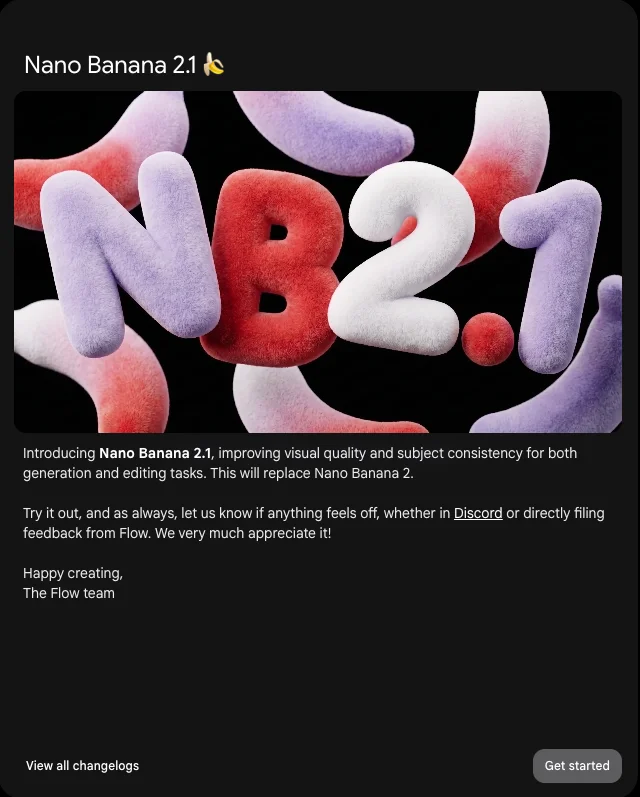
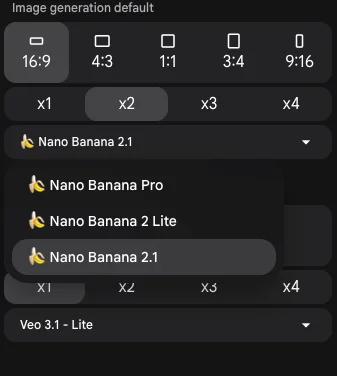
The replacement was already visible. Flow’s image model menu listed Nano Banana Pro, Nano Banana 2 Lite and Nano Banana 2.1, and Nano Banana 2 was gone. Nano Banana 2.1 was the default.
The test: eight prompts, five days apart
The point of this test is to change as little as possible except the model. On 2 October I ran eight prompts through Nano Banana 2 in Google Flow for our Nano Banana Pro vs Nano Banana 2 comparison. On 7 October I ran the same eight, word for word, on the same free Google account in Flow, this time on Nano Banana 2.1. One image per prompt, no retries, 4:3. One thing did change: on 2 October Flow’s agent reworded my prompts before generating; this time I told it to use them word for word, and the info panel confirms it did.
The prompts were built to catch common failures: a scene with seven specific details, three lines of poster text, a menu with four prices, a diagram with four labels, a map with four cities, a portrait, a pair of hands, and a product shot. The water-cycle image’s info panel confirmed the model, the 4:3 shape and my wording as typed.
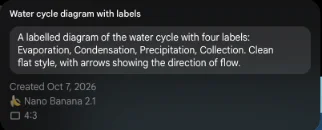
All eight images arrived within about two minutes of sending one message, and Flow charged nothing: my balance was 36 credits at the end of my previous session and still 36 after the eight images and the edit. Flow images cost 0 credits on a free account, as they did for Nano Banana 2.
Text: the poster that stopped inventing
The poster prompt asked for three exact pieces of text: the headline “MIDNIGHT ALLEY”, the line “Live at the Roxy, 14 June”, and the small print “Doors 7pm. Tickets $25.” in a bold retro style. Nano Banana 2 got all three right, but added “WEST HOLLYWOOD”, a “FRIDAY” before the date and a whole line about an 18+ event and a box office website, then drew the poster twice.
Nano Banana 2.1 set the three lines and nothing else: “MIDNIGHT ALLEY” across the top, “LIVE AT THE ROXY • 14 JUNE” on a banner, and “DOORS 7PM. TICKETS $25.” along the bottom, over an alley at night with a crescent moon. The only stray text is a small neon sign in the background with lettering too blurred to read.
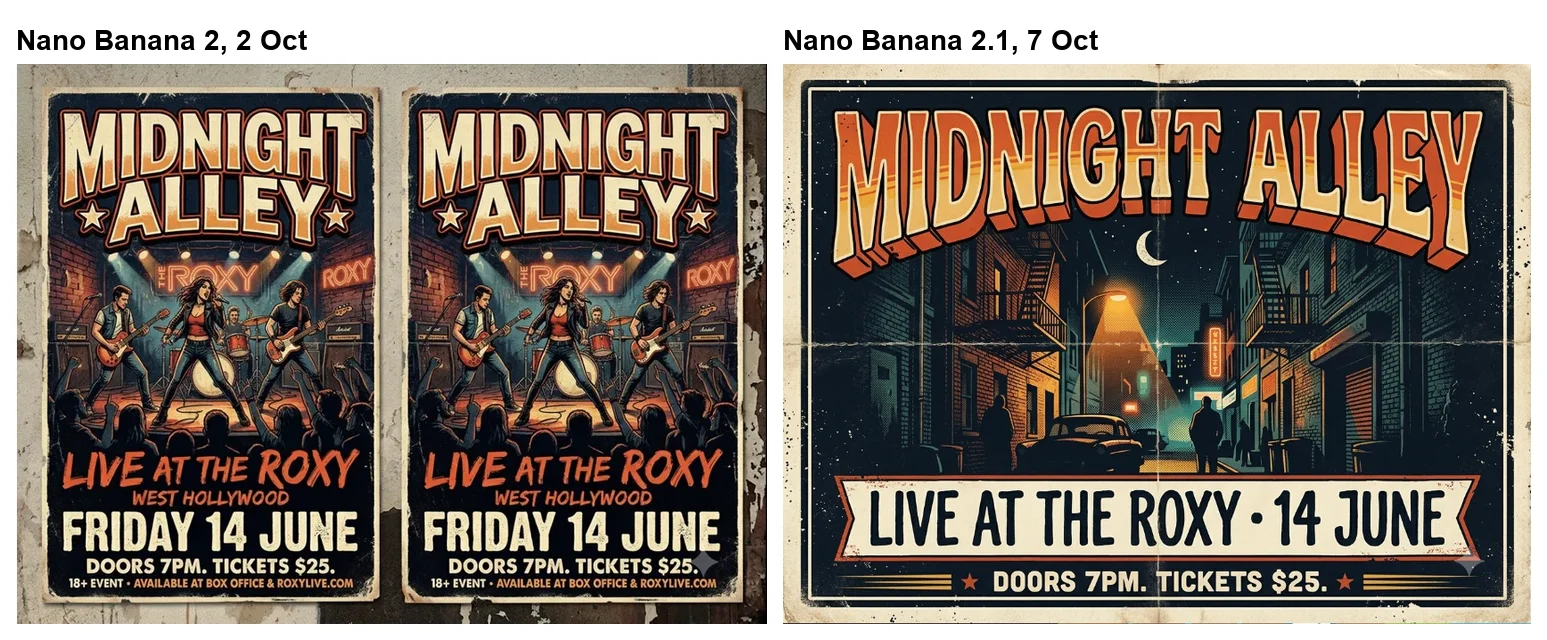
That is the result that matters most for anyone making a flyer, a thumbnail or a social card. On 2 October only Nano Banana Pro managed this prompt without additions; now the cheaper model does too.
The chalkboard menu was already right on Nano Banana 2 and stayed right: “TODAY”, then Espresso 3.00, Flat White 4.50, Oat Latte 5.00 and Almond Croissant 4.25, all correct. Nano Banana 2.1 still decorated it, with a coffee cup and a croissant drawn in chalk beside the items and leaf flourishes around the title. Harmless on a menu, but a sign that it still adds things.
Detail: the scene with seven things in it
The street scene prompt packs in seven checkable details: a red bicycle, a blue door, a black cat in the front basket, three yellow tulips, a green pot on the left of the door, the number 47 above the door, and late sun from the right. Nano Banana 2 got five, missing the tulip count and putting 47 beside the door rather than above it.
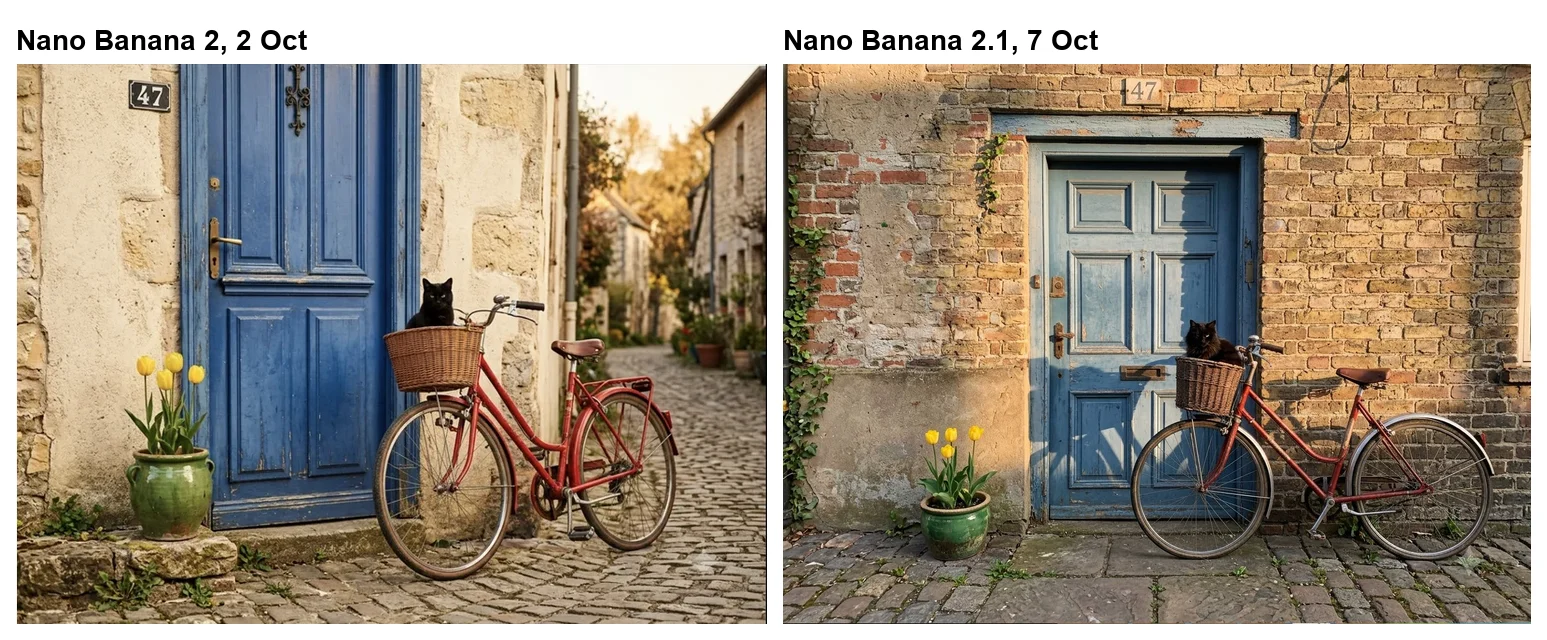
Nano Banana 2.1 got six. The 47 now sits above the door frame, the light falls from the right (the bicycle’s shadow lands on the door to its left), and the cat, the pot and the bike are all where they should be. It still drew four tulips, three tall and one shorter. That is the one detail all three Google models missed on this prompt in Flow (the Gemini app’s slower Pro mode, on Nano Banana 2, did draw three in an earlier test).
People and hands
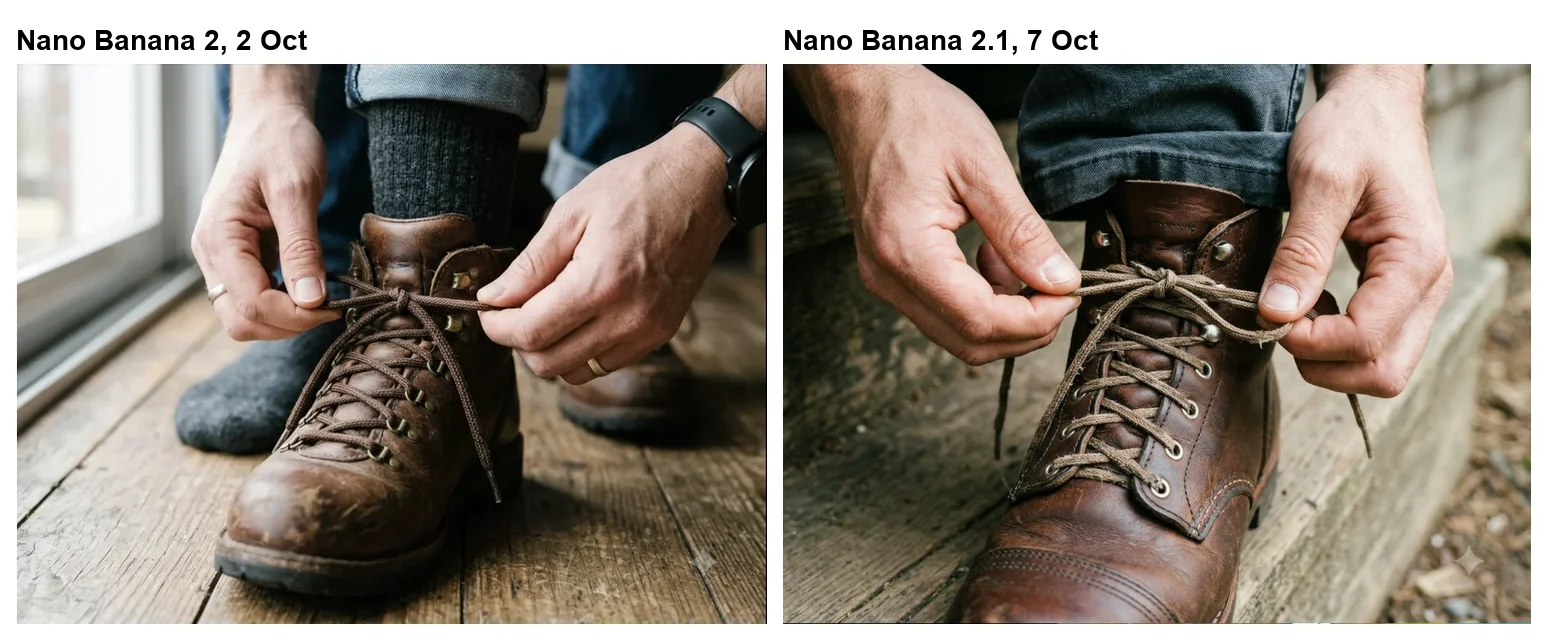
Hands are the classic AI failure, and Nano Banana 2 had failed in a new way: asked for two hands tying a boot, it drew the hands correctly but added a grey-socked foot and a second boot. Nano Banana 2.1 drew exactly what was asked, two hands tying the laces of one brown leather boot on a wooden step, with no extra limbs.
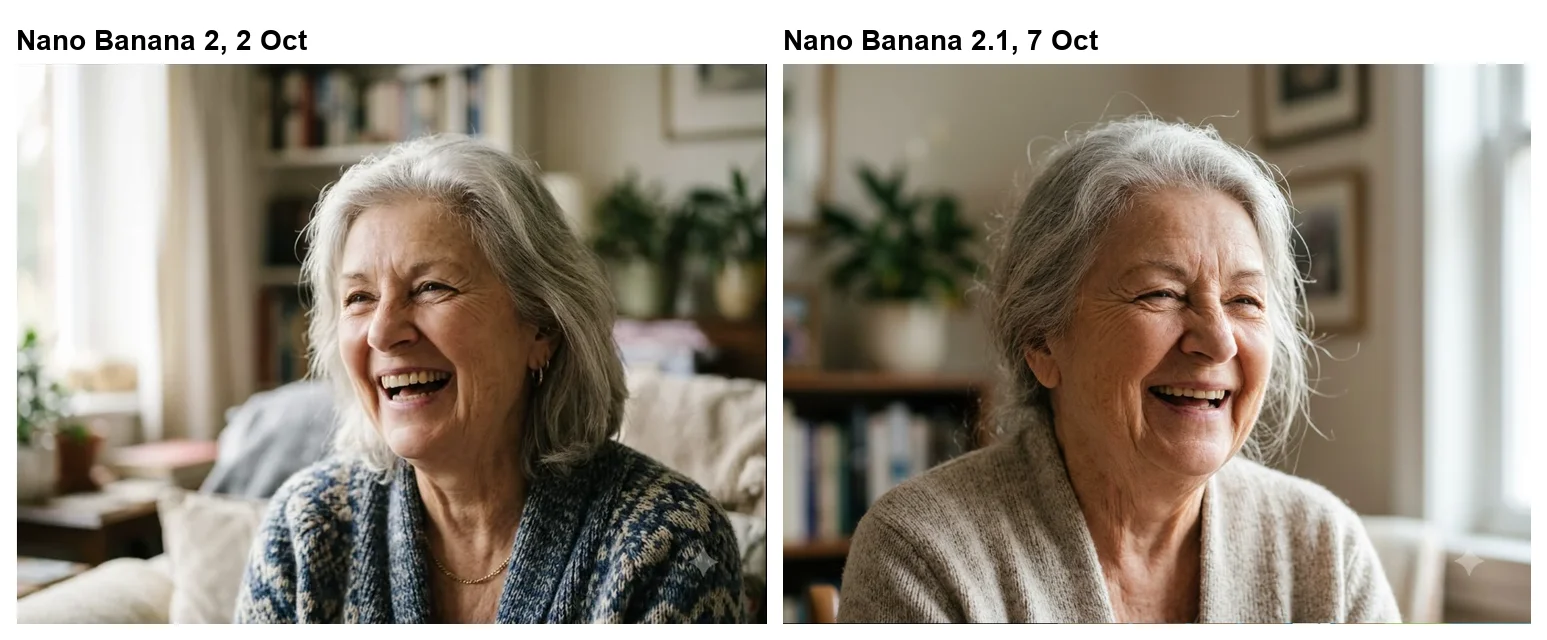
The portrait prompt asked for an elderly woman with silver hair laughing in window light. Nano Banana 2 gave a wider shot of a woman who looked closer to middle age. Nano Banana 2.1 gave a chest-up shot of a visibly elderly woman, deep laugh lines and all, lit from a window on the right with books and a plant softly blurred behind her.
The product shot, an open matte black earbud case on wet slate with no text or logo, was clean on both models. Nano Banana 2.1’s was a little brighter, with water droplets standing out on the stone, and it obeyed the “no text, no logo” instruction.
Diagrams and maps: still adding extras
Nano Banana 2.1 is more literal than Nano Banana 2, but not literal. Both of the information graphics came back correct and padded.
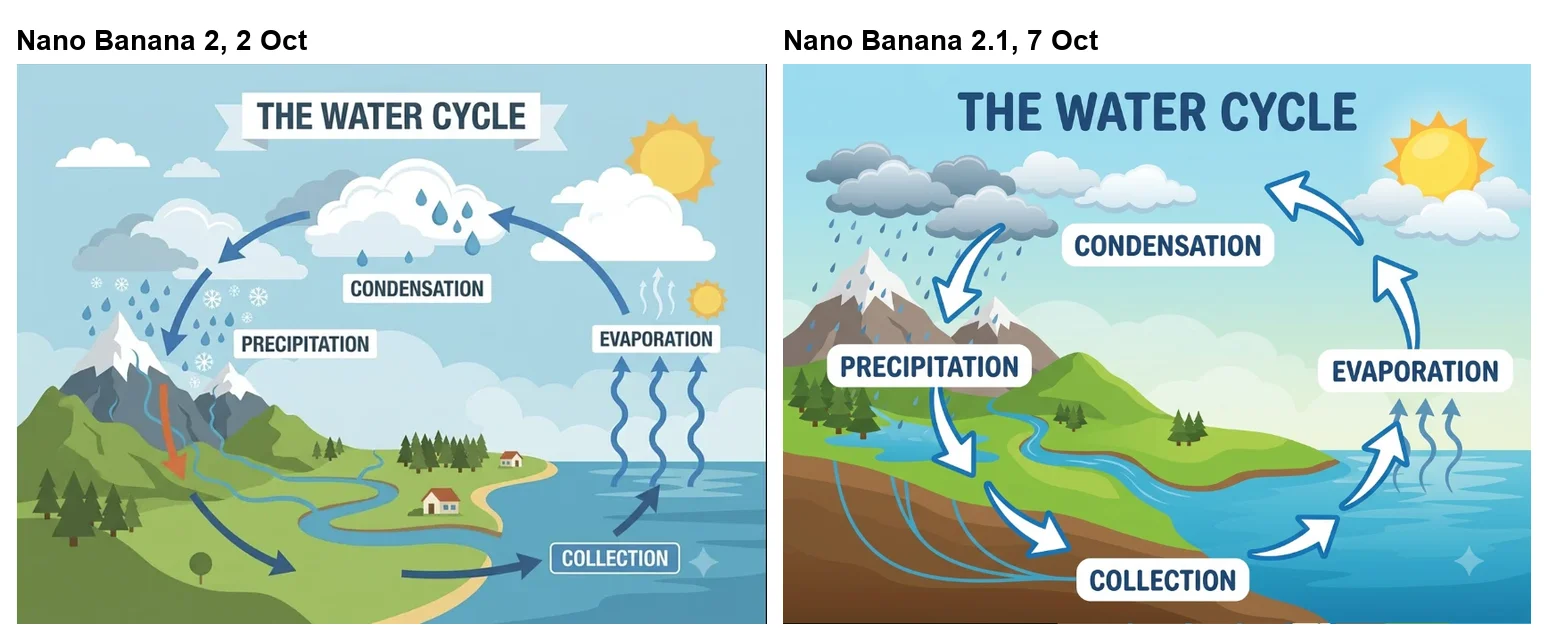
The water cycle diagram had all four labels, Evaporation, Condensation, Precipitation and Collection, in a loop of arrows that runs the right way. It also had a title, “THE WATER CYCLE”, that I did not ask for. Nano Banana 2 had added the same title plus a second sun and a stray arrow; Nano Banana 2.1 drew one sun and no stray arrows.
The map of Italy placed Milan, Venice, Rome and Naples correctly, with Rome marked by a star. Around them it added a title, “ITALY”, four neighbouring countries, four seas, Sardinia, Sicily and a compass rose: eleven labels I did not ask for, against twelve on Nano Banana 2. If you need a plain map, say “no other labels” in the prompt.
Editing: one tulip out, nothing else touched
Google’s pitch for 2.1 leans on editing, so I asked it to fix its own mistake. In Flow’s image editor I typed: “Remove one tulip so there are exactly three yellow tulips in the pot. Change nothing else.” The new version arrived within about 40 seconds, at no credit cost.
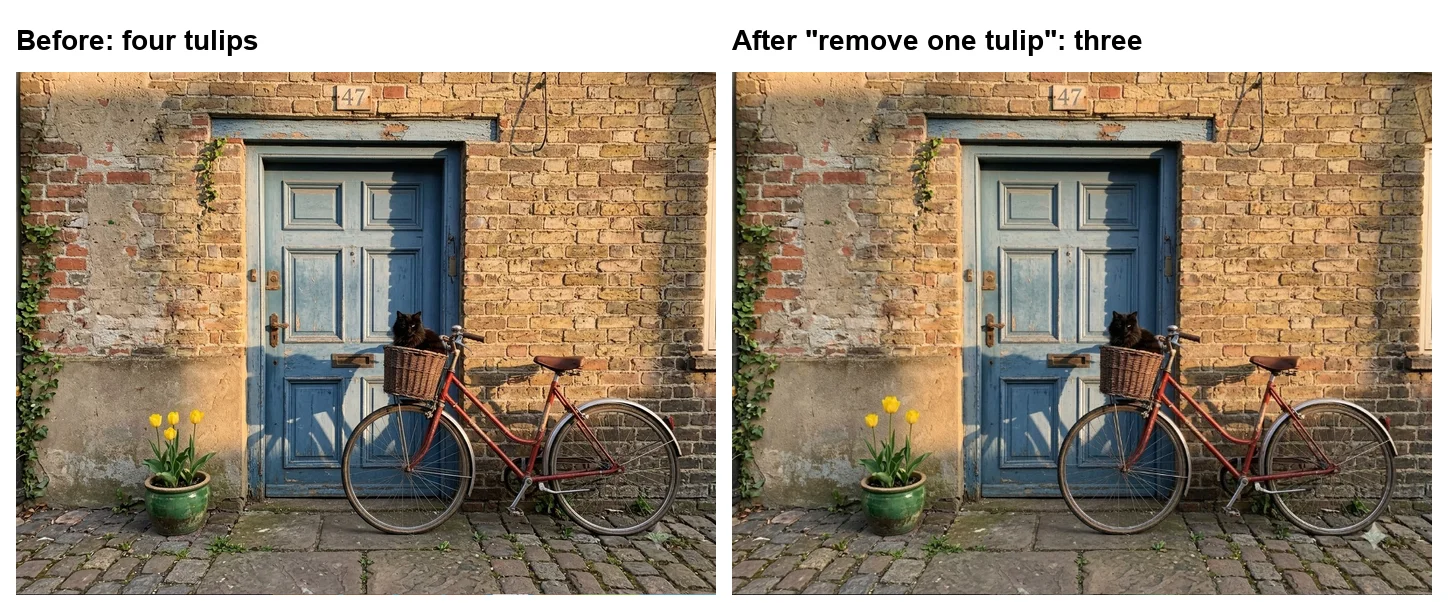
It counted correctly this time: three tulips. And it did, as asked, change nothing else. Comparing the two versions pixel by pixel, only about a quarter of one percent of the image differs, almost all of it in the tulips themselves, which were redrawn as a group of three. The door, the bicycle, the cat, the 47 and the light are untouched. For a one-word fix, that is exactly the behaviour you want from an editor, and it is the strongest evidence in my test for Google’s editing claim.
What Google promised, and what I could check
Google’s documentation lists four headline improvements, Flow’s pop-up adds editing, and a single eight-prompt run can check some of them better than others.
| Google’s claim | What my test shows |
|---|---|
| Better text rendering | Supported: the poster came back word for word, the menu prices stayed exact |
| Better prompt adherence | Mostly: six of seven scene details, one sun, the house number in place, but extra titles and labels remained |
| Better visual quality | Supported on people: cleaner hands and a more convincing elderly portrait |
| Better editing (Flow’s pop-up) | Supported for one edit: only the tulips changed |
| Better character consistency, up to 14 reference images | Not tested |
The pattern is that 2.1 is better at doing what the words say, not at doing only what the words say. Most explicit instructions were followed more closely than on Nano Banana 2, but the model still treats a diagram as an invitation to add a title and a map as an invitation to label the neighbours. That is a reasonable default for most people, and a nuisance for anyone who needs a clean asset to drop into a layout.
The character-consistency claim deserves its own test. Google says 2.1 accepts up to ten object and four character reference images to keep characters consistent, which is the feature that matters for comics, storyboards and product catalogues. One edit of one scene is not enough evidence either way, so treat that part of the pitch as unverified until it has been run across a series.
Three Google models, one test: 2.1 against Pro
Nano Banana Pro ran the same eight prompts on 2 October, so the three Google models can be lined up directly. Pro is the premium model, at four times 2.1’s 1K price on the API; our Nano Banana Pro pricing guide breaks down its plans.
| Prompt | Nano Banana Pro (2 Oct) | Nano Banana 2.1 (7 Oct) |
|---|---|---|
| Seven-part street scene | 4 of 7: four tulips, terracotta pot, 47 beside the door | 6 of 7: four tulips |
| Concert poster | Word for word, nothing added | Word for word, nothing added |
| Chalkboard menu | All correct, no extras | All correct, chalk doodles added |
| Water cycle | All correct, no title | All correct, title added |
| Map of Italy | Four cities, plain outline, title “ITALIA” | Four cities, eleven extra labels |
| Portrait | Visibly elderly | Visibly elderly |
| Hands and boot | Clean | Clean |
| Earbud case | Clean | Clean |
On this set, 2.1 now matches Pro on the poster, the portrait, the hands and the product shot, and beats it on the busy street scene. Pro still wins wherever restraint matters: it added nothing to the menu or the diagram, and its map carried a single extra word where 2.1’s carried eleven. If your work is mostly clean layouts that must contain exactly what you typed, Pro remains the better tool. For everything else, the gap is now small, and in Flow both are free.
Nano Banana 2.1 pricing: half of Nano Banana 2 on the API
In Google Flow it cost me nothing. Every image and the edit came out at 0 credits on a free account, as Flow images did with Nano Banana 2. Our Google Flow free guide covers what else a free account gets.
On the Gemini API, Google’s pricing page, updated 6 October 2026, charges half what Nano Banana 2 cost, at every resolution:
| Per image, standard API | Nano Banana 2.1 | Nano Banana 2 | Nano Banana Pro |
|---|---|---|---|
| 1K | $0.0336 | $0.067 | $0.134 |
| 2K | $0.0504 | $0.101 | $0.134 |
| 4K | $0.0756 | $0.151 | $0.24 |
| 1K, batch | $0.0168 | $0.034 | $0.067 |
| Free API tier | Not available | Not available | Not available |
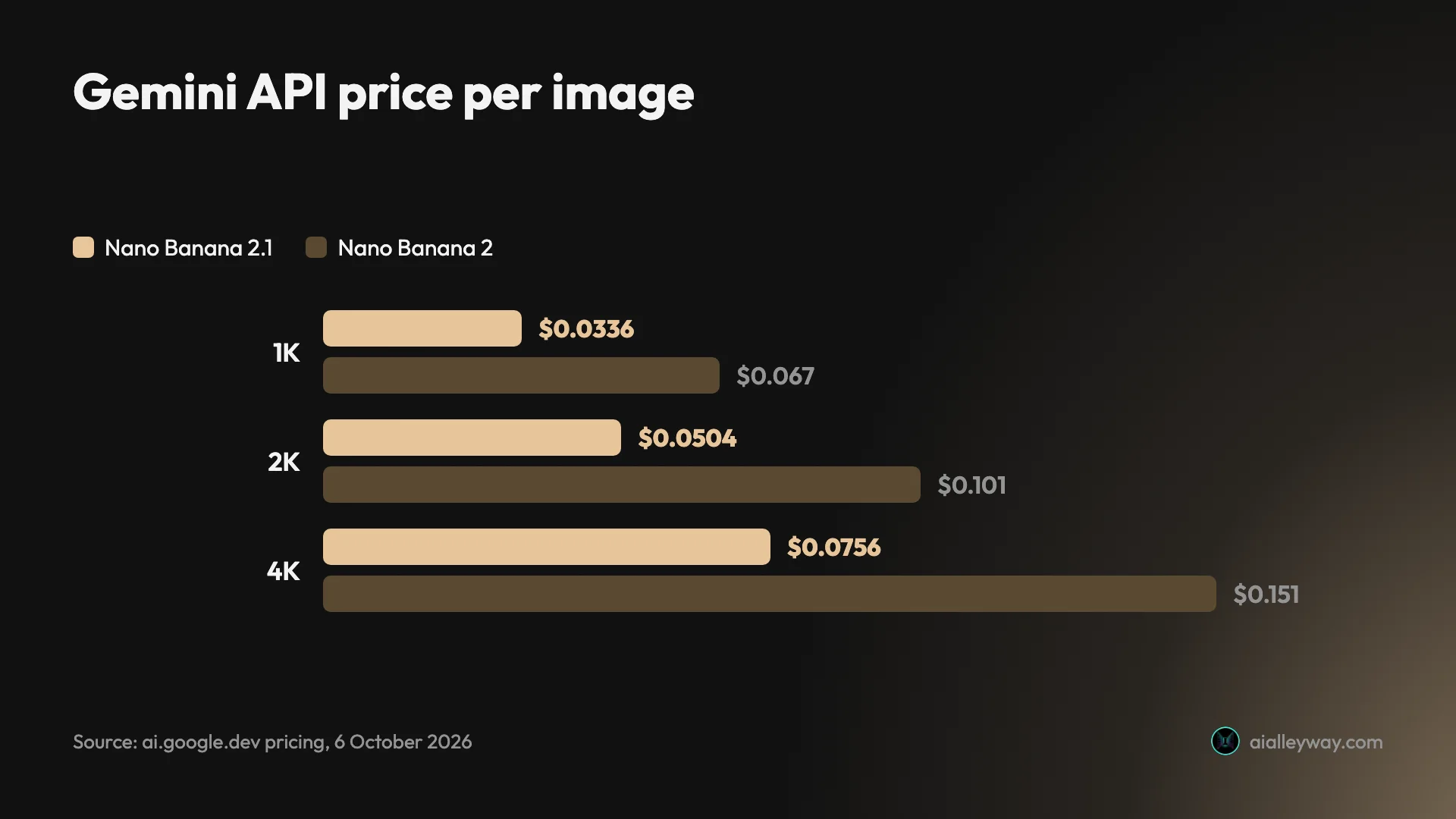
The 1K price matches Nano Banana 2 Lite’s $0.0336, so the full model now costs the same as the cut-down one at that size. For a developer generating a thousand 1K images, the bill falls from $67 to $33.60, or $16.80 in batch.
Flow, the API, the Gemini app: where 2.1 runs today
| Where | Status on 7 October 2026 |
|---|---|
| Google Flow, free account | ✓ Default image model, 0 credits (my test) |
| Gemini API | ✓ gemini-nano-banana-2.1, paid only |
| Gemini app | Reported as rolling out; Google’s help page still described Nano Banana 2 |
| AI Mode in Search, AI Studio | Reported in launch coverage; not checked |
I can only vouch for Flow. Launch coverage lists the Gemini app, AI Mode in Search, Google AI Studio and several business products, but Google’s Gemini image help page still mapped the app’s modes to Nano Banana 2 Lite, Nano Banana 2 and Nano Banana Pro on 7 October, and the Gemini app does not label which model drew a picture. Our how to use Nano Banana guide covers the app’s modes in detail.
The old model is already gone from Flow
Flow’s pop-up was blunt: 2.1 “will replace Nano Banana 2”. In Flow that has already happened, since Nano Banana 2 no longer appears in the model menu, so any image you make there today comes from 2.1, Nano Banana 2 Lite or Nano Banana Pro.
Elsewhere the change is staggered. Google’s API pricing page still listed Nano Banana 2, as gemini-3.1-flash-image, at its old prices on 6 October, alongside the new model, so existing code keeps working for now. If you run Nano Banana 2 in production, watch Google’s deprecations page for a shutdown date; I did not find one on a Google page. And the Gemini app’s help page still names Nano Banana 2 for its Flash mode, which suggests the consumer switch is still rolling out.
| Where | Nano Banana 2 on 7 October 2026 |
|---|---|
| Google Flow | Removed from the model menu; 2.1 is the default |
| Gemini API | Still listed as gemini-3.1-flash-image at $0.067 per 1K image |
| Gemini app help page | Still named for the app’s Flash mode |
For anyone who wrote prompts around Nano Banana 2’s habits, the practical change is good news: the same prompts produced fewer surprises on 2.1, so existing prompt libraries should carry over.
Prompting tips for Nano Banana 2.1
What the test taught me about getting clean results from the new model:
- Quote the exact text. Every quoted line came back spelled correctly, though 2.1 set them in capitals and swapped one comma for a bullet, so put any words you need in quotes rather than describing them.
- Say what you do not want. The extras all came from the model being helpful. “No title”, “no other labels” and “no decorations” are cheap to add and target the exact habits I saw.
- Count in words and check the count. It drew four tulips for “three”. If a number matters, check it, and fix it with a short edit rather than a new prompt.
- Use a short edit for small fixes. “Remove one tulip… Change nothing else” changed only the tulips and left the rest of the image as it was, so a targeted edit is safer than regenerating.
Nano Banana 2.1 or Nano Banana Pro: which to reach for
There is not much choice in Flow, where it has already replaced Nano Banana 2. The real question is whether it changes which Google model you reach for.
- For text-heavy images, it narrows the gap to Pro. On 2 October only Nano Banana Pro set the poster without additions. Now Nano Banana 2.1 does too, at a quarter of Pro’s 1K API price.
- For people, it is the safer everyday pick. Clean hands and an age-appropriate portrait were the two places Nano Banana 2 most clearly lost to Pro.
- For exact layouts, still say what you do not want. Titles on diagrams and extra labels on maps survived the update. Ending a prompt with “no title, no other labels” is still worth the words.
- For developers, it halves the bill. The same image costs half as much as on Nano Banana 2.
- Skip it for clean layouts with nothing added. Nano Banana Pro still added nothing to the menu or the diagram, where 2.1 added doodles and a title.
If you need the most faithful result on a complex brief, Nano Banana Pro is still Google’s premium model, and it is free in Flow too; our Nano Banana Pro free guide covers where it works without a plan.
Final word
Nano Banana 2.1 is the rare model update you can see on a side-by-side. Five days after testing Nano Banana 2, the same eight prompts came back with the poster set word for word, two hands on one boot, one sun in the sky and the house number where I asked, and a one-line edit fixed its tulip count without touching anything else. It still pads diagrams and still miscounts on the first try.
For a free model in Flow, and half the price on the API, it is the version to use. Start in Google Flow, where it is already the default. Our best AI image generator guide ranks Nano Banana against seven other tools.
Frequently asked questions
What is Nano Banana 2.1?
Nano Banana 2.1 is Google's newest everyday image model, announced on 6 October 2026 as an update to Nano Banana 2. Google's developer documentation calls it "The latest high-efficiency image generation and conversational editing model" and says it improves visual quality, prompt adherence, character consistency and text rendering. Its API name is gemini-nano-banana-2.1.
Is Nano Banana 2.1 free?
In Google Flow, yes. On 7 October 2026 a free Google account made eight Nano Banana 2.1 images in Flow, plus an edit, for 0 credits, and Flow's own pop-up said it "will replace Nano Banana 2".
In the Gemini API it is not free: Google's pricing page lists the free tier as "Not available" and charges $0.0336 for a 1K image. Google's Gemini app help page had not been updated to mention 2.1 on 7 October 2026.
Is Nano Banana 2.1 better than Nano Banana 2?
On my eight-prompt test, yes. I ran the exact prompts I had given Nano Banana 2 on 2 October 2026 again on 7 October. Nano Banana 2.1 got the concert poster word for word where Nano Banana 2 invented three lines, drew one boot and two hands where Nano Banana 2 added a stray foot, drew one sun instead of two, and placed the house number above the door.
It still added titles and labels I did not ask for, and drew four tulips when I asked for three.
How much does Nano Banana 2.1 cost?
On the Gemini API, $0.0336 for a 1K image, $0.0504 for 2K and $0.0756 for 4K, per Google's pricing page updated 6 October 2026. That is half of Nano Banana 2's $0.067, $0.101 and $0.151. Batch requests halve it again, to $0.0168 for 1K. In Google Flow, images were free on my account.
Is Nano Banana 2.1 the same as Nano Banana Pro?
No. Nano Banana Pro is Google's premium image model, Gemini 3 Pro Image, at $0.134 for a 1K image on the API. Nano Banana 2.1 is the cheaper everyday model at $0.0336. On 7 October 2026 Flow listed both side by side, along with Nano Banana 2 Lite.
Where can I use Nano Banana 2.1?
I used it in Google Flow, where it was the default image model on a free account on 7 October 2026. Developers can call it in the Gemini API as gemini-nano-banana-2.1. Launch coverage also lists the Gemini app, AI Mode in Search and Google AI Studio, but Google's Gemini app help page still described Nano Banana 2 when I checked, so I could not confirm which model the app was using.
Keep reading
Nano Banana Pro vs Nano Banana 2: 8 Prompts, Tested
Nano Banana Pro vs Nano Banana 2 on the same 8 prompts: Pro added nothing to a poster, Nano Banana 2 costs half per 1K image. Which to use, and when.
Nano Banana Review and Pricing: Fast, Free, Nearly Exact
Nano Banana pricing, tested: 12 prompts on Gemini's free tier, no limit hit. 15 of 15 text strings right, most images in 30 seconds, and one tulip too many.
How to Use Nano Banana: Gemini's Image Model, Step by Step
How to use Nano Banana in Gemini: pick the right mode, prompt, edit in plain words and download, with which mode runs which model and what free users get.
Nano Banana Pro Free: Where It Actually Works, Tested
Nano Banana Pro free, tested on a free Google account: it worked in Google Flow at no credit cost, but not in the Gemini app or AI Studio.