
Google Flow Free: What 50 Daily Credits Buy, Tested
Google Flow free, tested on a free account: 50 credits a day bought four AI video clips, images cost nothing, and Veo 3.1 Quality was out of reach.
Contents

Google Flow free is real, within a daily limit. Every Google account gets 50 Google Flow credits a day, and on 4 October 2026 my free account, with no Google AI plan, spent them on four AI video clips in about half an hour. Images cost nothing. The top Veo 3.1 Quality model was out of reach, and downloads stopped at 720p.
That is the short answer. Flow is Google’s AI filmmaking studio, where Veo 3.1, Gemini Omni Flash and the Nano Banana image models sit in one project. The useful part is what those 50 credits actually buy, because the cheapest clip cost 4 credits and the most expensive one I could afford cost 20.
| Question | What I found |
|---|---|
| Free credits | 50 a day, for every account |
| Clips I made | 4 clips for 46 credits |
| Images | 0 credits each, in every test since 1 October |
| Veo 3.1 Quality | Asks for 100 credits, so never affordable on free |
| Best free download | 720p (1080p and 4K say Upgrade) |
| Reset | 24 hours from your first generation; unused credits expire |
Credits and prices checked against Google’s help pages on 4 October 2026.
Is Google Flow free without a plan?
Yes, and Google says so in one place and contradicts itself in another. Its Flow credits page says: “With or without a subscription, you receive 50 Google Flow credits per day.” Its getting-started page still lists a Google AI Plus, Pro or Ultra subscription as a requirement to use Flow, with qualifying Workspace plans getting 50 daily credits at no extra charge.
My account sides with the credits page. It has no Google AI plan, and Flow showed it 50 credits every day I used it this week, 1 to 4 October. One honest caveat: the account has had a Flow project since November 2025, so I cannot rule out that older accounts are treated more kindly than brand-new ones. If Flow asks you to upgrade before you have made anything, the getting-started page is probably the rule it is applying.
The other requirements on that page are not in dispute. You need to be 18 or older with your age verified, you need to be in a country where Flow is offered, and Google recommends a Chromium-based browser such as Chrome on a computer. There is also a Google Flow app for phones, which I did not test. If you sign in with a work or school account, the same page says qualifying Google Workspace plans include Flow with 50 daily credits.
The 50-credit daily allowance and its reset
The free allowance is simple once you see it: 50 credits, a 24-hour clock that starts when you first generate, and no rollover.
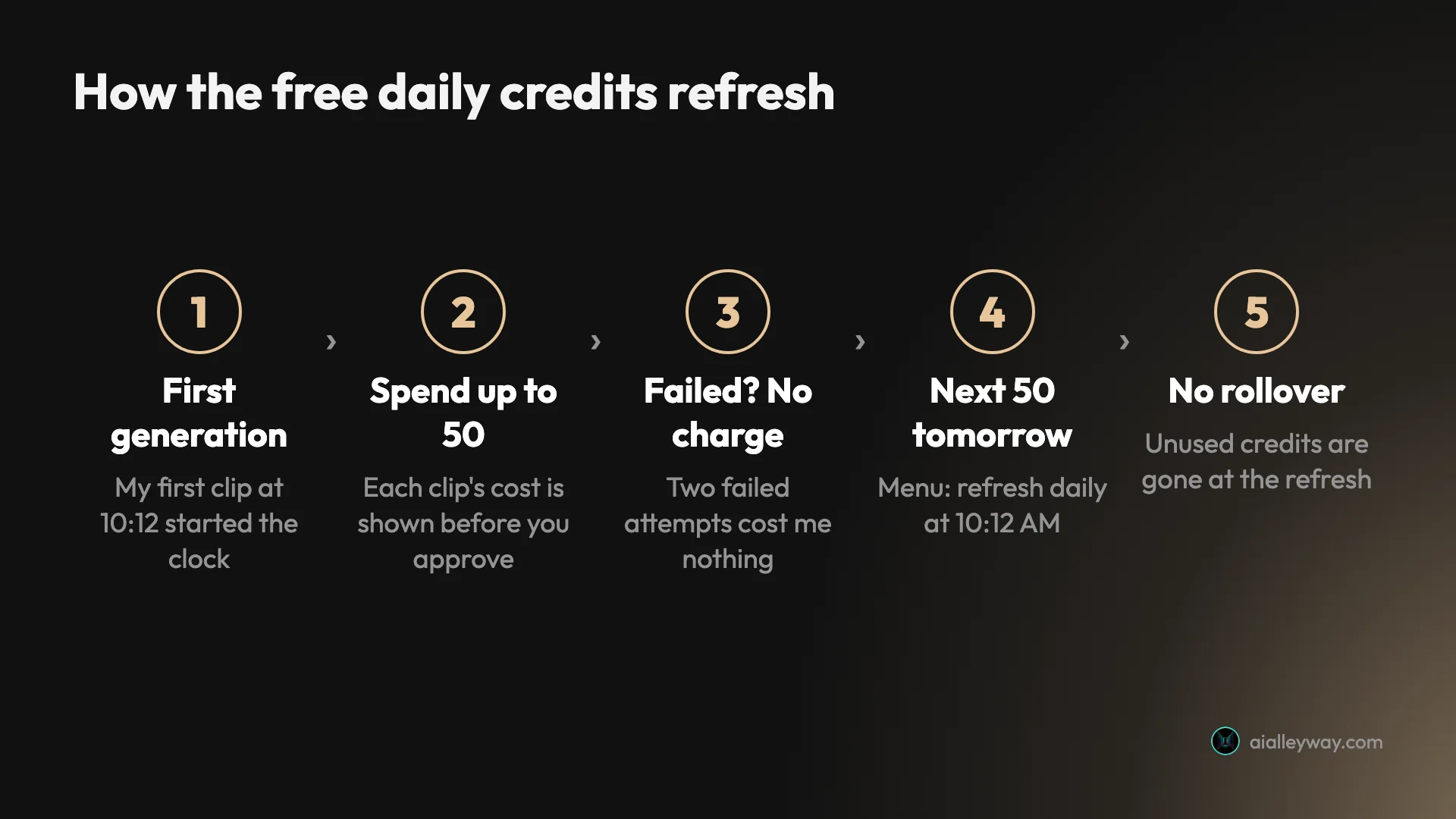
Google’s credits page says the daily refresh “is triggered by your first generation”, and gives the example of someone who first spends credits on 12 August getting the next 50 on 13 August. Mine behaved that way. I approved my first clip at 10:12 in the morning, and from then on the account menu read “Credits refresh daily at 10:12 AM”.
Three more rules matter:
- Unused credits vanish. The credits page says what you do not spend does not roll over, so 50 is the most a free account can ever hold.
- Failed clips are free. Google’s help page says failed generations are not charged, and I saw it twice. Both times the balance stayed where it was.
- Peak hours can block video. The credits page warns that between roughly 2 PM and 5 PM UTC, people without a subscription may not be able to generate videos, though images and the Flow agent keep working. I tested between 03:10 and 03:40 UTC, so I never ran into it.
Every video asks before it spends. Flow’s agent posts a card reading “Would you like me to kick off this 1 video generation, costing 10 credits?” with Approve, Always approve and Reject. A new project defaults to asking every time. The other setting, “Never”, lets the agent spend credits without asking, which on a 50-credit budget is a quick way to lose a day’s allowance to one misread prompt.
What I made with 50 free credits
I spent the allowance on one clip from each video model a free account can afford, plus one attempt at the model it cannot. All clips were 16:9 and made through Flow’s agent with a short written prompt.
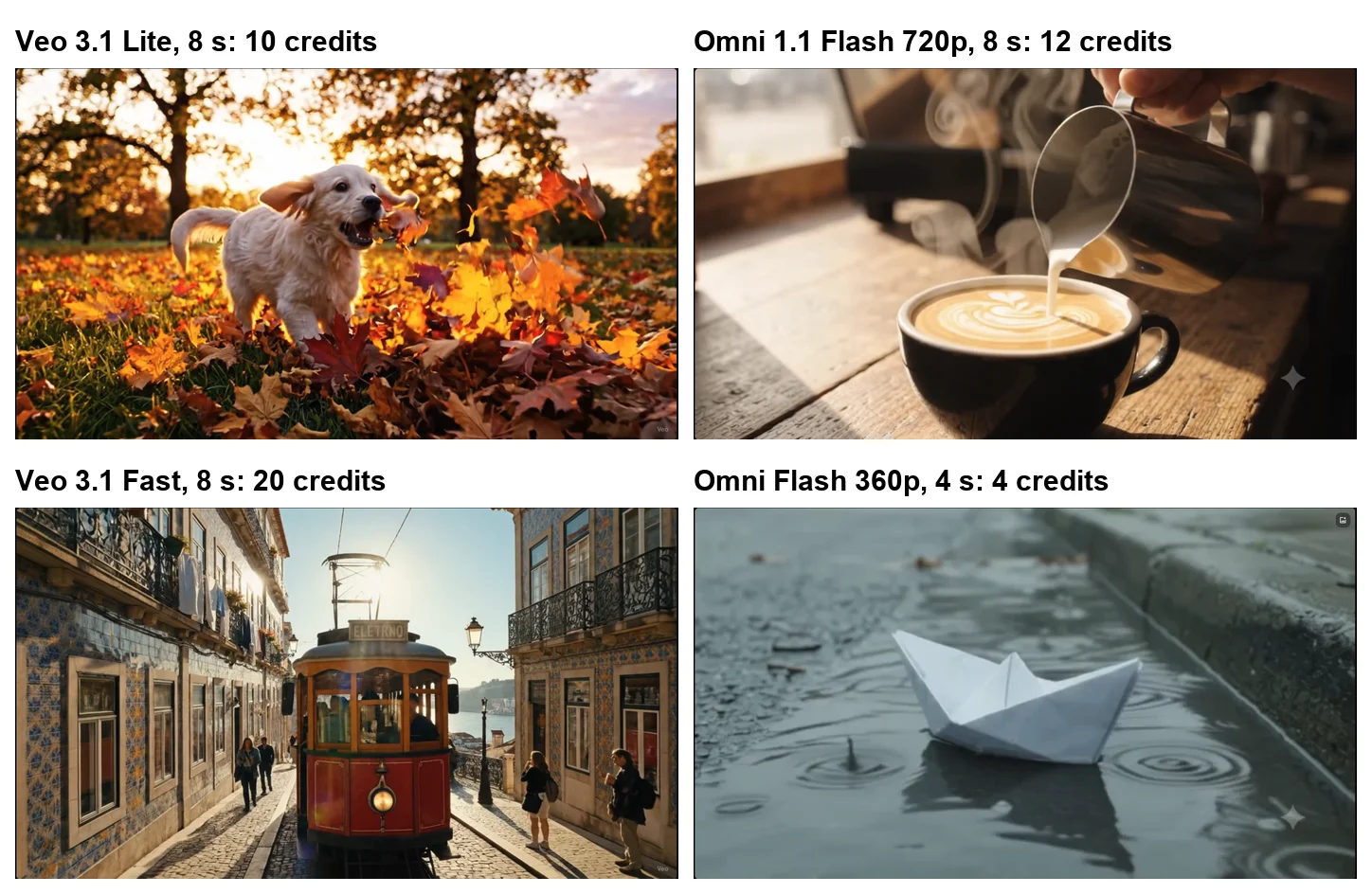
| Clip | Model | Credits | Ready in | Balance after |
|---|---|---|---|---|
| Puppy chasing autumn leaves, 8 s | Veo 3.1 Lite | 10 | About 80 seconds | 40 |
| Barista pouring latte art, 8 s | Veo 3.1 Quality | 100 asked | Failed, not charged | 40 |
| Barista pouring latte art, 8 s | Omni 1.1 Flash, 720p | 12 | About two minutes | 28 |
| Lisbon tram on a hill street, 8 s | Veo 3.1 Fast | 20 | About 100 seconds | 8 |
| Waves on a black sand beach, 8 s | Veo 3.1 Lite | 10 asked | Failed, not charged | 8 |
| Paper boat in a rainy gutter, 4 s | Omni Flash, 360p | 4 | Under a minute | 4 |
The quality is better than a free tier has any right to be. The Lite puppy bounds through the leaves and catches one in its mouth halfway through, with low golden sun behind it. The Omni barista clip starts on a steaming cup and pours a rosetta-style pattern by the four-second mark. The Fast tram is the most cinematic of the four, with tiled facades, cobbles and a glimpse of the river, but it also shows the classic AI tell: the destination board reads “ELETRNO”. The 360p paper boat is softer, as you would expect, but the rain ripples around it are convincing.
The timing column is from watching the screen, not a stopwatch. Every clip landed in under about two minutes, even though the agent said four times that my video was “waiting in the queue due to high demand”. I did not check the soundtracks, so I am not making any claim about audio here. Our Google Veo review covers Veo’s native audio.
The prompts were deliberately plain. Each was one sentence describing the subject, the setting or camera and, in most, the sounds. The first used the model set in Flow’s settings; after that I named the model in the prompt itself, and from the third clip on the length and shape too, for example “New video with Veo 3.1 Fast, 8 seconds, 16:9”. From then on the price on every approval card matched the model and length I had asked for, which is a useful check before you spend anything: 10 credits for Lite, 12 for Omni Flash at 720p, 20 for Fast and 4 for the short 360p clip.
The brief itself was followed less strictly. I asked for a tram climbing a steep hill and got one on a gentle slope with a river view, and the barista clip spends its first seconds on a plain cup of coffee before the pour begins. If one detail matters to you, watch for it in the first clip before spending more credits on variations.
Clips per day for each Flow video model
Google publishes the cost of every model on its credits page, and every cost I was shown matched it exactly. Turned into clips, the free allowance looks like this.
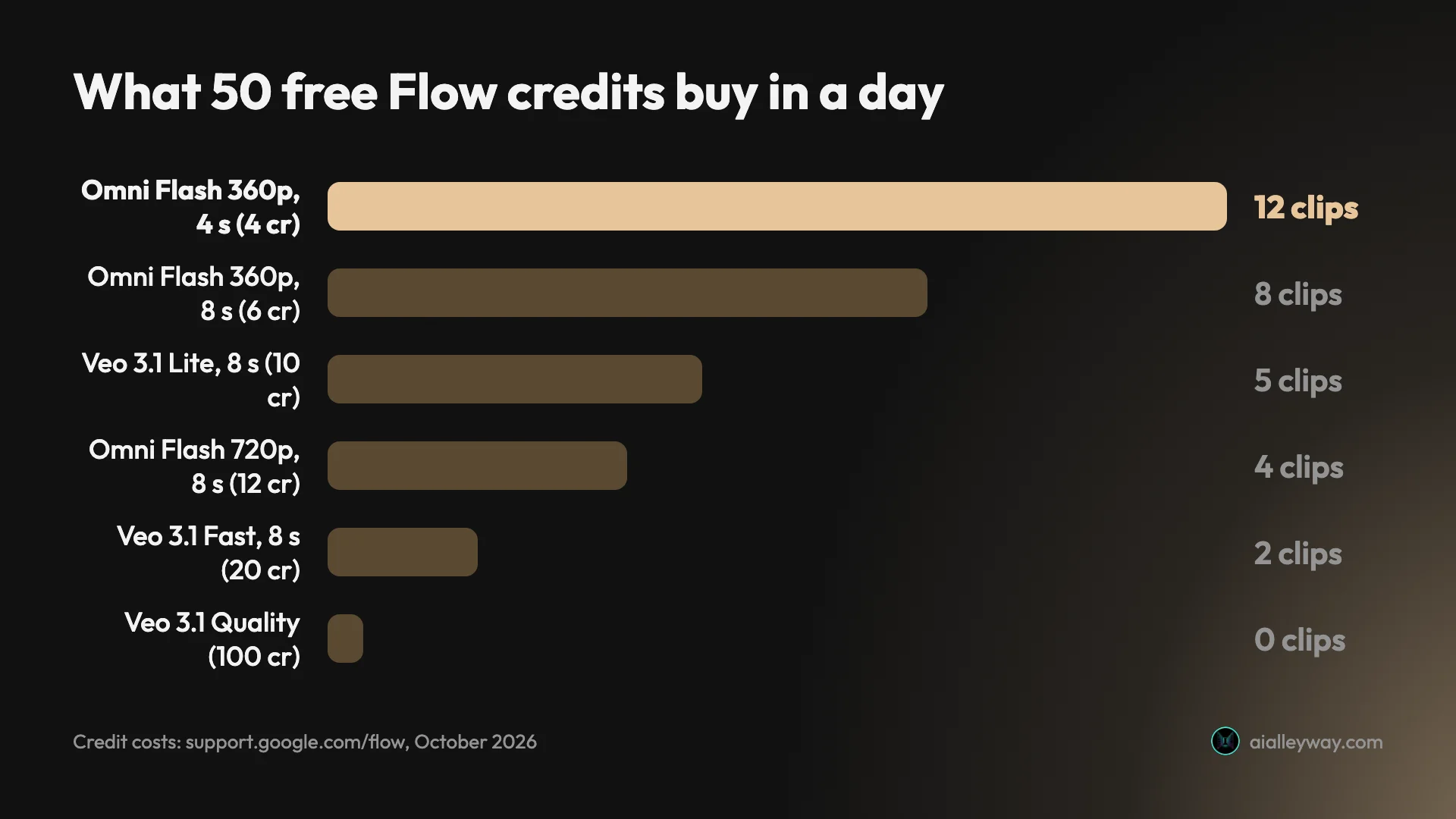
| Model | Length | Credits each | Clips from 50 a day |
|---|---|---|---|
| Gemini Omni Flash, 360p | 4 s | 4 | 12 |
| Gemini Omni Flash, 360p | 8 s | 6 | 8 |
| Gemini Omni Flash, 360p | 10 s | 7 | 7 |
| Gemini Omni Flash, 720p | 4 s | 7 | 7 |
| Gemini Omni Flash, 720p | 8 s | 12 | 4 |
| Gemini Omni Flash, 720p | 10 s | 15 | 3 |
| Veo 3.1 Lite | 8 s | 10 | 5 |
| Veo 3.1 Fast | 8 s | 20 | 2 |
| Veo 3.1 Quality | 8 s | 100 | 0 |
| Omni Flash edit of a video | Any | 40 | 1 |
Two things stand out. First, Omni Flash’s short and low-resolution clips are the only way to get more than five clips a day: 12 four-second clips at 360p, or 7 at 720p. Google’s models page says 360p costs half as much as 720p. It works well as a draft mode: try a prompt cheaply, then spend the bigger credits on the version that works. Second, Omni Flash is the only model that makes 10-second clips and edits existing video, but an edit costs 40 credits, which is almost the whole day.
Google notes that the costs are per generation, not per request, so a request that makes two videos costs double. Video defaulted to one clip per request in my project, and I left it there.
Images are the free part
Video is where the credits go. Images, in my testing, cost none. With 8 credits left, I asked Flow for a square Nano Banana Pro image of a flat-lay with a coffee cup, a croissant and an open notebook. The first attempt returned “Something went wrong”, the retry worked, no approval card appeared, and the balance still read 8.
That matches everything I have seen on this account. Earlier this week I made two Nano Banana Pro images for our free Nano Banana Pro guide, eight Pro and eight Nano Banana 2 images for a head-to-head, and 16 for our Nano Banana Pro prompts test, and none of them moved the balance. Google’s credits page lists costs for video and upscaling but none for images, and its models page calls Nano Banana 2 Lite “the default model available at no charge”.
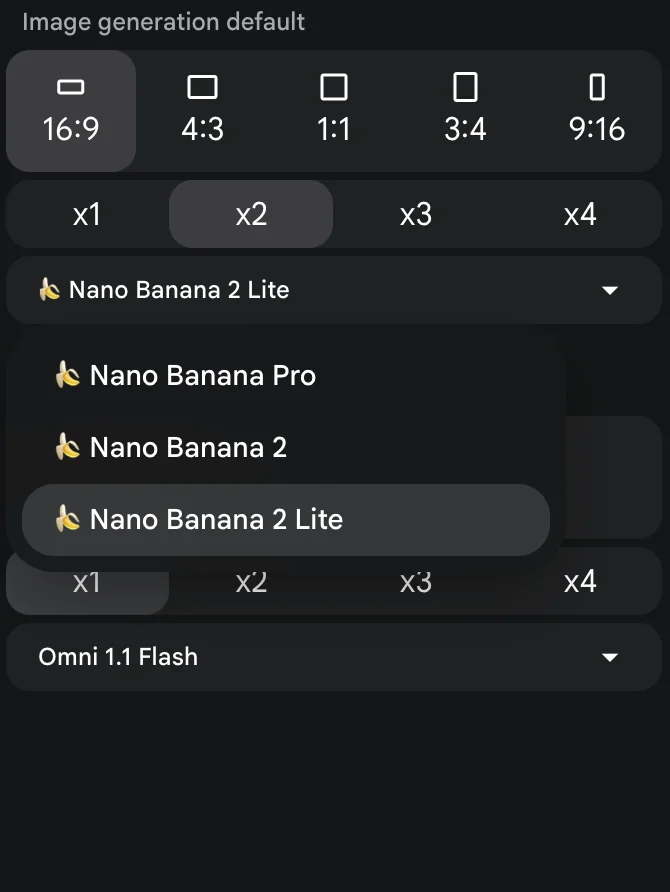
The image picker offers Nano Banana 2 Lite, Nano Banana 2 and Nano Banana Pro. Pro is the one worth switching to: in our Nano Banana Pro vs Nano Banana 2 test it was better at exact text, and in Flow it cost me nothing. I have not tried to find a daily image cap, so I cannot promise there is none. What I can say is that across more than 25 images in four days I never saw one.
Free images also make free video go further. Flow can start a clip from a first frame, so a good image made at no cost becomes the opening shot of a clip you then pay credits for. I did not test that route this time, but Google’s models page lists first-frame starts for every Veo 3.1 model and for Omni Flash.
Limits I hit on a free account
The limits are clear once you click around, and none of them is hidden behind small print. These are the six screens that told me where free ends.
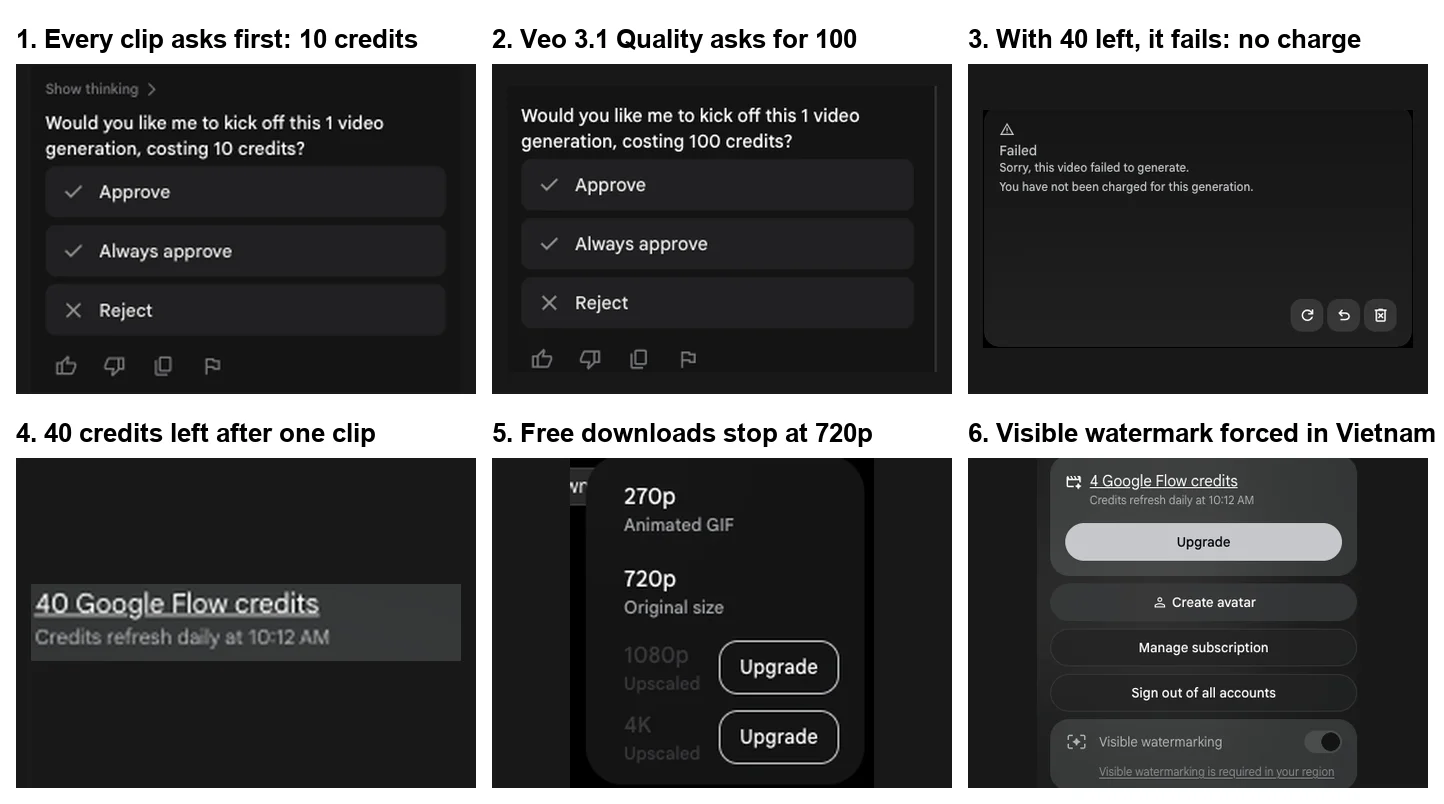
- Veo 3.1 Quality. It costs 100 credits per clip for every user, and a free account tops out at 50. I tried with 40 left: Flow happily asked me to approve 100 credits, then the clip failed with “You have not been charged for this generation.”
- Clips your balance can’t cover. With 8 credits left, Flow still offered me a 10-credit Lite clip, and it failed the same way. Flow does not check your balance before showing the approval card, so check it yourself in the account menu.
- 1080p and 4K. The download menu offered a 270p animated GIF and the 720p original, with 1080p and 4K behind Upgrade. Google’s credits page says 1080p upscaling is free for Plus, Pro and Ultra and not available to non-subscribers, and 4K costs 50 credits on Ultra only.
- Buying more credits. Google One’s help page says Pro and Ultra members can buy extra AI credits for Flow, and the Flow credits page extends that to Plus. A free account cannot top up; it waits for tomorrow.
- Turning off the visible watermark, in some countries. Google says every Flow output carries an invisible SynthID watermark, and that a visible one is applied automatically in India, South Korea and Vietnam. I tested from Vietnam, where the switch was greyed out. Outside those countries, the help page says the switch is in your profile menu. When I downloaded a Veo 3.1 Lite clip at 720p, the small white “Veo” mark sat in the bottom-right corner of the file. Our Google Veo review found no visible mark on its July export, and I cannot say whether region or a later change explains the difference.
Free vs Google AI Plus, Pro and Ultra
Google Flow pricing starts at $4.99 a month with Google AI Plus. Paid plans keep the 50 daily credits and add a monthly pool on top. Prices below are Google’s US prices; our Veo 3 pricing guide turns them into cost per clip.
| Free | Google AI Plus | Google AI Pro | Google AI Ultra | |
|---|---|---|---|---|
| Price a month (US) | $0 | $4.99 | $19.99 | $99.99 or $199.99 |
| Flow credits | 50 a day | 50 a day + 200 a month | 50 a day + 1,000 a month | 50 a day + 10,000 or 25,000 a month |
| Veo 3.1 Quality (100 credits) | Never affordable | About 2 a month | About 10 a month | 100 or more a month |
| 1080p downloads | No | Yes, 0 credits | Yes, 0 credits | Yes, plus 4K for 50 credits |
| Buy extra credits | No | Yes | Yes | Yes |
| Video in peak hours | May be blocked | No block stated | No block stated | No block stated |
The jump that matters most for video is Plus. For $4.99 you get 1080p downloads, no stated peak-hour block and 200 more credits, which is two Quality clips or ten Fast clips a month on top of the daily 50. Pro makes sense once you are regularly making more than a few clips a week. Ultra also halves the cost of Lite and Fast clips and adds a lower-priority Lite tier at 0 credits, according to the credits page.
How to start with Google Flow free
Getting a first clip takes about five minutes. For the agent, characters and the editor in more depth, see our step-by-step Google Flow tutorial.
- Open Google Flow in Chrome or another Chromium browser on a computer. The Google Flow login is your normal Google account; there is no separate sign-up, just a short onboarding screen the first time.
- Click your profile picture at the top right and check the balance. It should say 50 Google Flow credits.
- Start a new project. Click the settings icon in the prompt box to choose the default video model, aspect ratio and number of clips per request. Leave “Confirm before generating” on Always.
- Type what you want, including the model, length and shape, for example “an 8-second 16:9 video with Veo 3.1 Lite”.
- Read the approval card. It states the cost in credits. Approve it, and the clip appears in your project grid within a couple of minutes.
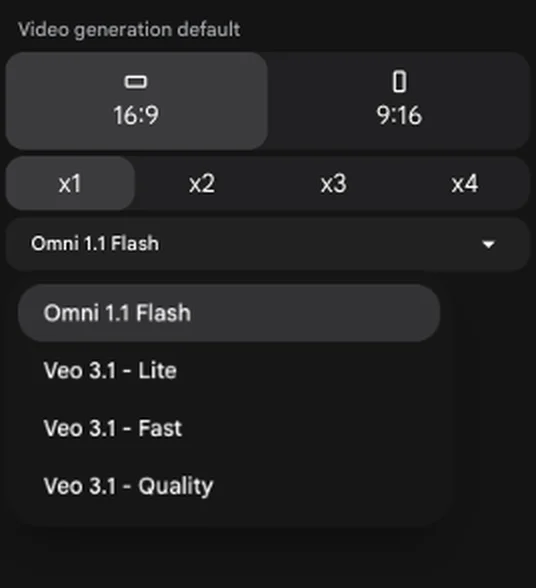
Twice, when I named a Veo model in the prompt, the agent replied that it was going to generate the video and then stopped without showing a card. Typing “Go ahead” brought the card up both times. If nothing happens after the agent says it is starting, that nudge is the fix.
Getting more from 50 free credits
A few habits stretched my allowance, and a couple would have saved me from wasted attempts.
- Draft at 360p. A four-second Omni Flash draft costs 4 credits against 12 for an eight-second 720p clip. Settle the prompt cheaply, then make the version you want to keep.
- Use four-second clips for tests. Omni Flash at 720p costs 7 credits for four seconds and 12 for eight, so a short test leaves room for the real thing.
- Make your start frame as an image first. Images cost nothing in my testing, so get the opening look right in Nano Banana Pro before you spend video credits.
- Start early in your day. The 24-hour clock starts at your first generation, so a morning start gives you a morning refresh. If you are near the 2 PM to 5 PM UTC peak, generate before it.
- Check the balance before you approve. Flow will offer clips you cannot afford. A failed clip costs nothing, but it costs you a few minutes.
- Keep approvals on. Each card names the price, which is your best defence against spending 20 credits on a prompt you meant to try at 4.
Here is what the draft-then-final habit looks like in credits, using Google’s published costs.
| Plan for the day | Credits | Left from 50 |
|---|---|---|
| Three 4-second 360p Omni drafts, then one 8-second 720p Omni final | 12 + 12 = 24 | 26 |
| Two 4-second 360p drafts, then one Veo 3.1 Fast final | 8 + 20 = 28 | 22 |
| Straight to five Veo 3.1 Lite clips, no drafts | 50 | 0 |
Common mistakes on the free tier
- Expecting Veo 3.1 Quality. It will never fit in 50 credits. If you have seen a stunning Veo clip online, it may well have been Quality, which free accounts cannot run.
- Expecting credits to stack. Skipping a day does not give you 100 the next. Unused credits are gone at the refresh.
- Expecting a midnight reset. The clock runs from your first generation, so a late start means a late refresh.
- Trusting websites that sell “free Flow” or “free Veo”. The official free tier is at flow.google.com and needs only a Google account. You do not need a third-party site to use it.
- Assuming the visible watermark can always be removed. In India, South Korea and Vietnam it is applied automatically, and our Gemini watermark remover guide explains the equivalent setting in the Gemini app and what it does and does not change.
Who should stay free and who should pay
- Stay free if you want to try AI video, make a few clips a week for social posts, or mainly need images. Four clips a day plus free images is a generous trial, and the 720p download is fine for phones.
- Pay for Google AI Plus if you need 1080p files, want to avoid the peak-hour block, or keep running out by lunchtime. At $4.99 it is the cheapest way to remove the free tier’s hardest limits.
- Pay for Pro or Ultra if Veo 3.1 Quality is the point. A free account can never run it, Plus covers about two clips a month, and only Pro and up make it a regular tool.
- Skip Flow if you need long clips. The longest single clip is 10 seconds on Omni Flash and 8 on Veo, so longer videos are stitched together or, on Veo 3.1 Lite, extended, which I did not test. Our best AI video generators roundup covers the alternatives.
Final word
Google Flow’s free tier is real, and it is better than Google’s own getting-started page suggests. Fifty credits a day bought me four good clips in half an hour, the failed attempts cost nothing, and images never touched the balance. The ceiling is just as real. Veo 3.1 Quality is permanently out of reach at 50 credits, downloads stop at 720p, and you cannot buy your way past a bad day without a plan.
For most people that is the right shape for a free tier. Use it to learn what AI video can do and to make short clips for social. Pay $4.99 for Plus the day 720p or the daily limit starts getting in your way.
Frequently asked questions
Is Google Flow free?
Yes, with a daily limit. Google's credits page says every account gets 50 Google Flow credits a day, with or without a subscription, and my free account had them on 4 October 2026. That bought four short video clips and still left room for images, which cost no credits in my test.
One caveat: Google's getting-started page still says Flow needs a Google AI Plus, Pro or Ultra plan. That contradicts the credits page and my account, so if Flow asks you to upgrade, that page is probably why.
How many free credits does Google Flow give you?
50 a day. Google's credits page says every account gets them, and paid plans add a monthly pool on top: 200 for Google AI Plus, 1,000 for Pro, and 10,000 or 25,000 for the two Ultra tiers.
On my free account the 50 went on an eight-second Veo 3.1 Lite clip for 10 credits, an eight-second Omni Flash clip for 12, an eight-second Veo 3.1 Fast clip for 20 and a four-second Omni Flash clip at 360p for 4.
When do Google Flow free credits reset?
A day after your first generation, not at midnight. Google's credits page says the daily refresh is triggered by your first generation and that unused credits do not roll over.
My first clip went in at 10:12 in the morning, and from then on Flow's account menu said my credits refresh daily at 10:12 AM. So if you start late in the day, your next 50 arrive late the next day too.
Can you use Veo 3.1 Quality for free in Google Flow?
Not in practice. A Veo 3.1 Quality clip costs 100 credits, and the free allowance is 50 a day that does not roll over, so a free account can never hold enough.
I tried anyway with 40 credits left. Flow asked me to approve a 100-credit generation, then the clip failed with the message that I had not been charged.
Can you download 1080p videos from Google Flow for free?
No. On my free account the download menu offered a 270p animated GIF and the clip at its original 720p size, with 1080p and 4K greyed out behind Upgrade buttons. A 360p clip offered 360p, with 720p behind Upgrade.
Google's credits page agrees: 1080p upscaling costs 0 credits for Plus, Pro and Ultra subscribers and is not available to non-subscribers, and 4K is for Ultra only.
Does Google Flow free add a watermark?
Google says every Flow output carries an invisible SynthID watermark. A visible watermark is a setting in the account menu, and Google's help page says it is applied automatically in India, South Korea and Vietnam.
I tested from Vietnam, where the switch was greyed out with the note that visible watermarking is required in my region. My Veo clips showed a small Veo label in the corner of the preview and the Omni clips a sparkle.
I downloaded one Veo 3.1 Lite clip at 720p (1280x720, 8 seconds), and the small white 'Veo' mark was in the bottom-right corner of the file too. Our July Veo review found no visible mark on its export, and I cannot say whether region or a later change explains the difference.
Can I use Google Flow free videos commercially?
Google's help page points to its Terms of Service and quotes them: Google won't claim ownership over content you generate. It does not set different rules for free accounts.
That is not a licence review, so read the Terms for your use. Also remember that every Flow output carries an invisible SynthID watermark, and in India, South Korea and Vietnam a visible one is applied automatically.
Is Google Flow free unlimited?
Not for video. The 50 daily credits are a hard ceiling, and when I tried a 10-credit clip with 8 credits left, it failed without charging me.
Images are a different story in my test. A Nano Banana Pro image went through with 8 credits left and the balance did not move, and Google's credits page lists no credit cost for images. I did not hit an image cap, but I also did not try to find one.
Keep reading
Google Veo 3 Pricing: What It Really Costs Per Clip
Google Veo 3 pricing, decoded: free to try, but the real cost is Flow credits — a Quality clip is about $2. Full per-clip, per-plan math, measured hands-on.
Google Veo 3 Review: Cinematic AI Video, Brutal Credit Math
Google Veo makes the West's most cinematic AI video, but a top clip costs 100 credits. My hands-on take on quality, the Flow workflow, and real pricing.
Nano Banana Pro Free: Where It Actually Works, Tested
Nano Banana Pro free, tested on a free Google account: it worked in Google Flow at no credit cost, but not in the Gemini app or AI Studio.

The Best AI Video Generator for Every Kind of Video
The best AI video generator depends on the job. We tested 10 hands-on: Google Veo for generation, Synthesia for avatars, Fliki for script-to-video, and more.