
Google Veo 3 Pricing: What It Really Costs Per Clip
Google Veo 3 pricing, decoded: free to try, but the real cost is Flow credits — a Quality clip is about $2. Full per-clip, per-plan math, measured hands-on.
Contents
What Google Veo 3 really costs
Google Veo 3 is free to try and, if you only read the plan prices, looks cheap — $4.99 to $99.99 a month. The number that actually decides your bill is hidden a layer down: Veo runs inside Google Flow on a credit system, and a single eight-second clip on the top Quality model costs 100 credits, which is about $2 on the mid plan. Generate a minute of that footage and you have spent most of a monthly allowance. The subscription is the hook; the credit meter is the real price, and this guide works it out per clip, per model, and per plan from hands-on measurement.

Here is the short version. Any Google account gets a real free tier of 50 Flow credits a day, enough for Lite, Fast and Omni Flash clips but never for the flagship Quality model. Paid access runs $4.99 (Plus), $19.99 (Pro), or from $99.99 (Ultra) a month, and each buys a pool of Flow credits. What you spend those credits on — Lite, Fast, or the flagship Quality model — matters far more than which plan you pick. For the quality verdict behind these numbers, see our full Google Veo review.
| Plan | Price / month | Flow credits | Quality clips (100 cr) |
|---|---|---|---|
| Free | $0 | 50 a day | None (a Quality clip costs 100) |
| Google AI Plus | $4.99 | 200 | ~2 |
| Google AI Pro | $19.99 | 1,000 | ~10 |
| Google AI Ultra | from $99.99 | 10,000–25,000 | ~100–250 |
Paid plans add these monthly credits on top of the same 50 daily credits every account gets.
How Google Veo 3 pricing works
You do not buy “Veo” directly. Veo is a set of models inside Google Flow, Google’s AI creative studio, and you reach it through a Google AI subscription — the same Plus, Pro, and Ultra plans that bundle Gemini and other Google AI features. So Veo’s price is really the Google AI plan price plus how fast you burn the Flow credits it includes.
That makes two layers to understand, and the plan price only tells you about the first.
| The two layers of Veo pricing | What it is | What it sets |
|---|---|---|
| The plan | Your Google AI subscription (Plus / Pro / Ultra) | How many Flow credits you get each month |
| The credit cost | Credits each model spends per 8s clip | How far those credits actually go |
The catch is the second layer. A plan that looks generous at 1,000 credits is only ten clips a month if you run the flagship model, or a hundred if you run the entry one — so the plan price alone tells you almost nothing about what you can make. Read both layers together.
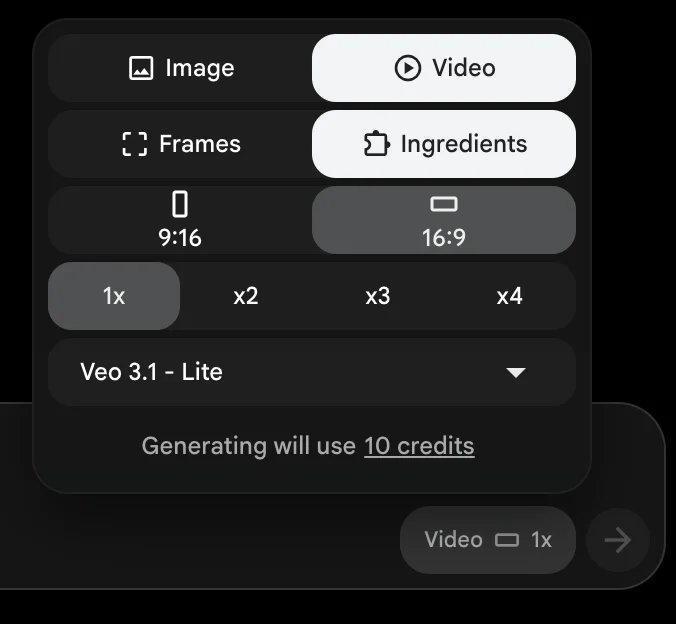
One genuinely good piece of design helps here: Flow shows the credit cost before every generation, so you always see “10 credits” or “100 credits” on screen before you spend. Stills cost nothing, and switching models updates the number live. You are never billed by surprise, which is more than Kling’s credit system can say.
It is also worth remembering what the subscription buys beyond video. These are Google’s broader AI subscriptions, so the Flow credits sit alongside other Google AI features rather than being the whole purchase, and if you already pay for one of these plans, Veo is effectively bundled rather than a separate line item.
That shifts the value calculation for anyone in Google’s ecosystem: the honest comparison against a standalone tool like Kling is not always $19.99 versus a subscription, but the marginal credits you spend on top of a plan you were keeping anyway. That marginal cost is real once you run Quality clips at any volume, but it is lower than paying for a video tool from scratch.
The Google AI plans
Veo access ladders up through four tiers, priced below for the US market as of mid-2026 — they vary by region, and Google adjusts them periodically.
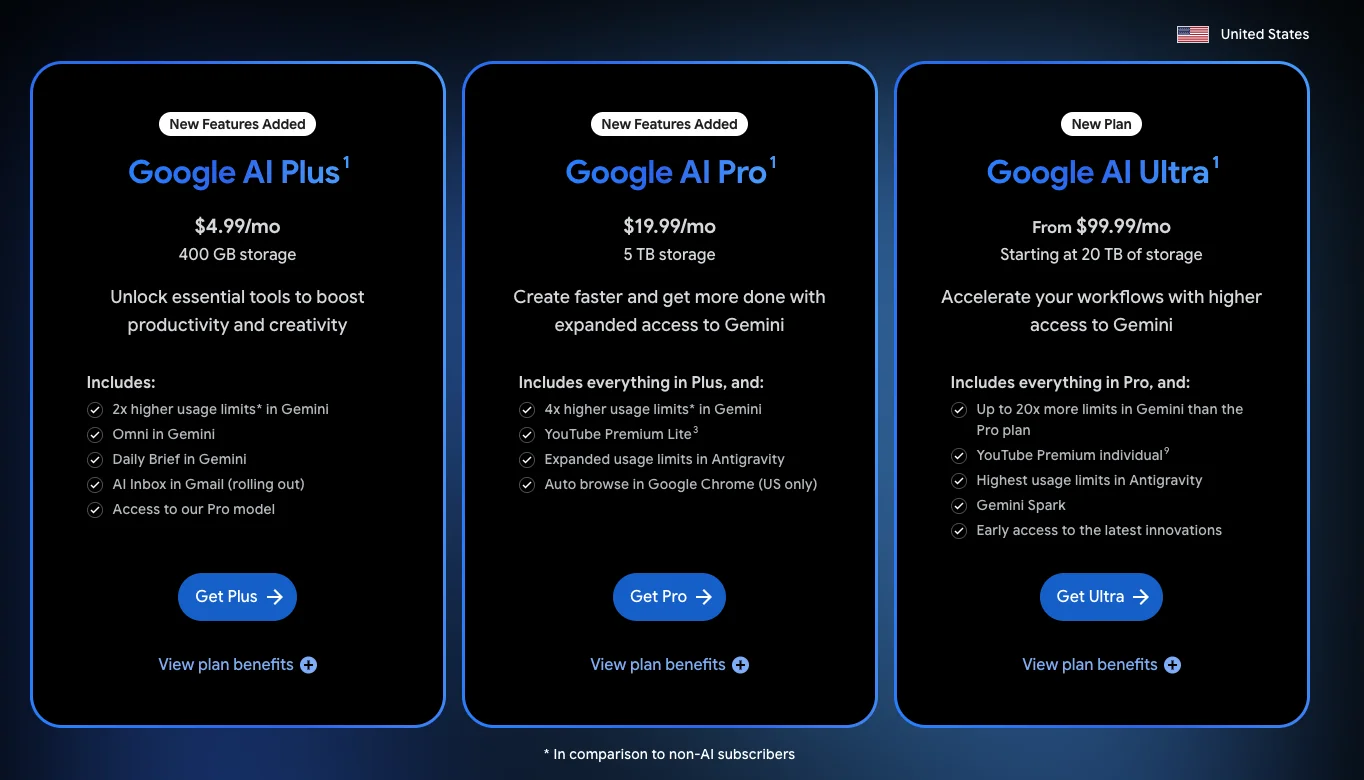
- Free — any Google account, 50 Flow credits a day that do not roll over, and no way to afford the 100-credit Quality model. Enough for a genuine trial, not a workflow.
- Google AI Plus — $4.99 a month, 200 credits. The cheapest paid entry. Two hundred credits is only about two Quality clips, so Plus suits light Fast or Lite use rather than flagship work.
- Google AI Pro — $19.99 a month, 1,000 credits. The mainstream plan. A thousand credits covers roughly ten Quality clips, fifty Fast, or a hundred Lite — enough for regular non-flagship production.
- Google AI Ultra — from $99.99 a month, 10,000 to 25,000 credits. The plan for heavy or Quality-first users. It bundles credits at a far lower unit cost, which is what makes flagship output affordable.
The pattern is that the more you pay, the cheaper each credit becomes, so heavy Quality users are not just buying more credits on Ultra, they are buying them at a discount. The next two sections turn that into real dollars.
What a Veo 3 clip actually costs
On the Pro plan, a Veo 3.1 Quality clip costs about $2.00, a Fast clip about $0.40, an entry Lite clip about $0.20, and a still image nothing. This is the per-clip math the rest of the internet leaves out — I measured each model’s credit cost directly in Flow for a single eight-second clip, then converted it to dollars at each plan’s per-credit rate. The table also covers Gemini Omni Flash, Google’s newer default Flow model, alongside the Veo 3.1 tiers.
| Model (8s clip) | Credits | On Plus (~$0.025/cr) | On Pro (~$0.02/cr) | On Ultra (from ~$0.01/cr) |
|---|---|---|---|---|
| Veo 3.1 Lite | 10 (5 on Ultra) | ~$0.25 | ~$0.20 | ~$0.05 or less |
| Gemini Omni Flash | 12 | ~$0.30 | ~$0.24 | ~$0.12 or less |
| Veo 3.1 Fast | 20 (10 on Ultra) | ~$0.50 | ~$0.40 | ~$0.10 or less |
| Veo 3.1 Quality | 100 | ~$2.50 | ~$2.00 | ~$1.00 or less |
| Still image | 0 | Free | Free | Free |
Two things jump out. First, the Quality model is an order of magnitude pricier than the rest — at roughly $2 a clip on Pro, it is the tier that empties an allowance fast, and the reason people call Veo expensive. Second, the per-clip cost drops sharply as you move up plans, because Ultra’s credits are cheaper each: a Quality clip that costs $2.50 on Plus falls toward $1.00 or below on Ultra. If your work depends on the flagship model, Ultra is not a luxury, it is the plan that makes the math work.
How many videos each plan buys
Credits mean nothing until you translate them into finished clips, so here is what each plan’s monthly allowance actually produces, by model. These are the extra monthly credits only, on top of the 50 a day every account gets, and Ultra’s counts reflect Google’s half-price Lite and Fast rates for Ultra subscribers.
| Plan | Extra credits / month | Quality clips | Fast clips | Lite clips |
|---|---|---|---|---|
| Google AI Plus | 200 | ~2 | ~10 | ~20 |
| Google AI Pro | 1,000 | ~10 | ~50 | ~100 |
| Google AI Ultra | 10,000–25,000 | ~100–250 | ~1,000–2,500 | ~2,000–5,000 |
Now scale it to real work, and the eight-second native cap becomes the hidden cost. Veo generates at most eight seconds per clip, so a longer piece is stitched from several: a thirty-second video is four clips, and a full minute is roughly eight. At the Quality rate that one minute costs about 800 credits — eighty percent of Pro’s entire month, or around $16 of footage — before any re-rolls for prompts that miss.
| One minute of video (~8 clips) | Credits | Cost at Pro rates |
|---|---|---|
| All Veo 3.1 Quality | ~800 | ~$16 |
| All Veo 3.1 Fast | ~160 | ~$3.20 |
| All Veo 3.1 Lite | ~80 | ~$1.60 |
The lesson is to budget in finished projects, not single clips. A creator posting one polished minute of Quality footage a month is a Pro subscriber; a studio making that weekly needs Ultra.
The free tier, honestly
Veo’s free tier is one of the better ones in AI video, with an important limit. Any Google account generated a full eight-second clip on the Veo 3.1 Lite model in testing, with native audio and no paywall. Where Runway’s free plan hands you a watermarked, silent draft and Kling’s a single watermarked flagship clip, Veo’s free output is good enough to judge the model and draft with.
On watermarks, our July export had no visible mark, but an October export (tested from a region where Google applies a visible watermark automatically) carried a small “Veo” label. Why the two exports differ is not established. Outside a few countries, including India and South Korea, Google says a profile-menu toggle controls it, and every Flow output carries invisible SynthID.
The limit is the credit pool. On 4 October, 50 free credits bought me four clips, which our Google Flow free guide breaks down: Veo 3.1 Lite for 10, Omni Flash for 12, Veo 3.1 Fast for 20 and a short 360p Omni clip for 4. The flagship Quality model costs 100 credits a clip, so it never fits, and the free tier is a real trial rather than a production tool. You can judge Veo’s quality and workflow properly for nothing, which is the point — but the moment you need the cinematic Quality tier or more than a few clips, you are on a paid plan.
How to keep your Veo 3 bill down
Because the Quality model is where the money goes, a few habits change your bill dramatically.
- Draft on Lite or Fast, finalise on Quality. At $0.20 to $0.40 a clip, drafting is nearly free; reserve the 100-credit Quality model for the handful of shots that ship. This alone can cut a project’s cost by more than half.
- Nail the look on free stills first. Still images through Nano Banana, Flow’s built-in image model, cost zero credits, so lock your framing and composition on free stills, then spend video credits only on animating the winner.
- Match the plan to your Quality volume. If you rarely touch Quality, Pro is plenty. If Quality is your default, Ultra’s cheaper per-credit rate pays for itself quickly — running flagship clips on Pro is the most expensive way to use Veo.
- Respect the eight-second cap. Every extra eight seconds is another full clip’s credits, so plan longer pieces as deliberate cuts rather than assuming length is cheap.
Veo 3 vs Kling and Seedance on price
Veo is the priciest of the top models for premium output, and it is worth being clear about the gap. A Veo 3.1 Quality clip costs about $2.00 on Pro, where a flagship Kling clip runs roughly $0.66 to $0.80 and a Seedance clip about $0.62 through a developer platform. For top-tier clips, the Chinese models are two to three times cheaper.
| Tool | Cost per premium clip |
|---|---|
| Google Veo 3 (Quality) | ~$2.00 |
| Kling (flagship) | ~$0.66–0.80 |
| Seedance (via fal.ai) | ~$0.62 |
But price is not the whole comparison. Veo’s cheaper Lite and Fast tiers cost $0.20 to $0.40 a clip, undercut Kling outright, and still generate native audio, and Veo’s billing is transparent, where Kling carries a 1.3-star Trustpilot reputation. So the honest framing is that Veo charges a premium for its best model and its clean experience, while the Chinese models win on raw cost per top clip. Our Kling vs Veo comparison and the Kling AI pricing and Seedance pricing guides lay out the full picture.
Which Veo 3 plan should you buy?
For most people the answer is Pro; the free tier is a genuine trial, and Ultra only earns its price once flagship Quality output is your default. Here it is by user type.
- Just trying it? Stay free. The Lite tier is genuinely usable and tells you whether Veo’s quality and workflow suit you before you spend anything.
- Occasional creator, mostly drafts and social clips? Google AI Plus at $4.99 or Pro at $19.99, running Fast and Lite, with the odd Quality clip for a hero shot.
- Regular creator who needs flagship quality sometimes? Pro at $19.99 is the mainstream pick — ten Quality clips or fifty Fast a month, with room to draft cheaply underneath.
- Studio or Quality-first professional? Ultra from $99.99. Once the flagship model is your default, its cheaper per-credit rate makes it the only plan whose math works at volume.
The final word
Google Veo 3’s pricing looks simple and is not. The plans run $4.99 to $99.99, but the figure that decides your real cost is credits per clip: about $2 for a flagship Quality clip on Pro, dropping to cents for the Lite and Fast models, and falling further on Ultra. Read the credit table, think in finished projects against the eight-second cap, and the “brutal credit math” reputation becomes manageable — expensive at the top, genuinely cheap in the middle, and free to try.
For most people the answer is Pro, drafting on the cheaper models and spending Quality credits only where they show. For flagship work at volume, Ultra earns its price. And for the quality verdict behind the numbers, see our full Google Veo review.
Frequently asked questions
How much does Google Veo 3 cost?
Google Veo is free to try on any Google account, and paid access comes through Google AI plans: Plus at $4.99 a month, Pro at $19.99, and Ultra from $99.99. But the subscription is only half the price. Veo runs inside Google Flow on a credit system, and each clip spends credits depending on the model — from 10 for the entry Lite model to 100 for the top Quality model, per eight-second clip.
So the real cost is credits per clip, not the monthly figure. On the $19.99 Pro plan's 1,000 credits, a flagship Quality clip works out to about $2, a Fast clip about $0.40, and a Lite clip about $0.20. Ultra lowers those per-clip costs further by bundling far more credits. Match the plan to how much Quality output you actually need.
Is Google Veo free?
Yes, there is a genuine free tier. Any Google account gets 50 Google Flow credits a day, and in hands-on testing a free account generated a full eight-second clip on the entry Veo 3.1 Lite model, with native audio and without hitting a paywall.
Our July export had no visible mark, but an October export (tested from a region where Google applies a visible watermark automatically) carried a small 'Veo' label. That is more than several rivals allow — Runway's free tier, for instance, is watermarked and silent.
The catch is that 50 credits buy about five Lite clips, and a Veo 3.1 Quality clip costs 100 credits, more than a free account can ever hold, so the free tier is a genuine trial rather than a workflow. Once you generate more than a handful of clips, or need the flagship Quality model, you move to a paid Google AI plan.
How much does one Veo 3 clip cost?
It depends on the model and your plan, because Veo charges credits per eight-second clip and each plan buys credits at a different rate. On the Pro plan ($19.99 for 1,000 credits), a top Quality clip costs 100 credits or about $2.00, a Fast clip 20 credits or about $0.40, an entry Lite clip 10 credits or about $0.20, and a still image is free.
Those per-clip prices fall on Ultra, which bundles 10,000 to 25,000 credits, and rise slightly on the smaller Plus plan. So the cheapest way to run Quality clips at volume is Ultra, while occasional users are better off drafting on Lite or Fast and spending Quality credits only on final shots.
Is Veo 3 more expensive than Kling or Seedance?
For top-quality clips, yes. A Veo 3.1 Quality clip costs about $2.00 on the Pro plan, where a flagship Kling clip runs roughly $0.66–0.80 and a Seedance clip about $0.62 through a developer platform. So for premium output, Veo is two to three times pricier per clip than the Chinese models.
Where Veo competes is the cheaper tiers and the experience. Its Lite and Fast models cost about $0.20 and $0.40 a clip, undercut Kling, and still include native audio, and its billing is transparent, where Kling's carries a poor reputation. So Veo costs more for its best output but offers a cleaner, cheaper path for drafts. Our Kling vs Veo comparison covers the trade-off in full.
Keep reading
The Best Google Veo 3 Alternatives, Tested Hands-On
Google Veo 3 makes the best AI video, but a Quality clip costs ~$2. The 6 best Veo 3 alternatives — cheaper, longer clips, better free tiers — tested hands-on.

The Best AI Video Generator for Every Kind of Video
The best AI video generator depends on the job. We tested 10 hands-on: Google Veo for generation, Synthesia for avatars, Fliki for script-to-video, and more.

The Best Free AI Video Generator (No Trial Traps)
Most free AI video generators are watermarked or trials in disguise. Google Veo's free tier gives a real clip with sound, refilled daily, for $0.
Google Veo 3 Review: Cinematic AI Video, Brutal Credit Math
Google Veo makes the West's most cinematic AI video, but a top clip costs 100 credits. My hands-on take on quality, the Flow workflow, and real pricing.