
Free AI Image Generator: 3 Run Head to Head, 5 Ranked
The best free AI image generators: Google Flow, Bing Image Creator and Meta AI run on the same two prompts, plus the Gemini and ChatGPT free limits we measured.
Contents
The best free AI image generator for most people is Google Flow with Nano Banana: on a free Google account it made the most convincing stormy portrait and a concert poster with every word spelled right, and its images used no credits in my tests. If you do not want an account at all, Bing Image Creator made four images per prompt on a logged-out browser on 8 October 2026.
- Best overall: Google Flow (Nano Banana), Google’s newest image models with no credit cost for images
- Best with no sign-up: Bing Image Creator, four images per prompt and the most faithful text
- Best in a chat app: Meta AI, fast and free with a Meta account
- Best on a phone: Gemini app, the same Nano Banana family in a simple chat
- Best for a few exact images: ChatGPT, precise but three free requests at a time
How I chose and tested the five
Free image generators are easy to list and hard to compare, so I ran the same two prompts through the three tools I could test this week, and set them beside what our earlier hands-on tests measured for the other two.
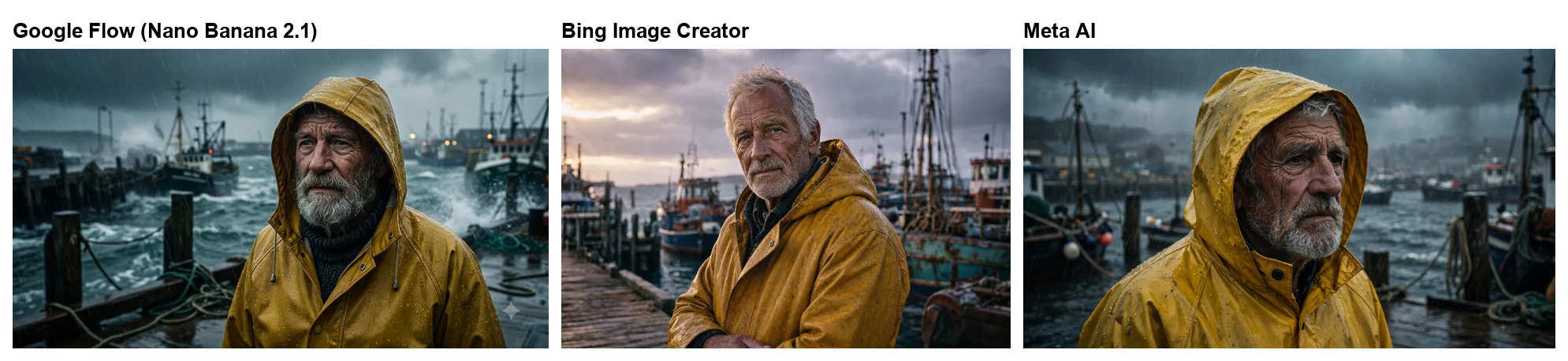
The first prompt was a photo: “Cinematic portrait of an old fisherman in a yellow raincoat on a stormy harbour, moody light, 35mm film look.” It tests mood and a specific look. The second was text: “A concert poster with the headline “MIDNIGHT ALLEY”, the line “Live at the Roxy, 14 June” and the small print “Doors 7pm. Tickets $25.” in a bold retro style.” It tests spelling, and whether a tool adds words of its own. I ran both word for word on Google Flow, Bing Image Creator and Meta AI on 7 and 8 October 2026, adding only an aspect ratio where the tool needed one, and judged the first result each time.
The Gemini app and ChatGPT were not re-run with these prompts. For them I am using our earlier first-hand tests of their free plans, which measured how far a free account goes before it hits a limit. I ranked the five on four things that matter when you are not paying: image quality, text accuracy, how much the free tier allows, and whether you need an account.
Those criteria are deliberately practical. Most people searching for a free image generator want one or two good pictures for a post, a slide or a flyer, not a production pipeline, so a tool that makes a great image but locks you out after three tries scores lower than one that is slightly less precise and lets you keep going. Text accuracy gets its own weight because posters, thumbnails and invitations are among the most common free uses, and a misspelt date is worse than a dull background.
I left out tools I could not run or measure myself, including some well-known names with free plans, rather than rank them on their marketing pages. Every tool below was either tested with these prompts or measured in our own earlier free-tier tests.
| Google Flow | Bing Image Creator | Meta AI | Gemini app | ChatGPT free | |
|---|---|---|---|---|---|
| Account needed | None in my test | Meta | OpenAI | ||
| Images per prompt | 2 by default | 4 | 1, or 2 to pick from | 1 | 1 |
| Free limit we hit | None; images used 0 credits | None in two prompts | None in two prompts | None in 12 requests | 3 requests, then 24 hours |
| Size I received | 1376 × 768 (16:9) | 1248 × 832 (3:2) | 2048 × 1152 (16:9) | 1408 × 768 (wide) | 1536 × 1024 (3:2) |
| Visible mark | Small sparkle (required where I tested) | None seen | None seen | Visible sparkle | Invisible marks, per OpenAI |
| Poster text | Correct, capitals | Exact | Correct, line added | Not re-run | Not re-run |
| Tested | 7–8 Oct 2026 | 8 Oct 2026 | 7–8 Oct 2026 | September 2026 test | 23 Sep 2026 |
1. Google Flow — best for quality at no credit cost
Google Flow is the free image generator hiding inside a video app. It is Google’s AI filmmaking tool, built for making short films, but it also makes images with the same Nano Banana models as the Gemini app, and on a free account those images used no credits in any of my tests. Flow’s 50 daily credits went on video; image making did not touch them.
That matters because Flow gives free users more than the Gemini app does. Its model menu offered Nano Banana 2.1, Google’s new everyday model, and Nano Banana Pro, its premium one, which the Gemini app keeps behind a paid Google AI plan. Both made images at no credit cost on my account.
Three caveats before you rely on it. Google’s own getting-started page still says Flow needs a paid plan, which my free account’s experience contradicts. That account has had a Flow project since November 2025, so I cannot rule out that brand-new accounts are treated less kindly. Flow also needs a verified age of 18 or over and a supported region, and Google recommends a Chromium browser. Free access to Pro could shrink or end. Our is Google Flow free guide has the detail.
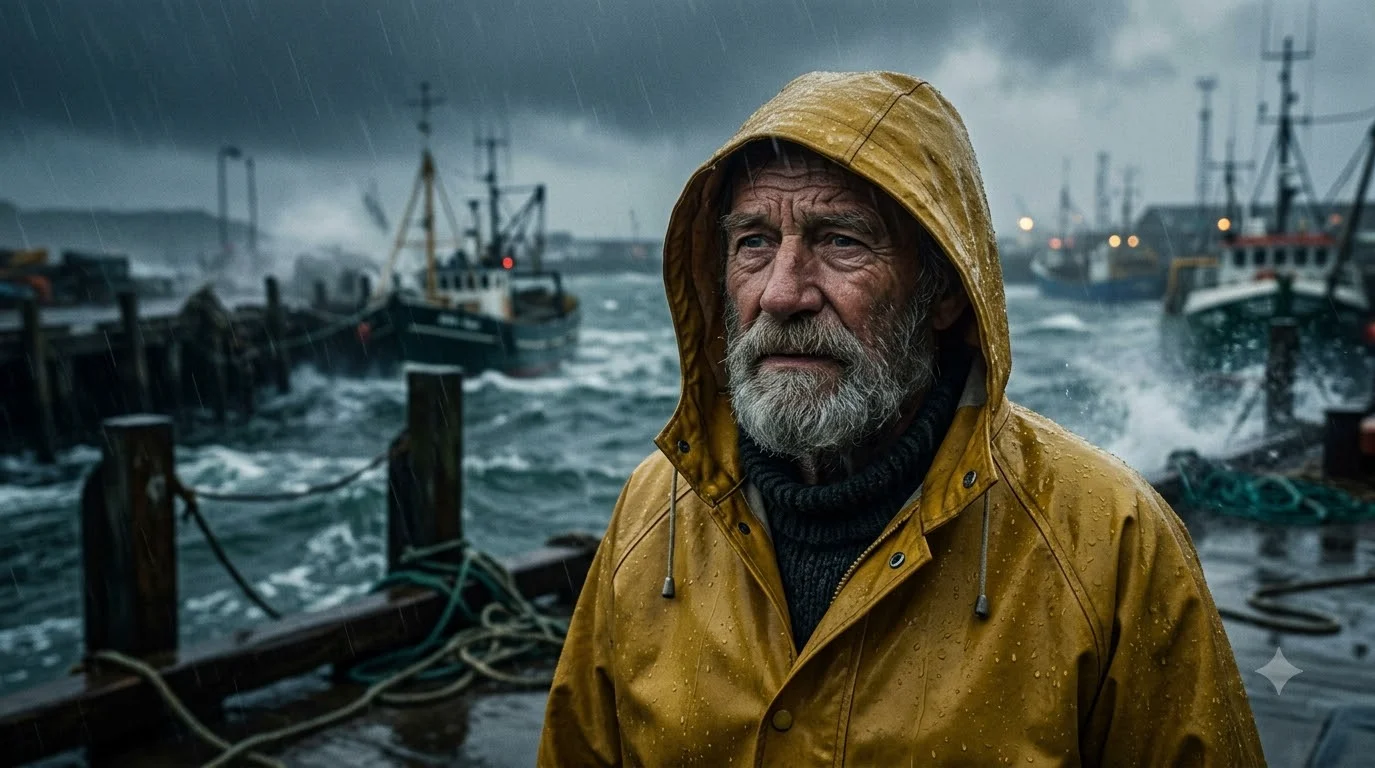
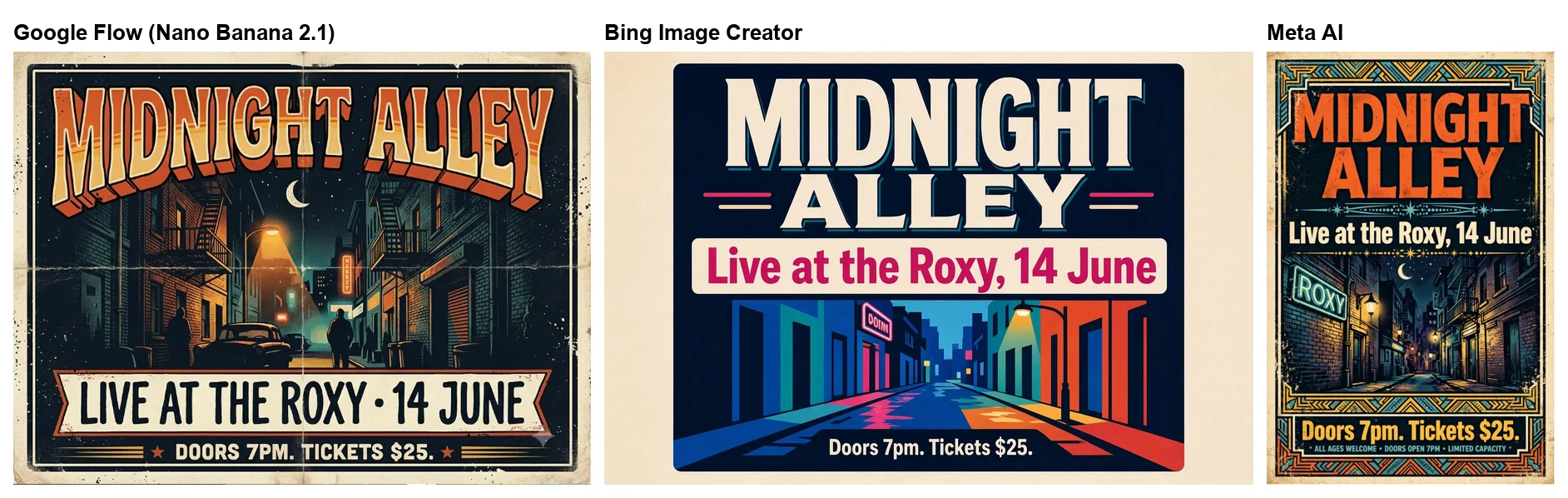
On the portrait prompt, Nano Banana 2.1 gave the most literal reading of “stormy” of the three tools: rain streaking across the frame, waves breaking over the harbour wall, trawlers behind, and a bearded man in a mustard hooded raincoat beaded with water, graded like film.
On the poster, it set all three lines correctly, in capitals, swapped the comma in “Live at the Roxy, 14 June” for a bullet, and added no line of its own; the only stray lettering was a small, unreadable neon sign in the alley art. Images carry a small sparkle mark in the corner, which Google requires in some countries, including the one I tested from, and offers as a setting elsewhere.
The catch is the interface. Flow is built for video projects, so you ask an agent for images in a chat panel rather than typing into a simple box, it defaulted to two images per request, and a batch took a minute or two. It is the best free quality here, and the most effort to start.
Once you are in, though, Flow rewards the effort. The same project keeps every image, so you can open one, describe a change in an edit box and get a new version beside the old, and in our Nano Banana 2.1 test a one-line edit fixed a miscounted detail without disturbing the rest of the picture. Because Flow is a video studio, the same project can also, per Google, turn a finished image into the opening frame of a short clip, which spends the daily video credits rather than nothing.
Good for: the best free images, Nano Banana Pro without a plan, posters with correct text. Not for: anyone who wants a one-box tool. Our Google Flow free guide explains the credits, and our Nano Banana 2.1 test has eight more prompts.
2. Bing Image Creator — best for no sign-up
Bing Image Creator was the surprise of the test. On 8 October 2026 I opened it in a browser that was not signed in to any Microsoft account, typed the portrait prompt, and it returned four images in under a minute, at 1248 by 832 pixels. The model chip above the results read MAI-Image-2.5-Flash, Microsoft’s own image model, at a 3:2 shape by default.
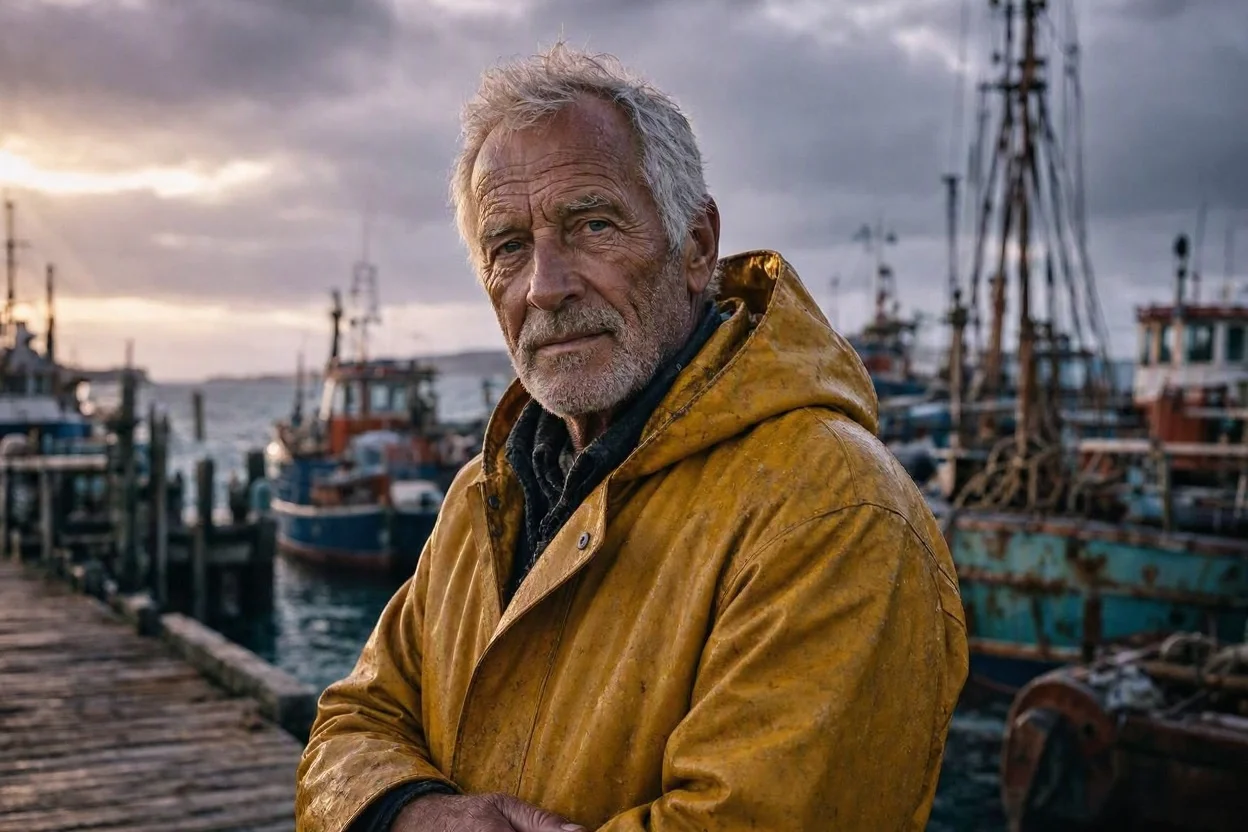
The portrait I checked was handsome but less stormy than the others: golden light breaking through heavy clouds over the boats, and no rain. The poster was the most faithful of the three tools on text: “MIDNIGHT ALLEY”, “Live at the Roxy, 14 June” and “Doors 7pm. Tickets $25.” exactly as I typed them, capitals and comma included. Like Flow’s, it drew a neon sign in the background with unreadable lettering, but it added no line of text.
Four images per prompt is the most generous output here, and useful when you are still deciding what you want. I saw no visible watermark on the image I captured. I did not run enough prompts to find a limit, and Microsoft did not ask me to sign in for these two.
The interface is the simplest of the five: one prompt box and an aspect-ratio menu. That makes it the friendliest place to start for anyone who has never used an image generator, and the only one in this test where you can try before deciding to make an account anywhere.
Search results are full of other sites promising free images with no sign-up. Bing differs in that you know whose model you are using and whose terms apply. I did not test the lesser-known sites, and I would not upload a personal photo to one without reading its privacy policy first.
Good for: no account, four options at a time, exact text. Not for: the stormiest, most literal reading of a mood prompt.
3. Meta AI — best for images inside a chat app
Meta AI makes images inside its chat assistant, free with a Meta account, and it was the quickest of the three tools I ran. On the portrait prompt, with 16:9 requested, it returned one 2048 by 1152 image in about 30 seconds: a darker, closer shot of a grey-bearded man in a rain-beaded yellow hood, with boats and dock posts behind him. It was the most cinematic crop of the three.
On the poster, Meta AI showed two versions side by side and asked which I preferred. Both spelled the three lines correctly and kept my capitals, in a tall poster shape. Both also added a line of small print I never asked for: “ALL AGES WELCOME • DOORS OPEN 7PM • LIMITED CAPACITY” on one, and “ONE NIGHT ONLY • ALL AGES WELCOME • LIMITED CAPACITY” on the other. On a real flyer, that is invented information you would have to catch and remove.
The images I captured showed no visible watermark, and the buttons under each image were simple: use it as a reference, download, add to favourites or share. Nothing on the image says which model drew it. Asked directly whether its portrait was made by Midjourney, Meta AI said it was not, and credited its own image system; our Is Midjourney free? guide covers why that question comes up.
Meta AI’s strength is convenience. It lives in the same assistant that answers everyday questions, it was fast, and it hit no limit across my two prompts. Its weakness is the one the poster showed: it is happy to add details you did not ask for.
It is also the tool most likely to keep going after the image: it offered to refine the picture in the same conversation, so a second version is one sentence away rather than a new prompt.
Good for: quick images in an app you already use. Not for: text you need exactly as written.
4. Gemini app — best for quick images on a phone
The Gemini app is the easiest of Google’s two free routes: a plain chat that works the same on a phone as on a laptop, with the Nano Banana image models built in. I did not run this test’s two prompts in it, but our Nano Banana review put the free app through 12 image requests in one session, including an edit and a slower run in the 3.1 Pro chat mode, without a single refusal.
That review found most default-mode images ready in about 30 seconds and none over 40, which makes it the fastest Google option for a quick picture. Free images carry a visible sparkle watermark. On a seven-part scene it drew four tulips where three were asked for, and the slower 3.1 Pro chat mode, which is not the Nano Banana Pro model, fixed the count.
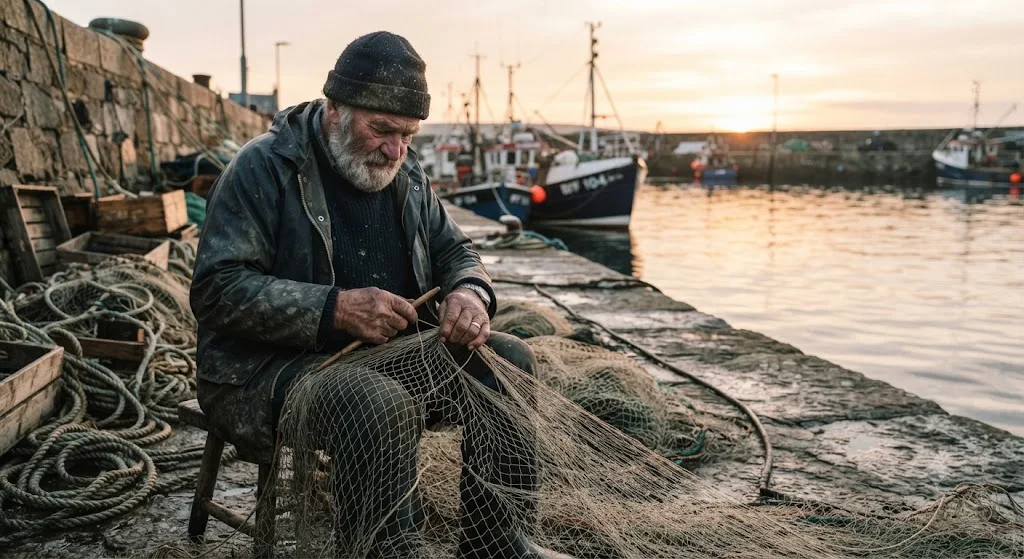
In an earlier test with a different prompt, the free app drew an elderly bearded fisherman mending a net on a stone quay at sunrise, with boats behind. It was a different prompt from this test’s, so it is not a head-to-head result, but it shows the same photographic quality the Flow version has, from the same family of models.
Google’s help page, as it read on 7 October 2026, maps the app’s modes to models: Flash-Lite mode uses Nano Banana 2 Lite, and Flash or Pro mode uses Nano Banana 2. Nano Banana Pro itself needs a Google AI plan in the app, which is why Flow, where Pro was free in my tests, ranks above it here. Our how to use Nano Banana guide explains the modes in more detail.
Where the app shines is editing a photo you already have. You upload it, describe the change in plain words, and it redraws the image; our Gemini image editing guide shows seven real edits on a free account, including where the face held and where it slipped. Our free AI photo editor roundup runs the same three edits on Flow and Meta AI.
Its limits are also the least visible of the five: the app did not show a counter or a warning at any point in that session, so you only learn the ceiling by hitting it, which our test never did.
Good for: quick images and photo edits on a phone. Not for: Nano Banana Pro without paying; use Flow for that.
5. ChatGPT — best for three precise images a day
ChatGPT makes some of the most precise images of any tool, and its free plan lets you try that, but only three at a time. In our ChatGPT free test on 23 September 2026, three image requests went through, one of them an edit, and the fourth was refused. The card that appeared offered an upgrade or a reset time 24 hours after the first image.
What those three requests buy is strong. In our ChatGPT image generator review, it spelled all 15 requested text strings correctly, though only the first poster ran on the free plan and the rest on Plus. Later prompt tests did turn up a few misspellings, so check the words. One free request was an edit that asked for three changes at once, night, a lit lamp and no cat, and ChatGPT handled all three in a single image, though night came out closer to dusk.
The limit is the whole story. Three requests is enough to make one important image and fix it once, and not enough to explore an idea. That makes ChatGPT the right last step rather than the first: try ideas in Flow or Bing, then bring the final version here. OpenAI says it adds C2PA metadata and invisible watermarking to its images.
If you outgrow it, ChatGPT Go costs $8 a month and, per OpenAI, offers more image creation than the free plan. Plus at $20 a month allowed 155 images before a lock in a separate test of ours. It is the one tool here where paying a little changes the experience completely; with the other four, the free tier already covers everyday use.
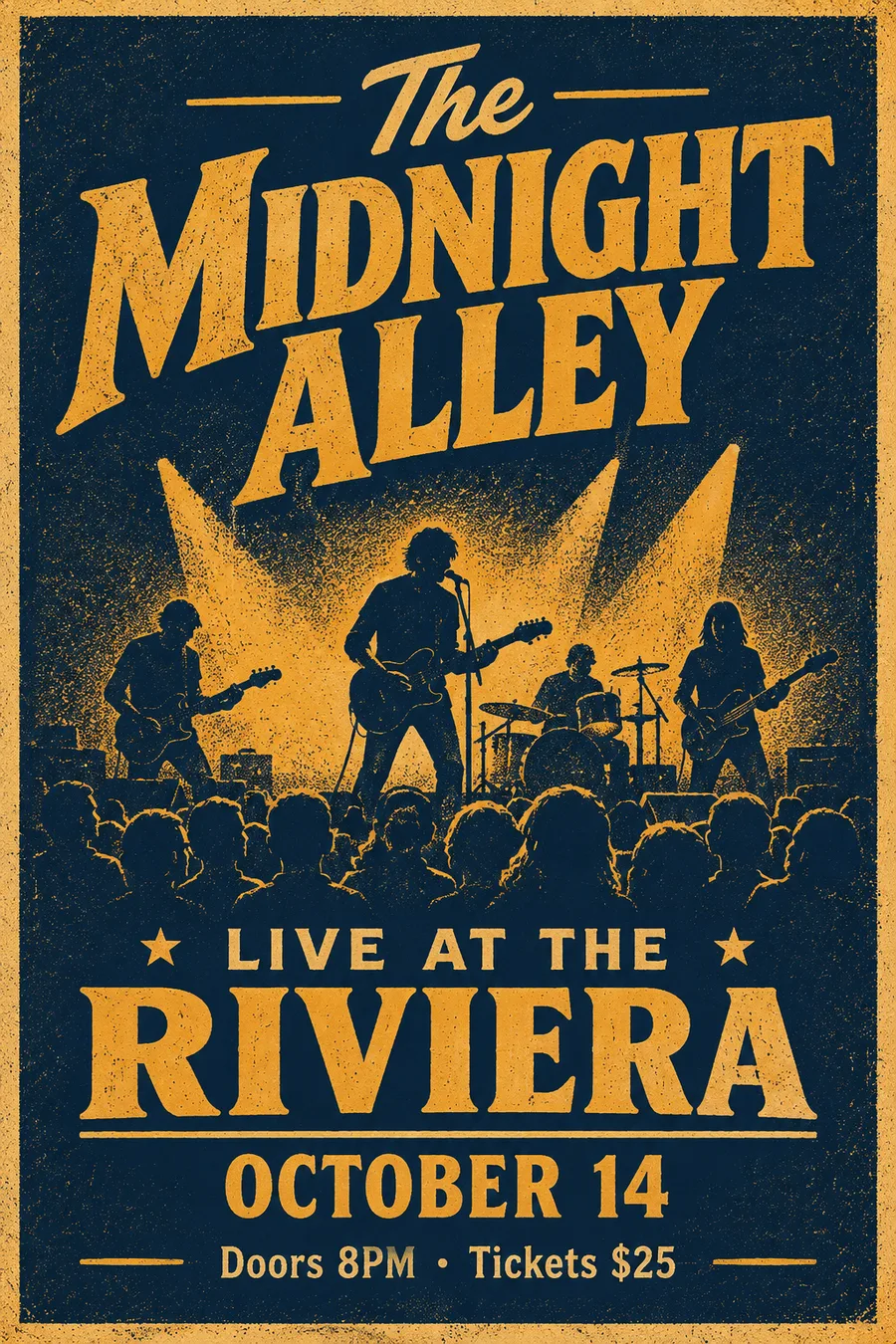
For text, our earlier test gave it a poster brief much like this one, and the free plan set every line of a navy and amber screen-printed concert poster. Like the other tools, it was a single image from a single request, which is exactly how you would use the free plan.
Good for: one image that has to be exactly right. Not for: exploring, or anything over three requests a day.
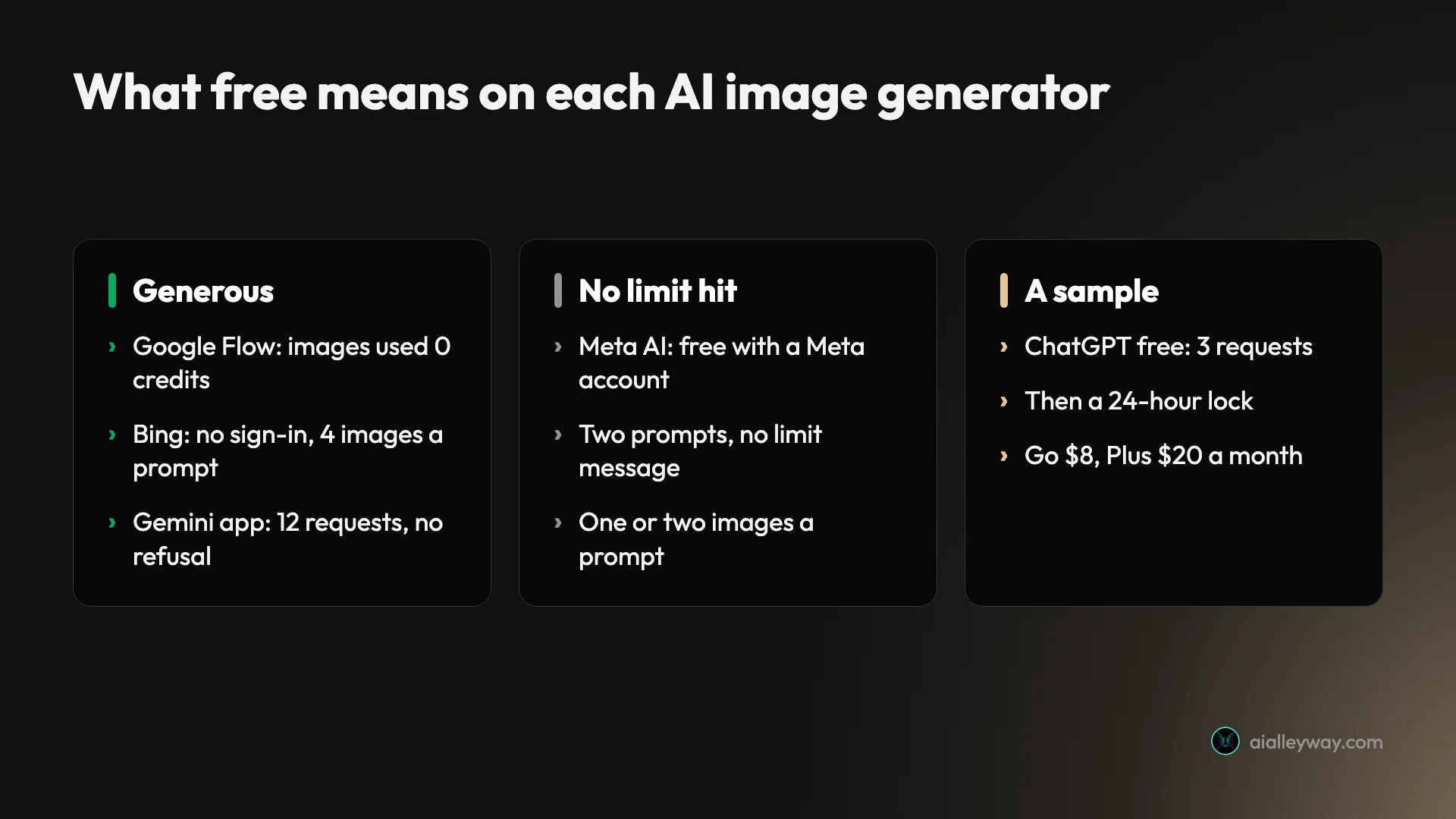
How to pick a free AI image generator
- If you want the best images without paying, pick Google Flow. It runs Nano Banana 2.1 and Nano Banana Pro, and its images used no credits in my tests.
- If you do not want to make an account, pick Bing Image Creator. It worked logged out and gave four options per prompt.
- If text must be exactly as written, pick Bing Image Creator first, the most faithful of the three I ran on this poster, and check every word whichever tool you use. Nano Banana Pro in Flow is the other strong option, though I ran 2.1 on this prompt, not Pro.
- If you want an image inside a chat you already use, pick Meta AI or the Gemini app.
- If you are editing a photo on your phone, pick the Gemini app.
- If you need one perfect image today, use ChatGPT’s three free requests, after drafting elsewhere.
- If you want to try several free tools in one sitting, draft the idea in Bing, refine it in Flow, and spend ChatGPT’s requests only on the version you will keep.
- If you need volume, privacy or a house style, a free tool is the wrong choice; our best AI image generator roundup covers the paid options, and our Midjourney alternatives guide covers the paid tools built around a house style.
Final word
For free AI images in 2026, start with Google Flow: it made the best images in my test, and offers Google’s premium model at no credit cost.
Frequently asked questions
What is the best free AI image generator?
For most people, Google Flow with Nano Banana. On a free Google account it made a rain-soaked cinematic portrait and a concert poster with every line spelled correctly, and its Nano Banana 2.1 and Pro images used 0 credits in my tests on 7 and 8 October 2026.
The runner-up is Bing Image Creator, which returned four images per prompt without signing in. Meta AI is the quickest if you already have a Meta account, the Gemini app is the easiest on a phone, and ChatGPT's free plan makes precise images but allowed only three requests before a 24-hour lock in our earlier test.
Is there an AI image generator free with no sign-up?
Yes. Bing Image Creator worked without signing in when I tested it on 8 October 2026: on a browser not logged in to any Microsoft account, it took my prompt and returned four images at 1248 by 832 pixels, using a model labelled MAI-Image-2.5-Flash. Google Flow, Meta AI, the Gemini app and ChatGPT all need an account. Many lesser-known sites also advertise no sign-up; I did not test those.
Is there an unlimited free AI image generator?
None of the five tools here promises unlimited images, but two of the three I tested came close in practice. Google Flow's Nano Banana 2.1 and Pro images used no credits in my tests, because Flow's 50 daily credits went on video, and Bing Image Creator showed no limit across my two prompts without even signing in.
The Gemini app took 12 image requests in one session without a refusal in our earlier test. ChatGPT's free plan is the opposite: three requests, then a 24-hour lock. Treat any tool's generosity as what one account saw on one day, not a guarantee.
Does Google have a free AI image generator?
Two. The Gemini app makes images free with Nano Banana 2 Lite or Nano Banana 2, depending on the mode, going by Google's help page as of 7 October 2026, and Google Flow, Google's AI filmmaking tool, makes images free with Nano Banana 2.1, and Nano Banana Pro, which the Gemini app reserves for paid Google AI plans. In my tests Flow images used no credits, and the Gemini app took 12 requests without a refusal.
Do free AI image generators add a watermark?
Some do. Google Flow images carried a small sparkle mark in the corner in my test; Google requires that visible mark in some countries, including the one I tested from, and makes it a setting elsewhere. Free images from the Gemini app also carry a visible sparkle. I saw no visible mark on the Bing Image Creator and Meta AI images I captured, though tools may also add invisible markers or metadata; OpenAI, for example, says it uses C2PA metadata and invisible watermarking.
Which free AI image generator is best for text?
In my poster test, all three tools I ran spelled every line correctly. Bing Image Creator kept my exact wording, capitals and comma included, in the image I checked. Google Flow's Nano Banana 2.1 set the text in capitals and swapped one comma for a bullet. Meta AI kept the wording but added a whole line of small print I never asked for. Flow and Bing each also drew a neon sign in the background with unreadable lettering.
Keep reading
Google Flow Free: What 50 Daily Credits Buy, Tested
Google Flow free, tested on a free account: 50 credits a day bought four AI video clips, images cost nothing, and Veo 3.1 Quality was out of reach.
Best AI Image Generator: 9 Picks, Two Tested Head to Head
The best AI image generator is ChatGPT for exact briefs and Nano Banana for free, fast images, both tested. Plus Midjourney, Ideogram, Firefly and four more.
ChatGPT Image Generator Free: The Limits, Tested
Is the ChatGPT image generator free? Yes, with an account: my free plan allowed three image requests, then locked for 24 hours. What free gets, and when to pay.
Is Midjourney Free? What a No-Plan Account Can Do
Is Midjourney free? No: a signed-in account without a plan can browse but not create. The one official trial, Meta AI tested, and a free alternative.