
ChatGPT Image Generator Free: The Limits, Tested
Is the ChatGPT image generator free? Yes, with an account: my free plan allowed three image requests, then locked for 24 hours. What free gets, and when to pay.
Contents
Is the ChatGPT image generator free?
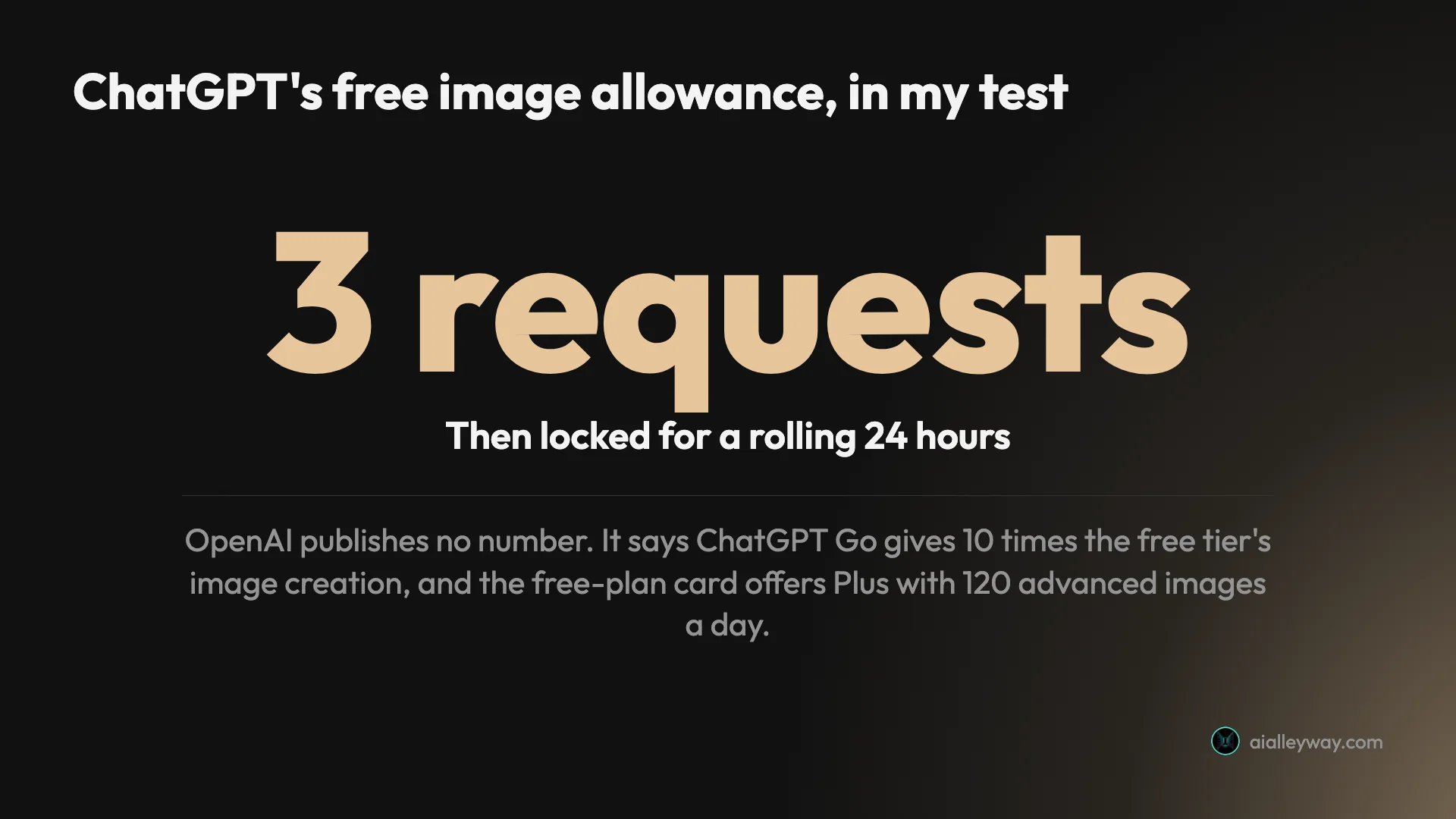
Yes, with a free account, but only just. On the free plan I tested, ChatGPT made three images, one of them an edit, then refused the fourth and set a reset time 24 hours after my first picture. OpenAI publishes no number for the free limit, so three is what one account got, not a promise. Free users do get the same ChatGPT Images 2.5 model as paying ones, and for more pictures the cheapest upgrade is ChatGPT Go at $8 a month.
| Plan | Price | OpenAI’s own description | In my free test |
|---|---|---|---|
| Free | $0 | ”Limited and slower image generation” | Three requests, then a 24-hour wait |
| Go | $8 a month | ”More image creation”; a tenfold rise on free, per OpenAI (January 2026) | Not tested |
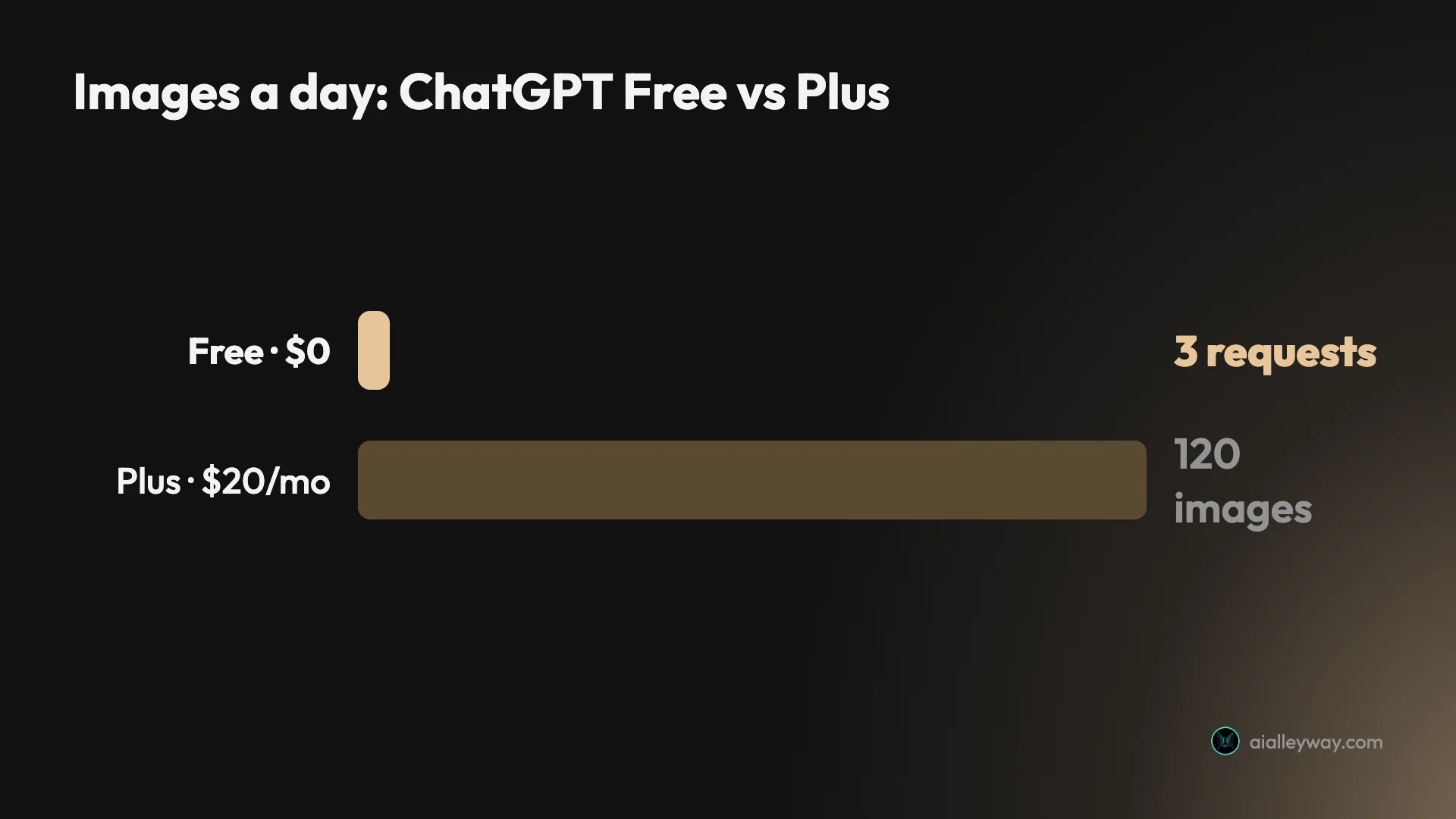
| Plus | $20 a month | ”More complex and accurate image creation” | The app offers 120 images a day |
| Pro | From $100 a month | ”Unlimited and faster image creation” | Not tested |
How ChatGPT’s free image limit works
The free limit is not a daily quota that resets at midnight. It behaves like a window that starts with your first picture and closes when you run out, and it is metered separately from ordinary chatting.
OpenAI’s free-tier help page sets out the rules without the numbers. Free users can create images. Image generation, file uploads, voice and data analysis each have their own usage limits. ChatGPT tells you when you reach one, and you then wait for a later time, or upgrade, which resets the limits. OpenAI’s pricing page adds only that free image generation is “limited and slower”.
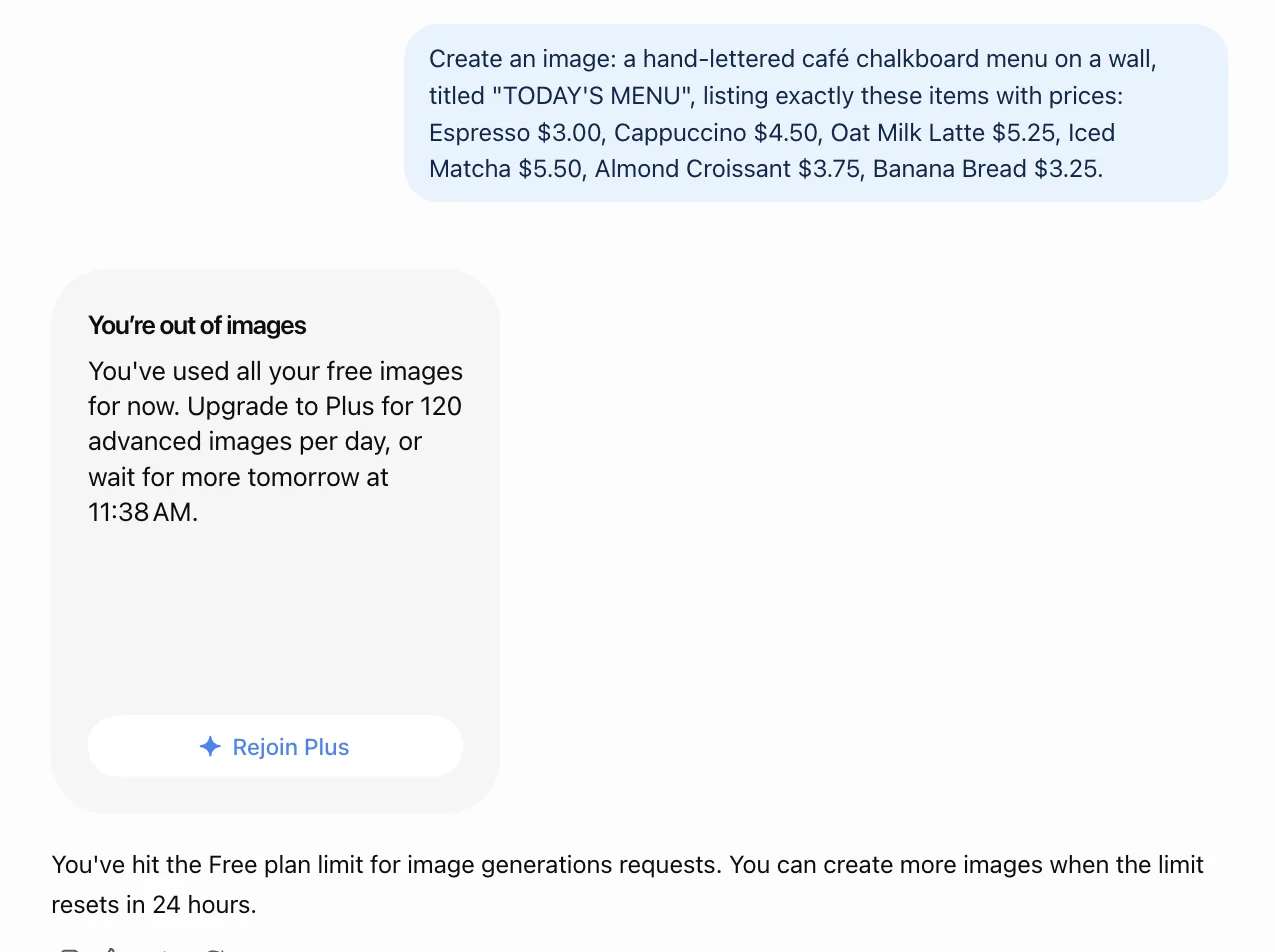
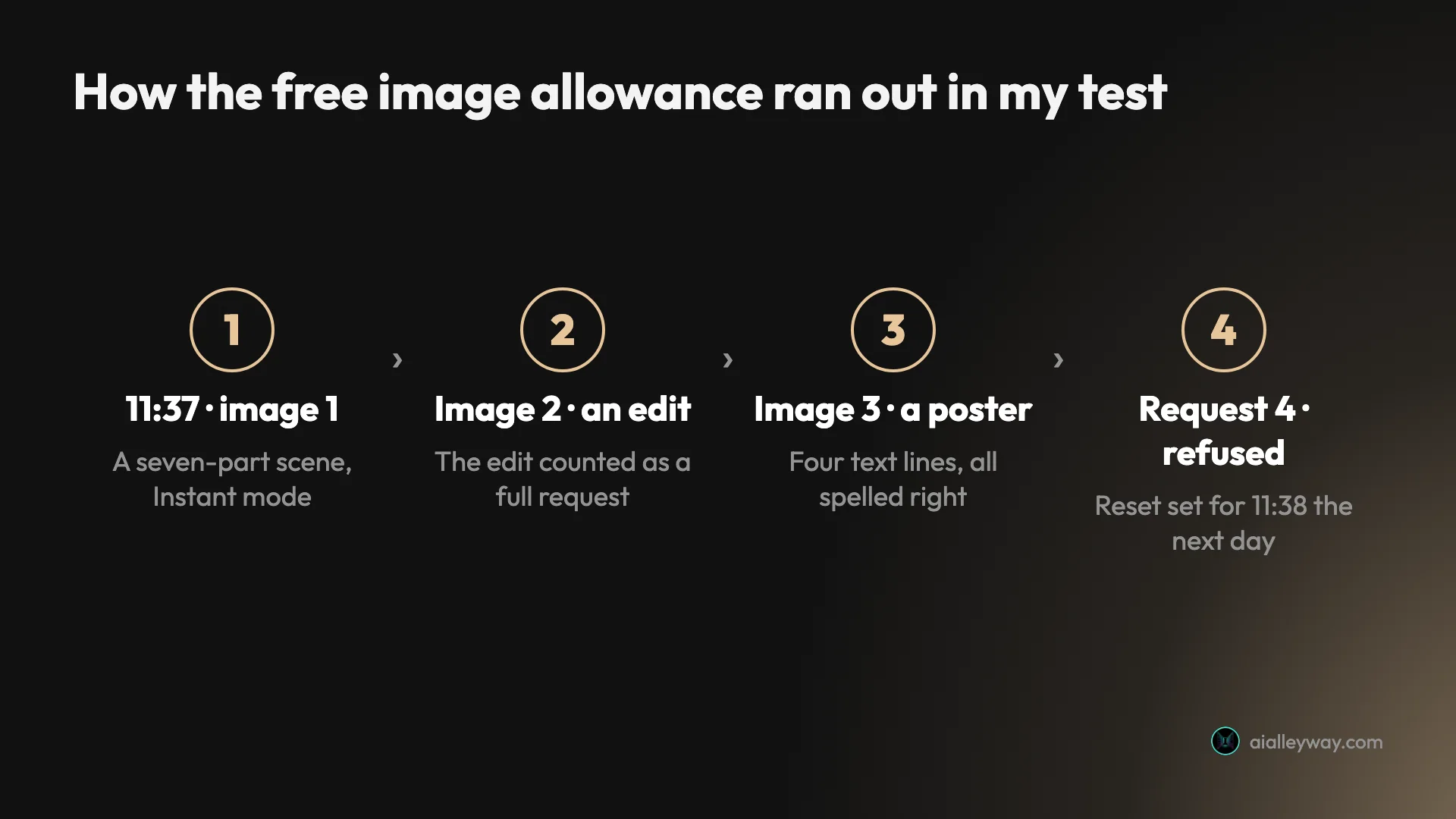
So the number you get is whatever ChatGPT shows you when you hit the wall. On my free account, that card read: “You’ve used all your free images for now. Upgrade to Plus for 120 advanced images per day, or wait for more tomorrow at 11:38 AM.” My first image had gone in at 11:37 the day before. The window was 24 hours from the first picture, not from midnight.
You also need to be signed in. Logged out, ChatGPT’s Images page shows trending prompts and templates, but says you must log in to create images. A free account is all it takes.
What the free plan gives you
The free plan’s strength is accuracy, not volume. It runs the same model as every paid plan, and on the one prompt I ran on both accounts, my free image matched the paid one.
The same model. OpenAI released ChatGPT Images 2.5 on 8 September 2026 and made it available on every tier, free included. There is no separate, weaker free model.
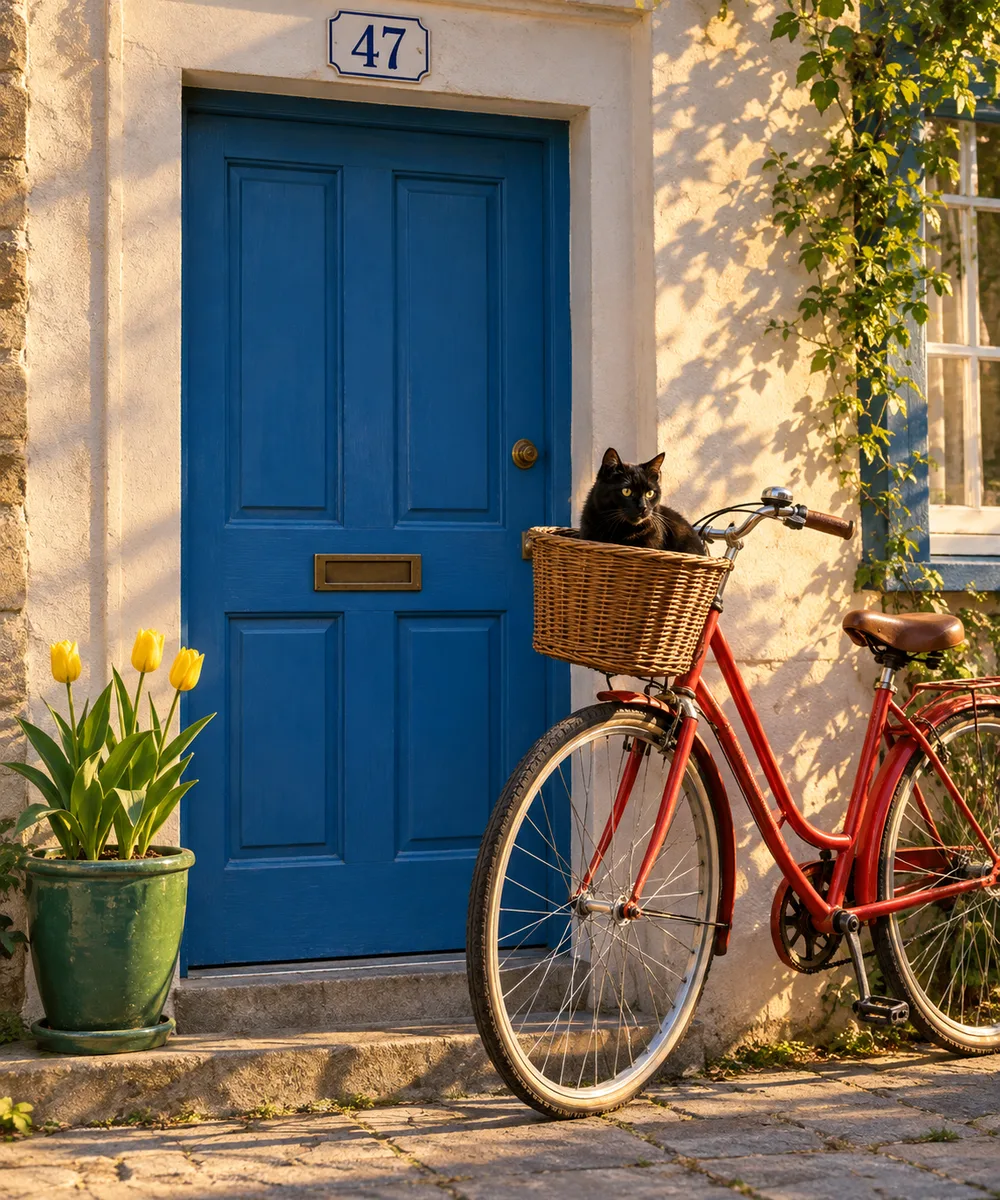
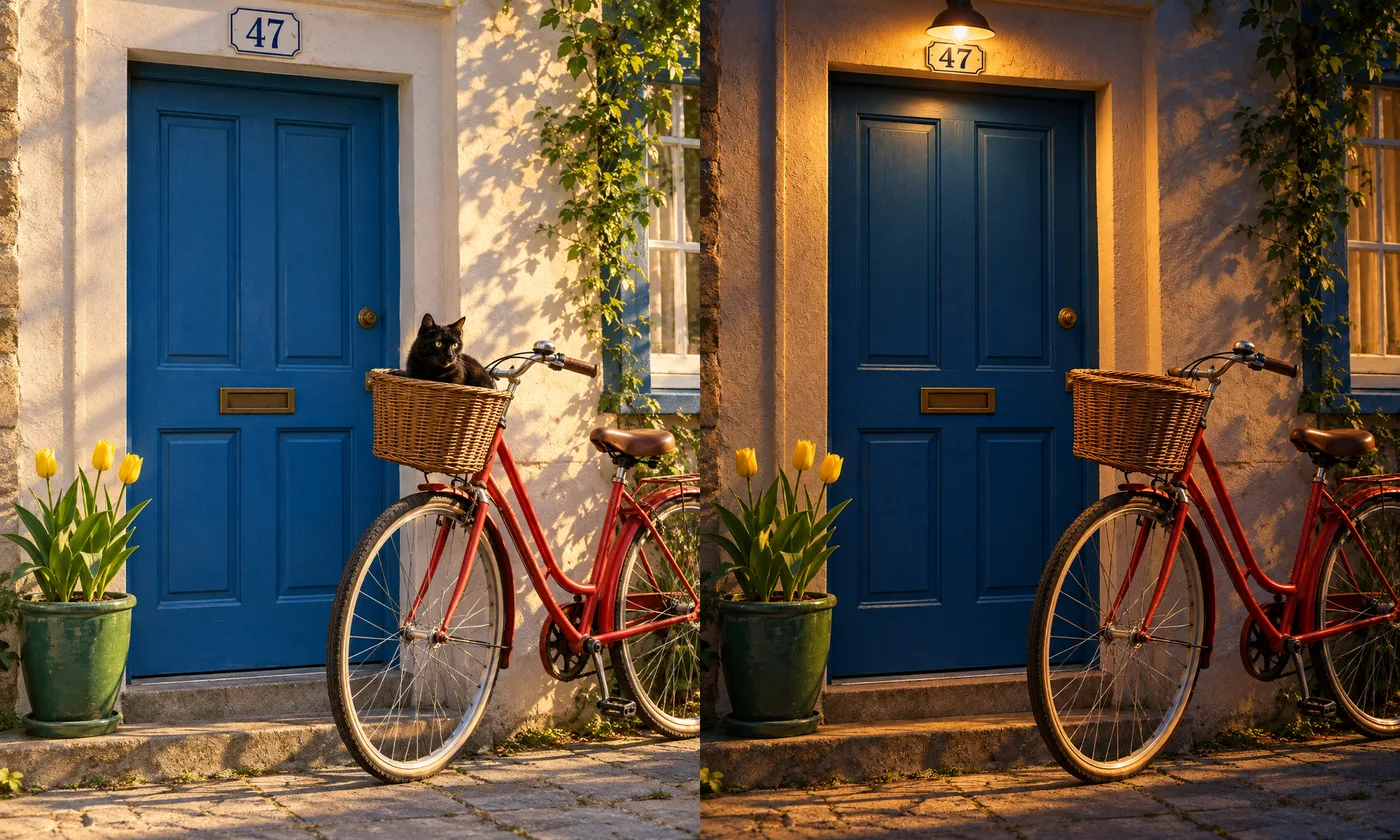
Accuracy that matches the paid plan. My first free request was the busiest prompt in my test, with seven things to get right, from the number of tulips and their position to the house number and the direction of the light. The free plan’s quick Instant mode scored seven out of seven, the same as my Plus account later managed at the highest Thinking setting available to it.
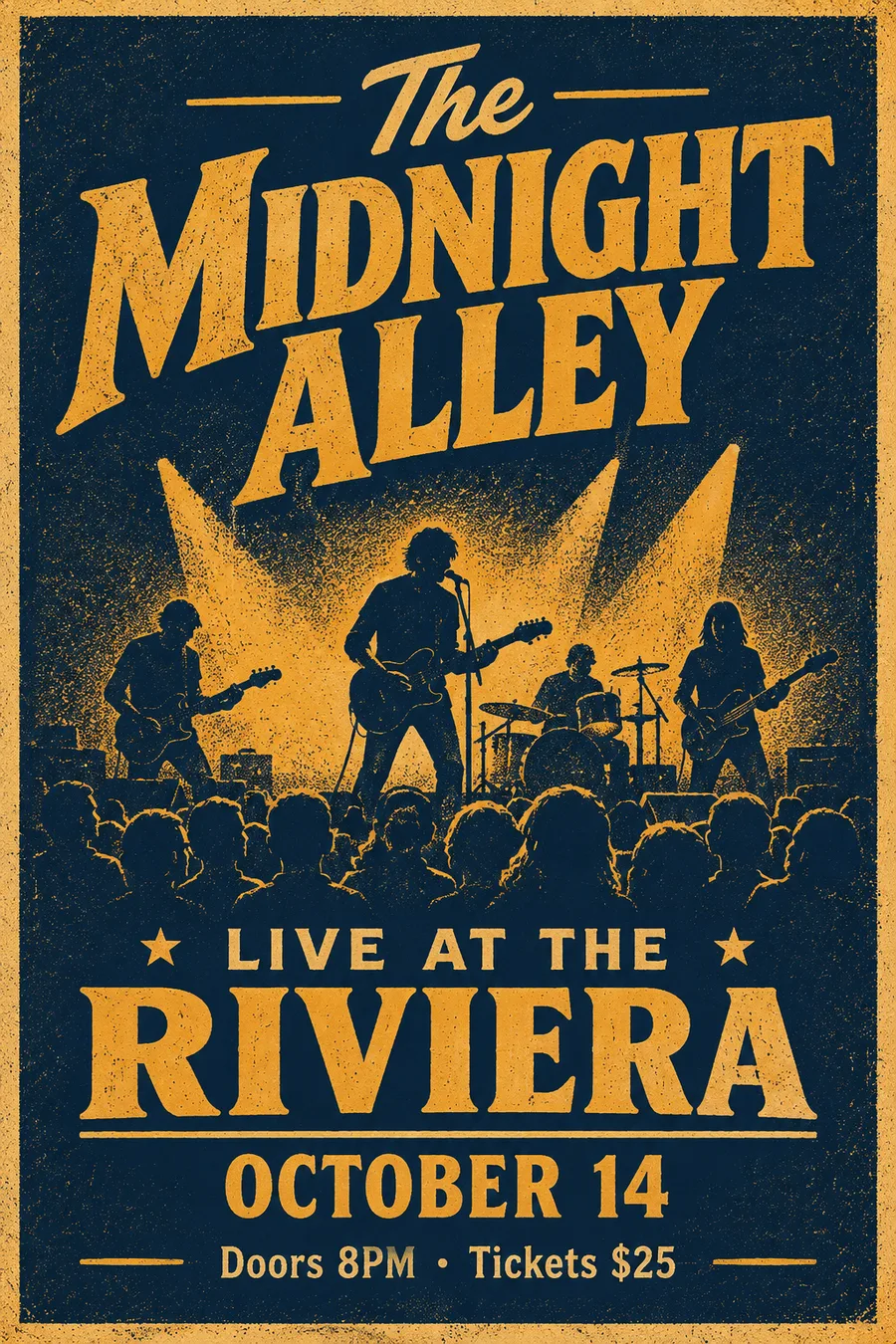
My third free request was a gig poster with four lines of text. All four came back spelled correctly, and the poster carried none of the invented slogans that later turned up on designs from my paid account.
Editing. You can change a picture by replying in plain words. For my second free request I asked for three changes at once, night, a lit lamp and no cat, and got all three in a single image. The light came out closer to dusk than night, and the house-number plate was restyled without being asked.
Labelled files. The images I downloaded carried C2PA provenance data identifying OpenAI as the source, and OpenAI’s Images 2.5 announcement says it also adds invisible watermarking. Nothing visible sits on the picture to crop out.
What free lacks. Beyond the allowance, the Thinking effort setting, which has the model plan a crowded layout before drawing it, is not included: OpenAI’s pricing table marks image generation with Thinking as No for Free and Go, and I used the picker on my Plus account.
Free vs Go vs Plus for images
If three requests a day is not enough, there are three paid plans, and OpenAI gives a clear figure for only one of them.
Go, $8 a month. OpenAI launched ChatGPT Go worldwide in January 2026 at $8 a month in the US. Its announcement said Go raises the free tier’s file uploads and image creation tenfold. The Go help page now describes it as extended access to image generation, without a number. I have not tested Go; if my three free requests are typical, a tenfold rise would be roughly thirty a day, but that is an estimate.
Plus, $20 a month. Plus is the plan with a published number, and it comes from ChatGPT itself: the free-plan limit card offers “120 advanced images per day”. I made nine images on Plus in one session without a warning. Plus also adds the Thinking effort setting.
Pro, from $100 a month. OpenAI’s pricing page describes Pro’s image creation as unlimited and faster, subject to its abuse guardrails. It is a plan for people who generate images all day, not a way to get a few more.
Which upgrade pays for itself. If you only need a few more pictures a week, Go’s $8 is the smaller bet. If you would use even a fraction of Plus’s 120 images a day, Plus is the better value: used fully over a 30-day month, 120 a day is 3,600 images for $20, well under a cent each. For work images, the Thinking setting is as good a reason to choose Plus as the allowance.
Why pay $20 for ChatGPT at all? For images alone, only if the free three are not enough and you want the Thinking setting for dense layouts. Plus is mainly a subscription to ChatGPT as a whole, and its image allowance comes bundled with it, so it makes most sense if you already use ChatGPT for other work. For the full test of what ChatGPT’s images can do, see our ChatGPT image generator review.
How fast, how big and how private
Free images come from the same model as paid ones, but OpenAI describes free generation as slower, and a few practical details are worth knowing before you plan around them.
Speed. On my free account, the bicycle scene and the poster were each ready by the time I checked at about 70 seconds. The edit took longer, about 170 seconds, but the browser tab was in the background for part of it, so that figure is inflated. Allow roughly a minute a picture.
Size. Every image I downloaded in my wider test was about 1.5 megapixels, for example 1536×1024 in landscape. That is plenty for a website or social post and short of print, and I saw no option to ask for a larger file on either plan I used.
Privacy. Images you make stay in your chat history unless you share the chat; I saw no public feed of other people’s pictures in the app, unlike Midjourney’s Explore page. On the paid account I tested, which had memory switched on, an invented slogan followed me between chats, but none of my free-account images showed it. If you make images for clients, consider switching memory off.
Devices. OpenAI says Images 2.5 is available on desktop, mobile and the web, so free users can make images on any of them; I tested only in the browser.
What three free requests actually buy
Three requests sounds like three pictures, but in practice it is less, because edits count too. Planning the three is the difference between a finished image and a half-done one.
One finished design. A poster, a menu or a social graphic with text usually needs a first draft and one or two fixes. That is the whole allowance. Write a detailed first prompt, with every line of text in quotation marks, so the fix round is short.
A single image and two variations. If you are exploring a look rather than polishing one design, three different takes on the same idea is a reasonable use, though you get one image per request, not a grid.
A week of occasional use. At three requests per 24-hour window, a daily user could make around twenty images a week, if the allowance holds at three and every window is used. Someone who needs twenty images in one afternoon cannot do it on the free plan.
How to avoid wasting a free request
On a plan this small, every failed attempt costs a third of your day, so the aim is to get it right first time. Our review’s prompting tips cover style and composition in depth; these are the habits that matter most when requests are scarce.
Draft the prompt in words first. OpenAI’s help page says image generation has its own limit, separate from ordinary chat, so you can refine the wording of a prompt in a normal conversation before you ask for the picture.
Write out every word you want in the image. My free poster came back exact, every line of it, because each line was spelled out in full in the prompt. Adding “no other text” may stop the model filling empty space with words of its own, though I have not tested that.
Specify numbers and places. Say how many of each object and where it goes. My free scene came back with exactly the three tulips on the left that I asked for; leaving it vague invites a guess you then have to fix.
Bundle your fixes. One edit request can carry several changes. Mine carried three and counted once. Our ChatGPT image editing guide covers how edits behave in more detail.
Can you get more free images?
Not from ChatGPT itself, beyond waiting. OpenAI’s help page says that when you reach a limit you need to wait for a later time, and that upgrading to Plus, Pro or Business resets the limits. There is no way to earn extra free images, and the reset time on the card is the one to plan around.
What you can do is spread the work. Use the free allowance for the images that need ChatGPT’s accuracy with text and layout, and use a more generous free tool for everything else. Google’s Gemini app gave my free account twelve images without refusing one, so the two free plans together cover far more ground than either alone.
Why ChatGPT won’t make an image on the free plan
If ChatGPT refuses or ignores an image request on a free account, one of four things is usually behind it.
| What you see | Likely cause | What to do |
|---|---|---|
| A card offering Plus and a reset time | Free allowance used | Wait for the reset or upgrade |
| A prompt to log in | Not signed in | Sign in to a free account |
| A reply that images are not available in that mode | Temporary Chat | Use a normal chat |
| A refusal that cites policy | OpenAI’s usage rules | Rephrase within the rules |
You have used your allowance. The clearest sign is the out-of-images card, with its offer of Plus and a reset time. Nothing but waiting or upgrading brings the allowance back.
You are not signed in. Signed out, the Images page shows templates and trending prompts but asks you to log in to create anything. A free account fixes it.
You are in Temporary Chat. When I tried ChatGPT’s private Temporary Chat, set to ignore memory, it replied that it could not make images in that mode. That was on my Plus account; I did not repeat it on the free one. Switch back to a normal chat.
The request breaks OpenAI’s rules. OpenAI’s system card for Images 2.5 lists fabricated or compromising depictions of real people among the uses it guards against, with several layers of blocking before and after an image is made. Those limits apply on every plan, and paying does not lift them. None of my free requests was refused on policy grounds; the only refusal was the fourth request, on the limit.
The API is not a free way round it. Developers can reach the same generation through OpenAI’s API, as GPT-Image-2.5 Flare and Sunburst, but it is priced per token and billed separately from ChatGPT, so it only makes sense if you are building images into a product.
Traps to avoid on the free plan
A few rules catch free users out, and most of them are not stated anywhere obvious.
Edits count as full requests
My second free request was an edit of the first image, and it used a third of the allowance. There is no discount for small changes, so get the first prompt as close as you can.
The reset is not at midnight
The window runs from your first image. Mine was set to reset at 11:38 the next day, a minute past the time of my first picture. Starting late in the evening does not buy you a fresh allowance the next morning.
There is no published number
OpenAI’s free-tier help page says ChatGPT will notify you when you reach a limit, that image generation has its own limit, and that the default model and available limits can change over time. It does not say how many images that is. Pages that quote a fixed free number are reporting what someone saw, as I am, not an official figure.
Many “free ChatGPT image generator” sites are not ChatGPT
When I searched Google for “chatgpt image generator free” on 27 September 2026, five of the top ten results were third-party image tools rather than OpenAI, with their own limits, prices and sign-up rules, some built on OpenAI’s API. Several pages in the results still described ChatGPT’s images as DALL-E, GPT-4o or Images 2.0, all superseded by Images 2.5. If you want OpenAI’s model on OpenAI’s terms, use chatgpt.com.
Which should you use?
- Use the free plan if you need a few images a week and can plan each one carefully.
- Pay for Go if you hit the free limit regularly but do not need Plus’s other features. At $8, it is the cheapest way to more images, with a tenfold rise on the free allowance by OpenAI’s own figure.
- Pay for Plus if images are part of your work. 120 a day is effectively unlimited for most people, and Thinking helps with dense layouts.
- Skip ChatGPT for volume if you want many free images. Its free tier, three requests in my test, ties for the smallest allowance I have tested, while Gemini ran twelve without a refusal.
Other free image generators worth trying
If ChatGPT’s free allowance runs out too fast, three places to look:
- Nano Banana (Gemini). Google’s image model costs nothing in the Gemini app, where my free account ran a twelve-prompt test in one sitting. Our Nano Banana vs ChatGPT comparison puts both through the same prompts.
- A ranked list. Our best AI image generator guide covers eight tools, including what each free tier really allows.
- For realistic photos. Our guide to the best AI image generator for realistic photos compares ChatGPT and Nano Banana on portraits, products and hands.
Final word
ChatGPT’s image generator is free in the sense that matters for trying it: sign in, and you get the same Images 2.5 model paying users get, with accuracy that matched the paid plan in my test. What you do not get is volume. Three requests, edits included, then a 24-hour wait. Spend them on the image that most needs to be right, and move to Go or Plus, or to Gemini’s more generous free tier, when three is not enough.
Frequently asked questions
How many images can ChatGPT free generate?
OpenAI does not publish a number. Its help centre says free users can create images, that image generation has its own usage limit, and that ChatGPT will tell you when you reach it. On the free account I tested on 23 September 2026, that happened on the fourth request: three image requests went through, one of them an edit, and the fourth was refused.
The card that appeared offered two ways out: upgrade to Plus for 120 advanced images per day, or wait until a reset time, which it set for 24 hours after my first image. Treat three as what one account got on one day rather than a guarantee. OpenAI describes the free tier only as limited and slower image generation, and says the default model and available limits can change over time.
Do you need an account to use ChatGPT's image generator?
Yes. Signed out, ChatGPT's Images page shows trending prompts and templates, but tells you to log in to create images and upload files. A free account is enough; you do not need a paid plan to make your first pictures.
This matters because many sites that rank for free ChatGPT image generator searches are not OpenAI. They are separate businesses offering their own image tools, some built on OpenAI's API, with their own sign-up rules, limits and prices. If you want OpenAI's own model on OpenAI's own terms, use chatgpt.com and sign in.
Is there an unlimited free ChatGPT image generator?
No. Every ChatGPT plan below Pro has an image limit, and the free plan's is the smallest: three requests before a 24-hour lockout in my test. OpenAI's pricing page reserves unlimited and faster image creation for its Pro plan, which starts at $100 a month, and even that is subject to abuse guardrails.
Sites promising unlimited free ChatGPT images are third parties, and their terms are their own. If you need a lot of free images, Google's Nano Banana in the Gemini app is the more generous free option I have tested: it ran twelve image requests on a free account without a refusal, though Google does not publish its limit either.
Is ChatGPT Go worth it for images?
It can be, if three free requests a day is not enough and $20 for Plus feels like too much. ChatGPT Go costs $8 a month in the US, and OpenAI's January 2026 announcement said it raises the free tier's image creation and file uploads tenfold. OpenAI publishes no absolute number for Go either.
I have not tested Go. If my three-request free allowance is typical, ten times that would be around thirty requests a day, but that is an estimate, not a measurement. Plus, at $20, is the plan with a published figure, 120 images a day according to the in-app card, and it adds a Thinking effort setting for dense layouts.
Does editing an image use up a free ChatGPT request?
Yes, in my test an edit cost the same as a new picture. My second request on the free plan was an edit of the first image, asking for three changes at once, and it counted as one of my three requests. After a third request, a poster, the fourth was refused.
The practical lesson is to put every change you want into one edit rather than asking for them one at a time. My single edit request carried three changes, night, a lit lamp and no cat, and ChatGPT handled all three in one image, though night came out closer to dusk. OpenAI does not publish how edits are metered, so this is what one free account showed, not an official rule.
Keep reading
ChatGPT Image Generator Review: Perfect Text, Pushy Slogans
I tested the ChatGPT image generator (Images 2.5) with 12 prompts on Free and Plus. It spelled all 15 text strings right, and added slogans I never asked for.
ChatGPT Image Editing: 7 Photo Edits Tested
How ChatGPT image editing works: upload a photo, describe the change, use the editor tools, and what held or slipped in seven real edits on ChatGPT Plus.
Nano Banana vs ChatGPT: 12 Prompts, Two Different Winners
Nano Banana vs ChatGPT, tested with the same 12 prompts: ChatGPT follows a brief exactly, Nano Banana is twice as fast and free. Which one to use, and when.
Best AI Image Generator: 8 Picks, Two Tested Head to Head
The best AI image generator is ChatGPT for exact briefs and Nano Banana for free, fast images, both tested. Plus Midjourney, Ideogram, FLUX and three more.
Nano Banana Review and Pricing: Fast, Free, Nearly Exact
Nano Banana pricing, tested: 12 prompts on Gemini's free tier, no limit hit. 15 of 15 text strings right, most images in 30 seconds, and one tulip too many.