
Best AI Image Generator for Realistic Photos: 6 Picks
The best AI image generator for realistic photos: ChatGPT and Nano Banana, tested on portraits, hands and products, plus Midjourney, FLUX, Leonardo and more.
Contents
The best AI image generators for realistic photos, in brief
The best AI image generator for realistic photos is ChatGPT if you need control over the shot, and Nano Banana if you want it fast and free. I put both through the same portrait, product and hands prompts and neither made an anatomy or physics error. For cinematic mood, the usual recommendation is Midjourney; for developers, FLUX.
- Best overall: ChatGPT Images. Followed an 85mm lens instruction with a real shallow depth of field, and downloads at about 1.5 megapixels.
- Best free: Nano Banana (Gemini). Matched ChatGPT on realism in about half the time, on a free account.
- Best for cinematic mood: Midjourney. The pick Google’s AI Overview leads with for lighting and skin texture. No free tier.
- Best for developers: FLUX. Per-image API prices from $0.014, and offered inside other apps, Leonardo among them.
- Best for photoreal presets on a free allowance: Leonardo AI. Its own Lucid Realism model and 150 free tokens a day.
- Best for local control: Stable Diffusion. Free to run on your own machine under $1 million in revenue.
How we chose these realistic AI image generators
A realistic AI photo fails in predictable places, so those were the criteria. Hands are the classic giveaway: extra fingers, fused knuckles, a grip that does not hold anything. Skin is the next, the airbrushed “plastic” look that reads as a render rather than a face. Then light and physics: shadows that fall the wrong way, reflections that do not match the object, water that sits on a surface as no water would. And the photographic details, depth of field, grain and lens character, that make a photorealistic image read as taken rather than drawn.
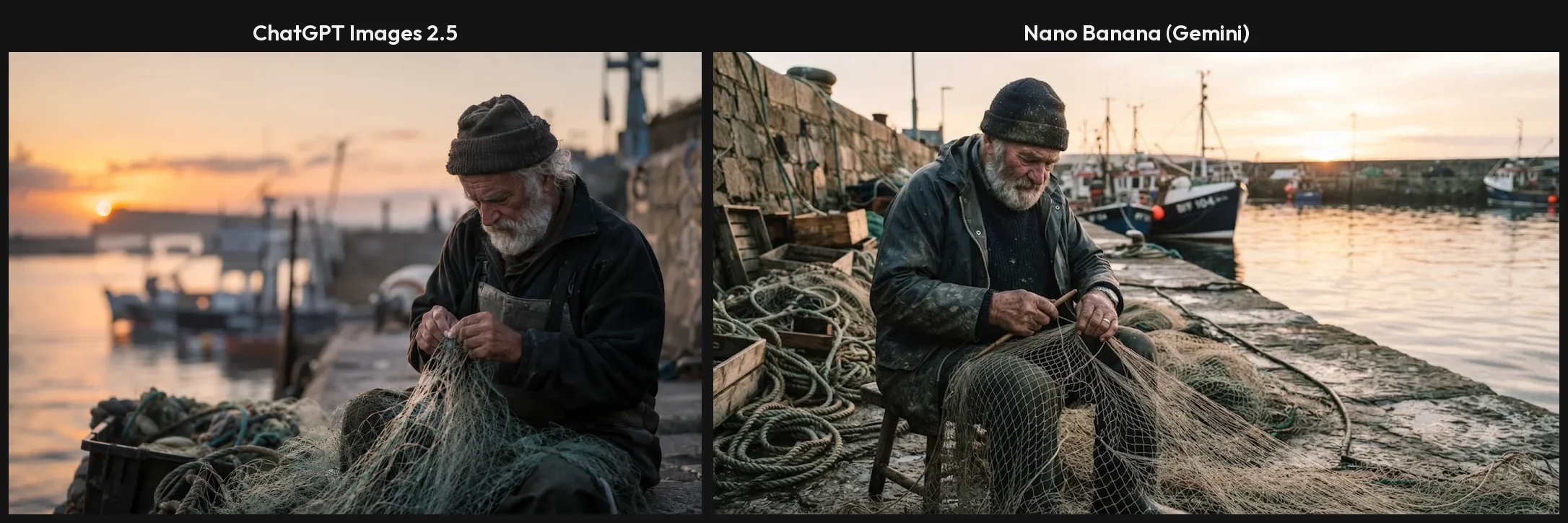
Two of the six, ChatGPT and Nano Banana, I have tested hands-on, on 23 September 2026. Both ran the same prompts word for word, and three of those prompts were built to catch the failures above: an elderly fisherman mending a net on a harbour wall at dawn, shot on an 85mm lens at f/1.8; an open matte-black earbud case on wet slate with rim lighting; and two floured hands kneading bread dough in window light. Every image in this guide from those two tools is the first result, with nothing rerolled or retouched.
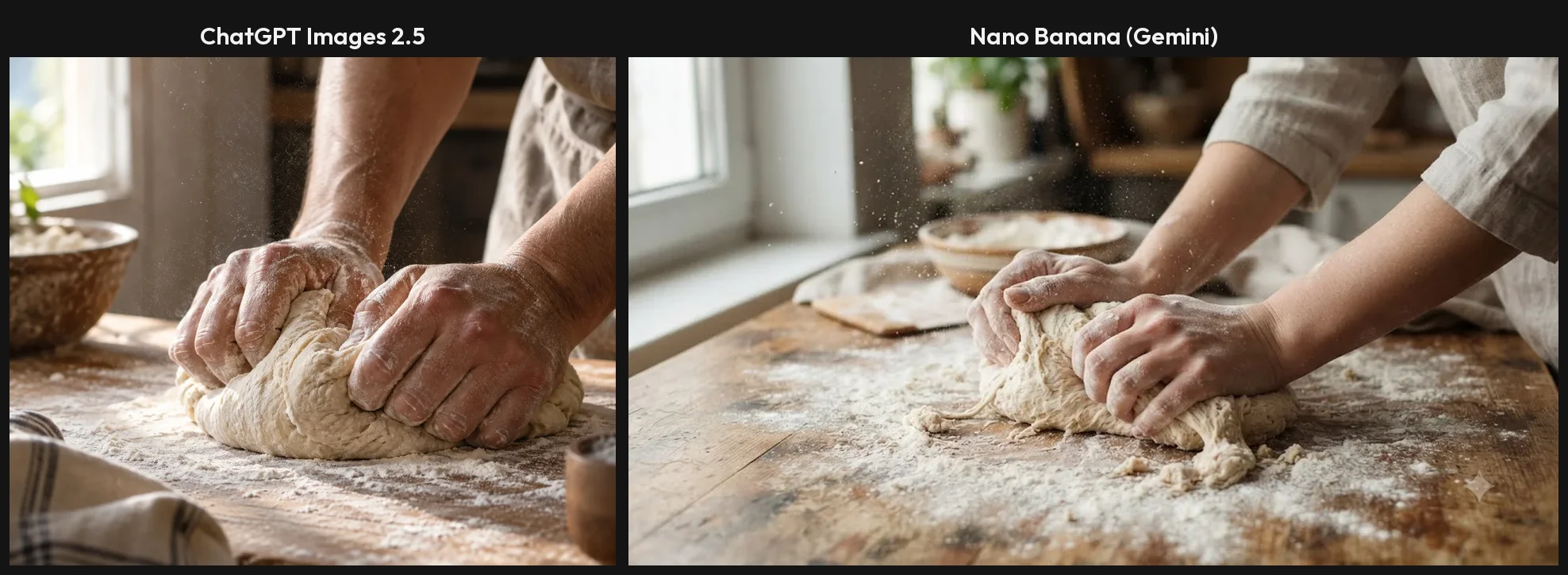
The hands prompt is the one that used to sink AI photos, and neither tool failed it. Both drew two hands with no extra or missing fingers, pressing into the dough with believable weight. That is the good news for anyone who gave up on AI photos a year or two ago: the classic giveaways were absent in both tools I tested, and the differences are in the finer details of lens, light and file size.
The other four I have not tested. Midjourney’s section draws on our Midjourney review, which read its plans and FAQ first-hand but ran no generations. FLUX, Leonardo and Stable Diffusion come from each vendor’s own pricing pages and documentation, read in September 2026, and from Google’s AI Overview on realistic photo generators, which is where their realism reputation is summarised. Where a claim about image quality is someone else’s, I say whose.
I left out tools whose strength is not photos. Adobe Firefly and Canva, which many lists include, are design suites first and sit with our design picks. Ideogram is built around text in images rather than realism, and it is covered in our Midjourney alternatives roundup.
Realistic AI image generators compared
| Tool | Tested hands-on | Photoreal model | Free tier | Cheapest paid route | Visible watermark on free | Best for |
|---|---|---|---|---|---|---|
| ChatGPT Images | Yes, 3 photoreal prompts | ChatGPT Images 2.5 | 3 requests a day in my test | Go $8, Plus $20 a month | None | Control over the shot |
| Nano Banana (Gemini) | Yes, 3 photoreal prompts | Nano Banana 2 | 12 requests, no refusal in my test | API from $0.0336 an image (2 Lite) | Small sparkle, switchable | Free and fast |
| Midjourney | No, plans only | V8.2 | None | $10 a month | Not applicable | Cinematic mood |
| FLUX | No | FLUX.2 [max], [pro], [flex], [klein] | Playground, sign-in required (free credits unconfirmed) | API from $0.014 an image | Not stated | Developers, other apps |
| Leonardo AI | No | Lucid Realism, Lucid Origin | 150 fast tokens a day | $12 a month ($10 yearly) | Not stated | Photoreal presets |
| Stable Diffusion | No | SD 3.5, Stable Image Ultra | Free model under $1M revenue | SD 3.5 API from $0.025 an image | None when run locally | Local control, fine-tuning |
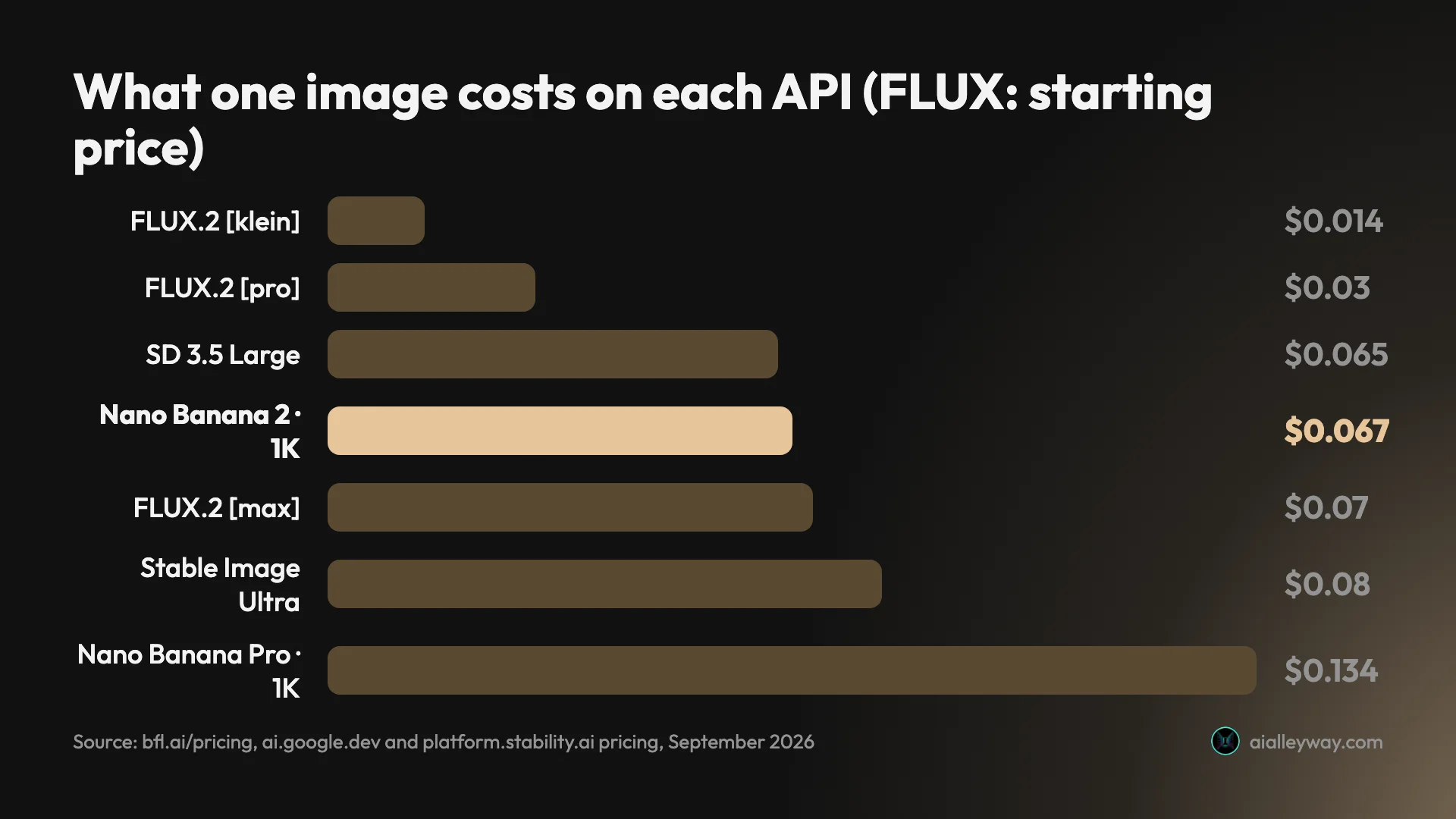
The chart is only for developers. For a person making pictures in an app, the price of realism is a subscription or nothing: Nano Banana made all three of my photoreal images on a free plan; ChatGPT’s free plan runs the same Images 2.5 model, though my photoreal shots were made on Plus. The main differences between the two free plans are how many images you get and Gemini’s visible sparkle.
1. ChatGPT Images — best overall for realistic photos

ChatGPT is the realistic-photo generator that behaves most like a camera you can brief. Tell it the lens, the light and the subject, and it renders the photograph those settings would produce, which is what separates a usable stock-style image from an AI illustration.
It now runs ChatGPT Images 2.5, released on 8 September 2026. You ask for a picture in a chat, or on the Images page, and edit it by replying with what to change.
What I found. The fisherman portrait is the clearest result. I asked for an 85mm lens at f/1.8, and it gave the shallow depth of field that setting implies: the face sharp, the harbour melting into blur behind him, and a weathered face that looks lived-in rather than airbrushed. The product shot is the one I would use unchanged, with water beading on a matte case, a clean reflection in the wet slate, and a rim light separating the case from the dark background. The hands were anatomically normal, the right number of fingers, with flour in the creases.
Pricing. Free allows a little image generation: my account was locked out after three requests, for a rolling 24 hours. Go is $8 a month and Plus $20, which the app says allows 120 images a day.
The catches. It is slow, about a minute an image. There is one image per request, so exploring variations costs time. Its downloads were about 1.5 megapixels, for example 1536×1024: plenty for the web, short of print, with no larger option in the app. And on text-bearing designs it adds slogans nobody asked for, which matters if your realistic photo includes a sign or a label.
Real people. OpenAI’s system card for Images 2.5 says the model restricts fabricated or compromising depictions of real people and blocks deepfakes. Every PNG I downloaded carried C2PA credentials marking it as AI-generated.
Getting more realism from it. One thing helped in my test: naming the camera settings, lens and aperture, rather than the mood gave the most photographic results. On Plus there is also a Thinking effort picker that lets the model plan a scene before drawing it, at about 90 seconds an image; I did not run it on a photoreal prompt, but it is worth trying for a busy staged shot. One edit caveat: when I asked it to turn a sunlit scene into night, the result read as dusk, with sunlight still on the wall, so check lighting edits closely.
Who it’s for: marketers and small businesses who need realistic product and lifestyle shots to a brief, and anyone who thinks in photographic terms. Our ChatGPT image generator review has the full test.
2. Nano Banana (Gemini) — best free AI image generator for realistic photos
Nano Banana makes photos as convincing as ChatGPT’s, in about half the time, for nothing. It is Google’s image model inside the Gemini app, and on a free account it made every image in my test without a refusal.
Google’s name covers a family. Nano Banana 2 is the default on every plan, and a slower Nano Banana Pro sits above it, which Google’s AI Overview on realistic photo generators credits with fine textures and handling complex prompts.
What I found. On the same three prompts it made no anatomy or physics errors. The hands had the right number of fingers and a haze of flour catching the window light. The earbud case sat open on wet slate, as asked, with a clean reflection underneath. The fisherman sat on a stone quay at sunrise with boats behind him. Where ChatGPT’s portrait blurred the harbour, Nano Banana kept the boats in sharper focus, which is less faithful to an f/1.8 lens and reads as a busier, more documentary photograph.
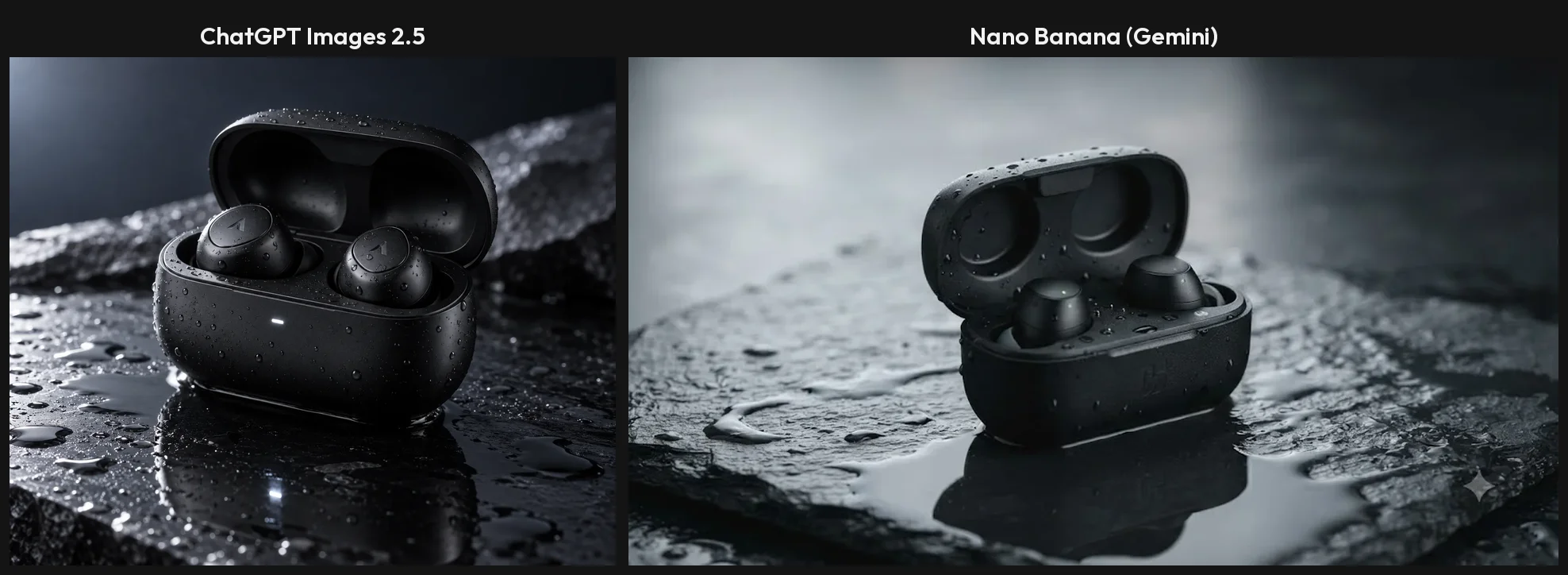
Speed. Most images in the default mode were ready in about 30 seconds and none took over 40, against about a minute for ChatGPT. For realistic work, where you often adjust the light or angle and go again, that speed is the bigger advantage.
Pricing. Free in the Gemini app, with compute-based limits that refresh every five hours up to a weekly ceiling. Paid Google AI plans raise the limits. On Google’s API it costs $0.0336 to $0.24 per image, depending on the model and resolution.
The catches. Free images carry a small visible sparkle in the corner, which most users can switch off in settings since August; on a product shot you would otherwise have to crop it. The full-size download was 1408×768, about 1.1 megapixels, smaller than ChatGPT’s. And it reads a crowded brief loosely, which matters less for a single subject than for a staged scene.
Getting more realism from it. Ask for the frame you need. With no aspect ratio in the prompt, Gemini chose a wide landscape frame for eleven of my twelve images, which suits a scene but not a portrait or a phone screen, so say “vertical portrait” for people shots. Its lighting edit was the stronger of the two in my test: asked to turn a sunset street into night, it produced a real night sky with lit lamps rather than dusk. And if a brief has exact counts, switch the chat mode to 3.1 Pro, which reasons before drawing, at about 80 seconds an image.
Who it’s for: anyone who wants a lot of realistic images without paying, and people who work by trying a shot and adjusting it. Our Nano Banana review has the full test, and our Nano Banana vs ChatGPT comparison sets it beside ChatGPT.
3. Midjourney — best for cinematic mood and portraits

Midjourney is a common recommendation for realism, and Google’s AI Overview on realistic photo generators names it first, crediting it with skin texture, atmospheric and low-light lighting, and portraits. I have not tested its output; our Midjourney review is a synthesis of its plans, documentation and user reports.
Its reputation rests on look rather than literal accuracy. Its current model, V8.2, has been the default since 24 July 2026, and Midjourney’s own documentation describes it as focused on aesthetics, image quality and personalisation. Users, and Google’s AI Overview for “midjourney review”, describe the result as a cinematic look with moody lighting and rich textures; I have not tested it.
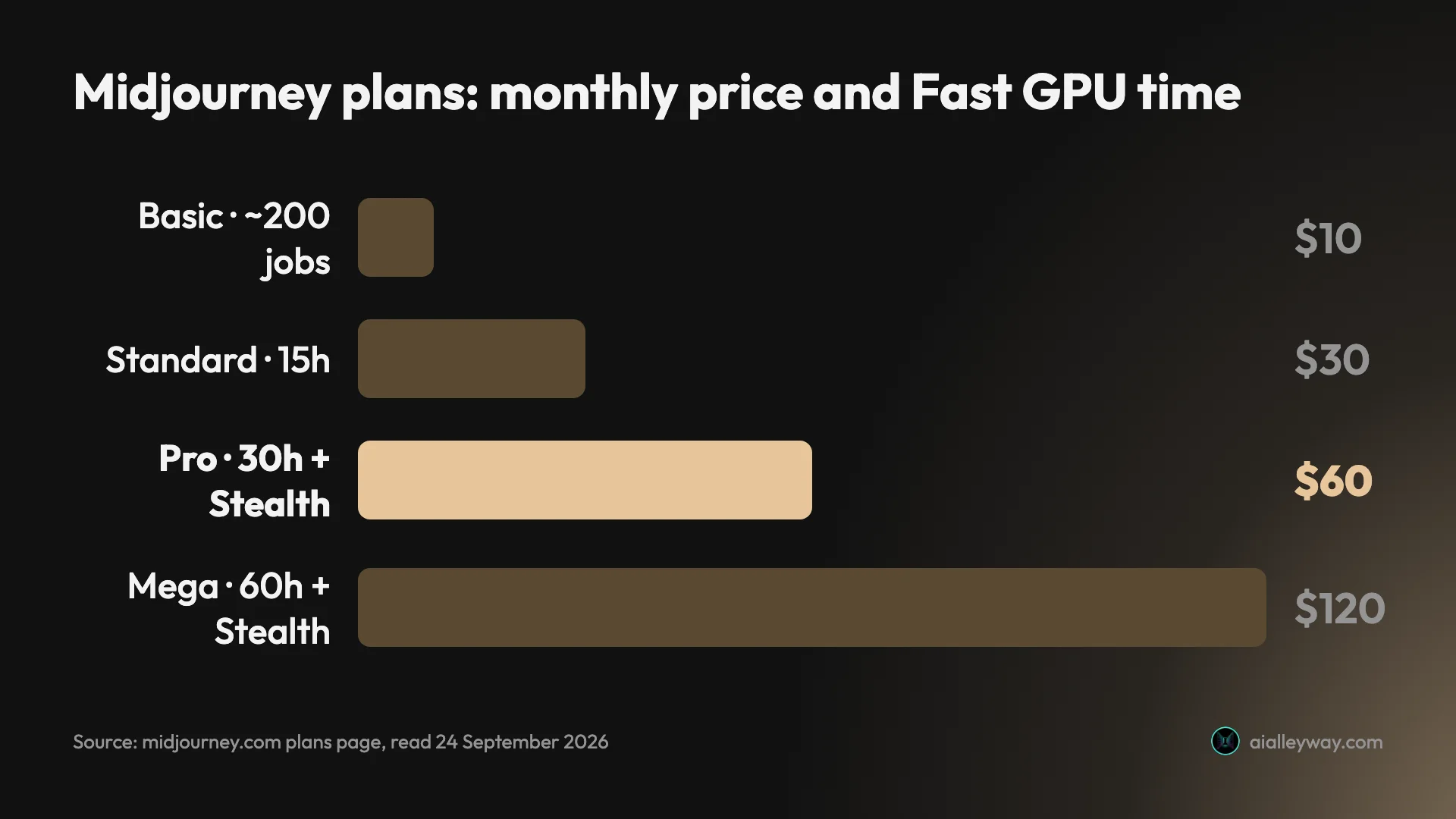
Pricing. There is no free tier. Basic is $10 a month for about 200 image jobs, four images each, so about 800 images. Standard at $30 adds unlimited Relax-mode images, which queue for spare capacity rather than using your fast time.
The catches for photo work. Everything you make is public on Midjourney’s Explore page unless you pay $60 a month for Stealth mode, which matters if your realistic images are for a client or an unreleased product. Companies with more than $1 million in annual revenue must be on the Pro or Mega plan to own their images. And Disney and Universal’s copyright case against Midjourney was still in discovery in July 2026, so avoid prompting for recognisable characters or brands.
Compared with the tested pair. Midjourney has no free way to try it, and it is the only tool here where private images cost $60 a month. Against ChatGPT and Nano Banana, you are paying for a look, not for accuracy, and you should try the free pair first to see whether their realism is already enough.
Who it’s for: photographers and artists who want cinematic mood and are willing to pay for it, and anyone whose realistic images are judged on atmosphere rather than on following a brief exactly.
4. FLUX — best for developers and sharp detail
FLUX is a model other apps, Leonardo among them, offer alongside their own, and the one Google’s AI Overview on realistic photo generators names next to Midjourney, crediting it with sharp detail, crisp edges, correct fingers and avoiding the “plastic AI look”. I have not tested it.
It is made by Black Forest Labs, not by Stability AI. The current image family is FLUX.2; its API offers [max], [pro], [flex] and the lightweight [klein].
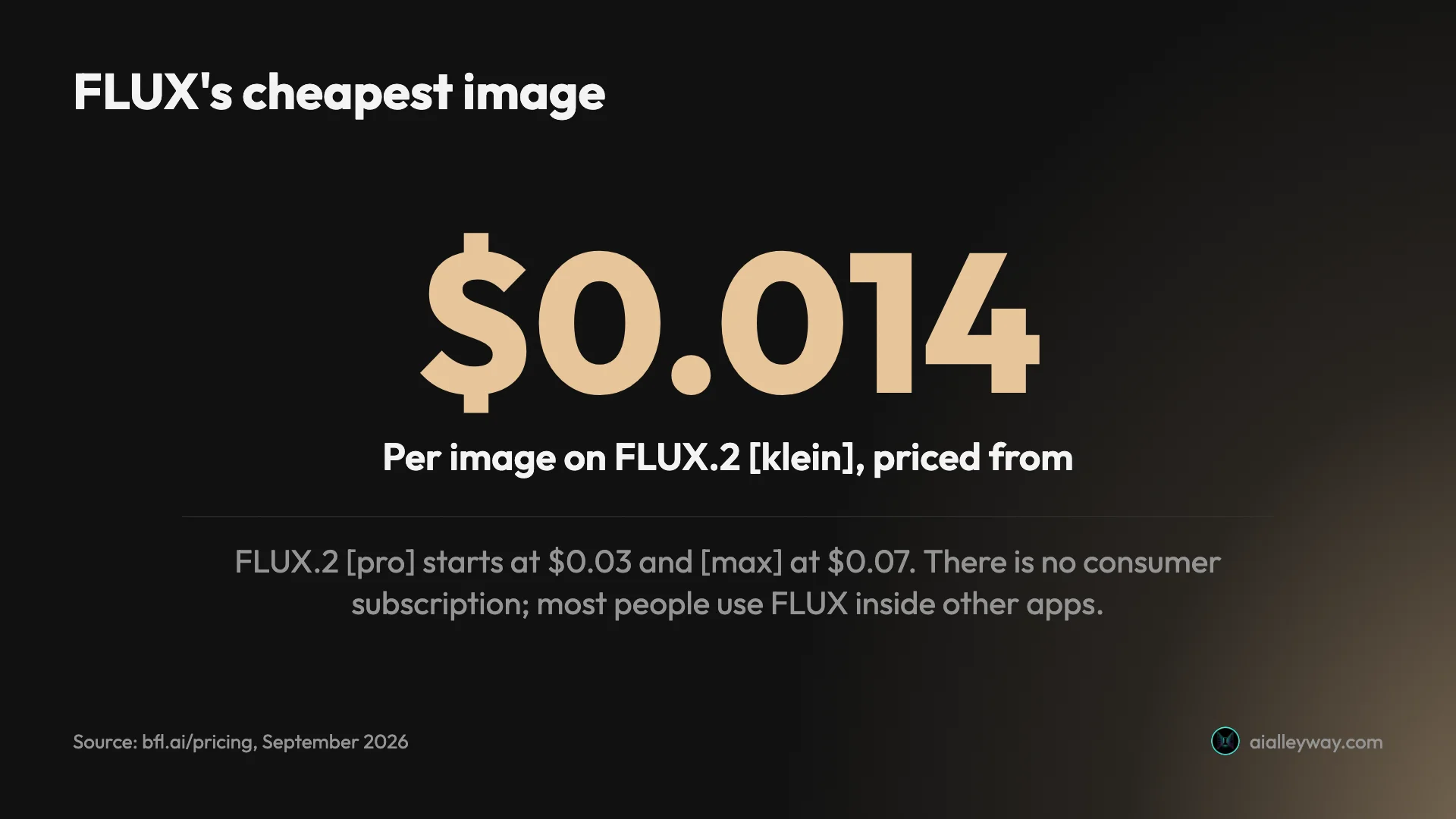
Pricing. There is no consumer subscription. Black Forest Labs sells FLUX through its API by the image, with one credit worth a cent: FLUX.2 [klein] from $0.014, [pro] from $0.03, [flex] from $0.05 and [max] from $0.07, with the price rising with resolution. Black Forest Labs also runs a playground on its site, behind a sign-in; I could not confirm whether it includes free credits. Open-weight versions are licensed separately.
How most people use it. Because there is no FLUX app with a monthly plan, most non-developers meet FLUX inside other services. Leonardo’s pricing page, for example, lists FLUX models alongside its own. If you want FLUX’s realism without writing code, pick an app that offers it, and check which FLUX version that app runs.
The catches. Per-image billing is ideal for a product and awkward for a person, who has to pay per picture or go through a third party with its own prices and terms. And as with any model reached through another app, the quality you get depends on the version and settings the app uses.
Compared with the tested pair. On price per image, FLUX undercuts Google’s API at the low end: [klein] from $0.014 against $0.0336 for Nano Banana 2 Lite, while FLUX.2 [max] from $0.07 sits close to Nano Banana 2 at $0.067 for a 1K image. For a person rather than a product, the free Gemini app remains the cheaper way to make realistic images.
Who it’s for: developers building realistic images into a product, where a published price from about one to seven cents for a 1-megapixel image makes the budget easy, and people who already use an app that offers FLUX.
5. Leonardo AI — best for photoreal presets on a free daily allowance
Leonardo is a web app built around choosing the right model for the job, and for realistic photos it offers models of its own. Its photography page recommends Lucid Realism and Lucid Origin for photoreal work, and its pricing page also lists its Phoenix models and FLUX Dev and Schnell. Google’s AI Overview on realistic photo generators credits it with photo-refinement tools and upscalers. I have not tested it.
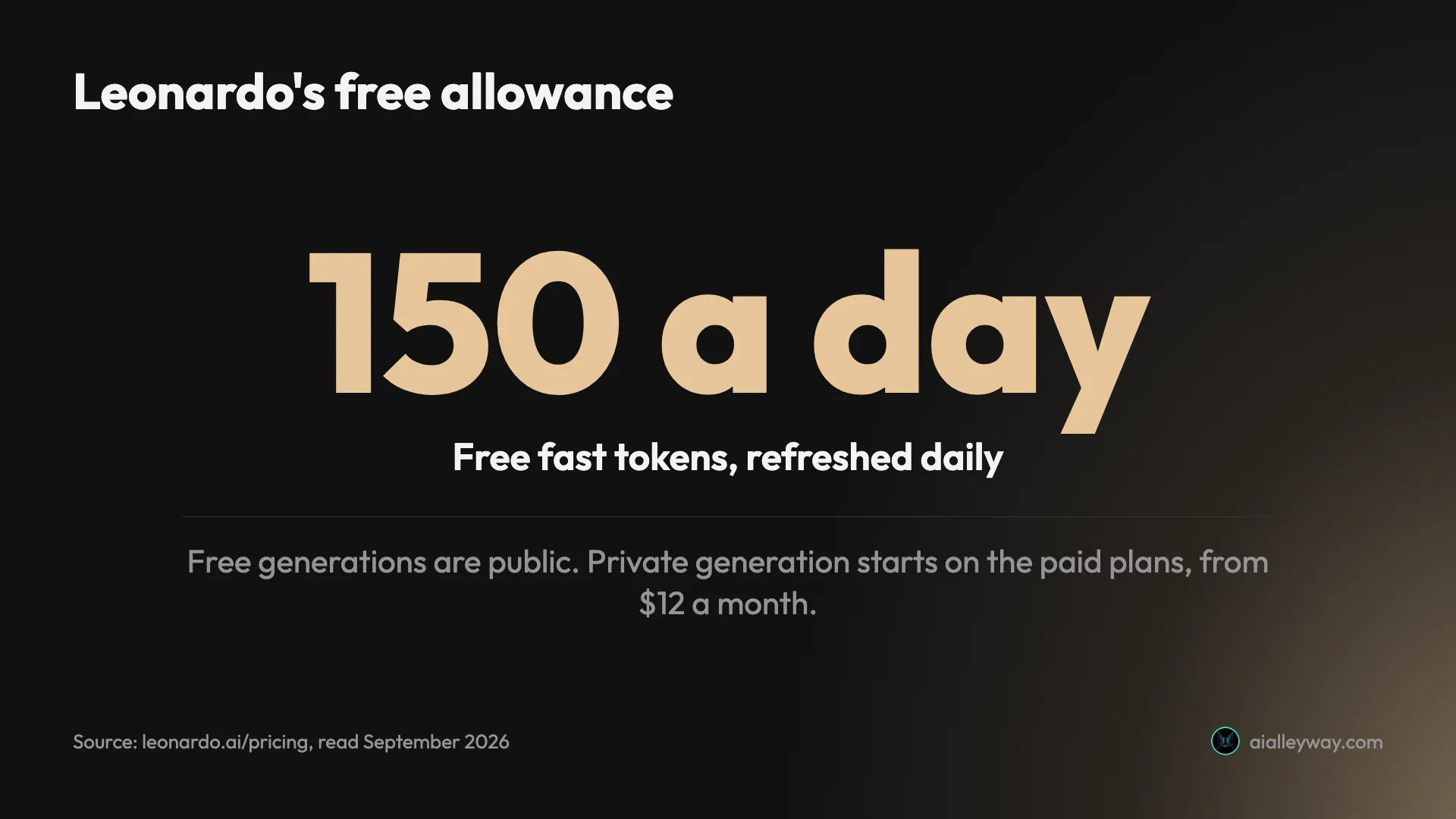
Pricing. Free users get 150 fast tokens a day. Essential costs $12 a month, or $10 billed yearly, and includes 8,500 tokens and private generation. Premium is $30 and Ultimate $60 a month. Tokens are spent per generation, so how many photos a plan buys depends on the model and settings.
Privacy and rights. Free generations are public, and Leonardo’s terms give free users a commercial licence while keeping the right to use their images itself. For realistic product or client photos that is the main reason to pay, and privacy starts at the $12 plan rather than Midjourney’s $60.
The catches. Token pricing is harder to budget than a flat image count. With several models on offer, the realism you get depends on choosing Lucid Realism or a FLUX model rather than a stylised one. And the refinement and upscaling steps that make a result look real take extra steps of their own.
Compared with the tested pair. Leonardo’s free allowance refreshes daily, and Gemini’s every five hours up to a weekly ceiling, but Leonardo’s free images are public, where ChatGPT’s and Gemini’s stay in your account. Its advantage is choice: several photoreal models and refinement tools under one account, where ChatGPT and Gemini choose the model for you.
Who it’s for: people who want a photoreal model and editing tools in one place with a daily free allowance, and anyone who needs private realistic images for less than Midjourney charges.
6. Stable Diffusion — best for local control and fine-tuning
Stable Diffusion is the choice for people who want realistic photos on their own terms: an open model you can download, run on your own computer and fine-tune on your own images. I have not tested it.
Stability AI’s current release is the Stable Diffusion 3.5 family. Its hosted top model, Stable Image Ultra, is built on SD 3.5 Large. Because the models are open, a large community has built photoreal fine-tuned versions and tools around them, which is where much of Stable Diffusion’s realism reputation comes from.
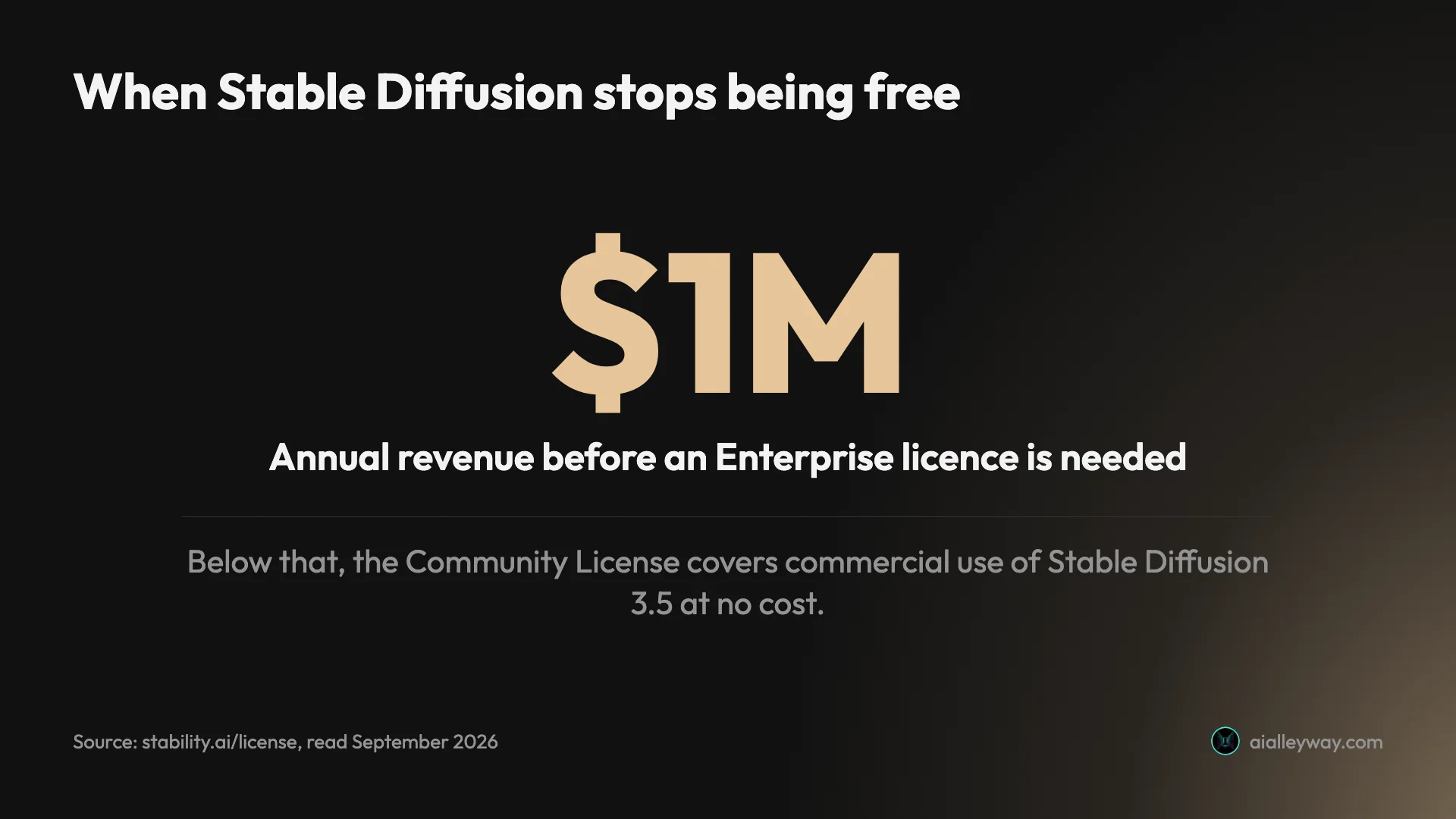
Pricing. Run locally, the model is free under Stability’s Community License, which covers commercial use for organisations under $1 million in annual revenue. On Stability’s own API, where a credit is a cent, Stable Image Ultra costs 8 credits, SD 3.5 Large 6.5, SD 3.5 Medium 3.5 and Flash 2.5, and new accounts get 25 free credits.
Privacy. Run it locally and your images never leave your machine, privacy as strong as it gets, matched only by running FLUX’s open weights, which matters for realistic images of unreleased products.
The catches. Running it yourself needs a capable graphics card and some setup, and there is no confirmed first-party consumer app to sign up to: Stability’s old pricing page now leads to an error. What you get depends heavily on which model and settings you choose, and getting professional realism usually means learning the tools the community has built.
Compared with the tested pair. It is the most open option here for training on your own products or photographic style, with a large set of community tools for it, and like FLUX’s open-weight versions it runs without an internet connection once installed. What it asks in return is setup and judgement that ChatGPT and Gemini handle for you.
Who it’s for: technical users, studios that want to fine-tune a model on their own product photography, and anyone for whom privacy matters more than convenience.
How to pick an AI image generator for realistic photos
Start with what the photo is for, then follow the branch.
- If you need a specific shot to a brief: ChatGPT. It followed the lens instruction and placed what I asked for.
- If you want realistic images free and fast: Nano Banana in the Gemini app, then ChatGPT’s three free daily requests for the shots that matter most.
- If atmosphere matters more than accuracy: Midjourney, if you can pay $10 a month and accept public images, or $60 for private ones.
- If you are building a product: FLUX or Nano Banana on their APIs, both with published per-image prices.
- If you need private images on a small budget: ChatGPT and Nano Banana keep them in your account, Leonardo from $12 a month, Stable Diffusion on your own machine.
- If you want to train a model on your own photos with full control: Stable Diffusion.
Whichever you choose, the prompt matters as much as the tool. These four habits come from what worked in my test.
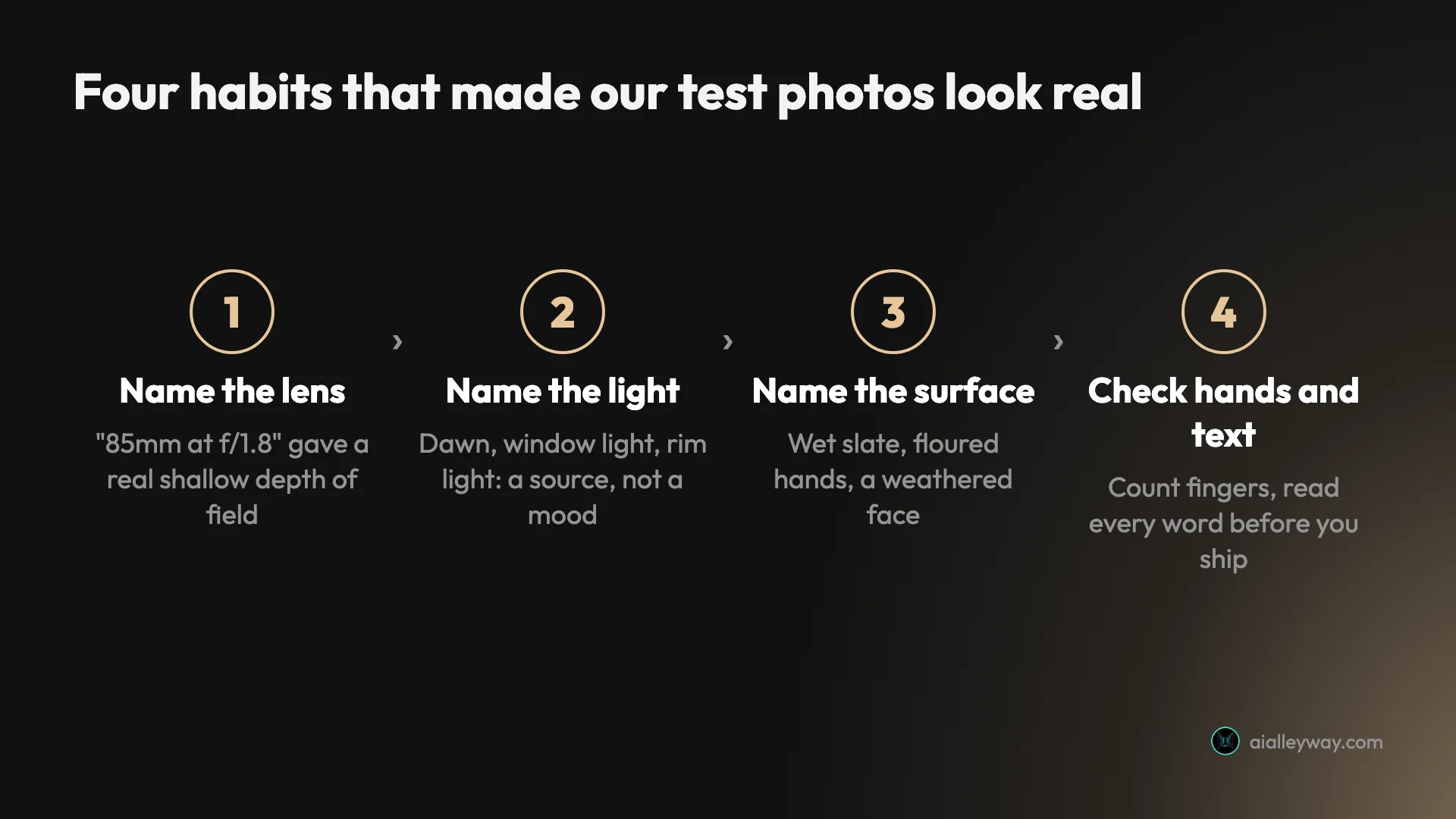
Name the lens. “Shot on an 85mm lens at f/1.8” is what gave ChatGPT’s fisherman a real shallow depth of field, the face sharp and the harbour soft. A focal length and an aperture are instructions a model can follow; “cinematic” is not.
Name the light as a source. My prompts said dawn, window light and rim lighting, and each image lit its subject from somewhere specific. Light with a direction is what makes shadows, reflections and skin texture fall into place.
Name the surface. Wet slate, floured hands and a weathered face gave both tools something physical to render: droplets, creases, texture. Materials are where the “plastic” look usually shows, so describe them.
Check before you ship. Count the fingers. Look at where the shadows fall. Read every word in the frame, because both tools added text of their own in my wider test, from a slogan to a signature. And check the corner for a watermark if the image came from a free plan.
A template to start from. This is built on the structure of my fisherman prompt rather than copied from it: subject, action, place and time, then lens, light and surface. Swap in your own subject and keep the camera language.
A photograph of an elderly fisherman mending a green net on a stone harbour wall at dawn. Shot on an 85mm lens at f/1.8, shallow depth of field. Soft low sunlight from the right, weathered skin and wet stone in sharp detail. No text in the frame.
Final word
For realistic photos in 2026, the two tools most people already have access to are also the two I would start with: ChatGPT when the shot has to match a brief, Nano Banana when you want good photos quickly and free. Our ChatGPT image generator review has the full test behind the top pick.
Frequently asked questions
Which AI gives the most realistic images?
Of the tools I have tested, ChatGPT and Google's Nano Banana tied on realism. On three photoreal prompts, a fisherman's portrait, a product shot and two hands kneading dough, both produced believable results with no anatomy or physics errors: the right number of fingers, flour in the creases, water beading on a matte case.
Where they differed was everything around the photo. ChatGPT followed the 85mm lens instruction with a real shallow depth of field and downloaded at about 1.5 megapixels. Nano Banana was twice as fast and free, but its full-size download was about 1.1 megapixels and free images carry a small visible watermark. Google's AI Overview on realistic photo generators points to Midjourney and FLUX; I have not tested either myself.
What is the best AI image generator for realistic photos?
On the evidence I have, ChatGPT, with Nano Banana close behind. Both made believable portraits, product shots and hands in my test with no anatomy or physics errors. ChatGPT gets the top spot because it followed camera instructions more faithfully than Nano Banana, rendering the shallow depth of field an 85mm lens at f/1.8 implies, and because it downloads at about 1.5 megapixels against Nano Banana's 1.1.
Nano Banana is the better choice if cost and speed matter more: it was free and about twice as fast. Midjourney and FLUX are the usual recommendations for cinematic mood and sharp detail, and Google's AI Overview leads with them, but I have not tested either, so I rank them on their reputation rather than my results.
Is there a free AI image generator for realistic photos?
Yes. The best free option I have used is Nano Banana in the Gemini app: it made all three of my photoreal test images, and twelve requests in total, on a free account without a refusal, most of them in about 30 seconds. ChatGPT's free plan runs the same Images 2.5 model as its paid plans, but it stopped me after three requests and locked me out for 24 hours.
Among the tools I have not tested, Leonardo gives free users 150 fast tokens a day and offers its own Lucid Realism model, FLUX has a playground, behind a sign-in, from its maker Black Forest Labs, though I could not confirm it includes free credits, and Stable Diffusion's models are free to download and run under its Community License. Midjourney, often recommended for realism, has no free tier.
How do I prompt AI to make realistic photos?
Describe the photograph, not the mood. The prompts that worked best in my test named a lens and aperture, such as 85mm at f/1.8, which produced a real shallow depth of field; named a light source, such as dawn, window light or rim light; and named the surfaces, such as wet slate, floured hands or a weathered face. Words like beautiful or stunning give a model nothing to act on.
Then check the result as a photographer would. Count the fingers, look at where the light falls, and read any text in the frame, because models still invent signs and labels. Google's AI Overview adds a useful point: realism often takes more than one step, with an edit or an upscale after the first image.
Can AI generate realistic photos of real people?
Mostly not, and deliberately so. OpenAI's system card for ChatGPT Images 2.5 says the model restricts fabricated or compromising depictions of real people and blocks deepfakes, including political, sexual or otherwise sensitive imagery of real people, through several safety layers. Other services set their own rules, and I have not tested where each one draws the line.
The realistic people in this guide are invented: a fisherman who does not exist, and hands that belong to nobody. That is the use these tools are built for. Every PNG I downloaded from ChatGPT carried C2PA content credentials marking it as AI-generated, as did the full-size file I downloaded from Nano Banana, and both companies say they also embed an invisible SynthID watermark, so an AI photo presented as real can be identified by software that reads them.
Can I use AI-generated realistic photos commercially?
Usually, but the terms differ. OpenAI assigns you ownership of ChatGPT's output, and Google says it won't claim ownership of Gemini images. Midjourney says you own what you create, but companies with more than $1 million in annual revenue must be on its Pro or Mega plan. Stable Diffusion's Community License allows commercial use for organisations under $1 million a year. Leonardo gives free users a commercial licence but keeps the right to use their images.
Two practical checks matter more than the licence for photoreal work. Look for visible watermarks, since free Gemini images carry a small sparkle unless you switch it off where Google offers the toggle. And never pass off an AI photo of a product, place or person as a real photograph where that would mislead.
Keep reading
Nano Banana vs ChatGPT: 12 Prompts, Two Different Winners
Nano Banana vs ChatGPT, tested with the same 12 prompts: ChatGPT follows a brief exactly, Nano Banana is twice as fast and free. Which one to use, and when.
Midjourney Alternatives: 6 Picks, Two Tested Side by Side
The best Midjourney alternatives in 2026: ChatGPT for exact briefs, Nano Banana for free and fast, plus Leonardo, Ideogram, Stable Diffusion and Playground.
ChatGPT Image Generator Review: Perfect Text, Pushy Slogans
I tested the ChatGPT image generator (Images 2.5) with 12 prompts on Free and Plus. It spelled all 15 text strings right, and added slogans I never asked for.
Nano Banana Review and Pricing: Fast, Free, Nearly Exact
Nano Banana pricing, tested: 12 prompts on Gemini's free tier, no limit hit. 15 of 15 text strings right, most images in 30 seconds, and one tulip too many.