
Adobe Firefly Review: Safe to Use, Shaky With Words
An Adobe Firefly review from the free plan: three generations a day, a default model that isn't Adobe's, and a café menu Firefly Image 5 could not spell.
Contents
Is Adobe Firefly worth it?

Yes, if you design inside Adobe and need images Adobe labels commercially safe: Firefly Image 5 read a crowded scene more literally than ChatGPT or Nano Banana on one key point, made a convincing gig poster, and sits in one account with fifteen partner models, and Adobe attaches Content Credentials to what it makes. It rates 4.0, a Power Tool, with one caveat that matters: on a café menu it wrote six lines of gibberish where both rivals scored seven of seven. Check every word it writes, pick an Adobe model deliberately, and expect only three free generations a day.
What does Adobe Firefly do?
Firefly is Adobe’s generative AI, and in 2026 it is two products under one name. It is a family of Adobe’s own image models, trained, Adobe says, on licensed Adobe Stock and public-domain content. And it is a web app that increasingly sells access to everyone else’s models as well.
That second part is the first thing you notice. When I opened Generate image on a free account, the model already selected was not Adobe’s. It was Google’s Gemini 3.1, better known as Nano Banana 2.
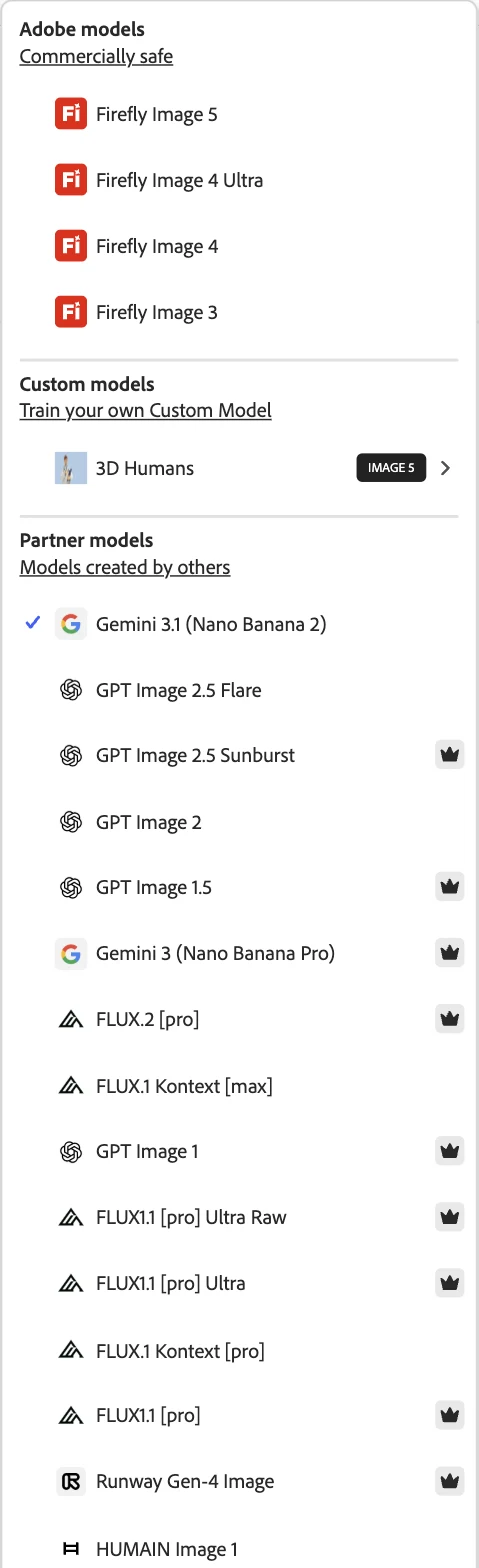
The picker splits into three groups. Four Adobe models sit under a heading that reads “Commercially safe”. A custom-model section invites you to train a model on your own images and already listed one, 3D Humans, built on Image 5.
Below them, under “Models created by others”, are fifteen partner models: Google’s Nano Banana 2 and Nano Banana Pro, OpenAI’s GPT Image 2.5 in two versions plus three older GPT Image models, six FLUX models, Runway’s Gen-4 Image and HUMAIN Image 1. Nine of the fifteen carry the same crown icon Firefly puts on its Upgrade button.
On our picks page Firefly sits in Design & Graphics, as the runner behind Canva, not among the image generators. That is deliberate: many people meet Firefly as part of Adobe’s design tools rather than as a standalone image app. But the heart of it is still an image model, so this review tests that model directly.
This review is about Adobe’s own model, Firefly Image 5, because that is the part only Adobe sells and the part its commercial-safety promise covers. Two of the partner families are ones we tested in their own apps, OpenAI’s image model in ChatGPT and Nano Banana 2 in Gemini, and our ChatGPT image generator review and Nano Banana review cover how they perform there.
The settings change with the model
The panel beside the prompt is not fixed; it rebuilds itself for whichever model you pick. With Nano Banana 2 selected, it showed a “Use Google Search” toggle and room for six reference images. Switch to Firefly Image 5 and the Google toggle disappears and the reference slot drops to a single image.
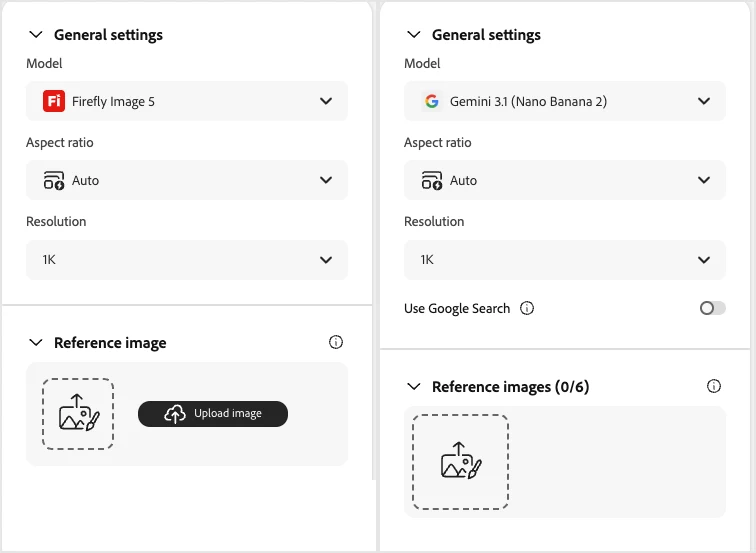
That is a small detail with a practical consequence. Firefly is really a front end over several engines, and the controls you get depend on the engine underneath. If a feature you used yesterday seems to have vanished, check which model is selected before you go looking for a bug.
Firefly inside Photoshop
The web app is only one door in. Adobe’s Photoshop help page lists the models available to Generative Fill, the feature that paints into a selected area of a photo: Adobe’s own Firefly Fill & Expand, Firefly Image 5 and Firefly Image 1, alongside partner models including FLUX.2 pro, FLUX Kontext pro, and Google’s Nano Banana 2 and Nano Banana Pro.
So the same pattern holds on the desktop: Adobe’s models and other companies’ models side by side, in the tool most designers already have open. I tested the web app only, so everything below about output quality is about Firefly Image 5 through the browser.
How I tested it
I used prompts from the same fixed set as those two reviews, word for word, on Firefly Image 5 with the aspect ratio on Auto and resolution at 1K. The free plan allows three generations a day, so I spent them on the three prompts that tell you the most: a seven-part compositional scene, a gig poster with four lines of text, and a café menu with six items and prices.
| Test | Firefly Image 5 | ChatGPT Images | Nano Banana | Firefly ready by |
|---|---|---|---|---|
| Seven-part scene (bike, door, cat, tulips, pot, “47”, light) | 6 of 7: four tulips | 7 of 7 | 5 of 7 | ~30 s |
| Gig poster, four text lines | 4 of 4 | 4 of 4 | 4 of 4 | ~42 s |
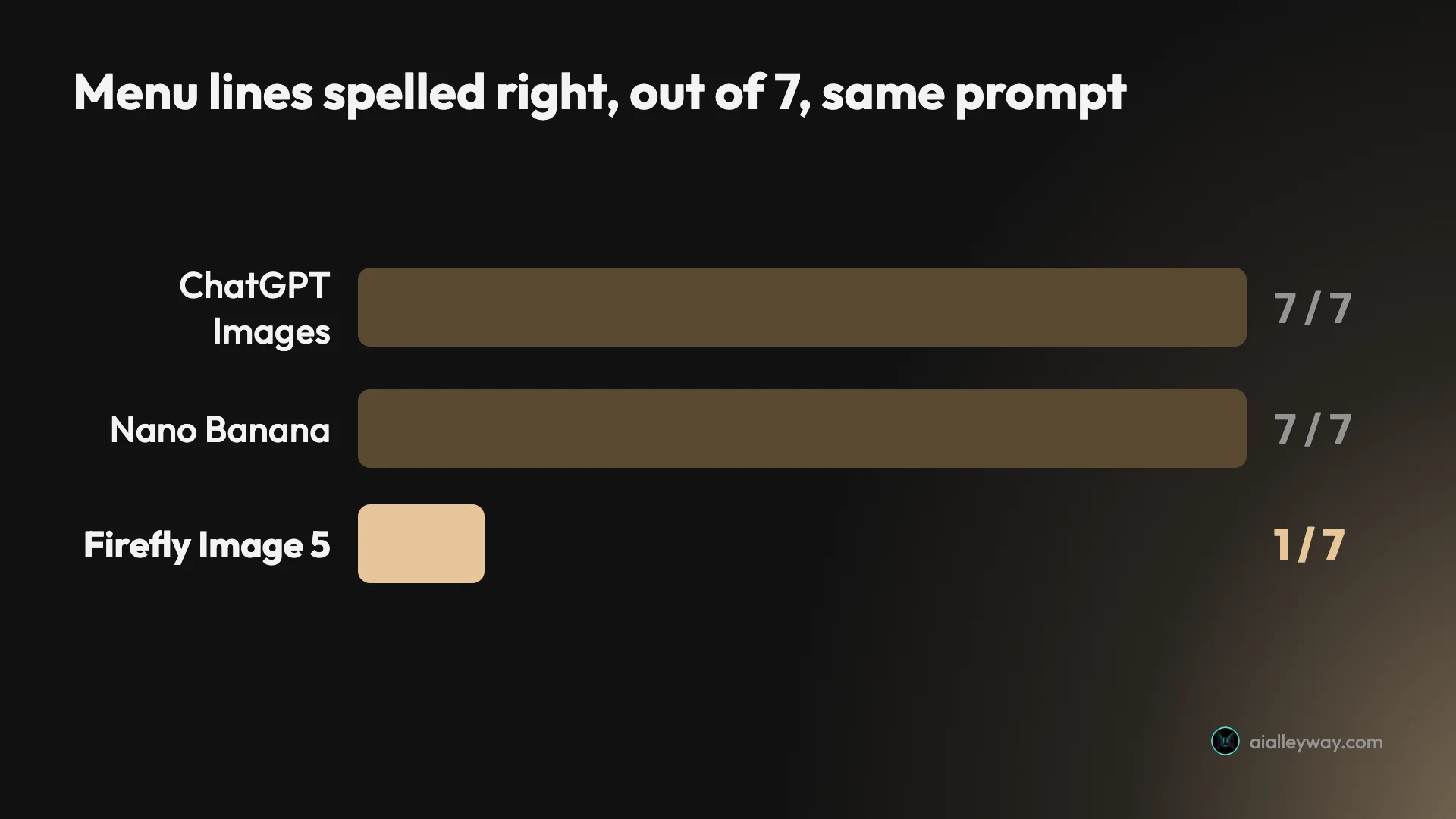
| Café menu, title plus six priced items | 1 of 7 | 7 of 7 | 7 of 7 | ~31 s |
Every Firefly image arrived as a single 1152×896 picture, landscape even for the poster, where ChatGPT and Nano Banana both chose a portrait frame. The times are when I checked, so they are upper bounds. Three prompts is a narrower test than the full set I ran on the other two tools, and I have kept the verdict to what those three showed.
Three settings to change before you generate
The test suggests three habits for getting more out of Firefly, all of them quick.
Choose the model yourself. The picker opened on a partner model. If Adobe’s licensing is the reason you are here, select Firefly Image 5 or another model in the “Commercially safe” group before the first prompt, not after.
Set the aspect ratio for anything with a shape. On Auto, Firefly laid the gig poster out in a wide landscape frame. A poster, a phone wallpaper or a social post should get its ratio set explicitly.
Send dense text to a partner model. Firefly Image 5 handled a four-line poster and failed a six-item menu. For price lists, labels and menus, switching to one of the partner models in the same picker is a better bet than rerolling Adobe’s.
How much does Adobe Firefly cost?
Firefly has a free plan and four paid ones. The free plan is measured in daily generations; the paid plans are measured in monthly generative credits.
| Plan | Monthly generative credits | US price (widely reported) |
|---|---|---|
| Free | Free daily generations (3 images a day in my test) | $0 |
| Firefly Standard | 2,000 | $9.99/mo |
| Firefly Pro | 4,000 | $19.99/mo |
| Firefly Pro Plus | 10,000 | $49.99/mo |
| Firefly Premium | 50,000 | $199.99/mo |
The credit allowances are from Adobe’s plans page, read on 23 September 2026. That page showed me local prices, not US dollars, so the US figures above are the widely reported ones rather than numbers I read from Adobe. Adobe’s local prices do follow the same shape: Pro costs twice Standard, Pro Plus about five times and Premium about twenty times.
On the free plan the counter sits in the prompt bar. It read “2 generations left today” after my first image, and after the third Firefly said my free daily generations had been used and to upgrade or come back tomorrow.

The paid plans change the model of payment as well as the size. Adobe’s plans page lists unlimited access to standard image features like Generative Fill on every paid plan, with the monthly credits spent on premium features, and it lists access to partner models from Google, OpenAI, Black Forest Labs and others among the paid-plan benefits. The two top plans, Pro Plus and Premium, also list unlimited generations on all image models at 1K and 2K for the first year, as a promotion rather than a permanent plan feature. In practice that means the plan you need depends less on how many images you make than on which models and features you want to make them with.
Who is Adobe Firefly for?
- Designers already paying for Adobe. Firefly’s strongest argument is where it lives: inside the Adobe tools you use for the rest of the job, with Adobe’s own models labelled commercially safe.
- Teams that need a licensing story for AI images. Adobe says its models are trained on licensed Adobe Stock and public-domain content, which is the answer a legal or brand team usually asks for first.
- People who want several image models in one account. One Firefly login reaches Adobe’s models plus fifteen partner models, including OpenAI’s and Google’s.
- Posters with short headlines, and busy scenes. Firefly Image 5 handled a four-line poster correctly and read a crowded scene well.
- Not for anyone who needs dense text in an image. On a six-item menu it invented every item and price. For menus, labels and price lists, ChatGPT and Nano Banana both did far better on the same prompt.
What does Adobe Firefly get right?
It placed the bicycle where I asked
Of the three generators I have run this prompt through, Firefly Image 5 is the only one that leaned the bicycle against the door, as written, rather than against the wall beside it. The cat is in the basket, the “47” is on the door above the knocker, the pot is on the left and the light comes from the right.
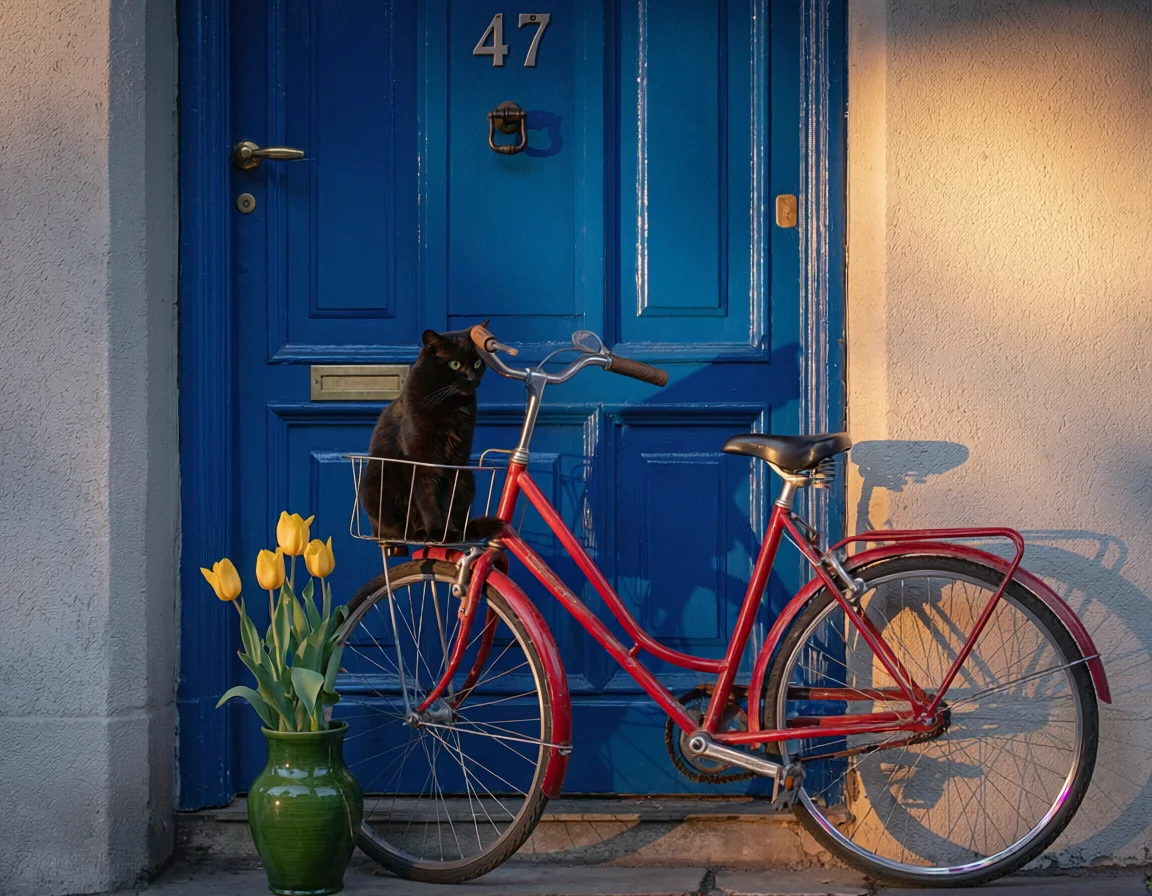
It still drew four tulips instead of three, the same slip Nano Banana made, so it scores six of seven. ChatGPT is the only one of the three to get all seven, but Firefly read the relationships in the sentence more literally than either rival.
The poster was right, and styled like a poster
The gig poster came back with all four strings correct: the band name, “LIVE AT THE RIVIERA”, “OCTOBER 14” and the doors-and-tickets line. The only liberty was typographic, round bullets where I had typed a middle dot, which is a choice a designer might make anyway.

It also looks like a screen print rather than a digital mock-up, with a distressed paper edge, halftone texture and a two-colour palette that stays inside the navy and amber I asked for.
The commercial-safety promise is visible in the product
Adobe does not leave its licensing claim to the marketing pages. The model picker puts its own models under a heading that reads “Commercially safe”, separate from the partner models, so you can see which side of the line a model sits on before you use it.
Adobe says those models are trained on licensed Adobe Stock and public-domain content where copyright has expired. That is a provenance argument about the model itself, and for a brand or agency it is often the deciding factor.
One account, many models
The partner list is a genuinely useful feature in its own right. From one Firefly login you can reach OpenAI’s GPT Image 2.5, Google’s Nano Banana 2, several FLUX models and Runway’s image model, alongside Adobe’s.
For someone comparing generators, that removes a stack of separate sign-ups. It also means a Firefly subscriber can switch to a partner model when Adobe’s own model struggles, which on the menu test would have been the right call.
It trains on your own images
The custom-model section lets you train a Firefly model on your own images, and my account already listed one, 3D Humans, built on Image 5. I did not train one for this review, but the option is there in the same picker as everything else, which matters for a brand that wants a consistent house style.
Firefly images carry a provenance label
Adobe says it automatically applies Content Credentials to content made with Firefly, recording the issuer, the date, the app and the AI tool used, and that those credentials stay attached to the file for anyone to inspect on supporting platforms.
For publishers and agencies that is a real advantage: the provenance record travels with the image, without a separate step on your part, as C2PA credentials also do for ChatGPT and Gemini images.
Where does Adobe Firefly fall short?
It could not spell a coffee menu
This is the caveat that matters most. Asked for a chalkboard menu with six named items and prices, Firefly Image 5 got the title right and then wrote nonsense: “Threm hedting”, “Tave forsceding”, “Cherdorerdiusiue”, with every price reading “30.”.
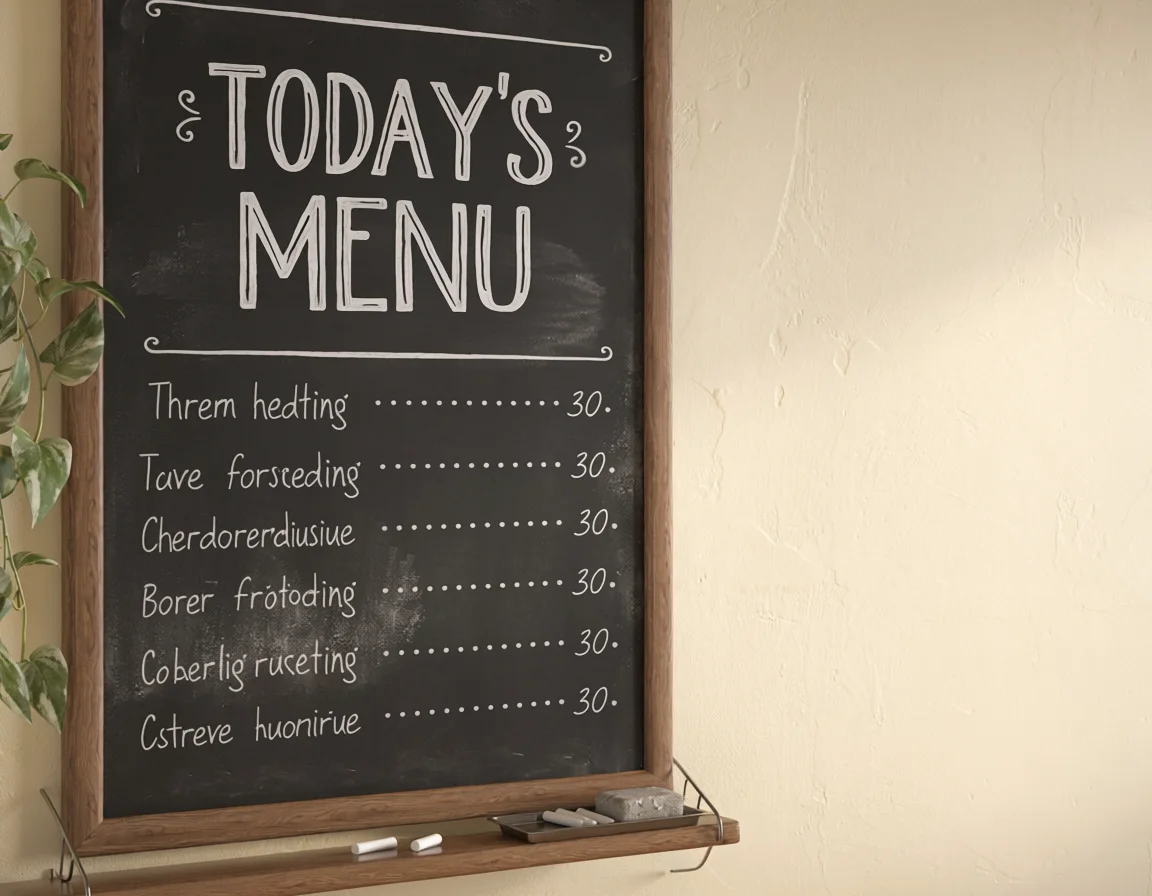
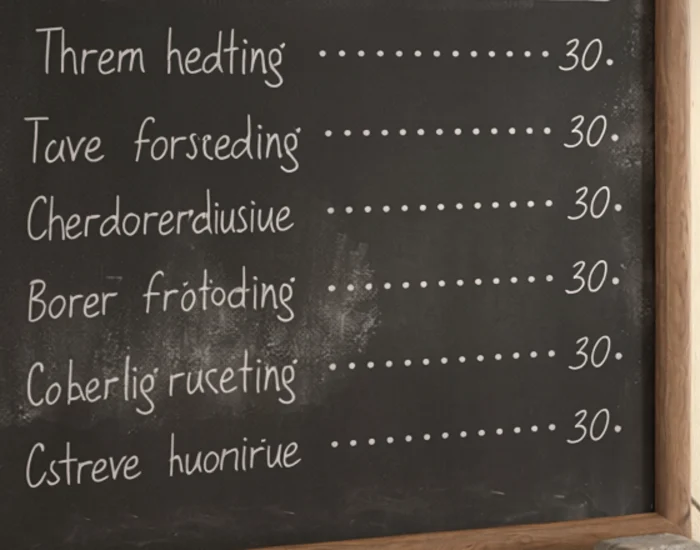
That is one of seven lines right, on the same prompt where ChatGPT and Nano Banana both scored seven of seven. It matters more for Firefly because text is exactly what designers reach for Adobe to handle, and our own picks had credited Firefly with it.
Three free generations a day
The free plan counts down in the prompt bar, from two left after the first image to zero after the third. Then Firefly told me my free daily generations had been used, and to upgrade or come back tomorrow.

That is the same three-a-day ceiling as ChatGPT’s free plan, and far short of Gemini’s free tier, which took twelve requests in one session without a refusal. It is also why this review covers three prompts rather than the full set.
The default model is not Firefly
Open Generate image on a free account and the model already chosen is Google’s Nano Banana 2, which sits in the partner list, outside Adobe’s “Commercially safe” group. Nothing on the main screen tells you that.
For a tool sold largely on licensing, that is an odd default. A user who types a prompt and presses Generate without opening the picker is not using the model Adobe’s commercial-safety claim covers, and would have to know to switch.
Auto aspect ratio chose landscape for a poster
All three images came back at 1152×896, including the gig poster, which Firefly laid out in a wide landscape frame. ChatGPT and Nano Banana both chose a tall portrait frame for the same prompt without being told.
It is a small thing, and setting the aspect ratio by hand fixes it. But a model that reads “concert poster” and does not reach for a poster shape is showing less judgement about the brief than its rivals did.
Its own labels can block your own images
The same Content Credentials system has a side effect. A bug report on Adobe’s community forum, opened on 28 July 2026, describes Firefly refusing reference images with the message “This image has Content Credentials and cannot be used”, across Firefly Image 3, 4, 4 Ultra and 5, while partner models still took reference images.
Adobe’s community team acknowledged it and escalated it. The workarounds offered were to screenshot the image first or strip its metadata, and the thread later traced some cases to firewalls blocking the domains Firefly uses to check credentials. If your workflow depends on reference images, it is worth a test before you commit.
User reviews are split
Aggregate ratings pull in opposite directions. Firefly has a Trustpilot TrustScore of 1.8 out of 5 from 27 reviews, while Gartner Peer Insights, which surveys business users, shows 4.2 from 59.
That split fits my test: a tool that business users working inside Adobe rate well, and that individual users judging raw image output often do not. Which camp you are in predicts whether Firefly is worth it more than any single test result.
If Adobe Firefly isn’t right for you
If the text results or the small free allowance rule Firefly out, these are the places to look: two image generators that beat it on the same prompts, and the design tool it sits beside in our picks.
- ChatGPT Images. The most accurate of the three on my tests, and seven of seven on the menu Firefly could not spell. Its free plan has the same three-a-day limit. Our ChatGPT image generator review has the full test.
- Nano Banana (Gemini). Also seven of seven on the menu, and far more generous on the free tier. It is also inside Firefly as a partner model, and it was the one selected by default. Our Nano Banana review covers it in Gemini.
- Canva. Firefly’s neighbour on our picks page, and the top pick in Design & Graphics. If what you want is finished designs, templates and social graphics rather than raw images, Canva builds its AI tools into the templates themselves. See Canva.
Final word
Firefly is two products now, and this review tested the one only Adobe sells. It stays our Design & Graphics runner behind Canva, for the workflow and licensing reasons above, not for its typography. As a hub, it is genuinely useful: one Adobe account reaches Adobe’s own commercially safe models and fifteen partner models, inside the tools many designers already pay for.
As an image model, Firefly Image 5 is strong, with one serious weak spot. It read a crowded scene well and made a convincing poster, then invented every item and price on a menu that two rivals got completely right. It rates 4.0: choose it for the Adobe workflow and the licensing story, pick an Adobe model deliberately if licensing is the point, and send dense text to a partner model or check every word.
Frequently asked questions
Is Adobe Firefly free?
Yes, with a small daily allowance. On the free account I tested, the prompt bar counted down from free daily generations to 2 generations left today after the first image, then 1, then 0. After the third image Firefly said my free daily generations had been used and to upgrade or come back tomorrow.
Adobe's plans page describes the free tier as free daily generations across image, video and audio, so the allowance resets each day rather than each month. Three images is enough to try the tool, not enough to work in it. The paid plans add a monthly allowance of generative credits, from 2,000 on Standard to 50,000 on Premium, plus what Adobe calls unlimited access to standard image features like Generative Fill.
Is Adobe Firefly commercially safe?
Adobe's own models are the ones it sells on that promise. In the Firefly model picker they sit under a heading that reads Commercially safe, and Adobe says they are trained on licensed content from Adobe Stock and public-domain content where copyright has expired.
The catch is that Firefly now also offers fifteen partner models from Google, OpenAI, Black Forest Labs, Runway and others, listed separately as models created by others, and the one selected by default on my free account was Google's Nano Banana 2. The commercial-safety label in the picker applies to Adobe's group, not to the partner list. If licensing is why you chose Firefly, pick Firefly Image 5 or another Adobe model deliberately before you generate.
Can Adobe Firefly put text in images?
Sometimes, and not reliably in my test. Firefly Image 5 rendered a gig poster with all four requested lines correct, including the band name, the venue headline, the date and a doors-and-tickets line. On a café chalkboard menu it got the title right and then wrote six lines of invented words, such as Threm hedting and Cherdorerdiusiue, with every price reading 30.
That is one of seven lines correct, on a prompt where ChatGPT Images and Nano Banana both scored seven of seven. Short, large headlines seem to work; a list of small items with prices did not. If text accuracy is the job, check every word, or use a partner model such as GPT Image or Nano Banana, which spelled this same menu correctly in their own apps in our tests.
Which models does Adobe Firefly use?
Two groups. Adobe's own image models, listed as Firefly Image 5, Image 4 Ultra, Image 4 and Image 3 on my account, sit under the Commercially safe heading. A custom-model section lets you train a model on your own images, and showed a 3D Humans model built on Image 5.
Below those are fifteen partner models: Google's Nano Banana 2 and Nano Banana Pro, OpenAI's GPT Image 2.5 Flare and Sunburst, GPT Image 2, 1.5 and 1, several FLUX models from Black Forest Labs, Runway Gen-4 Image and HUMAIN Image 1. Nine of the fifteen carry the crown icon Firefly also uses on its Upgrade button. On my free account the model already selected was Nano Banana 2, not an Adobe model.
Is Adobe Firefly better than ChatGPT for images?
Not for the jobs I tested. On the same prompts, ChatGPT placed all seven elements of a compositional scene and spelled all seven lines of a café menu; Firefly Image 5 got six of seven on the scene and one of seven on the menu. Both free plans allow three images a day, so neither is more generous.
Firefly's case is elsewhere. It sits inside the Adobe tools many designers already pay for, it labels its own models commercially safe and says they were trained on licensed and public-domain content, and it gives one account access to partner models, including OpenAI's. If you live in Photoshop and Illustrator, those advantages can outweigh a weaker text result. If you just need the most accurate image from a prompt, ChatGPT did better.
Keep reading
ChatGPT Image Generator Review: Perfect Text, Pushy Slogans
I tested the ChatGPT image generator (Images 2.5) with 12 prompts on Free and Plus. It spelled all 15 text strings right, and added slogans I never asked for.
Nano Banana Review and Pricing: Fast, Free, Nearly Exact
Nano Banana pricing, tested: 12 prompts on Gemini's free tier, no limit hit. 15 of 15 text strings right, most images in 30 seconds, and one tulip too many.
Google Gemini review: the best free tier, sold as storage
A Google Gemini review from the free tier: four models including 3.1 Pro handed over for nothing, then paid tiers that are really 400GB, 5TB and 20TB of Drive.
The Best Free AI Video Generator (No Trial Traps)
Most free AI video generators are watermarked or trials in disguise. Google Veo's free tier gives a watermark-free clip with sound for $0 — the honest ranking.