
Adobe Express Review: Generous Free Plan, Shaky AI Hand-Off
An Adobe Express review from the free plan: free background removal, an AI Assistant that got the brief right in all four designs, and an editor that lost text.
Contents
Is Adobe Express worth it?
Yes on the free plan, and with care around the AI. In this Adobe Express review, one free-plan session on 11 October 2026, Adobe Express gave me free background removal, a template I finished in six edits, and an AI Assistant that got my brief right in all four designs from one prompt. Then Firefly Image 4, Adobe’s commercially safe default, got none of eleven requested text lines right on the first image of each prompt, and the editor blanked a shop’s name on the way in.
What does Adobe Express do?
Adobe Express is Adobe’s design tool for people who do not use Photoshop. You start from a template or a blank page, change the words and pictures, and export a social post, flyer, short video or document.
It sits beside Adobe Firefly, not on top of it. Firefly is Adobe’s image, video and audio generator. Express is the layout tool, and it borrows Firefly’s models for its AI features. Adobe’s own pricing page makes the split clear: the Firefly Pro plan is described as including Express Premium’s features.
There are two ways to use AI in it. Separate tools generate an image, remove an object or build a presentation. And a chat box on the home page, the AI Assistant, takes a sentence and returns whole designs. Adobe labels the Assistant as beta.
We reviewed Adobe Firefly last month. This Adobe Express review covers the half of Adobe’s offer that competes with Canva, which is our best pick for design on the picks page.
What is in the editor
A rail on the left holds Search, Add content, Text, Upload, Your stuff, Brands, Templates, Styles and Add-ons. Every element on the page is its own layer, and a strip down the right edge shows the stack.
Select an image and an edit panel offers Remove background, Erase, Remove object, Insert object, Regenerate image, Set background and Generate similar, plus Auto enhance, Adjust, Corners, Position and Opacity. Erase carried a Premium crown on my account. The others did not.
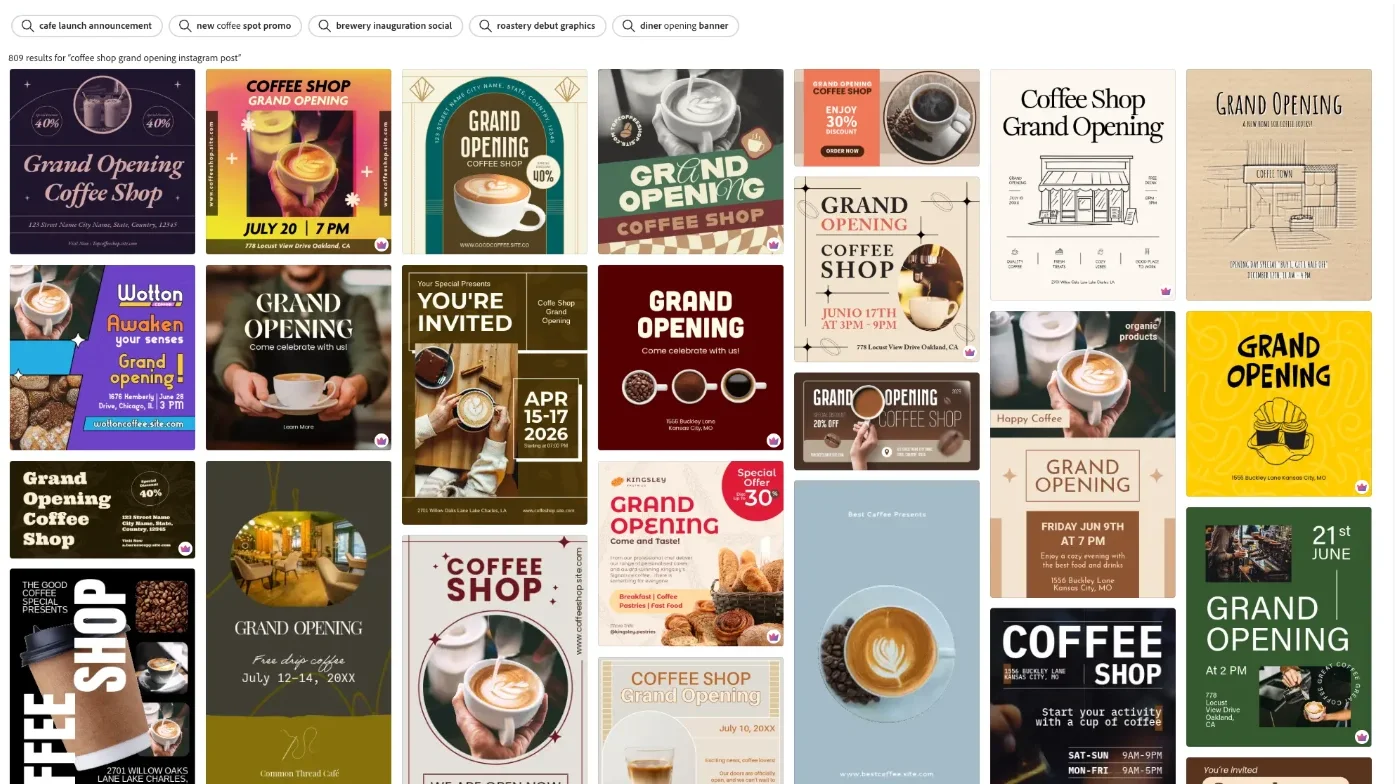
The template library is the centre of the product. A search for a coffee shop grand opening post returned 809 results, with filters for price, size, type, style, mood and region.
The home page and quick edits
The home page is built for people who know the job and not the tool. Under the prompt box sit five starting tiles: Upload, Start new design, Edit photos, Create video and Generate presentation.
Below them is a row of quick edits that each do one thing: Remove background, Generate QR code, Collage maker, Logo maker, Card maker, Clip maker, Auto edit video and a profile picture maker. Several carry a beta tag. Adobe’s pricing page lists removing an image background, resizing or cropping an image, making a QR code and trimming a video among the quick actions free users get. That is resizing a single image; the Resize tool that reshapes a whole design for another network is a different, paid feature, covered below.
Two ways to use the AI
The Generative AI page groups the single-purpose tools: Generate image, Generate template, Generate presentation, Generate text effects, Remove object, Insert object and Create a comic.
Generate image is the one I tested. Its left panel holds the model picker, two reference slots for style and composition, a content type setting and a wall of styles such as Synthwave, Palette knife and Layered paper. With Adobe’s model selected, each prompt returns four square images. Switching to Gemini 3.1, the partner model I tried, strips the panel down to a single reference slot and returns one.
The AI Assistant is the other route. It lives in a chat, keeps a history under Chats, and shows a running checklist of what it is doing before the results arrive. Adobe’s notice under the prompt box says it is in beta and that its responses may be inaccurate.
How I tested Adobe Express for this review
I ran one session on a free Adobe Express account on 11 October 2026, using the same prompts as our Canva review so the two can be compared. Timings come from screenshots taken every few seconds, so read them as upper bounds. My timer failed on the first image run, so that figure is looser than the others.
| Test | Result | Ready in |
|---|---|---|
| Image, Adobe’s model: seven-part scene | 4 of 7 on the first image; best of four was 6 of 7 | within about 70 s; a rerun took 16 to 22 s |
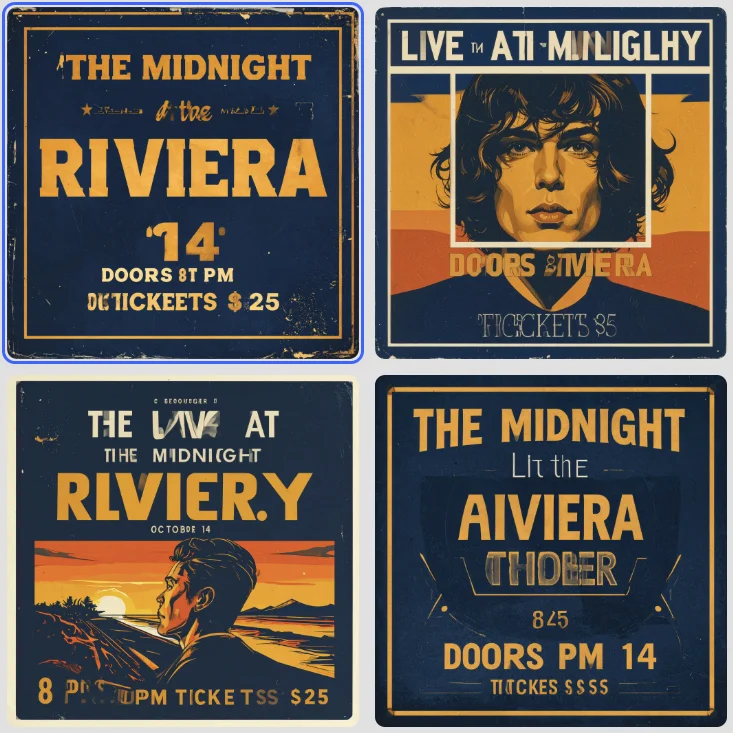
| Image, Adobe’s model: gig poster | 0 of 4 text lines right (first image) | 10 to 20 s |
| Image, Adobe’s model: café menu | 0 of 7 text lines right (first image) | within about 18 s |
| Image, partner model: café menu | 7 of 7 text lines right | 18 to 28 s |
| Remove background | Clean cutout, spokes intact | 15 to 20 s |
| Free template, six text edits | All six exact | by hand |
| AI Assistant: Instagram post | Four designs, brief right in all four | 80 to 105 s |
| Open that design in the editor | Hung, then saved with two blank blocks | over 65 s, abandoned |
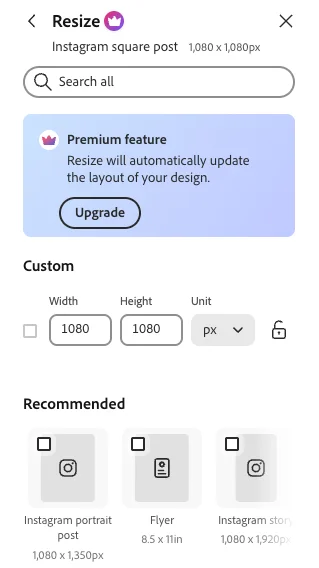
| Resize | Blocked: Premium only | not run |
I did not test any Premium feature, Generate template, Generate presentation, Remove object, Insert object, text effects, the comic maker, the quick actions such as QR codes, collages and the logo maker, the style and reference controls, the other partner models, the PDF tools, video tools, scheduling, the brand kit or the mobile app. I also did not download a finished file.
Adobe Express vs Canva on the same prompts
| Prompt | Express, Firefly Image 4 | Canva AI | ChatGPT Images | Nano Banana | Firefly Image 5 |
|---|---|---|---|---|---|
| Seven-part scene | 4 of 7 | 5 of 7 | 7 of 7 | 5 of 7 | 6 of 7 |
| Gig poster, four lines | 0 of 4 | 4 of 4 | 4 of 4 | 4 of 4 | 4 of 4 |
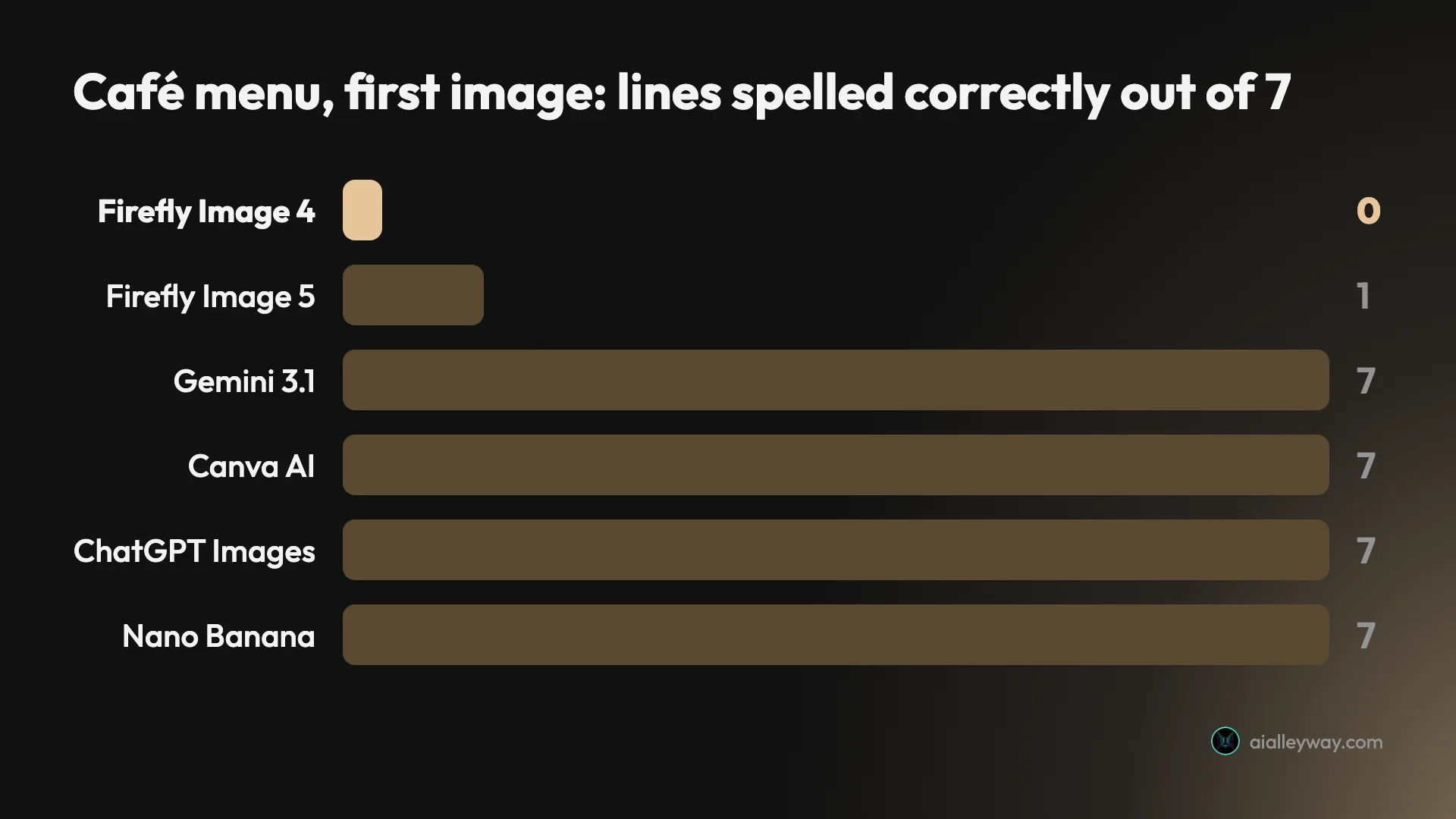
| Café menu, seven lines | 0 of 7 | 7 of 7 | 7 of 7 | 7 of 7 | 1 of 7 |
The Express column is Adobe’s default model inside Express on its free plan, scored on the first of the four images it returns. Canva ran on a Pro trial on the same day. Firefly Image 5 is the newer model we tested in the Firefly app in September, and the ChatGPT and Nano Banana figures come from their own reviews that month.
How much does Adobe Express cost?
Adobe Express costs nothing to start and $9.99 a month for Premium. These are the prices on Adobe’s pricing page on 11 October 2026.
| Plan | Price | Generative AI | Storage |
|---|---|---|---|
| Free | $0 | Free daily generations | 5GB |
| Premium | $9.99 a month | 250 credits a month | 100GB on the plan card |
| Firefly Pro | $19.99 a month | 4,000 credits a month | 100GB |
| Teams | $4.99 a month per licence in year one, then $7.99 | 250 credits per user | 1TB |
| Enterprise | By quote | Starts at 250 | Not stated |
Premium is sold month to month. The page describes it as billed monthly with no annual commitment and offers a 30-day free trial. Teams is different: it needs at least two seats and runs as an annual subscription billed monthly.
Two things on the page do not add up. The Premium plan card says 100GB of storage while the comparison table further down says 10GB. And no annual price for individual Premium appears anywhere on it.
How generative credits work
Paid plans get a monthly allowance of generative credits. Adobe’s help page on generative credits, dated 30 September 2026, says standard features use one credit per generation, that credits renew on the billing date, and that unused credits do not roll over.
Some things cost much more. The model picker on my account listed the paid partner models with their prices.
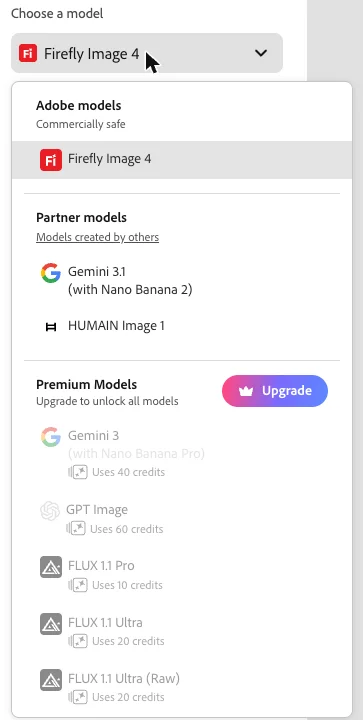
GPT Image uses 60 credits a generation, so Premium’s 250 credits cover four of them. Gemini 3 with Nano Banana Pro uses 40. FLUX 1.1 Pro uses 10. Video is dearer again: Adobe’s help page prices it by the second.
Free accounts work differently. Adobe’s help page says they get a limited number of free daily generations, refreshed each day, and gives no number. My account showed a “Free daily generations” label with no counter, and five generations in a row went through.
Is Premium worth $9.99?
Premium’s price is easy to like next to its rival. Canva Pro costs $18 a month, or $144 a year, on Canva’s US pricing page as of 11 October 2026. Express Premium at $9.99 a month comes to $119.88 over twelve months with no annual commitment.
What you get for it is mostly the list of locked tools: resize, Brand Kits, Erase, the full template and font libraries, and 250 generative credits. At one credit for a standard generation, that is a lot of Firefly images. At 60 credits each, it is four GPT Image pictures.
I did not test Premium, so I cannot tell you how well resize adapts a layout or how good the premium templates are. On paper it is the cheaper upgrade of the two. Whether it is the better one depends on tools this review did not reach.
What the free plan holds back
Four limits showed up in my session. Resize opened a panel headed “Premium feature” with its buttons greyed out. The Erase tool and the export size slider both carried a crown. And nearly half the templates on the first screen of my search were premium.
Adobe’s pricing page adds Brand Kits, removing a video background, 4K export, the larger font and template libraries, and scheduling to three accounts per network in place of one.
Refunds and cancelling
Adobe’s subscription terms say you get a full refund if you cancel within 14 days of your initial order. For plans sold as an annual contract billed monthly, the same terms set a cancellation charge of 50% of the remaining contract.
That charge matters for Teams, which is sold that way. Individual Premium is described as billed monthly with no annual commitment. These terms were read, not tested. I did not buy or cancel a plan, so check the wording on your own order page.
What Adobe says about commercial use
Adobe’s help pages on generative AI draw three lines. Outputs from Firefly features without a beta label can be used in commercial projects. Beta features can be used commercially unless Adobe says otherwise, but their outputs are not indemnified. And Content Credentials, the provenance label, are attached to images made wholly with generative AI.
The commercial-use and indemnity wording does not appear on Adobe’s page about partner models. So the promise follows the model, not the app. An image made in Express with Firefly Image 4 sits inside it. An image made in Express with a partner model does not obviously do so.
Who is Adobe Express for?
- People who want a capable free design tool. Free background removal and a working template editor cover a lot of everyday jobs.
- Small businesses that care about image licensing. Adobe’s own model is labelled commercially safe in the picker, as long as you choose it yourself.
- Anyone already paying for Adobe. Firefly Pro includes Express Premium’s features, per Adobe’s pricing page.
- Photoshop users handing work to colleagues. Express lists PSD as an export format, which Canva’s download panel did not offer in our test.
- Not for anyone who needs Adobe’s commercially safe model to write text inside an image. Adobe’s default model got none of eleven lines right on the first image of each prompt.
What does Adobe Express get right?
Background removal is free, and good
One click on a bicycle scene removed the door, the wall and the pavement in roughly 15 to 20 seconds. It kept the bicycle, the basket, the cat and the pot of tulips, and cleared the blue door from between the wheel spokes without breaking them.
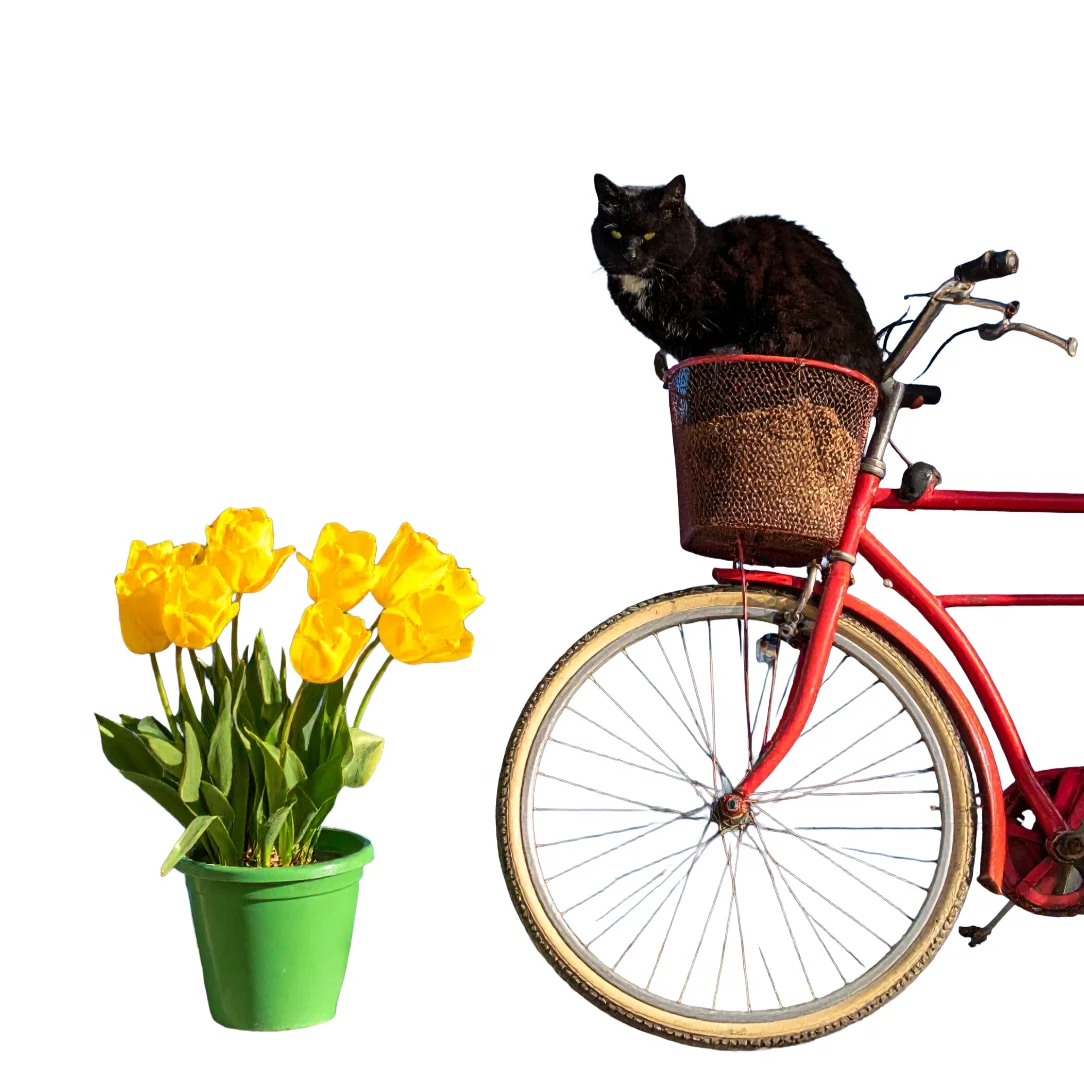
Canva marks the same tool as paid, and in our test its version thinned a few spokes. Each tool cut out its own generated bicycle, so this is not a like-for-like test. On these two images, the free tool left the spokes intact and the paid one did not.
A free template took six edits without a slip
I picked the first template in my search that had no crown and changed six text boxes by hand: the shop name, the headline, the date, the offer and two discount badges.
All six came out as typed, kept the template’s font and stayed inside the layout without any resizing. No AI was involved and no credits were spent.
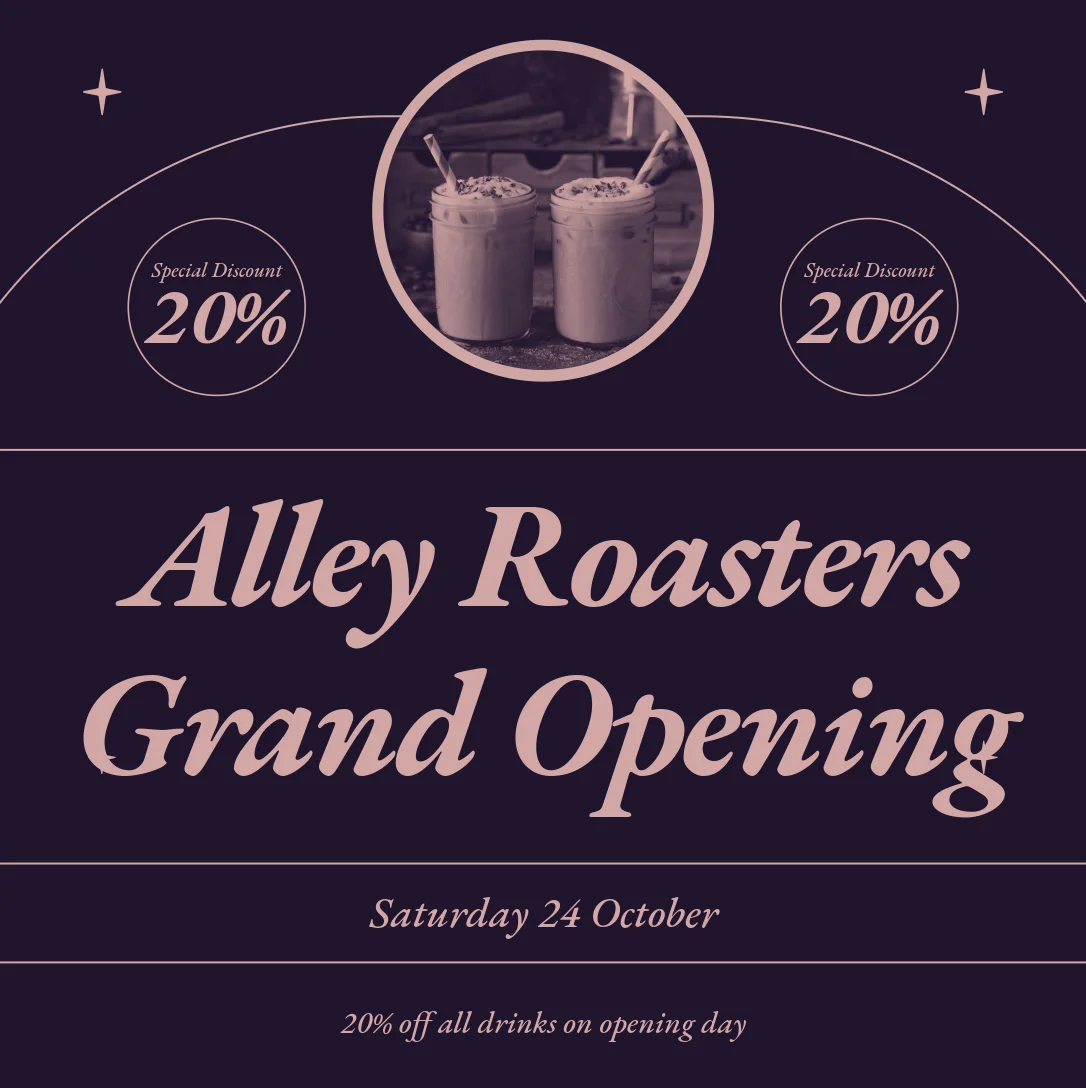
The palette is the template’s purple and pink, not the navy and amber in my brief, because I did not recolour it. That is the trade with templates: fast and exact, in someone else’s style.
The AI Assistant got the brief right four times
I gave the Assistant the same sentence I gave Canva: an Instagram post for the grand opening of a coffee shop called Alley Roasters on Saturday 24 October, with 20% off all drinks on opening day, in amber and navy.
It showed its working as a checklist, then returned four square designs in about a minute and a half. All four carried the full shop name, the date and the offer, correctly spelled, in the colours I asked for.
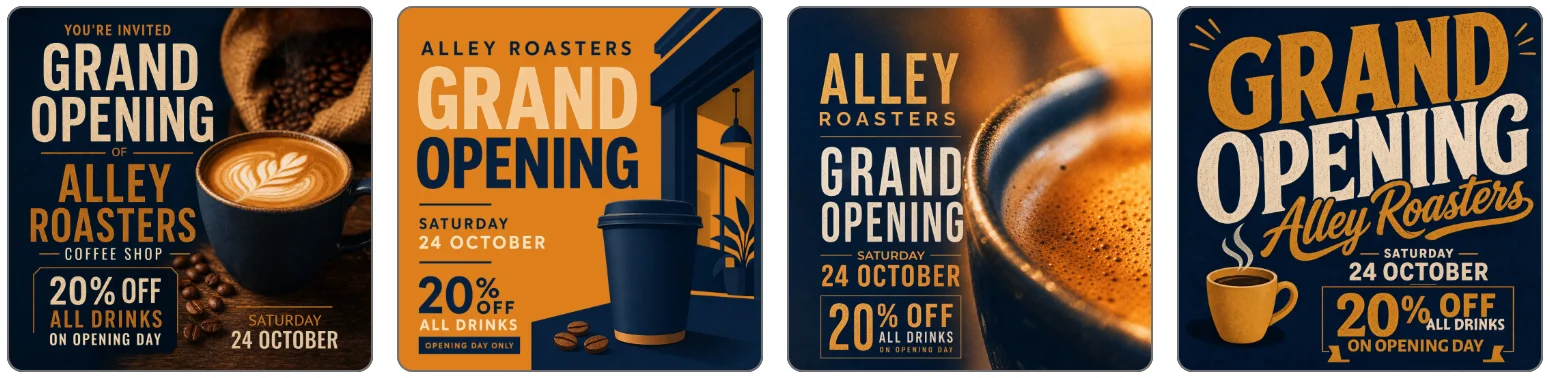
Canva’s single design dropped half the shop’s name on the same prompt. Two of the Express designs added words I did not ask for, “You’re invited” on one and “Opening day only” on another, but none got a fact wrong.
The model picker tells you whose model you are using
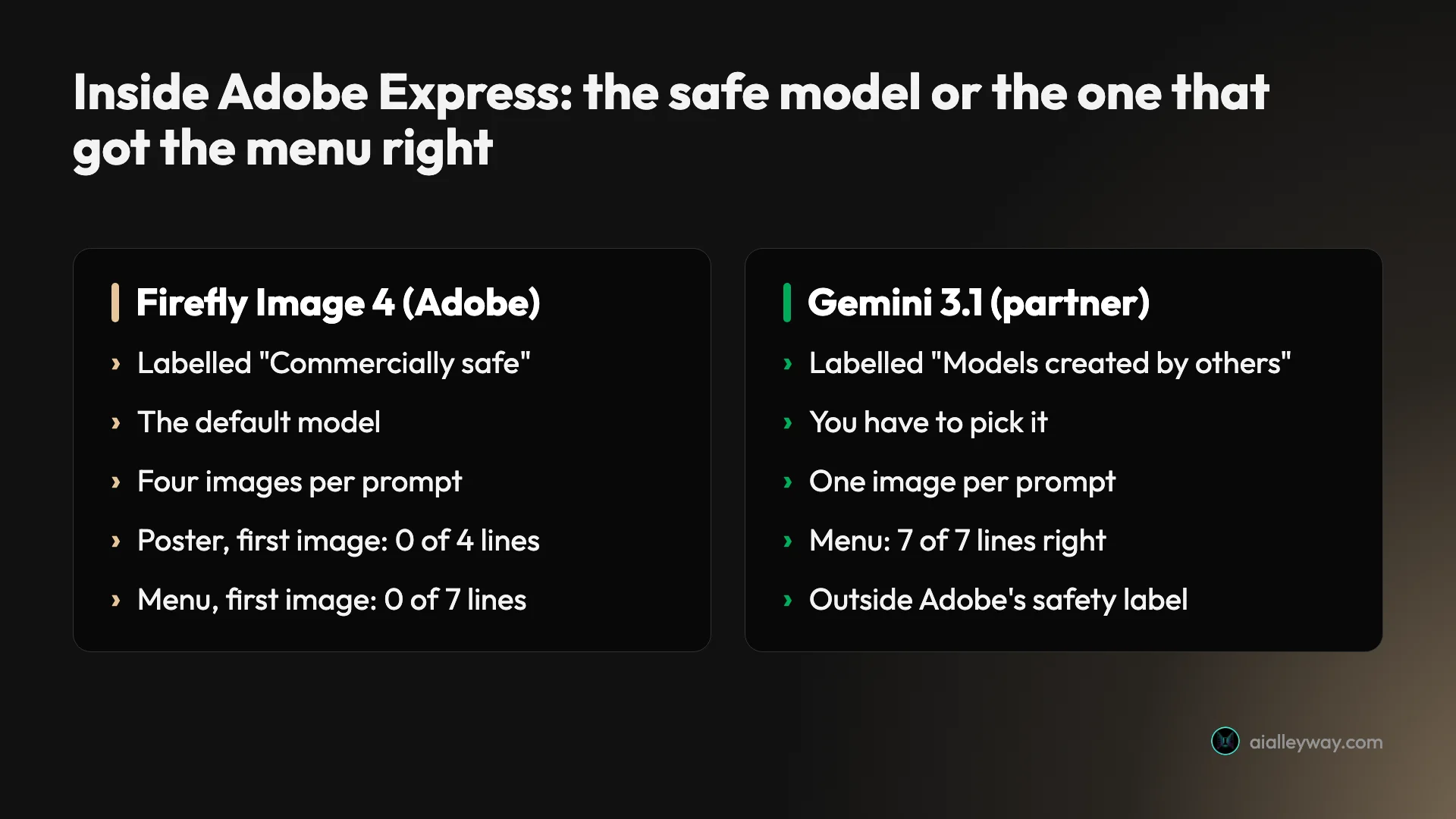
The image tool opens on Firefly Image 4 and labels it “Adobe models, Commercially safe”. Partner models sit under their own heading, “Models created by others”.
That is better than what we found in the Firefly app last month, where the picker opened on a partner model. In Express’s image tool, a user who presses Generate without looking gets the model Adobe’s licensing promise covers.
Four results per prompt
Firefly Image 4 returns four images each time. On the seven-part scene that mattered: the first image scored 4 of 7, and the fourth scored 6 of 7, with the cat in the basket and the number on the door.
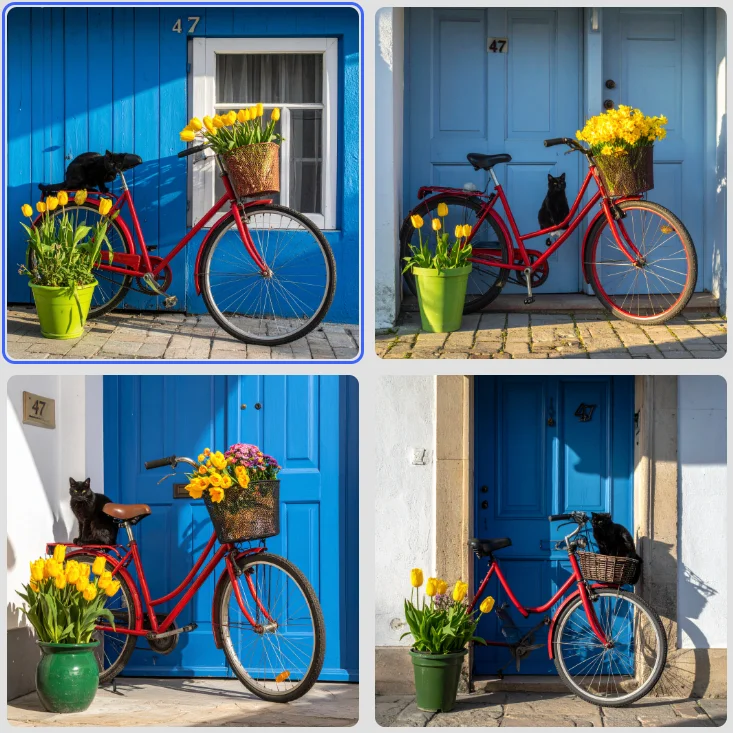
None of the four drew three tulips. But picking the best of four is a real advantage over tools that give you one.
Export includes a Photoshop file
The download panel offers PNG, JPG, two kinds of PDF for documents and for print, and PSD. A view-only share link sits above them.
PSD is the useful one. A marketer can rough out a post in Express and hand a designer a Photoshop file. Canva’s download panel offered no PSD in our test. The export size slider is a Premium control, and the panel showed 1,080 pixels square for my image. I opened this panel and did not download a file.
A partner model spelled the menu, for free
Switching the picker to Gemini 3.1 and running the café menu again produced one image with all seven lines correct, prices included. It needed no upgrade on my account.

Adobe’s help page describes partner models as available on certain Express plans, so this may not hold on every account. On mine it did.
Where does Adobe Express fall short?
Adobe’s safe model failed both text tests
Firefly Image 4 is the default and the commercially safe choice, and its first image failed both text prompts. The gig poster came back four times with lines like “TICKEETS $25” and “LIVE ATI MIDNIGLHY”.
The café menu was no better. Two of the four got the title right and none got a single complete item line right.
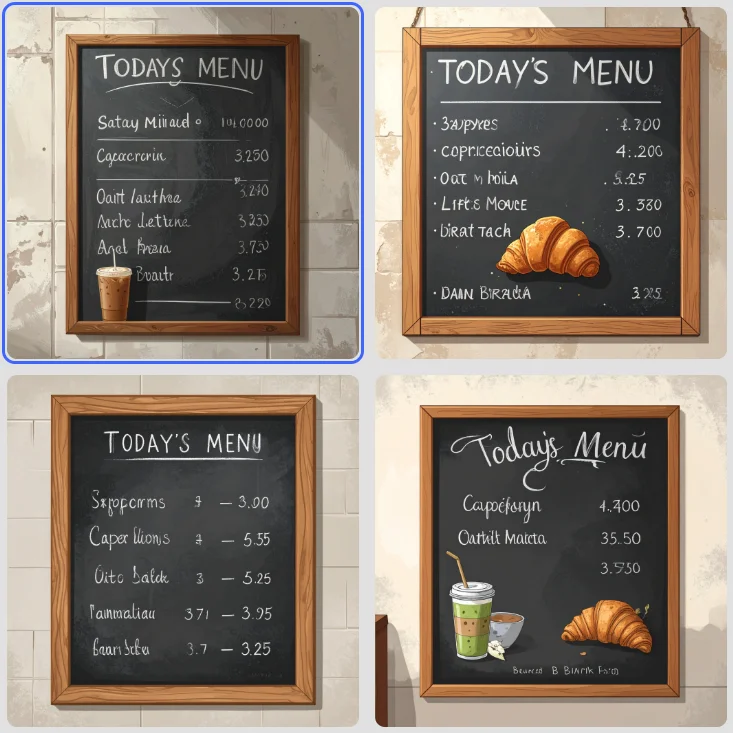
Scored on the first image, every other tool we have run this menu on did better, including Adobe’s newer Firefly Image 5.
The safety promise and the working model are different models
This is the choice Express leaves you with. The model Adobe labels commercially safe failed both text prompts on its first image. The model that got my menu right is labelled as someone else’s.
Adobe’s help pages say Firefly outputs from features without a beta label can be used in commercial projects. The page on partner models carries no such wording. If licensing is why you came to Adobe, the model that fixed my menu is not obviously covered by the reason you came.
The Assistant chooses the model for you
Before the AI Assistant would run, it asked me to agree to this.
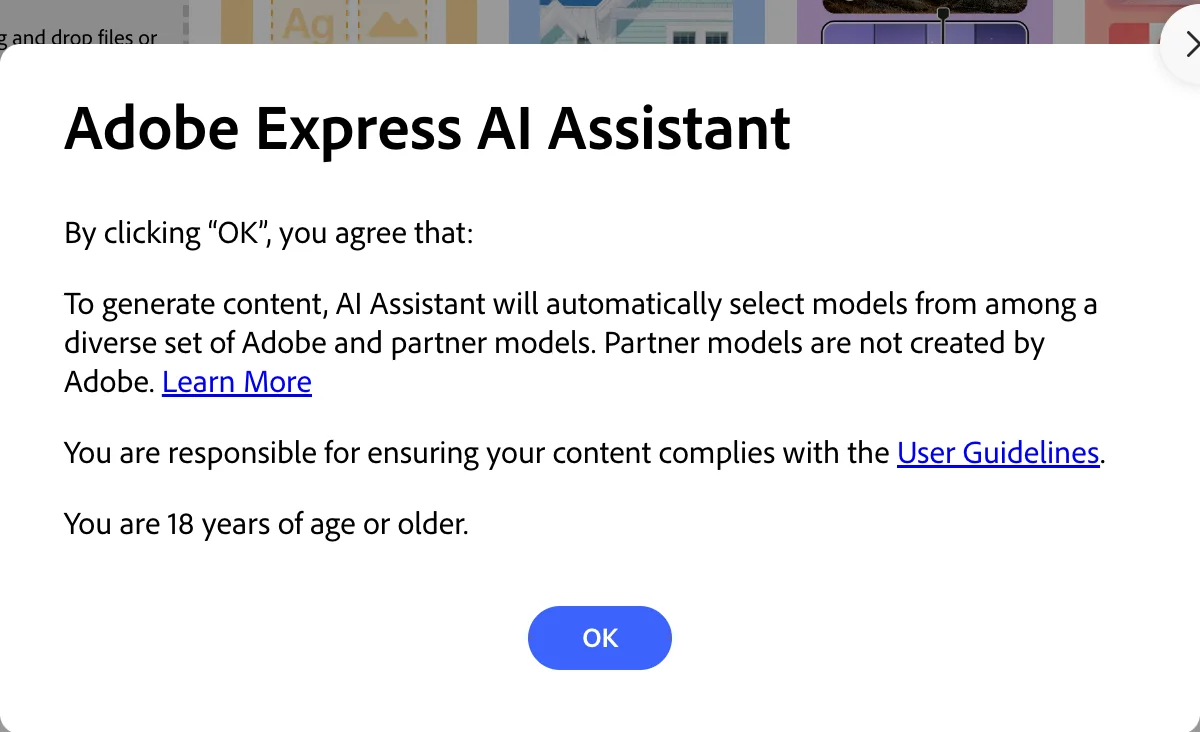
So the four designs it made may or may not have come from an Adobe model, and I saw nothing on the result that told me which. The Assistant is also in beta, and Adobe’s help page says beta outputs are not indemnified.
Opening an AI design in the editor lost the text
The Assistant’s designs are images until you open one. Clicking the first design opened a preview that showed a few text layers on a blank page and got no further. When I then clicked Open in Editor, the screen switched to “Saving your changes” and stayed there for more than a minute.
After a reload, the chat held a saved copy of the design with two blocks replaced by blank grey rectangles: the shop’s name and the line with the discount.
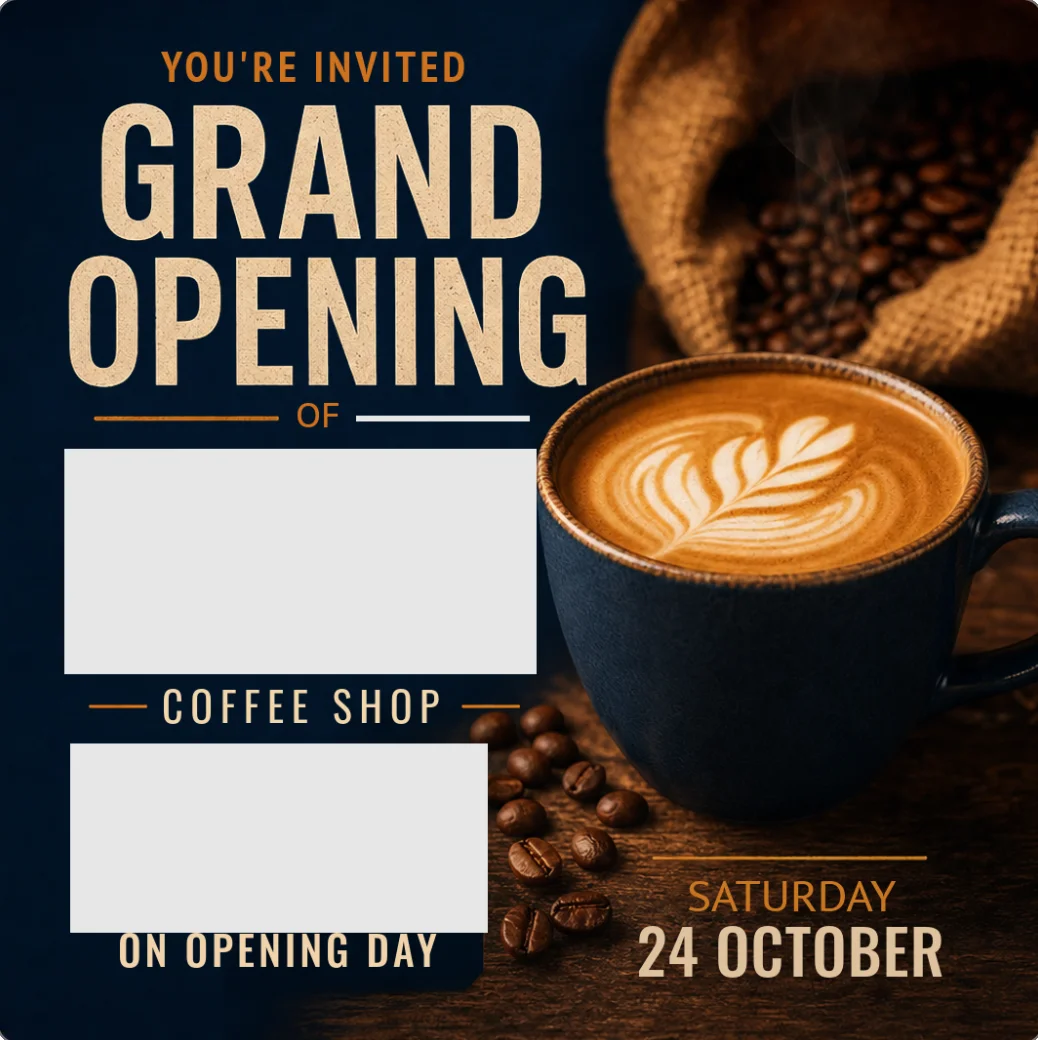
I had made no edits. The two most important lines on the post were the two that went missing. Canva’s generated design opened as editable layers straight away in our test.
The editor is slow and easy to trip
Beyond that hang, small things cost time. If I pressed Select All too soon after double-clicking a text box, Express selected every object on the page, and my typing landed in a new text box on top. A one-second pause fixed it.
I am not alone in finding it slow. A bug thread on Adobe’s own community forum titled “Adobe Express is too slow to work with” dates from March 2026 and has a reply from Adobe. Another Adobe thread tracks a download outage in August 2026 that hit the mobile app. I did not test the mobile app.
The first image was among the weakest on the scene
Express shows four results and selects the first. On the seven-part scene that first image missed three things: it drew a blue wall with a window where I asked for a door, put the cat on the rear rack and not in the basket, and filled the pot and the basket with tulips when I asked for three.
The best of the four was much closer, and a second run of the same prompt opened on an image that did have the door. But a user who takes the first result gets one of the two weakest answers in the batch, and no image in the first batch drew three tulips. Nor did the first image of the second.
Free limits are not shown
The free plan’s allowance is a label, not a number. “Free daily generations” sat in the prompt bar through five generations and never counted down. Clicking it brought up a note about trying generative features for free.
Adobe’s help page says the limits refresh daily and that a free user who runs out can subscribe to keep going. The Firefly app, by contrast, showed us a countdown of generations left. Not knowing where the ceiling is makes it hard to plan a batch of work on the free plan.
Resize is a paid feature
I could not test resize, because it is locked on the free plan. That is a real gap for anyone posting one design to several networks.
Canva’s pricing page lists resize under its Pro plan too, though I did not check it on a Canva Free account. So this is not a clear reason to switch. It is a reason not to expect the free plan to cover a multi-network workflow.
If Adobe Express isn’t right for you
If the text failures or the editor hang rule Express out, look at these.
- Canva is the stronger choice when you want an image model that spells text inside a picture, and designs that open as layers at once. It charges for background removal and meters its AI. Read our Canva review.
- Adobe Firefly is the better Adobe product if you only need generated images and want the newer Firefly Image 5 model. It is not a layout tool. Read our Adobe Firefly review.
- ChatGPT’s image generator scored 7 of 7 on our seven-part scene and spelled every line. It gives you a finished picture and no editor. Read our ChatGPT image generator review.
Final word
Adobe Express gives away a tool its biggest rival charges for. Free background removal that kept the spokes intact, and a template I finished in six clean edits, are reasons to open it today.
The 4.2 rating reflects that free tool, an Assistant that got the shop name right where Canva’s design dropped a word, and an AI layer that is not finished. The safe model failed both text tests, the Assistant picks its own model, and the one time I tried to edit an AI design, the editor lost the two lines that mattered.
It sits below Canva’s 4.5 because Canva’s image model spelled all eleven text strings and its generated design opened as editable layers, where the Express hand-off blanked two blocks. It sits a step above Adobe Firefly’s 4.0: the same licensing promise and a weaker Adobe model on text, offset by the free cutout, the template and the Assistant’s four designs, which all worked first time. All of this comes from one free-plan session, with no Premium feature tested.
It is now the runner behind Canva on our picks page, in the slot Adobe Firefly used to hold. Use the templates and the free tools with confidence. Check every word the AI writes, and look at a design again after it reaches the editor.
Frequently asked questions
Is Adobe Express free?
Yes. Adobe Express has a free plan at $0 with no card required, per Adobe's pricing page on 11 October 2026. It lists more than 100,000 templates, a million Adobe Stock assets, 4,000 fonts, standard photo, video and document editing, scheduling to one account per social network, and 5GB of storage.
In my test the free plan also removed an image background at no charge and let me run five AI image generations in a row without hitting a limit. Adobe's help page says free users get a limited number of free daily generations and does not publish the number. Resize and the Erase tool carried a Premium crown, and Adobe's pricing page lists Brand Kits as Premium.
How much does Adobe Express Premium cost?
Adobe's pricing page listed Adobe Express Premium at $9.99 a month on 11 October 2026, described as billed monthly with no annual commitment, with a 30-day free trial. It includes 250 generative credits a month. The same page lists Firefly Pro at $19.99 a month, which includes Premium's features plus 4,000 credits.
Teams is priced per licence: $4.99 a month in the first year and $7.99 after, with a two-seat minimum, on an annual subscription billed monthly. I could not find an annual price for individual Premium on the page, so treat any yearly figure you see elsewhere as unconfirmed.
Is Adobe Express better than Canva?
On the free plan, in one respect, yes: Adobe Express removed an image background for free, and Canva marks that tool as paid. A free Express template also took six text edits cleanly in my test.
Canva was stronger on text inside generated images, in tests run on 11 October 2026 with Canva on a Pro trial and Express on its free plan. Canva's image model spelled all eleven text strings on a poster and a menu, where Firefly Image 4, the default in Express, got none right on the first image of each. Canva's generated design also opened as editable layers at once, while the Express hand-off to the editor hung and blanked two text blocks. If free background removal matters most, pick Express. If you want an image model that spells and designs that open as layers at once, pick Canva.
Is Adobe Express commercially safe to use?
Partly, and you have to check which model made the image. In the Express image tool the picker labels Adobe's own Firefly Image 4 as commercially safe and lists Gemini 3.1 and HUMAIN Image 1 separately as partner models created by others. Adobe's help pages say outputs from Firefly features without a beta label can be used commercially, and that beta outputs are not indemnified.
The AI Assistant is in beta and its terms say it automatically selects from Adobe and partner models, so you cannot assume an Adobe model made its output. If commercial safety is your reason for choosing Adobe, generate with Firefly Image 4 yourself in the image tool.
Can Adobe Express remove a background for free?
Yes, for images. In the editor's image panel, Remove background had no Premium crown on my free account, and one click cut a bicycle, its basket, a cat and a pot of tulips out of a street scene in roughly 15 to 20 seconds, timed by eye from screenshots. It cleared the background from between the wheel spokes and left the spokes intact.
Adobe's pricing page lists removing a video background as a Premium feature, and the Erase tool next to Remove background carried a crown. The export size slider is also Premium. I did not download the cutout, so I cannot report the file it produces.
Keep reading
Canva Review: Great Editor, but the AI Runs on a Meter
A Canva review from a Pro trial: nine hands-on tests, exact US prices, and six AI requests that used 56% of the trial's allowance. Plus what the trial hides.
Adobe Firefly Review: Safe to Use, Shaky With Words
An Adobe Firefly review from the free plan: three generations a day, a default model that isn't Adobe's, and a café menu Firefly Image 5 could not spell.
ChatGPT Image Generator Review: Perfect Text, Pushy Slogans
I tested the ChatGPT image generator (Images 2.5) with 12 prompts on Free and Plus. It spelled all 15 text strings right, and added slogans I never asked for.
Best AI Image Generator: 9 Picks, Two Tested Head to Head
The best AI image generator is ChatGPT for exact briefs and Nano Banana for free, fast images, both tested. Plus Midjourney, Ideogram, Firefly and four more.