
Canva Review: Great Editor, but the AI Runs on a Meter
A Canva review from a Pro trial: nine hands-on tests, exact US prices, and six AI requests that used 56% of the trial's allowance. Plus what the trial hides.
Contents
Is Canva worth it?
Yes, for the editor, and with open eyes about the AI. Canva is still the quickest route I know for a non-designer to get from a blank page to something finished, and in my test its AI spelled every word on the two text images and built a working calculator in under a minute. But the AI runs on a monthly meter, six requests used 56% of my trial’s allowance, and it dropped a word from a name twice.
What does Canva do?
Canva is a design tool built for people who are not designers. You pick a format, such as an Instagram post, a flyer or a slide deck, start from a template or a blank page, and drag text, photos and shapes around until it looks right. Then you export it.
What has changed is how much of that Canva now offers to do for you. A chat box called Canva AI sits beside the editor. You describe what you want and it produces an image, a whole design or a small interactive page.
The part that separates Canva from an image generator is what comes back. A generated design is not a flat picture. It opens as layers: the headline is real text you can retype, the photo is an object you can swap, and the whole thing lands in the same editor as everything else you make.
Canva is our best pick for design on the picks page, ahead of Adobe Express. This Canva review is the test behind that call.
What is in the editor
The editor is where Canva earns its keep, and it is broader than the chat box suggests. A rail down the left side holds Templates, Elements, Text, Brand, Uploads, Photos, Audio and Apps, so stock photos, icons and fonts are one click from the canvas.
Select any image and an Edit panel opens with the tools most people came for: Adjust, Magic Layers, Magic Edit, Upscale, BG Remover, Magic Eraser, Image to Video and BG Generator, plus filters and shadows. A Resize menu covers social media, print, presentations, video, websites and whiteboards, with Translate and Transform into Doc listed beneath as paid features.
None of that needs a prompt. You can ignore the AI entirely and still get the product most Canva users pay for.
How I tested it
I ran one session on a Canva Pro trial on 11 October 2026. Every AI result below is a first attempt, with no retries, and I read the account’s AI usage meter after every request except the second image.
Three of the prompts are the same ones used in our ChatGPT image generator, Nano Banana and Adobe Firefly reviews, word for word, so the results can sit side by side.
| Test | Result | Ready in | AI allowance used |
|---|---|---|---|
| Image: seven-part scene | 5 of 7 parts right | ~23 s | ~2% |
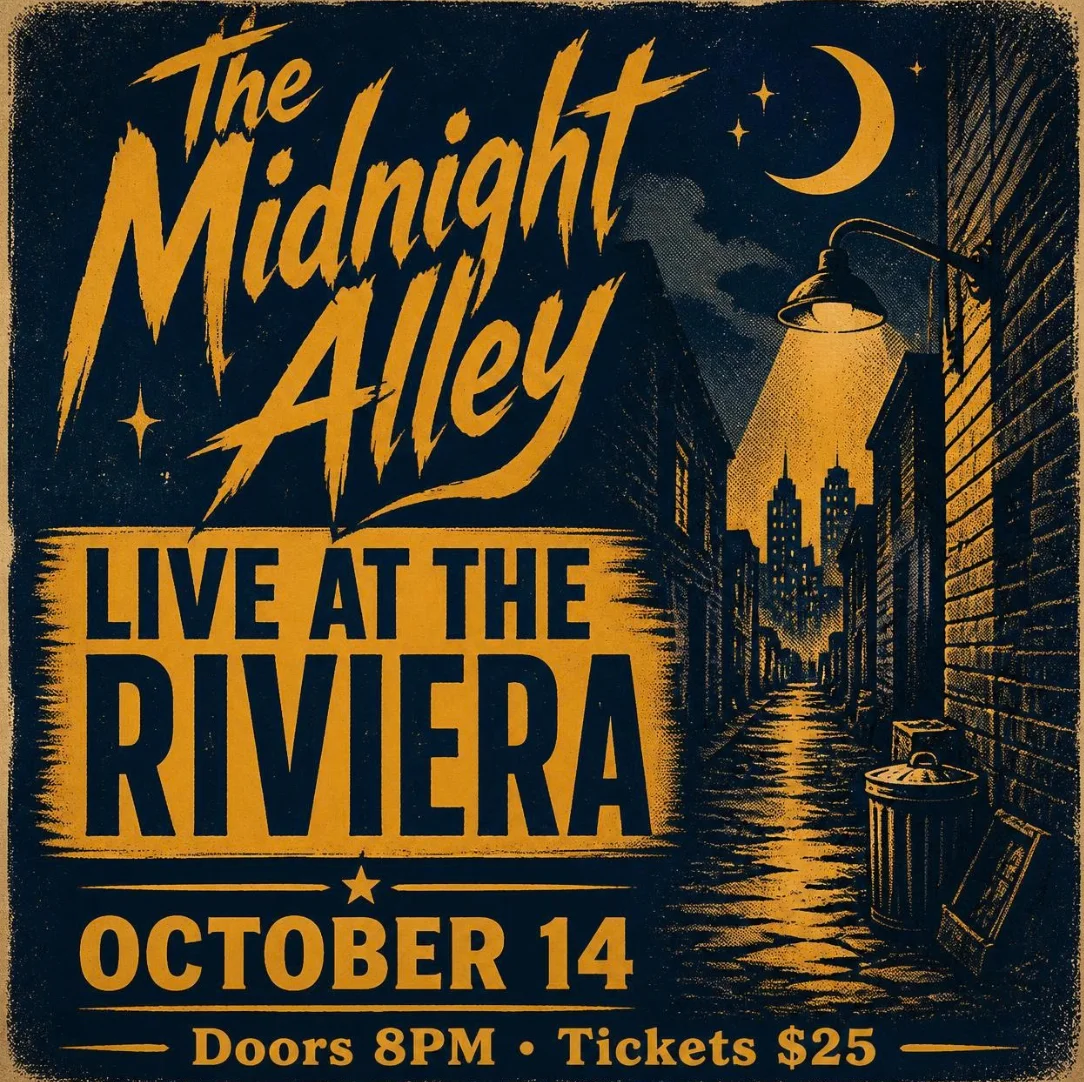
| Image: gig poster, four text lines | 4 of 4 exact | ~26 s | ~2% |
| Image: café menu, seven text lines | 7 of 7 exact | ~21 s | ~2% |
| Generated design: Instagram post | Headline missing a word | ~42 s | 16% |
| Manual fix of that headline | Fixed in two edits | under a minute | 0 |
| Canva Code: tip calculator | Worked, sums correct | ~38 s | 25% |
| Copy and resize to two formats | Done; Facebook Cover not re-laid out | ~10 s | 0 |
| Background remover | Cutout, a few thinned spokes | ~10 to 15 s | 0 |
| Magic Layers on the poster | Layered, one word lost | under 41 s | 8% |
The three images together moved the meter from 0% to 7%.
What I did not test matters as much. The trial blocks Canva’s top AI tier, so conversational design with Canva AI 2.0 and AI video clips are missing. I also did not test the template workflow, Magic Eraser, the brand kit, printing or the mobile app.
The test account is registered outside the US, so the prices in this review come from Canva’s US pricing page and not from my billing screen.
How it compares on the same prompts
| Prompt | Canva AI | ChatGPT Images | Nano Banana | Firefly Image 5 |
|---|---|---|---|---|
| Seven-part scene | 5 of 7 | 7 of 7 | 5 of 7 | 6 of 7 |
| Gig poster, four lines | 4 of 4 | 4 of 4 | 4 of 4 | 4 of 4 |
| Café menu, seven lines | 7 of 7 | 7 of 7 | 7 of 7 | 1 of 7 |
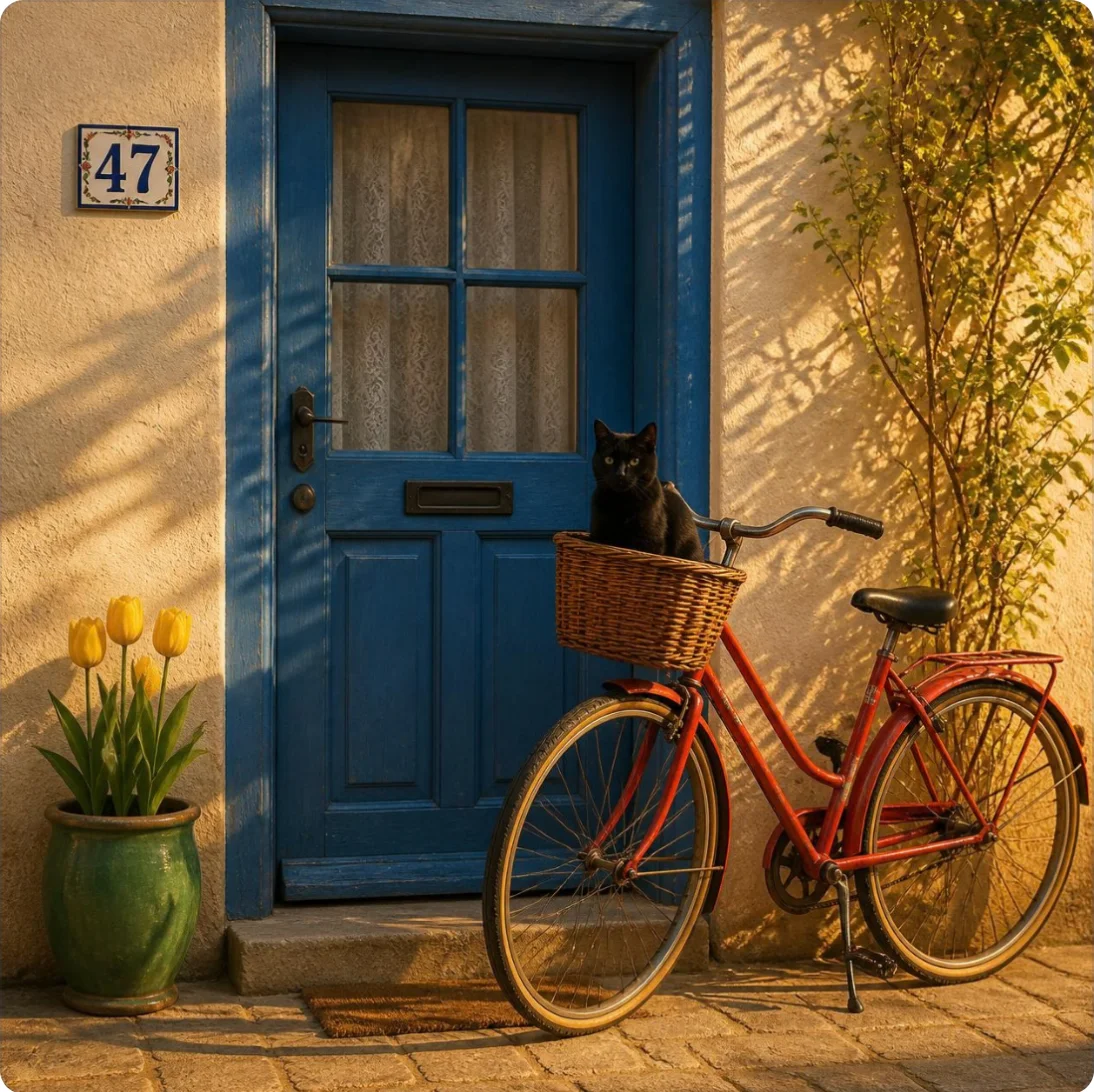
On text, Canva matched the two best image generators we have tested. On the scene it made the same two mistakes Nano Banana did in its free default mode: four tulips where I asked for three, and the house number beside the door when I asked for it above.
How much does Canva cost?
Canva has four plans, and the yearly Pro price is the one worth knowing. These are the US prices on Canva’s pricing page on 11 October 2026, before tax.
| Plan | Monthly | Yearly | AI allowance a month | Storage |
|---|---|---|---|---|
| Free | $0 | $0 | Up to 20 Standard or Premium uses | 5GB |
| Pro | $18 | $144 | Up to 200 Premium or 20 Ultra uses | 100GB |
| Business | $25 per person | $250 per person | Up to 400 Premium or 40 Ultra uses | 500GB |
| Enterprise | By quote | By quote | Up to 400 Premium or 40 Ultra uses | 1TB |
Paying yearly for Pro costs $144 against $216 for twelve monthly payments, which is $12 a month. Business saves less: $250 a year against $300.
Three costs sit outside that table. Canva sells an add-on called AI Pass for Pro and Business accounts that need more AI, and Business can also buy AI top-ups. Print orders and web domains are bought separately. And Canva prices by region, so the number in your account may not match the US figure.
Canva Teams no longer appears on the pricing page, which now carries a question titled “What happened to Canva Teams?”. Canva’s help pages still mention Teams, so expect to see the name around, but it is not a plan you can pick on the pricing page.
How the AI allowance works
Every plan gets one shared monthly AI allowance, and Canva’s help page on AI usage splits its AI tools into three tiers that draw on it at different rates.
| Tier | Examples Canva lists | Who can use it |
|---|---|---|
| Standard | Image Upscaler, basic image generation, Magic Formulas | Everyone; counted on Free and on trials, not counted on paid plans |
| Premium | Magic Layers, generate a design, Canva Code, generated elements, music and sound effects | Every plan, from the allowance. Canva’s AI code generator page says Canva Code is still rolling out, with Free plans to follow |
| Ultra | Conversational design with Canva AI 2.0, AI video clips, image creation at Ultra quality | Paid plans only |
A second group sits outside the meter. Canva’s help page names Translate, Magic Write, photo and video animations and AI Voice as tools that can be used freely and do not count towards the allowance.
The allowance resets monthly on your billing date, even on a yearly plan. On Free it resets at midnight UTC on the first of the month. When a free account runs out, Canva says Standard and Premium tools slow down with short pauses between generations. Ultra tools, on the plans that have them, stop until the reset.
The “up to” in every figure is doing work. Canva’s own page says the ranges assume simple tasks on the lightest tool in each tier, and that complex prompts land at the lower end.
Canva Free vs Pro: what the free plan holds back
In the editor, paid features carry a small crown. On my account the crown sat on BG Remover, the Brand tab, SVG export, the export size slider, the quality setting, transparent backgrounds, and the Translate and Transform into Doc options in the Resize menu.
Canva’s pricing page adds the rest: social scheduling, the larger template and stock libraries, five Brand Kits against one, and 100GB of storage against 5GB, all start at Pro. I tested on a trial, so I saw only the paid side and did not see the free plan’s locks first-hand.
The trial is not the full product
Canva offers a free trial of Pro, and the billing page on my account showed it ending on 10 November 2026, then renewing automatically at the monthly price. Cancel before that date if you do not want the charge.
The catch is in Canva’s help page on AI usage. A Pro trial gets the free plan’s AI allowance, not Pro’s.
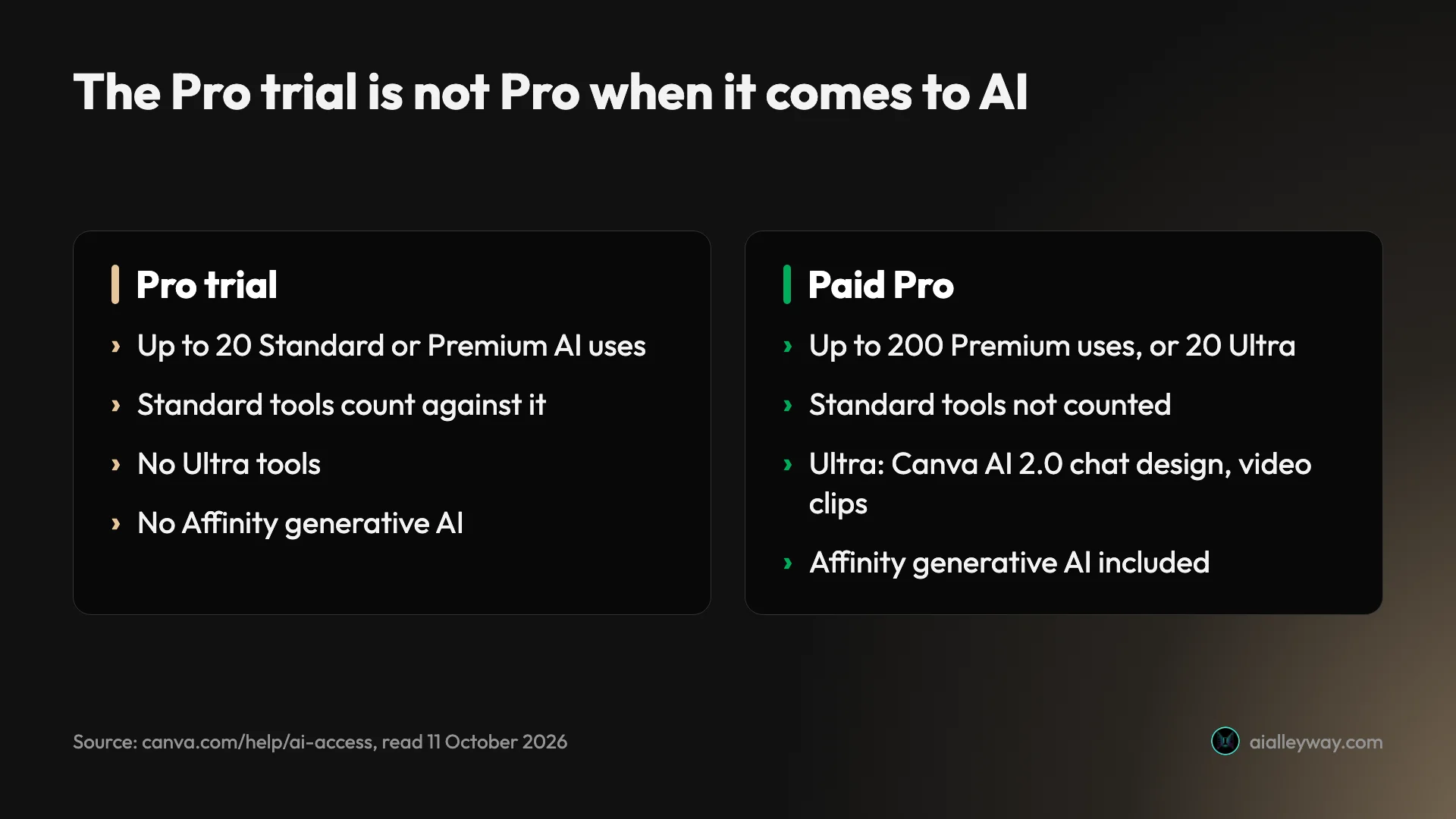
So a trial tells you a lot about the editor and the non-AI Pro tools, and very little about how far Pro’s AI will stretch.
Cancelling and pausing
Canva’s help page on cancelling sets out the route for a plan bought on the web: open Settings, go to Billing, choose Cancel plan, pick a reason and confirm. A confirmation email follows. Plans bought through Apple, Google Play or PayPal have to be cancelled there.
After you cancel, Canva says you keep paid features until the end of the billing period, your designs stay available on the free plan, and you can reverse the decision from the Billing page while the plan is still active. You can also pause Pro for up to three months with no charges. I read these steps and did not run them, because the test account’s trial is still live.
Who is Canva for?
- Small business owners and solo marketers who need a steady flow of social posts, flyers and menus and have no designer. Templates plus a quick AI first draft are aimed at exactly that work.
- Content creators who reuse one idea across formats. Resize and background remover are the tools I would miss first. Canva’s pricing page lists both under Pro.
- Teams that need everyone on brand. Business adds 100 Brand Kits and approvals, per Canva’s pricing page. I did not test either.
- Occasional users. The free plan’s editor, 1.6 million templates and 5GB of storage are enough for a birthday invite or a one-off poster.
- Not for anyone buying it mainly as an AI generator. The allowance is small next to the price, and a dedicated tool is the better buy. Our best AI image generator roundup covers those.
What does Canva get right?
It spelled every word in the images
The gig poster and the café menu together asked for eleven strings of text, and Canva AI got all eleven. The poster reads “The Midnight Alley”, “LIVE AT THE RIVIERA”, “OCTOBER 14” and “Doors 8PM • Tickets $25”, with nothing added.
The menu is the harder test, because six prices give a model six chances to swap a digit. Every item and every price came back right.
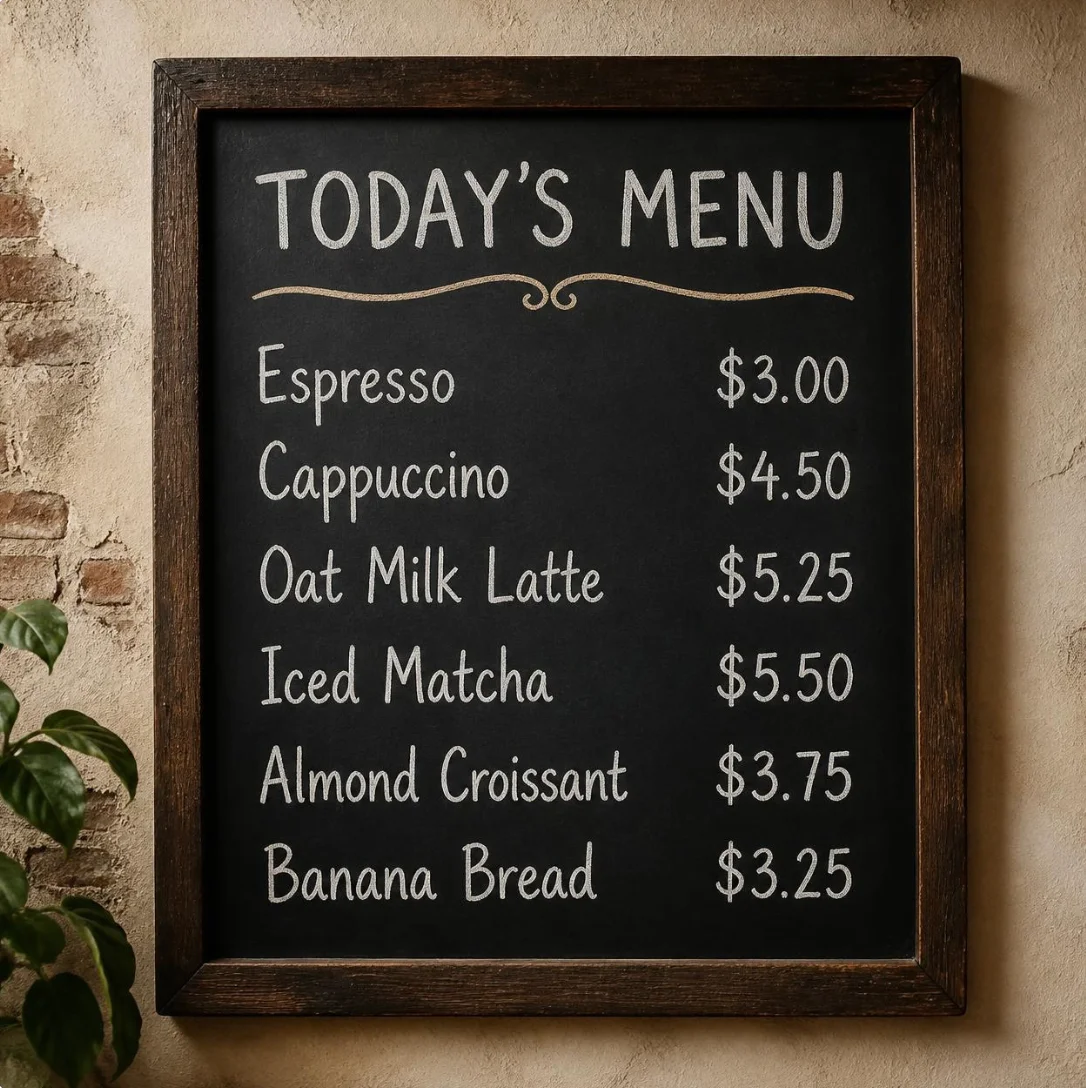
That is the same score as ChatGPT and Nano Banana on this prompt, and far ahead of Firefly Image 5, which invented six of the seven lines.
AI designs open as layers you can fix
I asked for an Instagram post for a coffee shop called Alley Roasters. The design came back in about 42 seconds with the headline reading only “ALLEY”.
With a flat generated image, that means generating again. Here I clicked the headline, which was a normal text box set in Anton at size 190, typed the full name, and dropped the size to 92 so it fit. Two edits, under a minute, and no AI allowance spent.
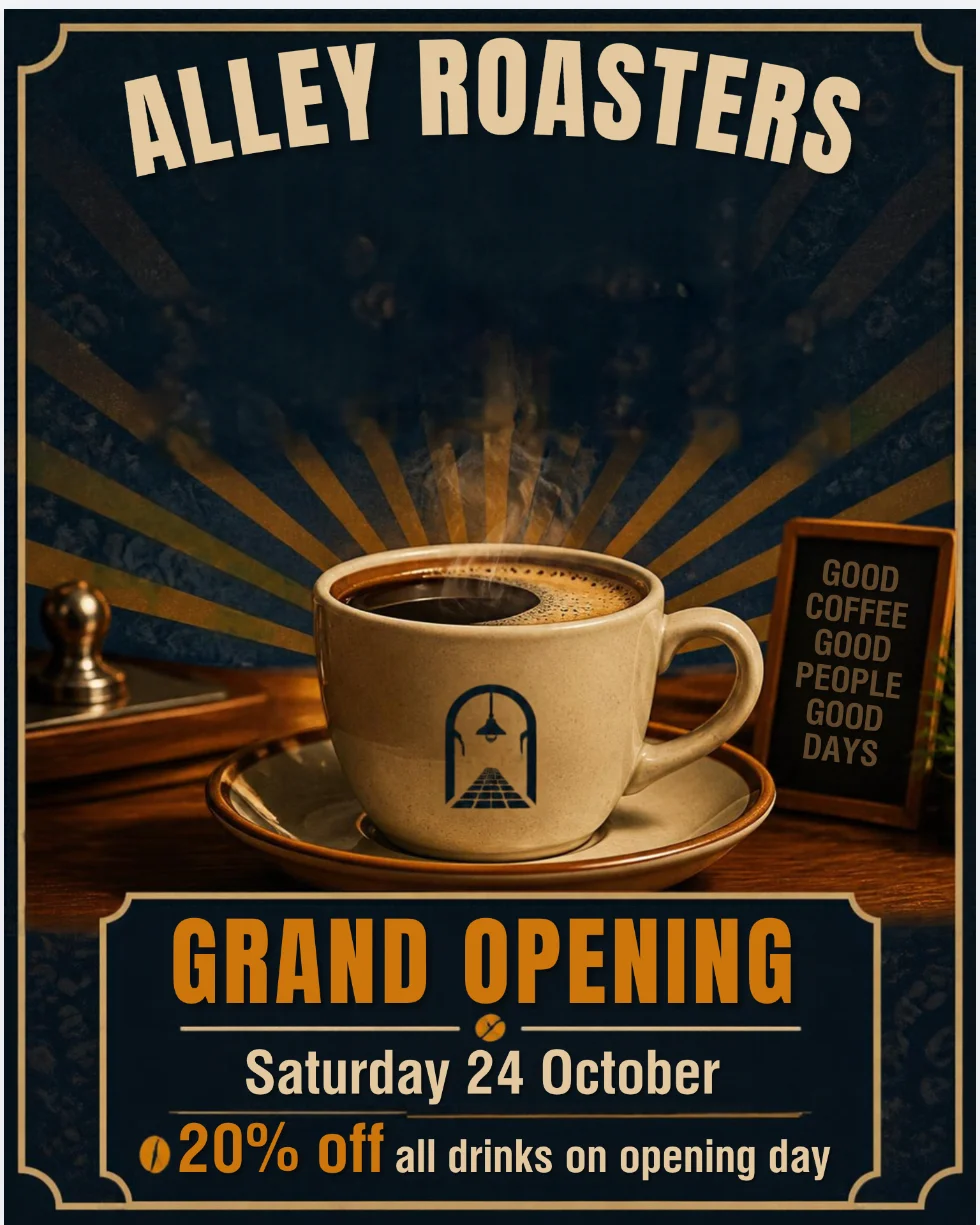
This is the strongest argument for Canva over a pure image tool. The AI gives you a draft, and the editor lets you finish it.
Background remover is quick and barely touches the allowance
One click on the bicycle scene removed the door, the wall, the tulips and the paving in about 10 to 15 seconds. It kept the bicycle, the basket, the cat and even the kickstand, and it cleared the wall from between the wheel spokes, thinning a few of them.
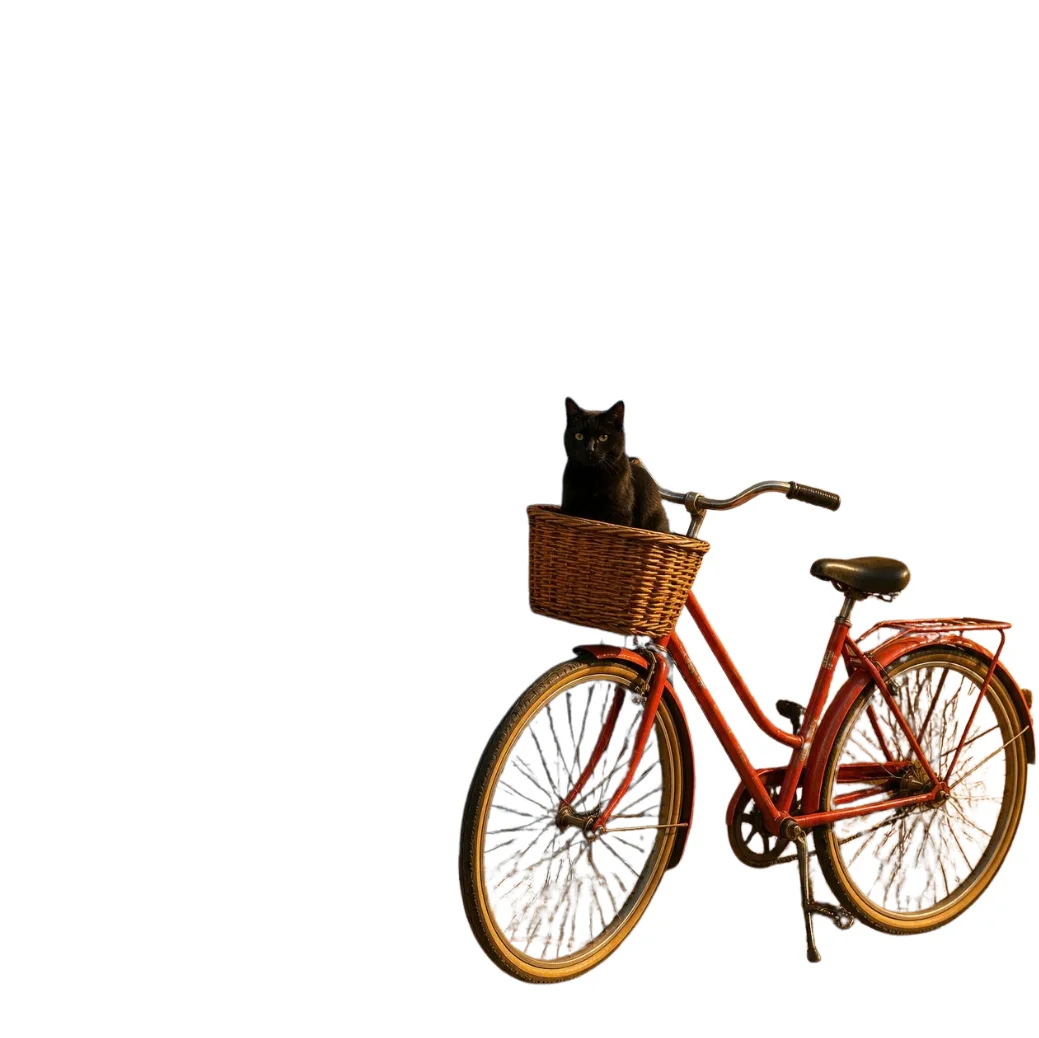
The usage meter did not move. It read 48% before and 48% after, and resize behaved the same way. Two days later, five background remover and Magic Eraser runs moved the same meter by one point. Our Canva background remover guide has the steps and that test.
Canva Code built a calculator that works
I asked for a tip calculator with a bill field, three tip buttons and a way to split the total. About 38 seconds later Canva had a styled page in the navy and amber I asked for.
In Preview I entered a bill of 200,000, chose 20% and set two people. It returned a tip of 40,000, a total of 240,000 and 120,000 each, all correct.
One oddity: it priced everything in my account’s local currency, though I never mentioned one.
A second build two days later cost the same 25 points of the allowance, and one follow-up edit took the 18 points I had left. Our Canva Code guide walks through the build, the edit and publishing.
Affinity is included, even on Free
Canva owns Affinity, the professional photo, vector and layout app, and its pricing page lists “Access to Affinity” on the free plan. Its help page on cancelling confirms Affinity stays free with a Canva account after a paid plan ends.
The generative tools inside Affinity are a different matter. Canva’s AI page says Affinity’s premium AI tools are not available to free accounts or to trials. I did not open Affinity in this test, so treat this as Canva’s claim and a reason to look, not as a result.
The yearly price is fair for what Pro adds
At $144 a year, Pro costs $12 a month. For that, Canva’s pricing page lists 3.6 million templates against 1.6 million on Free, 141 million stock photos, videos and graphics against 4.7 million, five Brand Kits, social scheduling and 100GB of storage.
I did not test anything on that list. The two tools I did run, background remover and resize, both worked on the first click. Canva’s pricing page lists both under Pro. In the editor only the background remover carried the paid crown, and I did not check resize on a Free account.
Export covers the formats people ask for
The download panel offers JPG, PNG, PDF, SVG, MP4, GIF and PPTX. A generated Instagram post was set to export at 1,080 by 1,350 pixels.
SVG, the size slider, the quality setting and transparent backgrounds all carry Canva’s paid-feature crown. I opened this panel and did not export a file from it.
Where does Canva fall short?
It dropped a word from a name, twice
The generated Instagram post left “Roasters” out of the shop’s name, while Canva’s own chat reply described the post as announcing “Alley Roasters’ grand opening”. The reply was right and the design was wrong.
Magic Layers did the same thing in a different way. It split the flat gig poster into editable layers and, in the process, changed “The Midnight Alley” to “Midnight Alley” and swapped the brushed lettering for a different script font.
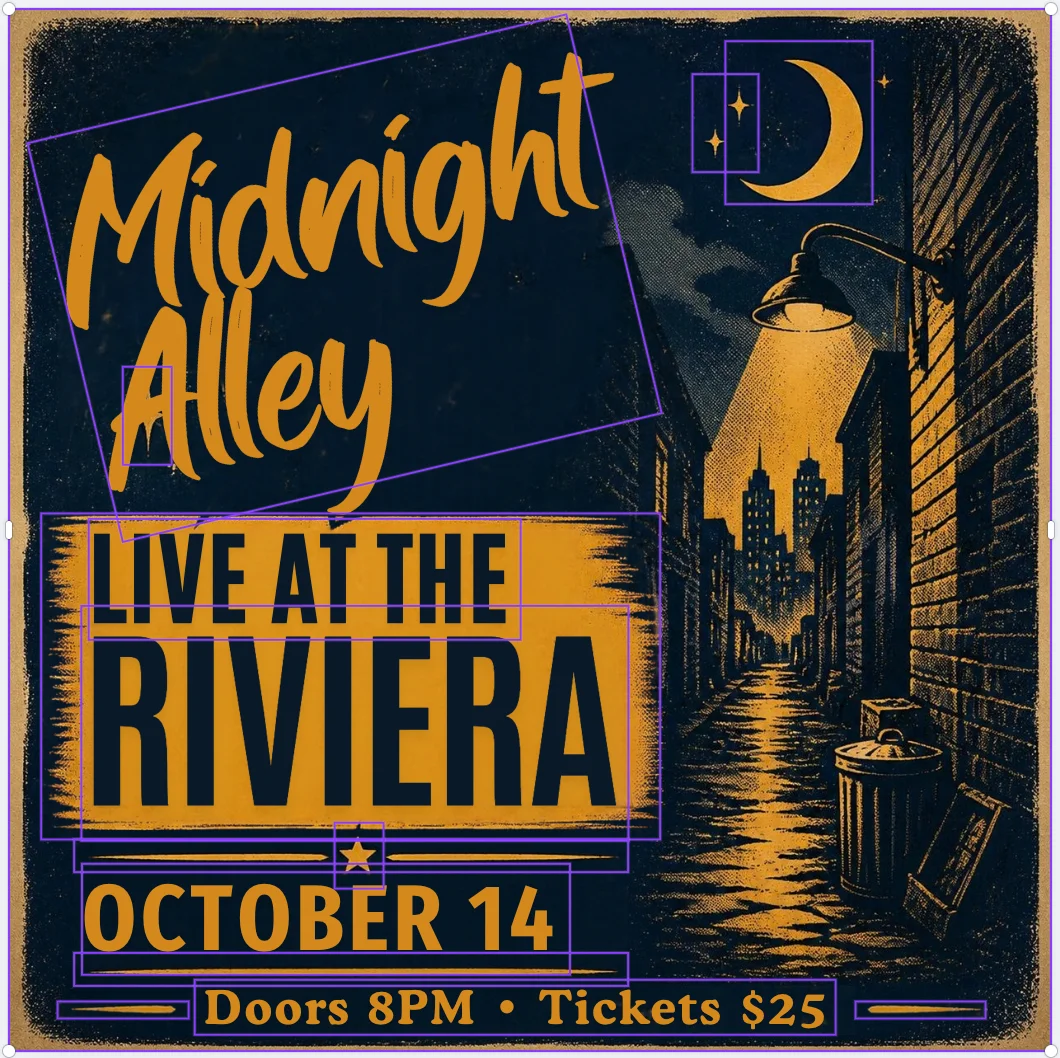
Both are easy to fix once you see them. The risk is the one you do not see before it goes to print. Read every name and date in anything Canva’s AI touches.
Six requests used 56% of the trial’s allowance
Canva meters AI through one shared monthly allowance, shown on the Billing page as a percentage. Mine started at 0% and read 56% after three images, one generated design, one Canva Code build and one Magic Layers run.

The cost per request varies widely, and I saw no cost shown before I clicked.
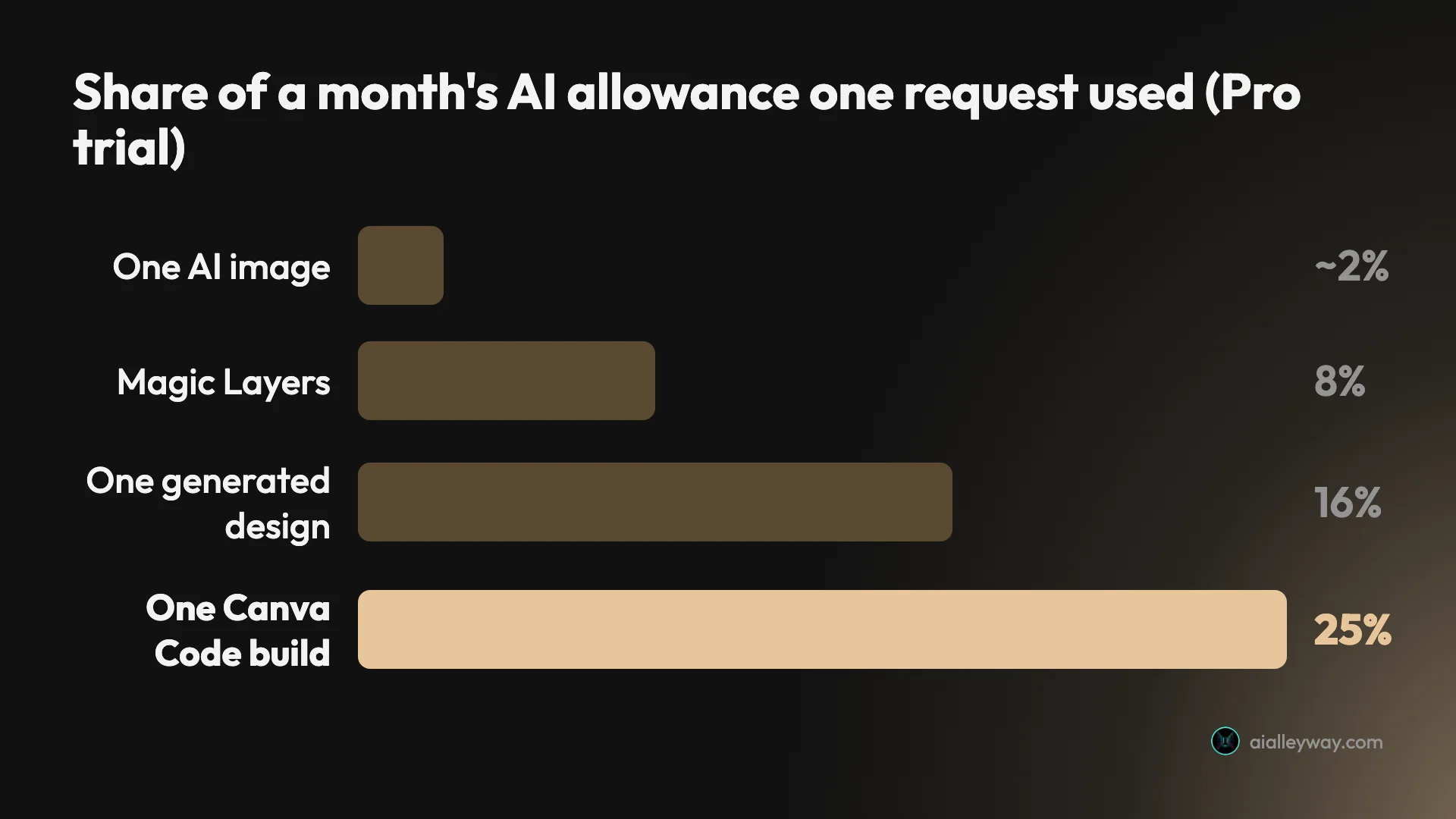
This was the trial’s allowance, which Canva puts at the free plan’s level. Paid Pro is larger, and Canva’s help page says heavier tasks use more. Even so, the shape is the lesson: images are cheap, and designs and code are not.
The trial hides the top AI tier
Canva sorts its AI into Standard, Premium and Ultra. Its help page lists conversational design with Canva AI 2.0 and AI video clips under Ultra, and says a Pro trial has no access to Ultra tools.
That is why this review cannot tell you how good Canva AI 2.0’s design assistant is. I did not get to try it on a trial. If that tool is your reason for buying, a trial will not answer the question.
Resize copies the design but does not rethink it
Copy and resize turned the portrait Instagram post into an Instagram Story and a Facebook Cover in about 10 seconds. The Facebook Cover is not a new layout.
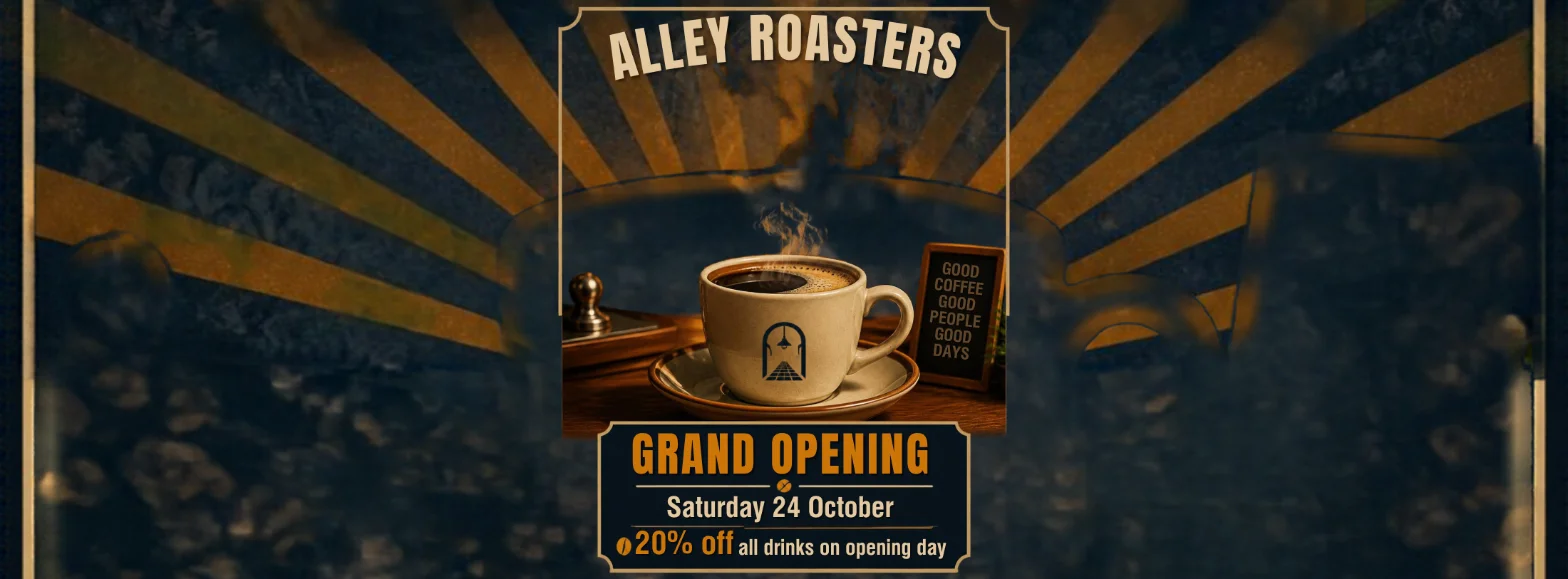
Canva shrank the whole portrait design into the middle third and stretched the background across the rest, leaving parts of the old border stranded at the edges. It is a starting point that still needs rearranging by hand.
It follows a brief loosely
On the seven-part scene Canva scored 5 of 7, with an extra tulip and the house number in the wrong place. Its chat reply still claimed “three yellow tulips”.
It also adds things. The coffee shop post gained a chalk sign reading “GOOD COFFEE GOOD PEOPLE GOOD DAYS” and an invented logo on the cup, neither of which I asked for. And all three test images came back square, including the poster, where ChatGPT and Nano Banana both chose a tall frame.
The trial renews by itself, and can charge a day early
The billing page on my trial said “Auto-renews” beside the price due when the trial ends. I saw no reminder setting on that page, so the date is yours to remember.
Canva’s own help page on cancelling a plan adds a second trap. Its billing system runs on UTC, so a charge can land a day earlier than your trial’s end date suggests, and Canva describes that as normal. Cancel at least two days before the date shown.
If Canva isn’t right for you
If the AI meter or the word-dropping rules Canva out, these are the places to look.
- Adobe Express is Adobe’s own template editor and the closest like-for-like option. Its free plan removes backgrounds at no charge, and Adobe’s pricing page listed Premium at $9.99 a month with 250 generative credits on 11 October 2026. Its default image model could not spell our café menu. Read our Adobe Express review.
- Adobe Firefly suits designers who already work in Adobe and want images Adobe labels commercially safe. It is an image generator, not a layout tool, and it could not spell our café menu. Read our Adobe Firefly review.
- ChatGPT’s image generator is the better choice if all you need is a finished picture that follows a brief exactly. It scored 7 of 7 on the scene Canva got 5 on. Read our ChatGPT image generator review.
Final word
Canva earns its place as our design pick because of what happens after the AI finishes. A wrong headline took me under a minute to fix, a background came off in one click, and a calculator I described in a sentence did the sums correctly.
The 4.5 rating sits just below our top band, even for a best pick, and that is deliberate. The AI dropped a word from a name twice in six AI requests, and the meter makes every experiment cost something. Of the two design tools we have tested it does more for a non-designer, and it still needs proofreading. The score rests on one session of first attempts, with the top AI tier unseen.
Start on the free plan. If you move to Pro, pay yearly, and treat the trial as a test of the editor, not of the AI.
Frequently asked questions
Is Canva free?
Yes. Canva's free plan costs $0 and, per Canva's pricing page on 11 October 2026, includes the drag-and-drop editor, more than 1.6 million templates, 4.7 million stock photos, videos and graphics, one Brand Kit limited to three colours, and 5GB of storage. It also includes access to Affinity, the professional design app Canva owns.
The limit that matters is AI. Free accounts get up to 20 uses a month of Standard or Premium AI tools, with no access to the top Ultra tier, and the allowance resets on the first of each month. Background remover and transparent PNG export are marked as paid features in the editor, and Canva's pricing page lists resize among the tools Pro adds.
How much is Canva Pro?
In the United States, Canva Pro costs $18 a month for one person, or $144 a year, which works out at $12 a month. Canva Business costs $25 a month per person, or $250 a year. Those are the prices Canva's pricing page showed a US visitor on 11 October 2026, before tax.
Canva prices by region, so the figure in your account may differ. My own test account is registered outside the US and its billing page quoted a local-currency price. Check the pricing page while signed out, or your Billing page, before you rely on any number, including these.
Is Canva Pro worth it?
For anyone who makes social posts, flyers or slides every week, yes. Canva's pricing page lists under Pro the two tools that saved the most time in my test: the background remover cut a bicycle out of an image in about 10 to 15 seconds, and resize copied one design into two new formats in about 10 seconds. Neither used any of the AI allowance. Pro also raises the template library from 1.6 million to 3.6 million and storage from 5GB to 100GB.
It is a weaker buy if you want it mainly for AI. AI use is metered, and in my test one generated design used 16% of a month's trial allowance and one Canva Code build used 25%. Pay yearly if you can: $144 against $216 for twelve monthly payments.
Does the Canva Pro free trial include all the AI features?
No. Canva's help page on AI usage says a Canva Pro trial gets up to 20 uses of Standard or Premium AI tools, with no access to Ultra AI tools or to Affinity's premium AI tools. That is the same allowance as the free plan. A paid Pro subscription gets up to 200 Premium uses or 20 Ultra uses a month, and Standard tools stop counting against the allowance.
In practice that means a trial cannot show you Canva's top tier, which includes conversational design with Canva AI 2.0 and AI video clips. I could not test either. The two non-AI Pro tools I ran, background remover and resize, both worked on the trial.
Can I sell designs made with Canva AI?
Canva says yes, with a warning attached. Its help page on selling designs states that images generated with its AI features are not covered by the Content License Agreement, and that you can use them for any lawful purpose, including selling them, as long as you follow its AI Product Terms.
The same page adds that the legal ownership of AI-generated work is unclear in many countries, that you may not be the copyright owner of the images you make, and that it recommends legal advice if you plan to sell them. Stock photos, graphics and templates from Canva's library follow different rules under the Content License Agreement, so a design that mixes both needs both checked.
Keep reading
Adobe Firefly Review: Safe to Use, Shaky With Words
An Adobe Firefly review from the free plan: three generations a day, a default model that isn't Adobe's, and a café menu Firefly Image 5 could not spell.
ChatGPT Image Generator Review: Perfect Text, Pushy Slogans
I tested the ChatGPT image generator (Images 2.5) with 12 prompts on Free and Plus. It spelled all 15 text strings right, and added slogans I never asked for.
Nano Banana Review and Pricing: Fast, Free, Nearly Exact
Nano Banana pricing, tested: 12 prompts on Gemini's free tier, no limit hit. 15 of 15 text strings right, most images in 30 seconds, and one tulip too many.
Best AI Image Generator: 9 Picks, Two Tested Head to Head
The best AI image generator is ChatGPT for exact briefs and Nano Banana for free, fast images, both tested. Plus Midjourney, Ideogram, Firefly and four more.