
ChatGPT Image Generator Review: Perfect Text, Pushy Slogans
I tested the ChatGPT image generator (Images 2.5) with 12 prompts on Free and Plus. It spelled all 15 text strings right, and added slogans I never asked for.
Contents
Is the ChatGPT image generator worth it?

Yes, ChatGPT’s image generator, now running ChatGPT Images 2.5, is the one to use when an image must follow a brief exactly: across 12 test images it spelled all 15 text strings I asked for, placed all seven objects in a crowded scene, and drew believable hands, products and three distinct art styles. It rates 4.5, a Power Tool rather than a Category Leader, because Free stops after three requests a day, most pictures take about a minute, and it adds slogans nobody asked for. Buy Plus if images are part of your work, start on Free if they are occasional, and read every word before you ship one.
What does the ChatGPT image generator do?
You describe a picture in a chat and ChatGPT draws it. That is the whole interface, and it is the point: there are no sliders, seeds or negative prompts, and the model reads your sentence closely enough that you rarely need them.
Since 8 September 2026 that model is ChatGPT Images 2.5. OpenAI rolled it out to every tier, Free included, and says it cut generation latency by up to 50% against Images 2.0, which had launched in April 2026. The browser tab now reads “ChatGPT Images 2.5 | AI Image Generator”, and every image in this review was made after that rollout.
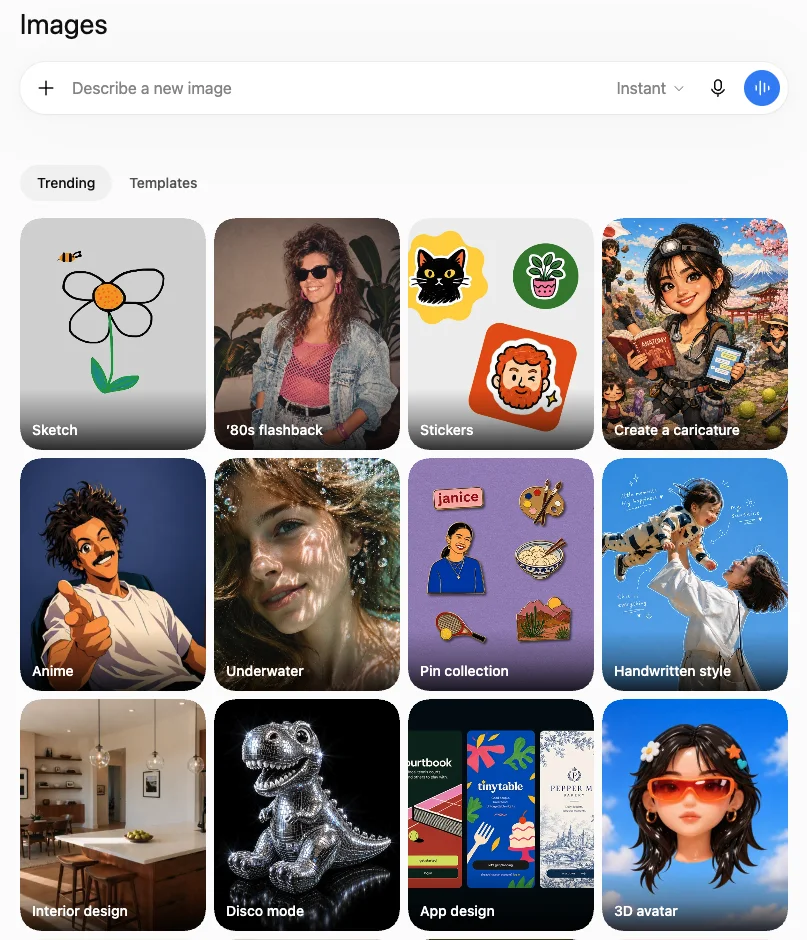
There are two ways in. You can ask in any chat, or you can open Images in the sidebar, which gives you a prompt box plus Trending and Templates tabs; Trending opens on starting points like Sketch, ’80s flashback, Stickers and Interior design.
Editing is conversational. You reply with what to change and it reworks the last image instead of starting again. On paid plans there is one more control, a Thinking effort picker next to the prompt box, which trades time for a model that plans the image before drawing it.
How I tested it
I ran one fixed set of prompts, the same set every image review in this cluster will use, so the results are comparable across tools. It covers six things: compositional accuracy, text inside the image, photorealism, style range, editing, and speed.
I started on a free account and switched to a Plus account when the free one locked me out after three requests. That lockout turned into one of the findings. Every image below is the first result for its prompt. I did not reroll anything, and nothing was retouched.
| # | Test | Plan · mode | Result | Done by |
|---|---|---|---|---|
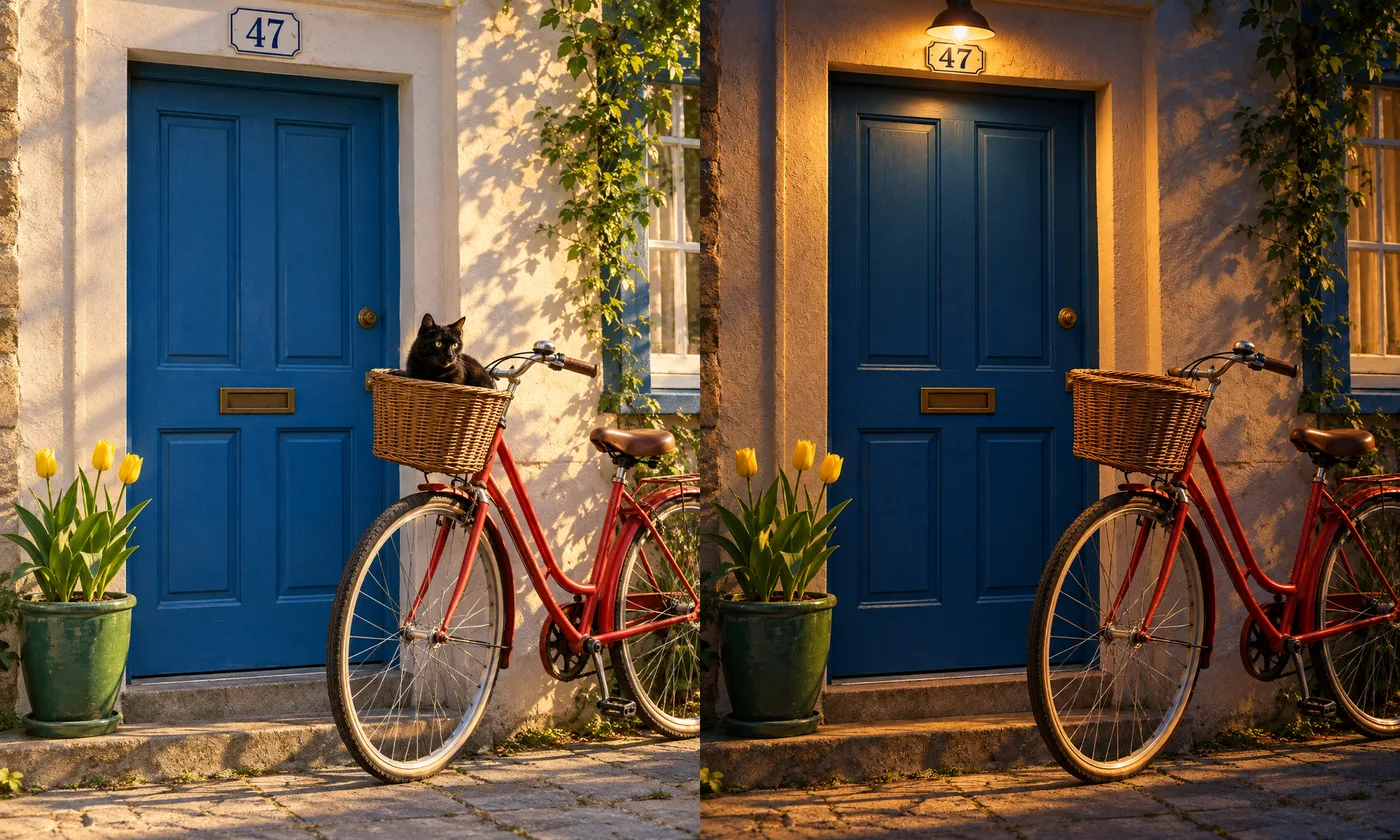
| 1 | Seven-part scene (bike, door, cat, tulips, pot, “47”, light) | Free · Instant | 7 of 7 elements; bike leans on the wall, not the door | ~70 s |
| 2 | Edit: night, lamp on, remove the cat | Free · Instant | Cat gone, lamp added, scene intact; reads as dusk | ~170 s* |
| 3 | Gig poster, four text lines | Free · Instant | 4 of 4 strings exact | ~70 s |
| 4 | Café menu, title plus six items with prices | Plus · Instant | 7 of 7 exact; added two slogans and a sign | ~65 s |
| 5 | Coffee-bag label, three text lines | Plus · Instant | 3 of 3 exact; added a slogan | ~115 s |
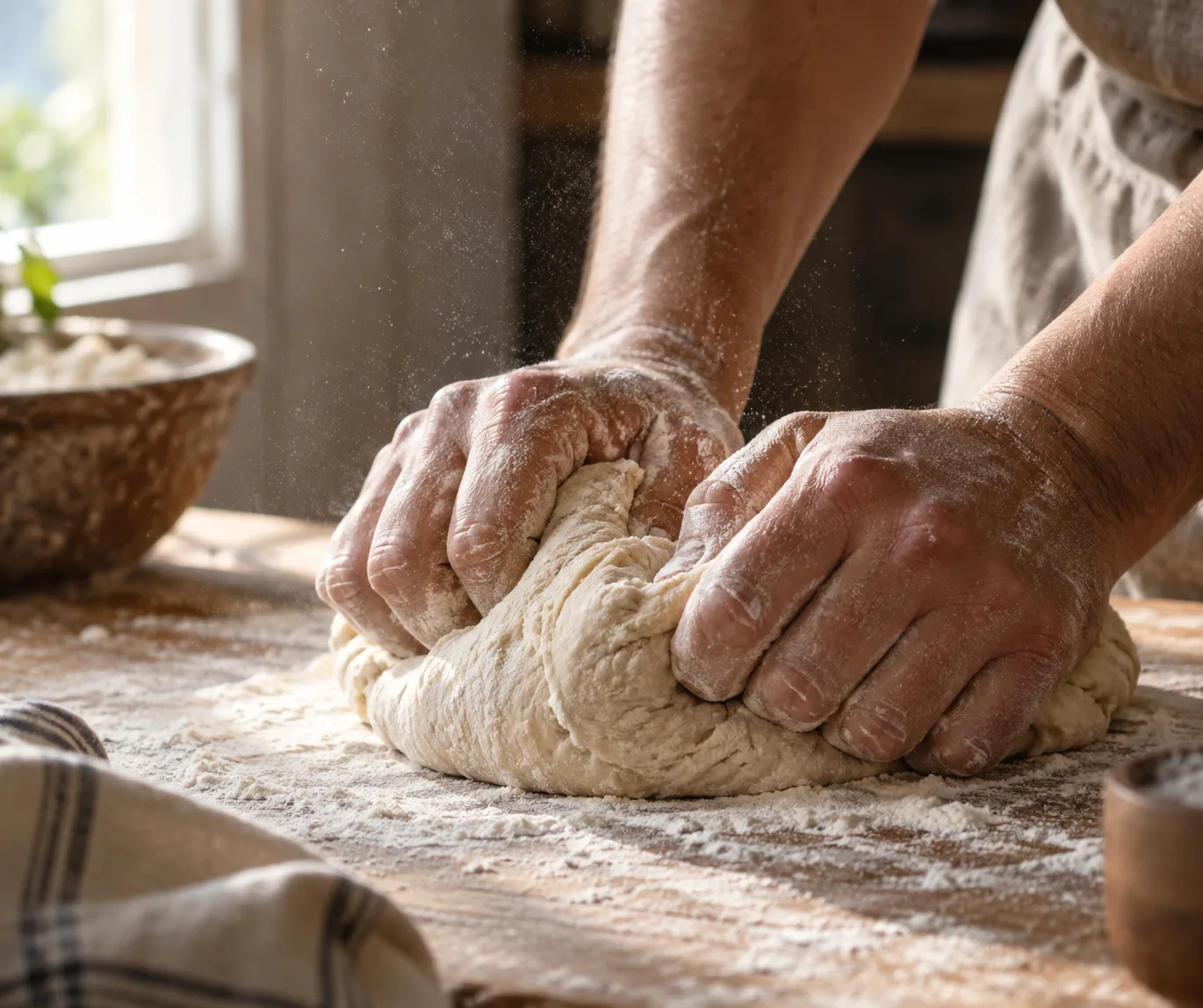
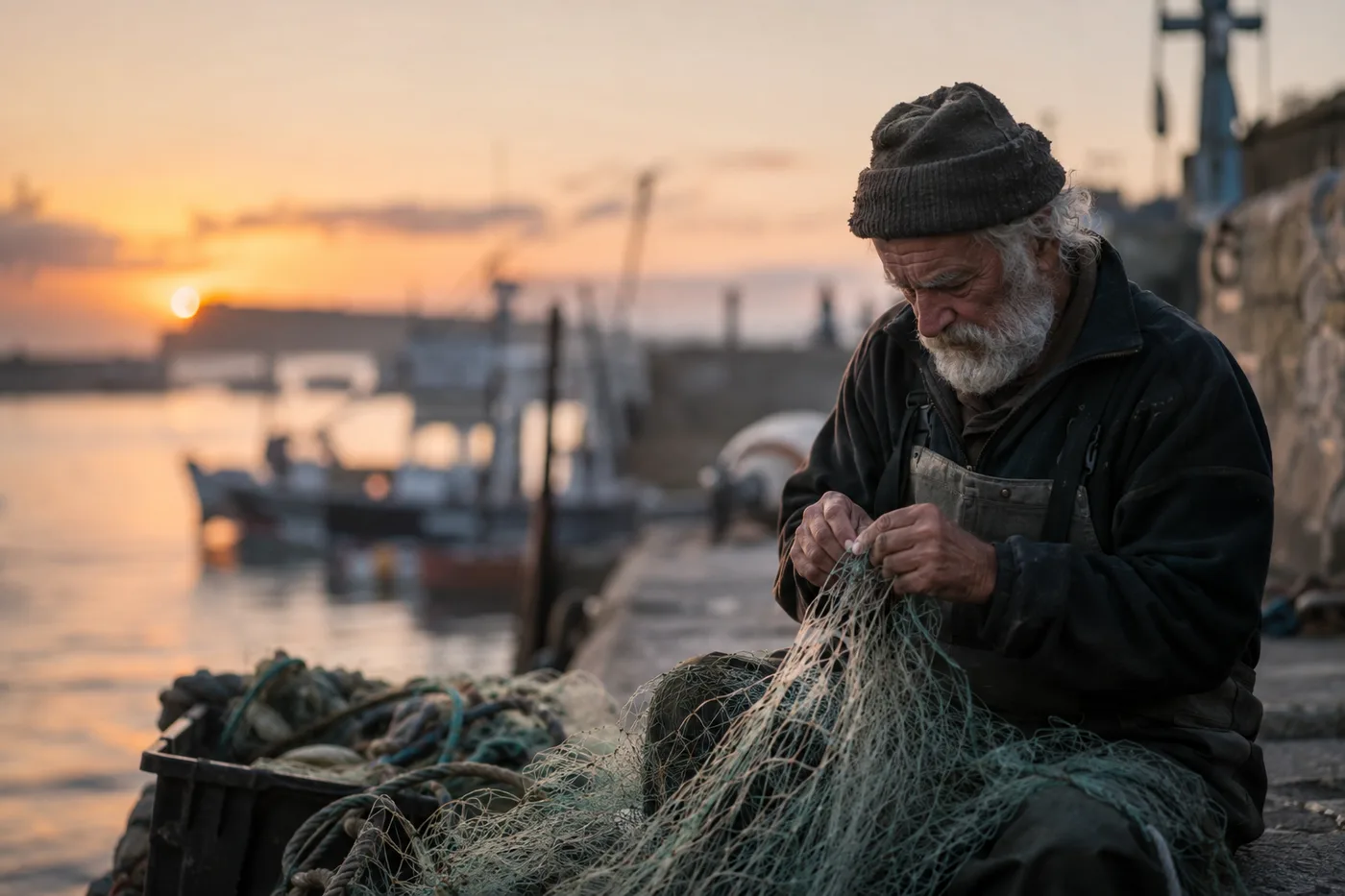
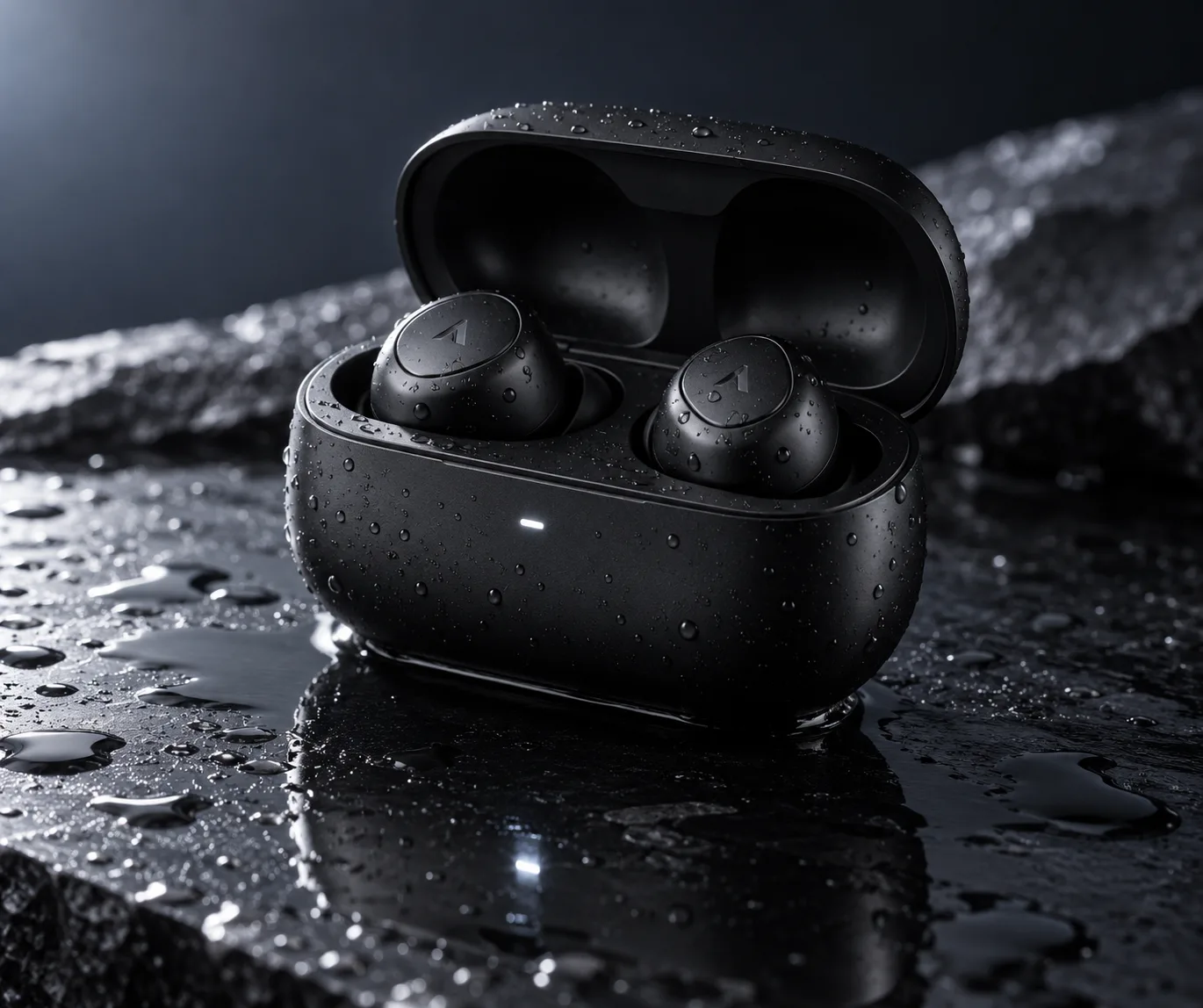
| 6–8 | Portrait, product shot, hands | Plus · Instant | No anatomy or physics errors | ~60–65 s |
| 9–11 | Ukiyo-e, watercolour, isometric low-poly | Plus · Instant | Styles convincing; low-poly only partial | ~65 s† |
| 12 | Seven-part bike and door scene, rerun | Plus · Thinking (High) | 7 of 7; added a plaque and a doormat with text | ~90 s |
*The edit’s time is inflated. The browser tab was in the background for part of it, and ChatGPT rendered it late. †The watercolour stalled the same way, to about 140 seconds, so the ~65 s covers the other two. All times are when I checked, so they are upper bounds.
How to prompt it, from what worked
The prompts that scored best in my test shared three habits, and none of them needs any special syntax.
Spell out the exact text. I gave the poster and the bag their lines in quotation marks and the menu its items as a plain list, and all three came back word for word. What I did not specify, like the empty space along a label, the model filled on its own, and that is where the invented slogans appeared. If you want a clean design, say so: “no other text”.
Give counts and positions. “Three yellow tulips in a green pot on the left of the door” produced exactly three tulips on the left. Vague quantities get creative answers.
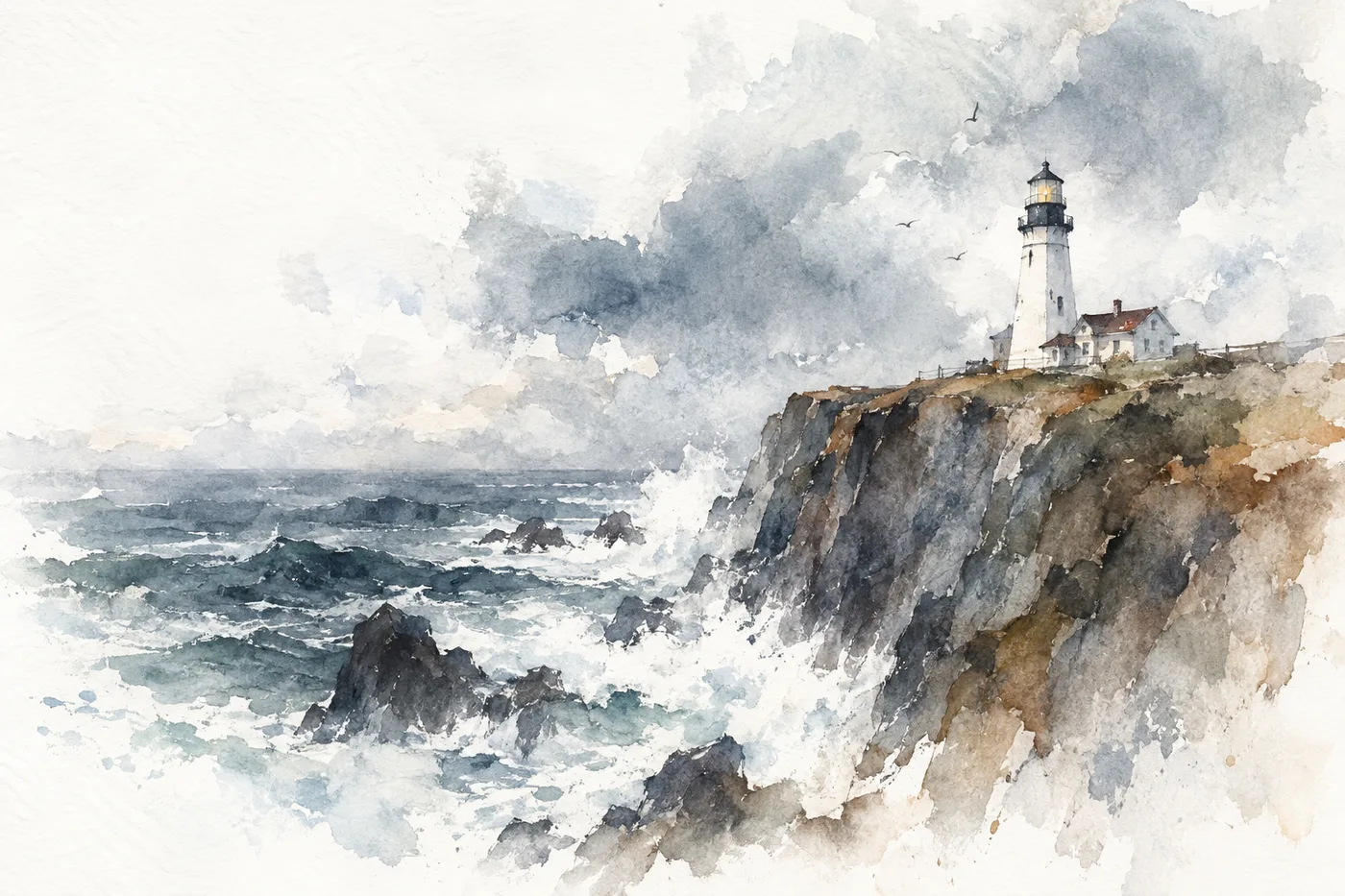
Name the lens or the medium, not the mood. “85mm at f/1.8” gave the fisherman a real shallow depth of field, and “wet-on-wet washes with bleeding edges” gave the lighthouse genuine watercolour texture. Words like “beautiful” or “stunning” add nothing a model can act on.
How much does ChatGPT image generation cost?
The image generator has no price of its own. It comes with your ChatGPT plan, and the plans differ mostly in how many images you get and how hard the model thinks.
| Plan | Price | What OpenAI says about images | What I measured |
|---|---|---|---|
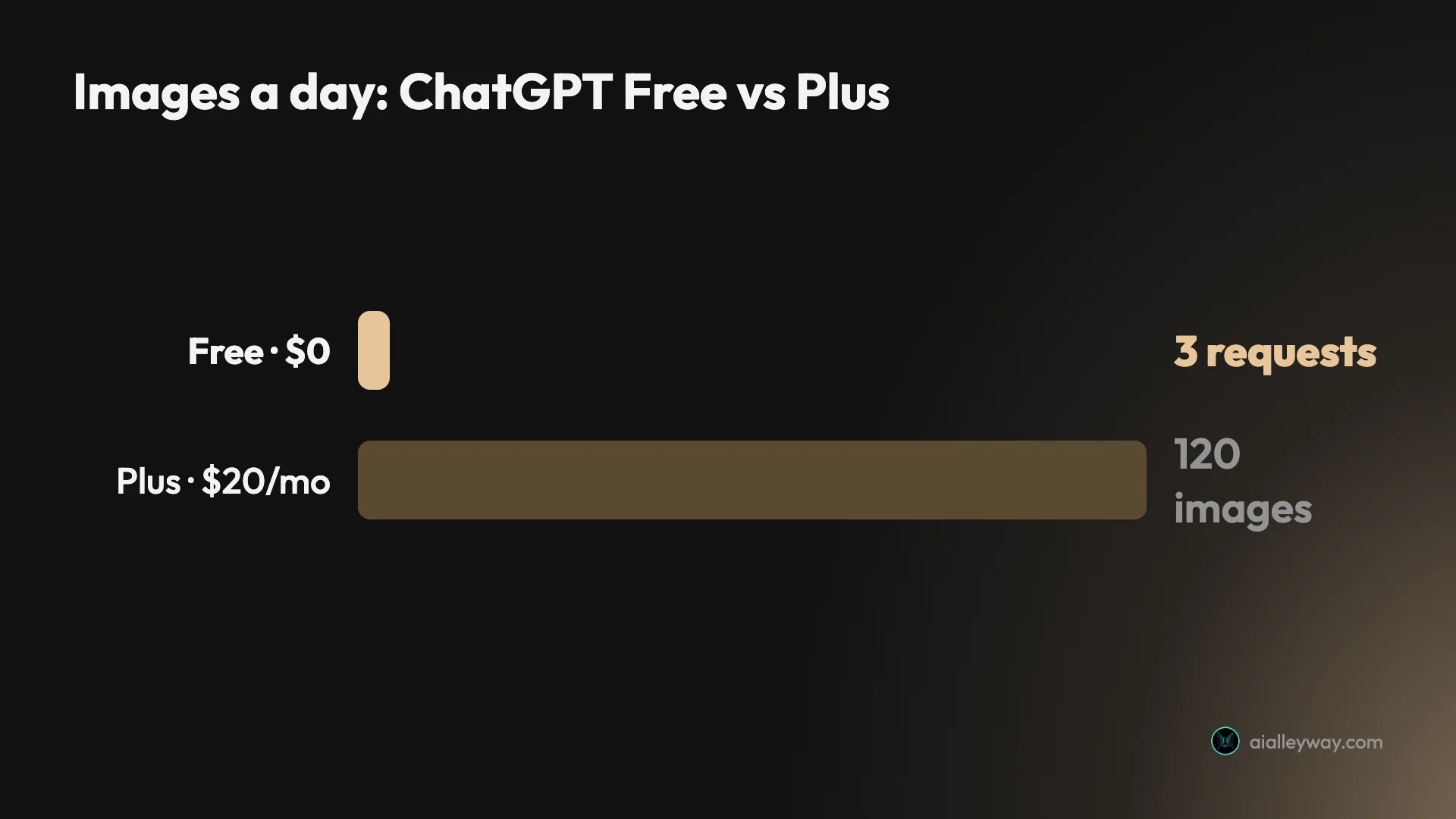
| Free | $0 | ”Limited and slower image generation” | 3 requests, then locked for 24 hours |
| Go | $8/mo | ”More image creation” | Not tested |
| Plus | $20/mo | ”More complex and accurate image creation”; Image generation with Thinking | In-app card says 120 images a day; 9 made, no warning |
| Pro | From $100/mo | ”Unlimited and faster image creation” | Not tested |
The quoted wording is from chatgpt.com/pricing, read on 23 September 2026. The dollar prices are the US prices from our ChatGPT review, checked on 22 August, and our ChatGPT Plus vs Pro breakdown covers what else each plan adds. OpenAI publishes no image counts on the pricing page, so the only hard number comes from ChatGPT itself: the card it shows when a free user runs out.
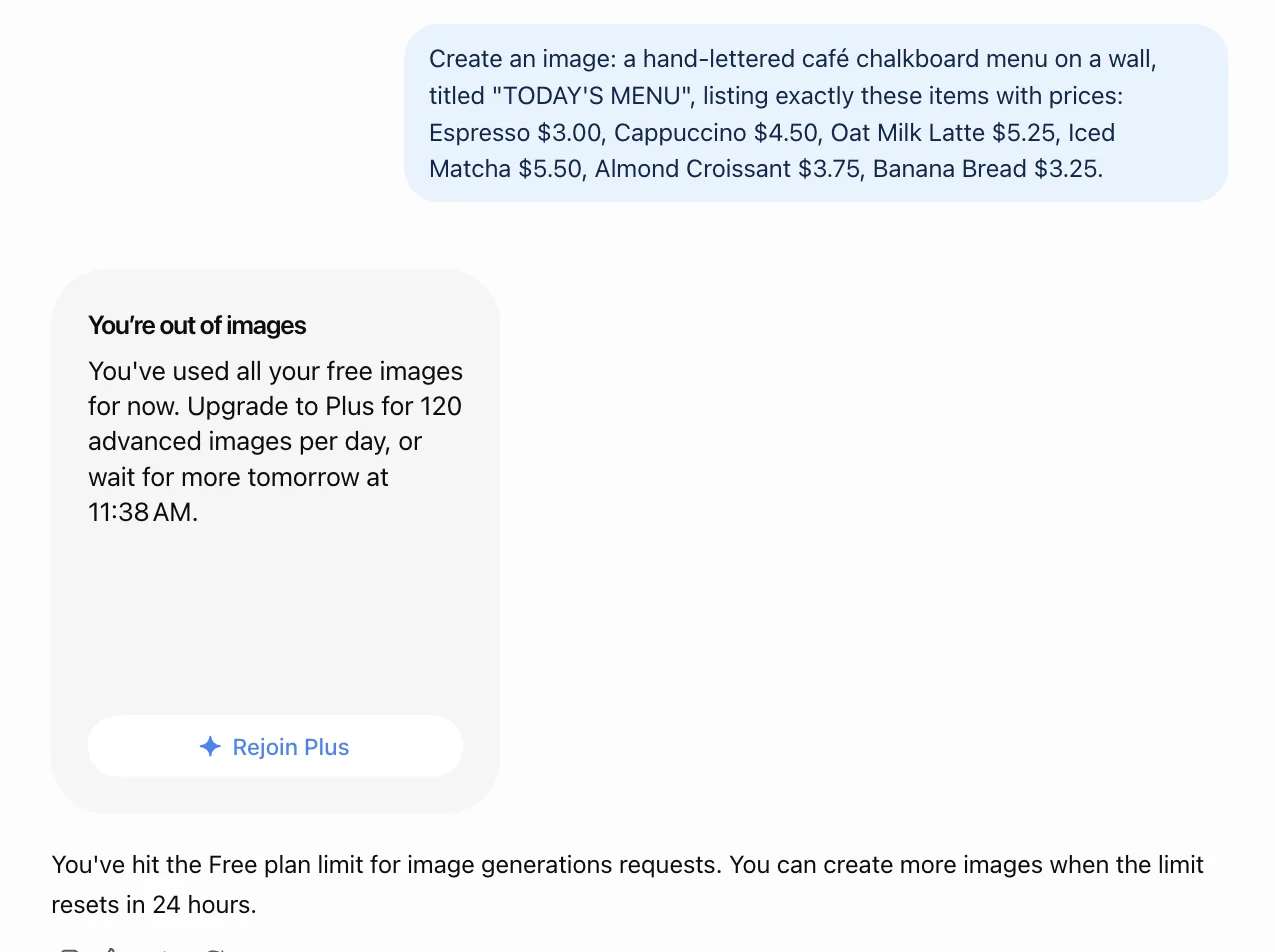
That card is worth reading closely. My first image was at 11:37 in the morning and the reset was 11:38 the next day, so the free window is a rolling 24 hours from your first picture, not a daily reset at midnight. It also counted my edit as one of the three, so iterating on a picture burns the same allowance as making a new one.
Developers can skip the plans. The same generation is sold through the API as gpt-image-2.5-flare and gpt-image-2.5-sunburst, priced per token rather than per image, which only makes sense if you are building it into a product.
Who is the ChatGPT image generator for?
- Anyone who needs words inside a picture. Posters, menus, packaging mock-ups, social graphics with a headline. It spelled every word I gave it, and text is the reason it tops our image picks.
- Marketers and small-business owners who think in sentences, not settings. You describe the image the way you would brief a designer, and it follows the brief.
- People who already pay for ChatGPT Plus. At $20 a month the image generator comes bundled with an assistant you already use, so there is no second subscription to justify.
- Anyone who edits by conversation. “Make it night”, “remove the cat”, “swap the headline” all work in plain language.
- Not for artists who want fine control or a signature look. There is no seed to lock a look, and you get one image per request. If aesthetics matter more than accuracy, look at Midjourney; our Midjourney review covers its plans and privacy rules.
What does the ChatGPT image generator get right?
It spells what you ask it to spell
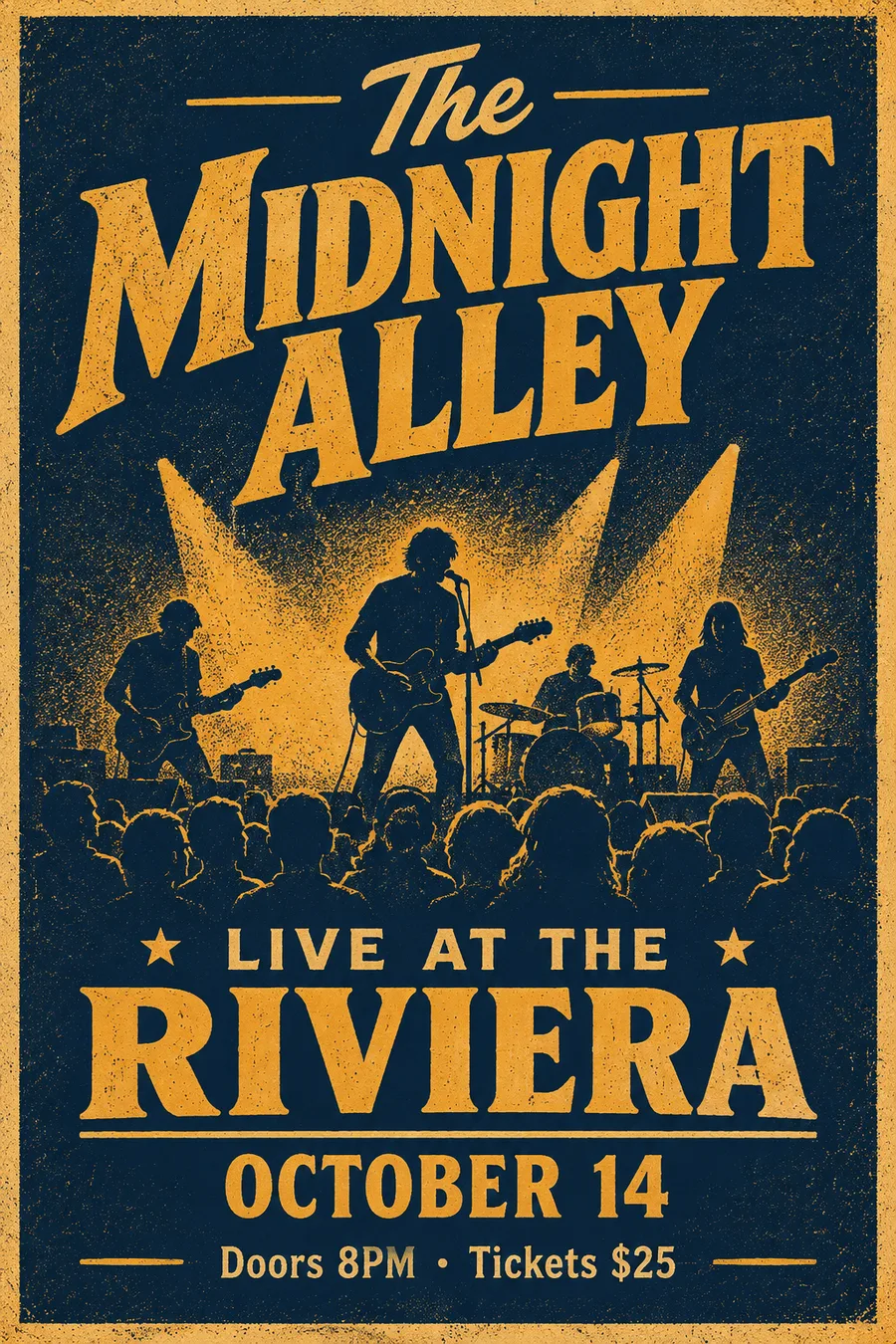
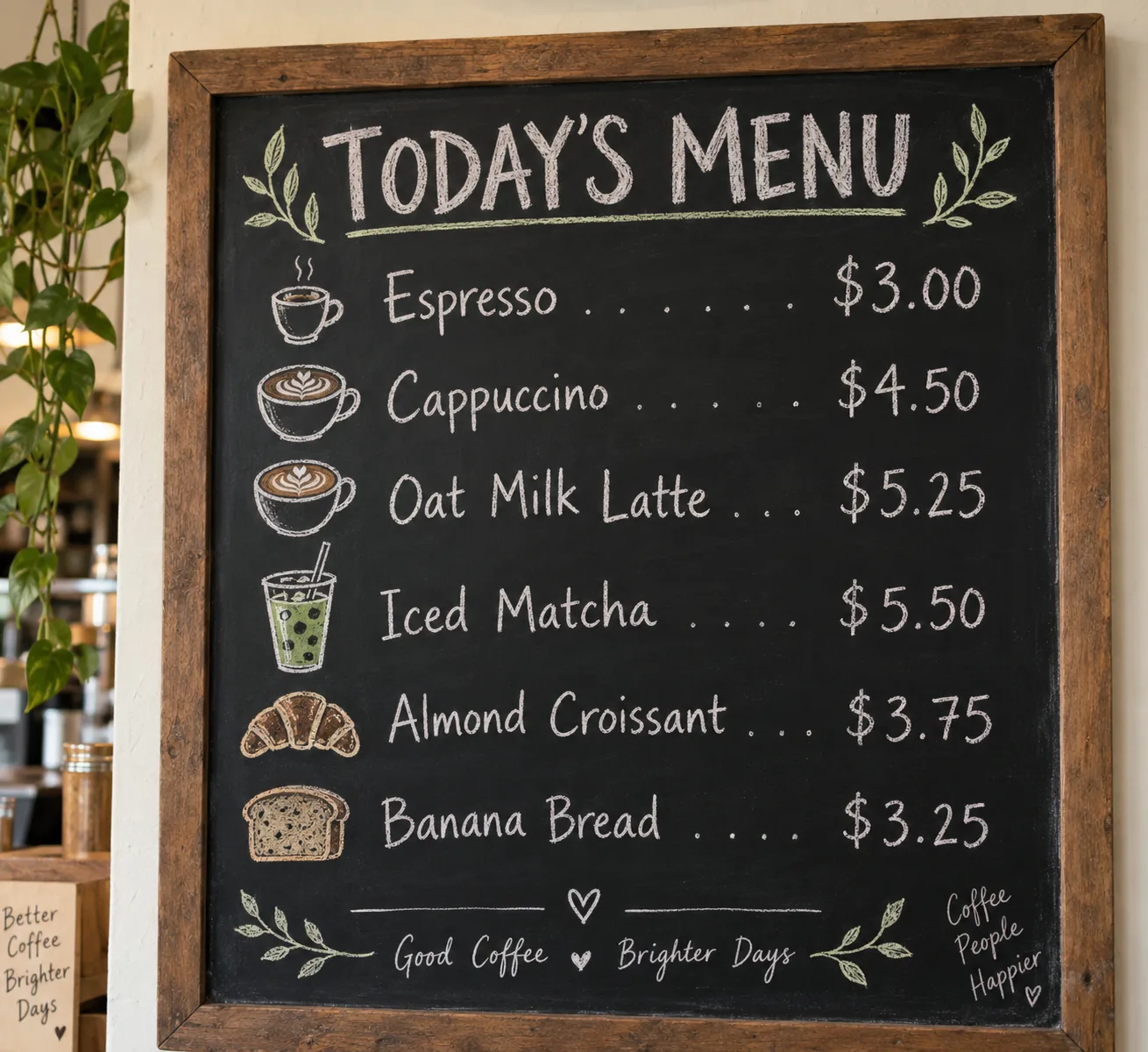
Text in images is one of the hardest jobs for an image model, and this one did not miss. Across four designs I asked for 15 separate strings, including a six-line price list, and all 15 came out letter-perfect.
The gig poster was on the free plan. “LIVE AT THE RIVIERA”, “OCTOBER 14” and “Doors 8PM · Tickets $25” are all correct, including the middle dot, and the lettering looks screen-printed rather than typed on.
The menu was the harder test, because a list of prices gives a model six chances to swap a digit. It got every price right, lined up with leader dots, in hand-drawn chalk lettering.
It puts things where you said
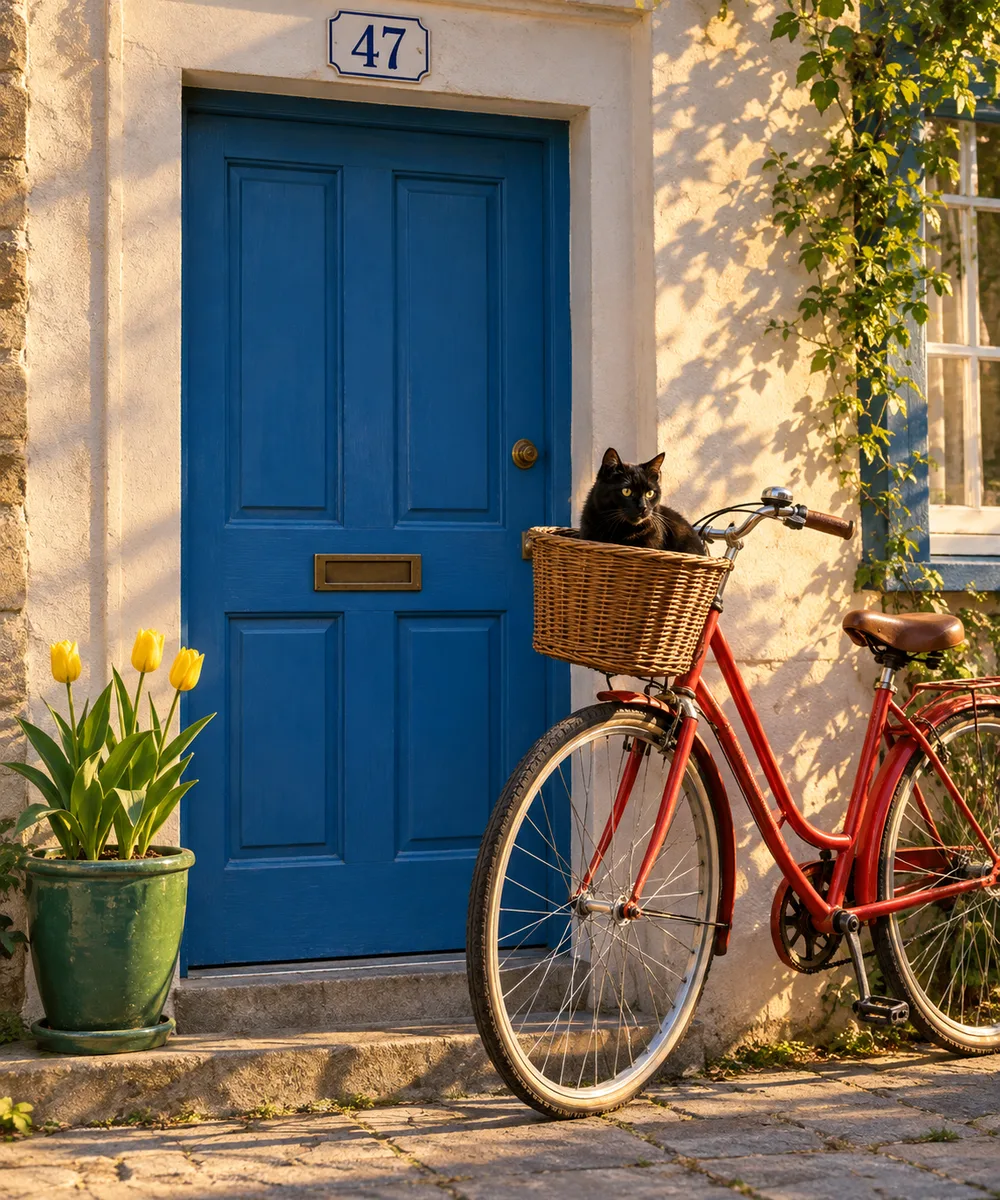
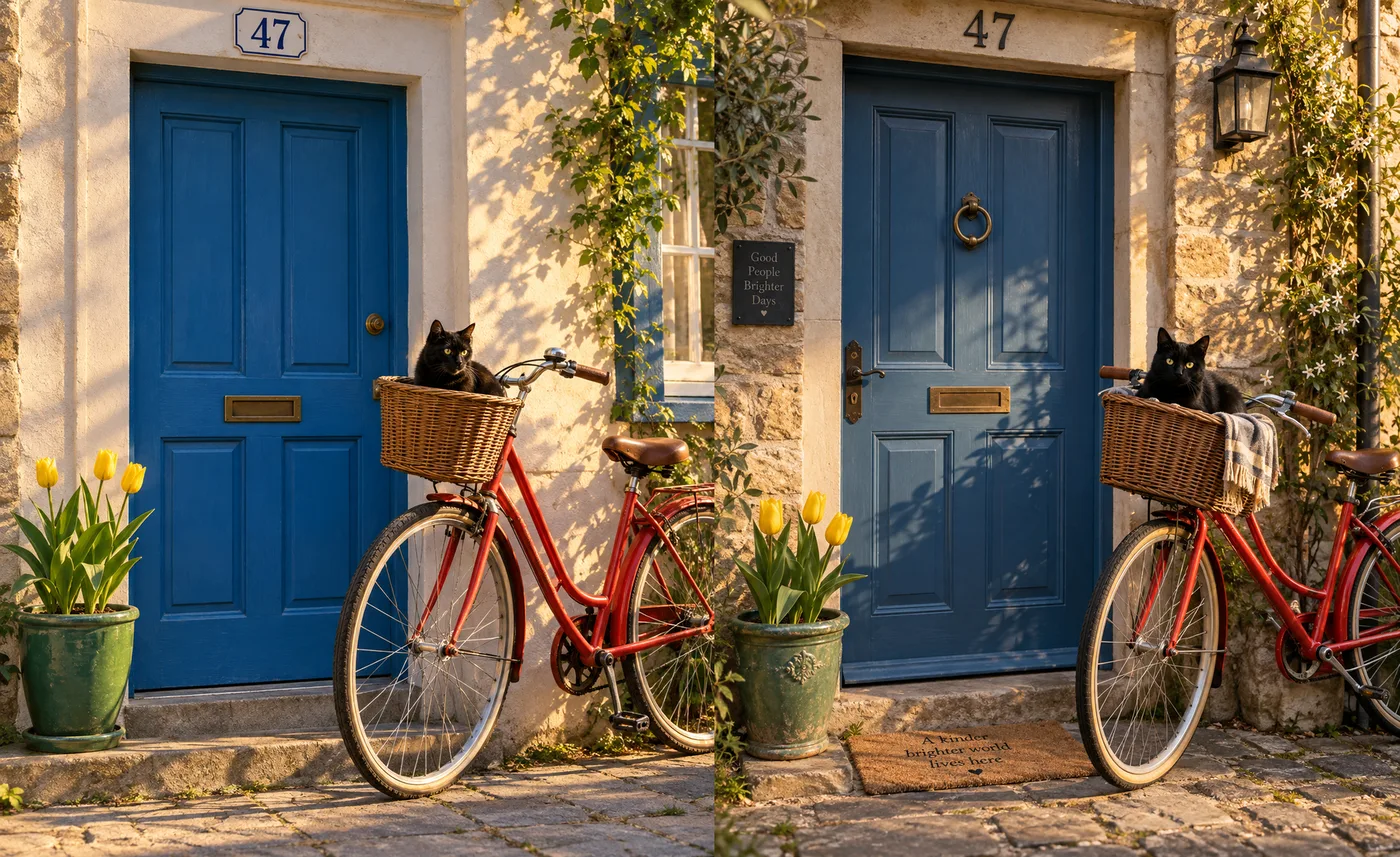
My compositional prompt asks for seven specifics at once: a red bicycle, a blue door, a black cat in the basket, three yellow tulips, a green pot on the left, the number 47 above the door, and sun from the right. It is the kind of brief where a missing element or a wrong count is easy to overlook.
ChatGPT got all seven on the free plan, first try. There are exactly three tulips. The one miss is a matter of reading: the bike leans on the wall beside the door, not on the door itself.
Editing keeps the scene intact
I asked it to turn that image into night, switch on a lamp above the door and remove the cat. It kept the bicycle, the tulips, the pot and the door exactly where they were, took the cat out of the basket cleanly and added a lit lantern.
Two things slipped. It reads as dusk rather than night, with sunlight still on the wall. And the house-number plate changed from white enamel to brass, which nobody asked for. For a one-sentence edit, that is a faithful result.
Photorealism without the usual tells
Hands are where AI photos give themselves away, so I asked for two hands kneading dough. It drew two anatomically normal hands, correct finger count, with flour in the creases and a believable sense of pressure on the dough.
The fisherman portrait has the shallow depth of field an 85mm prompt implies, and a weathered face that looks lived-in rather than airbrushed.
The product shot is the one I would use unchanged: water beading on a matte case, a clean reflection in wet slate, and rim light that separates the object from a dark background. Our best AI image generator for realistic photos roundup sets these three shots beside Nano Banana’s.
It changes style when asked
A model that only does one look is a filter, not a generator. The ukiyo-e fox has flat colour fields, woodgrain texture, a title cartouche in Japanese reading “fox in the snow”, and a red seal, all without being asked for the last two.
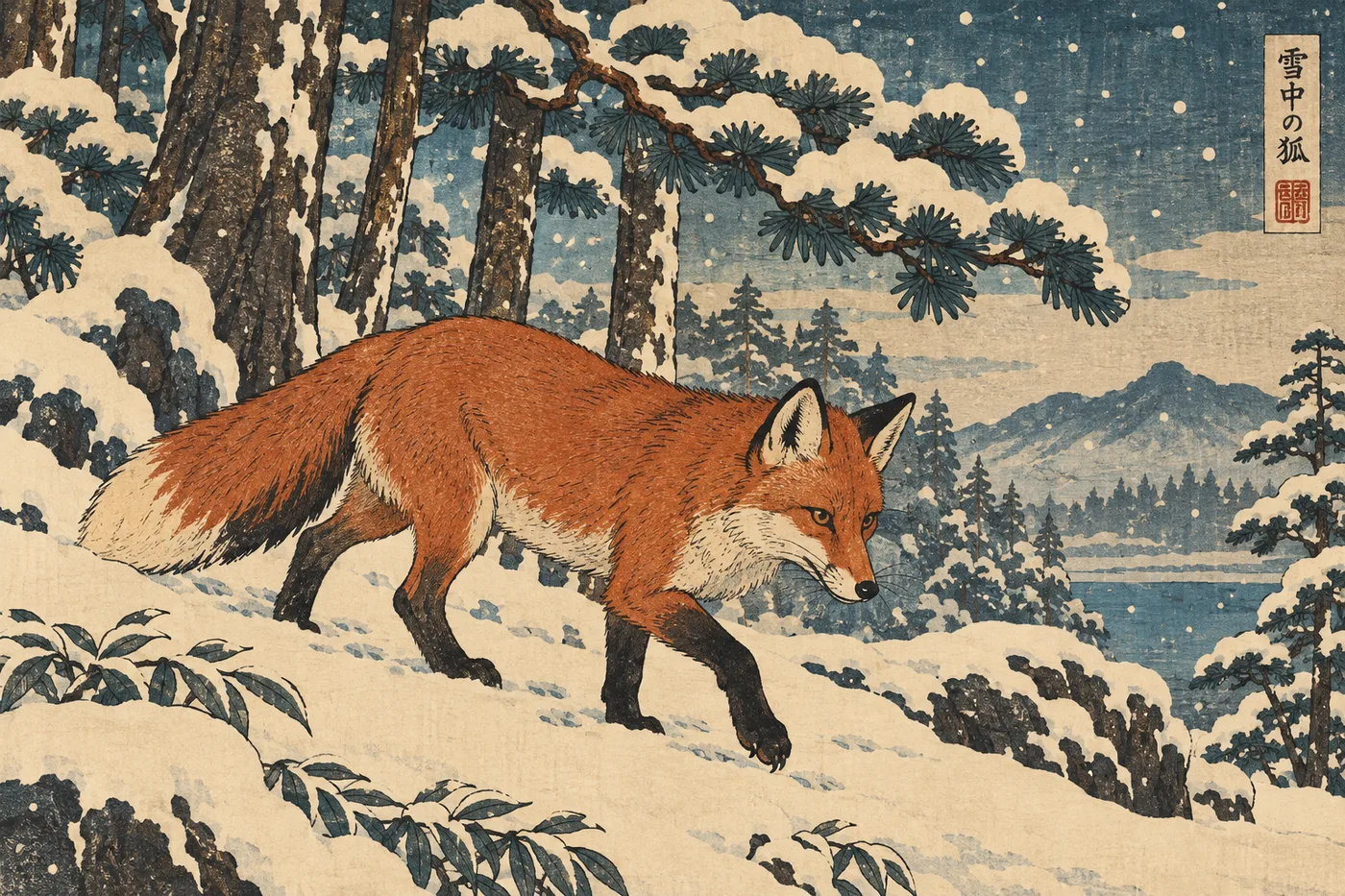
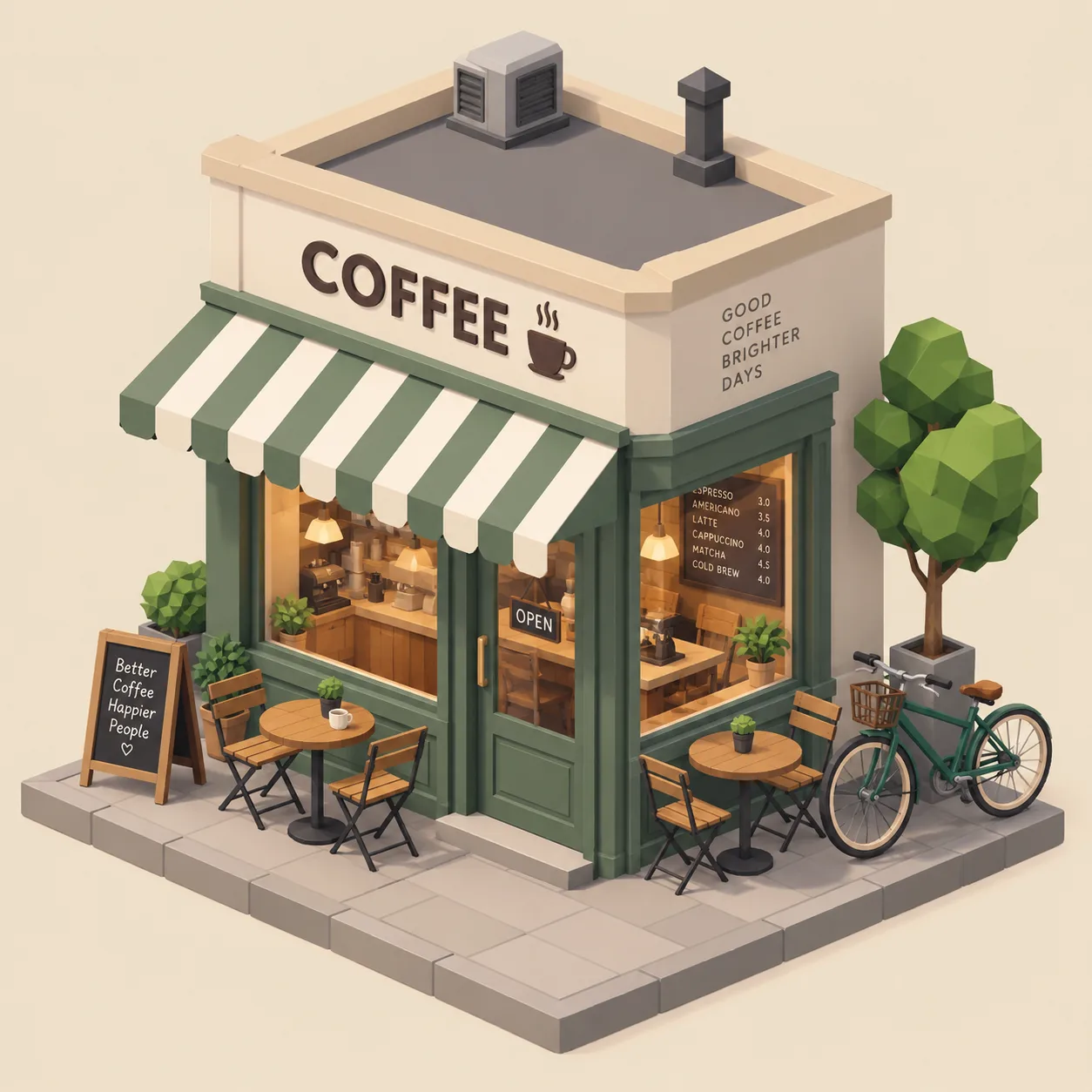
The watercolour lighthouse is loose in the right places, with bleeding edges and plenty of white paper. The isometric coffee shop was the weakest of the three. It is isometric and pastel, but only the tree and shrubs are low-poly. The building is smooth.
Thinking mode is a real control, not a label
Plus adds a Thinking effort picker with Instant, Medium and High, and a Pro level locked above them. I ran the bicycle prompt again at High to see what the extra time buys.

The High version took about 90 seconds and made a more considered picture, with stone walls, a proper wall lantern and warmer light. It was no more accurate than the free Instant result, because the free one was already seven for seven. Thinking is worth switching on for dense layouts. For a simple scene, Instant is enough.
Every image says where it came from
Each PNG I downloaded carried C2PA content credentials, the industry provenance standard, naming OpenAI and gpt-image and marking the file as algorithmically generated. OpenAI’s system card for Images 2.5 adds that it also embeds an invisible SynthID watermark, the Google DeepMind technique, as a second layer in case the metadata is stripped.
For anyone publishing AI images under their own name, that is a feature rather than a restriction. Platforms that read C2PA can label the image correctly without you doing anything, and you have a verifiable record of which tool made it if a client or a platform asks.
Where does the ChatGPT image generator fall short?
Free means three images a day
The free tier is a trial, not a plan. My fourth request was refused, and an edit counted as a full request, so you get three attempts at a picture per rolling 24 hours. OpenAI’s pricing page says only “Limited and slower image generation”, and the number surfaces only once you have hit it.
If Gemini is the other assistant you are weighing, our ChatGPT vs Gemini comparison covers both free tiers. If you want to see whether ChatGPT’s text rendering justifies $20, spend your three requests on a text-heavy design, because that is where the difference shows.
It writes copy you did not ask for
The menu I asked for had seven lines of text. The board I got added two more, “Good Coffee ♥ Brighter Days” and an ungrammatical “Coffee People Happier”, and propped a small sign beside it reading “Better Coffee Brighter Days”. The coffee bag gained “BETTER COFFEE BRIGHTER DAYS” on its side panel. Everything I asked for was right. The problem is everything else.
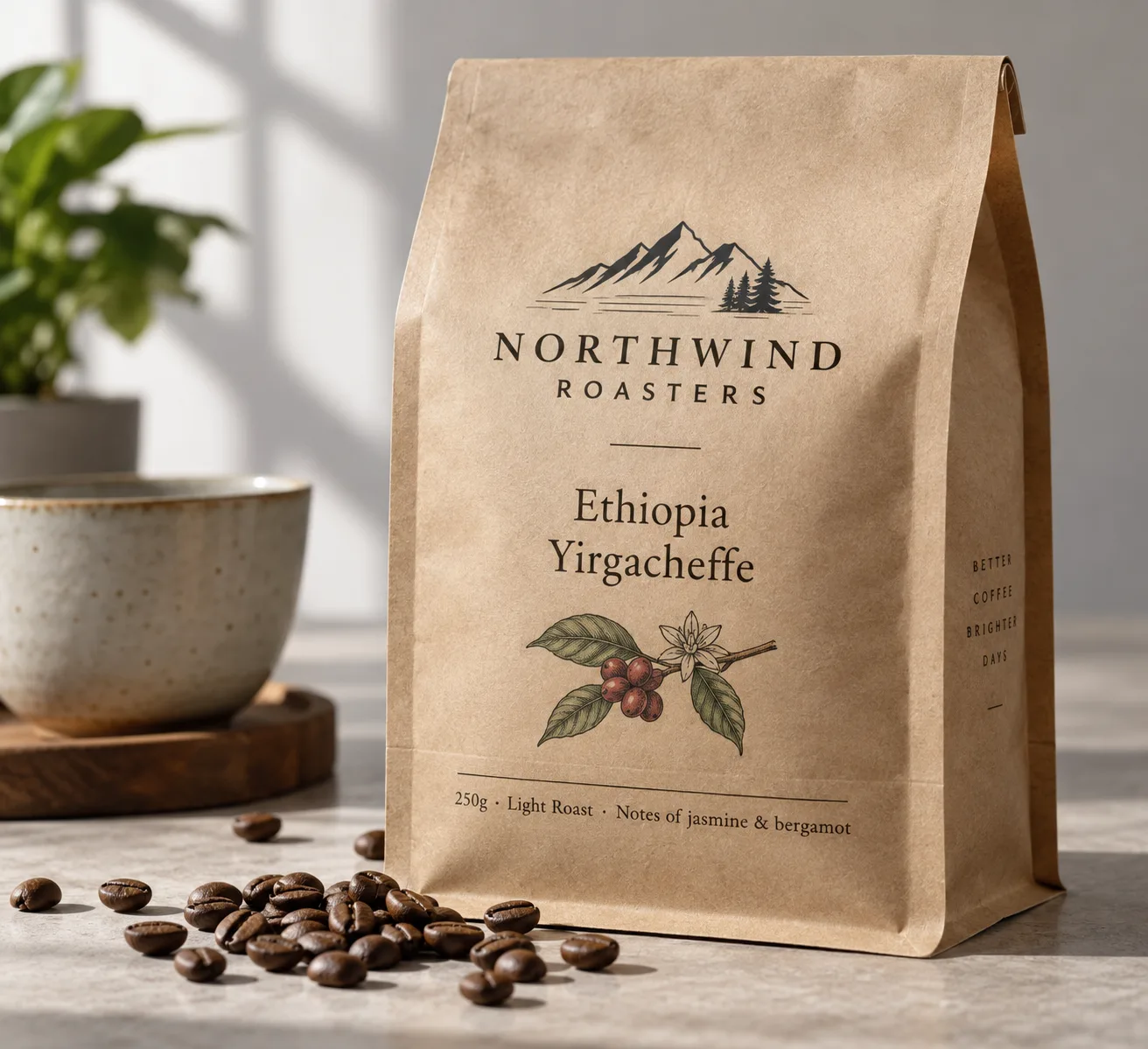
For personal use it is charming. For a client’s packaging mock-up it is a proofreading job. You must read every word in the image, not just the ones you wrote, because the model treats empty space as an invitation.
With memory on, a slogan followed me between chats
This is the finding I did not expect. On the Plus account, the “brighter days” line first appeared on the café menu. The very next chat, the coffee bag, carried a variation of it. Six chats later, after a portrait, a product shot, hands, a fox and a lighthouse, none of which showed the slogan, it was back on the wall of the isometric café, and in the last chat it became a wall plaque reading “Good People Brighter Days” and a doormat reading “A kinder brighter world lives here” in the bicycle scene, a picture with no coffee in it at all. That is three later chats, each a separate conversation.
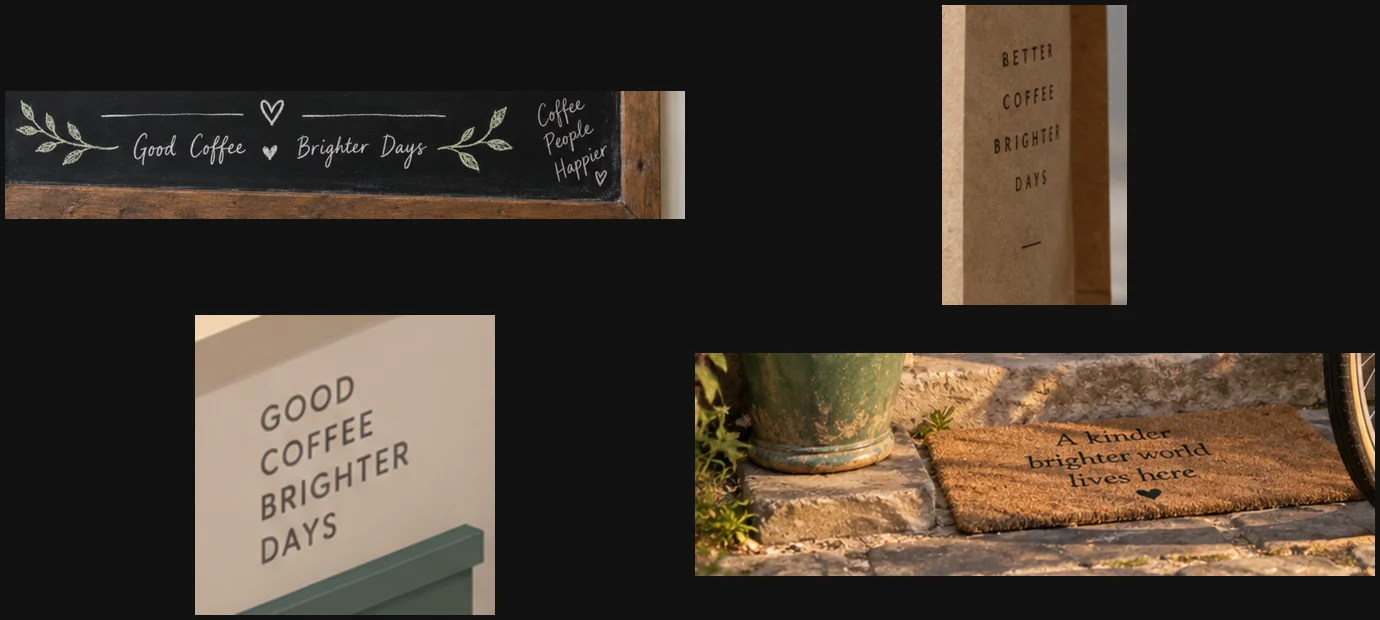
That account has memory switched on, and its memory summary had already absorbed my test prompts. None of the three images from the free account carried the slogan. I tried to prove the link by rerunning a prompt in a Temporary Chat with memory off, and ChatGPT refused, replying that image generation is not available in that mode. So the likely explanation is memory carrying one invented phrase across chats. I could not prove it. If you make images for clients, keep them in a separate account or switch memory off.
Slow, one image at a time
Leaving out the two images that stalled while the tab was in the background, every Instant image in my test arrived after about a minute, with one, the coffee bag, closer to two. Thinking at High took about 90 seconds. You get one image per request. There is no grid of four variations to choose from, so exploring a direction costs a minute per idea, and on Free it costs a third of your day.
OpenAI says Images 2.5 cut latency by up to half against 2.0. At a minute a picture, it still suits deliberate briefs better than rapid sketching.
Resolution is modest in the app
Every image I downloaded was about 1.5 megapixels, for example 1536×1024 in landscape, 1024×1536 in portrait, 1254×1254 square. That is plenty for the web and social posts. It is short of print size, and I saw no option in the ChatGPT app to ask for larger. The higher-quality tiers OpenAI announced alongside 2.5, xhigh and max, are documented for the API.
No chat-free, memory-free way to generate
Temporary Chat is ChatGPT’s private mode. It keeps chats out of your history and, in its unpersonalized setting, ignores memory. In that setting it also refused to make images. That leaves no clean option for someone who wants an image generated without it shaping, or being shaped by, their account history, which is exactly what you want for client work.
The small misreads add up on precise briefs
None of these ruins a picture, but a careful brief catches them. The bike leaned on the wall, not the door, twice in two runs. “Night” came out as dusk. An edit changed a house-number plate it was not asked to touch. “Low-poly” applied to the tree but not the building. On a mood board you would not notice. On a spec from a client you would.
If ChatGPT isn’t the right image generator for you
If the daily cap, the wait, or the unrequested text rules ChatGPT out, three tools cover the gaps.
- Nano Banana (Gemini). Google’s image model, built into Gemini, which Google launched as an upgrade to image editing in Gemini (see our Gemini review). It is the natural next stop if ChatGPT’s free cap is what stopped you. Our Nano Banana vs ChatGPT comparison puts both through this same prompt set. See Nano Banana.
- Midjourney. If you care more about how an image looks than whether it follows the brief word for word, Midjourney is built around style range and aesthetic control rather than literal accuracy. Our Midjourney review has its pricing, or see Midjourney.
- Adobe Firefly. If the worry is commercial safety, Adobe says Firefly is trained on licensed and public-domain content, and it sits inside the Adobe tools a design team already uses. See Adobe Firefly.
I will be running the same prompt set through each of them for this cluster, so these recommendations will get test results of their own.
Final word
ChatGPT’s image generator is the one I would hand to someone who needs a picture to say exactly what they asked for. It spelled 15 strings out of 15, placed seven objects out of seven, and edited a scene without breaking it, on the free plan as well as on Plus. For the wider field, our best AI image generator guide ranks eight options.
It rates 4.5 rather than a Category Leader score, and it is still our top image pick. Both are true. The pick rests on prompt accuracy and text rendering, the two things it did without a single miss in my test. The score measures it against perfect, and the three-a-day free cap, the minute-long waits and its habit of writing copy of its own keep it short of that. Start free, spend your three requests on something with words in it, and upgrade if it earns the $20.
Frequently asked questions
Is the ChatGPT image generator free?
Yes, with a tight cap. OpenAI's pricing page describes the Free plan as "Limited and slower image generation" and does not publish a number. On the free account I tested, the fourth image request in a day was refused with a card reading "You've used all your free images for now", and the reset time it gave was 24 hours after my first image, not midnight.
Those three requests included one edit, so an edit costs the same as a new image. That is enough to try the tool and to make the odd one-off picture. It is not enough to iterate on a design, because good results usually take a few rounds of revision, and on Free the third round is the last one of the day.
How many images can you make with ChatGPT Plus?
The limit card ChatGPT shows free users says it directly: "Upgrade to Plus for 120 advanced images per day." That is the only per-day figure OpenAI puts in front of users. The public pricing page lists Plus as "More complex and accurate image creation" and Pro as "Unlimited and faster image creation", without numbers.
I generated nine images on Plus in one session and never saw a warning. For most people 120 a day is effectively unlimited, and Plus also adds the Thinking effort picker, which lets the model plan a dense layout before it draws. The practical constraint on Plus is time rather than quota, because each image took roughly a minute to arrive in my test, so a 120-image day would mean two hours of waiting.
What model does ChatGPT use to generate images?
ChatGPT Images 2.5, which OpenAI released on 8 September 2026 and rolled out to all ChatGPT tiers, including Free. It replaced ChatGPT Images 2.0 from April 2026. OpenAI's launch notes claim up to 50% lower generation latency than 2.0, more natural lighting and texture, and better consistency across multiple edits.
Developers reach the same generation through the API as two models, gpt-image-2.5-flare for speed and gpt-image-2.5-sunburst for precision work. The API also documents quality tiers up to xhigh and max, priced per token. The images in this review came from the ChatGPT app, not the API, and the C2PA metadata embedded in them identifies the generator only as gpt-image, without a version number.
How do I get ChatGPT to create a picture?
Ask for one in plain language in any chat, for example "Create an image of a red bicycle leaning against a blue door", or open the Images page from the sidebar, which gives you a prompt box plus trending styles and templates to start from. There is no special command.
To edit, reply in the same chat with what to change, such as "make it night and remove the cat", and ChatGPT reworks the last image rather than starting over. Two things will stop it working. You need to be signed in, and a Temporary Chat set to ignore memory refused to generate images at all in my test, replying that image generation isn't available in that mode.
Can I use ChatGPT images commercially?
OpenAI's Terms of Use assign you ownership of the output you create, so commercial use is allowed in principle, subject to the usage policies, which bar things like deceptive depictions of real people. What you cannot do is hide where the image came from. Every PNG I downloaded carried C2PA content credentials naming OpenAI and gpt-image, and the Images 2.5 system card says OpenAI also embeds an invisible SynthID watermark.
For client work, check two things before shipping. Read every word in the image, because the generator adds text of its own, and in my test it put invented slogans on two of the four text designs I requested. And consider turning memory off, because on a memory-enabled account a slogan from one chat reappeared in later, unrelated ones.
Can ChatGPT generate any image you ask for?
No. It refuses some requests outright and some modes cannot make images at all. OpenAI's system card for Images 2.5 says the model restricts fabricated or compromising depictions of real people, and blocks deepfakes, including political, sexual or otherwise sensitive imagery of real people, places or events, through several safety layers before anything is generated.
The mode matters too. In my test a Temporary Chat set to ignore memory refused to generate an image at all, replying that image generation isn't available there, and the free plan stopped taking requests after three in a day. Within those limits it generated everything in my prompt set without a refusal, from photoreal hands to a Japanese woodblock print.
Keep reading
Nano Banana vs ChatGPT: 12 Prompts, Two Different Winners
Nano Banana vs ChatGPT, tested with the same 12 prompts: ChatGPT follows a brief exactly, Nano Banana is twice as fast and free. Which one to use, and when.
Best AI Image Generator: 8 Picks, Two Tested Head to Head
The best AI image generator is ChatGPT for exact briefs and Nano Banana for free, fast images, both tested. Plus Midjourney, Ideogram, FLUX and three more.
Midjourney Review: Is It Worth $10 a Month?
A Midjourney review from its own plans page and docs: no free tier, $10 for about 800 images, and every picture public unless you pay $60 a month.
Midjourney Alternatives: 6 Picks, Two Tested Side by Side
The best Midjourney alternatives in 2026: ChatGPT for exact briefs, Nano Banana for free and fast, plus Leonardo, Ideogram, Stable Diffusion and Playground.
ChatGPT review: the free tier is the story, not the $20 one
A ChatGPT review from a year on the free tier plus one month of Plus. Five rungs from $0 to $200, and ads now run on both the Free and $8 Go tiers.