
ChatGPT Photo Prompts: 9 Trends Tested, Gemini Compared
ChatGPT photo prompts for 9 selfie trends, run on ChatGPT Plus with every result shown and compared with Gemini. It kept the smile but misspelt a masthead.
Contents
ChatGPT photo prompts in one paragraph

The ChatGPT photo prompts that work are short edit instructions on a photo you attach: the change you want, the look, two or three concrete details, and a list of what must stay the same. I ran nine popular trend prompts on ChatGPT Plus on 1 October 2026, word for word the same prompts, on the same two photos, that I had run through Gemini the day before for our Gemini AI photo prompts test.
ChatGPT held on to the person better than Gemini. In the black-and-white portrait it kept the smile Gemini had dropped, in the illustration it kept the skin tone, and on the figurine box it printed no invented name. Its misses were different ones: it spelled the magazine masthead “ALLEWAY” instead of “ALLEYWAY”, and it freely changed details I did not name, from a jacket to a whole outfit.
Each prompt below is copied exactly as I sent it, with ChatGPT’s result next to Gemini’s. Nothing was retouched.
How I ran the ChatGPT photo test
The account was ChatGPT Plus, left on the default Instant setting. Every prompt went into a new chat with one photo attached, so no result could borrow from another. ChatGPT took all nine in about 20 minutes, with no refusals and no limit warnings. Every image after the first was already finished when I checked about 50 seconds after sending; the first, the retro portrait, appeared somewhere between 50 and 77 seconds.
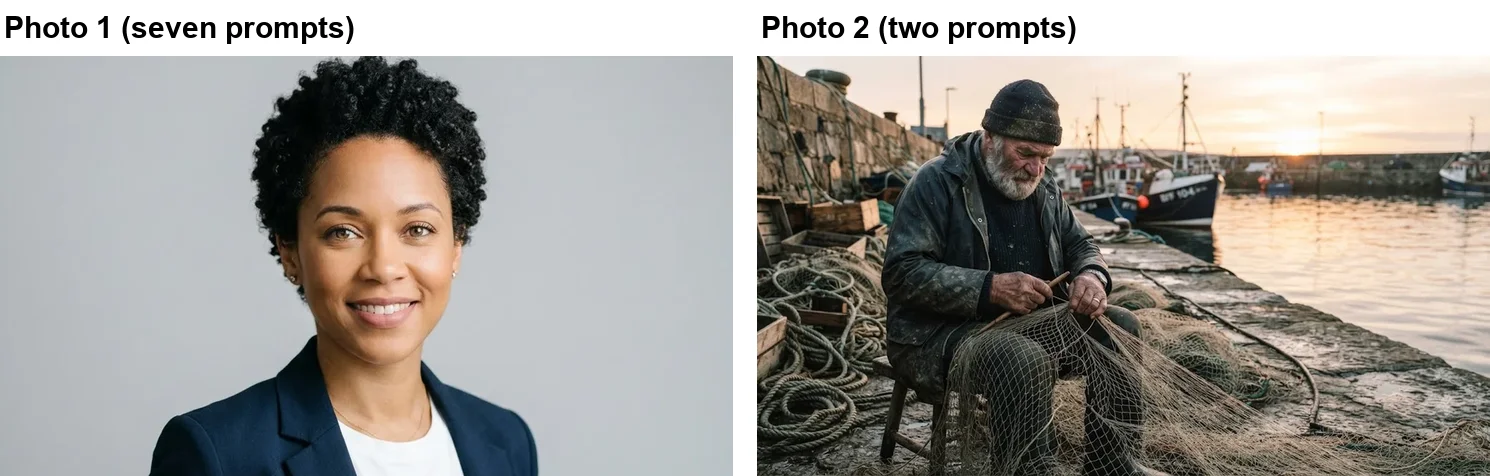
The photos are not real people. Both are stand-ins that Gemini made for our earlier tests, which keeps the comparison fair and means we can publish them. A real selfie carries detail no model has seen, so your results will vary in the fine print, but the patterns below are the ones to check for. Seven prompts used the woman’s headshot and two used the fisherman. I attached each as a full-window screenshot, 1,456 by 834 pixels, almost the same shape as the uploads in the Gemini test.
The keep list decides what ChatGPT changes
OpenAI’s own guide to making images in ChatGPT, also covered in our ChatGPT image prompts test, gives the key pattern for edits: “Change only X. Keep everything else exactly the same.” It also advises putting any words you want in the picture in quotes, spelling unusual words letter by letter, and saying directly when you do not want extra text.
For ChatGPT photo editing prompts, that turns into the same pattern that worked in Gemini, plus one more part, because ChatGPT changed the frame on four of the nine prompts:
- The change. “Turn this photo into”, “Restyle this photo as”, “Make this”.
- The look. The trend, in plain words.
- Two or three details. Backdrop, light, outfit, pose, colour grade.
- The keep list. Every feature you care about, by name: face, skin tone, hair, expression, outfit.
- The shape. Square, portrait or landscape, if it matters. ChatGPT chose a tall frame for the cover and a square one for the headshot on its own.
The keep list mattered most. ChatGPT treated mine faithfully, and in two prompts, the rain portrait and the cover, it changed the outfit I had left off the list where Gemini kept it.
Retro mall portrait, and no stamp from ChatGPT
Transform this photo into a 1990s mall photo studio portrait: soft-focus mottled blue backdrop, bright on-camera flash, slightly grainy film look, the person in a denim jacket, posing with a hand under the chin. Keep her face, skin tone, hair and features exactly the same.
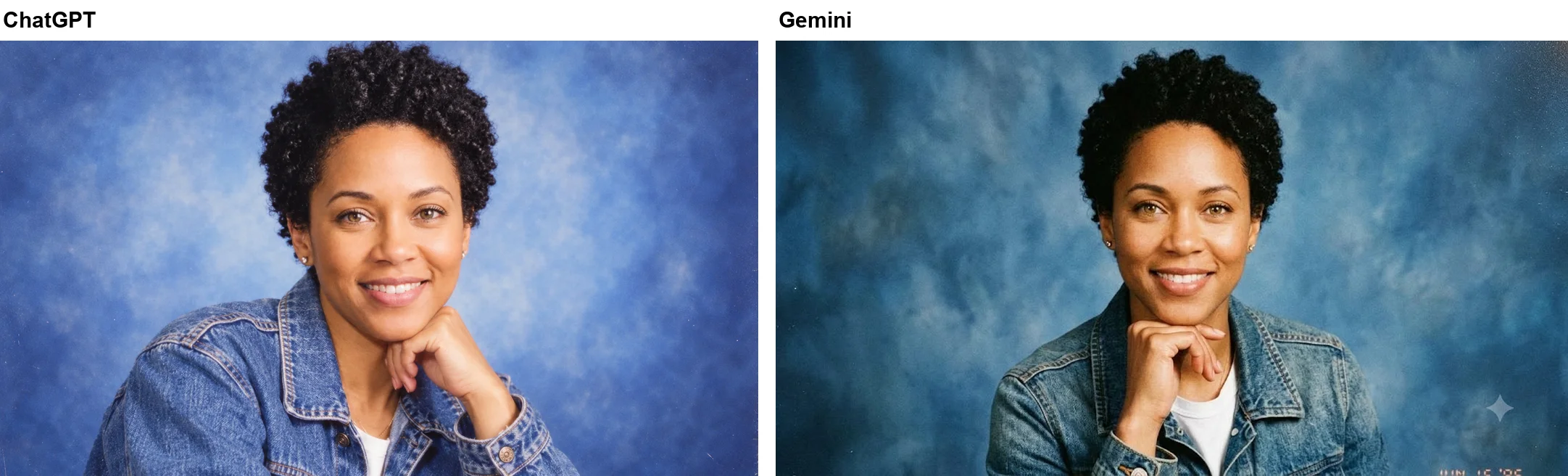
Both tools nailed the brief. ChatGPT’s version has the mottled blue backdrop, the denim jacket over the white t-shirt, the hand under the chin and a light film grain, and her face, smile, curls and earrings are unchanged. The one difference is a detail: Gemini added an orange film date stamp in the corner, while ChatGPT added no text at all. If you want the stamp, ask for it; ChatGPT will not volunteer it.
Figurine prompt: no invented name on the box
Turn the person in this photo into a 1/7 scale collectible figure standing on a round clear acrylic base on a desk, with a toy packaging box beside it showing her artwork. Keep her face and hairstyle recognisable. Realistic product photo.
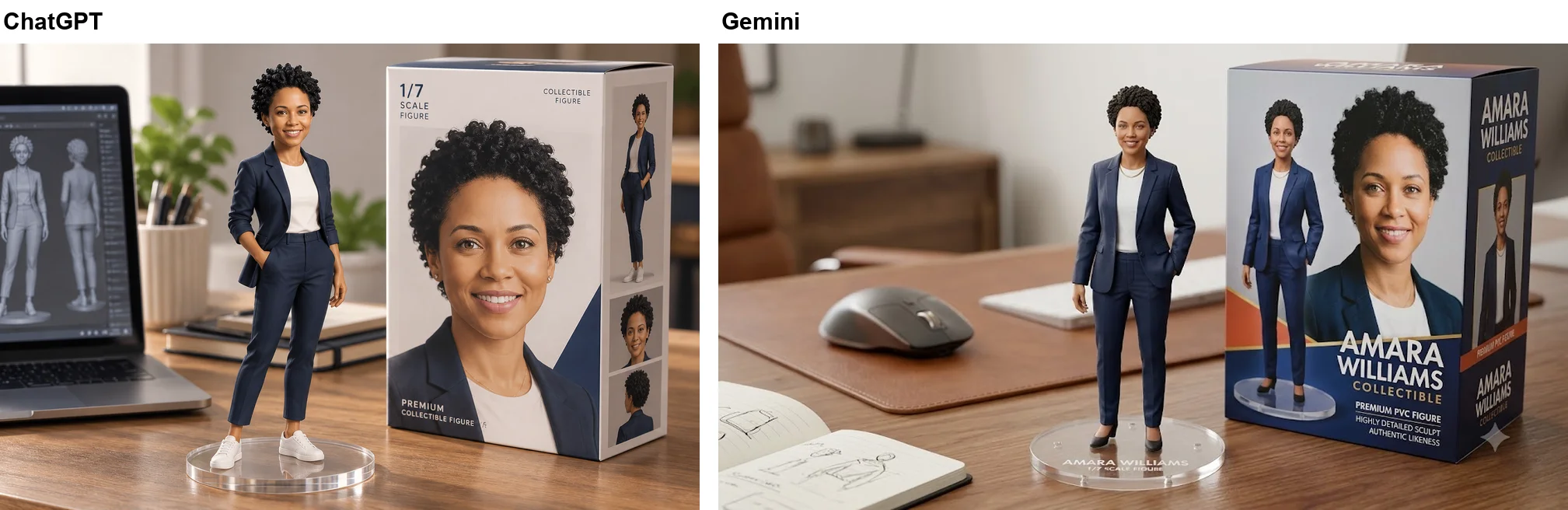
This is where ChatGPT behaved better. Its box carries only generic labels: “1/7 SCALE FIGURE”, “COLLECTIBLE FIGURE” and “PREMIUM COLLECTIBLE FIGURE”, with her portrait on the front and the figure on the side panels. Gemini, given the same prompt, gave her a name, “AMARA WILLIAMS”, and printed it on the box and the base.
ChatGPT did add plenty of scenery of its own: a laptop showing grey 3D-model views of the figure, a plant, a pen pot and books, plus white sneakers on the figure. That is the standard look of this trend, so most people will want it, but none of it was in the prompt. In our earlier ChatGPT test, an invented toy brand came out spelled two different ways on one box, so if you do want a name on yours, put it in quotes.
Black and white: ChatGPT kept the smile
Turn this photo into a dramatic black and white studio portrait with hard side lighting from the left and a dark background. Keep her face and expression exactly the same.
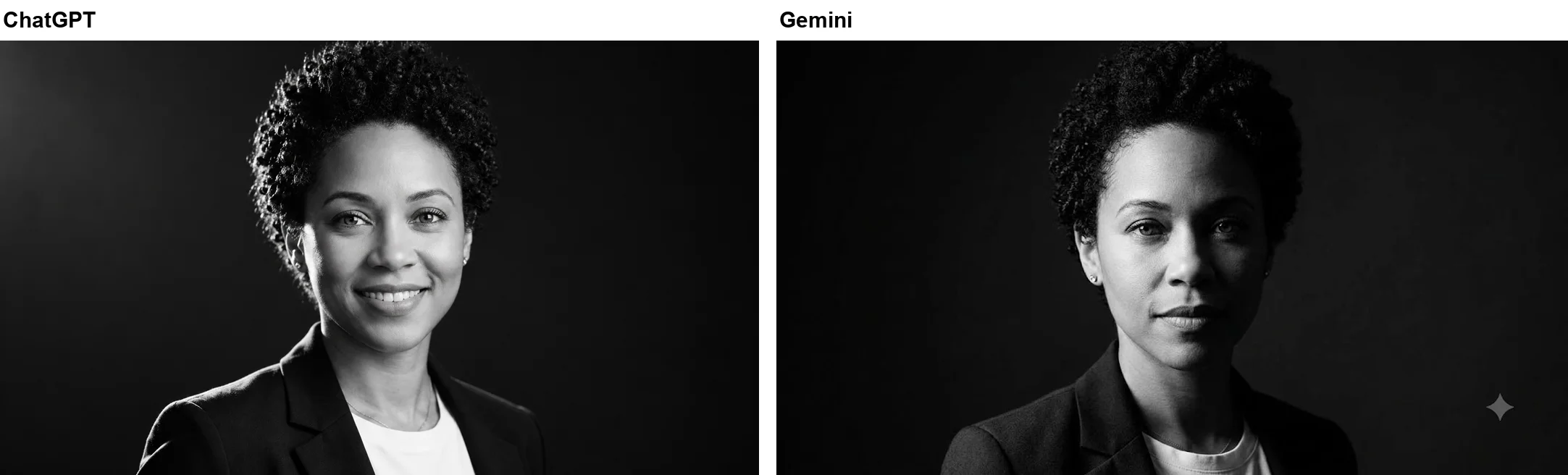
This was Gemini’s clearest failure, and ChatGPT’s clearest win. Gemini turned her broad smile into a serious, closed-mouth look despite “keep her expression exactly the same”. ChatGPT kept the smile, teeth and all.
The trade-off is drama. ChatGPT’s lighting is brighter on the left side of the frame, as asked, but the falloff is soft, so it reads as a polished studio portrait rather than the hard, moody side light I requested. Gemini’s is the more dramatic picture and the less faithful one. If you want both, keep the expression line and describe the light more strongly, for example “a single hard light, deep shadow on the right side of her face”.
ALLEWAY: the masthead it misspelt
Turn this photo into a fashion magazine cover. Add the masthead “ALLEYWAY” at the top in bold serif letters and the cover line “The New Creators” at the bottom. Keep her face exactly the same. No other text.
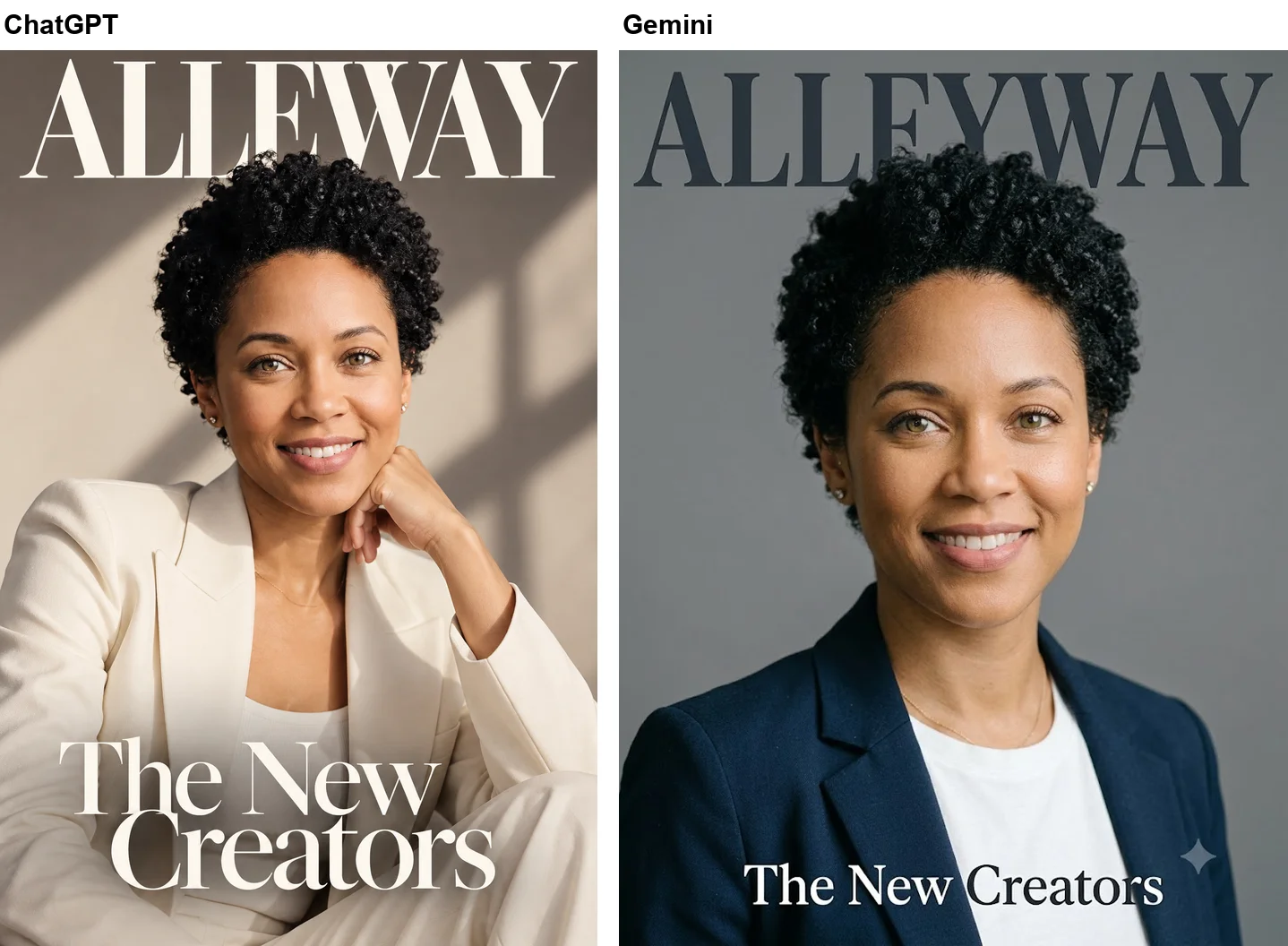
ChatGPT made the better-looking cover and the wrong one. It restyled her completely, in a cream suit against a wall striped with warm window light, seated with her hand at her chin, and it switched to a tall 1,024 by 1,536 frame on its own. The cover line “The New Creators” is exact and there is no other text. But the masthead reads “ALLEWAY”, with one Y missing, in letters large enough that nobody could miss it.
Gemini spelled “ALLEYWAY” correctly but barely restyled the photo, keeping the grey backdrop and her blazer. For a cover you plan to share, OpenAI’s advice fits exactly: spell unusual words letter by letter, for example “A-L-L-E-Y-W-A-Y”. I did not rerun the prompt that way, so I cannot say whether it would have fixed it, but read every letter of a ChatGPT headline before you post it.
Bollywood saree look in ChatGPT
Restyle this photo as a 1970s Bollywood film still: she wears a flowing red chiffon saree, soft golden-hour light, warm grainy film look, vintage backdrop. Keep her face, skin tone and hair exactly the same.
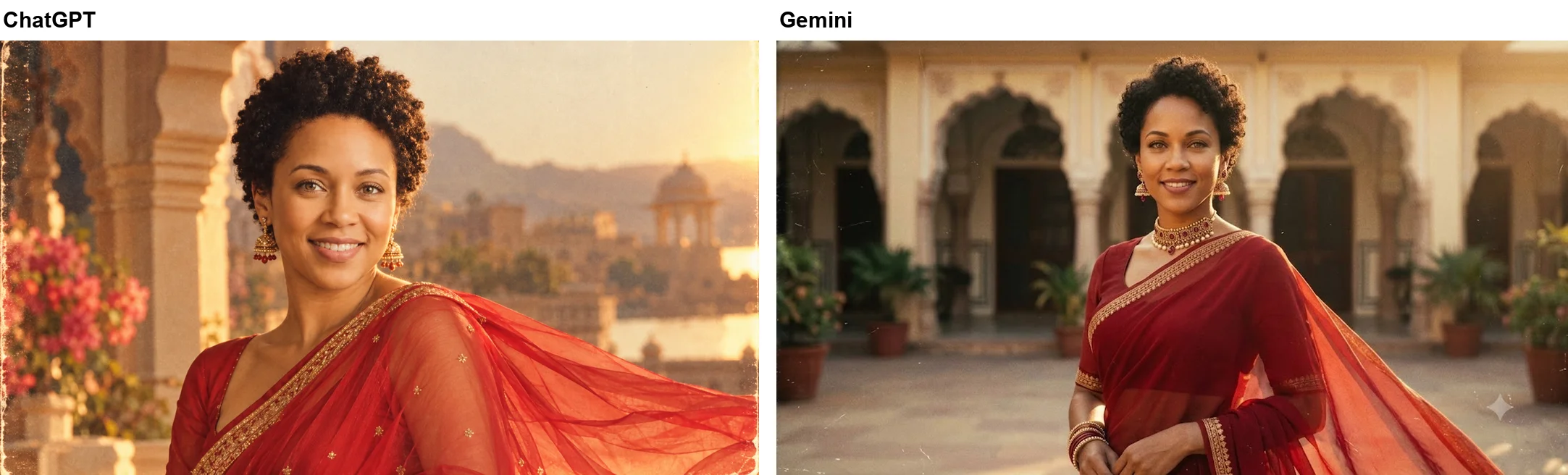
Both kept her face, skin tone and short curls, which is what the keep list was for. ChatGPT set the scene on a palace terrace above a lake, with arches, bougainvillea and a domed palace across the water, warm grain and a worn film edge on the left. It kept the head-and-shoulders framing of my photo, while Gemini pulled back to a waist-up shot.
Both added jewellery nobody asked for. ChatGPT stopped at a pair of large gold drop earrings; Gemini added a choker, earrings and bangles. If you want none, say “no jewellery”.
Rainy night portrait, new jacket
Make this a cinematic portrait at night in the rain: wet street with neon reflections, teal and orange colour grading, shallow depth of field. Keep her face exactly the same.
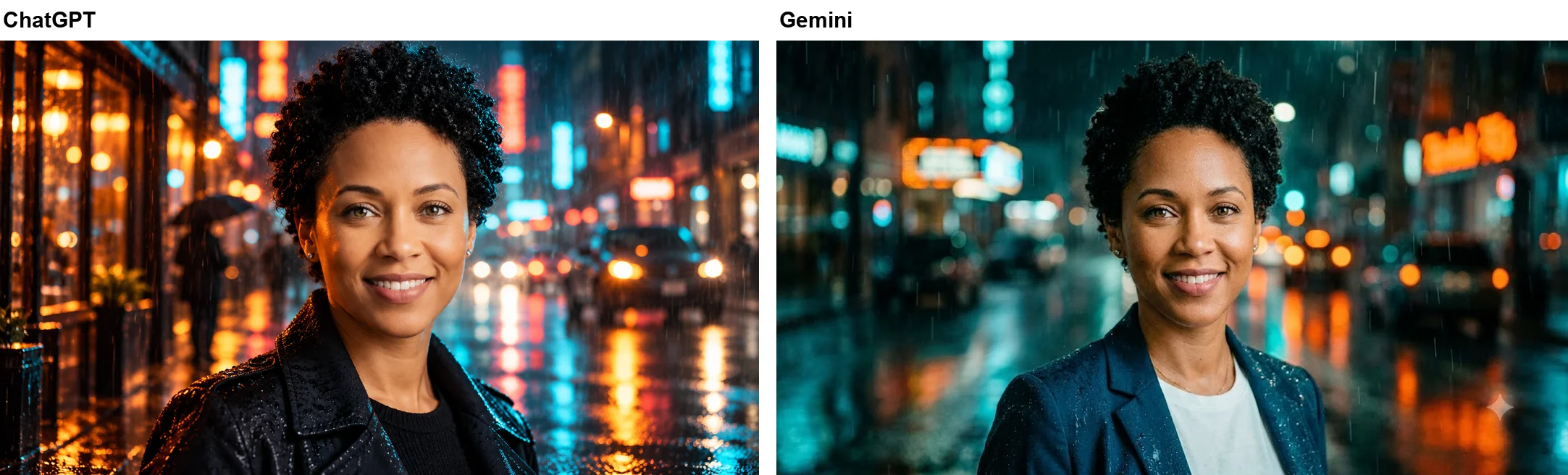
The keep list here named only the face, and that is all ChatGPT kept. Her face, smile, curls and earrings carried over, but her navy blazer became a wet black leather jacket over a black top. The scene is busier and more cinematic than Gemini’s, with a pedestrian under an umbrella, a car’s headlights and raindrops beaded on her hair and jacket, while the neon signs are blurred with no readable words.
Gemini, with the same words, kept the blazer and t-shirt. Neither behaviour is wrong; the prompt left the outfit open. But it shows the difference between the two tools clearly. If the outfit matters, add it to the keep list: “Keep her face, hair and outfit exactly the same.”
Asking for anime, getting a painting
Redraw this photo in a hand-drawn anime illustration style with soft pastel colours. Keep her hairstyle, outfit and expression.
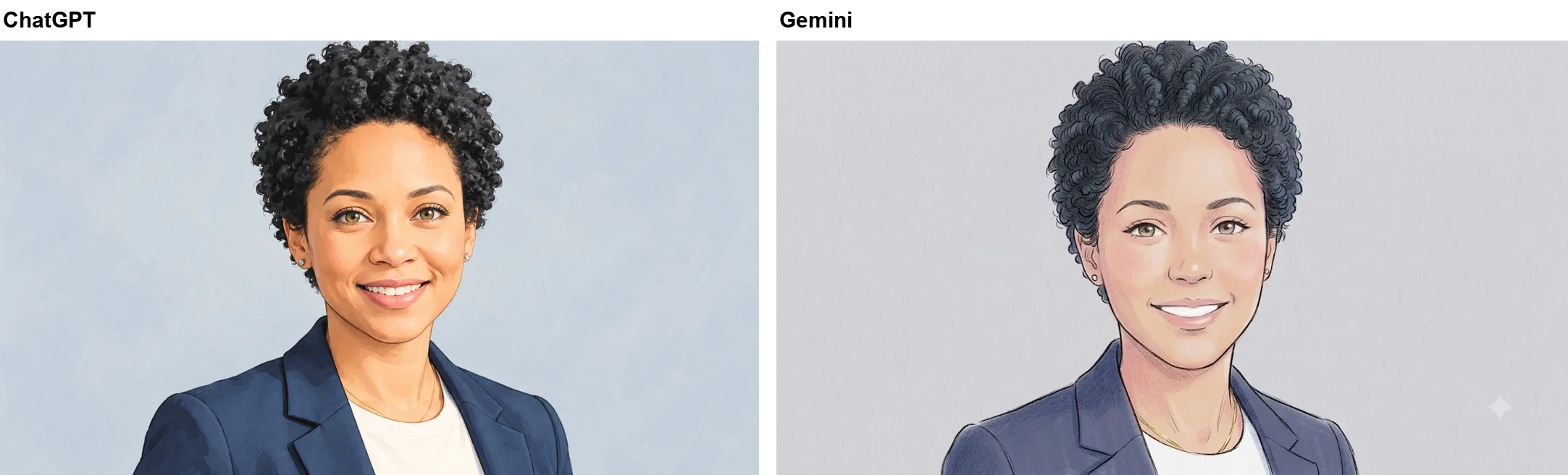
Neither tool drew anime in the sense most people mean, with large eyes and flat cel shading. ChatGPT produced a soft painted portrait with light linework on a pale blue background; Gemini produced a coloured-pencil sketch. Both kept the hairstyle, the outfit and the smile.
The difference is skin tone. Gemini rendered her noticeably lighter and pinker than the photo. ChatGPT kept her close to the original, even though neither keep list mentioned skin. For a style you actually want, name it precisely: “1990s cel-shaded anime, large expressive eyes, flat colours, clean ink outlines.”
ChatGPT headshot prompt: it guessed the hair
Turn this photo into a professional LinkedIn headshot: the same man in a navy suit and white shirt, plain grey studio backdrop, soft studio lighting, looking at the camera. Keep his face, beard and age exactly the same.
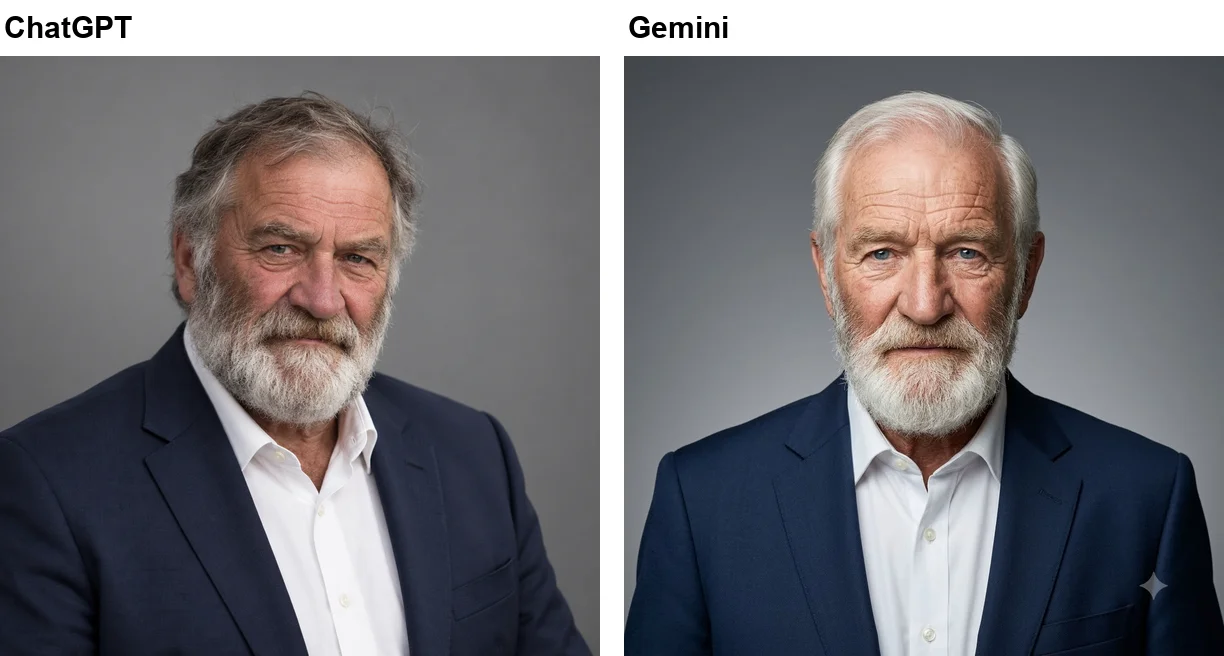
Both tools delivered a usable square headshot, ChatGPT’s at 1,254 pixels a side: navy suit, open-collar white shirt, grey backdrop, soft light. Both kept the beard and the age. And both had to invent what the photo hid. The fisherman wears a woollen hat and looks down at his net, so neither tool could see his hair or his eyes.
Put side by side, the guesses look like two different men. ChatGPT gave him tousled grey-brown hair and blue-grey eyes, with a moustache darker than the white beard in the photo; Gemini gave him swept-back white hair and pale blue eyes. The lesson is the same for both: start from a clear, front-facing photo, or the headshot will contain features that are not yours.
Polaroid prompt: ChatGPT aged it harder
Make this look like a faded 1980s Polaroid photo with a white border and a handwritten caption “Summer ‘86” on the border.
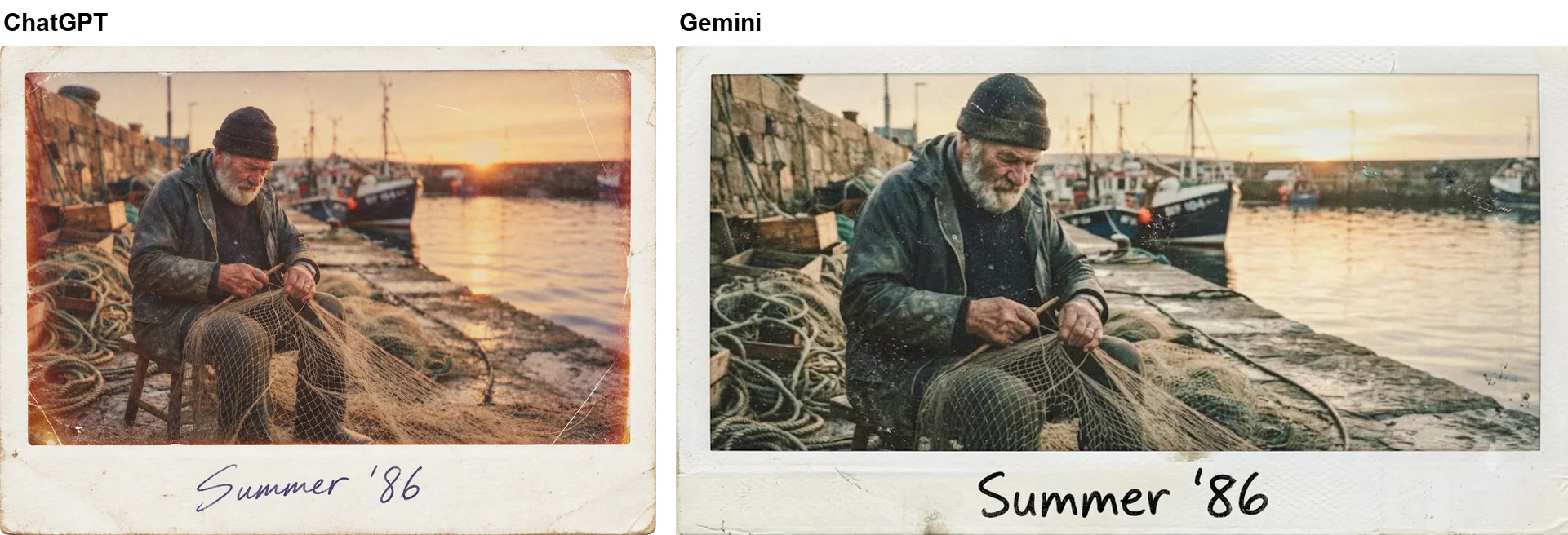
Both spelled “Summer ‘86” exactly, apostrophe included. ChatGPT wrote it in blue-ink cursive and aged the picture far more convincingly: a warm orange cast, burned edges, creases and scratches, and wear on the border. Its frame is 1,452 by 1,083, closer to square than Gemini’s wide landscape, though still not the square shape of a real instant photo. If you want that, add “square format”.
ChatGPT or Gemini for photo trends?
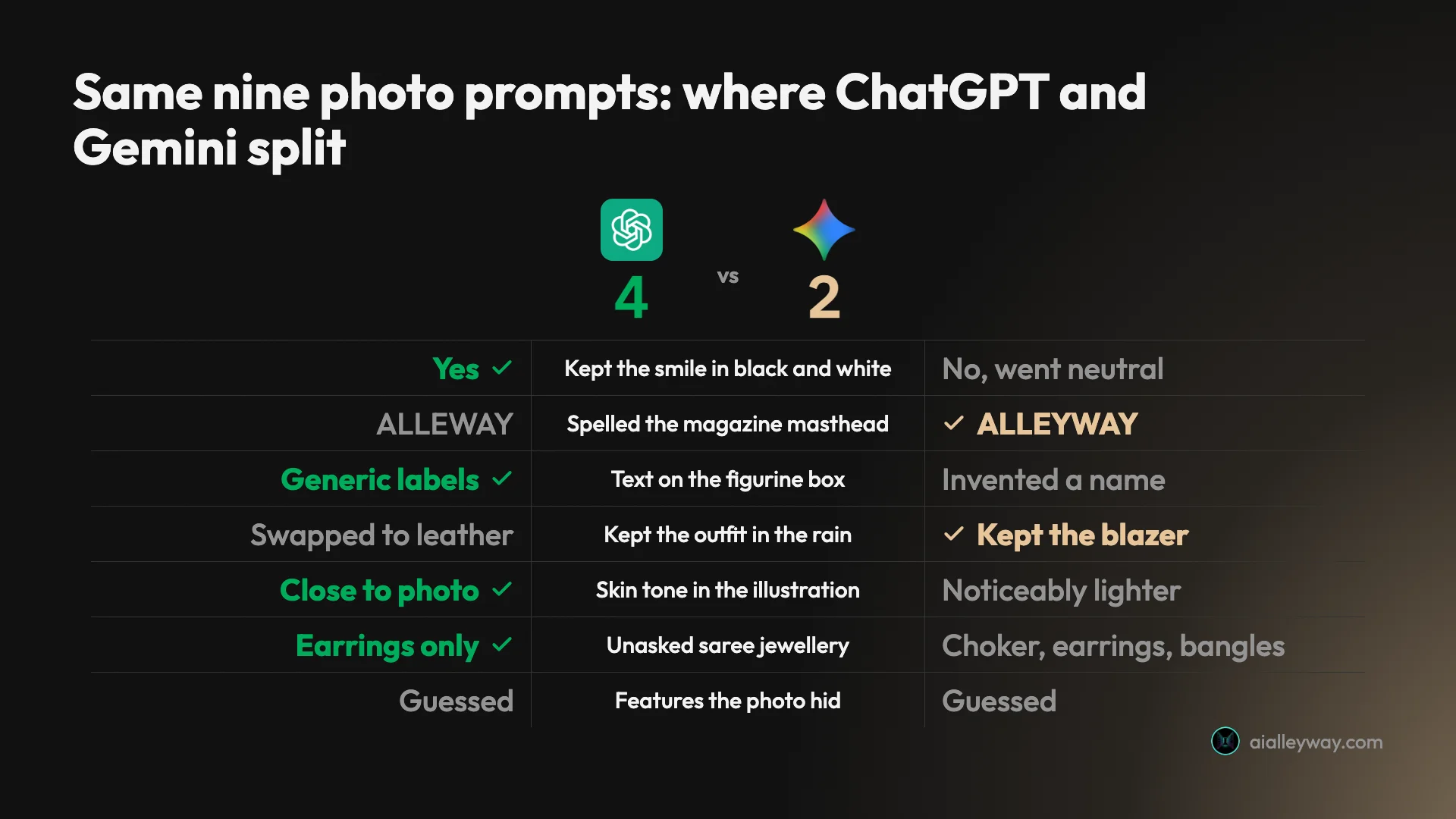
On the nine prompts, the two tools split in a pattern worth knowing. Of the seven rounds I could score, ChatGPT won four, Gemini two, and one was a tie; the 1990s studio and Polaroid prompts went to neither, because both tools did what was asked and the differences, a date stamp and how hard the ageing looks, come down to taste.
| Prompt | ChatGPT | Gemini |
|---|---|---|
| 1990s studio | All elements, no text | All elements, plus a date stamp |
| Figurine | Generic box labels, added laptop | Invented name and taglines |
| Black and white | Smile kept, softer light | Smile lost, dramatic light |
| Magazine cover | Full restyle, masthead misspelt | Correct masthead, little restyle |
| Saree | Head-and-shoulders, earrings added | Waist-up, choker, earrings, bangles |
| Rain | Outfit swapped for leather | Outfit kept |
| Anime | Painted portrait, skin kept | Pencil sketch, skin lighter |
| Headshot | Hair and eyes guessed | Hair and eyes guessed differently |
| Polaroid | Exact caption, strong ageing | Exact caption, mild fading |
ChatGPT was more faithful to the person: the face and the smile held in all seven prompts on the clear portrait, and in the colour images the skin tone stayed close to the photo. Gemini was more faithful to the words, spelling the masthead right, and more conservative with the outfit when I left it open, keeping the blazer in the rain. I ran Gemini on a free account and ChatGPT on Plus. For a photo of yourself where the face and expression matter most, ChatGPT had the edge in this test; for anything with a headline, check the spelling whichever tool you use.
Speed was similar: every Gemini image was ready within 50 seconds, and every ChatGPT image within about 50 seconds except the first, which took up to 77. ChatGPT’s default landscapes came out at about 1,657 by 949 pixels, slightly less wide than Gemini’s.
Which one to use comes down to the job:
- A profile picture where your expression matters: ChatGPT, which kept the smile and the skin tone.
- A cover, poster or anything with a headline: Gemini, or ChatGPT with the word spelled out letter by letter.
- No paid plan: start in Gemini, which ran all nine prompts on a free account in our test.
- Skip ChatGPT for this on the Free plan if you want to try several trends in a day: our free ChatGPT image test found 3 image requests per rolling 24 hours, a third of these nine.
For a broader comparison of the two image tools, see our Nano Banana vs ChatGPT test, and for object and background edits, our ChatGPT image editing test.
Where my ChatGPT photo prompts went wrong
| Mistake | What happened in my test |
|---|---|
| A keep list that names only the face | The rain prompt kept her face and swapped her blazer for a leather jacket |
| Text without spelling it out | The cover masthead came out as ALLEWAY |
| A photo that hides the face | Under a hat, ChatGPT invented the fisherman’s hair and eyes |
| A vague style name | ”Anime” came back as a soft painted portrait |
| No shape in the prompt | ChatGPT picked tall, square and 4:3 frames on its own |
Each of these is a line you can add before you send: name the outfit, spell the word, use a clear photo, describe the style, and give the shape.
Fixes for ChatGPT photo prompts
These are the prompts from my test with the fix for each miss built in. Swap the words in square brackets for your own. The fixes come from the misses above and OpenAI’s guide; I did not rerun them.
- Black and white: “Turn this photo into a dramatic black and white studio portrait with a single hard light from the left, deep shadow on the right side of the face, and a dark background. Keep my face and my wide smile exactly the same.”
- Magazine cover: “Turn this photo into a fashion magazine cover with the masthead “[TITLE]”, spelled [T-I-T-L-E], at the top in bold serif letters and the cover line “[LINE]” at the bottom. Keep my face exactly the same. No other text.”
- Cinematic: “Make this a cinematic portrait at night in the rain: wet street with neon reflections, teal and orange colour grading, shallow depth of field. Keep my face, hair and outfit exactly the same.”
- Saree or any costume: “Restyle this photo as a [decade and film style] still: [outfit], [light], [backdrop]. Keep my face, skin tone and hair exactly the same. No jewellery.” Leave the last line out if you want the accessories.
- Illustration: “Redraw this photo as [named style, for example 1990s cel-shaded anime with large expressive eyes and clean ink outlines]. Keep my hairstyle, outfit, smile and skin tone.”
- Headshot: “Turn this photo into a professional LinkedIn headshot: [suit colour], plain grey studio backdrop, soft studio lighting, looking at the camera, square format. Keep my face, hair, beard and age exactly the same.” Use a front-facing photo.
Final word
ChatGPT is a strong tool for photo trends, and in this test it was the more faithful of the two to the person in the picture. On the same nine prompts and the same two photos, it kept the smile Gemini lost, kept the skin tone Gemini lightened and printed no invented name on a toy box. What it often will not do is leave alone things you did not mention: a jacket, the jewellery, a whole outfit on a cover. And it can misspell a word as big as a masthead. Write the keep list in full, quote and spell any text, and compare the result with your photo before you post it.
Frequently asked questions
What are some good ChatGPT prompts for pictures of yourself?
The ones that held up best in my test start with the change, name the look, add two or three details and end with what to keep. For example: "Make this a cinematic portrait at night in the rain: wet street with neon reflections, teal and orange colour grading, shallow depth of field. Keep her face exactly the same."
On ChatGPT Plus, all nine trend prompts I ran came back as a recognisable version of the person in the photo, eight of them clearly. The ninth used a photo whose hat and downcast eyes hid the hair and eyes, so ChatGPT had to guess them.
How do I prompt ChatGPT to edit my photo?
Attach the photo with the plus button or the photo icon, then describe the change in one or two sentences and list what must stay the same, such as the face, skin tone, hair and expression. OpenAI's own guide recommends the pattern "Change only X. Keep everything else exactly the same."
Name everything you care about. My rain prompt only said to keep the face, and ChatGPT swapped her navy blazer for a black leather jacket.
What are the trending ChatGPT image prompts for photos?
The trends I tested were the 1990s mall studio portrait, the collectible figurine, the dramatic black-and-white portrait, the magazine cover, the retro Bollywood saree, the cinematic rain portrait, the anime redraw, the LinkedIn headshot from a casual photo and the faded Polaroid. Each one was ready on ChatGPT Plus within about 80 seconds, and all but the first within about 50.
The anime prompt was the weakest: like Gemini, ChatGPT produced a soft painted portrait rather than a classic anime look, so name the style precisely.
What is the most realistic photo prompt for ChatGPT?
In my test, the most convincing photographic results came from prompts that described the light and the setting as a photographer would. The 1990s studio prompt named the backdrop, the on-camera flash and the grain, and the result looked like a real mall portrait with her face unchanged.
The LinkedIn headshot prompt also produced a clean, square studio photo, but from a photo that hid the man's hair and eyes ChatGPT had to invent them, so start from a clear, front-facing photo.
Is ChatGPT or Gemini better for photo trend prompts?
On the same nine prompts and the same two photos, ChatGPT won four of the comparisons I tracked and Gemini two, with one tie. ChatGPT kept the smile in the black-and-white portrait, kept the skin tone in the illustration and put no invented name on the figurine box. Gemini spelled the magazine masthead correctly where ChatGPT wrote ALLEWAY, and kept the outfit in the rain portrait.
Gemini is free to try without a paid plan, while I ran ChatGPT on Plus. Either works; check every word and every detail the prompt did not name.
Does ChatGPT keep your face the same?
Largely, yes. Across the seven prompts on a clear studio portrait, the face, the curly hair and the smile carried over every time, including in the black-and-white portrait where Gemini had dropped the smile, and in the colour images the skin tone stayed close to the photo.
What ChatGPT changed were several things I left open: a new jacket in the rain, gold earrings with the saree, and a full cream suit on the magazine cover. Name each detail you want kept.
Keep reading
Gemini AI Photo Prompts: 9 Trends Tested on a Free Account
Gemini AI photo prompts for 9 selfie trends, tested free with every result shown: the face mostly held, but Gemini invented a name, jewellery and new hair.
ChatGPT Image Prompts: 15 Tested, With the Results
ChatGPT image prompts for headshots, product shots, thumbnails, logos, stickers and edits, each tested on ChatGPT Plus with the result it gave.
ChatGPT Image Editing: 7 Photo Edits Tested
How ChatGPT image editing works: upload a photo, describe the change, use the editor tools, and what held or slipped in seven real edits on ChatGPT Plus.
Nano Banana vs ChatGPT: 12 Prompts, Two Different Winners
Nano Banana vs ChatGPT, tested with the same 12 prompts: ChatGPT follows a brief exactly, Nano Banana is twice as fast and free. Which one to use, and when.