
Gemini AI Photo Prompts: 9 Trends Tested on a Free Account
Gemini AI photo prompts for 9 selfie trends, tested free with every result shown: the face mostly held, but Gemini invented a name, jewellery and new hair.
Contents
Gemini AI photo prompts, in short
The Gemini AI photo prompts that work are short edit instructions on an uploaded photo. The best ones start with the change you want, name the look, add two or three concrete details, and end with a list of what must stay the same. I ran nine popular trend prompts through a free Gemini account (Nano Banana 2, in Flash mode) on 30 September 2026: the 1990s mall studio portrait, the collectible figurine, the black-and-white portrait, the magazine cover, the retro Bollywood saree, the cinematic rain portrait, the anime redraw, the LinkedIn headshot and the faded Polaroid.
Eight of the nine came back clearly as the same person, and the ninth plausibly so, each within 50 seconds. The words I put in quotes were printed exactly. Most of what went wrong was something the prompt left open or the photo hid: a made-up name printed on a toy box, jewellery nobody asked for, and a head of hair invented under a woollen hat. One miss was Gemini ignoring me outright: a smile that turned neutral despite an instruction to keep it.
Every prompt below is copied exactly as I sent it, with the result next to the photo I uploaded. Nothing was retouched.
Nine selfie trends, two stand-in photos
The account was a free Gemini account, the kind that shows an Upgrade button, and every prompt ran in Flash mode. Google’s help page says Flash and Pro mode use Nano Banana 2, while Flash-Lite, the mode my account had reset to, runs a lighter version that Google says is not designed for multiple image references or multiple edits. Each prompt went into a new chat with a single photo attached, so no result could borrow from the one before.
The photos are not real people. They are two stand-ins made by Gemini in our earlier tests, a woman’s studio headshot from our Nano Banana prompts test and a fisherman mending nets from our Nano Banana review, which are ours to publish. Your own selfie will behave differently in the details, since a real face carries detail the model has never seen, but the patterns below, what held and what drifted, are the ones to watch for.
I uploaded each photo as a full-window screenshot, 1,480 by 812 pixels, through the plus button’s Upload files option. Seven prompts used the woman’s headshot and two used the fisherman. The ten requests (nine prompts, plus one that I stopped by accident and sent again) took about 32 minutes in total, with no refusal and no limit message. The images below are the display-size results Gemini showed, 1,024 pixels on the long side.
The four parts of a Gemini selfie prompt
A photo prompt is different from a prompt that starts from nothing, because the most important instruction is what not to change. Google’s prompting guide for Nano Banana says that when you edit, you should be explicit about what to keep. Google DeepMind’s image prompt guide breaks a prompt into style, subject, setting, action and composition, and says to put any words you want in the image inside quotes and describe how they should look.
Put together, a Gemini photo prompt has four parts, in this order:
- The change. Start with a verb aimed at the photo: “Turn this photo into”, “Restyle this photo as”, “Redraw this photo in”.
- The look. Name the trend or style in plain words: a 1990s mall photo studio portrait, a black-and-white studio portrait, a 1980s Polaroid.
- Two or three details. The ones that make the look recognisable: the backdrop, the light, the outfit, the pose, the colour grade.
- The keep list. “Keep her face, skin tone and hair exactly the same.” Name each feature you care about, because Gemini may treat anything missing from the list as open to change.
If you want text in the picture, add it in quotes and say “No other text”. If the shape matters, name it: DeepMind’s guide suggests prompting for the aspect ratio you want, such as 1:1 or 9:16.
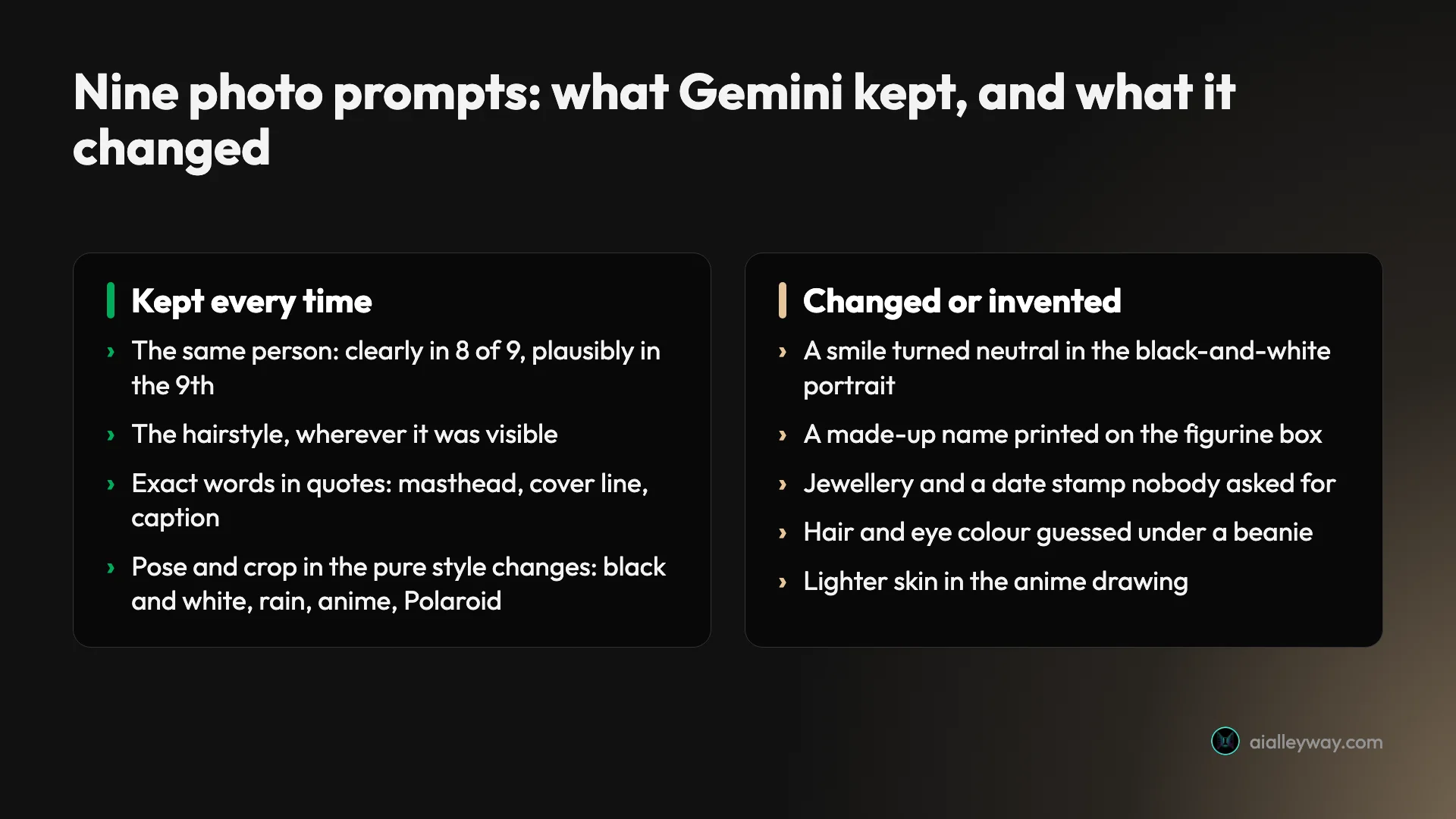
The nine results sort into those two columns. The left one is why these prompts are worth using. The right one is why you should look at every result beside your original photo before you post it.
The 1990s mall studio portrait prompt
The retro studio portrait is a popular Gemini trend, and it rewards a detailed prompt, because the look is a list of specific things: a blotchy blue backdrop, a hard flash, film grain and a stiff pose.
Transform this photo into a 1990s mall photo studio portrait: soft-focus mottled blue backdrop, bright on-camera flash, slightly grainy film look, the person in a denim jacket, posing with a hand under the chin. Keep her face, skin tone, hair and features exactly the same.
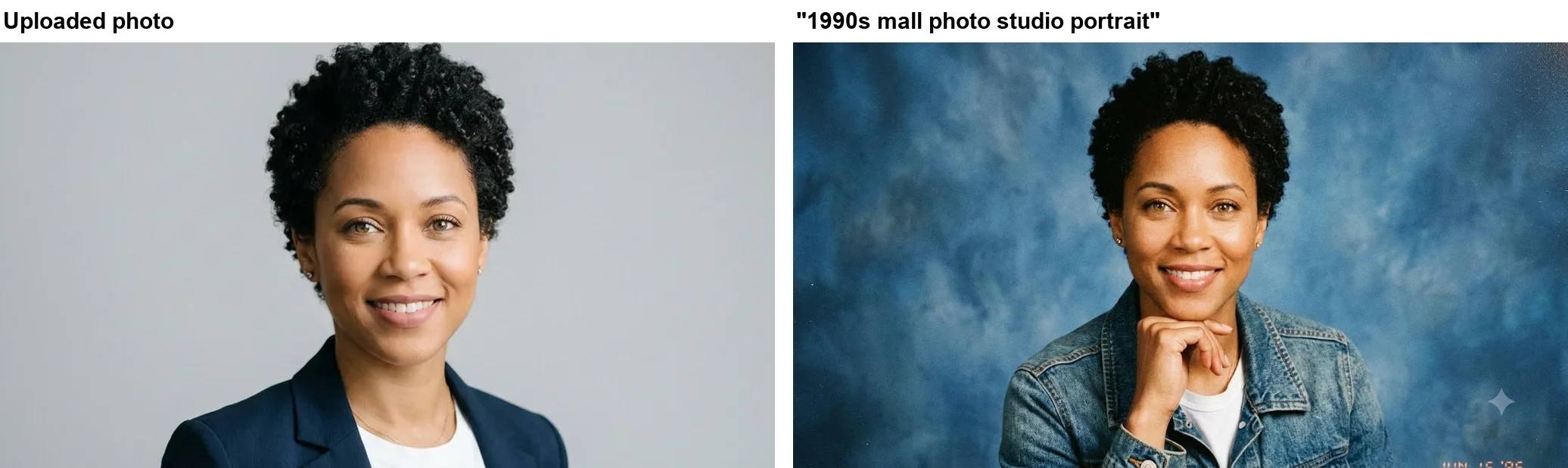
Gemini hit every item on the list. The backdrop is that unmistakable mottled blue, the denim jacket sits over the white t-shirt from the original, and she rests her chin on her hand. Her face, skin tone, short curls and stud earrings all carried over, so she reads as the same woman photographed thirty years earlier. The image was ready about 48 seconds after I sent it.
One addition came unasked: an orange film date stamp in the bottom-right corner reading “JUN 15 ‘95”, half cut off by the edge of the frame. It is a nice period touch, and plenty of people will want it, but it is text you did not write. If you would rather not have it, add “no date stamp” to the prompt, or better, describe the corner you want: “clean corners, no text”.
The collectible figurine prompt
The figurine trend turns a person into a boxed toy on a desk. It is the one where Gemini invents the most, because a toy box naturally carries words, and a prompt rarely says what they should be.
Turn the person in this photo into a 1/7 scale collectible figure standing on a round clear acrylic base on a desk, with a toy packaging box beside it showing her artwork. Keep her face and hairstyle recognisable. Realistic product photo.
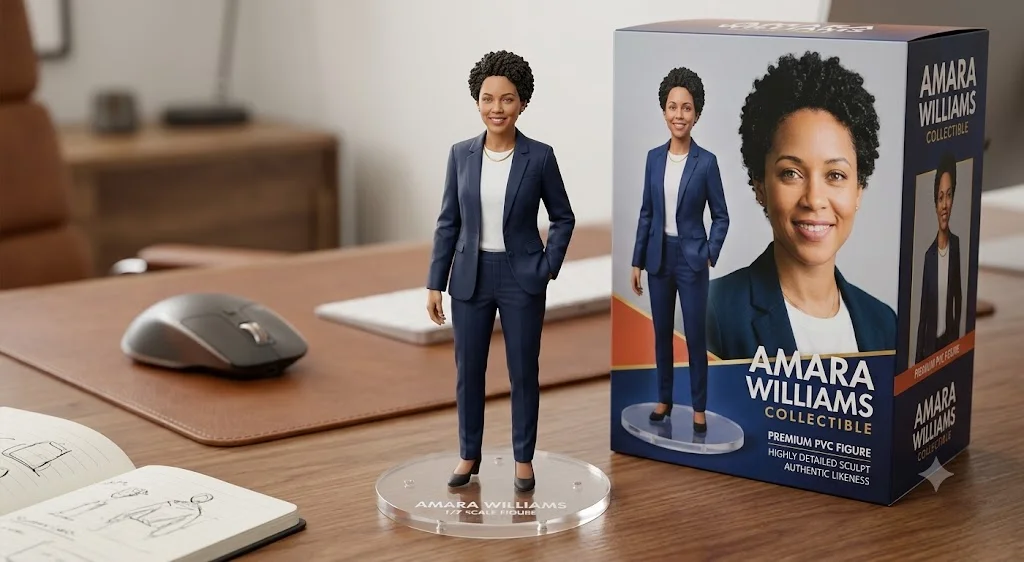
As a product photo, it works: a clean figure on a clear round base, a desk with a mouse, keyboard and sketchbook, and a box with her portrait on the front. The face and the short curly hair are recognisable on both the figure and the box. My photo showed only her head and shoulders, so Gemini decided the rest, dressing the figure in a full navy trouser suit, which fits the blazer it could see.
The box is where it took liberties. Gemini gave her a name, “AMARA WILLIAMS”, and printed it on the front of the box, on the side and on the base, along with “COLLECTIBLE”, “PREMIUM PVC FIGURE”, “HIGHLY DETAILED SCULPT”, “AUTHENTIC LIKENESS” and “1/7 SCALE FIGURE”. None of that was in my prompt. Our earlier Nano Banana prompts test did the same thing with an astronaut figure, inventing a brand and a character name, so treat it as the default behaviour. If you post a figure of yourself, put your own name in quotes: “the box reads “MAYA” and nothing else.”
I stopped the first run of this prompt by accident, with a stray click while it was generating, and sent the same prompt again in the same chat. The result above is from that second send, about 40 seconds after I sent it.
The black and white portrait prompt
This is the prompt where Gemini ignored an instruction outright, and it is worth knowing about because the instruction was about the face.
Turn this photo into a dramatic black and white studio portrait with hard side lighting from the left and a dark background. Keep her face and expression exactly the same.
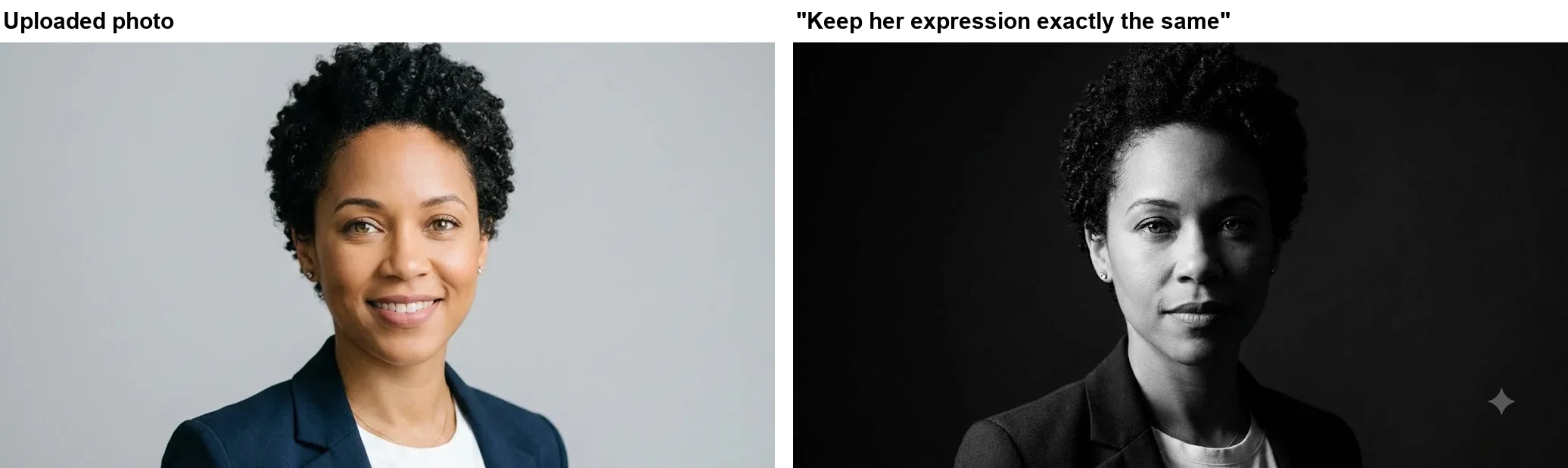
The lighting is exactly what I asked for: a near-black background and hard light falling from the left of the frame, leaving the other side of her face in shadow. It is a strong, moody portrait, and the face is unmistakably hers. But the broad smile in my photo became a neutral, closed-mouth look, despite the prompt saying “keep her face and expression exactly the same”.
My reading is that Gemini weighed “dramatic” more heavily than the keep list, since serious expressions and dramatic portraits usually go together. If the smile matters, name it as a feature rather than calling it an expression: “keep her wide smile, with teeth showing”. And if the first result drops it, reply in the same chat with that single correction instead of starting over. The image was ready in about 46 seconds.
The magazine cover prompt
A magazine cover tests the thing Gemini does best in photo prompts: printing the exact words you give it and nothing else.
Turn this photo into a fashion magazine cover. Add the masthead “ALLEYWAY” at the top in bold serif letters and the cover line “The New Creators” at the bottom. Keep her face exactly the same. No other text.
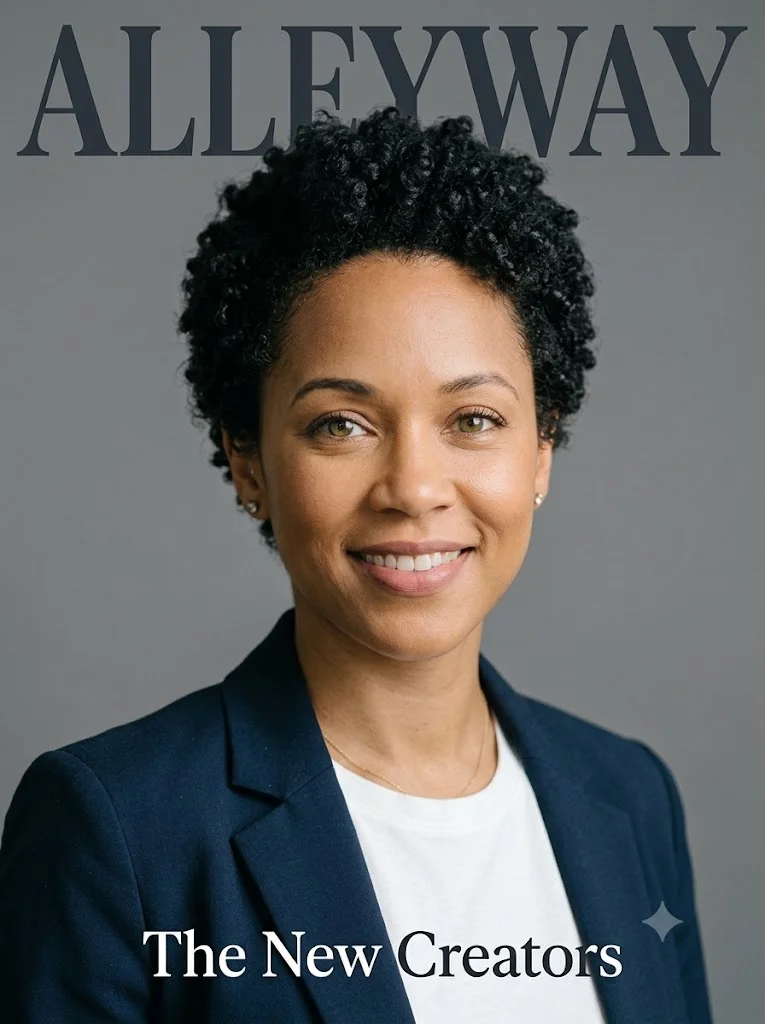
Both lines are spelled exactly, in the serif style I asked for, and there is not a single extra word: no barcode, no issue date, no invented cover lines. The face and the smile carried over untouched, which made this one of the most faithful of the woman’s seven results.
It also changed shape on its own. I uploaded a wide landscape photo, and Gemini returned a tall 765 by 1,024 cover, which is the right shape for a magazine. In our earlier Gemini image editing test, every result kept the proportions of the upload, so a prompt that names a format with a known shape, such as a cover or a headshot, seems to be enough to change it.
The weakness is ambition. It kept the grey studio backdrop and the same blazer and t-shirt, so it reads more like my photo with a title on it than a styled fashion shoot. If you want the full editorial look, say so: name the outfit, the backdrop colour and the pose.
The retro Bollywood saree prompt
The saree prompt is another popular Gemini trend, and it combines three changes at once: a new outfit, a new setting and a film look.
Restyle this photo as a 1970s Bollywood film still: she wears a flowing red chiffon saree, soft golden-hour light, warm grainy film look, vintage backdrop. Keep her face, skin tone and hair exactly the same.
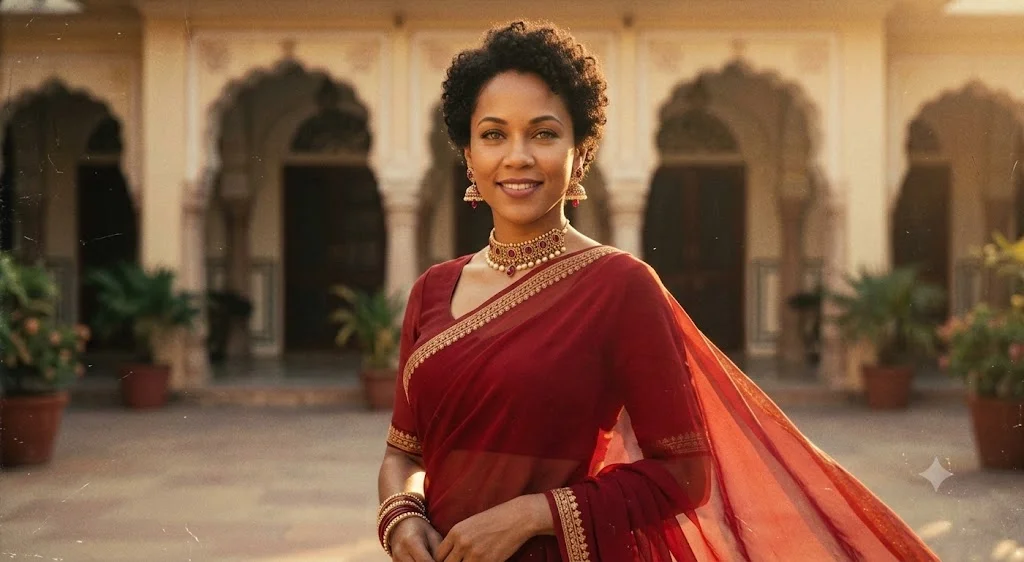
This and the 1990s studio portrait were the two biggest restyles of the person in the nine. The red saree is sheer, with a gold border, and the loose end flows off her shoulder. Gemini chose an arched courtyard lit by low, warm sun, with faint dust specks for the film look. The face, smile, skin tone and short curls all survived the restyle, which is what the keep list was there for.
Gemini also dressed the part without asking. She wears a gold-and-ruby choker, gold drop earrings and a stack of bangles, none of which were in the prompt. That suits the look, and many people would want them, but it is a change to your appearance you did not request. The frame also pulled back to a waist-up shot, so her face is smaller than in my head-and-shoulders photo, which matters if you want a profile picture. Add “head-and-shoulders framing” to keep the crop.
The cinematic rain portrait prompt
This prompt changed everything around her while keeping her face, outfit and crop intact.
Make this a cinematic portrait at night in the rain: wet street with neon reflections, teal and orange colour grading, shallow depth of field. Keep her face exactly the same.
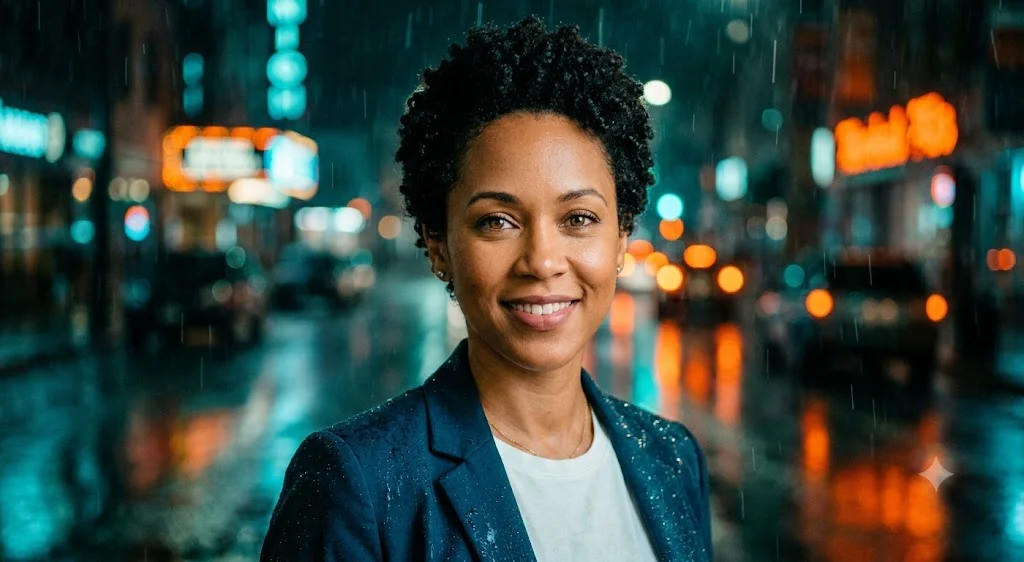
Her face, smile, earrings, fine gold necklace, blazer and t-shirt are all as they were, in the same head-and-shoulders crop. Behind her is a wet street, out of focus, with orange and teal neon, reflections on the road and streaks of rain. There are even droplets on the shoulders of her blazer. It was ready within 44 seconds.
Two small things give it away as an edit. Her hair looks completely dry despite the rain, and the neon signs are blurred into shapes with no readable words. The second is a good outcome, since blurred signs cannot carry misspelt text, but add “hair wet from the rain” if you want the shot to hold up to a close look. For a photo you will actually use as an avatar, this is the prompt I would start from.
The anime portrait prompt
Style redraws are the other big family of Gemini photo trends, and the anime redraw shows how loosely Gemini reads a style name.
Redraw this photo in a hand-drawn anime illustration style with soft pastel colours. Keep her hairstyle, outfit and expression.
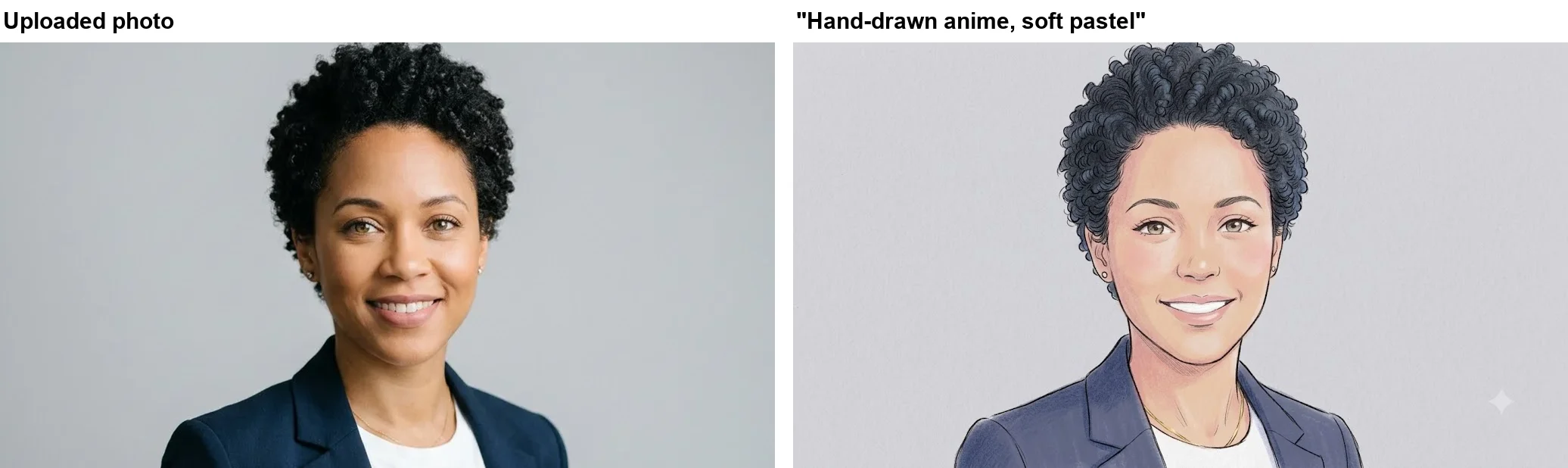
The result is a good drawing, but it is not what most people mean by anime. There are no oversized eyes or flat cel shading; it reads as a coloured-pencil portrait with a light manga line, on textured paper. Everything on the keep list survived: the curly hair, now tinted blue-black, the navy blazer, the white t-shirt, the thin gold chain and the smile. The crop and the grey background were kept too.
The part the keep list did not cover changed. Her skin came out noticeably lighter and pinker than in my photo. That is the drift to look for most carefully in any style change, and it is the reason to add “skin tone” to the keep list for a style change, as I did in the retro and saree prompts, where it held. If you want real anime, name the look more specifically: “1990s cel-shaded anime, large expressive eyes, flat colours, clean ink outlines”.
A LinkedIn headshot from a casual photo
The professional headshot is the most practical prompt here, and the one people most often want for a profile picture. I ran it on the harder photo: a fisherman in a woollen hat, looking down at a net, at sunrise.
Turn this photo into a professional LinkedIn headshot: the same man in a navy suit and white shirt, plain grey studio backdrop, soft studio lighting, looking at the camera. Keep his face, beard and age exactly the same.
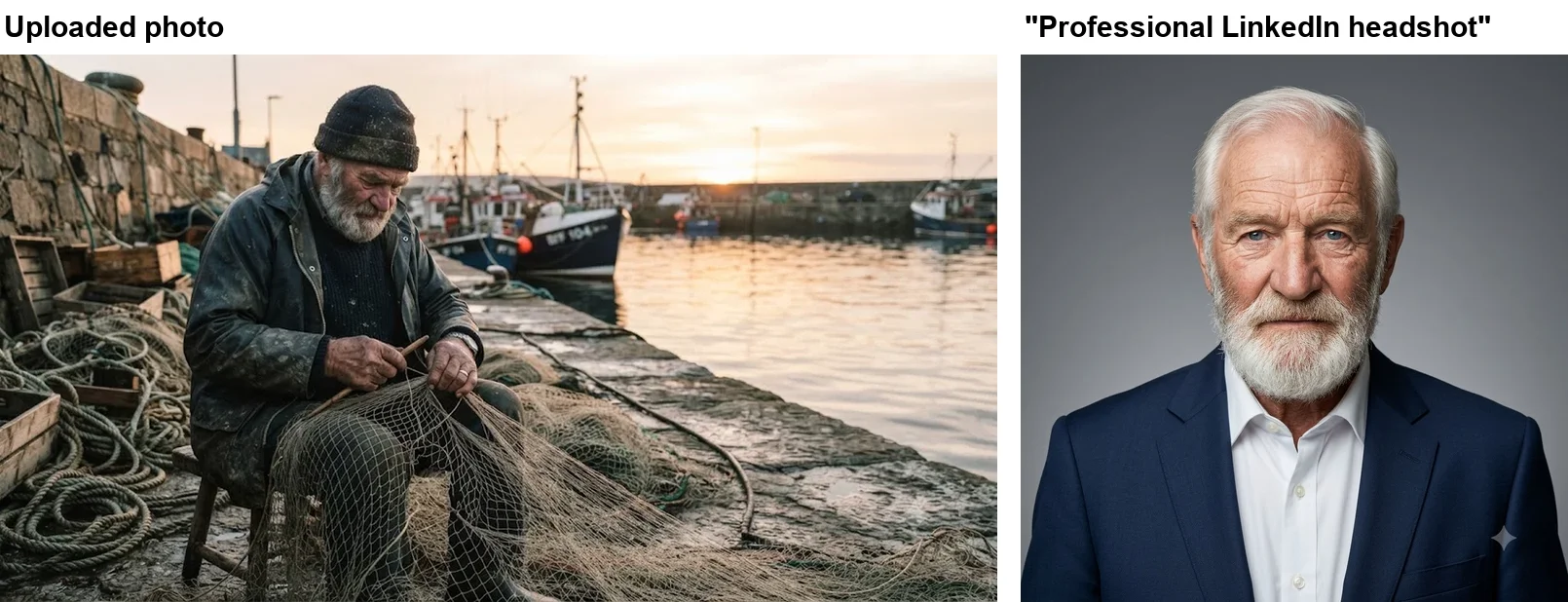
As a headshot, it is ready to upload: a navy suit, an open-collar white shirt, a soft grey backdrop, even lighting and a direct look at the camera. Gemini also chose a square 1,024 by 1,024 frame on its own, the shape most profile pictures use. The white beard and the weathered age carried over.
Look closer, though, and much of this face is a guess. In my photo, a hat covers his head and his eyes are cast down at the net. Gemini had to invent what it could not see, so it gave him a full head of swept-back white hair and pale blue eyes, and rebuilt a downturned three-quarter face as a frontal one. He is plausibly the same man. But if you use a hat photo, a sunglasses photo or a side-on photo, the result will contain features that are not yours. Start from a photo where your face is clear and looking at the camera.
The faded Polaroid prompt
The Polaroid prompt is a small test of handwriting, since the caption is the whole point of the trend.
Make this look like a faded 1980s Polaroid photo with a white border and a handwritten caption “Summer ‘86” on the border.
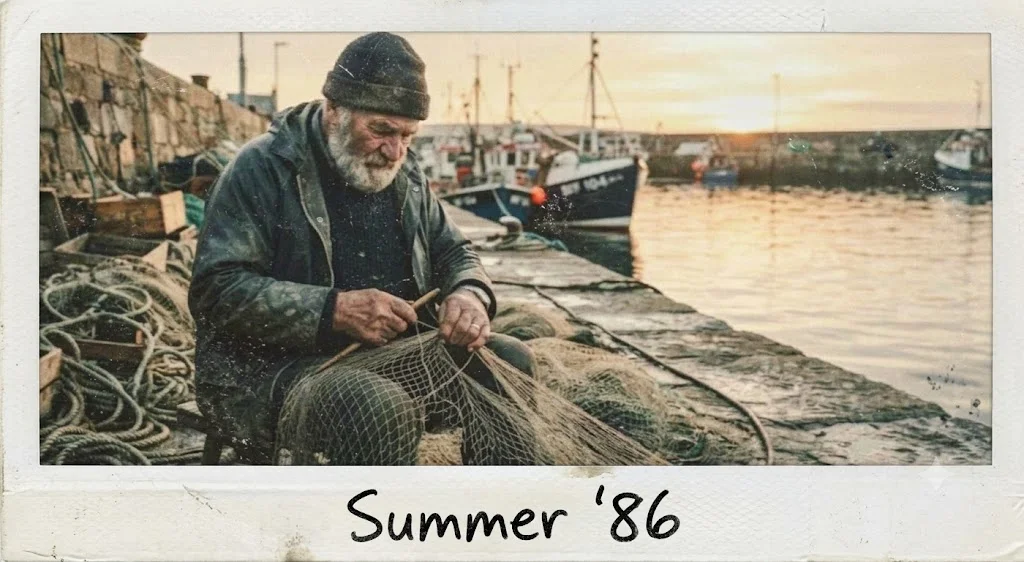
The caption is spelled exactly, apostrophe included, in a convincing black marker hand on a thick bottom border, the way a real instant photo is labelled. The border is off-white and a little scuffed, and the fisherman, his pose, the boats and the harbour are all unchanged underneath.
Two details are off. Real Polaroids are close to square, and this one kept my wide landscape shape. And the “faded” part is mild: the colours are still rich, with a warm cast and some dust specks rather than washed-out tones. Add “square instant-photo format” and “washed-out, low-contrast colours” to get closer to the real thing.
How well Gemini kept the face
Across the nine prompts, identity was the thing Gemini did best, and small details were where it slipped. Here is every result at a glance.
| Prompt | Face recognisable | What held | What changed or was invented |
|---|---|---|---|
| 1990s mall studio | Yes | Face, skin tone, hair, earrings | Film date stamp added |
| Collectible figurine | Yes | Face and hair on figure and box | Invented name and five taglines |
| Black and white | Yes | Face, lighting as asked | Smile turned neutral |
| Magazine cover | Yes | Face, smile, both quoted lines | Shape switched to portrait |
| Retro saree | Yes | Face, smile, skin tone, hair | Jewellery added, wider framing |
| Cinematic rain | Yes | Face, smile, jewellery, outfit, crop | Hair dry in the rain |
| Anime | Yes | Hair, outfit, smile, crop | Skin lighter, not true anime style |
| LinkedIn headshot | Plausibly | Beard, age | Hair and eye colour invented |
| Faded Polaroid | Yes | Scene, pose, exact caption | Landscape shape, mild fade |
Two patterns stand out. First, the keep list works on the things it names. The face held clearly in eight of nine results, and plausibly in the ninth. Skin tone held in both prompts that listed it, and drifted in the anime redraw, one of the five prompts on her photo that did not list it. Second, a mood word in the style can override the keep list: “dramatic” cost the smile in the black-and-white portrait, even though the saree, rain and anime results kept it. The fix is to describe the expression as a physical detail rather than a mood.
Shape, size and the watermark
Gemini mostly returns your photo’s shape. Seven of the nine results came back at 1,024 by 562, the same proportions as my 1,480 by 812 upload. The two exceptions were the prompts that named a format with its own shape: the magazine cover came back tall, and the LinkedIn headshot came back square. If you want a specific shape, for example 9:16 for a story or 1:1 for a profile picture, say so in the prompt.
According to Google’s help page, free downloads come at 1K resolution, and a Google AI plan raises that to 2K. Free images also carry Google’s small sparkle mark in one corner, visible in several of the results above. Google’s watermark settings page says most accounts can turn it off under Media Watermark in Settings, while the invisible SynthID watermark stays in every image regardless. That means you can check whether a picture came from Gemini, which is worth remembering before you pass off a trend photo as a real one.
Photos of real people: what to check first
These trends are built around faces, so a few rules apply that do not come up with product shots. Google’s help page limits image editing in the Gemini app to people aged 18 and over, and describes uploading your own images to edit. Uploading someone else’s photo and changing their appearance is a different matter, so ask first, and never post an edited picture of a real person as if it were a real photograph.
It is also worth thinking about what you upload. A plain headshot against a wall gives Gemini everything it needs, whereas a photo taken at home or with other people in the frame shares more than a trend picture requires. Crop to your face and shoulders before you upload.
Fill-in templates with the fixes built in
These are the prompts from my test, rewritten with the fix for each miss already included. Swap the words in square brackets for your own.
- Retro studio portrait: “Transform this photo into a [decade] mall photo studio portrait: [backdrop], bright on-camera flash, slightly grainy film look, [outfit], [pose]. Clean corners, no text. Keep my face, skin tone, hair and features exactly the same.”
- Figurine: “Turn the person in this photo into a 1/7 scale collectible figure on a round clear acrylic base on a desk, with a toy box beside it showing their artwork. The box reads “[YOUR NAME]” and nothing else. Keep the face and hairstyle recognisable. Realistic product photo.”
- Black and white: “Turn this photo into a black and white studio portrait with hard side lighting from the left and a dark background. Keep my face exactly the same, and keep my wide smile with teeth showing.”
- Cinematic: “Make this a cinematic portrait at night in the rain: wet street with neon reflections, [colour grade], shallow depth of field, hair wet from the rain. Keep my face and skin tone exactly the same.”
- Illustration: “Redraw this photo as [named style, for example 1990s cel-shaded anime with large expressive eyes and clean ink outlines]. Keep my hairstyle, outfit, smile and skin tone.”
- Headshot: “Turn this photo into a professional LinkedIn headshot: [suit or blazer colour], plain grey studio backdrop, soft studio lighting, looking at the camera, square format. Keep my face, hair and age exactly the same.”
Each one keeps the four-part order: the change, the look, the details and the keep list. Use one prompt per new chat, and make any corrections as short replies in the same chat.
Common mistakes with Gemini photo prompts
- Leaving the keep list out. Eight of my nine prompts said what to keep; the face held clearly in seven and plausibly in the eighth, where the photo hid his head and eyes. Without a keep list, Gemini decides for itself what may change.
- Keeping the expression by name only. “Keep her expression” lost the smile under a dramatic lighting prompt. Describe it instead, “a wide smile with teeth showing”, and if it still slips, reply in the same chat with just that correction.
- Forgetting skin tone. It held in both prompts that listed it and drifted in the anime redraw, which did not. List it for any style change.
- Leaving surfaces blank. A toy box and a film corner are both places Gemini wrote something unasked. Quote the words you want, or say “no other text”, which worked perfectly on the magazine cover.
- Uploading a hidden face. A hat, sunglasses or a downward look means Gemini invents what is behind them. Use a clear, front-facing photo.
- Using the wrong mode. Run photo prompts in Flash mode, not Flash-Lite, which the app can reset to. Our how to use Nano Banana guide explains which mode runs which model.
Pick a trend by what the photo is for
For a profile picture you will actually use, start with the cinematic rain prompt, which kept the face, outfit and crop while changing everything around them, or the LinkedIn headshot prompt with a clear, front-facing photo. For something shareable and fun, the 1990s mall studio portrait and the retro saree look changed the most around the face, and both kept the face well with a full keep list.
Use the magazine cover and Polaroid prompts whenever you want words in the picture; both printed the quoted text exactly. Treat the figurine as a novelty that needs your own name in quotes, and the anime prompt as a starting point that needs a more specific style name. For a full set of prompts that start from a blank page rather than a photo, see our Nano Banana prompts guide, and for object and background edits, see our Gemini image editing test. If you use ChatGPT too, our ChatGPT photo prompts test runs these same nine prompts there, on the same photos.
Final word
Gemini kept the face in eight of nine trend prompts, free, in about half an hour, and the ninth was a plausible guess from a photo that hid most of it. It turned one headshot into seven convincing looks and a fisherman into a corporate headshot. The pattern is simple: say the change, name the look, add two or three details, and list everything that must stay the same, skin tone and smile included. Then compare the result with your original photo, because the things Gemini adds on its own, a name, a stamp, a necklace, a new hair colour, are easy to miss at first glance and hard to explain once they are posted.
Frequently asked questions
What prompts should I give for a Gemini AI photo?
Upload your photo, then write one or two sentences that start with the change ("Turn this photo into..."), name the look, add two or three details such as the outfit, the light and the backdrop, and end with what must stay the same, for example "Keep her face, skin tone and hair exactly the same."
In my test of nine trend prompts on a free Gemini account, eight of the nine results were clearly the same person, and the ninth, made from a photo with a hat and downcast eyes, was plausibly him. Most misses came from things the prompt left open, such as a name on a toy box or jewellery with a saree.
What are good Gemini photo prompt examples?
A reliable example is the cinematic rain prompt I tested: "Make this a cinematic portrait at night in the rain: wet street with neon reflections, teal and orange colour grading, shallow depth of field. Keep her face exactly the same." It kept her face, smile, outfit and crop and changed everything around them.
For fun trends, the 1990s mall studio portrait, the collectible figurine and the faded Polaroid with a handwritten caption all worked on a free account. The fill-in templates in this guide give each one with the fixes for what went wrong already included.
How do I make a Gemini trending photo prompt?
Pick the trend, describe its signature details, and add a keep list. For the 1990s mall studio look I named the mottled blue backdrop, the on-camera flash, the grain, a denim jacket and a hand-under-chin pose, and Gemini delivered all of them in about 48 seconds.
The trend name alone is not enough. Spell out the few details that make the look recognisable, because Gemini fills anything you leave out with its own choices, and in my test those choices included a film date stamp and a made-up name.
What are good Gemini prompts for profile pictures?
For a professional profile picture, ask for a LinkedIn headshot with a named suit or blazer colour, a plain grey studio backdrop, soft studio lighting and a look at the camera, then add "Keep his face, beard and age exactly the same." Gemini returned a square, ready-to-crop headshot from a candid harbour photo.
For a casual avatar, the cinematic rain prompt kept the face, smile, outfit and crop intact while changing everything around them. Start from a photo where your face is clear and looking at the camera, because Gemini has to guess anything the photo hides.
Does Gemini keep your face the same?
Mostly, but not every detail. In eight of my nine prompts the result was clearly the same person, and the hairstyle held wherever the photo showed it. Two details slipped: a smile turned into a neutral expression in the black-and-white portrait despite an explicit instruction, and the anime drawing rendered her skin noticeably lighter than the photo.
On the fisherman photo, whose hat hid his hair and whose eyes looked down, Gemini invented swept-back white hair and blue eyes for the headshot. He was plausibly the same man, but those features were guesses. Use a clear, front-facing photo.
Are Gemini AI photo prompts free to use?
Yes. I ran all nine prompts on a free Gemini account on 30 September 2026 with no refusal and no limit message, and Google's help page lists uploading and editing your own photos in the Gemini app. Google says free use comes with usage limits, and I never reached them in this test.
Free downloads come at 1K resolution with a small visible sparkle mark, and editing is limited to people aged 18 and over, according to Google's help pages.
Why does Gemini add text or things I did not ask for?
Because anything the prompt leaves open is filled by the model's own idea of the scene. My figurine prompt asked for a toy box showing her artwork, so Gemini printed an invented name on the box and the base, plus taglines. The 1990s studio prompt came back with a film date stamp, and the saree prompt with a necklace, earrings and bangles.
The magazine cover prompt shows the fix: I quoted the two lines I wanted and added "No other text", and Gemini printed exactly those words and nothing else.
Keep reading
Nano Banana Prompts: 15 I Tested, With the Results
Nano Banana prompts for headshots, product shots, thumbnails, stickers, logos and edits, each tested in Gemini with the result, and what it ignored.
Gemini Image Editing: 7 Photo Edits on a Free Account
How Gemini image editing works on a free account: upload a photo, pick the right mode, describe the change, and what held or failed in seven real edits.
How to Use Nano Banana: Gemini's Image Model, Step by Step
How to use Nano Banana in Gemini: pick the right mode, prompt, edit in plain words and download, with which mode runs which model and what free users get.
ChatGPT Image Prompts: 15 Tested, With the Results
ChatGPT image prompts for headshots, product shots, thumbnails, logos, stickers and edits, each tested on ChatGPT Plus with the result it gave.