
Nano Banana Prompts: 15 I Tested, With the Results
Nano Banana prompts for headshots, product shots, thumbnails, stickers, logos and edits, each tested in Gemini with the result, and what it ignored.
Contents
The short version
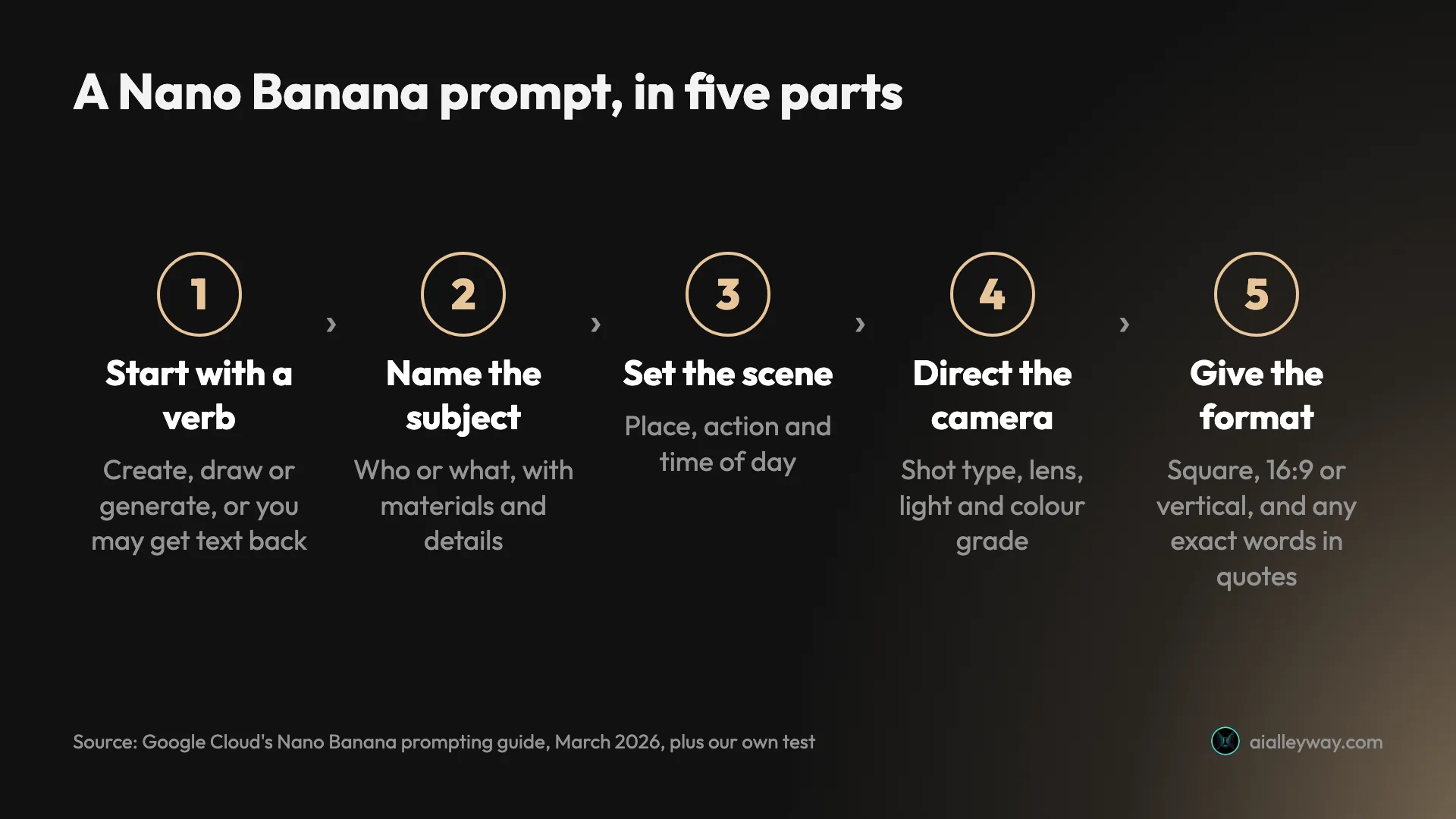
A good Nano Banana prompt starts with a verb, names the subject and its details, sets the scene, directs the camera and light, and ends with the format and any exact words in quotation marks. I ran 15 prompts through Nano Banana 2, in the free Gemini app’s Flash mode, on 28 September 2026 to see what that looks like in practice. The pattern was consistent: Nano Banana did almost everything I described, then added things I had not asked for, from a French press to a NASA logo.
Every prompt below is ready to copy and paste, exactly as I typed it, with the image it produced and a note on what it got wrong. None was rerolled or retouched, though an interface glitch sent the sticker prompt twice; I show the second result, and the first was a near-identical sticker without a face on the stone.
The test: 15 prompts on a free Gemini account
I used a free Gemini account with no Google AI plan, and set the mode picker to Flash before the first prompt. That matters, because the mode decides the model: Google’s help page says Flash and Pro modes use Nano Banana 2, while the default Flash-Lite mode uses the lighter Nano Banana 2 Lite. Our how to use Nano Banana guide explains that choice step by step.
Each prompt ran in a new chat, except the edits and follow-ups, which went into the chat that made the original image. In about half an hour the account took 16 requests, the 15 prompts plus one duplicate caused by the interface, with no refusal and no limit message. The images below are the display-size files Gemini showed in the chat, 1,024 pixels on the long side.
An earlier set of twelve requests, eleven of them in the default Flash-Lite mode, run on 23 September, is covered in our Nano Banana review. This page adds the jobs people most often search prompts for: headshots, product shots, thumbnails, stickers, figures, infographics, logos, interiors and characters.
What Google says makes a good prompt
Google has published two sets of advice, and they agree. Google Cloud’s prompting guide for Nano Banana, from March 2026, gives a formula for text-to-image prompts: subject, then action, then location or context, then composition, then style. It also says to start with a strong verb, use camera terms such as low angle or aerial view, and describe what you want rather than what you do not want, for example an empty street instead of no cars.
The Gemini API’s image generation docs add templates for common jobs. The product-shot template asks for the lighting setup and camera angle; the sticker template asks for the outline and shading style; the text template asks for the exact words in quotes and a described font. The docs call the positive-framing trick a semantic negative prompt.
Google’s docs also suggest a text-first habit for anything with words in it: ask Gemini to draft the headline or labels in the chat first, then ask for the image using that text. I did not test that route, but it is a sensible way to settle the wording before you spend an image on it.
Two pieces of Google’s advice turned out to matter most in my test. The first is the verb: without it, Gemini may answer in words. The second is the positive framing: the one time a no failed, on the busiest brief, it failed badly.
Prompts for photos: headshots and products
Photoreal prompts reward the language of a photographer. Name the lens, the light and the background, and say what the picture is for.
LinkedIn headshot.
Create a professional LinkedIn headshot of a woman in her 30s with short curly black hair, wearing a navy blazer over a white t-shirt, soft smile, plain light-grey studio background, soft key light from the left, 85mm lens, shallow depth of field, square format.
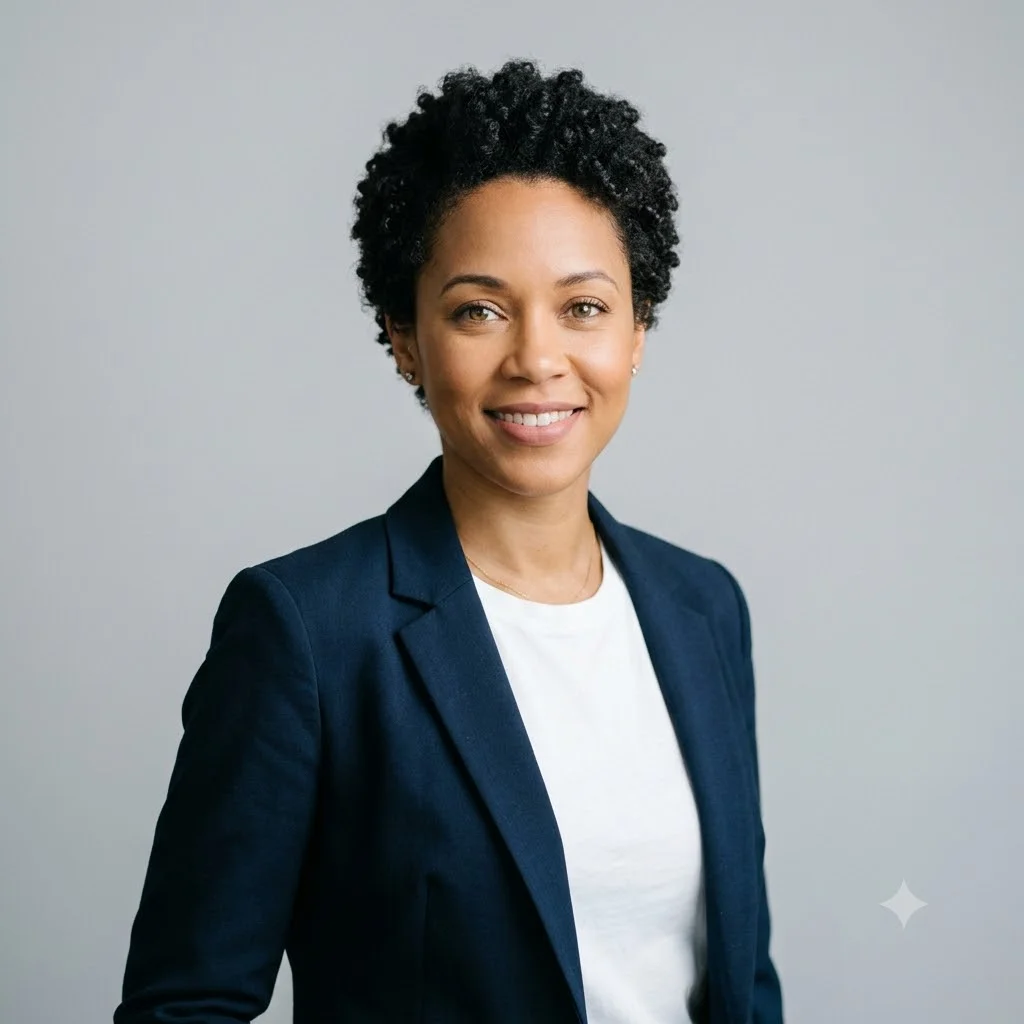
Every detail landed, including the square frame, which Gemini never chose on its own in my tests. The light from the left is there but subtle; if you want a dramatic side light, say how strong. It was ready in under 30 seconds.
Product shot, then an edit.
Studio product photo of a matte sage-green ceramic coffee mug on a white seamless background, soft diffused light, subtle shadow under the mug, no text, no logo, square format.
Then, in the same chat:
Keep the mug exactly the same. Place it on a white marble kitchen counter next to a small plate of croissants, with morning window light from the right.
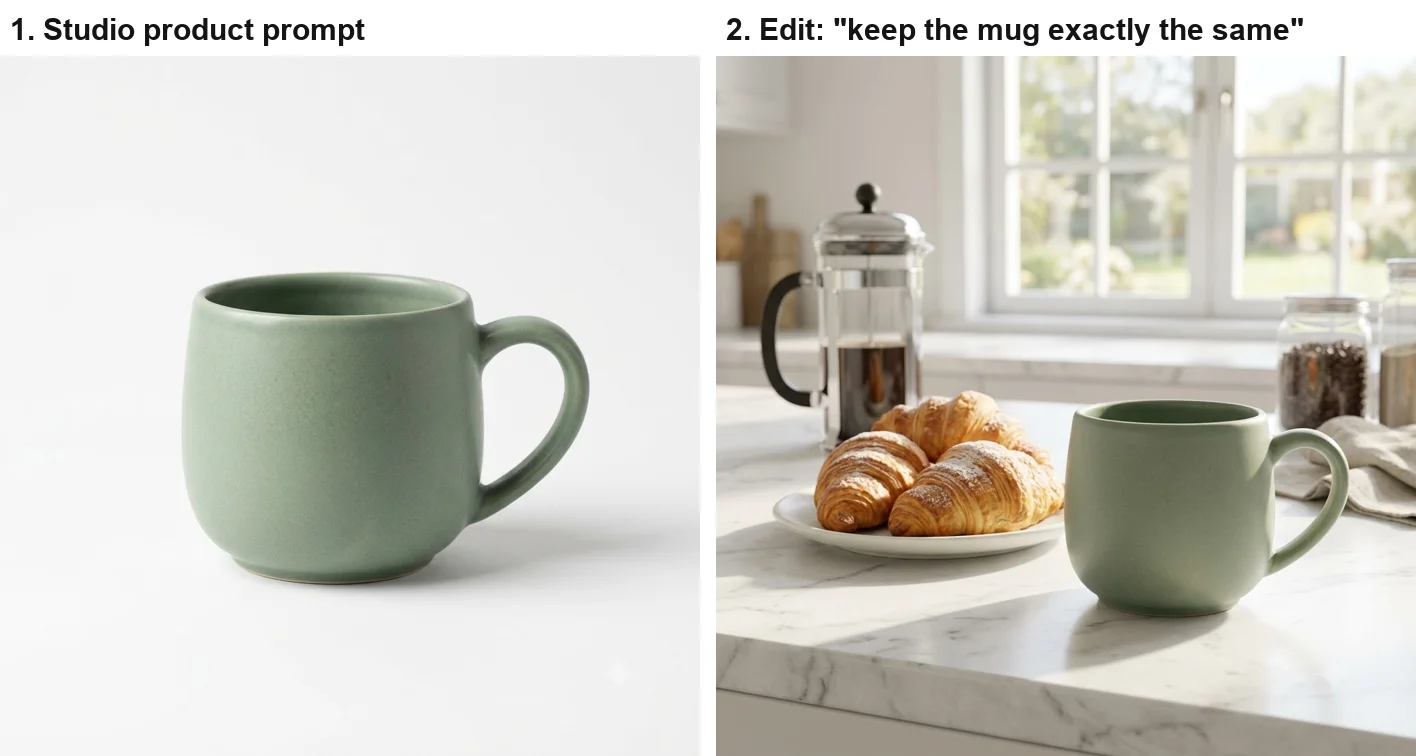
The catalogue shot is clean enough for a shop listing. The edit kept the mug’s shape, colour and handle, which is what “keep the mug exactly the same” is for, and Google’s editing guidance says the same: be explicit about what stays. But Nano Banana dressed the scene with a French press, a jar of coffee beans and a linen towel I never mentioned. For product work, list everything that should be in the frame and add “nothing else on the counter”.
Prompts with words: thumbnails, infographics and logos
Text is where Nano Banana is strongest, and where its habit of adding things costs the most, because an extra word is harder to miss than an extra croissant. Put the exact words in quotation marks and describe the space around them.
YouTube thumbnail.
YouTube thumbnail, 16:9: a surprised man in his 20s pointing at a giant glowing laptop screen, bright yellow background, bold white headline with a black outline reading “I TRIED 5 AI TOOLS”, no other text.
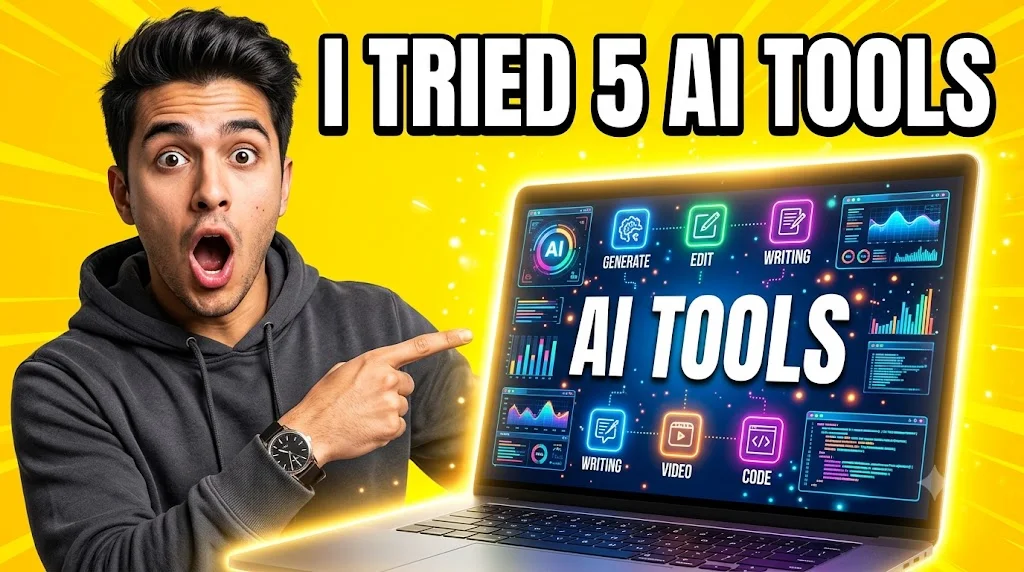
The headline is spelled exactly and the frame is a true 16:9. But “no other text” failed: the laptop screen carries a second “AI TOOLS” and six interface labels, GENERATE, EDIT, WRITING twice, VIDEO and CODE. The laptop is also ordinary-sized, not giant. A better version would describe the screen positively, such as “the laptop screen shows a plain glowing white surface”.
Infographic.
A clean vertical infographic titled “How Coffee Is Made” with four numbered steps: 1 Harvest, 2 Dry, 3 Roast, 4 Brew. One simple icon per step, brown and cream colours, no other text.
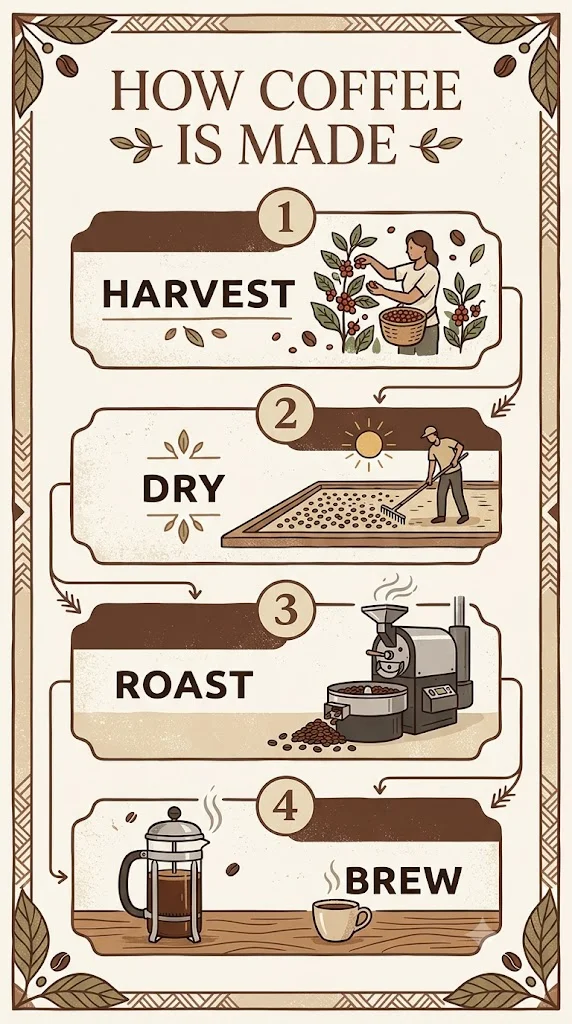
This one obeyed completely: a vertical frame, the title and four labels spelled right, and no stray words. The icons came back as detailed little illustrations of people picking, raking and roasting rather than simple icons, which looks better but would be hard to reuse. Here “no other text” worked, perhaps because the brief left no screen or sign to fill.
Logo.
A minimalist logo for a bakery called “Maple & Rye”: a simple wheat stalk icon above the name in an elegant serif font, dark brown on cream, flat vector, no other text.
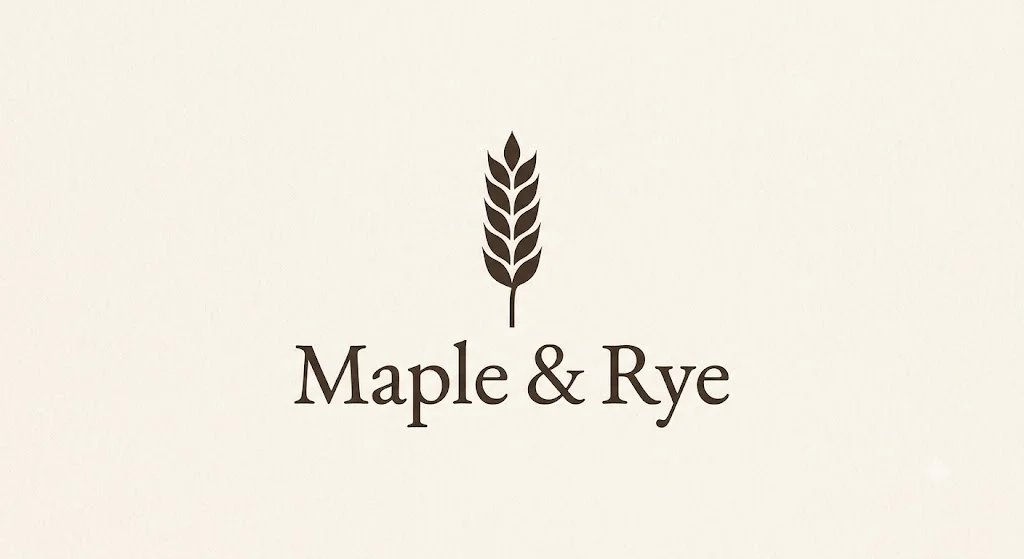
The cleanest result of the test, ampersand included. The one catch is the file: asking for “flat vector” gets you the look of vector art, not a vector file. The download is a PNG on a faintly textured cream background, so you would still need to trace it before using it at print size.
Prompts for illustration: stickers and collectible figures
Illustration prompts work best when they name the style, the outline and the background, which is exactly the shape of Google’s sticker template.
Die-cut sticker.
A die-cut sticker of a cheerful cartoon avocado wearing sunglasses and giving a thumbs up, thick white border, flat vector style, plain background, no text.
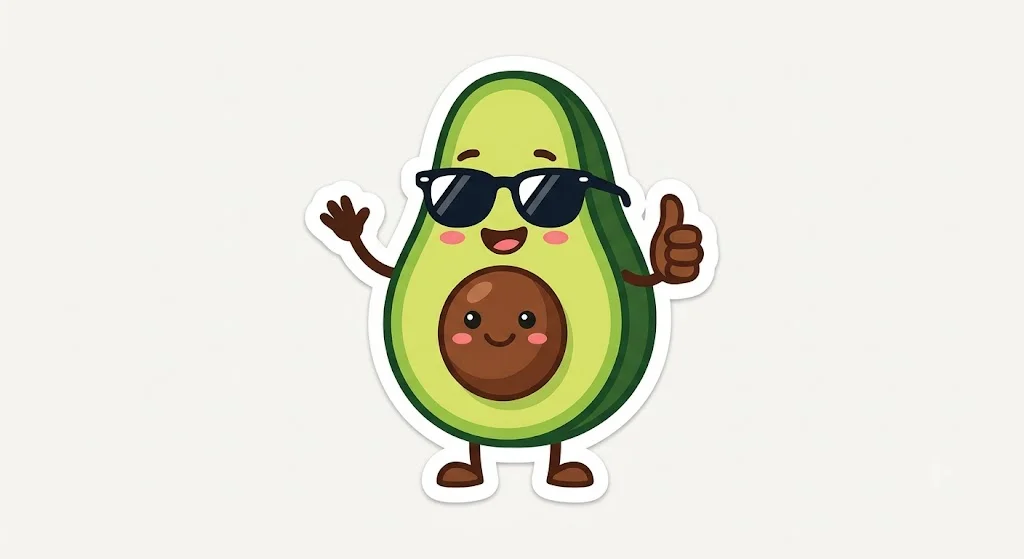
Both runs gave a usable sticker. Two things to note: in one of the two runs Gemini gave the avocado’s stone a face of its own, and it chose a wide landscape frame because I did not name a shape. For a sticker sheet, add “square format” and “one character only”.
Collectible figure. This is the prompt style that made Nano Banana famous, a toy figure on a desk with its box and its 3D model.
Create a 1/7 scale collectible figure of a red-haired female astronaut in a white spacesuit, standing on a round clear acrylic base on a wooden desk. Behind it, a computer monitor shows the figure’s 3D model, and next to it is a toy packaging box printed with the astronaut’s artwork. Realistic photo, soft indoor light.
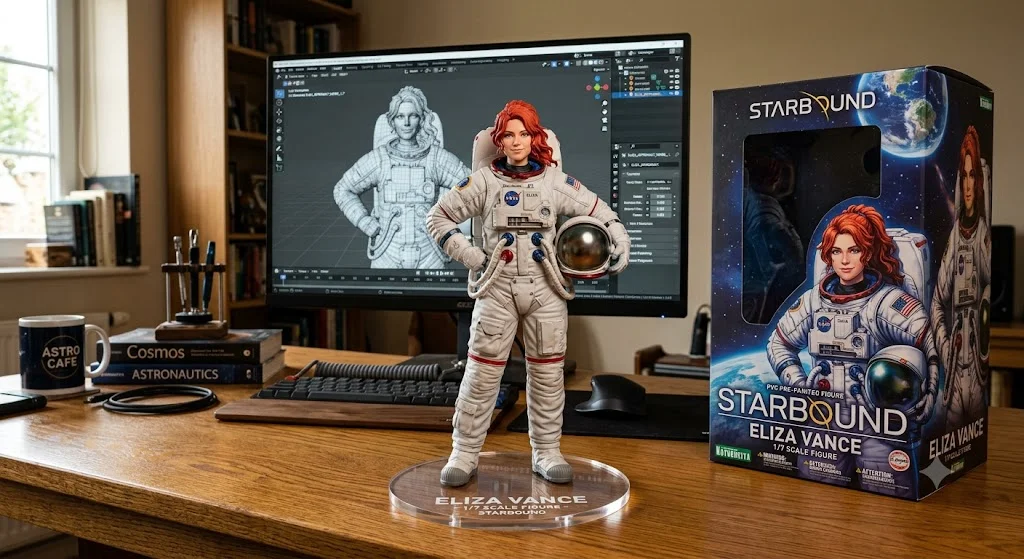
Every element is there and the result is convincing. It is also the best example of how much Nano Banana invents: a product line called Starbound, a character name, Eliza Vance, printed on the base and the box, a mug reading Astro Cafe, titled books, and a NASA logo on the spacesuit. That last one is a real agency’s protected insignia.
In the default-mode test for our review it added no slogans to text designs, though it did add a venue sign and a shop name; given a whole scene to dress in Flash mode, it invented far more. If you plan to post or sell anything like this, name the text you want on the box and check the suit.
Prompts for spaces and scenes
Interior render, then a style change.
Interior design render of a small Scandinavian living room: light oak floor, white walls, a grey linen sofa, a round wooden coffee table, a large monstera plant by a tall window, late afternoon sunlight, wide-angle, photorealistic.
Then, in the same chat:
Turn this image into a pencil sketch. Keep the composition exactly the same.
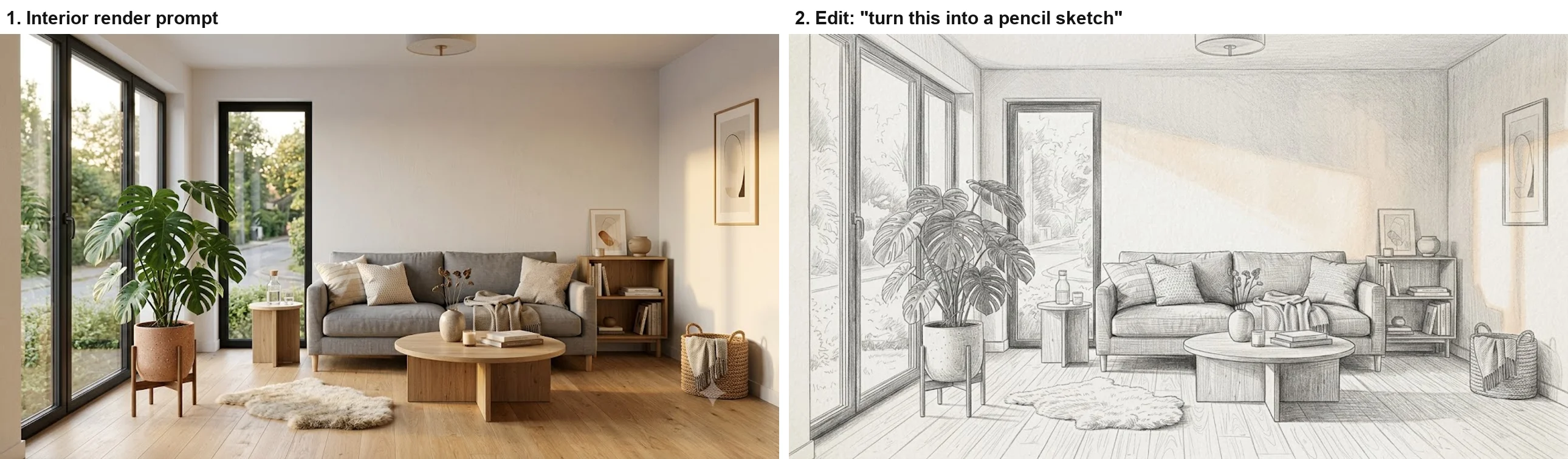
The render has everything I listed, plus a sheepskin rug, a shelf, framed art and a basket, which suit the style. The sketch is the most impressive edit in the test: every object stays in its place, redrawn in graphite hatching. It even kept a faint warm tint where the sun hits the wall, so add “black and white only” if you need pure pencil.
Short prompt against structured prompt. This pair shows why detail pays. First I typed four words with no verb:
a cozy coffee shop
Gemini did not draw anything. It wrote a paragraph about espresso and rain, added a table of menu specials and offered to write a story. In the same chat, I tried again:
Create an image of a cozy coffee shop
Then, in a new chat, the structured version:
Interior of a cozy coffee shop on a rainy evening, seen from a corner table: warm tungsten pendant lights, rain streaks on the front window, a barista behind a wooden counter, steam rising from a cup in the foreground, shot on a 35mm lens at f/2, shallow depth of field, cinematic colour grading with warm ambers and teal shadows.
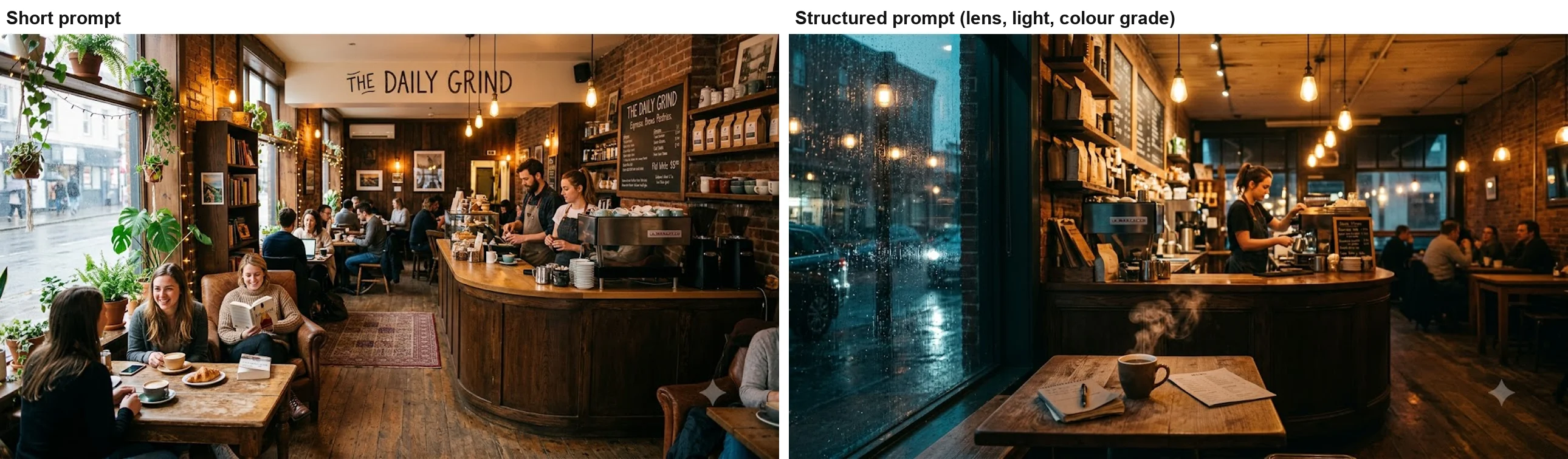
The short prompt gave a generic, crowded daytime café, with details that echo the text reply before it in that chat, so treat it as a rough comparison. It also named the café The Daily Grind, the same name Gemini gave, unasked, to the coffee shop in our September test. That name is also the example logo prompt in Google’s own API docs. The structured prompt got every element I asked for, and no invented shop name.
Prompts that keep a character consistent
Create an image of a friendly cartoon robot named Bolt with a round blue body, one large yellow eye and a short antenna, flat illustration style, standing in a park.
Then, in the same chat:
Now show Bolt, the same robot, reading a book in a library. Keep his design exactly the same.
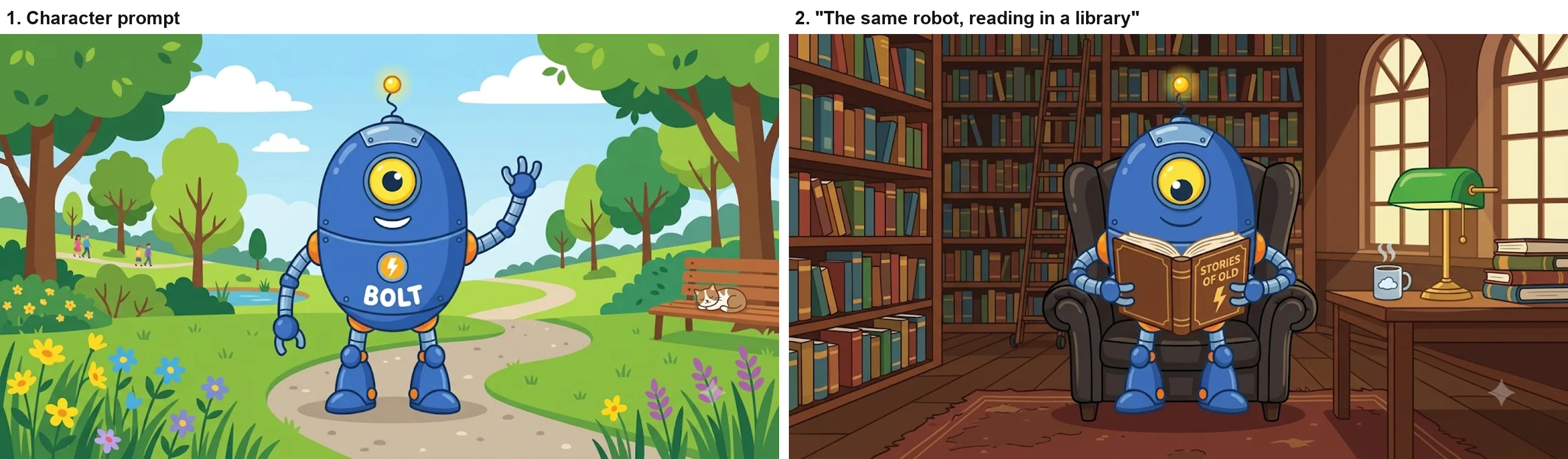
The design held between scenes: the same egg-shaped body, single yellow eye, antenna and jointed limbs. Two drifts are worth knowing. Nano Banana printed the name BOLT and a lightning emblem on the robot’s chest, taking the name literally, then moved the emblem onto the book cover in the second image. And the style slid from flat to shaded. Repeat the style words in every follow-up, and describe any marking you do or do not want. According to Google’s API docs, the model behind Flash mode keeps the resemblance of up to four characters in a single workflow.
Prompts for editing your own photos
I edited only images Gemini had made, so this part rests on Google’s documentation rather than my test. The API docs give three editing templates worth copying.
To change one thing, name it and fence off the rest: “Using the provided image, change only the [specific element] to [new element/description]. Keep everything else in the image exactly the same, preserving the original style, lighting, and composition.” To add or remove something: “Using the provided image of [subject], please [add/remove/modify] [element] to/from the scene. Ensure the change is [description of how the change should integrate].” To restyle a photo: “Transform the provided photograph of [subject] into the artistic style of [artist/art style]. Preserve the original composition but render it with [description of stylistic elements].”
My two edits followed the same shape, one clear change plus a line about what stays, and both held their subject. In the Gemini app you upload the photo with the Add files button in the prompt box, as Google’s help pages call it, and Google says editing needs you to be 18 or over.
Where prompt libraries fit
Most of what ranks for Nano Banana prompts is prompt libraries, some claiming thousands of prompts. They are useful for ideas, but treat each one as a starting point. Several of the biggest are built around Nano Banana Pro, others date from older versions of the model, and the same words can behave differently in the free app’s default Flash-Lite mode. Copy the structure rather than the exact wording, swap in your own subject, and check the mode picker before you judge the result.
Mistakes that waste a prompt
Each of these cost me an image, or would have in real use.
- No verb. “A cozy coffee shop” got a paragraph, not a picture. Google’s help page recommends starting with a word like draw, create or generate.
- Relying on no. “No other text” failed on the busiest brief. Google’s API docs recommend describing the empty version instead, which they call a semantic negative prompt.
- Leaving the frame empty. Nano Banana fills gaps with its own props, names and logos, as the Starbound figure box shows. List what belongs in the scene and say “nothing else”.
- Skipping the shape. Without a format it chose a wide frame for the sticker, the logo and the robot. Say square, 16:9 or vertical.
- Forgetting what stays. Both of my edits said what to keep, and both held. Google Cloud’s guide gives the same advice for editing.
- Using the wrong mode. The default Flash-Lite mode runs the Lite model, which Google’s Gemini help page says is not built for multiple references or repeated edits. Switch to Flash before a series of edits.
Which prompt pattern to use
| Job | Start with | Must include | Watch for |
|---|---|---|---|
| Headshot | ”Create a professional headshot of” | Clothing, background, light, lens, square | Light weaker than asked |
| Product shot | ”Studio product photo of” | Material, colour, background, shadow | Props added in edits |
| Thumbnail | ”YouTube thumbnail, 16:9:“ | Exact headline in quotes, font, colours | Extra words on screens |
| Infographic | ”A clean vertical infographic titled” | Numbered steps in quotes | Detailed icons, not simple |
| Logo | ”A minimalist logo for” | Name in quotes, icon, font style | PNG, not a vector file |
| Sticker | ”A die-cut sticker of” | Border, style, background, shape | Extra faces or characters |
| Character | ”Create an image of a character named” | Body, colours, style, then “the same” | Printed names, style drift |
For editing an existing picture, open with what must stay the same, then describe the change. For anything with text, give the words in quotes and describe the surfaces that should stay blank. And if a result is close, reply with one change rather than starting over, which is how both edits in this test kept their subject.
Skip Nano Banana if you need a brief followed word for word with nothing added. In our Nano Banana vs ChatGPT test, ChatGPT placed more of a crowded scene exactly as described, though it also invented slogans of its own.
Final word
The best Nano Banana prompts read like a brief to a photographer or designer: a verb, a subject, a place, the camera and light, the format, and the exact words. In my test that got the requested elements almost every time, on a free account. What it did not stop was Nano Banana’s habit of adding its own details, from a French press to an agency insignia on a spacesuit, so treat every result as a draft and read it before you post it. Our Nano Banana review covers the model’s wider strengths and limits.
Frequently asked questions
What is the best prompt formula for Nano Banana?
Start with a verb such as create or generate, then name the subject with its details, set the scene, direct the camera and light, and finish with the format and any exact words in quotation marks. Google Cloud's prompting guide gives a similar order for text-to-image prompts: subject, action, location, composition and style.
In my test the order mattered less than the detail. A short request for a coffee shop produced a generic busy café, while a prompt that named the time of day, the lens, the lighting and the colour grade produced every element I listed.
Why does Nano Banana ignore 'no text' in my prompt?
Because a negative instruction leaves the model to fill the space some other way. Google's own image generation docs advise describing what you want rather than what you do not want, and in my test "no other text" worked on a plain infographic and a logo but not on a busy thumbnail, where Gemini filled a laptop screen with extra labels.
The fix is to describe the empty space positively, for example a blank screen or a plain background, and to check every word in the result before you use it.
Why did Gemini reply with text instead of an image?
Your prompt probably read like a topic rather than a request. When I typed "a cozy coffee shop" on its own, Gemini wrote a description of a café with a menu table and offered to write a story. The same words with "Create an image of" in front produced a picture.
Google's guidance is to start image prompts with a verb such as draw, create or generate, which tells Gemini what kind of answer you want.
How do I keep a character consistent in Nano Banana?
Describe the character in detail the first time, give it a name, and make the follow-up in the same chat, saying it is the same character and that the design should stay the same. In my test a cartoon robot kept its body shape, eye, antenna and colours when I moved it from a park to a library.
The drawing style drifted a little, from flat to more shaded, so repeat the style words in each follow-up. Google's API docs say the Nano Banana 2 model can keep up to four characters consistent in one workflow.
Does prompt length matter for Nano Banana?
Detail matters more than length. My longest prompt, a rainy-evening coffee shop with a named lens and colour grade, came back with every element I asked for, while a short version filled the gaps with its own choices, including an invented shop name.
Long prompts do not help if they are lists of keywords. Google Cloud's guide recommends describing the scene narratively, like a director, rather than stacking tags.
Keep reading
How to Use Nano Banana: Gemini's Image Model, Step by Step
How to use Nano Banana in Gemini: pick the right mode, prompt, edit in plain words and download, with which mode runs which model and what free users get.
Nano Banana Review and Pricing: Fast, Free, Nearly Exact
Nano Banana pricing, tested: 12 prompts on Gemini's free tier, no limit hit. 15 of 15 text strings right, most images in 30 seconds, and one tulip too many.
Nano Banana vs ChatGPT: 12 Prompts, Two Different Winners
Nano Banana vs ChatGPT, tested with the same 12 prompts: ChatGPT follows a brief exactly, Nano Banana is twice as fast and free. Which one to use, and when.
Best AI Image Generator: 8 Picks, Two Tested Head to Head
The best AI image generator is ChatGPT for exact briefs and Nano Banana for free, fast images, both tested. Plus Midjourney, Ideogram, FLUX and three more.