
Nano Banana vs ChatGPT: 12 Prompts, Two Different Winners
Nano Banana vs ChatGPT, tested with the same 12 prompts: ChatGPT follows a brief exactly, Nano Banana is twice as fast and free. Which one to use, and when.
Contents
Nano Banana vs ChatGPT: the verdict at a glance
Nano Banana wins for most people: on the same 12 prompts it was about twice as fast as ChatGPT, spelled every word, added no slogans, made the better edit, and let a free account run the entire test. ChatGPT wins one job outright, following a crowded brief to the letter, and that job is why it still tops our image picks. Use Nano Banana by default and ChatGPT when a client counts the tulips.
| If you need | Pick | Why, from the test |
|---|---|---|
| Exact briefs, counts and positions | ChatGPT | 7 of 7 elements placed, against 5 of 7 |
| Speed, editing and clean text | Nano Banana | ~30 s an image, a real night edit, no invented slogans |
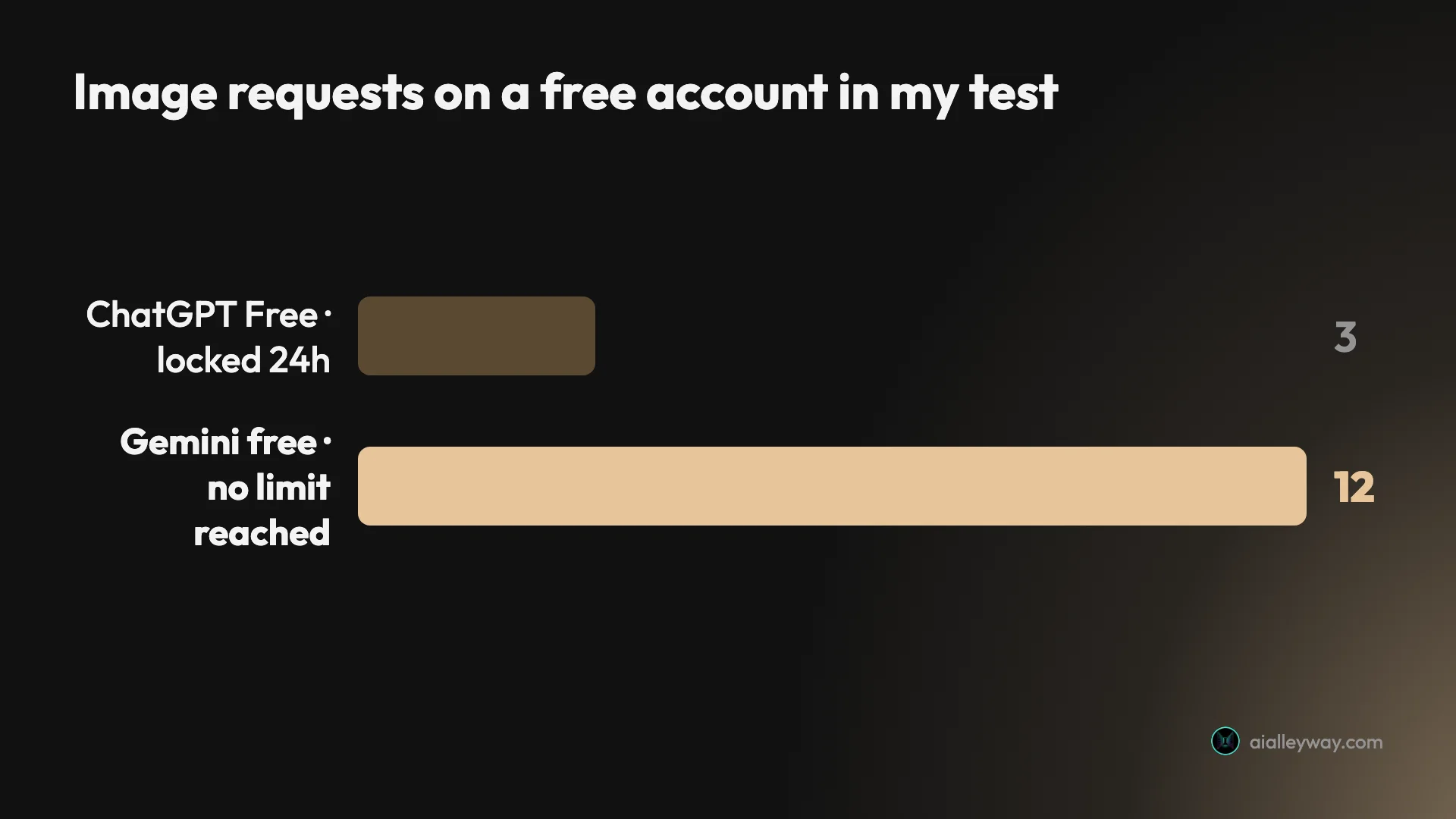
| The most images for nothing | Nano Banana | 12 free requests with no refusal, against 3 |
How this comparison was made
Both tools ran the same twelve prompts, word for word, on 23 September 2026: a seven-part scene, an edit, three text designs, three photoreal shots and three art styles, then the first prompt again in each tool’s slower reasoning mode. Every image here is the first result. Nothing was rerolled or retouched.
ChatGPT ran ChatGPT Images 2.5, released on 8 September, on a free account until it locked me out and then on Plus. Nano Banana ran on a free Gemini account in the default Flash-Lite mode. Most side-by-sides you will find online were made on ChatGPT Images 2.0 or older, so treat their verdicts with care. The full write-ups are our ChatGPT image generator review and our Nano Banana review.
How do Nano Banana and ChatGPT compare, axis by axis?
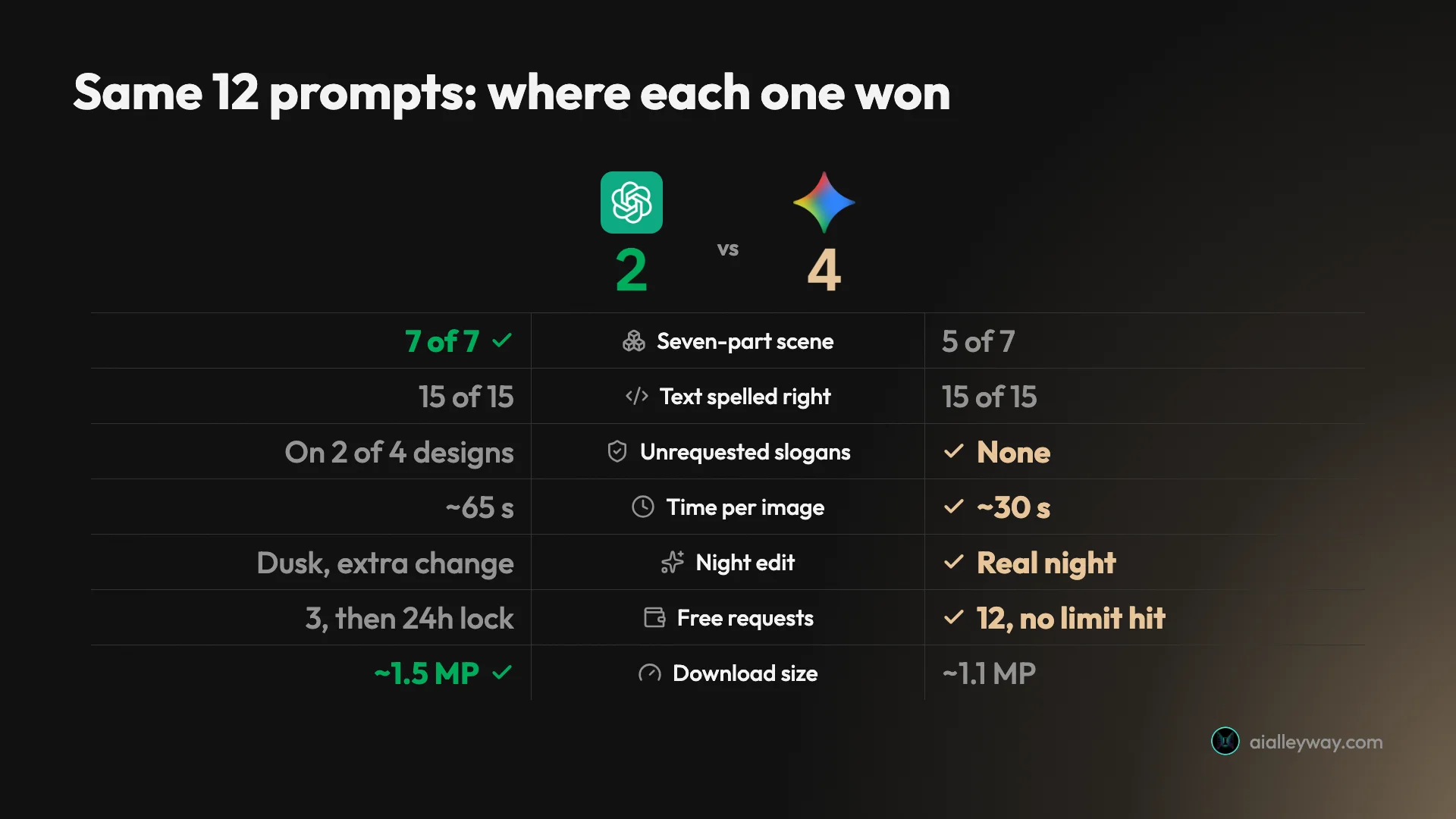
On the seven headline tests in the scorecard, it comes out 4 to 2 for Nano Banana, with text a tie; the full table below adds the plan, watermark and provenance rows. Look at which rows ChatGPT won, though, because they are the ones a paying client notices.
| Axis | ChatGPT Images 2.5 | Nano Banana (Gemini) | Winner |
|---|---|---|---|
| Seven-part scene, first try | 7 of 7 | 5 of 7 (four tulips, “47” beside the door) | ChatGPT |
| Same scene, slow mode | 7 of 7 at Thinking High | 6 of 7 in 3.1 Pro mode | ChatGPT |
| Text strings spelled right | 15 of 15 | 15 of 15 | Tie |
| Text nobody asked for | Slogans on the menu and the coffee bag | None on the menu or bag; a venue sign on the poster | Nano Banana |
| Time per image, default mode | About a minute | About 30 seconds, none over 40 | Nano Banana |
| Night edit | Reads as dusk; changed the house-number plate | Real night; only the requested changes | Nano Banana |
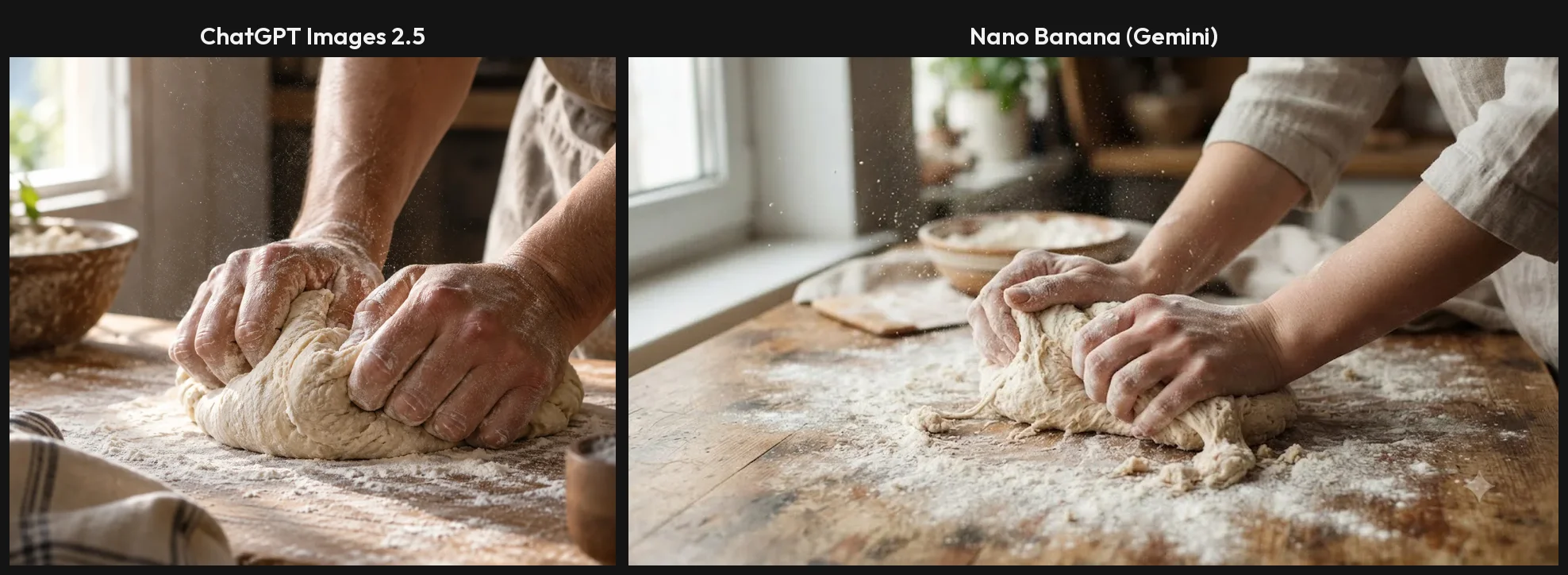
| Photoreal hands, portrait, product | No errors | No errors | Tie |
| Free plan in my test | 3 requests, then locked for 24 hours | 12 requests, no refusal | Nano Banana |
| Paid plan for images | Plus, $20 a month | Optional; free covered the whole test | Nano Banana |
| Full-size download | About 1.5 MP | About 1.1 MP (1408×768) | ChatGPT |
| Visible watermark on free | None | Sparkle in the corner (switchable for most users) | ChatGPT |
| Provenance labels | C2PA, plus SynthID per OpenAI | C2PA and SynthID | Tie |
ChatGPT Images: strengths and gaps
ChatGPT reads a brief like a proofreader. That is its whole case, and in this test it was a strong one.
Strengths
- Placed all seven elements of the crowded scene, on the free plan, first try, with exactly three tulips.
- Spelled all 15 requested strings, including a six-item price list with no swapped digits.
- Larger downloads, about 1.5 megapixels against Nano Banana’s 1.1.
- No visible watermark, with C2PA credentials in every file I downloaded.
- A Thinking effort picker on Plus that plans dense layouts before drawing.
Gaps
- Free stopped after three requests and locked me out for a rolling 24 hours.
- Added slogans to two of the four text designs, and with memory on, one slogan followed me into later chats.
- About a minute per image, twice Nano Banana’s time.
- Its night edit came out as dusk and changed a detail I had not asked about.
Nano Banana: strengths and gaps
Nano Banana behaves like a fast illustrator who does not always count. For most work that is the better trade.
Strengths
- About 30 seconds an image in the default mode, none over 40.
- Matched ChatGPT at 15 of 15 on text and added no slogans to the menu or the coffee bag.
- The best edit in the test: a real night sky, a lit lantern, the cat gone, nothing else touched.
- A free tier that ran all twelve requests without a refusal or a warning.
- Per-image API prices from $0.0336, published and easy to budget.
Gaps
- Drew four tulips instead of three and put the house number beside the door rather than above it.
- Signed a ukiyo-e print with the name of the real artist Hiroshige.
- A visible sparkle watermark on free images.
- Smaller downloads, 1408×768 for the full-size file.
Is Nano Banana or ChatGPT cheaper?
For anyone making pictures in an app, Nano Banana is cheaper by the widest margin in this comparison, because its free tier is a working tool and ChatGPT’s is a sample.
On ChatGPT Free my fourth image request of the day was refused with a card offering Plus “for 120 advanced images per day”. The card set the reset for 24 hours after my first image, not midnight, and an edit counted as one of the three. OpenAI’s pricing page describes the free plan only as “Limited and slower image generation”.
On a free Gemini account I ran twelve requests in about 20 minutes, including an edit and a slow Pro-mode render, and never saw a refusal or a warning. Google no longer publishes an image count. Since May 2026 Gemini uses compute-based limits that refresh every five hours up to a weekly ceiling, and images draw more from that pool than text. So Nano Banana’s free tier is bigger, but you cannot plan a deadline around an exact number.
| ChatGPT | Nano Banana (Gemini app) | |
|---|---|---|
| Free | 3 requests per rolling 24 hours in my test | Compute-based limits; 12 requests, no refusal in my test |
| Entry paid tier | Go, $8 a month, “more image creation” | Google AI Plus, twice the standard limits |
| Main paid tier for images | Plus, $20 a month, 120 images a day per the app | Google AI Pro, four times the standard limits |
| Top tier | Pro, from $100 a month, “unlimited and faster” | AI Ultra, from $100 a month |
ChatGPT’s dollar prices are the US prices from our ChatGPT review. I could not read US prices for Google AI Plus or Pro, because Google localises the plan cards to my account’s country, so I have left them out rather than guess. For images alone you may never need them: the free tier covered this whole test.
What an image costs on the API
Developers pay differently. Google lists Nano Banana per image on its API pricing page, updated on 22 September 2026: $0.0336 for a 1K image on Nano Banana 2 Lite, $0.067 on Nano Banana 2 and $0.134 on Nano Banana Pro, rising to $0.24 for a 4K Pro image. Batch jobs roughly halve those prices. OpenAI sells ChatGPT Images through its API as gpt-image-2.5-flare and gpt-image-2.5-sunburst, priced per token rather than per image, so the cost of a picture depends on its size and quality setting.
That makes Google’s list easier to budget: a thousand 1K images on Nano Banana 2 cost $67, or about $34 in batch.
Which is cheaper at volume?
At volume the answer flips, if you stay inside the apps. ChatGPT Plus advertises 120 images a day for $20 a month. Used to the full, that is about 3,600 images a month, well under a cent each, which no API price here comes close to. The catch is time: at about a minute an image, 120 pictures is two hours of waiting a day.
Gemini’s free tier costs nothing at all, but it has no published ceiling, so it is the cheapest option for occasional work and the least predictable one for a deadline. For a product that generates images for its own users, only the APIs apply, and there Google’s per-image list is the easier one to forecast.
Which one makes better images?
On image quality alone the two are closer than the scorecard suggests. They differ most in how literally they read you.
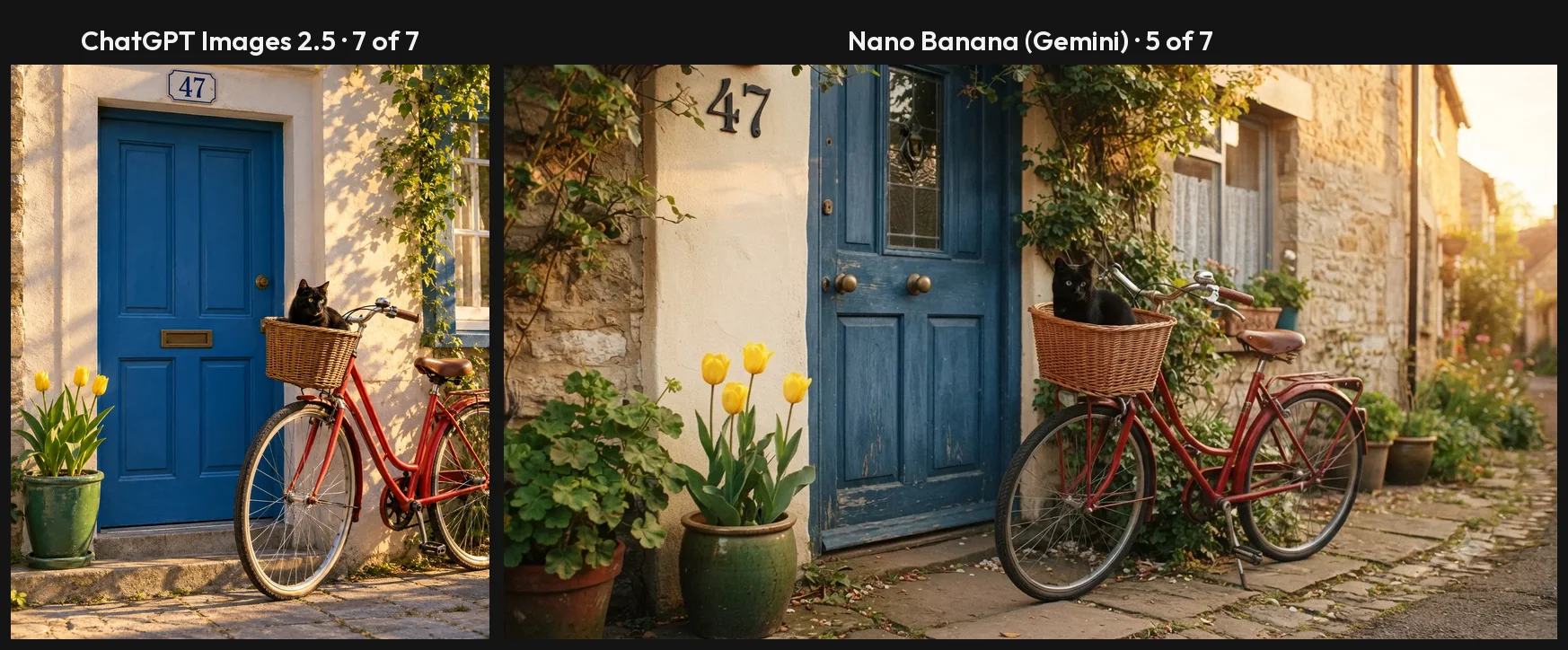
Composition goes to ChatGPT. The seven-part scene asks for a red bicycle, a blue door, a black cat in the basket, three yellow tulips, a green pot on the left, the number 47 above the door and sun from the right. ChatGPT drew all seven. Nano Banana drew five: four tulips, and the 47 on the wall beside the door. Its slower 3.1 Pro mode fixed the count, with a status line reading “Refining Floral Count”, but still put the number beside the door. On a mood board you would never notice. On a client brief it is a revision round.
The slow modes do not close the gap. I ran the same scene again in each tool’s reasoning mode. ChatGPT at Thinking effort High scored 7 of 7 again in about 90 seconds, and made a more considered picture, with stone walls and a proper wall lantern. Gemini’s 3.1 Pro mode scored 6 of 7 in about 80 seconds: it reasoned its way to three tulips but left the 47 beside the door. So if you reach for Gemini’s Pro mode to match ChatGPT’s precision, you give up most of the speed advantage and still land one element short.
Text is a tie on spelling and a win for Nano Banana on restraint. Both spelled all 15 strings across a gig poster, a café menu with six prices, a coffee-bag label and a house number. The difference is what else appeared. ChatGPT wrote “Good Coffee ♥ Brighter Days” and “Coffee People Happier” onto the menu and “BETTER COFFEE BRIGHTER DAYS” onto the bag. Nano Banana wrote exactly the seven menu lines and exactly the three label lines.
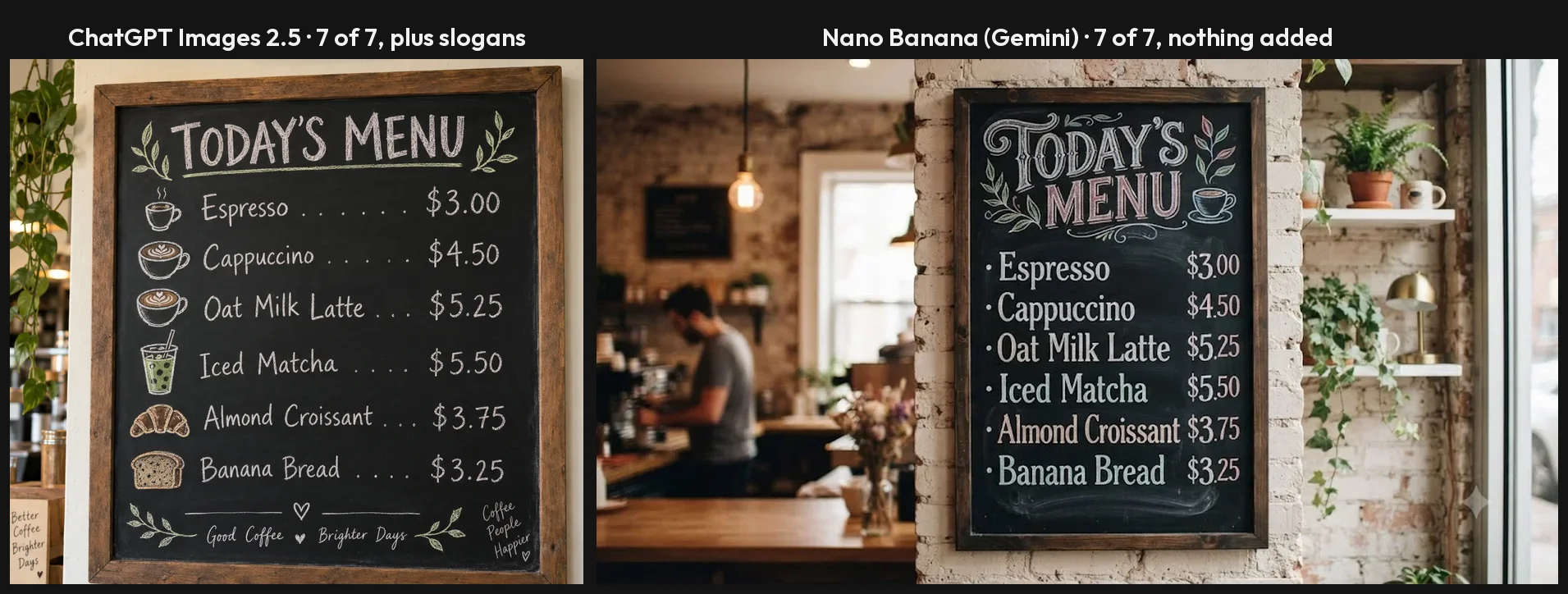
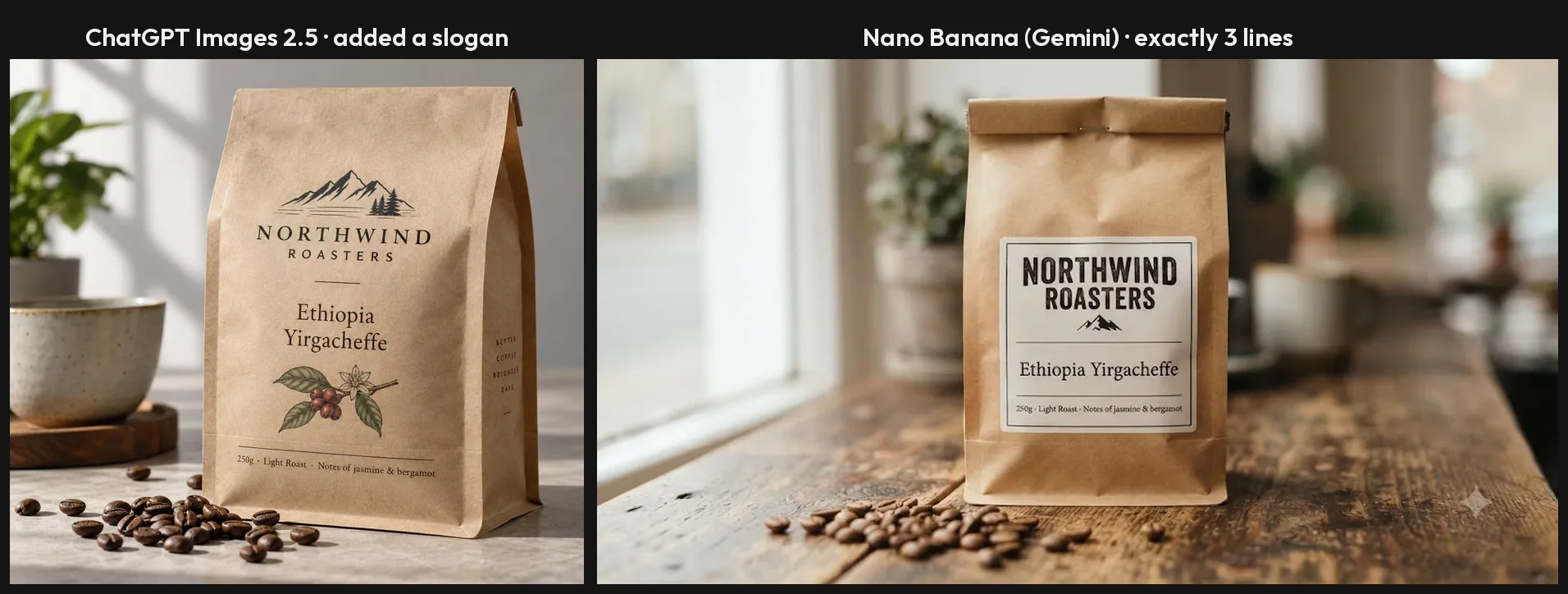
Neither is entirely clean. Nano Banana drew a “The Riviera” marquee into the poster’s street scene, named the isometric café “The Daily Grind”, and signed the ukiyo-e fox 歌川広重筆, “from the brush of Utagawa Hiroshige”, the real 19th-century printmaker. ChatGPT’s ukiyo-e print added a title cartouche and a red seal. Both treat empty space as an invitation, so read every word either one produces.
Photorealism is a draw. Both drew two floured hands kneading dough with the right number of fingers, a fisherman with believable skin and a product shot on wet slate. I could not pick a winner on any of the three. Our best AI image generator for realistic photos roundup covers them in more depth, with four more tools.
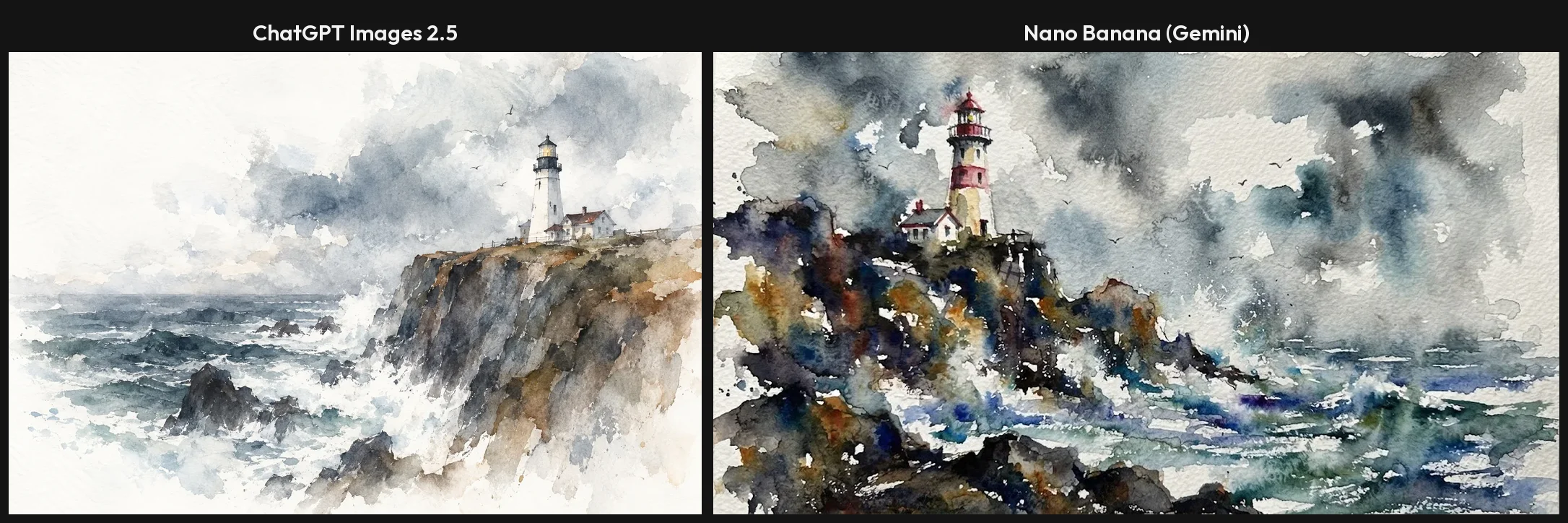
Style leans Nano Banana. Its watercolour lighthouse was the best image in either test, with pigment blooming into wet paper and white paper standing in for spray. ChatGPT’s is good, with more white paper and less bloom. Both failed the same instruction the same way: “isometric 3D low-poly” came back isometric but mostly smooth, with only the tree and shrubs (ChatGPT) or a plant pot (Nano Banana) faceted.
What this test did not cover. Competing comparisons also score character consistency across a set of images, multi-image reference inputs and 4K output. I did not test those, because a twelve-prompt set run once per tool cannot measure them fairly. On paper, Google’s API offers 4K on Nano Banana 2 and Pro, while ChatGPT’s app gave me nothing above about 1.5 megapixels; in the apps both tools handed back web-sized files.
Size and labels go to ChatGPT. Its downloads were about 1.5 megapixels, for example 1536×1024. Gemini’s full-size download was 1408×768, about 1.1. Free Gemini images also carry a small sparkle in the corner, which Google now lets most users switch off in settings. Both embed C2PA credentials, and both companies say they add an invisible SynthID watermark.
Which one is faster and easier to work with?
Speed changes how you use an image generator more than any quality gap here. Nano Banana is fast enough to sketch with; ChatGPT is slow enough that you plan.
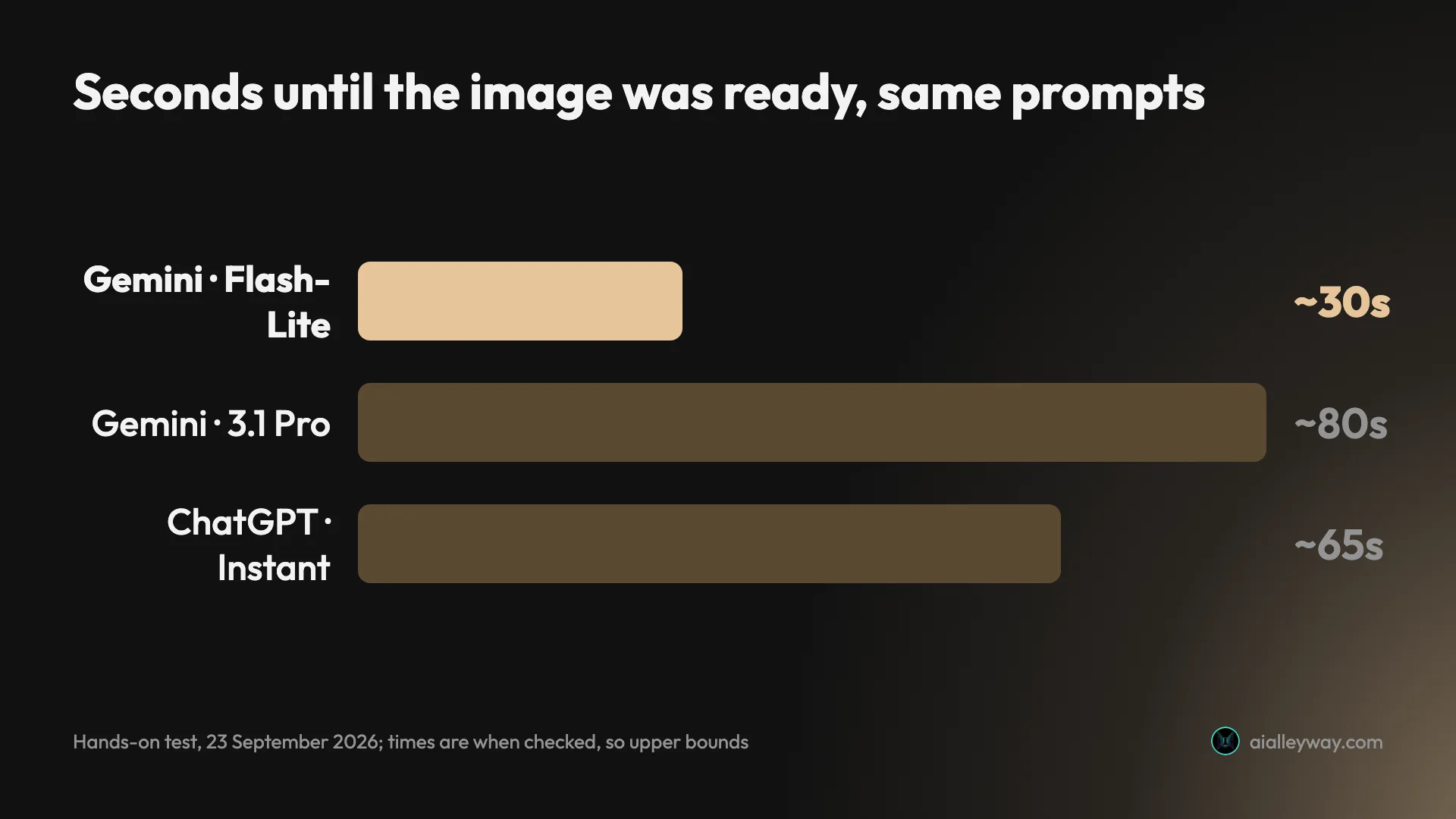
In Gemini’s default mode most images were ready by the time I checked at about 30 seconds, the two I timed most tightly within 17 and 20, and none took over 40. ChatGPT’s Instant mode took about a minute an image, and the coffee bag nearer two. The reasoning modes slow both down: Gemini’s 3.1 Pro took about 80 seconds, ChatGPT’s Thinking at High about 90. All these times are when I checked, so each is an upper bound.
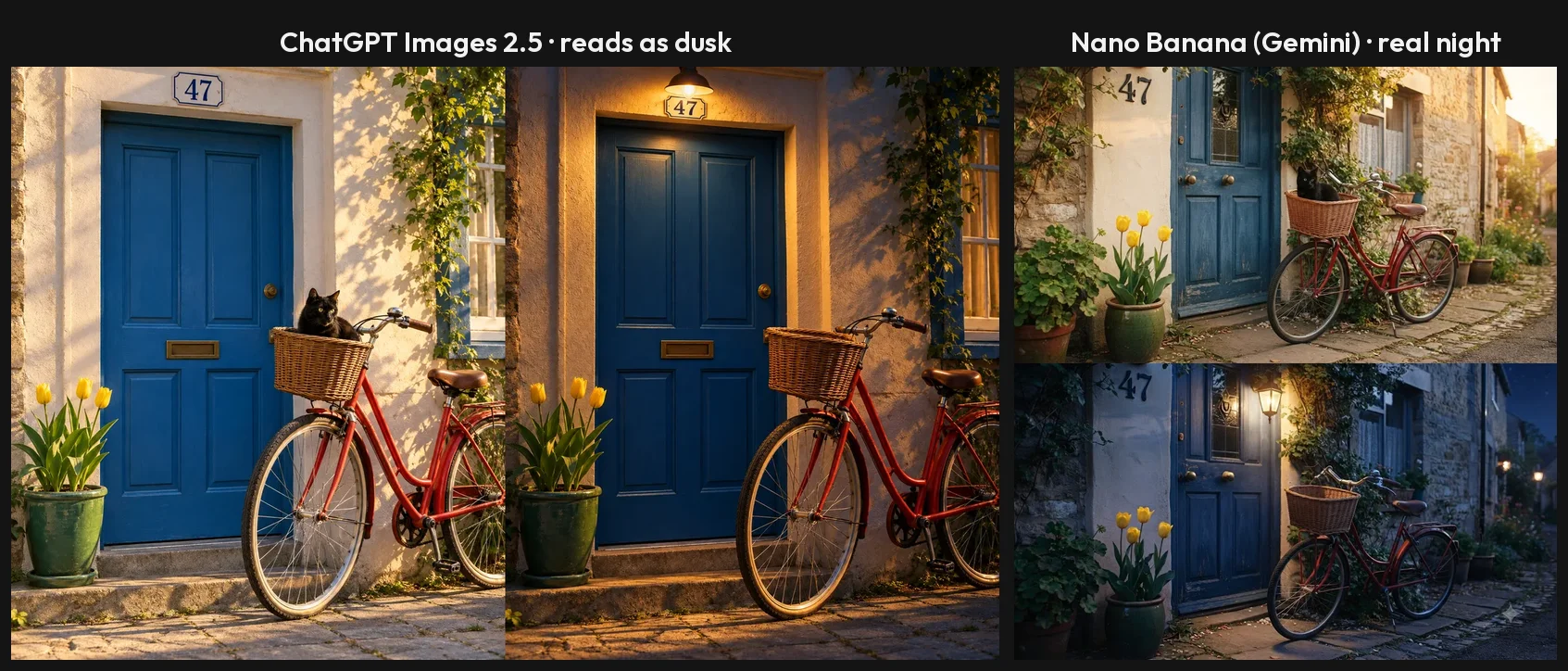
Editing is where Nano Banana pulls ahead. I asked each to turn the bicycle scene into night, switch on a lamp above the door and remove the cat. Nano Banana made a real night, with a dark blue sky and street lamps down the lane, lit a lantern and took out the cat, and left everything else alone. ChatGPT removed the cat and added a lamp, but the light still read as dusk, and it changed the house-number plate from white enamel to brass without being asked.
The controls differ. On Plus, ChatGPT has a Thinking effort picker, with Instant, Medium, High and a Pro level locked above them, which trades time for a model that plans the image first. Gemini gives even a free account a mode picker: 3.5 Flash-Lite, 3.6 Flash, 3.1 Pro and Extended thinking. The catch is that Gemini does not say which image model a mode used.
Framing is automatic in both. None of my prompts named an aspect ratio. Gemini chose a wide landscape frame for eleven of the twelve images and a tall one for the poster. ChatGPT varied the frame with the subject, from 3:2 landscape through square to 2:3 portrait. If an image has a destination, say “square” or “vertical 9:16” in the prompt with either one.
Memory was a wrinkle only on ChatGPT in this test. On the Plus account, which had memory on, the invented “brighter days” slogan reappeared in three later chats, including a bicycle scene with no coffee in it. I could not prove memory caused it, because ChatGPT’s Temporary Chat with memory off refused to make images at all. Gemini showed nothing similar across the whole test.
Using both together
The two are not mutually exclusive, and neither costs anything to try. The workflow this test points to is simple: explore in Gemini, where a new idea costs half a minute and no allowance you can see, then take the direction you like to ChatGPT when the final version has to carry exact text or exact counts. Paste the same prompt into both, compare the first results, and keep the one that got the brief right. For text-heavy designs, try ending the ChatGPT prompt with “no other text”; I did not test whether that stops the slogans.
Who should pick ChatGPT?
- Anyone working to a client’s exact brief. It placed every element and count I asked for. When three tulips means three, this is the one.
- People making text-heavy designs who will proofread. Posters, menus and packaging mock-ups came out letter-perfect, as long as you delete the slogans it adds.
- Existing ChatGPT Plus subscribers. At $20 a month the image generator comes with an assistant you already use, and 120 images a day is effectively unlimited.
- Anyone who needs the larger file. About 1.5 megapixels, with no visible watermark to crop.
Who should pick Nano Banana?
- Anyone who does not want to pay. The free Gemini app ran all twelve prompts without a refusal. ChatGPT Free managed three.
- People who edit by describing the change. Its night edit was the most convincing in the test, and it changed only what I asked.
- Social and marketing teams working at speed. Half a minute a picture lets you try five ideas in the time ChatGPT makes two or three.
- Developers who need a price per image. $0.0336 to $0.24 on Google’s API, with batch discounts, beats working out token costs.
Final word
If you can only use one, use Nano Banana. It was faster, cleaner with text, better at edits and free in a way that let me finish the whole test without paying, and for social posts, mock-ups and everyday pictures that combination wins.
Keep ChatGPT for the jobs where a miscount costs you: client briefs, packaging and anything where “three tulips above the door” means exactly that. The best setup for most people costs nothing. Make pictures in Gemini, and spend ChatGPT’s three free daily requests on the designs that have to be exact.
Frequently asked questions
Is Nano Banana Pro better than ChatGPT?
Not on the test that Pro is supposed to win. On a free Gemini account you cannot pick Nano Banana Pro by name (Google lists redoing an image with Nano Banana Pro as a paid-plan feature); the closest thing is the 3.1 Pro chat mode, which reasons before drawing, and Gemini does not say which image model it used. Run on the same seven-part scene, that mode scored 6 of 7 in about 80 seconds: it fixed the tulip count but still put the house number beside the door. ChatGPT at Thinking effort High scored 7 of 7 in about 90 seconds, and its free Instant mode had already managed 7 of 7.
Where Nano Banana Pro has a clear edge is on the API, where Google publishes 4K output and a flat per-image price: $0.134 for a 1K or 2K image and $0.24 for 4K. For everyday use, the default Nano Banana mode is the better trade, because it was twice as fast as ChatGPT and only slightly less literal.
Can I use Nano Banana in ChatGPT?
No. Nano Banana is Google's name for the image models inside Gemini, and it only runs in Google's products: the Gemini app, Google AI Studio and the Gemini API, and Google Search. ChatGPT uses OpenAI's own model, ChatGPT Images 2.5 since 8 September 2026.
Sites that sell Nano Banana plans or subscriptions are third parties reselling access to Google's API under their own prices and terms. If you want to compare the two yourself, the cleanest way is the one I used: the same prompt, word for word, in a fresh chat on each, on the same day.
Is Nano Banana cheaper than ChatGPT?
For a person making pictures, yes, because it is free in a way ChatGPT's free plan is not. On a free Gemini account I ran twelve image requests in one session without a refusal. ChatGPT Free stopped after three and locked me out for 24 hours. ChatGPT's real image plan is Plus at $20 a month, which the app says allows 120 images a day.
For developers the comparison is less direct. Google prices Nano Banana per image on its API, from $0.0336 for a 1K image on Nano Banana 2 Lite to $0.24 for a 4K image on Nano Banana Pro. OpenAI prices its image models per token, so the cost of an image depends on its size and quality setting rather than a single list price.
Is ChatGPT Plus worth $20 just for images?
Only if your images have to follow a brief exactly, or you need more than a handful a day from ChatGPT specifically. Plus lifts the free plan's three requests to the 120 a day the app advertises, and adds a Thinking effort picker that plans dense layouts before drawing, though in my test the free plan already managed the precision: seven of seven elements on Free, and 15 of 15 strings across both accounts. Plus buys volume and time, not accuracy.
If you mostly need good images quickly, the free Gemini app did more of that for nothing: twice as fast, no slogans, a better night edit and no limit reached in twelve requests. Plenty of people will get more value from Gemini free plus ChatGPT free than from paying for Plus, keeping ChatGPT's three daily requests for the text-heavy designs.
What is the difference between Nano Banana 2 and Nano Banana Pro?
Nano Banana 2 is Gemini 3.1 Flash Image, the fast default that Google says every Gemini plan, including free, uses for image generation. Nano Banana Pro is Gemini 3 Pro Image, slower and pricier; both it and Nano Banana 2 reach 4K on the API. On Google's API a 1K image costs $0.067 on Nano Banana 2 and $0.134 on Pro.
In the Gemini app you do not choose the model by name. You pick a chat mode, and switching from the default Flash-Lite to 3.1 Pro on my free account made Gemini reason before drawing, took about 80 seconds instead of under 20, and fixed a counting mistake. Gemini did not label which image model produced that result.
Keep reading
ChatGPT Image Generator Review: Perfect Text, Pushy Slogans
I tested the ChatGPT image generator (Images 2.5) with 12 prompts on Free and Plus. It spelled all 15 text strings right, and added slogans I never asked for.
Nano Banana Review and Pricing: Fast, Free, Nearly Exact
Nano Banana pricing, tested: 12 prompts on Gemini's free tier, no limit hit. 15 of 15 text strings right, most images in 30 seconds, and one tulip too many.
Best AI Image Generator for Realistic Photos: 6 Picks
The best AI image generator for realistic photos: ChatGPT and Nano Banana, tested on portraits, hands and products, plus Midjourney, FLUX, Leonardo and more.
Midjourney Alternatives: 6 Picks, Two Tested Side by Side
The best Midjourney alternatives in 2026: ChatGPT for exact briefs, Nano Banana for free and fast, plus Leonardo, Ideogram, Stable Diffusion and Playground.