
ChatGPT review: the free tier is the story, not the $20 one
A ChatGPT review from a year on the free tier plus one month of Plus. Five rungs from $0 to $200, and ads now run on both the Free and $8 Go tiers.
Contents
Is ChatGPT worth paying for?

ChatGPT is the assistant to pick if you want one subscription to cover everything, and it is still the default in this category for good reasons. The part worth knowing before you pay is that the free tier is genuinely usable, which is what this ChatGPT review is really about: not whether the product is worth it, but which of five rungs you actually need. I have been on Free for over a year, took one month of Plus in May 2026, and did not renew.
What does ChatGPT actually do?
ChatGPT is the broadest consumer AI product anyone ships. Where most assistants are a text box with features bolted on, this one has grown into a suite that happens to share a chat window.
The core is still conversation, and that core is what the free tier gives you without a meter running. Everything else is arranged in rings around it, and which rings you can reach is what your plan decides.
The surfaces, and which ones are gated
Images, Library, Plugins and Projects all appear in the sidebar on a free account, and the Projects page opens with a New button rather than an upgrade wall. OpenAI still lists unlimited projects as a Plus feature, and I have not confirmed whether creation succeeds on Free, so treat Projects as reachable rather than as proven. Alongside them are voice mode, web search, file uploads, code execution and deep research, each present but rate-limited rather than withheld.
Above Free the picture changes in kind rather than degree. Plus adds the advanced reasoning models, the Codex coding agent, a work agent for multi-step tasks, custom GPTs and expanded deep research. Pro adds a frontier model and lifts the ceilings.
One boundary is worth knowing before you buy for a specific job: cloud tasks and GitHub code review are not available on Plus at all, which is a detail I went through in the OpenAI Codex review. Those surfaces mean Pro or Business.
| Surface | Free | Go | Plus | Pro |
|---|---|---|---|---|
| Text chat | Unlimited on the core model | More messages | Advanced models | Unlimited core chat, frontier model |
| Image generation | Limited and slower | More | Advanced, with Thinking | Unlimited and faster |
| Voice | Limited | Expanded voice mode | Included | Included |
| Memory | Limited | Longer | Expanded across chats | Maximum |
| Deep research | Limited | Not listed | Expanded | Maximum |
| Codex coding agent | Limited access | Not listed | Included | Maximum access |
| Work agent | Not listed | Not listed | Included | Maximum access |
| Custom GPTs | Not listed | Not listed | Included | Included |
| Advertising | Yes | Yes | No | No |
Read that table down the Go column and the shape of the tier becomes obvious. It buys volume on things Free already has, adds one genuine feature in expanded voice, and introduces advertising. It does not cross the line into a different class of capability, which is what Plus is for.
The composer tells you what tier you are on
On Claude the model picker is the first thing you notice. On ChatGPT’s free tier there is no picker at all. That turns out to be the widest gap in the category once you compare free tiers rather than $20 ones, which is what ChatGPT vs Grok does across four prompts.

What you get is an attach button, a Think toggle, a microphone and voice mode. The model is chosen for you, and OpenAI’s pricing page is direct about which one: free accounts run the core model, and advanced models are a Plus feature.
That single absence is the clearest argument for upgrading, and it is more honest than a message-count table. You are not buying more of the same thing, you are buying a different class of reasoning.
The Think toggle is the one control Free does give you
There is no model picker on Free, but there is a Think button sitting in the composer next to the attach icon, and it is the only lever the tier hands you.
Turning it on asks for a more deliberate answer rather than a fast one. It is a coarser instrument than Claude’s five-step effort dial, which exposes Low through Max and warns you what each costs, but it addresses the same trade: how much work do you want done before the answer arrives.
| Control | ChatGPT Free | Claude paid |
|---|---|---|
| Choose the model | No | Four models in the picker |
| Adjust reasoning depth | Think on or off | Five effort levels |
| Told what it costs you | No | Yes, in the tooltip |
The gap in that last row is the one I mind. ChatGPT will let you ask for more thinking without telling you what it spends, so on a metered free tier you are adjusting a dial with no gauge attached. Claude at least says out loud that higher effort burns your allowance faster.
In practice I leave Think off for anything conversational and on for anything I would otherwise have to check. That is a rough heuristic built from use rather than documentation, because there is no documentation that would let me do better.
Image generation is the feature Claude cannot answer
ChatGPT makes pictures. Its nearest rival in writing quality does not, and for a large number of buyers that settles the question before any other comparison starts.
On Free it is present but throttled: OpenAI’s own wording is limited and slower image generation. Plus describes it as advanced image creation with Thinking, and Pro promises unlimited and faster.
The strategic read is that image generation is what keeps ChatGPT as somebody’s only subscription. Every capability it has that Claude lacks pushes toward the same conclusion, which is that this is the assistant you buy when you do not want to buy two.
Voice, and the part that is genuinely ahead
Voice mode is the feature I use most that Claude has no answer to at all. It is a real-time spoken conversation rather than dictation with text-to-speech bolted on, and it works on the free tier with a limit rather than a lock.
Go describes its version as expanded voice mode, which is one of the few places where the $8 tier adds something you can point at. On Free the ceiling arrives quickly enough that a long hands-free session is not realistic, but a five-minute one is.
The reason it matters beyond novelty is that it changes when you reach for an assistant. Voice makes it useful while cooking, walking or driving, which are contexts where a text box is not an option and a competitor with better prose is simply absent.
Where the free tier actually breaks
After a year I can name the failure mode precisely, and it is not the one people expect.
Free does not degrade in quality. It degrades in availability. The answers you get are the answers the core model gives, consistently, and then at some point a feature stops being available for a while and comes back later. Nothing gets subtly worse, which makes the tier easy to trust.
| What people expect from a free tier | What actually happens here |
|---|---|
| Worse answers than paying users get | Same core model, every time |
| A countdown or trial expiry | No expiry; it is a permanent tier |
| Nagging on every message | An upgrade button, and an occasional banner |
| Features hidden until you pay | Features present but metered |
The one thing I would change is the honesty of the ceilings. Being told “limited” and then discovering the limit by colliding with it mid-task is the only part of the free experience that feels designed to irritate rather than to inform.
Deep research, and what “limited” means on Free
Deep research runs a multi-step investigation across sources and returns something closer to a briefing than an answer. It is one of the highest-value things any assistant does, and it is metered on every tier including Pro.
Free gets limited deep research, Plus gets expanded, and Pro gets the most. Since none of those words is a number, the only way to learn your ceiling is to hit it, which is the same complaint I have about the rest of the ladder.
What I can say from a year on Free is that it is enough to see the shape of the feature and not enough to depend on it. That is almost certainly the intent.
Here is where I actually meet the ceilings, after a year of daily use on Free.
| Feature | How often I hit the limit | What happens |
|---|---|---|
| Text chat | Never | OpenAI describes it as unlimited, subject to abuse guardrails |
| Image generation | Most sessions where I use it at all | Generation slows, then stops for a period |
| File uploads | Weekly | Blocked until the window resets |
| Voice | Within a long conversation | Cuts out rather than degrading |
| Deep research | Almost immediately when I lean on it | The most tightly metered thing on the tier |
The pattern is that text is genuinely free and everything expensive is genuinely metered, which is a rational design and an honest one. If your use is conversational you may never pay. If it is visual or research-heavy, you will find the wall in your first week.
Custom GPTs, and why they are the sticky part
A custom GPT is a configured version of ChatGPT with its own instructions, knowledge and tools, shareable by link. They sit above Free, on Plus.
The reason they matter commercially is that they turn a subscription into infrastructure. A team that builds five custom GPTs around its own processes has switching costs that no model benchmark will move, and OpenAI is further ahead on this than anyone.
For an individual buyer they are less decisive. I used them during my Plus month and did not miss them afterwards, which tells you they reward organisations more than they reward one person.
Data controls are unusually complete
The Data controls screen is one of the better ones in this category, and it is the same on Free as on any paid tier.
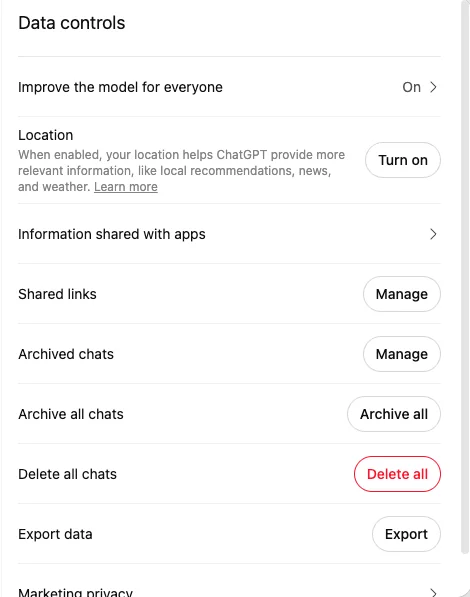
“Improve the model for everyone” is a single switch, and on my account it is on. Below it sit location, information shared with apps, shared links, archived chats, an archive-all and a delete-all, and a data export.
Two things stand out against rivals. There is a genuine export, and there are parental controls and a trusted-contact setting in the same settings menu, which is a duty-of-care surface no other assistant I have reviewed ships. Whatever you think of OpenAI’s direction on advertising, the privacy screen is not where they are cutting corners.
Memory, and the fact it is tiered
Memory on ChatGPT is not a switch, it is a quantity. Free gets limited memory and context, Go gets longer memory, Plus gets expanded memory across chats, and Pro gets maximum memory and context.
Tiering memory rather than gating it is a quietly aggressive design. The product gets more useful the longer you stay, and the incentive to upgrade grows with your own history in it, which is a stickier hook than any feature list.
How much does ChatGPT cost?
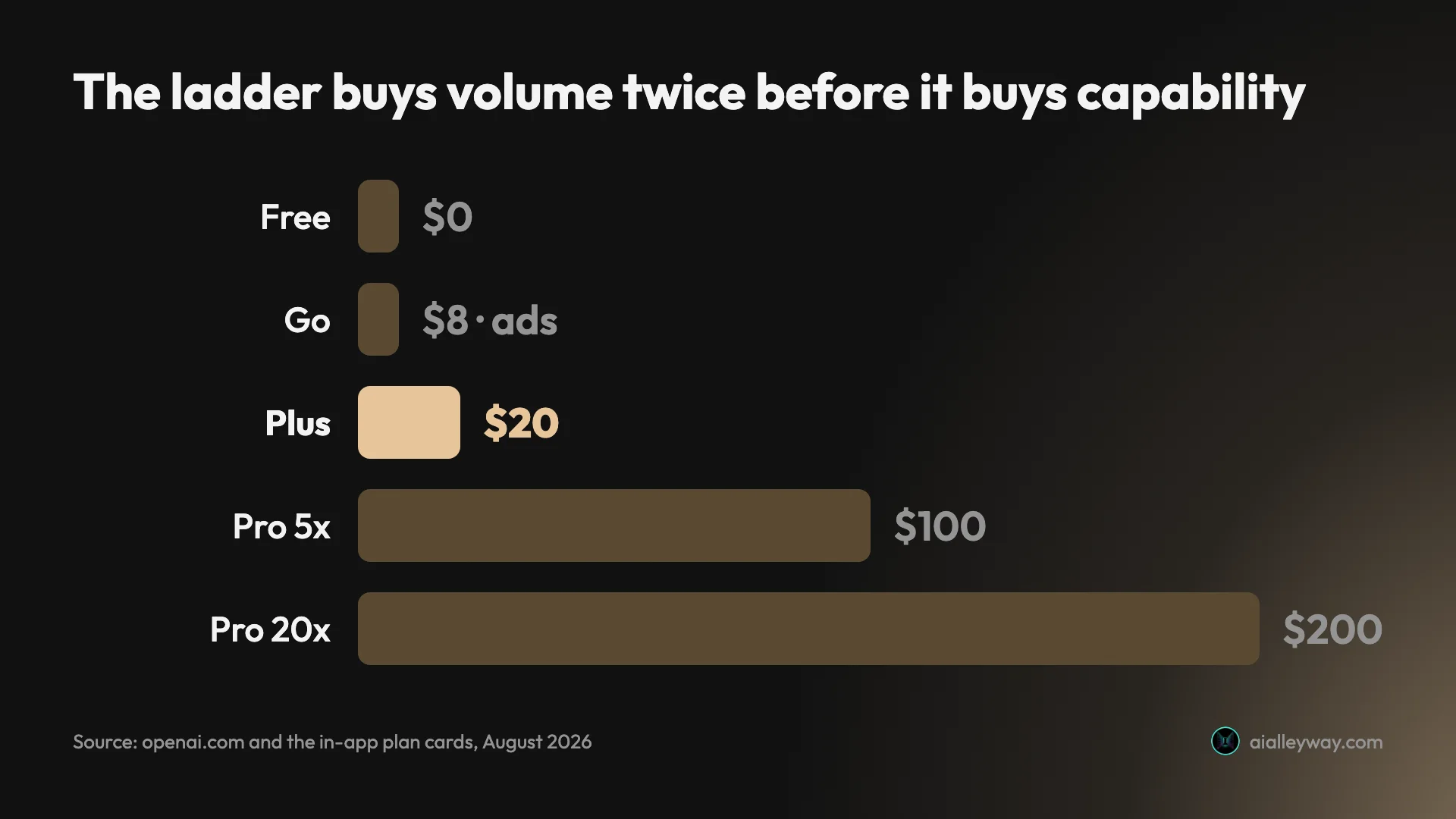
Five rungs for individuals on OpenAI’s pricing page, and the interesting one is not the most expensive.
| Plan | US price | What it adds |
|---|---|---|
| Free | $0 | Unlimited text chats on the core model; limited uploads, image creation, voice, deep research, memory and Codex access |
| Go | $8/mo | More messages, uploads and image creation; longer memory; expanded voice mode. Carries advertising |
| Plus | $20/mo | Advanced models, advanced image creation with Thinking, expanded memory across chats, work agent, Codex agent, expanded deep research, projects and custom GPTs |
| Pro | From $100/mo (5x) or $200/mo (20x) | Frontier Pro model, maximum Codex and work-agent access, unlimited core chat, unlimited and faster image creation, early access to experimental features |
| Business | $20/user/mo annual, $25 monthly | Team administration on top of Plus-class capability |
Does ChatGPT show ads? On Free and on the $8 Go tier
This is the finding I did not expect and the one that most changes how I read OpenAI’s direction.
The plan card for Go inside my own account carries a footnote: this plan may include ads. OpenAI’s announcement for Go says the same thing in a more flattering register, framing advertising as what keeps ChatGPT available at free and affordable price points.
Normally money is what removes advertising. Here it does not, until Plus: OpenAI’s help centre says ads “may appear for users on the Free and Go plans” while “Plus, Pro, Business, Enterprise, and Edu accounts will not have ads”, and Free users who would rather not see them can switch to an ads-free mode at reduced limits. The cheapest paid rung still carries them, which tells you Go is not really a value tier. It is a conversion tier, built to move free users into any paying relationship at all.
Practically: skip it. The $12 between Go and Plus buys the advanced models, the agents and custom GPTs, and it buys not being advertised to.
The US price is not everyone’s price
OpenAI states plainly that Go pricing is localised in some markets, and marks its $8 figure as the US price displayed.
My account demonstrates it. The plan modal renders Go in my local currency, at a price that, against the same exchange rate that reproduces Plus at $20 and Pro at $100, comes out nearer five dollars than eight.
That is not a complaint, it is a caveat about every pricing table you will read on this subject, including the one above. If you are outside the US, open the plan modal in your own account before budgeting, because the number you have been quoted may not be the number you are charged.
Which tier should you actually buy?
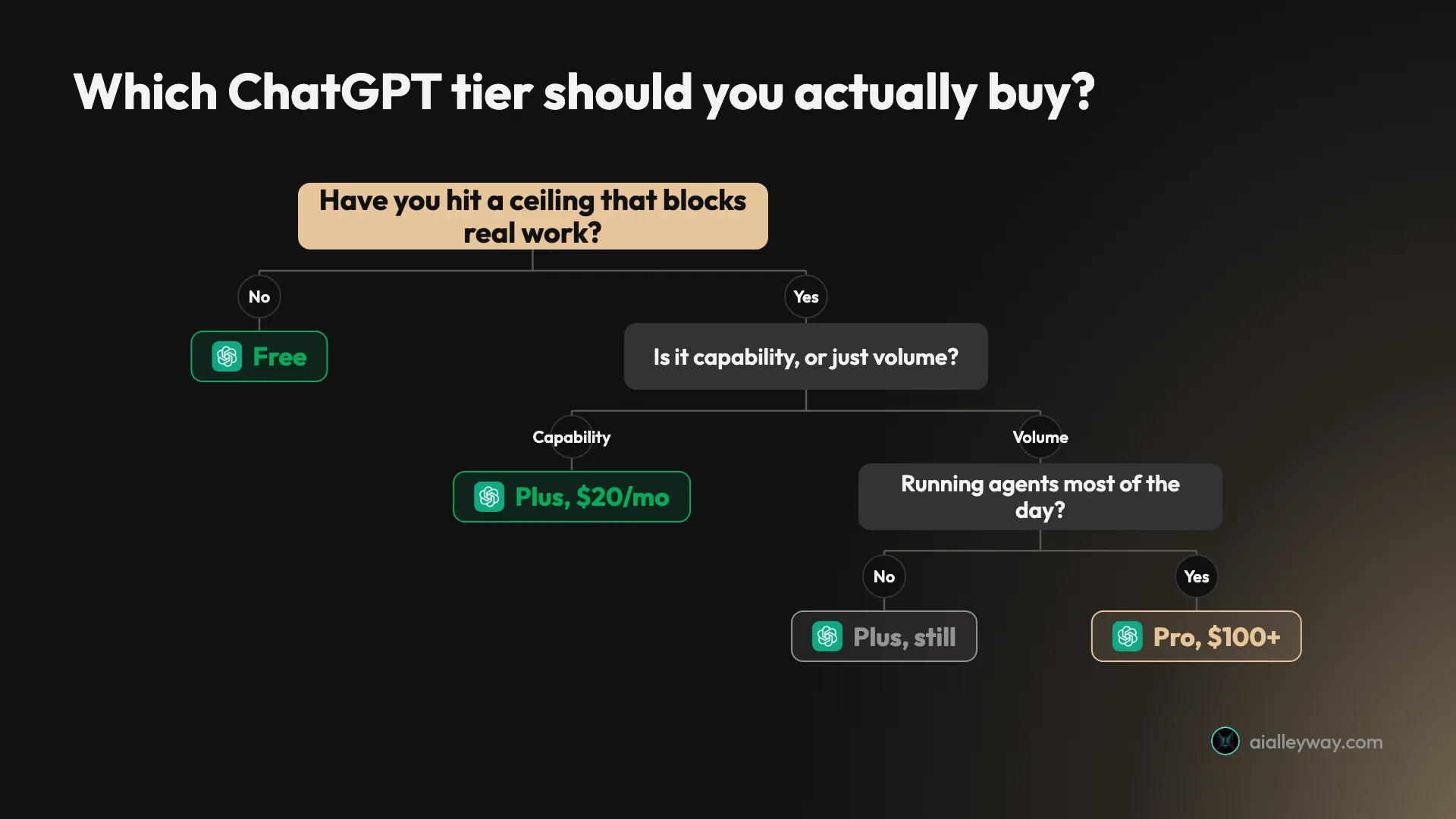
Start on Free and stay there until something specific breaks. That is not faint praise, and it is not the advice a review is supposed to give about the category leader. I have run it as a daily tool for over a year, and for text work the ceiling sits high enough that a great many people would never once find it.
Move to Plus when you hit one of three walls: you want the advanced reasoning models rather than the core one, you want image generation that is neither limited nor slow, or you need a surface that only exists above Free. Those are the honest triggers, and none of them is a message count.
Skip Go. It solves volume without solving capability, since it still runs the core model, and it introduces advertising into a product you are paying for.
Pro is for people running agents most of the working day. If you are reading a review to decide, you are not that customer yet. I have collected what these subscriptions actually cost across the category in the AI tool cost statistics.
Who is ChatGPT for?
- Anyone who wants one AI subscription. This is the central case and nothing else in the category answers it as completely. Writing, images, voice, code, research and agents out of one $20 plan, where the nearest rival on writing quality ships no image model at all.
- People who have not paid for an assistant yet. The free tier is the best trial in the category because it is not a trial. There is no countdown and no card required, and you can form a real opinion before spending anything.
- Casual and occasional users. If you open an assistant a few times a week, Free will carry you indefinitely and the upgrade question may never arrive.
- Developers already inside the ecosystem. Codex ships with the subscription rather than as a separate product, which makes Plus unusually dense if you also write code.
- Students and researchers. Deep research and file uploads are both present on Free, which makes it the cheapest serious research assistant available. The ceilings arrive, but they arrive after you have got real work done rather than before.
- Not for people who need the best prose. If your output has to be publishable rather than serviceable, Claude holds a brief further into a long document, and that gap is real.
- Not for people who object to advertising in paid software. Go carries ads. That may be a preview of where the free tier goes rather than an isolated decision.
What is ChatGPT good at?
ChatGPT’s strength is coverage: it is the only assistant where one $20 subscription reasonably answers writing, images, voice, code, research and agents at once. Underneath that sit the best free tier in the category, the widest integration ecosystem, and a product that most people already know how to use without being taught.
The free tier is the best in the category
Most free tiers are shaped to fail. This one is shaped to be lived in, and the difference shows in OpenAI’s own wording: unlimited text chats, with everything else limited rather than removed.
The distinction matters more than it sounds. A tier that removes features teaches you what you cannot have; a tier that meters them teaches you what you would use. Every ceiling you hit is a targeted argument for the specific upgrade that would fix it.
You therefore feel every paid feature before you hit its wall, which is a confident design and a slightly manipulative one. It is also why I have not felt pressure to re-subscribe since May: the free tier keeps clearing the bar for what I actually ask it to do.
Breadth nothing else matches at the price
The list of things Plus covers that a rival would sell you separately is long: image generation, voice, a coding agent, a work agent, deep research, custom GPTs.
For a lot of buyers the honest comparison is not ChatGPT against one competitor. It is ChatGPT against a competitor plus an image tool plus something for code, and once the comparison is framed that way the $20 looks different.
This is the argument I find hardest to counter when people ask me what to buy. I prefer Claude’s writing and I still tell most people to start here, because a second subscription is a real cost and most people’s needs are wider than their strongest need.
The exception is anyone whose output is words for publication. For them the breadth is a nice-to-have and the prose gap is the whole job, which is the one case where I reverse the advice.
To put the breadth argument in concrete terms, here is what a Plus subscription replaces if you assembled the same capability from best-of-breed tools.
| Capability | Covered by Plus | Typical standalone equivalent |
|---|---|---|
| Writing and reasoning | Yes | A rival assistant subscription |
| Image generation | Yes | A dedicated image tool |
| Voice conversation | Yes | No direct equivalent at most rivals |
| Coding agent | Yes, via Codex | A separate coding-agent subscription |
| Multi-step work agent | Yes | A separate agent product |
| Deep research | Yes | Often a higher tier elsewhere |
| Custom, shareable assistants | Yes | A build-your-own platform |
Nobody buys all seven of those separately, which is exactly the point. The comparison that matters is not Plus against one rival, it is Plus against the two or three tools you would otherwise stitch together, and on that basis it is the cheapest line in most people’s stack.
Everyone already knows how to use it
Familiarity is a real feature and reviews systematically undervalue it. ChatGPT is the assistant your colleagues, clients and family already have, which makes it the one you can share a workflow with and expect it to land.
That matters most for anything collaborative. A custom GPT you build is something you can hand to someone who has never configured an AI tool in their life, and a shared link is something they will open without asking what it is.
It also lowers the cost of being wrong. If a workflow built on ChatGPT does not suit someone, they can still use the thing; a workflow built on a tool they have never heard of dies at the install step.
The ecosystem is the moat
Plugins, connectors, custom GPTs and a deep bench of integrations mean ChatGPT reaches into more of the software people already run than any rival.
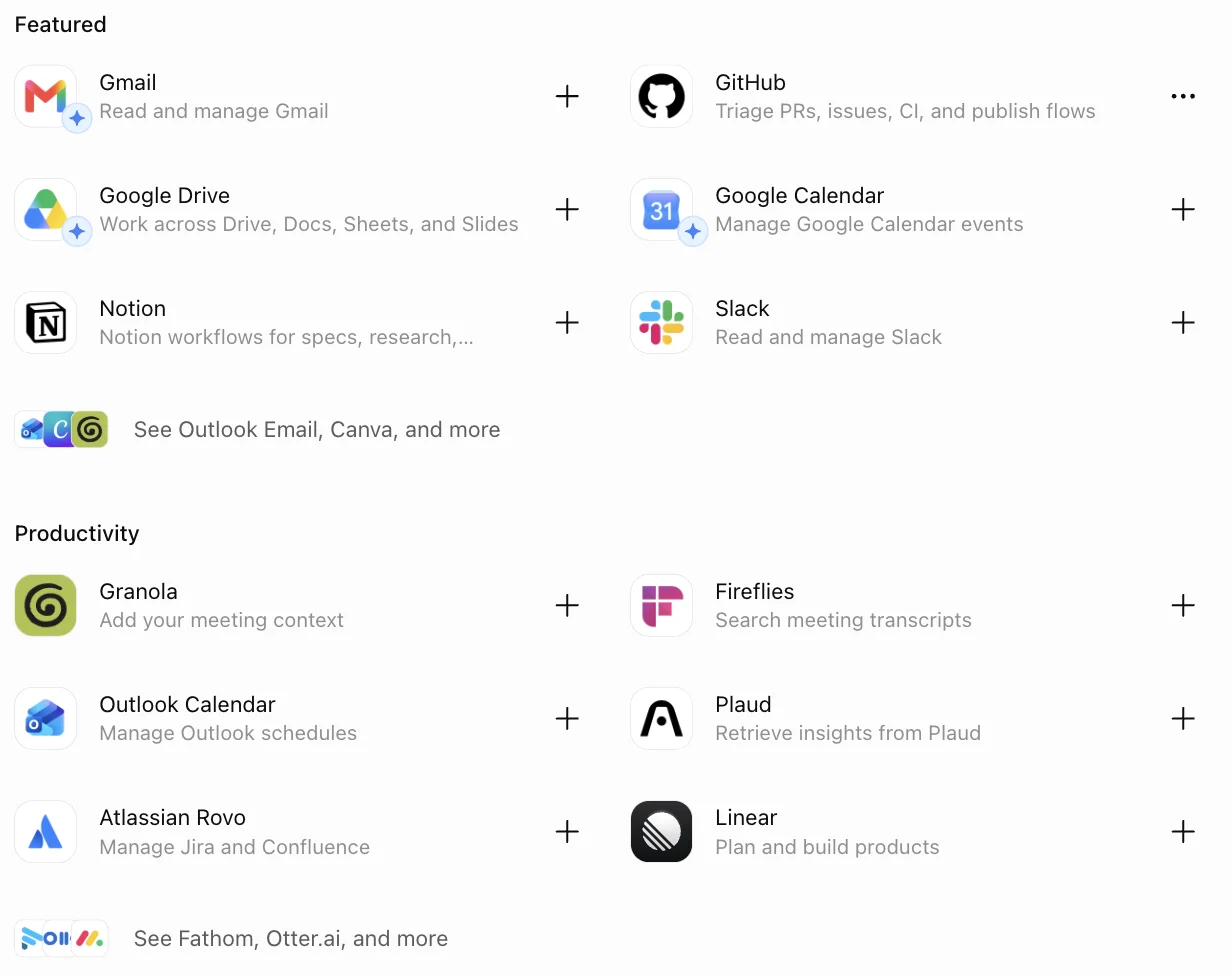
The directory is available on Free, which is the detail that makes the point. Gmail, GitHub, Google Drive, Calendar, Notion and Slack sit in the featured row, with Granola, Fireflies, Linear and Atlassian below them, and creative tools including Canva, Figma and HeyGen under that.
Breadth of integration is the least glamorous advantage in this category and probably the most durable. Model quality converges, and quickly. A directory of things that already work with your existing stack does not converge, because it is accumulated rather than trained.
If I were betting on which assistant is still default in three years, this is the reason I would bet on this one rather than on any benchmark result.
Codex arrives with the subscription
The coding agent is bundled rather than sold separately, which makes Plus quietly good value for anyone who writes code as part of a broader job.
I tested it on a deliberately awkward refactor and a greenfield build, and wrote that up in the OpenAI Codex review. It cleared a rename across 33 references and seven files in one run, which is real capability rather than a demo, and it placed against six rivals in our best AI for coding test.
One scoping note, because it matters. Both of those runs were on Free’s limited Codex quota, not on Plus’s fuller access, so what I can tell you is that the floor is already useful. I have not measured what the extra access buys, and I am not going to imply otherwise.
The relevant point here is structural rather than measured. No rival bundles a coding agent into a general assistant subscription at all, so for a developer who also wants images, voice and research, Plus covers ground that would otherwise be two purchases.
The privacy screen is not where the corners are being cut
It would be easy to read the advertising decision as a company that has stopped caring about the user relationship. The controls described earlier argue against that, and the detail that matters is which tier they sit on: all of them, including Free.
The question this raises is what happens when the two directions meet. Advertising works better the more it knows about you, and every control on that screen is a limit on what an advertiser could be told. Whether those survive contact with an ad business is the thing I would actually watch over the next year, and it is why I would rather see the controls tested than praised.
Where does ChatGPT fall short?
ChatGPT’s weaknesses are pricing architecture and writing quality, not capability. The ladder is now five rungs with blurry boundaries, the $8 tier carries advertising, US pricing is not universal, and free users get the core model with no picker to change it. On prose specifically, it is the second-best assistant I use.
The ladder has too many rungs
Free, Go, Plus, Pro at two multipliers, Business, Enterprise and Education is a lot of ladder for a consumer product, and the boundaries between rungs are described in comparatives rather than numbers.
More messages, longer memory, expanded memory, maximum memory. Those are the actual words on the plan cards, and none of them is a quantity. Working out which rung you need means buying one and finding out, which is a poor design for a purchase decision and a good one for revenue.
It is also getting worse rather than better. Go did not exist a year ago, and adding a rung between Free and Plus made the decision harder for exactly the people least equipped to make it.
Here is the vagueness in one place, taken verbatim from the plan cards.
| What you want to know | What OpenAI tells you |
|---|---|
| How many messages on Free | ”Unlimited text chats”, subject to abuse guardrails |
| How many on Go | ”More messages and uploads” |
| How much memory on Plus | ”Expanded memory across chats” |
| How much memory on Pro | ”Maximum memory and context” |
| How much image creation on Free | ”Limited image creation” |
| How much deep research anywhere | ”Limited”, “expanded”, or “maximum” |
| What Pro’s “unlimited” means | ”Unlimited subject to abuse guardrails” |
Seven rows, no numbers. Claude has the same problem and I criticised it there too, so this is a category habit rather than one company’s failing. It is still the single biggest obstacle to choosing a plan rationally, and the fix is trivial: publish the quantities.
Advertising in a tier you pay for
Covered in the pricing section, and it belongs here too because it is the clearest negative signal in the product.
The precedent is what concerns me rather than the tier itself. Once advertising is established as acceptable at $8, the argument for keeping it out of the free tier gets weaker rather than stronger, and the free tier is the thing I have just spent several hundred words praising.
I want to be fair about the trade OpenAI is making. Serving a very large free population costs real money, and ads are one of the few mechanisms that scale with it. But the honest description of Go is a paid tier subsidised twice, and buyers should read it that way.
The prose is serviceable rather than publishable
This is the gap I feel daily. ChatGPT writes competently and lands on a recognisable house style: structured, slightly bulleted, faintly eager.
Give it a style guide with prohibitions in it and it will comply for a while, then drift back once the material gets difficult. Negative instructions are the specific weakness. Telling it what to do works; telling it what never to do holds for a few exchanges and then quietly lapses.
For anything that goes in front of readers I draft elsewhere and bring it back for other jobs. The Claude AI review covers the other side of that comparison, including where Claude is worse, and ChatGPT vs Claude runs the two head to head.
No model choice on the tier most people are on
Free runs the core model with no picker in the composer. You cannot trade speed for depth, and you cannot tell whether a disappointing answer would have survived a better model.
That is a defensible commercial decision and a genuine product limitation at the same time. Claude, for comparison, puts four models and a five-step effort dial in front of paying users and tells them plainly which choices cost more.
The second-order effect is the one worth naming. Most people’s impression of what AI can do is formed on whatever the free tier serves them, which makes the core model the most consequential model OpenAI ships, whatever the frontier one can do.
The public ratings tell two completely different stories
This is the strangest thing about researching this product, and it is worth putting the numbers side by side.
On software directories ChatGPT rates around 4.7 out of 5, and Google’s AI Overview repeats that figure. On Trustpilot, chatgpt.com scores 1.6 across roughly 3,000 reviews.
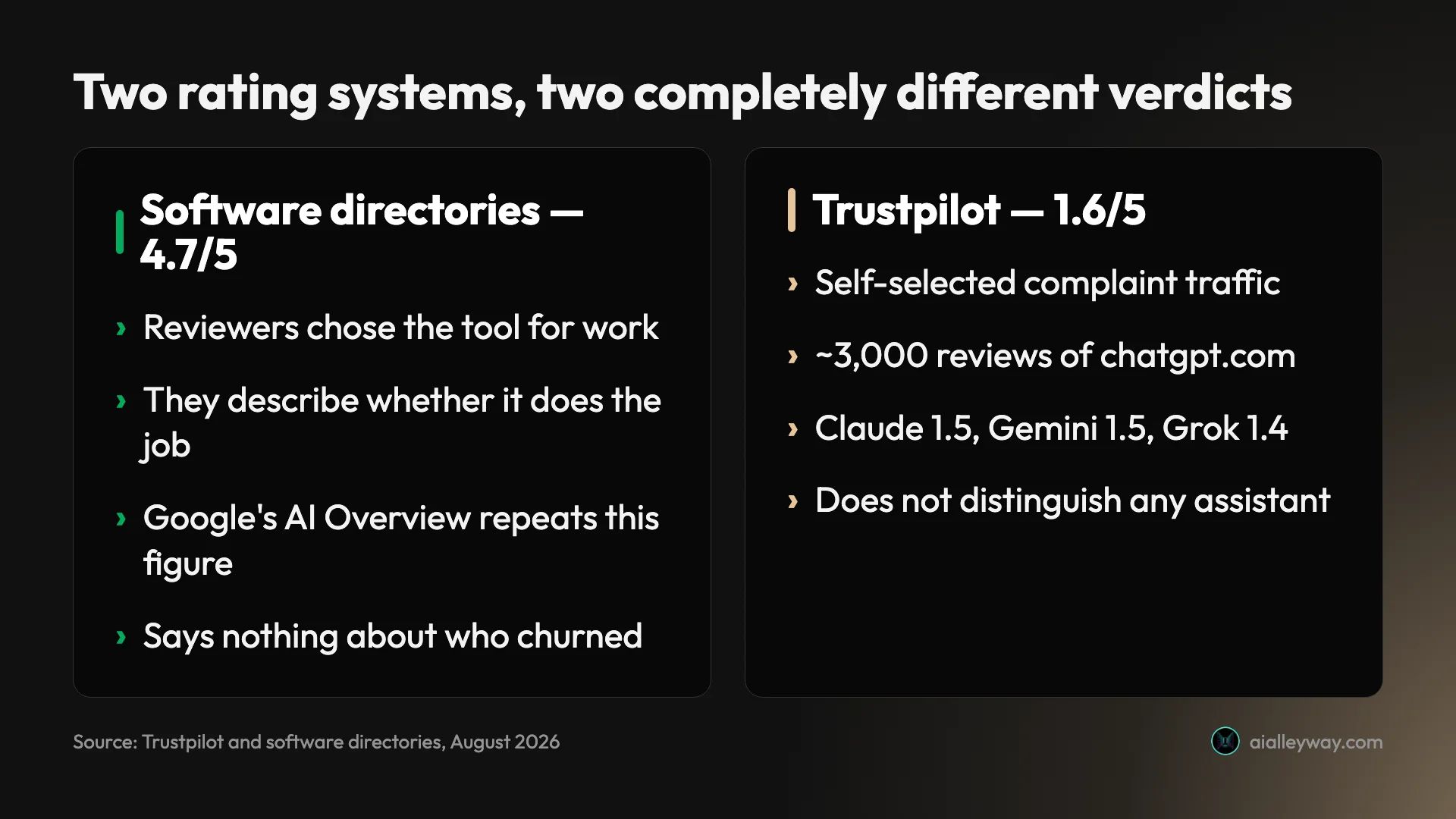
Neither number is a lie and neither is a verdict. Directory reviews come from people who chose the tool for work and are describing whether it does the job; Trustpilot collects the people motivated enough to complain. The useful move is to ignore both scores and read the complaint themes instead.
For context on how little the Trustpilot figure distinguishes anything: on the same platform Claude scores 1.5, Gemini 1.5, Perplexity 1.5 and Grok 1.4. Every major assistant lives in the same band.
Localised pricing makes every published table approximate
Every review of this product, this one included, prints a US price table. OpenAI localises Go pricing and marks its own figures as US prices displayed.
That is a small honesty problem with a wide blast radius, because the pricing table is the single most-quoted part of any review and is now only reliably true for one country.
Alternatives worth considering
If breadth is not what you need, or the direction of travel on advertising bothers you, three are worth a look — and our ChatGPT alternatives roundup covers those three plus three cheaper ones in full.
| ChatGPT | Claude | Gemini | Perplexity | |
|---|---|---|---|---|
| Best at | Breadth in one subscription | Writing and long documents | Google Workspace integration | Sourced answers on current information |
| Generates images | Yes | No | Yes | No |
| Free tier | Strong, no countdown | Yes, no Projects | Yes | Yes |
| Trustpilot score | 1.6 | 1.5 | 1.5 | 1.5 |
| Our pick status | Category pick, assistants | Runner-up, assistants | Runner-up, assistants | Category pick, search |
Claude is the one to take if what you produce is words. It holds a brief further into a long document and needs less repair on the way out, which is why I draft there.
The trade is real and you should price it honestly: no image generation, no video, and a metering system that is considerably more opaque than OpenAI’s. That last part catches people out, which is why the full review spends as long on the meters as on the writing.
Gemini makes sense if your working day already happens inside Google Workspace. The pull is integration rather than raw quality, and if your mail, docs and calendar are there, the friction saved is daily. ChatGPT vs Gemini compares the two free tiers, which is where they differ most.
Perplexity is a different product rather than a cheaper ChatGPT, and we asked both the same question to see where that difference shows. If what you mostly want is sourced answers about current information with citations attached, an answer engine does that better than a general assistant.
None of the three matches ChatGPT for coverage. If you want one subscription and one tool, this is still the one, and that is the whole reason it holds the category pick.
The honest way to use this section is to notice that every alternative here beats ChatGPT at exactly one thing. That is the shape of a mature market, and it means the right question is not which assistant is best but which single weakness you feel most often. Our best AI assistant pillar ranks all five side by side, and finds the widest gaps sit on the free tiers rather than the paid ones.
Final word
ChatGPT earns the category pick on breadth, and 4.6 rather than higher because the pricing ladder has got worse while the product has got better. Advertising at $8 is a direction, not a detail.
That is the tension I would leave you with. Every capability line in this review has improved over the past year, and every pricing line has become harder to read. The product deserves the score; the commercial architecture around it is the part I would watch.
The most useful advice I can give is to not pay yet. Run the free tier properly for a month against your real work:
- Use it for the tasks you would otherwise pay for, not test questions.
- Note which ceiling you hit first, because that is the only thing that should trigger an upgrade.
- If the answer is image generation or the reasoning models, buy Plus and skip Go entirely.
- If you never hit a ceiling, you have your answer and it costs nothing.
Everything in this ChatGPT review comes from that free account and one month of Plus in May 2026 that I chose not to renew. The screenshots are from my own session, and the prices were checked against OpenAI’s own pages on the day this went up.
Frequently asked questions
Is ChatGPT worth paying for?
For most people, not immediately. I have used the free tier daily for over a year and it handles the majority of what people actually ask an assistant: drafting, explaining, summarising, everyday questions. OpenAI describes free text chats as unlimited, subject to abuse guardrails.
Plus at $20 a month becomes worth it when you hit one of three walls. You want the advanced reasoning models rather than the core one, you want image generation that is not rate-limited and slow, or you want the surfaces that only exist above Free, which include the Codex coding agent, the work agent, custom GPTs and expanded deep research.
My advice is to stay on Free until something specific breaks, then upgrade for that specific thing. I score ChatGPT 4.6 out of 5.
How much does ChatGPT cost per month?
There are four consumer tiers plus business plans. Free is $0. Go is $8 a month in the US. Plus is $20 a month. Pro starts at $100 a month for the 5x usage tier, with a $200 20x tier above it. Business is $20 per user per month billed annually, or $25 monthly.
Two things about those numbers are easy to miss. OpenAI states that Go pricing is localised in some markets, and the $8 is specifically the US price, so what you pay depends on where your account is: mine displays Go in local currency, at a price closer to five dollars.
The second is that Go carries advertising. OpenAI's own plan card says the plan may include ads, which makes it the only tier where you pay money and still see them.
What do you actually get on the ChatGPT free tier?
More than most people expect. OpenAI's pricing page lists unlimited text chats on the core model, limited messages with uploads, limited and slower image generation, limited voice chats, limited deep research, limited memory and context, and limited Codex access.
The word doing the work in that list is limited. Nothing is fully absent, which is a deliberate design: you get to feel every paid feature before you hit its ceiling. In practice the ceilings I meet most are image generation and uploads, not text.
What you do not get is model choice. Free runs the core model and there is no picker in the composer to change it, so the advanced reasoning models are the single clearest thing your $20 buys. Projects appear in the free sidebar and the page opens without an upgrade wall, but OpenAI lists unlimited projects and custom GPTs as Plus features, and I have not verified whether creating one succeeds on Free.
Does ChatGPT show ads?
On the Free and $8 Go tiers, yes. The plan card inside my account carries the footnote that the plan may include ads, and OpenAI's own announcement for Go says advertising supports keeping ChatGPT available at free and affordable price points.
That is worth sitting with, because it inverts the usual arrangement. Normally you pay to remove advertising. Here the cheapest paid rung is the one that carries it, which suggests Go exists to convert free users into any kind of paying relationship rather than to be a good deal on its own merits.
If advertising in a product you pay for bothers you, the honest options are Free or Plus. Go is the tier to skip, and the $12 gap between it and Plus is a small price for not being advertised to.
Is ChatGPT better than Claude?
They are good at different things and the honest answer depends on what your work looks like. ChatGPT is the broader product by a distance: it generates images, has voice modes, ships a coding agent and a work agent, and carries the widest integration ecosystem. If you want one subscription to cover everything, it is the correct choice.
Claude is the better writer. It holds a brief, particularly a negative instruction like a banned-word list, further into a long document than ChatGPT does, and it is the one I reach for when prose has to be publishable rather than serviceable.
The practical split I have landed on is ChatGPT for breadth and anything visual, Claude for drafting and long documents. I went through Claude's side of that in detail in the Claude AI review.
Which ChatGPT plan should I buy?
Start on Free and stay there until something specific breaks. It is not a crippled demo, and for text work it will carry most people indefinitely.
Skip Go. At $8 it saves you $12 against Plus, carries advertising, and still runs the core model rather than the advanced ones, so it solves volume without solving capability. Plus at $20 is the tier that actually changes what the product can do, and it is the one I would point almost everyone at.
Pro at $100 or $200 is for people running agents most of the working day rather than chatting. If you are asking which plan to buy, you are not the Pro customer yet. Note also that cloud tasks and code review are not available on Plus, so certain Codex surfaces mean Pro or Business.
Keep reading
ChatGPT Plus vs Pro: there are now three prices, not two
ChatGPT Plus costs $20; Pro is $100 or $200. OpenAI publishes the 5x and 20x multipliers but never the base they multiply, and only one tier is a discount.
ChatGPT vs Gemini: the free tier decides this one
ChatGPT vs Gemini, both tested on free accounts. One hands a non-paying user its advanced reasoning model; the other will not let you pick a model at all.
ChatGPT vs Grok: 4 prompts, both free tiers, a clear tie
I ran four prompts through ChatGPT free and Grok free. They tied on all four. The real gaps: Plus $20 vs SuperGrok $30, and five free models against none.
ChatGPT vs Claude: one writes, one does everything else
ChatGPT vs Claude, from a paid Claude account and a year on ChatGPT free. Both $20, but the free tiers differ far more — and only one generates images.