
Best AI assistant: the free tiers decide it, not the $20 ones
The best AI assistant depends on whether you pay. Five tested on real accounts: at $20 they are close, on the free tier the gap runs opposite to the ranks.
Contents
The short answer
ChatGPT if you are going to pay, on breadth rather than on winning any single category. Gemini or Grok if you are not, because both hand a free account a model picker where ChatGPT and Claude hand it nothing. And Claude if your output is prose somebody reads.
| Assistant | Alley Rating | Free tier gives you | Entry paid |
|---|---|---|---|
| ChatGPT | 4.6, Category Leader | No model choice | $20 |
| Claude | 4.4, Power Tool | No model choice | $20, or $17 annual |
| Perplexity | 4.4, Power Tool | Ten models, all padlocked | $20 |
| Google Gemini | 4.3, Power Tool | Four selectable modes | Via Google One |
| Grok | Not rated, free tier tested | Five selectable modes | $30, or $300 a year |
The ranking above is the usual one. The third column is not, and it is the more interesting half of this comparison.
The thing every ranking gets backwards
Rankings for this term compare the $20 tiers, because that is where the feature tables live and where the affiliate money is.
The tests I ran this week were free-versus-free, and they point somewhere unexpected. Running the same prompts through ChatGPT’s free tier and Grok’s free tier, both answered two factual questions correctly, including one most of page one of Google still gets wrong, and both followed four explicit writing constraints without breaking one.
I have not used Grok’s paid product at all, so that is a claim about the bottom of the ladder rather than the top. What it suggests is that the output gap is already small before anyone pays. Above that line, on the evidence of the four reviews behind this post, the $20 tiers are close too, and the differences that survive are mostly matters of taste and of which ecosystem you already live in.
The free tiers are where they diverge, and the divergence runs opposite to the reputations.
| Free tier | Model choice | What you actually get |
|---|---|---|
| Grok | Five modes | Fast, Build (beta), Auto, Expert, Heavy |
| Gemini | Four modes | Including advanced reasoning, none padlocked |
| ChatGPT | None | One Think toggle |
| Claude | None | The assistant, no picker |
| Perplexity | None usable | Ten models displayed, a padlock on each |
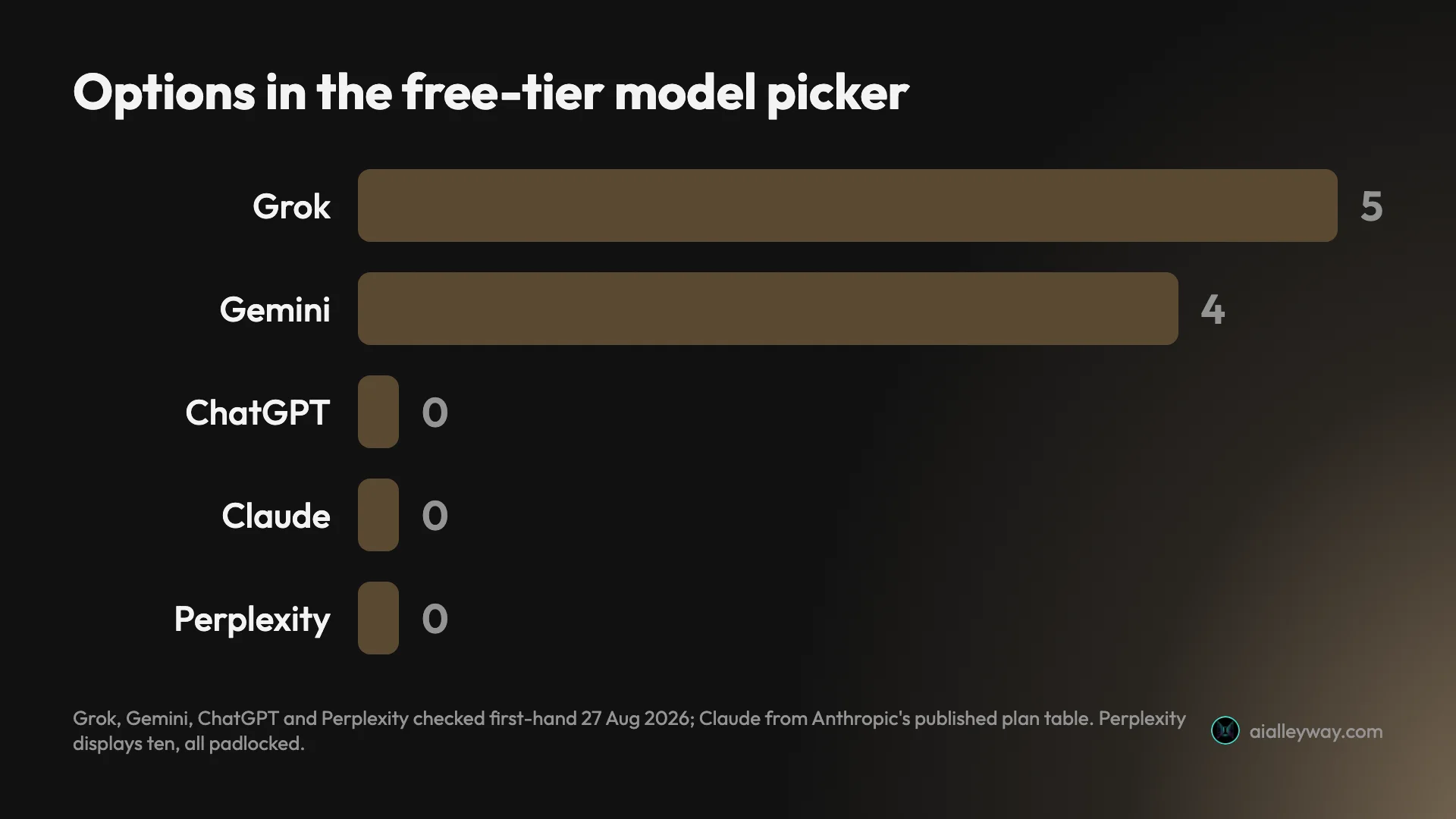
I opened four of these free accounts to check rather than reading it off a comparison page. The exception is Claude: I hold a paid account, so its free-tier row comes from Anthropic’s own plan table, which does not list the model picker below Pro. The two most famous assistants give a non-paying user the least choice, and the two most often described as challengers give the most. Perplexity’s is the strangest of the five: ten models are visible and every one of them is locked, which is a showroom rather than a free tier, and our Perplexity review says so at more length.
Two of those rows need a caveat before you act on them. A mode appearing in a picker is not the same as unmetered access to it: Grok’s own upgrade screen sells smarter answers in Expert mode as a paid benefit, which implies the free version is capped in a way the interface does not spell out. And Gemini’s four modes are genuinely selectable, but the thing most people want from Gemini — reaching Gmail, Docs and Drive — is not on the free tier at all.
There is also a difference in how the two restricted products restrict you. ChatGPT’s free tier gives you one good model and no choice, which is a coherent product. Perplexity’s shows you ten and locks all ten, which is a shop window. Those are not the same experience even though both reduce to “no model choice” in a table.
This matters more than a feature-table row because the free tier is where almost everyone forms their opinion. If you tried ChatGPT free and Gemini free and concluded ChatGPT was better, you were comparing a product with no model choice against one with four, and the conclusion you reached may have been about the interface rather than the intelligence.
How this was tested
Four of the five carry an Alley Rating earned on a real account over an extended period, and those reviews hold the per-tool detail: ChatGPT at 4.6, Claude at 4.4, Perplexity at 4.4 and Gemini at 4.3. This post adds one thing they do not: a same-day comparison of what each free tier hands a new user.
| What | Detail |
|---|---|
| Free tiers opened | Four of five, one sitting, 27 August 2026 |
| Claude free tier | Not opened — documented from Anthropic’s plan table |
| Grok free, prompts run | Four, once each, 27 August |
| Also run on ChatGPT free | All four of them, same day |
| Also run on Claude | Two of the four, the pricing and writing prompts |
| Paid tiers used | ChatGPT, Claude, Gemini, Perplexity. Not Grok |
| Agent tools tested | None |
Two limits worth stating rather than burying. Each cross-tool prompt ran once, so those results are an anecdote with screenshots rather than a benchmark, and I would not extrapolate from them to a general claim about which model reasons better. And “not rated” for Grok means exactly that: I have seen its free tier across four prompts and nothing of its paid product, so it sits in the ranking on a narrower basis than the other four.
The five AI assistants, axis by axis
| Axis | ChatGPT | Claude | Gemini | Perplexity | Grok |
|---|---|---|---|---|---|
| Alley Rating | 4.6 | 4.4 | 4.3 | 4.4 | Not rated |
| Free model choice | None | None | Four modes | Ten, all locked | Five modes |
| Entry paid | $20 | $20 | Google One | $20 | $30 |
| Annual discount | None offered | $17/mo | Via Google One | Annual-equivalent shown | $300/yr |
| Top consumer tier | $200 | $200 | Google One tiers | $200 | $30 |
| Generates images | Yes | No | Yes | No | Yes |
| Cites sources by default | On retrieval | On retrieval | On retrieval | Always | Always |
| Best single strength | Breadth | Long prose | Free capability | Checkable answers | Free model range |
| Weakest thing | Restricted free tier | No images | Tiered adjacency | Locked free tier | No paid testing here |
Two rows carry most of the decision. Free model choice is where the products actually diverge, and best single strength is what you are really buying once you have decided to pay.
Which of these I have actually used
The cross-tool evidence in this post comes from two write-ups published this week: ChatGPT vs Grok, which ran four prompts through both free tiers, and Claude vs Grok, which found a real difference in which sources each one trusted.
What I did not test is the other half of this category, and that needs saying plainly rather than in a footnote.
Assistants and agents are not the same product
Search for the best AI assistant and you will get two different kinds of software mixed into one ranking.
The five tools here are assistants. You ask a question, they answer, you take the output and do something with it. The loop closes with you.
Tools like Motion, Reclaim, Lindy and Notion’s agent features are agents. They connect to your calendar, inbox or CRM and change things without you approving each step. The loop closes without you.
Every page-one competitor for this term ranks both groups together. One of them ranks fifteen tools that include ChatGPT and Gemini alongside a scheduling tool, a meeting transcriber and two voice assistants, scored against criteria that cannot apply evenly to all of them. A calendar tool cannot be judged on writing quality and a chat assistant cannot be judged on how well it blocks focus time.
We have not tested the agent tools. Testing them properly means connecting a real inbox and a real calendar to software and letting it act, which is a different kind of commitment from opening a chat window, and it is not something to fake with a screenshot of a marketing page.
So this post ranks the assistants and stops there. If what you actually want is something that clears your inbox overnight, the tools above are the wrong shortlist — but you can leave equipped rather than empty-handed.
| Assistant | Agent | |
|---|---|---|
| Closes the loop | You do | It does |
| Needs write access | No | Yes, to inbox or calendar |
| Cost of a bad output | A wasted minute | An email that went out |
| Judge it on | Answer quality | What it does unsupervised |
| In this ranking | All five | None |
What I can offer on that half is the structural difference to check for, because it decides more than any feature list. Ask whether the tool needs write access to something you care about. An assistant needs nothing: you paste in, you copy out, and the blast radius of a bad answer is a wasted minute. An agent needs your calendar, your inbox or your CRM, and the blast radius of a bad decision is an email that went out or a meeting that moved.
Four questions are worth asking any agent vendor, and none of them apply to a chat assistant:
- What does it do without asking? The whole value is unsupervised action, so the scope of that autonomy is the product.
- What can it undo? A sent email and a moved meeting have different reversibility, and vendors rarely lead with this.
- What access does it need on day one? Read-only calendar access and full inbox write are very different commitments.
- What happens when it is wrong? Not whether it errs, which it will, but what the recovery looks like.
For orientation rather than ranking, these are the names that recur in other guides:
| Tool | Acts on | Access it needs | Tested here |
|---|---|---|---|
| Motion | Calendar, tasks | Calendar write | No |
| Reclaim | Calendar | Calendar write | No |
| Lindy | Email, CRM | Inbox and CRM write | No |
| Notion Agent | A workspace | Workspace write | No |
| alfred_ | Inbox | Inbox write | No |
I have used none of them, so treat that as a map of the territory rather than a recommendation. The last column is the one that matters: every row is a product this post did not test.
That difference is why the two categories cannot honestly share a ranking. Those four questions are not ones a chat assistant needs to answer at all, and any list that scores both groups on one set of criteria has quietly decided they do not matter.
1. ChatGPT — best overall, on breadth

| ChatGPT at a glance | |
|---|---|
| Alley Rating | 4.6 — Category Leader, reviewed here |
| Free tier | Yes, no model picker |
| Paid | Plus $20, Pro $100 or $200, monthly only |
| Best for | Wanting one subscription to cover everything |
It does not win a single category outright in this list. It writes less well than Claude, cites less cleanly than Perplexity, and gives a free account less choice than Gemini or Grok. It is still the one to buy for most people, because it covers more ground in one subscription than anything else here.
Images, voice, a wide integration surface and a paid ladder that keeps going past $20 all count for more than a category win when you are choosing one tool rather than assembling a stack. Our ChatGPT Plus vs Pro guide covers that ladder, including a $100 Pro tier most comparisons still miss.
Two things to know before you commit. There is no annual billing on any individual ChatGPT plan, so a year costs exactly twelve times the monthly rate with no discount to reach for. And the free tier is the most restricted of the five on model choice, which makes it a poor trial for what the paid product does.
The ladder is worth understanding before you buy into it, because it is stranger than it looks. Pro is not one price but two, $100 and $200, and OpenAI’s own help centre puts it this way: “Pro $100 unlocks 5x higher usage than Plus, while Pro $200 unlocks 20x usage than Plus.” Work that per unit and the middle tier is not a discount at all — it costs the same per unit of usage as Plus does, and only the $200 tier improves the rate.
There is a second oddity in the specification table. Go and Plus publish identical context windows on every row OpenAI lists: 54K on the instant model, 256K on reasoning, roughly forty and three hundred and twenty pages of input respectively. Paying to move from Go to Plus buys models and features, not room. Pro is where the number finally moves, to 128K and 400K.
The Go tier has one detail worth knowing before it tempts you: OpenAI’s own plan card says it may include ads, which makes it the only rung where you pay money and still see them.
For the head-to-heads it keeps losing and winning, ChatGPT vs Claude covers the $20 tier most people are actually deciding between, and ChatGPT vs Gemini covers the free tiers where the gap is widest.
2. Claude — best for prose somebody reads

| Claude at a glance | |
|---|---|
| Alley Rating | 4.4 — Power Tool, reviewed here |
| Free tier | Yes, no model picker |
| Paid | Pro $20 or $17 annual, Max $100 or $200 |
| Best for | Long writing held to rules |
This is the clearest single-axis result across everything this site has tested. On prose that has to hold a style guide across length, Claude wins, and it is not close.
The reason so many rankings miss it is that the difference does not appear in a quick trial. Give two assistants a set of prohibitions and a long brief, then read the last third of each draft rather than the first. Claude still respects the rules there; the others drift back toward their house structure once the material gets complicated. A three-prompt comparison will never show you this.
What holds the rating at 4.4 is metering rather than output. The limits are real and the naming is confusing, and our Claude Max plan guide works through why the multiplier in the plan name describes a five-hour session rather than a month, which is behind a lot of surprise bills.
The metering deserves a paragraph of its own because it is the most misunderstood thing in this category. Anthropic’s Max tiers are named 5x and 20x, and the natural reading is five or twenty times as much use per month. The actual wording describes a five-hour session window, and there is a separate weekly cap sitting above it that applies across every model. Heavy users tend to meet the weekly ceiling rather than the session one, which is precisely the limit the marketing number says nothing about.
Two hard limits beyond that. Claude generates no images at all, so if your assistant is doing double duty that is a second subscription rather than a feature gap. And Anthropic now sells five separately named products under the Claude brand — Code, Cowork, Design, Science, and Security on Enterprise — which makes shopping for a replacement unexpectedly confusing. Our Claude alternatives post untangles which one you actually mean before you start comparing.
One genuine advantage in the pricing: Claude Pro is the only plan in this list that discounts for paying annually at the entry tier, at $17 a month against $20. ChatGPT offers no annual billing on any individual plan at all.
3. Google Gemini — best free tier for reasoning
| Gemini at a glance | |
|---|---|
| Alley Rating | 4.3 — Power Tool, reviewed here |
| Free tier | Four selectable modes, none padlocked |
| Paid | Via Google One AI plans |
| Best for | Getting real capability without paying |
The free tier is the argument, and it is a strong one. Four selectable modes including advanced reasoning, none of them locked, where ChatGPT and Claude give a free account no choice at all.
The second argument is adjacency. Gemini reaches Gmail, Docs, Drive and Calendar natively, and no competitor can match that because the obstacle is ownership rather than engineering. The catch is that this advantage is tiered: a free account reaches none of your Google apps, so the thing people most want from Gemini sits behind a Google One plan.
The caveat we documented with a screenshot is retention. Google’s own support page states chats are kept for 72 hours even with history switched off. That is disclosed rather than hidden, and it is not nothing if you paste client material. Our Gemini alternatives roundup covers who that should bother.
Rated 4.3 rather than higher largely on packaging: the paid tiers are storage plans with an assistant attached rather than assistant subscriptions, which is a strange way to buy one and makes it oddly hard to answer “what does Gemini cost” without a paragraph of caveats.
There is one more thing Gemini does that nothing else in this list does, and it rarely appears in assistant rankings because it sits outside the category. It generates images on the free tier with unusual generosity, and it reaches Google’s Veo models for video. If you were using one subscription to cover writing, images and video, moving to a chat-only assistant leaves you short in a way a feature table will not show you.
The three-way against its closest rivals is in Claude vs ChatGPT vs Gemini, which covers the tier that is not priced like the other two at all.
4. Perplexity — best when the citation is the point

| Perplexity at a glance | |
|---|---|
| Alley Rating | 4.4 — Power Tool, reviewed here |
| Free tier | Ten models displayed, all padlocked |
| Paid | Pro $20, Max $200 |
| Best for | Research where the citation matters |
This is a different product rather than a cheaper version of the others, and buying it as a general assistant is the most common mis-purchase in this category. It answers questions with sources attached and does not really draft. Most people who adopt it keep something else for writing.
Where it earns its place is any task where being able to check the answer matters more than the prose around it. When this site ran one identical question through three engines, Perplexity cited European Commission domains across ten sources where a rival leaned on a consultancy and two explainer sites. Both were correct; only one let you verify it.
The free tier is the weakest thing about it. Ten models are shown and every one is locked, which reads as an upsell surface rather than a usable product, and it is the one free tier in this list I would not recommend forming an opinion from.
Its pricing is confusing in a different way. The vendor’s own pages quote two different numbers for the same plan depending on which page you land on, because one shows monthly rates and another shows annual-equivalents without labelling either. Our Perplexity pricing guide works through which figure applies to you, and the short version is that a like-for-like comparison is not the one most third-party articles run.
Where it sits in the wider field is covered in best AI search engine, which put it against Google’s AI Mode and Brave on one identical query and compared what each one cited.
5. Grok — best free model picker, not yet rated

| Grok at a glance | |
|---|---|
| Alley Rating | Not rated — free tier tested, paid tier not |
| Free tier | Five selectable modes |
| Paid | SuperGrok $30 a month, or $300 a year |
| Best for | Model choice without paying |
It earns a place here on one measurable thing: a free Grok account opens a picker with five entries, which is more than any other free tier in this list. That is a real difference for anyone not paying.
I tested it across four prompts on 27 August. It answered two factual questions correctly, including one where most of page one of Google is out of date, and it got there by opening the vendor’s own documentation rather than articles about the vendor. On a four-rule writing task it scored four out of four. The full runs are in ChatGPT vs Grok and Claude vs Grok.
Three honest caveats, which are why it carries no rating. I have not used the paid tier at all. It made me confirm my birth year before it would answer anything, which none of the others did. And grok.com/pricing returned a 404 when I checked on 28 August, so the price above comes from the in-app upgrade screen rather than a page you can send to a colleague.
One stylistic tic worth knowing: on the constrained writing task it produced 140 words containing no commas at all, having apparently generalised a ban on em dashes into avoiding punctuation broadly. The output complied with every stated rule and read strangely, which is the kind of thing that costs you an editing pass every time rather than once.
The finding I did not expect concerns sourcing. Asked a factual question about a competitor’s pricing, Grok ran three searches, opened the vendor’s own help centre and pricing pages, and quoted them. Claude, asked the same question, reached the correct answer through third-party articles about the vendor instead. Both were right; only one chain was checkable in a click.
That looked like a Grok advantage until I ran the same shape of test against ChatGPT’s free tier, which also went to the primary source and also got it right. So the habit is not unique to Grok, and the gap I first found was specific to Claude rather than general. It is a good example of why one comparison is never enough, and both write-ups are linked above.
Four things the whole category is bad at
None of the five solves these, and it is worth knowing which limits belong to the category rather than to the product you happen to be annoyed with.
| The limit | Whose problem it is |
|---|---|
| Nothing here acts unsupervised | The category’s, not the product’s |
| No history moves between them | The category’s |
| The top tier may be the real complaint | Yours to check before switching |
| Every figure decays | Everyone’s, including this post’s |
Anything that acts without you. All five wait to be asked. If the job is clearing an inbox or defending focus time on a calendar, no amount of chat quality helps, and you are shopping in the agent category described above.
Your accumulated context, if you switch. None of these import another assistant’s conversation history, saved instructions or remembered preferences. That loss is invisible on day one and obvious in week three. It is the strongest argument for adding a second assistant rather than replacing the first, and if you are weighing that switch anyway our ChatGPT alternatives roundup covers the same field from the other direction.
A cheaper answer than the one you are being sold. A large share of “this assistant is too expensive” is really “the top tier is too expensive”, and the top tiers here run to $200. Before migrating, check whether the complaint is about the product or about the rung you are standing on, because changing rungs is cheaper than changing tools and loses none of your history.
A stable answer. Every figure in this post was checked in August 2026, and free tiers in particular change faster than anything else here. Two of the five changed their model line-ups within the last quarter. Treat any ranking of this category, including this one, as a snapshot.
The pricing ladders, side by side
Five products, five different shapes, and the differences are structural rather than a few dollars either way.
| Free | Entry | Middle | Top | Annual option | |
|---|---|---|---|---|---|
| ChatGPT | Yes | Go, then $20 Plus | $100 Pro | $200 Pro | None, any tier |
| Claude | Yes | $20 Pro | $100 Max | $200 Max | $17/mo at Pro only |
| Gemini | Yes | Google One AI | Higher One tiers | Higher One tiers | Via Google One |
| Perplexity | Yes | $20 Pro | — | $200 Max | Annual-equivalent shown |
| Grok | Yes | $30 SuperGrok | — | $30 SuperGrok | $300/yr |
Three things fall out of that table. ChatGPT and Claude price their $20, $100 and $200 rungs identically, which makes the choice between them entirely about the product rather than the money — ChatGPT just adds a cheaper Go tier underneath, the one that carries ads. Grok is the only one with a single paid rung, so there is no upgrade decision but also nowhere to go. And ChatGPT is the only product here that offers no annual discount at any tier, which costs a year-long Plus subscriber $36 against Claude’s equivalent.
Gemini is the odd one out because its assistant is sold inside a storage plan, which makes a like-for-like row genuinely hard to write rather than an omission.
What changed in this category recently
A pillar is only as good as its freshness, so here is what moved in the months before this was written, all of it checked at source rather than repeated.
| What moved | Why it matters here |
|---|---|
| ChatGPT Pro split into $100 and $200 | Most comparisons still describe one tier |
| Claude became five named products | “Claude alternatives” is now five questions |
| Grok’s free tier gained a five-mode picker | The free-tier table above inverts |
| Consumer Sora was discontinued | ChatGPT no longer covers video |
ChatGPT Pro became two prices. It is now $100 and $200 rather than a single $200 plan, and a great deal of the writing about it has not caught up. If you read a comparison that describes Pro as one tier, it predates the change.
Claude became five products. Code, Cowork, Design and Science on Anthropic’s pricing page, plus Security on Enterprise. That is why shopping for a Claude replacement returns such a strange set of results, and it is recent enough that most listicles still treat Claude as one thing.
Grok’s free tier got a picker. Five selectable modes on a free account is a more generous offer than either famous rival makes, and it is the single biggest reason the free-tier table at the top of this post looks upside down.
ChatGPT lost consumer video. The standalone Sora app was discontinued, and sora.com now redirects to a sunset page. If you were counting video generation as part of a ChatGPT subscription, that is no longer part of the deal, and Gemini is the one in this list that still reaches a video model.
None of that is stable. Two of the five changed their model line-ups within the last quarter, which is the honest reason to distrust any ranking of this category more than a few months old, this one included.
Five questions, in order
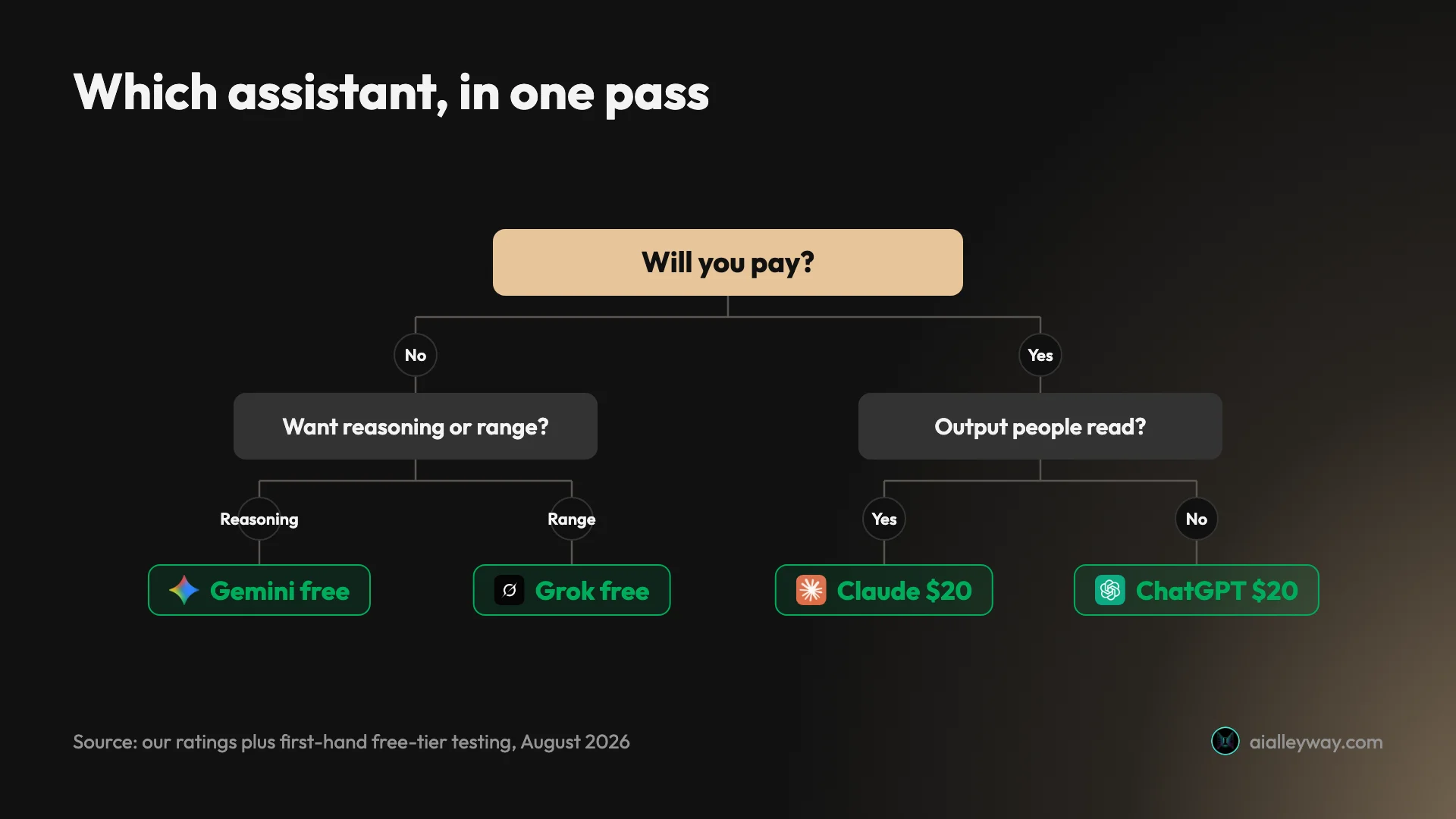
Are you going to pay? If no, go to Gemini or Grok, because they are the only two that give a free account real model choice. If yes, keep reading.
Does your output carry your name? If yes, Claude, and accept that you will need something else for images.
Do you need to check the answer? If yes, Perplexity, and expect to keep a second tool for drafting.
Do you want one subscription to cover everything? ChatGPT, which is the answer for most people and the reason it is our category pick.
Do you actually want something that acts rather than answers? None of these five. Take the four questions from the agent section above to whichever tool you shortlist, because they are the ones a ranking will not answer for you.
Final word
The interesting finding from a week of running the same prompts through these products is how close they have become where everyone is looking, and how far apart they still are where nobody is.
At $20 the differences are real but narrow, and mostly about which ecosystem you are already inside. On the free tier the gaps are wide, and they run against the reputations: the two best-known assistants give a non-paying user the least model choice of the five, and the least-known gives the most.
For most people paying for one: ChatGPT, on breadth. For anyone not paying: Gemini or Grok. For prose with your name on it: Claude, whatever else you also run.
And if what you meant by “assistant” was something that acts on your calendar rather than answers your questions, this was the wrong list — which is worth knowing before you spend $20 finding out, and worth taking the four questions above with you when you go looking.
Frequently asked questions
What is the best AI assistant in 2026?
ChatGPT, if you are going to pay for one, and we rate it 4.6 against Claude's 4.4, Perplexity's 4.4 and Gemini's 4.3.
The case is breadth rather than any single win. It covers images, voice and the widest integration surface, and its paid ladder runs from $20 to $200 so there is somewhere to go as usage grows.
If you are not going to pay, the answer changes completely, and this is the part most rankings skip. A free ChatGPT account gives you no model picker at all. A free Gemini account gives you four selectable modes and a free Grok account gives you five. On the tier most people actually use, the famous product is the more restricted one.
And if your work is prose that carries your name, Claude still writes better than any of them, which is a narrower claim than best but a more useful one.
Which AI assistant has the best free tier?
Gemini or Grok, depending on whether you want reasoning or range, and neither answer is ChatGPT.
I opened four of the five free tiers on the same afternoon. Gemini offers four selectable modes including advanced reasoning, none of them padlocked. Grok offers five, spanning quick answers, a beta coding mode and a heavier reasoning mode. ChatGPT offers a Think toggle and no model choice. Claude is the exception I did not open on a free account: Anthropic's own plan table does not list the model picker on the free tier, so that row is documented rather than observed.
Perplexity is the odd one: its free tier displays ten models with a padlock on every single one, which is a showroom rather than a free tier.
Two caveats. A mode appearing in a picker is not proof of unlimited use of it, and Grok's own upgrade screen sells smarter Expert answers as a paid benefit. Free tiers also change faster than anything else in this category.
Is ChatGPT still the best AI assistant?
For most paying buyers, yes, and the reason is coverage rather than any category where it wins outright.
It does not write as well as Claude. It does not cite as cleanly as Perplexity. Its free tier is more restricted than Gemini's or Grok's. What it does is cover more ground in one subscription than anything else here, which is what most people actually want from a single tool.
The honest qualifier is that its lead has narrowed in a specific way. On the two factual tests I ran this week, ChatGPT's free tier and Grok's free tier both answered correctly and both went to the vendor's own documentation. On a four-rule writing task they both scored four out of four.
So the gap in output quality is smaller than the gap in reputation. The gap in breadth is still real.
Which AI assistant is best for writing?
Claude, and it is the clearest single-axis result across everything this site has tested.
The difference does not show up in a quick trial, which is why so many rankings miss it. Give two assistants a style guide with prohibitions in it, ask for something long, then read the last third rather than the first. Claude still holds the rules there. The others drift back toward their house structure once the material gets complicated.
We rate Claude 4.4 overall, held back by metering rather than by output quality, and our Claude Max plan guide explains where the money goes if you hit those limits.
The caveat is that Claude generates no images at all. If your assistant is doing double duty, that is a separate subscription you will need to budget for, and it is the one hard capability gap in this ranking rather than a matter of degree.
What is the difference between an AI assistant and an AI agent?
An assistant answers; an agent acts. That distinction decides which half of this category you should be shopping in, and most rankings blur it.
The five tools ranked here are assistants. You ask, they respond, you take the output and use it. Tools like Motion, Reclaim and Lindy are agents: they connect to your calendar, inbox or CRM and change things without you in the loop for each step.
Search for the best AI assistant and you will get both categories mixed into one list, frequently with a scheduling tool ranked above a chat assistant on the basis of criteria that only apply to one of them.
We have tested the assistants and not the agents, so this post ranks the first group and describes the second honestly rather than pretending to have compared them.
Do I need to pay for an AI assistant?
Less often than the pricing pages imply, and the honest answer depends on which limit you actually hit.
If you want model choice without paying, Gemini and Grok both hand a free account a picker where ChatGPT and Claude hand it nothing. If you want the most complete free product regardless of model choice, ChatGPT's is still the broadest.
Pay when you hit a specific wall rather than on principle. The three walls worth paying to remove are volume, if you are being cut off mid-task; a model you cannot otherwise reach, which is the only thing more usage will never buy you; and context, if you are pasting documents longer than roughly forty pages.
One structural note: none of the individual ChatGPT plans can be paid annually, while Claude Pro discounts to $17 and Grok's annual rate saves about 17 percent.
Keep reading
Claude alternatives: which Claude are you replacing?
Anthropic sells the chat assistant plus five named products called Claude, and page one answers four different questions. Work out which you mean first.
Perplexity alternatives: 7 ranked, 6 tested on one question
The best Perplexity alternatives, tested on one question with a checkable answer. ChatGPT used the newest figure; three free answers began below 2025's rate.
Gemini alternatives: the two reasons people actually leave
The best Gemini alternatives, sorted by why you are leaving. Privacy points one way, escaping Google's ecosystem points another, and they are different tools.
ChatGPT vs Gemini: the free tier decides this one
ChatGPT vs Gemini, both tested on free accounts. One hands a non-paying user its advanced reasoning model; the other will not let you pick a model at all.