
Gemini alternatives: the two reasons people actually leave
The best Gemini alternatives, sorted by why you are leaving. Privacy points one way, escaping Google's ecosystem points another, and they are different tools.
Contents
The best Gemini alternatives, sorted by why you are leaving
Almost every list of Gemini alternatives ranks the same seven chatbots in roughly the same order. That is not much use, because the right replacement depends entirely on which of Gemini’s two problems sent you looking — and the two point at different tools.
| Why you are leaving | Switch to | Why |
|---|---|---|
| The data question | Proton Lumo | Zero-access encryption, no logging, no training on your chats |
| Google-only advantages | ChatGPT | Broadest single product, assumes nothing about where your files live |
| Writing that has to read well | Claude | Holds a brief to the end of a long draft |
| Answers you must verify | Perplexity | Inline citations on every claim |
| You live in Word and Excel instead | Microsoft Copilot | The same ownership advantage, other suite |
| Cost, especially at API scale | DeepSeek | Free chat; output from $0.66 per million tokens |
| A cheaper paid tier | Mistral Vibe | $14.99, or $5.99 for verified students |
The fuller picture, on the axes that decide it:
| Free tier | Entry paid | What it says about your data | Reaches your files | Tested here | |
|---|---|---|---|---|---|
| Gemini | Four modes, none locked | Google One AI plans | Kept 72h with history off | Native, on paid tiers | Free tier |
| Proton Lumo | Yes, no card | Plus, price not shown | States it never does | No | Not tested |
| ChatGPT | One model, no picker | $20 Plus | Opt-out offered | Via plugins | Free tier |
| Claude | Assistant only | $20 Pro | Opt-out offered | Via connectors | Paid Max plan |
| Perplexity | Ten models, all locked | $20 Pro | Opt-out offered | Via connectors | Free tier |
| Copilot | Yes, separate app | $9.99 via M365 | Enterprise controls | Native in Office | Not tested |
| DeepSeek | Free chat | API from $0.66/1M | Not stated clearly | No | Not tested |
| Mistral Vibe | Yes | $14.99 | Residency at enterprise | No | Not tested |
The fourth column is the one worth staring at if the data question is what brought you here, and it is the column most roundups leave out entirely. Note how differently the eight vendors answer it: one states a policy outright, three offer an opt-out, three answer an adjacent question instead — retention, enterprise controls, data residency — and one does not say.
One warning before the list: if what you liked about Gemini was the free tier, leaving is probably a downgrade. More on that below.
Why people actually leave Gemini
Three reasons come up repeatedly. Two are good ones and the third is worth checking before you act on it.
| The complaint | Is it fair? | Where it points |
|---|---|---|
| Gemini sees too much of my data | Yes: 72h retention with history off | Proton Lumo |
| Its best feature is locked to Google | Yes: Workspace access is tiered | ChatGPT |
| The free models got worse | Not on my account; the picker still shows four | Check before leaving |
Worth saying plainly before the detail: none of this makes Gemini a bad product. It scored 4.3 in our review and its free tier is the most generous in the category. The reasons below are specific complaints about specific behaviours, not a verdict on the whole thing, and a reader who has none of them should probably stay put.
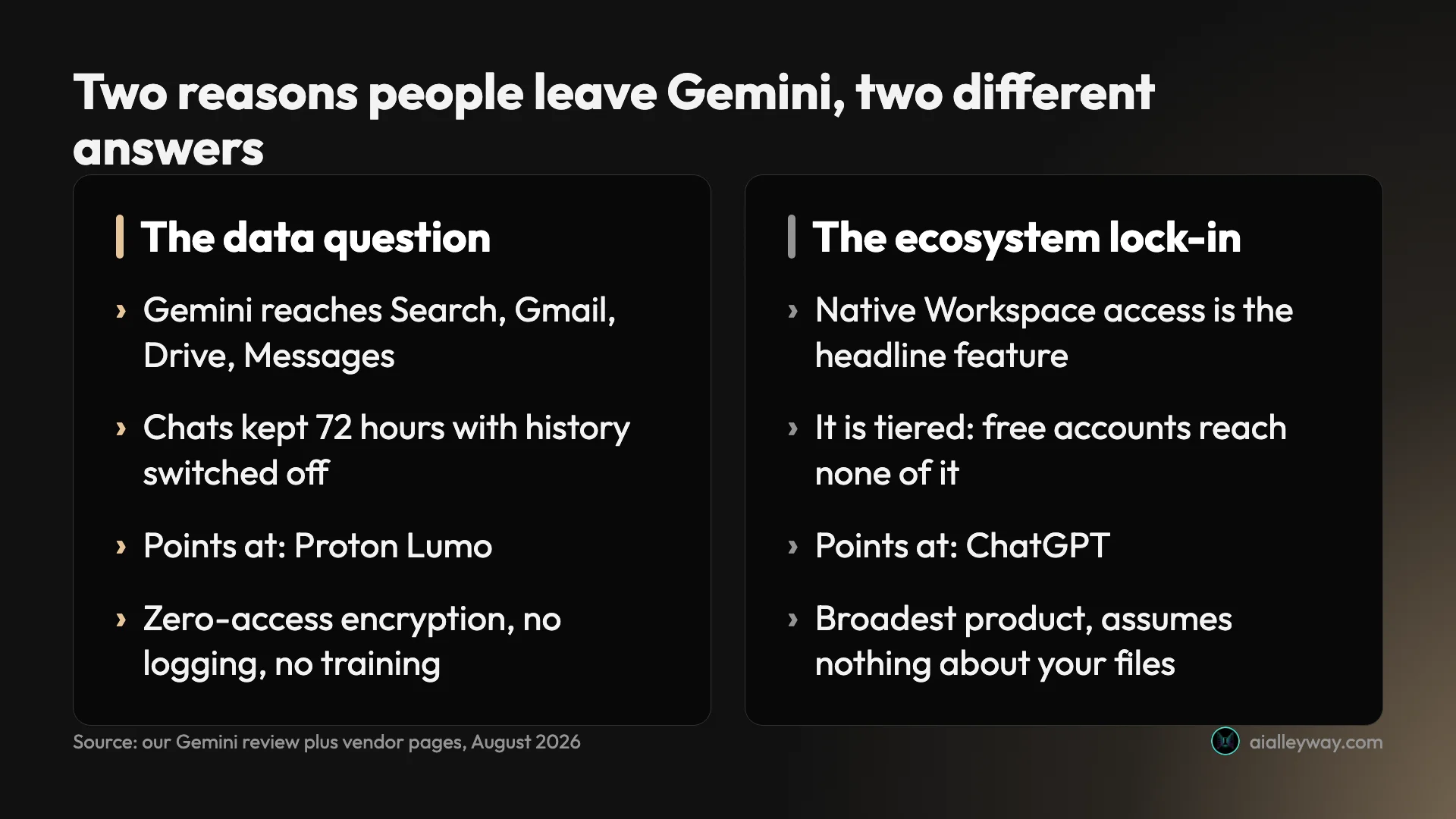
The data question. Gemini’s reach is the product. It sits inside Search, Gmail, Drive and Messages, which is what makes it useful and what makes people uneasy. The specific detail that bothers people most is one our Gemini review documented with a screenshot: Google’s own Gemini Apps Activity screen states that chats are still saved for 72 hours when you have switched that setting off.
That is a deliberate design decision rather than a bug, and Google discloses it plainly rather than burying it, which is more than several rivals manage. It is also not nothing. If you paste client material into an assistant, it is a fact you want before you do it rather than after.
The advantage is conditional. Native Workspace access is the thing no competitor can match, because the obstacle is ownership rather than engineering. But it is tiered. A free Gemini account reaches none of your Google apps, so the headline reason to use it sits behind a Google One plan — and the paid tiers are storage plans with Gemini attached rather than AI subscriptions, which our review scored 4.3 partly on that packaging.
The free models are worse now. This is a complaint you will see repeated in forums, and it did not match what I found. Opening the model picker on a free Gemini account gives four selectable modes — 3.5 Flash-Lite, 3.6 Flash, 3.1 Pro described as advanced reasoning, and a separate Extended thinking mode — none of them padlocked. That is more than ChatGPT’s free tier offers, which has no picker at all. If degraded free models are your reason for leaving, open the picker and check before you move.
What I tested here, and what I only read about
One scoping note first. Six of the seven tools below also appear in our ChatGPT alternatives roundup, which sorts the same field by what ChatGPT fails at instead. If ChatGPT rather than Gemini is the thing you are leaving, read that one — the tools overlap, the ranking does not.
Four of the tools here were reviewed on this site from real accounts, including Gemini itself: ChatGPT at 4.6, Claude at 4.4, Perplexity at 4.4 and Gemini at 4.3. Claude I use daily on a paid Max plan; the rest on free tiers.
Proton Lumo, Microsoft Copilot, DeepSeek and Mistral Vibe I have not used. Everything below about them comes from the vendors’ own pages, fetched while writing, and is written as documentation rather than experience. Every section says which it is in the same place, so you can tell at a glance without reading this paragraph.
| Tool | Basis for what you read below |
|---|---|
| ChatGPT, Claude, Perplexity, Gemini | Reviewed here from real accounts, rated |
| Proton Lumo, Copilot, DeepSeek, Mistral Vibe | Vendor documentation only, unrated |
The selection rule was that each tool has to answer one of the reasons above. A merely competent chatbot did not earn a section, because “also good” is not a reason to move off something that already works.
That rule is why some names you will see elsewhere are absent. Grok appears on most Gemini-alternatives lists; its site sits behind a bot-verification gate and xAI’s product page refuses automated access, so nothing about it could be sourced and inventing a section would have been worse than the omission. Meta Llama and open-weight models generally are a different category — they answer “how do I run this myself”, not “what do I open instead”.
1. Proton Lumo — best if the data question is why you are leaving

| Lumo at a glance | |
|---|---|
| Alley Rating | Not tested here — vendor pages only |
| Free tier | Yes, no card; limited Max model use, 1 Project |
| Entry paid | Lumo AI Plus exists; no price rendered to my account |
| Best at | Being the assistant that cannot read your chats |
| Worst at | Unknown to me — I have not run it |
If privacy is the reason you are leaving Gemini, this is the answer, and it is the only tool on this list where that is the entire product rather than a settings screen.
Lumo is made by Proton — the same people as Proton Mail and Proton VPN, under a nonprofit foundation. Its privacy claims are unusually specific, which matters because vague ones are easy to write. Proton states that all conversations are stored with zero-access encryption, so that nobody, including Proton, can read them; that it does not log your chats; and that it never uses your data to train AI models.
Set that beside the Gemini fact above and the contrast is the whole argument. One assistant keeps your chats for 72 hours after you tell it not to. The other says it cannot read them at all.
Pricing. There is a free tier with no card required, covering limited use of its Max model, limited messages and chat history, limited image generation and one Project. A paid Lumo AI Plus exists with more of each and unlimited Projects — I am not quoting a price for it, because the pricing page rendered “$0.00 every month” to my browser, which is plainly an artefact rather than a figure.
Where it falls short. I have not used it, so I cannot tell you whether the answers are any good, and that is not a small gap when the product is an assistant. A privacy guarantee is worth nothing if the output is poor. The free tier costs nothing to find that out.
The honest caveat about privacy claims. Every vendor says something reassuring about data. What makes Proton’s different is that the company’s entire business is built on the claim being true — Proton Mail and Proton VPN would not survive it being false — and that the wording is specific rather than gestural. “Zero-access encryption” is a technical statement about who holds the keys, not a promise about intentions. That is a meaningfully stronger form of assurance than a privacy policy that reserves the right to change.
Who it is for. Anyone who handles client, legal, medical or otherwise confidential material and has read Google’s retention wording carefully. Also anyone who simply finds it unpleasant that an assistant sees their mail, which is a preference rather than a threat model and does not need justifying.
2. ChatGPT — best if you want out of Google’s ecosystem

| ChatGPT at a glance | |
|---|---|
| Alley Rating | 4.6 — Category Leader, reviewed here |
| Free tier | Complete but rationed; no model picker at all |
| Entry paid | $20 Plus; a cheaper Go tier may carry ads |
| Best at | Breadth on a single subscription |
| Worst at | Long-document prose; free tier gives no model choice |
If the problem is that Gemini’s best features only exist inside Google, ChatGPT is the replacement, because it assumes nothing about where your files live.
One subscription covers text, image generation, voice, web search, deep research, a coding agent and custom GPTs. Gemini’s equivalent breadth is spread across Google products and tiers; ChatGPT’s sits on one plan and one tab. It remains our category pick at 4.6, and our ChatGPT vs Gemini comparison runs the two directly against each other.
Pricing. Free, then a cheaper Go tier that OpenAI’s own pricing page notes may include ads, then Plus at the category-standard price, then Pro.
Where it falls short. Its free tier is the mirror image of Gemini’s: more complete as a product, less capable as a model. Everything is present and everything is rationed, and there is no model picker — just a Think toggle. It also lost video generation entirely when the consumer Sora app shut down, which is a capability Gemini still has through Veo.
The trade you are making. Moving from Gemini to ChatGPT swaps a capable free tier for a broader paid one. Gemini’s free account gives you a working model picker; ChatGPT’s gives you one model and rations everything expensive around it. If you are going to pay either way, ChatGPT covers more ground. If you are not, this is the wrong direction to move.
Who it is for. Anyone leaving Google who wants one bill, one tab and no assumptions about their file storage.
3. Claude — best if register was the problem

| Claude at a glance | |
|---|---|
| Alley Rating | 4.4 — Power Tool, reviewed here |
| Free tier | Assistant only; Projects and Claude Code are paid |
| Entry paid | $20 Pro, or $17 billed annually |
| Best at | Holding a brief to the end of a long draft |
| Worst at | No image generation at all |
Gemini’s writing is its weakest axis, and Claude is the sharpest available fix.
The failure mode is specific rather than general. Gemini is accurate and undistinctive, and on anything long it slides toward a flat, listy register — argument flattened into bullets. Claude holds a brief further into a document, particularly a negative instruction like a banned-word list, which is the hard part that demos never test.
Pricing. Free, $20 Pro or $17 billed annually, and Max from $100 where the multiplier describes a five-hour session rather than a month — our Claude Max plan guide works through that.
Where it falls short. It generates no images at all. If Gemini was covering images for you, Claude does not replace that half and you will need something else for it.
What the swap costs. Claude’s free tier is the most restricted of the three assistants here — Projects, Claude Code, Cowork and Research all sit behind Pro — so unlike the Gemini free account you are leaving, the free Claude account is closer to a sample than a workshop. Budget for the $20 if writing is why you are moving.
Who it is for. Anyone whose output is prose other people read: newsletters, reports, documentation, anything carrying a byline.
4. Perplexity — best if you need to check the answer

| Perplexity at a glance | |
|---|---|
| Alley Rating | 4.4 — Power Tool, reviewed here |
| Free tier | Real, but ten models shown padlocked |
| Entry paid | $20 a month, shown as $17 billed annually |
| Best at | Answers with inline citations you can click |
| Worst at | Producing anything, rather than answering |
Perplexity is a different product rather than a substitute, and worth the section because Gemini’s answers are hard to audit.
When this site ran one identical question through three engines, Perplexity cited European Commission domains across ten sources while Google’s AI Mode leaned on a consultancy and two explainer sites. Both were correct. Only one let you check. Our best AI search engine roundup has that test in full.
Pricing. Free, $20 Pro, $200 Max — with the wrinkle that Perplexity’s own pages quote monthly and annual-equivalent figures without showing both, which our Perplexity pricing guide untangles.
Where it falls short. The free tier shows ten models with a padlock on every one. It answers rather than produces, so it is the wrong tool for drafting.
Not a like-for-like swap. This is the one tool here that does not replace Gemini so much as split off part of it. Gemini answers questions and drafts things; Perplexity answers questions with receipts and does not really draft. Most people who move here keep something else for writing, which means it is an addition to your stack rather than a substitution in it.
Who it is for. Researchers, analysts, students, anyone whose answer gets checked by somebody else.
5. Microsoft Copilot — best if you are swapping Google for Microsoft

| Copilot at a glance | |
|---|---|
| Alley Rating | Not tested here — vendor pages only |
| Free tier | A separate free Copilot at copilot.microsoft.com |
| Entry paid | From $9.99, inside Microsoft 365 Personal |
| Best at | Living inside Word, Excel, PowerPoint, Outlook |
| Worst at | Little obvious edge outside Microsoft’s suite |
This is the symmetrical case, and for some readers it is the honest answer: you do not want to leave an ecosystem, you are in the wrong one.
Everything that makes Gemini compelling inside Google — an assistant already in the file you have open, no uploading, no connector — Microsoft offers from the other side. If your documents are in Word and your mail is in Outlook, Copilot has the structural advantage and Gemini never did.
Pricing, from Microsoft’s own individuals page. Microsoft 365 Personal is $9.99 a month or $99.99 a year, Family $12.99 or $129.99, Premium $19.99 or $199.99. Personal and Family put Copilot inside the Word, Excel, PowerPoint and Outlook desktop apps; Premium adds agents for source-cited research and data analysis.
Worth knowing when reading older articles: Copilot Pro, the standalone individual subscription most of them name, no longer appears among Microsoft’s current individual plans.
Where it falls short. I have not used it, so I will not characterise the output. What is visible from outside is that its value is almost entirely conditional on already living in Microsoft’s suite.
One thing worth separating, because the single name hides it: the free Copilot at copilot.microsoft.com and the Copilot embedded in Excel are close to different products. The free one is a chatbot on a web page. The one the paid plans buy sits inside your spreadsheet and reads the sheet, and it is the only one relevant to this comparison. If you have tried the free version and found it thin, you have not tried the thing being sold here.
Who it is for. Office-based workers, and anyone whose employer has already bought Microsoft 365 and can switch it on rather than procure something new.
6. DeepSeek — best if the bill is what is driving this

| DeepSeek at a glance | |
|---|---|
| Alley Rating | Not tested here — vendor pages only |
| Free tier | Free chat |
| Entry paid | API from $0.66 per million output tokens off-peak |
| Best at | Cost, by a wide margin, at API scale |
| Worst at | Unanswered data-governance questions |
Gemini’s paid tiers are storage plans, which makes them either good value or irrelevant depending on whether you wanted the storage. If you did not, DeepSeek is the cheapest serious option here.
Its chat product is free. The striking number is on the API, where DeepSeek’s published rate card does something nothing else on this list does: it charges half rate outside business hours. Peak runs 01:00–04:00 and 06:00–10:00 UTC on weekdays, and off-peak is half of peak.
| DeepSeek API | Off-peak per 1M | Peak per 1M |
|---|---|---|
| v4-flash output | $0.66 | $1.32 |
| v4-flash input, cache miss | $0.22 | $0.44 |
| v4-pro output | $1.98 | $3.96 |
Where it falls short. Everything I know comes from its documentation. And there is an irony worth naming: if you are leaving Gemini over the data question, a Chinese vendor whose landing page defaults to Chinese and whose marketing pages do not answer data-governance questions is an odd destination. Read the terms first.
The off-peak mechanism deserves a moment because nothing else here does it. Charging half rate outside business hours is a supply signal made visible to customers: compute is cheaper when demand is low, and you are allowed to act on it. Any batch job that does not need to run now can be scheduled into the window, and the bill halves. That is a genuinely different pricing philosophy from a flat monthly tier.
Who it is for. Developers metering real volume, and cost-sensitive users who want capable free chat without a subscription.
7. Mistral Vibe — best if you want an EU-hosted vendor

| Mistral Vibe at a glance | |
|---|---|
| Alley Rating | Not tested here — vendor pages only |
| Free tier | Yes, for everyday tasks |
| Entry paid | $14.99, or $5.99 for verified students |
| Best at | Undercutting the $20 category default |
| Worst at | EU data residency is an enterprise feature |
Two things make Mistral worth a section, and the first is that it was renamed recently enough that the old name is still the one in circulation.
The product previously called Le Chat is now Mistral Vibe, described by Mistral as a chat assistant and coding agent in one. If you are comparing against something that says Le Chat, it means this.
Pricing, from Mistral’s own pricing page. Free for everyday tasks; Pro at $14.99 a month, which undercuts the $20 that has become the default; and $5.99 a month for verified students, which is the cheapest credible assistant subscription here. Team is $24.99 per user plus a $50 base, which flips the economics for small groups.
Where it falls short. I have not used it. And the European angle is more nuanced than it is usually sold: Mistral states that enterprise customers can deploy on-premises, in a private cloud or with full data residency, but its public page makes no equivalent commitment for free and Pro individuals. If EU residency is why you are leaving Google, read that carefully before assuming this solves it.
The student price is worth flagging separately. At $5.99 it is roughly a third of what students pay elsewhere, and unlike many education offers it sits on the public pricing page rather than behind an enquiry form. For anyone leaving Gemini’s free tier and unwilling to pay $20, this is the cheapest credible landing spot.
Who it is for. Students, price-sensitive users, and European organisations that need a non-American vendor at enterprise tier.
What you give up by leaving
A roundup that only lists reasons to go is doing half the job. Four things Gemini does that nothing on this list replaces:
| What Gemini holds | Nearest thing on this list |
|---|---|
| Native Gmail, Docs, Drive, Calendar access | Copilot, but only inside Microsoft’s suite |
| A free tier with advanced reasoning included | Nothing here matches it for $0 |
| Veo video generation | Nothing — ChatGPT lost video when Sora shut down |
| Storage bundled with the assistant | None; the others sell the assistant alone |
Native Google Workspace access. Google owns Gmail, Docs, Drive and Calendar, so Gemini reads and acts on them directly rather than through a connector you authorise. Every alternative reaches the same files at one remove. If that access is why you use it, none of the seven above is a replacement — they replace everything else.
The free tier. This is the one people underestimate. Gemini gives a non-paying user a working model picker with advanced reasoning in it. ChatGPT free gives one model and no picker; Perplexity free shows ten models with a padlock on each. Judged purely on what a non-payer gets, Gemini is the best of the group and moving is a downgrade.
Which is why the framing of this post matters. Leave over the data question or the lock-in, both of which are real. Do not leave because a forum thread told you the free models got worse, because on the evidence of opening the picker, they did not.
There is a broader point buried in that. Gemini is the assistant most likely to be criticised on reputation rather than on use — Google is a large company with a long history of retiring products and collecting data, and both of those make people suspicious in ways that are not always specific. Some of that suspicion is well earned; the 72-hour retention line is exactly the sort of detail that justifies it. But “Google is Google” is not a product assessment, and if you are going to move, the reason should be something you could point at on a screen.
The version of this post I would want to read sorts the reasons into ones that survive contact with the evidence and ones that do not. The retention policy survives. The tiered Workspace access survives. The degraded-free-models claim does not, at least not on my account and not this week.
What to check before you move
Switching assistants costs more than the subscription, and five things are worth checking before you commit rather than after, plus a sixth if privacy is what is driving this.
| Before you move | Why it matters |
|---|---|
| Can you finish “I am leaving because…”? | Vague dissatisfaction survives a change of tool |
| Have you opened Gemini’s model picker? | Four selectable modes is a strong free offer to give up |
| Where does your chat history go? | Nowhere. None of these import it |
| How much of your day already assumes Google? | Adjacency, not the model, is half of what you use |
| Is your complaint about the product or the tier? | A Google One plan is cheaper than a migration |
| If privacy is the reason, what does the destination promise? | Three tools here make no clear training statement |
Your actual reason, stated in one sentence. If you cannot finish “I am leaving Gemini because…” with something specific, the move will probably disappoint you. Vague dissatisfaction usually survives a change of tool.
What you are giving up on the free tier. Open Gemini’s model picker and look at what is in it. Four selectable modes including advanced reasoning is a strong free offering, and most of the alternatives here give a non-payer less. This is the single most common way people make themselves worse off.
Where your history goes. None of these tools imports your Gemini conversations. A year of accumulated context, saved instructions and remembered preferences does not move with you, and that loss is invisible until you notice yourself re-explaining things. It is the strongest argument for adding a second tool rather than replacing the first.
How much of your workflow assumes Google. This is the check people skip and then regret. If your documents open in Docs, your mail is Gmail and your calendar is Google, then a large part of what makes Gemini useful is not the model at all — it is the adjacency. Moving the assistant without moving the files means every task gains an upload step, and that friction compounds daily in a way a feature comparison will never show you.
Whether the thing you want is actually a tier. Several complaints about Gemini are complaints about the free tier rather than the product: no Workspace access, tighter limits. If the fix is a Google One plan you have not tried, that is a cheaper experiment than a migration.
There is also a sixth check that only applies if privacy is your reason, and it is the one people skip: read what the destination actually promises. Three of the tools on this list — Copilot, DeepSeek and Mistral Vibe — make no clear statement about training on consumer conversations at all, which means moving to them for privacy reasons would be a downgrade dressed as an upgrade. Gemini at least tells you what it keeps and for how long. A vendor that says nothing is not the same as a vendor that says no, and the silence is easy to read as reassurance when it is the opposite.
The half nobody mentions: images and video
Every list of Gemini alternatives treats it as a chatbot, which understates what you are replacing.
Gemini generates images, and its free tier does so with a generosity that most rivals meter tightly. It also reaches Google’s Veo models for video, which this site rates highest in that category — our best AI video generator roundup has the detail. If you moved to Gemini partly because it did those things without a second subscription, a chat-only replacement leaves you short.
That gap is sharpest against Claude, which generates no images at all, and against Perplexity, which is not a producer. ChatGPT covers images well and voice better than anything here, but it has no answer on video since the consumer Sora app was discontinued — you can confirm that in one click, because sora.com now redirects to a sunset page.
So the practical shape of a move away from Gemini is often two tools rather than one: something for the conversation and something else for the pictures. That is a real cost and it belongs in the decision rather than in a footnote.
If images are the reason you are staying, that is a perfectly good reason to stay.
How to pick
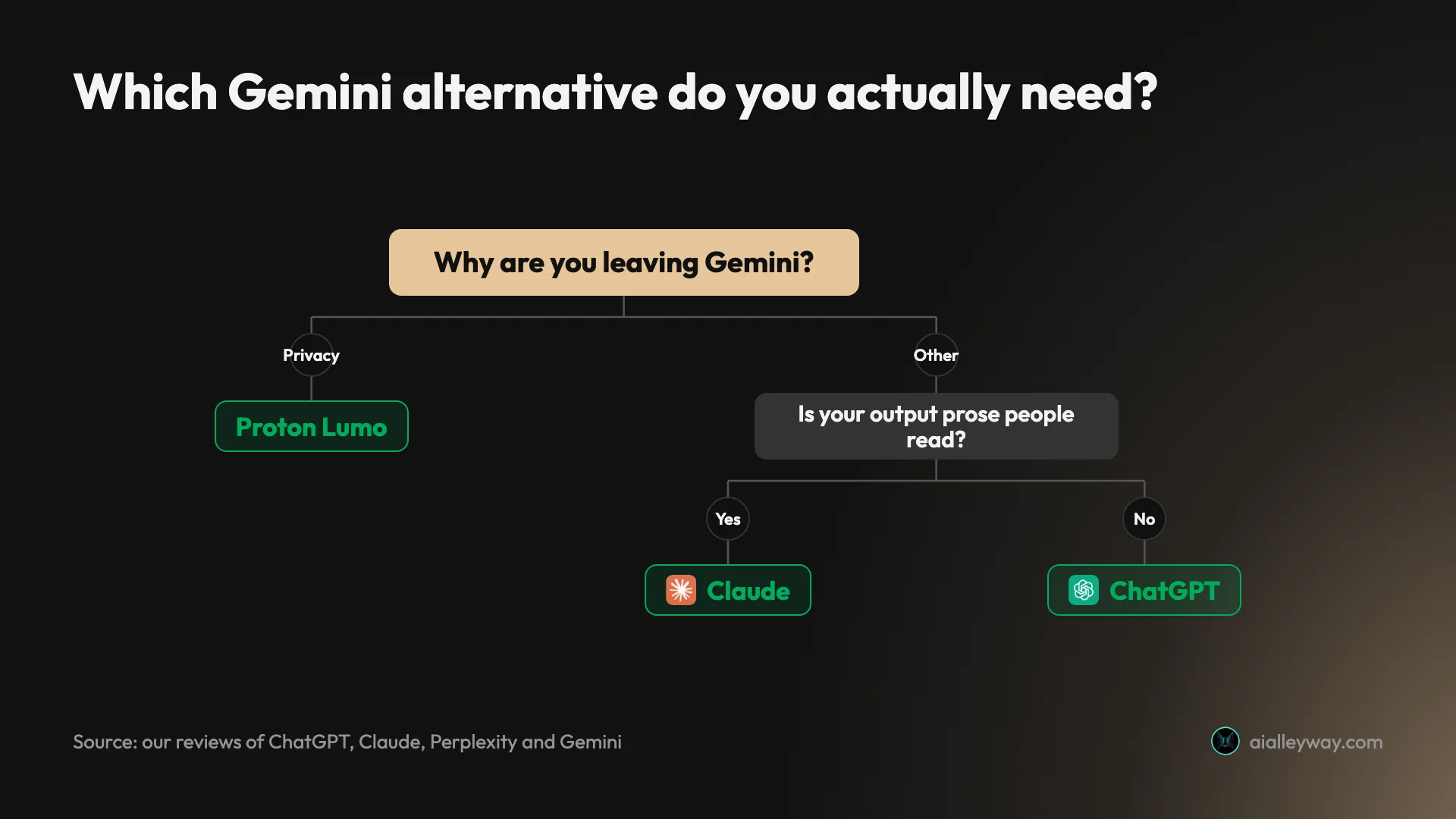
- You do not want an assistant reading your chats → Proton Lumo. Zero-access encryption, no logging, no training, free to try.
- You want out of Google specifically → ChatGPT. Broadest product, no assumptions about your files.
- Your writing needs editing every time → Claude.
- You cannot use an answer you cannot verify → Perplexity.
- Your work lives in Word and Excel → Microsoft Copilot, via Microsoft 365 Personal at $9.99.
- The bill is the problem → DeepSeek, scheduled off-peak.
- You want a paid tier under $20, or you are a student → Mistral Vibe.
- You are leaving because of the free tier → reconsider. Open the model picker first.
If you are moving a team rather than yourself
The calculation changes completely once more than one person is involved, and most Gemini-alternatives lists ignore it.
The first change is that the data question stops being a preference and becomes a procurement question. Consumer tiers across this whole category are the wrong place for regulated or client-confidential work, and the guarantees people assume they have — no training, audit logs, regional hosting — sit at enterprise tiers rather than on the $20 plan. That is true of Gemini and equally true of most things you would replace it with.
The second is that per-seat maths stops being linear. Mistral’s Team tier adds a $50 monthly base on top of $24.99 per user, which makes a two-person team about $50 a head rather than $25. Microsoft’s advantage compounds instead: if the organisation already pays for Microsoft 365, Copilot is a switch to flip rather than a purchase to justify.
The third is the boring one that decides it in practice. If your team’s files are in Google Drive, moving the assistant off Google means every person gains an upload step, every day. Multiply that by a headcount and the friction argument usually beats the feature argument.
So the honest guidance for a team is narrower than for an individual: move for compliance reasons, at an enterprise tier, with the files, or do not move at all.
Final word
Gemini is a strong free product with a packaging problem and a retention policy worth reading. Those are two different complaints and they have two different answers, which is why “the best Gemini alternative” is not a question with one name attached to it.
If your reason is the data question, Proton Lumo is the only tool here built around it, and the free tier costs nothing to evaluate. If your reason is that Gemini’s advantages evaporate outside Google, ChatGPT is the broadest replacement and our ChatGPT vs Gemini comparison covers that trade directly.
If your reason is writing, Claude is the clearest single-axis upgrade in the category and you will feel it on the first long draft. If it is cost, DeepSeek is not competing on the same axis as anyone else here. If it is that you would rather not be in an American vendor’s hands at all, Mistral is the European option, with the residency caveat above.
And if you cannot name your reason, that is worth noticing too. Gemini’s free tier is the most generous in the category, and a vague dissatisfaction is not usually worth the cost of moving your history, your saved context and your habits somewhere else. Our Gemini review sets out what it is genuinely good at, which is the other half of this decision.
Frequently asked questions
What is the best alternative to Google Gemini?
It depends on which of Gemini's two problems sent you looking, and they point at different tools.
If the problem is the data question, the answer is Proton Lumo. It is the only assistant on this list built around not seeing your conversations: Proton states that chats are stored with zero-access encryption, that it does not log them, and that it never trains on them.
If the problem is that Gemini's advantages only exist inside Google, the answer is ChatGPT. It is the broadest single product and the one that assumes nothing about where your files live. I scored it 4.6.
If what you actually liked about Gemini was the free tier, be careful. Its free picker gives four selectable modes including advanced reasoning, which is more than ChatGPT's free tier offers. Check what you are giving up before you move.
Is there a private alternative to Google Gemini?
Yes, and it is the clearest single-purpose recommendation here. Proton Lumo is made by the people behind Proton Mail and Proton VPN, and privacy is the entire product rather than a setting.
Proton's own wording is specific: all conversations are stored with zero-access encryption, so that nobody, including Proton, can read them; it does not log chats; and it never uses your data to train models. There is a free tier with no card required.
The contrast with Gemini is the point. Google's own Gemini Apps Activity screen says it still saves chats for 72 hours when you have switched that setting off, which our Gemini review documents with a screenshot.
Seventy-two hours is not sinister, and it is not nothing either. If that detail bothers you, that is a legitimate reason to move.
Which Gemini alternative is best for writing?
Claude, and it is the clearest single-axis result across every assistant this site has tested.
Gemini's weakness is not accuracy, it is register. It writes competently and undistinctively, and it slides toward flat, listy prose on anything long. That is fine for a summary and poor for anything carrying a byline.
The test that separates them is not a clever prompt. Give both a style guide containing prohibitions, ask for something long, then read the last third rather than the first. Claude still holds the rules there. Gemini has usually drifted.
I scored Claude 4.4 and use it daily for drafting. The caveat is that it generates no images at all, so if Gemini was doing double duty for you, that is a real thing to replace separately, and Gemini's image side has no equivalent inside Claude at any price.
Is there a free Gemini alternative that is any good?
Several, though this is the question where leaving Gemini costs you the most.
Gemini's free tier is genuinely strong: four selectable modes including 3.1 Pro advanced reasoning and a separate Extended thinking mode, none of them padlocked. Very little matches that for nothing.
What comes closest depends on the job. DeepSeek offers free chat on current models. Mistral Vibe has a free tier for everyday tasks. Proton Lumo's free tier includes limited use of its Max model with no card required. ChatGPT's free tier is the most complete product but gives you no model picker at all.
So if free capability is what you value, moving off Gemini is usually a downgrade. Move for the data question or the lock-in, which are real, rather than for a free tier that is already the most generous one in the category.
Why do people switch away from Gemini?
Two reasons dominate, and a third that is worth checking before you act on it.
The first is data. Gemini reaches into Search, Gmail, Drive and Messages, which is exactly what makes it useful and exactly what makes people uneasy. Google's own Activity screen says chats are kept 72 hours even with history off.
The second is that its best feature is conditional. Native Workspace access is the thing nothing else can match, and it is tiered, so a free account reaches none of your Google apps and the advantage you were promised is behind a Google One plan.
The third is a complaint you will see repeated in forums, that the free models have been degraded. That did not match what I found: the free picker still offers advanced reasoning unlocked. Verify it against your own account before treating it as a reason.
Does leaving Gemini mean losing Google Workspace integration?
Yes, and there is no way around it, because the advantage is ownership rather than engineering.
Google owns Gmail, Docs, Drive and Calendar, so Gemini reads and acts on them natively. Every competitor reaches the same files through a connector you authorise and maintain, which is slower, more fragile, and usually more limited.
So the honest framing is that if native Workspace access is the reason you use Gemini, none of the tools below replace it. What they replace is everything else Gemini does.
The symmetrical case is worth knowing: if your working day happens in Word, Excel and Outlook instead, Microsoft Copilot has the identical structural advantage from the other side, and it now arrives inside a Microsoft 365 subscription you may already pay for, which makes it the cheapest swap on this list if your day already runs on Office.
Keep reading
Gemini Image Editing: 7 Photo Edits on a Free Account
How Gemini image editing works on a free account: upload a photo, pick the right mode, describe the change, and what held or failed in seven real edits.
Gemini Watermark Remover: What Works, Tested Free
Gemini watermark remover options on a free account: the Media Watermark setting (missing for me), cropping, asking Gemini, and what SynthID still shows.
Gemini Omni Flash, Tested: Google's Video Model, Free
Gemini Omni Flash, tested free in Google Flow: 10-second clips, vertical video, image and character references, and a prompt edit that added snow.
Gemini AI Photo Prompts: 9 Trends Tested on a Free Account
Gemini AI photo prompts for 9 selfie trends, tested free with every result shown: the face mostly held, but Gemini invented a name, jewellery and new hair.