
ChatGPT alternatives: 6 worth switching to, 3 tested
The best ChatGPT alternatives, with the three I use daily scored from real accounts: Claude 4.4 for writing, Gemini 4.3 free, Perplexity 4.4 for citations.
Contents
The best ChatGPT alternatives, in one line each
Most lists of ChatGPT alternatives rank fifteen tools nobody ranked against each other. This one covers six, names which three I have actually used and scored, and says plainly where the other three came from.
| If ChatGPT is failing at | Switch to | Why |
|---|---|---|
| Writing that has to read well | Claude | Holds a brief to the end of a long draft. Scored 4.4 |
| Being usable without paying | Google Gemini | Four selectable models on the free tier. Scored 4.3 |
| Answers you can verify | Perplexity | Inline citations on every answer. Scored 4.4 |
| Working inside Word and Excel | Microsoft Copilot | Arrives inside Microsoft 365, from $9.99 |
| Cost, especially at API scale | DeepSeek | Free chat; output from $0.66 per million tokens |
| A cheaper paid tier, or EU hosting | Mistral Vibe | Pro at $14.99, under the $20 default |
How I chose these six, and what I did not test
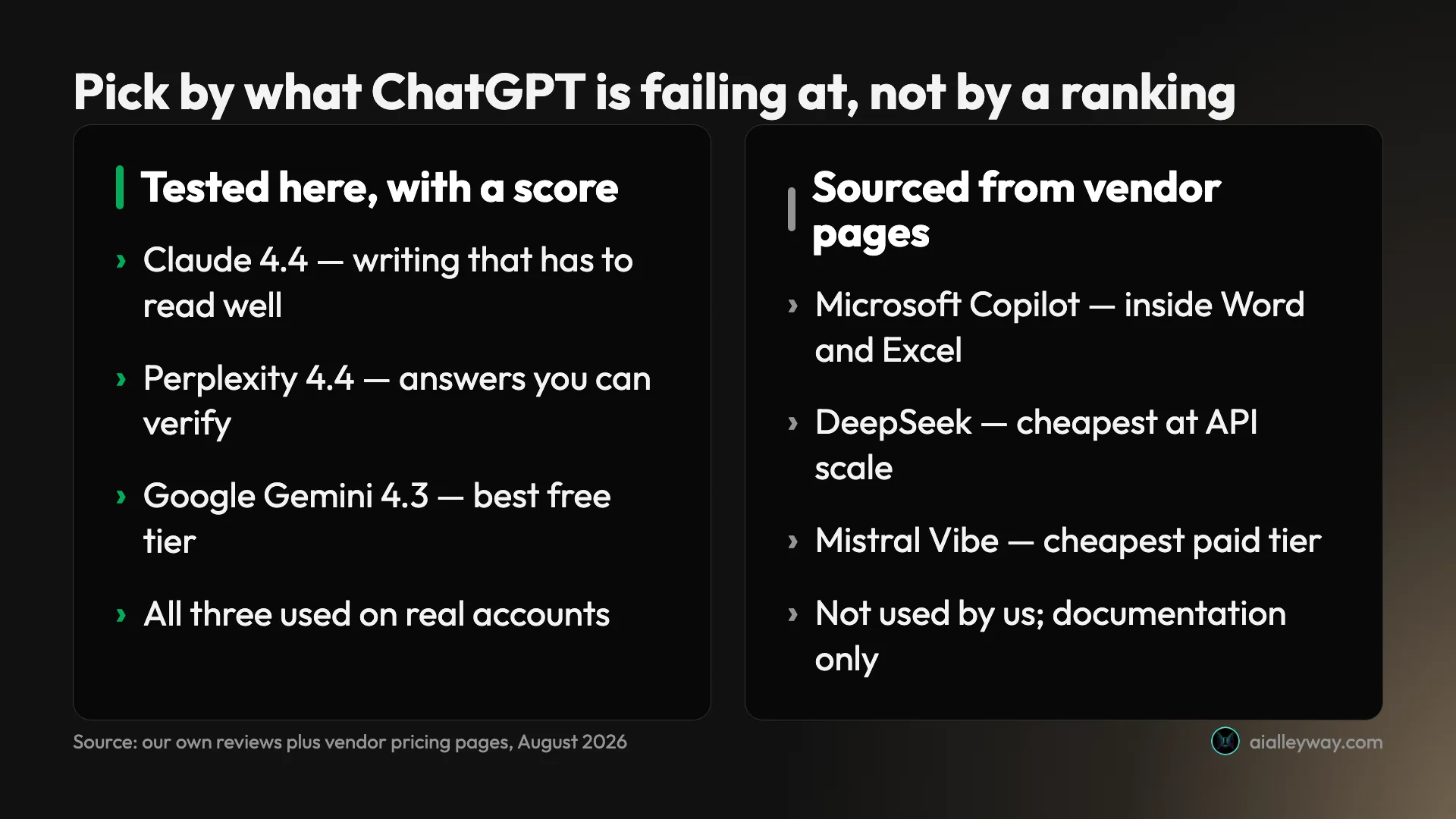
Three of the six carry an Alley Rating because I reviewed them from real accounts: Claude at 4.4, Perplexity at 4.4 and Google Gemini at 4.3. Claude I use daily on a paid Max plan. Gemini and Perplexity I use on their free tiers. Where this post says something is better or worse, for those three, it is because I ran into it.
The other three — Microsoft Copilot, DeepSeek and Mistral Vibe — I have not used. Everything below about them comes from the vendors’ own pricing and product pages, fetched while writing this, and it is written as documentation rather than experience. That is a weaker basis and I would rather say so than blur the line.
| Tool | Basis for what is said below | Account used |
|---|---|---|
| Claude | Full review, Alley Rating 4.4 | Paid Max 5x |
| Perplexity | Full review, Alley Rating 4.4 | Free tier |
| Google Gemini | Full review, Alley Rating 4.3 | Free tier |
| Microsoft Copilot | Vendor pricing pages, fetched 2026-08-25 | None |
| DeepSeek | Vendor site and API docs, same day | None |
| Mistral Vibe | Vendor pricing and product pages, same day | None |
One tool that appears on every competing list is missing here: Grok. When this was written its website sat behind a bot-verification gate and xAI’s product page refused automated access, so I could not source a single claim about its pricing or capabilities, and writing a section anyway would have meant inventing it. That has since been fixed with a real account: ChatGPT vs Grok runs four prompts through both free tiers, and Claude vs Grok covers it against Claude.
I did not run a head-to-head benchmark across all six, and I would be sceptical of any list claiming to have done so honestly. Benchmarks on frontier assistants go stale in weeks, and the numbers that circulate are usually the vendors’ own. What is durable is the shape of each product: what it is built to do, what it charges, and what it withholds. That is what this compares.
Those things move on a scale of quarters rather than weeks, and they are checkable. Every price and limit below came from a vendor page I opened while writing this, and the dates are recorded in the post’s source notes, so a future reader can judge for themselves how stale any of it has become rather than trusting a “2026” in the title.
The selection criterion was simple: each tool has to be the answer to a specific complaint about ChatGPT. Anything that was merely another competent chatbot did not earn a section, because “also good” is not a reason to switch.
Why do people look for a ChatGPT alternative?
Almost nobody arrives at this question because ChatGPT is bad. They arrive because it turns out to be worse than something else at one particular job that matters to them, and they have finally noticed.
In the reviews on this site, four complaints come up far more than the rest.
The prose needs rewriting. ChatGPT is a competent writer that reverts to a recognisable house style — headers, bullet lists, a summarising final paragraph — and holds a style brief less well the longer the document runs. If you publish under your own name, that is the complaint you feel every day.
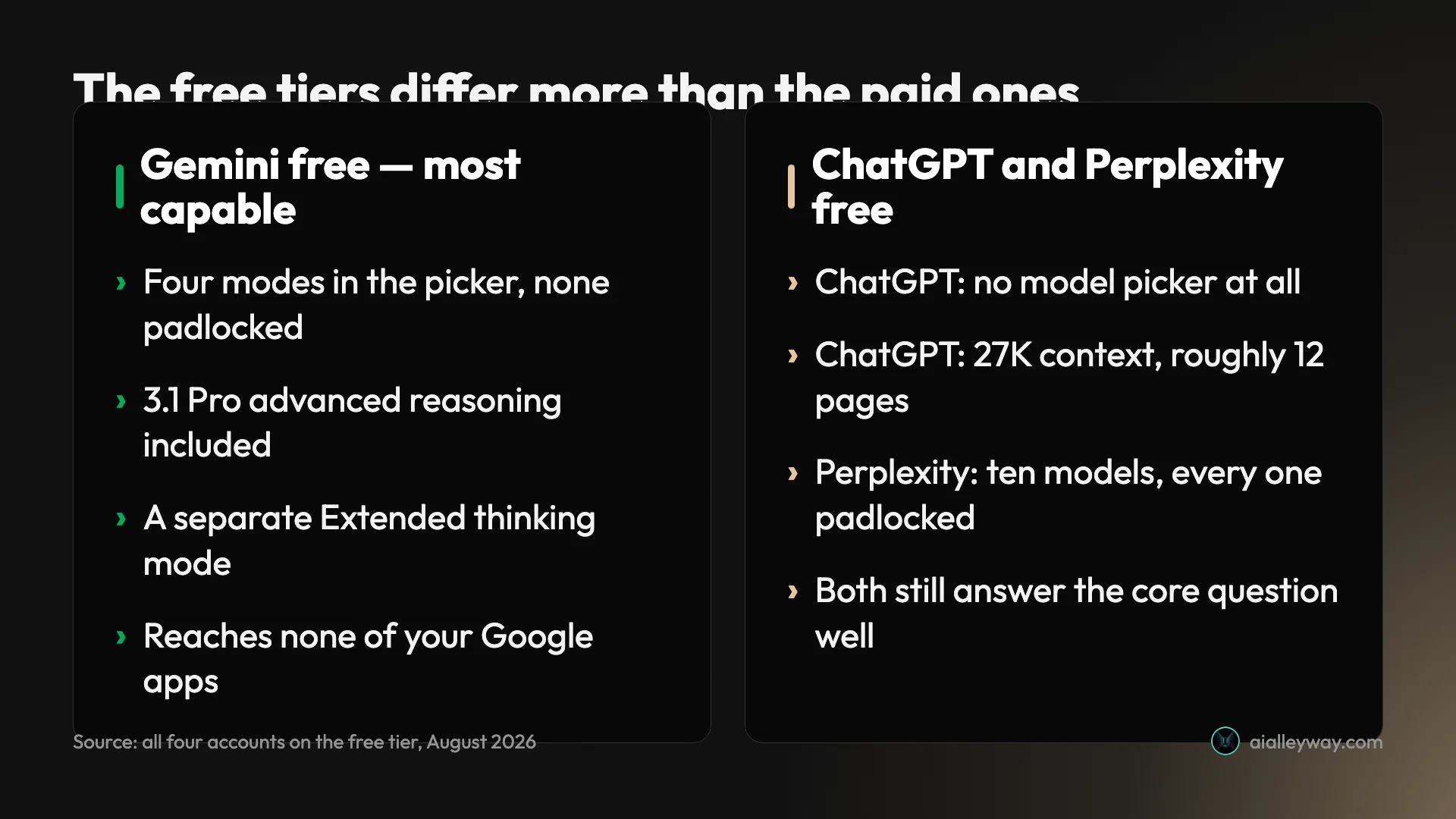
The free tier feels like a demo. OpenAI’s free plan has no model picker at all. You get one model, a Think toggle, and a 27K context window, which its own pricing page puts at roughly twelve pages of text. Every expensive thing — images, uploads, voice, deep research — is present but rationed. It is a good showroom and a frustrating workshop.
You cannot check the answer. A general assistant returns a confident paragraph with no way to trace a claim. For research, journalism, or anything a client will challenge, that is not a small gap.
The price stopped making sense. $20 a month is the category default, and once you notice that a cheaper tier or a free rival does your particular job as well, the default stops being obvious.
You are not comfortable with where the data goes. This one surfaces late and then dominates. Every consumer tier on this list trains on your conversations by default or retains them in ways that are easy to miss, and the guarantees people assume they have — no training on your data, audit logs, regional hosting — consistently sit at enterprise tiers rather than on the $20 plan. If you handle client material, that is not a preference, it is a procurement question, and it changes which of these is even eligible.
| The complaint | The alternative that answers it |
|---|---|
| The prose needs rewriting | Claude |
| The free tier feels like a demo | Google Gemini |
| You cannot check the answer | Perplexity |
| The price stopped making sense | Mistral Vibe, or Copilot via M365 |
| You are unsure where the data goes | An enterprise tier, whichever vendor |
Each of those has a different best answer, which is why the list below is organised by complaint rather than by rank. It is also why “which is best” is the wrong question to ask a list like this one: the six below are not competing for a single crown, they are competing for different jobs, and the one that wins yours depends entirely on which row above made you nod.
Every option, on the axes that decide it
| Free tier | Entry paid | Best at | Weakest at | Tested here | |
|---|---|---|---|---|---|
| ChatGPT | One model, no picker | $20 Plus | Breadth on one plan | Long-document prose | Free tier |
| Claude | Assistant only | $20 Pro | Writing, instruction-following | No image generation | Paid Max plan |
| Gemini | Four models, selectable | Google One AI plans | Free capability, Workspace | Writing, privacy default | Free tier |
| Perplexity | Ten models, all padlocked | $20 Pro | Cited, verifiable answers | Producing rather than answering | Free tier |
| Copilot | Available free | $9.99 via M365 | Word, Excel, Outlook | Little edge outside Office | Not tested |
| DeepSeek | Free chat | API from $0.66/1M | Cost at scale | Data governance questions | Not tested |
| Mistral Vibe | Everyday tasks | $14.99 Pro | Cheapest paid tier | EU residency is enterprise-only | Not tested |
Two of those columns do considerably more work than the rest. Free tier is where these products differ most sharply, and it is the column most roundups skip. Tested here is the one I would want if I were reading someone else’s list.
1. Claude — best for writing that has to read well

| Claude at a glance | |
|---|---|
| Alley Rating | 4.4 — Power Tool |
| Free tier | Assistant only; Projects and Claude Code are paid |
| Entry paid | $20/month, or $17 billed annually |
| Best at | Long-document writing, holding a brief |
| Worst at | No image generation at all |
Claude is the alternative to reach for when the problem with ChatGPT is the prose.
The difference shows up on a specific test rather than in general impressions. Give both a style guide that contains prohibitions — words not to use, a structure not to follow — then ask for something long and read the final third rather than the opening paragraphs. Any model follows positive instructions. Holding a negative instruction several thousand words in is the hard part, and it is where ChatGPT drifts back toward its house style of headers and bullet lists while Claude keeps the rules. Our ChatGPT vs Claude comparison runs that test properly, head to head.
Pricing. Free, Pro at $20 a month or $17 billed annually, and Max from $100 a month. The Max tier’s “5x” and “20x” labels describe usage within a rolling five-hour session rather than a monthly allowance, which our Claude Max plan guide works through in detail.
What it costs in practice. $20 gets you the assistant with real limits; the jump to Max at $100 buys session headroom rather than features, which is a distinction Anthropic’s own marketing blurs and which matters if you are budgeting. For most writers, Pro is the ceiling worth paying, and the free tier is genuinely useful for evaluating whether the prose difference is real for your kind of work.
Where it falls short. It generates no images at all, which is a real gap if your work is visual. Its free tier is the most restricted of the three I tested: Projects, Claude Code, Cowork and Research all sit behind Pro. And usage is metered by three meters at once — a session window, a weekly cap, and a separate cap for the heaviest model — none of which Anthropic publishes numbers for.
What it is like to live with. The thing that keeps me on it is not a benchmark, it is the editing load. A Claude draft arrives closer to publishable, which means the work after generation is shorter. Over a week that compounds more than any single-prompt comparison suggests.
It also has the most honest usage display of the group: a live meter that shows what you have spent rather than a limit you discover by hitting it. That sounds minor until you have planned a working day around an allowance you cannot see.
Who it is for. Anyone whose output is words other people read: newsletters, reports, documentation, anything carrying a byline. It is the tool I draft in, and the one I would keep if I could only keep one.
2. Google Gemini — best if you are not going to pay

| Gemini at a glance | |
|---|---|
| Alley Rating | 4.3 — Power Tool, reviewed here |
| Free tier | Four selectable models, none padlocked |
| Entry paid | Google One AI plans, sold on storage |
| Best at | Giving non-payers a reasoning model |
| Worst at | Writing; chats kept 72h when history is off |
This is the clearest recommendation on the list, and it applies to the largest group of people: everyone who has no intention of paying for an assistant.
Open the model picker on a free Gemini account and there are four entries — 3.5 Flash-Lite, 3.6 Flash, 3.1 Pro described as advanced reasoning, and a separate Extended thinking mode. None carries a padlock. Google hands a non-paying user its reasoning model. ChatGPT’s free tier, by contrast, has no model picker at all: there is a Think toggle and nothing else. That single difference is the whole argument of our ChatGPT vs Gemini comparison, which goes through both free tiers in detail.
Pricing. Free, and then something unusual. Google does not sell a Gemini subscription. The paid tiers are Google One AI plans priced on cloud storage — 400 GB, 5 TB and 20 TB — with higher Gemini limits attached. You are buying storage that comes with an assistant.
What it costs in practice. Nothing, for most people, and that is the recommendation. If you do pay, understand what you are buying: a Google One storage tier that raises your Gemini limits, which means the value calculation includes whether you wanted 400 GB or 5 TB of Drive anyway. Judged purely as an assistant subscription it looks expensive; judged as storage with an assistant attached it can look like the best deal here.
Where it falls short. The writing is the weak spot: competent, undistinctive, and prone to flattening argument into lists on anything long. The privacy default is the worst of the group — Google’s own wording on the Gemini Apps Activity screen says it still saves chats for 72 hours when you have switched the setting off. And the native Google Workspace access everyone cites as its headline advantage is tiered, so a free account reaches none of your Google apps.
The part that surprised me. I expected the free tier to be a stripped version of the paid one. It is not: the picker hands you the same advanced reasoning mode a subscriber gets, and the limit is volume rather than capability. That is a genuinely different philosophy from OpenAI’s, which gates capability first and volume second, and it is the single clearest reason to send a non-paying friend to Gemini rather than ChatGPT.
Who it is for. Non-payers, students, and anyone whose working day already happens inside Gmail and Docs — though that last group needs a paid tier to get the integration, which is the catch that most enthusiastic write-ups leave out.
3. Perplexity — best for answers you can check

| Perplexity at a glance | |
|---|---|
| Alley Rating | 4.4 — Power Tool |
| Free tier | Real, but ten models shown padlocked |
| Entry paid | $20/month, shown as $17 billed annually |
| Best at | Sourced answers you can verify by clicking |
| Worst at | Producing anything, rather than answering |
Perplexity is a different product rather than a cheaper ChatGPT, and that is the point of it.
Ask a general assistant a factual question and you get a confident paragraph. Ask Perplexity and you get the same paragraph with inline citations attached to each claim, which you can click. For checking something, finding a source, or getting oriented in an unfamiliar subject, that difference is the entire value. The citations are the product, not a footnote.
Pricing. Free, Pro at $20 a month, Max at $200. Worth knowing before you compare: Perplexity’s pricing hub quotes those monthly figures while its separate Pro page quotes $17 and $167 as annual-equivalents, and neither page shows the other’s number. Our Perplexity pricing guide untangles that.
What it costs in practice. The $20 tier’s real purchase is a model picker that works — on free, the picker exists but every entry is locked. Beyond that you are buying higher limits and premium data sources including PitchBook, Statista and S&P Capital IQ, which are inert for most people and decisive for anyone doing market or financial research.
Where it falls short. The free tier is the most restricted here — the picker shows ten models with a padlock on every one. It answers rather than produces, so it is the wrong tool for drafting. And the company is defending seven publisher lawsuits over the core mechanism of building answers from other people’s journalism, which is a genuine consideration on an annual commitment.
The failure mode worth knowing. When Perplexity is wrong, it is usually wrong in a specific and recoverable way: it summarises a real source slightly beyond what the source says. Because the citation is right there, you catch it by clicking. Compare that to a general assistant, which fails silently and confidently, and the citation stops looking like a feature and starts looking like the safety mechanism.
Who it is for. Researchers, analysts, students, journalists — anyone who has to be able to show where a claim came from, and anyone whose work gets checked by someone else.
4. Microsoft Copilot — best if you live in Word and Excel

| Copilot at a glance | |
|---|---|
| Alley Rating | Not tested here — vendor pages only |
| Free tier | A separate free Copilot at copilot.microsoft.com |
| Entry paid | From $9.99, inside Microsoft 365 Personal |
| Best at | Living inside Word, Excel, PowerPoint, Outlook |
| Worst at | Little obvious edge outside Microsoft’s suite |
Microsoft’s advantage is the same as Google’s, pointed at a different suite: it owns the software you already have open.
The thing most roundups get wrong here is how you buy it. Copilot Pro, the standalone $20 individual subscription that every older article names, does not appear among Microsoft’s current individual plans. Copilot now arrives inside the Microsoft 365 consumer subscriptions instead.
Pricing, from Microsoft’s own individuals page. Microsoft 365 Personal is $9.99 a month or $99.99 a year. Family is $12.99 a month or $129.99 a year. Premium is $19.99 a month or $199.99 a year. Personal and Family put Copilot inside the Word, Excel, PowerPoint and Outlook desktop apps; Premium adds agents for source-cited research reports and data analysis with visualisation.
| Microsoft 365 plan | Monthly | Annual | Copilot included in |
|---|---|---|---|
| Personal | $9.99 | $99.99 | Word, Excel, PowerPoint, Outlook |
| Family | $12.99 | $129.99 | Same, shared across the household |
| Premium | $19.99 | $199.99 | Adds research and data-analysis agents |
That repricing makes Copilot the cheapest route to an assistant on this list for anyone who was going to buy Office anyway — at $9.99 you are getting the productivity suite and the assistant for half the going rate of a standalone assistant.
There is also a free Copilot at copilot.microsoft.com, separate from the Microsoft 365 subscriptions. That distinction is worth holding on to when you read anything about Copilot, because the free consumer chatbot and the version embedded inside Excel are close to different products wearing the same name, and a review rarely says which one it means.
Where it falls short. I have not used it, so I will not characterise its output quality. What is visible from the outside is that its value is almost entirely conditional on already living in Microsoft’s suite; as a standalone chatbot it has no obvious edge over the three above.
The structural point is the same one that makes Gemini compelling inside Google: an assistant that already sits in the file you have open removes a step nothing else can remove. You are not pasting a spreadsheet into a chat window and pasting the answer back; the assistant is in the spreadsheet. Whether that is worth more than better prose depends entirely on where your work lives.
Who it is for. Office-based knowledge workers, and organisations that have already bought Microsoft 365 and can switch it on rather than procure something new. If you are not in that group, nothing here is a reason to switch.
5. DeepSeek — best on cost, by a distance

| DeepSeek at a glance | |
|---|---|
| Alley Rating | Not tested here — vendor pages only |
| Free tier | Free chat |
| Entry paid | API from $0.66 per million output tokens off-peak |
| Best at | Cost, by a wide margin, at API scale |
| Worst at | Unanswered data-governance questions |
DeepSeek is the answer when the complaint about ChatGPT is the bill, and the gap is not marginal.
Its chat product is free to use. The more striking number is on the API, where DeepSeek’s published rate card does something unusual: it charges less outside business hours.
| DeepSeek API | Off-peak per 1M | Peak per 1M |
|---|---|---|
| v4-flash output | $0.66 | $1.32 |
| v4-flash input, cache miss | $0.22 | $0.44 |
| v4-pro output | $1.98 | $3.96 |
Peak hours are 01:00–04:00 and 06:00–10:00 UTC, Monday to Friday, and off-peak rates run at half of peak. For scale, Perplexity’s Sonar Pro bills output at $15 per million tokens; DeepSeek’s v4-flash off-peak rate is $0.66 for the same unit. Our AI tool cost statistics put that spread in the context of the wider category. That is not a discount, it is a different pricing philosophy.
The model lineup is unusually broad for a single vendor, with v4-pro, v4, v3.2, v3.1, R1 and v3 all listed as current on its site — a range that suggests older models stay available rather than being retired underneath you. For anyone who has had a workflow broken by a model deprecation elsewhere, that is worth something, though it is an inference from the lineup rather than a commitment DeepSeek states.
Where it falls short. Everything I know about DeepSeek comes from its own documentation, so treat the quality question as open. More concretely, the vendor is Chinese and the landing page defaults to Chinese, which raises data-governance questions that matter for business use and that its marketing pages do not answer. Anyone handling client or regulated data should read the terms before pasting anything into it.
The off-peak mechanism is worth a moment because nothing else on this list does it. Charging half rate outside business hours is a supply-side signal made visible to customers — it tells you the compute is cheaper when demand is low, and lets you act on it. For any batch workload that does not need to run right now, that is a real and easily captured saving. Schedule it and you halve the bill.
Who it is for. Developers and builders metering real volume, and cost-sensitive individuals who want capable free chat without a subscription. Not for anyone handling regulated or client-confidential material until they have read the terms.
6. Mistral Vibe — best cheap paid tier, and the European option

| Mistral Vibe at a glance | |
|---|---|
| Alley Rating | Not tested here — vendor pages only |
| Free tier | Yes, for everyday tasks |
| Entry paid | $14.99, or $5.99 for verified students |
| Best at | Undercutting the $20 category default |
| Worst at | EU data residency is an enterprise feature |
Two things make Mistral worth a section, and the first is that it recently changed its name.
The product most articles still call Le Chat is now Mistral Vibe. Mistral’s own page describes it as “Mistral’s AI chat assistant and agent for work and code”, combining Vibe for work — the former Le Chat — with Vibe for code in one product. If you are comparing against an article that says Le Chat, it is describing this.
Pricing, from Mistral’s own pricing page. Free for everyday tasks. Pro at $14.99 a month, which undercuts the $20 that has become the category’s default, and $5.99 a month for verified students, which is the cheapest credible assistant subscription on this list. Team is $24.99 per user per month plus a $50 base, and Enterprise is custom.
| Mistral Vibe tier | Price |
|---|---|
| Free | $0, everyday tasks |
| Pro | $14.99/month |
| Pro, verified student | $5.99/month |
| Team | $24.99 per user/month plus a $50 base |
The student price deserves a flag. At $5.99 it is roughly a third of what students pay elsewhere, and unlike some education offers it is listed on the public pricing page rather than hidden behind an enquiry.
The Team pricing is worth reading carefully because it has an unusual shape: $24.99 per user per month plus a $50 monthly base. For two people that base adds $25 each on top, effectively making a small team’s real cost about $50 a head — which flips it from the cheapest option to a mid-priced one at exactly the size most small studios are. The individual Pro tier is where the value sits.
Where it falls short. Again, I have not used it, so the quality question is open. The European angle is more nuanced than it is usually presented, too: Mistral states that enterprise customers can deploy on-premises, in a private cloud, or on Mistral Cloud with full data residency, but its public page does not make an equivalent hosting commitment for individual free and Pro users. If EU data residency is the reason you are looking, that appears to be an enterprise feature rather than a default.
It is also the only vendor here that combined a chat assistant and a coding agent into a single named product rather than selling them as separate surfaces, which is a bet that the two jobs are converging. Whether that turns out to be right is exactly the sort of thing this site should test rather than speculate about.
Who it is for. Students, price-sensitive individuals, and European organisations that need a vendor outside the American majors — with the residency caveat above, which matters more than the marketing implies.
What none of these actually replace
A roundup that only lists reasons to leave is doing half the job, so here is the other half: the things ChatGPT still does that nothing on this list does as well.
Breadth on a single subscription. One ChatGPT plan covers text, image generation, voice conversation, web search, deep research, a coding agent and custom GPTs. Claude generates no images. Perplexity does not really produce. Gemini’s equivalent breadth is spread across Google products and tiers rather than sitting on one plan. If you want one bill and one tab, ChatGPT still wins that, which is why it remains our category pick.
Voice. ChatGPT’s conversational voice mode is the most polished in the category and is available, rate-limited, even without paying. Nothing here matches it, and if you talk to an assistant rather than type at it, that alone may end the discussion.
Custom GPTs and the directory around them. Being able to build a small configured assistant, share it, and use other people’s is a genuine network effect, and OpenAI’s is the largest in the category. Several rivals ship their own version of the idea; I have not assessed any of them, so I will not rank them against it here.
A genuinely enormous amount of accumulated public knowledge about how to use it. Every prompt guide, every tutorial, every workflow your colleague has written down assumes ChatGPT. That is not a product advantage but it is a real one, and it shows up as a lower support burden when you deploy it to a team that did not choose it.
Being the default everyone knows. This is unglamorous and it matters. If you are recommending a tool to a colleague, sending them somewhere they have already heard of has a real success rate advantage over sending them somewhere they have not.
| What ChatGPT still holds | Nearest thing on this list |
|---|---|
| Text, images, voice, search, agent on one plan | No single rival covers all five |
| Polished conversational voice mode | Nothing comparable |
| Custom GPTs plus a large directory | Rivals ship equivalents; not assessed here |
| Being the tool your colleague already uses | None |
The honest read is that ChatGPT is no longer the best assistant at most individual jobs, and is still the best single assistant. Those two statements are compatible, and holding both is what separates a useful comparison from a switch-now pitch.
Which one fits your kind of work?
- You write for publication. Claude, and it is not close. The editing load after generation is the metric that matters, and it is lowest here.
- You are a student. Gemini free for reasoning and coursework, or Mistral Vibe Pro at $5.99 if you want a paid tier and can verify. Both beat paying $20.
- You do research someone will check. Perplexity, because the citation is the deliverable as much as the answer is — our best AI search engine roundup runs it against Google AI Mode and Brave on one identical query.
- You work in spreadsheets and decks all day. Microsoft Copilot, via Microsoft 365 Personal at $9.99 if you were buying Office anyway.
- You are building a product on top of a model. DeepSeek for cost, and schedule anything that can wait for the off-peak window.
- You are a developer who mostly wants coding help. None of these is the right shape — that is a different category, and our best AI for coding roundup covers it properly.
- You are in a regulated industry or handling client data. Read the terms before anything else. The no-training guarantees and data-residency commitments on this list sit at enterprise tiers, not on the $20 consumer plans, and that distinction is easy to miss.
- You are choosing for a team rather than yourself. The calculation changes completely, because per-seat pricing and admin controls stop being footnotes. Mistral’s Team tier carries a $50 monthly base on top of per-user pricing, Perplexity’s Enterprise seats are quoted annually while its individual plans are quoted monthly, and Microsoft’s advantage compounds if the organisation already has 365. Price the whole team, on one billing basis, before comparing anything.
How to pick, in one pass
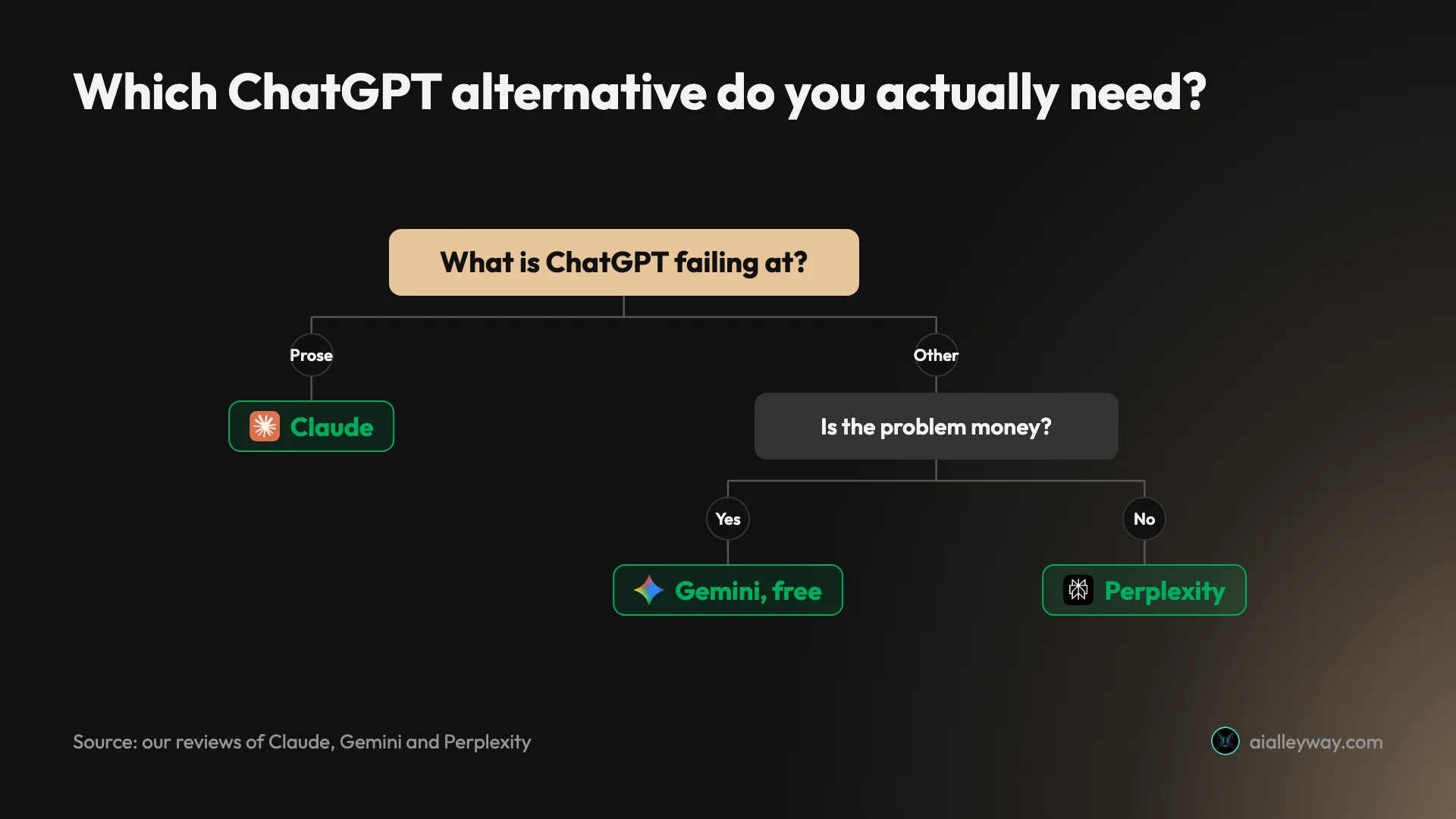
- Your writing needs editing every time → Claude. It is the only one on this list I would hand a piece that carries someone’s name.
- You are not going to pay for anything → Gemini. Four selectable models beats one model and a Think toggle.
- You cannot use an answer you cannot verify → Perplexity. The citations are the product.
- Your day happens in Word, Excel and Outlook → Microsoft Copilot, via Microsoft 365 Personal at $9.99 if you were buying Office anyway.
- You are metering API volume and the bill is the problem → DeepSeek, and schedule the batch work off-peak.
- You want a paid tier under $20, or you are a student → Mistral Vibe at $14.99, or $5.99 with student verification.
- Nothing is actually failing → stay on ChatGPT. It remains the broadest single product, which is why it is still our category pick, and switching costs you the breadth. Our ChatGPT review explains what it does better than any of these.
Final word
The honest summary of this category in 2026 is that ChatGPT is no longer obviously the best assistant, but it is still the best default — and those are different claims.
There is also a cost to switching that none of these lists price in. Moving assistants means leaving behind your history, your saved instructions, and whatever memory the tool has built about how you work. That is not nothing: a year of accumulated context is genuinely valuable, and it does not export. It is the strongest argument for adding a second tool rather than replacing the first, and the reason I run three rather than having migrated once.
What has changed is that the specific things ChatGPT does worst now each have a clearly better answer. Prose has Claude. Free access has Gemini. Verifiable answers have Perplexity. Cost has DeepSeek. None of those is a wholesale replacement, which is why the realistic move for most people is not a migration but a second tab.
| Verdict | Pick | Monthly |
|---|---|---|
| Best overall alternative | Claude | $20, or $17 annually |
| Best if you will not pay | Google Gemini | $0 |
| Best for verifiable answers | Perplexity | $0, or $20 |
| Best value if you buy Office | Microsoft Copilot | $9.99 via M365 Personal |
| Best on cost at scale | DeepSeek | Free chat; API from $0.66/1M |
| Best cheap paid tier | Mistral Vibe | $14.99, or $5.99 for students |
If you want to test this rather than take my word for it, there is a version that takes ten minutes and settles it better than any article. Take a task you actually do — a real brief, a real question, a real spreadsheet — and run it through ChatGPT and one rival on their free tiers. Do not use a clever prompt designed to expose a weakness; use the boring thing you do on a Tuesday. Then look at how much work the output still needs.
That test is decisive in a way benchmarks are not, because it measures the only thing that matters: the distance between what the tool gives you and what you can actually use.
Start with the free tiers, all of which are real products requiring no card. Two weeks of using ChatGPT alongside whichever one addresses your specific complaint will tell you more than any ranking, and it costs nothing to run the experiment. If your shortlist is the big three rather than this whole list, our Claude vs ChatGPT vs Gemini comparison takes them three at a time.
Frequently asked questions
What is the best alternative to ChatGPT?
There is no single best one. The right answer depends on what ChatGPT is failing at for you.
If the failure is prose quality, Claude is the alternative. It holds a brief, particularly a negative instruction, further into a long document than ChatGPT does. I scored it 4.4 out of 5.
If the failure is that you will not pay, Gemini is the alternative. Its free model picker offers four modes including advanced reasoning, none of them padlocked, where ChatGPT gives free users no picker at all.
If the failure is that you cannot verify what you are told, Perplexity is the alternative. Its answers arrive with inline citations you can click.
Those three are the ones I use and have reviewed from real accounts, which is why they carry scores. The rest of the list is cheaper or more specialised: Copilot for Office, DeepSeek for cost, Mistral Vibe for a paid tier under $20.
Is there a free alternative to ChatGPT that is actually good?
Yes, and one of them is better than ChatGPT's own free tier on the measure that matters most.
Open the model picker on a free Google Gemini account and you get four selectable modes, including 3.1 Pro for advanced reasoning and a separate Extended thinking mode. Nothing is padlocked. ChatGPT's free tier has no model picker at all, so whatever OpenAI has decided a free user should run is what you run.
DeepSeek also offers free chat access to its current models, and Mistral Vibe has a free tier for everyday tasks.
Perplexity's free tier is the most restricted of the group. It shows ten models in the picker with a padlock on every one, so you can see exactly what you are not getting. It still answers factual questions with citations, which is the core job. Between the four, Gemini is the one to start on if you never intend to pay.
Which ChatGPT alternative is best for writing?
Claude, and the gap widens the longer the document runs.
The test that separates assistants is not a clever prompt. Give one a style guide containing prohibitions, ask for something long, then read the final third rather than the opening. Anything follows positive instructions. Holding a rule about what not to do, several thousand words in, is the hard part.
Claude still respects those rules there. ChatGPT complies for a while, then reverts to its house structure of headers and bullet lists once the material gets complicated. Gemini is competent and undistinctive, sliding toward a flat listy register on longer pieces.
You can run that comparison yourself on all three free tiers in about ten minutes, which is a better guide than anyone's ranking, including this one. Use a real brief rather than a test prompt, and judge it on how much editing the output still needs rather than on how the first paragraph reads.
Is there a cheaper alternative to ChatGPT Plus?
Several, and two of them undercut the $20 that has become the category's default price.
Mistral Vibe, the product formerly called Le Chat, lists Pro at $14.99 a month, and $5.99 a month for verified students. That is the cheapest paid tier from a serious assistant vendor on this list.
Microsoft's route is cheaper still if you already buy Office. Copilot now comes inside the Microsoft 365 consumer plans rather than as a separate subscription, and Microsoft 365 Personal is $9.99 a month with Copilot built into Word, Excel, PowerPoint and Outlook.
DeepSeek is the cheapest of all if you are building rather than chatting. Its chat product is free, and its API bills v4-flash output at $0.66 per million tokens off-peak, rising to $1.32 during peak hours. For comparison, Perplexity's Sonar Pro bills output at $15 per million.
Do I have to stop using ChatGPT to use an alternative?
No, and for most people running two free tiers side by side is a better answer than switching.
Every tool on this list has a free tier that requires no card, which means the realistic setup is not a migration but a split. Use ChatGPT for breadth, and keep a second tab open for whatever it is worst at for you: Claude if that is prose, Gemini if that is reasoning without paying, Perplexity if that is anything you need to verify.
The cost of that arrangement is context switching rather than money. Three tools means three sets of history and no shared memory, which is a real friction and the main argument for eventually consolidating onto one paid plan.
But you should learn which one you actually reach for before you pay for any of them.
Which alternative is best if I use Google Workspace or Microsoft 365 all day?
Whichever one owns the suite you already live in, and this is the clearest decision on the whole list.
If your documents, mail and calendar are in Google, Gemini reads and acts on them natively rather than through a connector you authorise. Nothing a competitor builds closes that gap, because the gap is ownership rather than engineering. The caveat is that this access is tiered, so a free Gemini account reaches none of your Google apps.
If you work in Word, Excel, PowerPoint and Outlook, Microsoft Copilot has the same structural advantage from the other side, and it arrives inside a Microsoft 365 subscription you may already pay for.
In both cases you are not really choosing an assistant so much as choosing the one your employer already bought. That is a legitimate basis for the decision: an assistant inside the file you already have open removes a step that no amount of raw model quality makes up for elsewhere.
Keep reading
ChatGPT vs Gemini: the free tier decides this one
ChatGPT vs Gemini, both tested on free accounts. One hands a non-paying user its advanced reasoning model; the other will not let you pick a model at all.
ChatGPT vs Claude: one writes, one does everything else
ChatGPT vs Claude, from a paid Claude account and a year on ChatGPT free. Both $20, but the free tiers differ far more — and only one generates images.
ChatGPT Plus vs Pro: there are now three prices, not two
ChatGPT Plus costs $20; Pro is $100 or $200. OpenAI publishes the 5x and 20x multipliers but never the base they multiply, and only one tier is a discount.
ChatGPT review: the free tier is the story, not the $20 one
A ChatGPT review from a year on the free tier plus one month of Plus. Five rungs from $0 to $200, and ads now run on both the Free and $8 Go tiers.