
ChatGPT Plus vs Pro: there are now three prices, not two
ChatGPT Plus costs $20; Pro is $100 or $200. OpenAI publishes the 5x and 20x multipliers but never the base they multiply, and only one tier is a discount.
Contents
Plus, Pro $100 or Pro $200: the short answer

Most people should stay on Plus at $20. If you are genuinely hitting its ceiling, start at Pro $100, which raises the ceiling at the same $20-a-unit rate you already pay. It stops at five units, so past that $200 is the only plan left: grudgingly between six and ten, where you are buying ceiling rather than rate, and gladly beyond ten, where the rate finally halves. And if you are upgrading because you want a model Plus does not have, that is a different reason entirely, and it points at Pro at either price.
| Plan | Price | Usage vs Plus | What it is really for |
|---|---|---|---|
| Free | $0 | — | Unlimited text chat on one model, subject to guardrails |
| Go | Below Plus, localised by market | — | More messages and uploads than free. May include ads |
| Plus | $20/mo | 1x (the baseline) | The default. Advanced reasoning, projects, custom GPTs |
| Pro | $100/mo | 5x | A higher ceiling at the same rate you already pay |
| Pro | $200/mo | 20x | The only tier where usage per dollar improves |
The thing to understand before any of it makes sense is that OpenAI publishes the multipliers and withholds the base. That is the whole story of this comparison, and it is the next section.
The multiplier problem: 5x and 20x of what?
Here is OpenAI’s own sentence, from its help-centre article on Pro tiers: “Both Pro tiers include the same core capabilities. The main difference is usage allowance: Pro $100 unlocks 5x higher usage than Plus, while Pro $200 unlocks 20x usage than Plus.”
Precise, useful, and anchored to nothing. Because when you go to the Plus page looking for the number being multiplied, it is not there. What OpenAI says instead is that Plus subscriptions may include usage limits such as message caps, especially during high demand, and that these limits may vary based on system conditions.
So the ladder is described entirely in ratios. Five times an unpublished number. Twenty times an unpublished number. And the unpublished number, by OpenAI’s own account, is not even fixed — it moves with demand.
This is worth sitting with, because it quietly determines what kind of decision you are able to make. You can compare the three plans to each other with complete precision, because the ratios between them are stated. You cannot convert any of them into a quantity of work, because nothing connects the ratio to a message, a token, or an hour.
| What OpenAI publishes | What it does not |
|---|---|
| Pro $100 = 5x Plus usage | What Plus’s usage actually is |
| Pro $200 = 20x Plus usage | Any message, token or hour figure |
| Both Pro tiers share one feature set | Whether the base is stable week to week |
| Per-model allowances differ by Pro tier | By how much |
That gap is where most of the writing on this topic goes wrong. Search for this comparison and you will find a specific figure quoted for Plus — a message count, in a fixed time window, stated as fact. I went looking for it on OpenAI’s pages and could not find it. I am not telling you the number is wrong; I have no way to know that, and it may well be someone’s accurate observation from their own account. I am telling you it does not come from OpenAI’s plan pages, which means it is not a commitment and nothing obliges it to stay true next week.
The honest version is less satisfying and more useful: you are being asked to choose between three prices on the strength of ratios, and the only way to find your real ceiling is to run into it.
What do Plus and the two Pro tiers cost?
Plus is $20 a month, billed monthly. Pro is $100 or $200 a month, also billed monthly. That last word is not a detail — OpenAI states that it does not support annual billing or paying for multiple months in advance on Go, Plus or Pro.
| Plan | Price | Billing |
|---|---|---|
| Plus | $20/mo | Monthly only |
| Pro (5x) | $100/mo | Monthly only |
| Pro (20x) | $200/mo | Monthly only |
That is unusual in this category. A year of ChatGPT Plus costs exactly twelve times $20, with no discount available at any point. Annual billing appears further up the range, on Business and Enterprise, which tells you who the discount is meant to attract. Our ChatGPT review covers what the $20 tier is like to live with across a year; this guide is only about choosing between the paid rungs.
There is a second thing about the price, and it is in how the pricing page rendered for me.
Two things stood out. The first is that the prices are in local currency, because the page geo-locks — I am not in the United States, so I do not get shown dollars at all. If you are comparing against a US-priced article, you are comparing against a page you were never served. I have deliberately not converted those figures into dollars anywhere in this post, because the tax treatment and the exchange rate used are both unknown to me and the arithmetic would be guesswork dressed as a finding. Every dollar figure here comes from the help centre, which states them in USD regardless of where you are reading from.
The second is the Pro card. It says From. One card, one price, and a bullet reading “5x or 20x more usage” — which is the only acknowledgement anywhere on that page that Pro is two products. The $200 tier’s price does not appear on the pricing page at all.
What does a unit of usage cost on each plan?
The ratios are published, so the interesting arithmetic is available. Call one Plus-month of usage a unit, because that is exactly how OpenAI defines the multipliers.
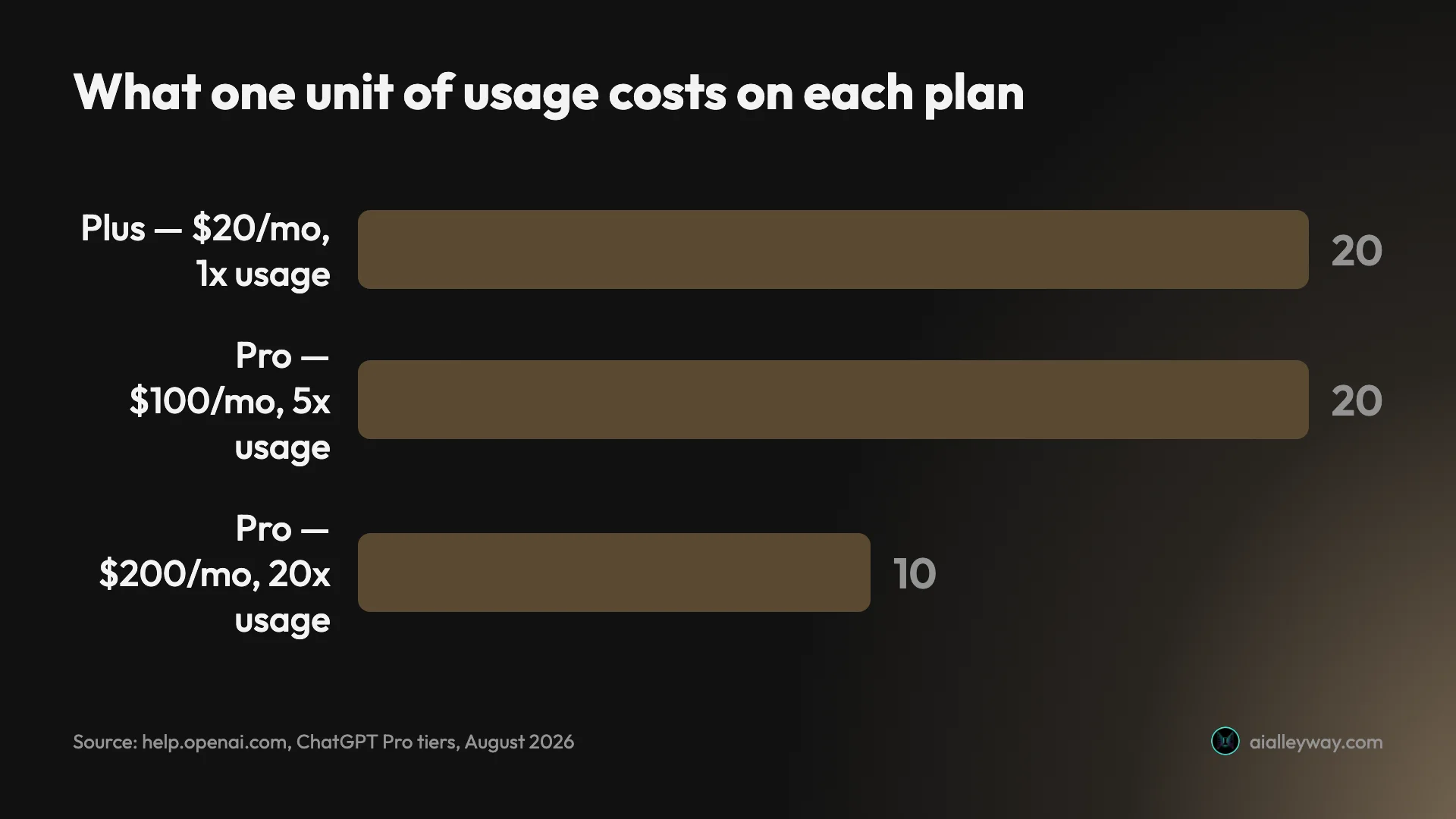
| Plan | Price | Units of usage | Cost per unit |
|---|---|---|---|
| Plus | $20 | 1 | $20 |
| Pro | $100 | 5 | $20 |
| Pro | $200 | 20 | $10 |
Read that middle row again. Pro at $100 is five times the price of Plus for five times the usage — which means the rate is identical. You are not getting a bulk discount. You are buying more of the same thing at exactly what you were already paying for it.
Pro at $200 is ten times the price for twenty times the usage, and that is the only place on the ladder where the rate moves. It halves.
The marginal step is starker still. Going from Pro $100 to Pro $200 costs another $100 and adds another fifteen units, which works out at about $6.67 for each additional unit — the cheapest usage available anywhere in the individual range, cheaper per unit than either plan below it.
None of which makes $200 the right answer for most people, and it is worth being clear about why. If you need three units of usage a month, the $200 plan gives you seventeen you will never touch, and the cheapest way to buy three units is still Plus plus the occasional wait. Cost per unit only matters if you are actually going to consume the units. What the arithmetic does tell you is this: the middle tier is not the value option. It is a ceiling-raiser priced at the going rate, and it should be chosen for the ceiling, never because it looks like the sensible compromise between $20 and $200.
Which plans actually give you a bigger context window?
OpenAI publishes a full comparison table further down the pricing page, and it contains the single most surprising fact in this whole comparison.
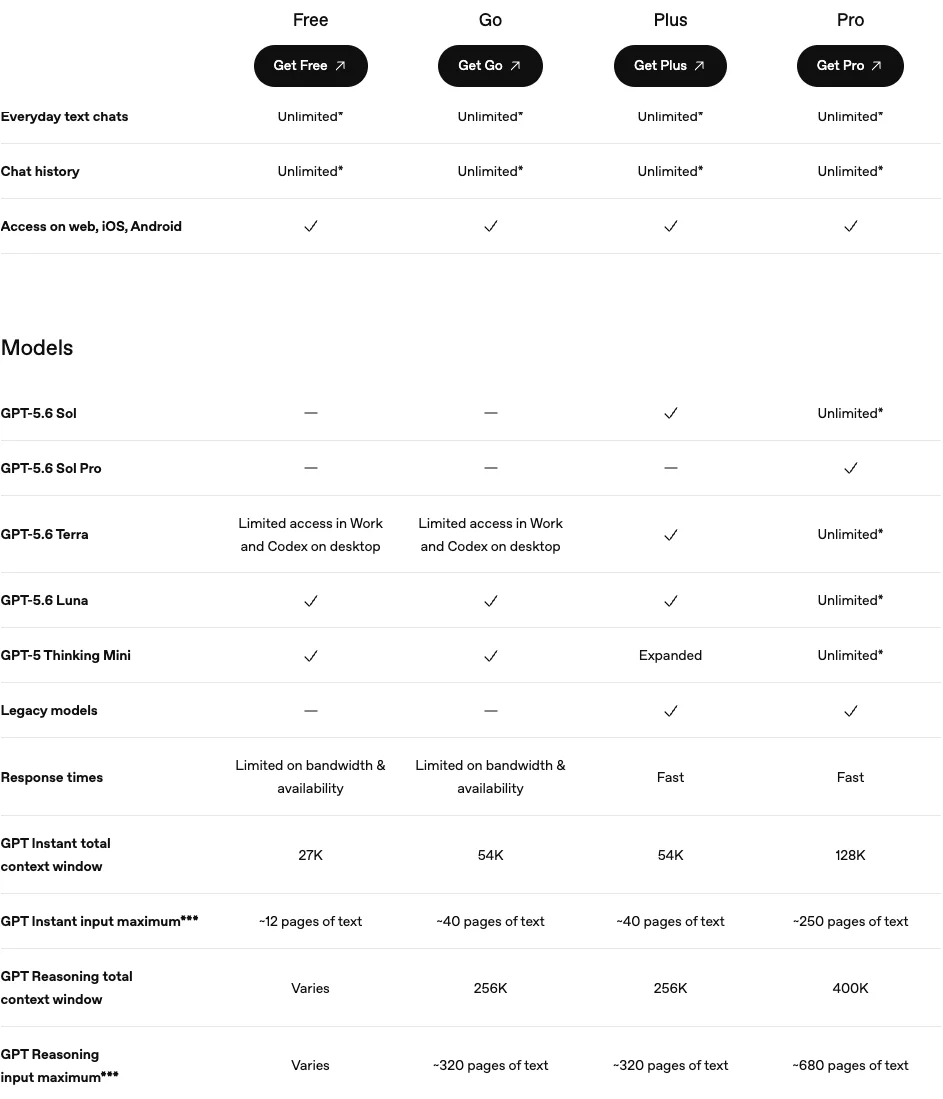
Go and Plus are identical on every context row:
| Free | Go | Plus | Pro | |
|---|---|---|---|---|
| Instant total context | 27K | 54K | 54K | 128K |
| Instant input maximum | ~12 pages | ~40 pages | ~40 pages | ~250 pages |
| Reasoning total context | Varies | 256K | 256K | 400K |
| Reasoning input maximum | Varies | ~320 pages | ~320 pages | ~680 pages |
Four rows, four exact matches. Whatever you pay to move from Go to Plus — and OpenAI localises Go’s price, so the gap is not the same in every market — it buys no additional room to put things in.
This matters because “context” is one of the words the plan cards use loosely. The Plus card promises “Expanded memory and context” as an upgrade over Go’s “Longer memory”. The table on the same page says the context figures do not change. Both statements can be true if the expansion is in memory rather than context, but a reader scanning the cards would reasonably conclude otherwise, and the specification table is the one to trust.
What Plus actually buys over Go is real and substantial — it is just not room. It is advanced reasoning with GPT-5.6, access to the Sol model and to legacy models, fast responses instead of “limited on bandwidth and availability”, projects, scheduled tasks and custom GPTs, and no ads, since OpenAI notes that the Go plan may include them.
Pro is where the number finally moves, and it moves a long way: 128K instant against 54K, and roughly 250 pages of input against roughly 40. If your actual complaint is that you cannot paste in a long enough document, Plus is not the plan that fixes it. That is a Pro problem and a Pro price.
How do Plus and Pro compare for images, research and Codex?
Three specific jobs come up over and over in the related searches for this comparison, and OpenAI answers all three the same way: with an adjective.
| Job | Free | Go | Plus | Pro |
|---|---|---|---|---|
| Image generation | Limited and slower | More | More complex and accurate | Unlimited and faster |
| Deep research | Limited | Not listed on the card | Expanded | Maximum |
| Codex | Limited access | Not listed on the card | Expanded usage | Maximum tasks |
Limited, more, expanded, maximum. That is a ranking, not a specification. Nowhere on the plan cards does a number appear against any of the three, which means you cannot work out before paying whether “expanded” deep research is twice “limited” or ten times it.
The one exception is image generation on Pro, which the card calls unlimited rather than a comparative. That is the only absolute claim in the group and the only one you could test. We have not tested Pro, but we did run Plus to its image limit: our ChatGPT Plus image generation limit test stopped after 155 images in a day, at a card offering Pro.
For images specifically, there is a structural point worth knowing that no amount of plan-reading tells you: image generation is the capability most likely to make a ChatGPT plan look expensive next to a rival, because the free tiers elsewhere are unusually generous with it. Our ChatGPT vs Gemini comparison covers what Google gives away here, and it is a lot.
For research, the honest framing is that “deep research” is a feature with a per-plan allowance rather than a quality level, so what Plus buys over Go is more runs, not better ones. And for Codex, note that it is the one item in this group OpenAI also names in its Pro feature list, alongside Pro models, deep research, image creation, memory and file uploads — which is a hint about which of the three is expected to be the reason people pay.
What does Pro add that Plus cannot reach at any usage level?
Usage is not the only difference, despite being the one OpenAI leads with, and this is the part of the decision the multipliers actively obscure.
Pro is the only individual plan that includes GPT-5.6 Sol Pro. The comparison table marks it with a dash on Free, Go and Plus, and a check on Pro alone. There is no amount of Plus usage that reaches a model Plus does not have, which means “am I hitting my limits” is genuinely the wrong question if the thing you want is that model.
Pro also converts several rows from a quantity to “Unlimited” — Sol, Terra, Luna and GPT-5 Thinking Mini all read as unlimited on Pro where Plus shows a check or an “Expanded”. And the feature list OpenAI attaches to all Pro tiers covers Pro models, Codex, deep research, image creation, memory and file uploads.
| Model | Free | Go | Plus | Pro |
|---|---|---|---|---|
| GPT-5.6 Sol | No | No | Yes | Unlimited |
| GPT-5.6 Sol Pro | No | No | No | Yes |
| GPT-5.6 Terra | Limited | Limited | Yes | Unlimited |
| GPT-5.6 Luna | Yes | Yes | Yes | Unlimited |
| GPT-5 Thinking Mini | Yes | Yes | Expanded | Unlimited |
| Legacy models | No | No | Yes | Yes |
I should be plain about the edge of my knowledge here. I do not hold a Pro subscription at either price. Everything in this section is read from OpenAI’s published tables today, not experienced, and I am not going to tell you how Sol Pro feels to use or whether it justifies the money — I have not used it. What I can tell you with confidence is the structure of what is on offer and what it costs, because that is documented, and the structure is where most of the confusion lives.
There is one caveat inside Pro that the marketing does not surface. OpenAI notes that some models carry separate usage allowances, that those allowances can differ by Pro tier, and specifically that the $100 tier includes lower allowances than the $200 tier. So a model can go temporarily unavailable on the cheaper Pro while the rest of the plan carries on working. OpenAI adds that there is no setting to increase or bypass a model’s allowance, and that support cannot reset one.
The tier the pricing page will not show you
Put the two sources side by side and something odd emerges.
The help centre is unambiguous that Pro is two tiers at two prices with two multipliers. It has a whole article about it, titled “About ChatGPT Pro tiers”, and the older article that used to be called “What is ChatGPT Pro?” now redirects into it — a small sign of how recently this changed.
The pricing page, which is where a buyer actually goes, shows one Pro card with a “From” price. It never states what the higher tier costs.
The pricing page’s own FAQ then adds a genuine inconsistency. Asked how pricing works, it answers that paid plans — and it lists Go, Plus, Business and Enterprise — are priced per user per month, then says monthly plans are offered for Go, Plus and Business. Pro is missing from both lists. Two questions later, asked about payment options, the same page says you can purchase ChatGPT Go, Plus, Pro or Business with any major credit card. Pro is absent from the explanation of pricing and present in the explanation of payment, on one page.
| Question | Pricing page | Help centre |
|---|---|---|
| How many Pro tiers? | One card, “From” a price | Two, stated explicitly |
| What does the top tier cost? | Not shown anywhere | $200, stated |
| Is Pro a monthly plan? | Omitted from the pricing FAQ’s list | Yes, monthly only |
| Can you buy Pro by card? | Yes, per the payments FAQ | — |
This is not a scandal. It is the ordinary residue of a plan structure that changed faster than the page describing it, and the help centre is clearly the more current of the two. But it does explain why so much of the writing on this comparison is out of date in the same way: if you build an article from the pricing page, you will describe Pro as a single $200 product, because that is all the pricing page has ever really said. The middle tier is only visible if you go looking in the help centre for it.
It also means the practical advice is unusually simple. Before you buy, open Settings then My Plan, which is where OpenAI says both Pro tiers are actually selectable, rather than deciding from the pricing page.
Is a Business seat cheaper than Pro?
This is the question the individual pricing tab cannot answer, because the answer is on the other tab. And it turns out to be the most interesting page on the site.
Business sells two seat types rather than one plan. The standard seat is described as best for everyday work. The premium seat is described, in OpenAI’s own words on that card, as “5x more usage than standard, with no 5-hour limit”.
Read that last clause again, because it is the only place on the entire pricing page where a five-hour window is mentioned at all. It appears as something the premium seat removes. OpenAI does not say on the individual tab whether that window applies to Plus or Pro, and I am not going to claim it does — but it is a notable thing to find on a page that otherwise describes usage only in multiples.
The seat prices follow the same pattern. On my account, with both figures taken from the same page at the same moment, the premium seat was priced at exactly five times the standard seat. OpenAI prices 5x usage at 5x the money, the same linear structure as Pro $100 being five times Plus for five times the usage.
| Business seat | OpenAI’s description | Price against the standard seat |
|---|---|---|
| Standard | Best for everyday work | Baseline |
| Premium | “5x more usage than standard, with no 5-hour limit” | Exactly 5x, in my local currency |
That is now two ladders, individual and business, where the 5x rung costs exactly 5x. Anthropic prices its own 5x and 20x rungs at the same $100 and $200, which our Claude Max plan guide works through — the difference being what the multiplier is measured against. It makes the $200 Pro tier’s 20x-for-10x look less like a bulk discount and more like the single deliberate exception in OpenAI’s whole pricing structure.
Two more things separate Business from the individual plans, and both matter to this decision:
Annual billing exists here. The seats are cheaper billed annually than monthly — the card shows both rates — where Go, Plus and Pro have no annual option at all. If you have been looking for the discount, this is where it lives.
There is a two-seat minimum. OpenAI’s FAQ states Business plans start at two users, and the card describes teams of 2 to 200. So a solo user cannot buy one premium seat instead of Pro. For two people, though, the comparison is worth running properly, and Business also carries SAML and SSO, admin controls, usage analytics, and no training on your business data by default — which is a stronger privacy position than any individual tier offers.
Are there any ChatGPT discounts?
There is no discount on the individual plans. No annual rate, no student tier, no promotional pricing — the only lever is which of the three prices you pick.
Every discount OpenAI does offer requires leaving the individual plans:
- Teachers. ChatGPT for Teachers is free for verified US K–12 educators through June 2027, per the pricing page’s own FAQ.
- Universities. ChatGPT Edu is a separate institutional plan, sold to campuses rather than individuals.
- Nonprofits. Up to 75% off ChatGPT Business or Enterprise, arranged through sales.
- Teams. The annual Business rate, as above.
The pattern is consistent and worth naming: OpenAI discounts institutions, not individuals. If you are one person paying with a personal card, the price on the card is the price, and the only question left is which rung of the ladder your work actually needs.
Four people deciding, with numbers
Abstract ratios are hard to act on, so here are four concrete cases using only what is published.
| The reader | What blocks them | The plan | Why |
|---|---|---|---|
| Occasional staller | A minor ceiling | Plus, $20 | Four unused units is not a fix for twenty minutes a month |
| Document analyst | Input maximum | Pro, from $100 | The only tier where the context figures move |
| Heavy daily user | Real volume | Pro, $100 then $200 | $100 caps at 5 units; 6–10 forces $200; past 10 it also pays |
| Pair, both blocked | Volume, times two | Compare Business seats | Annual billing and a 2-seat minimum they already clear |
The writer who occasionally stalls. Uses ChatGPT most days for drafting and research, hits a limit maybe twice a month, waits it out, carries on. This person needs roughly one unit and is annoyed by the ceiling rather than blocked by it. Plus at $20 is correct, and $100 would buy four units they will not use in order to remove an inconvenience that costs them twenty minutes a month. The upgrade that actually helps here is not a plan, it is splitting long sessions.
The analyst pasting large documents. Regularly works with material that runs well past forty pages of input. This person’s problem is not volume at all — it is the instant model’s input maximum, and no amount of extra usage changes it. Plus does not fix it. Go does not fix it. The fix is Pro, where instant input runs to roughly 250 pages and reasoning input to roughly 680, and it costs $100 minimum. This is the case where the right advice is genuinely to spend the money, because there is no cheaper structure that solves it.
The heavy daily user who keeps hitting the wall. Blocked several times a week, losing real working time. This is the only case where the two Pro tiers compete, and the arithmetic from earlier decides it. If they need somewhere between one and five units, $100 raises the ceiling at $20 a unit — the rate they already pay.
Between six and ten units the choice is forced rather than economic: $100 physically stops at five, so $200 is the only plan that holds them, and they are paying the higher price for the ceiling rather than for the rate. Past ten units, $200 is both a higher ceiling and a better rate, at $10 a unit. The honest instruction is to start at $100, since switching tiers takes effect from Settings with billing adjusted automatically, and move up only when $100 also stops being enough.
The pair who both need headroom. Two people, both hitting limits, both looking at Pro. This is the case where the individual tab gives the wrong answer, because two Pro subscriptions is not the only shape available to them. Two Business premium seats clear the two-seat minimum, bill annually at a rate the individual plans cannot match, carry the no-training-by-default position, and come with the five-hour limit explicitly removed. Whether that beats two Pro subscriptions depends on numbers that render in your own currency, so run it on the page rather than taking mine. The structural differences do not depend on currency at all:
| Two Pro subscriptions | Two Business premium seats | |
|---|---|---|
| Annual billing | Not offered | Yes, at a lower monthly rate |
| Five-hour limit | Not addressed either way | Explicitly removed |
| Training on your data | On by default, opt-out available | Off by default |
| Admin, SSO, analytics | None | Included |
Notice that in three of the four cases the deciding factor is not the multiplier at all. It is a behaviour (session length), a specification (the input maximum), or a billing structure that only exists on the other tab. The multiplier decides one case out of four — and it is the only thing OpenAI’s own comparison leads with.
Six things the plan cards do not tell you
| Watch out for | Where OpenAI states it |
|---|---|
| No annual billing on any individual plan | Help centre, both plan articles |
| Upgrading restarts the billing cycle | Help centre, Pro tiers FAQ |
| A model can go dark without a restriction | Help centre, Pro tiers FAQ |
| Support cannot reset a usage limit | Help centre, Pro tiers FAQ |
| Tax on top; API billed separately | Plus plan page |
| Training is on by default, opt-out available | Pricing page comparison table |
There is no annual discount to wait for. OpenAI states that annual billing and paying multiple months in advance are not supported on Go, Plus or Pro. If you have been holding off for a Black Friday yearly deal on an individual plan, there is no mechanism for one to arrive.
Upgrading restarts your billing cycle. OpenAI’s wording is that an upgrade takes effect immediately and the billing cycle starts over. A downgrade behaves differently — it lands at your next renewal and you keep the higher plan until then. Upgrading mid-cycle is therefore not free in the way it might look.
A model can go dark without your plan being restricted. OpenAI explicitly addresses this: reaching a model’s allowance does not mean your account was restricted or your subscription ended, and ChatGPT shows the reset time where it can. Worth knowing before you assume something has broken.
Support cannot rescue you from a limit. OpenAI states plainly that support does not reset ChatGPT or Codex usage limits, and that there is no setting to increase or bypass a model’s allowance. The only remedies offered are to wait for the reset or switch to another available model.
The sticker price is not the amount charged. Tax is added on top at your local rate, and API usage is billed entirely separately from the subscription — the Plus page makes the second point explicitly. Neither is hidden, but neither is in the number on the card.
Your conversations are used for training unless you opt out. The comparison table shows the same status on every individual tier: content is used to train the models, with an opt-out available. Paying more does not change the default, on any plan including $200 Pro. The Business tab is the first place that flips it, listing no training on your business data by default as an included feature rather than a setting you have to find.
Should you upgrade from Plus to Pro?
Work through it in this order, because the questions are not equally important.
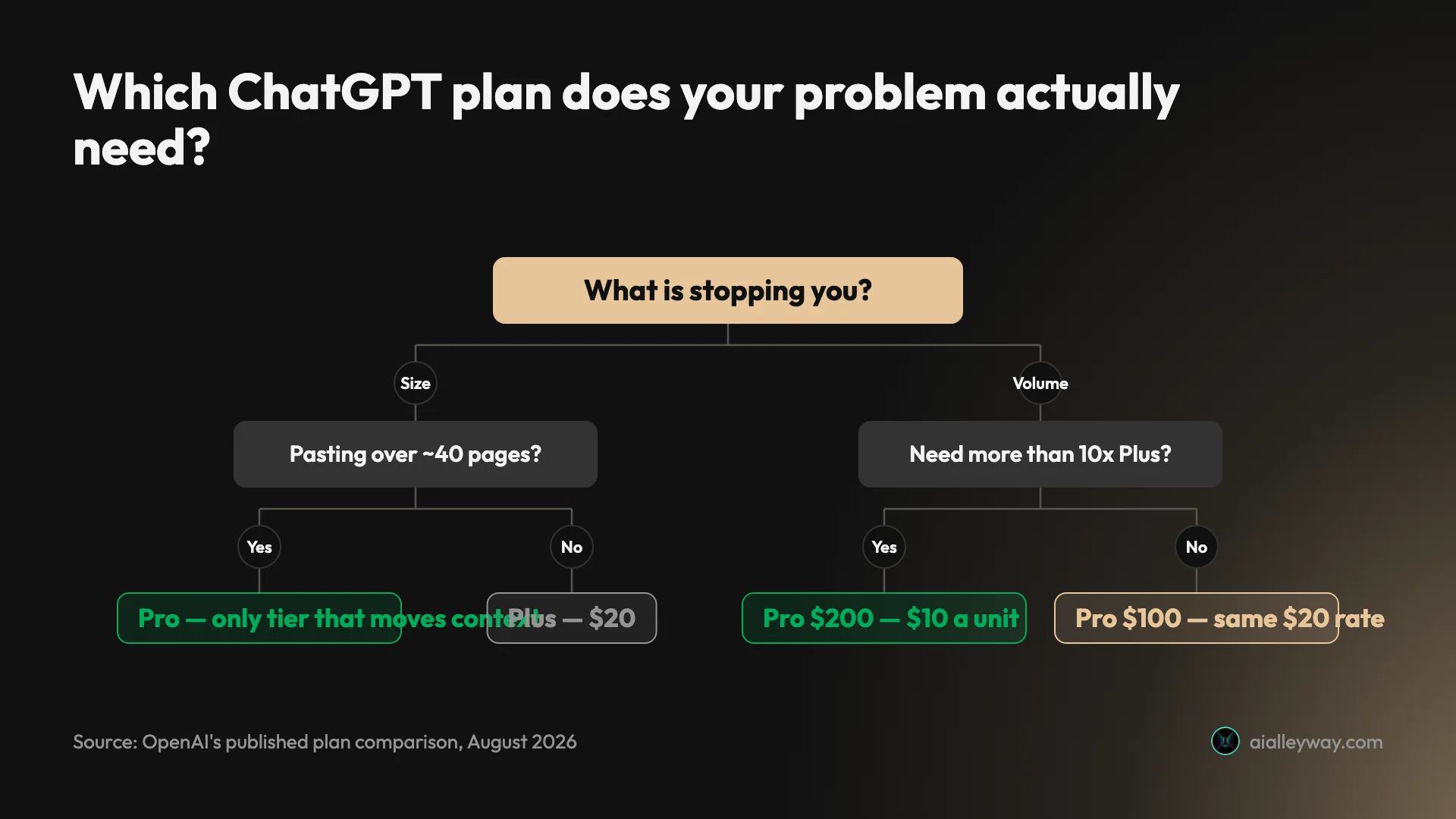
Do you want a model Plus does not have? If GPT-5.6 Sol Pro is the thing you are after, stop here — that is Pro, at $100 or $200, and no amount of Plus is a substitute.
Are you blocked by size rather than volume? If your work involves pasting things longer than about forty pages, this is a context-window problem. Pro is the only individual plan that changes those numbers.
Are you actually hitting limits, or just aware they exist? Most people asking this question are in the second group. If you are stalling twice a month, stay on Plus.
If you are hitting them hard, how hard? Up to five units, take Pro at $100 for the ceiling and accept that the rate is unchanged. Between six and ten you have no choice, because $100 stops at five — take $200 and know you are paying for headroom rather than a discount. Past ten, $200 is the tier where the rate finally halves as well.
Skip all of this if you are on Free and wondering whether to jump straight to Pro. Go to Plus first. It is a fifth of the price, it carries the advanced reasoning and the projects, and you will learn where your ceiling actually is for $20 rather than $100.
If the bill is the problem
If the honest answer is that $100 is more than the work justifies, the useful move is sideways rather than down.
Claude’s paid tiers are structured almost identically — $20, then $100 and $200 — but the multipliers there describe a five-hour session rather than a month, which is a genuinely different way of metering the same idea. Our Claude Max plan guide works through what that means in practice, and ChatGPT vs Claude covers the two at the $20 tier where most people actually live.
Gemini’s free tier is the most generous in the category and offers a model picker where ChatGPT’s free tier offers none, which our ChatGPT vs Gemini comparison documents from both accounts. If your usage is real but your budget is not, that is the most serious free option available.
Perplexity prices the same shape differently again, with a $20 tier and a $200 tier and no middle rung at all — our Perplexity pricing guide untangles a page that quotes two different numbers for the same plan.
And if the whole ladder feels wrong, ChatGPT alternatives covers six tools at a range of prices, including one that charges a fraction of any of these.
Final word
ChatGPT’s individual pricing is not deceptive, but it is described in a way that makes it hard to evaluate. The multipliers are published and the base they multiply is not. The middle Pro tier exists in the help centre and not on the pricing page. The word “context” appears on the plan cards as an upgrade between two plans whose context figures are identical.
Strip that away and the decision is clearer than it looks. Plus at $20 is right for most people and stays right for longer than the upgrade prompts imply. Pro exists for two distinct reasons — a model you cannot otherwise get, and a ceiling you keep hitting — and only the second of those is about the multiplier at all. If it is the ceiling, $100 buys headroom at the rate you already pay and $200 is the only tier that makes each unit cheaper.
For where ChatGPT sits against the field rather than against itself, our ChatGPT review covers what the $20 tier is actually like to live with, including what it costs.
Frequently asked questions
How much does ChatGPT Plus cost compared to Pro?
ChatGPT Plus is $20 a month. Pro is not one price but two: $100 a month or $200 a month, and OpenAI's help centre confirms both tiers include the same core capabilities.
That second Pro price is the part most comparisons miss. Page one of Google still largely describes Pro as a single $200 plan and frames the decision as a 10x jump from Plus. It is now a ladder with three rungs, and the middle rung did not exist when most of those articles were written.
None of the individual plans can be paid annually. OpenAI states plainly that it does not support annual billing or paying for multiple months in advance for Go, Plus or Pro, so there is no yearly discount to reach for on any of them.
Add your local tax on top, because the sticker price is not what leaves your account.
What does 5x usage mean on ChatGPT Pro?
It means five times the usage allowance of the Plus plan. OpenAI's wording is exact: Pro $100 unlocks 5x higher usage than Plus, while Pro $200 unlocks 20x usage than Plus.
The problem is what sits on the other side of the multiplication. OpenAI's own Plus page does not publish a message cap. It says Plus subscriptions may include usage limits such as message caps, especially during high demand, and that those limits may vary based on system conditions.
So 5x is five times a number the vendor declines to state, and which it says moves with demand. You can compare the tiers to each other precisely, because the ratios are published. You cannot convert either into messages per day, because the base is not.
Anyone quoting you a specific message count for Plus is not getting it from OpenAI's pricing or plan pages.
Is ChatGPT Pro worth it over Plus?
Only if you are hitting Plus's ceiling, and the arithmetic says which Pro tier to jump to if you are.
Work it per unit of usage. Plus buys one unit for $20. Pro $100 buys five units for $100, which is $20 a unit — exactly what you already pay. Pro $200 buys twenty units for $200, which is $10 a unit. The expensive tier is the only one where the rate improves; the middle tier raises your ceiling at the price you are already paying.
There is a second reason to consider Pro that has nothing to do with volume. Pro is the only individual plan with GPT-5.6 Sol Pro, and no amount of Plus usage reaches a model Plus does not include.
So: upgrade for the model, or upgrade for the ceiling. Do not upgrade for value per dollar unless you are going to $200.
What is the difference between the $100 and $200 ChatGPT Pro tiers?
Capacity, and only capacity. OpenAI states that both Pro tiers include the same core capabilities and that the main difference is usage allowance.
All Pro tiers carry the same feature set: Pro models, Codex, deep research, image creation, memory and file uploads. There is no capability withheld at $100 that appears at $200.
The one wrinkle worth knowing is that individual models meter separately. OpenAI notes that some models have separate usage allowances, that those allowances can differ by Pro tier, and that the $100 tier includes lower allowances than the $200 tier. So a model can go temporarily unavailable on $100 while the rest of the plan keeps working.
You can switch between the two tiers at any time from Settings then My Plan, with billing adjusted automatically, which makes starting at $100 a low-risk way to find your real ceiling.
Does ChatGPT Plus have a bigger context window than Go?
No, and this is the most surprising line in OpenAI's own comparison table. Go and Plus are identical on every context row it publishes.
Both show a 54K total context window on the instant model, both cap user input at roughly 40 pages of text, both show a 256K total context window on reasoning models, and both cap reasoning input at roughly 320 pages. Four rows, four exact matches.
What Plus buys over Go is elsewhere: advanced reasoning with GPT-5.6, access to Sol and to legacy models, fast response times instead of limits on bandwidth and availability, projects, scheduled tasks and custom GPTs, and no ads.
Pro is where the context number finally moves, to 128K instant and 400K reasoning. If your reason for upgrading is that you want to paste in something longer, Plus is not the plan that fixes it.
Can you pay for ChatGPT Pro annually?
No. OpenAI states that it does not currently support annual billing, or the option to pay for multiple months in advance, for ChatGPT Go, Plus or Pro subscriptions.
That makes the individual plans unusual in this category. Several rivals discount 15 to 20 percent for paying up front, so a year of a $20 competitor plan often costs less than twelve times its monthly price. A year of ChatGPT Plus costs exactly twelve times $20.
Annual billing does exist further up OpenAI's range, on Business and Enterprise, which is a reasonable clue about who the discount is designed for.
The practical upside of monthly-only billing is flexibility. Upgrades take effect immediately and restart the billing cycle, downgrades take effect at the next renewal, and a cancellation keeps access until the end of the period you paid for.
Keep reading
ChatGPT review: the free tier is the story, not the $20 one
A ChatGPT review from a year on the free tier plus one month of Plus. Five rungs from $0 to $200, and ads now run on both the Free and $8 Go tiers.
ChatGPT vs Gemini: the free tier decides this one
ChatGPT vs Gemini, both tested on free accounts. One hands a non-paying user its advanced reasoning model; the other will not let you pick a model at all.
ChatGPT vs Grok: 4 prompts, both free tiers, a clear tie
I ran four prompts through ChatGPT free and Grok free. They tied on all four. The real gaps: Plus $20 vs SuperGrok $30, and five free models against none.
ChatGPT vs Claude: one writes, one does everything else
ChatGPT vs Claude, from a paid Claude account and a year on ChatGPT free. Both $20, but the free tiers differ far more — and only one generates images.