
Google Gemini review: the best free tier, sold as storage
A Google Gemini review from the free tier: four models including 3.1 Pro handed over for nothing, then paid tiers that are really 400GB, 5TB and 20TB of Drive.
Contents
Is Google Gemini worth it?
Gemini has the most generous free tier of any assistant I have reviewed, and that is the whole story of this product. This Google Gemini review is written from a free account, which turns out to hand you the Pro model and an extended thinking mode without asking for a card. The paid tiers are the strange part: they are Google One storage plans with an assistant attached, and they are priced regionally enough that the number you are quoted may not be the number you pay.
What does Google Gemini actually do?
Gemini is Google’s assistant, and the useful way to understand it is by where it sits rather than by what it can do. Every rival is a product you go to. Gemini is a layer inside things you already use.
The chat app at gemini.google.com is the front door, and it looks much like its competitors: a composer, a model picker, a sidebar of past conversations. What is different is everything behind it.
The free tier hands you the Pro model
This is the finding I did not expect and the one that reframes the whole product.
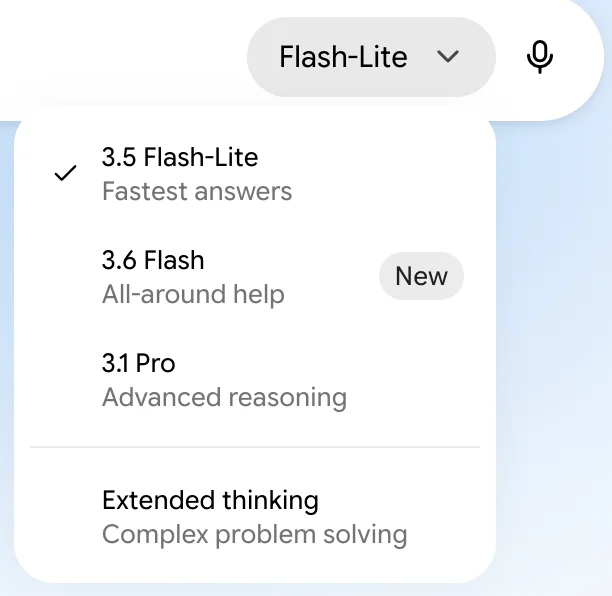
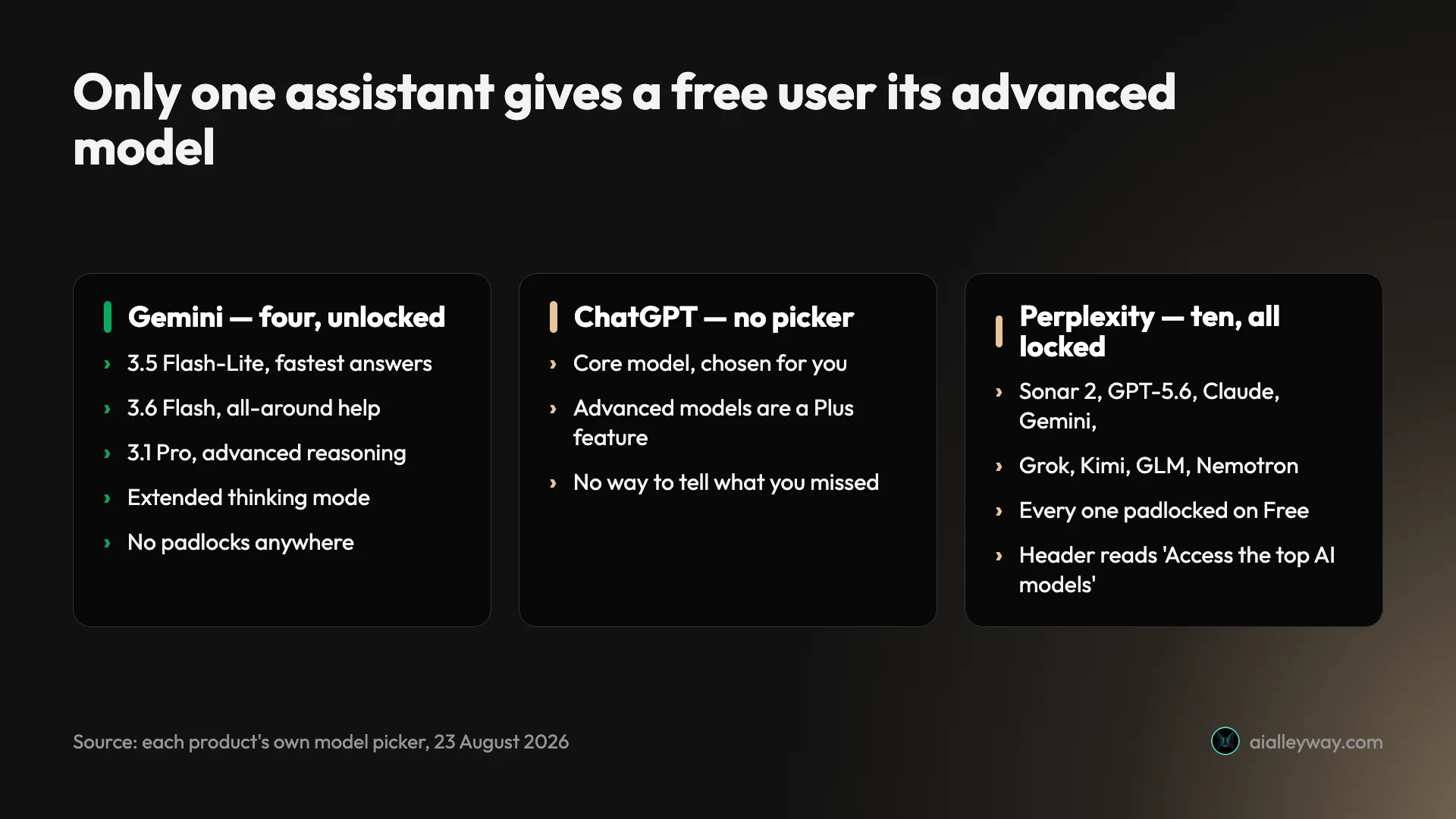
Four entries, no padlocks: 3.5 Flash-Lite for fastest answers, 3.6 Flash for all-around help, 3.1 Pro for advanced reasoning, and a separate Extended thinking mode for complex problem solving.
Put that next to what the others give away and the gap is stark. ChatGPT’s free tier has no model picker at all, so you take the core model and cannot tell whether a weak answer would have survived a better one. Perplexity shows free users ten models and padlocks every single one.
| Assistant | Free-tier model choice |
|---|---|
| Google Gemini | Four options including the Pro model and Extended thinking, all usable |
| Claude | Paid only, then four models plus a five-step effort dial |
| ChatGPT | No picker; the core model, chosen for you |
| Perplexity | Ten models displayed, all padlocked |
Google is the only one of the four handing a free user its advanced reasoning model. That is a strategic choice rather than generosity, and the reason becomes obvious once you look at what the paid tiers are actually selling.
Notebooks, Images and the rest of the sidebar
The free sidebar carries more than chat. Images sits there as its own surface, a Library holds what you have made, and Notebooks folds NotebookLM into the same interface rather than leaving it as a separate product.
That last one matters more than it reads. NotebookLM was a well-regarded standalone research tool, and putting it in the assistant’s sidebar means a free user gets a document-grounded research workspace without knowing it was ever a separate thing.
None of this is gated behind a plan. The pattern holds: Google is giving away the assistant.
Multimodal is the part Google actually leads on
Gemini reads images, audio and video, and it does so as a first-class capability rather than a bolt-on. PCMag’s review rates it capable across reasoning, creative writing, research, file processing, video generation and search, and multimodal handling is what the product most visibly surfaces: Images has its own sidebar entry, and video and audio understanding are present rather than promised.
The reason this lands differently at Google is the training and serving infrastructure underneath. Handing a model an hour of video and asking questions about it is an expensive operation, and Google is unusually placed to absorb that cost.
For a buyer the honest read is that if your inputs are not text, this is the assistant most likely to accept them without complaint. If your inputs are always text, the advantage is theoretical.
| Input type | Gemini | ChatGPT | Claude | Perplexity |
|---|---|---|---|---|
| Text | Yes | Yes | Yes | Yes |
| Images, read | Yes | Yes | Yes | Yes |
| Images, generated | Yes | Yes | No | No |
| Audio, understood | Yes | Voice mode | No | No |
| Video, understood | Yes | No | No | No |
Video understanding is the row nobody else fills. Whether you need it is a separate question, and most people do not, but it is the clearest example of Gemini leading rather than matching. Claude generates no images at all, which is the sharpest contrast in the group.
Deep Research, video generation and Flow
Three of the marquee paid features sit together and are worth naming separately, because they are what a plan actually adds beyond storage and limits.
Deep Research is described by Google as running a multi-step investigation and returning a structured report rather than an answer, which is the same category of feature as Perplexity’s and OpenAI’s. Video generation and Google Flow, described as an AI creative studio for cinematic scenes, are the generative-media side.
Flow is the one with no equivalent in this cluster. Claude generates no images at all, and Perplexity generates nothing. Whether a creative studio belongs in an assistant subscription is a fair question, and it is another sign that these plans are assembled from Google’s catalogue rather than designed around chat.
What it does that no rival can
On a paid plan, Gemini reads your Gmail, your Docs, your Drive and your Calendar. Not through a connector you authorise and a permission scope you review, but because Google owns both ends. On the free tier, which is where I am, it reaches none of them.
Every competitor is building integrations toward Google’s products from the outside. Gemini starts inside them. For anyone whose working day genuinely happens in Workspace, that is not a feature comparison, it is a different category of access.
The catch, and it is a real one, is that the depth of that access is tiered. Plus lists Gemini in Gmail. Pro extends it to Gmail, Docs and Vids. Ultra widens it further to more Google apps including Sheets and Slides. The integration everyone cites as Gemini’s headline advantage is partly a paid feature.
| Surface | Free | Behind a plan |
|---|---|---|
| Chat with model choice | Yes, four options | Higher usage limits |
| Images | Yes | More generation |
| Library | Yes | Unchanged |
| Notebooks (NotebookLM) | Yes | Unchanged |
| Deep Research | No | Yes |
| Video generation, Google Flow | No | Yes |
| Gemini in Gmail | No | Plus and above |
| Gemini in Docs and Vids | No | Pro and above |
Where the free tier stops
Deep Research, video generation and Google Flow all sit behind a plan, as does the deeper Workspace integration above.
Usage limits are the other ceiling, and Google describes them the way everyone in this category now does: the plans offer 2x, 4x and 5x higher limits than a free account. What the base number is, nobody says.
Gemini is also inside Search, which changes who it competes with
The Gemini app is not the only place Google ships this. AI answers now appear in Google Search itself, and the plan cards list Search access as a paid benefit: Plus gets more access to Nano Banana in Search, Pro adds Gemini 3 Pro and Nano Banana Pro, Ultra gets the highest access of the three.
That matters for a reason that has nothing to do with the chat app. Most people will never open gemini.google.com. They will meet Google’s AI inside Search itself, without choosing to, because it is already where they were going.
| Where people meet each assistant | How they get there |
|---|---|
| Gemini | Already inside Google Search, plus a chat app |
| ChatGPT | Deliberately opening an app or site |
| Claude | Deliberately opening an app or site |
| Perplexity | Deliberately opening an app or site |
It is also the reason the sourced-answer specialists have a strategic problem. An answer engine has to be worth a detour. Google’s does not.
The context window, and why long documents are its comfort zone
Gemini’s large context window is the specification most often cited in its favour, and it translates into a real behaviour: you can hand it a very long document and ask questions across the whole thing rather than a chunk of it.
That pairs naturally with the Workspace access. A model that tolerates long inputs, attached to a Drive full of long documents, is a more coherent product than either half on its own.
The limitation reported repeatedly, and which matches my own use, is context loss in long conversational threads, which is a different failure from context window size. Gemini holds a long document well and holds a long argument less well, and if your use is discursive rather than documentary you will meet the second problem before you benefit from the first.
How much does Google Gemini cost?
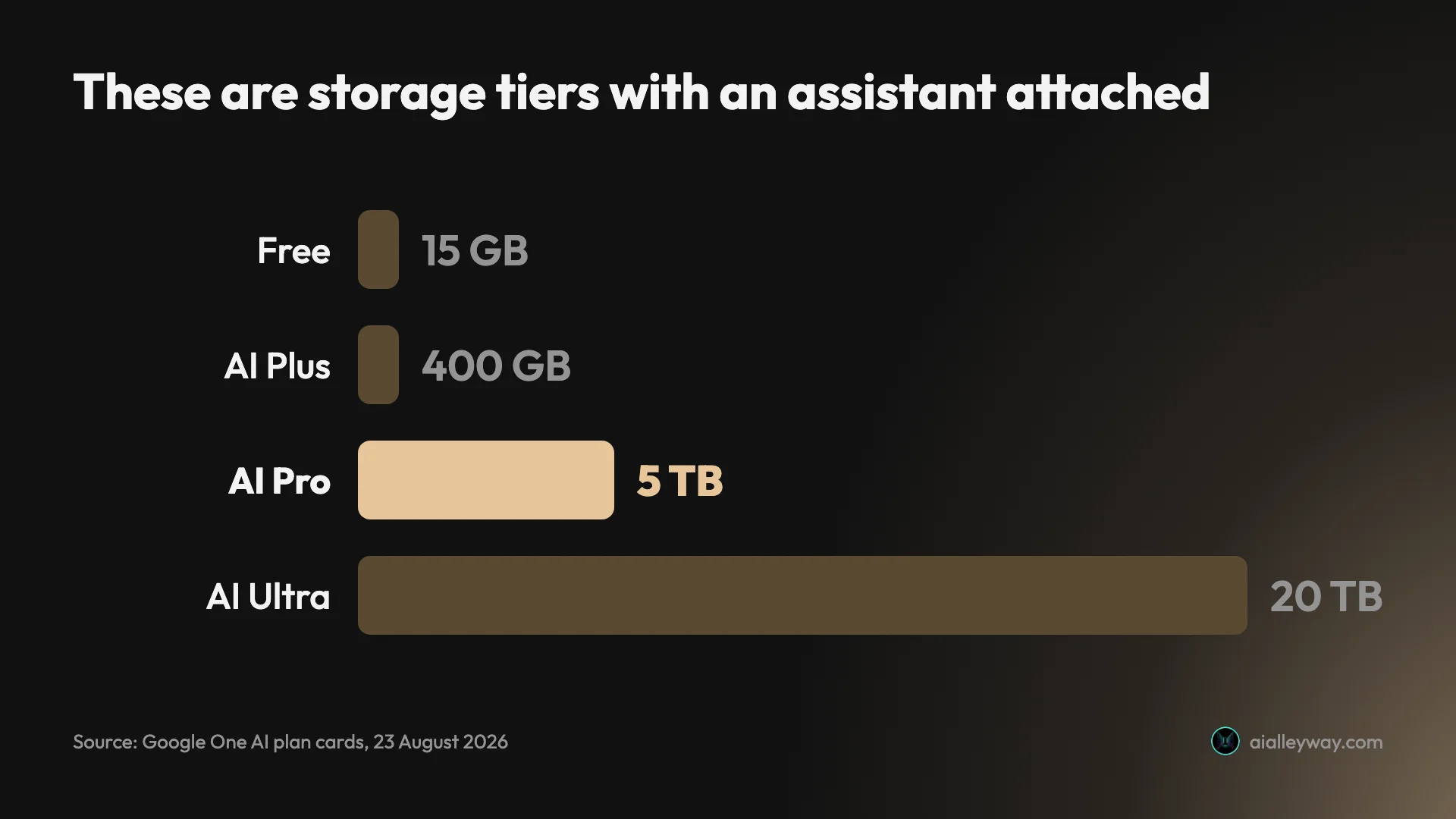
Gemini is free. What you can buy is a Google One AI plan, and this is where the product gets genuinely unusual: the three paid tiers are cloud storage plans at 400 GB, 5 TB and 20 TB with Gemini access bundled in, rather than AI subscriptions with storage attached. Google states $100 a month for AI Ultra and $200 for its top tier; it would not show me US figures for Plus or Pro at all.
These are storage plans, not AI plans
Each plan card leads with a storage number. Not a model, not a usage allowance: 400 GB, 5 TB, 20 TB.
Google AI Plus, Pro and Ultra are Google One cloud storage tiers with Gemini access bundled in. The AI benefits are real and they are listed second, underneath the storage number that defines the plan.
That explains the free tier. Google is not trying to convert you to an AI subscription, because Google does not sell one. It is trying to move you up a storage tier, and a very good free assistant is the thing that makes the storage tier attractive.
| Plan | Storage | Gemini access |
|---|---|---|
| Free | Standard Google account | Four models including 3.1 Pro and Extended thinking |
| Google AI Plus | 400 GB | 2x higher usage limits, Flash Thinking model, Gemini in Gmail |
| Google AI Pro | 5 TB | 4x higher usage limits, Pro model, Deep Research, video generation, Gemini in Gmail, Docs and Vids |
| Google AI Ultra | From 20 TB | 5x higher limits than Pro, Deep Think, highest Search access, Gemini across more Google apps |
Google Gemini price: it depends where you are, and Google would not tell me yours
This is the second review in a week where I have run into regional pricing, and Gemini’s case is worse than ChatGPT’s because Google would not render a US figure at all.
What I can state from a Google-owned source: Google’s own blog puts AI Ultra at $100 a month with 20 TB of storage, and a $200 top tier, reduced from $250, carrying a 20x higher usage limit than Pro.
For Plus and Pro, every Google surface I tried served my account’s local currency instead. My plan cards show Plus, Pro and Ultra in local currency, with a three-month promotional rate on Pro. The widely reported US figures are $4.99 for Plus and $19.99 for Pro, and the 400 GB allowance I can see does corroborate the newer, lower Plus price. I am flagging those two as reported rather than verified, because I could not get Google to show them to me.
Why the currency mismatch matters
On my account the three local prices did not match Google’s US figures at any single exchange rate. Each plan implied a different one.
| Plan | US figure |
|---|---|
| AI Plus | $4.99, reported |
| AI Pro | $19.99, reported |
| AI Ultra | $100, stated by Google |
That means these are regional prices set market by market, not one dollar figure passed through a currency converter. Only the Ultra row has a Google-stated dollar figure behind it.
The practical consequence for a reader is the same as it was for ChatGPT Go: every pricing table published about this product, this one included, is reliably true for one country. Open your own plan page before you budget.
The bundle goes further than storage
If the storage framing were the only oddity it would be a quirk. It is not: Google’s own announcement of these subscriptions confirms that AI Ultra includes a YouTube Premium individual plan, and that AI Pro subscribers in select countries get YouTube Premium Lite at no extra charge.
So the top tier of Google’s AI product line includes an ad-free video subscription. That is not a criticism of the value, which is obviously real. It is evidence for what these plans actually are: consumer bundles assembled from Google’s catalogue, of which the assistant is one component.
There is a billing toggle for monthly or annual, with annual advertised as saving 16%, and Google runs student offers including a year of AI Plus at no cost. Every one of those is a Google One mechanic rather than an AI-product mechanic.
The reason to keep saying this is that it changes the question you should be asking. Not “is Gemini worth the reported $19.99 a month” but “do I want 5 TB of Drive, a better Gemini allowance and possibly YouTube Premium Lite for one price”. Those are different purchases and only one of them is comparable to a Claude or ChatGPT subscription.
What the AI costs at the margin
Because the plans bundle storage, the only honest way to price the AI is to ask what the tier costs above the storage you would have bought anyway.
| If you already needed | Then the AI effectively costs |
|---|---|
| No extra storage | The full plan price |
| ~400 GB | The Plus premium over standard Google One storage |
| ~5 TB | Very little, since Pro’s storage alone is close to the price |
| 20 TB and YouTube Premium | Arguably nothing, and possibly less than nothing |
That last row is not a joke. AI Ultra includes a YouTube Premium individual plan, so a household already paying for Premium and for 20 TB of storage is looking at a bundle where the assistant is thrown in.
Nobody else in this category can construct that argument, and no comparison table between AI subscriptions will ever capture it, which is precisely why I keep insisting these are not AI subscriptions.
The one number Google will not give you
Every plan describes its Gemini allowance as a multiple: 2x for Plus, 4x for Pro, 5x higher than Pro for Ultra, and up to 20x on the top tier.
| Plan | What Google says about limits | What that tells you |
|---|---|---|
| Free | Nothing | Nothing |
| Plus | 2x higher than without a plan | 2 × unknown |
| Pro | 4x higher than without a plan | 4 × unknown |
| Ultra | 5x higher than Pro, up to 20x on the top tier | 20 × unknown |
None of those is a quantity, because the thing they multiply is never published. A free account has some usage limit; Google does not say what it is, so 4x higher than an unstated number is also an unstated number.
This is the third product in this cluster to do exactly that, which makes it a category habit rather than one company’s failing. Claude describes limits as percentages of an unpublished total. ChatGPT uses “more” and “expanded” and “maximum”. Google uses multipliers. All three are describing the same thing, which is a ceiling they would rather you discovered than compared.
The practical advice is the same everywhere: the only honest way to find your ceiling is to run the free tier hard for a fortnight and see whether you hit it.
Which plan should you buy?
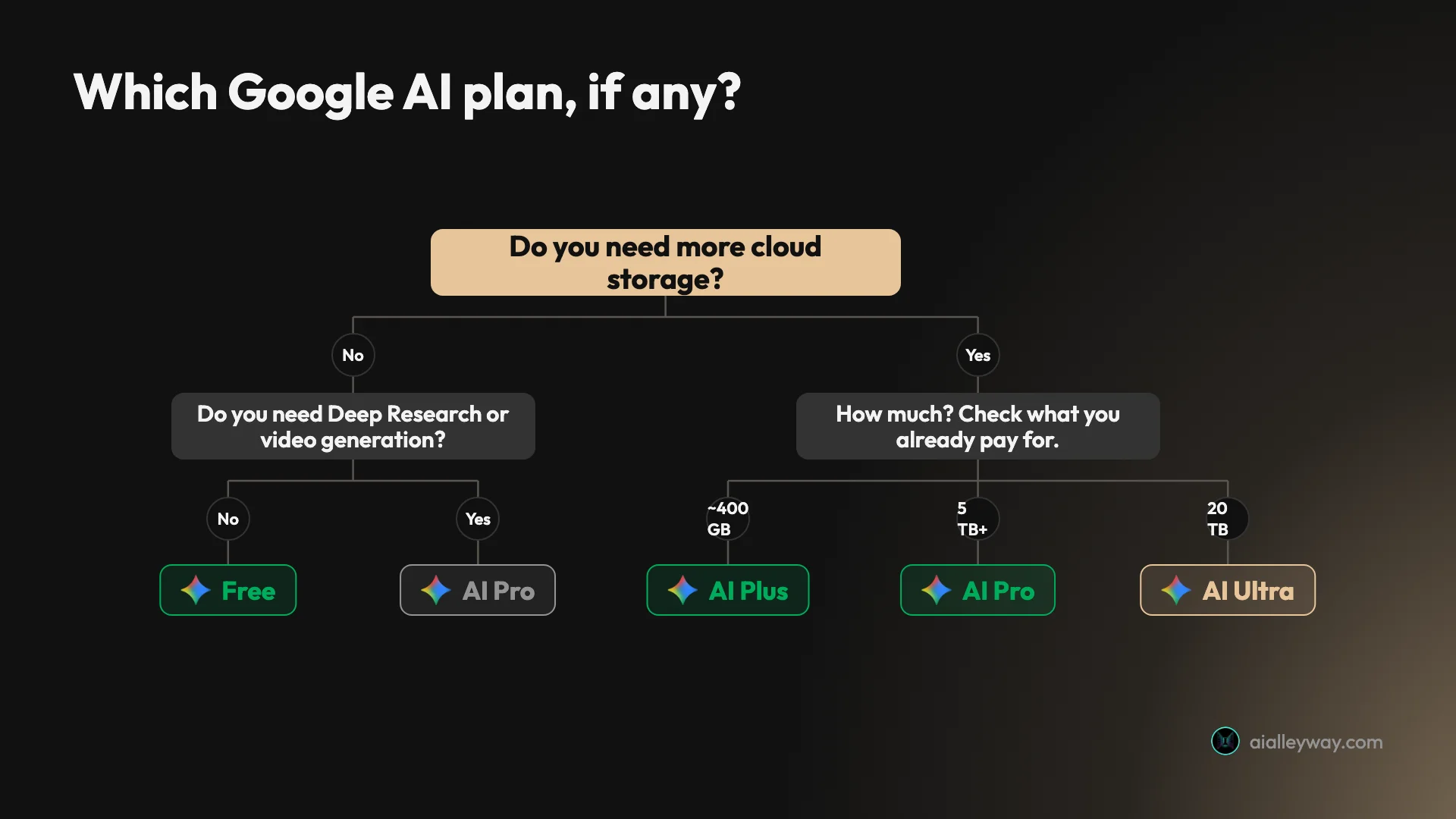
Start by ignoring the AI entirely and asking how much cloud storage you need. That sounds flippant and it is the correct way to read these plans.
If you are within your existing Google storage and the free assistant does what you need, there is nothing to buy. That will be most people, and it is an unusual thing to be able to say about a category leader’s free tier.
If you are already paying for Google One storage, you may already have AI benefits attached and not know it. Check before you subscribe to anything else, because a second assistant subscription is a real cost and you may be buying something you already have.
This is the single most valuable line in the review for a certain kind of reader, and it is invisible from the outside. Nobody thinks of their Drive plan as an AI subscription, so nobody checks, and Google has no incentive to remind them.
Go to Pro when you want Deep Research, video generation, or Gemini inside Docs rather than just Gmail. Ultra is for people who need 20 TB and the highest limits, which is a storage decision with an AI bonus rather than the reverse.
Who is Google Gemini for?
- Anyone who will not pay for an assistant. This is the clearest recommendation in the whole cluster. If your budget for AI is zero, Gemini gives you an advanced reasoning model and an extended thinking mode for it, which nothing else does.
- People who live in Google Workspace. If your mail, documents and calendar are already there, Gemini reaches into them natively while every rival negotiates access from outside. That advantage is structural and permanent.
- Existing Google One subscribers. You may already be entitled to AI benefits through storage you are already paying for. Check your plan before buying anything else.
- People who need a lot of cloud storage anyway. The plans are priced as storage, so if you were going to buy 2 TB or 5 TB regardless, the Gemini access is close to free at the margin.
- Students. Google runs student offers including a year of AI Plus at no cost, which on top of an already strong free tier makes this the obvious default for anyone in education.
- Anyone testing whether AI is useful at all. Because the free tier is close to fully featured, a sceptic gets a fair impression rather than a deliberately degraded one. That makes it the right recommendation for someone who has tried a weakened free tier elsewhere and concluded the category is overhyped.
- People with long documents rather than long conversations. The large context window and the Drive access point the same direction. Hand it a contract or a report and it copes; hold a forty-turn discussion and it drifts.
- Not for people who want the best prose. Gemini writes competently and lands well short of Claude on anything that has to be publishable. That is my own judgement from using it, and it is the axis I would push back on hardest if someone told me Gemini had caught up.
- Not for people outside the Google ecosystem. Strip away the Workspace integration and you have a good assistant competing with better-rounded ones. The integration is most of the argument.
What is Google Gemini good at?
Gemini’s strength is reach: an unusually complete free tier including the Pro model, native access to Gmail, Docs, Drive and Calendar that no rival can replicate, NotebookLM folded into the sidebar, and paid tiers that bundle the assistant with cloud storage you may want anyway. It is the assistant that costs the least to justify.
The Gemini free tier is the most generous in the category
What that freely available model is worth is easier to see in the negative. A free user of any rival meets a deliberately weaker model and forms their impression of the whole category from it.
That is worth more than any benchmark result to the large number of people who will never subscribe to anything. The quality ceiling of free AI, for most of the world, is set by whichever company is most willing to give its good model away, and right now that is Google.
It is also the reason I would put Gemini in front of someone who is sceptical of the whole category. The usual first experience of AI is a deliberately weakened free tier, which teaches people that these tools are worse than they are. Gemini’s free tier teaches them something closer to the truth.
The strategic logic is not charity and does not need to be. Google can afford to give the model away because the model is not the product it is selling, which is the single most useful thing to understand about this company’s position in the market.
Workspace access is a permanent advantage
The reason this is durable rather than merely current is that the obstacle facing a competitor is ownership, not difficulty. No amount of engineering gets a rival the position Google already holds.
The competitive significance is easy to understate. Model quality is converging fast and every lab ships a capable model now. Distribution and data access are not converging, and Google has both in a way that took twenty years to build.
The honest counterweight, covered below, is that this advantage is tiered rather than free, and that the integration has been slower to get good than the chat product has.
Bundling with storage changes the maths
Most AI subscriptions ask you to justify a new line item. Google’s ask you to upgrade one you may already have.
For someone already paying for Google One, or already needing more Drive space, the marginal cost of the AI is small or nil. No rival can match that framing because no rival has a storage business to attach it to.
I criticise the bundling below for making the AI impossible to price, and both things are true at once. It is bad for comparison shopping and good for your actual bill, and which matters more depends on whether you were going to buy the storage anyway.
NotebookLM comes along for free
Document-grounded research, where answers are constrained to sources you supply rather than to the open web, is a different and often safer mode than chat. Constraining the source set is the single most effective way to reduce invention.
Having that mode one click away, free, is a real capability rather than a checkbox — and it is the part of the free tier I would actually miss.
The privacy controls are unusually specific
Google gets criticised on privacy reflexively, and the actual Gemini Apps Activity screen is more forthcoming than most.
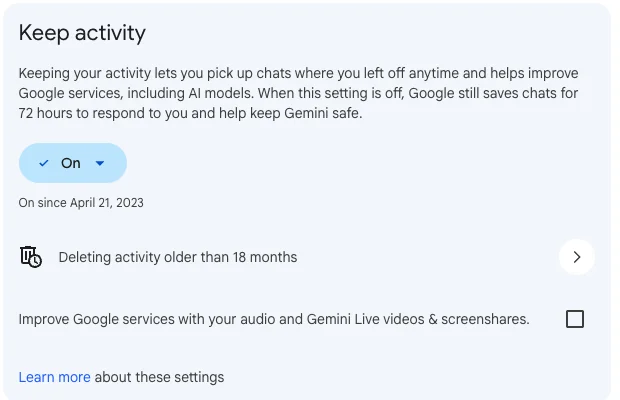
It tells you the setting is on, when it was switched on, that turning it off still leaves a 72-hour retention floor, and it offers auto-delete at a configurable age. Compare that with rivals who publish a retention period in a terms document and nothing in the product.
Where does Google Gemini fall short?
Gemini’s problems are commercial and editorial rather than technical. The paid tiers are storage plans that make the AI value hard to price, Google would not show me US figures at all, the headline Workspace integration is partly gated, the writing is the weakest of the four assistants I have reviewed, and the privacy default is on with a retention floor you cannot switch off.
The paid tiers make the AI impossible to price
I cannot tell you what Gemini costs, because Google does not sell Gemini. It sells storage with Gemini attached.
That is defensible as a business model and genuinely unhelpful as a purchase decision. If you want to know whether Gemini’s Deep Research is worth the reported $19.99 against Perplexity Pro’s stated $17, you cannot answer it, because part of what you are buying is 5 TB of Drive.
The comparison every reader wants is the one the packaging prevents. I keep the running figures for the category in the AI tool cost statistics.
| What a buyer wants to compare | Whether you can |
|---|---|
| Gemini Pro against Claude Pro on price | No, one includes 5 TB of storage |
| Gemini Pro against ChatGPT Plus on features | Partly, the feature sets barely overlap |
| What the AI alone is worth | No, it is never priced separately |
| What you will pay in your country | Only by opening your own plan page |
Google would not show me a US price
Every Google surface I tried served my account’s local currency: the plan cards, the public plans page, the Gemini subscriptions page. Only Google’s own blog post stated a dollar figure, and only for Ultra.
That is a worse disclosure position than any rival in this cluster. Anthropic and OpenAI both publish a plain US price on a public page; OpenAI even marks it as the US price and says pricing is localised elsewhere. Google shows you your own and leaves you to guess at everyone else’s.
I want to be fair about the intent, which is almost certainly helpfulness rather than obfuscation. Showing a user their own currency is the right default for that user. The cost is that no reader anywhere can compare this product against its rivals without doing currency work the vendor could have shown them.
It also means this section of every Gemini review in existence is either localised to the writer or reliant on secondary reporting, which is a strange position for the most-used software company on earth to put its reviewers in.
The headline integration is partly a paid feature
“Gemini works inside Gmail and Docs” is the sentence that sells this product, and on a free account it is not straightforwardly true.
Plus lists Gemini in Gmail. Pro extends to Docs and Vids. Ultra reaches more apps again. So the specific capability people are told is Gemini’s advantage arrives in stages, and the stage you are on depends on a storage plan.
| Where Gemini reaches | Free | Plus | Pro | Ultra |
|---|---|---|---|---|
| Gmail | No | Yes | Yes | Yes |
| Docs | No | No | Yes | Yes |
| Vids | No | No | Yes | Yes |
| More Google apps incl. Sheets and Slides | No | No | No | Yes |
Read that table against the sentence everyone uses to describe this product and the gap is obvious. “Gemini works inside your Google apps” is a description of the Ultra plan.
The writing is the weakest of the four
Across the four assistants I have reviewed this month, Gemini is the one I would reach for last when the output has to be read by someone else.
It is competent and it is not distinctive, and it drifts toward a flat, listy register on longer pieces.
The failure mode is worth naming precisely because it is not incompetence. Gemini produces correct, organised, usable text. What it does not do is hold a voice, and on a long piece it reverts to headings and bullets whatever you asked for.
That matters for a narrow but real group of buyers. If your output is internal, factual or throwaway, you will never notice. If it goes in front of readers with your name on it, you will notice on the first draft.
Activity is on by default, and off is not really off
The 72-hour floor is honest disclosure and it is still a floor. Switching Gemini Apps Activity off reduces retention rather than ending it.
More importantly the setting is on unless you change it, and mine has been on since April 2023, which is what a default looks like in practice. If you are putting work material into Gemini, open that screen deliberately rather than inheriting a choice you never made.
The comparison across this cluster is instructive rather than damning. Anthropic states five years of retention with the training setting on and thirty days with it off. OpenAI offers a single toggle and a full data export. Google gives the most granular controls of the three and the least escapable floor.
None of the four is a privacy product. Google is the one where the default is most consequential, because it is also the company that already holds your mail.
The public ratings disagree with each other completely
This is the widest ratings spread I have seen on any tool in this cluster, and it is worth laying out.
| Source | Score | What it measures |
|---|---|---|
| G2 | 4.4 / 5 | Aggregate of users who chose it for work |
| Trustpilot | 1.5 / 5, 1,116 reviews | Self-selected complaint traffic |
| IT Pro (Workspace) | 3.0 / 5 | Enterprise reviewer, “hit-and-miss” |
Trustpilot’s 1.5 is the number that gets quoted, and as with every assistant I have checked it distinguishes nothing: ChatGPT sits at 1.6, Claude at 1.5, Perplexity at 1.5, Grok at 1.4. The interesting figure is IT Pro’s 3.0 for the Workspace product specifically, because that is the surface Gemini’s whole pitch rests on, reviewed by someone testing it as enterprise software.
The framing I keep coming back to is one an Ars Technica discussion put well: an increasingly good chatbot that is still a weaker assistant. The chat product has improved faster than the integrations that are supposed to be its advantage.
Alternatives worth considering
If you are not in the Google ecosystem, or the storage bundling makes the value impossible to judge, three are worth a look.
| Gemini | ChatGPT | Claude | Perplexity | |
|---|---|---|---|---|
| Free-tier model choice | Four, including Pro | None | Paid only | Ten, all locked |
| Native Gmail and Docs access | Yes | No | No | No |
| Best at | Free capability and Google integration | Breadth in one subscription | Writing and long documents | Sourced answers |
| Paid tier buys | Storage plus AI | AI | AI | AI plus credits |
| Our pick status | Runner-up, assistants | Category pick, assistants | Runner-up, assistants | Category pick, search |
ChatGPT is the better buy the moment you decide to pay for something. Plus at a flat $20 covers image generation, voice, a coding agent and custom GPTs, and you are buying an AI product rather than a storage tier with AI in it. ChatGPT vs Gemini works through both free tiers, where the gap runs the other way.
Claude is the one to take if the output is words that other people read. It holds a brief further into a long document than Gemini does, which is the specific gap I feel most.
Perplexity is the specialist to add rather than the generalist to switch to. If what you want is a sourced answer with citations you can click, it does that better, though its free tier is far more restricted than this one.
It is also the alternative with the most direct exposure to Gemini, since Google putting sourced AI answers into Search for free is the competitive pressure that matters most to a paid answer engine. That is Perplexity’s problem rather than yours, but it is worth knowing before you commit to a subscription.
None of the three gives away as much. If cost is the binding constraint, Gemini wins on the free tier and it is not close, which is the single clearest recommendation to come out of reviewing all four.
The reverse is also worth stating plainly. The moment you decide to spend money on an assistant, Gemini stops being the obvious answer, because you are no longer buying an assistant. You are buying a storage plan and hoping the assistant justifies the difference. That free-versus-paid split is the spine of our best AI assistant ranking, where Gemini’s free tier is one of only two that hand you a model picker at all. If you have decided to leave, Gemini alternatives works through the two reasons people actually go and the different tools each one points at.
Final word
Gemini is the assistant I would tell someone to use if they were never going to pay for one, and the 4.3 reflects a genuinely strong product wrapped in commercial packaging that makes its value almost impossible to judge against a rival.
The thing to internalise is that Google is not selling you an assistant. It is giving you a very good one to make a storage plan look attractive, which is why the free tier is so much better than it commercially ought to be. Take the free tier at face value, and treat the paid plans as what they actually are.
Four things worth doing in your first ten minutes:
- Open the model picker and move off Flash-Lite. The Pro model is right there and most people never look.
- Open Gemini Apps Activity and make a deliberate choice, knowing that off still means 72 hours.
- Check whether an existing Google One plan already entitles you to AI benefits.
- Try Notebooks before assuming you need a separate research tool.
And one broader thought, having now reviewed all four of the major assistants in the space of eight days. The free tiers are where the real competition is happening, and they are diverging sharply rather than converging.
Google gives away its advanced reasoning model. OpenAI gives away a generous allowance of its core one and hides the picker. Anthropic gives away the product without Projects. Perplexity gives away the answer engine and padlocks the models. Those are four different bets about what makes someone pay, and Gemini’s is the only one that assumes the answer is not the assistant at all.
Everything above comes from a free account, from Google’s own plan and blog pages, and from what those pages would and would not show me on 23 August 2026.
Frequently asked questions
Is Google Gemini worth it?
The free tier is worth using by anyone, and that is a stronger statement than it sounds. Open the model picker on a free account and you get 3.5 Flash-Lite, 3.6 Flash, 3.1 Pro and an Extended thinking mode, all selectable. ChatGPT gives free users no picker at all, and Perplexity shows ten models with a padlock on every one.
Whether a paid plan is worth it is a different question, because the paid plans are not really AI subscriptions. Google AI Plus, Pro and Ultra are Google One storage tiers with Gemini access attached, sold on 400 GB, 5 TB and 20 TB respectively.
So the honest framing is that you should use Gemini free regardless, and buy a plan when you want the cloud storage or the higher usage limits, not because the free assistant is holding you back. I score it 4.3 out of 5.
How much does Google Gemini cost?
Gemini itself is free. The paid tiers are Google One AI plans, and Google prices them regionally, which makes a single global answer impossible.
Google's own blog states the AI Ultra plan at $100 a month with 20 TB of cloud storage, and a $200 a month top tier reduced from $250 that carries a 20x higher usage limit than Pro. For Plus and Pro, Google would not show me US pricing from this account: the figures widely reported are $4.99 for Plus and $19.99 for Pro, and the 400 GB allowance I can see corroborates the newer Plus figure.
My own account, which is localised to a region outside the US, displays Plus, Pro and Ultra in local currency. Those prices do not convert to the US figures at any single exchange rate, which tells you the prices are genuinely regional rather than converted.
What do you get on the Gemini free tier?
More than any rival gives away. A working model picker containing 3.5 Flash-Lite for fast answers, 3.6 Flash for general use, 3.1 Pro for advanced reasoning and a separate Extended thinking mode for complex problems. None of them is padlocked.
You also get image generation, a Library, and Notebooks, which is NotebookLM folded into the same sidebar. Usage limits apply and Google describes the paid tiers as 2x, 4x and 5x higher rather than publishing the base number, so the ceiling exists but is never stated.
What sits behind a plan is Deep Research, video generation, Google Flow, deeper Gemini integration into Gmail, Docs and Slides, and the cloud storage. The assistant itself is close to fully featured before you pay anything.
That makes Gemini the fairest free trial in the category, because you are seeing roughly what a paying user sees rather than a deliberately weakened version of it.
Is Google Gemini safe to use with personal data?
That depends on a setting you should look at on day one. Gemini Apps Activity is on by default and Google is explicit about what it does: keeping activity lets you resume chats and helps improve Google services, including AI models.
The detail worth knowing is the floor. Google's own wording is that when the setting is off, it still saves chats for 72 hours to respond to you and to help keep Gemini safe. So switching it off reduces retention rather than eliminating it, which is a more honest disclosure than most rivals make and also a real limit.
There is an auto-delete control, set on my account to remove activity older than 18 months, and a separate unchecked option covering audio and Gemini Live videos. The controls are good. The default is on, and most people never open the screen.
Is Gemini better than ChatGPT?
On the free tier, Gemini gives you more. A model picker including the Pro model and an extended thinking mode, against ChatGPT's core model with no picker at all. If you are never going to pay for an assistant, that is close to decisive.
On the paid tier the answer flips, because ChatGPT Plus buys a broader product: image generation, voice, a coding agent, a work agent and custom GPTs, all for a flat $20. Gemini's paid tiers buy storage, higher limits and deeper Workspace integration instead.
So the split is about where you live rather than which is better. If your documents, mail and calendar are already in Google, Gemini is reaching into them in a way nothing else can. If they are not, ChatGPT covers more ground. The ChatGPT review on this site works through the other side.
Does Gemini work inside Gmail and Docs?
Yes, and it is the single thing Gemini does that no rival can copy. Google owns the applications, so Gemini reads and acts on your mail, documents, Drive files and calendar directly rather than through a connector you have to authorise.
The depth of that access is tiered. Google AI Plus lists Gemini in Gmail. Pro extends it to Gmail, Docs and Vids. Ultra adds more Google apps including Sheets and Slides. So the integration people describe as Gemini's headline feature is partly a paid feature.
Whether that is worth paying for depends entirely on whether Google Workspace is where your work actually lives. For someone inside it all day the argument is strong. For someone who uses Gmail for personal mail and nothing else, it is close to irrelevant.
It is also the one advantage no competitor can engineer around, because the obstacle is ownership rather than difficulty. Every rival reaches Google's apps through a connector you authorise; Gemini starts inside them.
Keep reading
Google Whisk AI Is Gone: Do It in Flow Instead, Tested
Google Whisk shut down on 30 April 2026 and now redirects to Flow. I rebuilt a Whisk subject, scene and style remix in Flow, free, and tested ImageFX prompts.
Google Flow Free: What 50 Daily Credits Buy, Tested
Google Flow free, tested on a free account: 50 credits a day bought four AI video clips, images cost nothing, and Veo 3.1 Quality was out of reach.
Google Flow Music Review: Free Songs, Real Files
Google Flow Music, tested on a free account: 5 credits a song, 30 free credits a day, free MP3, WAV and stems, and a 15-second music video for 188 credits.
How to Use Google Flow: A Hands-On Beginner's Guide
How to use Google Flow, tested on a free account: start a project, make free images, build a character with a voice, turn it into video and download it.