
Google Whisk AI Is Gone: Do It in Flow Instead, Tested
Google Whisk shut down on 30 April 2026 and now redirects to Flow. I rebuilt a Whisk subject, scene and style remix in Flow, free, and tested ImageFX prompts.
Contents

Google Whisk AI is gone. Google discontinued it on 30 April 2026 and folded its best features, along with ImageFX, into Google Flow. The old Whisk address now opens Flow. I tested whether Whisk’s signature trick still works there: on 5 October 2026, Flow combined a subject, a scene and a style image into one picture and turned the subject into the sticker, plushie and enamel pin Google used as Whisk examples, all for free.
The catch is that you now describe the combination in words instead of dropping images into three labelled slots. It took one extra sentence and one automatic retry.
| Question | Answer |
|---|---|
| Is Google Whisk still available? | No, discontinued 30 April 2026 |
| Where does labs.google Whisk go now? | It redirects to Google Flow |
| What happened to ImageFX? | Also moved into Flow; its link redirects too |
| Can Flow do a Whisk-style remix? | Yes, by describing each image’s role |
| Does it cost anything? | Images were free in my test and per Google |
| What about old Whisk images? | Only kept if moved before the shutdown |
What happened to Google Whisk?
Whisk was a Google Labs experiment that launched on 16 December 2024. Its idea, in Google’s words, was that “Whisk lets you prompt with images”. Instead of writing a long description, you dropped in three pictures, a subject, a scene and a style, and Whisk blended them. Behind the scenes, Google said, Gemini wrote captions for your images and fed them to its Imagen 3 image model.
Whisk was always presented as an experiment. At launch Google made it available in the US through labs.google, and it described the tool as built for “rapid visual exploration” rather than precise editing. That framing matters for what came next: Google treated Whisk as a test of an idea, and once the idea worked, it moved the idea into its main creative app.
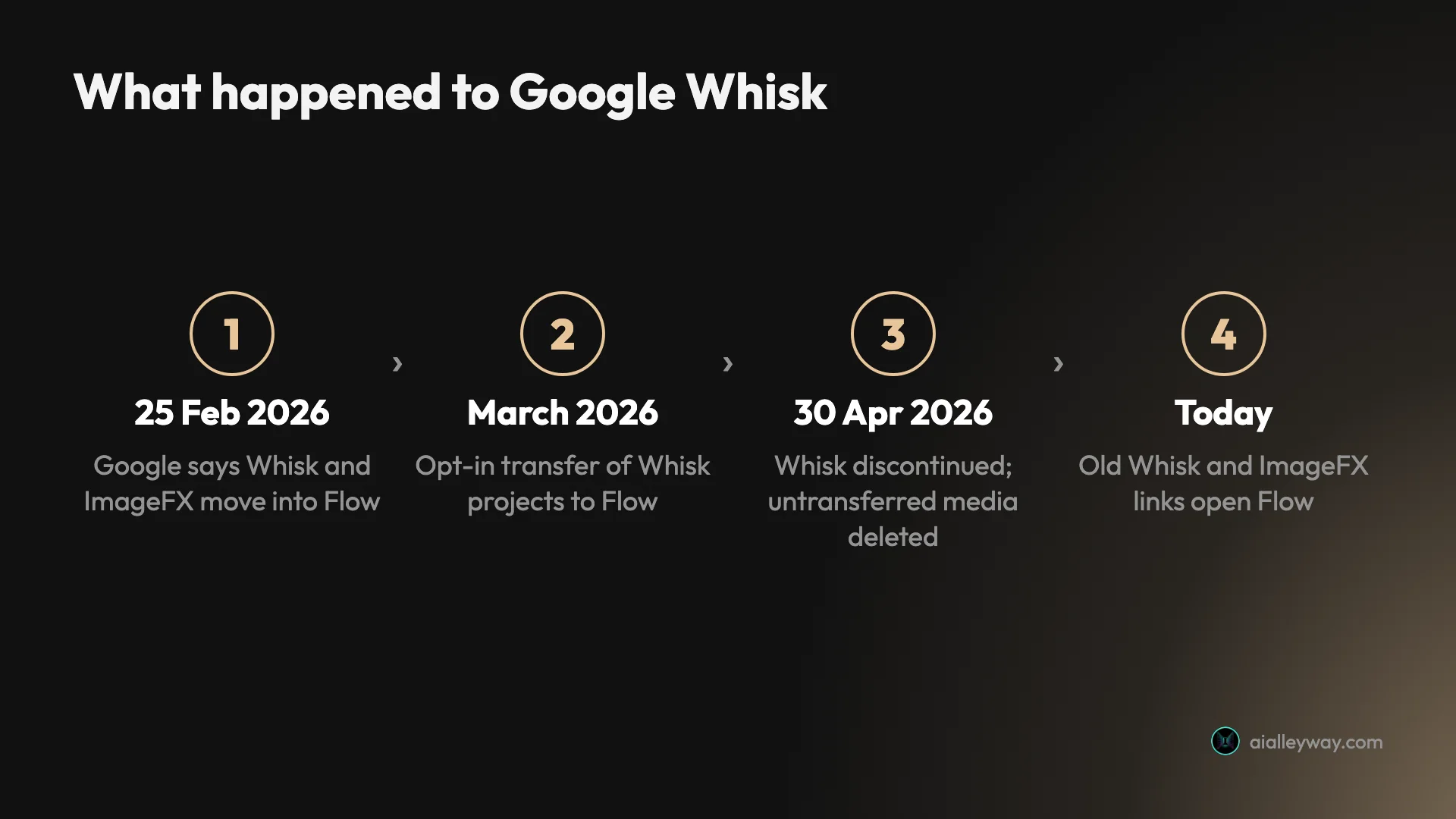
The end came in two announcements. On 25 February 2026, Google’s Flow update post said the best capabilities of its two image experiments, Whisk and ImageFX, were “moving directly into Flow”. In March, Google’s Workspace Updates blog set the date: “April 30, 2026 — Whisk discontinued.”
That second post had the part that matters to anyone with old work in Whisk. Migration to Flow was opt-in, assets did not transfer automatically, and “any media remaining in a user’s Whisk library after this date will be permanently deleted”. Google also said Whisk users could download their data before the end, and that Whisk and Flow share the same AI credits, so any credits carried over.
I checked the old addresses on 5 October 2026. The Whisk page at labs.google/fx/tools/whisk forwarded straight to flow.google.com, and so did the ImageFX page. Nothing at either address works as a separate tool any more.
What replaced Whisk and ImageFX
Google Flow is the replacement for both. It is Google’s AI filmmaking app, and it makes images with the Nano Banana models as well as video with Veo 3.1 and Gemini Omni Flash. Google’s February post was direct about cost: “you can generate images for free in Flow.”
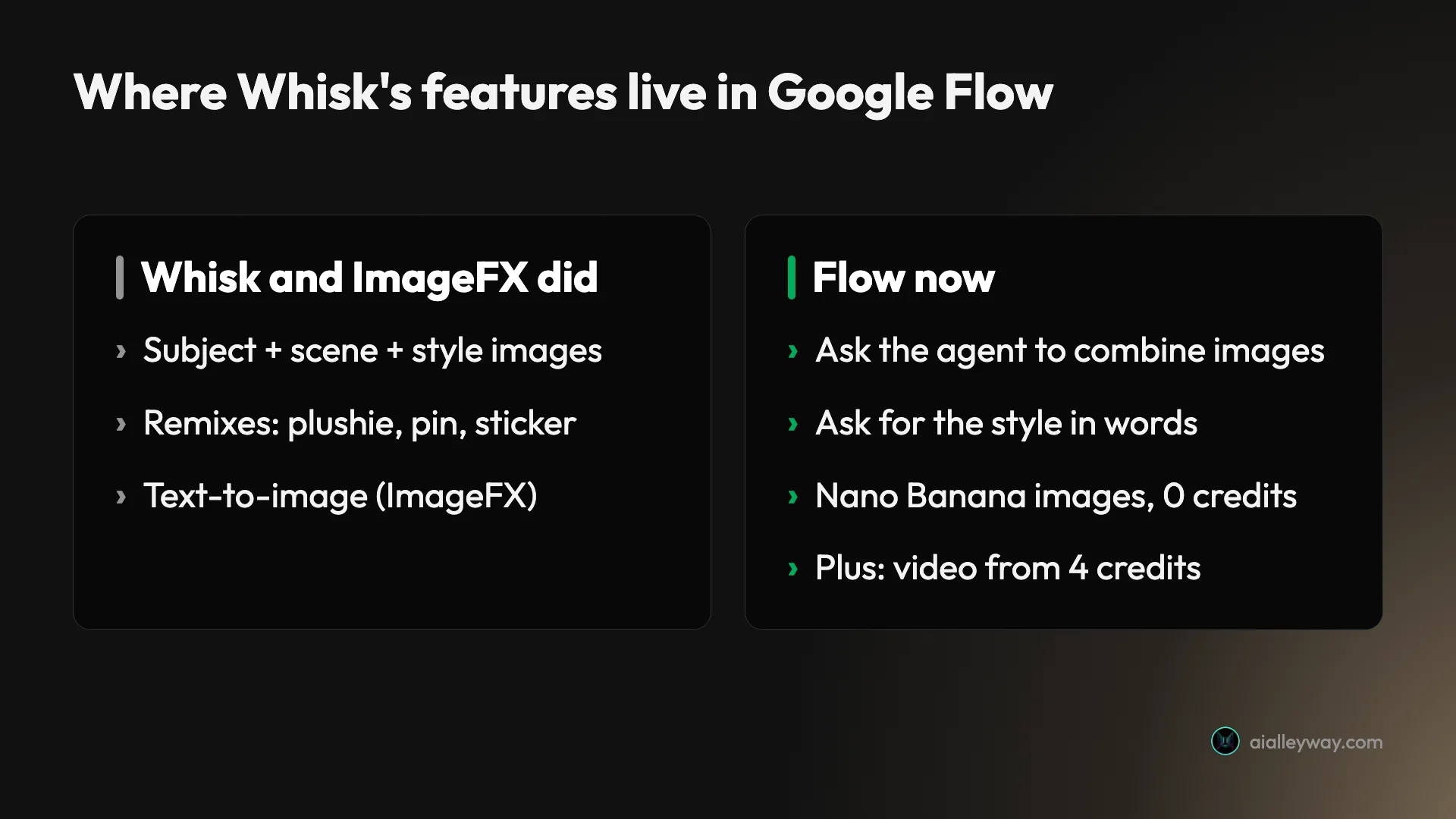
The way you work is different. Whisk was built around three image slots: subject, scene and style. Flow is built around an agent: you type what you want in a chat panel, and it decides how to make it. ImageFX’s text-to-image job is now simply Flow’s default, since typing a description makes an image. Whisk’s job, combining pictures, now means telling the agent which image plays which part.
If Flow is new to you, our Google Flow tutorial walks through the app from a blank project, and our Google Flow free guide explains the daily credits. Images did not use any of those credits in my testing.
Recreating a Whisk remix in Flow, step by step
To test whether Whisk’s core trick survived the move, I rebuilt one from scratch in a new Flow project. Whisk took your own uploaded photos; I made the three inputs in Flow so the whole test could be repeated by anyone.
Step 1: make or add the three images. I asked the agent for three separate square images with Nano Banana Pro: “a small orange tabby cat sitting on a plain white background, studio photo”, “an empty rooftop garden in Tokyo at dusk with paper lanterns and city lights, photo”, and “an abstract wave pattern in Japanese ukiyo-e woodblock print style”. They arrived within about a minute, with no approval card.
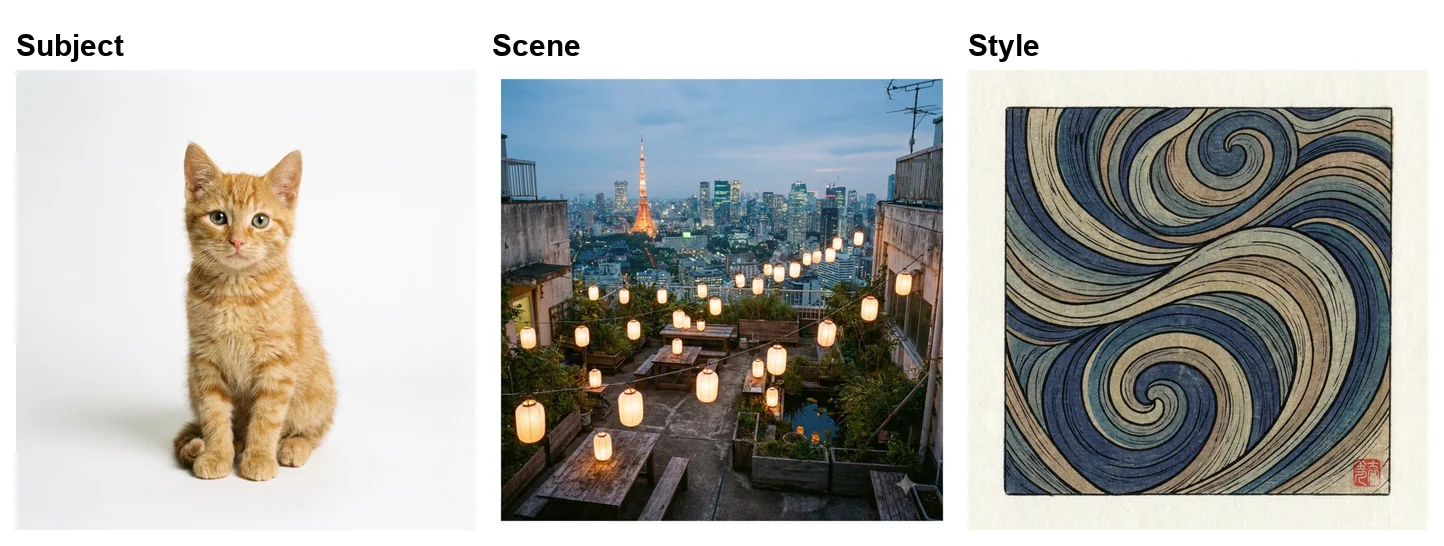
Step 2: tell the agent which image does what. My prompt was: “Now combine my three images the way Whisk did: make 1 square image with Nano Banana Pro using the orange cat as the subject, the Tokyo rooftop garden as the scene, and the ukiyo-e wave pattern image as the style.”
Step 3: wait for it, and let it retry. The first attempt failed with a tile reading “Sorry, this image failed to generate” and a note that I had not been charged. The agent tried again on its own, and the second attempt worked.
How close Flow gets to Whisk
The result is a better match for the rooftop than I expected. The garden’s layout survived almost exactly: the same wooden tables, strings of paper lanterns, the pond and Tokyo Tower on the skyline. The cat sits in the middle, and everything, from the sky to the floor, is redrawn in the wave pattern’s blue and beige woodblock style.
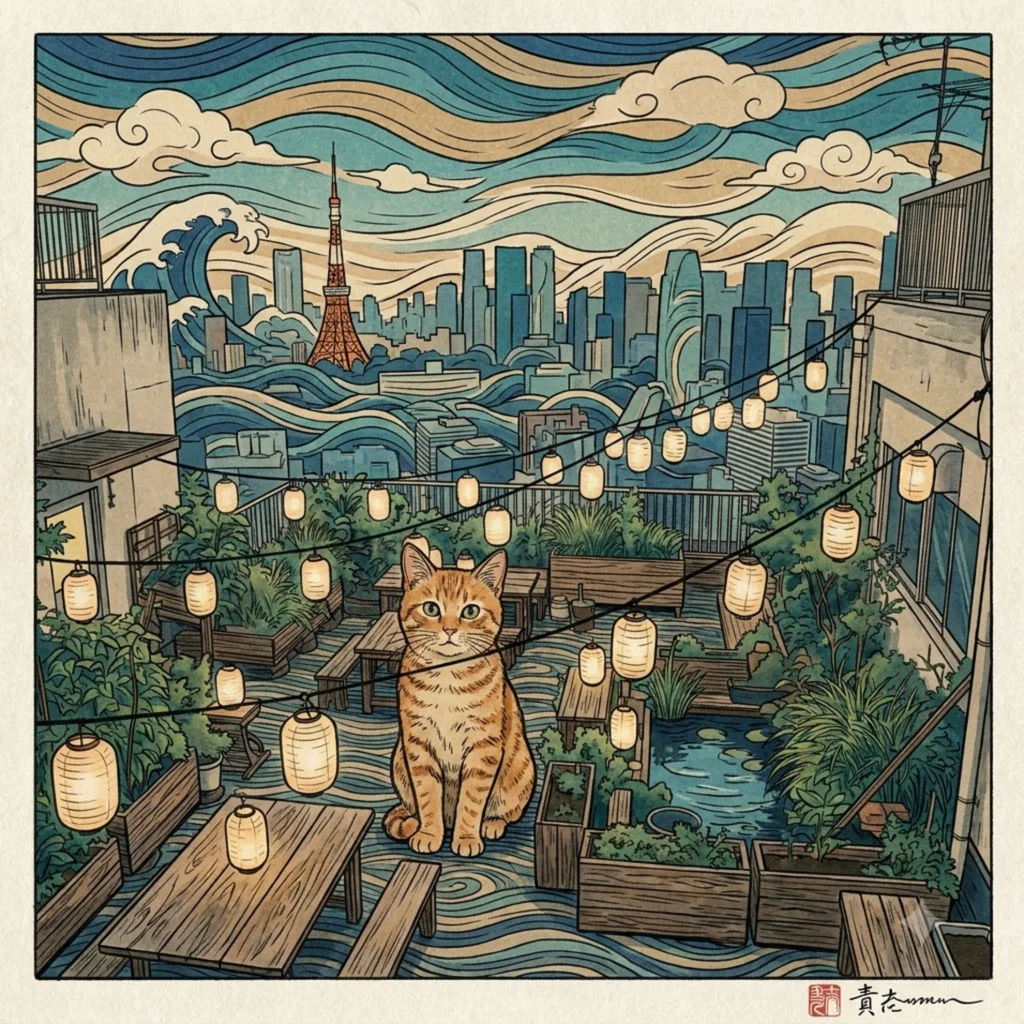
Two details show how literally the style image was read. The wave pattern I made had a small red seal in one corner, and the remix copied that idea, adding a red seal and a scrawl of made-up signature text in its own corner. If you do not want an artist’s mark, say so in the prompt.
That literal streak is the main difference from what Google promised for Whisk. Google described Whisk as capturing “your subject’s essence, not an exact replica”, a tool for “rapid visual exploration” rather than precise editing. Flow’s Nano Banana Pro kept my scene far more faithfully than “essence” suggests, and kept the cat’s markings too. Whether that is better depends on what you used Whisk for. For keeping a product or place recognisable, Flow’s literal approach is an advantage. If you want something looser, say so in the prompt; I did not test how far Flow will drift from the references.
I never used Whisk itself before it closed, so I cannot compare this side by side with a real Whisk output. The comparison here is with how Google described Whisk.
Flow shows the prompt it actually used
One Whisk feature Google highlighted at launch was that you could “view and edit the underlying prompts at any time”, because Whisk turned your images into text before making a picture. Flow keeps a version of that. In the project’s list view, each image sits next to the prompt the agent wrote for it, the reference images it used, the model and the shape.
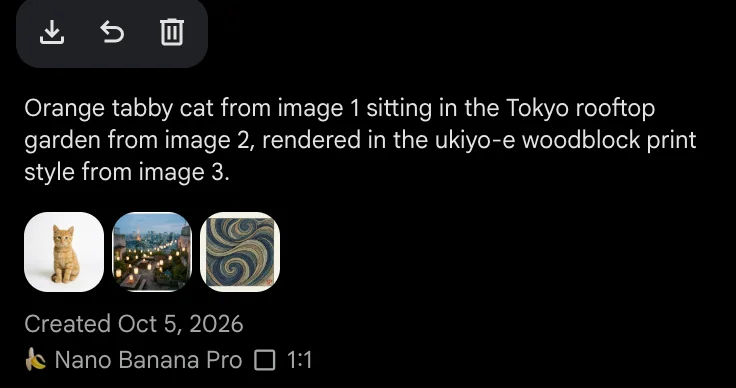
For my remix, the agent had rewritten my request as “Orange tabby cat from image 1 sitting in the Tokyo rooftop garden from image 2, rendered in the ukiyo-e woodblock print style from image 3”, with the three images attached as references and Nano Banana Pro as the model. That is the closest thing in Flow to Whisk’s slots: the references are attached for real, not just mentioned in a sentence.
The sticker, plushie and pin images showed the same pattern. Each one listed the cat as its only reference and a short prompt of its own, such as “A die-cut sticker of the orange tabby cat, white border, high quality illustration.” If a result is wrong, that line tells you whether the agent misunderstood the request or the model missed it.
Whisk’s plushie, pin and sticker examples in Flow
Google’s Whisk launch post said you could remix your images into anything “from a digital plushie to an enamel pin or sticker”. Flow has no buttons for those looks, but the same results take one sentence.
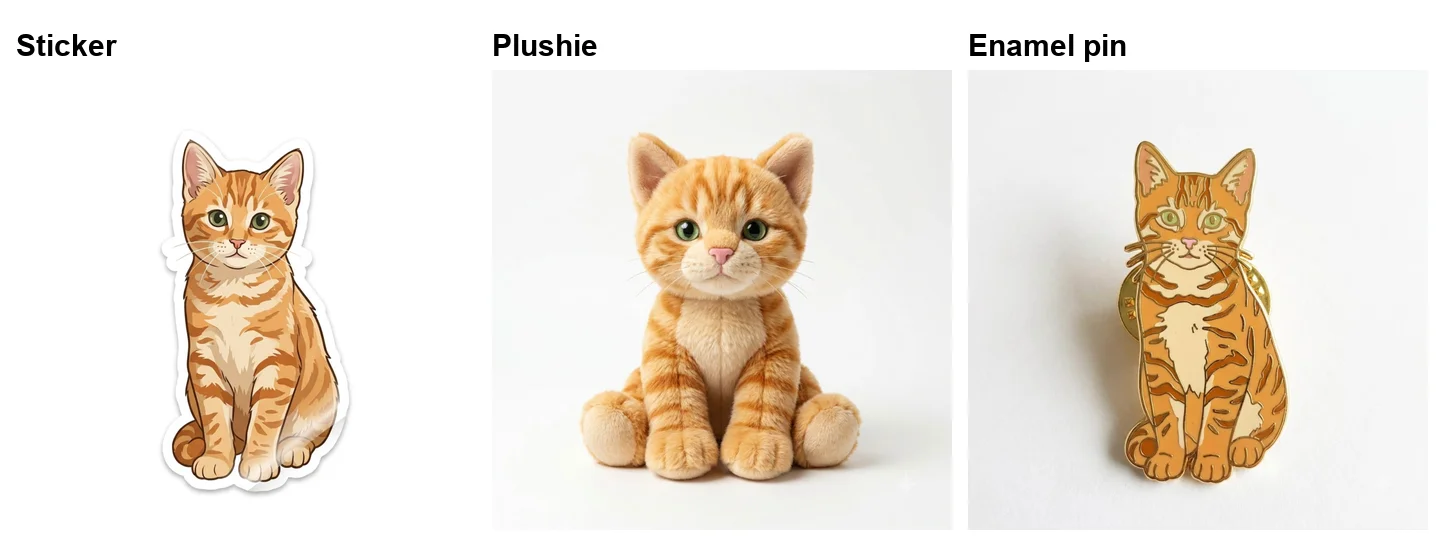
I asked: “Whisk had style presets. Using the orange cat from the first image, make 3 separate square images with Nano Banana Pro: the cat as a die-cut sticker, as a soft plushie toy, and as an enamel pin.” The “style presets” wording was mine, not Google’s. All three came back in one go, again with no cost:
- Sticker. An illustrated cat with a thick white die-cut border, the kind of thing you could send to a sticker printer.
- Plushie. A soft toy version with the same stripes and green eyes, photographed like a product shot.
- Enamel pin. A gold-outlined pin with flat enamel colours and the clutch backs visible behind it.
Each kept the tabby stripes and green eyes from my original cat. In Flow each is a short prompt, so you are not limited to the looks Google used as examples. Other styles should work the same way, though I only tested these three.
ImageFX users: plain text-to-image in Flow
Google ImageFX was Google’s text-to-image experiment, and its job maps straight onto Flow: you type a description and get a picture. I tried a plain prompt with no model or shape named, as an ImageFX user would type it: “A watercolour painting of a lighthouse on a cliff at sunrise, seagulls overhead.”
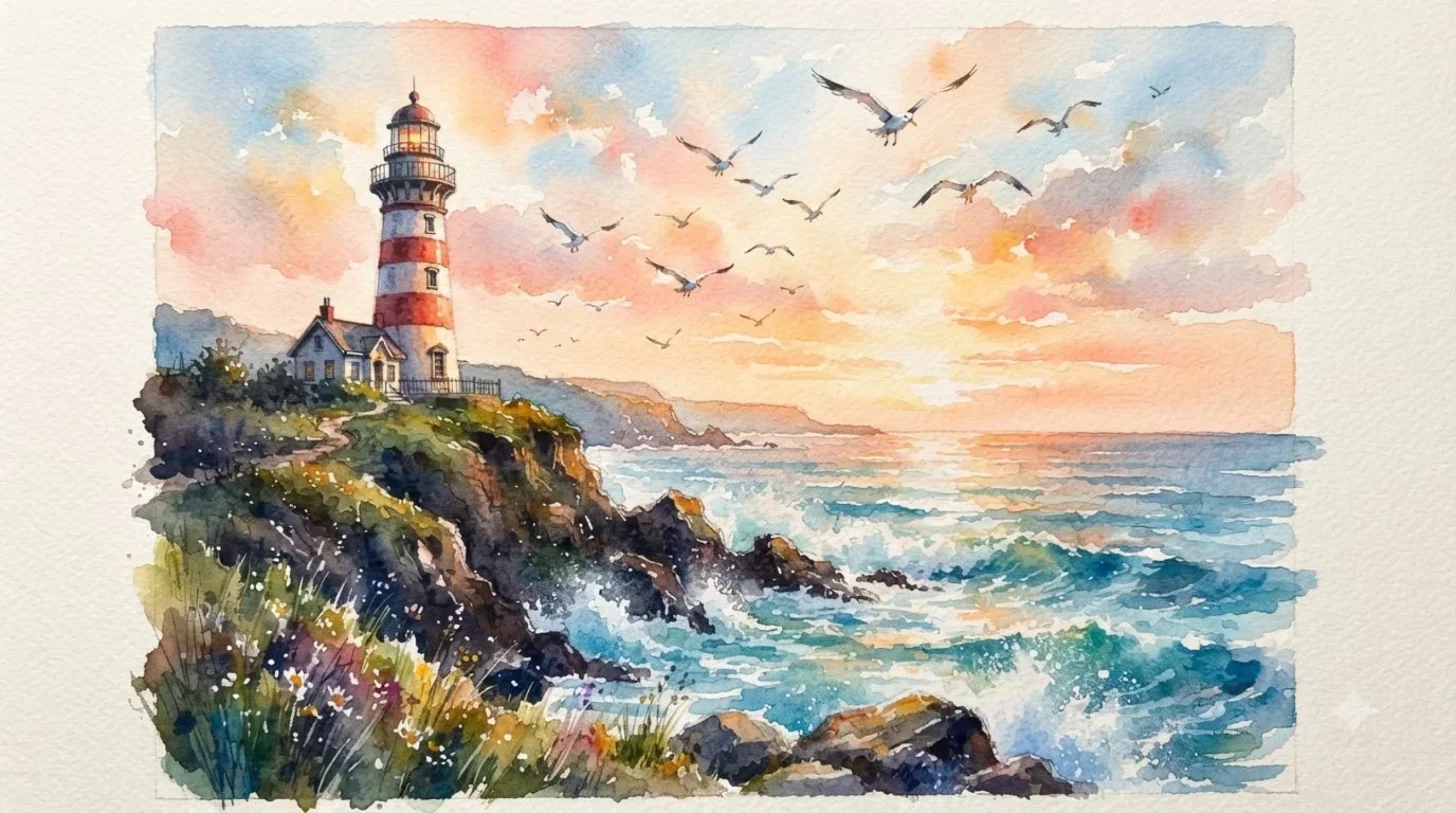
Within about a minute Flow returned one 16:9 image, made with Nano Banana 2 Lite, at no cost. Those came from the project’s defaults. The settings panel in the prompt box sets the default shape (16:9, 4:3, 1:1, 3:4 or 9:16), how many images per request (one to four) and the model, with Nano Banana 2 Lite selected and Nano Banana 2 and Nano Banana Pro on the list.
That was the menu on 5 October 2026; by 7 October Flow had replaced Nano Banana 2 with Nano Banana 2.1 and made it the default. My project was set to two images per request, but this prompt produced one, so the agent does not always follow the count.
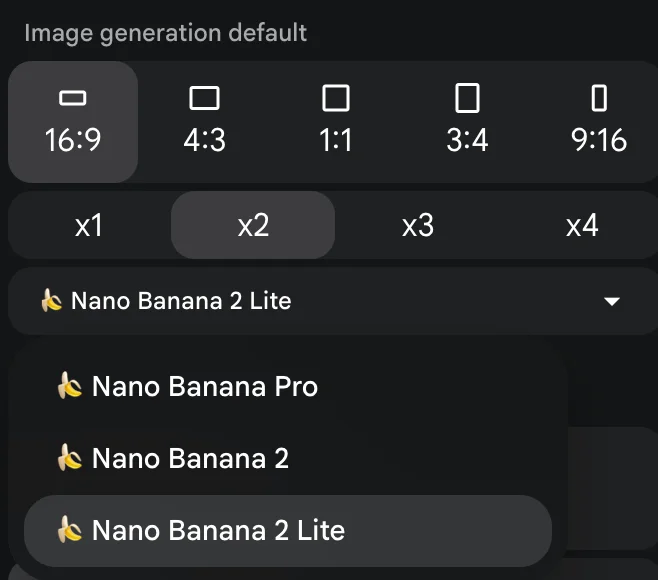
If you used ImageFX for quick drafts, the default is fine. If you want the best result, name Nano Banana Pro and the shape in the prompt, as I did for the Whisk test. Our Nano Banana Pro prompts test has 16 tested prompts for text and layouts.
Using your own photos instead of Flow-made ones
Flow has the controls to use your own photos as references, but I did not test an upload. Whisk’s appeal was dropping in your own pictures: a photo of your dog, your living room, a postcard whose style you liked. I made my three inputs in Flow so anyone could repeat the test.
The agent’s prompt box has a button labelled “Add ingredients to the prompt box”, and the Characters page offers Upload and Add from project buttons. Google’s create-videos help page describes the same idea for video, where you drag reference images in as ingredients. In principle the remix works the same way with your own photos as references; I have not confirmed it with an upload, so treat that part as untested.
One rule carries over whichever tool you use. Google’s help page on making video in Gemini puts it plainly, “Only upload photos you have the right to use”, and the same caution applies to anything you hand Flow as a reference.
Whisk vs Flow at a glance
Whisk was a Google Labs experiment that blended a subject, scene and style image into a new picture. Flow is its successor: you describe each image’s role to an agent, the images come from Nano Banana models, and the same project adds video and an editor.
| Google Whisk (closed) | Google Flow | |
|---|---|---|
| Status | Discontinued 30 April 2026 | Live; old Whisk link redirects here |
| How you combine images | Drop images into subject, scene and style slots | Describe each image’s role to the agent |
| Image model | Imagen 3 at launch, per Google | Nano Banana models (I used Nano Banana Pro) |
| Remix examples | Plushie, enamel pin or sticker, per Google | Ask for the style in words |
| Cost of images | Not stated in Google’s launch post | Free, per Google; 0 credits in my test |
| Video | Not covered in this test | Frames-to-video from 4 credits |
| Faithfulness | Captured the “essence”, by design | Kept my scene and subject closely |
What you can still do with old Whisk work
If you transferred your Whisk library to Flow before the shutdown, it is in Flow, and Google said Whisk credits were already shared with Flow. If you downloaded your Whisk data, you have the files and can use them in Flow as references.
If you did neither, Google’s Workspace post leaves little room for hope: media left in Whisk after 30 April 2026 “will be permanently deleted”. There was no automatic move. I have no way to check whether anything survives for a given account, so if your work mattered, check your Flow library first, then any downloads.
Credits are the one thing that moved without any action. Google’s post said “Because Whisk and Flow use the same AI credits platform, your existing credits are already available in Flow.” In Flow those credits matter mainly for video, since images did not use any in my test, and every account also gets 50 Google Flow credits a day on top of anything carried over.
Flow is also not available everywhere. Google’s post warned that “Flow is not yet available in all countries”, so a Whisk user in an unsupported country lost the tool without a replacement in the same place.
Tips for Whisk users moving to Flow
- Name each image’s job. “Use X as the subject, Y as the scene and Z as the style” did what Whisk’s slots did. Be explicit; the agent cannot see slot labels.
- Ask for Nano Banana Pro. It is the strongest image model in Flow, and it cost nothing in my test. Our Nano Banana Pro free guide covers it in more detail.
- Say what you do not want. My style image’s red seal turned up in the remix as a seal and a fake signature. Add “no signature or seal” if that matters.
- Let failures go. My first remix failed without a charge and the agent retried by itself. If it does not, ask again.
- Turn looks into prompts. “As a sticker”, “as a plushie” and “as an enamel pin” each worked first time; other style words should work the same way, though I tested only three.
- Animate in the same project. Flow turns images into video, which our Nano Banana video guide tests for 4 to 12 credits a clip.
Mistakes Whisk users make in Flow
| Mistake | What to do instead |
|---|---|
| Expecting the old link to work | labs.google/fx/tools/whisk forwards to Flow’s home page; bookmark flow.google.com |
| Dropping images in without saying what they are for | Name the subject, scene and style in one sentence |
| Assuming the default model | A plain prompt used Nano Banana 2 Lite on 5 October and Nano Banana 2.1 from 7 October; ask for Nano Banana Pro by name |
| Reading a failed tile as a charge | My failed remix said I was not charged, and the agent retried |
| Looking for buttons for each look | Type the style you want; I tested sticker, plushie and pin |
| Waiting for old work to reappear | Google said untransferred Whisk media would be deleted; check your Flow library and downloads |
Who should move to Flow, and who should look elsewhere
- Move to Flow if you used Whisk to mix references, make stickers and merchandise ideas, or explore a look quickly. It does all of that, free, in my test, and adds video and an editor.
- Expect a learning curve if you liked Whisk’s image-only, no-typing design. Flow needs you to describe each image’s role in words, even if only in one sentence.
- Use the Gemini app instead if you only want images and no video. It makes them free too, on Nano Banana 2 in Flash or Pro mode. Google says you can upload several images and ask it to combine them, so a subject, scene and style sentence should work there as well; I did not test a three-image remix in Gemini. Our how to use Nano Banana guide covers it step by step.
- Look elsewhere if Flow is not available in your country. Google says it is not offered everywhere, and the Gemini app, above, is the closest Google alternative.
Final word
Google Whisk is gone, and the shutdown was a real loss for anyone who left work in it past 30 April 2026. Its core idea survived, though. In Google Flow, a subject, a scene and a style still combine into one picture, Whisk’s plushie, pin and sticker looks are a sentence away, and none of it cost a credit in my test.
The interface changed more than the result did. You now type what each image is for instead of dropping it in a box. Once you have done that once, Flow is the more capable tool: the same remix, a stronger image model, and video in the same project.
If you came here looking for Whisk itself, the short version is this: it is not coming back, the old link opens Flow, and your first job is to check your Flow library for anything you transferred. Then try the three-image sentence above with your own pictures. Our Nano Banana review tests the image models Flow runs, and our best AI image generator guide ranks them against seven other tools.
Frequently asked questions
Is Google Whisk discontinued?
Yes, and it is no longer available. Google's Workspace Updates blog set the date: "April 30, 2026 — Whisk discontinued." Google said media left in a Whisk library after that date would be permanently deleted, and moving it to Flow was opt-in rather than automatic.
The old address now forwards to Google Flow. When I opened labs.google/fx/tools/whisk on 5 October 2026, it landed on flow.google.com.
Is Google Whisk free?
Whisk itself is closed, so there is nothing to pay for. Google's launch post did not discuss cost, and Google later said Whisk ran on the same AI credits platform as Flow. Its replacement, Google Flow, makes images for free, according to Google's February 2026 announcement, and none of the eight images I made in Flow asked for credits.
What is the difference between Google Whisk and Flow?
Whisk was a Google Labs experiment that blended a subject, a scene and a style image dropped into three slots. Flow is the app that replaced it: you describe each image's role to an agent, images come from Nano Banana models, and the same project adds video, characters and an editor. In my test Flow kept the scene and subject more faithfully than Google's description of Whisk, which aimed for the subject's essence.
What replaced Google Whisk?
Google Flow. Google said in February 2026 that "the best capabilities from our image generation experiments — Whisk and ImageFX — are moving directly into Flow". Flow makes images with Nano Banana models, can use your images as references, and adds video and an editor.
There is no Whisk-style panel with three image slots in Flow's agent. You describe the combination in words instead, and in my test that produced a proper subject, scene and style remix.
Is ImageFX also gone?
Yes. Google's February 2026 Flow announcement named both Whisk and ImageFX as moving into Flow, and the old ImageFX address now redirects there too. When I opened labs.google/fx/tools/image-fx on 5 October 2026, it landed on flow.google.com.
Text-to-image, which was ImageFX's job, is what Flow does by default: type a description and it makes an image with a Nano Banana model.
Is Google Flow free for images?
Yes. Google's announcement says "you can generate images for free in Flow", and none of the eight images I made for this test, including the remix and the sticker, plushie and pin versions, asked me to approve a cost.
Video is different. Every account gets 50 Google Flow credits a day for video, and a clip costs 4 to 100 credits depending on the model.
Can I still get my old Whisk images?
Only if they were moved before the shutdown. Google's Workspace post said migration to Flow was opt-in, that users could download their Whisk data at any time before the end, and that media left in Whisk after 30 April 2026 would be permanently deleted. If you transferred your library, it is in Flow.
Can I do a Whisk-style subject, scene and style remix in Flow?
Yes. I made three images in Flow (a cat, a Tokyo rooftop garden and a woodblock wave pattern), then asked the agent to combine them with the cat as the subject, the rooftop as the scene and the wave pattern as the style. The first attempt failed without charging me, the agent retried by itself, and the result put the cat in the same rooftop, redrawn in the woodblock style.
It cost no credits. Unlike Whisk, you describe each image's role in words rather than dropping it into a labelled slot.
Keep reading
How to Use Google Flow: A Hands-On Beginner's Guide
How to use Google Flow, tested on a free account: start a project, make free images, build a character with a voice, turn it into video and download it.
Nano Banana Pro Free: Where It Actually Works, Tested
Nano Banana Pro free, tested on a free Google account: it worked in Google Flow at no credit cost, but not in the Gemini app or AI Studio.
Nano Banana Video: Turn Images Into Clips Free, Tested
Nano Banana video, tested: Nano Banana makes images, not video, but Google Flow animated mine free. Start frame, end frame and reference, with credit costs.
Google Flow Free: What 50 Daily Credits Buy, Tested
Google Flow free, tested on a free account: 50 credits a day bought four AI video clips, images cost nothing, and Veo 3.1 Quality was out of reach.