
Google Flow Music Review: Free Songs, Real Files
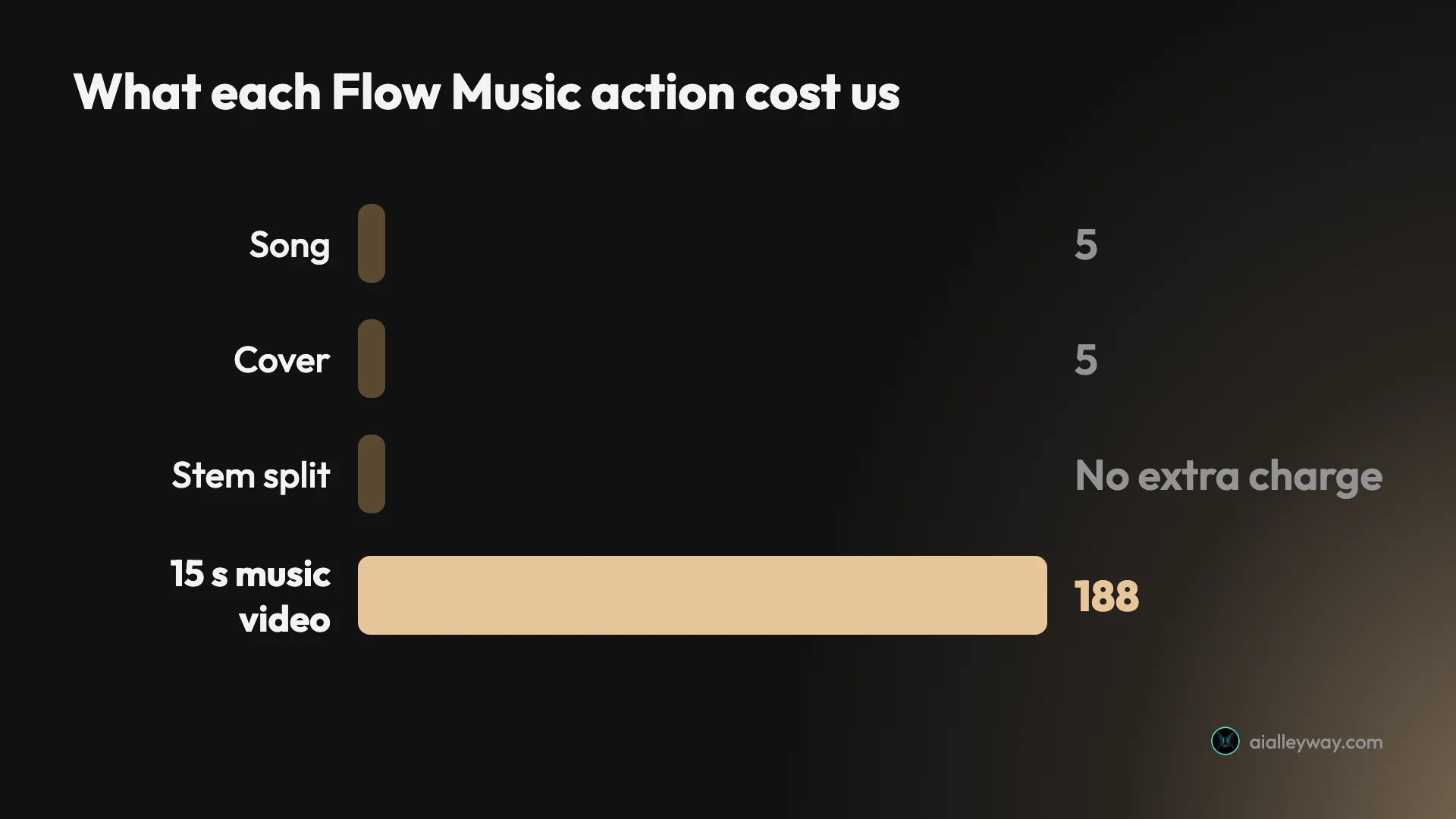
Google Flow Music, tested on a free account: 5 credits a song, 30 free credits a day, free MP3, WAV and stems, and a 15-second music video for 188 credits.
Contents

Google Flow Music is the most generous on files of the three AI song makers we have tested hands-on, alongside Suno and Udio: a free account turns a one-line idea into two finished three-minute songs for 5 credits each, then lets you take the MP3, the WAV and the separated stems. It is the right pick for creators who want usable tracks without a subscription, and the wrong one if you need a written music licence or plan to lean on its music videos, which cost 188 credits for 15 seconds.
Is Google Flow Music worth it? Six free songs a day, and you keep the files
Google Flow Music is worth it on a free account: in one day it produced five tracks across three song requests, plus a cover, for exactly 30 credits, one day’s free allowance, and let me keep the MP3, WAV and stems. It sang my own lyric sheet word for word, the one test we have not run on Suno or Udio. It is worth less if you need a music licence in writing or want music videos, which cost more than six days of free credits each.
What Google Flow Music does
Flow Music is a chat window with a band behind it. It is a separate app from Google Flow, Google’s AI video studio; Flow lists Flow Music in its own menu, and our Google Flow tutorial covers the video side.
You describe a song to Flow Music’s AI Producer, an agent which writes a style brief, writes lyrics, picks a title and renders two takes. My first prompt was one sentence: “An upbeat indie pop song about riding a bike through a city at sunrise, female vocal, bright guitars, 110 bpm.” About forty seconds later I had two takes of a song it had named “Ride to the Sea”, each 2:59 long, with two verses, three choruses and a bridge I had not asked for.
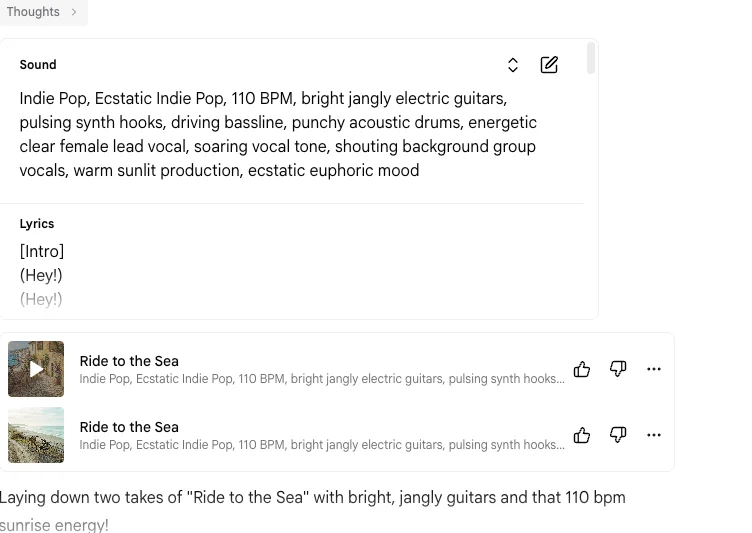
The brief is the interesting part. The Producer expanded my twenty-word prompt into a longer tag list, adding “pulsing synth hooks”, “punchy acoustic drums” and “shouting background group vocals”, and it shows you that list with an edit button before you judge the result. That makes it easy to see why a song came out the way it did and to change one ingredient instead of re-rolling the whole prompt.
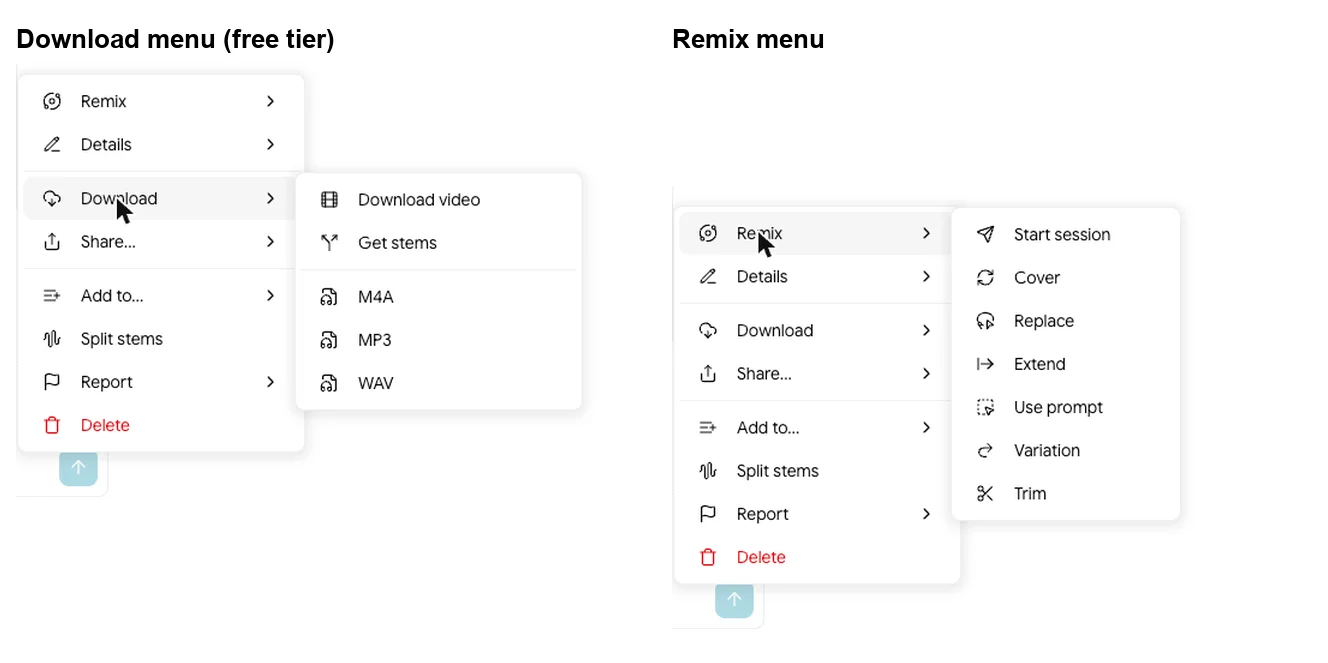
Everything after the first render happens in the same conversation or from a song’s menu. Ask for changes in plain words and the Producer re-renders; open the menu and you get remix tools (Cover, Replace, Extend, Variation, Trim), stem splitting and downloads.
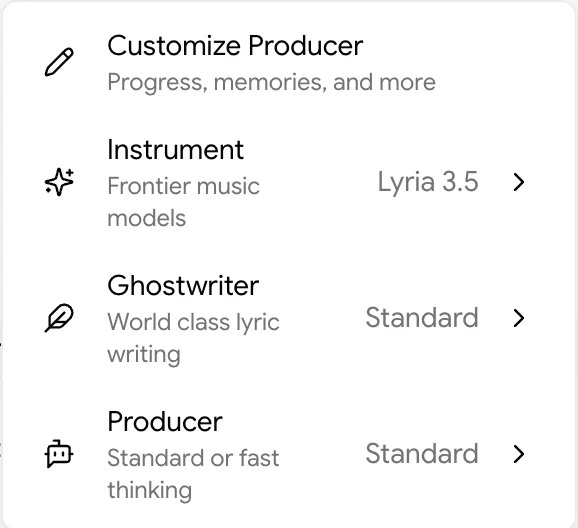
Under the hood is Google DeepMind’s Lyria. The settings menu in the prompt box lists Lyria 3.5 as the “Top performing, flagship model” and the earlier Lyria 3 Pro as a “Legacy model”. It also sets the lyric writer, called Ghostwriter, and whether the Producer thinks in standard or fast mode. Google launched Flow Music on Lyria 3 Pro, per its May 2026 Flow update, which also announced the Flow Music app on iOS; the app now defaults to Lyria 3.5.
If the name is new to you, the product is not. Riffusion and Producer.ai both redirect to flowmusic.app now, and that page calls itself Google Flow Music, so this is the same product under Google’s name.
The four songs I made, and what came back
I ran four kinds of request on 6 October 2026 to see whether the Producer follows instructions or just produces something in the right genre. I drove the tests in the browser and a teammate listened to one take of each; the sound notes below are theirs, and they are deliberately short.
| Request | What came back | Credits | Listener’s note |
|---|---|---|---|
| Indie pop from one sentence | Two takes of “Ride to the Sea”, 2:59 each, with its own lyrics | 10 | Take 1: fine, nothing off |
| Lo-fi instrumental, “about 2 minutes” | One take of “Study Session”, 2:10 | 5 | Fine, nothing off |
| Country ballad, “using exactly these lyrics” | Two takes of “Come On Home”, 3:02 | 10 | Take 1: sung as written |
| Soul cover of the ballad | One “Come On Home (Cover)“ | 5 | Fine, nothing off |
Your own lyrics come through intact. For the ballad I wrote four lines, a verse about a porch light and letters in a coffee can and a chorus asking someone to come home before the river rises, and asked for “exactly these lyrics”. The lyrics card showed all four lines with my verse and chorus labels, the sound brief kept my exact words (“slow country ballad, male vocal, acoustic guitar, pedal steel”), and my listener confirmed the vocal sang the lines as written. It did not rewrite them.
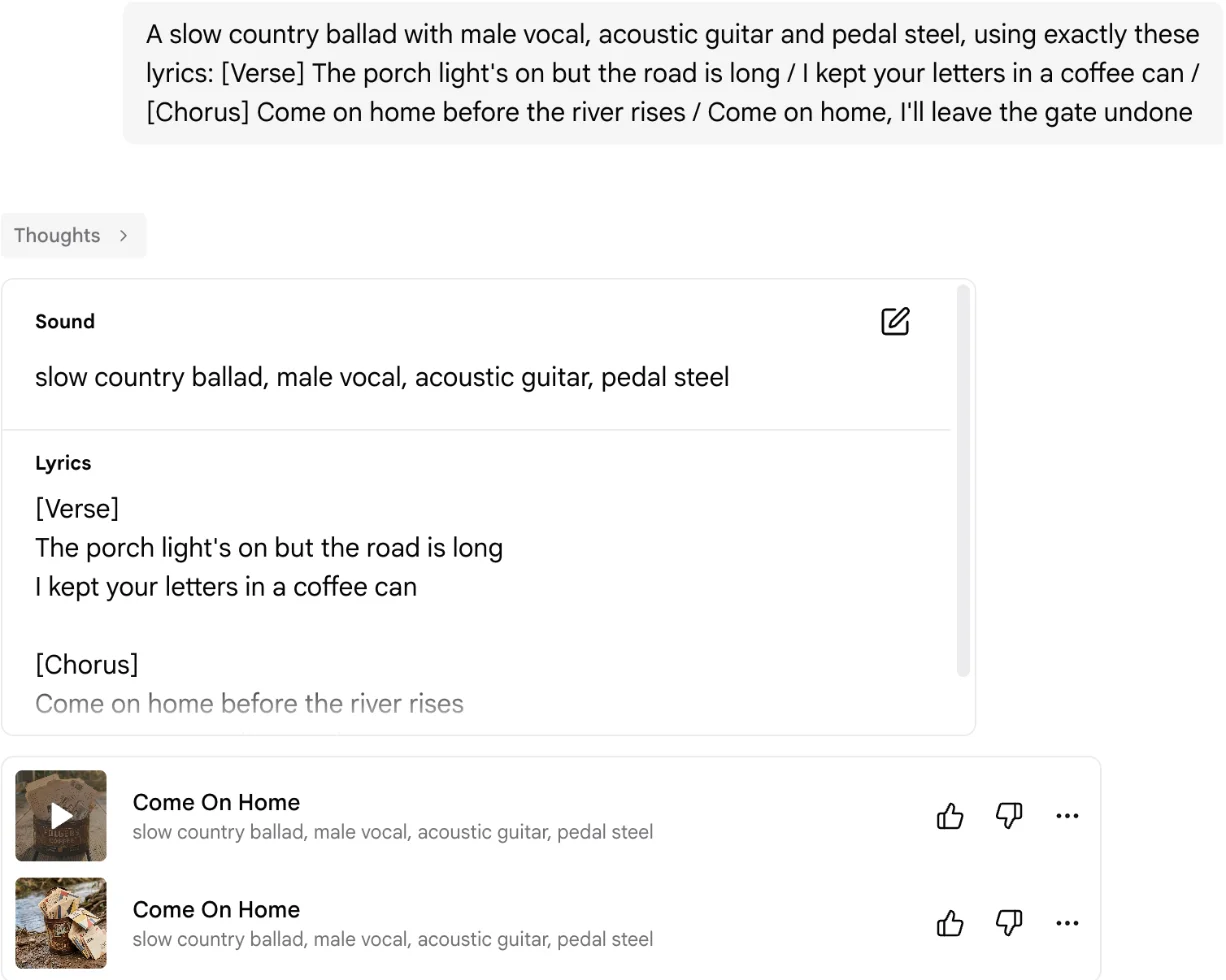
Length instructions are approximate. I asked for “about 2 minutes” of lo-fi, and the Producer wrote “[End - 2:00]” into the brief, but the track came back at 2:10. Close enough for background music, though not a tool for cutting to an exact runtime.
Our instrumental request returned one take. The lo-fi prompt said “no vocals”, and Flow Music gave me a single track for 5 credits rather than two takes for 10. It is the cheapest way to fill a video with background music on the free tier.
Covers and stems: editing a song after it exists
The remix tools are where Flow Music stops being a slot machine. A Cover keeps the song and changes its clothes: the panel takes an instruction “for how to change the sound or lyrics”, a lyrics editor, and a Strength slider that runs from More Similar to More Different.
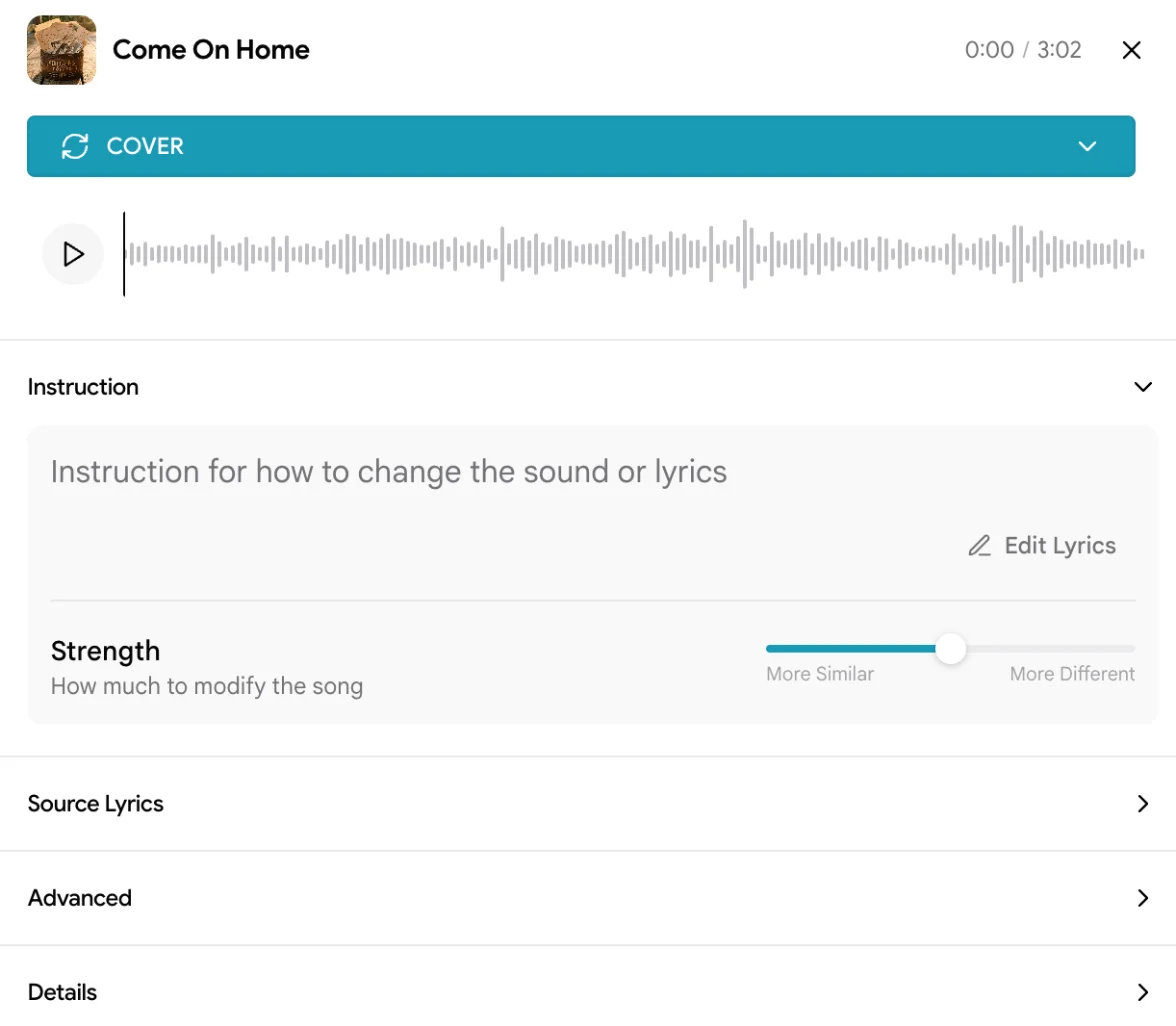
I left Strength in the middle and asked it to “Turn it into 1960s Motown soul with a horn section, tambourine and a female lead vocal”. It returned one track, “Come On Home (Cover)”, for 5 credits, the same price as a fresh song. My listener reported nothing off. For a songwriter, that is the useful trick: write the song once, then hear it in two more genres for 10 credits.
Split stems separates any song into four tracks: drums, bass, vocals and “other”, which is everything else. I split “Ride to the Sea” and got a four-lane player with mute and solo on each lane, and the four stems appeared in my library as separate 2:59 tracks. The split showed no separate line in my credit history; the session total matched three songs at 5 credits each.
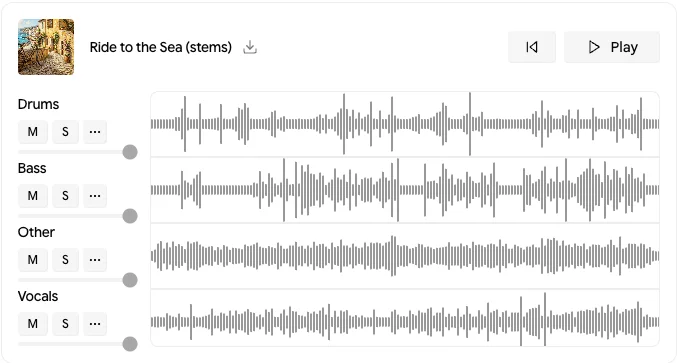
Stems matter more than they sound. A vocal stem drops into a video editor under your own footage, an instrumental stem becomes a karaoke track or a bed for a podcast, and a drum stem can be replaced in a real DAW. Flow Music’s plan table lists stem downloads on the free tier, which is the most generous thing on its pricing page.
Flow Music pricing: free, then $8, $24 or $64
Free, then $8, $24 or $64 a month, or $6, $18 or $48 a month billed yearly. Every plan, including Free, gets the same features on Flow Music’s comparison table; what you pay for is credits and how many songs render at once.
| Plan | Monthly | Billed yearly | Credits | Songs at 5 credits | Renders at once |
|---|---|---|---|---|---|
| Free | $0 | $0 | 30 a day in my account | About 6 a day | 2 |
| Starter | $8 | $6 | 3,000 a month + top-ups | About 600 | 8 |
| Plus | $24 | $18 | 10,000 a month + top-ups | About 2,000 | 12 |
| Member | $64 | $48 | 30,000 a month + top-ups | About 6,000 | 16 |
The free tier’s number is not printed on the pricing page, which only says “Daily top-up credits”. My account’s usage history settled it: a line reading “Daily Free Credits” for 30, plus a one-time “Bonus Credits” gift of 500 on the first day. At 5 credits a song, the 30 cover about six songs a day, or three vocal prompts, since those returned two takes each.
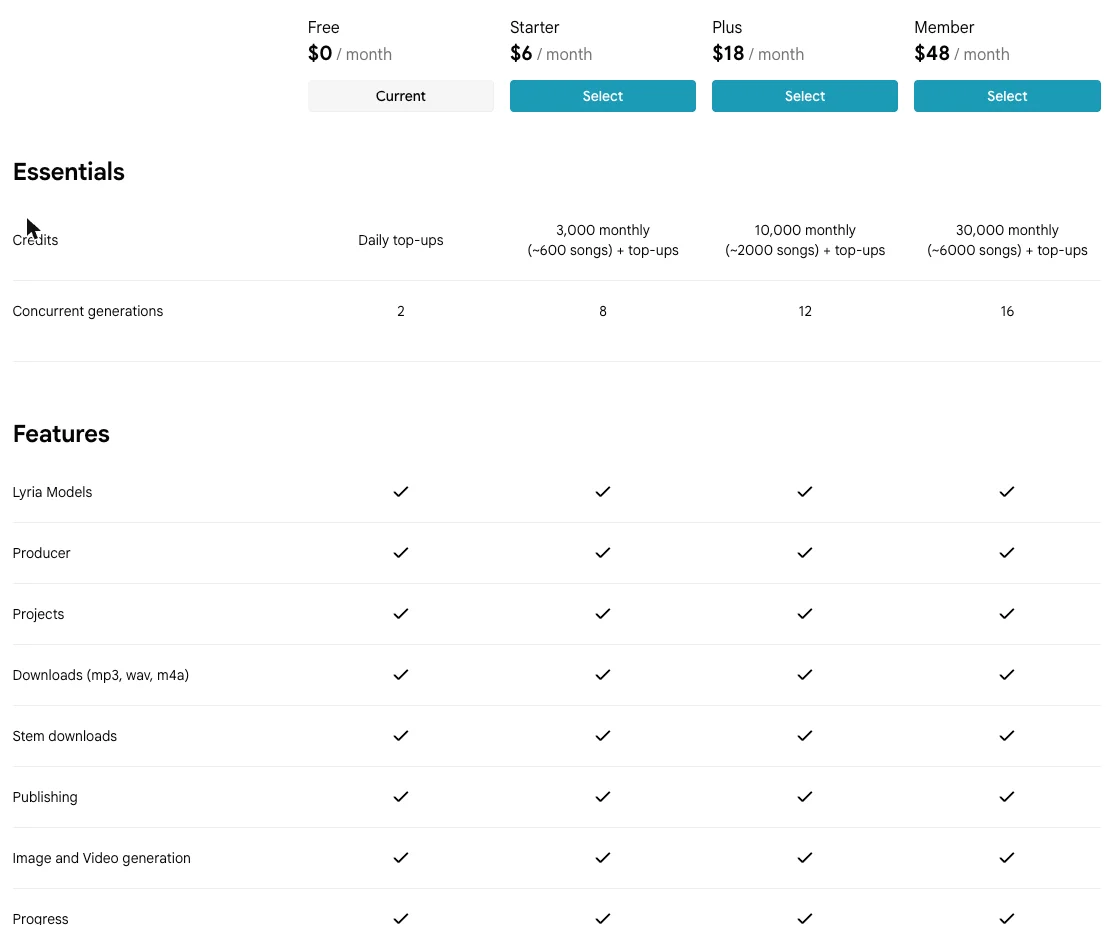
Two smaller print points. Extra credits are “Only available on paid plans while your subscription is active”, so a free user who runs out waits for tomorrow. And the music video pop-up says “Upgrade to Member for a free video.”
Music videos: the 188-credit feature
Flow Music can turn a song into a music video. Google’s May announcement said its Gemini Omni model was coming to Flow Music for music videos; the app did not say which model rendered ours. It is the one feature that does not fit a free day. I asked the Producer for a short video of my country ballad and to tell me the cost first. It said it did not “have details on credits or pricing”, then asked how long the clip should be, which shape, whether to show lyrics, and whether I had a photo of a person or a style image.
I asked for 15 seconds from the start of the song, 16:9, no lyrics, and for it to generate the person and the style image itself. It generated a style image of a farmhouse porch at dusk above a river, then showed a plan card: 16:9, 720p, 15 seconds, “Estimated credits 188 credits”. A pop-up added that “Videos can be up to 2 minutes long” and that videos “can be expensive”.
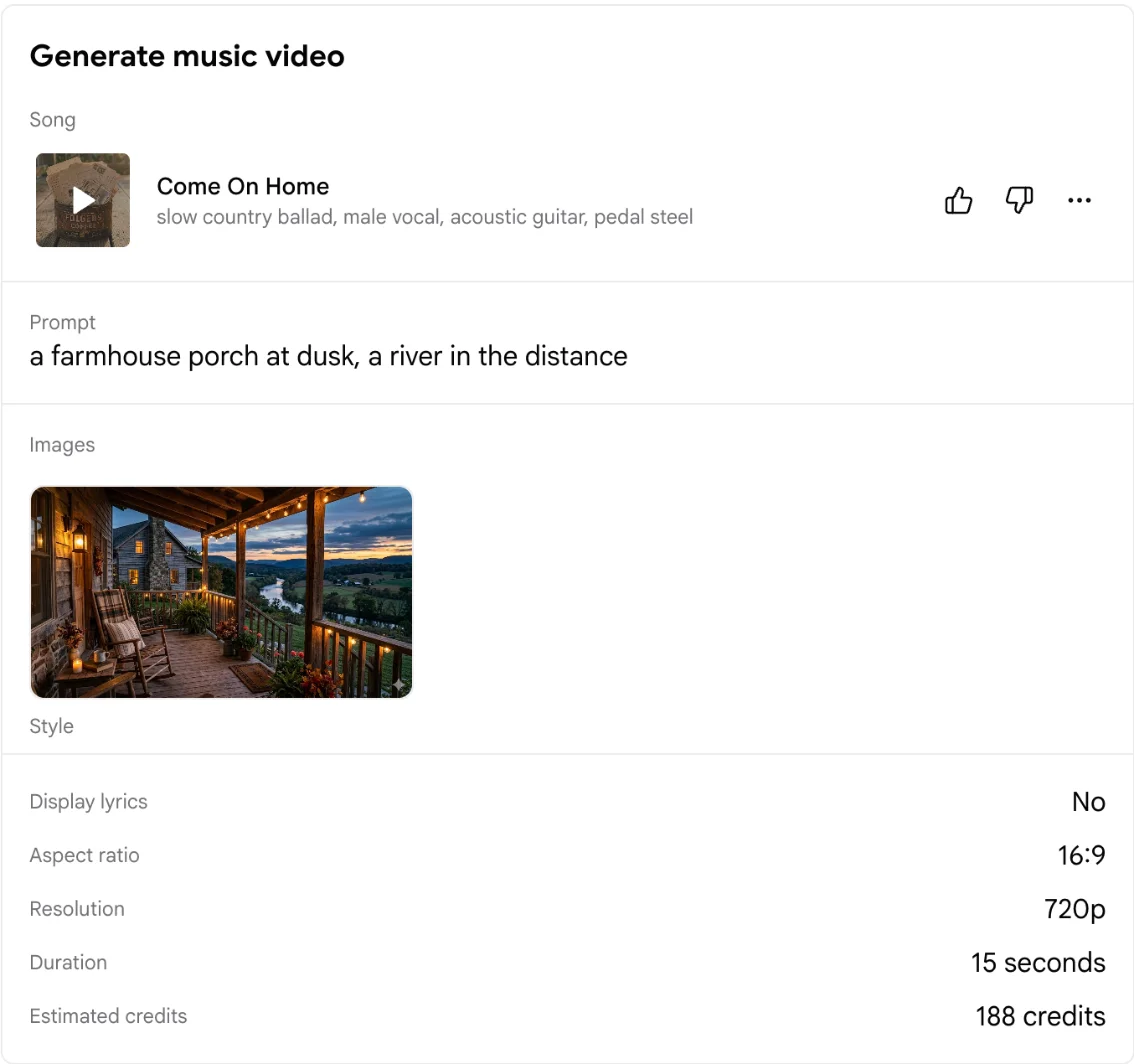
My balance fell by exactly 188, the price of about 38 songs, and the app estimated 15 minutes for the render. The file was 18 seconds at 1280 by 720: 15 seconds of the porch, cutting between several angles of the rocking chair, string lights and river valley, then a night shot from outside, then a closing “Made with Google Flow Music” end card.
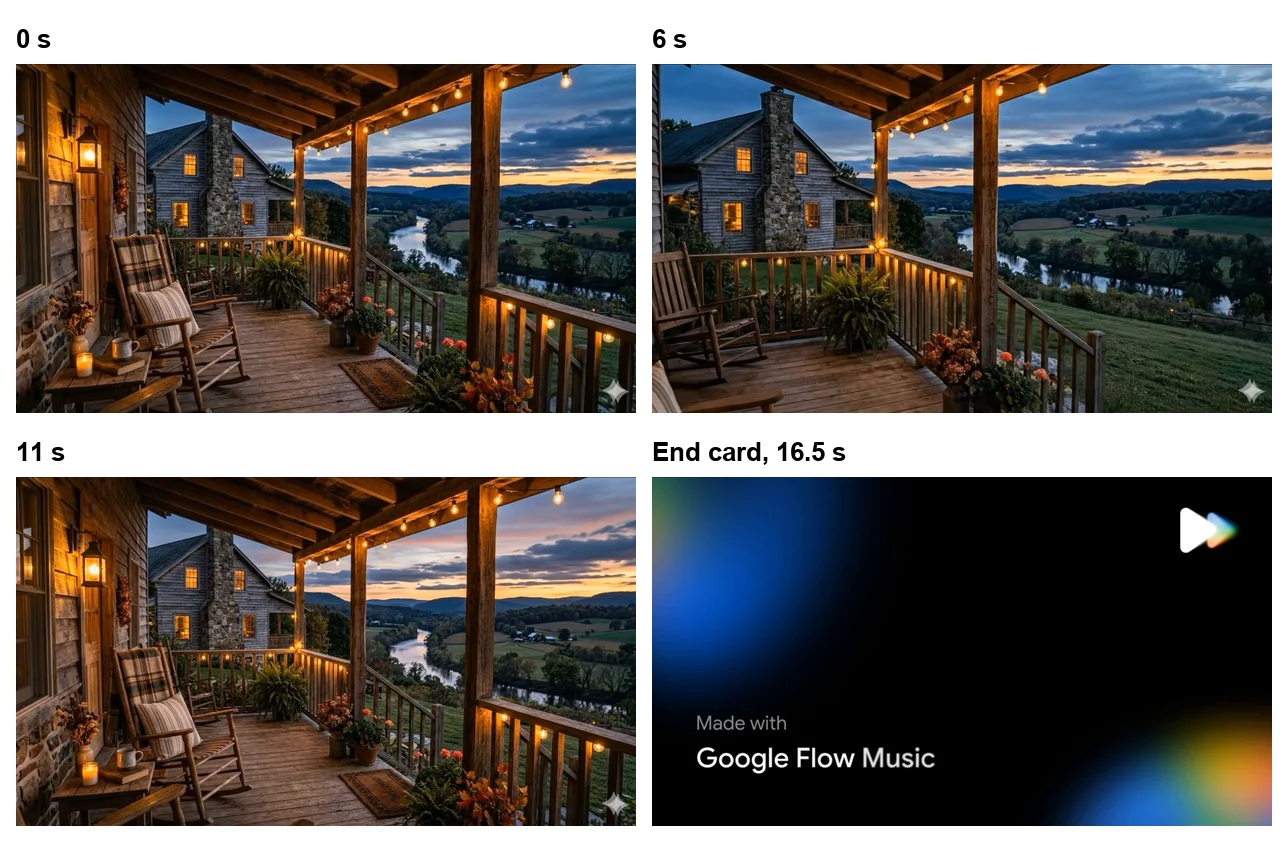
The pictures are handsome, but the video did not do what I asked. I asked it to generate a person, and no person appeared in any frame I checked; the card never listed a subject image either. For 188 credits I would have liked the Producer to say it was dropping the person. If you want a performer on screen, upload a photo for the subject slot.
Who Flow Music is for: creators, songwriters, podcasters
- Video creators who need background music. Instrumentals cost 5 credits a track, download as WAV, and a free account covers several a day.
- Songwriters testing ideas. It sings your lyrics as written and covers the same song in another genre for 5 credits, so you can hear a lyric three ways in an afternoon.
- Podcasters and editors who want stems. Vocals, drums, bass and the rest come apart in one click, on the free tier.
- People curious about AI music who will not pay. Six songs a day with real files beats the free tiers of the other two music tools we have tested.
- Not for anyone who needs a music licence in writing. Rights rest on Google’s general terms, though TuneCore names Flow Music as an approved partner, and you need to be 18 or over to use it at all.
What Flow Music gets right
Free downloads in every format, plus stems
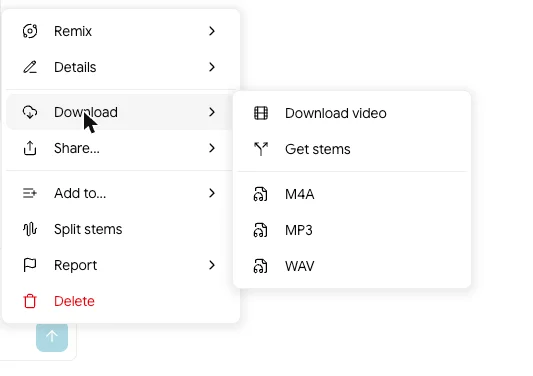
The download menu on my free account offered MP3, WAV, M4A, a video and stems, and Flow Music’s plan table ticks “Downloads (mp3, wav, m4a)” and “Stem downloads” on the free tier. Compare that with Udio, whose free tier has no download at all, only a share link, per our Udio review. Files are the point of making music, and Flow Music does not hold them back.
It sings your lyrics as written
The country ballad test is the one I would show a songwriter. Four lines in, four lines sung, with the verse and chorus where I put them and my sound brief untouched. The Producer still writes lyrics when you do not supply them, so you can use it either way.
Covers at the price of a song
A cover costs 5 credits, the same as a new song, and its panel lets you edit the lyrics and set how far it strays from the original. That turns one good song into a set of versions for very little.
You can see and edit the brief
Every render shows the Producer’s sound brief and lyrics above the takes, with an edit button. When a song misses, you can see which tag sent it the wrong way and change that tag rather than guessing.
Full songs, fast
The first prompt returned two complete 2:59 takes, with an intro, a bridge and an outro, in about forty seconds; the ballad came back at 3:02.
Flow Music’s weak spots: videos, volume and rights
Music videos are priced for paying users
188 credits for a 15-second video is six days of free credits, and longer videos will cost more. The Producer could not quote the price in chat; it only appeared on the plan card. My new account could afford it only because of the one-time 500-credit gift.

The video skipped the person I asked for
I asked the Producer to “generate the person and the style image” for the video. It generated the style image only, the plan card listed no subject, and the finished video had no person in any frame I checked. It did not say it had dropped that part of the request.
The free allowance is smaller than Suno’s
30 credits a day is about six songs. Suno’s free tier gives 50 credits a day, which our Suno review puts at roughly ten songs. Flow Music wins on files, but if you want volume on a free account, Suno renders more.
Rights rest on Google’s general terms
Flow Music’s terms link redirects to Google’s general Terms of Service, which say “Google won’t claim ownership over that content” for original content you generate. That is reassuring but narrow: it is not a licence, and Flow Music publishes no music-specific licence. TuneCore does name Flow Music as an approved generator, which makes it the clearest route to distribution today; our AI music generator roundup covers how the distributors compare.
Your songs help improve Flow Music by default
My account’s settings had “Help improve Google Flow Music”, described as “Allow your content to be used to improve Google Flow Music”, switched on by default. It can be switched off, but it was on from the first prompt.
Adults only, and not everywhere
Google’s Flow Music help page says “You must be 18 years of age or older” and live in a supported region. That rules it out for anyone under 18.
How to make your first song in Flow Music
The workflow I settled on after a day of testing, for anyone starting on a free account:
- Go to flowmusic.app, sign in with a Google account and type one sentence: genre, mood, the voice you want and a tempo. “Upbeat indie pop, female vocal, bright guitars, 110 bpm” is enough.
- Read the Producer’s sound brief before you play anything. If a tag is wrong, edit it there rather than writing a new prompt.
- If you have lyrics, paste them with [Verse] and [Chorus] labels and say “using exactly these lyrics”. Otherwise let it write them and change the lines you do not like.
- Play both takes, keep the better one, and use Cover to hear it in another genre for 5 credits.
- Split stems if you need the vocal or the instrumental on its own, then download WAV for editing or MP3 for sharing.
- Leave music videos until you have credits to spare: at 188 credits for 15 seconds, one costs more than six free days.
How Flow Music’s free tier compares
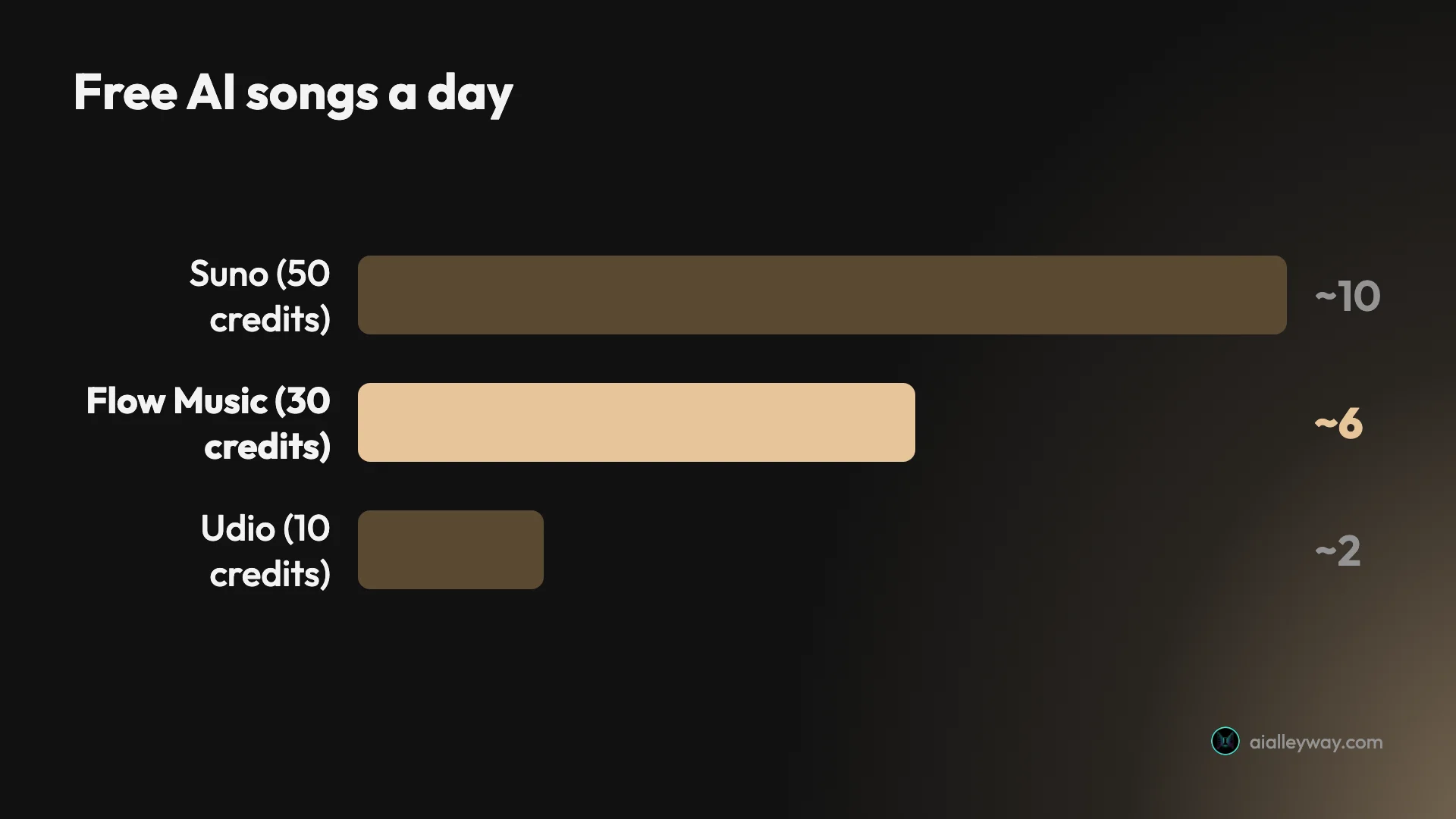
| Free tier | Daily credits | Songs a day | Free downloads |
|---|---|---|---|
| Google Flow Music | 30 | About 6 | MP3, WAV, M4A, stems |
| Suno | 50 | About 10 | MP3 only, 7 per account lifetime; no WAV or stems |
| Udio | 10 | One generation of 2 tracks | None |
Alternatives worth considering
If Flow Music is not for you, these are the places to look:
- Suno if you want more free songs a day. It renders roughly ten free songs daily against Flow Music’s six, and our review explains its download caps and commercial-use rules.
- Udio if you want more control over each render, with song length, clip timing and a manual mode on the free tier, at the cost of no free downloads.
- Treblo if rights are the deciding factor. Its terms assign you the output on the free tier, per our AI music generator roundup; we have not run it ourselves.
Final word
Google Flow Music gives a free account something most AI music tools sell: about six full songs a day, written or sung from your own lyrics, with MP3, WAV and stems to take away. The Producer’s editable brief and 5-credit covers make it a working tool rather than a toy. The weak spots are the 188-credit videos, a smaller daily allowance than Suno’s, an 18-plus gate and a rights position that rests on Google’s general terms. For making and keeping music without paying, it is the one I would open first.
Frequently asked questions
Is Google Flow Music free?
Yes. A free account gets 30 credits a day, and on 6 October 2026 each song cost 5 credits, so that is about six songs a day. Vocal prompts returned two takes each, which makes it three prompts a day in practice.
The free tier includes MP3, WAV and M4A downloads and stem downloads, per Flow Music's own plan table. Our new account was also gifted a one-time 500 bonus credits on its first day.
How much does Google Flow Music cost?
There is a free plan and three paid ones. Starter is $8 a month or $6 billed yearly for 3,000 credits a month, which Google labels about 600 songs. Plus is $24 or $18 for 10,000 credits, and Member is $64 or $48 for 30,000 credits plus a member badge, events and early access.
Extra credits can only be bought on a paid plan: the page says they are "only available on paid plans while your subscription is active."
Who owns songs made with Google Flow Music?
Flow Music has no music-specific licence. Its terms link redirects to Google's general Terms of Service, which say "Google won't claim ownership over that content" for original content you generate, and "Your content remains yours".
That is a statement about Google not claiming the song, not a licence promising the song is clear for commercial release. TuneCore does name Flow Music as an approved partner for distribution. For anything you plan to sell or distribute, read the terms yourself and check your distributor's AI policy first.
Is Flow Music the same as Riffusion or Producer.ai?
It is where they went. Riffusion and Producer.ai now redirect to flowmusic.app, which calls itself Google Flow Music. Google's May 2026 Flow announcement describes Flow Music as part of the Flow family, now on iOS with Android coming. The official address is flowmusic.app.
Is Google Flow Music the same as Google Flow?
No. Google Flow, at flow.google.com, is Google's AI video studio, where Veo and Gemini Omni make clips. Songs are made in Flow Music, a separate app at flowmusic.app that Flow lists in its own menu. Same Google account, different product and different credits.
What model does Google Flow Music use?
Lyria 3.5 by default. The settings menu in the prompt box lists Lyria 3.5 as the "Top performing, flagship model" and Lyria 3 Pro as a "Legacy model". The same menu sets the lyric writer, called Ghostwriter, and the Producer agent's thinking mode, standard or fast.
Can Google Flow Music make music videos?
Yes, and it is the expensive part. We asked for a 15-second, 16:9, 720p video of our country ballad. The plan card estimated 188 credits, and our balance fell by exactly 188. The app estimated 15 minutes to render, and the result was an 18-second file: 15 seconds of a porch at dusk cut between several angles, then a "Made with Google Flow Music" end card.
Flow Music's own pop-up says videos can be up to 2 minutes long and that they "can be expensive".
Does Google Flow Music follow your own lyrics?
In our test, yes. We gave it four lines for a country ballad and asked it to use exactly those lyrics. The lyrics card reproduced all four lines with the verse and chorus labels, and when we played the song back the vocal sang them as written.
Keep reading
Best AI music generator: the three we ran, and what the rest are for
We gave Suno and Udio the same brief on the same day. Suno wins on output. On the licence the field splits three ways, and one tool grants nothing at any price.
Suno review: the free tier is good, and it's shrinking
One prompt on Suno's free plan returned four tracks. Two were playable, two were paywalled previews. What that tells you about paying, tested 3 September 2026.
Udio review: more knobs than Suno, far less rope
Udio, the AI music generator, gives song length and clip timing free, paywalls BPM and its negative prompt, and caps free at 10 credits a day. Tested Sep 2026.
Can you sell music made with Suno? What the terms actually say
Suno grants commercial rights on paid downloads, then says it cannot promise you a copyright. Three gates decide whether you can sell a track.