
Suno review: the free tier is good, and it's shrinking
One prompt on Suno's free plan returned four tracks. Two were playable, two were paywalled previews. What that tells you about paying, tested 3 September 2026.
Contents
Is Suno worth it?

Yes, with a caveat that is easy to miss and that changes how you should read every other Suno review: the free plan is genuinely good, and it got smaller the day we tested it.
This Suno review is built on one generation run on a free account on 3 September 2026, plus the two tracks it produced, which are embedded below. We gave the account one line of description and got four tracks back in about seventy seconds. Two were complete songs we could play. The other two were one-minute previews of a better model, each wearing an Upgrade for full song button.
Fast, cheap, and good enough for background music under a video. We ran the same brief through Udio and preferred what Suno returned, which is the comparison that decides a category. It is still not a mastering suite, and still not a company with a settled billing reputation.
What do you actually get from one Suno prompt?
Here is the brief we used, typed once into the Song Description box on a free account on 3 September 2026:
Upbeat indie pop for a product demo video, bright electric guitars,warm female vocal, hopeful but not saccharine, clean endingWe clicked Create at 02:44:57 UTC. By 02:46:04 all four results had rendered with durations. That is roughly seventy seconds from a sentence to finished music with vocals, which is the thing Suno is genuinely remarkable at and the reason people forgive it a lot.
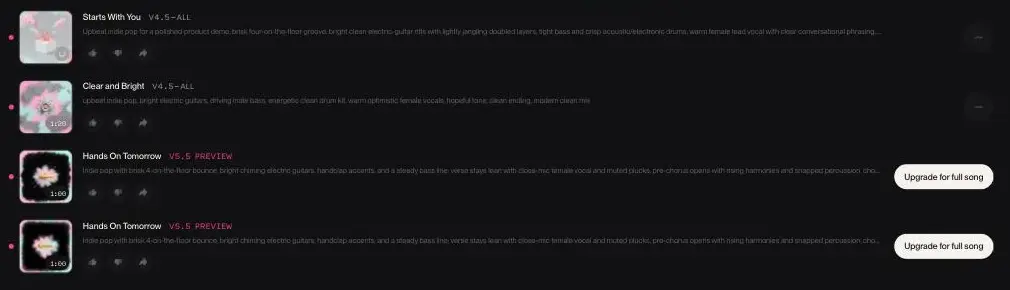
What came back is more interesting than the speed:
| Track | Model | Length | Can you play it? |
|---|---|---|---|
| Starts With You | v4.5-all | 3:17 | Yes |
| Clear and Bright | v4.5-all | 1:20 | Yes |
| Hands On Tomorrow | v5.5 preview | 1:00 | No — upgrade required |
| Hands On Tomorrow | v5.5 preview | 1:00 | No — upgrade required |
Here are both playable tracks, exactly as Suno’s free tier exported them. No edit, no mastering, no second attempt — this is what one sentence produced on the first try.
Judge the free tier on those two, because they are the whole of what it gives you.
Two things stand out. The first is that half of what a free generation returns is advertising. Suno runs your prompt through the newer v5.5 model as well, shows you the result in the same list as the songs you are allowed to keep, and caps it at a minute you cannot hear in full.
The upsell is inside the output, not on the pricing page. That is a smarter conversion mechanic than a banner, and no free-tier review that only reads the plan comparison will catch it. It is a sharper version of the tiering across AI voice cloning tools, where the free tier demonstrates the paid one rather than substituting for it.
The second is the length variance. Identical prompt, same model, same run: 3:17 and 1:20. If you need a specific duration, expect to generate several times and pick, which is exactly the behaviour that spends credits.
What the interface actually gives you
The generator has two modes. Simple is the one we used: a single Song Description box, a Lyrics button, an Instrumental toggle, and a row of suggestion chips that rewrite your prompt for you. Advanced opens up the fields separately so you can supply style and lyrics independently rather than describing everything in one sentence.
Three inputs sit above the box and are easy to overlook. Audio lets you browse, upload or record a clip to build from. Voice attaches a voice, which is a different job from the dedicated voice generators we have reviewed. Inspo pulls inspiration from a playlist. On a free account you can upload up to 8 minutes of audio; Pro and Premier raise that to 30.
Open the model selector and the free tier’s real shape appears. Six models are listed. Five carry a Pro badge. Free accounts get exactly one, v4.5-all, which Suno labels “Best free model” — an honest description, since it is also the only one.
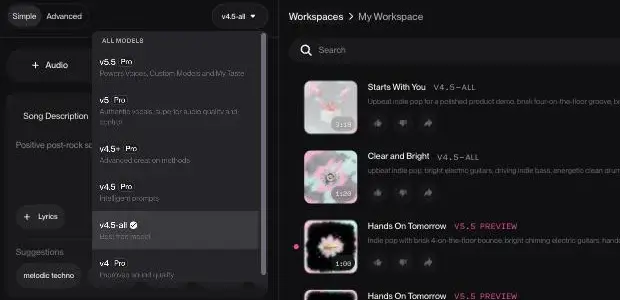
The ones behind the badge are v5.5 (“Powers Voices, Custom Models and My Taste”), v5 (“Authentic vocals, superior audio quality and control”), v4.5+ (“Advanced creation methods”), v4.5 (“Intelligent prompts”) and v4. Suno’s own one-line descriptions do the selling, and they are visible whether or not you can use them.
There is also a dice button that rolls a random prompt, which sounds like a toy and is genuinely the fastest way to learn what the model responds to. The placeholder text cycles through real examples — “Rich industrial metal song about pride and ego”, “Futuristic ebm song about carefree living” — and those are a better guide to useful prompt shape than most tutorials.
What you can do with a track afterwards
This is the part that separates Suno from a one-shot generator, and it is where paid tiers earn their money. Every finished track carries a menu with Remix, Edit, Publish, Share, Download, Add to Playlist and Song Radio.
Remix and Edit are the ones that matter. They let you iterate on a result rather than re-rolling from scratch, which is the difference between spending five credits refining something promising and spending fifty hunting for a new one.
The Download submenu is where the plan boundary shows up most concretely:
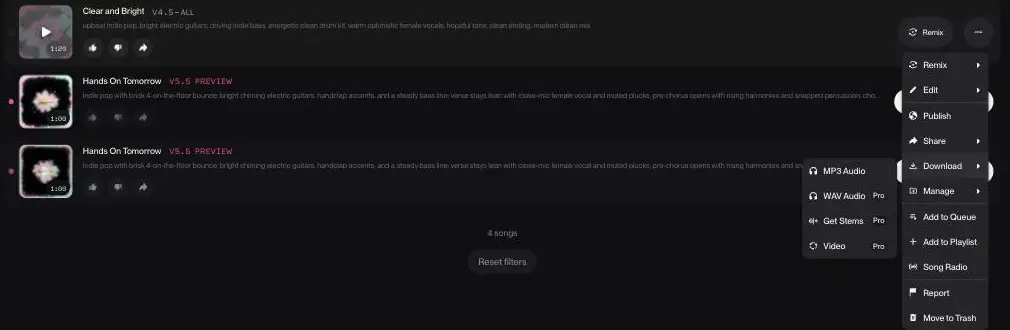
| Export | Free | Pro / Premier |
|---|---|---|
| MP3 Audio | Listed, unbadged | Yes |
| WAV Audio | Pro badge | Yes |
| Get Stems | Pro badge | Yes |
| Video | Pro badge | Yes |
Stems in particular are the thing a video editor will eventually want, because they let you duck the vocal under narration instead of fighting a finished mix.
The library also keeps Voices, Lyrics, Styles, Cover Art and Hooks as separate tabs, so the things you build up are reusable across projects rather than trapped in one song.
How much does Suno cost?
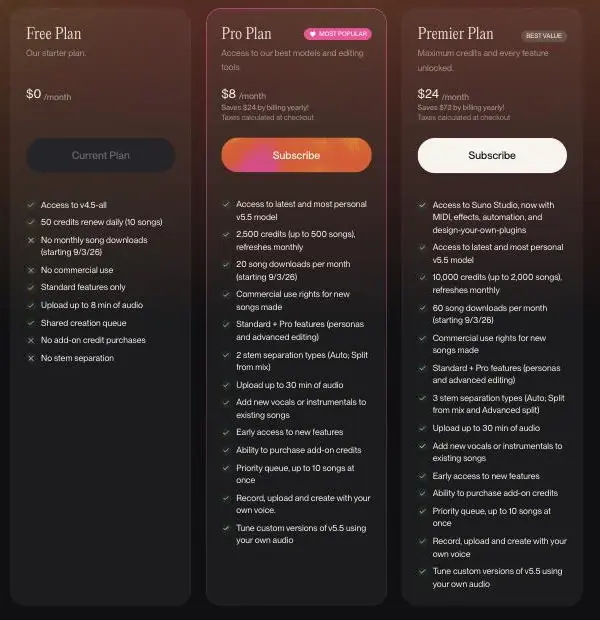
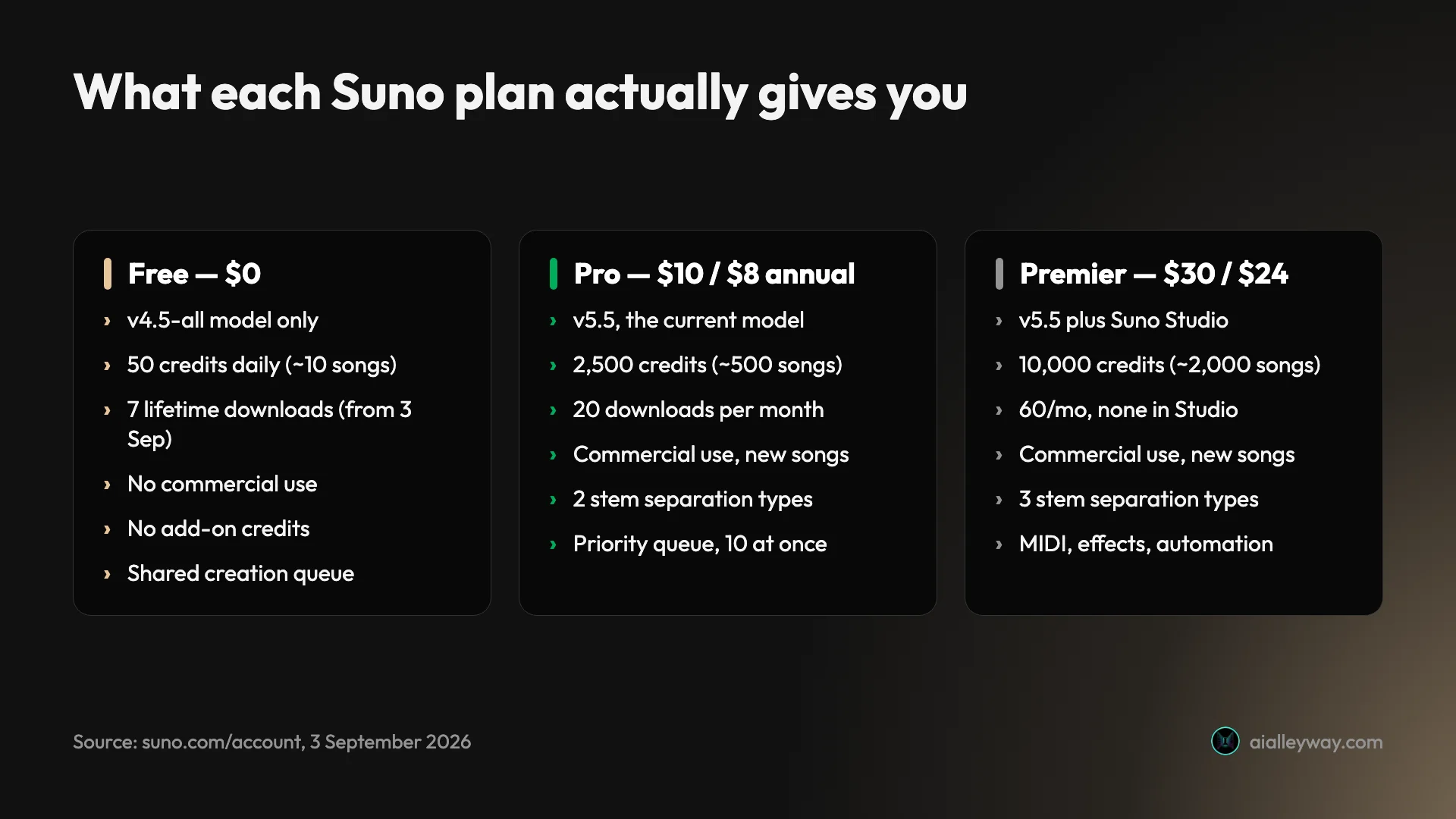
Read off Suno’s own plan page on 3 September 2026, with both billing cycles toggled. We take the credit maths apart properly in our Suno pricing guide, including what a finished track really costs and why downloads, not credits, are the number that binds.
| Plan | Monthly | Annual | Credits | Model | Commercial use |
|---|---|---|---|---|---|
| Free | $0 | $0 | 50 daily (~10 songs) | v4.5-all | No |
| Pro | $10 | $8 | 2,500/mo (~500 songs) | v5.5 | Yes, new songs |
| Premier | $30 | $24 | 10,000/mo (~2,000 songs) | v5.5 + Studio | Yes, new songs |
Annual billing saves $24 a year on Pro and $72 on Premier, which is the usual 20 percent. For where that sits against the rest of the category, we track what AI tools actually cost.
What the credits actually buy
Suno prices in credits and then translates them for you on the same line, which is more helpful than most competitors manage. The arithmetic works out at roughly five credits per song across every tier: 50 daily credits for about 10 songs on Free, 2,500 for about 500 on Pro, 10,000 for about 2,000 on Premier.
Put that against how the tool is actually used and the picture changes. Our single prompt returned four tracks. If a usable result takes three or four attempts — which is realistic, given that identical input gave us durations of 3:17 and 1:20 — then one finished piece of music costs somewhere between fifteen and twenty credits.
On the free plan that is two or three finished tracks a day, not ten. On Pro, 2,500 credits a month is between 125 and 167 finished pieces, which is far more than most video channels need.
| Plan | Credits | Songs, as advertised | Finished tracks, realistically |
|---|---|---|---|
| Free | 50 daily | ~10 a day | 2 to 3 a day |
| Pro | 2,500 monthly | ~500 a month | 125 to 167 a month |
| Premier | 10,000 monthly | ~2,000 a month | 500 to 667 a month |
The right-hand column assumes three to four generations per keeper, which is what our own length variance suggests is realistic rather than pessimistic. The practical read is that Pro’s credit allowance is not the constraint for anyone making short-form content. The download cap is.
That inversion is worth sitting with. Suno prices and markets on credits, but for a working video producer the binding limit is now the twenty downloads, not the two and a half thousand credits.
The detail that matters more than the headline price is the one printed in small type in every column: monthly song download caps, dated 9/3/26. Free gets no monthly allowance at all, just 7 for the lifetime of the account. Pro gets 20 a month. Premier gets 60, or no limit at all inside Suno Studio. In US date format that is 3 September 2026, which is the day we ran this test.
So a free plan that used to let you take your music away now allows seven exports for the life of the account, and paid plans that felt uncapped now have a number attached. Suno’s announcement adds one exception the plan cards do not: Premier subscribers working in Suno Studio have no download limit at all. If you read an older Suno review that treats downloads as unlimited, that review is describing a product that no longer exists.
Did the free download cap actually apply?
So we tested it, on the day the change was supposed to bite. The free MP3 download still worked.
Both v4.5 tracks exported without complaint, no upgrade prompt, no error. The two files above came off a free account on 3 September 2026, the date printed on Suno’s own plan table as the start of “No monthly song downloads” for Free. WAV, stems and video are genuinely gated — all three carry a Pro badge in the menu — but plain MP3 went through.
The plan page and the product were not actually in conflict, and Suno’s own announcement of the change explains why. A free account gets up to 7 trial downloads for the lifetime of the account — a one-time allowance that never resets, which is how the table can truthfully say there are no monthly downloads while an export still succeeds. We were spending trial downloads. They are also personal-use only: Suno ties commercial rights to songs downloaded on a paid plan. So the free tier still lets you take music away, seven times, once, and not for anything commercial.
The files themselves are worth a line, because it is the one part of output quality that is measurable rather than a matter of taste:
| Exported file | Duration | Sample rate | Bitrate | Size |
|---|---|---|---|---|
| Starts With You | 3:17.5 | 48 kHz stereo | ~190 kbps | 4.7 MB |
| Clear and Bright | 1:20.0 | 48 kHz stereo | ~186 kbps | 1.9 MB |
The sample rate is the video standard, which is convenient if that is what you are scoring. The bitrate is a good way below the 320 kbps a “high quality” MP3 usually implies, and it is a fair, concrete reason not to treat these as masters. Note also that the interface displayed the first track as 3:13 while the file is 3:17.5, so treat the durations in the results list as approximate.
Who is Suno for?
Video people and content creators, first and foremost. If your actual need is “something under this footage that is not the same royalty-free loop everyone uses”, Suno solves it in a minute at a price that is hard to argue with. That is the use case the free tier serves well and the one Pro is priced for.
Songwriters sketching, second. Fast and disposable, which is the point: a way to hear whether an idea has legs before committing time to it.
Worth doing the maths against what you use now. We have not priced the stock-music market for this review, so do the comparison against your own current bill rather than against a number we would be guessing at. The structural difference is the part worth weighing: a Suno track is unique to you, where a library track is one three other channels in your niche can also license.
The catch is the one running through this whole review. A stock licence is a thing you buy once and stop thinking about. Suno’s commercial rights attach to songs made while you are subscribed, so the licence is something you actively maintain rather than own. For a channel that publishes continuously that is fine. For someone making one video a quarter, paying $10 a month to keep the rights live on a track you generated in March is worse value than a one-off licence.
| If you are | Plan | Why |
|---|---|---|
| Scoring short-form video weekly | Pro | 20 downloads a month is the real limit, not credits |
| Publishing one video a quarter | Stock licence | A maintained subscription costs more than a one-off |
| Sketching ideas for a human to play | Free | Ten songs a day, no rights needed, nothing ships |
| Selling the music itself | Neither, yet | We have not assessed the output at that standard, and would not from one run |
| Producing in a DAW already | Premier | Studio, stems and MIDI are the only reason to go past Pro |
Not for anyone shipping a master. The most-read criticism from someone who works in audio for a living is a thread on the r/SunoAI subreddit from an audio engineer, and its complaint is about stem separation rather than about how a finished track sounds. That is one named source, not a survey, and we have not assessed the output at that standard ourselves. Treat it as a demo and judge the embedded tracks against your own bar.
The good
It is genuinely fast, and the free tier is not a crippled demo
Seventy seconds, from one sentence, to two complete songs with vocals. Fifty credits a day is about ten songs, renewed daily rather than as a one-off trial. We listened to the two v4.5 tracks and thought they were pretty good. They are embedded above, which is the only honest way to make that claim: hear them and decide.
| Free tier delivers | Verdict |
|---|---|
| 50 credits daily, renewed | Real allowance, not a one-off trial |
| 2 complete v4.5 songs per prompt | Usable; both embedded above |
| ~70 seconds per generation | Faster than finding a stock track |
| MP3 export | 7 lifetime trial downloads; both ours worked |
| Commercial rights | None — this is the hard limit |
The pricing is honest about what a credit buys
Suno states credits per plan and translates them into songs on the same line: 2,500 credits, up to 500 songs on Pro. That is more transparency than several competitors manage, and it makes forecasting straightforward. At Pro, roughly five credits a song, generating twenty variations to find one you like costs about four percent of a month.
Iteration is built in, not bolted on
The thing that stops Suno being a slot machine is that every result is a starting point. Remix and Edit let you push a promising track somewhere rather than re-rolling and hoping, and the library keeps Voices, Styles and Lyrics as reusable objects across projects.
That matters more than it sounds, because the failure mode with generative tools is spending your whole budget on fresh attempts instead of improving one good one. Suno’s interface actively pushes against that, and on a metered product it is the feature that most directly protects your credits.
The evidence is downloadable, which is rarer than it sounds
Whatever you make of the music, Suno let us export both finished tracks as MP3 from a free account and put them on this page. A lot of generative tools make you screenshot a result and describe it; here you can hear the actual output and disagree with us.
That matters for judging any review of this category, including this one. If a write-up tells you the output is good or bad without letting you listen, the only thing being tested is the writer’s taste.
Annual billing is a real discount, not a rounding error
$8 against $10, and $24 against $30. Twenty percent for a tool you would otherwise pay monthly is worth taking once you know you want it.
The bad
Half of a free generation is an advert
Two of the four tracks we got back could not be played. That is not a bug, it is the funnel, and it means the free plan’s real output is half of what the results list appears to offer.
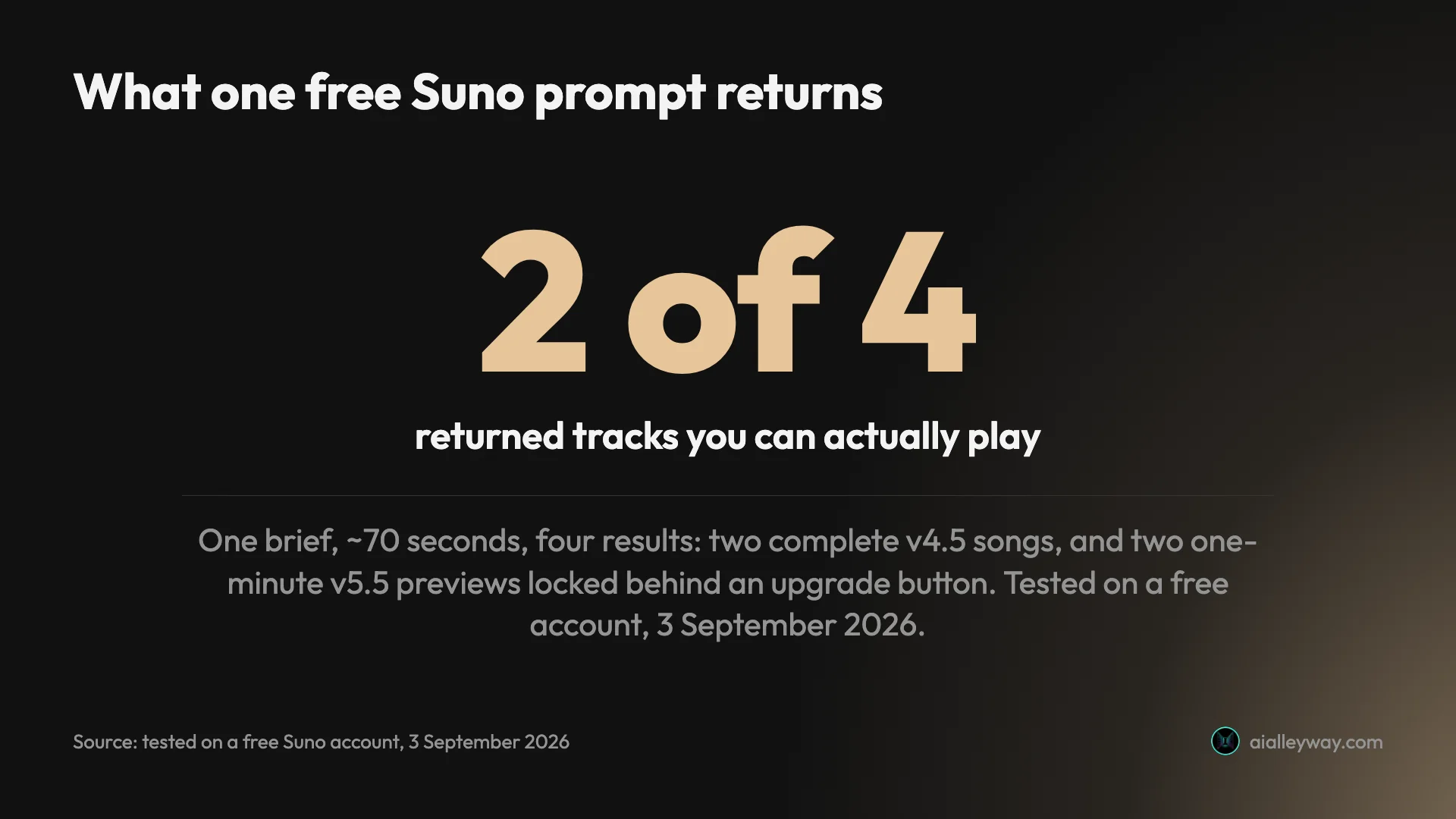
Anyone judging Suno’s free tier by counting rows in that list will overestimate it by a factor of two.
The download caps are real, and the free one is a lifetime allowance
Suno’s plan table says Free loses monthly song downloads from 3 September 2026, with Pro capped at 20 a month and Premier at 60. Suno’s announcement fills in what the card omits: a free account holds up to 7 trial downloads for the life of the account. That seven is for accounts joined before 3 September 2026; later signups “may occasionally receive trial downloads” instead. On that exact date, MP3 export from a free account worked for us — we were spending one of the seven.
The 20-a-month Pro ceiling is the number a short-form producer should be checking against their actual output. Twenty finished tracks a month is a real limit if you publish daily, and it is a much tighter constraint than the 2,500 credits sitting next to it.
The best model is visible but not audible
The free plan runs v4.5-all, confirmed in the model selector and not just the plan page. v5.5 exists in your results, one minute at a time, unplayable. We genuinely cannot tell you whether it is better, because we were never allowed to hear one in full.
The commercial licence attaches to when you generated, not when you paid
Suno’s plan table grants commercial use rights for “new songs made” on a paid tier. The plan card’s wording points that way, though Suno’s announcement ties commercial rights to songs downloaded on a paid plan, which may mean a re-download after subscribing is covered. Suno does not resolve it, and we unpick the whole permission-versus-ownership question in can you sell music made with Suno. Read the card literally and upgrading does not retroactively licence the library you built up while you were on the free plan.
This is the kind of detail that only bites once, and it bites hard. If you spent a fortnight on the free tier finding a track you love and then subscribed in order to use it, the thing you actually bought may not cover the thing you wanted. Generate the tracks you intend to publish after you subscribe, not before.
| What “the bad” actually costs you | Free | Pro |
|---|---|---|
| Half of each result is a locked preview | yes | no |
| Song downloads | 7, lifetime | 20 a month |
| Best model (v5.5) | preview only | full |
| Commercial rights | none | new songs only |
The company’s reputation is much worse than the product’s
Suno’s main Trustpilot page averages 1.6 out of 5 across roughly 767 reviews, with about 70 percent of them one star. The complaints cluster heavily on billing and unresponsive support, though some do concern output quality, so “nothing to do with the music” would be too clean a summary.
There is also a second, smaller Trustpilot profile for the domain averaging about 1.8 across around 160 reviews. It is less damning and much less read, and we are naming both rather than quoting only the harsher one. That is a wide gap between what the tool does and how the company is experienced. We tested the product, not the billing relationship, so we cannot confirm those accounts — but a 767-review average that low is a reason to start monthly rather than annual, whatever the discount.
What else should you consider?
Udio is the direct competitor, and we ran the identical brief through its free tier on the same day. Two tracks came back in about sixty-five seconds against Suno’s four in seventy, and we preferred Suno’s. The full head-to-head is in Udio vs Suno.
The structural comparison is closer than the pricing suggests, because the pricing is the same: $10 a month or $8 annually, $30 or $24 for the tier above, matching Suno’s ladder to the dollar. The free tiers are not the same at all. Suno gives 50 credits a day with no monthly ceiling; Udio gives 10 a day capped at 100 a month, and our single generation cost 8 of them. The two Udio limits interact: the daily allowance runs out first, and the separate “3 full length generations per day” line is the ceiling you hit before the credits are the problem.
| Same brief, same day, free tiers | Suno | Udio |
|---|---|---|
| Tracks returned | 4 | 2 |
| Playable | 2 | 2 |
| Track length | 3:17 and 1:20 | 2:10 and 2:10 |
| Time | ~70s | ~65s |
| Download on free | MP3, worked | none — embed only |
| Credits per generation | not shown | 8, shown |
| Daily free credits | 50 | 10 |
| Monthly cap | none | 100, no rollover |
| Paid tiers | $10 / $8 · $30 / $24 | $10 / $8 · $30 / $24 |

Here are both Udio tracks from that run, so the comparison is listenable rather than asserted. They are embedded from Udio rather than hosted here, for a reason covered below.
Udio’s free tier will not let you download them at all. There is no MP3 option, only a Share dialog offering a link or an embed iframe, which is why these are embedded and the Suno pair is self-hosted. That is the sharpest single contrast in this comparison, and it runs against the direction you would expect from the pricing pages: Suno capped free downloads at seven for the life of an account and still let us export MP3s on the day that took effect, while Udio simply does not offer the option.
Be clear about what this comparison is and is not. One prompt each, one day, one listener, on free tiers only. That is enough to establish which free tier is more generous, and it is what our preference rests on; it is not a controlled study. We would rather show you the four tracks and the numbers than pretend the sample is bigger than it is.
Track length is the difference the table understates. Both Udio tracks came back at the same length, 2:10 in the interface and 130.9 seconds in the file, which is not a coincidence: its free plan advertises “3 full length (2:10s) song generations per day”, so 2:10 is the cap rather than the outcome. Identical to the decimal across both tracks is what a ceiling looks like. Going longer means using Extend, which costs more credits. Suno’s free tier returned 3:17 without being asked, and varied the length between the two tracks.
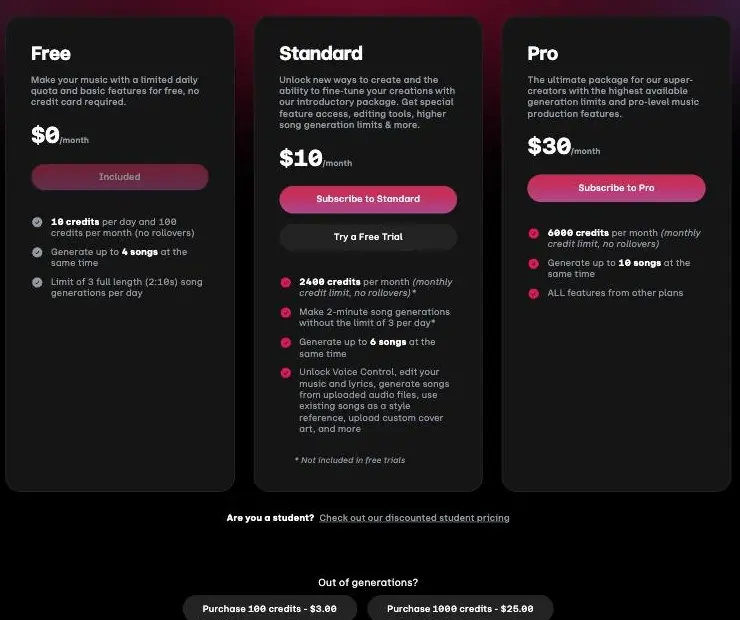
Udio does two things better. It shows you the credit price of a generation and the balance before and after, which Suno never displays anywhere. And both tracks it returned were playable, where half of Suno’s results are previews you cannot hear. If the preview mechanic annoys you more than the smaller allowance does, Udio is the honest alternative.
The rest of the category sits in our best AI music generator roundup, where eleven tools took the same brief and the licence terms separate them more than the audio does.
Royalty-free libraries remain the boring correct answer when clearance matters more than originality. The trade is straightforward. Suno gives you a track nobody else has, on a licence you have to keep paying to maintain. A stock library gives you a track other people also use, on a licence you buy once and never think about again. If your channel would survive sharing a backing loop with a competitor, the boring option carries less risk and no expiry.
A human, for anything the music itself is selling. This is not a joke entry. If the music is the product rather than the backdrop, the money is better spent on a musician, and Suno remains useful upstream of that as the sketch you hand them. We are not going to dress that up with a verdict on Suno’s musicianship we have not earned.
Final word
Suno is the category leader, and it earns that on a comparison rather than a vibe: same brief, same day, against the obvious rival, and we preferred what Suno returned. It turns a sentence into something usable faster than anything else at the price, and its free tier is five times more generous than the closest thing to it.
What keeps the score at the bottom of that band rather than the top is everything around the output: a free tier whose downloads were cut to seven for the life of the account the day we looked, a better model shown to you but withheld, and a company whose customer reviews are far worse than its product deserves. Leading a category is not the same as being finished.
There is a version of this review that scores Suno higher, and it is the one written from the pricing page. Read the plan comparison and the free tier looks generous: fifty credits a day, ten songs, a current-sounding model. Generate once and the picture changes, because half of what lands in your results is a locked preview of something better. The tier is still good. It is just smaller than it advertises, and it got smaller again on the day we tested.
| The verdict in one line | |
|---|---|
| Score | 4.6 / 5, Category Leader |
| Why it leads | 5× the free daily credits, no monthly cap; we preferred it on one shared brief |
| Why not higher | Preview paywall, download caps, Trustpilot 1.6 |
| Start on | Free — 50 credits daily is a real allowance |
| Upgrade when | You publish anything; generate after subscribing |
| Pay | Monthly first, not annual |
Start free, because free is real here and ten songs a day is a genuine allowance. Move to Pro the moment you need to publish anything, generate the tracks you intend to use only after you have subscribed, and pay monthly at first. If the company’s support turns out to be as bad as its Trustpilot average suggests, a monthly plan is the cheapest way to have been wrong.
Frequently asked questions
Is Suno worth paying for?
It depends entirely on whether you need to use the music commercially, because that is the line the free plan will not cross.
The free plan gives you 50 credits a day, roughly ten songs, on the v4.5 model. In our test that produced music we were happy to put under a product video. What it does not give you is commercial rights, the newer v5.5 model in full, WAV or stem downloads, or the ability to buy more credits when you run dry.
So the question is not really whether the music justifies ten dollars. It is whether you are publishing anything. Hobby use, demos, sketching ideas for a human musician to replace later: stay free. Anything that ships to an audience or a client: you need Pro, and the price is reasonable for what it unlocks.
Is Suno AI music any good?
Usable, on our listen, and we are careful about how far we take that.
We gave a free account a single one-line brief and listened to the two complete tracks it returned. Our judgement was that they were pretty good, and we are deliberately not going further than that, because one person listening once is not a quality assessment. Both tracks are embedded in this review so you can decide for yourself rather than take our word for it.
The most-cited criticism from someone working in audio professionally is a thread on the r/SunoAI subreddit, linked in the body of this review. Its complaint is narrower than usually reported: it concerns stem separation, where drums, bass, synths and vocals bleed into each other so an exported stem still carries other parts. That is about what you can do with the output downstream rather than whether the songs sound bad, and it applies to stem export, a Pro feature the free tier does not have.
What does Suno cost?
Free, $10 a month, or $30 a month, with roughly a 20 percent discount for paying annually.
The Free plan is $0 and gives you 50 credits daily, about ten songs, on the v4.5 model. Pro is $10 monthly or $8 a month billed annually, and includes 2,500 credits a month, the v5.5 model, commercial use rights, stem separation and the ability to buy add-on credits. Premier is $30 monthly or $24 annually for 10,000 credits and Suno Studio.
One detail changes the value of every tier and is easy to miss on the pricing page: song download caps. Pro gets 20 a month, Premier 60, and a free account gets 7 for the lifetime of the account rather than any monthly allowance. Those limits are dated on Suno's own pricing table to 3 September 2026, which was the day we ran this test.
Can I use Suno music commercially or put it on Spotify?
Only on a paid plan, and only for songs made while you are subscribed.
Suno's pricing table is explicit that the Free plan carries no commercial use, and that Pro and Premier include commercial use rights for new songs made. The wording matters: the right attaches to songs created during the subscription, not to everything in your library.
That has a practical consequence people discover late. Music you generated on the free plan does not become commercially licensed when you later upgrade. If you are building toward a release, subscribe before you generate the tracks you intend to use rather than after. We have not tested any distributor's own policy on AI-generated music, which is a separate question from Suno's licence and is worth checking with whoever you distribute through before you count on a release.
Why does Suno have bad reviews if the music is good?
Because the complaints are almost entirely about billing and support rather than about the songs.
Suno's main Trustpilot page averages 1.6 out of 5 across roughly 767 reviews, around 70 percent of them one star, and the summary points at non-responsive customer service and subscription management. A second profile for the domain sits at about 1.8 across 160 reviews. That is a strikingly wide gap between what the product does and how the company is experienced, and it is the single most common reason people who like the music still end up unhappy.
Our own testing covers the product, not the billing relationship, so we cannot confirm those accounts first-hand. But a 767-review average that low is not noise, it is about the company rather than the songs, and it is a fair reason to prefer monthly billing over annual until you know how you feel about dealing with them.
What is the difference between Suno v4.5 and v5.5?
v4.5 is what the free plan runs. v5.5 is the current model and it is paid, though free users see just enough of it to want it.
This is the mechanic worth understanding. When we generated on a free account, Suno returned four tracks from one prompt: two complete songs on v4.5-all, and two v5.5 previews capped at one minute each, both carrying an Upgrade for full song button. You are shown the better model in the same result list as the one you are allowed to keep.
Whether v5.5 is meaningfully better is a question we could not answer, because the free plan will not play the previews in full. That is the design. Judge the free tier on the two v4.5 tracks you actually get, and treat the previews as advertising rather than as part of the offer.
Keep reading
How to use Suno: the free account, honestly
How to use Suno step by step, from your first prompt to getting a file out — including the two results you can't play and the seven downloads you get.
Suno pricing: the number that isn't credits
Suno sells credits, but caps something else: downloads. Seven for the lifetime of a free account, 20 a month on Pro, 60 on Premier. What each plan really costs.
Suno alternatives: the one I actually tested, and eight I didn't
Every Suno alternatives list claims it tested everything. This one tested one rival properly, labels the rest, and fixes two entries the others get wrong.
Best AI music generator: the three we ran, and what the rest are for
We gave Suno and Udio the same brief on the same day. Suno wins on output. On the licence the field splits three ways, and one tool grants nothing at any price.