
Best AI voice cloning: which tool actually sounds like you?
ElevenLabs is the best AI voice cloning tool overall, but the right pick depends on whether you're cloning your own voice, building an app, or want it free.
Contents
The short answer
The best AI voice cloning tool is ElevenLabs, and unlike most “best of” lists, this one has a clear winner at the top. Its clones are the most convincing money can buy, it offers both a 10-second instant clone and a studio-grade professional clone, and the voice speaks 32-plus languages from one training pass. If you want one name and nothing else, that is it.
But “best at cloning” splits into very different jobs once you start, so here is the decision in four lines.
- Cloning your own voice to fix a recording? Descript’s Overdub is built for exactly that, inside a real editor.
- Building an app or voice agent? Cartesia clones from $5/mo with the lowest latency in the field.
- Worried about consent, rights, or deepfakes? Resemble AI ships watermarking and deepfake detection nobody else here matches.
- Refuse to pay a cent? An open-source model like Fish Audio clones for free, if you can run a GPU.
One honest note before the list. I score ElevenLabs 4.7 in our full ElevenLabs review, and on raw cloning quality it is still a step ahead. So the tools below are not here because they clone better. They are here because they clone differently, or cheaper, or for free, and one of those differences is probably why you are reading this.
How I picked these
Voice cloning is a narrow promise with a wide set of jobs hiding inside it. “Copy a voice and make it read a script” covers a podcaster patching one flubbed line, a developer wiring a voice into a phone agent, a studio dubbing a film, and a hobbyist who just wants their own voice for free. Those are not the same buyer, and they do not want the same tool.
So I ranked on fit, not on a single quality number. Five things decided each spot. Where a tool already has a full write-up on this site, I leaned on that hands-on testing; where it does not, I am clear that the read is from its docs, pricing pages, and user reports rather than a long stint inside it.
| Criterion | What I weighed |
|---|---|
| Similarity | How close the clone sounds to the source, not a cherry-picked demo |
| Audio needed | Seconds for an instant clone, or 30+ minutes for a professional one |
| Pricing | The cheapest plan where you can actually clone a voice |
| Commercial use | Whether you can legally sell what the clone produces |
| The one job | The single use case it is unmistakably built for |
Two well-known names did not make the cut, and the reasons are worth stating. WellSaid Labs refuses to clone voices on purpose, so a cloning roundup is the one list it cannot be on. And Play.ht shows up on a lot of older lists, but the product no longer resolves, so recommending it would just send you to a dead page. Murf AI does make the list, but with a warning attached: its cloning is Enterprise-only, so it ranks on the strength of the studio around the voice, not on the clone itself.
Instant vs professional cloning: the split that decides everything
Before the tools, the one distinction that explains the whole category. Almost every cloner offers two modes, and picking the wrong one is the most common reason people say “the clone didn’t sound like me.”
Instant cloning copies a voice from a tiny sample, often 10 to 60 seconds, in a few seconds of processing. It is astonishing for how little it asks, and it is genuinely good in short bursts. It also slips on the hard parts: unusual words, strong emotion, and long passages, where small artifacts pile up. Use it to prototype, to dub a short clip, or to test whether a tool is worth more of your time.
Professional cloning trains a dedicated model on far more audio, typically 30 minutes to a few hours of clean recording, and takes hours rather than seconds. The payoff is a clone most listeners cannot pick from the real voice on a normal sentence. This is the mode for audiobooks, a brand voice you will reuse for a year, or any project where the clone carries real weight.
The trap is the source audio, not the tool. A quiet, consistent 30-minute recording clones better than two noisy hours with a fan humming in the background. Every tool below inherits that rule.
| The measure | Instant cloning | Professional cloning |
|---|---|---|
| Sample needed | 10–60 seconds | 30 min – 3 hours, clean |
| Time to clone | Seconds | Hours (training) |
| Similarity | Good, small artifacts | Near-indistinguishable |
| Best for | Prototyping, short dubs | Audiobooks, brand voice |
| Where to find it | ElevenLabs, Cartesia, HeyGen | ElevenLabs (PVC), Resemble (pro clone), Cartesia ($49) |
The cloners at a glance
One table before the detail. “Cloning available at” is the cheapest plan where you can actually clone a voice, current as of June 2026.
| Tool | Best for | Clone from | Cloning available at | Commercial use |
|---|---|---|---|---|
| ElevenLabs | Overall realism | 10 sec / 30+ min | $6/mo Starter | Yes |
| Descript | Cloning your own voice | Your recordings | Included (Overdub) | Yes |
| Cartesia | Real-time apps, low cost | Seconds | $5/mo Pro | Yes (from $5) |
| Resemble AI | Security & rights | Seconds–minutes | $2 per voice/mo | Yes |
| HeyGen | Cloning into video | 30 sec–3 min | Free (1 clone) / $29 Creator | Yes |
| Murf AI | Teams already on Murf | Custom | Enterprise only | Yes |
| Speechify | Listening-first creators | Minutes | In Speechify Studio | Yes |
| Open-source | Free & self-hosted | Model-dependent | Free (you host) | Yes |
1. ElevenLabs — best overall voice cloning
ElevenLabs is the gold standard, and for once that phrase is earned rather than borrowed from a press release. It is the tool every other cloner gets measured against, including by Google’s own AI Overview for this exact search, and the gap is audible on the first take rather than in a cherry-picked demo.
The reason it tops the list is that it does both cloning modes well. Instant Voice Cloning builds a usable clone from about 10 seconds of audio, fine for a quick test or a short dub. Professional Voice Cloning is the real draw: feed it 30 minutes or more of clean audio, with the FAQ calling 3 hours optimal, and it trains a model most listeners cannot separate from the original. The clone then speaks 32-plus languages without re-recording a word, which is the feature dubbing teams actually pay for.
For once, you can hear the thing itself: my own voice, cloned with ElevenLabs from a sample, reading a script I never recorded. Judge the fidelity yourself.
That is the engine your clone would run on. To hear its range on voices I did not clone, here is stock text-to-speech and the same model crossing into Spanish, the realism a professional clone inherits:
Cloning starts on the $6 Starter plan, which already includes Instant and Professional cloning, undercutting most of the field on entry price. The catch is the one every ElevenLabs review lands on: credit-based pricing that bills every regeneration and scales into real money for heavy use, which is why its Trustpilot score sits lower than its quality deserves. The voices are not the complaint; the bill is. Our ElevenLabs pricing guide works through what the credits actually cost once you are regenerating lines in volume.
| The measure | ElevenLabs | The field |
|---|---|---|
| Instant clone from | ~10 seconds | 30–60 sec typical |
| Professional clone | 30+ min, near-perfect | Few tools offer it |
| Languages per clone | 32+ | Usually fewer |
| Cloning starts at | $6/mo Starter | Often higher |
Read the full ElevenLabs review for where the credits really go, or our ElevenLabs alternatives guide if the pricing is the dealbreaker.
2. Descript — best for cloning your own voice
Descript clones for a completely different reason than everyone else, and that reason is the whole point. Its Overdub feature exists to clone your voice so you can fix a recording by typing, not to mass-produce narration from a stranger’s sample. If your real job is editing podcasts or talking-head video, this is the cloner that lives where you already work.
The workflow is the magic. Descript turns your recording into a transcript, you edit the media by editing the text, and when you need to patch a flubbed line, Overdub types it back in your own cloned voice instead of sending you to the mic. No waveform editor offers that trick, and for cleaning up real recordings it saves more time than a higher-fidelity clone ever would.
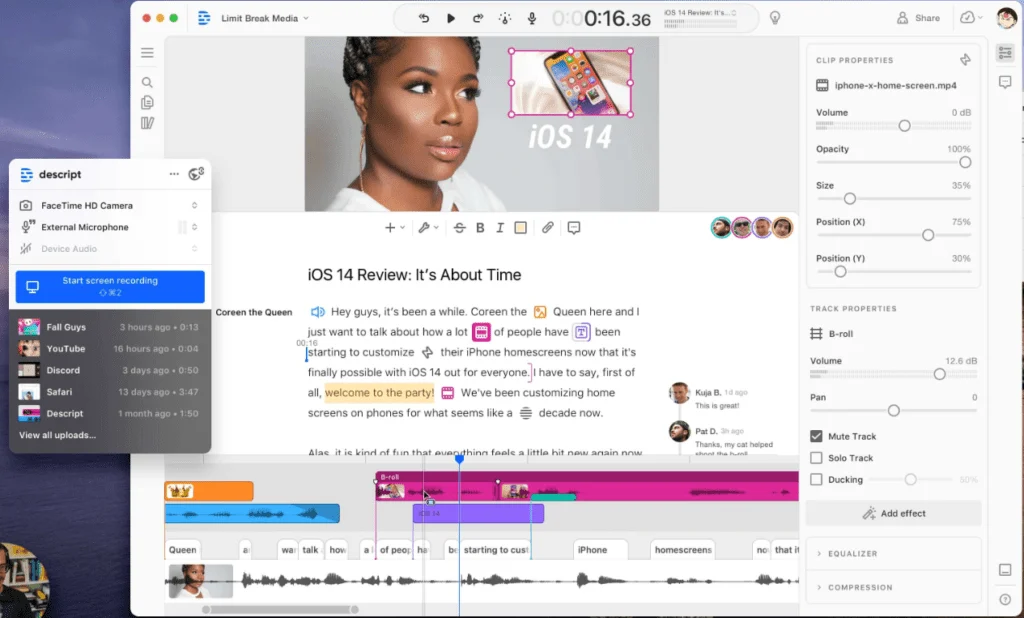
The honest framing, which Descript itself is fairly upfront about: Overdub is a patch tool, not a narration engine. For reading an hour of new script in a cloned voice, ElevenLabs still wins on raw quality. Overdub shines on the 30-second correction, where re-recording would mean resetting your whole audio chain.
Cloning is included across paid plans starting at $24/mo Hobbyist, with no separate cloning add-on, which is friendlier than tools that wall it behind a premium tier. The thing to watch is Descript’s two-meter credit system of Media Minutes and AI Credits, which heavy users burn through faster than they expect.
| The measure | Descript | ElevenLabs |
|---|---|---|
| What it clones | Your own voice | Any consented voice |
| Cloning style | Patch a line by typing | Full narration |
| Cloning available at | Included from $24/mo | $6/mo Starter |
| Best for | Editing recordings | Generating from scratch |
Read the full Descript review for how the two meters actually meter.
3. Cartesia — best for real-time apps and low cost

Cartesia is the developer’s cloner, and it owns two things the others do not: latency and price. Its Sonic models are built for real-time, conversational AI, the sub-second response a live voice agent needs so a caller does not feel the pause. If you are wiring a cloned voice into something that talks back, this is the short list.
The pricing is the surprise. A free tier hands you 20,000 credits a month with text-to-speech included, the $5 Pro plan adds a commercial license and instant voice cloning, and professional cloning arrives on the $49 Startup tier. That $5 instant cloning is the cheapest paid clone of anything here, undercutting even ElevenLabs’ $6 Starter.
Latency is not a vanity metric for this job. In a live phone agent, even a half-second gap before the cloned voice answers reads as a stall and breaks the illusion of a conversation, which is why telephony and contact-center builders care about Cartesia more than catalog size. ElevenLabs ships a low-latency model too, but real-time is Cartesia’s entire reason to exist rather than a side mode.
What you give up is polish and hand-holding. Cartesia is newer, thinner on ready-made voices, and squarely a build-it-yourself tool rather than a point-and-click studio. For narration you assemble by hand, ElevenLabs is the nicer place to work; for a cloned voice answering calls in milliseconds, Cartesia wins.
| The measure | Cartesia | ElevenLabs |
|---|---|---|
| Instant clone from | $5/mo Pro | $6/mo Starter |
| Professional clone | $49/mo Startup | $22/mo Creator |
| Latency | Lowest in class | Strong |
| Best for | Real-time agents | Polished narration |
Pick Cartesia if you are cloning a voice into something that has to answer in real time.
4. Resemble AI — best for security, rights, and detection
Resemble is the pick when the worry is not whether the clone sounds good but whether you are allowed to make it and can prove who owns it. It is a developer-first platform with a safety story no other tool here tells: audio watermarking on generated speech, real-time deepfake detection, on-premise deployment, and the SSO and custom-model training a regulated buyer needs. For a bank, a hospital, or anyone shipping cloned voice into a product with legal exposure, that matters more than a slightly warmer read.
The detection side is the part worth a second look, because it is genuinely unique here. Resemble bills audio deepfake detection at $0.04 a second and watermarks the voices it generates, so one account can both create cloned voices and police misuse of them. When a legal team asks “how do we prove this audio is ours, and how do we catch a fake,” that is a real answer rather than a shrug.
The pricing fits that audience. Instead of monthly tiers, Resemble runs pay-as-you-go: text-to-speech at $0.0005 a second, roughly $1.80 an hour of audio, with rapid voice clones at $2 a voice per month and higher-fidelity pro clones at $5. You pay for exactly what you generate, which suits spiky, API-driven use far better than a fixed subscription.
For a solo creator who just wants their own narration, this is overkill and the interface assumes you write code. But the watermarking, detection, and on-prem options are things ElevenLabs simply does not sell, so for security-led teams Resemble is not really competing on the same axis.
| The measure | Resemble AI | ElevenLabs |
|---|---|---|
| Clone pricing | $2–5 per voice/mo | Included from $6/mo |
| Watermarking | Yes | Limited |
| Deepfake detection | Yes ($0.04/sec) | Via partners |
| Best for | Compliance & rights | Creator narration |
Pick Resemble if consent, watermarking, or deployment control are the deciding factors.
5. HeyGen — best for cloning into video
HeyGen clones a voice so it can drive a video, and that framing is the whole pitch. Where the others hand you an audio file, HeyGen bakes the cloned voice straight into a text-to-video editor: write or paste a script, and it generates the narration in your voice, syncs an avatar’s lips to it, and aligns the visuals without you touching an audio timeline. If the end product is a talking-head video, not a sound file, this consolidates the most steps.
Cloning is fast and light on input. HeyGen needs 30 seconds to 3 minutes of audio, with a clean one-minute sample its sweet spot, and the clone then speaks across languages from that single pass. The headline use case is dubbing: record once, and your own voice delivers the same video in a dozen languages, lips matched, which is exactly the localization job creators and outreach teams hit a wall on.
The pricing is friendlier than its reputation suggests. HeyGen bundles one voice clone into its free plan, and unlimited cloning starts on the $29/mo Creator tier, with Pro at $49/mo. So it is not an expensive way to clone at all. The real trade is focus: HeyGen is an avatar and video platform first, so cloning is one feature inside a bigger product rather than a dedicated voice studio. It is the wrong tool if all you want is an audio file, and the right one if the clone was always meant to talk on camera.
| The measure | HeyGen | ElevenLabs |
|---|---|---|
| Output | Cloned voice + video | Cloned voice (audio) |
| Clone from | 30 sec–3 min | 10 sec / 30+ min |
| Killer feature | Lip-synced dubbing | Raw voice realism |
| Best for | Talking-head video | Audio-first projects |
Pick HeyGen if the cloned voice was always going to end up in a video.
6. Murf AI — best if your team already lives in the studio

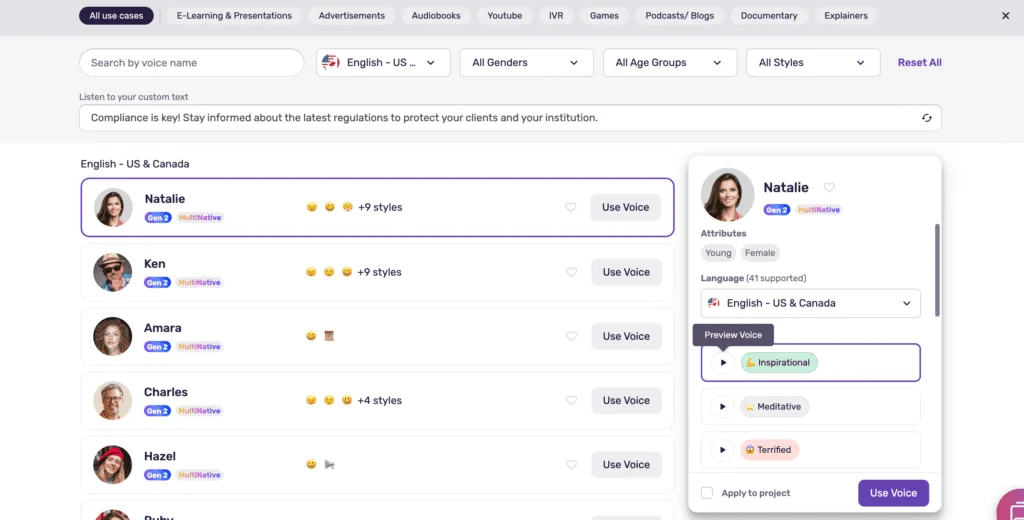
Murf earns a spot the way a strong all-rounder makes a specialist list: not because it clones best, but because if you are already paying for it, the cloning is right there. It is a text-to-speech tool wrapped in a production studio, with a video timeline, a royalty-free music library, subtitles, and team project folders, plus a clean catalog of 200-plus voices rated 4.7 on G2 across more than 1,400 reviews. For a team producing voiceover at volume, that surrounding studio is the draw.
The cloning, though, is where Murf asks you to pay up. It does not appear on the Creator or Business plans at all. Murf’s cloning page routes everyone to Contact Sales, which makes it the one tool here where cloning has no public price and starts with a sales call. Set against Cartesia’s $5 instant clone or ElevenLabs’ $6 Starter, that is the expensive end of this list by a wide margin. The Murf pricing guide covers what the published plans do include, since the studio is the reason to be here.
So the honest verdict is conditional. If you need to clone a single voice and nothing else, Murf is the wrong tool and the others undercut it badly. If your team already needs the studio, runs multi-language training content, and wants one vendor to own voice, video, and collaboration, then a custom cloned voice on top of that is a reasonable add-on rather than a reason to switch.
| The measure | Murf AI | ElevenLabs |
|---|---|---|
| Cloning available at | Enterprise (Contact Sales) | $6/mo Starter |
| Public cloning price | None | Yes |
| Surrounding studio | Video, music, folders | Voice only |
| Best for | Teams already on Murf | Cloning on any budget |
Read the full Murf AI review for where the studio earns its price and where it does not.
7. Speechify — best for listening-first creators

Speechify comes at cloning from the side door. Most people know it as a read-aloud app: point it at an article, a PDF, or an email and it reads back in a natural voice, with a big following among people who consume text by ear or have dyslexia. Cloning is the secondary act, which is exactly why it suits a particular creator: someone whose main relationship with audio is listening, who occasionally needs their own voice on a track too.
The cloning itself lives in Speechify Studio, the creation-focused half of the product, separate from the read-aloud app most people subscribe to. That split matters for budgeting: the consumer plan is a free tier with 10 basic voices, then Premium at $29 a month, or $139 a year on annual billing, which buys the 1,000-plus natural voices and faster listening, while voice cloning and narration export are billed through Studio on their own.
The reason to pick Speechify over a pure cloner is reach, not fidelity. It scans physical documents, reads web pages and emails aloud, and syncs your place across phone and laptop, so the cloned voice is one feature inside a tool you would keep for the listening alone. If producing a polished voiceover is the actual goal, ElevenLabs or Descript will serve you better; if you mostly want to listen and clone now and then, Speechify is the only tool here built for that shape.
| The measure | Speechify | ElevenLabs |
|---|---|---|
| Core job | Listening / read-aloud | Voice generation |
| Where cloning lives | Speechify Studio (separate) | Built in |
| Starts at | Free / $29/mo Premium | $6/mo Starter |
| Best for | Accessibility + occasional clone | Cloning as the main job |
Pick Speechify if you mostly want to listen to your reading and clone a voice on the side.
8. Open-source — best free and self-hosted

If the real objection is paying anything at all, skip subscriptions entirely. A wave of open-source voice models now clones close enough to commercial quality that running your own is a serious option, and the licenses let you use the output commercially with no per-minute fee.
The names worth knowing: Fish Audio for expressive cloning with emotional control, Chatterbox as a newer high-quality entrant that head-to-head videos keep pitting against paid ElevenLabs, Coqui XTTS v2 as the established workhorse, and OpenVoice for fast cloning with fine control over tone and accent. None matches ElevenLabs across the board, but the best of them are startlingly close on a standard read for exactly zero dollars.
The honest catch is the one a subscription hides: you trade the bill for setup time and hardware. Most of these want a GPU, so you either own one or rent it by the hour (services like RunPod make that a few dollars). There is no support line when something breaks, no polished editor, and updates land on the community’s schedule rather than a vendor’s. For a developer or a tinkerer, that is a fair trade; for someone who just wants to type and press generate, the paid tools earn their price.
There is also a quieter advantage that matters for cloning specifically: privacy. Running the model yourself means the source voice never leaves your machine, which for sensitive or personal voices is worth more than any feature on a pricing page.
| The measure | Open-source (Fish Audio et al.) | ElevenLabs |
|---|---|---|
| Cost | Free (you run the hardware) | $6/mo and up |
| Clone quality | Close on standard reads | Best in class |
| Privacy | Voice never leaves your machine | Cloud |
| Best for | Free, self-hosted, private | Zero-setup polish |
Fish Audio is the pick if you would rather own the stack than rent it monthly.
Is there a truly free way to clone a voice?
Yes, but “free” means two different things, and the gap between them catches people out. The first kind is a free cloud tier. Cartesia’s gives 20,000 credits a month with cloning you can test, and ElevenLabs’ free tier covers about 10 minutes. The catch is almost always the same: a hard monthly cap and no commercial license, so you can judge the clone but not sell what it makes.
The second kind is genuinely free forever: the open-source models above. Fish Audio, Chatterbox, Coqui XTTS, and OpenVoice cost nothing per minute and let you use the output commercially, which no free cloud tier does. The price simply moves from your wallet to your time and hardware, since most want a GPU you own or rent.
So the real answer depends on what “free” has to cover. For a few test clones, take Cartesia’s free tier. For ongoing, commercial, zero-cost cloning, an open-source model is the only thing that truly qualifies, as long as you are willing to set it up. Anyone wanting free, polished, and one-click at the same time is asking for something that does not exist yet.
Cloning a voice legally: consent, rights, and deepfakes
This is the section most roundups skip, and it is the one that can actually get you in trouble. Voice cloning is legal in the obvious case and illegal in the obvious case, and the whole game is knowing which one you are in.
Cloning your own voice is always fine. Cloning someone else’s with their clear, recorded consent is fine, and it is how every tool here expects to be used. Cloning a real person without permission is where it turns: it can break likeness and publicity rights, and a cloned voice used to deceive, say, to fake authorization or impersonate someone for money, crosses into fraud. “I found the audio online” is not consent, and it is not a defense.
The tools split on how seriously they enforce this. Most put consent in their terms of service and leave it at you. The stricter ones build it into the product: ElevenLabs requires a recorded voice-verification step before it will train a professional clone, so you cannot quietly clone a celebrity from a podcast clip. Resemble goes furthest, watermarking the voices it generates and selling deepfake detection so misuse can be caught downstream.
| Safeguard | Who enforces it | What it does |
|---|---|---|
| Consent verification | ElevenLabs (pro cloning) | Recorded check that you control the voice |
| Watermarking | Resemble AI | Marks generated audio as synthetic |
| Deepfake detection | Resemble AI | Flags cloned audio after the fact |
| Terms-of-service only | Most other tools | Consent required, not technically enforced |
The practical rule is short: clone your own voice freely, get written consent for anyone else’s, and if your use is commercial or public-facing, prefer a tool that watermarks and verifies. The small friction now is cheaper than a likeness claim later.
How to pick, in one decision tree
Skip the table and answer one question: what are you actually cloning, and why?
- You want the most convincing clone, full stop. ElevenLabs. Professional cloning on 30-plus minutes of clean audio is the quality bar everyone else chases.
- You want to clone your own voice to fix recordings. Descript. Overdub patches a line by typing, inside the editor you already use.
- You’re cloning a voice into an app or live agent. Cartesia. Lowest latency, and cloning from $5/mo. Our Cartesia pricing guide has the per-character maths.
- Consent, rights, or deepfake risk is the blocker. Resemble. Watermarking and detection nobody else here sells.
- The clone needs to talk on camera. HeyGen. Lip-synced dubbing from a single voice sample.
- Your team already runs on a voice studio. Murf, where a custom Enterprise clone bolts onto the production tools you use anyway.
- You mostly listen and clone now and then. Speechify, where cloning rides along with the best read-aloud app.
- You refuse to pay and can run a GPU. An open-source model like Fish Audio or Chatterbox.
- You just want to test cloning for free first. Cartesia’s free tier, then upgrade to whichever fits.
Notice what is not on the list: a tool that is cheapest, highest-quality, easiest, and free all at once. That one does not exist. Pick the corner of that triangle you care about most, and the choice above falls out.
If cost per hour across the whole category matters more to you than cloning specifically, that comparison lives in best AI voice generator.
Final word
The best AI voice cloning tool is ElevenLabs, because it clones closest and offers both the 10-second instant clone and the studio-grade professional one. But the moment your real job is narrower, cloning your own voice, building an app, dubbing video, satisfying a legal team, or paying nothing, the winner changes, and one of the six above is built for exactly that.
If you have not heard a clone against your own voice yet, start with ElevenLabs. It is free to test, and a single instant clone of 10 seconds of your own audio tells you more than any roundup can.
Frequently asked questions
What is the best AI voice cloning tool?
ElevenLabs is the best AI voice cloning tool overall.
Its instant cloning needs about 10 seconds of audio, its professional cloning trains on 30 minutes or more for a near-indistinguishable result, and the clone speaks 32-plus languages. The catch is credit-based pricing.
If you only want to clone your own voice to fix lines in a recording, Descript's Overdub is the better fit; if you are building an app, Cartesia clones from $5/mo with the lowest latency; and if you refuse to pay, open-source models like Fish Audio and Chatterbox clone for free if you can run a GPU.
How much audio do you need to clone a voice?
It depends on the cloning type. Instant cloning needs very little: ElevenLabs works from about 10 seconds, Cartesia and HeyGen from under a minute. The result is good but carries small artifacts.
Professional cloning is the high-fidelity route and is hungrier: ElevenLabs asks for 30-plus minutes of clean audio and says 3 hours is optimal. More clean, consistent audio always beats more total audio, so a quiet 30-minute recording clones better than 2 noisy hours.
Is there a free AI voice cloning tool?
Yes, in two forms. Free cloud tiers let you test cloning but usually cap your minutes and withhold a commercial license: Cartesia's free tier includes 20,000 credits a month, and ElevenLabs' free tier covers about 10 minutes.
The genuinely free-forever route is open-source models you run yourself: Fish Audio, Chatterbox, Coqui XTTS, and OpenVoice cost nothing per minute and allow commercial use, but most want a GPU you either own or rent by the hour.
Is AI voice cloning legal?
Cloning your own voice, or someone else's with their clear consent, is legal and is how every tool here expects you to use it.
Cloning a real person without permission is where it turns illegal fast: it can break likeness and publicity rights, and using a cloned voice to deceive can be fraud.
Most platforms put consent in their terms of service, and the stricter ones enforce it technically. ElevenLabs requires a recorded voice-verification step before it will train a professional clone, and Resemble watermarks its output and sells deepfake detection.
Can an AI clone sound exactly like me?
With professional cloning and clean source audio, close enough that most listeners cannot tell on a normal sentence.
ElevenLabs' professional clone trained on 30-plus minutes is the current high-water mark for similarity. Instant clones from a few seconds are convincing in short bursts but slip on unusual words, heavy emotion, and long passages.
The honest limit is that AI still struggles with the messy, spontaneous parts of speech, so scripted narration clones better than a freewheeling conversation.
Keep reading
Best AI voice generator: what an hour of audio really costs
ElevenLabs wins on voice and costs $10.91 an hour. We normalised six AI voice generators plus open-source to one unit: the cost of an hour you can publish.
Best AI voice generator for audiobooks (and where to publish it)
ElevenLabs is the best AI voice for audiobooks, but the right pick depends on whether you're cloning your own narrator voice, publishing free, or on a budget.
ElevenLabs vs Cartesia: creator quality vs agent speed
ElevenLabs owns voice quality and catalog; Cartesia owns sub-100ms speed. I tested both, including cloning my own voice in each. Here's which AI voice wins.
ElevenLabs vs Descript: voice engine vs editing suite
ElevenLabs makes the best AI voice; Descript is the editor that even runs ElevenLabs inside it. Here's which you actually need, and when to use both.