
Murf AI pricing: the meter is hours, not dollars
Murf AI pricing runs free to $66/mo, but the real limit isn't the price — it's the hours-per-year voice meter, and cloning is locked to Enterprise.
Contents
The short answer
Murf AI is free to audition and $19 a month to actually use, billed annually. The free tier is a 10-minute demo with no downloads, so it exists to let you hear the voices, not to finish anything. The Creator plan at $19/mo (or $29 billed monthly) is where most solo creators and course-makers land, and it is the first plan with commercial rights.

The number the pricing page understates is not the dollar price. It is the hours. Murf meters voice generation by the hour, and on annual billing it quotes that allowance per year — 24 hours on Creator, 96 on Business. Every re-roll spends from that budget, so the plan that fits is decided by how much audio you make, not by the sticker.
One more thing to know before you subscribe: voice cloning is not on Creator or Business at all. It is an Enterprise-only add-on you have to negotiate. If cloning your own voice is why you’re here, the number that matters is somewhere else, and we’ll get to it below. If you want the quality verdict rather than the bill, that lives in our full Murf AI review. This guide is about what it costs.
| Plan | Billed annually | Billed monthly | What it’s for |
|---|---|---|---|
| Free | $0 | $0 | Auditioning the voices, no publishing |
| Creator | $19/mo ($228/yr) | $29/mo | Solo creators, course-makers, commercial work |
| Business | $66/mo ($792/yr) | $99/mo | Higher volume, teams’ project capacity |
| Enterprise | Custom | Custom | Cloning, SSO, compliance, unlimited generation |
How does Murf AI pricing work? Hours, not credits
Murf sells each plan two things, and only one of them is the real limit. The first is a project cap — 10 on Free, 100 on Creator, 500 on Business. The second is a voice-generation allowance measured in hours, and that is the number that decides which plan you actually need.
The hours are the meter. On annual billing Murf quotes the allowance per year: 24 hours of generated audio on Creator, 96 hours on Business, 10 minutes total on Free, and uncapped on Enterprise. Billed monthly it works out to roughly 2 hours a month on Creator and 8 on Business, the same rate either way — the annual contract just cuts the price, not the allowance.
Here is the part the marketing soft-pedals. The meter counts generation time, not finished audio. Every time you re-run a line to fix a clumsy reading, that generation spends from the same budget as the take you keep. In our hands-on testing for the full review, that is exactly how the hours went — you generate, you hear an odd emphasis, you regenerate, and the budget ticks down twice for one usable minute. Plan around the hours you’ll generate, which is always more than the audio you’ll ship.
So the pricing decision is a two-step: pick the plan whose feature set covers you, then check that its yearly hours cover your real output with room for re-rolls. Get the second step wrong and you are rationing audio in November, which is the most common Murf complaint after the voice quality itself.
The plans, broken down
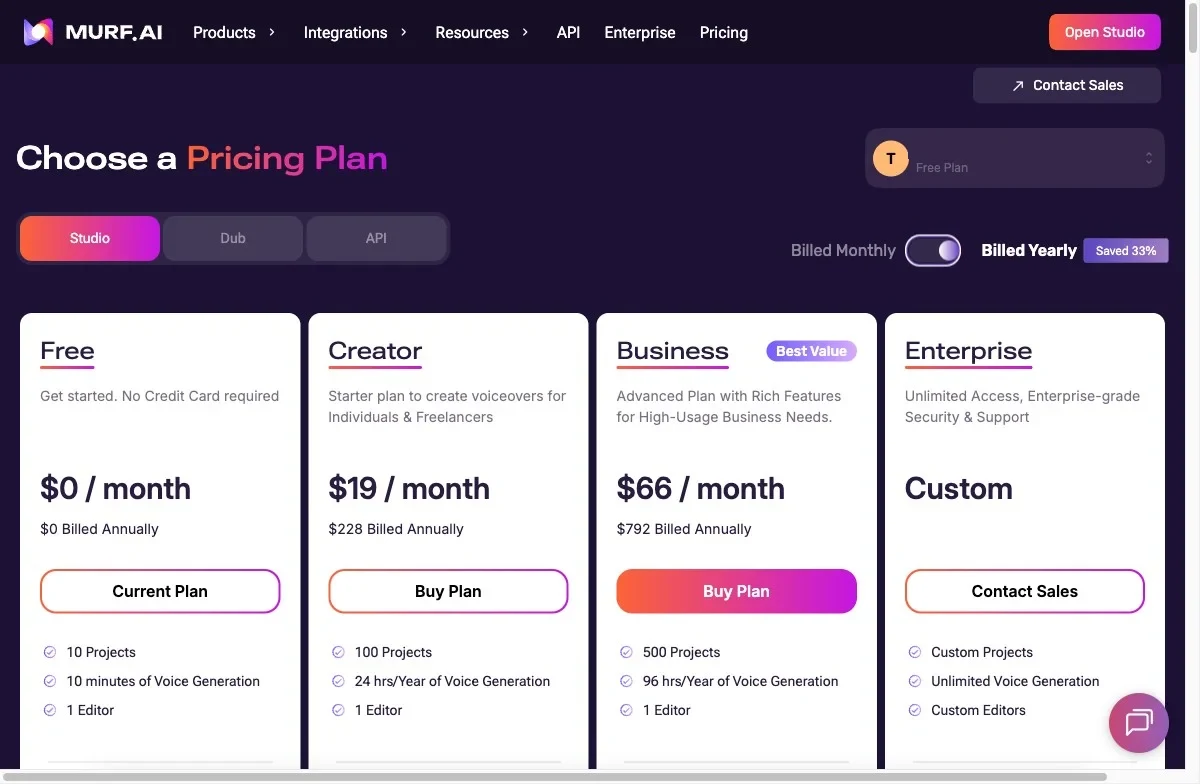
Here is every public tier as of July 2026, pulled from the live pricing page on the annual view. Older reviews still quote different tier names and hour counts; those are stale. The current lineup is four tiers, and the two in the middle are the only ones most people choose between.
| Plan | Monthly | Billed annually | Voice generation | Projects | Editors | Commercial |
|---|---|---|---|---|---|---|
| Free | $0 | $0 | 10 min total | 10 | 1 | No (preview only) |
| Creator | $29/mo | $19/mo ($228/yr) | 24 hrs / year | 100 | 1 | Yes |
| Business | $99/mo | $66/mo ($792/yr) | 96 hrs / year | 500 | 1 | Yes |
| Enterprise | Custom | Custom | Unlimited | Custom | Custom | Yes |
Free is a demo, not a plan. Ten minutes of total generation, ten projects, one editor, watermarked previews, and no downloads or commercial rights. It is genuinely useful for one thing: hearing the 200-plus voices against your own script before you pay. It cannot finish a real project, and it is not meant to.
Creator at $19 a year-at-a-time ($29 monthly) is the real entry point and the minimum for anything commercial. It opens up all 200-plus voices and styles, the MultiNative voices that switch language mid-sentence, unlimited watermark-free downloads, commercial rights, and the Canva integration. The limits are the 24 hours of yearly generation and the single editor seat. For a solo course creator or a freelancer making a handful of videos a month, it fits.
Business at $66 a year-at-a-time ($99 monthly) is “everything in Creator, plus” more of it. You get 96 hours of yearly generation, 500 projects, a business license, and a set of pro controls Creator doesn’t have: Emphasis, Variability, Say It My Way, PowerPoint integration, Audio to Text transcription, and Murf’s voices inside Windows apps. It is the tier agencies and daily publishers land on, and the reason is the hours and the project capacity, not a better voice — the voices are identical to Creator.
Enterprise is custom-quoted and is where Murf parks everything a large or regulated buyer needs: unlimited generation, Sharing and Collaboration, AI Translation, single sign-on, no training on your data, an MSA, an IT security assessment, PO and invoicing, a Customer Success Manager, and the Custom Voice Clones add-on. There is no public price, so it is a sales conversation, not a checkout. If you’re an individual or a small team you’ll never touch it. If you’re an L&D department at a bank, it’s the only tier that fits.
One line worth reading twice: the two features people most often reach for next — voice cloning and real team collaboration — both live on Enterprise, not on the plans you can buy yourself. More on that under the traps.
What the hours really buy
The yearly hour count sounds generous until you map a real project onto it. Twenty-four hours of audio a year feels like plenty right up to the moment you divide it by a weekly show. The table below runs the arithmetic on the projects people actually make, in finished audio, before any re-rolls.
| Project | Finished audio / year | Comfortable on |
|---|---|---|
| A 20-lesson online course (10 min each) | ~3.3 hrs | Creator, with huge headroom |
| A weekly 20-min podcast (×52) | ~17 hrs | Creator, but re-rolls eat the rest |
| A single 8-hour nonfiction audiobook | ~8 hrs (12+ with re-records) | Creator for one; Business for two |
| A faceless channel: 5 × 8-min videos/week | ~35 hrs | Business (overflows Creator) |
| Daily 5-min social clips (×260) | ~22 hrs | Creator on the edge; Business for safety |
Read the podcast row carefully, because it’s the one that catches people. A weekly 20-minute episode is about 17 hours of finished audio a year. That leaves roughly 7 hours of the Creator budget for every re-record, pickup, and intro tweak across the whole year — and generation counts re-rolls, so a show that chases a clean read burns through that cushion fast. Bump the episode to 30 minutes and you’re at 26 hours, over the Creator ceiling before you’ve fixed a single line.
Courses are the opposite story, and they’re Murf’s home turf. A 20-lesson certification course is a little over three hours of finished narration, so Creator’s 24 hours could carry five or six of them a year. If your work is structured e-learning, the hours are a non-issue and the project system is the reason to be here.
Now the value, because per-hour is the honest way to compare voice tools. On Creator you’re paying $228 a year for 24 hours, which is $9.50 per finished hour of audio. Business lands at $8.25. Billed monthly those rise to $14.50 and $12.38, since you’re paying the higher sticker for the same hours.
| Plan | Price | Audio budget | Cost per hour |
|---|---|---|---|
| Murf Creator (annual) | $228/yr | 24 hrs/yr | $9.50 |
| Murf Creator (monthly) | $29/mo | 2 hrs/mo | $14.50 |
| Murf Business (annual) | $792/yr | 96 hrs/yr | $8.25 |
| Murf Business (monthly) | $99/mo | 8 hrs/mo | $12.38 |
| ElevenLabs Creator (monthly) | $22/mo | ~2 hrs/mo | ~$11 |
| ElevenLabs Creator (annual) | ~$18.33/mo | ~2 hrs/mo | ~$9.17 |
Against professional voice actors at $100 or more an hour, any of these is a clear saving. Against ElevenLabs the gap is narrower than Murf’s annual rate first suggests. ElevenLabs’ $22 Creator plan runs about $11 an hour billed monthly, but it also discounts annually to roughly $9.17 an hour, a hair under Murf Creator’s $9.50. So Murf never clearly wins on the price of the voice itself. Its real case is the studio wrapped around the voice, not a cheaper per-hour rate, which is the same verdict our Murf AI review reaches on quality.
The costs the pricing page soft-pedals
Every point below is something you can check against a named source, not a vague “users say.” These are the surprises that land after you subscribe.
| The catch | What it costs you | How to handle it |
|---|---|---|
| Cloning is Enterprise-only | A sales call and a custom quote to clone your voice | Use ElevenLabs ($22 Creator) if cloning is the point |
| Hours count re-rolls | The yearly budget drains faster than the number | Budget hours for generation, not finished audio |
| Free tier can’t publish | No downloads, no commercial rights | Move to Creator ($19 annual) before you ship |
| Team editing is Enterprise | One editor seat on every self-serve plan | Don’t buy Business expecting co-editing |
| Monthly billing costs ~34% more | The same plan, a third pricier | Commit annually if you’ll use it past a few months |
| API is billed separately | A second bill on top of the subscription | Budget twice if you’re driving voices from your app |
Voice cloning is locked to Enterprise
This is the limitation that catches the most people. Murf’s Custom Voice Clones are an Enterprise-only add-on — the feature does not appear on Creator or Business, and the cloning page sends every visitor to Contact Sales with no public price and no self-serve flow. It is a feature you negotiate, not a button you press.
The contrast is stark. ElevenLabs includes instant voice cloning on its $22/mo Creator plan, from a short sample, self-serve. If your plan is to scale content in your own voice — a YouTuber, a podcaster, a personal brand — Murf effectively asks you to talk to sales for a number it won’t publish, while a cheaper tool hands you the same capability at checkout.
The hours count every re-roll
Because the meter charges generation time, the “24 hours” is 24 hours of generation, not 24 hours of audio you keep. Hands-on reviewers make the same complaint in plainer words: the allowance drains fast unless your scripts stay short, and you end up rationing output to make the plan last the year. The fix is to estimate your finished-audio needs and then pad for the re-records you know you’ll do.
The free tier can’t be used commercially
Free gives you 10 minutes of total generation, but the output is a watermarked preview with no downloads and no commercial license. Anything you plan to publish or sell has to come from a paid plan, so treat Free as an audition booth, not a trial you can ship from.
Team collaboration is also an Enterprise wall
Murf markets itself to teams, but every self-serve plan — Free, Creator, and Business — includes exactly one editor seat. Sharing and Collaboration only appear on Enterprise. A two-person studio that buys the $66 Business plan expecting to co-edit will find that one person edits at a time, and the collaboration Murf advertises is again a sales conversation.
Monthly billing quietly costs a third more
The annual discount isn’t a rounding error. Creator is $29 billed monthly against $19 billed annually, and Business is $99 against $66 — roughly 34% off on each, but only if you pay a full year upfront. There is no middle path; the cheaper number requires the commitment, so month-to-month is the premium you pay for flexibility.
API access is a separate bill
If you want to drive Murf voices from your own app or automation, the API is priced separately from these Studio subscriptions. That means budgeting twice: once for the Studio plan your team uses, and again for the metered API calls your product makes. For most creators this never comes up; for developers, it’s a line item the pricing page doesn’t surface next to the plans.
Which Murf plan should you pick?
The plan follows the work, not the other way around. Match your situation to one of these:
- Just auditioning the voices — stay on Free. Ten minutes is enough to judge whether Murf’s voices suit your content before you pay a cent, and that’s exactly what it’s for.
- A solo course creator or freelancer — Creator at $19 annually. Commercial rights, all 200-plus voices, and 24 hours a year that comfortably covers structured e-learning and a modest video output. Start here when in doubt.
- A weekly podcaster — Creator, but do the arithmetic first. A 20-minute weekly show fits with a tight cushion; a 30-minute one overflows it and points to Business.
- A daily publisher, agency, or high-volume channel — Business at $66 annually, for the 96 hours and the 500-project capacity, plus the transcription and PowerPoint tools. You’re buying the hours and the organization, not a better voice.
- You need voice cloning, SSO, or real team editing — Enterprise, because none of those exist on the self-serve plans. Get a quote before you assume it’s affordable.
- Skip Murf’s paid plans entirely if cloning your own voice is the whole job, or voice is a rare, occasional task. In the first case ElevenLabs is cheaper and self-serve; in the second, you don’t need a subscription metered in hours.
How to keep the Murf bill down
Three levers move the number, and the first is the obvious one: pay annually. It is a flat ~34% cut on both paid plans, turning Creator from $29 to $19 and Business from $99 to $66 — the single biggest saving on offer, as long as you’re confident you’ll still be using the tool past a few months.
The second lever is drafting discipline. Because the meter charges generation time, the cheapest habit is getting the script right in text before you ever press generate. Lock your voice choice on the free plan or with a few short test lines, tighten the wording so you’re not re-rolling to fix your own copy, then generate the final version once. On a tool metered in hours, a clean first pass is money in the bank. Re-rolling a ten-minute script five times to chase a reading can quietly cost you close to an hour of your yearly allowance for one finished clip.
Third, buy for the hours you’ll actually use and size up only when the meter tells you to. Murf lets you change plans, so the safe opening move is Creator, two or three months of real work, and a jump to Business only once you’re brushing the 24-hour ceiling. One caution before you commit past the free plan: our hands-on review found Murf’s refund window is tight, capped at 24 hours and a few minutes of use, so make your call during the free audition, not after the charge clears.
| Lever | The saving | The catch |
|---|---|---|
| Pay annually | ~34% off ($29→$19, $99→$66) | A full year committed upfront |
| Draft in text first | Fewer re-rolls, more hours kept | Requires discipline before you generate |
| Start on Creator, size up later | Only pay Business once you need the 96 hours | You have to watch the meter, not the calendar |
If the hours or the cloning don’t fit: cheaper routes
Murf earns its keep for the team-and-course buyer, and on the annual rate the per-hour cost is fair. But two situations point somewhere else before you commit, and both are worth a look.
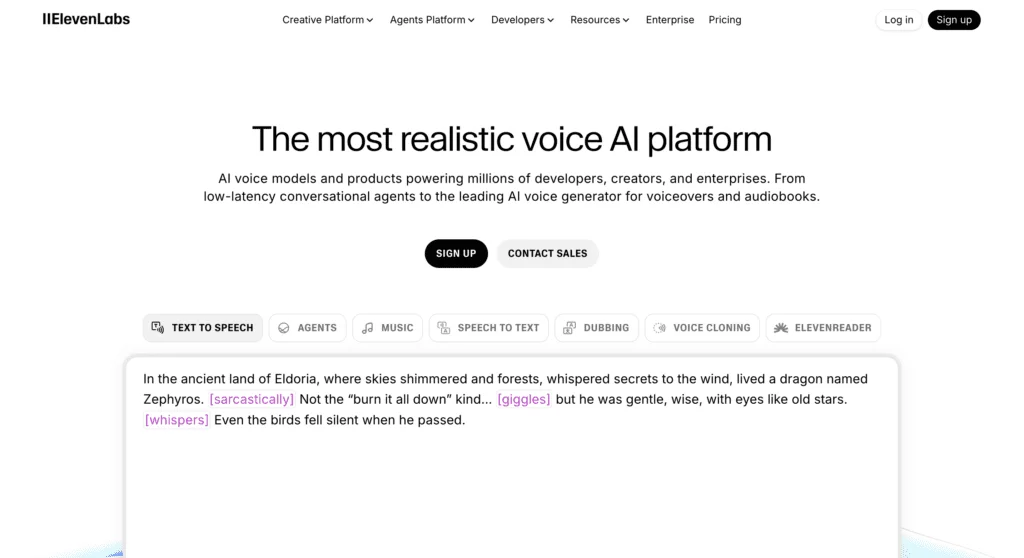
If the voice itself is the deliverable — audiobooks, character work, or a brand voice you want to clone — ElevenLabs is the better call. It leads on raw realism, and it includes instant voice cloning on its $22/mo Creator plan, the exact feature Murf reserves for an Enterprise quote. Our full ElevenLabs pricing guide breaks down how its credit meter compares to Murf’s hours, and ElevenLabs vs Murf runs the two head-to-head on price and quality.
And if cloning is specifically what sent you shopping, start with the field rather than a single tool. Our best AI voice cloning roundup lines up the tools that actually let you clone a voice self-serve, at a published price, without the sales call Murf requires.
Final word
Murf AI pricing is honest once you translate it. Free to audition, $19 a month billed annually for the plan most creators need, $66 for the volume and tools a team wants, and a custom Enterprise quote for cloning, SSO, and collaboration. The only real trap is reading the dollar price as the whole cost — the meter is hours, not dollars, and it charges you for every re-roll, so size the plan to the audio you’ll generate rather than the audio you’ll keep.
Start on the free plan, run your own script through a few voices, then pick the tier by your real yearly hours instead of the sticker on the page.
Frequently asked questions
How much does Murf AI cost?
Murf has four tiers. Free is $0, Creator is $29/mo billed monthly or $19/mo billed annually ($228/year), Business is $99/mo monthly or $66/mo annually ($792/year), and Enterprise is custom-quoted.
Annual billing cuts about a third off both paid plans, so the honest sticker price for the plan most people need is $19 a month, paid a year at a time. Commercial use starts on Creator; the free plan is preview-only.
Is Murf AI free?
There is a free plan, but it is a demo, not a workspace. You get 10 minutes of total voice generation, 10 projects, and one editor, with no downloads and no commercial rights — every export is a watermarked preview.
It is enough to judge the voices and click around the editor, which is exactly what you should use it for. It is not enough to finish or publish a single real project, so anything you plan to sell needs at least the $19/mo Creator plan.
Does Murf AI include voice cloning?
No, not on the plans you can buy online. Voice cloning (Murf calls it Custom Voice Clones) is an Enterprise-only add-on — it does not appear on Creator or Business at all, and the cloning page routes everyone to Contact Sales with no public price.
For comparison, ElevenLabs includes instant voice cloning on its $22/mo Creator plan. So if cloning your own voice is the reason you're shopping, Murf is the expensive, sales-call route and a cheaper option exists elsewhere.
What's the difference between Murf Creator and Business?
Both cover all 200-plus voices, unlimited downloads, and commercial rights. Creator ($19/mo annual) gives 24 hours of voice generation a year and 100 projects; Business ($66/mo annual) gives 96 hours a year, 500 projects, and adds a business license, audio-to-text transcription, PowerPoint integration, and the emphasis and variability controls.
The deciding factor is volume, not features. If two hours of generated audio a month covers you, Creator is enough. If you publish daily or run several clients, the jump to 96 hours a year is what you're paying for.
How much do you save with Murf annual billing?
About a third. Creator drops from $29/mo billed monthly to $19/mo billed annually, and Business drops from $99 to $66 — both roughly 34% cheaper if you commit to a full year upfront. There is no cheaper monthly path; the discount only exists on the annual contract.
Why is Murf metered in hours per year?
Murf sells each plan a voice-generation allowance measured in hours, and on annual billing it quotes that allowance per year — 24 hours on Creator, 96 on Business. The meter counts generation time, so every re-roll to fix a clumsy reading spends from the same budget as the final take.
That matters because the hours run out faster than the number sounds. A weekly 20-minute podcast is already about 17 hours of finished audio a year before you re-record anything, so heavy users hit the ceiling well before light users would guess.
Keep reading
Murf AI review: the studio sells it, not the voice
I ran my own scripts through Murf's Studio. The voices are polished and the all-in-one studio is the real draw, but the value and cloning aren't here.
Best ElevenLabs alternatives: which one replaces it?
The best ElevenLabs alternative depends on why you're leaving. I lined up Murf, Descript, Cartesia and 4 more against the one job each actually wins.
Best AI voice generator: what an hour of audio really costs
ElevenLabs wins on voice and costs $10.91 an hour. We normalised six AI voice generators plus open-source to one unit: the cost of an hour you can publish.
Best AI voice cloning: which tool actually sounds like you?
ElevenLabs is the best AI voice cloning tool overall, but the right pick depends on whether you're cloning your own voice, building an app, or want it free.