
ElevenLabs review: the best AI voice, billed by the credit
I ran my own scripts through ElevenLabs: the voices are a clear class above everything else, but the credit pricing punishes heavy use. Here's the verdict.
Contents
Is ElevenLabs worth it?
For most creators, yes. ElevenLabs is the best AI voice tool you can pay for in 2026, and I score it 4.7 out of 5, a Category Leader. The gap to second place is wide enough that the real question is not whether to use it but which plan you need. The voices I generate breathe and place emphasis on meaning in a way cheaper text-to-speech still cannot match.
The one real catch is the credit-based pricing: every regeneration is billed, so heavy users burn through an allowance faster than the headline minutes suggest, and unused credits vanish when you cancel (ElevenLabs sits at 3.2 out of 5 on Trustpilot, mostly over exactly that). Start free to hear it, then move up by your monthly minutes.
What it does
ElevenLabs turns text into speech that does not announce itself as synthetic in the first sentence. I paste a script, pick a voice, and the output breathes, pauses, and puts emphasis where the meaning sits.
That core text-to-speech is the reason to be here. It is what the r/ElevenLabs regulars mean when they call it “by far the leader” for instant generation, and after running my own scripts through it I agree: everything else the platform does orbits that one strength.
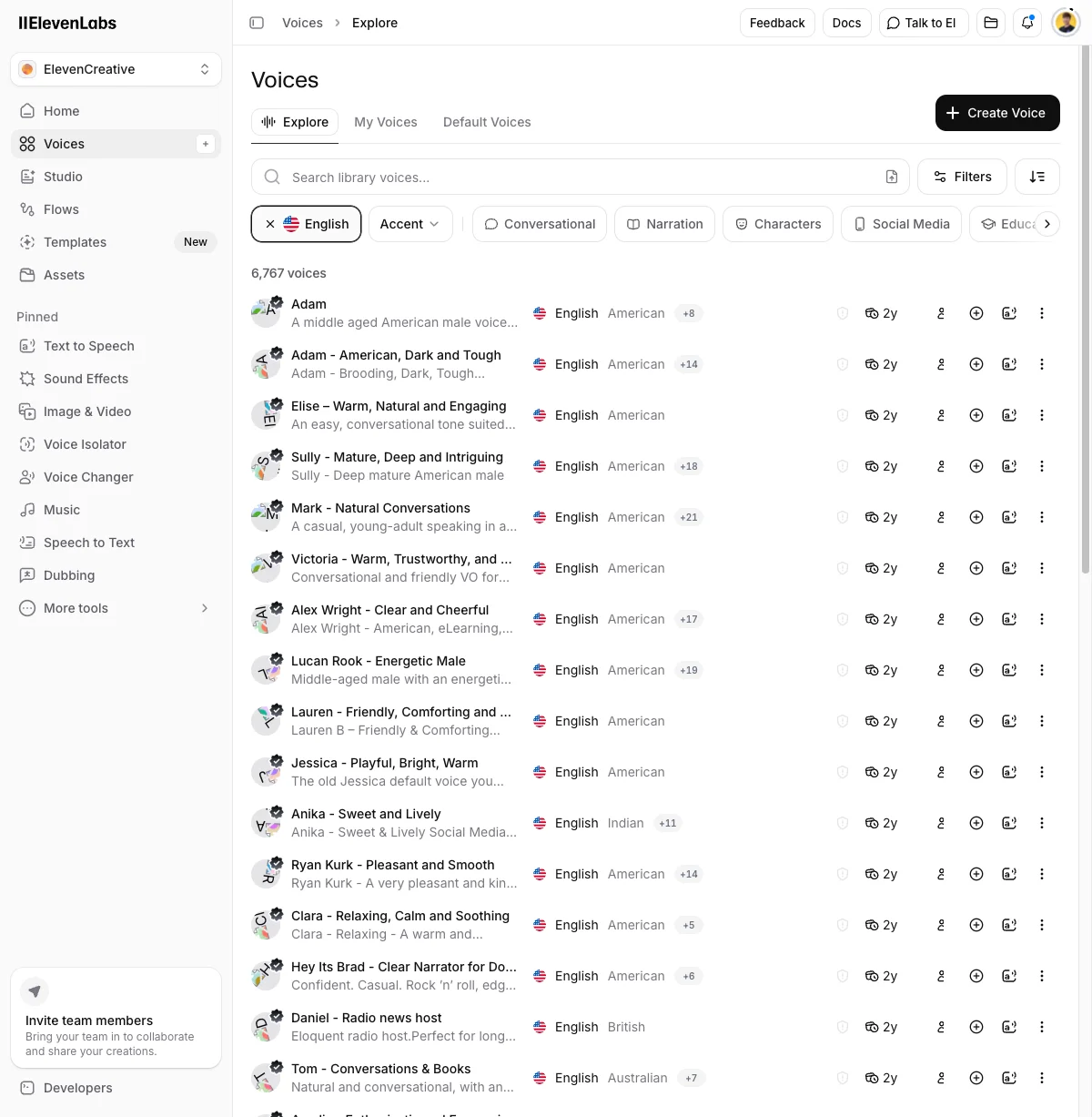
Around the core sit three more jobs. Voice cloning copies a specific voice and reads any script in it, with two tiers that behave differently (the naming costs people money, so it gets its own entry under The bad).
Dubbing translates and re-voices existing audio or video into dozens of languages while keeping the original speaker’s character. And an API with official Python and JavaScript SDKs exposes the same voices to developers, which is why a lot of apps and voice agents you have used recently sound the way they do.
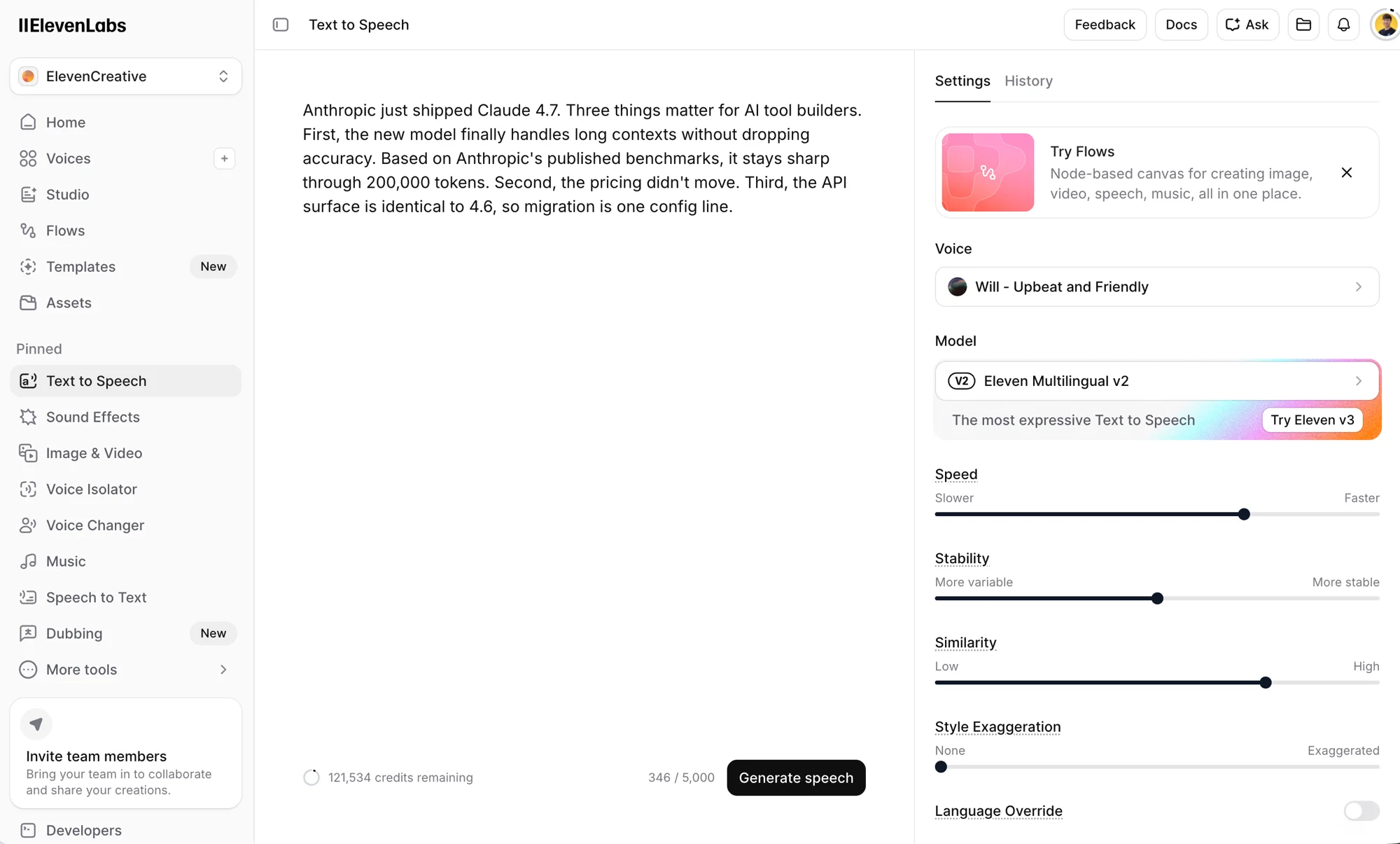
Most of the result comes from three controls. Stability trades expressiveness for consistency: low stability gives range and the occasional odd reading, high stability gives a flatter but predictable take. Similarity sets how hard the model hugs the reference voice, and Style pushes toward a more dramatic delivery.
The setting I settle on for narration is mid-stability with high similarity, then a second pass on any line that reads wrong. Character work drops stability and raises style, and I accept that one take in five needs a re-roll.
The sliders live in the Speech Synthesis panel, and the defaults are a reasonable starting point rather than a trap. A speaker-boost toggle sharpens similarity on cloned voices, and the V3 model’s emotional tags handle what the Style slider cannot, like marking a single clause to be read as a whisper.
None of it is hard to learn. The real skill is knowing when to stop adjusting, because every regeneration that chases a marginally better read spends credits you will want back later in the month.
The toolkit is wider than text-to-speech alone. It ships sound effects generated from a prompt, a voice isolator that strips background noise, a voice changer that recasts your own delivery while keeping your timing, and voice agents for building something that talks back in real time.
The current V3 model adds emotional audio tags, so you can mark a line to be read as a whisper or with excitement instead of fighting the sliders for it. Few competitors ship that range under one subscription.
You reach a voice three ways. The Voice Library is a catalog of thousands of community and professional voices you can filter by accent, age, and use case. Voice Design generates a brand-new voice from a text prompt when nothing in the library fits. Cloning copies a real one.
In my own use I have rarely needed to clone anything. The library plus a designed voice covers a surprising amount of narration, which is the practical point most creators running real channels land on too.
If you want a starting point, here are three I keep coming back to: a calm voice for meditation or explainer work, a brisk one for tech and news reads, and a British storyteller voice for fiction. I audition three or four against my own script before settling, because the right match depends on your pacing as much as the voice itself. Here is the same line in three of those picks:
Voice Design is the fallback when the catalog does not have what I want. I describe the voice in a sentence, generate a few candidates, and keep the one that fits. It is the step most people skip, and it is usually the difference between sounding like every other channel and sounding like yours.
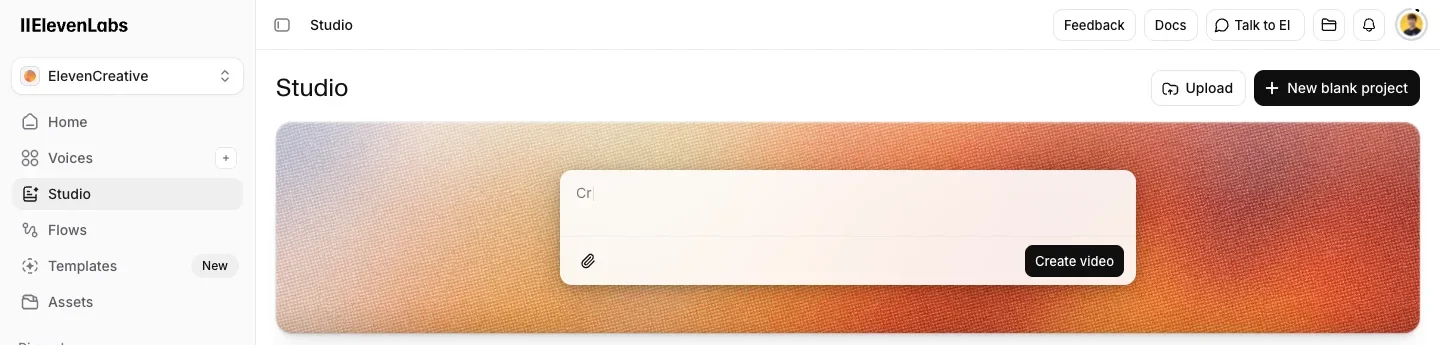
For anything longer than a clip, the Studio editor imports a script, splits it into paragraphs, and lets me regenerate any block on its own. That is what keeps a 2,000-word pass from drifting in tone.
Pricing — what the credits really buy
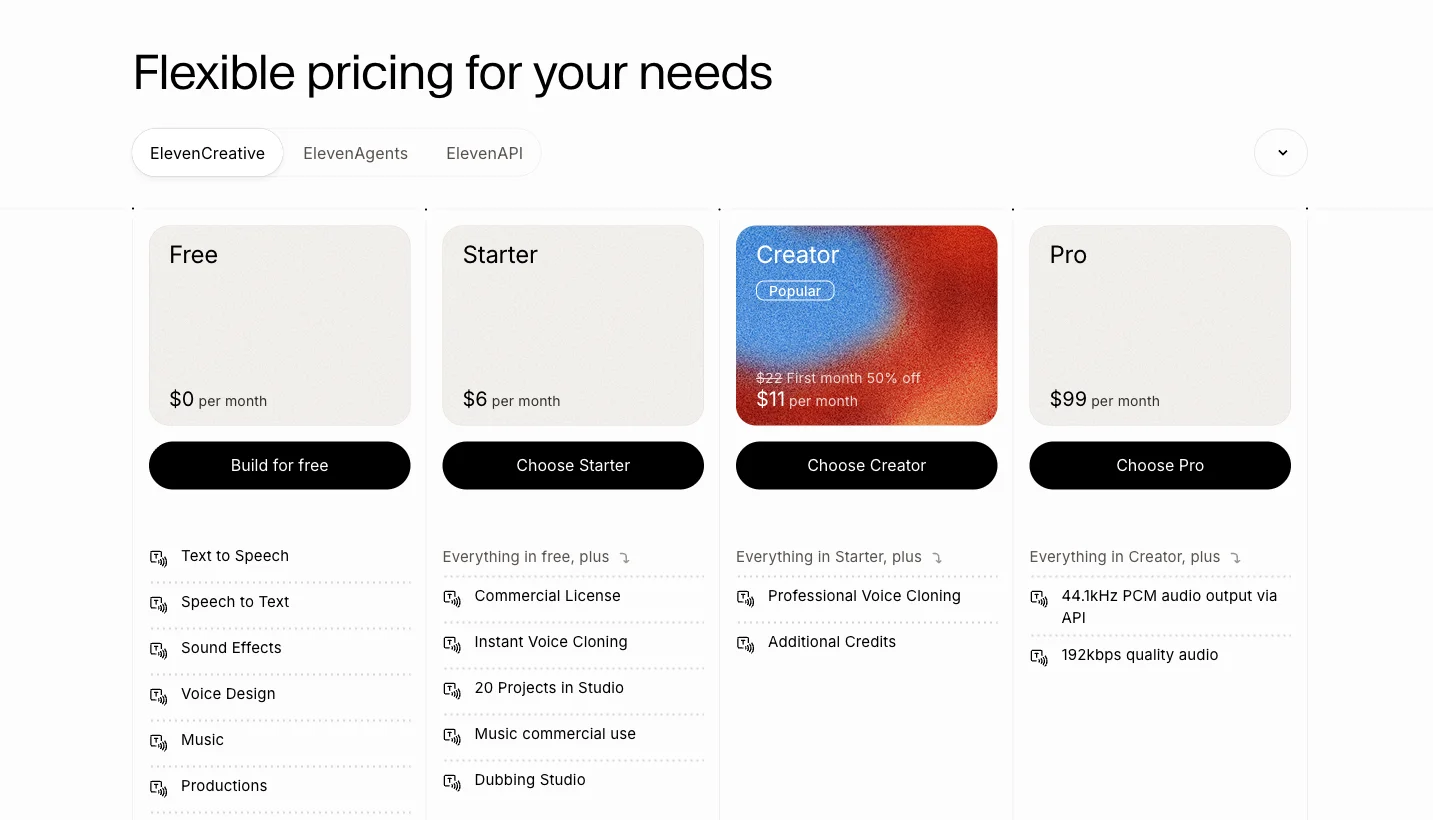
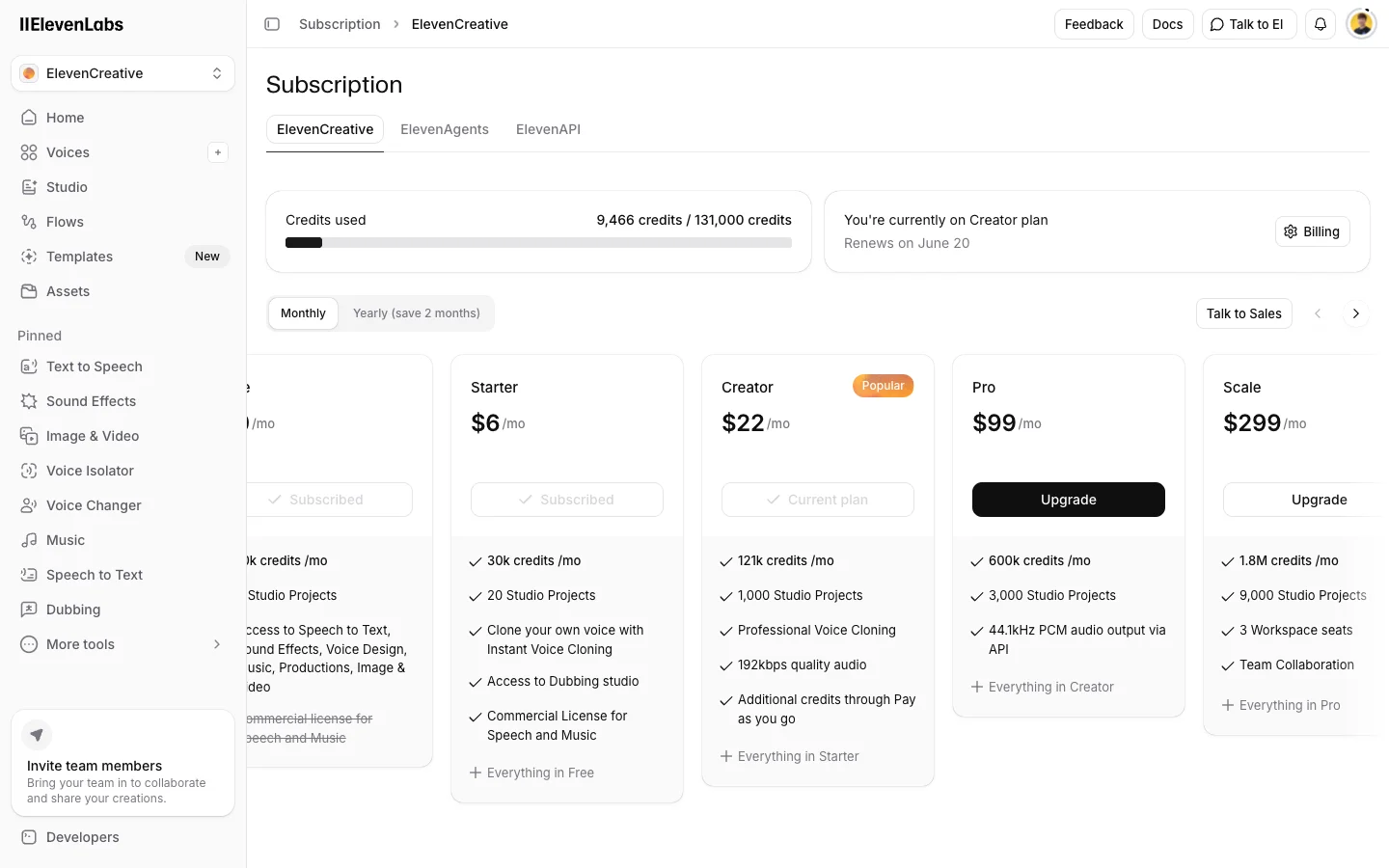
ElevenLabs meters everything in monthly credits, where roughly 1,000 credits buys one minute of speech. The plans, current as of June 2026:
| Plan | Price | Credits / month | ~Minutes | Cloning | Commercial license |
|---|---|---|---|---|---|
| Free | $0 | 10,000 | ~10 | None | No |
| Starter | $6/mo | 30,000 | ~30 | Instant | Yes |
| Creator | $22/mo | 121,000 | ~121 | Professional | Yes |
| Pro | $99/mo | 600,000 | ~600 | Professional, 192 kbps | Yes |
Read that table once and the tiers sort themselves. Free is a demo: 10 minutes and no commercial license means it exists to let you hear the quality before you pay.
Starter at $6 is the real entry point. It is the cheapest plan that lets you sell what you make, and it adds Instant Voice Cloning.
Creator at $22 is the one most people need. The ~121 minutes covers a steady podcast or a weekly channel, it is the first plan with Professional Voice Cloning, and the first month is half price. Pro at $99 buys volume and 192 kbps exports, not better base quality; the voices are the same.
The catch the pricing page soft-pedals is that the minute counts assume you nail every take on the first try. You will not. A 10-minute script you regenerate five times while dialing in stability is closer to 50 minutes of billed audio, and on my own account that gap showed up fast.
So the realistic ceiling on Creator is well under the headline 121 minutes. This is the single most common surprise in the reviews, and it is the reason to budget one tier up.
It helps to estimate before you commit. Credits map roughly one-to-one to characters, and about 1,000 characters is a minute of speech, so a 1,500-word blog script runs near 9,000 characters — well under a tenth of the Creator allowance in a single render.
Two money-savers fall out of that math. First, write and proof your script as text before you generate anything, so you are not spending credits to hear your own typos read aloud. Second, if all you need is one steady narrator, Instant Voice Cloning on the $6 Starter plan covers it.
If you know you are staying, annual billing lowers the per-month cost on each tier, and it is the only discount worth planning around. The half-price first month on Creator is a one-time nudge, not a recurring saving, so do not factor it into the long-run cost.
My honest value read: ElevenLabs is expensive per minute and still worth it when the voice is the product, and hard to justify when it is a nice-to-have.
For the full plan-by-plan breakdown — how the credit system works, the Pay As You Go overage behavior, the annual math, and which tier fits which workload — see our dedicated ElevenLabs pricing guide.
Who it’s for
- Video creators and YouTubers who need a consistent, believable narrator without booking a booth. Start on Starter, move to Creator when the minutes run short, and lean on the library before you ever clone a voice. This is the use case the tool is most obviously built for.
- Podcasters patching pickups or producing whole episodes. Creator’s ~121 minutes is the right shape for a weekly show, and the Studio editor lets you regenerate a single fluffed line instead of re-recording a segment.
- Course and audiobook makers who want one cloned narrator across hours of material. This is the Professional Voice Cloning case, so Creator or Pro, but budget editing time on top of generation time, because even strong narration still needs a human pass for pacing and pauses.
- Developers wiring speech into an app or a voice agent, who care most about the API, the lower-latency model, and the voice library. The shared credit pool means a chatty agent can drain a plan fast, so price agent traffic against Pro.
- Multilingual creators who want one video re-voiced into several languages from a single upload, then corrected on the Dubbing Studio timeline before export.
- Not for: anyone who needs a few minutes of voiceover once a month. A free or cheaper text-to-speech tool is fine, you do not need the best, and the monthly credit floor is wasted on light use. It is also the wrong fit if you expect a one-click finished audiobook, since the pacing always needs a human pass before it is shippable.
The good
Seven reasons it earns the 4.7, in the order a buyer should weigh them.
Voice realism a clear step above the field
A 4.5 / 5 across more than a thousand G2 reviews, and the r/ElevenLabs regulars call it the leader for instant generation. The voices breathe and place emphasis on meaning, which is the part cheaper text-to-speech tools miss. In my own listening it holds up on the first take, not just in a cherry-picked demo, and the quality stays consistent across the catalog rather than living in two or three hero voices.
A library deep enough to skip cloning
The catalog runs to thousands of voices, from calm meditation guides to brisk tech-news reads to British storytellers. I settled on a signature sound without ever touching a microphone, so for most creators the library plus one designed voice is the whole job. That also keeps you off the higher tiers that cloning pushes you toward.
Two cloning paths at two price points
Instant Voice Cloning lands on the $6 Starter plan and copies a voice from a short sample in seconds, which is enough for a consistent narrator across a series. Professional Voice Cloning on the $22 Creator plan trains a higher-fidelity model from longer audio, with the gain showing up on emotional range and long-script stability. Both paths require a consent check that you own the voice. If cloning your own voice is the main reason you are here, weigh ElevenLabs against the field in our best AI voice cloning guide.
Here is the instant path on my own voice, reading a line I never recorded:
Multilingual output and dubbing competitors envy
One upload re-voices into dozens of languages — 70+ on the newest v3 model, 29 on the multilingual v2 — while keeping the speaker’s character, and the Dubbing Studio gives you a timeline to fix the transcript, translation, and timing before export. That correction step is the difference between a gimmick and a tool.
A first-class API, not an afterthought
The same account and credits drive the web app and the official Python and JavaScript SDKs, so what you prototype in the browser is what you ship. A lower-latency model handles realtime voice agents. That continuity from prototype to production is the strongest reason to pick it over an editor-first tool.
from elevenlabs.client import ElevenLabs
client = ElevenLabs(api_key="YOUR_API_KEY")
audio = client.text_to_speech.convert(    voice_id="JBFqnCBsd6RMkjVDRZzb",      # any library or cloned voice    model_id="eleven_multilingual_v2",    text="Welcome to the show.",)
A real long-form workflow
The Studio editor imports a script, splits it into blocks, and lets me regenerate only the lines that read wrong instead of re-rolling a whole chapter. That per-block control is what keeps hours of narration from drifting in tone, and it is why audiobook work is viable here at all. If that is your use case, our best AI voice for audiobooks guide covers the publishing side too.
More than text-to-speech under one login
Sound effects generated from a prompt, a voice isolator, a speech-to-speech voice changer, and the V3 model’s emotional tags all sit under one subscription. Most rivals make you stitch two or three tools together to match the range. One login, one credit pool.
The bad
The trade-offs are real, and most of them trace back to one thing: how credits are priced.
Credits scale into real money fast
This is the most-cited complaint, and the one the marketing pages bury. On my own Creator account I watched a single project eat into the monthly allowance quickly, because every regeneration is billed and the headline minutes are an optimistic ceiling. Budget one tier up from whatever the numbers suggest.
Unused credits disappear when you cancel
ElevenLabs holds a 3.2 / 5 on Trustpilot across nearly a thousand reviews, and the top complaint is blunt: “elevenlabs took back my remaining credits” after a cancellation. Spend your balance down before you cancel, not after. Credits do not roll over the way a prepaid balance would.
Long single-pass generations drift
Across thousands of words in one session, the voice stability can slip — something I have run into, and a recurring note in community reports. The fix is generating block by block in Studio. If you were hoping to paste a whole chapter and export in one shot, that is not the tool’s strength yet, so plan around paragraphs.
The free tier is tiny
Ten minutes a month and no commercial license, per the pricing page, is gone in an afternoon of testing. It is enough to judge quality and nothing more. Treat it as an audition, not a plan you can ship from.
Editing is less granular than a human voice actor
G2 reviewers note that fine inflection and pacing control is limited next to directing a real performer, and that matches my experience. The sliders and the V3 tags get you close, but a specific reading sometimes needs several re-rolls, and each one spends credits. For most narration it is a non-issue; for tightly directed character work it is a real ceiling.
Two cloning features wear near-identical names
Instant versus Professional Voice Cloning is a real, paid distinction, and the credit allotments differ by tier, but the names do not signal that. Churn threads describe people paying for the tier they did not need. Work out which path your project requires before you upgrade.
Audiobook output still needs a human pass
Even at its best, the output needs a human pass: you fix pacing, add pauses, and adjust the manuscript for audio before the result is shippable. The narration is strong; the one-click finished audiobook is not real yet. Budget editing time, not just generation time.
Alternatives worth considering
If you decided ElevenLabs is not for you, here is where to look — not because these beat it overall, but because each wins a specific case.
- Murf — if you would rather not leave a timeline editor to generate audio. Murf is built around an editor that syncs voiceover to slides, which fits explainer and corporate work better than ElevenLabs’ generate-then-export flow. See our Murf review, or the full ElevenLabs vs Murf head-to-head.
- Descript — if the voice is one part of a full video edit. Descript’s Overdub lives inside a complete audio-and-video editor, so you fix the voiceover and cut the video in one place. See our Descript review, or compare them in ElevenLabs vs Descript.
- Cartesia — if you are a developer chasing the lowest possible latency for a realtime voice agent. It is newer and thinner on features, but worth a look for that one job; we put them side by side in ElevenLabs vs Cartesia.
For the wider field — open-source models, budget voiceover tools, and the rest — see our full roundup of the best ElevenLabs alternatives. For the category ranked by cost per finished hour rather than by what replaces ElevenLabs, see best AI voice generator.
Final word
ElevenLabs earns its 4.7 because the voice quality is a genuine class above the field, the cloning is the best most creators can buy, and the API makes it the default for anything that needs to talk. For narration, podcasts, audiobooks, dubbing, and voice agents, nothing else comes close right now.
The only real brake is the credit pricing, which punishes the heavy use the features invite. Go in knowing that, draft your scripts as text before you generate so you are not paying to hear your own typos, and it pays for itself quickly. Start free to hear the voices, then pick the plan by your monthly minutes, not the feature list.
Frequently asked questions
Is ElevenLabs free to use?
Yes, the Free tier gives 10,000 credits a month (about 10 minutes of speech). It has no commercial license and no voice cloning, so it is for testing, not publishing.
Can I use ElevenLabs audio commercially?
Commercial use starts on the $6/mo Starter plan. Every paid tier includes a commercial license; the Free tier does not.
What is the difference between Instant and Professional Voice Cloning?
Instant Voice Cloning (from Starter) copies a voice from a short sample in seconds. Professional Voice Cloning (from the $22/mo Creator plan) trains a higher-fidelity model from 30+ minutes of audio and is not instant.
Does ElevenLabs have an API?
Yes. The same account and credits cover the web app and the API, with official Python and JavaScript SDKs. It is a common pick for adding speech to apps and voice agents.
Why did ElevenLabs charge me after I cancelled?
Several Trustpilot reviewers report that unused credits are removed when you cancel rather than carrying over. Spend your remaining credits before you cancel, not after.
Keep reading
ElevenLabs vs Cartesia: creator quality vs agent speed
ElevenLabs owns voice quality and catalog; Cartesia owns sub-100ms speed. I tested both, including cloning my own voice in each. Here's which AI voice wins.
ElevenLabs vs Descript: voice engine vs editing suite
ElevenLabs makes the best AI voice; Descript is the editor that even runs ElevenLabs inside it. Here's which you actually need, and when to use both.
ElevenLabs vs Murf: the cheaper one is your script
Murf bills by audio duration, ElevenLabs by characters, so the cheaper voice tool depends on your script's pace, not the price page. I ran the numbers.
ElevenLabs pricing: what the credits really cost
ElevenLabs starts free and most creators pay $22/month — but credits burn faster than the headline minutes. Here's what every plan actually costs.