
Best AI music generator: the three we ran, and what the rest are for
We gave Suno and Udio the same brief on the same day. Suno wins on output. On the licence the field splits three ways, and one tool grants nothing at any price.

Contents
What is the best AI music generator?
Suno, on the only controlled test we have run — and the reason to keep reading is that the tool which makes the best track is not automatically the one you are allowed to use.
We gave Suno and Udio an identical one-line brief on free accounts on the same day. Suno returned four tracks in about seventy seconds and let us export MP3s. Udio returned two and no file at all. That is two tools on one brief, which is a fact rather than a benchmark, and we will not dress it up as more.
| If you want | Pick | Why |
|---|---|---|
| The best all-round generator | Suno | Most output, longest tracks, and a file you can keep |
| To shape the track, not re-roll it | Udio | Length, clip timing and a negative prompt Suno lacks |
| A free tier that lets you keep files | Treblo | OGG, MP3, WAV, FLAC and M4A, and it has no paid tier |
| The most generous licence | Treblo | Assigns you the output, free tier included |
| Royalty-free for client work | Soundraw | Clearest licence terms, if you read the licence page |
How we tested, and what we did not
One brief, typed once into each product’s free tier on the same day, no follow-ups and no second attempts:
Upbeat indie pop for a product demo video, bright electric guitars,warm female vocal, hopeful but not saccharine, clean endingSuno ran at 02:44:57 UTC and had finished by 02:46:04. Udio ran at 05:04:14 and finished by 05:05:19. We then opened every panel each interface exposes, established which controls a free account can actually touch, read both pricing pages on both billing cycles, and tried to get the audio off each platform. The full record is in our Udio vs Suno comparison.
We have run three of the tools on this page: Suno and Udio head to head on one brief, and Flow Music in a separate hands-on review. Everything else here is assessed from the vendor’s own documentation, its pricing pages and its licence, and we say which is which in each entry. We have not heard output from ElevenLabs Music, Soundraw, Mubert, AIVA, Boomy, Loudly, Stable Audio, Treblo, Beatoven or Ecrett, and we are not going to grade music we have not listened to.
That is a real limitation, and it is also why this page exists. When we pulled this search in September 2026, exactly one result on the first page was an independent publication. The rest were a Reddit thread, YouTube videos, and companies in this market ranking their own products under a “best of” headline.
The licence is the thing you are actually buying
Before the tools, the axis that decides more purchases than audio quality does and that almost no roundup covers.
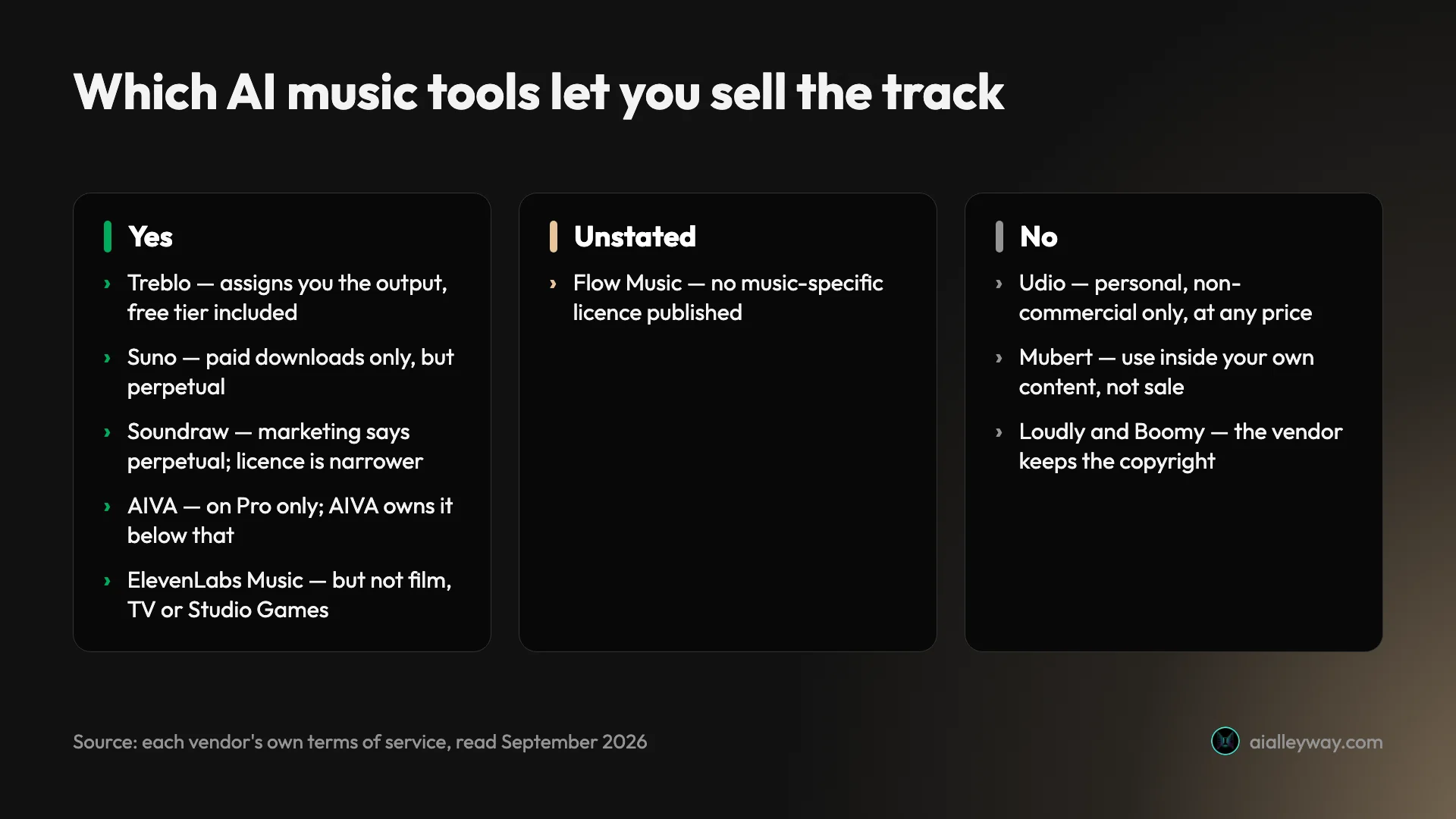
| Tool | Sell the track? | The actual rule |
|---|---|---|
| Treblo | Yes, free tier included | Assigns you the output; no tier condition |
| Suno | Yes | Paid downloads only; perpetual, survives cancellation |
| Soundraw | Yes, with conditions | Marketing says perpetual worldwide; the licence page is narrower |
| AIVA | Only on Pro | Free and Standard: “Copyright owned by AIVA” |
| ElevenLabs Music | Paid, with carve-outs | Excludes film, TV and Studio Games |
| Mubert | No | Pro means use inside your content, not selling music |
| Loudly, Boomy | No | The vendor keeps the copyright |
| Udio | No | “Personal and non-commercial purposes”, no downloads |
| Flow Music | Unstated | No music-specific licence; /terms points at Google’s |
Three things follow from that table, and the first is the one that surprised us most.
The most generous licence here is not the best-known product. Treblo, formerly Sonauto, states in its terms that “You own any right, title, or interest that may exist” in what you generate, that it assigns you “all our right, title, and interest, if any”, and that its commercial-use restrictions “do not limit Your use of Your Outputs” — with no paid-tier condition anywhere in that section. Suno, by contrast, grants commercial rights only on paid downloads and explicitly declines to promise a copyright exists.
Suno’s own announcement states that its trial downloads “are not eligible for commercial use”, so a file on your hard drive is not a licence.
Paying does not always fix it. Udio’s paid plans grant no commercial rights at all — its terms permit output “solely for your personal and non-commercial purposes” and bar downloading output “for any purpose”, with no paid-tier exception anywhere in the document. We had this wrong ourselves until we read it properly.
And permission is not ownership. Suno’s terms assign you whatever it holds and then say it “makes no representation or warranty to you that any copyright will vest in any Output.” We take that apart in can you sell music made with Suno.
1. Suno — the best overall on our test

The one we would pick on output, and the one we have used most. On our brief it returned four tracks from one prompt in about seventy seconds: two playable on the free model at 3:17 and 1:20, and two one-minute previews of the newer model locked behind an upgrade. The upsell is inside the output rather than on the pricing page, which is worth knowing before you count your free generations.
The free tier is the most usable in this roundup: 50 credits a day with no monthly ceiling, roughly ten generations, and real songs rather than watermarked previews. Since 3 September 2026 it also carries up to seven trial downloads for the lifetime of the account, personal use only — and that seven applies to accounts opened before that date. Sign up today and Suno says only that you “may occasionally receive trial downloads”.
| Suno, at a glance | |
|---|---|
| Free allowance | 50 credits a day, no monthly ceiling |
| Free downloads | 7 lifetime, personal use only, accounts opened before 3 Sep 2026 |
| Free model | v4.5-all; the newer model returns locked previews |
| Paid | Pro $10/mo or $8 annually; Premier $30 or $24 |
| Commercial rights | On paid downloads, perpetual, survive cancellation |
Paid is $10 a month for Pro and $30 for Premier, or $8 and $24 billed annually — the same ladder as Udio, to the dollar. The commercial rights attach to songs you download while subscribed, and they are perpetual: cancel and you keep them.
That last property is worth more than it sounds and almost nobody mentions it. Because the rights survive cancellation, a single month of Pro is a legitimate way to license a project’s music: subscribe, download what the project needs, stop paying. What you lose is the ability to download more, not the right to use what you already pulled.
The cap is what makes or breaks that plan. Pro allows 20 downloads a month, so a month buys you twenty keepers, not a library.
The counterweight is the one Suno is honest about. Its terms assign you whatever it holds and then say it “makes no representation or warranty to you that any copyright will vest in any Output”, so you are buying permission to exploit the track rather than an assurance that anyone else is stopped from using it. Treblo’s terms are more generous on exactly this point, which is the finding that reordered the licence table below.
Read our full Suno review and pricing breakdown for the detail, or the how to use Suno walkthrough if you are starting on the free account.
2. Udio — better controls, an unusable free tier, and no licence

The only other tool here we have run, and the one with the better instrument panel. Its Advanced Controls give even a free account a song-length slider, clip timing as start and end percentages, and a manual mode that uses your prompt exactly as written. A Style Reduction field acts as a negative prompt, which Suno’s free interface has no equivalent to, but it is paid-only: clicking it on our free account returned “Please subscribe to unlock this feature”.
Two things stop us recommending it. The free plan exports nothing — the Share dialog offers a public link or an embed and no file, which we checked twice. And the licence grants no commercial use at any price.
Standard is $10 a month or $8 billed annually, Pro $30 or $24 — the same ladder as Suno, to the dollar. Those buy you capability, not rights.
The free allowance is shaped differently from Suno’s and the shape is what catches people. Udio grants 10 credits a day against a hard 100 a month that does not roll over, so the daily number is not the constraint: spend at the maximum for ten days and the month is over. Suno’s 50 a day has no monthly ceiling behind it at all.
Length is the other free-tier limit. Udio’s slider stops at 2:10, where Suno’s free model returned a 3:17 track on our brief. For a two-minute bed under a product demo that is fine; for anything that needs to breathe it is not.
| Udio, at a glance | |
|---|---|
| Free allowance | 10 credits a day, hard 100 a month |
| Free export | None, in any format |
| Max free length | 2:10 |
| Paid | $10/mo, $8 annually; Pro $30, $24 |
| Commercial rights | None, at any tier |
What Udio does better is genuinely better, and it is worth being clear about it since our verdict goes the other way. The controls are the best-designed in this roundup. Manual mode uses your prompt exactly as written rather than embellishing it, clip timing lets you say which slice of the arrangement you want, and the model selector is exposed rather than buried. If your complaint about AI music tools is that they re-roll instead of letting you steer, Udio is the one built for you — and then the licence takes it away again.
Our Udio review covers the controls in detail.
3. Flow Music — Google-owned, generous on files, silent on rights

This is the tool the field is still describing under two names that no longer exist. Riffusion redirects to Producer.ai, which redirects on to flowmusic.app, and that page identifies itself as Google Flow Music and serves Google’s corporate terms. If a roundup lists either as a current separate product, it has not been checked recently.
It matters because the terms changed with the ownership. On our reading of its pricing table, the free tier allows MP3, WAV and M4A downloads plus stems plus publishing, which is unusually generous.
It is also the only generator TuneCore currently names as an approved partner, which is a real advantage if you intend to release commercially. That approval is not a small thing: TuneCore’s rule is that it only distributes music from models trained on fully licensed datasets, and Flow Music is the only tool it currently names as clearing that bar. Worth knowing it is a commercial arrangement rather than a neutral audit — TuneCore offers its artists bonus Flow Music credits — and TuneCore says more partners are coming.
Against that sits the gap. Flow Music publishes two legal links, and its terms link redirects to Google’s generic terms of service — which say “your content remains yours” and nothing else about music, commercial use, or Flow Music by name. There is no music-specific licence. Its pricing page lists daily top-up credits without a number; in our Flow Music review the free account received 30 credits a day, and a song cost 5, so about six songs a day. Paid plans run $6, $18 and $48 a month billed annually above it, or $8, $24 and $64 month to month.
For a product actively inviting you to publish, an unstated licence is the largest open question in this roundup. Every other tool here tells you something specific, even when what it tells you is bad news: Udio says no, Mubert says not for sale, Suno says yes with conditions and no warranty. Flow Music points you at a document written for every Google product at once.
| Flow Music, at a glance | |
|---|---|
| Owner | Google, on the evidence of the redirects and its own site name |
| Free export | MP3, WAV, M4A, plus stems and publishing |
| Free allowance | 30 credits a day in our test, about six songs |
| Tested by us | Yes, see our Flow Music review |
| Distribution | The only tool TuneCore names as approved |
| Licence | No music-specific one; /terms redirects to Google’s generic terms |
That combination is genuinely awkward to advise on. The distribution path is the smoothest of any tool here and the ownership position is the least documented, which means the one thing making it attractive for commercial work is also the thing you cannot get in writing. On that basis we would not build a release around it until the licence is published.
4. Soundraw — royalty-free, edited section by section

The pick for client work, on licence terms rather than on sound. On its own documentation, Soundraw steers by genre, mood and length and then lets you edit the result section by section, toggling instruments and resetting length while it rebuilds the track. We have not run it.
Pricing starts at $5.99 a month billed annually, rising through $10.49 and $12.59 to $17.49. Month to month the same ladder runs $9.99, $19.99, $29.99 and $49.99, so the annual commitment saves between 40% and 65% depending on the rung, rather than the usual ten or twenty per cent.
| Soundraw, at a glance | |
|---|---|
| Annual | $5.99 / $10.49 / $12.59 / $17.49 a month |
| Monthly | $9.99 / $19.99 / $29.99 / $49.99 |
| Licence | Homepage and licence page do not agree; read the licence |
| Not permitted | Content ID registration |
| Tested by us | No |
The editing model is what separates it from the song generators. Rather than re-rolling a whole track when one section is wrong, you keep the parts that work and rebuild the rest, which is the workflow you actually want when scoring to picture and the cue has to hit a specific length.
On the licence, read the licence page as well as the homepage, because they do not say the same thing. The homepage advertises a worldwide, perpetual right with 100% of revenue kept. Its homepage now advertises a perpetual commercial licence and says anything already exported “remains covered forever”, which is not what its licence page said when we last read it. We have not reconciled the two, so read the licence yourself before commercial work. What has stayed consistent is that Content ID registration is out. Treat the homepage line as marketing and the licence page as the deal.
5. ElevenLabs Music — the one to try if you already pay for voice

Worth a look mainly for existing customers. We have used ElevenLabs extensively for voice work and both our ElevenLabs review and pricing guide are first-hand, but we have not tested its music product — the app froze our browser twice when we tried, which is what we saw rather than a verdict on the product.
It is the most interesting untested entry here for a practical reason: if you already pay ElevenLabs for voice, the music model sits inside a subscription you already hold, which changes the arithmetic in a way none of the standalone tools can. Its ladder runs $6 Starter, $22 Creator, $99 Pro, then $299 Scale and $990 Business, on the figures in our own ElevenLabs pricing guide.
The question worth answering before you rely on it is whether music generation draws on the same credit balance as your speech work or a separate one, because that decides whether the music is nearly free at the margin or quietly competing with your narration budget. We have not tested it and are not going to guess at it.
| ElevenLabs Music, at a glance | |
|---|---|
| Plans | $6 / $22 / $99, then $299 and $990 at the top |
| Best case | You already pay for ElevenLabs voice |
| Carve-outs | Film, TV and Studio Games excluded on self-serve; Starter has no streaming |
| Tested by us | No; the app froze our browser twice |
The licence carries carve-outs worth reading before you commit. ElevenLabs states it plainly: “On Self-Serve plans, online and offline commercial use is permitted, except for film, TV, and Studio Games.” Its own plan table is more granular still — Free is “Personal use only”, Starter is “Commercial, no streaming”, and Creator and Pro are commercial but not enterprise. So the two uses most likely to justify paying for music, a film cue and a streaming release, are the two the cheaper plans do not cover.
6. AIVA — built for scores rather than songs

The specialist, and one we have not run. Everything below is from its own pages. AIVA describes itself as generating in more than 250 styles, and its centre of gravity is composition — cues, themes, instrumental beds — rather than tracks with vocals. If you are scoring rather than songwriting, this is the shape of tool you want.
Pricing is in euros and the page opens on annual rates: €11 for Standard and €33 for Pro. The free tier gives three downloads a month as MP3 and MIDI with credit required.
The copyright position is per tier and worth reading closely: AIVA’s own pricing page says copyright is “owned by AIVA” on Free and Standard, and “owned by YOU” on Pro. Standard also limits monetisation to YouTube, Twitch, TikTok and Instagram. If you need to own the output, Pro is not an upsell, it is the entry point.
That tiering is unusual enough to be worth spelling out, because most tools here treat ownership as a single yes or no. AIVA treats it as a thing you buy more of. On the free tier you are making music you do not own. On Standard you own nothing but may monetise it on four named platforms. Only on Pro does the copyright position invert.
| AIVA, by tier | Copyright | Monetisation |
|---|---|---|
| Free | Owned by AIVA | None |
| Standard, EUR 11 annually plus VAT | Owned by AIVA | YouTube, Twitch, TikTok, Instagram |
| Pro, EUR 33 annually plus VAT | Owned by you | Full |
The output shape differs too. AIVA generates in more than 250 styles by its own count, and produces MIDI as well as audio on the free tier — the only one here whose free tier hands you an editable score rather than a finished mixdown; Suno Studio accepts MIDI on its top tier but exports WAV or MP3. For anyone who intends to take the material into a DAW and actually arrange it, that is a more useful export than a higher-bitrate WAV.
7. Mubert — long-form background, and a licence that stops short

The least song-shaped entry here, and another we have not run. On its own pages Mubert generates from a database of sounds made by human producers and pays contributors for the samples and loops that feed it, though it publishes no split or rate. It is the only tool here that pays into the pool it draws from.
Its pricing page is worth approaching carefully, because Mubert is running at least three variants of it. Fetching it repeatedly returned different cohorts with different tier labels: one calls the $39 Pro plan “Commercial Usage”, another calls it “Limited commercial use”. What you see may not be what we saw.
What holds across every variant is the restriction. A disclaimer sitting below the whole plan grid, attached to no single card, says tracks cannot be registered with Content ID and cannot be distributed via streaming services. On the variants that spell it out further, tracks also cannot be sold or commercially distributed at all.
So whatever label your version of the page puts on the $39 tier, read it as the right to put music behind your own content — a video, a podcast, an app — rather than the right to sell music. The restriction is page-level, so it reaches Business too.
The free tier is five MP3 downloads a month, non-commercial, with attribution required and a fixed track duration, which makes it a demonstration rather than a working allowance.
| Mubert tier | What it permits |
|---|---|
| Free | 5 MP3 downloads a month, attribution required |
| Creator $14 | Non-commercial |
| Pro $39 | Use inside your own content, not sale |
| Business $199 | Same page-level restrictions apply |
In a category where the central legal question is whether training data was licensed, a tool that pays into its own pool is a structurally different proposition, whatever you make of the output.
8. Stable Audio — texture, loops and sound design

The one to reach for when you do not want a song. Stable Audio frames itself as a tool to create music and design sound, covering intros, loops, cues and full tracks from one second to six minutes, which is a different job from everything above it on this page.
That framing is not marketing evasion, it is an accurate description of a different job. A song generator wants to give you a finished arrangement. Stable Audio is built to give you a component: a riser, a loop that tiles cleanly, an ambience bed, a four-second sting. If you are assembling rather than commissioning, that is the tool shape you want, and none of the song generators above do it well.
We have not run it. It has a free tier of 50 credits a month, and a paid ladder of $12, $30, $90 and $199 for Solo, Session, Producer and Studio.
The licence is one of several in this category where the marketing and the terms do not obviously agree about which tiers a perpetual grant covers, which is reason enough to read the terms yourself before commercial work rather than trusting a summary, including ours.
9. Treblo — the most generous terms here, from the tool nobody lists

Formerly Sonauto, and its own FAQ confirms it: “Didn’t you used to be Sonauto? Yes.” We covered that rename in our Suno alternatives roundup, where we also noted we could not get past its bot challenge. This time we could, and what is behind it reframes the whole page.
There is no paid tier. Its pricing URL returns Not Found, and the homepage pairs “$0.00” with “Truly free.” The free tier advertises unlimited songs on its current model, exports as OGG, MP3, WAV, FLAC and M4A, and includes stem separation, inpainting and extending.
And it assigns you the output. Its terms, dated 20 August 2026, say “You own any right, title, or interest that may exist” in what you generate, that it assigns you “all our right, title, and interest, if any”, and that its commercial-use restrictions “do not limit Your use of Your Outputs.” Its FAQ puts it plainly: “Can I use my songs outside Treblo? Yes, even on the free tier.”
| Treblo, on its own pages | |
|---|---|
| Paid tier | None; the pricing URL returns Not Found |
| Free allowance | Unlimited songs on its current model |
| Export formats | OGG, MP3, WAV, FLAC, M4A |
| Rights | Assigned to you, free tier included |
| Tested by us | No, generation is behind signup |
There is a trade, and it is the usual one. You grant Treblo an irrevocable, perpetual licence to use your outputs and prompts to train its models. It also volunteers something most vendors leave unsaid: that outputs “may not be unique, and the Services may generate the same or similar output for different users.”
We could not test the music. Typing our brief and pressing Make my song flips the button to “Taking you to sign up” and sends you to registration with the prompt stored for replay. The box is lead capture, not a demo, and we did not create an account, so everything above is documentation rather than a verdict on the output.
10. Boomy — the fastest on-ramp

Built around getting something finished in very few clicks, with release to streaming services attached. Another we have not run — its pricing page would not render for us on repeated attempts, so everything here is from its plan terms.
One thing to know before you start: the free tier allows 25 song saves and no downloads and no commercial use, so nothing leaves the platform without paying.
| Boomy, at a glance | |
|---|---|
| Free | 25 song saves, no downloads, no commercial use |
| Creator $9.99 | 25 WAV downloads a month |
| Pro $29.99 | 250 WAV downloads a month |
| Rights | Boomy keeps the copyright |
| Tested by us | No |
Paid tiers run $9.99 and $29.99 a month, both currently discounted from list prices of $14.99 and $39.99. What they add is downloads: WAV files, metered at 25 a month on Creator and 250 on Pro rather than unlimited.
The catch is ownership. Boomy keeps the copyright and licenses use back to you, which is the arrangement to read carefully if you plan to build anything you want to own.
That combination puts Boomy in an awkward spot in this roundup. Its pitch is the shortest distance from nothing to a released track. But the free tier that gets people in the door fails all three senses of the word, and it is the only paid-tool free plan here that fails the first one: you cannot download, you cannot use it commercially, and what you make is not yours. It is a demo of a workflow rather than a working free tier, and the roundups that list it as a free option are not reading the plan.
11. Loudly — generation with a distribution arm attached

The most vertically integrated entry here, and the last of the ones we have not run. On its own pages Loudly bundles generation with a remixer, stem splitter and mastering, and unusually runs its own distribution.
Personal is $10 a month or $8 billed annually and carries 2,500 credits with a seven-minute maximum track length; Pro is $30 or $24 with 10,000 credits and thirty minutes. Thirty minutes is the longest single track in this roundup, ahead of Mubert’s 25, and the reason to consider Loudly at all — for long-form ambient, meditation or stream backing, most of these tools stop far short.
Three things to weigh against that. Its free plan caps you at one download a day and returns 30-second previews in basic MP3 rather than tracks, which makes it the least useful free tier here for auditioning output. WAV is paid-only. And like Boomy, the vendor keeps the copyright and licenses use back to you.
| Loudly, at a glance | |
|---|---|
| Free | 30-second previews, 1 a day, basic MP3, non-commercial |
| Personal $10/mo, $8 annually | 2,500 credits, 7 minute maximum |
| Pro $30/mo, $24 annually | 10,000 credits, 30 minute maximum |
| Not permitted | Streaming release; Content ID; film and TV need a separate licence |
There is also a contradiction on its own site worth knowing before you rely on the marketing. Loudly’s own search description sells “royalty-free tracks, samples and versions for videos, social media, streaming and commercial use” with no tier qualifier attached. Its licence agreement, section 5.1, grants those rights “exclusively under the Paid Subscription plans during the term of this agreement, unless explicitly expressed otherwise in the conditions below”. Those cannot both be true of a free account, and the licence is the document that governs.
The licence agreement carries three limits the plan cards do not surface: releasing to streaming services is prohibited, Content ID registration is prohibited, and film and television need a separate licence. A third condition is on the cards, if you read them: streaming royalty payouts at 100% come with the annual plans, not the monthly ones.
What does each free tier actually give you?
“Free” is the most overloaded word in this category, and it splits three ways: free to use, free to keep a file, and free to use commercially. Almost nothing is the third, and the gap between the first two is where most people get caught.
| Tool | Free allowance | Do you get a file? |
|---|---|---|
| Suno | 50 credits a day, no monthly ceiling | Yes, 7 for the account’s lifetime |
| Udio | 10 credits a day, hard 100 a month | No, none, in any format |
| Flow Music | 30 credits a day in our test, about six songs | MP3, WAV, M4A, plus stems |
| Mubert | 5 a month | Yes, MP3, attribution required |
| AIVA | 3 a month | MP3 and MIDI, credit required |
| Treblo | Unlimited, per its own page | OGG, MP3, WAV, FLAC, M4A, plus stems |
| Loudly | Limited creations, 1 download a day | 30-second preview, non-commercial |
| Boomy | 25 song saves | No downloads at all, no commercial use |
Two rows deserve a second look.
Udio’s daily allowance renews at ten but runs against a hard hundred a month that does not roll over, so the ceiling arrives sooner than the daily number suggests. And on the free plan there is no export at all, which makes it a demonstration rather than a tool: you can hear what it does and you cannot take anything away.
Suno’s is the opposite shape. Fifty credits a day at roughly five credits a song is about ten generations, and a usable keeper realistically takes three or four attempts, so call it two or three finished pieces a day with no monthly wall behind it. The seven downloads are the constraint, not the generating.
What changed in this category in 2026?
More than any roundup we read has caught up with, which is the main reason to distrust an undated list here.
Two products changed identity. Riffusion and Producer.ai both now redirect to flowmusic.app, which presents itself as Google Flow Music. Sonauto redirects to Treblo. Any list still presenting those as three separate current products is describing a market that no longer exists.
Suno changed what free accounts can keep. From 3 September 2026 a free account opened before that date gets up to seven trial downloads for the lifetime of the account rather than a monthly allowance, and those are explicitly not eligible for commercial use. Later signups are promised no fixed number at all. Udio removed downloads. Its free tier exports nothing, and its terms bar downloading output for any purpose, which is a substantially different product from the one most write-ups describe.
The practical lesson is that in this category the terms move faster than the software. A page that tested audio quality eighteen months ago may still be right about the sound and badly wrong about what you are allowed to do with it.
One note on prompting, since it changes the output more than the tool does
Both tools we ran head to head took a single one-line brief and produced something usable from it, and the brief did a lot of work: genre, use case, instrumentation, vocal type, mood with a negative qualifier, and an explicit ending.
The qualifier mattered. “Hopeful but not saccharine” is the kind of instruction these models respond to, because it fences off the nearest cliché rather than just naming a target. Udio formalises that idea in a Style Reduction field, which is a negative prompt in everything but name — though we could not try it, because it is behind Udio’s paywall.
If you are comparing tools, give them the same brief and keep it. Changing the prompt between products tells you nothing about either.
What actually separates these tools?
Feature grids in this category tend to list the same nine things and hide the three that matter.
Vocals or not. Suno, Udio, Treblo, Boomy and Loudly generate songs with sung vocals, and so do Flow Music and ElevenLabs Music. AIVA, Mubert, Soundraw and Stable Audio are built for instrumental work: cues, beds, loops and scores. That split decides which half of this list is even relevant to you, and it is the first question to answer about your own project.
Track length. This is where the free tiers diverge most sharply. On our brief Suno returned a 3:17 track on its free model, which is a finished piece. Udio’s free length slider tops out at 2:10. Stable Audio advertises one second to six minutes, which is a range built for sound design rather than songs.
Whether you can take it apart. Stems separate a track into its instrument layers, and they are the difference between a piece of music you can edit and one you can only accept. Flow Music includes stems on its free tier, which is unusual. Suno gates stem separation behind paid plans. If you intend to drop the music under dialogue and duck instruments around it, this matters more than the generation quality does.
What we could not check
Three things, stated plainly because the alternative is implying we checked them.
Treblo blocked us at the signup wall. We typed the same brief its homepage invites and got a registration page instead of a track, so we have no output to judge and no account to report from.
ElevenLabs Music would not load for us. Its app froze the browser twice, so that entry rests on documentation alone.
Some pages need a real browser. Beatoven’s pricing URL returns a 404, and Boomy, Stable Audio and Treblo serve nothing useful to an automated fetch — they render normally in a browser, which is how we read them. Loudly’s /pricing also 404s; its actual pricing lives at /music/pricing, which is worth knowing if you go looking. Where we quote a price it was read from the live page or carried from our own Suno alternatives roundup of 5 September 2026, and we have not invented a number in either case.
Which one should you pick?
Making music for the fun of it: Suno’s free tier, and nothing else comes close on generations per day.
Background music for your own videos: Suno Pro at $8 billed annually. Download what you need while subscribed and the rights stay with you afterwards.
Client work where someone else needs the rights: Soundraw, for the perpetual licence, and read the licence page rather than the FAQ.
Scoring rather than songwriting: AIVA.
You want to release commercially on streaming: settle your distributor before your generator. TuneCore names Flow Music as an approved partner and says it will add more over time, which makes it the smoothest path today — but Flow Music publishes no music-specific licence. Its terms link redirects to Google’s generic corporate terms, which never mention music or commercial use, and that is a real gap for commercial work. If you want the licence in writing, Treblo and Suno both put it there.
Skip the category entirely if you need clean, defensible ownership. No tool here sells you that, and Suno is the only one honest enough to say so in its own terms.
Final word
The interesting split in this category is no longer audio quality — the top handful are closer than the marketing suggests, and our own test came down to a preference we stated once and did not inflate. It is the licence, and the licences diverge wildly for products that look interchangeable on a feature grid.
Suno is our pick because it made the most usable music on the one brief we ran, and because its licence is clear about what you are buying. It is not, however, the most generous licence here: Treblo assigns you the output outright, including on its free tier, and says so in plainer language than Suno manages.
Frequently asked questions
What is the best AI music generator?
Suno, on the one controlled test we have run. We gave Suno and Udio an identical one-line brief on free accounts on the same day in September 2026. Suno returned four tracks in about seventy seconds, two of them playable, and let us export MP3s. Udio returned two playable tracks and no file at all.
That is two tools on one brief, not a benchmark of the field, and we say so throughout.
On the licence, though, Suno is not the most generous here. Treblo assigns you the output outright, free tier included, where Suno grants commercial rights only on paid downloads and declines to promise a copyright exists at all.
What is the best free AI music generator?
Treblo, if what you mean by free is keeping a usable file you are allowed to use. It has no paid tier at all, exports as OGG, MP3, WAV, FLAC and M4A, and its terms assign you the output on the free tier. Google's Flow Music is the other strong option on files: in our hands-on test a free account got 30 credits a day, about six songs, with MP3, WAV and stems, though it publishes no music-specific licence, only a redirect to Google's generic terms.
Suno's free plan gives up to seven trial downloads for the lifetime of the account, and Suno states those are not eligible for commercial use. Udio's free plan exports nothing at all: the Share dialog offers a link or an embed and no file.
So "free" splits three ways in this category: free to use, free to keep, and free to use commercially. Almost nothing is the third.
Can you sell music made with an AI music generator?
Rarely, and vendor by vendor rather than category-wide. Treblo's terms are the broadest, assigning you the output on its free tier. Suno permits it on paid downloads, Soundraw under a licence narrower than its marketing, AIVA only on its Pro tier, and ElevenLabs Music with film, TV and Studio Games carved out.
Udio grants no commercial rights at any price. Mubert's paid tiers mean using music inside your own content, not selling the music. Loudly and Boomy keep the copyright, and so does AIVA below its Pro tier.
Permission is also not the same as ownership, and a distributor deciding to carry the track is a third question again. Our guide on selling Suno music works through all three.
Which AI music generator has the best free tier?
It depends what you need from it. Treblo is the most generous, with unlimited songs, every export format and rights assigned to you; Flow Music is the other strong option on files. Suno's is the most usable as a product: 50 credits a day with no monthly ceiling, roughly ten generations, and real songs rather than previews.
Udio's free tier is a demonstration rather than a tool. Loudly's free plan returns a 30-second preview. Mubert's free tier is five MP3 downloads a month, non-commercial, with attribution required.
If you want to audition the category properly, start on Suno and Flow Music.
Is Udio or Suno better?
Suno, for most people. On our identical brief it produced more, longer, and exportable, where Udio returned no file at all.
Udio's advantage is control, and the licence is what settles it: Suno grants commercial rights on paid downloads and Udio grants none at any tier.
We ran the two head to head on one brief in our Udio vs Suno comparison, which has the full record.
What happened to Riffusion and Sonauto?
Both changed identity, and most lists in this category have not caught up.
Riffusion and Producer.ai now redirect to flowmusic.app, which identifies itself as Google Flow Music. Sonauto redirects to treblo.com, and Treblo now outranks its own former brand name.
If a roundup still lists Riffusion, Producer.ai or Sonauto as current separate products, it has not been checked recently. That matters more than it sounds, because the free-tier terms changed with the ownership.
Keep reading
Udio vs Suno: one brief, one day, two free accounts
Udio vs Suno, or Suno vs Udio: same sentence, same day, both free tiers. Suno gave us more music, Udio gave us more control, and only one let us keep a file.
Can you sell music made with Suno? What the terms actually say
Suno grants commercial rights on paid downloads, then says it cannot promise you a copyright. Three gates decide whether you can sell a track.
How to use Suno: the free account, honestly
How to use Suno step by step, from your first prompt to getting a file out — including the two results you can't play and the seven downloads you get.
Suno pricing: the number that isn't credits
Suno sells credits, but caps something else: downloads. Seven for the lifetime of a free account, 20 a month on Pro, 60 on Premier. What each plan really costs.