
Udio review: more knobs than Suno, far less rope
Udio, the AI music generator, gives song length and clip timing free, paywalls BPM and its negative prompt, and caps free at 10 credits a day. Tested Sep 2026.
Contents
Is Udio worth it?

Yes, for a specific person: someone who wants to shape a track rather than re-roll it until one lands.
Udio puts real controls in front of you. Song length. Clip timing. A manual mode. A model selector. BPM and a negative prompt too, though those two turn out to be paid — we clicked them and got a subscribe wall. That is still more steering than Suno, the rival it is measured against, offers anywhere in its simple mode.
Then it rations you. Ten credits a day against a hard hundred a month, one full-length generation costing eight of them, every free track capped at 2:10, and no way to download anything at all.
How we tested. This Udio review rests on one generation, run on a free account in the browser on 3 September 2026 from the same one-line brief we had put to its closest competitor, so both products answered an identical prompt. We generated, timed the wait, watched the credit balance move, opened every panel in the interface, clicked each control in turn to find out which ones a free account can actually touch, read both pricing cycles, and tried to get the finished files out.
What we did not do is grade the music beyond a single sentence. Two tracks from one prompt is not a sample, and telling you how an AI song sounds is a job for your own ears rather than ours. Everything below about limits, prices, controls and terms is something we saw on screen on the day and could show you, and where a number came from Udio’s own pricing page rather than from the account, we say so.
| At a glance | |
|---|---|
| Alley Rating | 4.1 / 5, Power Tool |
| Tested | free account, 3 September 2026 |
| Free tier | 10 credits a day, 100 a month, tracks capped at 2:10, no downloads, BPM and negative prompt paywalled |
| Paid from | $8 a month billed annually |
| Best for | steering the output instead of re-rolling it |
| Skip if | you need files, volume, or a settled commercial licence |
What do you actually get from one Udio prompt?
We gave a free account one line of description on 3 September 2026:
Upbeat indie pop for a product demo video, bright electric guitars,warm female vocal, hopeful but not saccharine, clean endingTwo tracks came back in about sixty-five seconds. Both playable, both complete, no locked previews and no upsell inside the results. The credit balance moved from 102 to 94, so the generation cost 8 credits and Udio showed us that it had.

The prompt box is more considered than a plain text field. It offers a described song or a saved style as the starting point, a row of genre chips that append to what you have written rather than replacing it, and a choice of generated lyrics, your own, or none at all. Building from audio you already have and Udio’s Voice Control are Standard features, so on a free account you can see those controls and not run them. Voice Control puts a voice into a song rather than narrating a script, which is not what the dedicated voice tools we cover elsewhere are for, and nobody should buy Udio for it.
Both landed at exactly the same length. That is not a coincidence, and it is the first thing to understand about the free plan.
The 2:10 ceiling
Udio’s free plan allows three full-length generations a day and defines full length as 2:10. Our two tracks came back at 2:10 in the interface and about 131 seconds in the file. The Advanced Controls panel makes the ceiling explicit: the song-length slider has four stops, 0:32, 1:05, 1:37 and 2:10, and goes no further.
Going past it means paying, which lifts the per-day limit on two-minute generations, or using Extend to bolt more onto a finished track. Extend spends credits of its own, and on ten a day you would think twice even if a free balance covers it, which we did not confirm.
What we thought of the output
We listened to both. They were good and usable, and we are going no further than that, because two tracks from one prompt on one afternoon is not a quality assessment and one person’s ear is not a verdict. They sat just behind what the same brief produced on Suno.
The controls it puts in front of you
Udio shows a free account a panel of controls most generators do not expose at all: song length, clip timing, a manual mode, a model selector, and behind a paywall, BPM and a negative prompt. This is the case for Udio, and it is more complicated than the headline suggests.
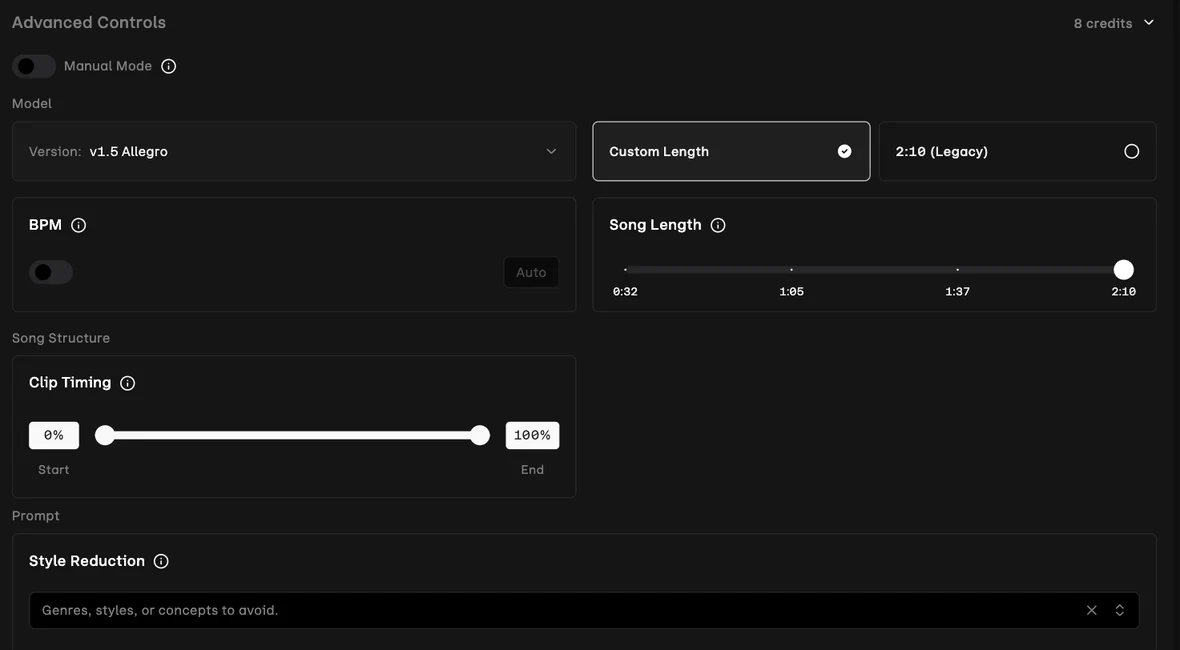
Advanced Controls holds all of it. A BPM field with an automatic toggle, so you can pin a tempo. A song-length slider. Clip timing as a start and end percentage, for taking a slice rather than the whole thing. A Manual Mode switch described as using your prompt exactly as given, for when you want the model to stop interpreting. And a model selector, currently reading v1.5 Allegro.
Style Reduction is the one worth the price of entry. It is a negative prompt: genres, styles or concepts to avoid. Describing what you do not want is often faster than describing what you do, and anyone who has watched a generator keep adding an instrument they never asked for will recognise the value immediately.
So we went through the panel control by control to see what a free account can actually touch, and the answer splits neatly in two. Manual Mode, the model selector, the song-length slider and clip timing all work. BPM and Style Reduction do not. Clicking the BPM toggle produces a notice and an upgrade dialog; clicking into Style Reduction produces “Please subscribe to unlock this feature” and the same dialog.
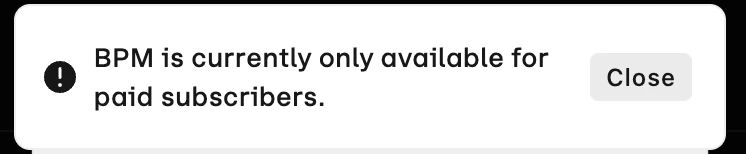
That is worth being blunt about, because the two controls Udio gates are the two nobody else offers. The free plan lets you set how long a track is; it does not let you set its tempo or tell it what to avoid. If those are why you came, the price is $10 a month, or $8 annually.
What the panel does do for free is print its cost, “8 credits”, before you commit. That is a small piece of design honesty Suno does not offer anywhere.
Every track is a starting point
The control story does not stop at generation. Each finished track carries Remix, Style, Extend, Edit and Session, plus a Vary Type selector for producing variations of a specific kind rather than rolling the dice again.
Extend is the one that matters most on a plan capped at 2:10, because it is the only route to a longer piece. Remix and Vary are meant to move a promising track forward without a fresh roll of the dice, though as with Extend we did not confirm a free balance can run them. The library also carries a Trees filter, which groups a track with everything derived from it, so a session of iteration reads as a lineage rather than a pile of near-identical files.
That combination is the argument for Udio as a tool rather than a slot machine. Burn a metered plan re-rolling for a lucky take and you never actually finish anything, which is the trap this tool set is built to avoid. Udio’s interface pushes against that harder than anything else we have used in the category — which makes it doubly frustrating that the free plan gives you so few credits to iterate with.
Styles, and actual musicians
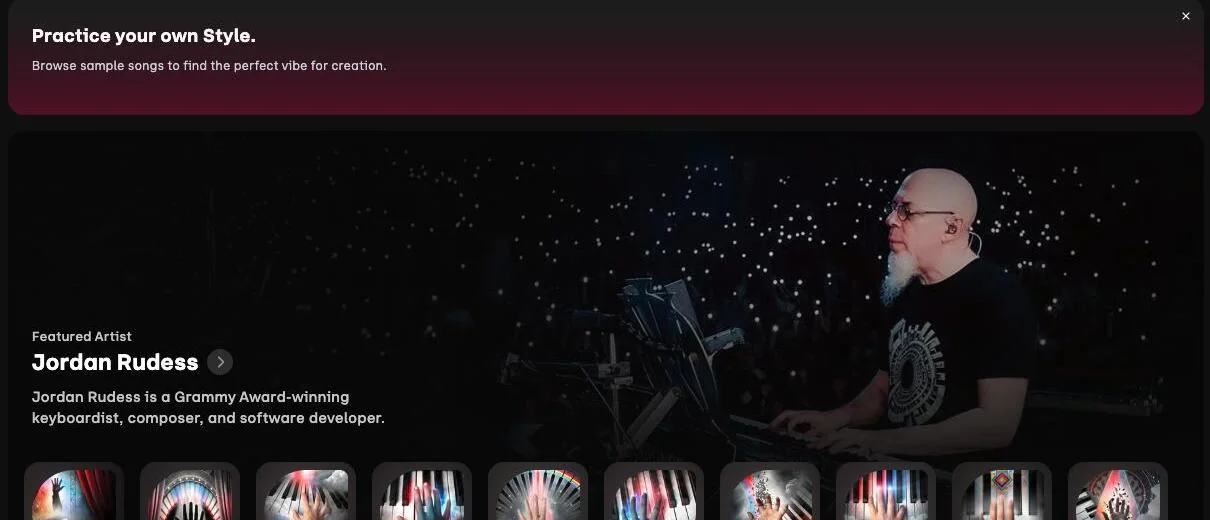
Styles is a browsable library with Discover, Artists and Saved tabs, and Udio populates it with work from named musicians. When we looked, the featured artist was Jordan Rudess — the Grammy-winning keyboardist — with ten styles under his own name.
Whatever you make of AI music, a category facing this much argument about consent benefits from named artists participating openly. It is also just useful: a style built by a working musician is a better starting point than a genre tag.
The Playground
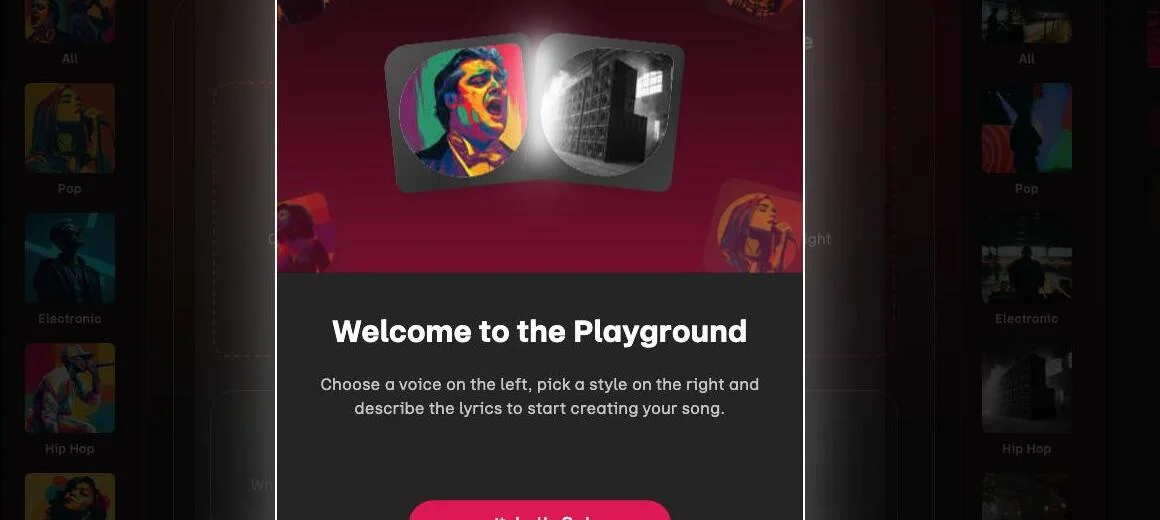
Playground is the guided mode. Pick a voice from the left column, a style from the right, describe the lyrics in the middle. Both columns filter by genre and browse visually rather than by typing adjectives.
It is the friendliest entry point in the product and the one to send a beginner to. It also quietly solves the hardest part of prompting a music model, which is knowing what to ask for.
How much does Udio cost?
Udio’s pricing page, read on 3 September 2026 against both the monthly and the annual view, breaks down like this.
| Plan | Monthly | Annual | Credits | Downloads | Key limit |
|---|---|---|---|---|---|
| Free | $0 | $0 | 10/day, 100/month | none | 3 full-length (2:10) a day |
| Standard | $10 | $8 ($96/yr) | 2,400/month | yes | no 3-a-day limit, 6 at once |
| Pro | $30 | $24 ($288/yr) | 6,000/month | yes | 10 at once, all features |
| Add-on credits | $3 / 100 credits, $25 / 1,000 credits | n/a | n/a | n/a | tops up any paid plan |
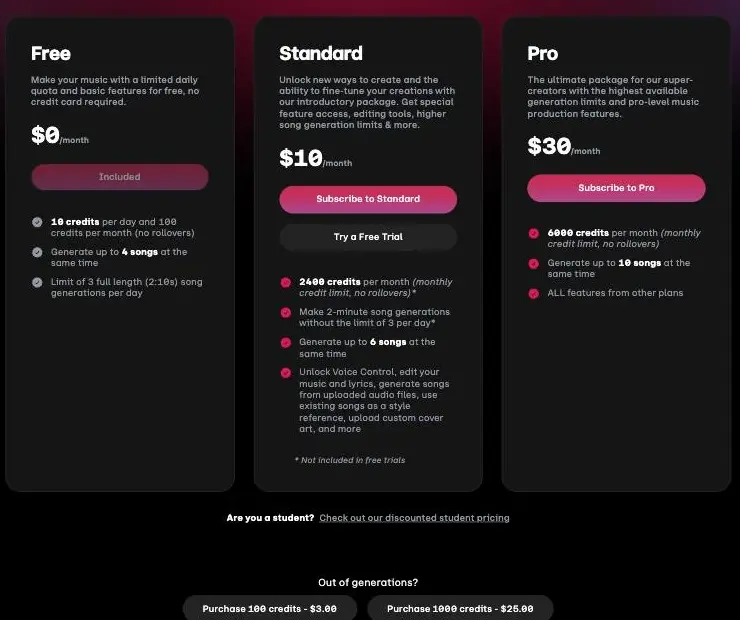
Run dry mid-month and you can buy add-ons at $3 for 100 credits or $25 for 1,000. There is discounted student pricing too.
Those add-ons are worth doing the division on. At 8 credits a generation, $3 buys about twelve of them, which is 24 cents each. Standard’s 2,400 credits work out at roughly 3 cents a generation, or under 3 cents on the annual price. Buying credits à la carte therefore costs about seven times what the same generation costs inside a subscription. They are a rescue for a deadline, not a way to stay off a plan, and the 1,000-credit pack at $25 is only about a sixth cheaper per credit than the small one, 2.5 cents a credit against 3.
That ladder is worth staring at, because it is identical to the main competitor’s: $10 and $8, $30 and $24, the same numbers in the same places, which we break down from the other side in our Suno pricing guide. The paid tiers are not where these two products differ. The free tiers are.
What Standard actually buys is worth spelling out, because it is more than a bigger number. It removes the three-full-length-generations-a-day cap, raises simultaneous generations from four to six, and opens up Voice Control, editing your music and lyrics after the fact, generating from uploaded audio, using an existing song as a style reference, and custom cover art. Several of those are the difference between a toy and a workflow.
Pro adds volume and ten simultaneous generations rather than a new class of capability. Unless you are producing at scale, Standard is the tier that changes what the product is.
What ten credits actually gets you
Our single generation cost 8 credits and returned two tracks, so ten credits a day reads as one prompt per day, not ten.
Except the price is not fixed, and this is the most useful thing we found. Drag the song-length slider down and the header price falls with it. We watched it move through every stop:
| Song length | Cost | Generations on 10 credits a day |
|---|---|---|
| 0:32 | 2 credits | 5 |
| 1:05 | 4 credits | 2 |
| 1:37 | 6 credits | 1 |
| 2:10 | 8 credits | 1 |
So the free plan is one full-length track a day, or five thirty-second sketches. If you are auditioning ideas rather than finishing them, generating short is worth five times as many attempts, and nothing in Udio’s own pricing page tells you that.
The monthly ceiling still catches people. 100 credits with no rollover is about twelve full-length generations, or fifty short ones. On Standard, 2,400 credits is around 300 generations, which is a different product entirely. We keep the running numbers for the whole category in what AI tools actually cost.
Who is Udio for?
The person who already knows roughly what they want and is tired of describing it in one sentence.
| If you are | Plan | Free plan enough? | Why |
|---|---|---|---|
| Shaping a specific sound | Standard | No | BPM and the negative prompt are the reason to be here, and both are paid |
| Making video backing tracks | Standard | No | You cannot download on free, so it never reaches your editor |
| A beginner finding your feet | Free | Yes | Playground plus a generation a day is a real tutorial |
| Publishing commercially | Standard at minimum | No | Free gives you no files, and the terms are the common complaint |
| Producing at volume | Pro, or look elsewhere | No | 100 credits a month is the binding constraint |
The table hides one thing worth saying plainly: the free plan is a demo, not a tier. That is not a criticism of the demo, which is unusually good, but it does mean the decision in front of you is not really free versus paid. It is whether the controls are worth $8 a month to you, and you can answer that inside a week of free use.
Not for anyone who needs files today. The single biggest practical limit is not credits or length, it is that a free account cannot export anything.
The good
The controls are real, and most of them are free
Song length, clip timing, a manual mode and a model selector all work on a $0 plan, with the price of the run printed on the panel. BPM and the negative prompt are paid. This is a tool for people who know roughly what they want and are tired of re-rolling until a generator stumbles into it, and the free tier is enough to find out whether you are that person.
It tells you what things cost
The credit balance sits in the corner of the interface and the Advanced Controls header prints the price of the generation you are about to run. We watched 102 become 94 and never had to guess. That sounds minor until you have used a metered creative tool that hides the meter.
Both outputs were usable, and neither was an advert
Two tracks from one prompt, both complete, both playable. No preview versions, no locked model, no upgrade button inside the results. What the free plan returns is what the free plan returns.
Styles and Playground are genuinely better on-ramps
A visual voice-and-style picker and a library of styles from named musicians beat a blank text box and a list of genre chips. For anyone new to this, that difference is larger than any spec on the pricing page.
The pricing has no surprises in it
Same ladder as the competition, published add-on rates, student discount, and an annual saving that is a real twenty percent rather than a rounding error.
The bad
The free tier is the tightest we have tested
Ten credits a day, a hard 100 a month with no rollover, and 8 credits for a full-length generation. That is one prompt a day and about twelve a month, unless you drop to thirty-second clips. The free tier of the one competitor we ran the same brief through is considerably more generous than that, and it does not paywall its tempo control, because it does not have one.
| The free plan’s hard limits | |
|---|---|
| Credits per day | 10, against 8 credits for a full-length generation or 2 for a 0:32 clip |
| Credits per month | 100, no rollover — about 12 generations |
| Track length | 2:10 maximum, and shorter costs less |
| Full-length generations per day | 3 by the plan, 1 by the credits |
| Paywalled controls | BPM, Style Reduction, Voice Control, upload-to-generate |
| File export | none at all |
| Commercial use | none at any tier, per Udio’s terms of service, read 6 Sep 2026 |
You cannot download anything on the free plan
Not a restricted format, not a watermark — nothing. The Share dialog offers a public link or an embed iframe and no file at all. We went looking for the option twice, on the track and in the library, before accepting that it is not there.
Every free track stops at 2:10
Fine for a social clip, short for anything else, and lengthening it costs credits you do not have much of.
The company’s ratings are poor, and the theme is the terms
Udio’s Trustpilot page averages 1.5 out of 5 across roughly 57 reviews. The theme running through the recent ones is the licence rather than the software: reviewers describe the platform itself as workable and the terms as too restrictive for anyone serious about music. We tested the product rather than the licence, so treat that as the pattern in the reviews and not as our finding — but it is a consistent enough theme to check the terms yourself before you commit.
Most of the coverage you will find is stale
The write-ups that rank for Udio are old. The best-known mainstream review scores it 4.5 out of 5 and was published in August 2024, which is two years and several model versions ago.
We cannot evaluate the trend either way. We have one afternoon with the current product and no basis for comparing it to a version we never used. The practical point stands regardless: a score from 2024 is not a description of the thing you will sign up for today, and this review is dated for the same reason.
It is still labelled beta
The wordmark carries a BETA mark. Nothing we touched behaved like a beta, which is the point: a vendor charging $30 a month while still labelling the product unfinished is hedging something, and on this product the thing being hedged is most likely the licence.
What else should you consider?
Our Suno review covers the direct competitor and the one we rate higher overall, mostly on free-tier generosity rather than on anything about the audio. It is more complicated than a straight win, though: Suno puts locked previews of its paid model inside every free result, and it hides the credit cost that Udio prints. We ran both on the same brief, and rather than compress that here it has its own post: Udio vs Suno.
The wider category is in our best AI music generator roundup, which ran eleven tools against one brief and ranks them on what you are allowed to do with the output.
Suno alternatives covers the eight we could not test first-hand and why.
A stock music library is still the right answer when the paperwork matters more than the originality: you pay once, the rights question is settled, and you accept that other people are using the same track.
Final word
Udio is a Power Tool with an unusually clear shape: it is the generator for people who want to steer. The controls it puts on screen go beyond anything the competition exposes, though the two most distinctive of them, tempo and the negative prompt, only arrive when you pay. The Playground is the best on-ramp in the category, and it is honest about what every action costs.
Then it gives you almost no room to use any of it. One prompt a day, a hundred credits a month, everything capped at 2:10, and nothing you can take away with you.
Start free to see the controls and learn the interface, because that is what the free plan is genuinely good for. Move to Standard the moment you want to finish something, and check the terms before you build anything commercial on top of it.
Frequently asked questions
Is Udio free to use?
Yes, with the tightest free tier of any tool we have tested in this category, and the limits interact in a way the pricing page does not spell out.
You get 10 credits a day against a hard ceiling of 100 a month with no rollover, and a separate cap of three full-length generations per day. A full-length generation cost us 8 credits, so the daily allowance is one prompt, not ten. Shorter costs less, and this is the trick worth knowing: the panel charges 2 credits for a 0:32 clip, 4 for 1:05 and 6 for 1:37, so ten credits a day is either one full-length track or five short sketches.
The harder limit is that the free plan does not let you download anything. There is no MP3 option in the menu at all. What you get instead is a Share dialog offering a public link or an embed iframe, which is enough to show someone your track and not enough to put it in a video.
How much does Udio cost?
Free, $10 a month, or $30 a month, with roughly a 20 percent discount for paying annually.
Standard is $10 monthly or $8 a month billed annually, which Udio lists as $96 for the year. It brings 2,400 credits a month, removes the three-per-day full-length limit, allows six simultaneous generations, and opens up Voice Control, lyric editing, generating from uploaded audio and custom cover art. Pro is $30 monthly or $24 annually, listed as $288 for the year, for 6,000 credits, ten simultaneous generations and every feature.
If you run out mid-month you can buy add-on credits at $3 for 100 or $25 for 1,000. There is also discounted student pricing. That ladder is identical to Suno's, dollar for dollar, which makes the free tiers the real difference between the two.
What is Udio's Style Reduction?
It is a negative prompt, and it is the most useful control Suno, its closest rival, does not offer at all.
Inside Advanced Controls there is a field labelled Style Reduction which takes genres, styles or concepts to avoid. Instead of only describing what you want, you describe what you do not: no brass, no lo-fi hiss, nothing that reads as corporate. Anyone who has fought a generator that keeps adding an element they never asked for will understand why that matters.
It sits alongside the rest of the Advanced Controls panel: a BPM field with an automatic toggle, a song-length slider, clip timing expressed as a start and end percentage, and a model selector currently on v1.5 Allegro. Together they make Udio a tool you steer rather than one you re-roll. Style Reduction itself is not free, though: clicking into the field on a free account returns "Please subscribe to unlock this feature" and an upgrade dialog, and the BPM toggle beside it says it is only available to paid subscribers. Song length, clip timing, Manual Mode and the model selector do work on free.
How long are Udio songs?
Two minutes and ten seconds on the free plan, and that is a ceiling rather than a result.
Both tracks from our test came back at exactly the same length, 2:10 in the interface and about 131 seconds in the file. The pricing page explains why: the free plan allows three full-length generations per day and defines full length as 2:10. The Advanced Controls panel makes it visible, with a song-length slider that tops out at that number and a separate radio option labelled 2:10 Legacy.
Going longer means either paying, which removes the per-day limit on two-minute generations, or using Extend to bolt more onto an existing track, which spends more credits. On a plan that gives you ten credits a day, extending is not something you do casually, and we did not confirm that a free balance can run it at all.
Can I use Udio music commercially?
No, and not on a paid plan either, which is the part most write-ups get wrong. Udio's terms of service, last revised 12 November 2025, say a user "may use Output solely for your personal and non-commercial purposes, provided that you may not download any copies of your Output from the App for any purpose" — with no carve-out for paid tiers anywhere in the document.
We read the live terms on 6 September 2026. The terms are the most common complaint about the company rather than the product.
Udio's Trustpilot page averages 1.5 out of 5 across roughly 57 reviews, and the theme running through them is the licence rather than the software: reviewers call the platform workable and the terms too restrictive for anyone serious about music. We tested the product rather than the licence, so we are reporting that pattern rather than confirming it.
What we can confirm is the download position, which is the practical end of the same problem. A free account cannot export a file at all. If your use case ends in a video editor or a distributor rather than a share link, the free plan cannot reach it regardless of what the licence says.
Is Udio AI any good?
Good enough to be the tool of choice for one specific person: someone who wants to shape a track rather than re-roll it until one lands. We rate it 4.1 out of 5, a Power Tool.
On our test it turned a one-line brief into two finished, playable tracks in about sixty-five seconds, with no locked previews and no upsell in the results. We liked what we heard. One afternoon and two tracks is not a benchmark, though, and how an AI song sounds is a judgement only your own ears can make.
What we can judge is the product around the model, and that is where Udio AI is genuinely distinctive: an Advanced Controls panel with song length, clip timing, a manual mode and a model selector on the free plan, plus BPM and a negative prompt behind the paywall, a Styles library curated by named musicians, and a Playground that is the friendliest entry point in the category. The reason it is not rated higher is the free tier, which is the tightest we have tested, paywalls the two most distinctive controls, and exports nothing at all.
The short answer: good, and rationed.
What is the Playground in Udio?
A guided mode that has you pick a voice and a style visually before writing anything, rather than describing a whole song in one sentence.
The interface puts a column of voices on the left and a column of styles on the right, both browsable by genre, with lyrics described in the middle. Its own welcome dialog frames it plainly: choose a voice on the left, pick a style on the right, describe the lyrics. It is the friendliest entry point in the product and the one we would point a beginner at first.
It sits alongside Styles, a separate library where Udio publishes styles from named musicians. When we looked, the featured artist was Jordan Rudess, the Grammy-winning keyboardist, with ten of his own styles listed. Neither surface has an equivalent on Suno's free tier.
Keep reading
Udio vs Suno: one brief, one day, two free accounts
Udio vs Suno, or Suno vs Udio: same sentence, same day, both free tiers. Suno gave us more music, Udio gave us more control, and only one let us keep a file.
Suno alternatives: the one I actually tested, and eight I didn't
Every Suno alternatives list claims it tested everything. This one tested one rival properly, labels the rest, and fixes two entries the others get wrong.

Best AI music generator: the three we ran, and what the rest are for
We gave Suno and Udio the same brief on the same day. Suno wins on output. On the licence the field splits three ways, and one tool grants nothing at any price.
Grammarly pricing: $144 a year, or $360 if you pay monthly
Grammarly pricing in October 2026: Free, Pro at $12 or $30 a month, the student half-price deal, the Superhuman $15 trap and what a year really costs.