
Udio vs Suno: one brief, one day, two free accounts
Udio vs Suno, or Suno vs Udio: same sentence, same day, both free tiers. Suno gave us more music, Udio gave us more control, and only one let us keep a file.
Contents
Udio or Suno?
Two products, one sentence, one afternoon. We typed the same brief into both on 3 September 2026, on free accounts, and watched what came back.
| If you want | Pick | Why |
|---|---|---|
| Music you can actually keep and use | Suno | More credits, longer tracks, and a file that downloads |
| To shape the track rather than re-roll it | Udio | The only one of the two with length, clip timing and a manual mode |
| The better free tier, full stop | Suno | Udio’s free plan is a demonstration; Suno’s is a tool |

Suno wins, and not by as much as the scores suggest. We rate it 4.6 out of 5 against Udio’s 4.1, but the gap comes down to two things: what each company gives away, and one afternoon’s preference on a single shared brief. On the paid tiers, priced identically to the dollar, the argument gets genuinely close.
How we tested. One brief, typed once into each product’s free tier on the same day, with no follow-up prompts and no second attempts:
Upbeat indie pop for a product demo video, bright electric guitars,warm female vocal, hopeful but not saccharine, clean endingSuno ran at 02:44:57 UTC and had rendered everything by 02:46:04. Udio ran at 05:04:14 and was done by 05:05:19. We then opened every panel each interface exposes, clicked each control to find out which ones a free account can actually touch, read both pricing pages on both billing cycles, and tried to get the finished audio off each platform.
What we did not do is grade the music. We listened to all four playable tracks and formed a preference, which we will state once and not dress up as a benchmark. Everything else below is a number or a screen we can show you.
The comparison, axis by axis
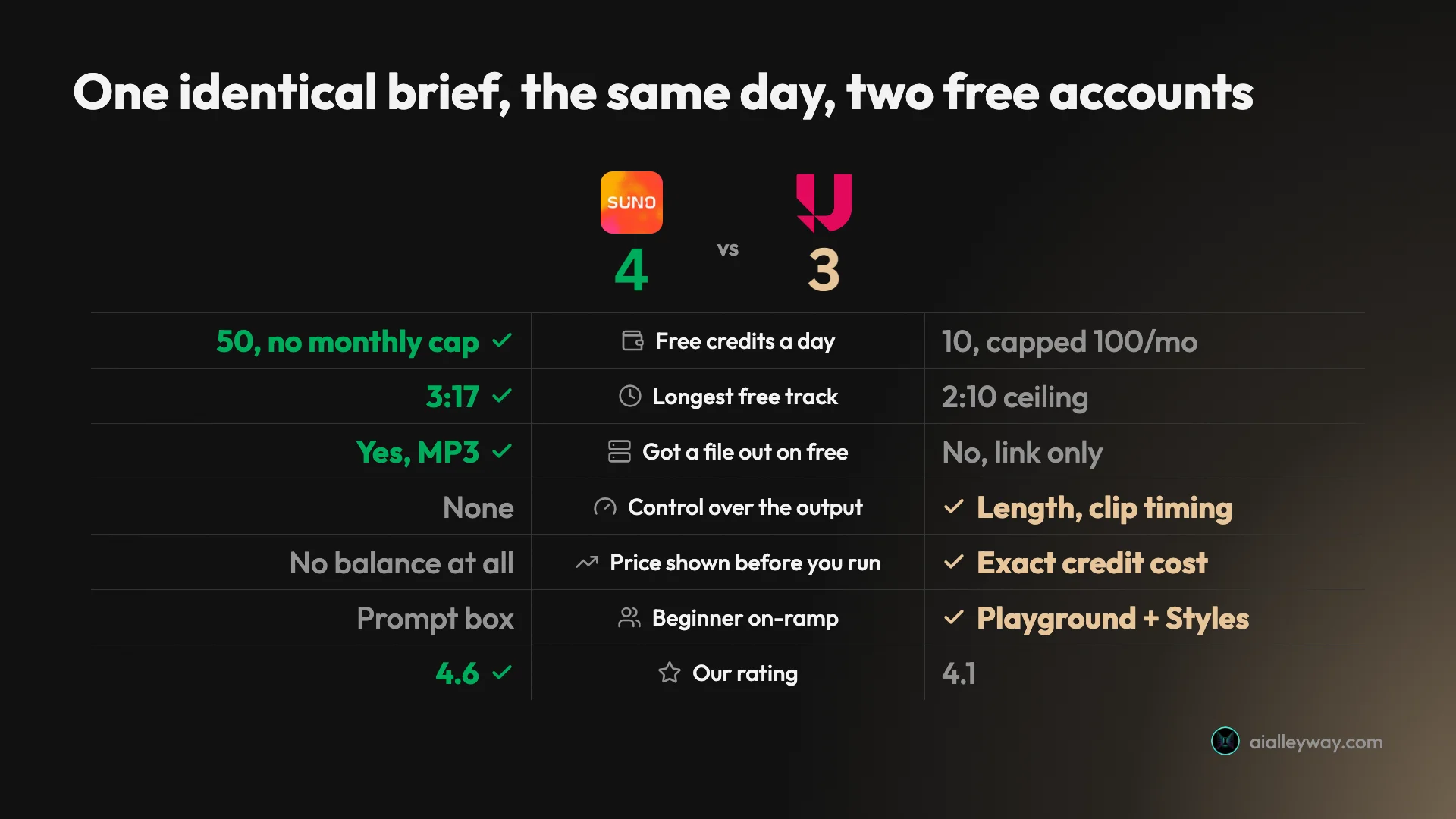
| Axis | Suno | Udio | Winner |
|---|---|---|---|
| Playable tracks from one free prompt | 2 of 4 | 2 of 2 | Tie |
| Free credits | 50 a day, no cap, ~5 a song | 10 a day, 100 a month, 8 a track | Suno |
| Track length on free | 3:17 and 1:20, unasked | 2:10 ceiling | Suno |
| Control over length | None | Slider: 0:32 / 1:05 / 1:37 / 2:10 | Udio |
| Tempo and negative prompt | Neither in the free interface | Both, paid only | Udio |
| Credit balance on screen | Never shown | Always, with per-run price | Udio |
| Upsell inside the results | 2 of 4 are locked previews | None | Udio |
| Models on the free tier | 1 of 6; five are Pro-badged | v1.5 Allegro, selector not badged | Tie |
| Export on free | 7 downloads, lifetime | Nothing, link or embed only | Suno |
| Paid credits | 2,500 a month | 2,400 a month | Suno |
| Our rating | 4.6, Category Leader | 4.1, Power Tool | Suno |
Count the winners and it is five to Suno, four to Udio, two genuine ties. That is a much narrower spread than half a rating point suggests, and it is the honest shape of this comparison: Udio wins on capability and loses on generosity, and generosity is what a free tier is for.
Suno: what it does well, and where it stops
It is the one that behaves like a finished product. One sentence, seventy seconds, four results, and on the day we tested, a file we could take away.
- The free tier is genuinely usable. 50 credits a day at roughly five credits a song, with no monthly ceiling to run into. Allowing three or four attempts per keeper — realistic, given the length variance below — that is two or three finished tracks a day, every day.
- Longer output, without asking. Our two playable tracks ran 3:17 and 1:20. Nothing in Udio’s free tier can exceed 2:10.
- Files come out, seven times. Both MP3s exported at 48 kHz stereo, around 190 and 186 kbps, spending two of the seven trial downloads Suno allows a free account for its lifetime — and those carry no commercial rights. That sample rate is the video standard, which matters if scoring video is why you are here. Suno’s footnote limits that to accounts joined before 3 September 2026; free users who join on or after that date “may occasionally receive trial downloads” rather than a guaranteed seven.
- It is the category leader for a reason. We rated it 4.6 and it is the best pick in music on our own list.
Where it stops:
- Half of a free generation is advertising. Two of the four results were one-minute previews from the newer v5.5 model that you cannot play without upgrading. The upsell arrives as a result rather than as a banner, which is why a comparison built from plan tables alone will never mention it.
- You get one model of six. The selector lists six; five carry a Pro badge. Free accounts get
v4.5-all, which Suno labels “Best free model” — technically true, given it is the only one a free account can pick. - No control of any kind in the free interface. No tempo, no duration, no negative prompt. The same prompt in the same run gave us 3:17 and 1:20, and there is no field anywhere to ask for something in between.
- The meter is invisible. Nothing in the free interface shows a credit balance, so you learn what a generation cost by running out.
- The paid constraint is downloads, not credits. Pro’s 2,500 credits are far more than most people need; its 20 downloads a month are not.
Udio: what it does well, and where it stops

It is the one that lets you steer. Everything good about Udio follows from the Advanced Controls panel, and everything frustrating follows from how little room the free plan gives you to use it.
- Real controls, and most of them are free. A song-length slider with four stops, clip timing as a start and end percentage, a Manual Mode that uses your prompt exactly as written, and a model selector. Nothing in Suno’s free interface does any of it.
- You always know the price before you pay it. The balance never leaves the screen, and the panel quotes the run’s cost up front. Ours dropped from 102 to 94 exactly as advertised.
- The price scales with length. Drag the slider down and the header falls with it: 2 credits at 0:32, 4 at 1:05, 6 at 1:37, 8 at 2:10. Ten credits a day is one full-length track or five short sketches, and Udio’s own pricing page never mentions this.
- No advertising in the results. Both tracks were playable. Nothing was a locked preview of a model we could not have.
- The friendlier front door. Playground walks you through a voice, then a style, then lyrics. Styles is a library of looks published by named musicians — the featured artist when we looked was Jordan Rudess, with ten of his own.
Where it stops:
- Ten credits buys almost nothing. 10 a day against a hard 100 a month with no rollover. About twelve full-length generations a month, or fifty short ones.
- Nothing comes out. No MP3, no WAV, no restricted format — the Share dialog offers a public link or an embed and that is all.
- The two best controls are paid. Clicking BPM returns “BPM is currently only available for paid subscribers”; clicking into Style Reduction returns “Please subscribe to unlock this feature”. Those are precisely the two controls we found nowhere in Suno’s free interface, so the thing that makes Udio distinctive is itself behind a paywall.
- Everything is capped at 2:10. Going longer means paying, or using Extend, which spends more credits and which we did not confirm runs on a free balance at all.
- It still says BETA. The wordmark carries the mark, on a product asking $30 a month at the top tier.
Which one is cheaper?
Neither. The ladders are identical to the dollar, which is the first genuinely surprising thing about comparing these two.
| Plan | Suno | Udio |
|---|---|---|
| Free | $0, 50 credits a day, no monthly cap | $0, 10 credits a day, 100 a month |
| Entry paid | Pro, $10 monthly or $8 annually | Standard, $10 monthly or $8 annually |
| Entry paid credits | 2,500 a month | 2,400 a month |
| Top tier | Premier, $30 or $24 annually | Pro, $30 or $24 annually |
| Top tier credits | 10,000 a month | 6,000 a month |
| Annual discount | 20 percent | 20 percent |
| Add-on credits | Sold on paid plans, price not recorded | $3 / 100, $25 / 1,000 |
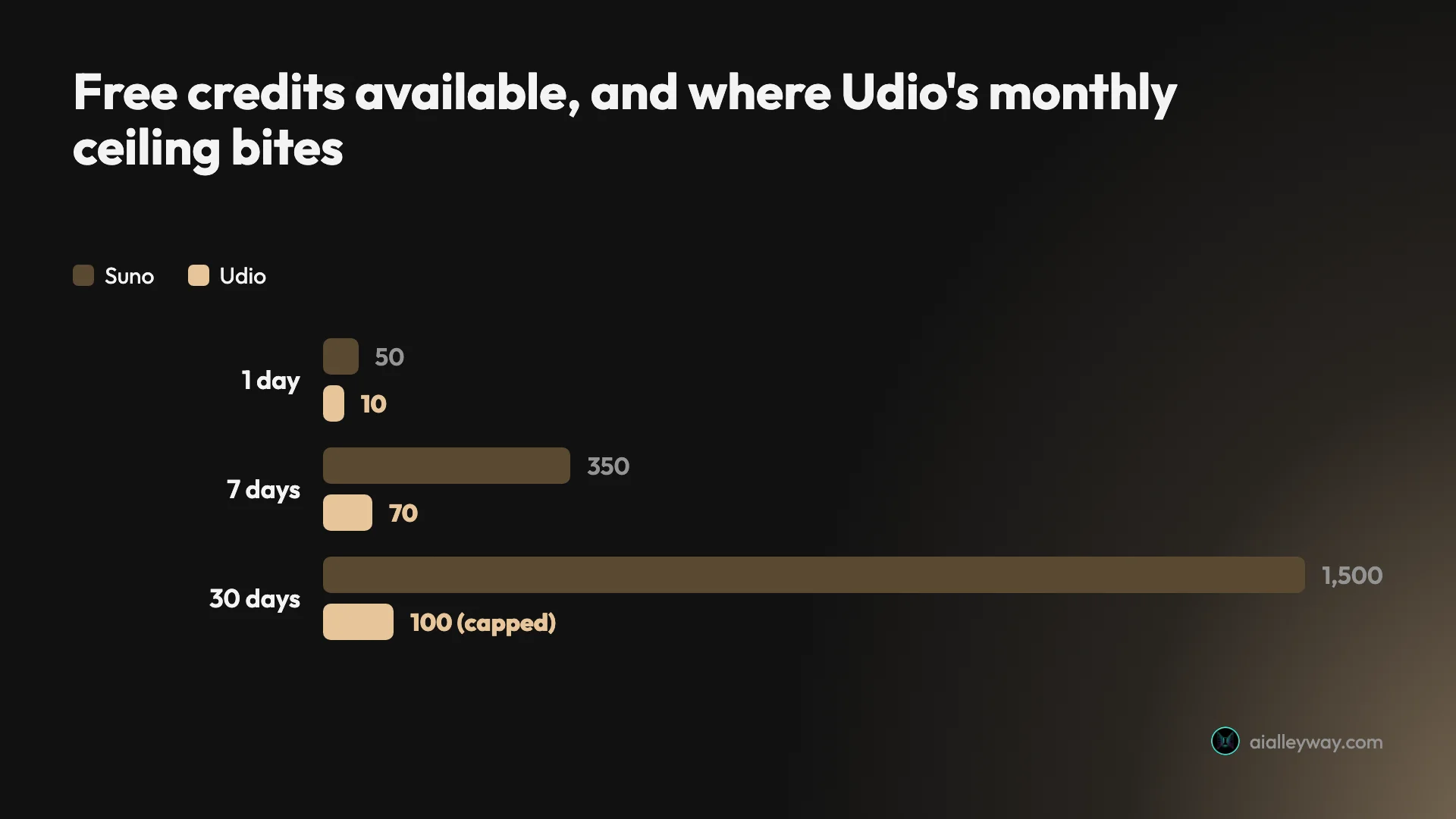
Same prices, same discount, near-identical entry allowances. So price is not the axis, and anyone telling you one is the budget option has not read both pages.
What the money buys does differ. Suno prices at roughly five credits a song, so Pro’s 2,500 is about 500 advertised songs a month, and we break that ladder down in full in our Suno pricing guide. Udio charges 8 for a full-length generation, so Standard’s 2,400 is about 300. On paper Suno is ahead; in practice both numbers are far more music than one person will use in a month.
The real paid constraint on Suno is not credits at all. Its plan page carries monthly song download caps — 20 on Pro, 60 on Premier — printed in small type beside the credit allowances. For anyone producing video on a schedule, twenty finished tracks a month is a much closer ceiling than two and a half thousand credits. Udio’s plan page states no equivalent number that we could find, which is a point in its favour and one we could not test, since a free account cannot download at all.
The one place Udio’s pricing is smarter is the short end, where its meter rewards you for asking for less. A thirty-second clip is 2 credits rather than 8, so a free account gets five attempts a day instead of one. Suno’s roughly five credits a song does not scale with length as far as we can tell, though at fifty a day it still buys about ten attempts either way. Udio’s pricing is the more thoughtful design; Suno’s is still the more generous outcome.
Udio publishes its add-on rates: $3 for 100 credits or $25 for 1,000. Do the division and a Udio generation bought à la carte costs about 24 cents against roughly 3 cents inside a subscription, seven times more. They are a deadline rescue, not a way to stay off a plan. Suno sells add-on credits on its paid plans too, but we did not record a price for them. Where both sit against everything else we have priced is in our running cost figures for the category.
Which one gives you more to work with?
Here is the one sentence of taste in this post, stated plainly and then left alone: we listened to all four playable tracks and preferred Suno’s. That is one person, one brief, one afternoon. It is not a benchmark, we are not going to describe how either one sounds, and you should run your own prompt through both before you believe anyone on this question, including us.
Everything else about output is measurable, and there the picture is more interesting than a preference.
What you can hear at all. Suno returned four results and let us play two. The other two were one-minute previews from v5.5, sitting in the same list, needing an upgrade. Udio returned two and let us play both. Judge each free tier on what it actually hands you, and Suno’s four-versus-two advantage shrinks to a draw.
Length, and control of it. Suno’s two tracks ran 3:17 and 1:20 from one prompt in one run. That variance is the strongest argument for Udio’s slider that exists: if you need something to fit a 60-second cut, Suno’s only answer is to keep generating until one lands near enough, and every attempt is charged. Udio’s answer is to set 1:05 and pay 4 credits. Udio also caps at 2:10, so if you need three minutes, Suno is the only one of the two that ever handed us anything that long, though it did so unasked and cannot be told to do it again.
The files themselves. Suno’s MP3s came out at 48 kHz stereo, around 190 and 186 kbps. The bitrate sits under the 320 kbps convention, which is a checkable file fact to hold against whatever your delivery needs.
| Exported file | Duration | Sample rate | Bitrate | Size |
|---|---|---|---|---|
| Starts With You, Suno | 3:17.5 | 48 kHz stereo | ~190 kbps | 4.7 MB |
| Clear and Bright, Suno | 1:20.0 | 48 kHz stereo | ~186 kbps | 1.9 MB |
| Either Udio track | 2:10 | — | — | no file exists |
That last row is the finding. We have no numbers for Udio because a free Udio account produces nothing to measure. We also did not test whether a paid Udio account exports cleanly, and given that the free tier offers no export at all, it is the first thing we would check before subscribing.
The model you are judging. Suno’s free tier runs v4.5-all while the product sells v5.5, so a free-tier opinion of Suno is an opinion of a model several versions behind the one you would be paying for, and one Suno has said it will retire when its announced new models land. Udio’s selector reads v1.5 Allegro and is not Pro-badged. In both cases, if you are evaluating with a purchase in mind, the free output is not quite the product.
What other people report. Suno’s Trustpilot page averages 1.6 out of 5 across roughly 767 reviews, about 70 percent of them one star, with complaints clustering on billing and account handling. Udio’s averages 1.5 across roughly 57, where the theme is the licence rather than the software. Neither is a verdict on the audio, and we are citing them as patterns rather than as findings.
Which one is faster to work in?
Generation speed is a tie and a red herring. Seventy seconds against sixty-five, for four results against two, is close enough that neither should influence a decision. What differs is everything that happens before and after the wait.
Before. Suno’s Simple mode is a single box, a Lyrics button, an Instrumental toggle and a row of suggestion chips, which is the fastest possible path from an idea to a render. Advanced mode separates style from lyrics. Above the box sit Audio, for building from a clip you upload, Voice, and Inspo. It is a well-judged interface for someone who wants to type a sentence and go.
Udio asks more of you and gives more back. The prompt box offers a described song or a saved style, with lyrics generated, supplied or omitted. Then Advanced Controls, where the free account can set duration and clip timing and turn on Manual Mode. For a beginner, Playground is the better door entirely: a column of voices, a column of styles, lyrics in the middle, and a welcome dialog that tells you exactly that. Nothing in Suno is aimed as squarely at someone who does not yet know what to ask for.
After. This is where the workflow gap opens, and it decides the section. On Suno, a finished track has a download menu, and on the day we tested, MP3 came out of it on a free account. The music reaches your editor, seven times in the life of that account and for personal use only.
On Udio, it does not. Share offers a public link or an embed iframe, and there is no file. Every downstream step — cutting to picture, importing to a timeline, sending a client a track — requires a subscription first. Udio’s own iteration tools are the better set on paper, with Remix, Style, Extend, Edit, Session, a Vary Type selector and a Trees filter that groups a track with everything derived from it. We did not confirm which of those a free balance can run, and it matters less than it should, because whatever you iterate towards still cannot leave the site.
There is one workflow advantage worth crediting Udio with regardless: Udio quotes the price before the click, and Suno shows no meter anywhere in its free interface. On Suno you learn what a generation cost by watching the day’s allowance disappear.
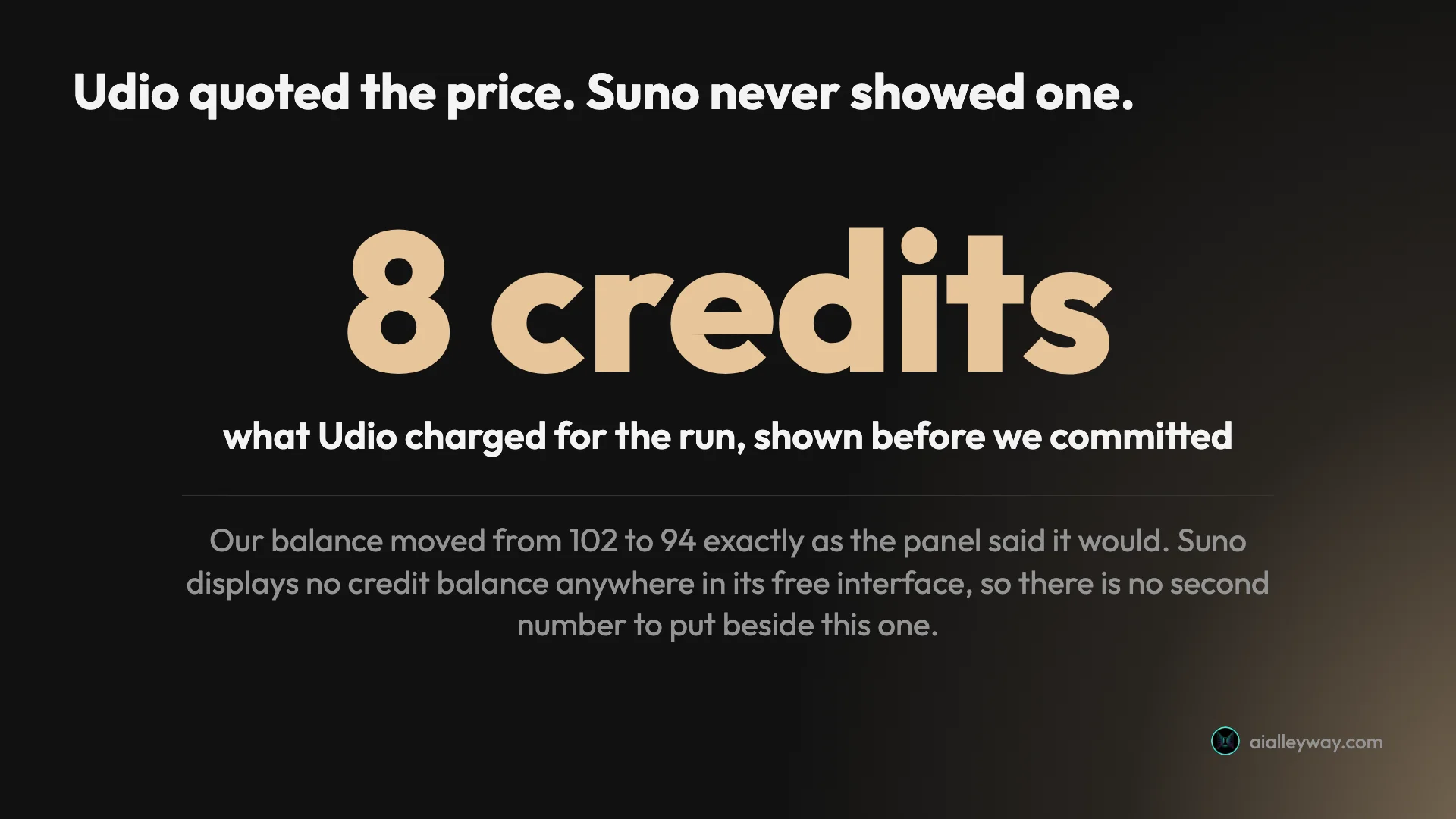
Small thing, and it changes how you work. Knowing a run costs 8 credits out of 10 makes you think before you type. Not knowing makes you generate freely until the day stops, which is either liberating or expensive depending on how the month is going.
Who should pick Suno?
- Anyone making video on a schedule. You need a file, today, and Suno is the only one of the two that gave us one on a free account. Check the download caps before you buy Pro, though: 20 a month is the real ceiling.
- People who want music, not a mixing desk. If “type a sentence, get a song” is the whole requirement, the controls Udio adds are overhead you will never open.
- Anyone who needs more than 2:10. Suno handed us 3:17 without being asked. Udio’s free plan cannot reach it at all.
- Anyone evaluating on the free tier. Fifty credits a day with no monthly ceiling gives you enough attempts to form a real opinion, which is what a free tier is for.
Who should pick Udio?
- People who already know what they want. If you can say the tempo, the length and the three things you do not want to hear, Udio is the only one of the two that will listen — and you will be paying, because BPM and Style Reduction are both behind the paywall.
- Anyone cutting to a fixed duration. The slider is the reason to be here if you are scoring 30- and 60-second spots, with stops at 0:32 and 1:05 that are close enough to cut to. Suno’s answer to “make it 60 seconds” is to roll again. The slider itself is free; the subscription is what gets the file out.
- Complete beginners. Playground and the Styles library are the friendliest entry point in this category, and it is not close.
- Anyone who hates an invisible meter. Udio shows the balance and prices every run before you commit. If that transparency is worth more to you than a larger allowance, this is your product.
Final word
For most people, most of the time: Suno. Its free tier is a working tool rather than a demonstration of a paid one, it gave us longer music, and it let us keep a file. If you are here to make something and move on, that is the whole decision.
If what you actually need is to sell the output, can you sell music made with Suno walks through the three separate gates that decides.
Pick Udio if the sentence “I need it to be exactly sixty-five seconds at 120 BPM with no brass” describes a real problem you have. Nothing we saw in Suno solves it, and Udio solves most of it for $8 a month. Just know going in that the two controls you came for are the paid ones, and that a free Udio account cannot export anything at all, so the trial tells you about the interface rather than the workflow.
If neither is quite right, the best AI music generator roundup runs the same brief through eleven tools and sorts them by what the licence lets you do.
And if you only take one number away, take this one: the paid tiers cost the same. This is not a cheap option against an expensive one. It is a generous free tier against a controllable paid one, and which of those you need is the only question that matters.
Frequently asked questions
Is Suno or Udio better?
Suno, for most people, and the margin is mostly the free tier, plus one preference on one brief.
We ran an identical one-line brief through both on free accounts on 3 September 2026. Suno returned four tracks in about seventy seconds, two of them playable, the longer one running 3:17, and it let us download an MP3. Udio returned two tracks in about sixty-five seconds, both playable, both capped at 2:10, and gave us no way to export a file at all.
We rate Suno 4.6 out of 5 and Udio 4.1. The case for Udio is control: it is the only one of the two with a song-length slider, clip timing and a manual mode, and it prints the credit cost of a run before you commit. The case for Suno is that its free tier is a usable tool rather than a demonstration.
Is Udio cheaper than Suno?
No. The paid ladders are identical to the dollar, so price is not the axis that separates them.
Both charge $10 a month, or $8 a month billed annually, for the entry paid tier, and $30 a month or $24 annually for the tier above. Suno calls those Pro and Premier; Udio calls them Standard and Pro. Both discount annual billing by the usual 20 percent.
Where they differ is what the money buys. Suno's Pro is 2,500 credits a month at roughly five credits a song, against Udio's Standard at 2,400 credits and 8 credits for a full-length generation. That is about 500 advertised songs against about 300. Suno's paid plans also carry monthly download caps of 20 and 60 songs, which for a working video producer is a tighter constraint than either credit allowance.
Can you download songs from Suno and Udio for free?
From Suno, seven times in the life of the account. From Udio, not once, and not in any format.
Udio's free plan has no export at all. The Share dialog offers a public link or an embed iframe and nothing else. We looked twice, on the track and in the library, before accepting that the option is not there.
Suno's plan page states that free accounts get no monthly song downloads from 9/3/26, and both playable MP3s still exported on that exact date. Suno's own announcement of the change reconciles the two: a free account carries up to 7 trial downloads for the lifetime of the account, one-time rather than monthly, and personal-use only. So Suno hands you a file and Udio does not, but the Suno allowance is small, finite and carries no commercial rights.
Which one gives you more control over the song?
Udio, clearly, and it is the whole reason to consider it.
Udio's Advanced Controls panel gives a free account a song-length slider with stops at 0:32, 1:05, 1:37 and 2:10, clip timing as a start and end percentage, a Manual Mode that uses your prompt exactly as written, and a model selector. Two further controls, a BPM field and Style Reduction, which is a negative prompt for genres and styles to avoid, exist but are paid: clicking them on a free account returns a subscribe notice.
Suno's free interface has no equivalent. It has a Simple and an Advanced mode that separate style from lyrics, plus audio upload and an Inspo picker, but nothing that sets tempo, duration or a negative prompt. The clearest illustration is length: our one Suno prompt returned tracks of 3:17 and 1:20 from the same run, and there is no field anywhere to ask for a specific duration.
How many free songs do you get from Suno and Udio?
Suno gives 50 credits a day with no monthly ceiling. Udio gives 10 a day against a hard 100 a month that does not roll over.
At Suno's roughly five credits a song that is about ten generations a day, though a usable keeper realistically takes three or four attempts, so call it two or three finished tracks. At Udio's 8 credits for a full-length generation, ten credits a day is one prompt.
Udio has one trick that its own pricing page never mentions: the price scales with the length you ask for. The panel charges 2 credits for a 0:32 clip, 4 for 1:05 and 6 for 1:37, so ten credits a day is either one full-length track or five short sketches. It is the best way to stretch the tightest free tier we have tested in this category, and it still does not close the gap to Suno.
What is the best AI song generator, Suno or Udio?
Between the two we tested, Suno, and by enough that it is our pick in the category.
We are not going to tell you it beats every AI music tool that exists, because we did not test every AI music tool that exists. We tested these two against each other on free accounts with one identical brief on one day. Inside that comparison, Suno's free tier gave us longer tracks and a file we could keep, while Udio's advantage is control rather than allowance.
If a third tool matters to you, run the test we ran: one brief, both free tiers, the same afternoon, and judge what actually lands rather than what the pricing page promises.
Do Suno and Udio let you use the music commercially?
Suno yes, on a paid plan. Udio no, at any price.
Suno ties commercial rights to songs you download while subscribed. Udio grants none: its terms of service, last revised 12 November 2025, say you "may use Output solely for your personal and non-commercial purposes, provided that you may not download any copies of your Output from the App for any purpose", and the word commercial appears three times in the whole document, restricting use every time. There is no paid-tier carve-out in it. We read the live terms on 6 September 2026.
The terms are the most common complaint about both companies.
Suno's Trustpilot page averages 1.6 out of 5 across roughly 767 reviews, with about 70 percent of them one star, and the complaints cluster on billing and account issues. Udio's averages 1.5 out of 5 across roughly 57 reviews, and the recurring theme there is licensing: reviewers describe the platform as workable and the terms as too restrictive for anyone serious about music.
We tested the products rather than the licences, so we are reporting those patterns rather than confirming them. If you are building anything commercial on top of either tool, read the current terms yourself before you commit, and note that Udio still carries a BETA mark next to its wordmark.
Keep reading
Udio review: more knobs than Suno, far less rope
Udio, the AI music generator, gives song length and clip timing free, paywalls BPM and its negative prompt, and caps free at 10 credits a day. Tested Sep 2026.

Best AI music generator: the three we ran, and what the rest are for
We gave Suno and Udio the same brief on the same day. Suno wins on output. On the licence the field splits three ways, and one tool grants nothing at any price.
Can you sell music made with Suno? What the terms actually say
Suno grants commercial rights on paid downloads, then says it cannot promise you a copyright. Three gates decide whether you can sell a track.
How to use Suno: the free account, honestly
How to use Suno step by step, from your first prompt to getting a file out — including the two results you can't play and the seven downloads you get.