
Grammarly pricing: $144 a year, or $360 if you pay monthly
Grammarly pricing in October 2026: Free, Pro at $12 or $30 a month, the student half-price deal, the Superhuman $15 trap and what a year really costs.
Contents
Grammarly pricing at a glance: what each plan costs
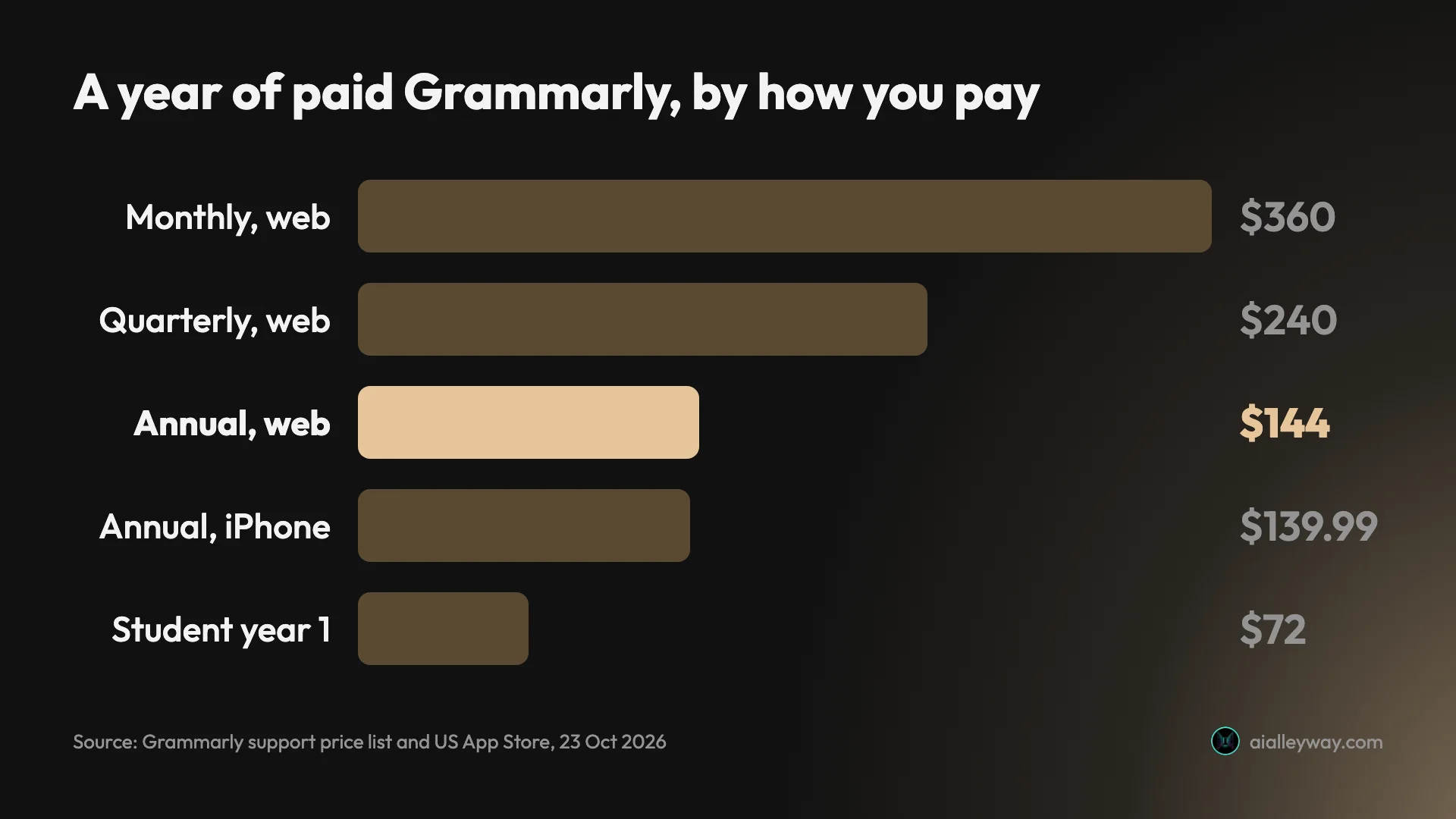
Grammarly Pro costs $12 a month if you pay $144 for a year up front, and $30 a month if you pay month to month. Same product, same features. Over twelve months that is $144 against $360, so the billing period matters more than any plan choice you make.
Grammarly Free costs nothing and is a better grammar checker than most people expect; it caught every error I planted in my Grammarly review. Enterprise is priced by quote. Students can currently get the first year of Pro for $72.
| Plan | Price (US, 23 October 2026) | What it’s for |
|---|---|---|
| Free | $0 | Spelling, grammar, punctuation, tone, 100 AI prompts a month |
| Pro, annual | $144 a year ($12 a month) | Rewrites, tone changes, plagiarism and AI detection, 2,000 AI prompts |
| Pro, quarterly | $60 every three months ($20 a month) | The same Pro, billed four times a year |
| Pro, monthly | $30 a month | The same Pro, cancel any month |
| Enterprise | Quote only | Security, admin controls, unlimited prompts |
| Students (SheerID) | $72 for the first year, then $144 | Pro at 50% off, one period only |
How Grammarly’s pricing works
Three ideas explain every number on Grammarly’s pricing pages.
It is priced per member. Pro is sold “for individuals or teams,” and the price is per seat. Grammarly’s price list says a Pro plan takes up to 149 seats; bigger organisations go to Enterprise. A team of five on the annual plan pays 5 × $144 = $720 a year.
The billing period sets the price. Grammarly’s support price list, updated 22 October 2026, gives three options for Pro: “$30 USD/member/month,” “$60 USD/member/three months” and “$144 USD/member/year ($12 USD average cost per member/month).” The quarterly plan doesn’t appear on the main pricing card, but it is a real option. The same article says Grammarly does not offer gift subscriptions, lifetime plans or one-time plans.
Where you buy changes the product. On the web you buy Grammarly Pro. Inside the iPhone or Android app you buy Grammarly Premium, the older name, which Grammarly’s help center says has 1,000 AI prompts a month instead of 2,000 and no team features.
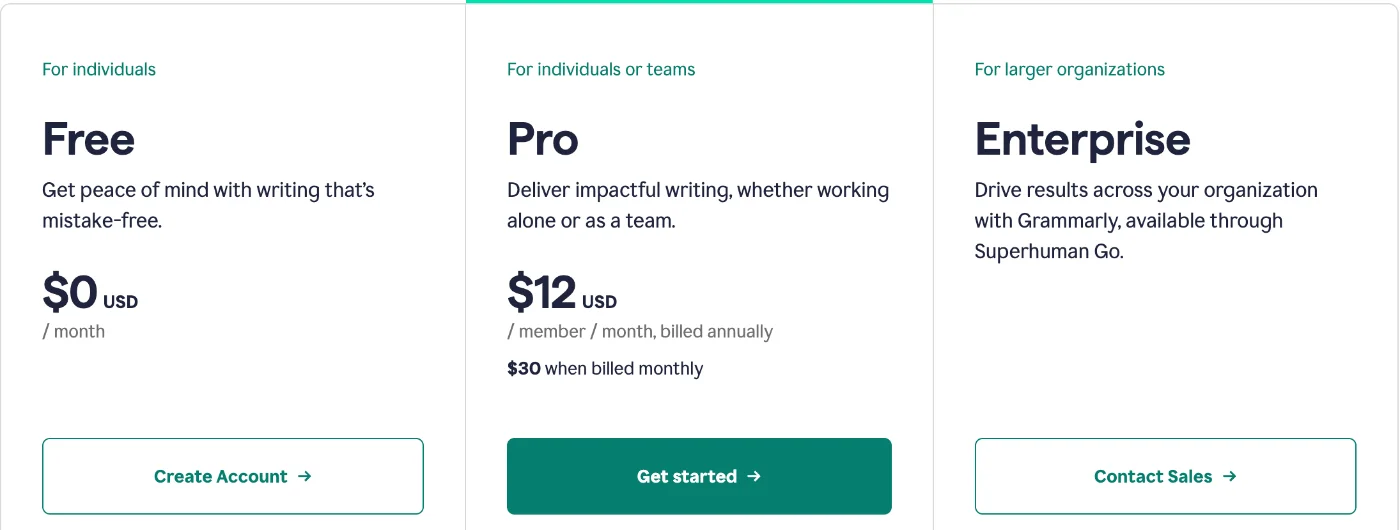
Grammarly’s Pro page showed every price in US dollars when I checked it on 23 October 2026. The price list says the US dollar is the default currency, that some regions get local-currency pricing, and that “the available rates and currency will be displayed during checkout.” Tax can be added on top based on your billing address, according to Grammarly’s tax article, which also says Grammarly doesn’t accept tax exemptions for individual subscriptions and considers them only for qualifying team subscriptions.
In some countries there is also a regional plan. Grammarly’s help center describes Grammarly Plus as “a region-specific plan available in select countries” with “the same core product features as our paid plans,” differing in support priority and who can buy it. It says Pro “remains available at a fixed global price” and that Plus isn’t compatible with special offers or discounts. If you see a plan called Plus at checkout, that is what it is.
Payment is by credit or debit card, PayPal, Apple Pay or Google Pay, according to the price list, which also says Grammarly doesn’t take personal checks, money orders or payments by phone. You are charged at the start of each billing period, on the date you first subscribed.
Grammarly Free: what $0 gets you
More than a free tier usually does. Free covers the part of Grammarly most people install it for.
The plan card lists three things: “Write without mistakes,” “See your writing tone” and “Generate text with 100 AI prompts.” In practice that means the full spelling, grammar and punctuation checker, in the browser extension, the desktop apps and Grammarly’s own editor. When I ran two practice paragraphs with 23 planted errors through a free account for the Grammarly review, it flagged all 23, from simple typos to a dangling modifier and “between you and I,” and raised nothing on a clean control paragraph.
What Free doesn’t do is rewrite. Full-sentence rewrites, tone adjustment, the plagiarism checker and the AI Detector inside Grammarly’s editor are Pro features. Free accounts see some rewrites as labelled free samples.
There is also a free AI detector page on Grammarly’s website, separate from the editor. On my free account on 23 October 2026 it allowed two scans before showing a “daily free limit” pop-up. If you mainly want a free AI detector with more room, QuillBot’s free detector gave me seven scans that same day; I compared the two in my QuillBot AI detector test.
Grammarly Pro pricing: $12, $20 or $30 a month
Pro is one product sold at three prices. The only difference is how often you pay.
| Billing | You pay | Monthly equivalent | Cost over a year |
|---|---|---|---|
| Monthly | $30 a month | $30 | $360 |
| Quarterly | $60 every three months | $20 | $240 |
| Annual | $144 a year | $12 | $144 |
Pro adds the features that write for you, and the card spells them out: “Rewrite full sentences,” “Adjust your writing tone,” “Stay on-brand” and “Generate text with 2,000 AI prompts.” From Grammarly’s comparison table, Pro also adds the plagiarism checker, AI detection inside the editor, consistent citations, a style guide, a brand tone, snippets and team analytics. Grammarly’s help article on student pricing adds that every Pro subscription comes with Superhuman Go, the company’s AI assistant.
Is Pro worth it? That depends on whether you want an editor or a co-writer. In my Grammarly review, the free checker did the error-catching well, while the paid-style rewrites sometimes changed meaning: one rewrite added a claim the writer never made. If you mostly need clean copy, Free may be enough. If you write for work every day and want rewrites, tone changes and a plagiarism check, Pro on the annual plan is the sensible price.
Enterprise: quote only
Enterprise has no public price. The card says “Contact Sales” and describes it as Grammarly “available through Superhuman Go,” for larger organisations.
From Grammarly’s comparison table, Enterprise adds single sign-on, user provisioning, data-loss prevention, audit logs, confidential mode, unlimited style guides and brand tones, unlimited AI prompts and dedicated support. Pro already includes basic team features for up to 149 seats, so most small teams never need Enterprise.
Schools and universities have a separate route, Grammarly for Education, which is also quote only. Grammarly’s help center says institutions should contact its sales team for a price.
Grammarly through Superhuman: the $15 trap
This is the most confusing part of Grammarly’s pricing, and it costs people money.
Grammarly’s parent company renamed itself Superhuman in October 2025 and now sells a bundle called the Superhuman suite. Its plans page lists Superhuman Pro at “$12 per member / month, billed annually” and “$15 when billed monthly,” with Grammarly, Docs and Go shown under the plan. Next to Grammarly Pro’s $30 monthly price, $15 looks like a half-price deal.
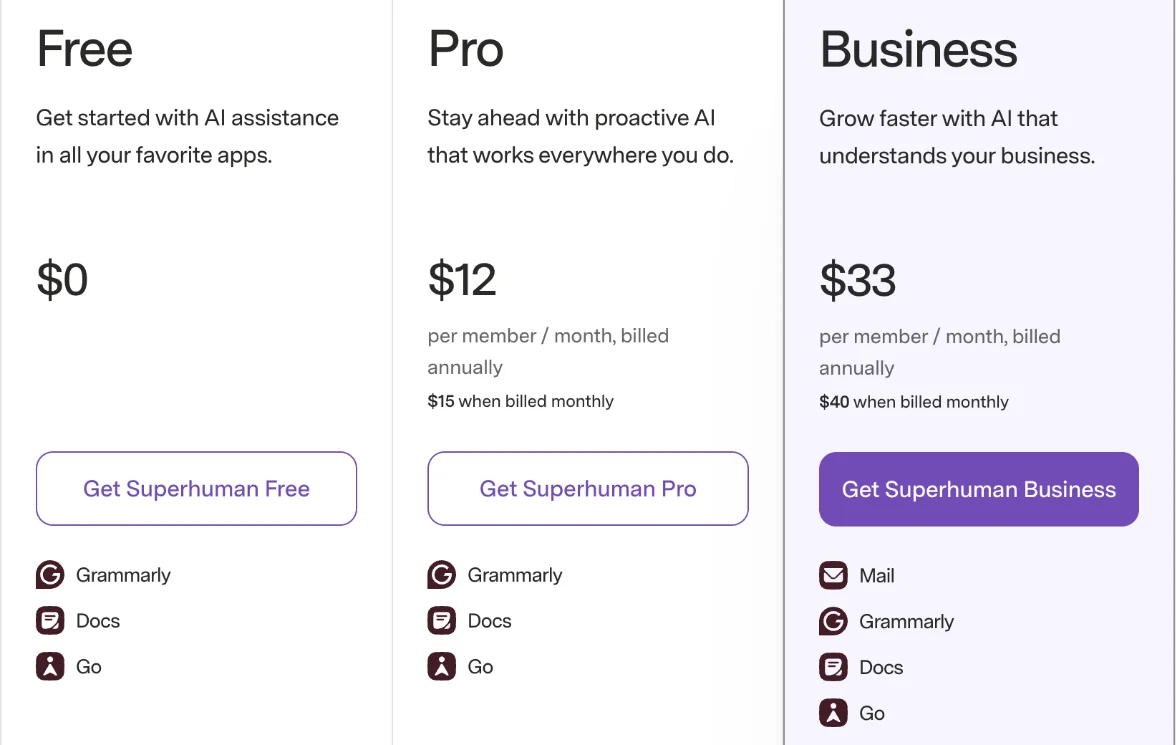
It isn’t one. Grammarly’s help article introducing the Superhuman suite says: “Annual plan includes Grammarly Pro access. With the monthly plan, Grammarly Pro is available as an optional add‑on for an additional $15 USD / month.” So the monthly suite on its own doesn’t include Grammarly Pro. Add it and you pay $30, the same as buying Grammarly Pro directly.
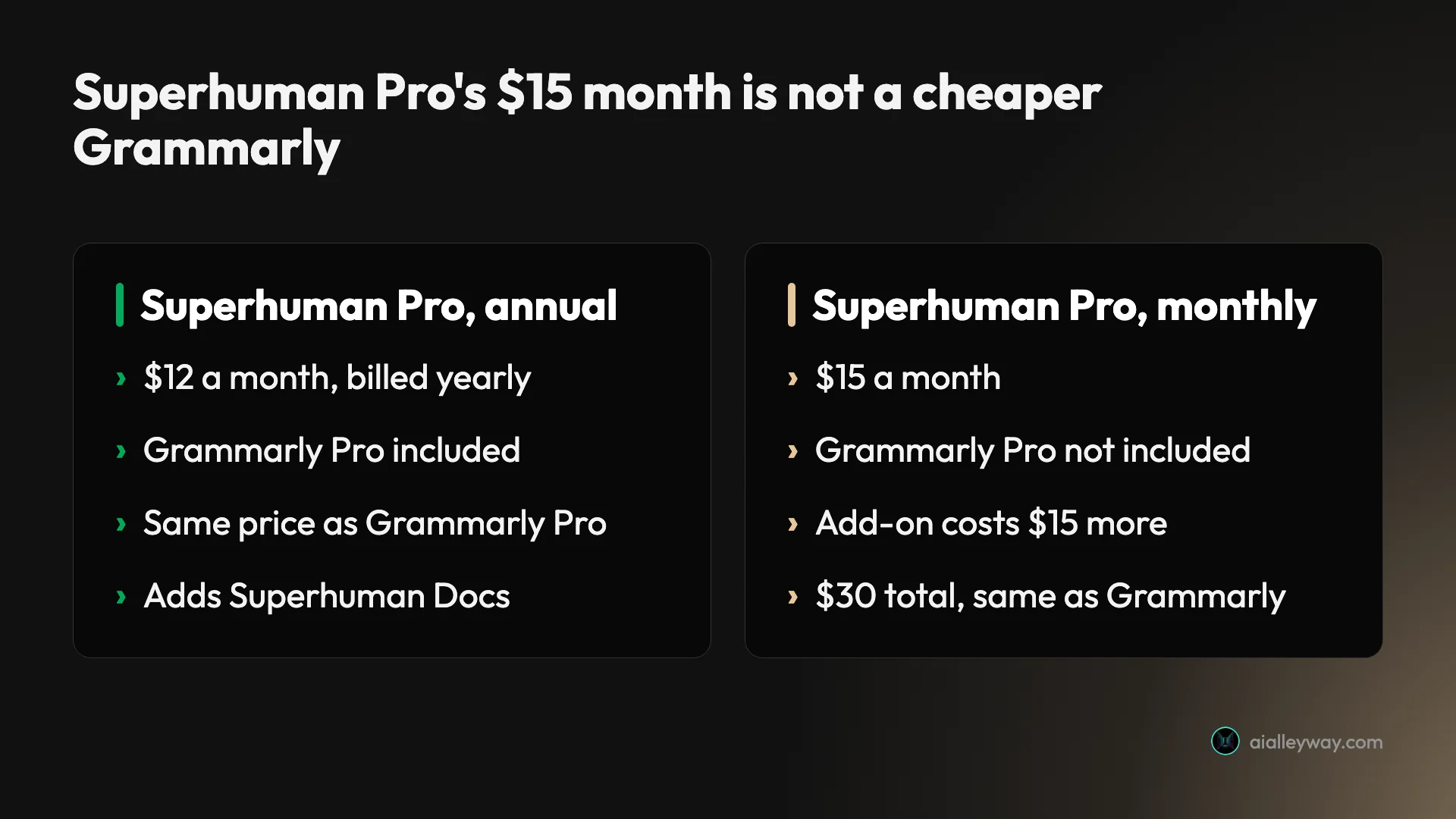
On the annual plan the two routes cost the same, $12 a month, and the suite adds Superhuman Docs, the former Coda. Superhuman Go, the AI assistant, comes with Grammarly Pro on either route. The suite has a second tier, Superhuman Business, at $33 a month billed annually or $40 billed monthly, which adds Superhuman Mail on top of Grammarly, Docs and Go. That is for people who want Superhuman’s email client; it is not needed for Grammarly alone.
If you start on Superhuman Pro and later move to Business, Grammarly’s help center says the upgrade has to be for a billing period the same length as your current one or longer. A yearly Pro subscriber can’t drop to monthly Business.
There is one more limit: Grammarly’s help center says existing Grammarly subscribers other than Pro customers can’t currently move to the suite, and Superhuman doesn’t offer discounts or free trials on it.
App Store and Google Play prices
Buying inside the mobile app gets you a slightly different plan at a slightly different price.
The US App Store listing for Grammarly’s keyboard app shows in-app purchases of $29.99 a month, $59.99 a quarter and $139.99 a year. Those are Grammarly Premium plans, which Grammarly’s help center describes as including full-sentence rewrites, tone suggestions, plagiarism detection and 1,000 monthly AI prompts, without team features or admin controls. Google Play shows “$29.99 - $139.99 per item.”
The App Store also lists a “Mobile Only” plan at $17.99 a month or $83.99 a year. Grammarly doesn’t document what it covers, so I would treat it as the cheapest route only if you write almost entirely on your phone, and check the description in the app before buying.
Two catches with app purchases: Grammarly’s student and promo discounts don’t apply to them, and Grammarly’s refund article sends App Store purchases to Apple for refunds.
Grammarly student discount and other deals
Grammarly’s own help article, updated 22 October 2026, says that “for a limited time, eligible students can get 50% off Grammarly Pro through SheerID verification.” A second article says eligible users “can save up to $72,” which is half of the $144 annual plan. The eligible groups go beyond students: educators, military, first responders, healthcare workers, young adults and seniors are listed too.
So a student’s first year of Pro costs $72.
| Offer | Who gets it | Price | What happens next |
|---|---|---|---|
| SheerID discount | Students, educators, military, first responders, healthcare workers and others | 50% off Pro: $72 for the first year | Renews at $144 |
| UNiDAYS | Verified students | 50% off Pro | Grammarly’s promo policy: one period only |
| Free trial | When Grammarly is running one | $0 for seven days | Converts to a paid plan unless cancelled |
| Coupon codes online | Nobody | Not Grammarly offers | — |
Verification runs through SheerID and, according to Grammarly’s help center, “can take up to seven business days,” so don’t leave it until the night before a deadline. The discount applies to the first seat only and can’t be combined with other offers. The second year costs $144, because Grammarly’s billing policy says promo offers “are valid for one subscription period only” and renew “at a standard rate.” The UNiDAYS student site also showed “50% Off Grammarly Pro!” when it was checked on 23 October 2026, the same half-price deal.
Ignore coupon sites. Grammarly’s help center says it “does not provide discounts in the form of coupons or other codes. If you found a promo code online, it is not a promotional offer from Grammarly.”
Is there a Grammarly free trial?
Grammarly runs Pro trials some of the time. Its billing help says that if you signed up for a “seven-day free trial of a paid plan, you will not be charged before your free trial ends,” and archived copies of the plans page from January and April 2026 showed a “Start 7-Day Trial” button. Cancel during the trial and Grammarly says it ends immediately, your account drops to Free, and your documents stay. The pages don’t say which billing period a trial converts to, so read the checkout screen before you start.
What a year of Grammarly really costs
Here is how the prices land for four common situations, using the US prices above.
A student writing essays. Verify through SheerID and pay $72 for the first year of Pro. Put a reminder in your calendar a week before renewal: year two is $144. If you mainly need error-catching, Free covers it at $0.
A freelancer who writes every day. Pay annually: $144 for the year. Paying month to month for the same twelve months would cost $360, which is $216 more for the same product.
Someone with one big deadline. One month of Pro at $30, then cancel. The cancellation stops the renewal and you keep Pro until the month ends. This is the only case where monthly billing wins.
A five-person team. Pro annual at $144 per member is $720 a year, with a shared style guide, a brand tone and team analytics included. Seats can be added mid-term at a prorated price, according to Grammarly’s price list.
Billing rules that catch people out
The price is simple. The billing rules around it are where people lose money.
| Rule | What Grammarly’s help center says | What to do |
|---|---|---|
| Refunds | Only if required by law | Try Free or a trial before paying for a year |
| Renewal | Automatic, at the standard rate | Set a reminder a week before |
| Promo prices | One period only | Budget for full price in year two |
| Suite cancellation | Cancelling Grammarly cancels the Superhuman suite | Check what else is on the plan |
| Account deletion | Removes saved documents permanently | Cancel instead, or export first |
Refunds are rare
Grammarly’s refund article says “refunds are issued only if required by law.” If you buy a year and stop using it in month two, you have paid for the year. That is the strongest argument for trying Free first.
Plans renew automatically at full price
Grammarly’s billing policy says subscriptions renew automatically using the card on file, at the standard rate. A $72 student year renews at $144. Cancelling stops the next renewal but doesn’t end your current period early.
Cancelling Grammarly can cancel more than Grammarly
If you have the Superhuman suite, Grammarly’s cancellation article says that cancelling through your Grammarly account applies across all the other apps in the suite. Check what else is on the subscription first.
How to cancel
Grammarly’s cancellation article gives the route: open your account settings, go to Subscription, choose Cancel Subscription, confirm, pick a reason and confirm again. If you subscribed on a phone through Grammarly’s website, cancel at account.grammarly.com. If you subscribed through the App Store or Google Play, cancel through the store; Grammarly’s help center sends App Store subscribers to Apple. Cancel at least a day before the renewal date, since Grammarly bills at the start of each period.
Deleting your account deletes your documents
Cancelling keeps your documents and drops you to Free. Deleting your account is different: Grammarly says it removes “any documents you may have saved in the Grammarly Editor. This action cannot be undone.”
“Premium” and “Business” are old names
Many pricing pages still describe Grammarly Premium and Grammarly Business. Archived copies of Grammarly’s plans page show Premium at $12 a month billed annually and Business at $15 per member a month billed annually as late as September 2024; by October 2024 the page showed Free, Pro and Enterprise. Grammarly’s help center says Premium subscribers moved to Pro without a price increase. The individual price, $30, $60 or $144, has not changed since at least 2023.
Which Grammarly plan should you pick?
Most people should start on Free and only move up for a specific reason.
- You want fewer typos and cleaner emails: Free. It catches the errors that matter, at $0.
- You write for work daily and want rewrites and tone control: Pro, annual, $144 a year.
- You’re a student or educator: Pro through SheerID at $72 for the first year, and decide before it renews at $144.
- You need Pro for a single project: one month at $30, then cancel.
- You run a team of up to 149 people: Pro annual per seat. Talk to sales only if you need single sign-on, audit logs or data-loss controls.
- You need Pro for a semester or a few months: the quarterly plan. Three months cost $60 instead of $90 monthly, and six months cost $120, less than monthly billing or the annual plan.
- Skip paying monthly unless you need Pro for a single month. For two to six months the quarterly plan costs the same or less ($60 covers three months, $120 covers six), and from month seven the annual $144 is cheapest.
Cheaper alternatives to Grammarly Pro
If $144 a year is more than you want to spend, two tools are worth a look.
QuillBot is the cheaper writing suite. Premium defaults to $99.95 a year on QuillBot’s US page, though QuillBot tests prices and varies them by region. Its strength is paraphrasing rather than grammar: in my QuillBot review its free grammar checker caught 18 of the same 23 planted errors Grammarly Free caught in full.
ProWritingAid is the closest like-for-like grammar and style checker. Its Premium plan costs $30 a month or $120 a year, Premium Pro costs $36 a month or $144 a year, and it sells lifetime licences, at $399 for Premium and $699 for Premium Pro, according to its pricing page on 23 October 2026. ProWritingAid says yearly and lifetime plans have a three-day refund window and monthly plans have none. See ProWritingAid.
And don’t overlook Grammarly Free itself. For many writers, the free checker is the whole value of Grammarly.
Final word
Grammarly’s pricing comes down to one decision: how often you pay. Pro is $144 a year, $240 if you pay quarterly and $360 if you pay monthly, for exactly the same product. Students currently get the first year for $72. The Superhuman suite’s $15 monthly price is not a cheaper Grammarly, because Grammarly Pro is a $15 add-on on that plan.
Start with Free, which costs nothing and has no time limit. If you find yourself wanting the rewrites, the tone controls or the plagiarism check every week, buy Pro annually and set a reminder before it renews, because refunds are rare.
Frequently asked questions
How much does Grammarly cost per month?
Grammarly Pro costs $30 a month if you pay month to month, $20 a month if you pay $60 every quarter, or $12 a month if you pay $144 for a full year, according to Grammarly's own price list in October 2026. The price is per member, so a team of five on the annual plan pays $720 a year. Grammarly Free costs nothing, and Enterprise is priced by quote.
Prices are in US dollars by default. Grammarly says some regions see local-currency pricing at checkout, and tax can be added on top depending on your billing address. If you buy inside the iPhone or Android app instead of on the web, you get Grammarly Premium rather than Pro, at $29.99 a month, $59.99 a quarter or $139.99 a year in the US App Store, with half the AI prompts and no team features.
Is Grammarly free?
Yes. Grammarly Free costs $0 and has no time limit. It checks spelling, grammar and punctuation, shows the tone of your writing and includes 100 AI prompts a month, and it works in the browser extension, the desktop apps and Grammarly's own editor. When I tested it on a free account for our Grammarly review in October 2026, it flagged all 23 errors I had planted in two practice paragraphs and raised nothing on a clean control paragraph.
What Free leaves out is everything that rewrites for you: full-sentence rewrites, tone adjustment, the plagiarism checker and the AI Detector inside Grammarly's editor are Pro features. Grammarly also runs a separate free AI detector page on its website, but on my free account it allowed only two scans in a day before showing a daily free limit message. For most people who only want cleaner emails and documents, Free is enough.
Is there a Grammarly student discount?
Yes, for now. Grammarly's help center says that for a limited time, eligible students can get 50% off Grammarly Pro through SheerID verification, and another article says eligible users can save up to $72. That matches half of the $144 annual plan, so a student's first year costs $72. Educators, military, first responders, healthcare workers and some other groups are eligible through the same SheerID route.
The catch is the renewal. Grammarly's billing policy says promo offers are valid for one subscription period only and renew at the standard rate, so year two costs $144 unless the offer is still running and you qualify again. Discounts can't be combined, and they don't apply to App Store or Google Play purchases. Grammarly also says promo codes found online are not its offers.
Does Grammarly have a free trial?
Sometimes. Grammarly's help center says it periodically offers free trials of Grammarly Pro and that you will see the option on its website when one is available. A billing article updated in October 2026 refers to a seven-day free trial and says you will not be charged before it ends. Archived copies of Grammarly's plans page from January and April 2026 showed a Start 7-Day Trial button.
If you cancel during the trial, Grammarly says the trial ends immediately and your account becomes a free account, with no charge and your documents kept. Grammarly's pages don't say which billing period the trial converts to, so check the plan and price on the checkout screen before you start. I did not start a trial on my test account.
Is Superhuman Pro a cheaper way to get Grammarly?
No. Superhuman, the company that owns Grammarly, sells a suite called Superhuman Pro for $12 a month billed annually or $15 a month billed monthly, and its plans page lists Grammarly among the included apps. The $15 monthly price looks like half of Grammarly Pro's $30.
It isn't. Grammarly's help article on the Superhuman suite says the annual plan includes Grammarly Pro access, but with the monthly plan, Grammarly Pro is an optional add-on for an additional $15 a month. So monthly costs $30 either way, and annual costs $12 a month either way. The suite does add Superhuman Docs, the document app that used to be Coda; Superhuman Go already comes with Grammarly Pro either way. Existing Grammarly subscribers other than Pro customers currently can't move to the suite, according to the same help center.
Can I get a refund on Grammarly?
Usually not. Grammarly's refund article says you can cancel at any time, but refunds are issued only if required by law, and Superhuman's terms say payments are non-refundable and there are no credits for partly used periods. When you cancel, the plan stops renewing and you keep paid features until the end of the period you already paid for.
There are narrow exceptions. Grammarly says it will review payments made in error, and a subscriber who joins another team's Pro plan can request a refund for their own. If you bought through the App Store, refunds go through Apple. Cancelling through your Grammarly account also cancels the rest of the Superhuman suite if you have it. Deleting your account erases documents saved in the Grammarly editor.
Keep reading
Grammarly review: a near-perfect checker with a pushy AI
A Grammarly review from 23 planted errors: the free plan caught all 23, but one AI rewrite added a claim I never made. Prices, privacy and verdict.
QuillBot review: a quick paraphraser that edits your meaning too
A QuillBot review from the free plan: 18 of 23 planted errors caught, a paraphraser that swapped facts, and whether Premium at $99.95 a year is worth it.
QuillBot AI detector: 6 of 7 right, and the miss that matters
QuillBot AI detector tested on seven texts: it cleared every human one and caught formal AI, then scored a casual Claude story 100% human.
Notion Alternatives: 9 Picks for Notes, Wikis, Tables and Tasks
The best Notion alternatives by job: Obsidian for personal notes, Confluence for wikis, ClickUp for projects, Airtable for databases. Prices in US dollars.