
Notion Alternatives: 9 Picks for Notes, Wikis, Tables and Tasks
The best Notion alternatives by job: Obsidian for personal notes, Confluence for wikis, ClickUp for projects, Airtable for databases. Prices in US dollars.

Contents
The best Notion alternatives, by what you use Notion for
Notion is four tools in a trench coat: notes, a wiki, databases and a project tracker. If you are looking for a Notion alternative, the useful question is which of those four you actually use. Pick the tool built for that one job.
- Best for personal notes you own: Obsidian. No sign-up, no fee, and your notes stay as Markdown files in a folder you choose.
- Best for a personal knowledge base: Capacities. Notes as typed objects instead of folders, and built for one person.
- Best for private, encrypted notes: Anytype. Local-first and end-to-end encrypted, with shared spaces when you need them.
- Best open-source Notion lookalike: AppFlowy. Pages, databases and views like Notion’s, and you can host it yourself.
- Best for docs that work like apps: Superhuman Docs, the product that was Coda until July 2026. Tables, formulas and buttons inside a doc.
- Best for databases that outgrew Notion: Airtable. Relational bases, automations and interfaces, with AI credits on every plan.
- Best for tasks and projects: ClickUp. Imports Notion on every plan, with docs and a wiki next to the tasks.
- Best for a company wiki: Confluence. A native Notion importer that turns each teamspace into a space.
- Best for teams in Teams and Outlook: Microsoft Loop. On work accounts its components live inside Teams and Outlook; free, but more limited, on a personal account.
I have tested Notion itself for this cluster, in a free workspace on 15 October 2026. I have not used the nine tools above. What follows about them comes from each vendor’s pricing page, help centre and, where the code is public, its repository, all read on 18 October 2026.
How we chose these Notion alternatives
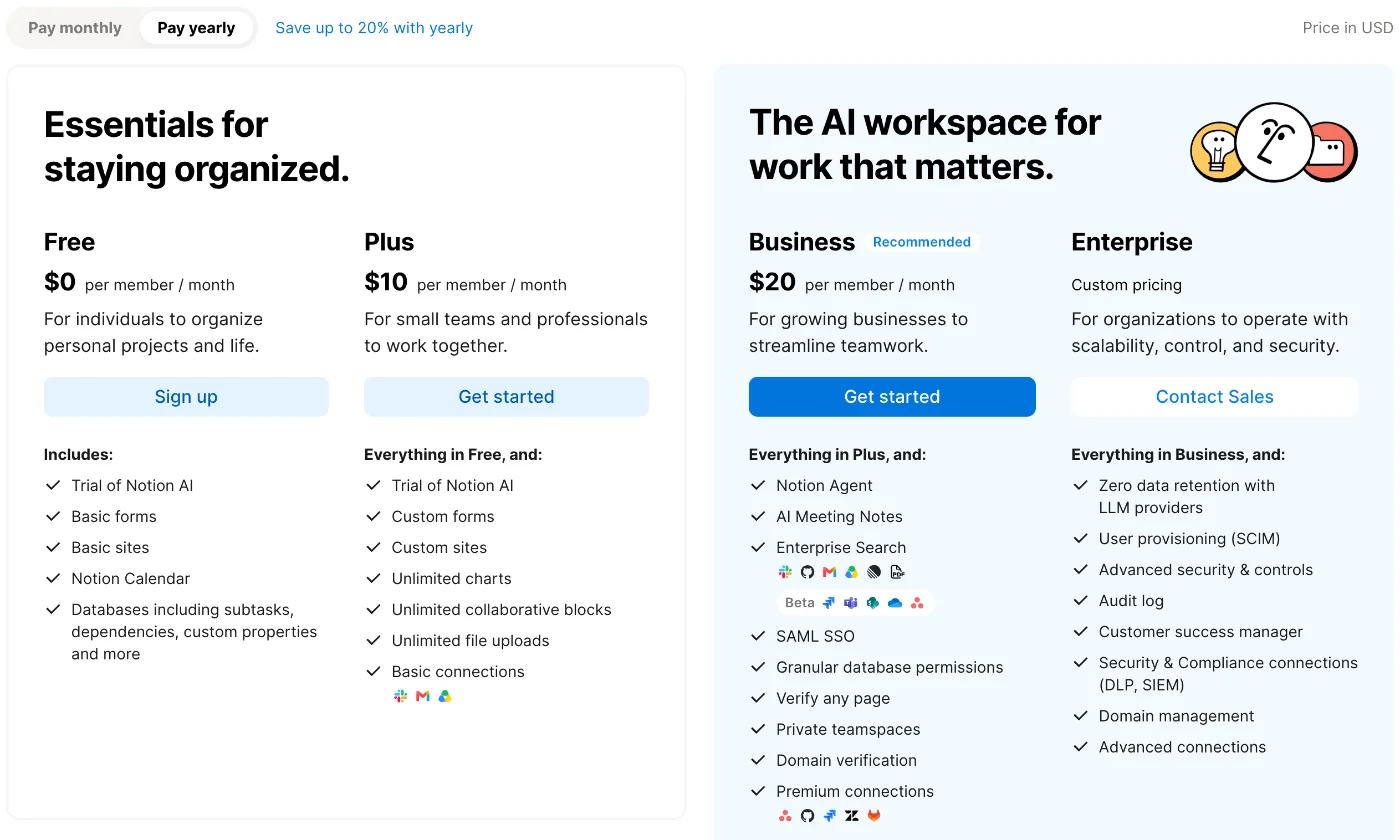
First, the baseline. Our Notion pricing guide read Notion’s plans on 16 October 2026: one person can use the Free plan with no cap on pages or blocks. Teams pay per member: Plus is $10 a member a month billed yearly ($12 monthly), and Business, the first plan with full Notion AI, is $20.
So money is not the only reason to look. Google’s related searches for this topic point to personal use, teams, open source and versions without AI, and they map onto four broad reasons to move.
It is too much for one person. Databases, permissions and teamspaces are built for teams. A student writing lecture notes does not need relations and rollups.
It lives in someone else’s cloud. Notion keeps your workspace in its cloud. If you want your notes as files on your own disk, readable in any editor in ten years’ time, you need a different design.
The AI. Full Notion AI starts at Business. In my test, a Free workspace ran 39 AI requests in about an hour with no limit shown, and its web search was on by default. Searches for “Notion alternatives without AI” show that some people want less of it, not more.
It is the wrong shape for the job. Teams that live in tasks may suit a tool built around tasks. Teams that live in tables hit the edges of Notion databases. Companies with hundreds of pages want wiki permissions.
What Notion does that the others split up
Notion’s strength is that one page can hold a doc, a database and a task list at once. In my test, Notion AI turned four of our articles into a 23-row table of plans, and every row opened as a page of its own.
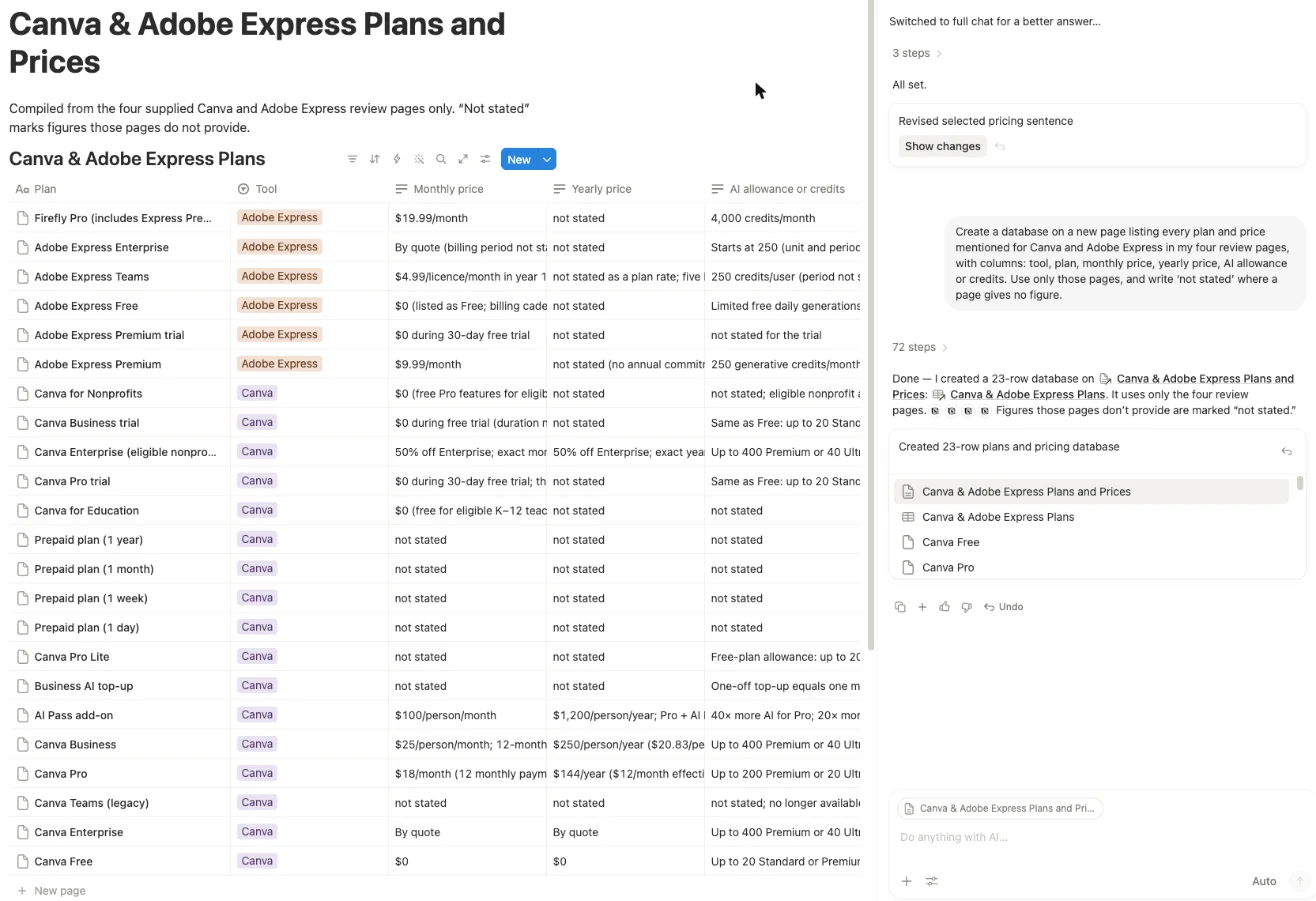
Several of the tools below split that into separate pieces: a notes app, a database, a wiki or a task tracker, each built around its one job. Our Notion AI review covers the rest of that test.
I compared each alternative on six things that matter when you leave Notion:
- where your notes live
- whether it works offline
- how it handles AI
- the free plan
- the price
- whether it imports from Notion, and what it drops
Most importers publish a list of what they drop, so that column needs care. I did not use these nine, so each claim below is the vendor’s own, with no verdict on speed or polish. Where two of a vendor’s pages conflict, I give both or name the page.
Notion alternatives side by side: storage, AI, price and import
Start at the right-hand column. Moving a large workspace is where most of the work is, and Airtable and Loop document no Notion importer at all.
| Tool | Where notes live | Offline | AI | Free plan | First paid plan, billed monthly | Imports from Notion |
|---|---|---|---|---|---|---|
| Notion, for reference | Notion’s cloud | Not checked | Trial on Free and Plus, full on Business | Unlimited for one person | $12 a member (Plus) | n/a |
| Obsidian | Markdown files on your disk | Yes | None built in | Free without limits | $5 a user (Sync) | Yes; the API route keeps databases (primary view) |
| Capacities | Its own database, synced | Yes | Light budget on Pro | Unlimited objects, one person | $11.99 (Pro) | Markdown and CSV, desktop only |
| Anytype | Encrypted, on your devices | Yes | None built in | 100 MB cloud storage | $5 (Plus) | Yes, via the Notion API |
| AppFlowy | Cloud or your own server | Yes, per its pages | Trial, or free local AI | 100 MB, one owner | $16 a member (Pro) | Yes, from a Notion zip |
| Superhuman Docs | Superhuman’s cloud | Edits sync later | Beta, included on paid plans | 1,000 rows per shared doc | $15 a Maker (Pro) | Yes, from an HTML zip |
| Airtable | Airtable’s cloud | Not stated | Credits on every plan | 1,000 records per base | $24 a seat (Team) | No importer; CSV from Notion’s export |
| ClickUp | ClickUp’s cloud | View only | Included in new plans | Unlimited members | $9 a user (Core, billed yearly) | Yes, on every plan |
| Confluence | Atlassian’s cloud | Edit existing pages | Rovo on paid plans | Up to 10 users | $7.15 a user (Standard) | Yes, native importer |
| Microsoft Loop | Your Microsoft storage | Not stated | Copilot licence needed | Free on personal accounts | Comes with work accounts | None documented |
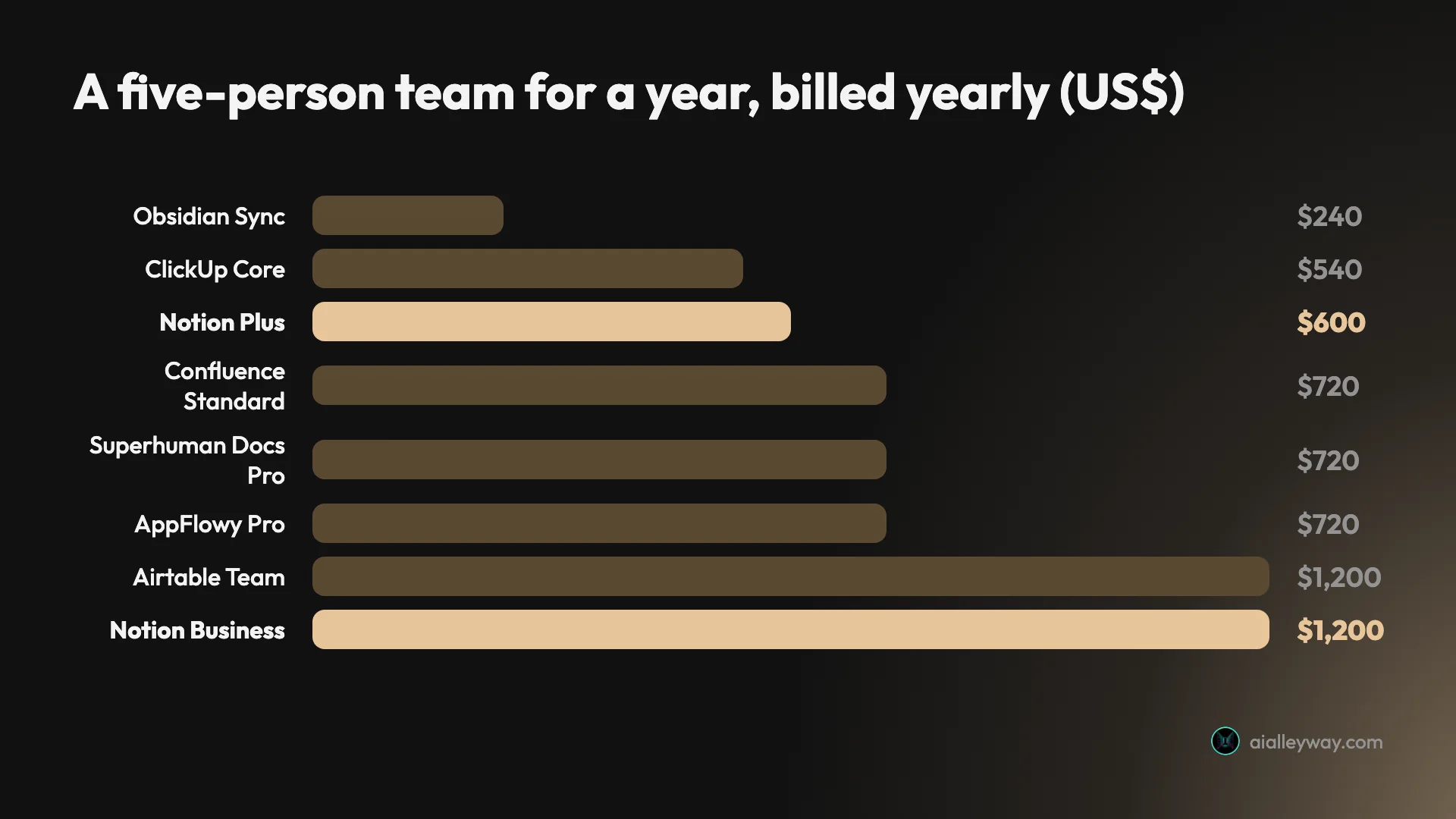
The chart is for a team of five on yearly billing. Confluence’s yearly price is a flat $720 for 1 to 10 users, so within that band it gets cheaper per person as the team grows. Superhuman Docs charges only people who create docs, so the $720 assumes all five do; editors cost nothing. Obsidian is free to use, and the $240 is Sync for all five, which every member of a shared vault needs.
ClickUp’s monthly price for Core is not on the page I read, so the table gives the yearly rate. Three tools are left out of the chart: Capacities, because it is for individuals; Anytype, because its plans carry no per-user wording and its business plans show no US dollar price; and Loop, which comes with Microsoft 365 work accounts rather than its own price.
1. Obsidian — best for personal notes you own

Obsidian is the answer for people who want their notes to outlive the app. Its homepage says notes are stored “locally as plain text Markdown files”, so the folder on your disk is the database. Any text editor can open them, and they still work if Obsidian disappears.
| Obsidian | |
|---|---|
| Price | Free; Sync from $4 a user a month billed yearly, $5 monthly |
| Free plan | “Free without limits”, no account needed, commercial use included |
| AI | None built in |
| From Notion | Importer plugin; the API route keeps databases and formulas |
What the free app covers. Everything on one device, with no sign-up. Its licence page, last updated 20 February 2025, says it is free for any purpose, commercial use included. Its pricing FAQ says the $50-a-user-a-year commercial licence is optional and that the apps collect no telemetry.
Where you pay. Sync is the paid add-on that moves notes between devices, end-to-end encrypted by default. Sync Standard is $4 a user a month billed yearly for one vault and 1 GB. Sync Plus is $8 a user a month billed yearly, for 10 vaults and 10 GB. Publish, for putting notes on the web, is $8 a site a month billed yearly.
The Notion move. Obsidian’s Importer plugin has two routes. Connecting to your Notion account keeps databases and formulas, which become Obsidian Bases, though only each database’s primary view comes across. The zip-file route does not keep databases at all. Bases gained a kanban view in version 1.14 on 5 October 2026.
What you give up. Teamwork, mostly. Its help docs say all collaborators need an active Sync subscription to use a shared vault, and its download page lists no web app. It is free to use but not open source; its terms forbid decompiling the app.
Who it is for. One person who writes a lot, wants it offline, and would rather own files than rent a workspace.
2. Capacities — best for a personal knowledge base

Capacities organises notes by what they are, not where they sit. A book, a person or a meeting is an object type with its own properties, and links between objects build a graph instead of a folder tree. If Notion’s blank page left you building systems instead of writing, this is the opposite approach.
| Capacities | |
|---|---|
| Price | Pro $9.99 a month billed yearly ($119.88), $11.99 monthly |
| Free plan | Unlimited spaces, objects and blocks; sync across devices |
| AI | “Light monthly budget” on Pro; bigger budgets with the Plus add-on |
| From Notion | Markdown and CSV, desktop app only |
What the free plan covers. Capacities Basic includes unlimited objects and custom object types, offline support, full-text search, and media uploads up to 5 GB, then 100 MB a month. Its pricing page says “the core product of Capacities is and will remain free.”
The catch is in its own docs. “There is no collaboration in Capacities. It’s a tool for individuals.” You can share notes view-only, and that is all. Its offline docs also say notes are stored in its own database format, not as Markdown, and that syncing to its servers cannot be switched off.
AI. Pro and Believer include an AI assistant with what the pricing page labels a “Light monthly budget”. The docs say regular use will probably need Plus, an add-on at $8.33 a month billed yearly, and that Capacities does not publish fixed usage numbers.
The Notion move. Its migration guide is honest: bulk import “is not a one-click perfect migration”. You export Markdown and CSV, and formulas usually arrive as their results. Notion’s URL property has no direct equivalent.
Who it is for. A student or researcher building a personal knowledge base, who never shares a workspace.
3. Anytype — best for private, encrypted notes

Anytype is what you pick when the reason you are leaving Notion is the cloud. Its docs say data lives on your device, works fully offline, and syncs end to end encrypted, with keys generated on your device and never sent to Anytype.
| Anytype | |
|---|---|
| Price | Plus $4 a month billed yearly, $5 monthly; Pro $8 or $10 |
| Free plan | 100 MB remote storage, 10 shared channels, unlimited private ones |
| AI | None built in; connects to AI agents through an MCP and an agents skill |
| From Notion | Yes, through the Notion API; desktop only |
How it works. Anytype calls its workspaces channels, also called spaces. Inside them you get pages, typed objects and views: list, grid, calendar, kanban, gallery and graph. Shared channels support real-time collaboration with viewer, editor and admin roles, plus built-in chat.
The privacy trade. There is no email sign-up; an account is created from a recovery phrase. Its privacy page is blunt about the cost: Anytype cannot reset your password or recover your account if you lose access. It also says search indexes stay local and unencrypted, and that the app collects limited anonymised usage data.
Paid plans buy storage. The free 100 MB is remote backup and sync. Plus raises that to 1 GB and Pro to 10 GB. The pricing page says “per month” with no per-user wording, and self-hosters need no membership at all.
The Notion move. The importer connects to Notion’s API. Its docs say @mentions become plain text, date ranges become text, and formulas arrive as values. Import and export run on desktop only, and mobile lacks the kanban, calendar and graph views.
The licence. Anytype’s code is published under the “Any Source Available License 1.0”, which allows non-commercial use and commercial use only in what it calls Allowed Networks. Its sync protocol is MIT-licensed. That makes the app source-available, not open source in the usual sense.
Who it is for. Anyone who wants Notion’s blocks and databases with the data encrypted on their own devices, and accepts that a lost recovery phrase means a lost account.
4. AppFlowy — best open-source Notion lookalike

AppFlowy’s README calls it “The Open Source Alternative To Notion”, and the feature list reads like one. Pages, databases, and views for grid, kanban, calendar, gallery, list, timeline, form and chart. On paper, it is the closest in shape to Notion of the nine.
| AppFlowy | |
|---|---|
| Price | Pro $12 a member a month billed yearly, $16 monthly |
| Free plan | Personal: one owner, 100 MB, 7 MB uploads, 7 days of history |
| AI | “Limited trial” on Personal; free local AI through Ollama and LM Studio |
| From Notion | Yes, from a Notion zip export |
Open source, with a business around it. The main repository is AGPL-3.0 and had about 77,500 GitHub stars on 18 October 2026. AppFlowy’s own site now calls the product “open core”: self-hosting, with Docker or Kubernetes, is free for one seat on the web, and paid self-hosted tiers start at $6 a month for One and $10 a seat for Team, both billed yearly.
Where the free plan stops. Personal on AppFlowy Cloud gives one workspace owner and 100 MB of storage, with no guest editors and no publishing to the web. Pro adds unlimited members, 90 days of history and publishing. AppFlowy’s comparison page says it works across platforms “including completely offline”.
AI on your terms. Cloud AI is a limited trial on the free plan and included on Pro. Local AI, which runs models on your own machine through Ollama or LM Studio, is ticked on both plans. Its comparison page says teams can choose whether AI features are enabled at all.
The Notion move. You export your Notion workspace as a zip and drop it on AppFlowy’s import page; the import lands in a new workspace and you get an email when it finishes. AppFlowy’s marketing says pages, databases and media are fully preserved, but its import guide does not list what is lost, so test a small workspace first.
Who it is for. A small team or a privacy-minded person who wants Notion’s shape, on any device including the web, with the option to run it on their own server.
5. Superhuman Docs — best for docs that work like apps

If you have searched for Coda, this is it. Grammarly agreed to buy Coda in December 2024, Grammarly renamed itself Superhuman in October 2025, and on 8 July 2026 Coda became Superhuman Docs. Old coda.io links now redirect.
| Superhuman Docs | |
|---|---|
| Price | Pro $12 per Maker a month billed yearly, $15 monthly; Business $33 or $40 |
| Free plan | Shared docs up to 50 objects and 1,000 rows; unshared docs unlimited |
| AI | Docs AI in beta, included on paid plans under fair use |
| From Notion | Yes, from an HTML export zip |
What it adds to a doc. Superhuman describes a doc as tables, buttons and formulas working together on one page. It lists more than 800 integrations with two-way sync, and Packs and automations carry over from Coda. On paper, that makes a doc closer to a small app than a page.
How it bills. Only people who create docs pay. Editors and viewers are free, which can cost less than Notion’s per-member billing when a few people build and many only fill in. The Docs pricing page says “per Maker”, while Superhuman’s suite page words the same price “per member”. New customers now get Docs as part of the Superhuman bundle; Pro on yearly billing includes Grammarly Pro, which our Grammarly review weighs against the free plan.
What to watch. Docs AI is in beta, and the help centre says Superhuman is “exploring how Docs AI will be monetized once it exits beta”. Outside Enterprise, Docs AI cannot be switched off, though you can simply not use it. Offline, the help centre says edits sync once you reconnect, but a doc needs a connection to load first.
The Mac app arrived on 8 July 2026; the help centre says a Windows version is still in the works, though a tooltip on the pricing table already lists Windows.
The Notion move. Export Notion as HTML with subpages and import the zip. The help article says formulas, filters and alternative database views do not come through as they were, though the values stay. Unused select options and cell colours are dropped.
Who it is for. A team that uses Notion databases as lightweight apps and keeps wishing they could calculate and automate more.
6. Airtable — best for databases that outgrew Notion

Airtable is built as a database, not a notes app. If your Notion workspace is mostly databases, with linked records, formulas and views, Airtable’s plans are organised around exactly that part: relational bases, many views and automation runs counted by the thousand.
| Airtable | |
|---|---|
| Price | Team $20 a seat a month billed yearly, $24 monthly; Business $45 or $54 |
| Free plan | 1,000 records per base, 5 editors, 1 GB of attachments per base |
| AI | Monthly credits on every plan; 500 per editor on Free |
| From Notion | No Notion importer; CSV, Excel and Google Sheets |
What it adds. Views for grid, kanban, calendar, gallery, Gantt, timeline, list and forms, plus interfaces: custom screens built on your data for people who should not touch the raw tables. Airtable’s pricing data gives Team 25,000 automation runs a month.
AI on every plan. Its help centre says all plans include AI credits each month, pooled for shared use, and its pricing page says unused credits do not roll over. Extra credits start at $20 a month for 10,000. AI is on by default, and workspace owners can switch it off.
The Notion move. I found no Notion importer in Airtable’s help centre. The route is to export each Notion database as CSV and import it; Airtable takes CSV files up to 100 MB. Airtable’s pages do not say what happens to the page body inside each Notion row, so check a CSV of one database before you move the rest.
Watch the billing. Team bills everyone with edit access. Its help article also counts commenters on Team, which the pricing page FAQ does not; check before you invite a crowd. Business and Enterprise require a company email domain.
Who it is for. An operations, content or sales team whose Notion pages are really tables, and who wants the docs to live somewhere else.
7. ClickUp — best for tasks and projects

ClickUp starts from the task and adds docs, where Notion starts from the page and adds tasks. If your team opens Notion mainly to move cards and check deadlines, ClickUp is built around exactly that.
| ClickUp | |
|---|---|
| Price | New plans: Core $9 a user a month billed yearly, Business $17 |
| Free plan | Free Forever, unlimited members, 1 doc wiki |
| AI | Included in the new plans; 500 one-time credits on Free |
| From Notion | Yes, on every plan, from an HTML export |
Pricing is mid-change. ClickUp’s help centre says “New Workspaces start on the new plans” and that certain existing workspaces are gradually being upgraded, with price updates beginning no earlier than January 2027. On the new plans, AI is included instead of sold as add-ons. The pricing page I read also still carried the older Unlimited and Business plans.
The Notion move. Its help article says Notion imports are unlimited on every plan. Databases arrive as lists in one folder, fields become text custom fields, and docs land in one ClickUp Doc as subpages. It does not import task descriptions, inline comments and attachments, button fields or page history, and it flattens toggles, callouts and columns into plain text or bullets.
What else to know. Offline mode lets you view tasks you have already opened and notes, but you cannot edit tasks or notes offline. Desktop apps cover Mac, Windows and Linux, with mobile apps for iOS and Android.
Who it is for. A team whose Notion is really a project tracker, and who wants task views, sprints and workload next to its docs.
8. Confluence — best for a company wiki

Confluence is Atlassian’s wiki, the sibling of Jira. When a Notion workspace has grown into hundreds of pages and nobody can say who should see what, Confluence’s spaces and permissions are the reason to move.
| Confluence | |
|---|---|
| Price | Standard $7.15 a user a month on monthly billing; $720 a year for 1 to 10 users |
| Free plan | Up to 10 users and 2 GB |
| AI | Rovo on paid plans, 25 credits per user a month on Standard |
| From Notion | Native importer; each teamspace becomes a space |
Price change. Atlassian raised Confluence’s cloud list prices on 13 October 2026. The figures above are the US dollar rows dated 13 October 2026 in the price catalog on Atlassian’s pricing page; its pricing FAQ explains the change. Premium is $14.10 a user a month, or $1,400 a year for up to 10 users.
What the free plan leaves out. Its support page says Free permissions are not customisable, so everyone who can log in can view, add and edit everything. Atlassian also reserves the right to deactivate inactive Free sites.
The Notion move. Each Notion teamspace becomes a Confluence space. You can import a whole workspace or one page with subpages, and its FAQ lists what survives: @mentions, page comments, toggles, callouts, code blocks and table data. Equations become plain text, and synced blocks, buttons and breadcrumbs are not supported. Guest accounts are not imported.
AI and offline. Rovo, Atlassian’s AI, comes only with paid plans and needs a verified business email domain. Extra Rovo usage starts billing on 3 December 2026 at $0.01 a credit. Pages can be edited offline, but not created.
Who it is for. A company whose Notion has become its knowledge base, especially one already on Jira.
9. Microsoft Loop — best for teams in Teams and Outlook

Loop’s trick is the component. Microsoft describes components as portable pieces of content that stay in sync across all the places they are shared, and says they work in Teams, Outlook, OneNote and Whiteboard. That is the feature to judge it on.
| Microsoft Loop | |
|---|---|
| Price | Free on personal accounts during public preview; included with work accounts |
| Free plan | Counts against your Microsoft storage; up to 250 workspaces |
| AI | Needs a paid Copilot licence; not on personal accounts |
| From Notion | No importer documented by Microsoft |
Personal accounts. Microsoft’s support page says the Loop app “is currently in Public Preview and available at no cost” for personal Microsoft accounts. Workspaces count against your Microsoft storage. Loop components do not yet work in Teams or Outlook with a personal account, which takes away the main reason to choose it.
Work accounts. Loop is available to anyone with a work or school account. Microsoft says full features need a SharePoint or OneDrive licence, and since February 2026 anyone who meets the storage requirement can create workspaces.
AI. Copilot in Loop needs a paid Copilot licence, and Microsoft says a Personal, Family or Premium plan won’t enable any Copilot features in Loop. A Microsoft FAQ from November 2025 says some Copilot integrations were removed from the app while it is aligned with Copilot Pages.
What is missing. Microsoft documents no Notion importer, and Loop does not support external sharing with guests. The apps run on the web, iOS and Android, with a Windows app in the Microsoft Store.
Who it is for. A team that already lives in Teams and Outlook and wants shared lists and notes there, not in another tab.
How to pick a Notion alternative
Start with who uses it, then with the job Notion was doing.
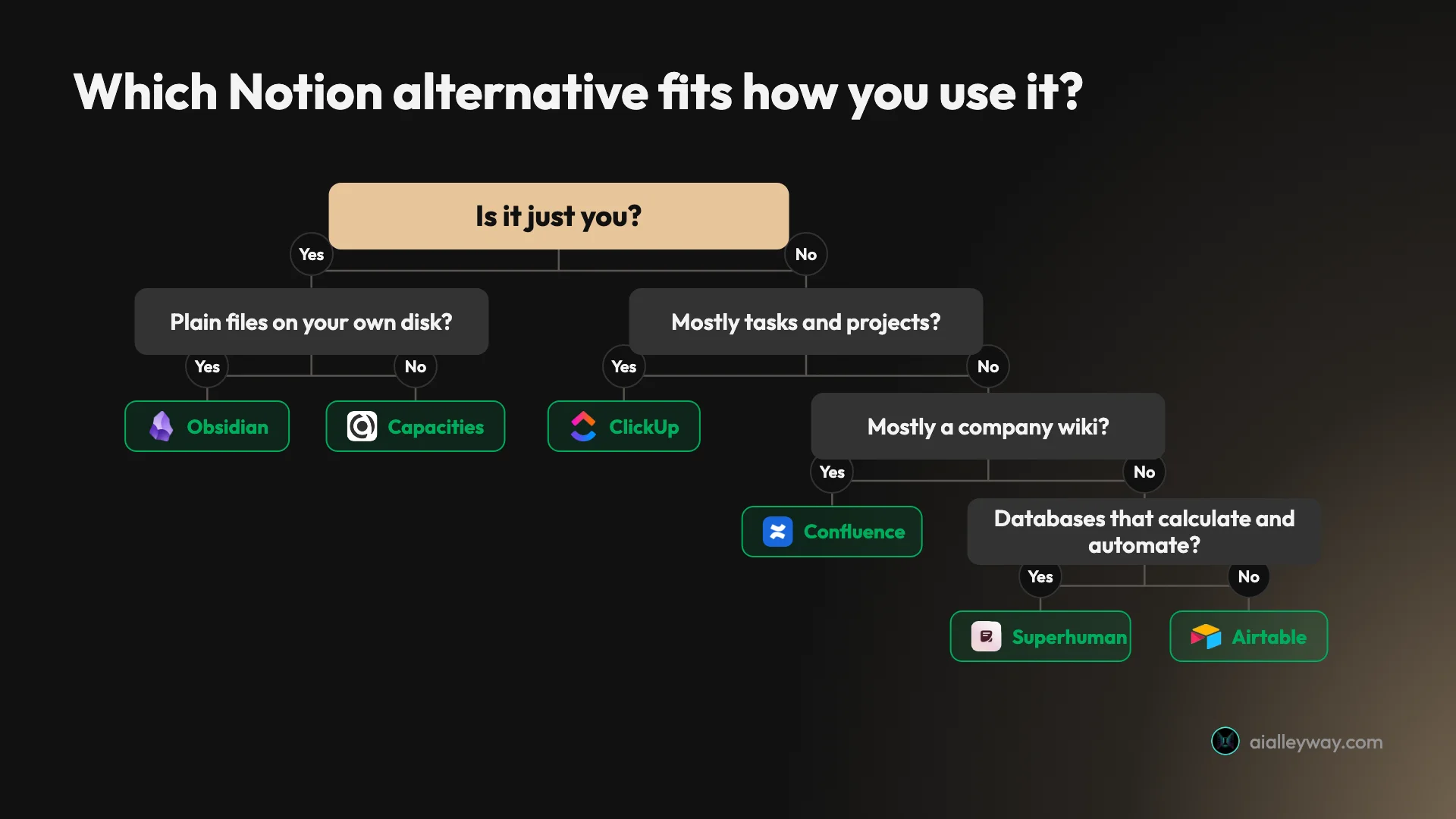
- If it is just you and you want files you own, pick Obsidian.
- If it is just you and you think in people, books and projects, pick Capacities.
- If privacy is the reason you are leaving, pick Anytype, and keep the recovery phrase somewhere safe.
- If you want Notion’s shape, open source, pick AppFlowy.
- If your databases do calculations and send things, pick Superhuman Docs.
- If your workspace is really tables, pick Airtable.
- If your team opens Notion to move tasks, pick ClickUp.
- If your Notion has become the company wiki, pick Confluence.
- If your team lives in Teams and Outlook, try Loop.
Leaving Notion as a student
Notion’s own answer is hard to beat on price: its pricing page says Plus, with a one-member limit, is free for students and educators with a school email. Before you leave for cost, check that first.
If you leave anyway, four of the nine list an education discount on the pages I read. Obsidian takes 40% off Sync and Publish for students, faculty and nonprofit staff. Anytype offers educators and students 50% off its plans. Capacities was running a seasonal 40% off annual Pro for students when I read its pricing page, and Atlassian lists Confluence Cloud at 75% off for eligible academic customers.
For one student’s notes, Obsidian and Capacities fit best, because neither needs a team.
If you want less AI, not more
Searches for Notion alternatives without AI are common enough that Google suggests them. Here is where each tool stands, from its own pages:
- No built-in assistant: Obsidian and Anytype. AI only arrives if you connect it yourself.
- Optional, and you can switch it off: AppFlowy, which says teams choose whether AI features are enabled at all, and Airtable, where workspace owners can turn it off.
- Paid plans only: Confluence’s Rovo and Loop’s Copilot, neither on a free plan.
- No off switch below Enterprise: Superhuman Docs, though you can simply not use it.
And if the only thing you miss is asking questions of your notes, Gemini Notebook may be the better addition. Our NotebookLM vs Notion comparison tested both on the same articles, where Gemini Notebook’s citation went straight to the highlighted passage, and Gemini Notebook is free to start. Going the other way, our NotebookLM alternatives roundup covers tools for asking questions of your files.
Before you export: a migration checklist
- Export everything first. Every Notion plan, Free included, can export the whole workspace as HTML, Markdown and CSV. Keep that zip whatever you choose.
- Move one teamspace, not the company. The importers that publish a list of losses all drop something, and AppFlowy’s guide publishes none. Import a small section, then check formulas, mentions and links against the original.
- Count who pays. Notion charges every member. Superhuman Docs charges only doc creators, Confluence’s yearly price is a flat band of users, and Airtable charges editors, plus commenters on Team according to its help article. The cheapest tool depends on how many people only read.
- Find the free-plan wall before you hit it. A big Notion database can blow through a free plan on day one. Airtable’s free plan stops at 1,000 records per base. A shared Superhuman doc stops at 1,000 rows, and its help centre says the doc turns read-only after a 14-day grace period. AppFlowy’s Personal plan holds 100 MB, and Confluence Free stops at 10 users and 2 GB.
Final word
For one person who wants their notes as plain files they own, Obsidian is the one to try first. For teams, check what Notion is actually doing for you in our Notion AI review before you pay to replace it.
Frequently asked questions
What is the best alternative to Notion?
It depends on which of Notion's jobs you need, because it is a notes app, a wiki, a database and a project tracker at once. Pick by the job you need done, not by the longest feature list.
For a single person's notes, Obsidian costs nothing to use and stores notes as plain Markdown. A company wiki suits Confluence, whose importer maps each Notion teamspace to a Confluence space. A team that mostly tracks work suits ClickUp, which takes Notion imports on any plan. Table-heavy workspaces suit Airtable. For an open-source match to Notion's pages and databases, look at AppFlowy.
Is there a free alternative to Notion?
Yes. Free for one person with no plan to buy: Obsidian, whose pricing page reads "Free without limits" and charges only for its optional Sync and Publish services, and Microsoft Loop, which costs nothing on a personal Microsoft account during its public preview.
Free with a ceiling: Capacities Basic gives one person unlimited objects. Anytype's free tier includes 100 MB of encrypted sync storage. AppFlowy's free tier is one owner and 100 MB. For small teams, Confluence's free tier covers 10 people, and Airtable's free tier caps each base at 1,000 records and each workspace at 5 editors.
Is there an open-source Notion alternative?
AppFlowy is the clearest case. GitHub lists its main repository under AGPL-3.0, its README calls it "The Open Source Alternative To Notion", and its site describes self-hosting with Docker or Kubernetes. The site now also calls the product open core, and its paid self-hosted tiers need a commercial licence.
Anytype is often listed as open source, but its app licence is the "Any Source Available License 1.0", which limits commercial use; its sync protocol, any-sync, is MIT-licensed. Obsidian costs nothing, yet it is proprietary software: reverse engineering is barred by its terms. I have not installed any of them; this comes from their repositories and licence pages, read on 18 October 2026.
What is a good Notion alternative without AI?
Obsidian and Anytype. Neither app has a built-in AI assistant. In Obsidian's help docs, AI turns up only in an optional Web Clipper feature where you bring your own API key. Anytype's AI routes are integrations you connect yourself, such as an agents skill for agent-capable tools.
If AI can stay as long as you control it, AppFlowy and Airtable both let the people running a workspace turn AI off. Superhuman Docs keeps that switch for Enterprise admins only. Confluence's Rovo and Loop's Copilot come only with paid plans or licences.
Can I move my Notion pages to another app?
Yes. Notion lets any account, even a free one, download its whole workspace in HTML, Markdown or CSV, and every tool here except Loop, which documents no Notion import, takes at least one of those formats. Obsidian and Anytype can instead connect to Notion's API, which keeps more structure; Obsidian says its API route brings databases and formulas across, though only each database's primary view.
Read each importer's own list of what does not survive. ClickUp's leaves out task descriptions and page history, Superhuman Docs keeps formula values but not the formulas, Anytype turns @mentions into plain text, and Confluence converts equations to plain text. AppFlowy's guide lists no losses, so test any of them on one small teamspace first.
Is Notion overkill for personal use?
Often, yes. Teamspaces, permissions and guest access are team features, and a person keeping lecture notes or a journal uses few of them. Notion is still free for one person, so price alone is not a reason for a solo user to leave.
Three reasons to look elsewhere: you want fewer features, you want your notes as files on your own disk, or you want them encrypted on your own devices. Obsidian opens Markdown files from your own disk and works offline. Capacities is built for individuals and says so plainly. Anytype stores data on your devices and encrypts what it syncs. All three are free to start, so try one with a week of notes before you move the rest.
What is the best alternative to Notion AI?
If what you use Notion AI for is asking questions about your own documents, Gemini Notebook, the tool Google called NotebookLM until July 2026, is the one we have tested against it. In our side-by-side test on four of our articles, the Gemini Notebook citation I clicked jumped to the passage with it highlighted, while Notion AI's landed at the top of the source page. Our NotebookLM vs Notion comparison has the full test.
Among the nine tools in this roundup, AppFlowy offers local AI that keeps model calls on your computer, Airtable includes monthly AI credits on every plan, and Superhuman Docs includes its Docs AI beta on paid plans under fair use.
Keep reading
Notion AI Review: It Builds Real Pages, but Full AI Costs $20
A hands-on Notion AI review on a free workspace: 39 requests, a 23-row database, a six-minute slide deck, one wrong citation, and what Business costs.

Notion Pricing: $0 to $24 a Seat, and Where Notion AI Starts
Notion pricing in the US: Free, Plus at $10 or $12, Business at $20 or $24 per member a month. Where Notion AI starts, what credits cost and how seats bill.
NotebookLM vs Notion: I Gave Both the Same Four Articles
NotebookLM vs Notion AI on the same four articles and questions: Gemini Notebook's citation opened the passage and it is free; Notion builds pages, from $20.

NotebookLM Alternatives: 9 Picks, Sorted by Why You're Leaving
The best NotebookLM alternatives by reason for leaving: Notion AI for teams, Copilot Notebooks for Microsoft 365, Open Notebook to self-host. Prices in US$.